light FORD E SERIES 2021 Manual PDF
[x] Cancel search | Manufacturer: FORD, Model Year: 2021, Model line: E SERIES, Model: FORD E SERIES 2021Pages: 301, PDF Size: 3.05 MB
Page 217 of 301
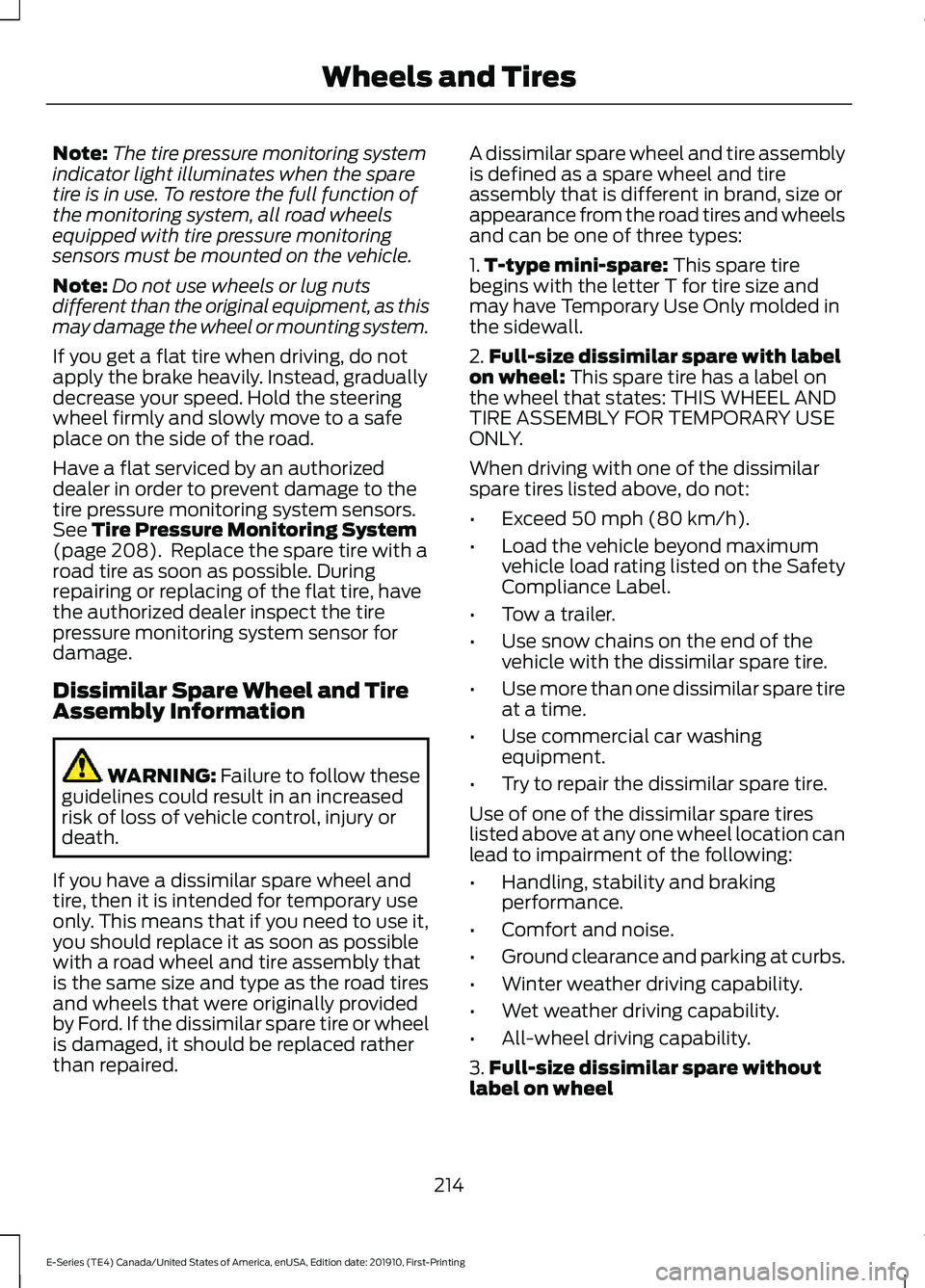
Note:
The tire pressure monitoring system
indicator light illuminates when the spare
tire is in use. To restore the full function of
the monitoring system, all road wheels
equipped with tire pressure monitoring
sensors must be mounted on the vehicle.
Note: Do not use wheels or lug nuts
different than the original equipment, as this
may damage the wheel or mounting system.
If you get a flat tire when driving, do not
apply the brake heavily. Instead, gradually
decrease your speed. Hold the steering
wheel firmly and slowly move to a safe
place on the side of the road.
Have a flat serviced by an authorized
dealer in order to prevent damage to the
tire pressure monitoring system sensors.
See Tire Pressure Monitoring System
(page 208). Replace the spare tire with a
road tire as soon as possible. During
repairing or replacing of the flat tire, have
the authorized dealer inspect the tire
pressure monitoring system sensor for
damage.
Dissimilar Spare Wheel and Tire
Assembly Information WARNING:
Failure to follow these
guidelines could result in an increased
risk of loss of vehicle control, injury or
death.
If you have a dissimilar spare wheel and
tire, then it is intended for temporary use
only. This means that if you need to use it,
you should replace it as soon as possible
with a road wheel and tire assembly that
is the same size and type as the road tires
and wheels that were originally provided
by Ford. If the dissimilar spare tire or wheel
is damaged, it should be replaced rather
than repaired. A dissimilar spare wheel and tire assembly
is defined as a spare wheel and tire
assembly that is different in brand, size or
appearance from the road tires and wheels
and can be one of three types:
1.
T-type mini-spare:
This spare tire
begins with the letter T for tire size and
may have Temporary Use Only molded in
the sidewall.
2. Full-size dissimilar spare with label
on wheel:
This spare tire has a label on
the wheel that states: THIS WHEEL AND
TIRE ASSEMBLY FOR TEMPORARY USE
ONLY.
When driving with one of the dissimilar
spare tires listed above, do not:
• Exceed
50 mph (80 km/h).
• Load the vehicle beyond maximum
vehicle load rating listed on the Safety
Compliance Label.
• Tow a trailer.
• Use snow chains on the end of the
vehicle with the dissimilar spare tire.
• Use more than one dissimilar spare tire
at a time.
• Use commercial car washing
equipment.
• Try to repair the dissimilar spare tire.
Use of one of the dissimilar spare tires
listed above at any one wheel location can
lead to impairment of the following:
• Handling, stability and braking
performance.
• Comfort and noise.
• Ground clearance and parking at curbs.
• Winter weather driving capability.
• Wet weather driving capability.
• All-wheel driving capability.
3. Full-size dissimilar spare without
label on wheel
214
E-Series (TE4) Canada/United States of America, enUSA, Edition date: 201910, First-Printing Wheels and Tires
Page 235 of 301
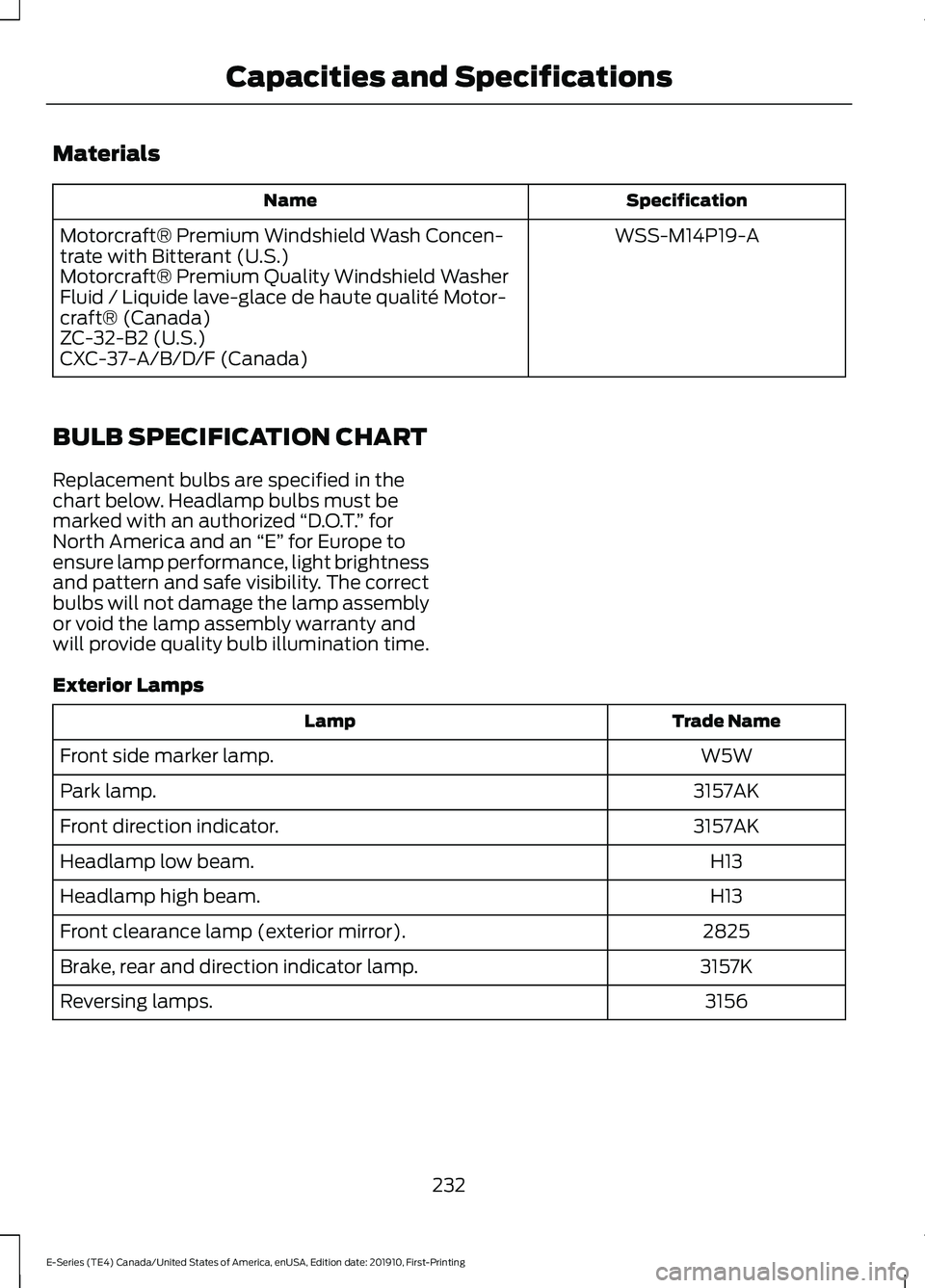
Materials
Specification
Name
WSS-M14P19-A
Motorcraft® Premium Windshield Wash Concen-
trate with Bitterant (U.S.)
Motorcraft® Premium Quality Windshield Washer
Fluid / Liquide lave-glace de haute qualité Motor-
craft® (Canada)
ZC-32-B2 (U.S.)
CXC-37-A/B/D/F (Canada)
BULB SPECIFICATION CHART
Replacement bulbs are specified in the
chart below. Headlamp bulbs must be
marked with an authorized “D.O.T.” for
North America and an “E” for Europe to
ensure lamp performance, light brightness
and pattern and safe visibility. The correct
bulbs will not damage the lamp assembly
or void the lamp assembly warranty and
will provide quality bulb illumination time.
Exterior Lamps Trade Name
Lamp
W5W
Front side marker lamp.
3157AK
Park lamp.
3157AK
Front direction indicator.
H13
Headlamp low beam.
H13
Headlamp high beam.
2825
Front clearance lamp (exterior mirror).
3157K
Brake, rear and direction indicator lamp.
3156
Reversing lamps.
232
E-Series (TE4) Canada/United States of America, enUSA, Edition date: 201910, First-Printing Capacities and Specifications
Page 236 of 301
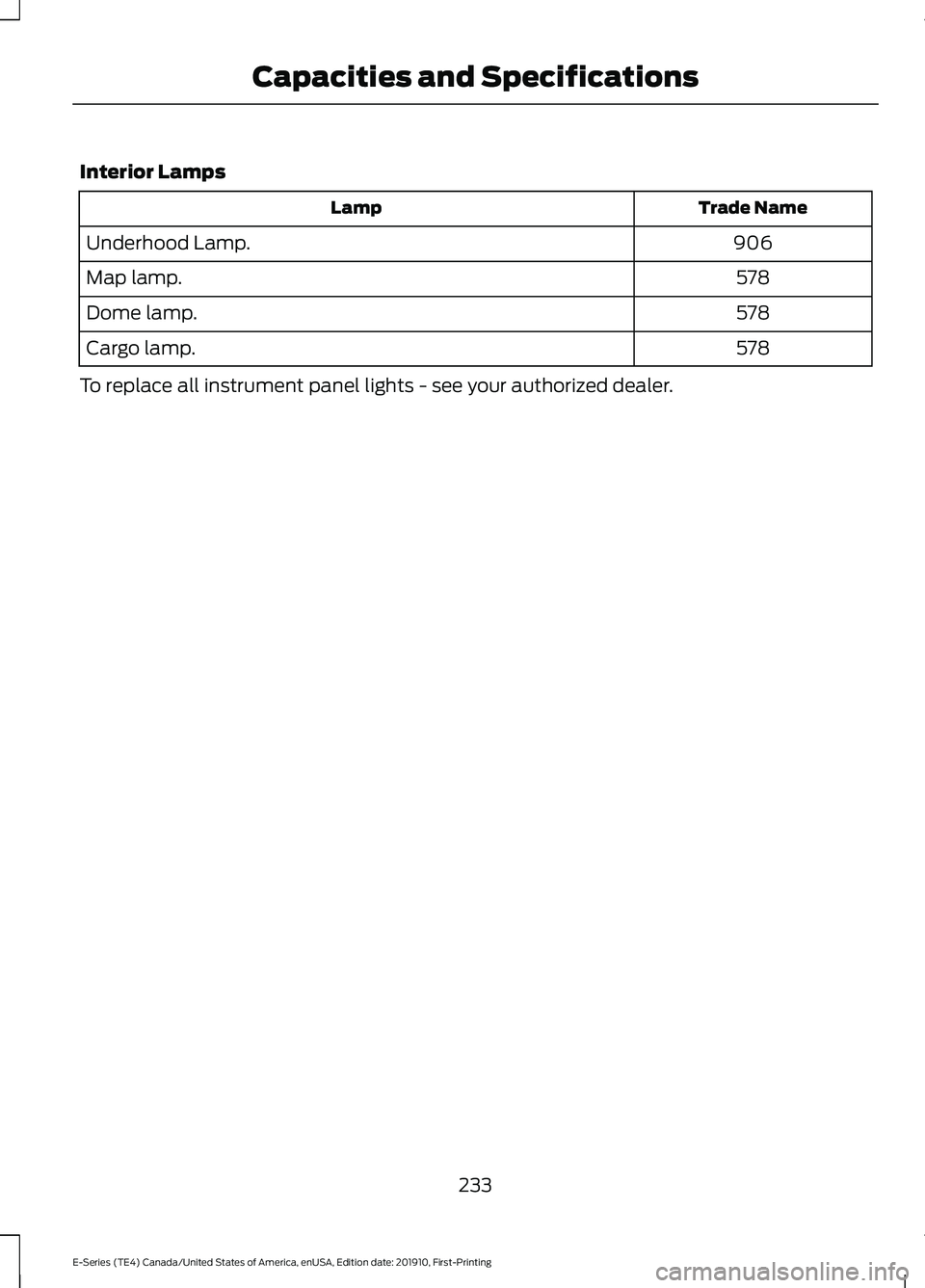
Interior Lamps
Trade Name
Lamp
906
Underhood Lamp.
578
Map lamp.
578
Dome lamp.
578
Cargo lamp.
To replace all instrument panel lights - see your authorized dealer.
233
E-Series (TE4) Canada/United States of America, enUSA, Edition date: 201910, First-Printing Capacities and Specifications
Page 241 of 301
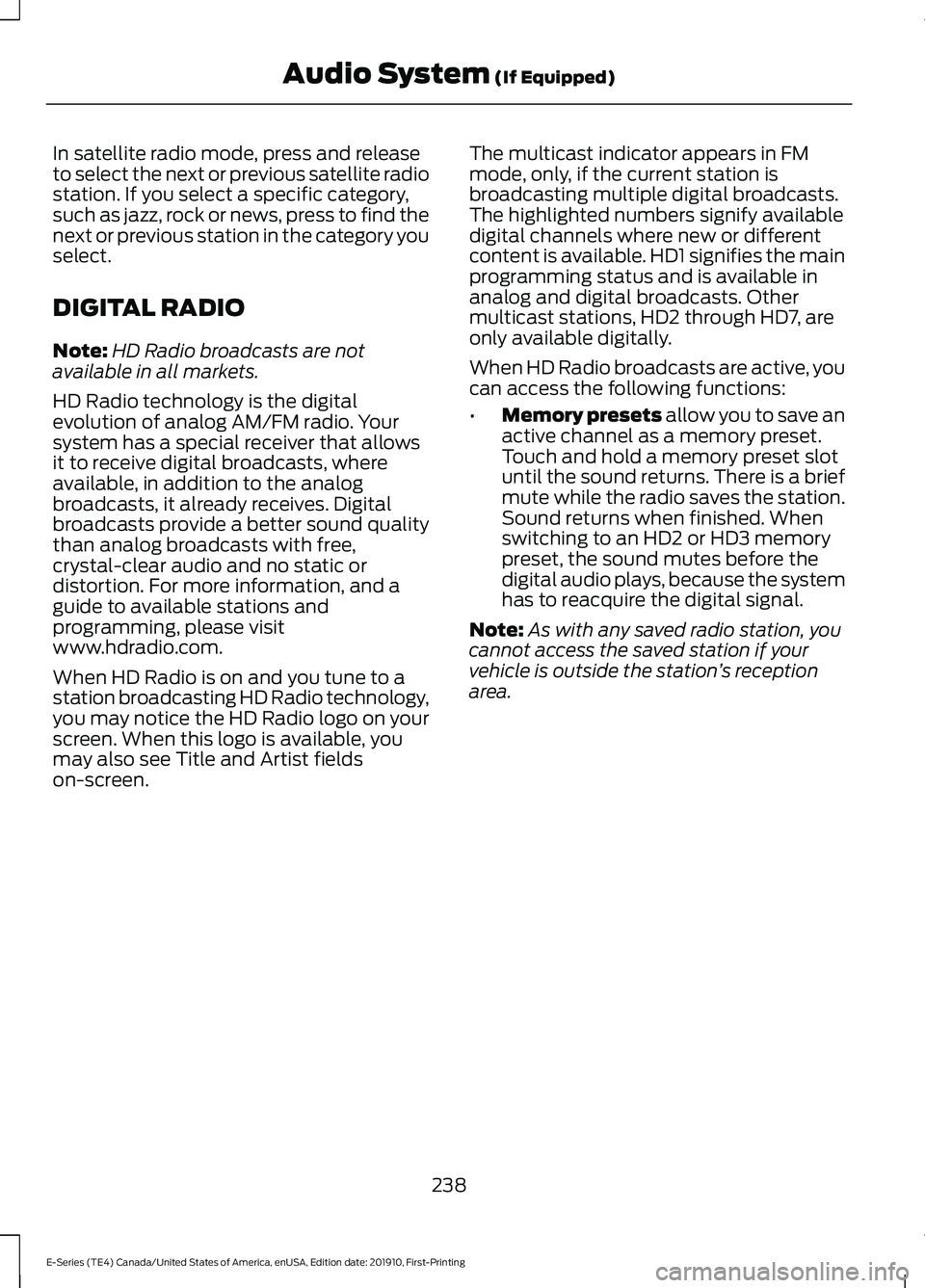
In satellite radio mode, press and release
to select the next or previous satellite radio
station. If you select a specific category,
such as jazz, rock or news, press to find the
next or previous station in the category you
select.
DIGITAL RADIO
Note:
HD Radio broadcasts are not
available in all markets.
HD Radio technology is the digital
evolution of analog AM/FM radio. Your
system has a special receiver that allows
it to receive digital broadcasts, where
available, in addition to the analog
broadcasts, it already receives. Digital
broadcasts provide a better sound quality
than analog broadcasts with free,
crystal-clear audio and no static or
distortion. For more information, and a
guide to available stations and
programming, please visit
www.hdradio.com.
When HD Radio is on and you tune to a
station broadcasting HD Radio technology,
you may notice the HD Radio logo on your
screen. When this logo is available, you
may also see Title and Artist fields
on-screen. The multicast indicator appears in FM
mode, only, if the current station is
broadcasting multiple digital broadcasts.
The highlighted numbers signify available
digital channels where new or different
content is available. HD1 signifies the main
programming status and is available in
analog and digital broadcasts. Other
multicast stations, HD2 through HD7, are
only available digitally.
When HD Radio broadcasts are active, you
can access the following functions:
•
Memory presets allow you to save an
active channel as a memory preset.
Touch and hold a memory preset slot
until the sound returns. There is a brief
mute while the radio saves the station.
Sound returns when finished. When
switching to an HD2 or HD3 memory
preset, the sound mutes before the
digital audio plays, because the system
has to reacquire the digital signal.
Note: As with any saved radio station, you
cannot access the saved station if your
vehicle is outside the station ’s reception
area.
238
E-Series (TE4) Canada/United States of America, enUSA, Edition date: 201910, First-Printing Audio System
(If Equipped)
Page 242 of 301
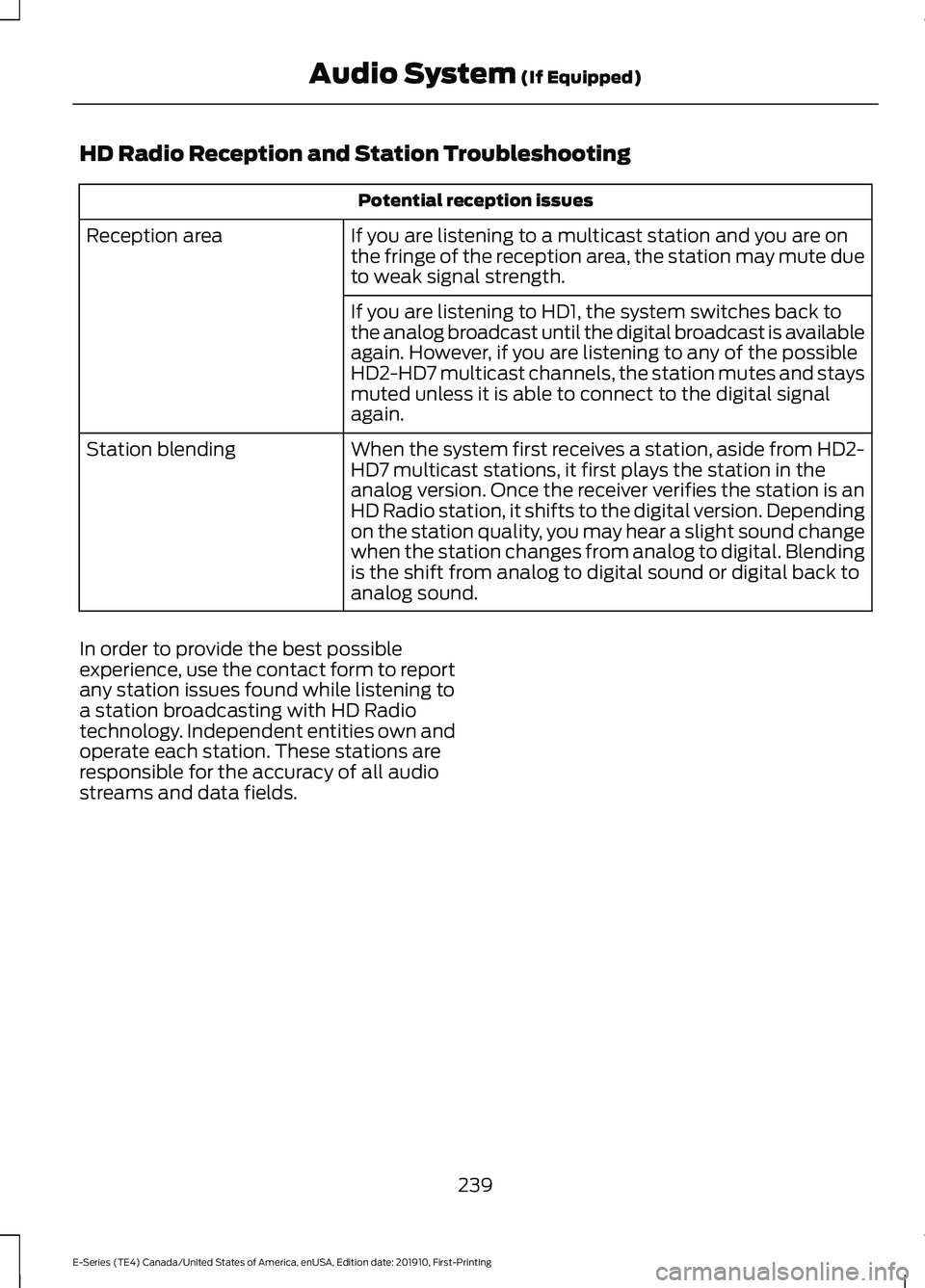
HD Radio Reception and Station Troubleshooting
Potential reception issues
If you are listening to a multicast station and you are on
the fringe of the reception area, the station may mute due
to weak signal strength.
Reception area
If you are listening to HD1, the system switches back to
the analog broadcast until the digital broadcast is available
again. However, if you are listening to any of the possible
HD2-HD7 multicast channels, the station mutes and stays
muted unless it is able to connect to the digital signal
again.
When the system first receives a station, aside from HD2-
HD7 multicast stations, it first plays the station in the
analog version. Once the receiver verifies the station is an
HD Radio station, it shifts to the digital version. Depending
on the station quality, you may hear a slight sound change
when the station changes from analog to digital. Blending
is the shift from analog to digital sound or digital back to
analog sound.
Station blending
In order to provide the best possible
experience, use the contact form to report
any station issues found while listening to
a station broadcasting with HD Radio
technology. Independent entities own and
operate each station. These stations are
responsible for the accuracy of all audio
streams and data fields.
239
E-Series (TE4) Canada/United States of America, enUSA, Edition date: 201910, First-Printing Audio System (If Equipped)
Page 254 of 301
Ford Motor Company has recommended
maintenance intervals for various parts
and component systems based upon
engineering testing. Ford Motor Company
relies upon this testing to determine the
most appropriate mileage for replacement
of oils and fluids to protect your vehicle at
the lowest overall cost to you and
recommends against maintenance
schedules that deviate from the scheduled
maintenance information.
We strongly recommend the use of only
genuine Ford, Motorcraft or
Ford-authorized re-manufactured
replacement parts engineered for your
vehicle.
Additives and Chemicals
This owner's manual and the Ford
Workshop Manual list the recommended
additives and chemicals for your vehicle.
We do not recommend using chemicals or
additives not approved by us as part of
your vehicle
’s normal maintenance. Please
consult your warranty information. Oils, Fluids and Flushing
In many cases, fluid discoloration is a
normal operating characteristic and, by
itself, does not necessarily indicate a
concern or that the fluid needs to be
changed. However, a qualified expert, such
as the factory-trained technicians at your
dealership, should inspect discolored fluids
that also show signs of overheating or
foreign material contamination
immediately.
Make sure to change your vehicle
’s oils and
fluids at the specified intervals or in
conjunction with a repair. Flushing is a
viable way to change fluid for many vehicle
sub-systems during scheduled
maintenance. It is critical that systems are
flushed only with new fluid that is the same
as that required to fill and operate the
system or using a Ford-approved flushing
chemical.
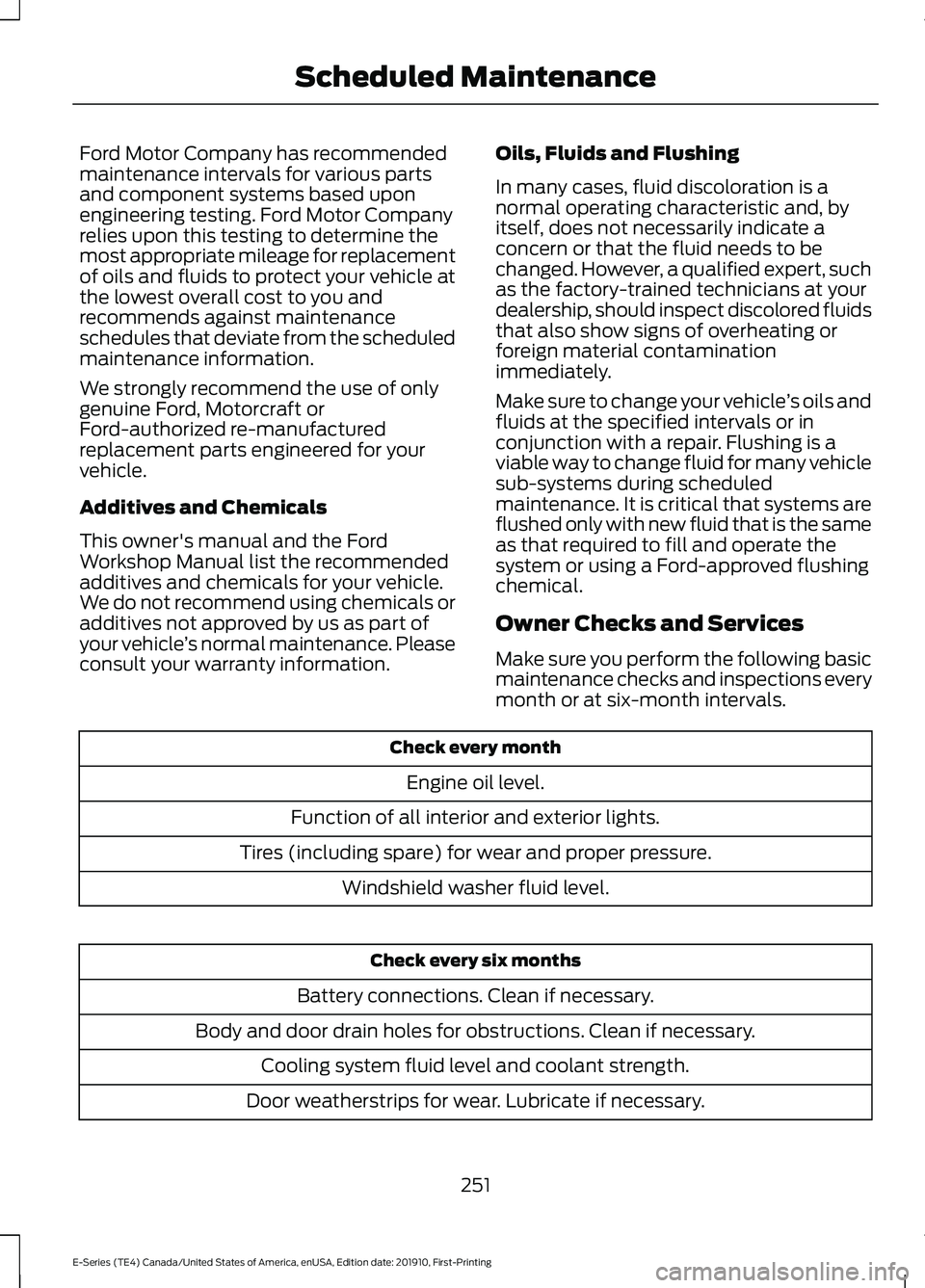
Owner Checks and Services
Make sure you perform the following basic
maintenance checks and inspections every
month or at six-month intervals. Check every month
Engine oil level.
Function of all interior and exterior lights.
Tires (including spare) for wear and proper pressure. Windshield washer fluid level. Check every six months
Battery connections. Clean if necessary.
Body and door drain holes for obstructions. Clean if necessary. Cooling system fluid level and coolant strength.
Door weatherstrips for wear. Lubricate if necessary.
251
E-Series (TE4) Canada/United States of America, enUSA, Edition date: 201910, First-Printing Scheduled Maintenance
Page 298 of 301
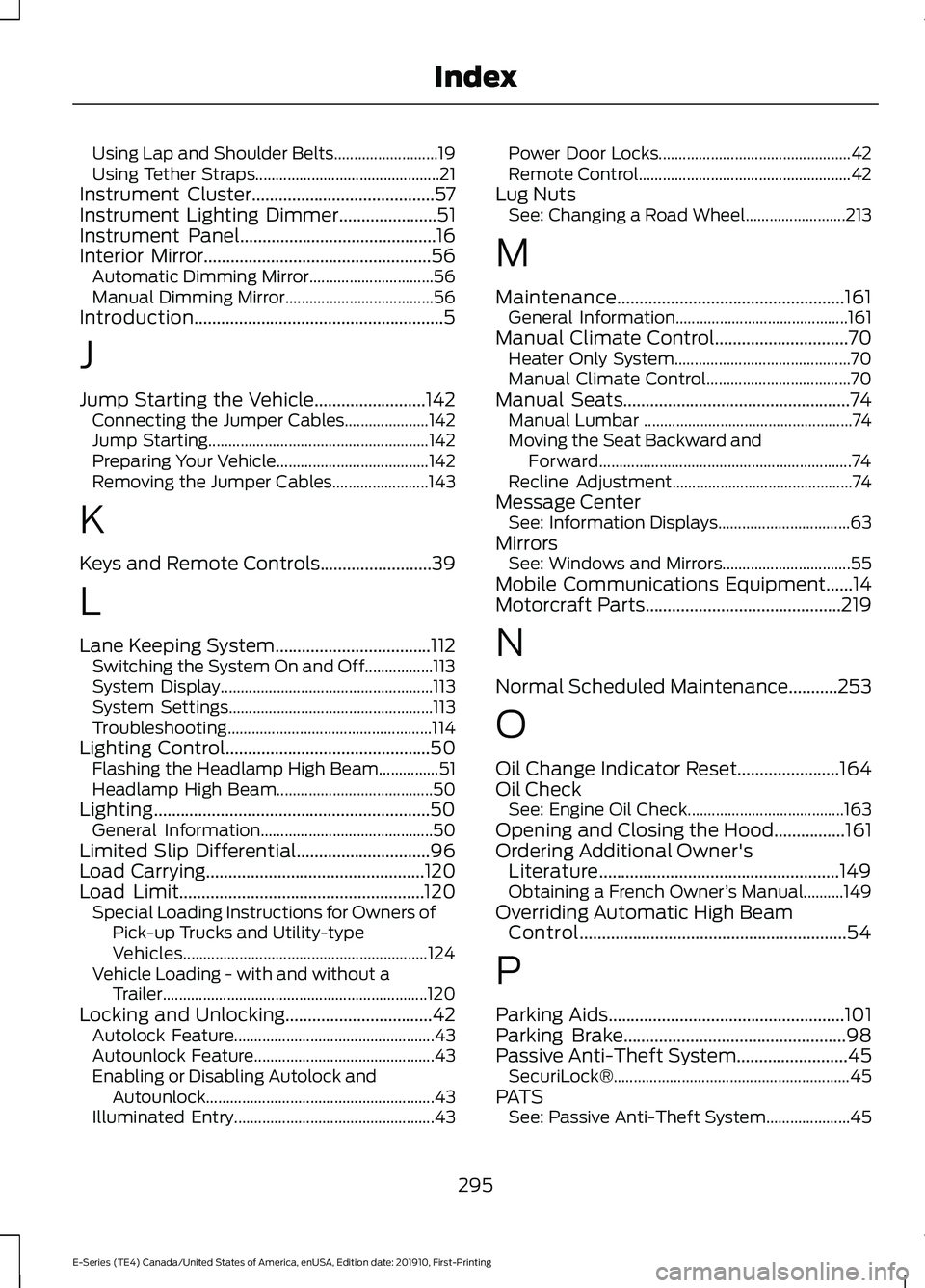
Using Lap and Shoulder Belts..........................
19
Using Tether Straps.............................................. 21
Instrument Cluster.........................................57
Instrument Lighting Dimmer......................51
Instrument Panel............................................16
Interior Mirror...................................................56
Automatic Dimming Mirror............................... 56
Manual Dimming Mirror..................................... 56
Introduction........................................................5
J
Jump Starting the Vehicle.........................142 Connecting the Jumper Cables..................... 142
Jump Starting....................................................... 142
Preparing Your Vehicle...................................... 142
Removing the Jumper Cables........................ 143
K
Keys and Remote Controls.........................39
L
Lane Keeping System
...................................112
Switching the System On and Off.................113
System Display..................................................... 113
System Settings................................................... 113
Troubleshooting................................................... 114
Lighting Control
..............................................50
Flashing the Headlamp High Beam...............51
Headlamp High Beam....................................... 50
Lighting..............................................................50 General Information........................................... 50
Limited Slip Differential..............................96
Load Carrying
.................................................120
Load Limit.......................................................120 Special Loading Instructions for Owners of
Pick-up Trucks and Utility-type
Vehicles............................................................. 124
Vehicle Loading - with and without a Trailer.................................................................. 120
Locking and Unlocking
.................................42
Autolock Feature.................................................. 43
Autounlock Feature............................................. 43
Enabling or Disabling Autolock and Autounlock......................................................... 43
Illuminated Entry.................................................. 43Power Door Locks................................................
42
Remote Control..................................................... 42
Lug Nuts See: Changing a Road Wheel......................... 213
M
Maintenance...................................................161 General Information........................................... 161
Manual Climate Control..............................70 Heater Only System............................................ 70
Manual Climate Control.................................... 70
Manual Seats...................................................74 Manual Lumbar .................................................... 74
Moving the Seat Backward and Forward............................................................... 74
Recline Adjustment............................................. 74
Message Center See: Information Displays................................. 63
Mirrors See: Windows and Mirrors................................ 55
Mobile Communications Equipment......14
Motorcraft Parts
............................................219
N
Normal Scheduled Maintenance
...........253
O
Oil Change Indicator Reset.......................164
Oil Check See: Engine Oil Check....................................... 163
Opening and Closing the Hood................161
Ordering Additional Owner's Literature......................................................149
Obtaining a French Owner ’s Manual..........149
Overriding Automatic High Beam Control............................................................54
P
Parking Aids
.....................................................101
Parking Brake..................................................98
Passive Anti-Theft System.........................45
SecuriLock®........................................................... 45
PATS See: Passive Anti-Theft System..................... 45
295
E-Series (TE4) Canada/United States of America, enUSA, Edition date: 201910, First-Printing Index
Page 301 of 301
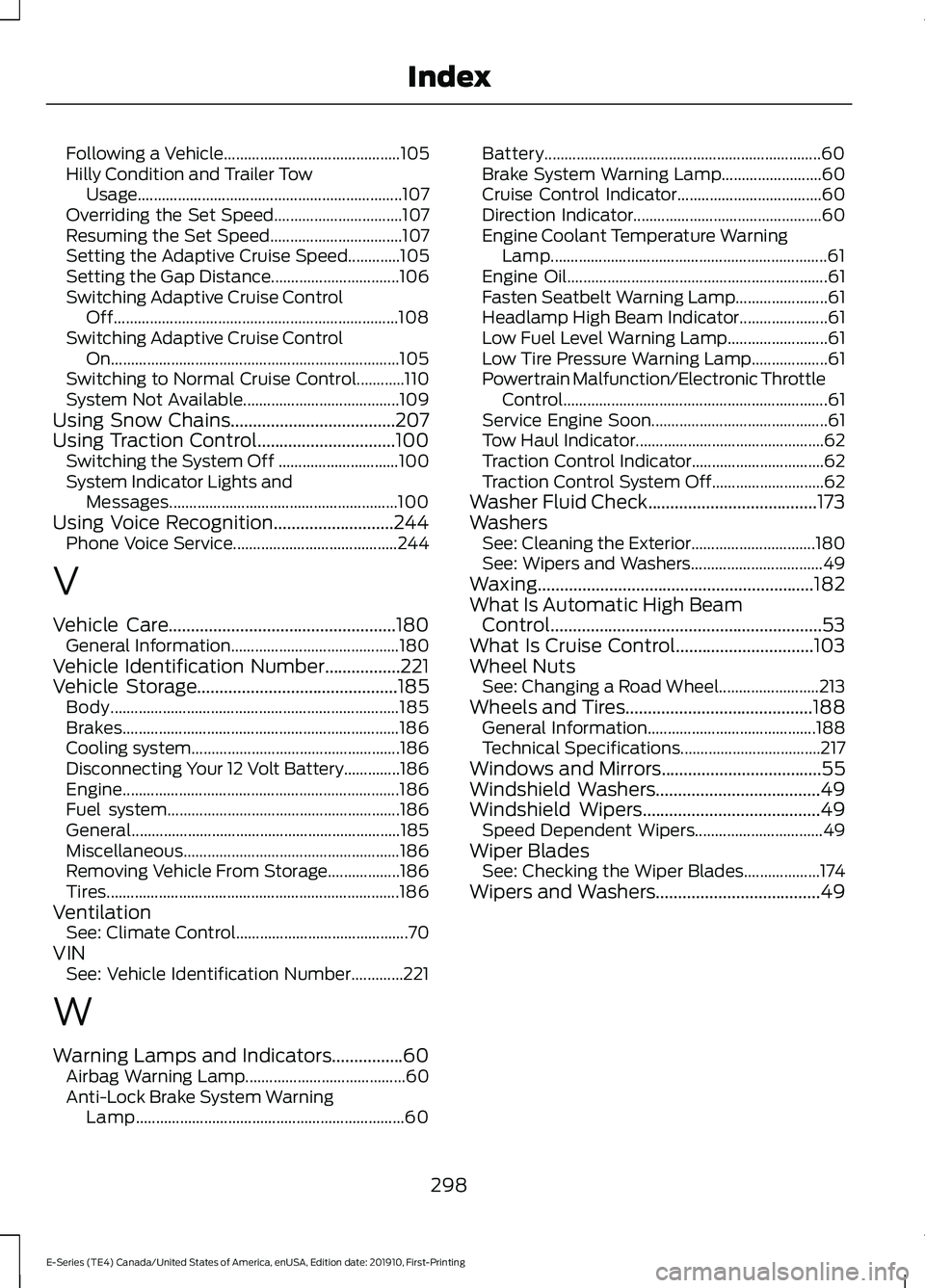
Following a Vehicle............................................
105
Hilly Condition and Trailer Tow Usage.................................................................. 107
Overriding the Set Speed................................ 107
Resuming the Set Speed................................. 107
Setting the Adaptive Cruise Speed.............105
Setting the Gap Distance................................ 106
Switching Adaptive Cruise Control Off....................................................................... 108
Switching Adaptive Cruise Control On........................................................................\
105
Switching to Normal Cruise Control............110
System Not Available....................................... 109
Using Snow Chains.....................................207
Using Traction Control...............................100 Switching the System Off .............................. 100
System Indicator Lights and Messages......................................................... 100
Using Voice Recognition...........................244 Phone Voice Service......................................... 244
V
Vehicle Care...................................................180 General Information.......................................... 180
Vehicle Identification Number
.................221
Vehicle Storage.............................................185
Body........................................................................\
185
Brakes..................................................................... 186
Cooling system.................................................... 186
Disconnecting Your 12 Volt Battery..............186
Engine..................................................................... 186
Fuel system.......................................................... 186
General................................................................... 185
Miscellaneous...................................................... 186
Removing Vehicle From Storage.................. 186
Tires........................................................................\
. 186
Ventilation See: Climate Control........................................... 70
VIN See: Vehicle Identification Number.............221
W
Warning Lamps and Indicators................60 Airbag Warning Lamp........................................ 60
Anti-Lock Brake System Warning Lamp
................................................................... 60Battery.....................................................................
60
Brake System Warning Lamp......................... 60
Cruise Control Indicator.................................... 60
Direction Indicator............................................... 60
Engine Coolant Temperature Warning Lamp..................................................................... 61
Engine Oil................................................................. 61
Fasten Seatbelt Warning Lamp....................... 61
Headlamp High Beam Indicator...................... 61
Low Fuel Level Warning Lamp......................... 61
Low Tire Pressure Warning Lamp................... 61
Powertrain Malfunction/Electronic Throttle Control.................................................................. 61
Service Engine Soon............................................ 61
Tow Haul Indicator............................................... 62
Traction Control Indicator................................. 62
Traction Control System Off............................ 62
Washer Fluid Check
......................................173
Washers See: Cleaning the Exterior............................... 180
See: Wipers and Washers................................. 49
Waxing..............................................................182
What Is Automatic High Beam Control.............................................................53
What Is Cruise Control
...............................103
Wheel Nuts See: Changing a Road Wheel......................... 213
Wheels and Tires..........................................188 General Information.......................................... 188
Technical Specifications................................... 217
Windows and Mirrors....................................55
Windshield Washers.....................................49
Windshield Wipers
........................................49
Speed Dependent Wipers................................ 49
Wiper Blades See: Checking the Wiper Blades................... 174
Wipers and Washers.....................................49
298
E-Series (TE4) Canada/United States of America, enUSA, Edition date: 201910, First-Printing Index