AUX FORD E SERIES 2024 Owners Manual
[x] Cancel search | Manufacturer: FORD, Model Year: 2024, Model line: E SERIES, Model: FORD E SERIES 2024Pages: 303, PDF Size: 6.95 MB
Page 6 of 303
Daytime Running Lamps - Vehicles With:Configurable Daytime Running Lamps...........................................................................52
Daytime Running Lamps - Vehicles With:Daytime Running Lamps (DRL)..........53
Direction Indicators......................................53
Automatic High Beam Control
What Is Automatic High Beam Control..........................................................................54
Switching Automatic High Beam ControlOn and Off...................................................54
Automatic High Beam Control Indicators..........................................................................54
Overriding Automatic High Beam Control..........................................................................55
Windows and Mirrors
Power Windows............................................56
Exterior Mirrors...............................................56
Interior Mirror...................................................57
Sun Visors.........................................................57
Instrument Cluster
Gauges..............................................................58
Warning Lamps and Indicators.................61
Audible Warnings and Indicators............63
Information Displays
General Information....................................64
Information Messages................................68
Climate Control
Manual Climate Control..............................73
Hints on Controlling the Interior Climate...........................................................................74
Rear Passenger Climate Controls...........75
Seats
Sitting in the Correct Position...................76
Head Restraints.............................................76
Manual Seats...................................................77
Power Seats....................................................78
Auxiliary Power Points
Auxiliary Power Points.................................79
Starting and Stopping theEngine
General Information......................................81
Ignition Switch................................................81
Starting a Gasoline Engine........................82
Engine Block Heater.....................................83
Fuel and Refueling
Safety Precautions.......................................85
Fuel Quality - E85.........................................85
Fuel Quality - Gasoline................................87
Running Out of Fuel.....................................87
Refueling..........................................................88
Fuel Consumption........................................89
Engine Emission Control
Emission Law...................................................91
Catalytic Converter.......................................92
Transmission
Automatic Transmission............................95
Brakes
General Information....................................99
Hints on Driving With Anti-Lock Brakes........................................................................100
Parking Brake................................................100
Hill Start Assist..............................................101
Traction Control
Principle of Operation................................102
Using Traction Control...............................102
2
2024 E-Series (TE4) Canada/United States of America, enUSA, Edition date: 202210, First-PrintingTable of Contents
Page 8 of 303
Power Steering Fluid Check.....................173
Changing the 12V Battery..........................173
Adjusting the Headlamps.........................176
Washer Fluid Check.....................................177
Fuel Filter........................................................178
Checking the Wiper Blades......................178
Changing the Wiper Blades.....................178
Removing a Headlamp..............................179
Changing a Bulb...........................................179
Vehicle Care
General Information...................................182
Cleaning Products.......................................182
Cleaning the Exterior..................................183
Waxing.............................................................184
Cleaning the Engine...................................184
Cleaning the Windows and Wiper Blades.........................................................................185
Cleaning the Interior...................................185
Cleaning the Instrument Panel andInstrument Cluster Lens.......................186
Cleaning Leather Seats.............................186
Repairing Minor Paint Damage...............187
Cleaning the Wheels..................................187
Vehicle Storage.............................................187
Wheels and Tires
General Information...................................190
Tire Care...........................................................191
Using Snow Chains.....................................212
Tire Pressure Monitoring System...........213
Changing a Road Wheel...........................218
Technical Specifications..........................225
Capacities and Specifications
Engine Specifications...............................226
Motorcraft Parts - 7.3L...............................227
Bulb Specification Chart..........................228
Engine Oil Capacity and Specification........................................................................229
Cooling System Capacity andSpecification............................................230
Fuel Tank Capacity......................................231
Air Conditioning System Capacity andSpecification.............................................232
Washer Fluid Specification.....................232
Automatic Transmission Fluid Capacityand Specification....................................233
Brake Fluid Specification.........................234
Rear Axle Fluid Capacity andSpecification............................................234
Hydraulic Power Steering Fluid Capacityand Specification...................................236
Vehicle Identification
Vehicle Identification Number...............237
Connected Vehicle
Connected Vehicle Requirements.......238
Connected Vehicle Limitations.............238
Connecting the Vehicle to a MobileNetwork......................................................238
Connected Vehicle – Troubleshooting........................................................................238
Audio System
General Information..................................239
Audio Unit......................................................239
Connecting a Bluetooth® Device.........242
Streaming Bluetooth Audio....................242
Playing Media From a USB Device.......242
USB Port........................................................243
Using Voice Recognition..........................243
Accessories
Accessories...................................................244
Auxiliary Switches......................................245
4
2024 E-Series (TE4) Canada/United States of America, enUSA, Edition date: 202210, First-PrintingTable of Contents
Page 22 of 303
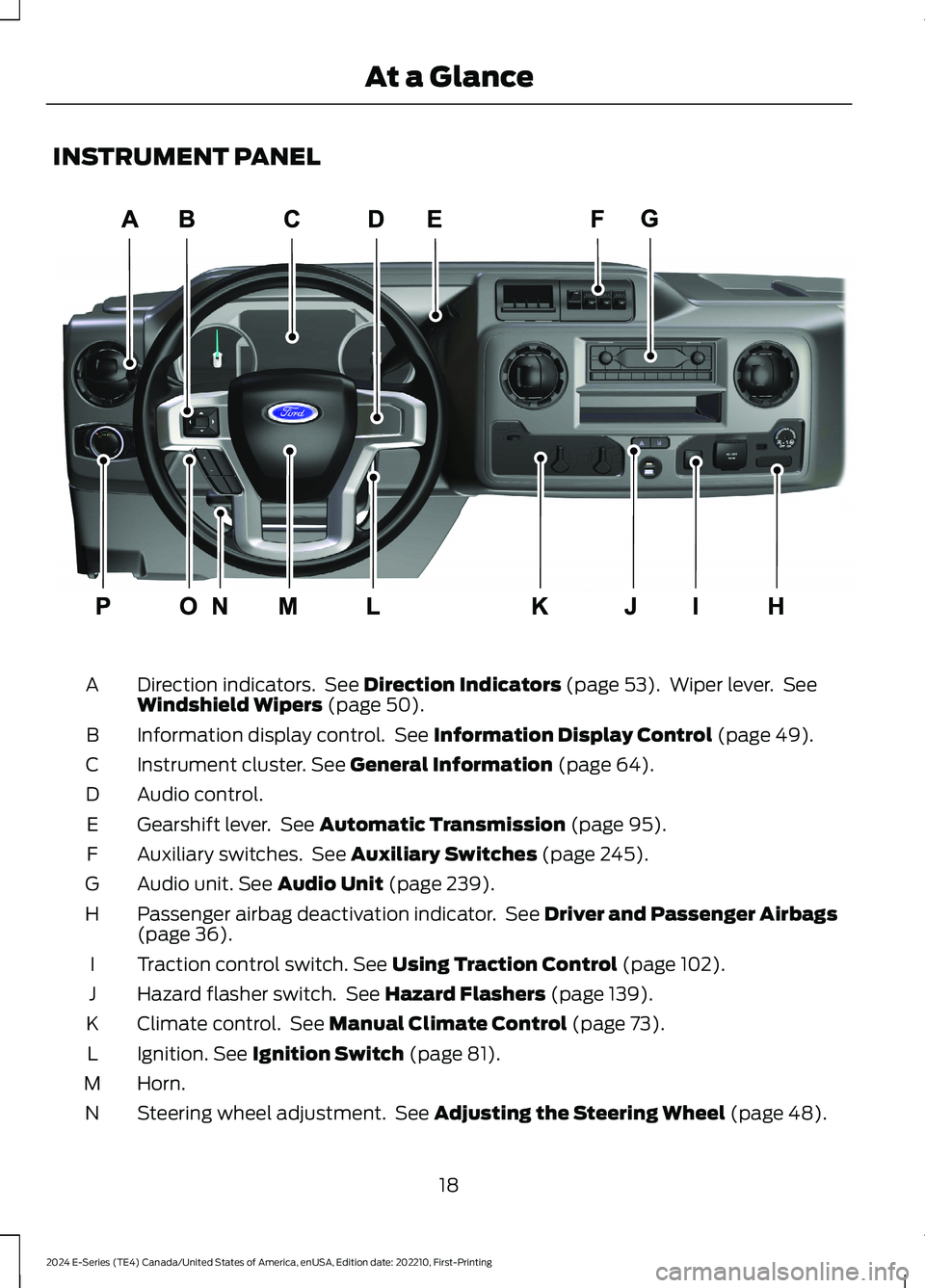
INSTRUMENT PANEL
Direction indicators. See Direction Indicators (page 53). Wiper lever. SeeWindshield Wipers (page 50).A
Information display control. See Information Display Control (page 49).B
Instrument cluster. See General Information (page 64).C
Audio control.D
Gearshift lever. See Automatic Transmission (page 95).E
Auxiliary switches. See Auxiliary Switches (page 245).F
Audio unit. See Audio Unit (page 239).G
Passenger airbag deactivation indicator. See Driver and Passenger Airbags(page 36).H
Traction control switch. See Using Traction Control (page 102).I
Hazard flasher switch. See Hazard Flashers (page 139).J
Climate control. See Manual Climate Control (page 73).K
Ignition. See Ignition Switch (page 81).L
Horn.M
Steering wheel adjustment. See Adjusting the Steering Wheel (page 48).N
18
2024 E-Series (TE4) Canada/United States of America, enUSA, Edition date: 202210, First-PrintingAt a GlanceE307562
Page 83 of 303
12 Volt DC Power Point
WARNING: Do not plug optionalelectrical accessories into the cigarlighter socket. Incorrect use of the cigarlighter can cause damage not coveredby the vehicle warranty, and can resultin fire or serious injury.
Note:When you switch the ignition on, youcan use the socket to power 12 voltappliances with a maximum current ratingof 15 amps.
Note:If the power supply does not workafter you switch the ignition off, switch theignition on.
Note:Do not hang any accessory from theaccessory plug.
Note:Do not use the power point over thevehicle capacity of 12 volt DC 180 watts ora fuse may blow.
Note:Always keep the power point capsclosed when not in use.
Do not insert objects other than anaccessory plug into the power point. Thisdamages the power point and may blowthe fuse.
Run the vehicle for full capacity use of thepower point.
To prevent the battery from running out ofcharge:
•Do not use the power point longer thannecessary when the vehicle is notrunning.
•Do not leave devices plugged inovernight or when you park your vehiclefor extended periods.
Locations
Power points could be in the followinglocations:
•On the instrument panel.
•Inside the glove box.
•Behind the driver's seat, upper trimpanel.
110 Volt AC Power Point (If Equipped)
WARNING: Do not keep electricaldevices plugged into the power outletwhenever the device is not in use. Theoutlet provides power when the vehicleis on. Failure to follow this instructioncould result in personal injury.
WARNING: Do not use anextension cord or connect multipledevices to the power outlet. Doing socould result in overloading the poweroutlet. Failure to follow this instructioncould result in fire, personal injury orproperty damage.
Note:The power point turns off when youswitch the ignition off, or when the batteryvoltage drops below 11 volts.
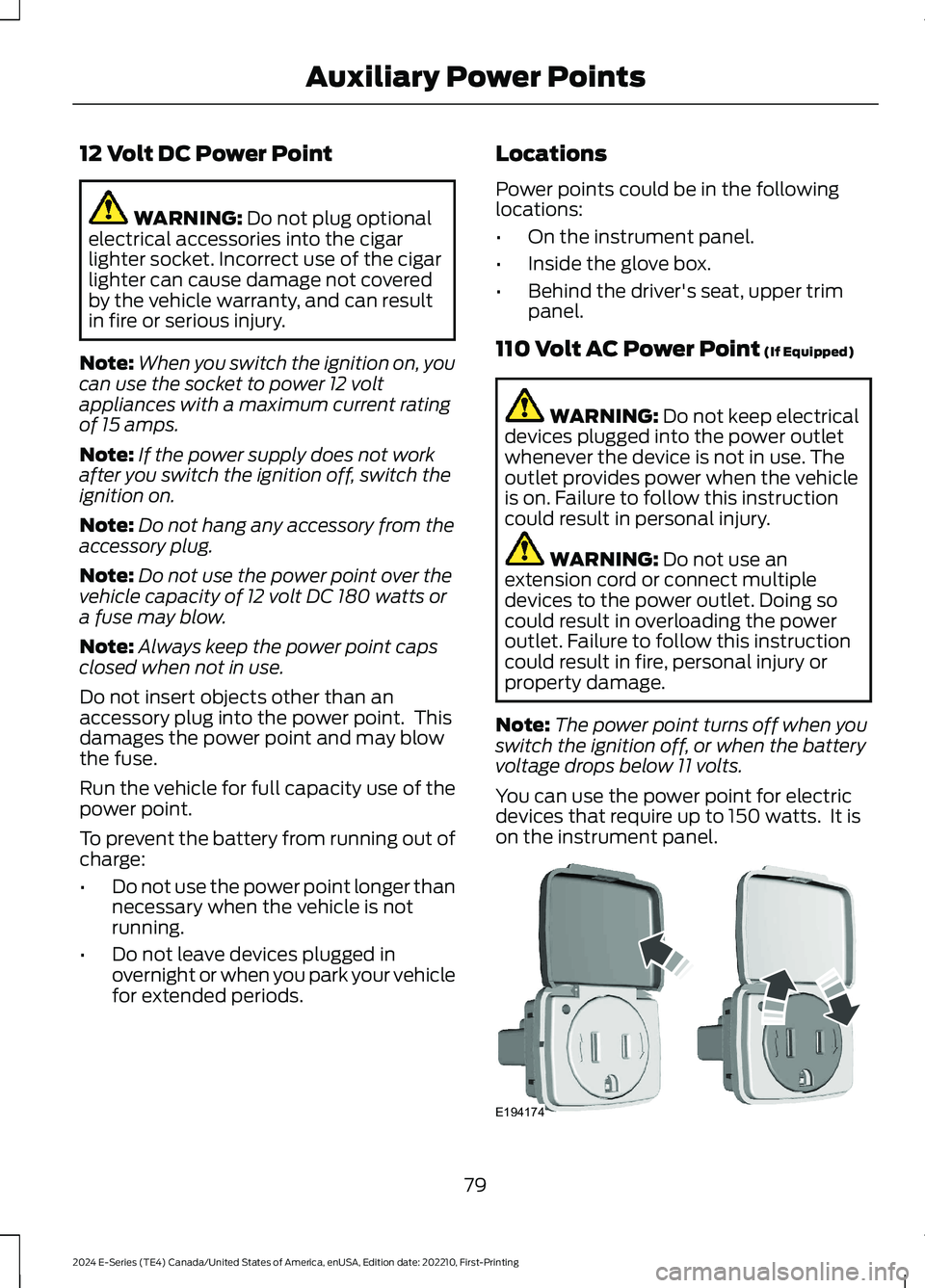
You can use the power point for electricdevices that require up to 150 watts. It ison the instrument panel.
79
2024 E-Series (TE4) Canada/United States of America, enUSA, Edition date: 202210, First-PrintingAuxiliary Power PointsE194174
Page 84 of 303
To gain access to the outlet contacts,press the plug against the outlet and rotateclockwise.
When the indicator light on the power pointis:
•On: The power point is working, theignition is on and a device is pluggedin.
•Off: The power point is off, the ignitionis off or no device is plugged in.
•Flashing: The power point is in faultmode.
The power outlet temporarily turns offpower when in fault mode if the deviceexceeds the 150 watt limit. Unplug yourdevice and switch the ignition off. Switchthe ignition back on, but do not plug yourdevice back in. Let the system cool off andswitch the ignition off to reset the faultmode. Switch the ignition back on andmake sure the indicator light remains on.
Do not use the power point for certainelectric devices, including:
•Cathode-ray, tube-type televisions.
•Motor loads, such as vacuum cleaners,electric saws and other electric powertools or compressor-drivenrefrigerators.
•Measuring devices, which processprecise data, such as medicalequipment or measuring equipment.
•Other appliances requiring anextremely stable power supply such asmicrocomputer-controlled electricblankets or touch-sensor lamps.
80
2024 E-Series (TE4) Canada/United States of America, enUSA, Edition date: 202210, First-PrintingAuxiliary Power Points
Page 157 of 303
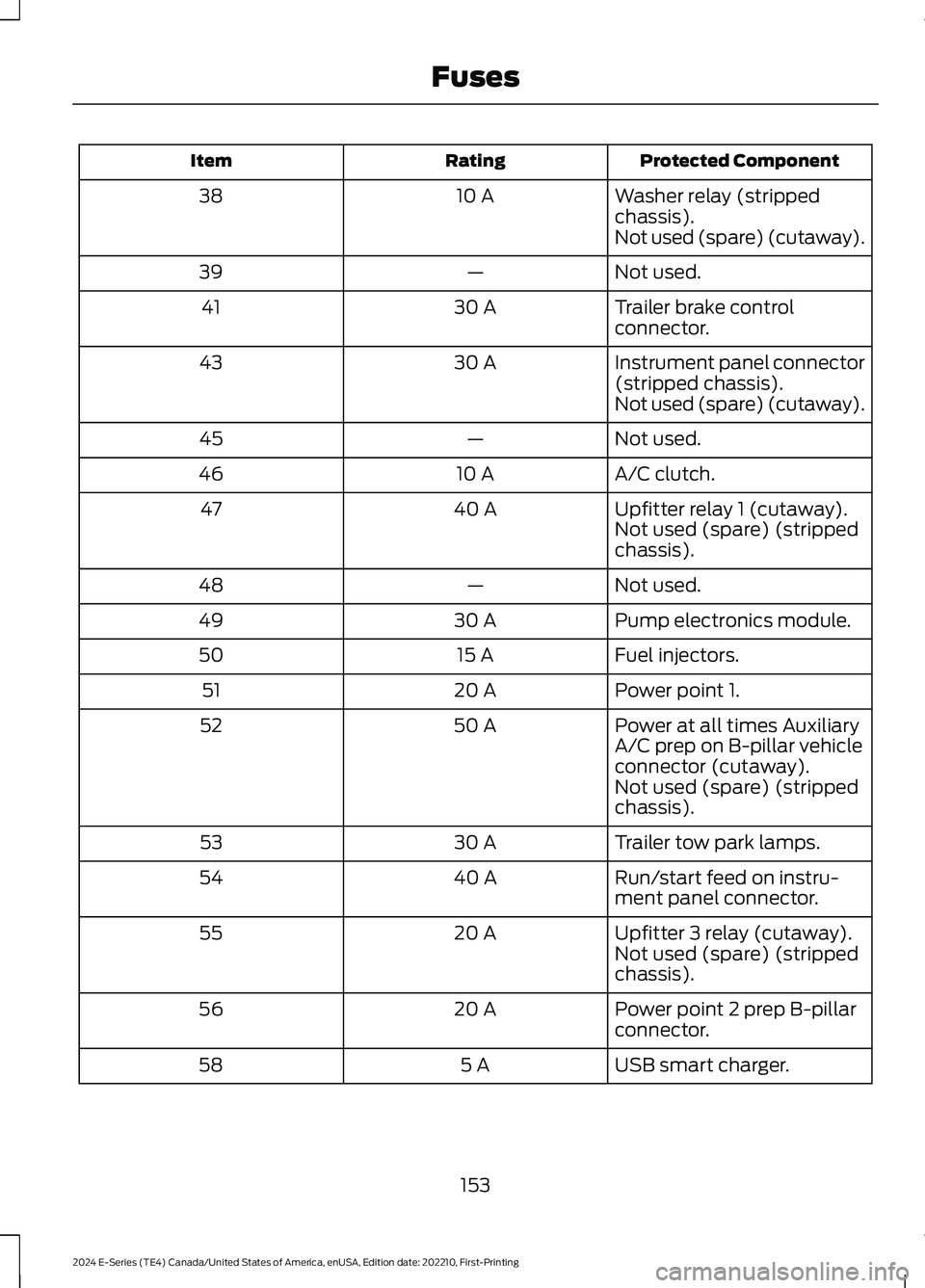
Protected ComponentRatingItem
Washer relay (strippedchassis).10 A38
Not used (spare) (cutaway).
Not used.—39
Trailer brake controlconnector.30 A41
Instrument panel connector(stripped chassis).30 A43
Not used (spare) (cutaway).
Not used.—45
A/C clutch.10 A46
Upfitter relay 1 (cutaway).40 A47Not used (spare) (strippedchassis).
Not used.—48
Pump electronics module.30 A49
Fuel injectors.15 A50
Power point 1.20 A51
Power at all times AuxiliaryA/C prep on B-pillar vehicleconnector (cutaway).
50 A52
Not used (spare) (strippedchassis).
Trailer tow park lamps.30 A53
Run/start feed on instru-ment panel connector.40 A54
Upfitter 3 relay (cutaway).20 A55Not used (spare) (strippedchassis).
Power point 2 prep B-pillarconnector.20 A56
USB smart charger.5 A58
153
2024 E-Series (TE4) Canada/United States of America, enUSA, Edition date: 202210, First-PrintingFuses
Page 165 of 303
GENERAL INFORMATION
Have your vehicle serviced regularly to helpmaintain its roadworthiness and resalevalue. There is a large network ofauthorized dealers that are there to helpyou with their professional servicingexpertise. We believe that their speciallytrained technicians are best qualified toservice your vehicle properly and expertly.They are supported by a wide range ofhighly specialized tools developedspecifically for servicing your vehicle.
If your vehicle requires professional service,an authorized dealer can provide thenecessary parts and service. Check yourwarranty information to find out whichparts and services are covered.
Use only recommended fuels, lubricants,fluids and service parts conforming tospecifications. Motorcraft® parts aredesigned and built to provide the bestperformance in your vehicle.
Precautions
•Do not work on a hot engine.
•Make sure that nothing gets caught inmoving parts.
•Do not work on a vehicle with theengine running in an enclosed space,unless you are sure you have enoughventilation.
•Keep all open flames and other burningmaterial (such as cigarettes) awayfrom the battery and all fuel relatedparts.
Working with the Engine Off
1.Set the parking brake and shift thetransmission to park (P).
2.Switch off the engine.
3.Block the wheels.
Working with the Engine On
WARNING: To reduce the risk ofvehicle damage and personal burninjuries, do not start your engine with theair cleaner removed and do not removeit while the engine is running.
1.Set the parking brake and shift thetransmission to park (P).
2.Block the wheels.
OPENING AND CLOSING THE
HOOD
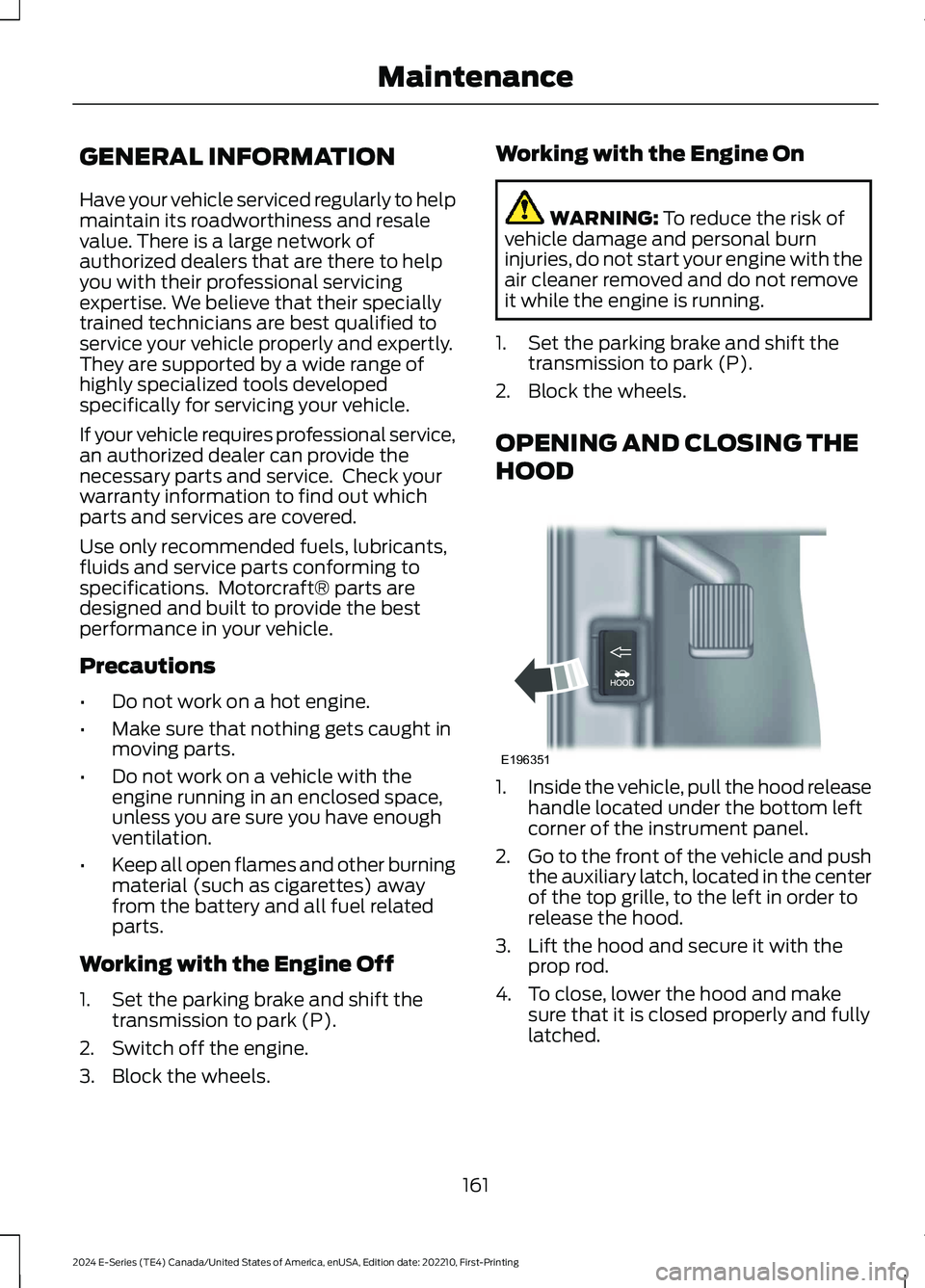
1.Inside the vehicle, pull the hood releasehandle located under the bottom leftcorner of the instrument panel.
2.Go to the front of the vehicle and pushthe auxiliary latch, located in the centerof the top grille, to the left in order torelease the hood.
3.Lift the hood and secure it with theprop rod.
4.To close, lower the hood and makesure that it is closed properly and fullylatched.
161
2024 E-Series (TE4) Canada/United States of America, enUSA, Edition date: 202210, First-PrintingMaintenanceE196351
Page 247 of 303
Sorting by Categories
You can also sort and play music byspecific categories, for example artist oralbum.
Press the OK button to view the availablecategories.
USB PORT
WARNING: Driving while distractedcan result in loss of vehicle control, crashand injury. We strongly recommend thatyou use extreme caution when using anydevice that may take your focus off theroad. Your primary responsibility is thesafe operation of your vehicle. Werecommend against the use of anyhand-held device while driving andencourage the use of voice-operatedsystems when possible. Make sure youare aware of all applicable local lawsthat may affect the use of electronicdevices while driving.
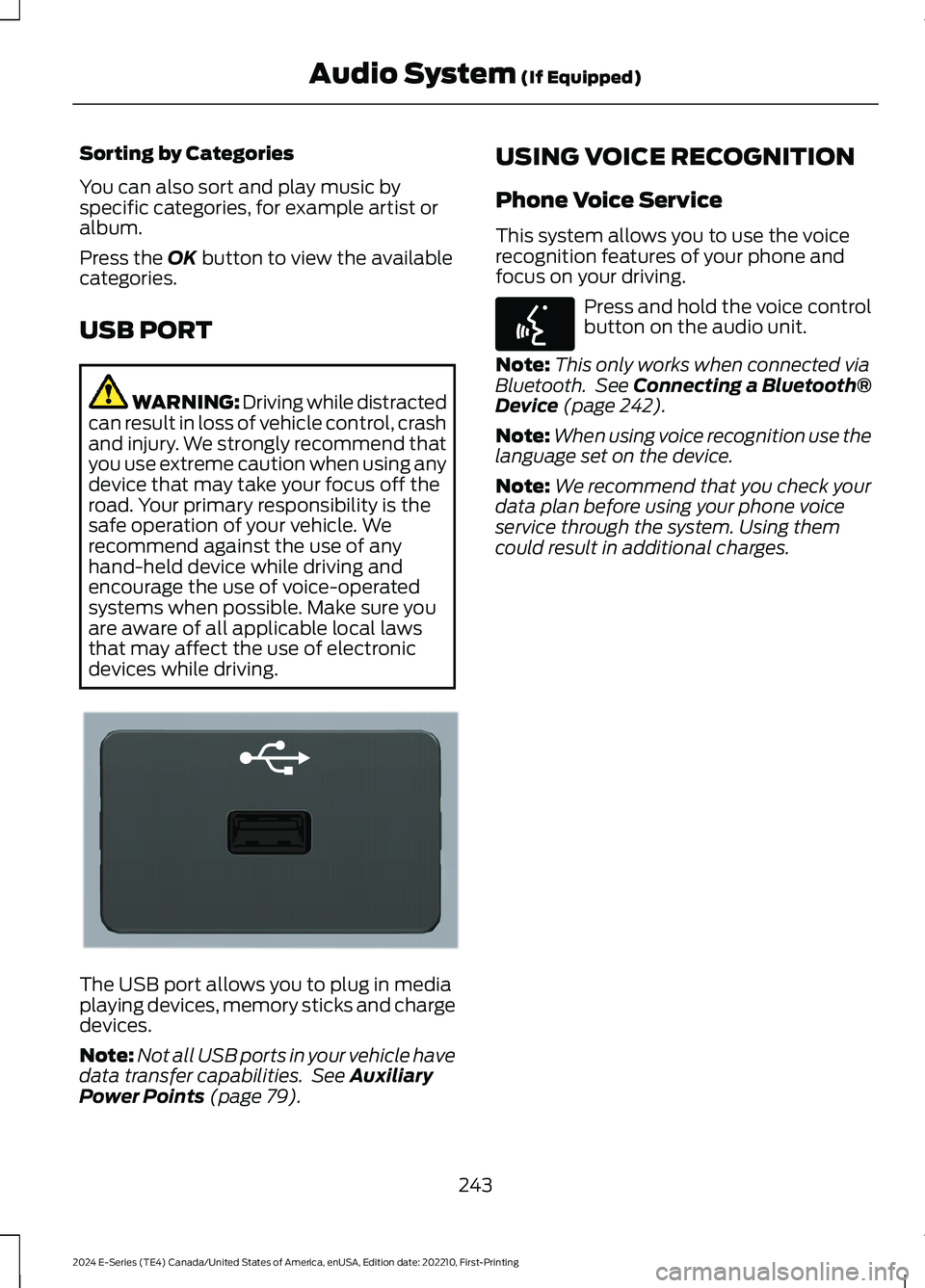
The USB port allows you to plug in mediaplaying devices, memory sticks and chargedevices.
Note:Not all USB ports in your vehicle havedata transfer capabilities. See AuxiliaryPower Points (page 79).
USING VOICE RECOGNITION
Phone Voice Service
This system allows you to use the voicerecognition features of your phone andfocus on your driving.
Press and hold the voice controlbutton on the audio unit.
Note:This only works when connected viaBluetooth. See Connecting a Bluetooth®Device (page 242).
Note:When using voice recognition use thelanguage set on the device.
Note:We recommend that you check yourdata plan before using your phone voiceservice through the system. Using themcould result in additional charges.
243
2024 E-Series (TE4) Canada/United States of America, enUSA, Edition date: 202210, First-PrintingAudio System (If Equipped)E201595 E142599
Page 249 of 303
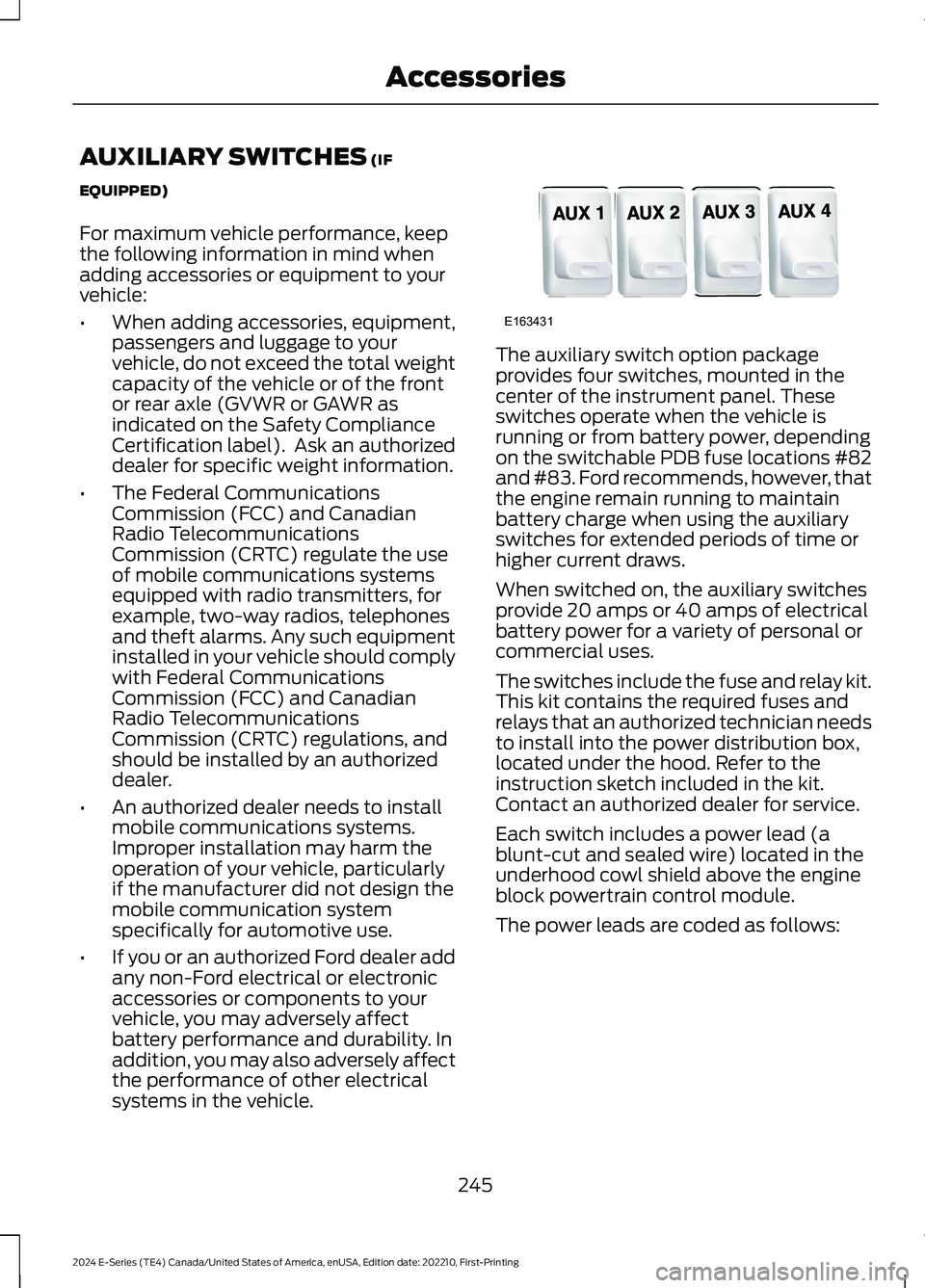
AUXILIARY SWITCHES (IF
EQUIPPED)
For maximum vehicle performance, keepthe following information in mind whenadding accessories or equipment to yourvehicle:
•When adding accessories, equipment,passengers and luggage to yourvehicle, do not exceed the total weightcapacity of the vehicle or of the frontor rear axle (GVWR or GAWR asindicated on the Safety ComplianceCertification label). Ask an authorizeddealer for specific weight information.
•The Federal CommunicationsCommission (FCC) and CanadianRadio TelecommunicationsCommission (CRTC) regulate the useof mobile communications systemsequipped with radio transmitters, forexample, two-way radios, telephonesand theft alarms. Any such equipmentinstalled in your vehicle should complywith Federal CommunicationsCommission (FCC) and CanadianRadio TelecommunicationsCommission (CRTC) regulations, andshould be installed by an authorizeddealer.
•An authorized dealer needs to installmobile communications systems.Improper installation may harm theoperation of your vehicle, particularlyif the manufacturer did not design themobile communication systemspecifically for automotive use.
•If you or an authorized Ford dealer addany non-Ford electrical or electronicaccessories or components to yourvehicle, you may adversely affectbattery performance and durability. Inaddition, you may also adversely affectthe performance of other electricalsystems in the vehicle.
The auxiliary switch option packageprovides four switches, mounted in thecenter of the instrument panel. Theseswitches operate when the vehicle isrunning or from battery power, dependingon the switchable PDB fuse locations #82and #83. Ford recommends, however, thatthe engine remain running to maintainbattery charge when using the auxiliaryswitches for extended periods of time orhigher current draws.
When switched on, the auxiliary switchesprovide 20 amps or 40 amps of electricalbattery power for a variety of personal orcommercial uses.
The switches include the fuse and relay kit.This kit contains the required fuses andrelays that an authorized technician needsto install into the power distribution box,located under the hood. Refer to theinstruction sketch included in the kit.Contact an authorized dealer for service.
Each switch includes a power lead (ablunt-cut and sealed wire) located in theunderhood cowl shield above the engineblock powertrain control module.
The power leads are coded as follows:
245
2024 E-Series (TE4) Canada/United States of America, enUSA, Edition date: 202210, First-PrintingAccessoriesE163431
Page 250 of 303
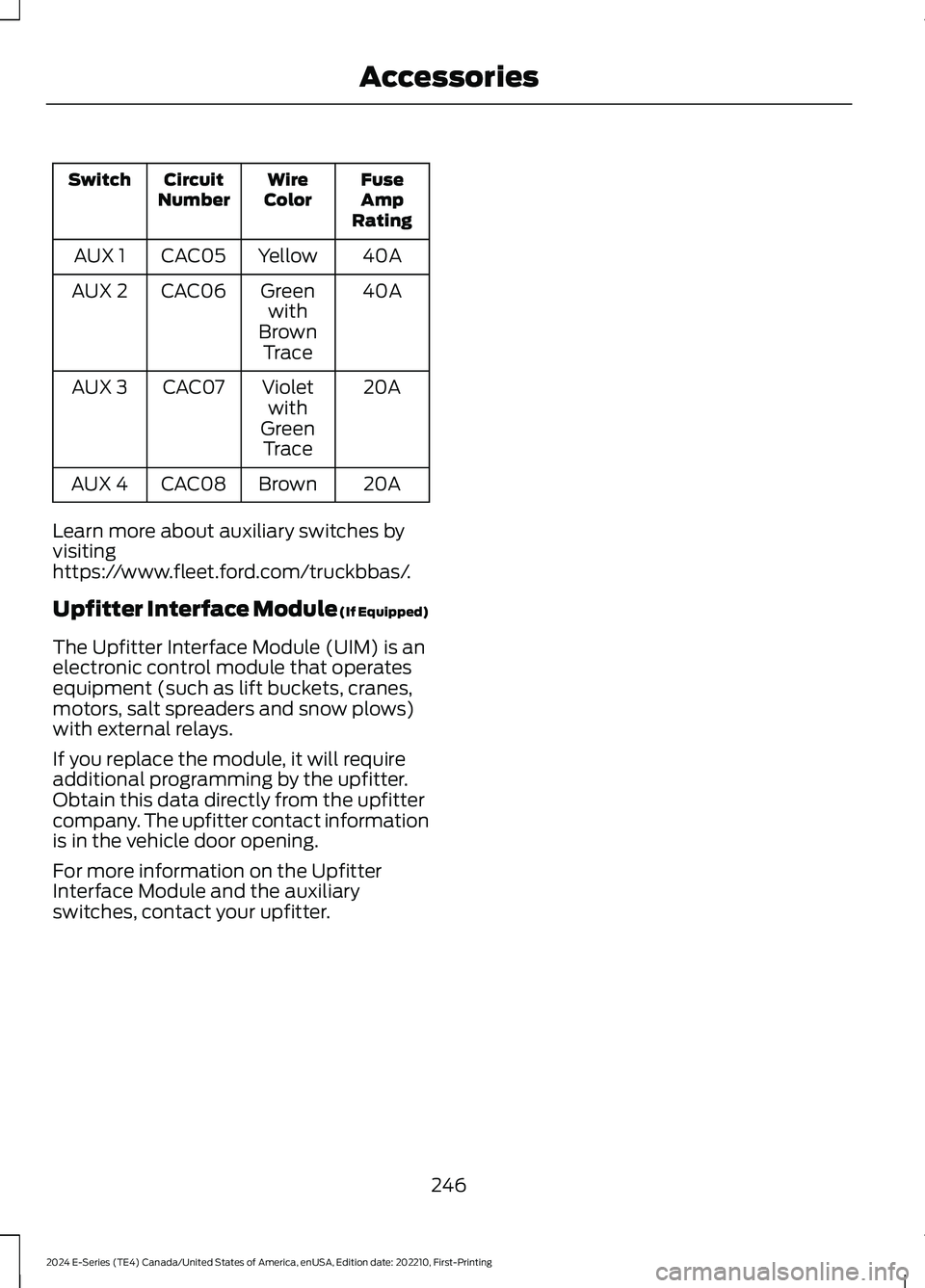
FuseAmpRating
WireColorCircuitNumberSwitch
40AYellowCAC05AUX 1
40AGreenwithBrownTrace
CAC06AUX 2
20AVioletwithGreenTrace
CAC07AUX 3
20ABrownCAC08AUX 4
Learn more about auxiliary switches byvisitinghttps://www.fleet.ford.com/truckbbas/.
Upfitter Interface Module (If Equipped)
The Upfitter Interface Module (UIM) is anelectronic control module that operatesequipment (such as lift buckets, cranes,motors, salt spreaders and snow plows)with external relays.
If you replace the module, it will requireadditional programming by the upfitter.Obtain this data directly from the upfittercompany. The upfitter contact informationis in the vehicle door opening.
For more information on the UpfitterInterface Module and the auxiliaryswitches, contact your upfitter.
246
2024 E-Series (TE4) Canada/United States of America, enUSA, Edition date: 202210, First-PrintingAccessories