automatic transmission FORD ECOSPORT 2018 User Guide
[x] Cancel search | Manufacturer: FORD, Model Year: 2018, Model line: ECOSPORT, Model: FORD ECOSPORT 2018Pages: 452, PDF Size: 17.04 MB
Page 142 of 452
AUTOMATIC TRANSMISSION
WARNINGS
Always fully apply the parking brake.Make sure you shift into park (P) forvehicles with an automatictransmission. Switch the ignition off andremove the key whenever you leave yourvehicle.
Do not apply the brake pedal andaccelerator pedal simultaneously.Applying both pedals simultaneouslyfor more than a few seconds will limitengine performance, which may result indifficulty maintaining speed in traffic andcould lead to serious injury.
When your vehicle is stationary, keepthe brake pedal fully pressed whenshifting gears. Failure to follow thisinstruction could result in personal injury,death or property damage.
Note:Under certain conditions you may notbe able to shift out of park unless theIntelligent Access Key is inside the vehicle.
Selector Lever Positions
•P Park
•R Reverse
•N Neutral
•D Drive
•S Sport mode
Press the button on the front of thegearshift lever to shift to each position.
Brake needs to be depressed to move outof (P).
The gearshift lever position will be shownin the instrument cluster display.
Park (P)
In this position, power is not transmittedto the driven wheels and the transmissionis locked.
You can start the engine with the gearshiftlever in this position.
Note:A warning tone sounds if you openthe driver door and you have not shifted thegearshift lever to park (P).
Reverse (R)
Shift the gearshift lever to reverse (R) toallow your vehicle to move backward
Neutral (N)
In this position, power is not transmittedto the driven wheels but the transmissionis not locked.
You can start the engine with the gearshiftlever in this position.
Drive (D)
Drive (D) is the normal driving position forthe best fuel economy and smoothness.The overdrive function allows automaticupshifts and downshifts through allforward gears.
Shift the gearshift lever to drive (D) toallow your vehicle to move forward andshift automaticallu through the forwardgears.
The transmission will shift to theappropriate gear for optimum performancebased on ambient temperature, roadgradient, vehicle load and your input.
Sport Mode (S)
Switch on sport mode by shifting thegearshift lever to sport (S). In Sport modethe transmission will select the optimumgear for best performance. This gearselection is typically lower than that ofdrive (D) and the shifts are faster.
138EcoSport (CBW) Canada/United States of America, Vehicles Built From: 14-08-2017, GN15-19G219-ZFB enUSA, First PrintingTransmission
Page 143 of 452
SelectShift™ AutomaticTransmission
This feature gives you the ability to changegears up or down as desired.
Downshifts are allowed unless the enginespeed after the shift exceeds themaximum allowable limit.
In order to prevent engine stalls,SelectShift automatically downshifts atlow engine speeds.
Note:Engine damage may occur if youmaintain excessive engine revving withoutshifting.
SelectShift does not automatically upshift,even if the engine is approaching the RPMlimit, unless the accelerator pedal is at fulltravel.
Take notice of the shift indicator lamp,which alerts you when to shift to make sureyou achieve the highest level of efficiencyand fuel economy.
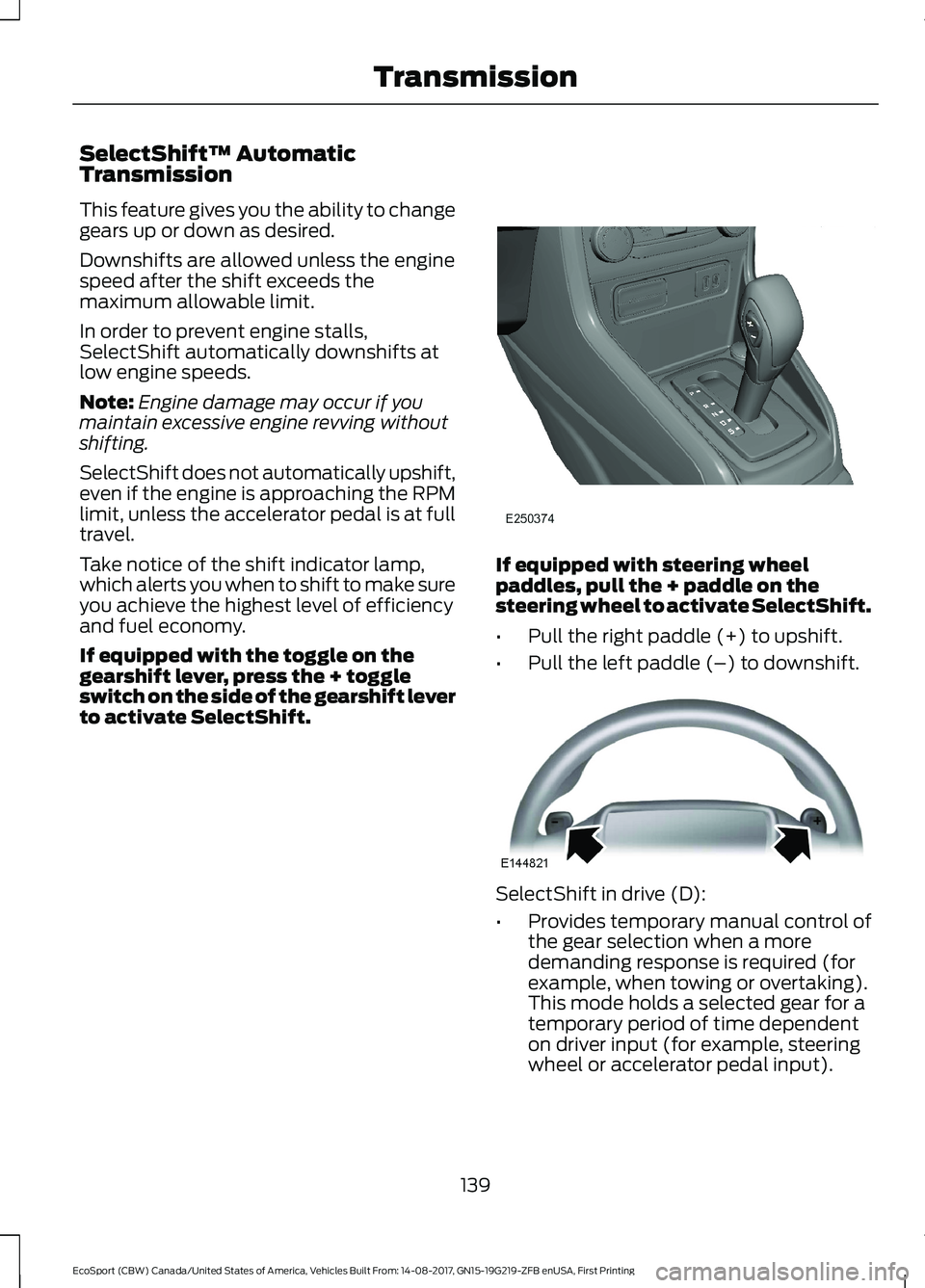
If equipped with the toggle on thegearshift lever, press the + toggleswitch on the side of the gearshift leverto activate SelectShift.
If equipped with steering wheelpaddles, pull the + paddle on thesteering wheel to activate SelectShift.
•Pull the right paddle (+) to upshift.
•Pull the left paddle (–) to downshift.
SelectShift in drive (D):
•Provides temporary manual control ofthe gear selection when a moredemanding response is required (forexample, when towing or overtaking).This mode holds a selected gear for atemporary period of time dependenton driver input (for example, steeringwheel or accelerator pedal input).
139EcoSport (CBW) Canada/United States of America, Vehicles Built From: 14-08-2017, GN15-19G219-ZFB enUSA, First PrintingTransmission
Page 144 of 452
SelectShift in sport (S):
•Provides manual gear selection withouta time out period.
To exit SelectShift mode:
•If in drive (D), move the selector tosport (S) and then back to drive (D). Ifin sport (S), move the selector to drive(D) and then back to sport (S).
Upshift to the recommended shift speedsaccording to the following chart:
Upshifts when accelerating (recom-mended for best fuel economy)
Shift from:
15 mph (24 km/h)1 - 2
25 mph (40 km/h)2 - 3
40 mph (64 km/h)3 - 4
45 mph (72 km/h)4 - 5
50 mph (80 km/h)5 - 6
The instrument cluster displays yourcurrent gear. If a gear is requested but notavailable due to vehicle conditions (toolow or too high engine speed), the currentgear flashes three times.
Note:At full accelerator pedal travel, thetransmission may automatically downshiftfor maximum performance.
Emergency Park Position ReleaseLever
Note:Do not drive your vehicle until youverify that the brake lamps are working.
WARNINGS
When doing this procedure, you needto take the transmission out of park(P) which means your vehicle canroll freely. To avoid unwanted vehiclemovement, always fully apply the parkingbrake prior to doing this procedure. Usewheels chocks if appropriate.
If the parking brake is fully released,but the brake warning lamp remainsilluminated, the brakes may not beworking properly. Have your vehiclechecked as soon as possible.
Note:For some markets this feature will bedisabled.
Your vehicle is equipped with a brake-shiftinterlock feature that prevents moving thegearshift lever from park (P) when theignition is on and the brake pedal is notpressed.
If you cannot move the transmissionselector lever out of park (P) position withthe ignition in the on position and the brakepedal pressed, a malfunction may haveoccurred. It is possible that a fuse hasblown or your vehicle’s brake lamps arenot operating properly. See FuseSpecification Chart (page 193).
If the fuse is not blown and the brakelamps are working properly, the followingprocedure will allow you to move thegearshift lever from park (P).
140EcoSport (CBW) Canada/United States of America, Vehicles Built From: 14-08-2017, GN15-19G219-ZFB enUSA, First PrintingTransmission
Page 145 of 452
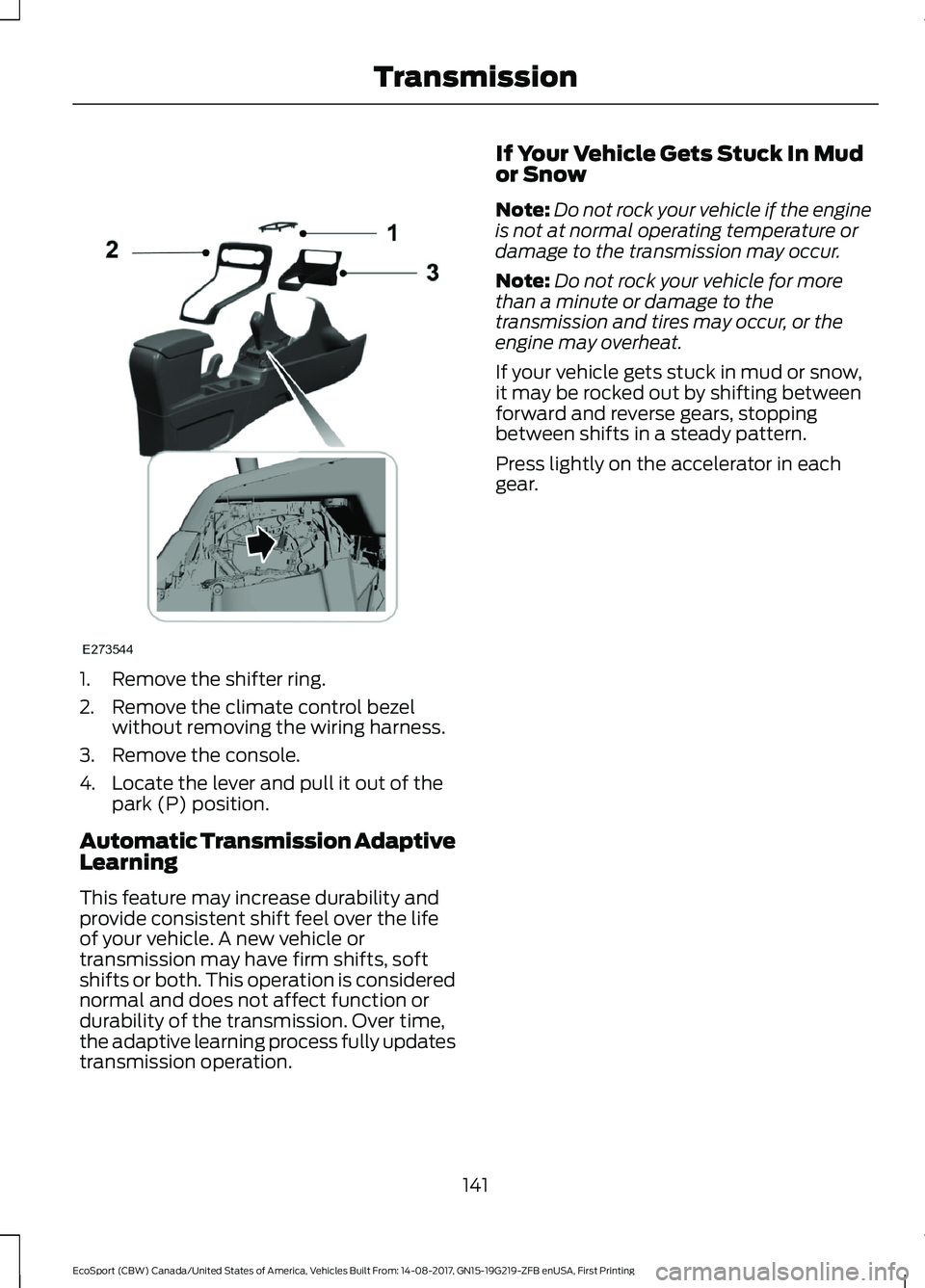
1.Remove the shifter ring.
2.Remove the climate control bezelwithout removing the wiring harness.
3.Remove the console.
4.Locate the lever and pull it out of thepark (P) position.
Automatic Transmission AdaptiveLearning
This feature may increase durability andprovide consistent shift feel over the lifeof your vehicle. A new vehicle ortransmission may have firm shifts, softshifts or both. This operation is considerednormal and does not affect function ordurability of the transmission. Over time,the adaptive learning process fully updatestransmission operation.
If Your Vehicle Gets Stuck In Mudor Snow
Note:Do not rock your vehicle if the engineis not at normal operating temperature ordamage to the transmission may occur.
Note:Do not rock your vehicle for morethan a minute or damage to thetransmission and tires may occur, or theengine may overheat.
If your vehicle gets stuck in mud or snow,it may be rocked out by shifting betweenforward and reverse gears, stoppingbetween shifts in a steady pattern.
Press lightly on the accelerator in eachgear.
141EcoSport (CBW) Canada/United States of America, Vehicles Built From: 14-08-2017, GN15-19G219-ZFB enUSA, First PrintingTransmission
Page 150 of 452
GENERAL INFORMATION
Wet brakes result in reduced brakingefficiency. Gently press the brake pedal afew times when driving from a car wash orstanding water to dry the brakes.
Brake Over Accelerator
In the event the accelerator pedalbecomes stuck or entrapped, apply steadyand firm pressure to the brake pedal toslow the vehicle and reduce engine power.If you experience this condition, apply thebrakes and bring your vehicle to a safestop. Shift the transmission to park (P)(automatic transmission) or to a low gear(manual transmission), switch the engineoff and apply the parking brake.
Inspect the accelerator pedal and the areaaround it for any items or debris that maybe obstructing its movement. If none arefound and the condition persists, have yourvehicle towed to the dealer for service.
Emergency Brake Assist
Emergency brake assist detects when youbrake heavily by measuring the rate atwhich you press the brake pedal. Itprovides maximum braking efficiency aslong as you press the pedal. Emergencybrake assist can reduce stopping distancesin critical situations.
Anti-lock Brake System (If Equipped)
This system helps you maintain steeringcontrol and vehicle stability duringemergency stops by keeping the brakesfrom locking.
This lamp momentarilyilluminates when you switch theignition on. If the light does notilluminate during start up, remains on orflashes, the system may be disabled. Havethe system checked by an authorizeddealer. If the anti-lock brake system isdisabled, normal braking is still effective.
If the brake warning lampilluminates when you release theparking brake, have the systemchecked by an authorized dealer.
Note: Occasional brake noise is normal. Ifa metal-to-metal, continuous grinding orcontinuous squeal sound is present, thebrake linings may be worn-out. If yourvehicle has continuous vibration or shudderin the steering wheel while braking, haveyour vehicle checked by an authorizeddealer.
Note: Brake dust may accumulate on thewheels, even under normal drivingconditions. Some dust is inevitable as thebrakes wear. See Cleaning the Wheels(page 234).
Note:Depending on applicable laws andregulations in the country for which yourvehicle was originally built, the brake lampsmay flash during heavy braking. Followingthis the hazard warning flashers may alsoflash when your vehicle comes to a stop.
See Warning Lamps andIndicators (page 81).
HINTS ON DRIVING WITH
ANTI-LOCK BRAKES
The anti-lock braking system does noteliminate the risks when:
•You drive too closely to the vehicle infront of you.
•Your vehicle is hydroplaning.
146EcoSport (CBW) Canada/United States of America, Vehicles Built From: 14-08-2017, GN15-19G219-ZFB enUSA, First PrintingBrakes
Page 151 of 452
•You take corners too fast.
•The road surface is poor.
Note: If the system activates, the brakepedal may pulse and may travel further.Maintain pressure on the brake pedal. Youmay also hear a noise from the system. Thisis normal.
PARKING BRAKE
Vehicles With AutomaticTransmission
WARNING
Always set the parking brake fullyand leave your vehicle with thetransmission selector lever inposition P.
Note:If you park your vehicle on a hill andfacing uphill move the transmission selectorlever to position P and turn the steeringwheel away from the curb.
Note:If you park your vehicle on a hill andfacing downhill move the transmissionselector lever to position P and turn thesteering wheel toward the curb.
Vehicles With ManualTransmission
WARNING
Always set the parking brake fully.
Note:If you park your vehicle on a hill andfacing uphill select first gear and turn thesteering wheel away from the curb.
Note:If you park your vehicle on a hill andfacing downhill select reverse gear and turnthe steering wheel toward the curb.
All Vehicles
Note:Do not press the release button whilepulling the lever up.
To apply the parking brake:
1.Press the foot brake pedal firmly.
2.Pull the parking brake lever up to itsfullest extent.
To release the parking brake:
1.Press the brake pedal firmly.
2.Pull the lever up slightly.
3.Press the release button and push thelever down.
HILL START ASSIST
WARNINGS
The system does not replace theparking brake. When you leave yourvehicle, always apply the parkingbrake and shift the transmission into park(P) for automatic transmission or first gearfor manual transmission.
You must remain in your vehiclewhen the system turns on. At alltimes, you are responsible forcontrolling your vehicle, supervising thesystem and intervening, if required. Failureto take care may result in the loss ofcontrol of your vehicle, serious personalinjury or death.
The system turns off if there is amalfunction or if you excessively revthe engine.
The system makes it easier to pull awaywhen your vehicle is on a slope without theneed to use the parking brake.
147EcoSport (CBW) Canada/United States of America, Vehicles Built From: 14-08-2017, GN15-19G219-ZFB enUSA, First PrintingBrakes
Page 152 of 452
When the system activates, your vehicleremains stationary on a slope for a fewseconds after you release the brake pedal.This allows you time to move your footfrom the brake to the accelerator pedal.The brakes release when the engine hasdeveloped sufficient torque to prevent yourvehicle from rolling down the slope. Thisis an advantage when pulling away on aslope, for example from a car park ramp,traffic lights or when reversing uphill intoa parking space.
The system activates on any slope thatcauses your vehicle to roll.
Note:There is no warning lamp to indicatethe system is either on or off.
Using Hill Start Assist
1.Press the brake pedal to bring yourvehicle to a complete standstill. Keepthe brake pedal pressed and shift intofirst gear when facing uphill or reverse(R) when facing downhill.
2.The system activates if the sensorsdetect that your vehicle is on a slope.
3.When you remove your foot from thebrake pedal, your vehicle remains onthe slope without rolling away for a fewseconds. This hold time increases if youare in the process of driving off.
4.Pull away in the normal manner.
Switching the System On and Off
Vehicles with Manual Transmission
You can switch this feature on or off in theinformation display. The systemremembers the last setting when you startyour vehicle.
Vehicles with Automatic Transmission
The system turns on when you switch theignition on and you cannot switch thesystem off.
148EcoSport (CBW) Canada/United States of America, Vehicles Built From: 14-08-2017, GN15-19G219-ZFB enUSA, First PrintingBrakes
Page 154 of 452
PRINCIPLE OF OPERATION
Electronic Stability Control
WARNING
The system is designed to aid thedriver. It is not intended to replaceyour attention and judgment. You arestill responsible to drive with due care andattention.
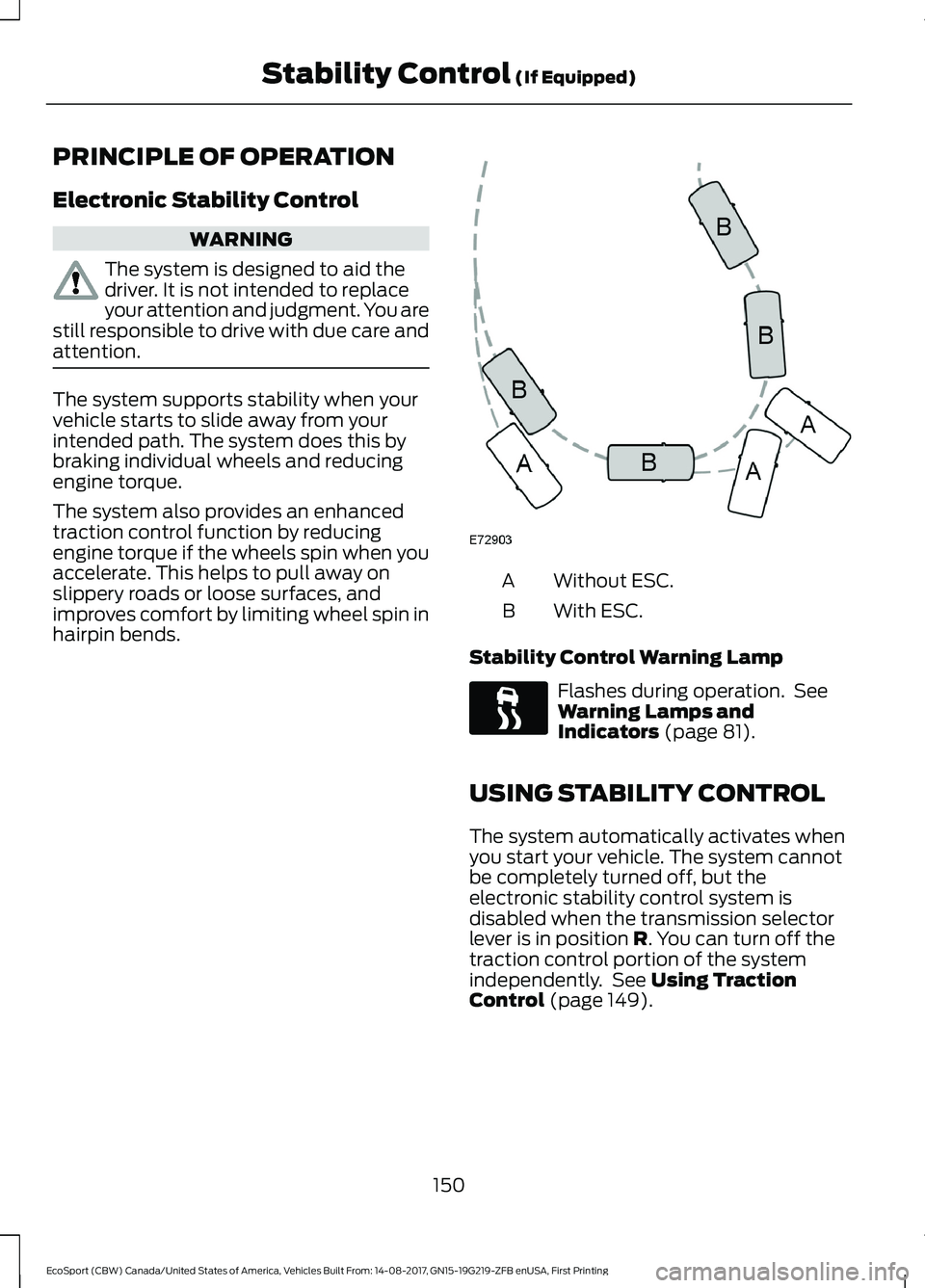
The system supports stability when yourvehicle starts to slide away from yourintended path. The system does this bybraking individual wheels and reducingengine torque.
The system also provides an enhancedtraction control function by reducingengine torque if the wheels spin when youaccelerate. This helps to pull away onslippery roads or loose surfaces, andimproves comfort by limiting wheel spin inhairpin bends.
Without ESC.A
With ESC.B
Stability Control Warning Lamp
Flashes during operation. SeeWarning Lamps andIndicators (page 81).
USING STABILITY CONTROL
The system automatically activates whenyou start your vehicle. The system cannotbe completely turned off, but theelectronic stability control system isdisabled when the transmission selectorlever is in position R. You can turn off thetraction control portion of the systemindependently. See Using TractionControl (page 149).
150EcoSport (CBW) Canada/United States of America, Vehicles Built From: 14-08-2017, GN15-19G219-ZFB enUSA, First PrintingStability Control (If Equipped)
Page 155 of 452
PRINCIPLE OF OPERATION
WARNINGS
The system may not detect objectswith surfaces that absorb reflection.Always drive with due care andattention. Failure to take care may resultin a crash.
To help avoid personal injury, alwaysuse caution when in reverse (R) andwhen using the sensing system.
The system may not detect small ormoving objects, particularly thoseclose to the ground.
Note:Certain add-on devices installedaround the rear fascia such as large trailerhitches, bike or surfboard racks or certainadd-on devices installed around the frontfascia such as license plate brackets orframes, bumper covers, bumper guards orany other device that may block the normaldetection zone of the system, may createfalse beeps.
Note:In these cases the add-on devicesmust be removed in order to prevent thefalse beeps.
Note: Keep the sensors free from snow, iceand large accumulations of dirt. Blockedsensors may affect system accuracy. Donot clean the sensors with sharp objects.
Note:If your vehicle sustains damage tothe bumper or fascia, leaving it misalignedor bent, the sensing zone may be alteredcausing inaccurate measurement ofobstacles or false alarms.
Note:When a trailer is connected to thevehicle, the Rear Sensing System maydetect the trailer and therefore providewarnings. It is suggested that the driverdisables the Rear Sensing System when atrailer is connected to the vehicle to preventthese warnings.
We recommend that you take some timeto get to know the system and itslimitations by reading this section.
The sensing system warns the driver ofobstacles within a certain range of yourvehicle. The system automatically turnson each time you switch the ignition on.
The system may provide display or soundwarnings when the detected obstacle is12 in (30 cm) or less from the bumper.
The system can be switched off throughthe information display menu or from thepop-up message that appears once youshift the transmission into reverse (R). Ifyour vehicle is equipped with a frontsensing system, you can switch the systemoff using the parking aid button. SeeGeneral Information (page 85).
If a fault is present in the system, a warningmessage appears in the informationdisplay and does not allow you to switchthe system on.
See Information Messages (page 88).
REAR PARKING AID
The rear parking aid sensors automaticallyturn on when you shift into reverse (R).
As your vehicle moves closer to theobstacle, the rate of the audible warningincreases. When the obstacle is less than11.81 in (30 cm) the warning soundscontinuously. If the system detects anobject farther than 11.81 in (30 cm) fromthe corners of the bumper, the tone soundsfor only three seconds. If the systemdetects an approaching object the warningsounds again.
151EcoSport (CBW) Canada/United States of America, Vehicles Built From: 14-08-2017, GN15-19G219-ZFB enUSA, First PrintingParking Aids (If Equipped)
Page 158 of 452
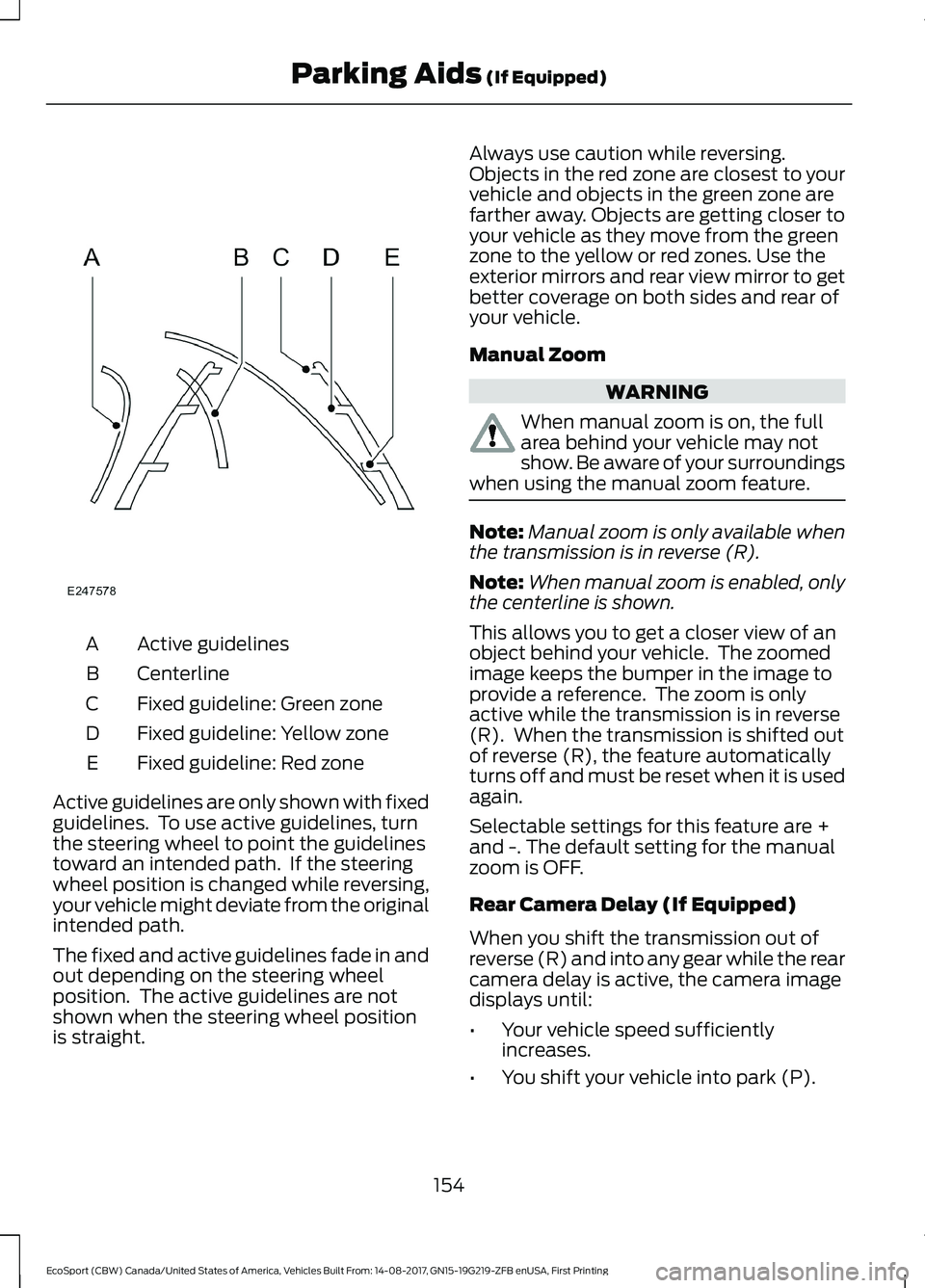
Active guidelinesA
CenterlineB
Fixed guideline: Green zoneC
Fixed guideline: Yellow zoneD
Fixed guideline: Red zoneE
Active guidelines are only shown with fixedguidelines. To use active guidelines, turnthe steering wheel to point the guidelinestoward an intended path. If the steeringwheel position is changed while reversing,your vehicle might deviate from the originalintended path.
The fixed and active guidelines fade in andout depending on the steering wheelposition. The active guidelines are notshown when the steering wheel positionis straight.
Always use caution while reversing.Objects in the red zone are closest to yourvehicle and objects in the green zone arefarther away. Objects are getting closer toyour vehicle as they move from the greenzone to the yellow or red zones. Use theexterior mirrors and rear view mirror to getbetter coverage on both sides and rear ofyour vehicle.
Manual Zoom
WARNING
When manual zoom is on, the fullarea behind your vehicle may notshow. Be aware of your surroundingswhen using the manual zoom feature.
Note:Manual zoom is only available whenthe transmission is in reverse (R).
Note:When manual zoom is enabled, onlythe centerline is shown.
This allows you to get a closer view of anobject behind your vehicle. The zoomedimage keeps the bumper in the image toprovide a reference. The zoom is onlyactive while the transmission is in reverse(R). When the transmission is shifted outof reverse (R), the feature automaticallyturns off and must be reset when it is usedagain.
Selectable settings for this feature are +and -. The default setting for the manualzoom is OFF.
Rear Camera Delay (If Equipped)
When you shift the transmission out ofreverse (R) and into any gear while the rearcamera delay is active, the camera imagedisplays until:
•Your vehicle speed sufficientlyincreases.
•You shift your vehicle into park (P).
154EcoSport (CBW) Canada/United States of America, Vehicles Built From: 14-08-2017, GN15-19G219-ZFB enUSA, First PrintingParking Aids (If Equipped)