power steering FORD ECOSPORT 2018 User Guide
[x] Cancel search | Manufacturer: FORD, Model Year: 2018, Model line: ECOSPORT, Model: FORD ECOSPORT 2018Pages: 452, PDF Size: 17.04 MB
Page 200 of 452
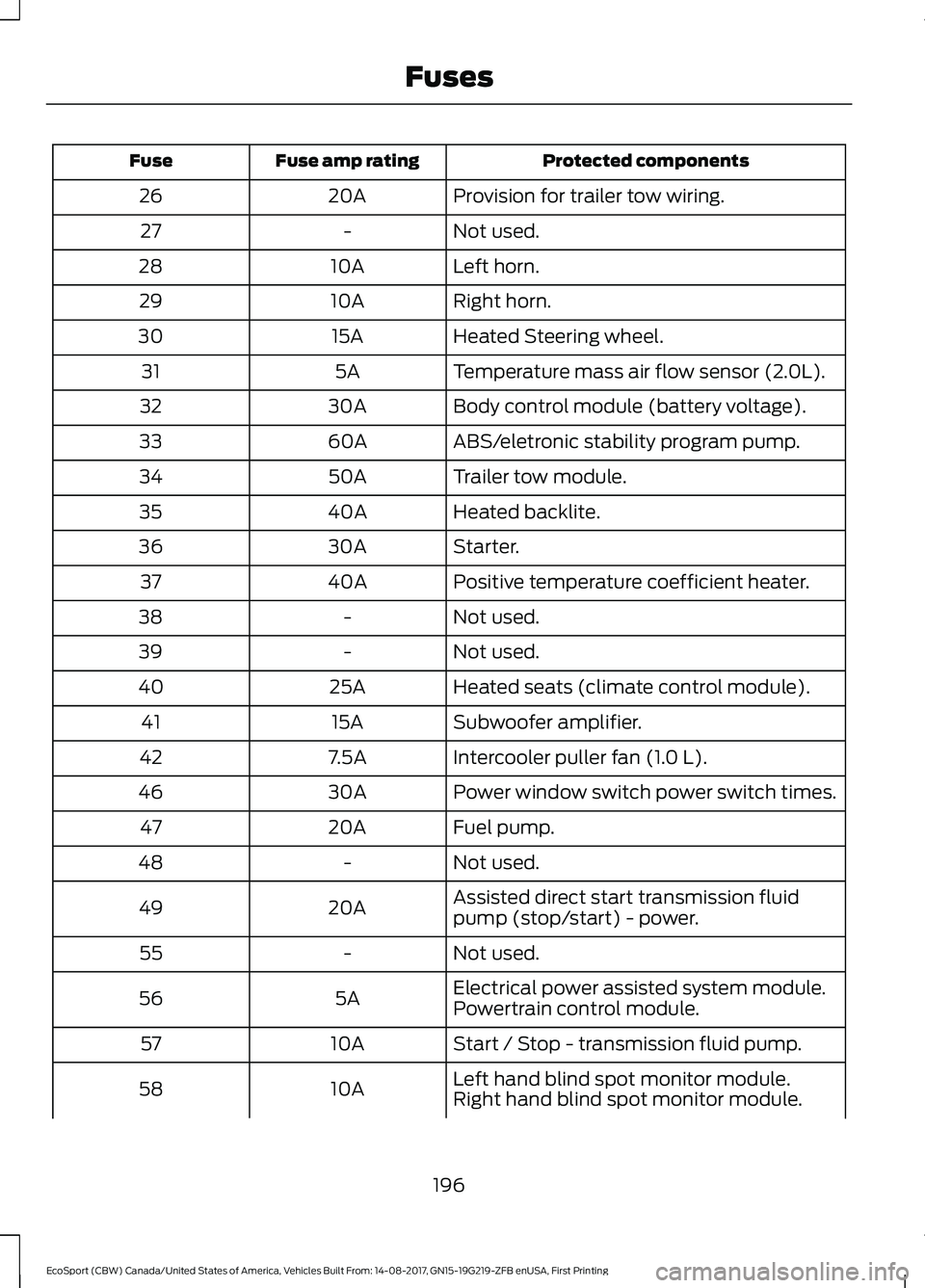
Protected componentsFuse amp ratingFuse
Provision for trailer tow wiring.20A26
Not used.-27
Left horn.10A28
Right horn.10A29
Heated Steering wheel.15A30
Temperature mass air flow sensor (2.0L).5A31
Body control module (battery voltage).30A32
ABS/eletronic stability program pump.60A33
Trailer tow module.50A34
Heated backlite.40A35
Starter.30A36
Positive temperature coefficient heater.40A37
Not used.-38
Not used.-39
Heated seats (climate control module).25A40
Subwoofer amplifier.15A41
Intercooler puller fan (1.0 L).7.5A42
Power window switch power switch times.30A46
Fuel pump.20A47
Not used.-48
Assisted direct start transmission fluidpump (stop/start) - power.20A49
Not used.-55
Electrical power assisted system module.5A56Powertrain control module.
Start / Stop - transmission fluid pump.10A57
Left hand blind spot monitor module.10A58Right hand blind spot monitor module.
196EcoSport (CBW) Canada/United States of America, Vehicles Built From: 14-08-2017, GN15-19G219-ZFB enUSA, First PrintingFuses
Page 203 of 452
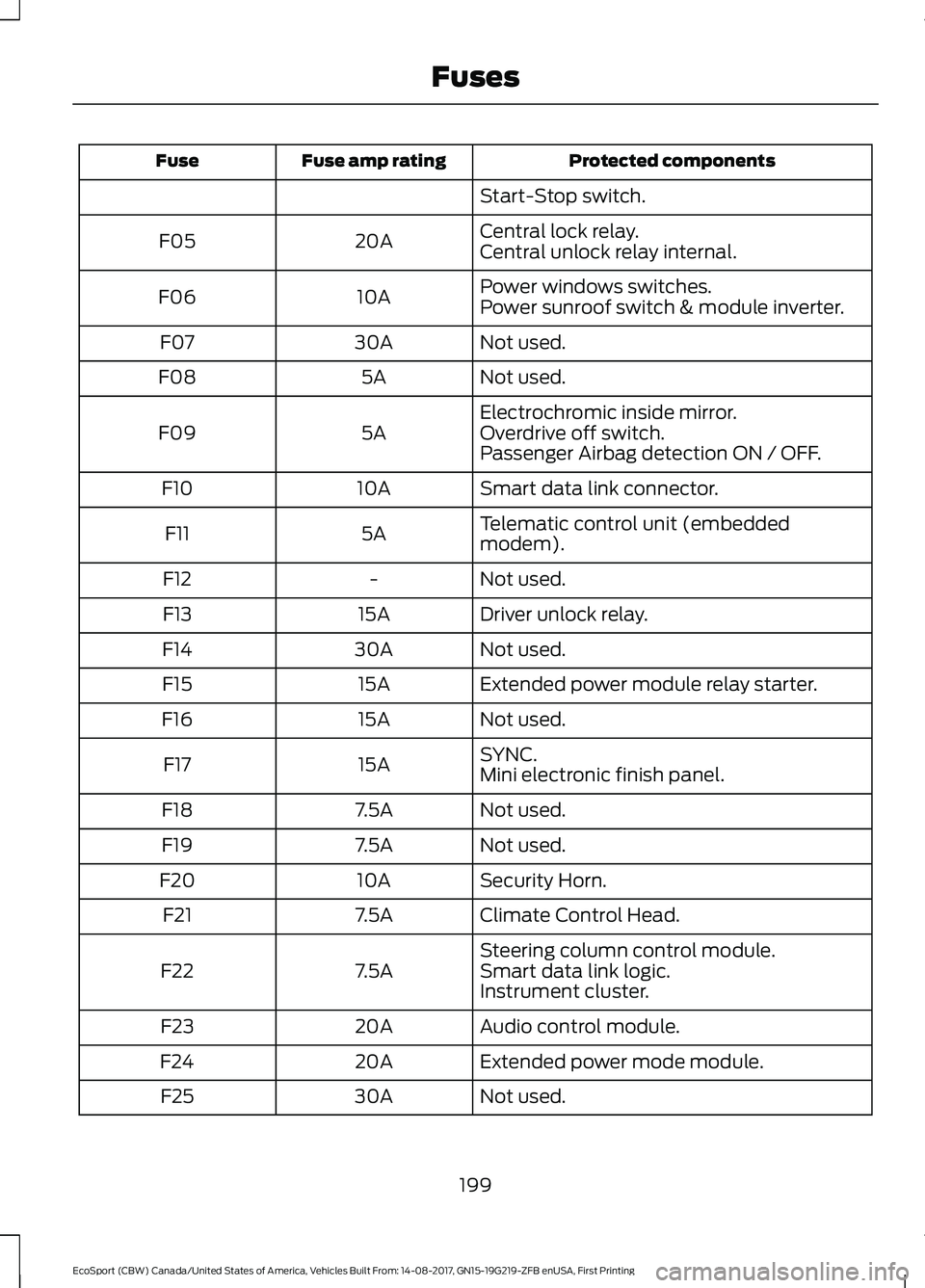
Protected componentsFuse amp ratingFuse
Start-Stop switch.
Central lock relay.20AF05Central unlock relay internal.
Power windows switches.10AF06Power sunroof switch & module inverter.
Not used.30AF07
Not used.5AF08
Electrochromic inside mirror.5AF09Overdrive off switch.Passenger Airbag detection ON / OFF.
Smart data link connector.10AF10
Telematic control unit (embeddedmodem).5AF11
Not used.-F12
Driver unlock relay.15AF13
Not used.30AF14
Extended power module relay starter.15AF15
Not used.15AF16
SYNC.15AF17Mini electronic finish panel.
Not used.7.5AF18
Not used.7.5AF19
Security Horn.10AF20
Climate Control Head.7.5AF21
Steering column control module.7.5AF22Smart data link logic.Instrument cluster.
Audio control module.20AF23
Extended power mode module.20AF24
Not used.30AF25
199EcoSport (CBW) Canada/United States of America, Vehicles Built From: 14-08-2017, GN15-19G219-ZFB enUSA, First PrintingFuses
Page 204 of 452
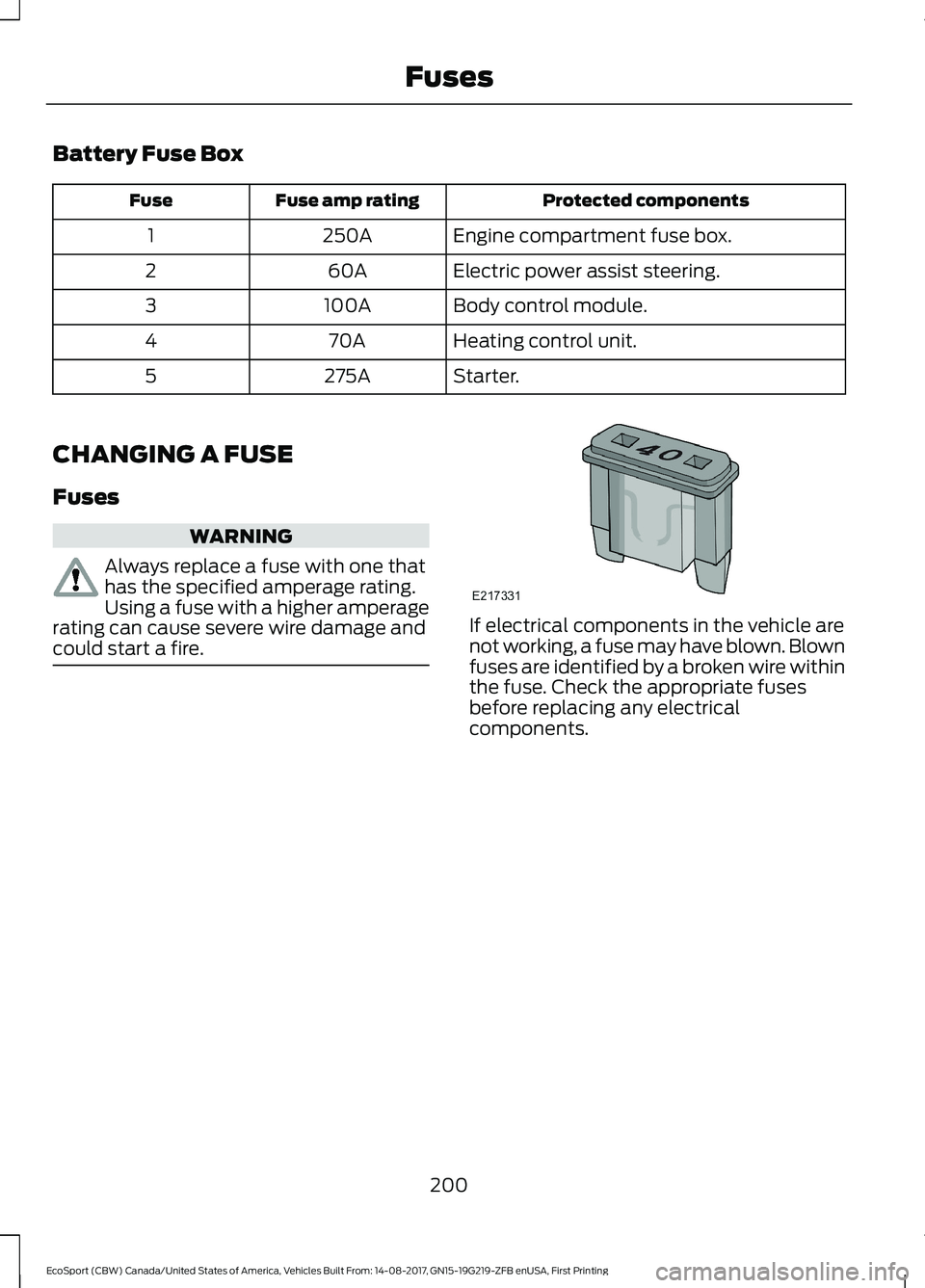
Battery Fuse Box
Protected componentsFuse amp ratingFuse
Engine compartment fuse box.250A1
Electric power assist steering.60A2
Body control module.100A3
Heating control unit.70A4
Starter.275A5
CHANGING A FUSE
Fuses
WARNING
Always replace a fuse with one thathas the specified amperage rating.Using a fuse with a higher amperagerating can cause severe wire damage andcould start a fire.If electrical components in the vehicle arenot working, a fuse may have blown. Blownfuses are identified by a broken wire withinthe fuse. Check the appropriate fusesbefore replacing any electricalcomponents.
200EcoSport (CBW) Canada/United States of America, Vehicles Built From: 14-08-2017, GN15-19G219-ZFB enUSA, First PrintingFuses
Page 214 of 452
If you drive in extremely hot climates:
•You can decrease the coolantconcentration to 40%.
•Coolant concentrations below 40%decrease the freeze and corrosionprotection characteristics of thecoolant and may cause enginedamage.
Vehicles driven year-round in non-extremeclimates should use prediluted coolant foroptimum cooling system and engineprotection.
Coolant Change
At specific mileage intervals, as listed inthe scheduled maintenance information,the coolant should be changed. Addprediluted coolant approved to the correctspecification. See Capacities andSpecifications (page 271).
Fail-Safe Cooling
Fail-safe cooling allows you to temporarilydrive your vehicle before any incrementalcomponent damage occurs. The fail-safedistance depends on ambienttemperature, vehicle load and terrain.
How Fail-Safe Cooling Works
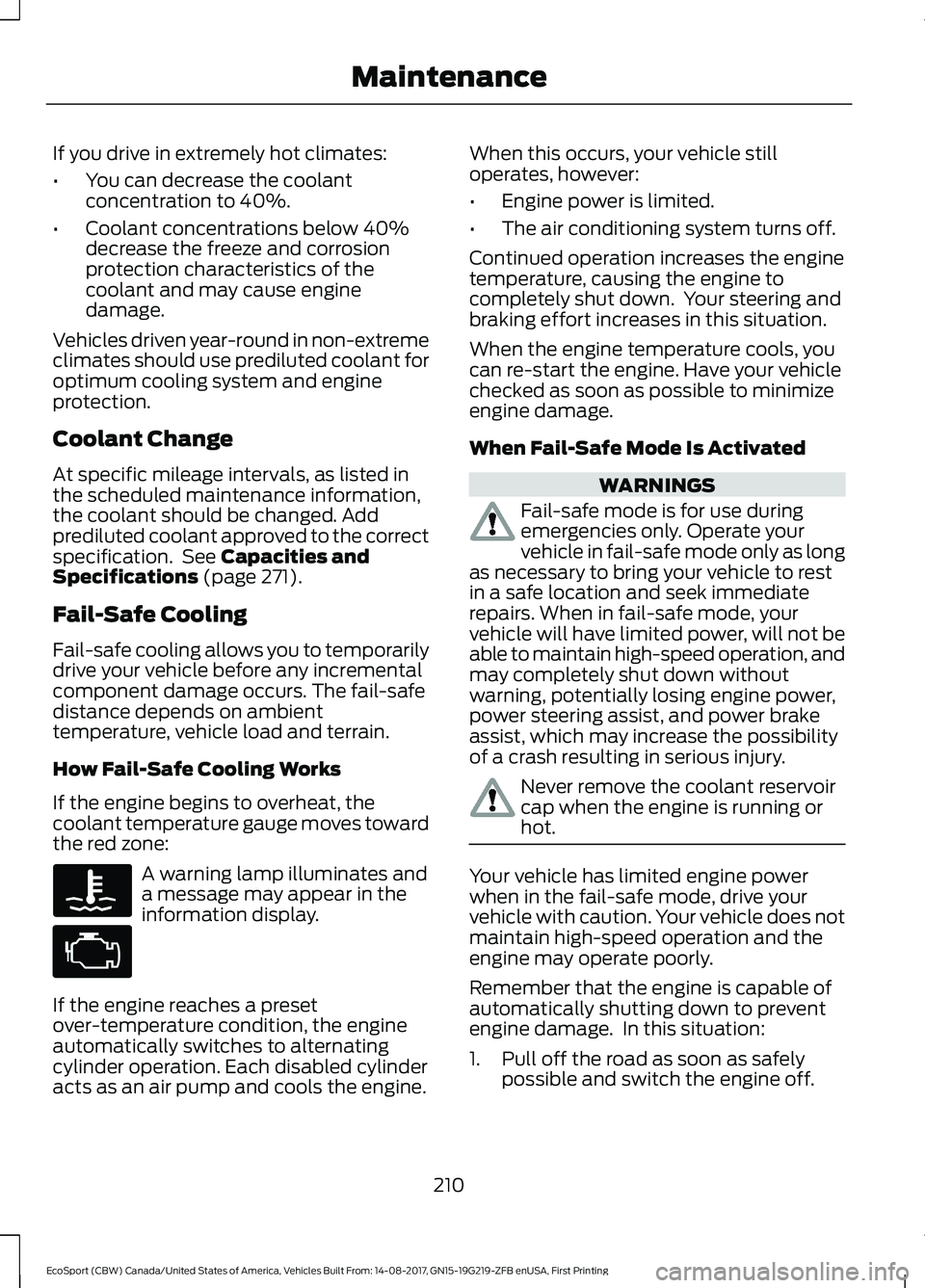
If the engine begins to overheat, thecoolant temperature gauge moves towardthe red zone:
A warning lamp illuminates anda message may appear in theinformation display.
If the engine reaches a presetover-temperature condition, the engineautomatically switches to alternatingcylinder operation. Each disabled cylinderacts as an air pump and cools the engine.
When this occurs, your vehicle stilloperates, however:
•Engine power is limited.
•The air conditioning system turns off.
Continued operation increases the enginetemperature, causing the engine tocompletely shut down. Your steering andbraking effort increases in this situation.
When the engine temperature cools, youcan re-start the engine. Have your vehiclechecked as soon as possible to minimizeengine damage.
When Fail-Safe Mode Is Activated
WARNINGS
Fail-safe mode is for use duringemergencies only. Operate yourvehicle in fail-safe mode only as longas necessary to bring your vehicle to restin a safe location and seek immediaterepairs. When in fail-safe mode, yourvehicle will have limited power, will not beable to maintain high-speed operation, andmay completely shut down withoutwarning, potentially losing engine power,power steering assist, and power brakeassist, which may increase the possibilityof a crash resulting in serious injury.
Never remove the coolant reservoircap when the engine is running orhot.
Your vehicle has limited engine powerwhen in the fail-safe mode, drive yourvehicle with caution. Your vehicle does notmaintain high-speed operation and theengine may operate poorly.
Remember that the engine is capable ofautomatically shutting down to preventengine damage. In this situation:
1.Pull off the road as soon as safelypossible and switch the engine off.
210EcoSport (CBW) Canada/United States of America, Vehicles Built From: 14-08-2017, GN15-19G219-ZFB enUSA, First PrintingMaintenance
Page 264 of 452
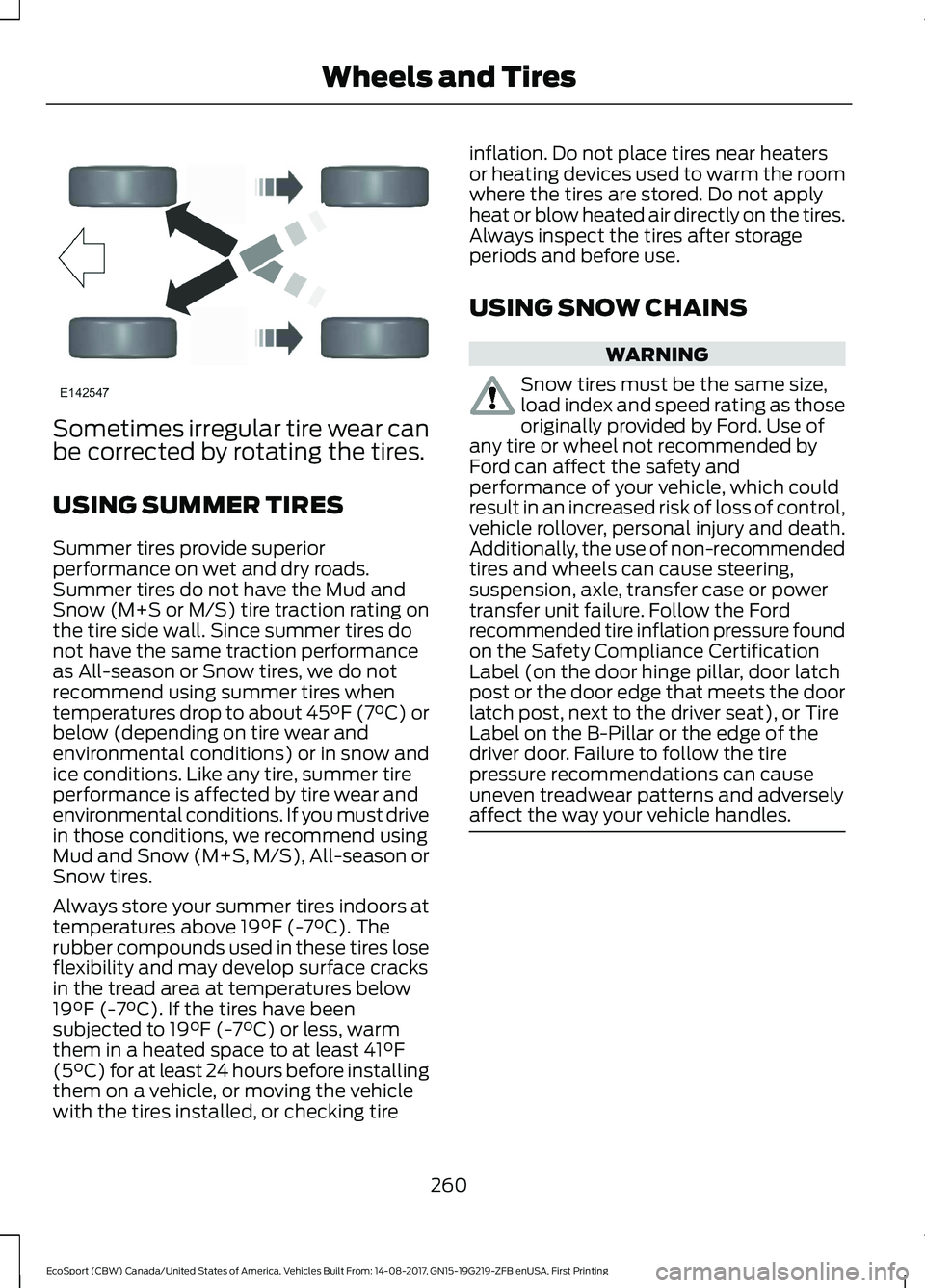
Sometimes irregular tire wear canbe corrected by rotating the tires.
USING SUMMER TIRES
Summer tires provide superiorperformance on wet and dry roads.Summer tires do not have the Mud andSnow (M+S or M/S) tire traction rating onthe tire side wall. Since summer tires donot have the same traction performanceas All-season or Snow tires, we do notrecommend using summer tires whentemperatures drop to about 45°F (7°C) orbelow (depending on tire wear andenvironmental conditions) or in snow andice conditions. Like any tire, summer tireperformance is affected by tire wear andenvironmental conditions. If you must drivein those conditions, we recommend usingMud and Snow (M+S, M/S), All-season orSnow tires.
Always store your summer tires indoors attemperatures above 19°F (-7°C). Therubber compounds used in these tires loseflexibility and may develop surface cracksin the tread area at temperatures below19°F (-7°C). If the tires have beensubjected to 19°F (-7°C) or less, warmthem in a heated space to at least 41°F(5°C) for at least 24 hours before installingthem on a vehicle, or moving the vehiclewith the tires installed, or checking tire
inflation. Do not place tires near heatersor heating devices used to warm the roomwhere the tires are stored. Do not applyheat or blow heated air directly on the tires.Always inspect the tires after storageperiods and before use.
USING SNOW CHAINS
WARNING
Snow tires must be the same size,load index and speed rating as thoseoriginally provided by Ford. Use ofany tire or wheel not recommended byFord can affect the safety andperformance of your vehicle, which couldresult in an increased risk of loss of control,vehicle rollover, personal injury and death.Additionally, the use of non-recommendedtires and wheels can cause steering,suspension, axle, transfer case or powertransfer unit failure. Follow the Fordrecommended tire inflation pressure foundon the Safety Compliance CertificationLabel (on the door hinge pillar, door latchpost or the door edge that meets the doorlatch post, next to the driver seat), or TireLabel on the B-Pillar or the edge of thedriver door. Failure to follow the tirepressure recommendations can causeuneven treadwear patterns and adverselyaffect the way your vehicle handles.
260EcoSport (CBW) Canada/United States of America, Vehicles Built From: 14-08-2017, GN15-19G219-ZFB enUSA, First PrintingWheels and Tires
Page 300 of 452
In the Event of a Crash
Not all crashes deploy an airbag or activatethe fuel pump shut-off (the triggers for 911Assist). If a connected cell phone sustainsdamage or loses its connection to SYNCduring a crash, SYNC searches for and triesto connect to a previously paired cellphone; SYNC then attempts to call theemergency services.
Before making the call:
•SYNC provides a short window of time(about 10 seconds) to cancel the call.If you fail to cancel the call, SYNCattempts to dial 911.
•SYNC says the following, or a similarmessage: "SYNC will attempt to call911, to cancel the call, press Cancel onyour screen or press and hold thephone button on your steering wheel".
If you do not cancel the call, and SYNCmakes a successful call, a pre-recordedmessage plays for the 911 operator, andthen the occupant(s) in your vehicle is ableto talk with the operator. Be prepared toprovide your name, phone number andlocation immediately, because not all 911systems are capable of receiving thisinformation electronically.
911 Assist May Not Work If
•Your cellular phone or 911 Assisthardware sustains damage in a crash.
•The vehicle's battery or the SYNCsystem has no power.
•The phone(s) thrown from your vehicleare the ones paired and connected tothe system.
911 Assist Privacy Notice
When you switch on 911 Assist, it maydisclose to emergency services that yourvehicle has been in a crash involving thedeployment of an airbag or activation ofthe fuel pump shut-off. Certain versions orupdates to 911 Assist may also be capableof electronically or verbally disclosing to911 operators your vehicle location or otherdetails about your vehicle or crash to assist911 operators to provide the mostappropriate emergency services. If you donot want to disclose this information, donot switch the feature on.
SYNC Mobile Apps
The system enables voice and steeringwheel control of SYNC AppLink enabledsmartphone apps. When an app is runningthrough AppLink, you can control mainfeatures of the app through voicecommands and steering wheel controls.
Note:You must pair and connect yoursmartphone to SYNC to access AppLink.
Note:iPhone users need to connect thephone to the USB port.
Note:Android users need to connect thephone to SYNC using Bluetooth.
Note:For information on available apps,supported smartphone devices andtroubleshooting tips please visit the Fordwebsite.
Availability of SYNC AppLink enabled Appswill vary by region.Note:Make sure you have an active accountfor the app that you have downloaded.Some apps work automatically with nosetup. Other apps want you to configureyour personal settings and personalize yourexperience by creating stations or favorites.We recommend you do this at home oroutside of your vehicle.
296EcoSport (CBW) Canada/United States of America, Vehicles Built From: 14-08-2017, GN15-19G219-ZFB enUSA, First PrintingSYNC™
Page 315 of 452
Cleaning the Touchscreen
You can remove fingerprints with a dry,clean, soft cloth.
If dirt or fingerprints are still on the screen,apply a small amount of alcohol to thecloth and try to clean it again.
Note: Do not use detergent or any type ofsolvent to clean the touchscreen.
Note:Do not pour or spray alcohol onto thetouchscreen.
Using Voice Recognition
Using voice commands allows you to keepyour hands on the wheel and eyes on theroad. The system provides feedbackthrough audible tones, prompts, questionsand spoken confirmations depending onthe situation and the chosen level ofinteraction (voice settings).
The system also asks short questions(confirmation prompts) when it is not sureof your request or when there are multiplepossible responses to your request.
When using voice commands, words andicons may appear in the status barindicating the status of the voice commandsession. See Using Voice Recognition(page 291).
Using the Steering Wheel Controls
Depending on your vehicle and optionpackage, you can use different controls onyour steering wheel to interact with thetouchscreen system in different ways.
VOL: Control the volume of audio output.
Voice: Press to start a voice session. Pressagain to stop the voice prompt andimmediately begin speaking. Press andhold to end a voice session.
SEEK NEXT:
•While in radio mode, press to seekbetween memory presets or press andhold to fast seek.
•While in USB, Bluetooth Audio or CDmode, press to seek between songs orpress and hold to fast seek.
SEEK PREVIOUS:
•While in radio mode, press to seekbetween memory presets or press andhold to fast seek.
•While in USB, Bluetooth Audio or CDmode, press to seek between songs orpress and hold to fast seek.
PHONE ACCEPT: Press to answer a callor switch between calls.
PHONE REJECT: Press to end a call orreject an incoming call.
Note:On some models,SEEK NEXT maybe combined with PHONE REJECT andSEEK PREVIOUS may be combined withPHONE ACCEPT.
See Steering Wheel (page 65).
Using Your Bezel Controls
Depending on your vehicle and optionpackage, you may also have these controlson your instrument panel:
•Power or VOL: Press to switch theaudio system on and off, or turn toadjust the volume.
•Sound Settings: Press to access theaudio settings.
•Seek: Press to seek through radiostations or audio tracks.
•Play or Pause: Press to either play orpause a track.
•Tune: Turn to manually tune radiostations.
•Display: Press to switch the display onor off.
311EcoSport (CBW) Canada/United States of America, Vehicles Built From: 14-08-2017, GN15-19G219-ZFB enUSA, First PrintingSYNC™ 3
Page 317 of 452
In the Event of a Crash
Not all crashes will deploy an airbag oractivate the fuel pump shut-off (thetriggers for 911 Assist). If a connected cellphone sustains damage or loses itsconnection to SYNC during a crash, SYNCwill search for and try to connect to apreviously paired cell phone; SYNC willthen attempt to call the emergencyservices.
Before making the call:
•SYNC provides a short window of time(about 10 seconds) to cancel the call.If you fail to cancel the call, SYNCattempts to dial 911.
•SYNC says the following, or a similarmessage: "SYNC will attempt to call911, to cancel the call, press Cancel onyour screen or press and hold thephone button on your steering wheel."
If you do not cancel the call, and SYNCmakes a successful call, a pre-recordedmessage plays for the 911 operator, andthen the occupant(s) in your vehicle is ableto talk with the operator. Be prepared toprovide your name, phone number andlocation immediately, because not all 911systems are capable of receiving thisinformation electronically.
911 Assist May Not Work If
•Your cellular phone or 911 Assisthardware sustains damage in a crash.
•The vehicle's battery or the SYNCsystem has no power.
•The phone(s) thrown from your vehicleare the ones paired and connected tothe system.
911 Assist Privacy Notice
When you switch on 911 Assist, it maydisclose to emergency services that yourvehicle has been in a crash involving thedeployment of an airbag or activation ofthe fuel pump shut-off. Certain versions orupdates to 911 Assist may also be capableof electronically or verbally disclosing to911 operators your vehicle location or otherdetails about your vehicle or crash to assist911 operators to provide the mostappropriate emergency services. If you donot want to disclose this information, donot switch the feature on.
Safety Information
WARNING
Driving while distracted can result inloss of vehicle control, crash andinjury. We strongly recommend thatyou use extreme caution when using anydevice that may take your focus off theroad. Your primary responsibility is the safeoperation of your vehicle. We recommendagainst the use of any hand-held devicewhile driving and encourage the use ofvoice-operated systems when possible.Make sure you are aware of all applicablelocal laws that may affect the use ofelectronic devices while driving.
•Do not attempt to service or repair thesystem. Have an authorized dealercheck your vehicle.
•Do not operate playing devices if thepower cords or cables are broken, splitor damaged. Place cords and cablesout of the way, so they do not interferewith the operation of pedals, seats,compartments or safe driving abilities.
313EcoSport (CBW) Canada/United States of America, Vehicles Built From: 14-08-2017, GN15-19G219-ZFB enUSA, First PrintingSYNC™ 3
Page 444 of 452
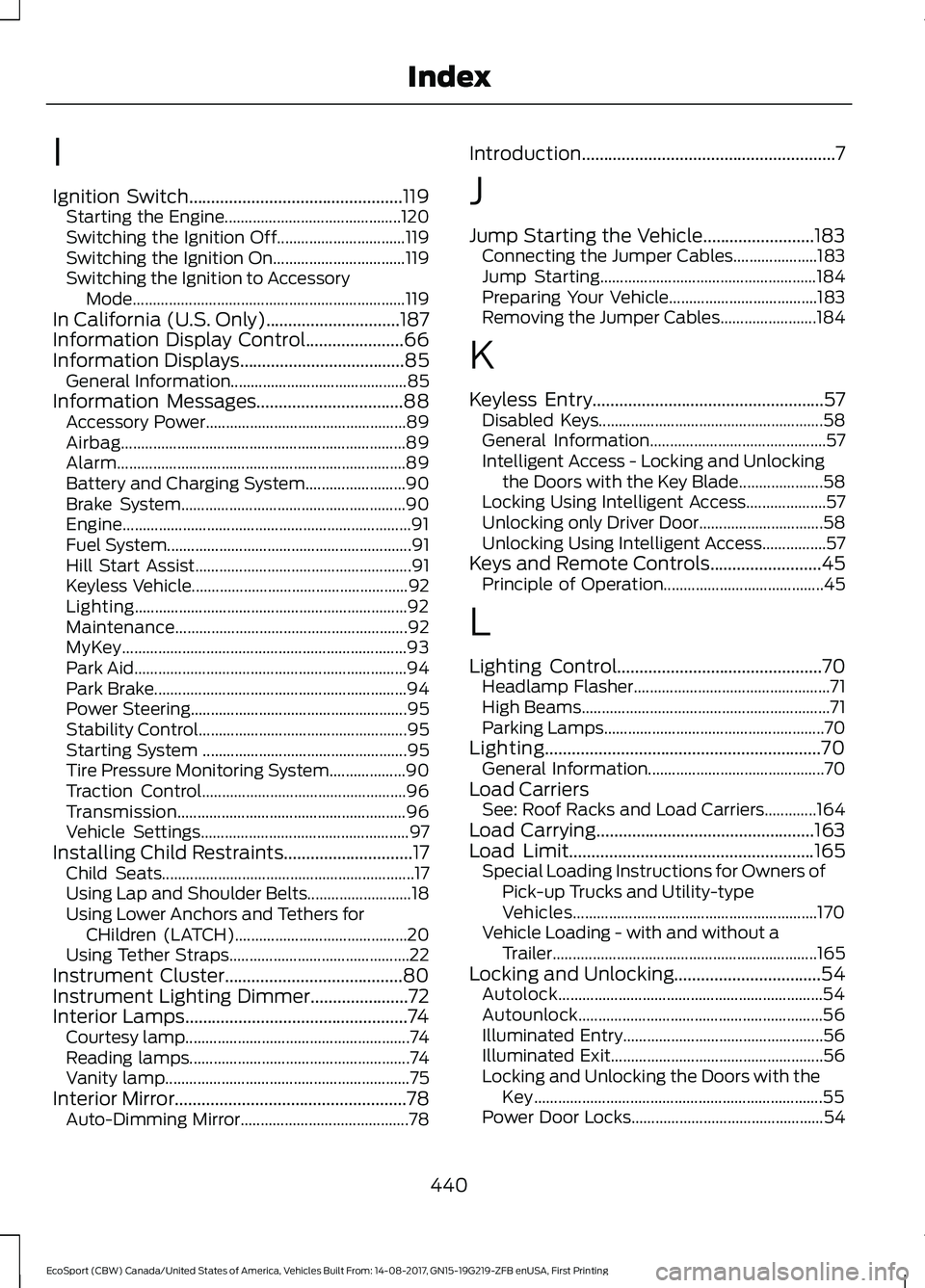
I
Ignition Switch................................................119Starting the Engine............................................120Switching the Ignition Off................................119Switching the Ignition On.................................119Switching the Ignition to AccessoryMode....................................................................119In California (U.S. Only)..............................187Information Display Control......................66Information Displays.....................................85General Information............................................85Information Messages.................................88Accessory Power..................................................89Airbag.......................................................................89Alarm........................................................................89Battery and Charging System.........................90Brake System........................................................90Engine........................................................................91Fuel System.............................................................91Hill Start Assist......................................................91Keyless Vehicle......................................................92Lighting....................................................................92Maintenance..........................................................92MyKey.......................................................................93Park Aid....................................................................94Park Brake...............................................................94Power Steering......................................................95Stability Control....................................................95Starting System ...................................................95Tire Pressure Monitoring System...................90Traction Control...................................................96Transmission.........................................................96Vehicle Settings....................................................97Installing Child Restraints.............................17Child Seats...............................................................17Using Lap and Shoulder Belts..........................18Using Lower Anchors and Tethers forCHildren (LATCH)...........................................20Using Tether Straps.............................................22Instrument Cluster........................................80Instrument Lighting Dimmer......................72Interior Lamps..................................................74Courtesy lamp........................................................74Reading lamps.......................................................74Vanity lamp.............................................................75Interior Mirror....................................................78Auto-Dimming Mirror..........................................78
Introduction.........................................................7
J
Jump Starting the Vehicle.........................183Connecting the Jumper Cables.....................183Jump Starting......................................................184Preparing Your Vehicle.....................................183Removing the Jumper Cables........................184
K
Keyless Entry....................................................57Disabled Keys........................................................58General Information............................................57Intelligent Access - Locking and Unlockingthe Doors with the Key Blade.....................58Locking Using Intelligent Access....................57Unlocking only Driver Door...............................58Unlocking Using Intelligent Access................57Keys and Remote Controls.........................45Principle of Operation........................................45
L
Lighting Control..............................................70Headlamp Flasher.................................................71High Beams..............................................................71Parking Lamps.......................................................70Lighting..............................................................70General Information............................................70Load CarriersSee: Roof Racks and Load Carriers.............164Load Carrying.................................................163Load Limit.......................................................165Special Loading Instructions for Owners ofPick-up Trucks and Utility-typeVehicles.............................................................170Vehicle Loading - with and without aTrailer..................................................................165Locking and Unlocking.................................54Autolock..................................................................54Autounlock.............................................................56Illuminated Entry..................................................56Illuminated Exit.....................................................56Locking and Unlocking the Doors with theKey........................................................................55Power Door Locks................................................54
440EcoSport (CBW) Canada/United States of America, Vehicles Built From: 14-08-2017, GN15-19G219-ZFB enUSA, First PrintingIndex
Page 447 of 452
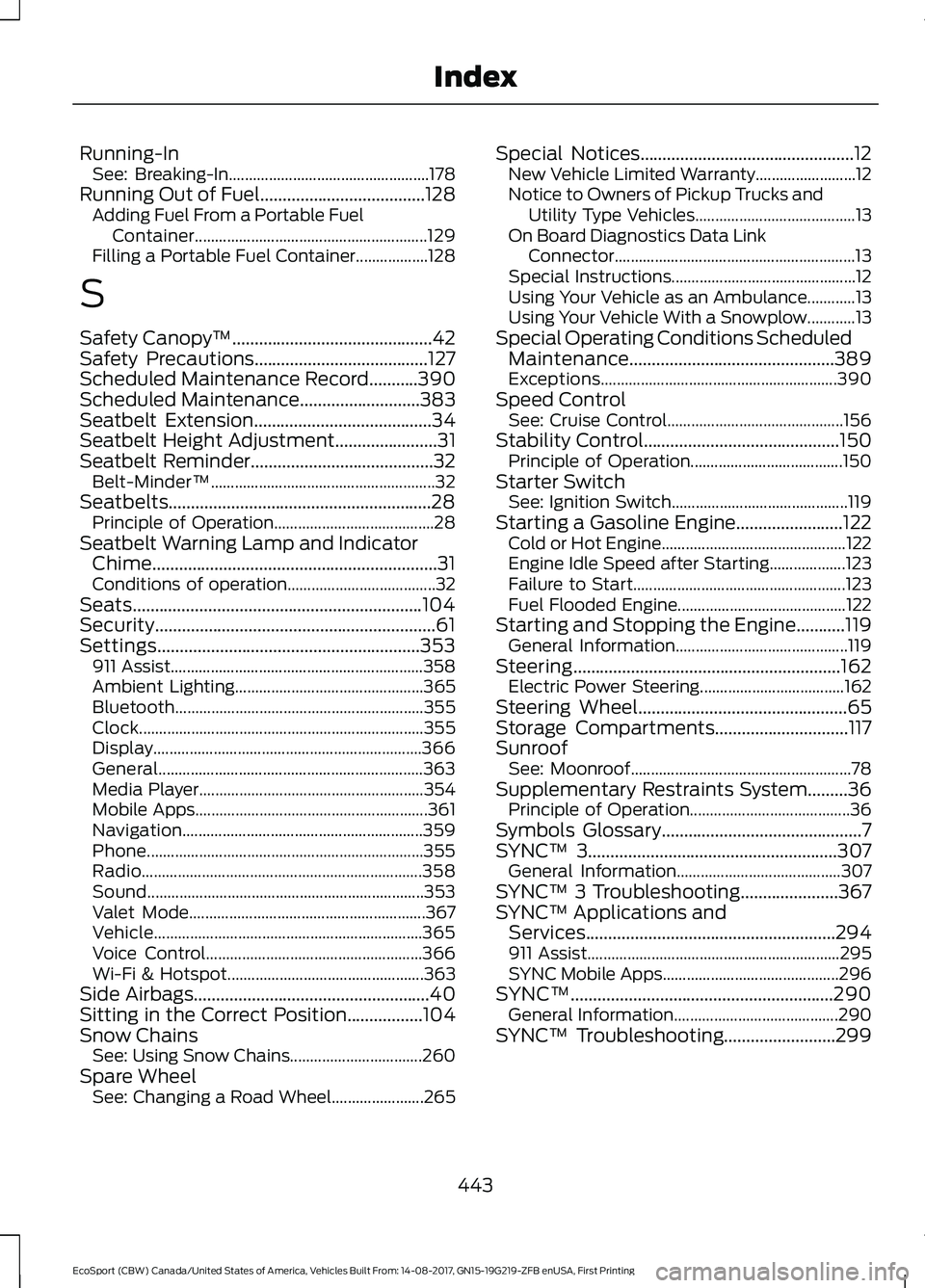
Running-InSee: Breaking-In..................................................178Running Out of Fuel.....................................128Adding Fuel From a Portable FuelContainer..........................................................129Filling a Portable Fuel Container..................128
S
Safety Canopy™.............................................42Safety Precautions.......................................127Scheduled Maintenance Record...........390Scheduled Maintenance...........................383Seatbelt Extension........................................34Seatbelt Height Adjustment.......................31Seatbelt Reminder.........................................32Belt-Minder™........................................................32Seatbelts...........................................................28Principle of Operation........................................28Seatbelt Warning Lamp and IndicatorChime................................................................31Conditions of operation.....................................32Seats.................................................................104Security...............................................................61Settings...........................................................353911 Assist...............................................................358Ambient Lighting...............................................365Bluetooth..............................................................355Clock.......................................................................355Display...................................................................366General..................................................................363Media Player........................................................354Mobile Apps..........................................................361Navigation............................................................359Phone.....................................................................355Radio......................................................................358Sound.....................................................................353Valet Mode...........................................................367Vehicle...................................................................365Voice Control......................................................366Wi-Fi & Hotspot.................................................363Side Airbags.....................................................40Sitting in the Correct Position.................104Snow ChainsSee: Using Snow Chains.................................260Spare WheelSee: Changing a Road Wheel.......................265
Special Notices................................................12New Vehicle Limited Warranty.........................12Notice to Owners of Pickup Trucks andUtility Type Vehicles........................................13On Board Diagnostics Data LinkConnector............................................................13Special Instructions..............................................12Using Your Vehicle as an Ambulance............13Using Your Vehicle With a Snowplow............13Special Operating Conditions ScheduledMaintenance..............................................389Exceptions...........................................................390Speed ControlSee: Cruise Control............................................156Stability Control............................................150Principle of Operation......................................150Starter SwitchSee: Ignition Switch............................................119Starting a Gasoline Engine........................122Cold or Hot Engine..............................................122Engine Idle Speed after Starting...................123Failure to Start.....................................................123Fuel Flooded Engine..........................................122Starting and Stopping the Engine...........119General Information...........................................119Steering............................................................162Electric Power Steering....................................162Steering Wheel...............................................65Storage Compartments..............................117SunroofSee: Moonroof.......................................................78Supplementary Restraints System.........36Principle of Operation........................................36Symbols Glossary.............................................7SYNC™ 3........................................................307General Information.........................................307SYNC™ 3 Troubleshooting......................367SYNC™ Applications andServices........................................................294911 Assist...............................................................295SYNC Mobile Apps............................................296SYNC™...........................................................290General Information.........................................290SYNC™ Troubleshooting.........................299
443EcoSport (CBW) Canada/United States of America, Vehicles Built From: 14-08-2017, GN15-19G219-ZFB enUSA, First PrintingIndex