USB FORD ECOSPORT 2018 Owner's Guide
[x] Cancel search | Manufacturer: FORD, Model Year: 2018, Model line: ECOSPORT, Model: FORD ECOSPORT 2018Pages: 452, PDF Size: 17.04 MB
Page 379 of 452
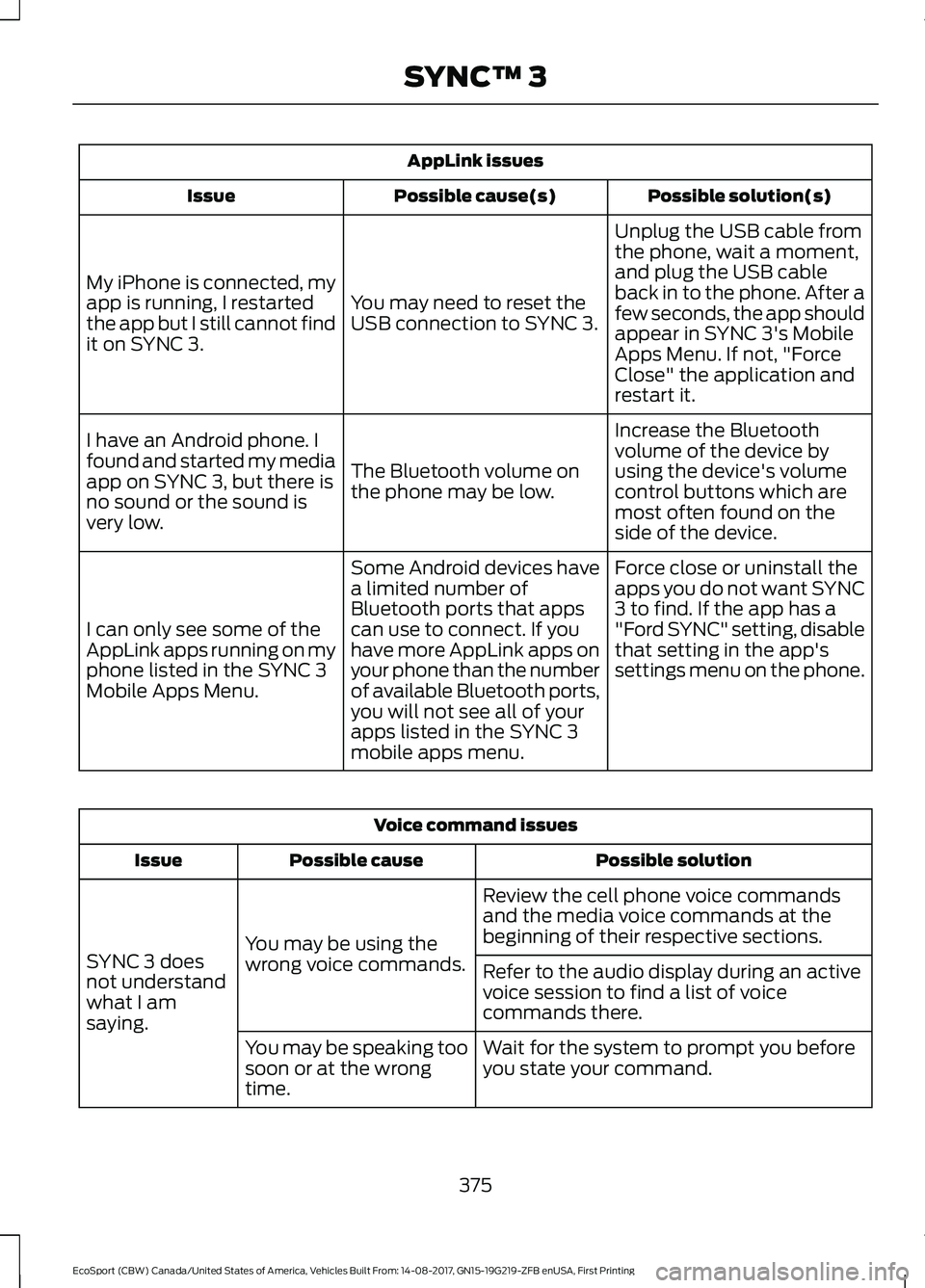
AppLink issues
Possible solution(s)Possible cause(s)Issue
Unplug the USB cable fromthe phone, wait a moment,and plug the USB cableback in to the phone. After afew seconds, the app shouldappear in SYNC 3's MobileApps Menu. If not, "ForceClose" the application andrestart it.
You may need to reset theUSB connection to SYNC 3.
My iPhone is connected, myapp is running, I restartedthe app but I still cannot findit on SYNC 3.
Increase the Bluetoothvolume of the device byusing the device's volumecontrol buttons which aremost often found on theside of the device.
The Bluetooth volume onthe phone may be low.
I have an Android phone. Ifound and started my mediaapp on SYNC 3, but there isno sound or the sound isvery low.
Force close or uninstall theapps you do not want SYNC3 to find. If the app has a"Ford SYNC" setting, disablethat setting in the app'ssettings menu on the phone.
Some Android devices havea limited number ofBluetooth ports that appscan use to connect. If youhave more AppLink apps onyour phone than the numberof available Bluetooth ports,you will not see all of yourapps listed in the SYNC 3mobile apps menu.
I can only see some of theAppLink apps running on myphone listed in the SYNC 3Mobile Apps Menu.
Voice command issues
Possible solutionPossible causeIssue
Review the cell phone voice commandsand the media voice commands at thebeginning of their respective sections.You may be using thewrong voice commands.SYNC 3 doesnot understandwhat I amsaying.
Refer to the audio display during an activevoice session to find a list of voicecommands there.
Wait for the system to prompt you beforeyou state your command.You may be speaking toosoon or at the wrongtime.
375EcoSport (CBW) Canada/United States of America, Vehicles Built From: 14-08-2017, GN15-19G219-ZFB enUSA, First PrintingSYNC™ 3
Page 381 of 452
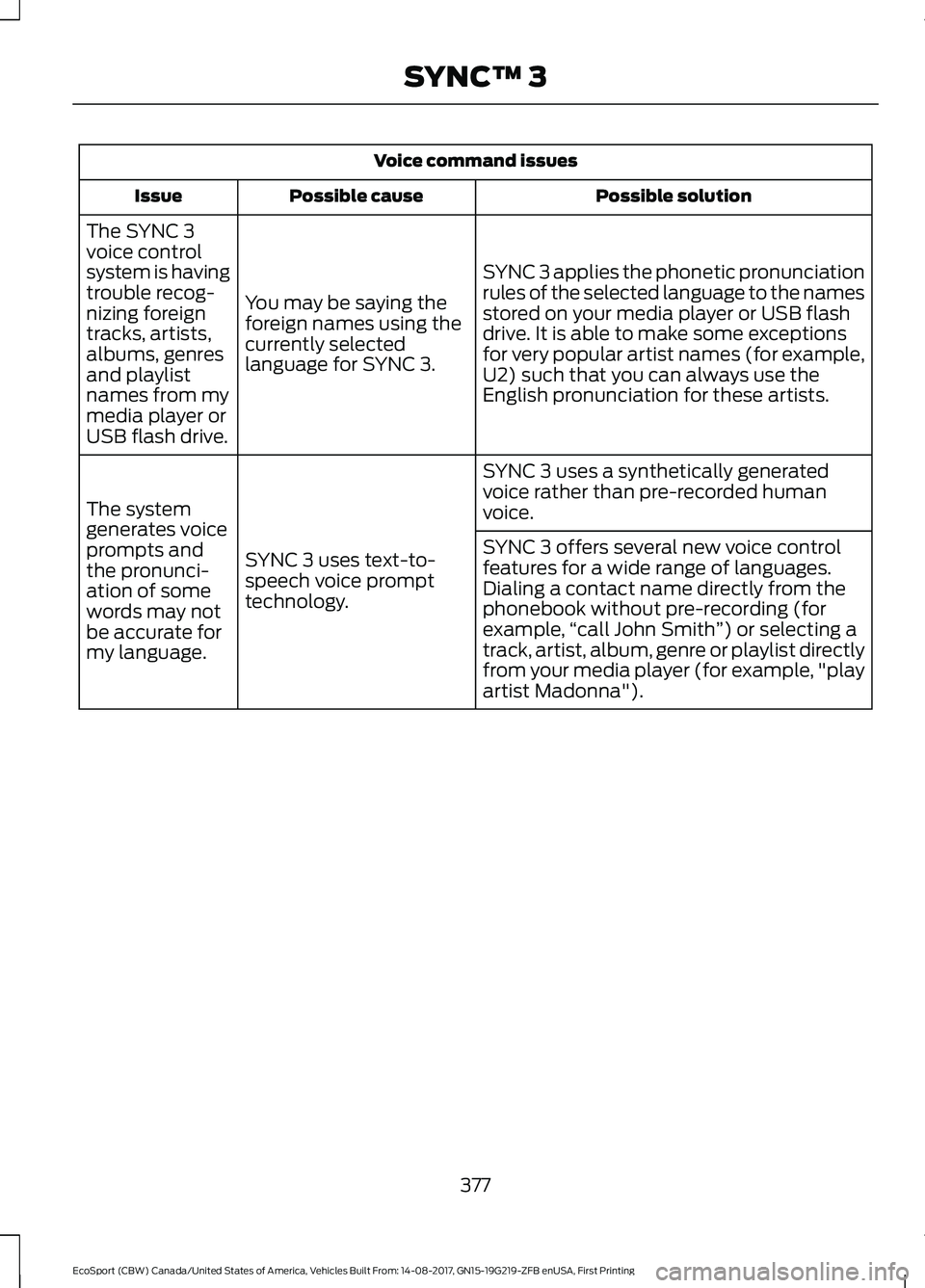
Voice command issues
Possible solutionPossible causeIssue
SYNC 3 applies the phonetic pronunciationrules of the selected language to the namesstored on your media player or USB flashdrive. It is able to make some exceptionsfor very popular artist names (for example,U2) such that you can always use theEnglish pronunciation for these artists.
You may be saying theforeign names using thecurrently selectedlanguage for SYNC 3.
The SYNC 3voice controlsystem is havingtrouble recog-nizing foreigntracks, artists,albums, genresand playlistnames from mymedia player orUSB flash drive.
SYNC 3 uses a synthetically generatedvoice rather than pre-recorded humanvoice.
SYNC 3 uses text-to-speech voice prompttechnology.
The systemgenerates voiceprompts andthe pronunci-ation of somewords may notbe accurate formy language.
SYNC 3 offers several new voice controlfeatures for a wide range of languages.Dialing a contact name directly from thephonebook without pre-recording (forexample,“call John Smith”) or selecting atrack, artist, album, genre or playlist directlyfrom your media player (for example, "playartist Madonna").
377EcoSport (CBW) Canada/United States of America, Vehicles Built From: 14-08-2017, GN15-19G219-ZFB enUSA, First PrintingSYNC™ 3
Page 382 of 452
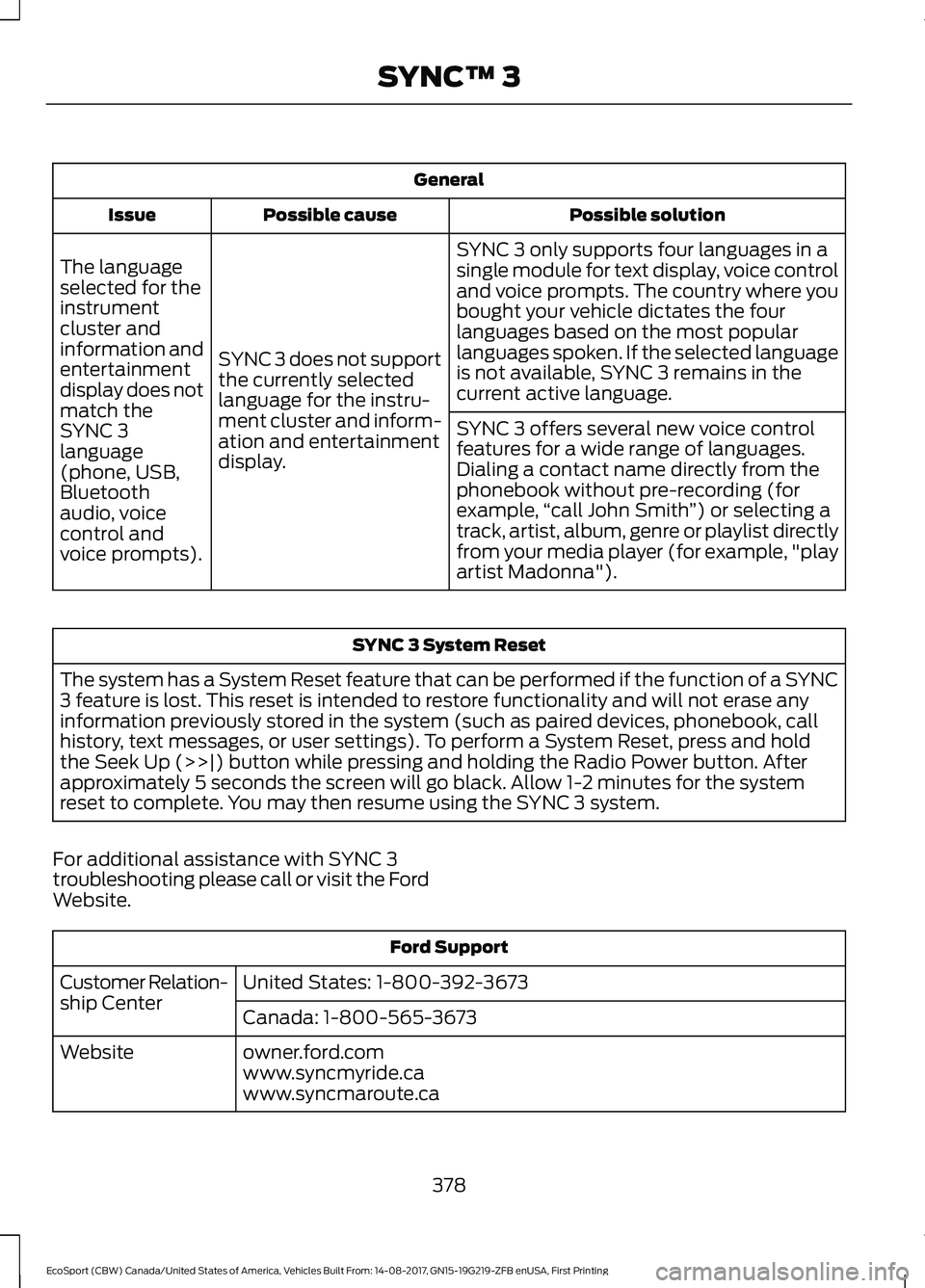
General
Possible solutionPossible causeIssue
SYNC 3 only supports four languages in asingle module for text display, voice controland voice prompts. The country where youbought your vehicle dictates the fourlanguages based on the most popularlanguages spoken. If the selected languageis not available, SYNC 3 remains in thecurrent active language.
SYNC 3 does not supportthe currently selectedlanguage for the instru-ment cluster and inform-ation and entertainmentdisplay.
The languageselected for theinstrumentcluster andinformation andentertainmentdisplay does notmatch theSYNC 3SYNC 3 offers several new voice controlfeatures for a wide range of languages.Dialing a contact name directly from thephonebook without pre-recording (forexample,“call John Smith”) or selecting atrack, artist, album, genre or playlist directlyfrom your media player (for example, "playartist Madonna").
language(phone, USB,Bluetoothaudio, voicecontrol andvoice prompts).
SYNC 3 System Reset
The system has a System Reset feature that can be performed if the function of a SYNC3 feature is lost. This reset is intended to restore functionality and will not erase anyinformation previously stored in the system (such as paired devices, phonebook, callhistory, text messages, or user settings). To perform a System Reset, press and holdthe Seek Up (>>|) button while pressing and holding the Radio Power button. Afterapproximately 5 seconds the screen will go black. Allow 1-2 minutes for the systemreset to complete. You may then resume using the SYNC 3 system.
For additional assistance with SYNC 3troubleshooting please call or visit the FordWebsite.
Ford Support
United States: 1-800-392-3673Customer Relation-ship CenterCanada: 1-800-565-3673
owner.ford.comWebsitewww.syncmyride.cawww.syncmaroute.ca
378EcoSport (CBW) Canada/United States of America, Vehicles Built From: 14-08-2017, GN15-19G219-ZFB enUSA, First PrintingSYNC™ 3
Page 442 of 452
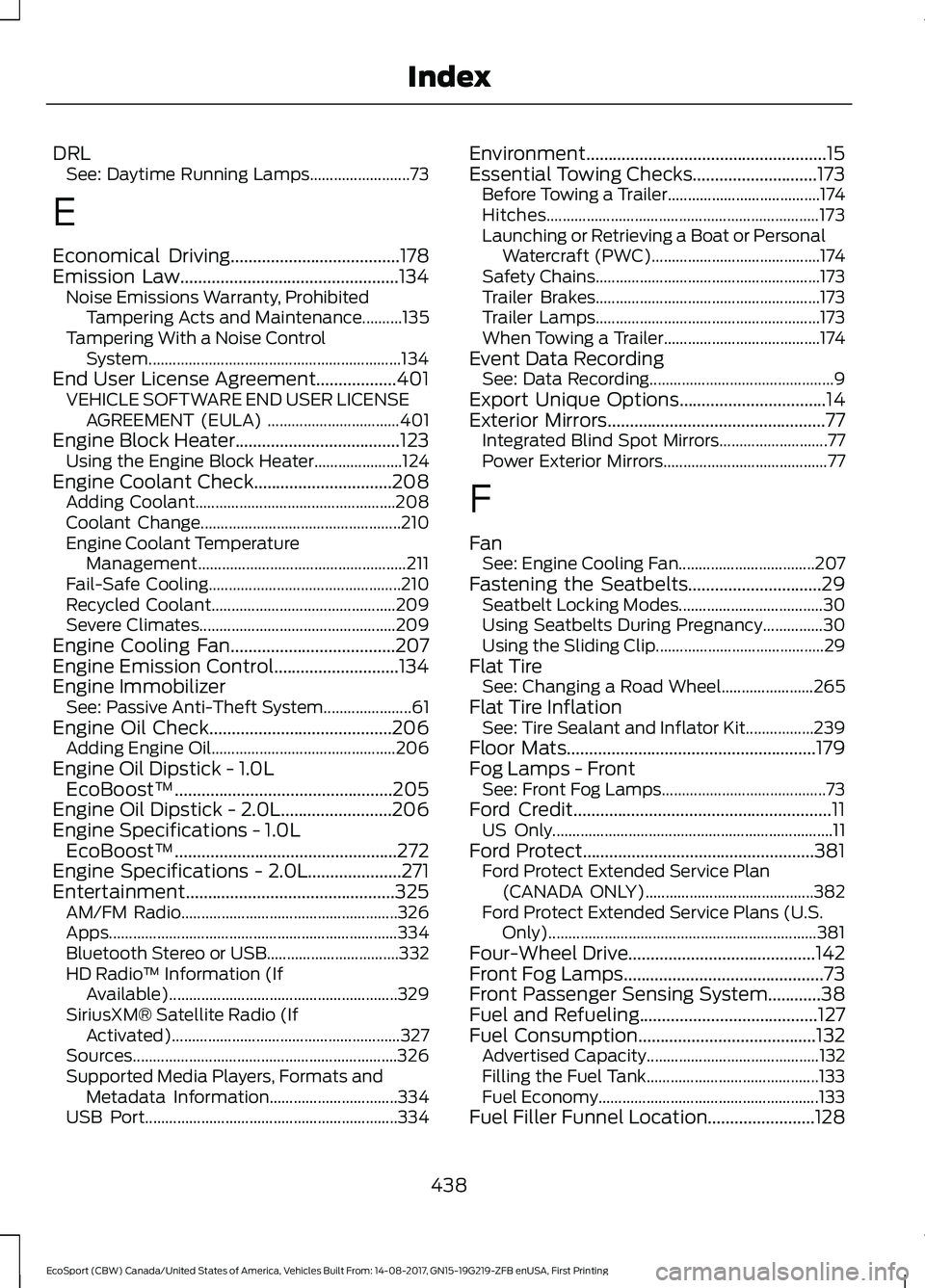
DRLSee: Daytime Running Lamps.........................73
E
Economical Driving......................................178Emission Law.................................................134Noise Emissions Warranty, ProhibitedTampering Acts and Maintenance..........135Tampering With a Noise ControlSystem...............................................................134End User License Agreement..................401VEHICLE SOFTWARE END USER LICENSEAGREEMENT (EULA) .................................401Engine Block Heater.....................................123Using the Engine Block Heater......................124Engine Coolant Check...............................208Adding Coolant..................................................208Coolant Change..................................................210Engine Coolant TemperatureManagement....................................................211Fail-Safe Cooling................................................210Recycled Coolant..............................................209Severe Climates.................................................209Engine Cooling Fan.....................................207Engine Emission Control............................134Engine ImmobilizerSee: Passive Anti-Theft System......................61Engine Oil Check.........................................206Adding Engine Oil..............................................206Engine Oil Dipstick - 1.0LEcoBoost™.................................................205Engine Oil Dipstick - 2.0L.........................206Engine Specifications - 1.0LEcoBoost™..................................................272Engine Specifications - 2.0L.....................271Entertainment...............................................325AM/FM Radio......................................................326Apps........................................................................334Bluetooth Stereo or USB.................................332HD Radio™ Information (IfAvailable).........................................................329SiriusXM® Satellite Radio (IfActivated).........................................................327Sources..................................................................326Supported Media Players, Formats andMetadata Information................................334USB Port...............................................................334
Environment......................................................15Essential Towing Checks............................173Before Towing a Trailer......................................174Hitches....................................................................173Launching or Retrieving a Boat or PersonalWatercraft (PWC)..........................................174Safety Chains........................................................173Trailer Brakes........................................................173Trailer Lamps........................................................173When Towing a Trailer.......................................174Event Data RecordingSee: Data Recording..............................................9Export Unique Options.................................14Exterior Mirrors.................................................77Integrated Blind Spot Mirrors...........................77Power Exterior Mirrors.........................................77
F
FanSee: Engine Cooling Fan..................................207Fastening the Seatbelts..............................29Seatbelt Locking Modes....................................30Using Seatbelts During Pregnancy...............30Using the Sliding Clip..........................................29Flat TireSee: Changing a Road Wheel.......................265Flat Tire InflationSee: Tire Sealant and Inflator Kit.................239Floor Mats........................................................179Fog Lamps - FrontSee: Front Fog Lamps.........................................73Ford Credit..........................................................11US Only......................................................................11Ford Protect....................................................381Ford Protect Extended Service Plan(CANADA ONLY)..........................................382Ford Protect Extended Service Plans (U.S.Only)...................................................................381Four-Wheel Drive..........................................142Front Fog Lamps.............................................73Front Passenger Sensing System............38Fuel and Refueling........................................127Fuel Consumption........................................132Advertised Capacity...........................................132Filling the Fuel Tank...........................................133Fuel Economy.......................................................133Fuel Filler Funnel Location........................128
438EcoSport (CBW) Canada/United States of America, Vehicles Built From: 14-08-2017, GN15-19G219-ZFB enUSA, First PrintingIndex
Page 448 of 452
T
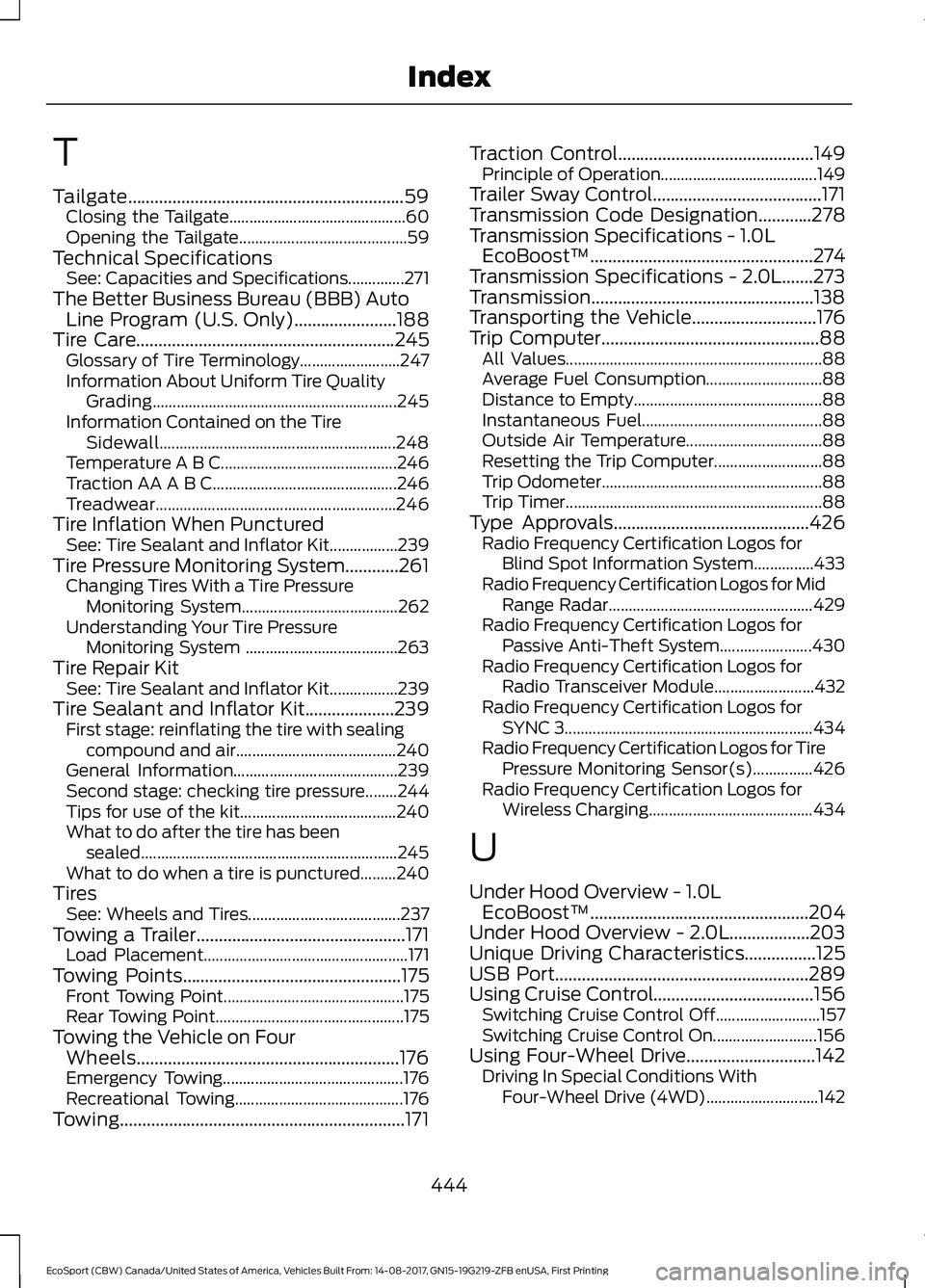
Tailgate..............................................................59Closing the Tailgate............................................60Opening the Tailgate..........................................59Technical SpecificationsSee: Capacities and Specifications..............271The Better Business Bureau (BBB) AutoLine Program (U.S. Only).......................188Tire Care..........................................................245Glossary of Tire Terminology.........................247Information About Uniform Tire QualityGrading.............................................................245Information Contained on the TireSidewall...........................................................248Temperature A B C............................................246Traction AA A B C..............................................246Treadwear............................................................246Tire Inflation When PuncturedSee: Tire Sealant and Inflator Kit.................239Tire Pressure Monitoring System............261Changing Tires With a Tire PressureMonitoring System.......................................262Understanding Your Tire PressureMonitoring System ......................................263Tire Repair KitSee: Tire Sealant and Inflator Kit.................239Tire Sealant and Inflator Kit....................239First stage: reinflating the tire with sealingcompound and air........................................240General Information.........................................239Second stage: checking tire pressure........244Tips for use of the kit.......................................240What to do after the tire has beensealed................................................................245What to do when a tire is punctured.........240TiresSee: Wheels and Tires......................................237Towing a Trailer...............................................171Load Placement...................................................171Towing Points.................................................175Front Towing Point.............................................175Rear Towing Point...............................................175Towing the Vehicle on FourWheels...........................................................176Emergency Towing.............................................176Recreational Towing..........................................176Towing................................................................171
Traction Control............................................149Principle of Operation.......................................149Trailer Sway Control......................................171Transmission Code Designation............278Transmission Specifications - 1.0LEcoBoost™..................................................274Transmission Specifications - 2.0L.......273Transmission..................................................138Transporting the Vehicle............................176Trip Computer.................................................88All Values................................................................88Average Fuel Consumption.............................88Distance to Empty...............................................88Instantaneous Fuel.............................................88Outside Air Temperature..................................88Resetting the Trip Computer...........................88Trip Odometer.......................................................88Trip Timer................................................................88Type Approvals............................................426Radio Frequency Certification Logos forBlind Spot Information System...............433Radio Frequency Certification Logos for MidRange Radar...................................................429Radio Frequency Certification Logos forPassive Anti-Theft System.......................430Radio Frequency Certification Logos forRadio Transceiver Module.........................432Radio Frequency Certification Logos forSYNC 3..............................................................434Radio Frequency Certification Logos for TirePressure Monitoring Sensor(s)...............426Radio Frequency Certification Logos forWireless Charging.........................................434
U
Under Hood Overview - 1.0LEcoBoost™.................................................204Under Hood Overview - 2.0L..................203Unique Driving Characteristics................125USB Port.........................................................289Using Cruise Control....................................156Switching Cruise Control Off..........................157Switching Cruise Control On..........................156Using Four-Wheel Drive.............................142Driving In Special Conditions WithFour-Wheel Drive (4WD)............................142
444EcoSport (CBW) Canada/United States of America, Vehicles Built From: 14-08-2017, GN15-19G219-ZFB enUSA, First PrintingIndex