lock FORD ECOSPORT 2020 Owners Manual
[x] Cancel search | Manufacturer: FORD, Model Year: 2020, Model line: ECOSPORT, Model: FORD ECOSPORT 2020Pages: 448, PDF Size: 16.57 MB
Page 359 of 448
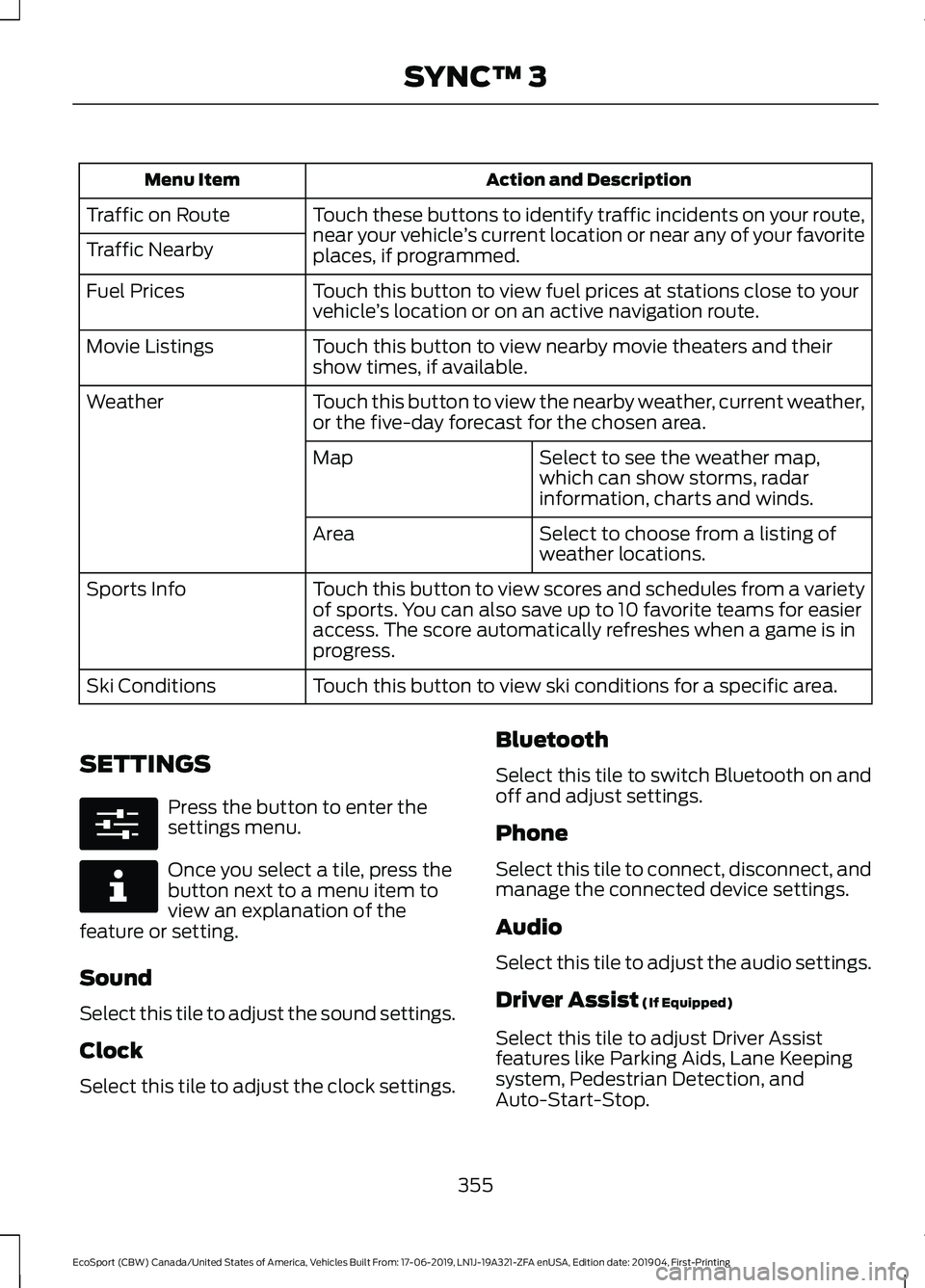
Action and DescriptionMenu Item
Touch these buttons to identify traffic incidents on your route,near your vehicle’s current location or near any of your favoriteplaces, if programmed.
Traffic on Route
Traffic Nearby
Touch this button to view fuel prices at stations close to yourvehicle’s location or on an active navigation route.Fuel Prices
Touch this button to view nearby movie theaters and theirshow times, if available.Movie Listings
Touch this button to view the nearby weather, current weather,or the five-day forecast for the chosen area.Weather
Select to see the weather map,which can show storms, radarinformation, charts and winds.
Map
Select to choose from a listing ofweather locations.Area
Touch this button to view scores and schedules from a varietyof sports. You can also save up to 10 favorite teams for easieraccess. The score automatically refreshes when a game is inprogress.
Sports Info
Touch this button to view ski conditions for a specific area.Ski Conditions
SETTINGS
Press the button to enter thesettings menu.
Once you select a tile, press thebutton next to a menu item toview an explanation of thefeature or setting.
Sound
Select this tile to adjust the sound settings.
Clock
Select this tile to adjust the clock settings.
Bluetooth
Select this tile to switch Bluetooth on andoff and adjust settings.
Phone
Select this tile to connect, disconnect, andmanage the connected device settings.
Audio
Select this tile to adjust the audio settings.
Driver Assist (If Equipped)
Select this tile to adjust Driver Assistfeatures like Parking Aids, Lane Keepingsystem, Pedestrian Detection, andAuto-Start-Stop.
355
EcoSport (CBW) Canada/United States of America, Vehicles Built From: 17-06-2019, LN1J-19A321-ZFA enUSA, Edition date: 201904, First-PrintingSYNC™ 3
Page 363 of 448
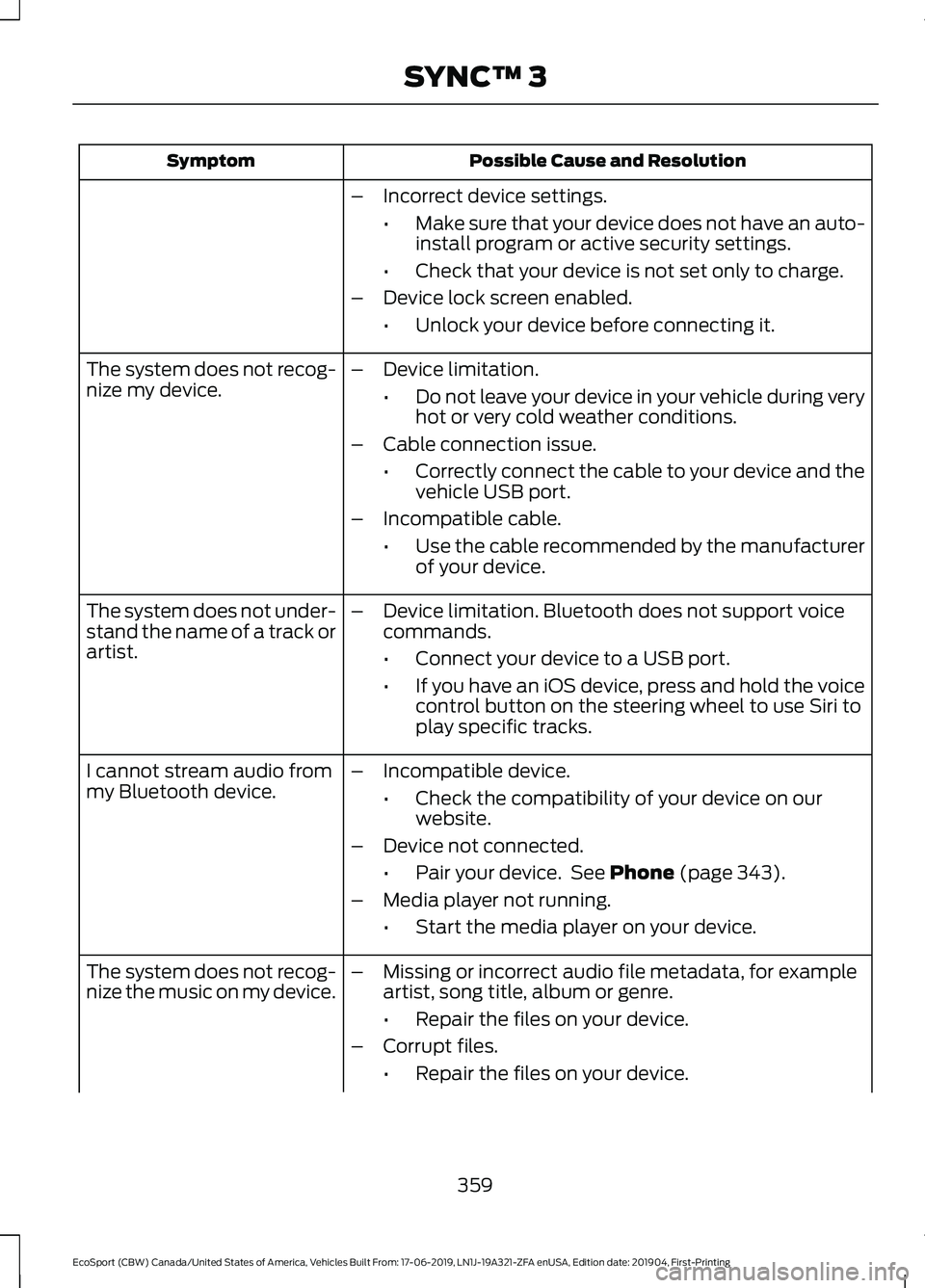
Possible Cause and ResolutionSymptom
–Incorrect device settings.
•Make sure that your device does not have an auto-install program or active security settings.
•Check that your device is not set only to charge.
–Device lock screen enabled.
•Unlock your device before connecting it.
The system does not recog-nize my device.–Device limitation.
•Do not leave your device in your vehicle during veryhot or very cold weather conditions.
–Cable connection issue.
•Correctly connect the cable to your device and thevehicle USB port.
–Incompatible cable.
•Use the cable recommended by the manufacturerof your device.
The system does not under-stand the name of a track orartist.
–Device limitation. Bluetooth does not support voicecommands.
•Connect your device to a USB port.
•If you have an iOS device, press and hold the voicecontrol button on the steering wheel to use Siri toplay specific tracks.
I cannot stream audio frommy Bluetooth device.–Incompatible device.
•Check the compatibility of your device on ourwebsite.
–Device not connected.
•Pair your device. See Phone (page 343).
–Media player not running.
•Start the media player on your device.
The system does not recog-nize the music on my device.–Missing or incorrect audio file metadata, for exampleartist, song title, album or genre.
•Repair the files on your device.
–Corrupt files.
•Repair the files on your device.
359
EcoSport (CBW) Canada/United States of America, Vehicles Built From: 17-06-2019, LN1J-19A321-ZFA enUSA, Edition date: 201904, First-PrintingSYNC™ 3
Page 364 of 448
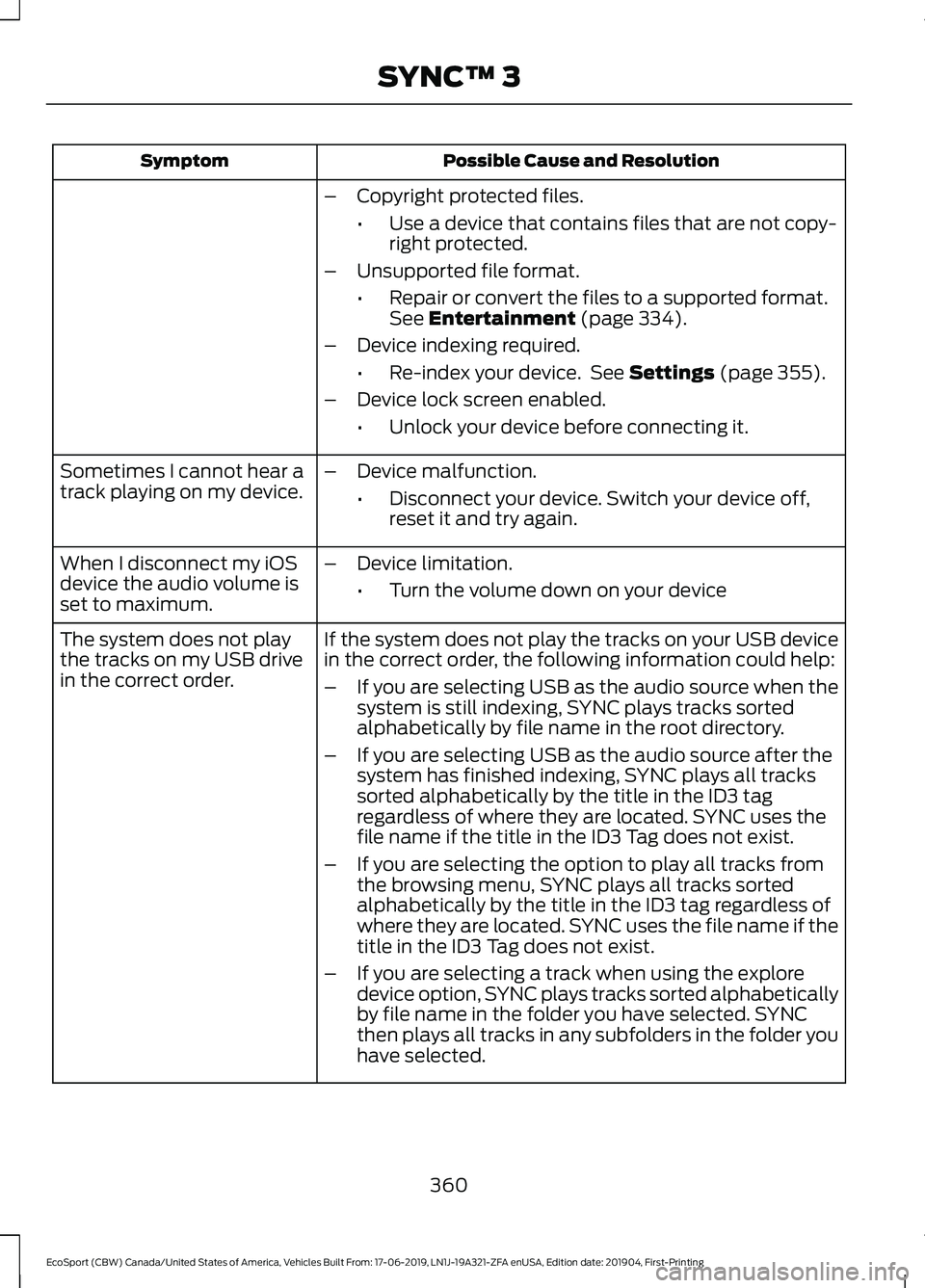
Possible Cause and ResolutionSymptom
–Copyright protected files.
•Use a device that contains files that are not copy-right protected.
–Unsupported file format.
•Repair or convert the files to a supported format.See Entertainment (page 334).
–Device indexing required.
•Re-index your device. See Settings (page 355).
–Device lock screen enabled.
•Unlock your device before connecting it.
Sometimes I cannot hear atrack playing on my device.–Device malfunction.
•Disconnect your device. Switch your device off,reset it and try again.
When I disconnect my iOSdevice the audio volume isset to maximum.
–Device limitation.
•Turn the volume down on your device
If the system does not play the tracks on your USB devicein the correct order, the following information could help:The system does not playthe tracks on my USB drivein the correct order.–If you are selecting USB as the audio source when thesystem is still indexing, SYNC plays tracks sortedalphabetically by file name in the root directory.
–If you are selecting USB as the audio source after thesystem has finished indexing, SYNC plays all trackssorted alphabetically by the title in the ID3 tagregardless of where they are located. SYNC uses thefile name if the title in the ID3 Tag does not exist.
–If you are selecting the option to play all tracks fromthe browsing menu, SYNC plays all tracks sortedalphabetically by the title in the ID3 tag regardless ofwhere they are located. SYNC uses the file name if thetitle in the ID3 Tag does not exist.
–If you are selecting a track when using the exploredevice option, SYNC plays tracks sorted alphabeticallyby file name in the folder you have selected. SYNCthen plays all tracks in any subfolders in the folder youhave selected.
360
EcoSport (CBW) Canada/United States of America, Vehicles Built From: 17-06-2019, LN1J-19A321-ZFA enUSA, Edition date: 201904, First-PrintingSYNC™ 3
Page 365 of 448
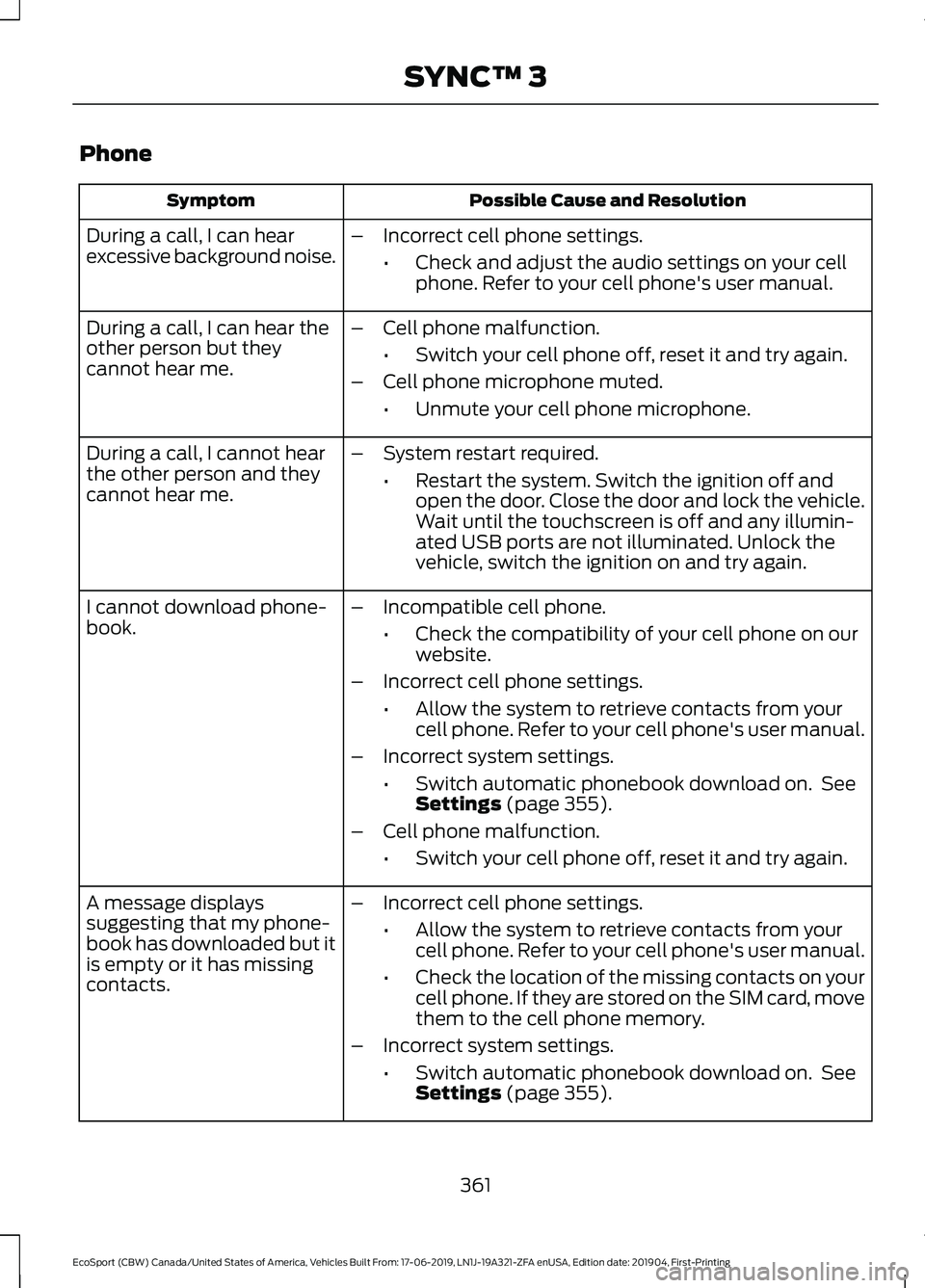
Phone
Possible Cause and ResolutionSymptom
During a call, I can hearexcessive background noise.–Incorrect cell phone settings.
•Check and adjust the audio settings on your cellphone. Refer to your cell phone's user manual.
–Cell phone malfunction.
•Switch your cell phone off, reset it and try again.
–Cell phone microphone muted.
•Unmute your cell phone microphone.
During a call, I can hear theother person but theycannot hear me.
During a call, I cannot hearthe other person and theycannot hear me.
–System restart required.
•Restart the system. Switch the ignition off andopen the door. Close the door and lock the vehicle.Wait until the touchscreen is off and any illumin-ated USB ports are not illuminated. Unlock thevehicle, switch the ignition on and try again.
I cannot download phone-book.–Incompatible cell phone.
•Check the compatibility of your cell phone on ourwebsite.
–Incorrect cell phone settings.
•Allow the system to retrieve contacts from yourcell phone. Refer to your cell phone's user manual.
–Incorrect system settings.
•Switch automatic phonebook download on. SeeSettings (page 355).
–Cell phone malfunction.
•Switch your cell phone off, reset it and try again.
–Incorrect cell phone settings.
•Allow the system to retrieve contacts from yourcell phone. Refer to your cell phone's user manual.
•Check the location of the missing contacts on yourcell phone. If they are stored on the SIM card, movethem to the cell phone memory.
–Incorrect system settings.
•Switch automatic phonebook download on. SeeSettings (page 355).
A message displayssuggesting that my phone-book has downloaded but itis empty or it has missingcontacts.
361
EcoSport (CBW) Canada/United States of America, Vehicles Built From: 17-06-2019, LN1J-19A321-ZFA enUSA, Edition date: 201904, First-PrintingSYNC™ 3
Page 371 of 448
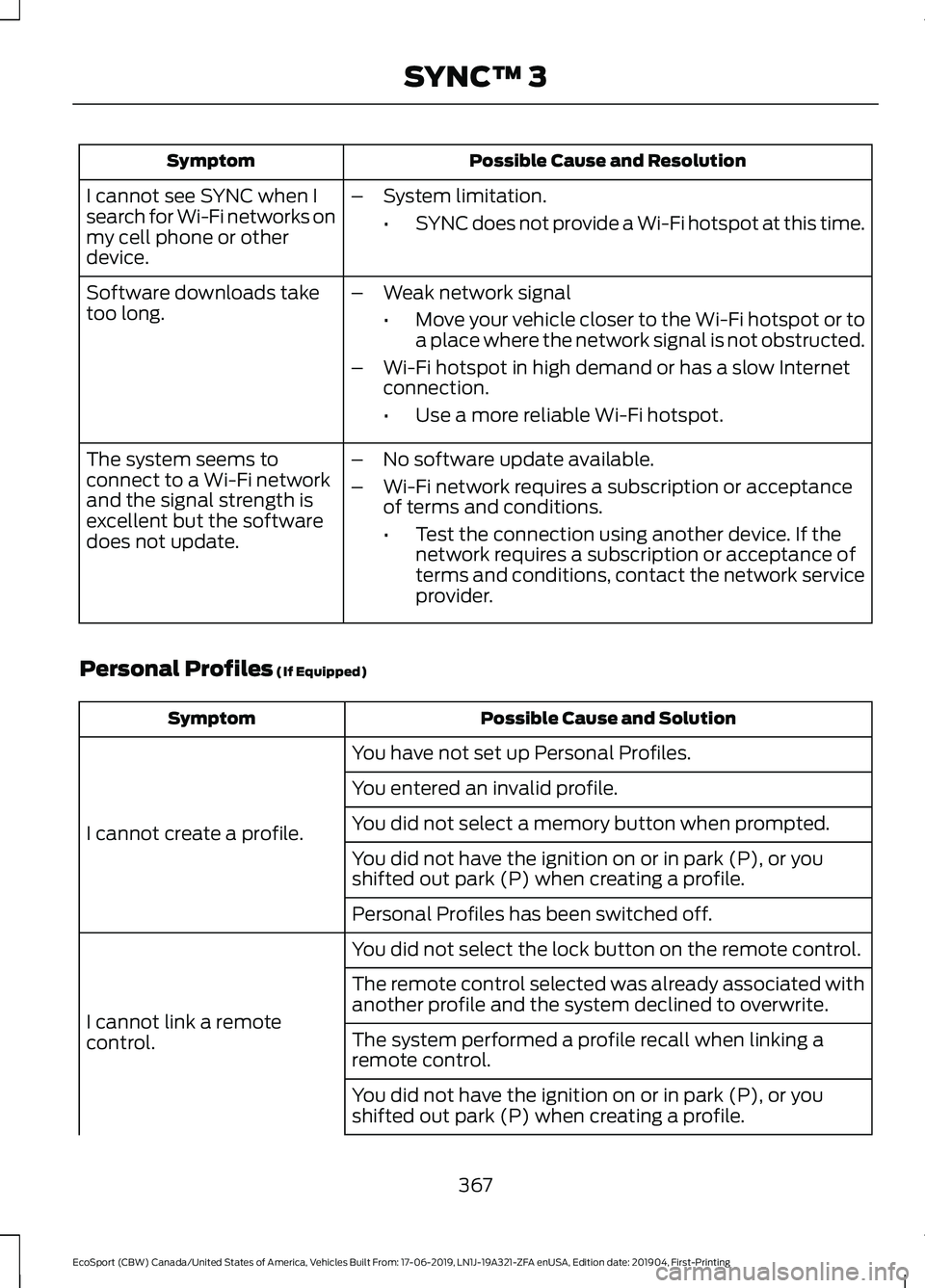
Possible Cause and ResolutionSymptom
I cannot see SYNC when Isearch for Wi-Fi networks onmy cell phone or otherdevice.
–System limitation.
•SYNC does not provide a Wi-Fi hotspot at this time.
–Weak network signal
•Move your vehicle closer to the Wi-Fi hotspot or toa place where the network signal is not obstructed.
–Wi-Fi hotspot in high demand or has a slow Internetconnection.
•Use a more reliable Wi-Fi hotspot.
Software downloads taketoo long.
–No software update available.
–Wi-Fi network requires a subscription or acceptanceof terms and conditions.
•Test the connection using another device. If thenetwork requires a subscription or acceptance ofterms and conditions, contact the network serviceprovider.
The system seems toconnect to a Wi-Fi networkand the signal strength isexcellent but the softwaredoes not update.
Personal Profiles (If Equipped)
Possible Cause and SolutionSymptom
You have not set up Personal Profiles.
I cannot create a profile.
You entered an invalid profile.
You did not select a memory button when prompted.
You did not have the ignition on or in park (P), or youshifted out park (P) when creating a profile.
Personal Profiles has been switched off.
You did not select the lock button on the remote control.
I cannot link a remotecontrol.
The remote control selected was already associated withanother profile and the system declined to overwrite.
The system performed a profile recall when linking aremote control.
You did not have the ignition on or in park (P), or youshifted out park (P) when creating a profile.
367
EcoSport (CBW) Canada/United States of America, Vehicles Built From: 17-06-2019, LN1J-19A321-ZFA enUSA, Edition date: 201904, First-PrintingSYNC™ 3
Page 372 of 448
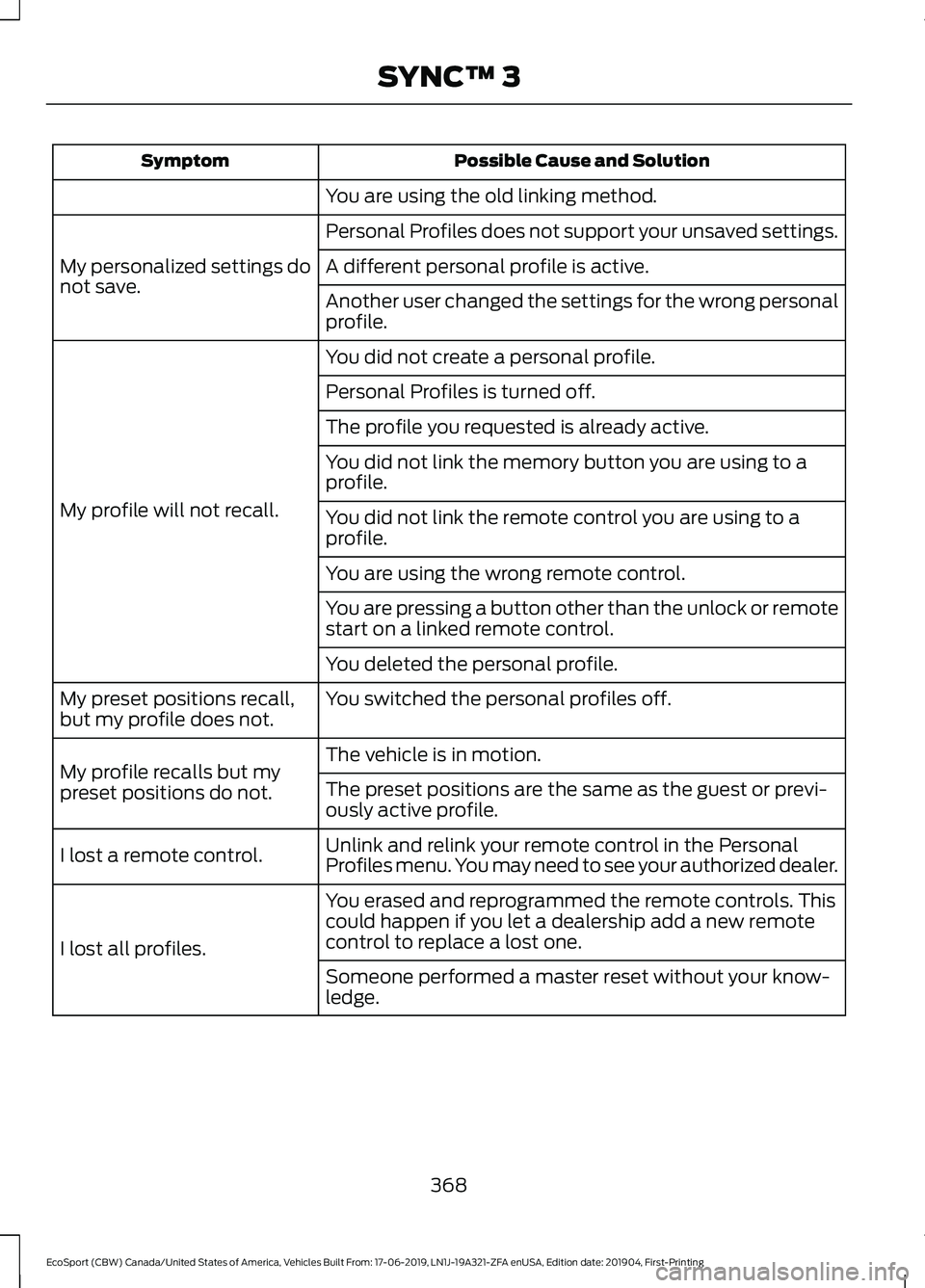
Possible Cause and SolutionSymptom
You are using the old linking method.
Personal Profiles does not support your unsaved settings.
My personalized settings donot save.A different personal profile is active.
Another user changed the settings for the wrong personalprofile.
You did not create a personal profile.
My profile will not recall.
Personal Profiles is turned off.
The profile you requested is already active.
You did not link the memory button you are using to aprofile.
You did not link the remote control you are using to aprofile.
You are using the wrong remote control.
You are pressing a button other than the unlock or remotestart on a linked remote control.
You deleted the personal profile.
You switched the personal profiles off.My preset positions recall,but my profile does not.
The vehicle is in motion.My profile recalls but mypreset positions do not.The preset positions are the same as the guest or previ-ously active profile.
Unlink and relink your remote control in the PersonalProfiles menu. You may need to see your authorized dealer.I lost a remote control.
You erased and reprogrammed the remote controls. Thiscould happen if you let a dealership add a new remotecontrol to replace a lost one.I lost all profiles.
Someone performed a master reset without your know-ledge.
368
EcoSport (CBW) Canada/United States of America, Vehicles Built From: 17-06-2019, LN1J-19A321-ZFA enUSA, Edition date: 201904, First-PrintingSYNC™ 3
Page 375 of 448
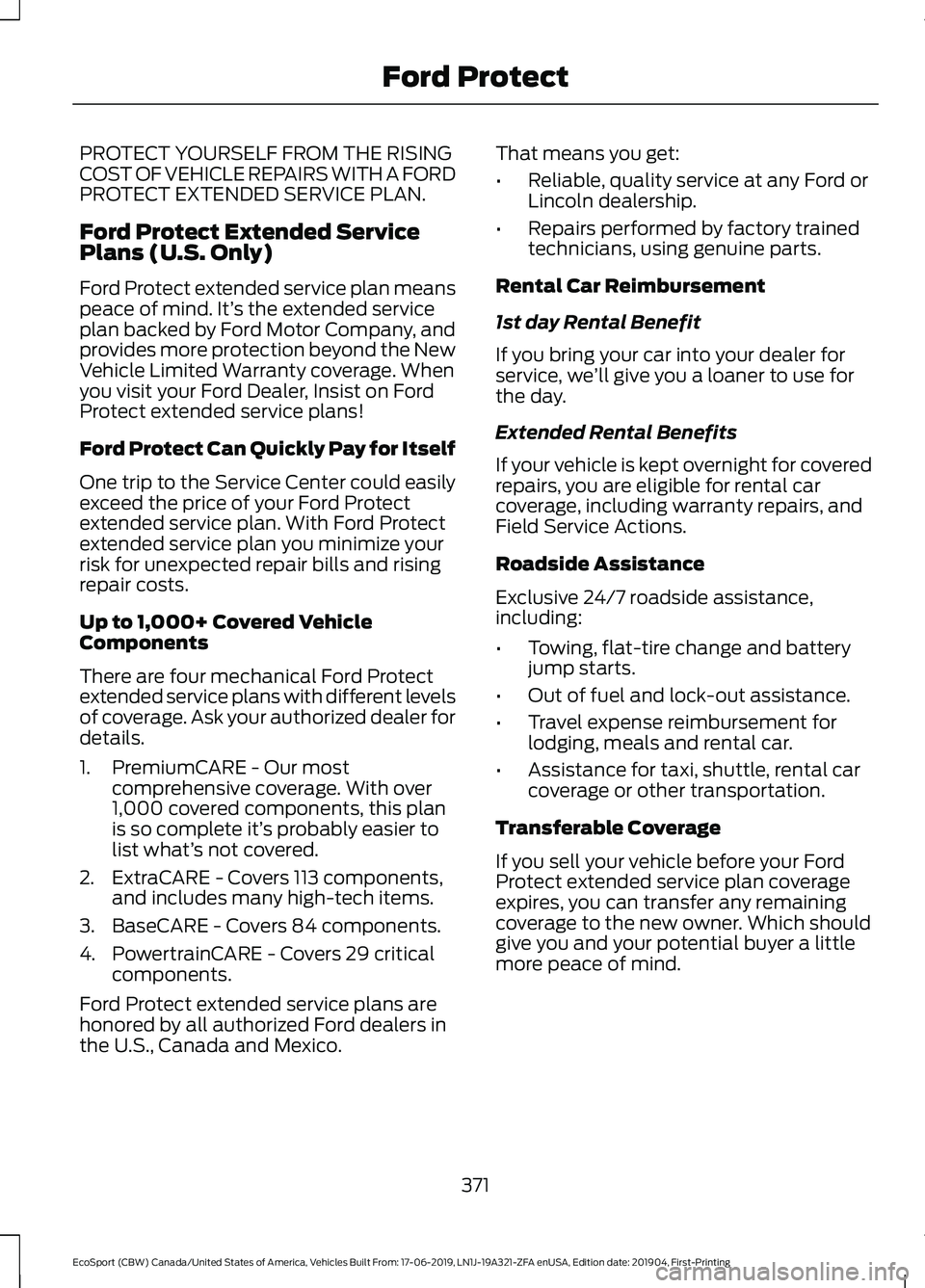
PROTECT YOURSELF FROM THE RISINGCOST OF VEHICLE REPAIRS WITH A FORDPROTECT EXTENDED SERVICE PLAN.
Ford Protect Extended ServicePlans (U.S. Only)
Ford Protect extended service plan meanspeace of mind. It’s the extended serviceplan backed by Ford Motor Company, andprovides more protection beyond the NewVehicle Limited Warranty coverage. Whenyou visit your Ford Dealer, Insist on FordProtect extended service plans!
Ford Protect Can Quickly Pay for Itself
One trip to the Service Center could easilyexceed the price of your Ford Protectextended service plan. With Ford Protectextended service plan you minimize yourrisk for unexpected repair bills and risingrepair costs.
Up to 1,000+ Covered VehicleComponents
There are four mechanical Ford Protectextended service plans with different levelsof coverage. Ask your authorized dealer fordetails.
1.PremiumCARE - Our mostcomprehensive coverage. With over1,000 covered components, this planis so complete it’s probably easier tolist what’s not covered.
2.ExtraCARE - Covers 113 components,and includes many high-tech items.
3.BaseCARE - Covers 84 components.
4.PowertrainCARE - Covers 29 criticalcomponents.
Ford Protect extended service plans arehonored by all authorized Ford dealers inthe U.S., Canada and Mexico.
That means you get:
•Reliable, quality service at any Ford orLincoln dealership.
•Repairs performed by factory trainedtechnicians, using genuine parts.
Rental Car Reimbursement
1st day Rental Benefit
If you bring your car into your dealer forservice, we’ll give you a loaner to use forthe day.
Extended Rental Benefits
If your vehicle is kept overnight for coveredrepairs, you are eligible for rental carcoverage, including warranty repairs, andField Service Actions.
Roadside Assistance
Exclusive 24/7 roadside assistance,including:
•Towing, flat-tire change and batteryjump starts.
•Out of fuel and lock-out assistance.
•Travel expense reimbursement forlodging, meals and rental car.
•Assistance for taxi, shuttle, rental carcoverage or other transportation.
Transferable Coverage
If you sell your vehicle before your FordProtect extended service plan coverageexpires, you can transfer any remainingcoverage to the new owner. Which shouldgive you and your potential buyer a littlemore peace of mind.
371
EcoSport (CBW) Canada/United States of America, Vehicles Built From: 17-06-2019, LN1J-19A321-ZFA enUSA, Edition date: 201904, First-PrintingFord Protect
Page 379 of 448
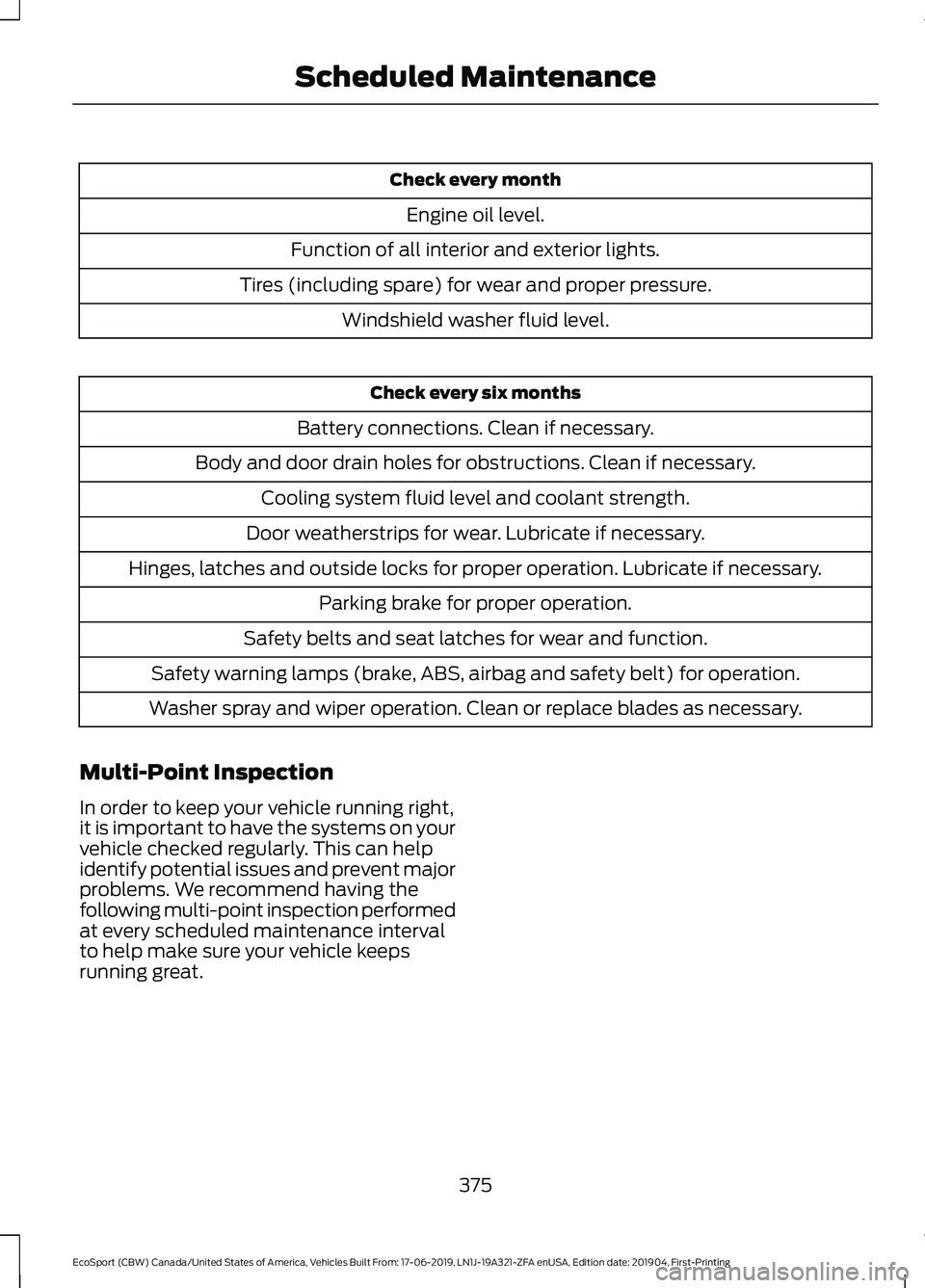
Check every month
Engine oil level.
Function of all interior and exterior lights.
Tires (including spare) for wear and proper pressure.
Windshield washer fluid level.
Check every six months
Battery connections. Clean if necessary.
Body and door drain holes for obstructions. Clean if necessary.
Cooling system fluid level and coolant strength.
Door weatherstrips for wear. Lubricate if necessary.
Hinges, latches and outside locks for proper operation. Lubricate if necessary.
Parking brake for proper operation.
Safety belts and seat latches for wear and function.
Safety warning lamps (brake, ABS, airbag and safety belt) for operation.
Washer spray and wiper operation. Clean or replace blades as necessary.
Multi-Point Inspection
In order to keep your vehicle running right,it is important to have the systems on yourvehicle checked regularly. This can helpidentify potential issues and prevent majorproblems. We recommend having thefollowing multi-point inspection performedat every scheduled maintenance intervalto help make sure your vehicle keepsrunning great.
375
EcoSport (CBW) Canada/United States of America, Vehicles Built From: 17-06-2019, LN1J-19A321-ZFA enUSA, Edition date: 201904, First-PrintingScheduled Maintenance
Page 435 of 448
4
4WDSee: Four-Wheel Drive......................................153
9
911 Assist...........................................................49
A
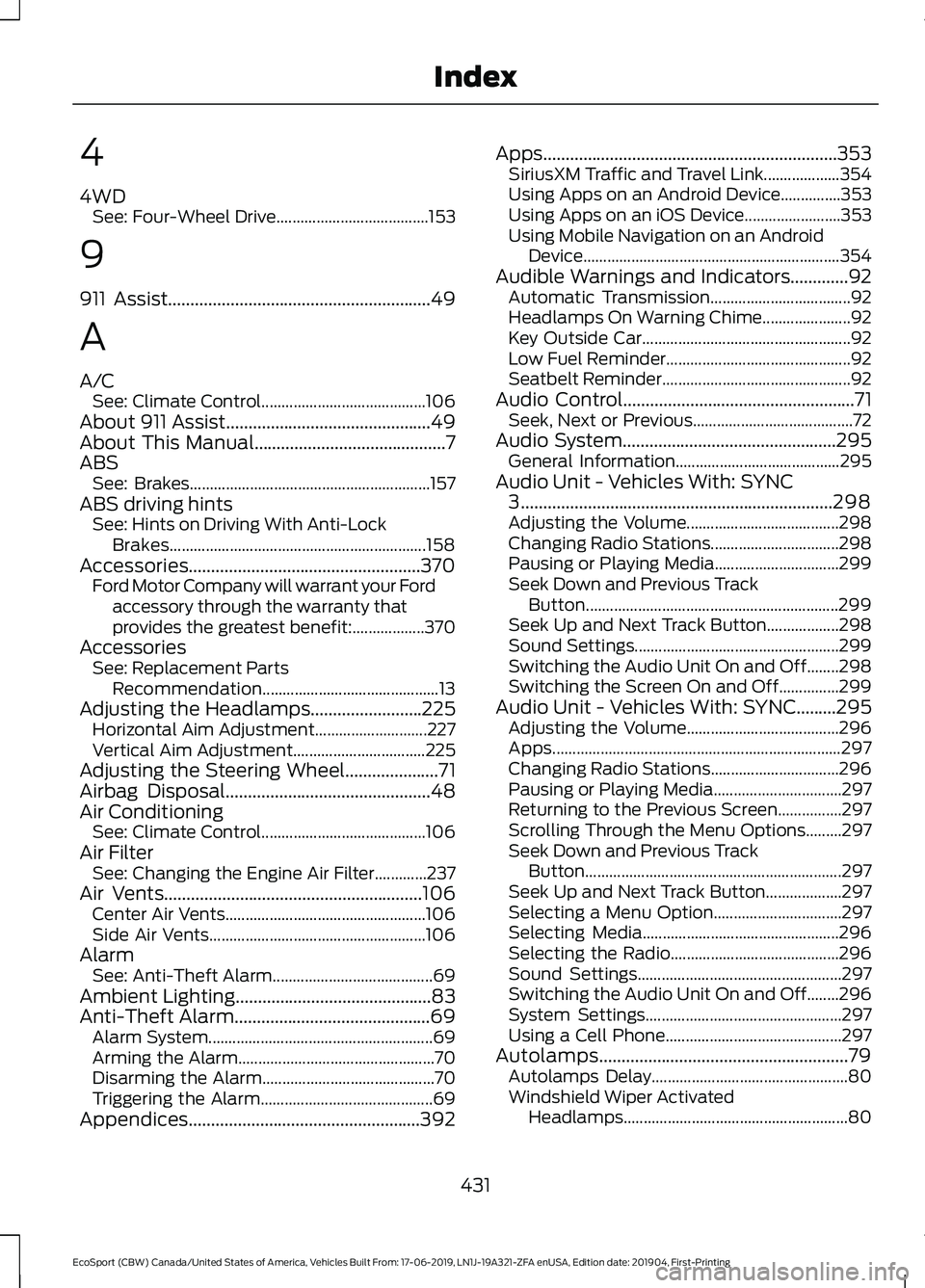
A/CSee: Climate Control.........................................106About 911 Assist..............................................49About This Manual...........................................7ABSSee: Brakes............................................................157ABS driving hintsSee: Hints on Driving With Anti-LockBrakes................................................................158Accessories....................................................370Ford Motor Company will warrant your Fordaccessory through the warranty thatprovides the greatest benefit:..................370AccessoriesSee: Replacement PartsRecommendation............................................13Adjusting the Headlamps.........................225Horizontal Aim Adjustment............................227Vertical Aim Adjustment.................................225Adjusting the Steering Wheel.....................71Airbag Disposal..............................................48Air ConditioningSee: Climate Control.........................................106Air FilterSee: Changing the Engine Air Filter.............237Air Vents..........................................................106Center Air Vents..................................................106Side Air Vents......................................................106AlarmSee: Anti-Theft Alarm........................................69Ambient Lighting............................................83Anti-Theft Alarm............................................69Alarm System........................................................69Arming the Alarm.................................................70Disarming the Alarm...........................................70Triggering the Alarm...........................................69Appendices....................................................392
Apps..................................................................353SiriusXM Traffic and Travel Link...................354Using Apps on an Android Device...............353Using Apps on an iOS Device........................353Using Mobile Navigation on an AndroidDevice................................................................354Audible Warnings and Indicators.............92Automatic Transmission...................................92Headlamps On Warning Chime......................92Key Outside Car....................................................92Low Fuel Reminder..............................................92Seatbelt Reminder...............................................92Audio Control....................................................71Seek, Next or Previous........................................72Audio System................................................295General Information.........................................295Audio Unit - Vehicles With: SYNC3......................................................................298Adjusting the Volume......................................298Changing Radio Stations................................298Pausing or Playing Media...............................299Seek Down and Previous TrackButton...............................................................299Seek Up and Next Track Button..................298Sound Settings...................................................299Switching the Audio Unit On and Off........298Switching the Screen On and Off...............299Audio Unit - Vehicles With: SYNC.........295Adjusting the Volume......................................296Apps........................................................................297Changing Radio Stations................................296Pausing or Playing Media................................297Returning to the Previous Screen................297Scrolling Through the Menu Options.........297Seek Down and Previous TrackButton................................................................297Seek Up and Next Track Button...................297Selecting a Menu Option................................297Selecting Media.................................................296Selecting the Radio..........................................296Sound Settings...................................................297Switching the Audio Unit On and Off........296System Settings.................................................297Using a Cell Phone............................................297Autolamps........................................................79Autolamps Delay.................................................80Windshield Wiper ActivatedHeadlamps........................................................80
431
EcoSport (CBW) Canada/United States of America, Vehicles Built From: 17-06-2019, LN1J-19A321-ZFA enUSA, Edition date: 201904, First-PrintingIndex
Page 436 of 448
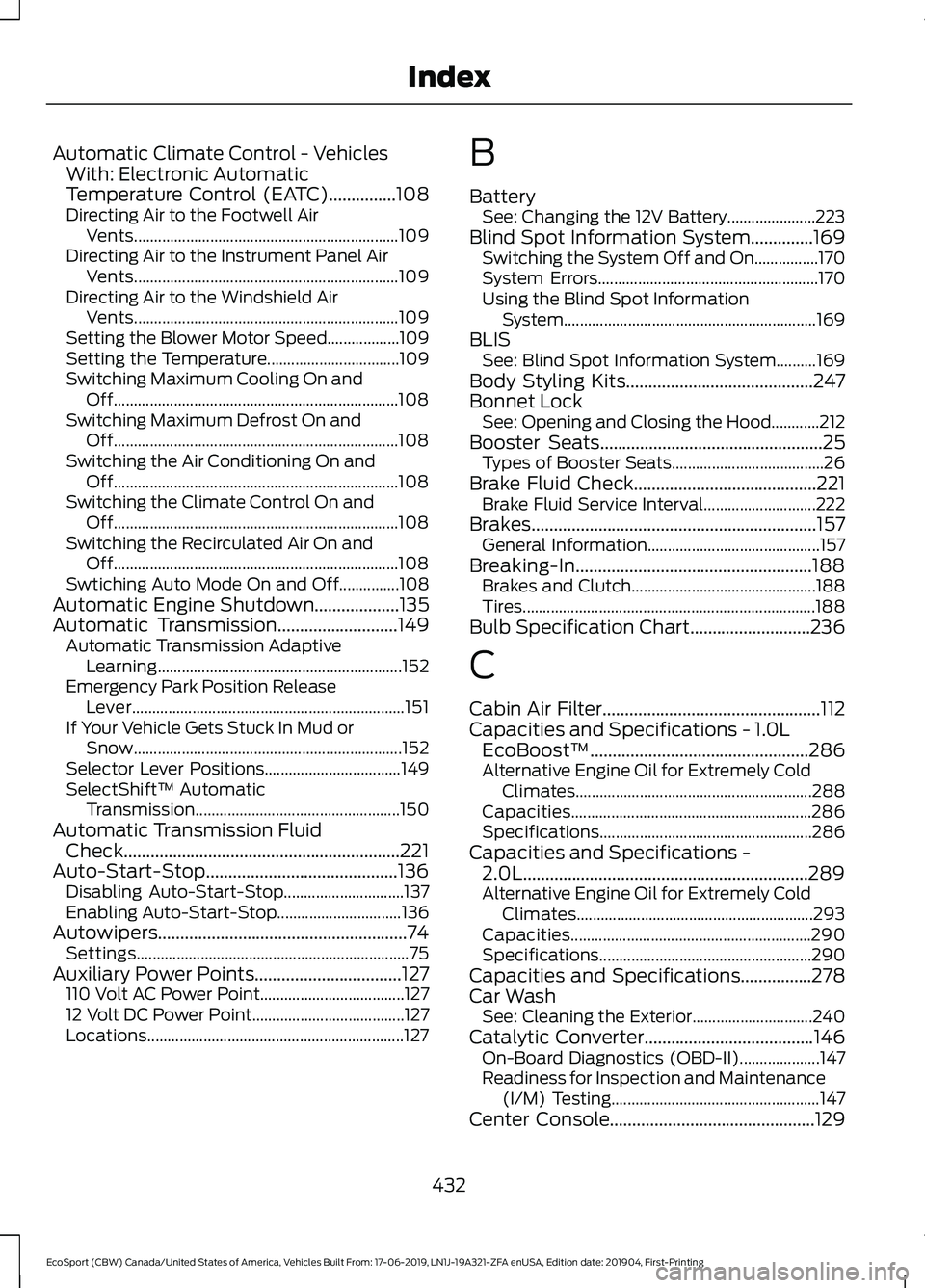
Automatic Climate Control - VehiclesWith: Electronic AutomaticTemperature Control (EATC)...............108Directing Air to the Footwell AirVents..................................................................109Directing Air to the Instrument Panel AirVents..................................................................109Directing Air to the Windshield AirVents..................................................................109Setting the Blower Motor Speed..................109Setting the Temperature.................................109Switching Maximum Cooling On andOff.......................................................................108Switching Maximum Defrost On andOff.......................................................................108Switching the Air Conditioning On andOff.......................................................................108Switching the Climate Control On andOff.......................................................................108Switching the Recirculated Air On andOff.......................................................................108Swtiching Auto Mode On and Off...............108Automatic Engine Shutdown...................135Automatic Transmission...........................149Automatic Transmission AdaptiveLearning.............................................................152Emergency Park Position ReleaseLever....................................................................151If Your Vehicle Gets Stuck In Mud orSnow...................................................................152Selector Lever Positions..................................149SelectShift™ AutomaticTransmission...................................................150Automatic Transmission FluidCheck..............................................................221Auto-Start-Stop...........................................136Disabling Auto-Start-Stop..............................137Enabling Auto-Start-Stop...............................136Autowipers........................................................74Settings....................................................................75Auxiliary Power Points.................................127110 Volt AC Power Point....................................12712 Volt DC Power Point......................................127Locations................................................................127
B
BatterySee: Changing the 12V Battery......................223Blind Spot Information System..............169Switching the System Off and On................170System Errors.......................................................170Using the Blind Spot InformationSystem...............................................................169BLISSee: Blind Spot Information System..........169Body Styling Kits..........................................247Bonnet LockSee: Opening and Closing the Hood............212Booster Seats..................................................25Types of Booster Seats......................................26Brake Fluid Check.........................................221Brake Fluid Service Interval............................222Brakes................................................................157General Information...........................................157Breaking-In.....................................................188Brakes and Clutch..............................................188Tires.........................................................................188Bulb Specification Chart...........................236
C
Cabin Air Filter.................................................112Capacities and Specifications - 1.0LEcoBoost™.................................................286Alternative Engine Oil for Extremely ColdClimates...........................................................288Capacities............................................................286Specifications.....................................................286Capacities and Specifications -2.0L................................................................289Alternative Engine Oil for Extremely ColdClimates...........................................................293Capacities............................................................290Specifications.....................................................290Capacities and Specifications................278Car WashSee: Cleaning the Exterior..............................240Catalytic Converter......................................146On-Board Diagnostics (OBD-II)....................147Readiness for Inspection and Maintenance(I/M) Testing....................................................147Center Console..............................................129
432
EcoSport (CBW) Canada/United States of America, Vehicles Built From: 17-06-2019, LN1J-19A321-ZFA enUSA, Edition date: 201904, First-PrintingIndex