ECU FORD ECOSPORT 2020 User Guide
[x] Cancel search | Manufacturer: FORD, Model Year: 2020, Model line: ECOSPORT, Model: FORD ECOSPORT 2020Pages: 448, PDF Size: 16.57 MB
Page 53 of 448
![FORD ECOSPORT 2020 User Guide ABOUT 911 ASSIST
911 Assist is a SYNC system feature thatcan call for help if you’re in an accident. Ifa crash deploys an airbag (excluding kneeairbags and rear inflatable seatbelts [ifequipped]) or](/img/11/40639/w960_40639-52.png "FORD ECOSPORT 2020 User Guide ABOUT 911 ASSIST
911 Assist is a SYNC system feature thatcan call for help if you’re in an accident. Ifa crash deploys an airbag (excluding kneeairbags and rear inflatable seatbelts [ifequipped]) or")
ABOUT 911 ASSIST
911 Assist is a SYNC system feature thatcan call for help if you’re in an accident. Ifa crash deploys an airbag (excluding kneeairbags and rear inflatable seatbelts [ifequipped]) or activates the fuel pumpshut-off, your SYNC-equipped vehicle maybe able to contact emergency services bydialing 911 through a paired and connectedBluetooth-enabled phone. You can learnmore about the 911 Assist feature, byvisiting:
Website
www.owner.ford.comwww.syncmyride.cawww.syncmaroute.ca
Not all crashes will deploy an airbag oractivate the fuel pump shut-off (thetriggers for 911 Assist). If a connected cellphone sustains damage or loses itsconnection to SYNC during a crash, SYNCwill search for and try to connect to apreviously paired cell phone; SYNC willthen attempt to call the emergencyservices.
Before making the call:
•SYNC provides a short window of time(about 10 seconds) to cancel the call.If you fail to cancel the call, SYNCattempts to dial 911.
•SYNC says the following, or a similarmessage: "SYNC will attempt to call911, to cancel the call, press Cancel onyour screen or press and hold thephone button on your steering wheel."
If you do not cancel the call, and SYNCmakes a successful call, a pre-recordedmessage plays for the 911 operator, andthen the occupant(s) in your vehicle is ableto talk with the operator. Be prepared toprovide your name, phone number andlocation immediately, because not all 911systems are capable of receiving thisinformation electronically.
During an emergency call, the systemtransmits vehicle data to the emergencyservice. See Data Recording (page 9).
EMERGENCY CALL
REQUIREMENTS
WARNING: Do not wait for 911Assist to make an emergency call if youcan do it yourself. Dial emergencyservices immediately to avoid delayedresponse time which could increase therisk of serious injury or death after acrash. If you do not hear 911 Assist withinfive seconds of the crash, the system orphone may be damaged ornon-functional.
WARNING: Always place yourphone in a secure location in your vehicleso it does not become a projectile or getdamaged in a crash. Failure to do so maycause serious injury to someone ordamage the phone which could prevent911 Assist from working properly.
WARNING: Unless the 911 Assistsetting is set on before a crash, thesystem will not dial for help which coulddelay response time, potentiallyincreasing the risk of serious injury ordeath after a crash.
49
EcoSport (CBW) Canada/United States of America, Vehicles Built From: 17-06-2019, LN1J-19A321-ZFA enUSA, Edition date: 201904, First-Printing911 Assist
Page 71 of 448
PASSIVE ANTI-THEFT
SYSTEM
Principle of Operation
The system prevents someone fromstarting the engine with an incorrectlycoded key.
Note: The system is not compatible withnon-Ford aftermarket remote start systems.Use of these systems may result in enginestarting problems and a loss of securityprotection
Note:Metallic objects, electronic devicesor a second coded key on the same keychain may result in vehicle startingproblems, especially if they are too close tothe key when starting your vehicle. Preventthese objects from touching the coded keywhen starting your vehicle. Switch theignition off, move all objects on the keychain away from the coded key and restartyour vehicle if a problem occurs.
Note: Do not leave a duplicate coded keyin your vehicle. Always take your keys andlock all doors when leaving your vehicle.
SecuriLock®
The system is an engine immobilizationsystem. It is designed to help prevent theengine from being started unless a codedkey programmed to your vehicle is used.Using the wrong key may prevent theengine from starting. A message mayappear in the information display.
If you are unable to start the engine with acorrectly coded key, a malfunction hashappened and a message may appear inthe information display.
Automatic Arming
When you switch the ignition off the engineimmobilizer will arm automatically after ashort time.
Automatic Disarming
When you switch the ignition on, the engineimmobilizer will disarm automatically if acorrectly coded key is used. If you areunable to start the engine with a correctlycoded key, have your vehicle checked byan Authorized Dealer.
Replacement Keys
Note:Your vehicle comes equipped withtwo remote controls with a folding key bladeor two intelligent access keys.
The remote controls with a folding keyblade functions as a programmed ignitionkey that operates all the locks and startsthe vehicle, as well as a remote control.
The intelligent access key functions as aprogrammed key that operates the driverdoor lock and activates the intelligentaccess with push button start system, aswell as a remote control.
If your programmed transmitters orstandard SecuriLock® coded keys are lostor stolen and you do not have an extracoded key, you will need to have yourvehicle towed to an authorized dealer. Youneed to erase the key codes from yourvehicle and program new coded keys.
Store an extra programmed key away fromthe vehicle in a safe place to help preventany inconveniences. See your authorizeddealer to purchase additional spare orreplacement keys. Have replacement keyscoded together with recoding yourremaining keys.
Note:Have all of your remaining keyserased and recoded if you lose a key. Havereplacement keys coded together withrecoding your remaining keys. See anauthorized dealer for further information.
Note:Do not shield your keys with metalobjects. This may prevent the receiver fromrecognizing a coded key.
67
EcoSport (CBW) Canada/United States of America, Vehicles Built From: 17-06-2019, LN1J-19A321-ZFA enUSA, Edition date: 201904, First-PrintingSecurity
Page 72 of 448
Programming a Spare Remote ControlWith a Folding Key Blade
You can program your own integratedkeyhead transmitter or standardSecuriLock coded keys to your vehicle.This procedure will program both thevehicle immobilizer keycode and theremote entry portion of the remote controlto your vehicle.
You must have two previouslyprogrammed coded keys and the newunprogrammed key readily accessible.
Contact an authorized dealer to have thespare key programmed if two previouslyprogrammed keys are not available.
Make sure that the ignition is switched offbefore beginning this procedure. Carry outall steps within 30 seconds of starting thesequence. Stop and wait for at least oneminute before starting again if you carryout any steps out of sequence.
Note:You can program a maximum of sixcoded keys to your vehicle.
Read and understand the entire procedurebefore you begin.
1.Insert the first previously programmedcoded key into the ignition.
2.Switch the ignition from off to on. Keepthe ignition on for at least 3 seconds,but no more than 10 seconds.
3.Switch the ignition off and remove thefirst coded key from the ignition.
4.After at least 3 seconds but within 10seconds of switching the ignition off,insert the second previously coded keyinto the ignition.
5.Switch the ignition from off to on. Keepthe ignition on for at least 3 seconds,but no more than 10 seconds.
6.Switch the ignition off and remove thesecond previously programmed codedkey from the ignition.
7.After at least 3 seconds but within 10seconds of switching the ignition offand removing the previouslyprogrammed coded key, insert the newunprogrammed key into the ignition.
8.Switch the ignition from off to on. Keepthe ignition on for at least six seconds.
9.Remove the newly programmed codedkey from the ignition.
If you have successfully programmed thecoded key, it will start your vehicle andoperate the remote entry system.
If programming was unsuccessful, wait 10seconds and repeat Steps 1 through 8.
If programming remains unsuccessful,have your vehicle checked by an authorizeddealer.
Wait 20 seconds and repeat Steps 1through 9 to program an additional key.
Programming a Spare IntelligentAccess Key
Note:You can program a maximum of fourkeys to your vehicle.
You must have two previouslyprogrammed intelligent access keys insideyour vehicle and the new unprogrammedintelligent access key readily accessible.You can purchase replacement keys orremote controls from an authorized dealer.
Make sure that the ignition is switched offbefore beginning this procedure. Make surethat you close all the doors beforebeginning and that they remain closedthroughout the procedure. Carry out allsteps within 30 seconds of starting thesequence. Stop and wait for at least oneminute before starting again if you carryout any steps out of sequence.
Read and understand the entire procedurebefore you begin.
Remove the key blade from thetransmitter.
68
EcoSport (CBW) Canada/United States of America, Vehicles Built From: 17-06-2019, LN1J-19A321-ZFA enUSA, Edition date: 201904, First-PrintingSecurity
Page 73 of 448
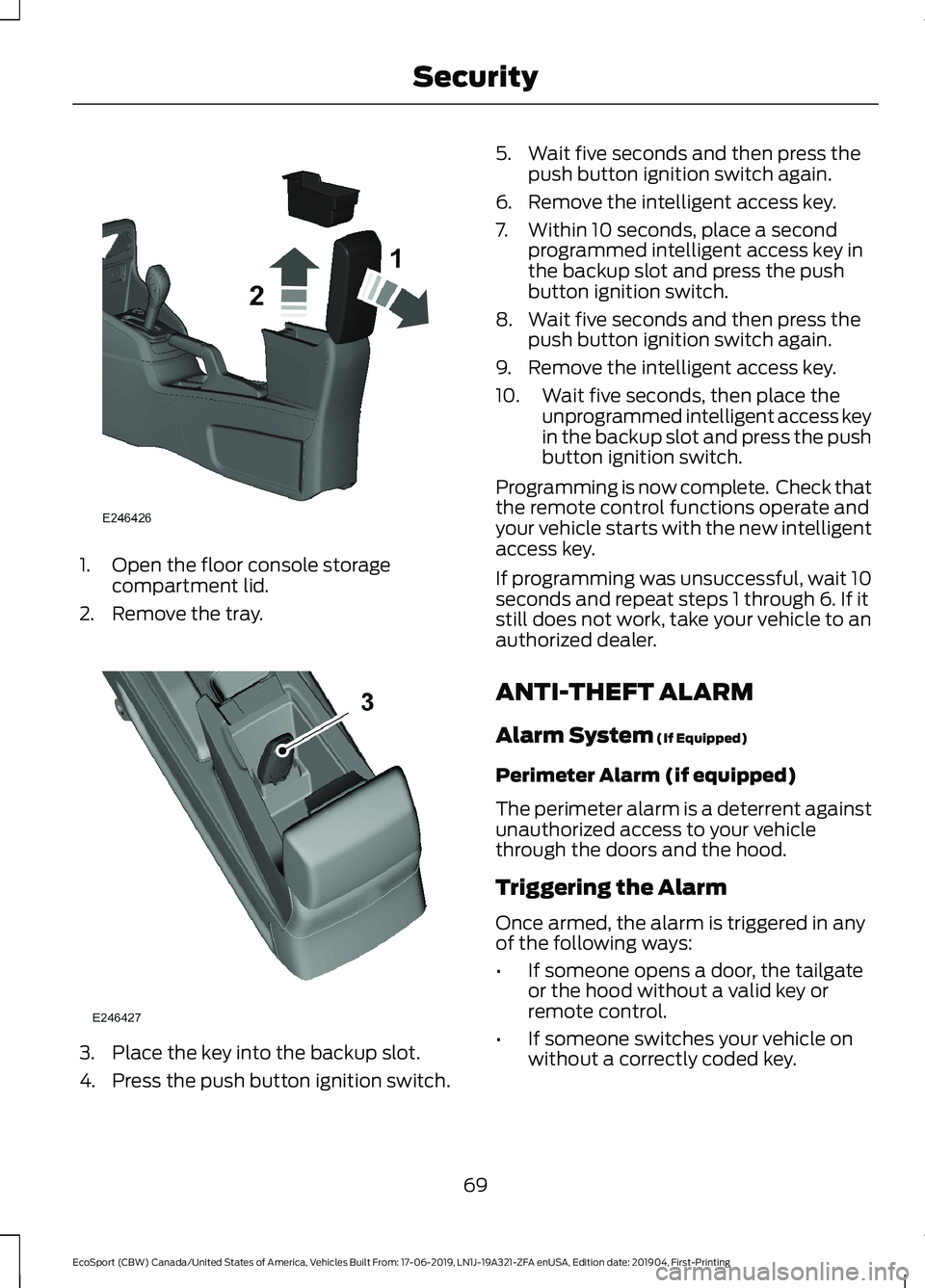
1.Open the floor console storagecompartment lid.
2.Remove the tray.
3.Place the key into the backup slot.
4.Press the push button ignition switch.
5.Wait five seconds and then press thepush button ignition switch again.
6.Remove the intelligent access key.
7.Within 10 seconds, place a secondprogrammed intelligent access key inthe backup slot and press the pushbutton ignition switch.
8.Wait five seconds and then press thepush button ignition switch again.
9.Remove the intelligent access key.
10.Wait five seconds, then place theunprogrammed intelligent access keyin the backup slot and press the pushbutton ignition switch.
Programming is now complete. Check thatthe remote control functions operate andyour vehicle starts with the new intelligentaccess key.
If programming was unsuccessful, wait 10seconds and repeat steps 1 through 6. If itstill does not work, take your vehicle to anauthorized dealer.
ANTI-THEFT ALARM
Alarm System (If Equipped)
Perimeter Alarm (if equipped)
The perimeter alarm is a deterrent againstunauthorized access to your vehiclethrough the doors and the hood.
Triggering the Alarm
Once armed, the alarm is triggered in anyof the following ways:
•If someone opens a door, the tailgateor the hood without a valid key orremote control.
•If someone switches your vehicle onwithout a correctly coded key.
69
EcoSport (CBW) Canada/United States of America, Vehicles Built From: 17-06-2019, LN1J-19A321-ZFA enUSA, Edition date: 201904, First-PrintingSecurity
Page 74 of 448
If the alarm is triggered, the alarm horn willsound for 30 seconds and the hazardwarning flasher will flash for five minutes.
Any further attempts to perform one of theabove will trigger the alarm again.
Arming the Alarm
With ignition OFF and doors closed, lockthe vehicle via Remote Control or exteriordoor handle. Alarm will be armed after 20seconds.
Arming the alarm can also be achieved bylocking the vehicle using the trim switcheswhile a side door is open and closing alldoors, or using the driver's door cylinder.In these two last cases, alarm will bearmed after 20 seconds.
Note:Alarm will arm due to an auto-relock.See Doors and Locks (page 60).
Disarming the Alarm
Vehicles Without Intelligent AccessSystem
Disarm and silence the alarm by unlockingthe doors with the key and switching yourvehicle on with a correctly coded key orunlocking the doors with the remotecontrol.
Vehicles with Intelligent AccessSystem
Note:A valid intelligent access key mustbe located within the detection range ofthat door for entry.
Disarm the alarm by performing aintelligent access entry, or switching yourvehicle on, or unlocking the vehicle withthe remote control.
Disarm the alarm by performing a keylessentry, or switching your vehicle on, orunlocking the vehicle with the remotecontrol.
70
EcoSport (CBW) Canada/United States of America, Vehicles Built From: 17-06-2019, LN1J-19A321-ZFA enUSA, Edition date: 201904, First-PrintingSecurity
Page 77 of 448
Note:The system uses a sensor and isdesigned to control the temperature of thesteering wheel and to prevent it fromoverheating.
Note:In warm temperatures, the steeringwheel quickly reaches its maximumtemperature and the system reduces thecurrent to the heating element. This couldcause you to think that the system hasstopped working but it has not. This isnormal.
73
EcoSport (CBW) Canada/United States of America, Vehicles Built From: 17-06-2019, LN1J-19A321-ZFA enUSA, Edition date: 201904, First-PrintingSteering Wheel
Page 116 of 448
HEATED REAR WINDOW -
VEHICLES WITH: ELECTRONIC
MANUAL TEMPERATURE
CONTROL (EMTC)
Press the button to clear the rearwindow of thin ice and fog. Theheated rear window turns offafter a short period of time.
Note:Make sure the engine is on beforeoperating the heated windows.
Note: Do not use razor blades or othersharp objects to clean or remove decalsfrom the inside of the heated rear window.The vehicle Warranty may not coverdamage caused to the heated rear windowgrid lines.
HEATED EXTERIOR MIRRORS
When you switch the heated rear windowon, the heated exterior mirrors turn on.
Note:Do not remove ice from the mirrorswith a scraper or adjust the mirror glasswhen it is frozen in place.
Note:Do not clean the mirror housing orglass with harsh abrasives, fuel or otherpetroleum-based cleaning products.
Windshield Wiper De-icer (If Equipped)
The windshield wiper de-icer turns on inlow temperatures or when you manuallyswitch the heated rear window on.
CABIN AIR FILTER
Your vehicle is equipped with a cabin airfilter, which gives you and your passengersthe following benefits:
•It improves your driving comfort byreducing particle concentration.
•It improves the interior compartmentcleanliness.
•It protects the climate controlcomponents from particle deposits.
You can locate the cabin air filter behindthe center console, on the passenger side.
Note:Make sure you have a cabin air filterinstalled at all times. This prevents foreignobjects from entering the system. Runningthe system without a filter in place couldresult in degradation or damage to thesystem.
Replace the filter at regular intervals. SeeScheduled Maintenance (page 373).
For additional cabin air filter information,or to replace the filter, see an authorizeddealer.
REMOTE START
About Remote Start
The system allows you to remotely startthe engine using the FordPass app.
The system can also adjust the interiortemperature according to the settings thatyou chose.
Note:All other vehicle systems remain offwhen you have remotely started the engine.
Note:The vehicle remains secured whenyou have remotely started the engine. Avalid key must be inside your vehicle toswitch the ignition on and drive your vehicle.
Remote Start Limitations
Remote start does not work if:
112
EcoSport (CBW) Canada/United States of America, Vehicles Built From: 17-06-2019, LN1J-19A321-ZFA enUSA, Edition date: 201904, First-PrintingClimate Control
Page 122 of 448
WARNING: Do not recline theseatback too far as this can cause theoccupant to slide under the seatbelt,resulting in serious injury in the event ofa collision.
WARNING: Do not place cargo orany objects behind the seat backrestbefore returning it to the original position.Pull on the seat backrest to make surethat it has fully latched after returningthe seat backrest to its original position.An unlatched seat may becomedangerous if you stop suddenly or havea crash.
WARNING: Make sure the seatfully locks into place by rocking itbackward and forward. Not securing theseat into the locked position can bedangerous in a crash and could causeserious personal injury or death.
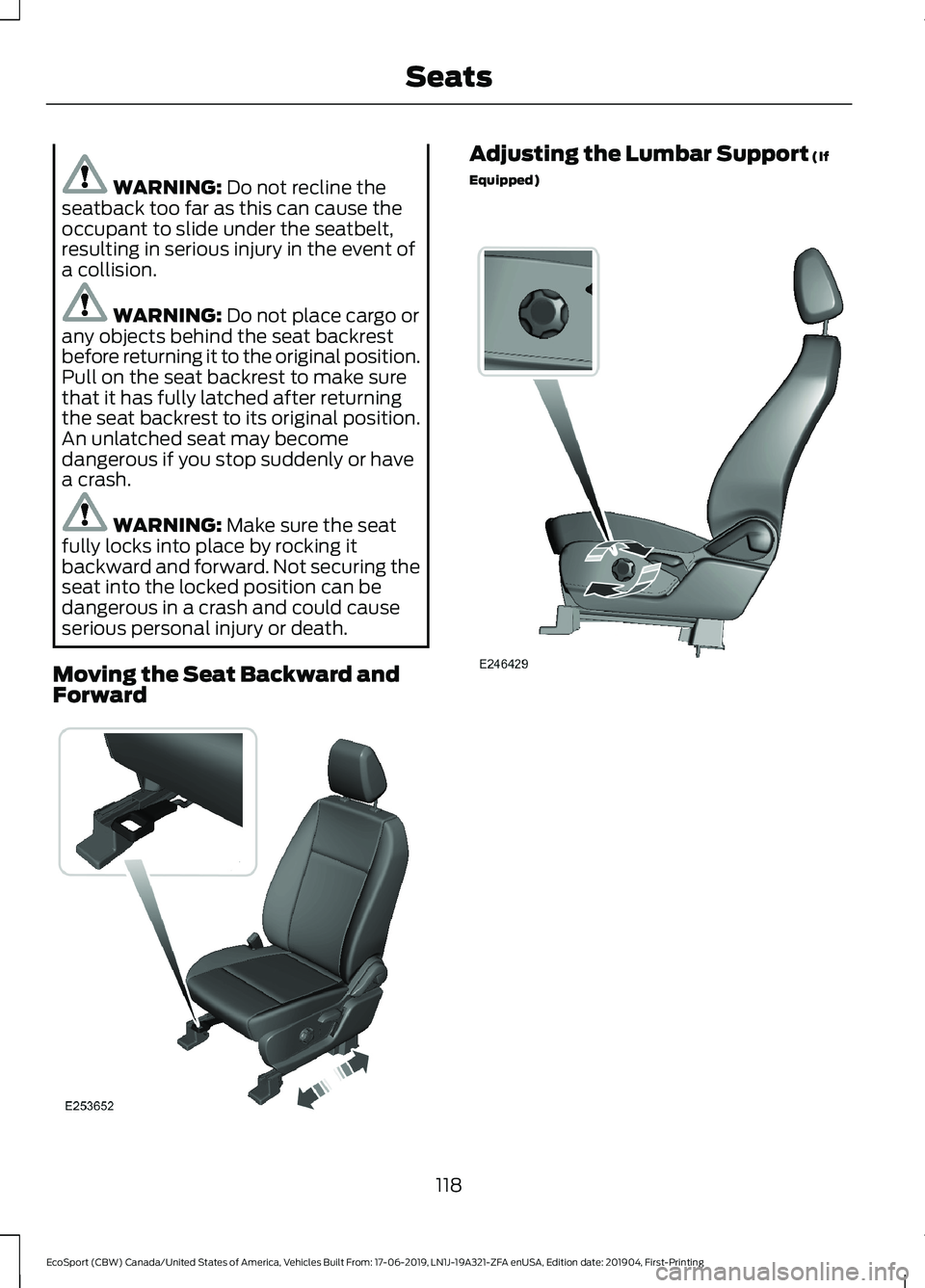
Moving the Seat Backward andForward
Adjusting the Lumbar Support (If
Equipped)
118
EcoSport (CBW) Canada/United States of America, Vehicles Built From: 17-06-2019, LN1J-19A321-ZFA enUSA, Edition date: 201904, First-PrintingSeats
Page 126 of 448
REAR SEATS
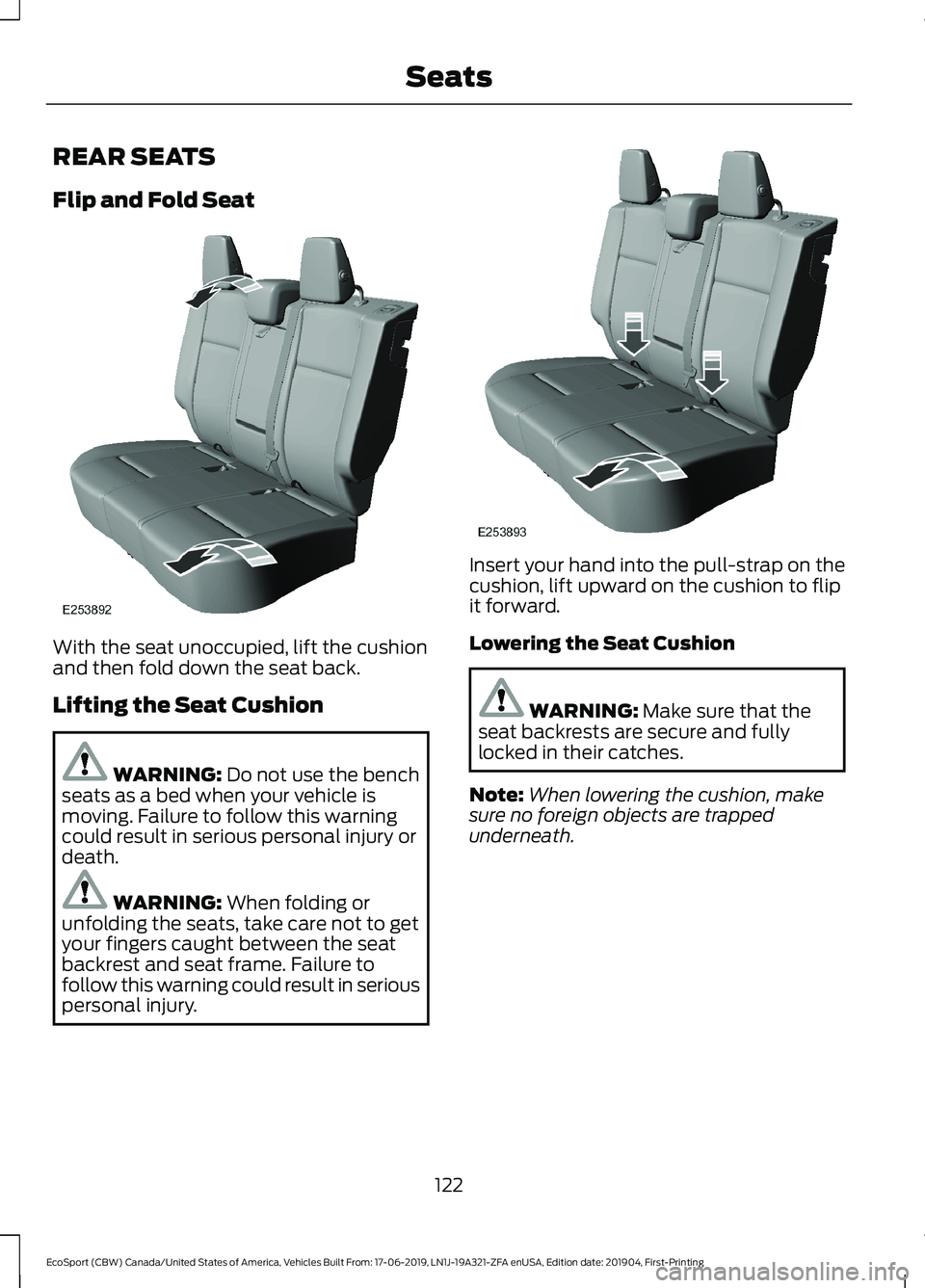
Flip and Fold Seat
With the seat unoccupied, lift the cushionand then fold down the seat back.
Lifting the Seat Cushion
WARNING: Do not use the benchseats as a bed when your vehicle ismoving. Failure to follow this warningcould result in serious personal injury ordeath.
WARNING: When folding orunfolding the seats, take care not to getyour fingers caught between the seatbackrest and seat frame. Failure tofollow this warning could result in seriouspersonal injury.
Insert your hand into the pull-strap on thecushion, lift upward on the cushion to flipit forward.
Lowering the Seat Cushion
WARNING: Make sure that theseat backrests are secure and fullylocked in their catches.
Note:When lowering the cushion, makesure no foreign objects are trappedunderneath.
122
EcoSport (CBW) Canada/United States of America, Vehicles Built From: 17-06-2019, LN1J-19A321-ZFA enUSA, Edition date: 201904, First-PrintingSeats
Page 128 of 448
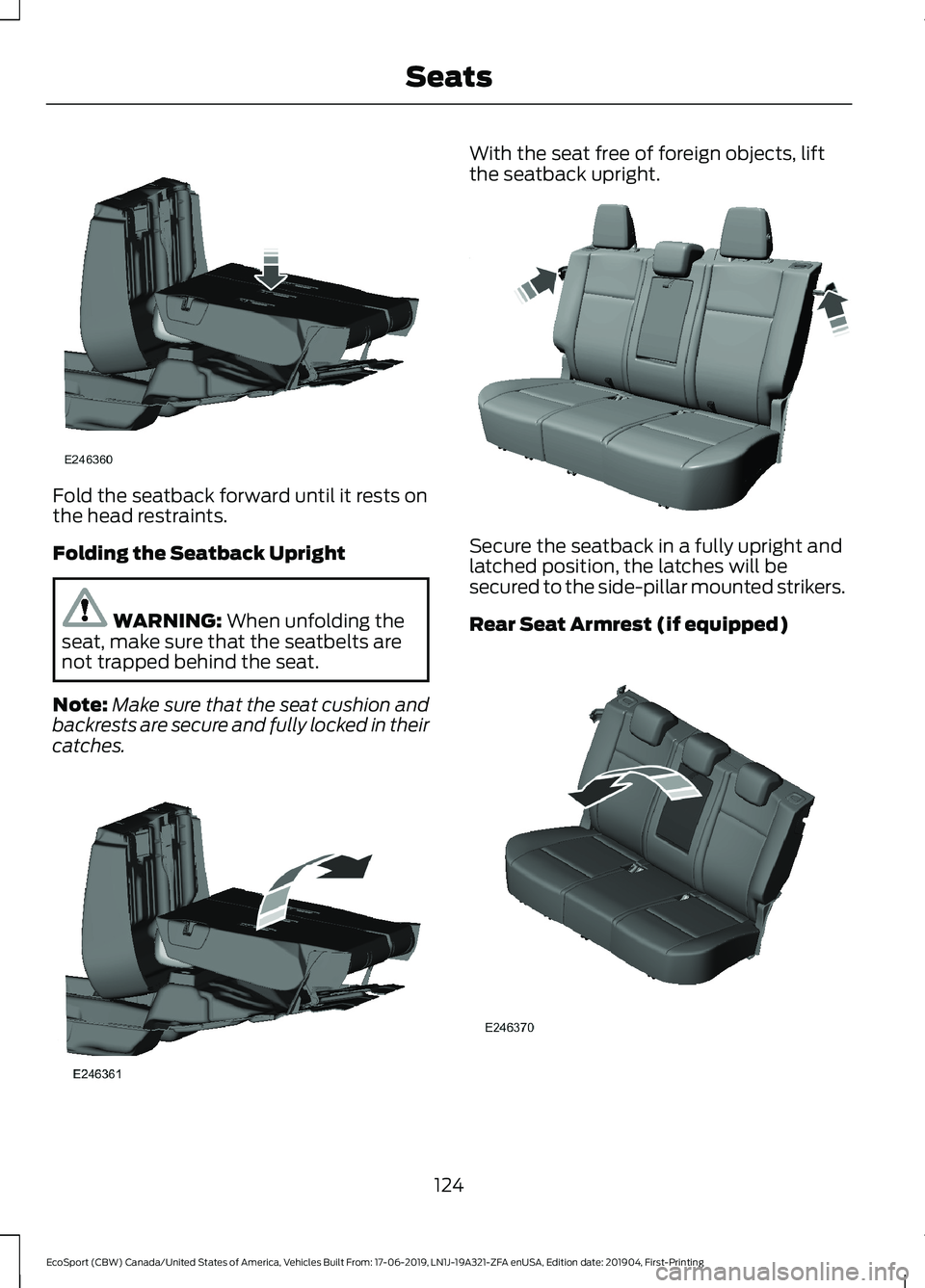
Fold the seatback forward until it rests onthe head restraints.
Folding the Seatback Upright
WARNING: When unfolding theseat, make sure that the seatbelts arenot trapped behind the seat.
Note:Make sure that the seat cushion andbackrests are secure and fully locked in theircatches.
With the seat free of foreign objects, liftthe seatback upright.
Secure the seatback in a fully upright andlatched position, the latches will besecured to the side-pillar mounted strikers.
Rear Seat Armrest (if equipped)
124
EcoSport (CBW) Canada/United States of America, Vehicles Built From: 17-06-2019, LN1J-19A321-ZFA enUSA, Edition date: 201904, First-PrintingSeats