power steering FORD ECOSPORT 2020 User Guide
[x] Cancel search | Manufacturer: FORD, Model Year: 2020, Model line: ECOSPORT, Model: FORD ECOSPORT 2020Pages: 448, PDF Size: 16.57 MB
Page 193 of 448
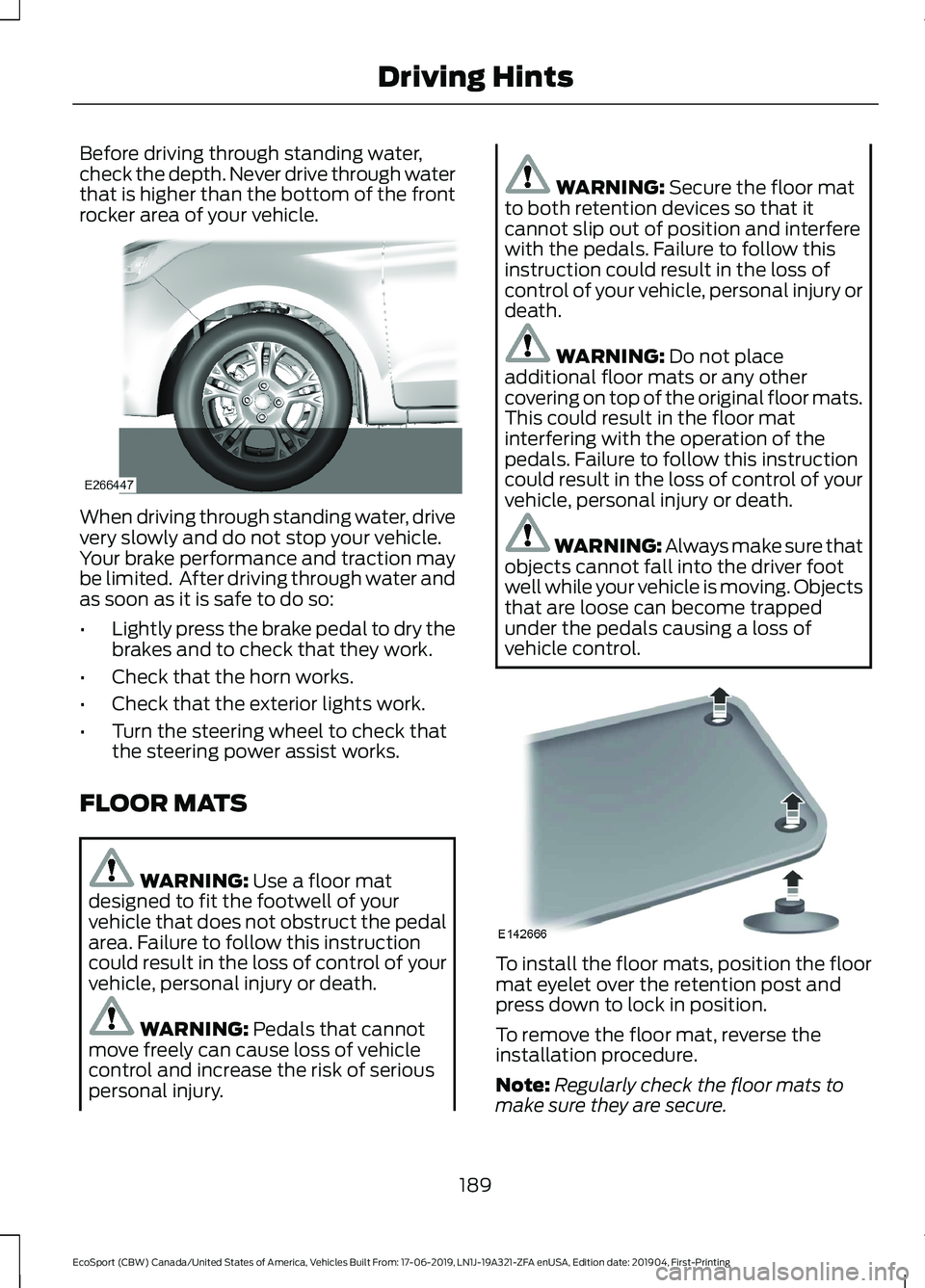
Before driving through standing water,check the depth. Never drive through waterthat is higher than the bottom of the frontrocker area of your vehicle.
When driving through standing water, drivevery slowly and do not stop your vehicle.Your brake performance and traction maybe limited. After driving through water andas soon as it is safe to do so:
•Lightly press the brake pedal to dry thebrakes and to check that they work.
•Check that the horn works.
•Check that the exterior lights work.
•Turn the steering wheel to check thatthe steering power assist works.
FLOOR MATS
WARNING: Use a floor matdesigned to fit the footwell of yourvehicle that does not obstruct the pedalarea. Failure to follow this instructioncould result in the loss of control of yourvehicle, personal injury or death.
WARNING: Pedals that cannotmove freely can cause loss of vehiclecontrol and increase the risk of seriouspersonal injury.
WARNING: Secure the floor matto both retention devices so that itcannot slip out of position and interferewith the pedals. Failure to follow thisinstruction could result in the loss ofcontrol of your vehicle, personal injury ordeath.
WARNING: Do not placeadditional floor mats or any othercovering on top of the original floor mats.This could result in the floor matinterfering with the operation of thepedals. Failure to follow this instructioncould result in the loss of control of yourvehicle, personal injury or death.
WARNING: Always make sure thatobjects cannot fall into the driver footwell while your vehicle is moving. Objectsthat are loose can become trappedunder the pedals causing a loss ofvehicle control.
To install the floor mats, position the floormat eyelet over the retention post andpress down to lock in position.
To remove the floor mat, reverse theinstallation procedure.
Note:Regularly check the floor mats tomake sure they are secure.
189
EcoSport (CBW) Canada/United States of America, Vehicles Built From: 17-06-2019, LN1J-19A321-ZFA enUSA, Edition date: 201904, First-PrintingDriving Hints
Page 210 of 448
Protected componentsFuse amp ratingFuse
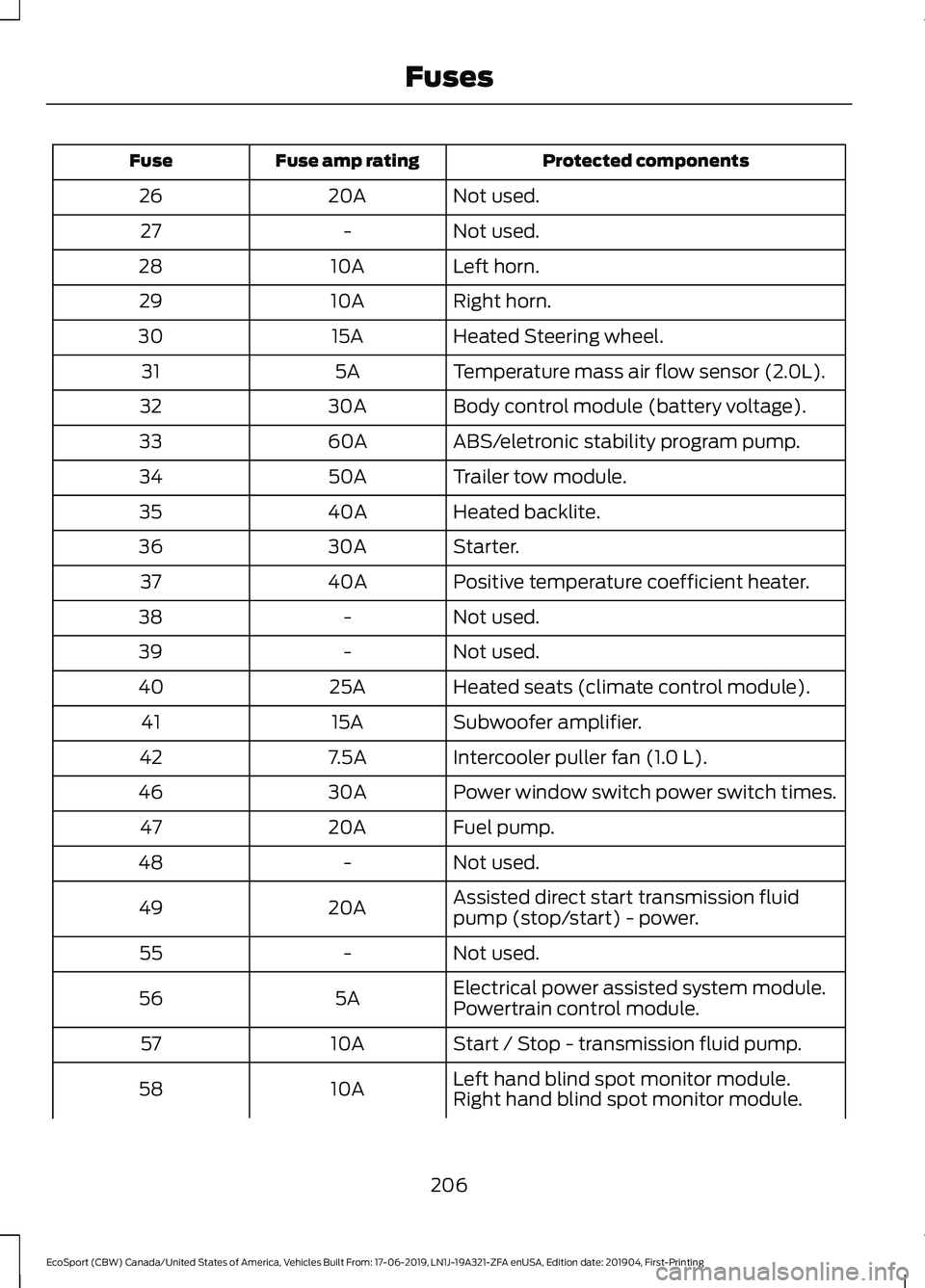
Not used.20A26
Not used.-27
Left horn.10A28
Right horn.10A29
Heated Steering wheel.15A30
Temperature mass air flow sensor (2.0L).5A31
Body control module (battery voltage).30A32
ABS/eletronic stability program pump.60A33
Trailer tow module.50A34
Heated backlite.40A35
Starter.30A36
Positive temperature coefficient heater.40A37
Not used.-38
Not used.-39
Heated seats (climate control module).25A40
Subwoofer amplifier.15A41
Intercooler puller fan (1.0 L).7.5A42
Power window switch power switch times.30A46
Fuel pump.20A47
Not used.-48
Assisted direct start transmission fluidpump (stop/start) - power.20A49
Not used.-55
Electrical power assisted system module.5A56Powertrain control module.
Start / Stop - transmission fluid pump.10A57
Left hand blind spot monitor module.10A58Right hand blind spot monitor module.
206
EcoSport (CBW) Canada/United States of America, Vehicles Built From: 17-06-2019, LN1J-19A321-ZFA enUSA, Edition date: 201904, First-PrintingFuses
Page 213 of 448
Protected componentsFuse amp ratingFuse
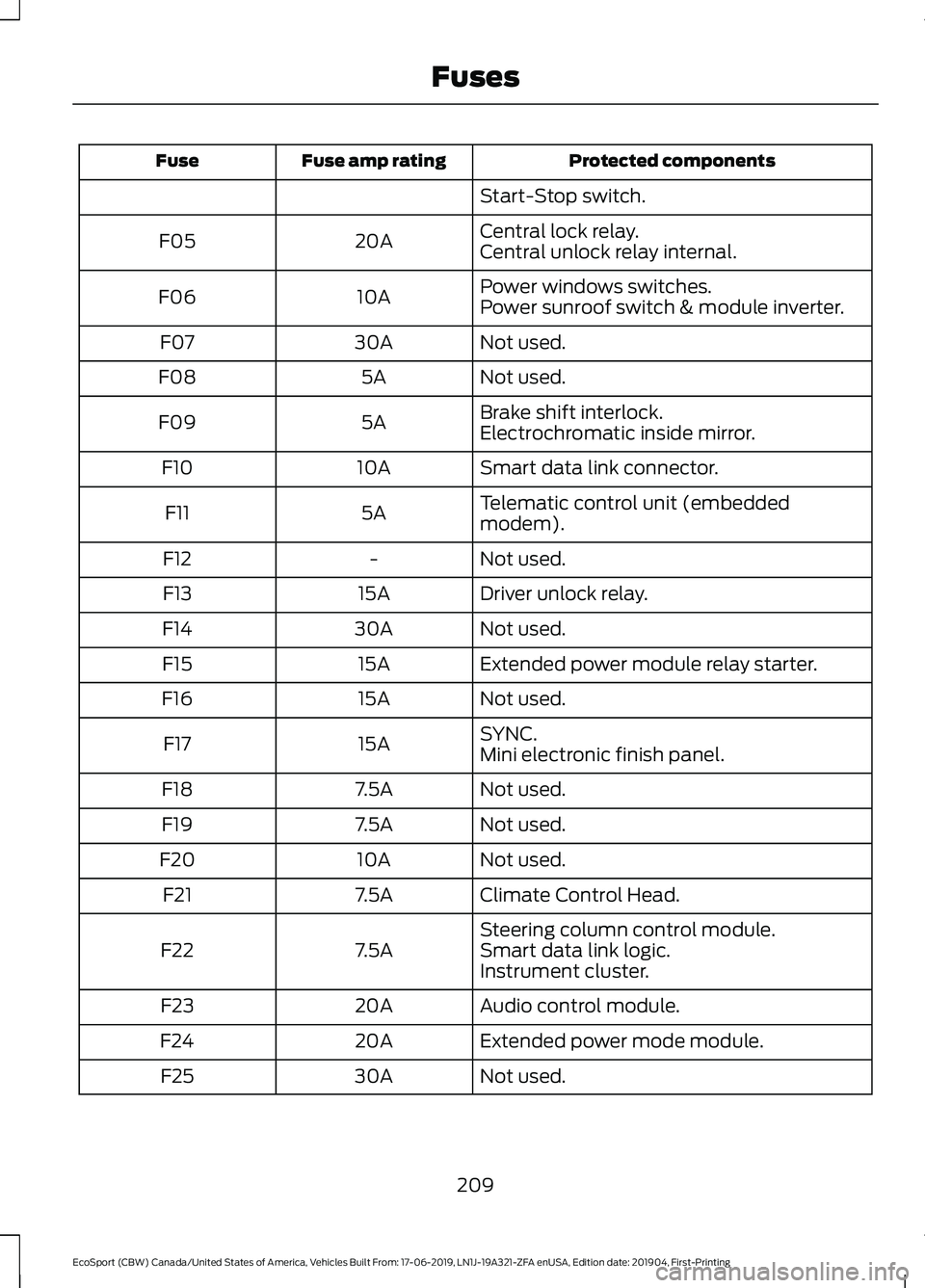
Start-Stop switch.
Central lock relay.20AF05Central unlock relay internal.
Power windows switches.10AF06Power sunroof switch & module inverter.
Not used.30AF07
Not used.5AF08
Brake shift interlock.5AF09Electrochromatic inside mirror.
Smart data link connector.10AF10
Telematic control unit (embeddedmodem).5AF11
Not used.-F12
Driver unlock relay.15AF13
Not used.30AF14
Extended power module relay starter.15AF15
Not used.15AF16
SYNC.15AF17Mini electronic finish panel.
Not used.7.5AF18
Not used.7.5AF19
Not used.10AF20
Climate Control Head.7.5AF21
Steering column control module.7.5AF22Smart data link logic.Instrument cluster.
Audio control module.20AF23
Extended power mode module.20AF24
Not used.30AF25
209
EcoSport (CBW) Canada/United States of America, Vehicles Built From: 17-06-2019, LN1J-19A321-ZFA enUSA, Edition date: 201904, First-PrintingFuses
Page 214 of 448
Battery Fuse Box
Protected componentsFuse amp ratingFuse
Engine compartment fuse box.250A1
Electric power assist steering.60A2
Body control module.100A3
Heating control unit.70A4
Starter.275A5
CHANGING A FUSE
Fuses
WARNING: Always replace a fusewith one that has the specifiedamperage rating. Using a fuse with ahigher amperage rating can cause severewire damage and could start a fire.
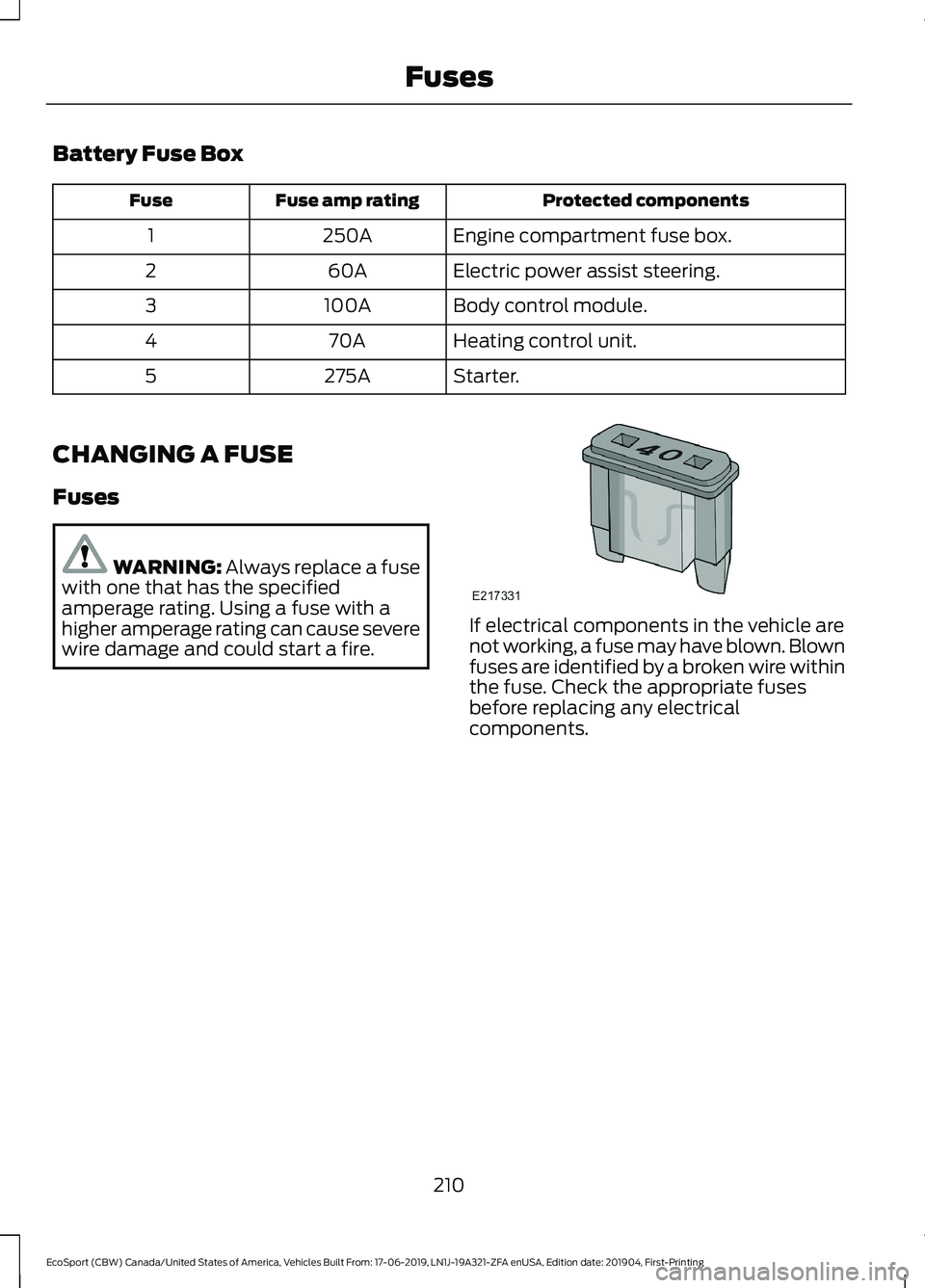
If electrical components in the vehicle arenot working, a fuse may have blown. Blownfuses are identified by a broken wire withinthe fuse. Check the appropriate fusesbefore replacing any electricalcomponents.
210
EcoSport (CBW) Canada/United States of America, Vehicles Built From: 17-06-2019, LN1J-19A321-ZFA enUSA, Edition date: 201904, First-PrintingFuses
Page 223 of 448
Recycled Coolant
We do not recommend the use of recycledcoolant as an approved recycling processis not yet available.
Dispose of used engine coolant in anappropriate manner. Follow yourcommunity’s regulations and standardsfor recycling and disposing of automotivefluids.
Severe Climates
If you drive in extremely cold climates:
•It may be necessary to increase thecoolant concentration above 50%.
•A coolant concentration of 60%provides improved freeze pointprotection. Coolant concentrationsabove 60% decrease the overheatprotection characteristics of thecoolant and may cause enginedamage.
If you drive in extremely hot climates:
•You can decrease the coolantconcentration to 40%.
•Coolant concentrations below 40%decrease the freeze and corrosionprotection characteristics of thecoolant and may cause enginedamage.
Vehicles driven year-round in non-extremeclimates should use prediluted coolant foroptimum cooling system and engineprotection.
Coolant Change
At specific mileage intervals, as listed inthe scheduled maintenance information,the coolant should be changed. Addprediluted coolant approved to the correctspecification. See Capacities andSpecifications (page 278).
Fail-Safe Cooling
Fail-safe cooling allows you to temporarilydrive your vehicle before any incrementalcomponent damage occurs. The fail-safedistance depends on ambienttemperature, vehicle load and terrain.
How Fail-Safe Cooling Works
If the engine begins to overheat, thecoolant temperature gauge moves towardthe red zone:
A warning lamp illuminates anda message may appear in theinformation display.
If the engine reaches a presetover-temperature condition, the engineautomatically switches to alternatingcylinder operation. Each disabled cylinderacts as an air pump and cools the engine.
When this occurs, your vehicle stilloperates, however:
•Engine power is limited.
•The air conditioning system turns off.
Continued operation increases the enginetemperature, causing the engine tocompletely shut down. Your steering andbraking effort increases in this situation.
When the engine temperature cools, youcan re-start the engine. Have your vehiclechecked as soon as possible to minimizeengine damage.
219
EcoSport (CBW) Canada/United States of America, Vehicles Built From: 17-06-2019, LN1J-19A321-ZFA enUSA, Edition date: 201904, First-PrintingMaintenance
Page 224 of 448
When Fail-Safe Mode Is Activated
WARNING: Fail-safe mode is foruse during emergencies only. Operateyour vehicle in fail-safe mode only aslong as necessary to bring your vehicleto rest in a safe location and seekimmediate repairs. When in fail-safemode, your vehicle will have limitedpower, will not be able to maintainhigh-speed operation, and maycompletely shut down without warning,potentially losing engine power, powersteering assist, and power brake assist,which may increase the possibility of acrash resulting in serious injury.
WARNING: Do not remove thecoolant reservoir cap when the engine ison or the cooling system is hot. Wait 10minutes for the cooling system to cooldown. Cover the coolant reservoir capwith a thick cloth to prevent thepossibility of scalding and slowly removethe cap. Failure to follow this instructioncould result in personal injury.
Your vehicle has limited engine powerwhen in the fail-safe mode, drive yourvehicle with caution. Your vehicle does notmaintain high-speed operation and theengine may operate poorly.
Remember that the engine is capable ofautomatically shutting down to preventengine damage. In this situation:
1.Pull off the road as soon as safelypossible and switch the engine off.
2.If you are a member of a roadsideassistance program, we recommendthat you contact your roadsideassistance service provider.
3.If this is not possible, wait a shortperiod for the engine to cool.
4.Check the coolant level. If the coolantlevel is at or below the minimum mark,add prediluted coolant immediately.
5.When the engine temperature cools,you can re-start the engine. Have yourvehicle checked as soon as possible tominimize engine damage.
Note:Driving your vehicle without repairincreases the chance of engine damage.
Engine Coolant TemperatureManagement (If Equipped)
WARNING: To reduce the risk ofcrash and injury, be prepared that thevehicle speed may reduce and thevehicle may not be able to acceleratewith full power until the coolanttemperature reduces.
If you tow a trailer with your vehicle, theengine may temporarily reach a highertemperature during severe operatingconditions, for example ascending a longor steep grade in high ambienttemperatures.
At this time, you may notice the coolanttemperature gauge moves toward the redzone and a message may appear in theinformation display.
You may notice a reduction in vehiclespeed caused by reduced engine power.In order to manage the engine coolanttemperature. Your vehicle may enter thismode if certain high-temperature andhigh-load conditions take place. Theamount of speed reduction depends onvehicle loading, grade and ambienttemperature. If this occurs, there is no needto pull off the road. You can continue todrive your vehicle.
220
EcoSport (CBW) Canada/United States of America, Vehicles Built From: 17-06-2019, LN1J-19A321-ZFA enUSA, Edition date: 201904, First-PrintingMaintenance
Page 274 of 448
Sometimes irregular tire wear canbe corrected by rotating the tires.
USING SUMMER TIRES
Summer tires provide superiorperformance on wet and dry roads.Summer tires do not have the Mud andSnow (M+S or M/S) tire traction rating onthe tire side wall. Since summer tires donot have the same traction performanceas All-season or Snow tires, we do notrecommend using summer tires whentemperatures drop to about 45°F (7°C) orbelow (depending on tire wear andenvironmental conditions) or in snow andice conditions. Like any tire, summer tireperformance is affected by tire wear andenvironmental conditions. If you must drivein those conditions, we recommend usingMud and Snow (M+S, M/S), All-season orSnow tires.
Always store your summer tires indoors attemperatures above 19°F (-7°C). Therubber compounds used in these tires loseflexibility and may develop surface cracksin the tread area at temperatures below19°F (-7°C). If the tires have beensubjected to 19°F (-7°C) or less, warmthem in a heated space to at least 41°F(5°C) for at least 24 hours before installingthem on a vehicle, or moving the vehiclewith the tires installed, or checking tireinflation. Do not place tires near heatersor heating devices used to warm the roomwhere the tires are stored. Do not applyheat or blow heated air directly on the tires.Always inspect the tires after storageperiods and before use.
USING SNOW CHAINS
WARNING: Snow tires must bethe same size, load index and speedrating as those originally provided byFord. Use of any tire or wheel notrecommended by Ford can affect thesafety and performance of your vehicle,which could result in an increased risk ofloss of control, vehicle rollover, personalinjury and death. Additionally, the use ofnon-recommended tires and wheels cancause steering, suspension, axle, transfercase or power transfer unit failure.Follow the Ford recommended tireinflation pressure found on the SafetyCompliance Certification Label (on thedoor hinge pillar, door latch post or thedoor edge that meets the door latchpost, next to the driver seat), or TireLabel on the B-Pillar or the edge of thedriver door. Failure to follow the tirepressure recommendations can causeuneven treadwear patterns andadversely affect the way your vehiclehandles.
270
EcoSport (CBW) Canada/United States of America, Vehicles Built From: 17-06-2019, LN1J-19A321-ZFA enUSA, Edition date: 201904, First-PrintingWheels and Tires
Page 312 of 448
Before making the call:
•SYNC provides a short window of time(about 10 seconds) to cancel the call.If you fail to cancel the call, SYNCattempts to dial 911.
•SYNC says the following, or a similarmessage: "SYNC will attempt to call911, to cancel the call, press Cancel onyour screen or press and hold thephone button on your steering wheel".
If you do not cancel the call, and SYNCmakes a successful call, a pre-recordedmessage plays for the 911 operator, andthen the occupant(s) in your vehicle areable to talk with the operator. Be preparedto provide your name, phone number andlocation immediately, because not all 911systems are capable of receiving thisinformation electronically.
911 Assist May Not Work If
•Your cellular phone or 911 Assisthardware sustains damage in a crash.
•The vehicle's battery or the SYNCsystem has no power.
•The phone(s) thrown from your vehicleare the ones paired and connected tothe system.
911 Assist Privacy Notice
When you switch on 911 Assist, it maydisclose to emergency services that yourvehicle has been in a crash involving thedeployment of an airbag or activation ofthe fuel pump shut-off. Certain versions orupdates to 911 Assist may also be capableof electronically or verbally disclosing to911 operators your vehicle location or otherdetails about your vehicle or crash to assist911 operators to provide the mostappropriate emergency services. If you donot want to disclose this information, donot switch the feature on.
SYNC Mobile Apps
The system enables voice and steeringwheel control of SYNC AppLink enabledsmartphone apps. When an app is runningthrough AppLink, you can control mainfeatures of the app through voicecommands and steering wheel controls.
Note:You must pair and connect yoursmartphone to SYNC to access AppLink.
Note:Android users need to connect thephone to SYNC using Bluetooth.
Note:For information on available apps,supported smartphone devices andtroubleshooting tips please visit the Fordwebsite
Note:Availability of SYNC AppLink enabledApps will vary by region.
Note:Make sure you have an active accountfor the app that you have downloaded.Some apps work automatically with nosetup. Other apps want you to configureyour personal settings and personalize yourexperience by creating stations or favorites.We recommend you do this at home oroutside of your vehicle.
To Access Using the SYNC Menu
Press the Mobile Apps button to accessthe menu on-screen. Then select:
Action and DescriptionMenuItem
Scroll through the list ofavailable applications andselect a particular app.
FindMobileApps
Note:If you cannot find a compatible SYNCAppLink app, make sure the required app isrunning on the mobile device.
308
EcoSport (CBW) Canada/United States of America, Vehicles Built From: 17-06-2019, LN1J-19A321-ZFA enUSA, Edition date: 201904, First-PrintingSYNC™
Page 327 of 448
Cleaning the Touchscreen
You can remove fingerprints with a dry,clean, soft cloth.
If dirt or fingerprints are still on the screen,apply a small amount of alcohol to thecloth and try to clean it again.
Note: Do not use detergent or any type ofsolvent to clean the touchscreen.
Note:Do not pour or spray alcohol onto thetouchscreen.
Using Voice Recognition
Using voice commands allows you to keepyour hands on the wheel and eyes on theroad. The system provides feedbackthrough audible tones, prompts, questionsand spoken confirmations depending onthe situation and the chosen level ofinteraction (voice settings).
The system also asks short questions(confirmation prompts) when it is not sureof your request or when there are multiplepossible responses to your request.
When using voice commands, words andicons may appear in the status barindicating the status of the voice commandsession. See Using Voice Recognition(page 327).
Using the Steering Wheel Controls
Depending on your vehicle and optionpackage, you can use different controls onyour steering wheel to interact with thetouchscreen system in different ways.
VOL: Control the volume of audio output.
Voice: Press to start a voice session. Pressagain to stop the voice prompt andimmediately begin speaking. Press andhold to end a voice session.
SEEK NEXT:
•While in radio mode, press to seekbetween memory presets or press andhold to fast seek.
•While in USB, Bluetooth Audio or CDmode, press to seek between songs orpress and hold to fast seek.
SEEK PREVIOUS:
•While in radio mode, press to seekbetween memory presets or press andhold to fast seek.
•While in USB, Bluetooth Audio or CDmode, press to seek between songs orpress and hold to fast seek.
PHONE ACCEPT: Press to answer a callor switch between calls.
PHONE REJECT: Press to end a call orreject an incoming call.
Note:On some models,SEEK NEXT maybe combined with PHONE REJECT andSEEK PREVIOUS may be combined withPHONE ACCEPT.
See Steering Wheel (page 71).
Using Your Bezel Controls
Depending on your vehicle and optionpackage, you may also have these controlson your instrument panel:
•Power or VOL: Press to switch theaudio system on and off, or turn toadjust the volume.
•Sound Settings: Press to access theaudio settings.
•Seek: Press to seek through radiostations or audio tracks.
•Play or Pause: Press to either play orpause a track.
•Tune: Turn to manually tune radiostations.
•Display: Press to switch the display onor off.
323
EcoSport (CBW) Canada/United States of America, Vehicles Built From: 17-06-2019, LN1J-19A321-ZFA enUSA, Edition date: 201904, First-PrintingSYNC™ 3
Page 440 of 448
Heated Rear Window - Vehicles With:Electronic Manual TemperatureControl (EMTC)...........................................112Heated Seats..................................................125Heated Steering Wheel................................72HeatingSee: Climate Control.........................................106Hill Start Assist..............................................158Switching the System On and Off...............159Using Hill Start Assist.......................................159Hints on Controlling the Interior Climate- Vehicles With: Electronic AutomaticTemperature Control (EATC).................110Defogging or Clearing the Windshield ofThin Ice...............................................................110Defogging the Side Windows in ColdWeather..............................................................110General Hints........................................................110Quickly Cooling the Interior.............................110Recommended Settings for Cooling...........110Recommended Settings for Heating...........110Hints on Controlling the Interior Climate- Vehicles With: Electronic ManualTemperature Control (EMTC).................111Defogging or Clearing the Windshield ofThin Ice.................................................................111Defogging the Side Windows in ColdWeather...............................................................111General Hints..........................................................111Quickly Cooling the Interior...............................111Quickly Heating the Interior..............................111Recommended Settings for Cooling.............111Recommended Settings for Heating.............111Hints on Driving With Anti-LockBrakes............................................................158Hood LockSee: Opening and Closing the Hood............212
I
Ignition Switch...............................................130Starting the Engine.............................................131Switching the Ignition Off...............................130Switching the Ignition On................................130Switching the Ignition to AccessoryMode..................................................................130In California (U.S. Only)..............................197Information Display Control.......................72
Information Displays.....................................93General Information............................................93Information Messages.................................96Accessory Power..................................................97Airbag........................................................................97Alarm.........................................................................97Battery and Charging System.........................98Brake System........................................................98Engine......................................................................99Fuel System...........................................................99Hill Start Assist.....................................................99Keyless Vehicle...................................................100Lighting..................................................................100Maintenance........................................................100MyKey......................................................................101Park Aid..................................................................102Park Brake.............................................................102Power Steering....................................................103Stability Control..................................................103Starting System .................................................103Tire Pressure Monitoring System...................98Traction Control..................................................104Transmission........................................................104Vehicle Settings..................................................105Installing Child Restraints...........................20Child Seats..............................................................20Using Lap and Shoulder Belts.........................20Using Lower Anchors and Tethers forCHildren (LATCH)............................................23Using Tether Straps.............................................24Instrument Cluster........................................88Instrument Lighting Dimmer.....................80Interior Lamps.................................................82Courtesy lamp.......................................................82Reading lamps......................................................82Vanity lamp............................................................83Interior Mirror...................................................86Auto-Dimming Mirror.........................................86Introduction.........................................................7
J
Jump Starting the Vehicle.........................192Connecting the Jumper Cables.....................193Jump Starting......................................................194Preparing Your Vehicle......................................192Removing the Jumper Cables........................194
436
EcoSport (CBW) Canada/United States of America, Vehicles Built From: 17-06-2019, LN1J-19A321-ZFA enUSA, Edition date: 201904, First-PrintingIndex