AUDIO FORD ECOSPORT 2020 Owner's Manual
[x] Cancel search | Manufacturer: FORD, Model Year: 2020, Model line: ECOSPORT, Model: FORD ECOSPORT 2020Pages: 448, PDF Size: 16.57 MB
Page 317 of 448
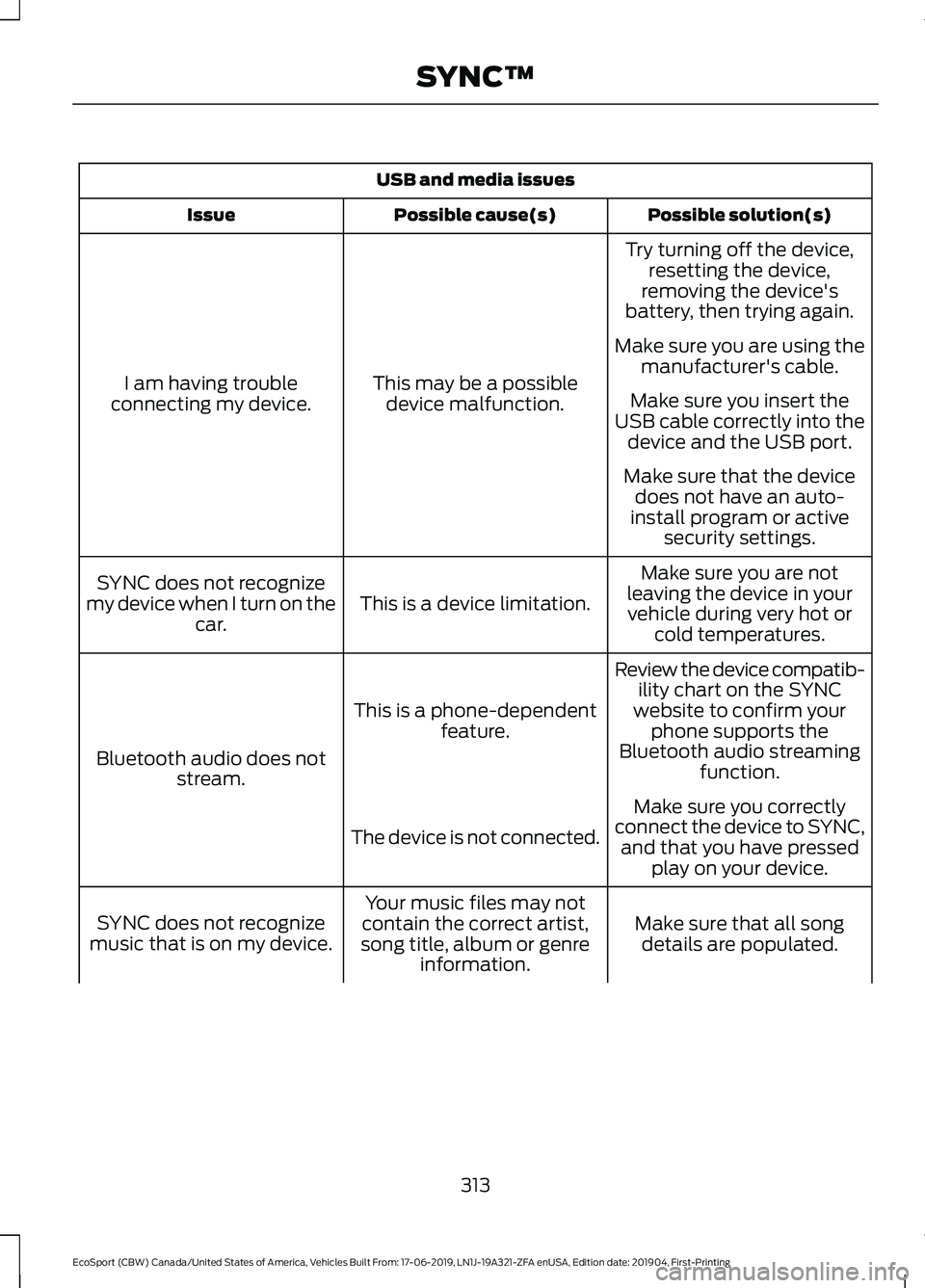
USB and media issues
Possible solution(s)Possible cause(s)Issue
Try turning off the device,resetting the device,removing the device'sbattery, then trying again.
This may be a possibledevice malfunction.I am having troubleconnecting my device.
Make sure you are using themanufacturer's cable.
Make sure you insert theUSB cable correctly into thedevice and the USB port.
Make sure that the devicedoes not have an auto-install program or activesecurity settings.
Make sure you are notleaving the device in yourvehicle during very hot orcold temperatures.
This is a device limitation.SYNC does not recognizemy device when I turn on thecar.
Review the device compatib-ility chart on the SYNCwebsite to confirm yourphone supports theBluetooth audio streamingfunction.
This is a phone-dependentfeature.
Bluetooth audio does notstream.
Make sure you correctlyconnect the device to SYNC,and that you have pressedplay on your device.
The device is not connected.
Make sure that all songdetails are populated.
Your music files may notcontain the correct artist,song title, album or genreinformation.
SYNC does not recognizemusic that is on my device.
313
EcoSport (CBW) Canada/United States of America, Vehicles Built From: 17-06-2019, LN1J-19A321-ZFA enUSA, Edition date: 201904, First-PrintingSYNC™
Page 323 of 448
GENERAL INFORMATION
WARNING: Driving whiledistracted can result in loss of vehiclecontrol, crash and injury. We stronglyrecommend that you use extremecaution when using any device that maytake your focus off the road. Yourprimary responsibility is the safeoperation of your vehicle. Werecommend against the use of anyhand-held device while driving andencourage the use of voice-operatedsystems when possible. Make sure youare aware of all applicable local lawsthat may affect the use of electronicdevices while driving.
Getting to Know Your System
The SYNC 3 system allows you to interactwith a variety of features using thetouchscreen and voice commands. Byintegrating with your Bluetooth-enabledphone, the touchscreen provides easyinteraction with audio, multimedia, climatecontrol, navigation, and your phone's SYNCAppLink.
Using the Touchscreen
To operate the touchscreen, you cansimply touch the item or option that youwant to select. The button highlights whenyou select it.
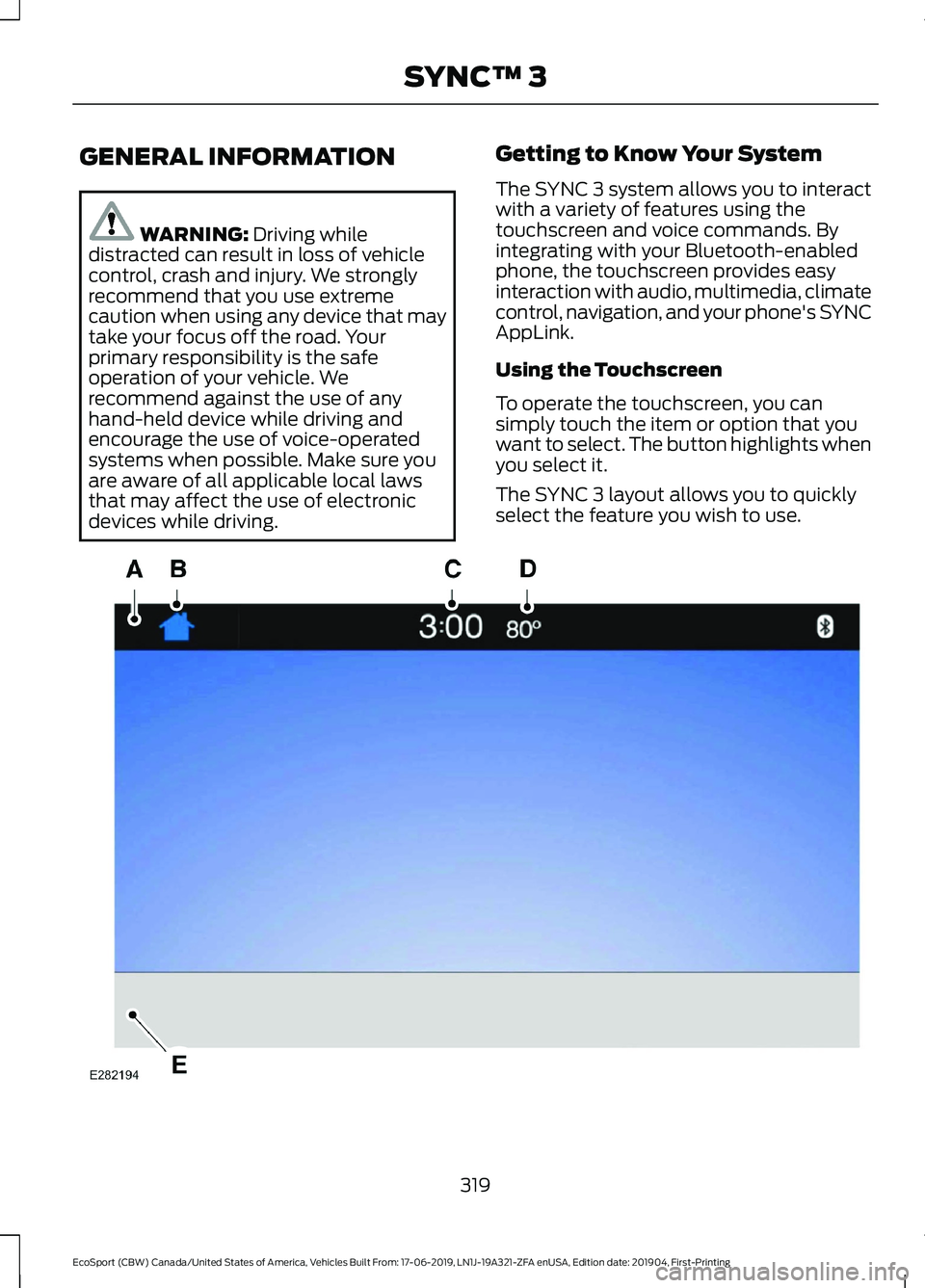
The SYNC 3 layout allows you to quicklyselect the feature you wish to use.
319
EcoSport (CBW) Canada/United States of America, Vehicles Built From: 17-06-2019, LN1J-19A321-ZFA enUSA, Edition date: 201904, First-PrintingSYNC™ 3
Page 324 of 448
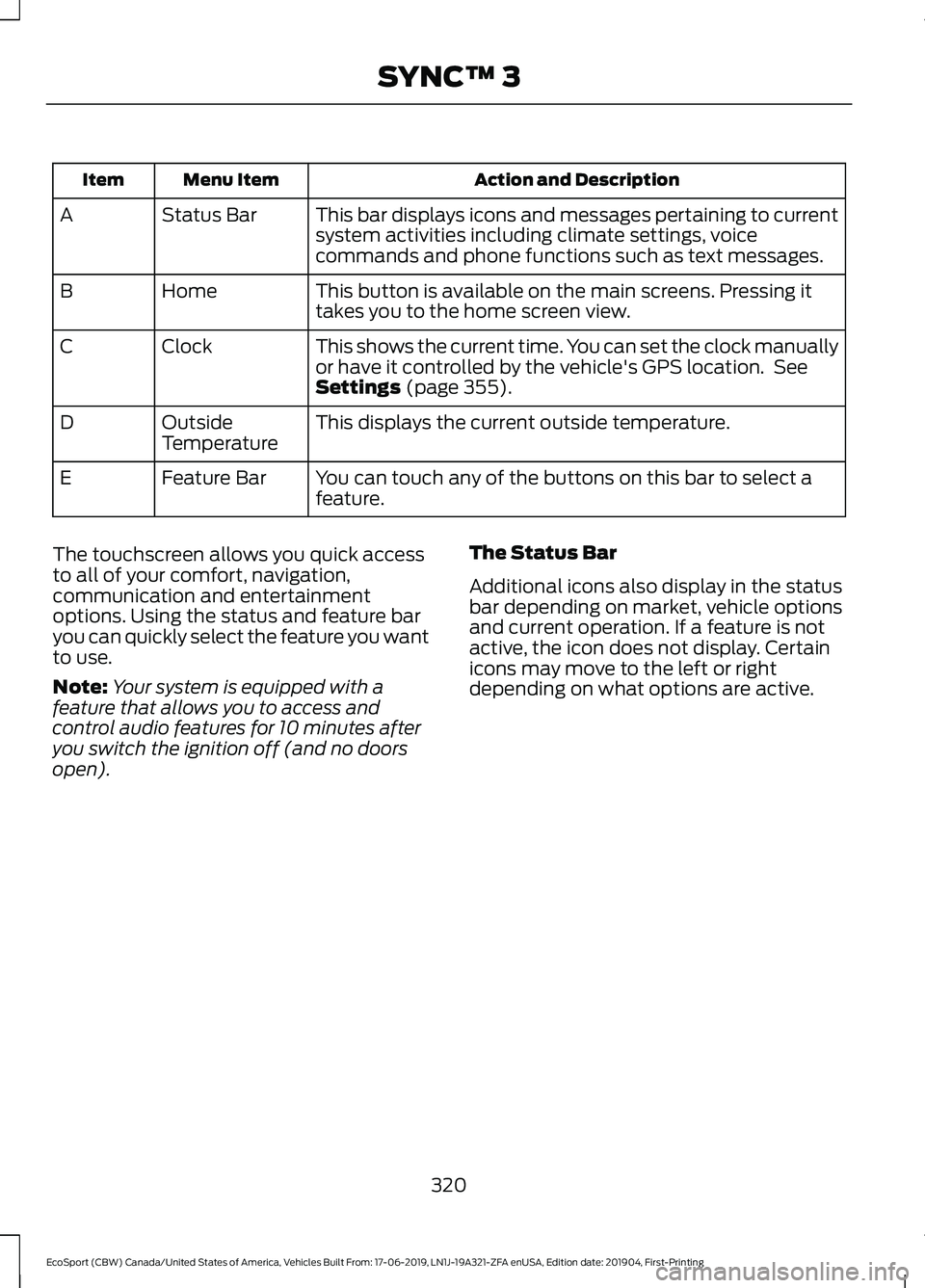
Action and DescriptionMenu ItemItem
This bar displays icons and messages pertaining to currentsystem activities including climate settings, voicecommands and phone functions such as text messages.
Status BarA
This button is available on the main screens. Pressing ittakes you to the home screen view.HomeB
This shows the current time. You can set the clock manuallyor have it controlled by the vehicle's GPS location. SeeSettings (page 355).
ClockC
This displays the current outside temperature.OutsideTemperatureD
You can touch any of the buttons on this bar to select afeature.Feature BarE
The touchscreen allows you quick accessto all of your comfort, navigation,communication and entertainmentoptions. Using the status and feature baryou can quickly select the feature you wantto use.
Note:Your system is equipped with afeature that allows you to access andcontrol audio features for 10 minutes afteryou switch the ignition off (and no doorsopen).
The Status Bar
Additional icons also display in the statusbar depending on market, vehicle optionsand current operation. If a feature is notactive, the icon does not display. Certainicons may move to the left or rightdepending on what options are active.
320
EcoSport (CBW) Canada/United States of America, Vehicles Built From: 17-06-2019, LN1J-19A321-ZFA enUSA, Edition date: 201904, First-PrintingSYNC™ 3
Page 325 of 448
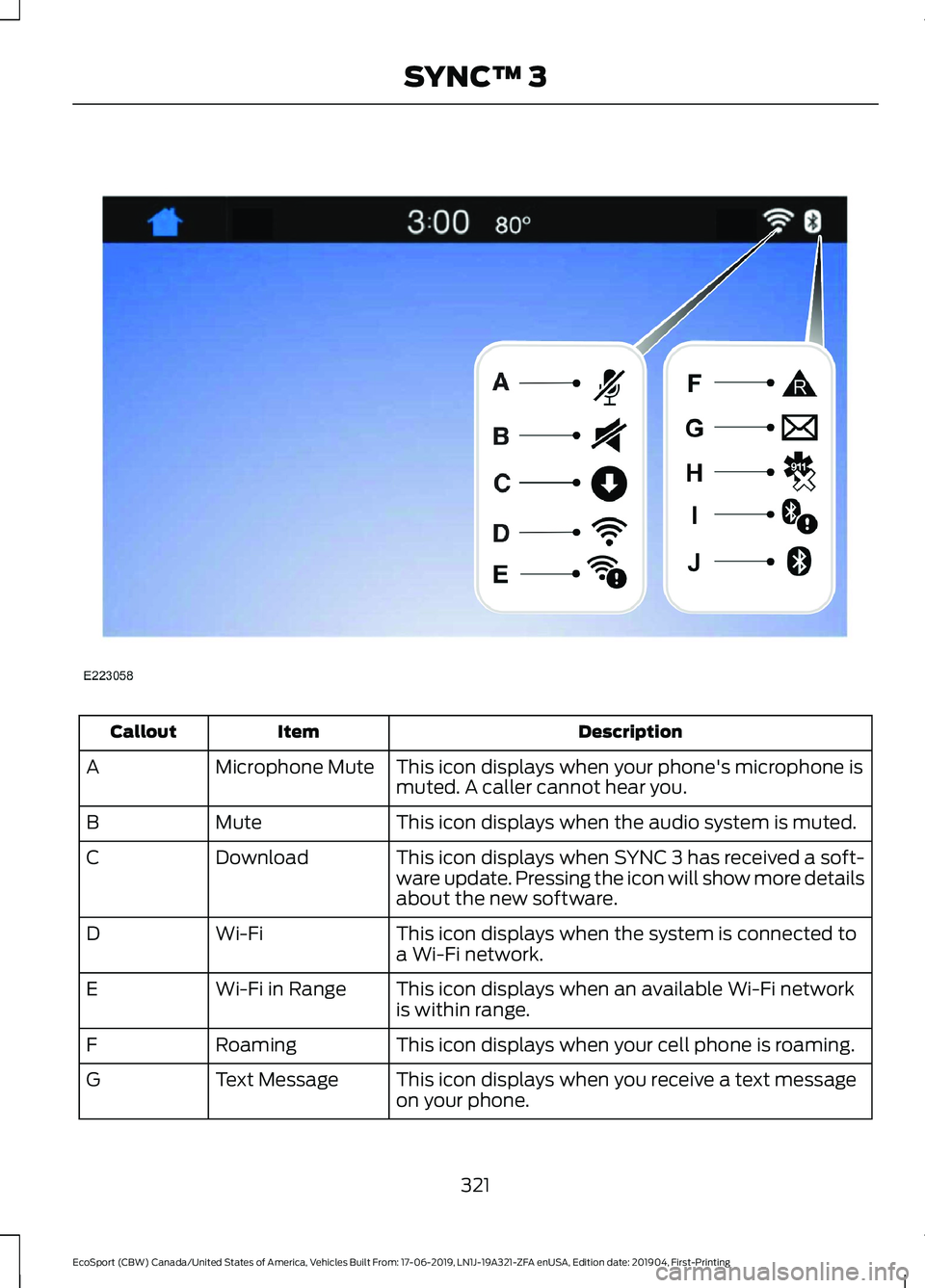
DescriptionItemCallout
This icon displays when your phone's microphone ismuted. A caller cannot hear you.Microphone MuteA
This icon displays when the audio system is muted.MuteB
This icon displays when SYNC 3 has received a soft-ware update. Pressing the icon will show more detailsabout the new software.
DownloadC
This icon displays when the system is connected toa Wi-Fi network.Wi-FiD
This icon displays when an available Wi-Fi networkis within range.Wi-Fi in RangeE
This icon displays when your cell phone is roaming.RoamingF
This icon displays when you receive a text messageon your phone.Text MessageG
321
EcoSport (CBW) Canada/United States of America, Vehicles Built From: 17-06-2019, LN1J-19A321-ZFA enUSA, Edition date: 201904, First-PrintingSYNC™ 3
Page 326 of 448
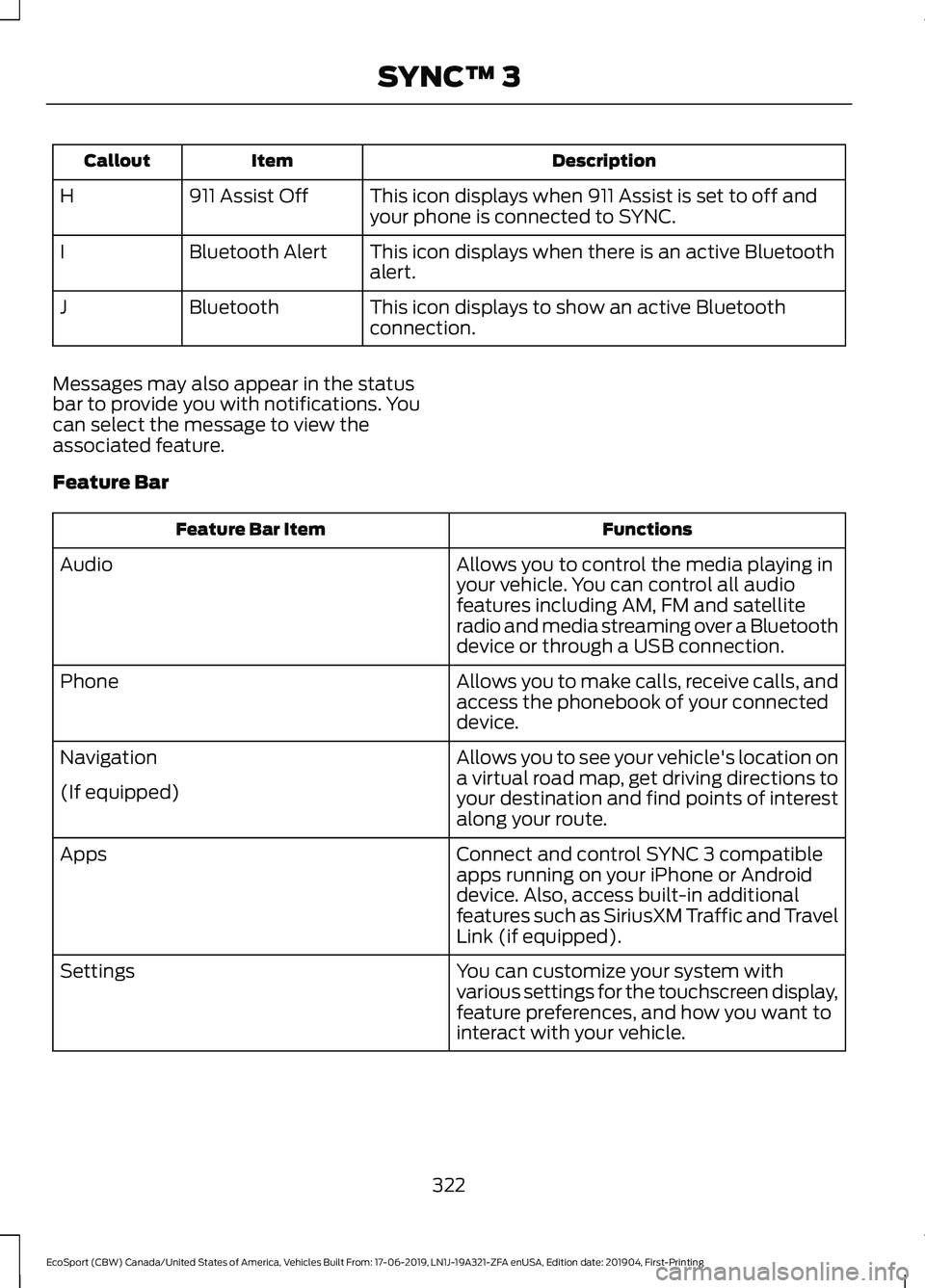
DescriptionItemCallout
This icon displays when 911 Assist is set to off andyour phone is connected to SYNC.911 Assist OffH
This icon displays when there is an active Bluetoothalert.Bluetooth AlertI
This icon displays to show an active Bluetoothconnection.BluetoothJ
Messages may also appear in the statusbar to provide you with notifications. Youcan select the message to view theassociated feature.
Feature Bar
FunctionsFeature Bar Item
Allows you to control the media playing inyour vehicle. You can control all audiofeatures including AM, FM and satelliteradio and media streaming over a Bluetoothdevice or through a USB connection.
Audio
Allows you to make calls, receive calls, andaccess the phonebook of your connecteddevice.
Phone
Allows you to see your vehicle's location ona virtual road map, get driving directions toyour destination and find points of interestalong your route.
Navigation
(If equipped)
Connect and control SYNC 3 compatibleapps running on your iPhone or Androiddevice. Also, access built-in additionalfeatures such as SiriusXM Traffic and TravelLink (if equipped).
Apps
You can customize your system withvarious settings for the touchscreen display,feature preferences, and how you want tointeract with your vehicle.
Settings
322
EcoSport (CBW) Canada/United States of America, Vehicles Built From: 17-06-2019, LN1J-19A321-ZFA enUSA, Edition date: 201904, First-PrintingSYNC™ 3
Page 327 of 448
Cleaning the Touchscreen
You can remove fingerprints with a dry,clean, soft cloth.
If dirt or fingerprints are still on the screen,apply a small amount of alcohol to thecloth and try to clean it again.
Note: Do not use detergent or any type ofsolvent to clean the touchscreen.
Note:Do not pour or spray alcohol onto thetouchscreen.
Using Voice Recognition
Using voice commands allows you to keepyour hands on the wheel and eyes on theroad. The system provides feedbackthrough audible tones, prompts, questionsand spoken confirmations depending onthe situation and the chosen level ofinteraction (voice settings).
The system also asks short questions(confirmation prompts) when it is not sureof your request or when there are multiplepossible responses to your request.
When using voice commands, words andicons may appear in the status barindicating the status of the voice commandsession. See Using Voice Recognition(page 327).
Using the Steering Wheel Controls
Depending on your vehicle and optionpackage, you can use different controls onyour steering wheel to interact with thetouchscreen system in different ways.
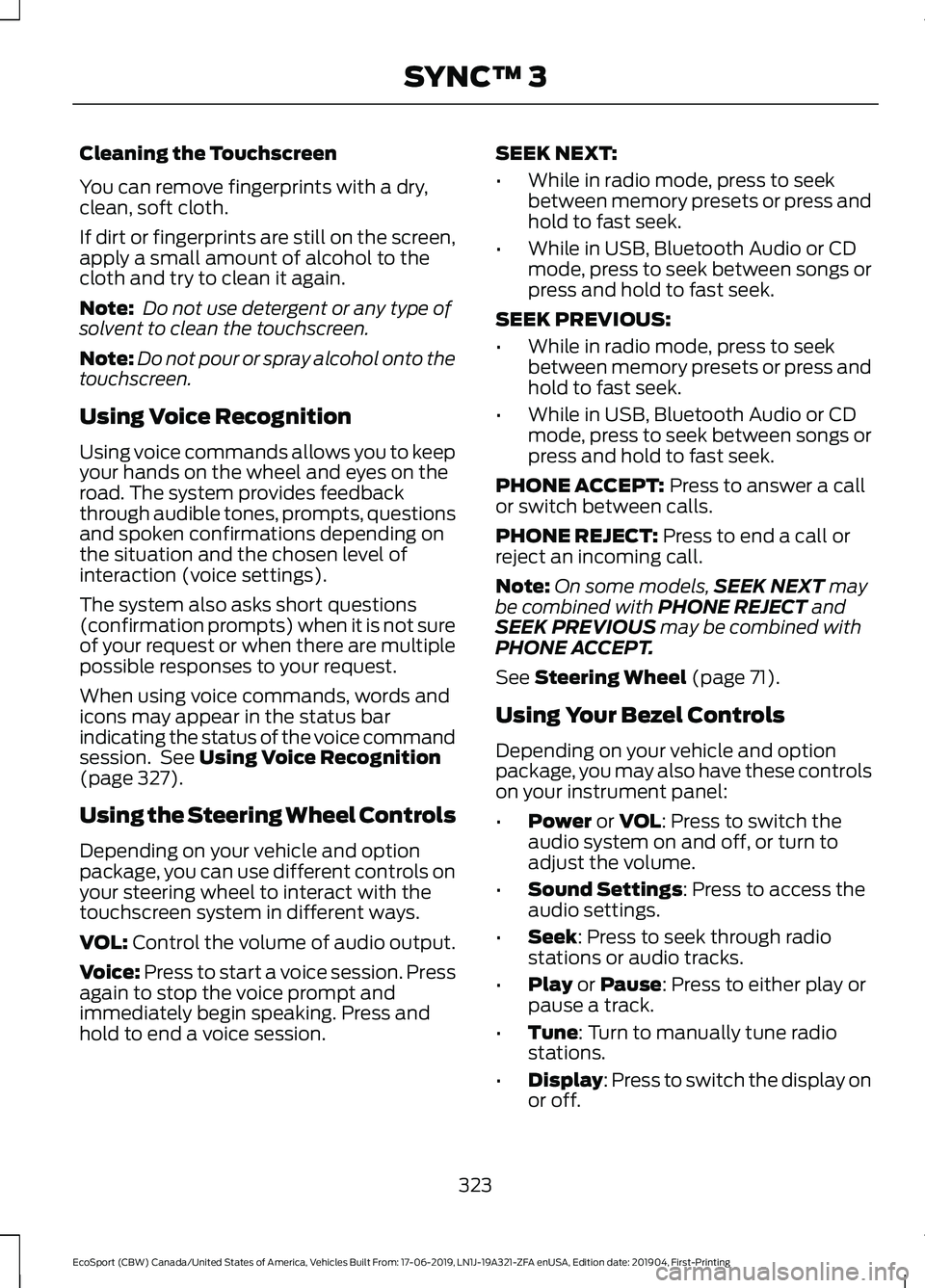
VOL: Control the volume of audio output.
Voice: Press to start a voice session. Pressagain to stop the voice prompt andimmediately begin speaking. Press andhold to end a voice session.
SEEK NEXT:
•While in radio mode, press to seekbetween memory presets or press andhold to fast seek.
•While in USB, Bluetooth Audio or CDmode, press to seek between songs orpress and hold to fast seek.
SEEK PREVIOUS:
•While in radio mode, press to seekbetween memory presets or press andhold to fast seek.
•While in USB, Bluetooth Audio or CDmode, press to seek between songs orpress and hold to fast seek.
PHONE ACCEPT: Press to answer a callor switch between calls.
PHONE REJECT: Press to end a call orreject an incoming call.
Note:On some models,SEEK NEXT maybe combined with PHONE REJECT andSEEK PREVIOUS may be combined withPHONE ACCEPT.
See Steering Wheel (page 71).
Using Your Bezel Controls
Depending on your vehicle and optionpackage, you may also have these controlson your instrument panel:
•Power or VOL: Press to switch theaudio system on and off, or turn toadjust the volume.
•Sound Settings: Press to access theaudio settings.
•Seek: Press to seek through radiostations or audio tracks.
•Play or Pause: Press to either play orpause a track.
•Tune: Turn to manually tune radiostations.
•Display: Press to switch the display onor off.
323
EcoSport (CBW) Canada/United States of America, Vehicles Built From: 17-06-2019, LN1J-19A321-ZFA enUSA, Edition date: 201904, First-PrintingSYNC™ 3
Page 331 of 448
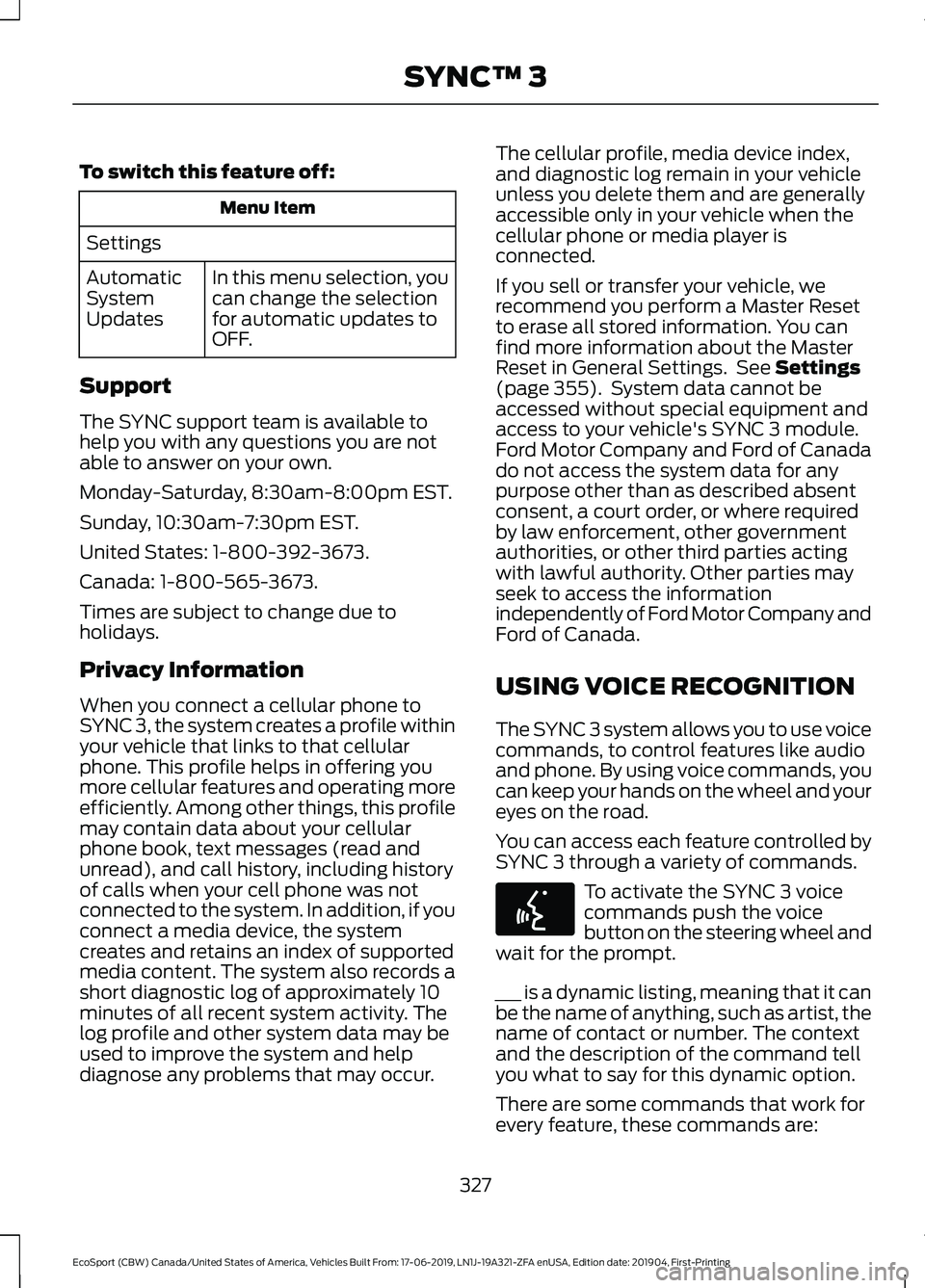
To switch this feature off:
Menu Item
Settings
In this menu selection, youcan change the selectionfor automatic updates toOFF.
AutomaticSystemUpdates
Support
The SYNC support team is available tohelp you with any questions you are notable to answer on your own.
Monday-Saturday, 8:30am-8:00pm EST.
Sunday, 10:30am-7:30pm EST.
United States: 1-800-392-3673.
Canada: 1-800-565-3673.
Times are subject to change due toholidays.
Privacy Information
When you connect a cellular phone toSYNC 3, the system creates a profile withinyour vehicle that links to that cellularphone. This profile helps in offering youmore cellular features and operating moreefficiently. Among other things, this profilemay contain data about your cellularphone book, text messages (read andunread), and call history, including historyof calls when your cell phone was notconnected to the system. In addition, if youconnect a media device, the systemcreates and retains an index of supportedmedia content. The system also records ashort diagnostic log of approximately 10minutes of all recent system activity. Thelog profile and other system data may beused to improve the system and helpdiagnose any problems that may occur.
The cellular profile, media device index,and diagnostic log remain in your vehicleunless you delete them and are generallyaccessible only in your vehicle when thecellular phone or media player isconnected.
If you sell or transfer your vehicle, werecommend you perform a Master Resetto erase all stored information. You canfind more information about the MasterReset in General Settings. See Settings(page 355). System data cannot beaccessed without special equipment andaccess to your vehicle's SYNC 3 module.Ford Motor Company and Ford of Canadado not access the system data for anypurpose other than as described absentconsent, a court order, or where requiredby law enforcement, other governmentauthorities, or other third parties actingwith lawful authority. Other parties mayseek to access the informationindependently of Ford Motor Company andFord of Canada.
USING VOICE RECOGNITION
The SYNC 3 system allows you to use voicecommands, to control features like audioand phone. By using voice commands, youcan keep your hands on the wheel and youreyes on the road.
You can access each feature controlled bySYNC 3 through a variety of commands.
To activate the SYNC 3 voicecommands push the voicebutton on the steering wheel andwait for the prompt.
___ is a dynamic listing, meaning that it canbe the name of anything, such as artist, thename of contact or number. The contextand the description of the command tellyou what to say for this dynamic option.
There are some commands that work forevery feature, these commands are:
327
EcoSport (CBW) Canada/United States of America, Vehicles Built From: 17-06-2019, LN1J-19A321-ZFA enUSA, Edition date: 201904, First-PrintingSYNC™ 3
Page 332 of 448
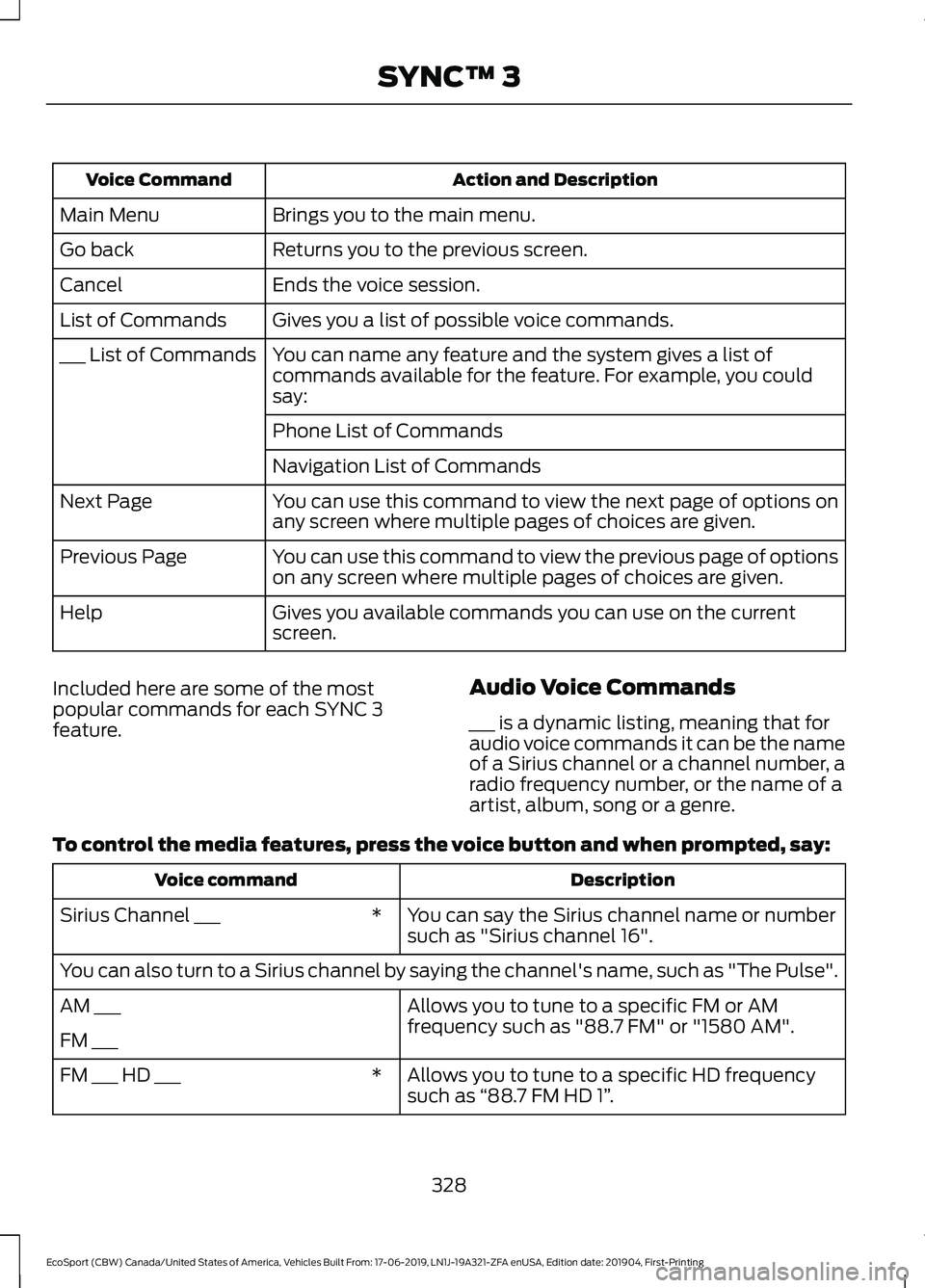
Action and DescriptionVoice Command
Brings you to the main menu.Main Menu
Returns you to the previous screen.Go back
Ends the voice session.Cancel
Gives you a list of possible voice commands.List of Commands
You can name any feature and the system gives a list ofcommands available for the feature. For example, you couldsay:
___ List of Commands
Phone List of Commands
Navigation List of Commands
You can use this command to view the next page of options onany screen where multiple pages of choices are given.Next Page
You can use this command to view the previous page of optionson any screen where multiple pages of choices are given.Previous Page
Gives you available commands you can use on the currentscreen.Help
Included here are some of the mostpopular commands for each SYNC 3feature.
Audio Voice Commands
___ is a dynamic listing, meaning that foraudio voice commands it can be the nameof a Sirius channel or a channel number, aradio frequency number, or the name of aartist, album, song or a genre.
To control the media features, press the voice button and when prompted, say:
DescriptionVoice command
You can say the Sirius channel name or numbersuch as "Sirius channel 16".*Sirius Channel ___
You can also turn to a Sirius channel by saying the channel's name, such as "The Pulse".
Allows you to tune to a specific FM or AMfrequency such as "88.7 FM" or "1580 AM".AM ___
FM ___
Allows you to tune to a specific HD frequencysuch as “88.7 FM HD 1”.*FM ___ HD ___
328
EcoSport (CBW) Canada/United States of America, Vehicles Built From: 17-06-2019, LN1J-19A321-ZFA enUSA, Edition date: 201904, First-PrintingSYNC™ 3
Page 333 of 448
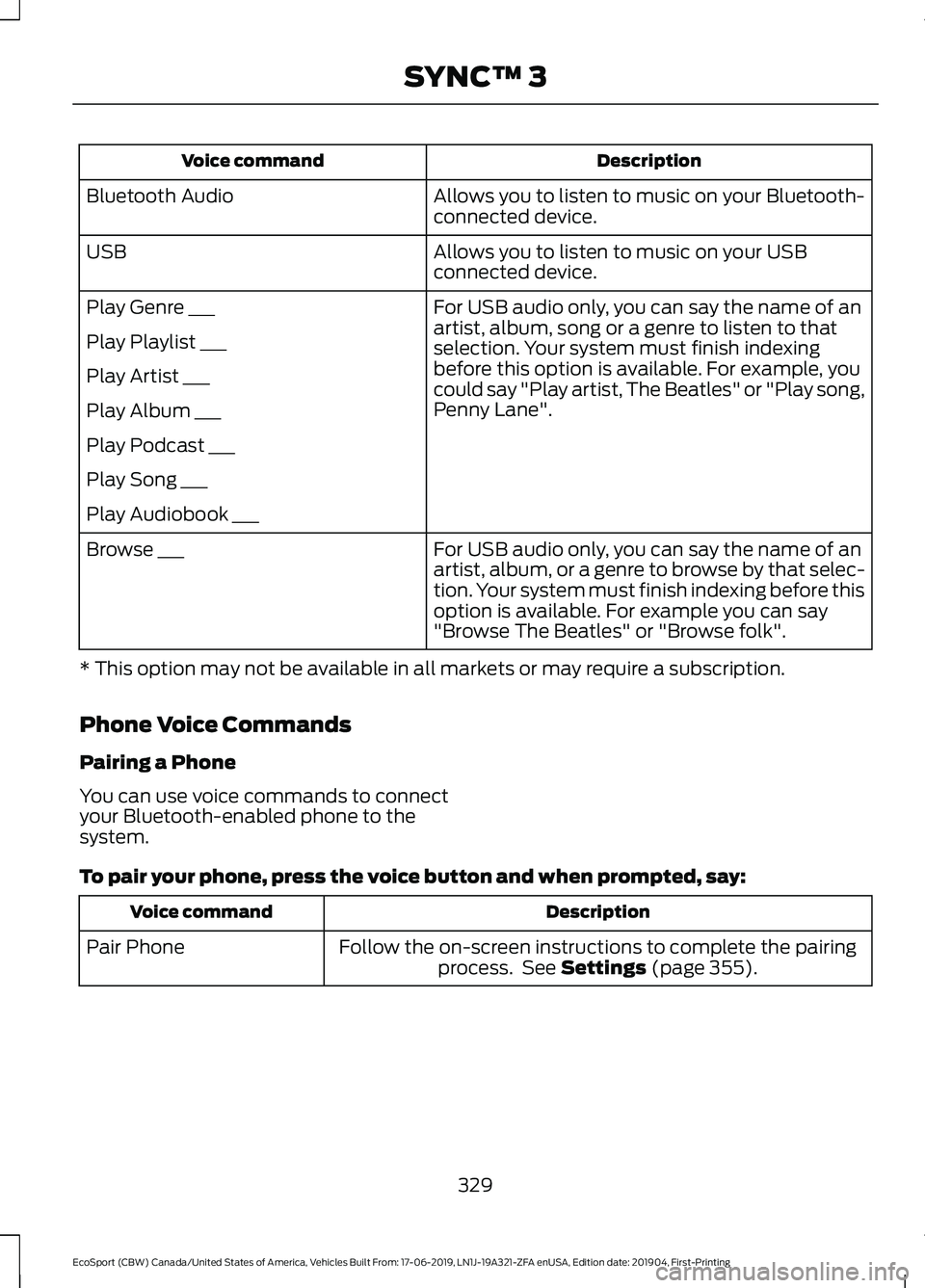
DescriptionVoice command
Allows you to listen to music on your Bluetooth-connected device.Bluetooth Audio
Allows you to listen to music on your USBconnected device.USB
For USB audio only, you can say the name of anartist, album, song or a genre to listen to thatselection. Your system must finish indexingbefore this option is available. For example, youcould say "Play artist, The Beatles" or "Play song,Penny Lane".
Play Genre ___
Play Playlist ___
Play Artist ___
Play Album ___
Play Podcast ___
Play Song ___
Play Audiobook ___
For USB audio only, you can say the name of anartist, album, or a genre to browse by that selec-tion. Your system must finish indexing before thisoption is available. For example you can say"Browse The Beatles" or "Browse folk".
Browse ___
* This option may not be available in all markets or may require a subscription.
Phone Voice Commands
Pairing a Phone
You can use voice commands to connectyour Bluetooth-enabled phone to thesystem.
To pair your phone, press the voice button and when prompted, say:
DescriptionVoice command
Follow the on-screen instructions to complete the pairingprocess. See Settings (page 355).Pair Phone
329
EcoSport (CBW) Canada/United States of America, Vehicles Built From: 17-06-2019, LN1J-19A321-ZFA enUSA, Edition date: 201904, First-PrintingSYNC™ 3
Page 339 of 448
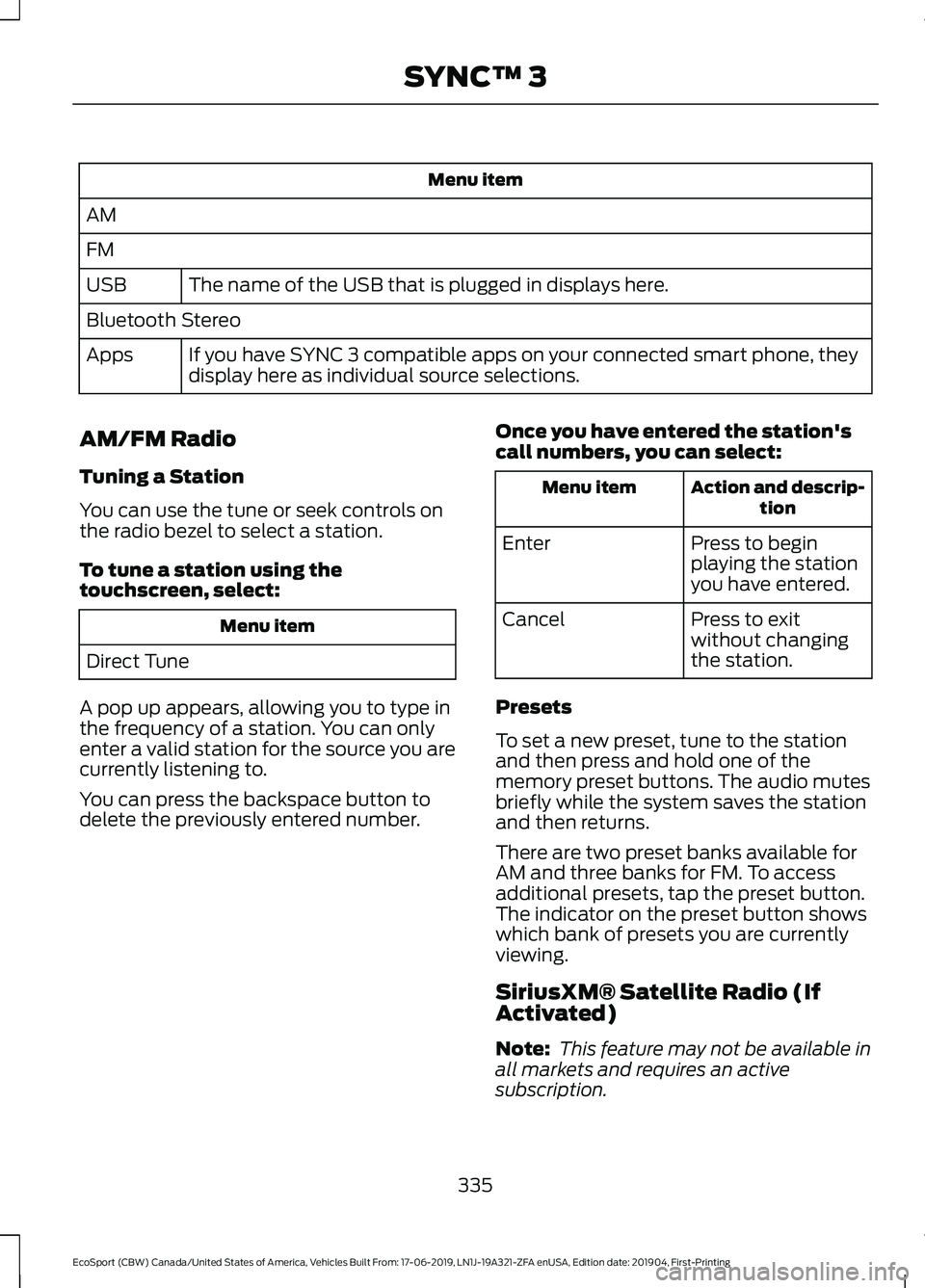
Menu item
AM
FM
The name of the USB that is plugged in displays here.USB
Bluetooth Stereo
If you have SYNC 3 compatible apps on your connected smart phone, theydisplay here as individual source selections.Apps
AM/FM Radio
Tuning a Station
You can use the tune or seek controls onthe radio bezel to select a station.
To tune a station using thetouchscreen, select:
Menu item
Direct Tune
A pop up appears, allowing you to type inthe frequency of a station. You can onlyenter a valid station for the source you arecurrently listening to.
You can press the backspace button todelete the previously entered number.
Once you have entered the station'scall numbers, you can select:
Action and descrip-tionMenu item
Press to beginplaying the stationyou have entered.
Enter
Press to exitwithout changingthe station.
Cancel
Presets
To set a new preset, tune to the stationand then press and hold one of thememory preset buttons. The audio mutesbriefly while the system saves the stationand then returns.
There are two preset banks available forAM and three banks for FM. To accessadditional presets, tap the preset button.The indicator on the preset button showswhich bank of presets you are currentlyviewing.
SiriusXM® Satellite Radio (IfActivated)
Note: This feature may not be available inall markets and requires an activesubscription.
335
EcoSport (CBW) Canada/United States of America, Vehicles Built From: 17-06-2019, LN1J-19A321-ZFA enUSA, Edition date: 201904, First-PrintingSYNC™ 3