car battery FORD ECOSPORT 2020 Owners Manual
[x] Cancel search | Manufacturer: FORD, Model Year: 2020, Model line: ECOSPORT, Model: FORD ECOSPORT 2020Pages: 448, PDF Size: 16.57 MB
Page 3 of 448
The information contained in this publication was correct at the time of going to print. In the interest ofcontinuous development, we reserve the right to change specifications, design or equipment at any timewithout notice or obligation. No part of this publication may be reproduced, transmitted, stored in aretrieval system or translated into any language in any form by any means without our written permission.Errors and omissions excepted.© Ford Motor Company 2019
All rights reserved.Part Number: LN1J-19A321-ZFA 201904 20190410174214
California Proposition 65
WARNING: Operating, servicing and
maintaining a passenger vehicle or off-highway
motor vehicle can expose you to chemicals
including engine exhaust, carbon monoxide,
phthalates, and lead, which are known to the
State of California to cause cancer and birth
defects or other reproductive harm. To minimize
exposure, avoid breathing exhaust, do not idle the
engine except as necessary, service your vehicle
in a well-ventilated area and wear gloves or wash
your hands frequently when servicing your vehicle.
For more information go to
www.P65Warnings.ca.gov/passenger-vehicle.
WARNING: Battery posts, terminals and
related accessories contain lead and lead
compounds, chemicals known to the State of
California to cause cancer and reproductive harm.
Wash your hands after handling.
Page 8 of 448
Cold Weather Precautions.......................188
Driving Through Water..............................188
Floor Mats......................................................189
Roadside Emergencies
Roadside Assistance.................................190
Hazard Flashers............................................191
Fuel Shutoff....................................................191
Jump Starting the Vehicle........................192
Post-Crash Alert System..........................195
Customer Assistance
Getting the Services You Need..............196
In California (U.S. Only).............................197
The Better Business Bureau (BBB) AutoLine Program (U.S. Only).....................198
Utilizing the Mediation/ArbitrationProgram (Canada Only).......................199
Getting Assistance Outside the U.S. andCanada.......................................................199
Ordering Additional Owner's Literature.........................................................................201
Reporting Safety Defects (U.S. Only).........................................................................201
Reporting Safety Defects (Canada Only).........................................................................201
Fuses
Fuse Box Locations....................................203
Fuse Specification Chart.........................203
Changing a Fuse..........................................210
Maintenance
General Information....................................212
Opening and Closing the Hood..............212
Under Hood Overview - 1.0L EcoBoost™.........................................................................213
Under Hood Overview - 2.0L...................214
Engine Oil Dipstick - 1.0L EcoBoost™.........................................................................215
Engine Oil Dipstick - 2.0L..........................215
Engine Oil Check..........................................215
Oil Change Indicator Reset......................216
Engine Cooling Fan......................................217
Engine Coolant Check................................217
Automatic Transmission Fluid Check.........................................................................221
Brake Fluid Check........................................221
Washer Fluid Check....................................222
Fuel Filter........................................................222
Changing the 12V Battery........................223
Checking the Wiper Blades.....................224
Changing the Wiper Blades....................225
Adjusting the Headlamps........................225
Removing a Headlamp.............................227
Changing a Bulb..........................................228
Bulb Specification Chart..........................236
Changing the Engine Air Filter................237
Drive Belt Routing - 2.0L..........................238
Drive Belt Routing - 1.0L EcoBoost™........................................................................238
Vehicle Care
General Information..................................239
Cleaning Products......................................239
Cleaning the Exterior.................................240
Waxing.............................................................241
Cleaning the Engine...................................242
Cleaning the Windows and Wiper Blades........................................................................242
Cleaning the Interior..................................243
Cleaning the Instrument Panel andInstrument Cluster Lens......................243
Cleaning Leather Seats............................244
Repairing Minor Paint Damage.............244
Cleaning the Wheels.................................244
Vehicle Storage...........................................245
Body Styling Kits.........................................247
Wheels and Tires
General Information..................................248
4
EcoSport (CBW) Canada/United States of America, Vehicles Built From: 17-06-2019, LN1J-19A321-ZFA enUSA, Edition date: 201904, First-PrintingTable of Contents
Page 55 of 448
PRINCIPLE OF OPERATION
The remote control allows you to:
•Remotely lock or unlock the vehicledoors.
•Unlock the doors without actively usinga key or remote control (intelligentaccess only).
•Activate the panic alarm.
Car Finder
Press the button twice withinthree seconds. The horn soundsand the direction indicatorsflash. We recommend you use this methodto locate your vehicle, rather than usingthe panic alarm.
Sounding the Panic Alarm
Note:The panic alarm only operates whenthe ignition is off.
Press the button to sound thepanic alarm. Press the buttonagain or switch the ignition on toturn it off.
GENERAL INFORMATION ON
RADIO FREQUENCIES
This device complies with Part 15 of theFCC Rules and with Industry Canadalicense-exempt RSS standard(s).Operation is subject to the following twoconditions: (1) This device may not causeharmful interference, and (2) This devicemust accept any interference received,including interference that may causeundesired operation.
Note:Changes or modifications notexpressively approved by the partyresponsible for compliance could void theuser's authority to operate the equipment.The term IC before the radio certificationnumber only signifies that Industry Canadatechnical specifications were met.
The typical operating range for yourtransmitter is approximately 32.8 ft (10 m).
A decrease in operating range could becaused by:
•weather conditions
•nearby radio towers
•structures around your vehicle
•other vehicles parked next to yourvehicle.
The radio frequency used by your remotecontrol can also be used by other radiotransmitters, for example amateur radios,medical equipment, wireless headphones,wireless remote controls, cell phones,battery chargers and alarm systems. If thefrequencies are jammed, you will not beable to use your remote control. You canlock and unlock the doors with the key.
Note:Make sure your vehicle is lockedbefore leaving it unattended.
Note:If you are in range, the remote controlwill operate if you press any buttonunintentionally.
Note: The remote control containssensitive electrical components. Exposureto moisture or impact may cause permanentdamage.
REMOTE CONTROL
Remote Control With a Folding KeyBlade
Use the key blade to start your vehicle andunlock or lock the driver door from outsideyour vehicle. The transmitter portionfunctions as the remote control.
51
EcoSport (CBW) Canada/United States of America, Vehicles Built From: 17-06-2019, LN1J-19A321-ZFA enUSA, Edition date: 201904, First-PrintingKeys and Remote Controls
Page 56 of 448
Replacing the Battery
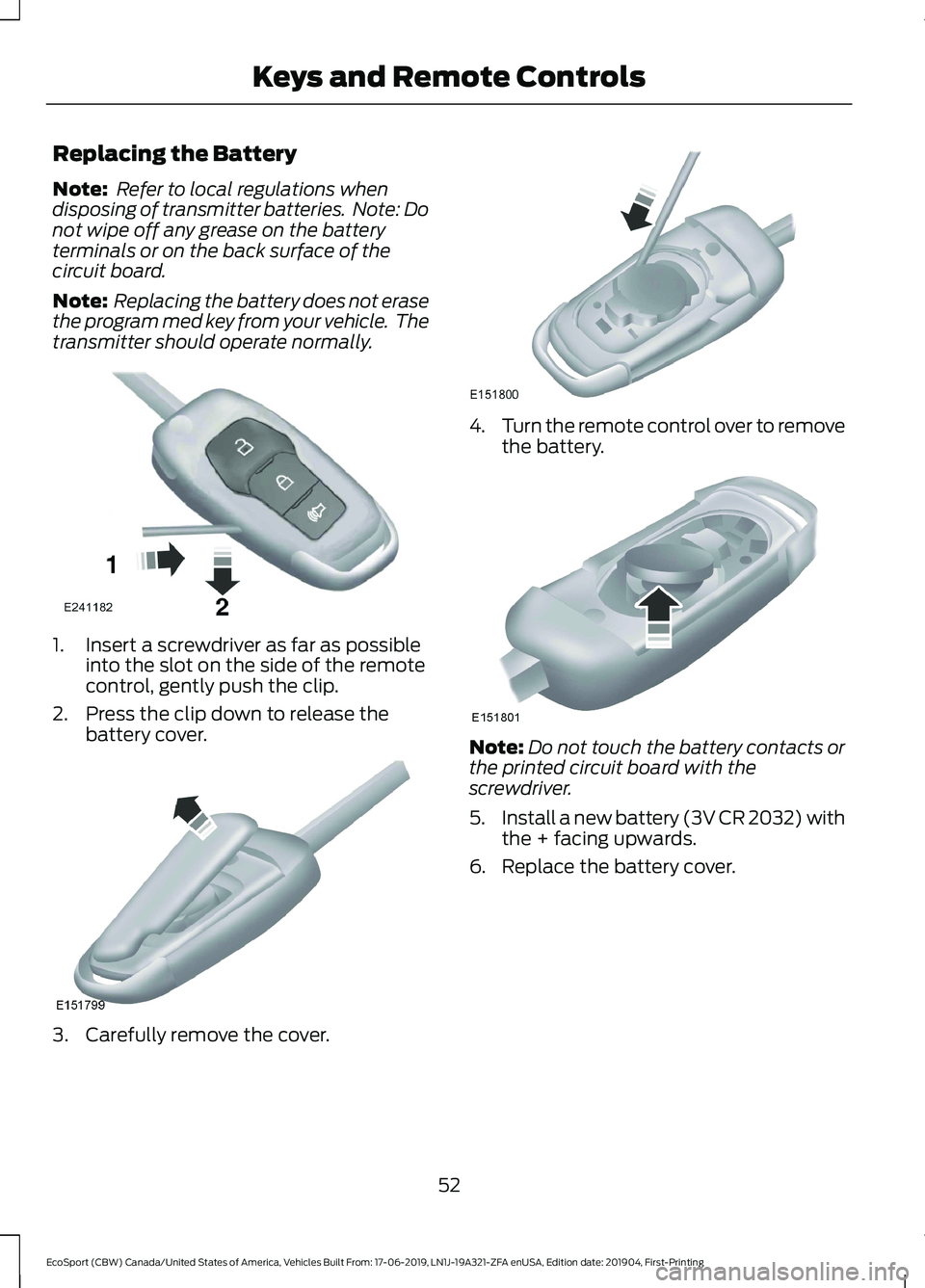
Note: Refer to local regulations whendisposing of transmitter batteries. Note: Donot wipe off any grease on the batteryterminals or on the back surface of thecircuit board.
Note: Replacing the battery does not erasethe program med key from your vehicle. Thetransmitter should operate normally.
1.Insert a screwdriver as far as possibleinto the slot on the side of the remotecontrol, gently push the clip.
2.Press the clip down to release thebattery cover.
3.Carefully remove the cover.
4.Turn the remote control over to removethe battery.
Note:Do not touch the battery contacts orthe printed circuit board with thescrewdriver.
5.Install a new battery (3V CR 2032) withthe + facing upwards.
6.Replace the battery cover.
52
EcoSport (CBW) Canada/United States of America, Vehicles Built From: 17-06-2019, LN1J-19A321-ZFA enUSA, Edition date: 201904, First-PrintingKeys and Remote Controls
Page 59 of 448
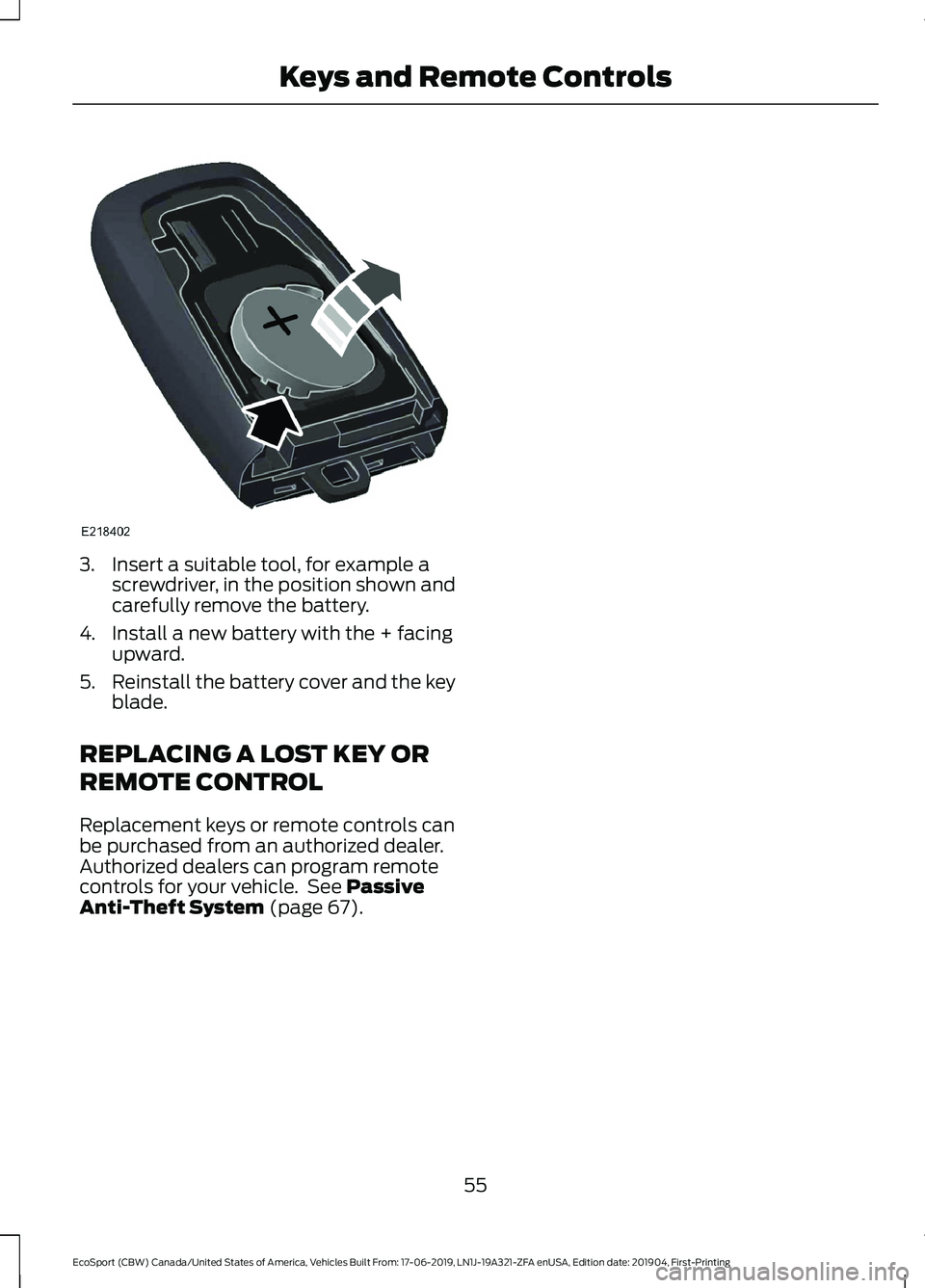
3.Insert a suitable tool, for example ascrewdriver, in the position shown andcarefully remove the battery.
4.Install a new battery with the + facingupward.
5.Reinstall the battery cover and the keyblade.
REPLACING A LOST KEY OR
REMOTE CONTROL
Replacement keys or remote controls canbe purchased from an authorized dealer.Authorized dealers can program remotecontrols for your vehicle. See PassiveAnti-Theft System (page 67).
55
EcoSport (CBW) Canada/United States of America, Vehicles Built From: 17-06-2019, LN1J-19A321-ZFA enUSA, Edition date: 201904, First-PrintingKeys and Remote Controls
Page 67 of 448
KEYLESS ENTRY (IF EQUIPPED)
General Information
Note:The system may not function if thekey is close to metal objects or electronicdevices such as cell phones.
The system will not function if:
•Your vehicle battery has no charge.
•The passive key frequencies arejammed.
•The passive key battery is flat.
Note:If the system does not function, youwill need to use the key blade to lock andunlock your vehicle.
The system allows you to operate yourvehicle without the use of a key or remotecontrol.
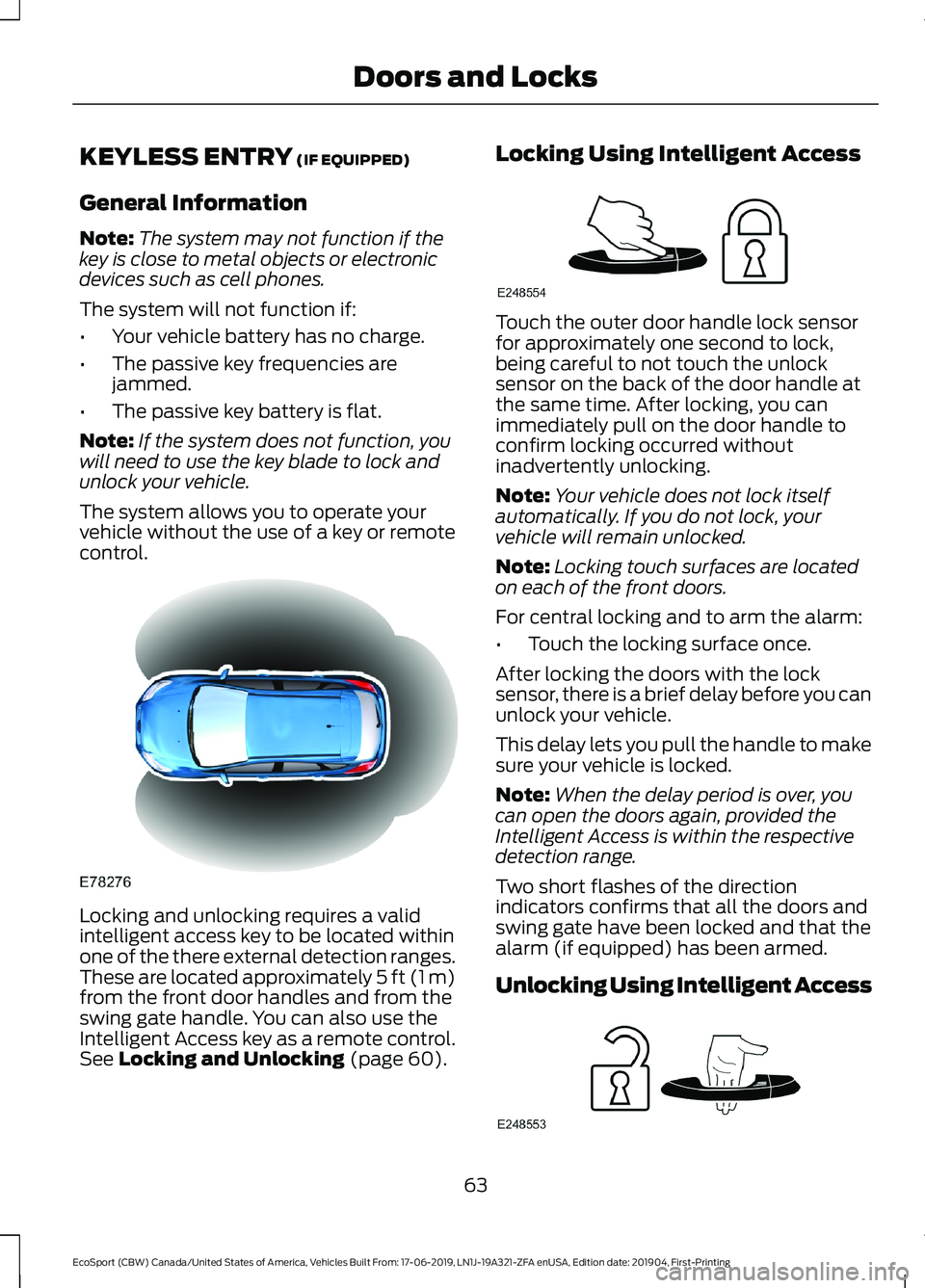
Locking and unlocking requires a validintelligent access key to be located withinone of the there external detection ranges.These are located approximately 5 ft (1 m)from the front door handles and from theswing gate handle. You can also use theIntelligent Access key as a remote control.See Locking and Unlocking (page 60).
Locking Using Intelligent Access
Touch the outer door handle lock sensorfor approximately one second to lock,being careful to not touch the unlocksensor on the back of the door handle atthe same time. After locking, you canimmediately pull on the door handle toconfirm locking occurred withoutinadvertently unlocking.
Note:Your vehicle does not lock itselfautomatically. If you do not lock, yourvehicle will remain unlocked.
Note:Locking touch surfaces are locatedon each of the front doors.
For central locking and to arm the alarm:
•Touch the locking surface once.
After locking the doors with the locksensor, there is a brief delay before you canunlock your vehicle.
This delay lets you pull the handle to makesure your vehicle is locked.
Note:When the delay period is over, youcan open the doors again, provided theIntelligent Access is within the respectivedetection range.
Two short flashes of the directionindicators confirms that all the doors andswing gate have been locked and that thealarm (if equipped) has been armed.
Unlocking Using Intelligent Access
63
EcoSport (CBW) Canada/United States of America, Vehicles Built From: 17-06-2019, LN1J-19A321-ZFA enUSA, Edition date: 201904, First-PrintingDoors and Locks
Page 68 of 448
Note:Your vehicle remains locked forlonger than three days, the system will enteran energy-saving mode. This is to reducethe discharge of your vehicle battery. Whenyour vehicle is unlocked while in this mode,the reaction time of the system may be alittle longer than normal. To exit theenergy-saving mode, unlock your vehicle.
With your intelligent access key within 5 ft(1 m) of your vehicle, touch the unlocksensor on the back of the door handle fora brief period and then pull on the doorhandle to unlock, being careful to nottouch the lock sensor at the same time orpulling the door handle too quickly. Theintelligent access system requires a briefdelay to authenticate your intelligentaccess key fob.
Note:Keep the door handle clean to makesure the system operates correctly.
Note:A valid passive key must be locatedwithin the detection range of that door.
One long flash of the direction indicatorsconfirms that all the doors and swing gatehave been unlocked and that the alarm (ifequipped) has been disarmed.
Unlocking only Driver Door
If the unlocking function is reprogrammedso that only the driver door is unlocked SeeRemote Control (page 51). Note thefollowing:
If the driver door is the first door which isunlocked, the other doors and swing gatewill remain locked. All the other doors canbe unlocked from inside your vehicle bypressing the unlock button located at thefront part of the front inner handles. Doorscan be unlocked individually by pulling theinterior door handles on those doors.
If the front passenger door is the first doorwhich is unlocked, all the doors will beunlocked.
Disabled Keys
Any keys left inside your vehicle interiorwhen it is locked will be disabled.
You cannot use a disabled key to switchthe ignition on or start the engine.
You must enable all Intelligent Accessagain in order to use them.
To enable all your Intelligent Access,unlock your vehicle using a passive key orthe remote control unlocking function.
All Intelligent Access will then be enabledif you switch the ignition on or your vehicleis started using a valid key.
Intelligent Access - Locking andUnlocking the Doors with the KeyBlade (If Equipped)
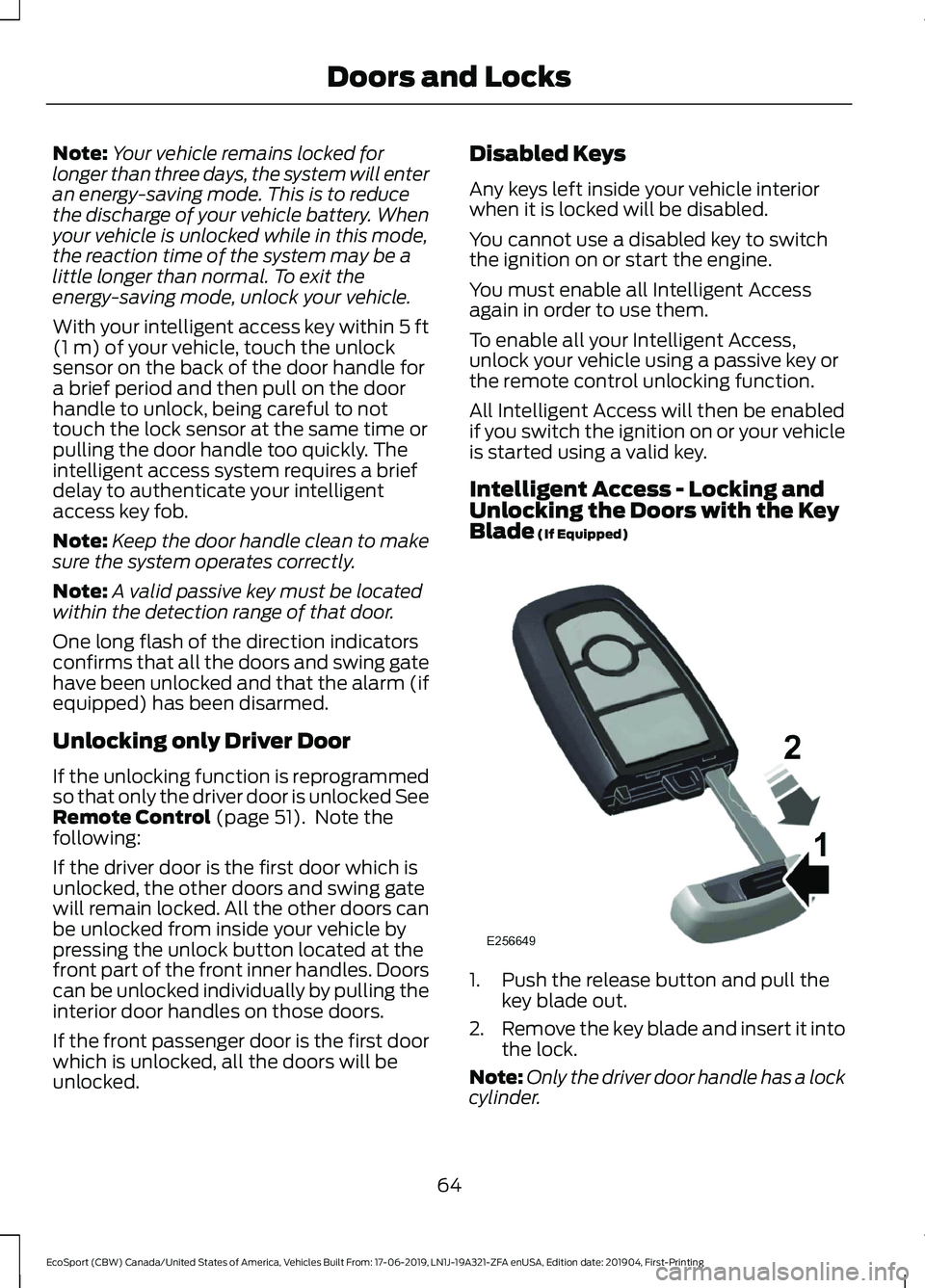
1.Push the release button and pull thekey blade out.
2.Remove the key blade and insert it intothe lock.
Note:Only the driver door handle has a lockcylinder.
64
EcoSport (CBW) Canada/United States of America, Vehicles Built From: 17-06-2019, LN1J-19A321-ZFA enUSA, Edition date: 201904, First-PrintingDoors and Locks
Page 88 of 448
POWER WINDOWS
WARNING: Do not leave childrenunattended in your vehicle and do notlet them play with the power windows.Failure to follow this instruction couldresult in personal injury.
WARNING: When closing thepower windows, verify they are free ofobstruction and make sure that childrenand pets are not in the proximity of thewindow openings.
Note:If the power window is operatedmany times on a short period the switchmay be inactivated for some moment toavoid overheat on power window system.
Note:You may hear a pulsing noise whenjust one of the windows is open. Lower theopposite window slightly to reduce thisnoise.
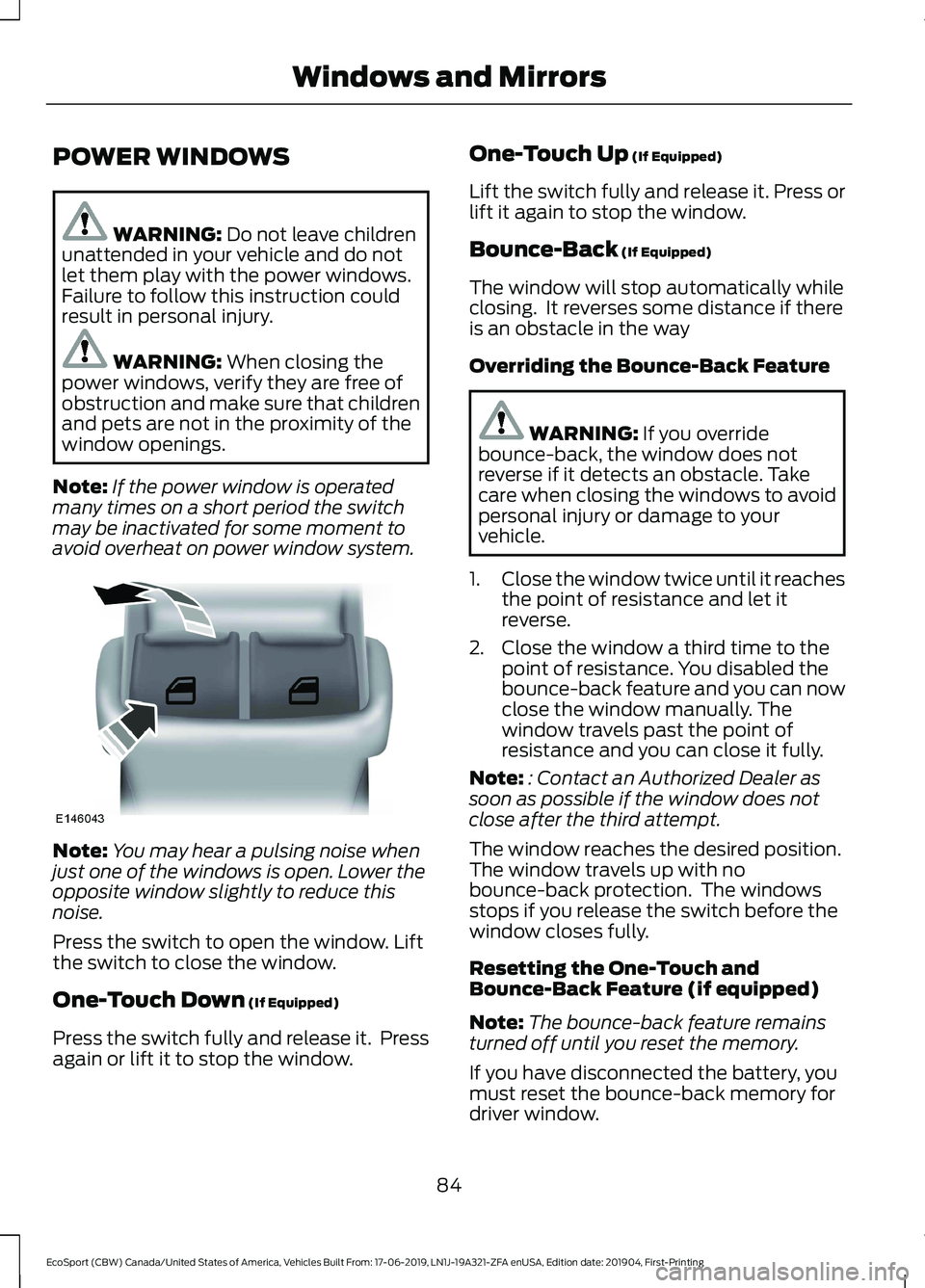
Press the switch to open the window. Liftthe switch to close the window.
One-Touch Down (If Equipped)
Press the switch fully and release it. Pressagain or lift it to stop the window.
One-Touch Up (If Equipped)
Lift the switch fully and release it. Press orlift it again to stop the window.
Bounce-Back (If Equipped)
The window will stop automatically whileclosing. It reverses some distance if thereis an obstacle in the way
Overriding the Bounce-Back Feature
WARNING: If you overridebounce-back, the window does notreverse if it detects an obstacle. Takecare when closing the windows to avoidpersonal injury or damage to yourvehicle.
1.Close the window twice until it reachesthe point of resistance and let itreverse.
2.Close the window a third time to thepoint of resistance. You disabled thebounce-back feature and you can nowclose the window manually. Thewindow travels past the point ofresistance and you can close it fully.
Note:: Contact an Authorized Dealer assoon as possible if the window does notclose after the third attempt.
The window reaches the desired position.The window travels up with nobounce-back protection. The windowsstops if you release the switch before thewindow closes fully.
Resetting the One-Touch andBounce-Back Feature (if equipped)
Note:The bounce-back feature remainsturned off until you reset the memory.
If you have disconnected the battery, youmust reset the bounce-back memory fordriver window.
84
EcoSport (CBW) Canada/United States of America, Vehicles Built From: 17-06-2019, LN1J-19A321-ZFA enUSA, Edition date: 201904, First-PrintingWindows and Mirrors
Page 194 of 448
ROADSIDE ASSISTANCE
Vehicles Sold in the United States:Getting Roadside Assistance
To fully assist you should you have avehicle concern, Ford Motor Companyoffers a complimentary roadsideassistance program. This program isseparate from the New Vehicle LimitedWarranty.
The service is available:
•24 hours a day, seven days a week.
•For the coverage period listed in theQuick Reference Guide included in yourOwner's Manual portfolio.
Roadside Assistance covers:
•A flat tire change with a good spare(except vehicles supplied with a tireinflation kit).
•Battery jump start.
•Lock-out assistance (key replacementcost is the customer's responsibility).
•Fuel delivery — independent servicecontractors, if not prohibited by state,local or municipal law, shall deliver upto 2 gal (8 L) of gasoline or 5 gal (20 L)of diesel fuel to a disabled vehicle.Roadside Assistance limits fuel deliveryservice to two no-charge occurrenceswithin a 12-month period.
•Winch out — available within 100 ft(30 m) of a paved or countymaintained road, no recoveries.
•Towing — independent servicecontractors, if not prohibited by state,local or municipal law, shall tow Fordeligible vehicles to an authorized dealerwithin 35 mi (56 km) of thedisablement location or to the nearestauthorized dealer. If a memberrequests a tow to an authorized dealerthat is more than 35 mi (56 km) fromthe disablement location, the membershall be responsible for any mileagecosts in excess of 35 mi (56 km).
•Roadside Assistance includes up to$200 for a towed trailer if the disabledeligible vehicle requires service at thenearest authorized dealer. If the towingvehicle is operational but the trailer isnot, then the trailer does not qualify forany roadside services.
Vehicles Sold in the United States:Using Roadside Assistance
Complete the roadside assistanceidentification card and place it in yourwallet for quick reference. This card is inthe owner's information portfolio in theglove compartment.
United States vehicle customers whorequire Roadside Assistance, call1-800-241-3673.
If you need to arrange roadside assistancefor yourself, Ford Motor Companyreimburses a reasonable amount fortowing to the nearest dealership within35 mi (56 km). To obtain reimbursementinformation, United States vehiclecustomers call 1-800-241-3673.Customers need to submit their originalreceipts.
190
EcoSport (CBW) Canada/United States of America, Vehicles Built From: 17-06-2019, LN1J-19A321-ZFA enUSA, Edition date: 201904, First-PrintingRoadside Emergencies
Page 195 of 448
Vehicles Sold in Canada: GettingRoadside Assistance
To fully assist you should you have avehicle concern, Ford Motor Company ofCanada, Limited offers a complimentaryroadside assistance program. Thisprogram is eligible within Canada or thecontinental United States.
The service is available 24 hours a day,seven days a week.
This program is separate from the NewVehicle Limited Warranty, but the coverageis concurrent with the powertrain coverageperiod of your vehicle. Canadian roadsidecoverage and benefits may differ from theU.S. coverage.
If you require more information, pleaserefer to the coverage section of yourwarranty guide, call us in Canada at1-800-665-2006, or visit our website atwww.ford.ca.
Vehicles Sold in Canada: UsingRoadside Assistance
Complete the roadside assistanceidentification card and place it in yourwallet for quick reference.
In Canada, this card is found in theWarranty Guide in the glove compartmentof your vehicle.
Vehicles Sold in Canada: RoadsideAssistance Program Coverage
The service is available 24 hours a day,seven days a week.
Canadian roadside coverage and benefitsmay differ from the U.S. coverage.
If you require more information, pleaserefer to the coverage section of yourwarranty guide, call us in Canada at1-800-665-2006, or visit our website atwww.ford.ca.
HAZARD FLASHERS
The hazard flasher switch is onthe instrument panel.
Use the hazard flashers if your vehicle iscreating a safety hazard for other roadusers.
Switching the Hazard Flashers Onor Off
Press the button to switch thehazard flashers on.
Press the button again to switchthe hazard flashers off.
Note:All direction indicators flash.
Note:Prolonged use of the hazard flasherscould cause the vehicle battery to run outof charge.
Note:Depending on applicable laws in thecountry your vehicle was built for, if youheavily brake, the hazard flashers could turnon.
Hazard Flasher Indicator
Flashes when you switch thehazard flashers on.
FUEL SHUTOFF
WARNING: If your vehicle hasbeen involved in a crash, have the fuelsystem checked. Failure to follow thisinstruction could result in fire, personalinjury or death.
In the event of a moderate to severecollision, this vehicle includes a fuel pumpshutoff feature that stops the flow of fuelto the engine. Not every impact will causea shutoff.
191
EcoSport (CBW) Canada/United States of America, Vehicles Built From: 17-06-2019, LN1J-19A321-ZFA enUSA, Edition date: 201904, First-PrintingRoadside Emergencies