Temp FORD EDGE 2008 1.G User Guide
[x] Cancel search | Manufacturer: FORD, Model Year: 2008, Model line: EDGE, Model: FORD EDGE 2008 1.GPages: 336, PDF Size: 2.8 MB
Page 73 of 336
Federal Communication Commission (FCC) Compliance
Changes or modifications not approved by Ford Lincoln-Mercury could void
user’s authority to operate the equipment. This equipment has been tested
and found to comply with the limits for a Class B digital device, pursuant
to Part 15 of the FCC Rules. These limits are designed to provide
reasonable protection against harmful interference in a residential
installation. This equipment generates, uses and can radiate radio
frequency energy and, if not installed and used in accordance with the
instructions, may cause harmful interference and radio communications.
However, there is no guarantee that interference will not occur in a
particular installation. If this equipment does cause harmful interference
to radio or television reception, which can be determined by turning the
equipment off and on, the user is encouraged to consult the dealer or an
experienced radio/TV technician for help.
Care and service of the DVD player
Environmental extremes
DVD players which are subjected to harsh environmental conditions may
be damaged or perform at less than maximum capability. To avoid these
outcomes, whenever possible avoid exposing your DVD player to:
•extremely hot or cold temperatures.
•direct sunlight.
•high humidity.
•a dusty environment.
•locations where strong magnetic fields are generated.
Temperature extremes
When the vehicle is parked under direct sunlight or in an extremely cold
place for a long period of time, wait until the cabin temperature of the
vehicle is at normal temperature before operating the system.
Humidity and moisture condensation
Moisture in the air will condense in the DVD player under extremely humid
conditions or when moving from a cold place to a warm one. Moisture
condensation may cause damage to the DVD and/or player. If moisture
condensation occurs, do not insert a CD or DVD into the player. If one is
already in the player, remove it. Turn the DVD player ON to dry the
moisture before inserting a DVD. This could take an hour or more.
Foreign substances
Exercise care to prevent dirt and foreign objects from entering the DVD
player compartment. Be especially careful not to spill liquids of any kind
2008 Edge(edg)
Owners Guide (post-2002-fmt)
USA(fus)
Entertainment Systems
73
Page 75 of 336
MANUAL HEATING AND AIR CONDITIONING SYSTEM
(IF EQUIPPED)
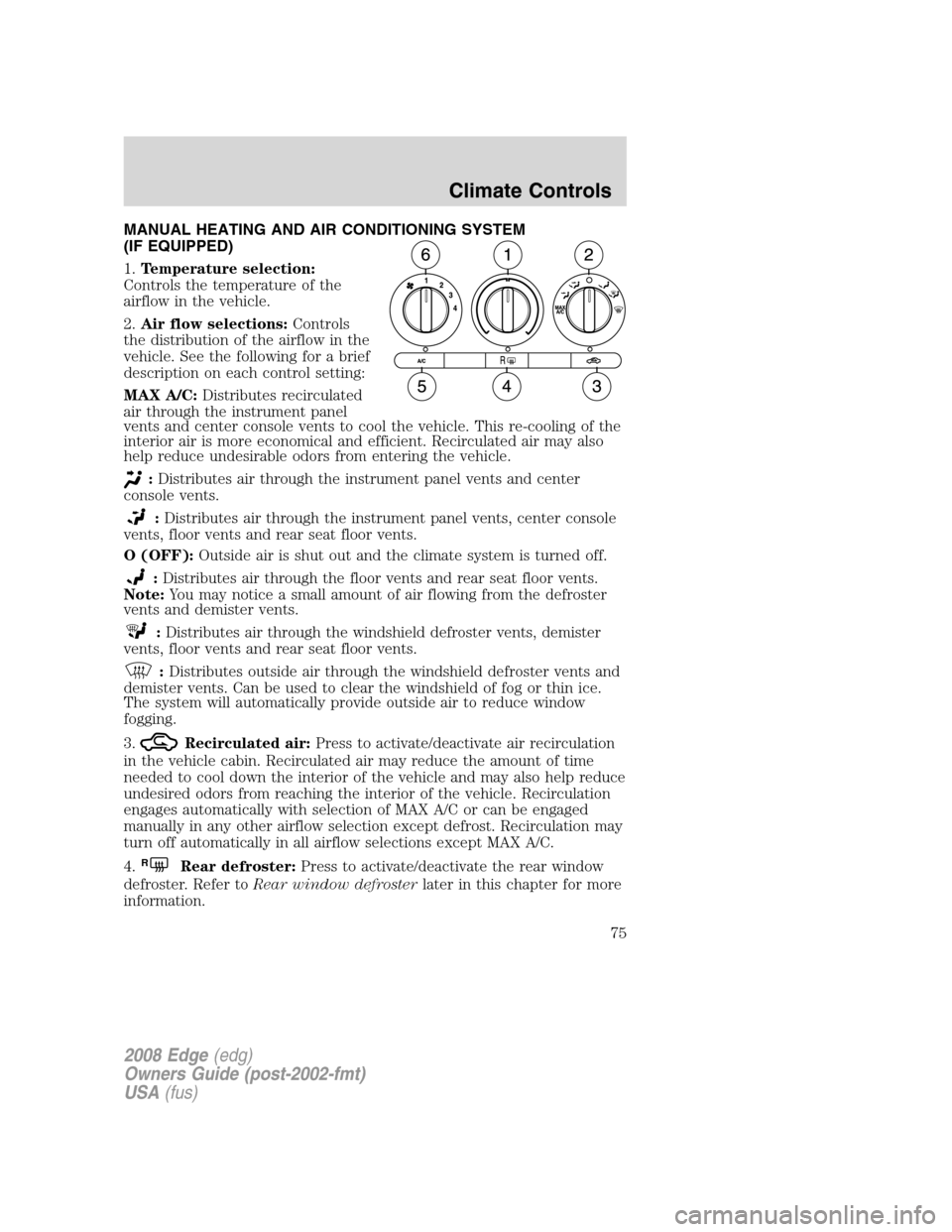
1.Temperature selection:
Controls the temperature of the
airflow in the vehicle.
2.Air flow selections:Controls
the distribution of the airflow in the
vehicle. See the following for a brief
description on each control setting:
MAX A/C:Distributes recirculated
air through the instrument panel
vents and center console vents to cool the vehicle. This re-cooling of the
interior air is more economical and efficient. Recirculated air may also
help reduce undesirable odors from entering the vehicle.
:Distributes air through the instrument panel vents and center
console vents.
:Distributes air through the instrument panel vents, center console
vents, floor vents and rear seat floor vents.
O (OFF):Outside air is shut out and the climate system is turned off.
:Distributes air through the floor vents and rear seat floor vents.
Note:You may notice a small amount of air flowing from the defroster
vents and demister vents.
:Distributes air through the windshield defroster vents, demister
vents, floor vents and rear seat floor vents.
:Distributes outside air through the windshield defroster vents and
demister vents. Can be used to clear the windshield of fog or thin ice.
The system will automatically provide outside air to reduce window
fogging.
3.
Recirculated air:Press to activate/deactivate air recirculation
in the vehicle cabin. Recirculated air may reduce the amount of time
needed to cool down the interior of the vehicle and may also help reduce
undesired odors from reaching the interior of the vehicle. Recirculation
engages automatically with selection of MAX A/C or can be engaged
manually in any other airflow selection except defrost. Recirculation may
turn off automatically in all airflow selections except MAX A/C.
4.
RRear defroster:Press to activate/deactivate the rear window
defroster. Refer toRear window defrosterlater in this chapter for more
information.
2008 Edge(edg)
Owners Guide (post-2002-fmt)
USA(fus)
Climate Controls
75
Page 76 of 336
5.A/C:Press to activate/deactivate air conditioning. Use with
recirculated air to improve cooling performance and efficiency. Engages
automatically in MAX A/C,
(defrost) and(floor/defrost).
6.Fan speed adjustment:Controls the volume of air circulated in the
vehicle.
Operating tips
•To reduce fog build up on the windshield during humid weather, place
the air flow selector in the
(defrost) or(floor/defrost)
position.
•To reduce humidity build up inside the vehicle, do not drive with the
air flow selector in the O (OFF) position or with
(recirculated
air) engaged and A/C off.
•Do not put objects under the front seats that will interfere with the
airflow to the back seats.
•Remove any snow, ice or leaves from the air intake area at the base of
the windshield.
•To improve the A/C cool down, drive with the windows slightly open
for 2-3 minutes after start up or until the vehicle has been “aired out.”
For maximum cooling performance in MAX A/C mode:
1. Select MAX A/C.
2. Move temperature control selector to the coolest setting.
3. Set the fan to the highest speed initially, then adjust to maintain
comfort.
To aid in side window defogging/demisting in cold weather:
1. Select
.
2. Select A/C.
3. Adjust the temperature control to maintain comfort.
4. Set the fan speed to the highest setting.
5. Direct the outer instrument panel vents towards the side windows.
Do not place objects on top of the instrument panel as these
objects may become projectiles in a collision or sudden stop.
2008 Edge(edg)
Owners Guide (post-2002-fmt)
USA(fus)
Climate Controls
76
Page 77 of 336
DUAL AUTOMATIC TEMPERATURE CONTROL (DATC) SYSTEM
WITH HEATED SEATS (IF EQUIPPED)
Temperature conversion:To switch between Fahrenheit and Celsius,
refer toMessage centerin theDriver Controlschapter.
MAX A/C setting:In order to achieve maximum cooling performance,
press
, A/C,, and set the temperature to 60°F (16°C) and the
highest blower setting.
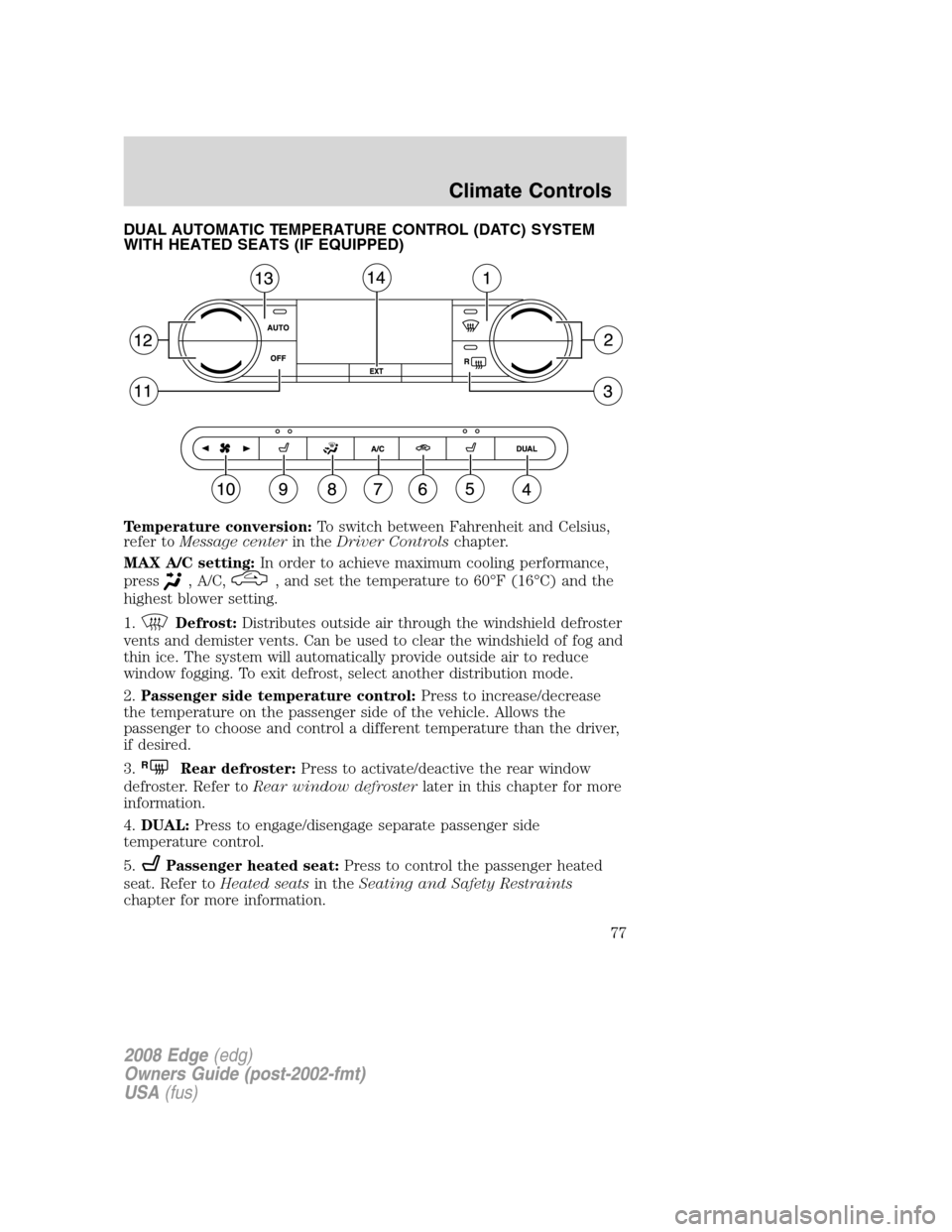
1.
Defrost:Distributes outside air through the windshield defroster
vents and demister vents. Can be used to clear the windshield of fog and
thin ice. The system will automatically provide outside air to reduce
window fogging. To exit defrost, select another distribution mode.
2.Passenger side temperature control:Press to increase/decrease
the temperature on the passenger side of the vehicle. Allows the
passenger to choose and control a different temperature than the driver,
if desired.
3.
RRear defroster:Press to activate/deactive the rear window
defroster. Refer toRear window defrosterlater in this chapter for more
information.
4.DUAL:Press to engage/disengage separate passenger side
temperature control.
5.
Passenger heated seat:Press to control the passenger heated
seat. Refer toHeated seatsin theSeating and Safety Restraints
chapter for more information.
2008 Edge(edg)
Owners Guide (post-2002-fmt)
USA(fus)
Climate Controls
77
Page 78 of 336
6.Recirculated air:Press to activate/deactive air recirculation in
the vehicle. Recirculated air may reduce the amount of time needed to
cool down the interior of the vehicle and may also help reduce undesired
odors from reaching the interior of the vehicle. Recirculation can be
engaged manually in any airflow selection except defrost. Recirculation
may turn off automatically in some airflow modes to reduce fog potential.
7.A/C:Press to activate/deactivate air conditioning. Use with
recirculated air to improve cooling performance and efficiency. Engages
automatically in AUTO,
(defrost) and(floor/defrost).
8.
Manual override controls:Allows you to manually select where
airflow is distributed. Press to toggle through the air distribution modes
listed below. The selected mode will illuminate in the display. To return
to full automatic control, press AUTO.
:Distributes air through the windshield defroster vents, demister
vents, floor vents and rear seat floor vents. The system will automatically
provide outside air to reduce window fogging.
:Distributes air through the floor vents and rear seat floor vents.
The system will automatically provide outside air to reduce window
fogging.Note:You may notice a small amount of air flowing from the
defroster vents and demister vents.
:Distributes air through the instrument panel vents, center console
vents, floor vents and rear seat floor vents.
:Distributes air through the instrument panel vents and center
console vents.
9.
Driver heated seat control:Press to control the driver heated
seat. Refer toHeated seatsin theSeating and Safety Restraints
chapter for more information.
10.
Fan Speed:Press to manually increase or decrease the fan
speed. To return to automatic fan operation, press AUTO.
11.OFF:Outside air is shut out and the fan will not operate.
12.Driver side temperature control:Press to increase/decrease the
temperature on the driver side of the vehicle in dual zone or the
temperature of both the driver and passenger side in single zone.
13.AUTO:To engage automatic temperature control, press AUTO and
select the desired temperature using the temperature control. The
system will automatically determine fan speed, airflow distribution, A/C
on or off, and outside or recirculated air, to heat or cool the vehicle to
reach the desired temperature.
2008 Edge(edg)
Owners Guide (post-2002-fmt)
USA(fus)
Climate Controls
78
Page 79 of 336
14.EXT:Press to display outside temperature. Press again to display
cabin temperature settings.Note:Exterior readings are more accurate
when the vehicle is moving.
Operating tips
•To reduce fog build up on the windshield during humid weather,
select
(defrost) or(floor/defrost).
•To reduce humidity build up inside the vehicle, do not drive with the
system OFF or with
(recirculated air) engaged and A/C off.
•Do not put objects under the front seats that will interfere with the
airflow to the back seats.
•Remove any snow, ice or leaves from the air intake area at the base of
the windshield.
•To improve the A/C cool down, drive with the windows slightly open
for 2-3 minutes after start up or until the vehicle has been “aired out.”
For maximum cooling performance in MAX A/C mode:
•Automatic operation:
1. Press AUTO for full automatic operation.
2. Do not override A/C or
(recirculated air).
3. Set the temperature to 60°F (16°C).
•Manual operation:
1. Select
or.
2. Select A/C and
(recirculated air). Use(recirculated air)
with A/C to provide colder airflow.
3. Set the temperature to 60°F (16°C).
4. Set highest fan setting initially, then adjust to maintain comfort.
To aid in side window defogging/demisting in cold weather:
1. Select
.
2. Select A/C.
3. Adjust the temperature control to maintain comfort.
4. Set the fan speed to the highest setting.
5. Direct the outer instrument panel vents towards the side windows.
2008 Edge(edg)
Owners Guide (post-2002-fmt)
USA(fus)
Climate Controls
79
Page 99 of 336
Fold-away mirrors
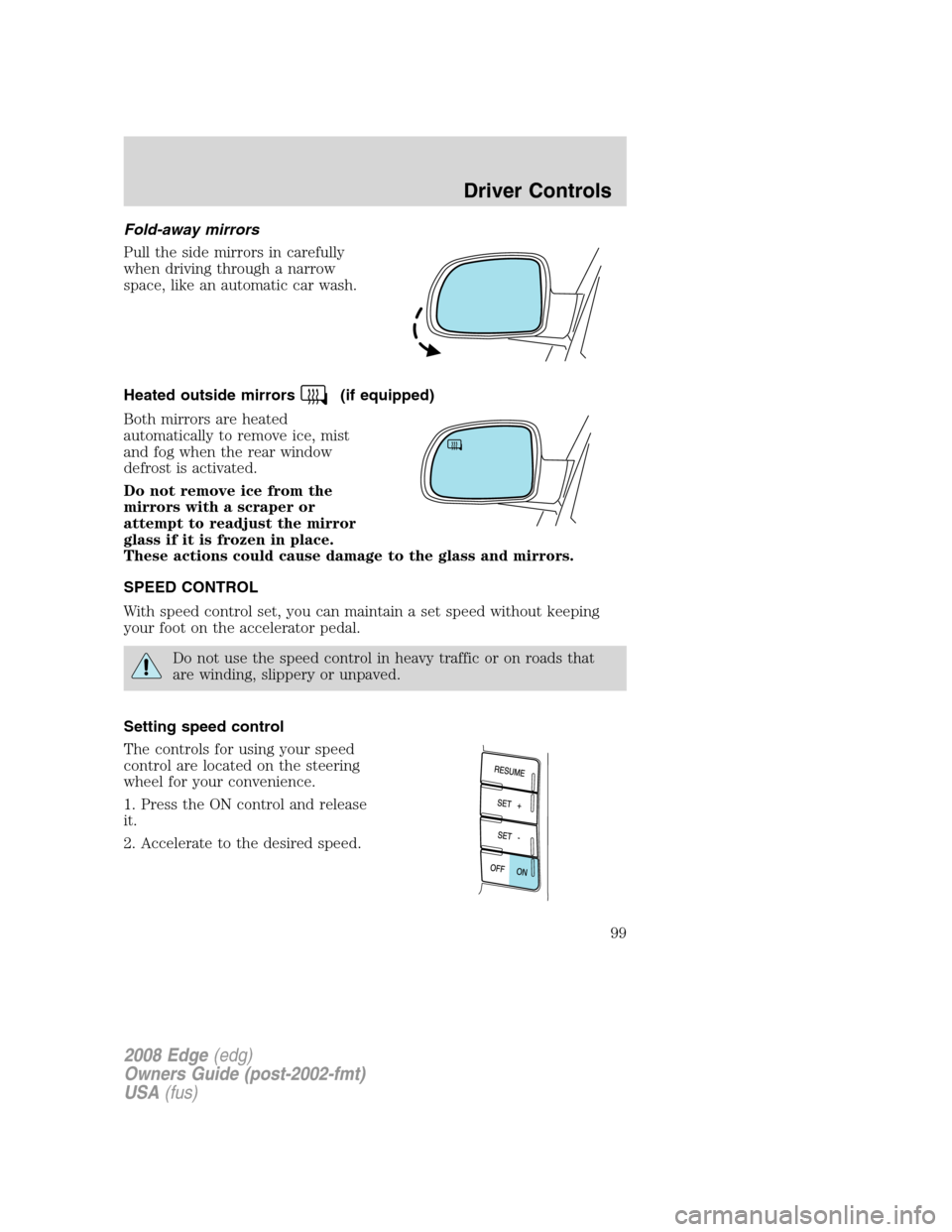
Pull the side mirrors in carefully
when driving through a narrow
space, like an automatic car wash.
Heated outside mirrors
(if equipped)
Both mirrors are heated
automatically to remove ice, mist
and fog when the rear window
defrost is activated.
Do not remove ice from the
mirrors with a scraper or
attempt to readjust the mirror
glass if it is frozen in place.
These actions could cause damage to the glass and mirrors.
SPEED CONTROL
With speed control set, you can maintain a set speed without keeping
your foot on the accelerator pedal.
Do not use the speed control in heavy traffic or on roads that
are winding, slippery or unpaved.
Setting speed control
The controls for using your speed
control are located on the steering
wheel for your convenience.
1. Press the ON control and release
it.
2. Accelerate to the desired speed.
2008 Edge(edg)
Owners Guide (post-2002-fmt)
USA(fus)
Driver Controls
99
Page 105 of 336
Note:Do not attempt to move the panoramic power sunshades manually
or sunshade damage or malfunction may occur. The sunshade track clips
are designed to release the sunshade crossbar in order to prevent
damage to the system. If this occurs the sunshade crossbar ends may
just need to be slid back into position to regain proper function. See
your authorized dealer for proper panoramic Vista Roof™ or sunshade
operating, diagnostic or repair instructions.
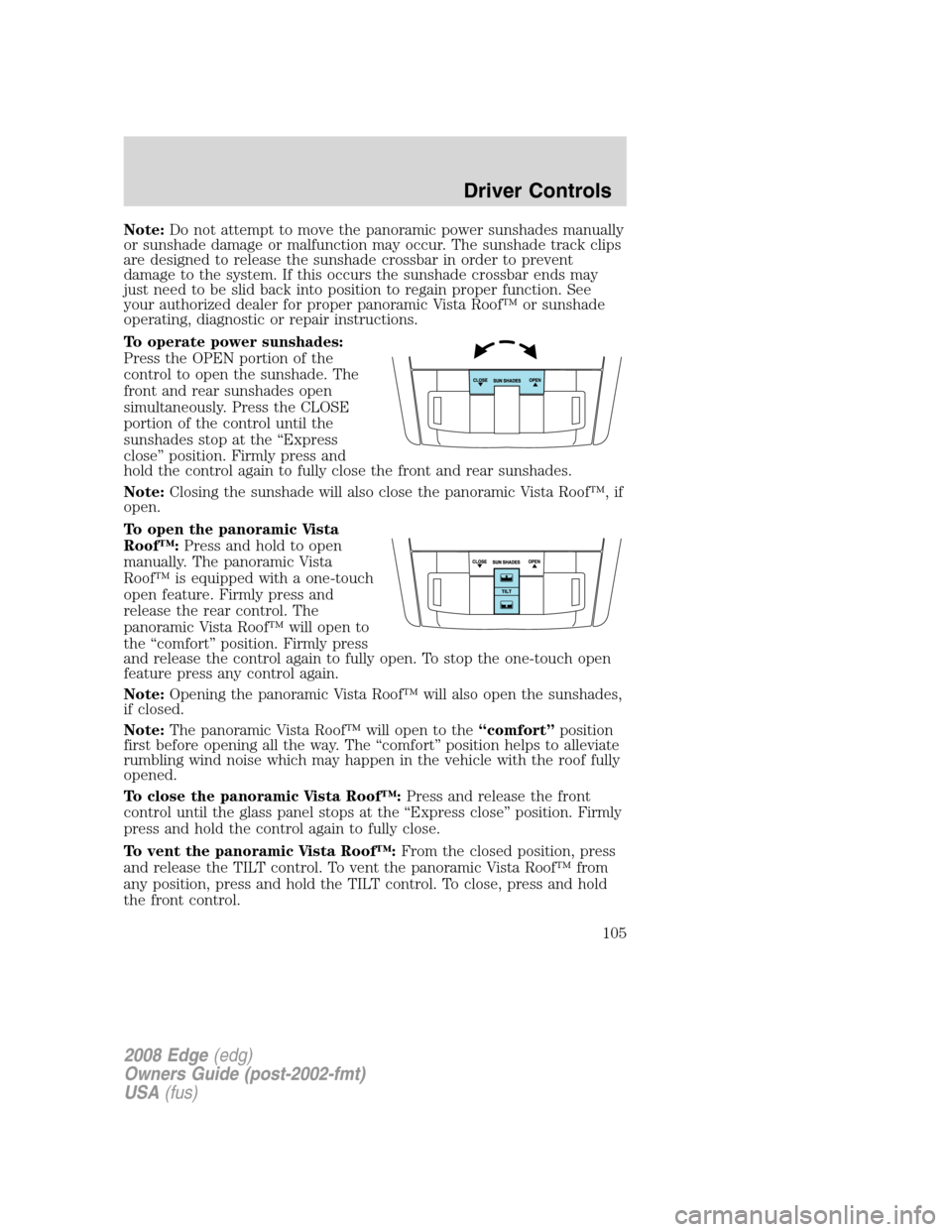
To operate power sunshades:
Press the OPEN portion of the
control to open the sunshade. The
front and rear sunshades open
simultaneously. Press the CLOSE
portion of the control until the
sunshades stop at the “Express
close” position. Firmly press and
hold the control again to fully close the front and rear sunshades.
Note:Closing the sunshade will also close the panoramic Vista Roof™, if
open.
To open the panoramic Vista
Roof™:Press and hold to open
manually. The panoramic Vista
Roof™ is equipped with a one-touch
open feature. Firmly press and
release the rear control. The
panoramic Vista Roof™ will open to
the “comfort” position. Firmly press
and release the control again to fully open. To stop the one-touch open
feature press any control again.
Note:Opening the panoramic Vista Roof™ will also open the sunshades,
if closed.
Note:The panoramic Vista Roof™ will open to the“comfort”position
first before opening all the way. The “comfort” position helps to alleviate
rumbling wind noise which may happen in the vehicle with the roof fully
opened.
To close the panoramic Vista Roof™:Press and release the front
control until the glass panel stops at the “Express close” position. Firmly
press and hold the control again to fully close.
To vent the panoramic Vista Roof™:From the closed position, press
and release the TILT control. To vent the panoramic Vista Roof™ from
any position, press and hold the TILT control. To close, press and hold
the front control.
2008 Edge(edg)
Owners Guide (post-2002-fmt)
USA(fus)
Driver Controls
105
Page 115 of 336
•Power Liftgate (if equipped)
•Easy entry/exit seat (if equipped)
•Reverse sensing system (Park Assist) (if equipped)
•Language
System check
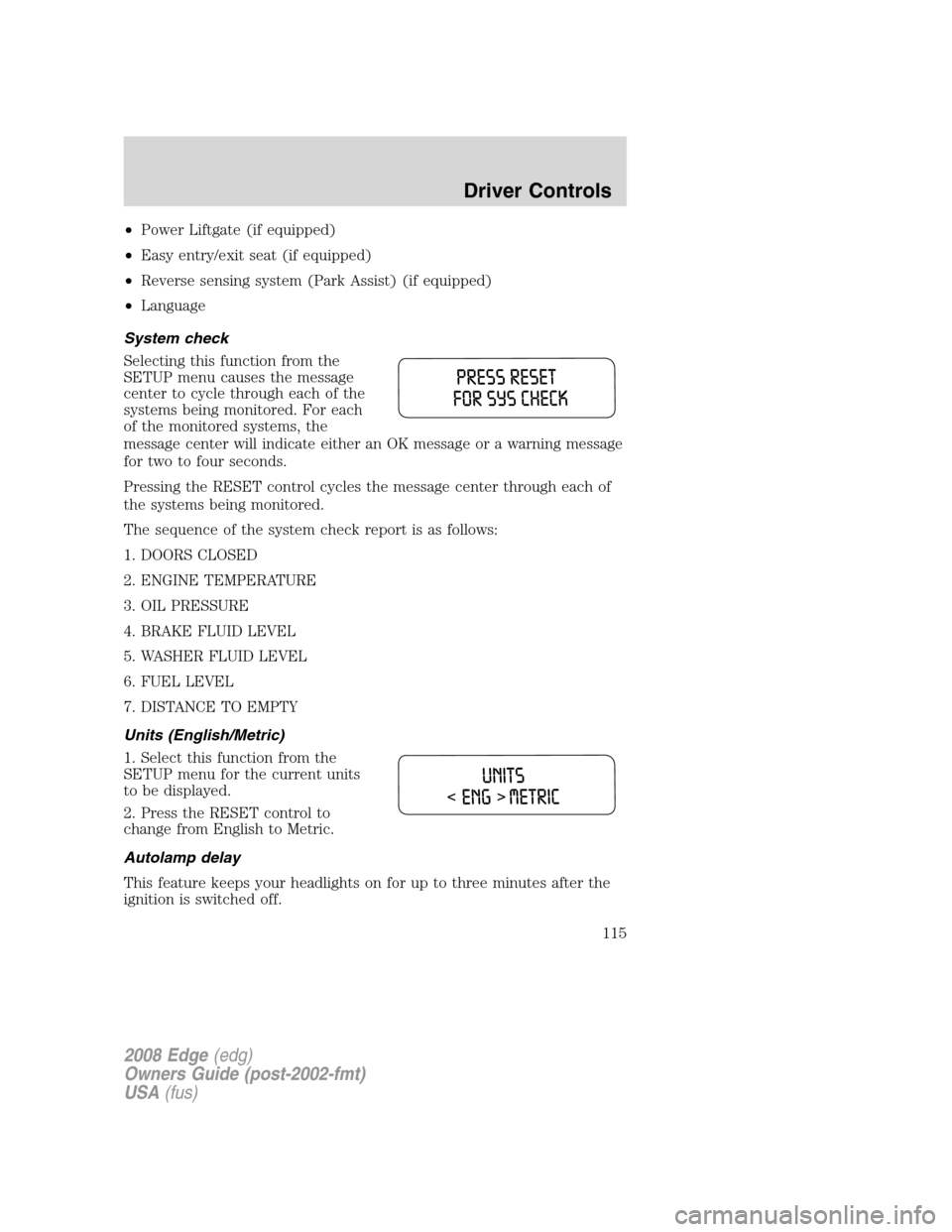
Selecting this function from the
SETUP menu causes the message
center to cycle through each of the
systems being monitored. For each
of the monitored systems, the
message center will indicate either an OK message or a warning message
for two to four seconds.
Pressing the RESET control cycles the message center through each of
the systems being monitored.
The sequence of the system check report is as follows:
1. DOORS CLOSED
2. ENGINE TEMPERATURE
3. OIL PRESSURE
4. BRAKE FLUID LEVEL
5. WASHER FLUID LEVEL
6. FUEL LEVEL
7. DISTANCE TO EMPTY
Units (English/Metric)
1. Select this function from the
SETUP menu for the current units
to be displayed.
2. Press the RESET control to
change from English to Metric.
Autolamp delay
This feature keeps your headlights on for up to three minutes after the
ignition is switched off.
2008 Edge(edg)
Owners Guide (post-2002-fmt)
USA(fus)
Driver Controls
115
Page 119 of 336
REAR LEFT DOOR AJAR.Displayed when the rear left door is not
completely closed.
REAR RIGHT DOOR AJAR.Displayed when the rear right door is not
completely closed.
PARK BRAKE ENGAGED.Displayed when the manual park brake is
set, the engine is running and the vehicle is driven more than 3 mph (5
km). If the warning stays on after the park brake is released, contact
your authorized dealer as soon as possible.
LOW FUEL LEVEL.Displayed as an early reminder of a low fuel
condition.
CHECK BRAKE SYSTEM.Displayed when the brake system needs
servicing. If the warning stays on or continues to come on, contact your
authorized dealer as soon as possible.
LOW BRAKE FLUID LEVEL.Indicates the brake fluid level is low and
the brake system should be inspected immediately. Refer toBrake fluid
reservoirin theMaintenance and Specificationschapter.
LIFTGATE AJAR.Displayed when the liftgate is not completely closed.
LOW TIRE PRESSURE.Displayed when one or more tires on your
vehicle have low tire pressure. Refer toInflating your tiresin theTires,
Wheels and Loadingchapter.
TIRE PRESSURE MONITOR FAULT.Displayed when the Tire
Pressure Monitoring System is malfunctioning. If the warning stays on or
continues to come on, have the system inspected by your authorized
dealer.
TIRE PRESSURE SENSOR FAULT.Displayed when a tire pressure
sensor is malfunctioning, or your spare tire is in use. For more
information on how the system operates under these conditions, refer to
Tire pressure monitoring systemin theTires, Wheels and Loading
chapter. If the warning stays on or continues to come on, have the
system inspected by your authorized dealer.
COMPASS DATA ERROR (if equipped).Displayed when the compass
is not operating properly. If the warning stays on or continues to come
on, contact your authorized dealer as soon as possible.
INTEGRATED KEY PROGRAMMING STATUS.Displayed when an
attempt is made to program a fifth Integrated Key to the Remote Key
Entry System. For more information on Integrated Key, refer toLocks
and Securitychapter in this manual.
2008 Edge(edg)
Owners Guide (post-2002-fmt)
USA(fus)
Driver Controls
119