cooling FORD EDGE 2012 1.G Owners Manual
[x] Cancel search | Manufacturer: FORD, Model Year: 2012, Model line: EDGE, Model: FORD EDGE 2012 1.GPages: 396, PDF Size: 3.25 MB
Page 57 of 396
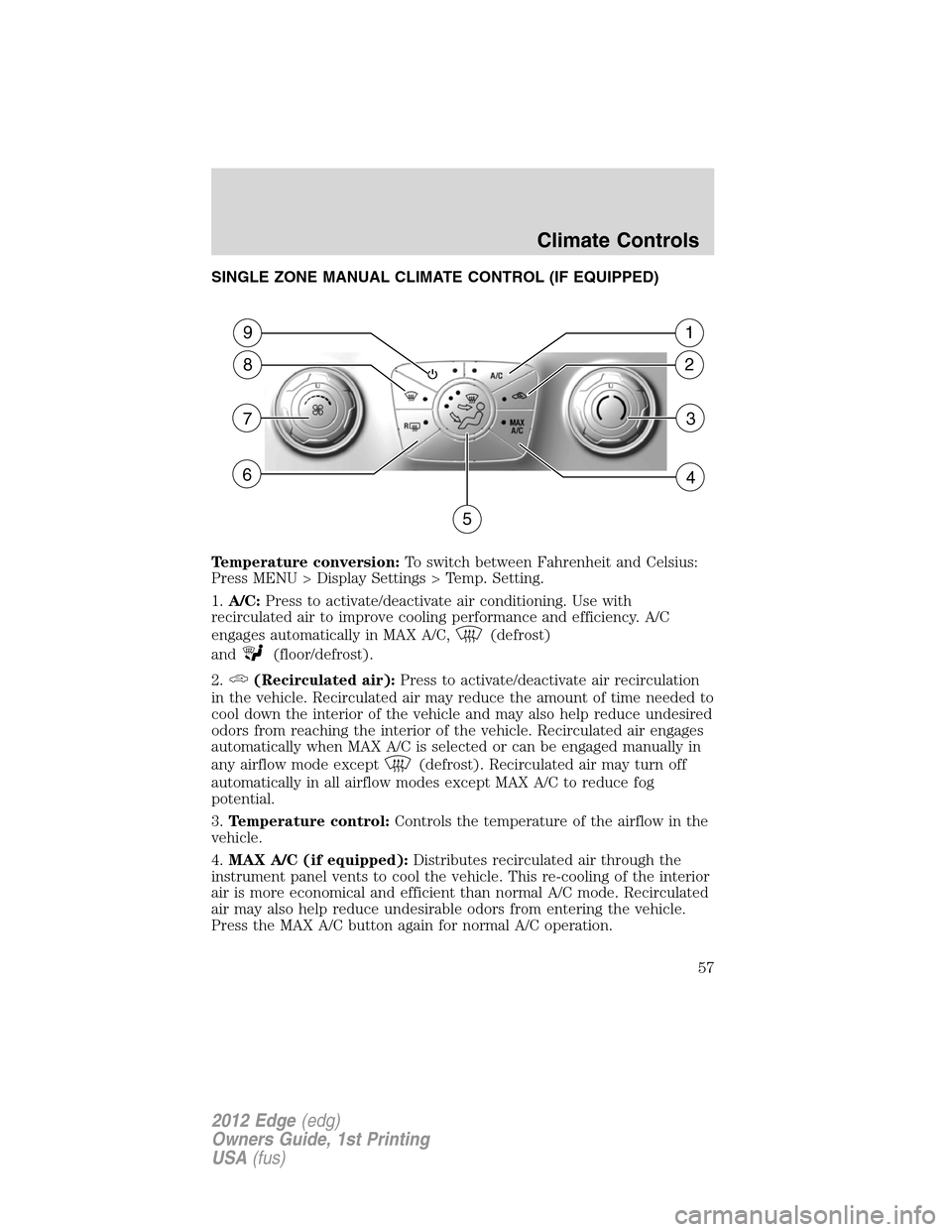
SINGLE ZONE MANUAL CLIMATE CONTROL (IF EQUIPPED)
Temperature conversion:To switch between Fahrenheit and Celsius:
Press MENU > Display Settings > Temp. Setting.
1.A/C:Press to activate/deactivate air conditioning. Use with
recirculated air to improve cooling performance and efficiency. A/C
engages automatically in MAX A/C,
(defrost)
and
(floor/defrost).
2.
(Recirculated air):Press to activate/deactivate air recirculation
in the vehicle. Recirculated air may reduce the amount of time needed to
cool down the interior of the vehicle and may also help reduce undesired
odors from reaching the interior of the vehicle. Recirculated air engages
automatically when MAX A/C is selected or can be engaged manually in
any airflow mode except
(defrost). Recirculated air may turn off
automatically in all airflow modes except MAX A/C to reduce fog
potential.
3.Temperature control:Controls the temperature of the airflow in the
vehicle.
4.MAX A/C (if equipped):Distributes recirculated air through the
instrument panel vents to cool the vehicle. This re-cooling of the interior
air is more economical and efficient than normal A/C mode. Recirculated
air may also help reduce undesirable odors from entering the vehicle.
Press the MAX A/C button again for normal A/C operation.
2
1
5
3
4
8
9
7
6
Climate Controls
57
2012 Edge(edg)
Owners Guide, 1st Printing
USA(fus)
Page 59 of 396
For maximum cooling performance in MAX A/C mode:
1. Select MAX A/C.
2. Move temperature control selector to the coolest setting.
3. Set the fan to the highest speed initially. As the interior starts to cool
down, adjust the fan speed to maintain comfort.
To aid in side window defogging/demisting in cold weather:
1. Select
(panel/floor).
2. Select A/C.
3. Adjust the temperature control to maintain comfort.
4. Set the fan speed to the highest setting.
5. Direct the outer instrument panel vents toward the side windows.
To increase airflow to the outer instrument panel vents, close the vents
located in the middle of the instrument panel.
AUTOMATIC TEMPERATURE CONTROL SYSTEMS
Dual Automatic Temperature Control (DATC) system with and
without heated seats (if equipped)
Temperature conversion:To switch between Fahrenheit and Celsius:
Press MENU > Display Settings > Temp. Setting, or refer toSettingsin
theMessage Centersection of theInstrument Clusterchapter.
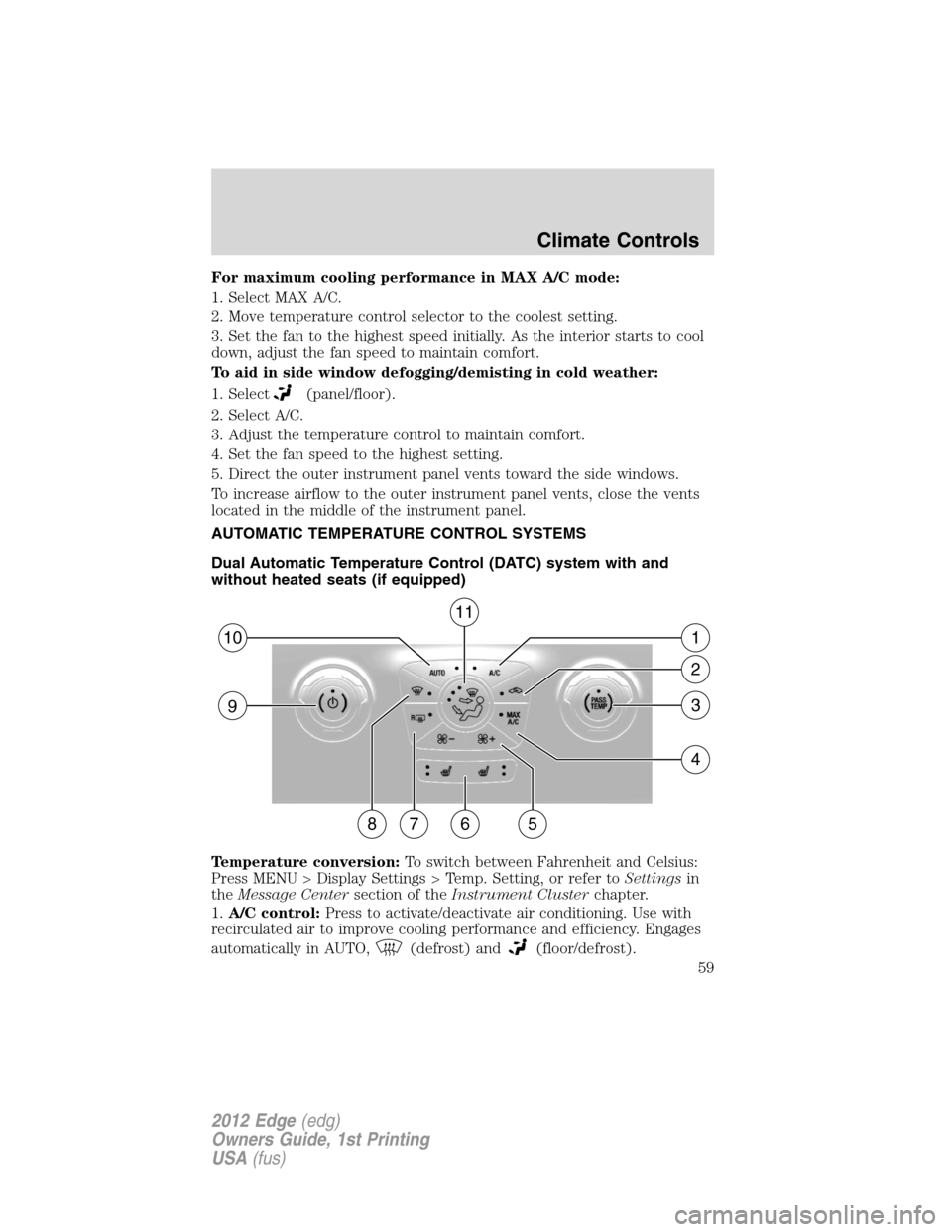
1.A/C control:Press to activate/deactivate air conditioning. Use with
recirculated air to improve cooling performance and efficiency. Engages
automatically in AUTO,
(defrost) and(floor/defrost).
57
93
4
2
110
86
11
Climate Controls
59
2012 Edge(edg)
Owners Guide, 1st Printing
USA(fus)
Page 60 of 396
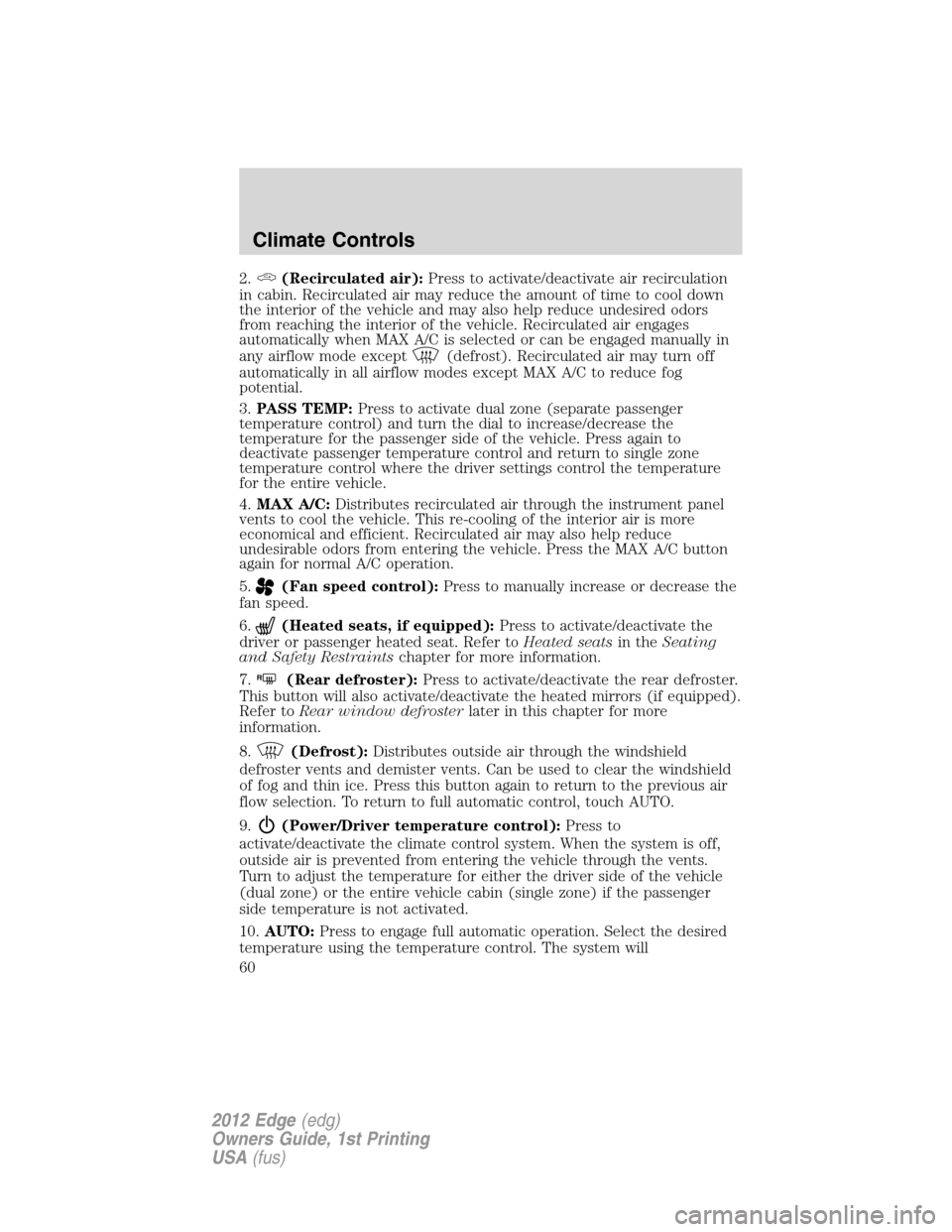
2.(Recirculated air):Press to activate/deactivate air recirculation
in cabin. Recirculated air may reduce the amount of time to cool down
the interior of the vehicle and may also help reduce undesired odors
from reaching the interior of the vehicle. Recirculated air engages
automatically when MAX A/C is selected or can be engaged manually in
any airflow mode except
(defrost). Recirculated air may turn off
automatically in all airflow modes except MAX A/C to reduce fog
potential.
3.PASS TEMP:Press to activate dual zone (separate passenger
temperature control) and turn the dial to increase/decrease the
temperature for the passenger side of the vehicle. Press again to
deactivate passenger temperature control and return to single zone
temperature control where the driver settings control the temperature
for the entire vehicle.
4.MAX A/C:Distributes recirculated air through the instrument panel
vents to cool the vehicle. This re-cooling of the interior air is more
economical and efficient. Recirculated air may also help reduce
undesirable odors from entering the vehicle. Press the MAX A/C button
again for normal A/C operation.
5.
(Fan speed control):Press to manually increase or decrease the
fan speed.
6.
(Heated seats, if equipped):Press to activate/deactivate the
driver or passenger heated seat. Refer toHeated seatsin theSeating
and Safety Restraintschapter for more information.
7.
R(Rear defroster):Press to activate/deactivate the rear defroster.
This button will also activate/deactivate the heated mirrors (if equipped).
Refer toRear window defrosterlater in this chapter for more
information.
8.
(Defrost):Distributes outside air through the windshield
defroster vents and demister vents. Can be used to clear the windshield
of fog and thin ice. Press this button again to return to the previous air
flow selection. To return to full automatic control, touch AUTO.
9.
(Power/Driver temperature control):Press to
activate/deactivate the climate control system. When the system is off,
outside air is prevented from entering the vehicle through the vents.
Turn to adjust the temperature for either the driver side of the vehicle
(dual zone) or the entire vehicle cabin (single zone) if the passenger
side temperature is not activated.
10.AUTO:Press to engage full automatic operation. Select the desired
temperature using the temperature control. The system will
Climate Controls
60
2012 Edge(edg)
Owners Guide, 1st Printing
USA(fus)
Page 62 of 396
Temperature conversion:To access the temperature setting, press
Menu on the touchscreen. Then press Settings > System > Temperature.
Select to view the temperature in either Fahrenheit and Celsius.
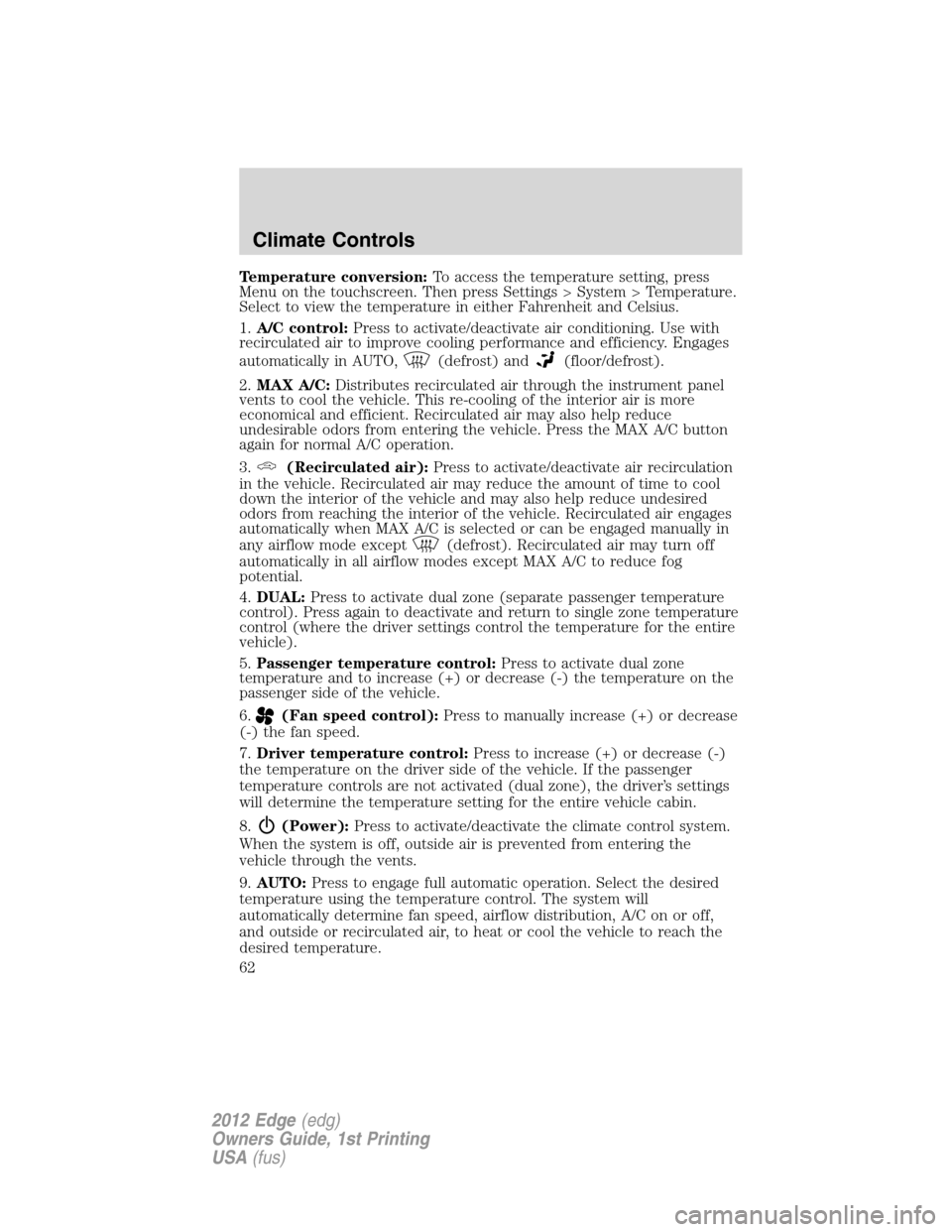
1.A/C control:Press to activate/deactivate air conditioning. Use with
recirculated air to improve cooling performance and efficiency. Engages
automatically in AUTO,
(defrost) and(floor/defrost).
2.MAX A/C:Distributes recirculated air through the instrument panel
vents to cool the vehicle. This re-cooling of the interior air is more
economical and efficient. Recirculated air may also help reduce
undesirable odors from entering the vehicle. Press the MAX A/C button
again for normal A/C operation.
3.
(Recirculated air):Press to activate/deactivate air recirculation
in the vehicle. Recirculated air may reduce the amount of time to cool
down the interior of the vehicle and may also help reduce undesired
odors from reaching the interior of the vehicle. Recirculated air engages
automatically when MAX A/C is selected or can be engaged manually in
any airflow mode except
(defrost). Recirculated air may turn off
automatically in all airflow modes except MAX A/C to reduce fog
potential.
4.DUAL:Press to activate dual zone (separate passenger temperature
control). Press again to deactivate and return to single zone temperature
control (where the driver settings control the temperature for the entire
vehicle).
5.Passenger temperature control:Press to activate dual zone
temperature and to increase (+) or decrease (-) the temperature on the
passenger side of the vehicle.
6.
(Fan speed control):Press to manually increase (+) or decrease
(-) the fan speed.
7.Driver temperature control:Press to increase (+) or decrease (-)
the temperature on the driver side of the vehicle. If the passenger
temperature controls are not activated (dual zone), the driver’s settings
will determine the temperature setting for the entire vehicle cabin.
8.
(Power):Press to activate/deactivate the climate control system.
When the system is off, outside air is prevented from entering the
vehicle through the vents.
9.AUTO:Press to engage full automatic operation. Select the desired
temperature using the temperature control. The system will
automatically determine fan speed, airflow distribution, A/C on or off,
and outside or recirculated air, to heat or cool the vehicle to reach the
desired temperature.
Climate Controls
62
2012 Edge(edg)
Owners Guide, 1st Printing
USA(fus)
Page 64 of 396
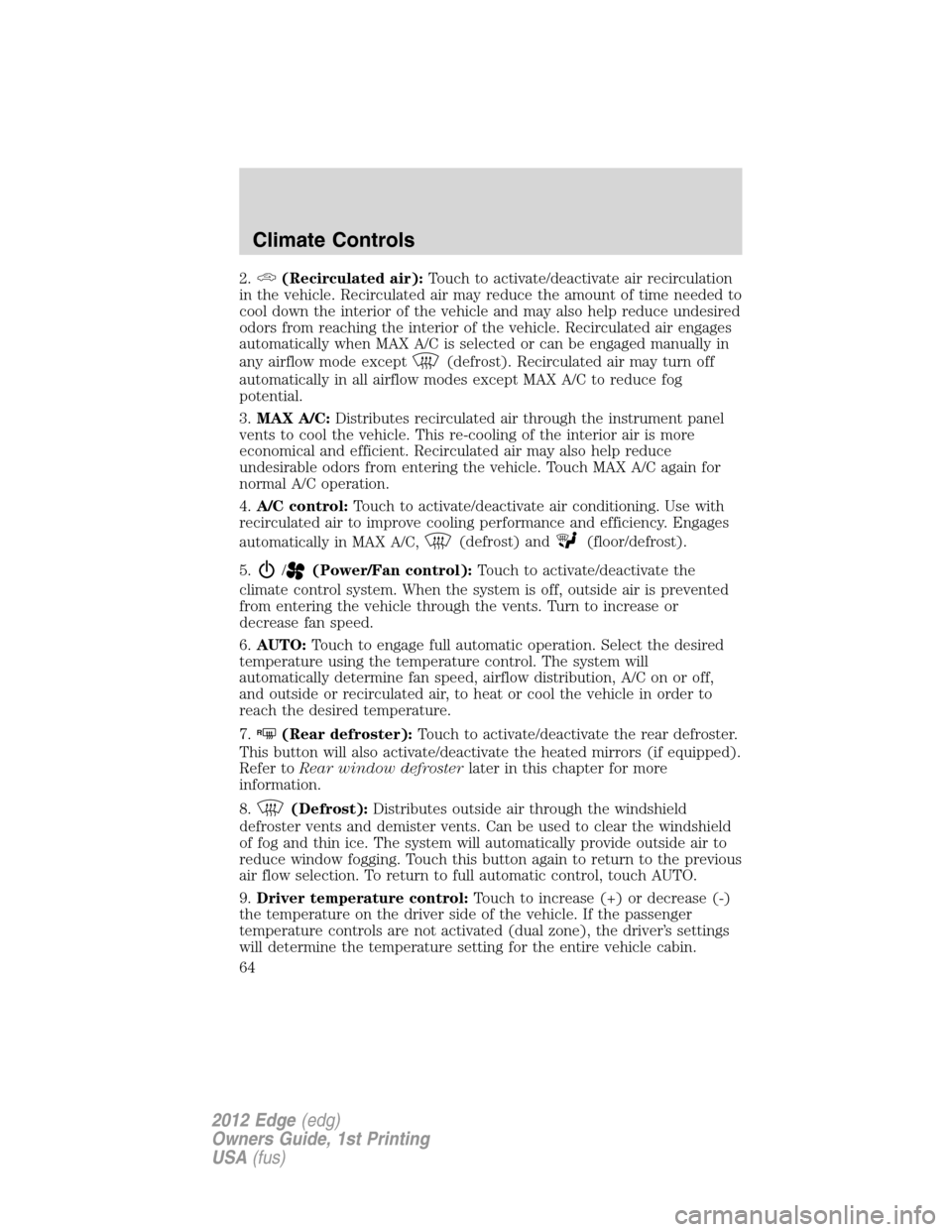
2.(Recirculated air):Touch to activate/deactivate air recirculation
in the vehicle. Recirculated air may reduce the amount of time needed to
cool down the interior of the vehicle and may also help reduce undesired
odors from reaching the interior of the vehicle. Recirculated air engages
automatically when MAX A/C is selected or can be engaged manually in
any airflow mode except
(defrost). Recirculated air may turn off
automatically in all airflow modes except MAX A/C to reduce fog
potential.
3.MAX A/C:Distributes recirculated air through the instrument panel
vents to cool the vehicle. This re-cooling of the interior air is more
economical and efficient. Recirculated air may also help reduce
undesirable odors from entering the vehicle. Touch MAX A/C again for
normal A/C operation.
4.A/C control:Touch to activate/deactivate air conditioning. Use with
recirculated air to improve cooling performance and efficiency. Engages
automatically in MAX A/C,
(defrost) and(floor/defrost).
5.
/(Power/Fan control):Touch to activate/deactivate the
climate control system. When the system is off, outside air is prevented
from entering the vehicle through the vents. Turn to increase or
decrease fan speed.
6.AUTO:Touch to engage full automatic operation. Select the desired
temperature using the temperature control. The system will
automatically determine fan speed, airflow distribution, A/C on or off,
and outside or recirculated air, to heat or cool the vehicle in order to
reach the desired temperature.
7.
R(Rear defroster):Touch to activate/deactivate the rear defroster.
This button will also activate/deactivate the heated mirrors (if equipped).
Refer toRear window defrosterlater in this chapter for more
information.
8.
(Defrost):Distributes outside air through the windshield
defroster vents and demister vents. Can be used to clear the windshield
of fog and thin ice. The system will automatically provide outside air to
reduce window fogging. Touch this button again to return to the previous
air flow selection. To return to full automatic control, touch AUTO.
9.Driver temperature control:Touch to increase (+) or decrease (-)
the temperature on the driver side of the vehicle. If the passenger
temperature controls are not activated (dual zone), the driver’s settings
will determine the temperature setting for the entire vehicle cabin.
Climate Controls
64
2012 Edge(edg)
Owners Guide, 1st Printing
USA(fus)
Page 65 of 396
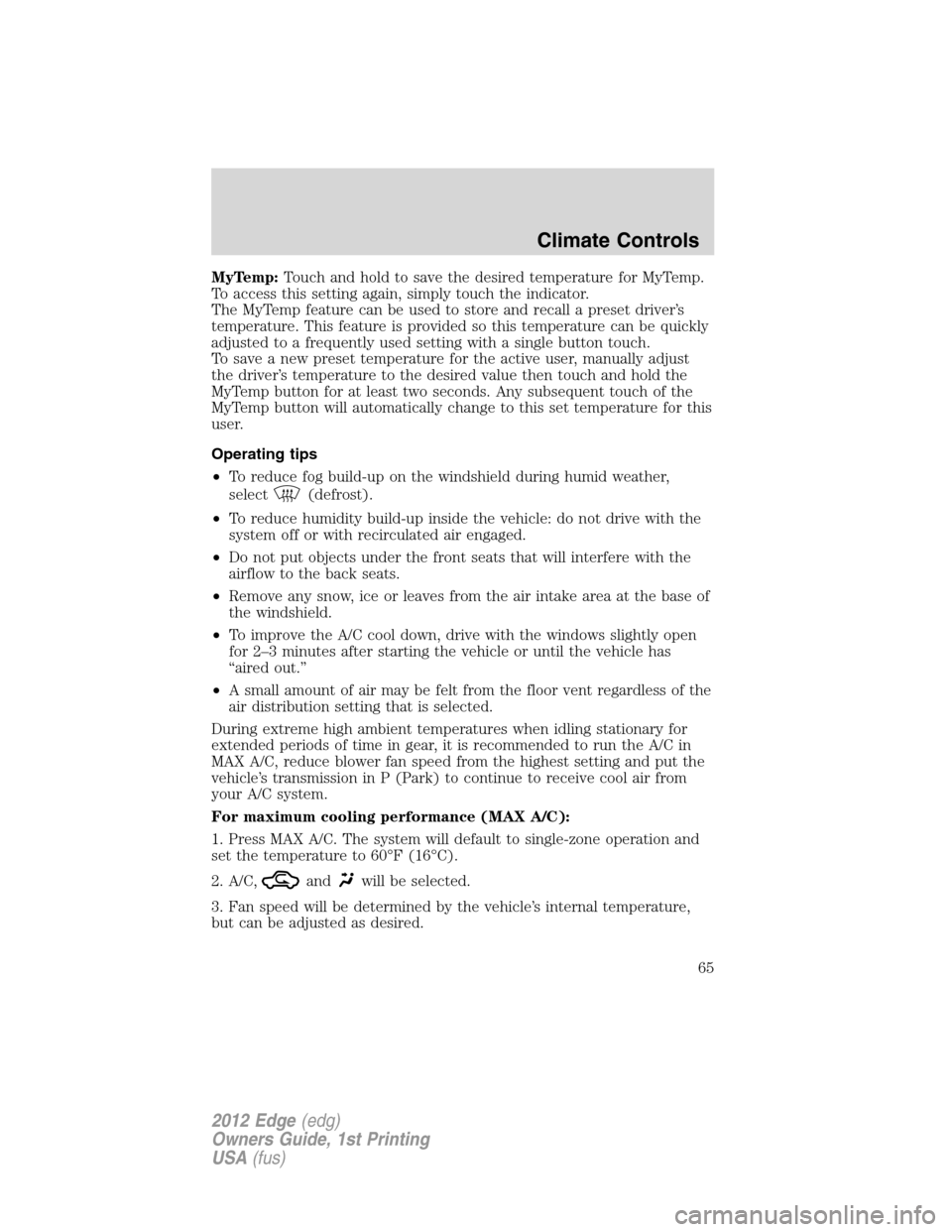
MyTemp:Touch and hold to save the desired temperature for MyTemp.
To access this setting again, simply touch the indicator.
The MyTemp feature can be used to store and recall a preset driver’s
temperature. This feature is provided so this temperature can be quickly
adjusted to a frequently used setting with a single button touch.
To save a new preset temperature for the active user, manually adjust
the driver’s temperature to the desired value then touch and hold the
MyTemp button for at least two seconds. Any subsequent touch of the
MyTemp button will automatically change to this set temperature for this
user.
Operating tips
•To reduce fog build-up on the windshield during humid weather,
select
(defrost).
•To reduce humidity build-up inside the vehicle: do not drive with the
system off or with recirculated air engaged.
•Do not put objects under the front seats that will interfere with the
airflow to the back seats.
•Remove any snow, ice or leaves from the air intake area at the base of
the windshield.
•To improve the A/C cool down, drive with the windows slightly open
for 2–3 minutes after starting the vehicle or until the vehicle has
“aired out.”
•A small amount of air may be felt from the floor vent regardless of the
air distribution setting that is selected.
During extreme high ambient temperatures when idling stationary for
extended periods of time in gear, it is recommended to run the A/C in
MAX A/C, reduce blower fan speed from the highest setting and put the
vehicle’s transmission in P (Park) to continue to receive cool air from
your A/C system.
For maximum cooling performance (MAX A/C):
1. Press MAX A/C. The system will default to single-zone operation and
set the temperature to 60°F (16°C).
2. A/C,
andwill be selected.
3. Fan speed will be determined by the vehicle’s internal temperature,
but can be adjusted as desired.
Climate Controls
65
2012 Edge(edg)
Owners Guide, 1st Printing
USA(fus)
Page 232 of 396
Driving while you tow
When towing a trailer:
•Do not drive faster than 70 mph (113 km/h) during the first 500 miles
(800 km) of trailer towing and don’t make full-throttle starts.
•Turn off the speed control. The speed control may shut off
automatically when you are towing on long, steep grades.
•Use a lower gear to eliminate excessive shifting and assist in
transmission cooling. For additional information, refer toAutomatic
transmission operationin theDrivingchapter.
•Allow more distance for stopping with a trailer attached; anticipate
stops and brake gradually.
Trailer towing tips
•Practice turning, stopping and backing-up before starting on a trip to
get the feel of the vehicle-trailer combination. When turning, make
wider turns so the trailer wheels will clear curbs and other obstacles.
•To aid in engine/transmission cooling and A/C efficiency during hot
weather while stopped in traffic, place the gearshift lever in P (Park).
•After you have traveled 50 miles (80 km), thoroughly check your
hitch, electrical connections and trailer wheel lug nuts.
•If you are driving down a long or steep hill, shift to a lower gear. Do
not apply the brakes continuously, as they may overheat and become
less effective.
•Vehicles with trailers should not be parked on a grade. If you must
park on a grade, place wheel chocks under the trailer’s wheels.
RECREATIONAL TOWING
Follow these guidelines for your specific powertrain combination to tow
your vehicle for personal travel (such as behind a motor home or a
truck).
Note:Put your climate control system in recirculated air mode to
prevent exhaust fumes from entering the vehicle. Refer to theClimate
Controlschapter for more information.
In case of a roadside emergency with a disabled vehicle, please refer to
Wrecker towingin theRoadside Emergencieschapter.
These guidelines are designed to prevent damage to your vehicle after it
is hooked-up to the RV or tow dolly.
Tires, Wheels and Loading
232
2012 Edge(edg)
Owners Guide, 1st Printing
USA(fus)
Page 274 of 396
location and allow it to idle. TheAWD OFFmessage will turn off when
the system cools and normal AWD function returns.
Note:The AWD feature gives your vehicle some limited off-road capabilities
in which driving surfaces are relatively level, obstruction-free and otherwise
similar to normal on-road driving conditions. Operating your vehicle under
other than those conditions could subject the vehicle to excessive stress
which might result in damage which is not covered under your warranty.
Driving off-highway with AWD vehicles
AWD vehicles are equipped for driving on sand, snow, mud and rough
roads and have operating characteristics that are somewhat different
from conventional vehicles, both on and off the highway.
When driving at slow speeds off-highway under high outside
temperatures, use L (Low) gear when possible. L (Low) gear operation
will maximize the engine and transmission cooling capability.
Under severe operating conditions, the A/C may cycle on and off to
protect overheating of the engine.
Basic operating principles
•Drive slower in strong crosswinds which can affect the normal steering
characteristics of your vehicle.
•Be extremely careful when driving on pavement made slippery by
loose sand, water, gravel, snow or ice.
If your vehicle goes off the edge of the pavement
•If your vehicle goes off the edge of the pavement, slow down, but
avoid severe brake application, ease the vehicle back onto the
pavement only after reducing your speed. Do not turn the steering
wheel too sharply while returning to the road surface.
•It may be safer to stay on the apron or shoulder of the road and slow
down gradually before returning to the pavement. You may lose
control if you do not slow down or if you turn the steering wheel too
sharply or abruptly.
•It often may be less risky to strike small objects, such as highway
reflectors, with minor damage to your vehicle rather than attempt a
sudden return to the pavement which could cause the vehicle to slide
sideways out of control or rollover. Remember, your safety and the
safety of others should be your primary concern.
If your vehicle gets stuck
If your vehicle gets stuck in mud or snow it may be rocked out by
shifting between forward and reverse gears, stopping between shifts, in a
steady pattern. Press lightly on the accelerator in each gear.
Driving
274
2012 Edge(edg)
Owners Guide, 1st Printing
USA(fus)
Page 276 of 396
AWD systems (if equipped)
With AWD, the vehicle uses all four wheels to power the vehicle. This
increases traction, enabling you to drive over terrain and road conditions
that a conventional two-wheel drive vehicle cannot.
Sand
When driving over sand, try to keep all four wheels on the most solid
area of the trail. Avoid reducing the tire pressures but shift to a lower
gear and drive steadily through the terrain. Apply the accelerator slowly
and avoid spinning the wheels.
Do not drive your AWD vehicle in deep sand for an extended period of
time. This will cause the AWD system to overheat. If the rear tires stop
spinning while the front tires spin in deep sand, turn off the vehicle and
allow the AWD system to cool down for a minimum of 15 minutes. After
the system has cooled down, normal AWD function will return. When
driving at slow speeds in deep sand under high outside temperatures,
use L (Low) gear when possible. L (Low) gear operation will maximize
the engine and transmission cooling capability.
Under severe operating conditions, the A/C may cycle on and off to
protect overheating of the engine.
Avoid excessive speed because vehicle momentum can work against you
and cause the vehicle to become stuck to the point that assistance may
be required from another vehicle. Remember, you may be able to back
out the way you came if you proceed with caution.
Mud and water
If you must drive through high water, drive slowly. Traction or brake
capability may be limited.
When driving through water, determine the depth; avoid water higher
than the bottom of the wheel rims (for cars) or the bottom of the hubs
(for trucks) (if possible) and proceed slowly. If the ignition system gets
wet, the vehicle may stall.
Once through water, always try the brakes. Wet brakes do not stop the
vehicle as effectively as dry brakes. Drying can be improved by moving
your vehicle slowly while applying light pressure on the brake pedal.
Be cautious of sudden changes in vehicle speed or direction when you
are driving in mud. Even AWD vehicles can lose traction in slick mud. As
when you are driving over sand, apply the accelerator slowly and avoid
spinning your wheels. If the vehicle does slide, steer in the direction of
the slide until you regain control of the vehicle.
Driving
276
2012 Edge(edg)
Owners Guide, 1st Printing
USA(fus)
Page 289 of 396
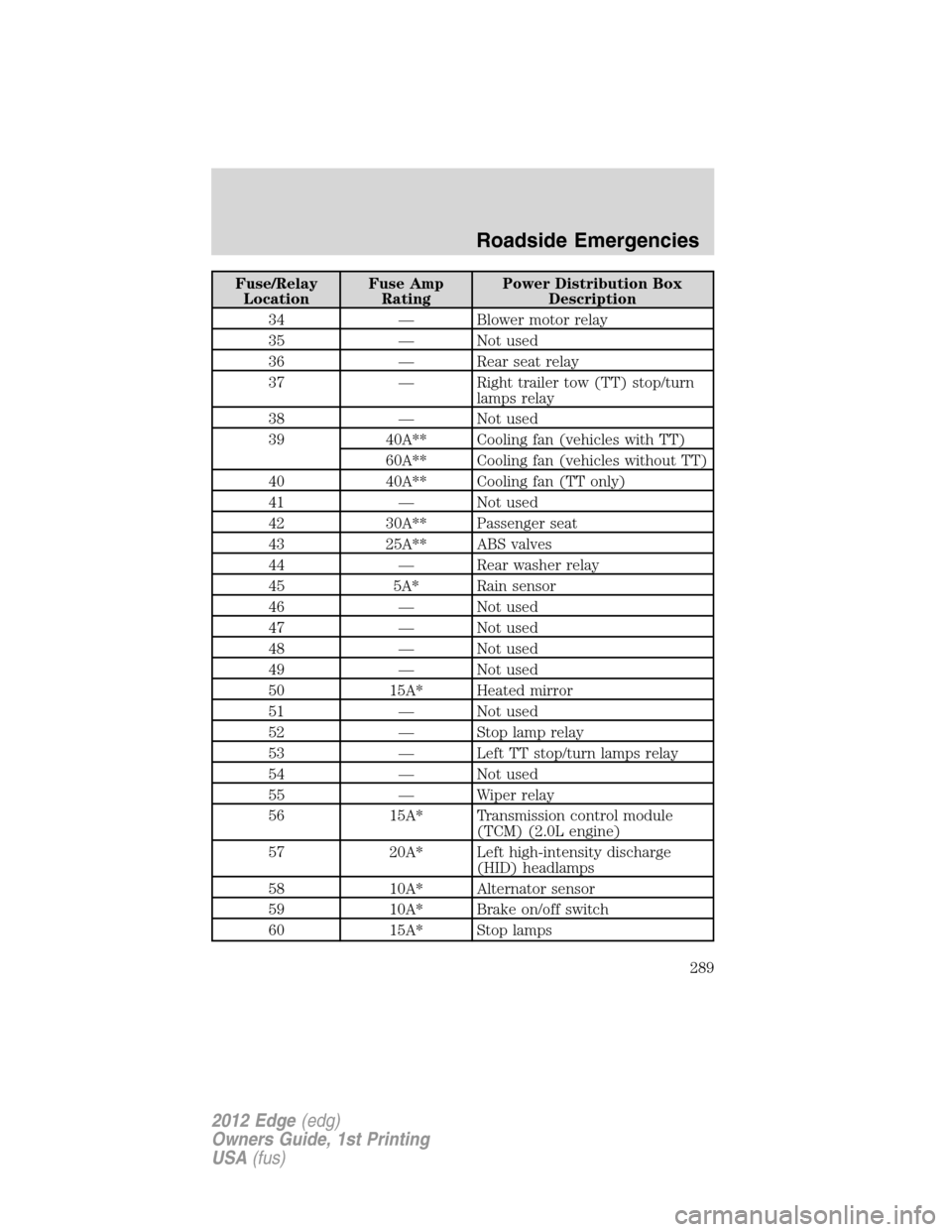
Fuse/Relay
LocationFuse Amp
RatingPower Distribution Box
Description
34 — Blower motor relay
35 — Not used
36 — Rear seat relay
37 — Right trailer tow (TT) stop/turn
lamps relay
38 — Not used
39 40A** Cooling fan (vehicles with TT)
60A** Cooling fan (vehicles without TT)
40 40A** Cooling fan (TT only)
41 — Not used
42 30A** Passenger seat
43 25A** ABS valves
44 — Rear washer relay
45 5A* Rain sensor
46 — Not used
47 — Not used
48 — Not used
49 — Not used
50 15A* Heated mirror
51 — Not used
52 — Stop lamp relay
53 — Left TT stop/turn lamps relay
54 — Not used
55 — Wiper relay
56 15A* Transmission control module
(TCM) (2.0L engine)
57 20A* Left high-intensity discharge
(HID) headlamps
58 10A* Alternator sensor
59 10A* Brake on/off switch
60 15A* Stop lamps
Roadside Emergencies
289
2012 Edge(edg)
Owners Guide, 1st Printing
USA(fus)