brakes FORD EDGE 2013 1.G User Guide
[x] Cancel search | Manufacturer: FORD, Model Year: 2013, Model line: EDGE, Model: FORD EDGE 2013 1.GPages: 526, PDF Size: 5.98 MB
Page 201 of 526
GENERAL INFORMATION
Note:Occasional brake noise is normal. If a metal-to-metal, continuous
grinding or continuous squeal sound is present, the brake linings may be
worn-out and should be inspected by an authorized dealer. If the vehicle
has continuous vibration or shudder in the steering wheel while braking,
the vehicle should be inspected by an authorized dealer.
Note:Brake dust may accumulate on the wheels, even under normal
driving conditions. Some dust is inevitable as the brakes wear and does
not contribute to brake noise. Refer to theVehicle Carechapter for
wheel cleaning instructions.
Refer to theInstrument Clusterchapter for information on the
brake system warning light.
Wet brakes result in reduced braking efficiency. Gently press the brake
pedal a few times when driving from a car wash or standing water to dry
the brakes.
Brake Over Accelerator
In the event the accelerator pedal becomes stuck or entrapped, apply
steady and firm pressure to the brake pedal to slow the vehicle and
reduce engine power. If you experience this condition, apply the brakes
and bring your vehicle to a safe stop. Turn the engine off, shift to P
(Park) and apply the parking brake, and then inspect the accelerator
pedal for any interferences. If none are found and the condition persists,
have your vehicle towed to the nearest authorized dealer.
Emergency Brake Assist
Emergency brake assist detects when you brake heavily by measuring the
rate at which you press the brake pedal. It provides maximum braking
efficiency as long as you press the pedal. Emergency brake assist can
reduce stopping distances in critical situations.
Brakes201
2013 Edge(edg)
Owners Guide gf, 1st Printing
USA(fus)
Page 202 of 526
Anti-lock Brake System (ABS)
This system helps you maintain steering control during emergency stops
by keeping the brakes from locking.
The ABS lamp momentarily illuminates when the ignition is
turned on. If the light does not illuminate during start up,
remains on or flashes, the ABS may be disabled and may need
to be serviced.
If the ABS is disabled, normal braking is still effective. If the
brake warning lamp illuminates with the parking brake released,
have your brake system serviced immediately.
HINTS ON DRIVING WITH ANTI-LOCK BRAKES
When the system is operating, the brake pedal will pulse and may travel
further. Maintain pressure on the brake pedal. You may also hear a noise
from the system. This is normal.
The ABS will not eliminate the dangers inherent when:
•you drive too closely to the vehicle in front of you.
•your vehicle is hydroplaning.
•you take corners too fast.
•the road surface is poor.
PARKING BRAKE
WARNING:If the parking brake is fully released, but the brake
warning lamp remains illuminated, the brakes may not be working
properly. See your authorized dealer as soon as possible.
WARNING:Always set the parking brake fully and make sure
that the gearshift is securely latched in P (Park).
To set the parking brake, press the parking brake pedal down to its
fullest extent.
To release the parking brake, press the parking brake pedal down again.
202Brakes
2013 Edge(edg)
Owners Guide gf, 1st Printing
USA(fus)
Page 203 of 526
PRINCIPLES OF OPERATION
The traction control system helps avoid drive wheel spin and loss of
traction.
If your vehicle begins to slide, the system applies the brakes to individual
wheels and, when needed, reduces engine power at the same time. If the
wheels spin when accelerating on slippery or loose surfaces, the system
reduces engine power in order to increase traction.
USING TRACTION CONTROL
In certain situations (e.g. stuck in snow or mud), turning the traction
control off may be beneficial as this allows the wheels to spin with full
engine power. Turn off the traction control system using the information
display control. Refer to theInformation Displayschapter.
System indicator lights and messages
WARNING:If a failure has been detected within the Traction
Control System, the stability control light will illuminate steadily.
Verify that the Traction Control System was not manually disabled using
the information display control. If the stability control light still
illuminates steadily, have the system serviced by an authorized dealer
immediately. Operating your vehicle with Traction Control disabled
could lead to an increased risk of loss of vehicle control, vehicle
rollover, personal injury and death.
The stability control light temporarily illuminates on engine
start-up and flashes when a driving condition activates the
stability system.
The stability control off light temporarily illuminates on engine
start-up and stays on when the traction control system is
turned off or if a problem occurs in the stability system.
When the traction control system is turned off or on, a message appears
in the information display showing system status.
Traction Control203
2013 Edge(edg)
Owners Guide gf, 1st Printing
USA(fus)
Page 206 of 526
SENSING SYSTEM (IF EQUIPPED)
WARNING:To help avoid personal injury, please read and
understand the limitations of the system as contained in this
section. Sensing is only an aid for some (generally large and fixed)
objects when moving in reverse on a flat surface at parking speeds.
Traffic control systems, inclement weather, air brakes, and external
motors and fans may also affect the function of the sensing system; this
may include reduced performance or a false activation.
WARNING:To help avoid personal injury, always use caution
when in R (Reverse) and when using the sensing system.
WARNING:This system is not designed to prevent contact with
small or moving objects. The system is designed to provide a
warning to assist the driver in detecting large stationary objects to avoid
damaging the vehicle. The system may not detect smaller objects,
particularly those close to the ground.
WARNING:Certain add-on devices such as large trailer hitches,
bike or surfboard racks and any device that may block the normal
detection zone of the system, may create false beeps.
Note:Keep the sensors (located on the bumper/fascia) free from snow,
ice and large accumulations of dirt. If the sensors are covered, the
system’s accuracy can be affected. Do not clean the sensors with sharp
objects.
Note:If your vehicle sustains damage to the bumper/fascia, leaving it
misaligned or bent, the sensing zone may be altered causing inaccurate
measurement of obstacles or false alarms.
The sensing system warns the driver of obstacles within a certain range
of the bumper area. The system turns on automatically whenever the
ignition is switched on.
When receiving a detection warning, the radio volume is reduced to a
predetermined level. After the warning goes away, the radio volume
returns to the previous level.
206Parking Aids
2013 Edge(edg)
Owners Guide gf, 1st Printing
USA(fus)
Page 212 of 526
PRINCIPLES OF OPERATION
Cruise control lets you maintain a set speed without keeping your foot on
the accelerator pedal.
USING CRUISE CONTROL
WARNING:Do not use cruise control in heavy traffic or on roads
that are winding, slippery or unpaved.
Note:Vehicle speed may vary momentarily when driving up or down a
steep hill. Apply the brakes if the vehicle speed increases above the set
speed while driving downhill.
Note:Cruise control will disengage if the vehicle speed decreases more
than 10 mph (16 km/h) below your set speed while driving uphill.
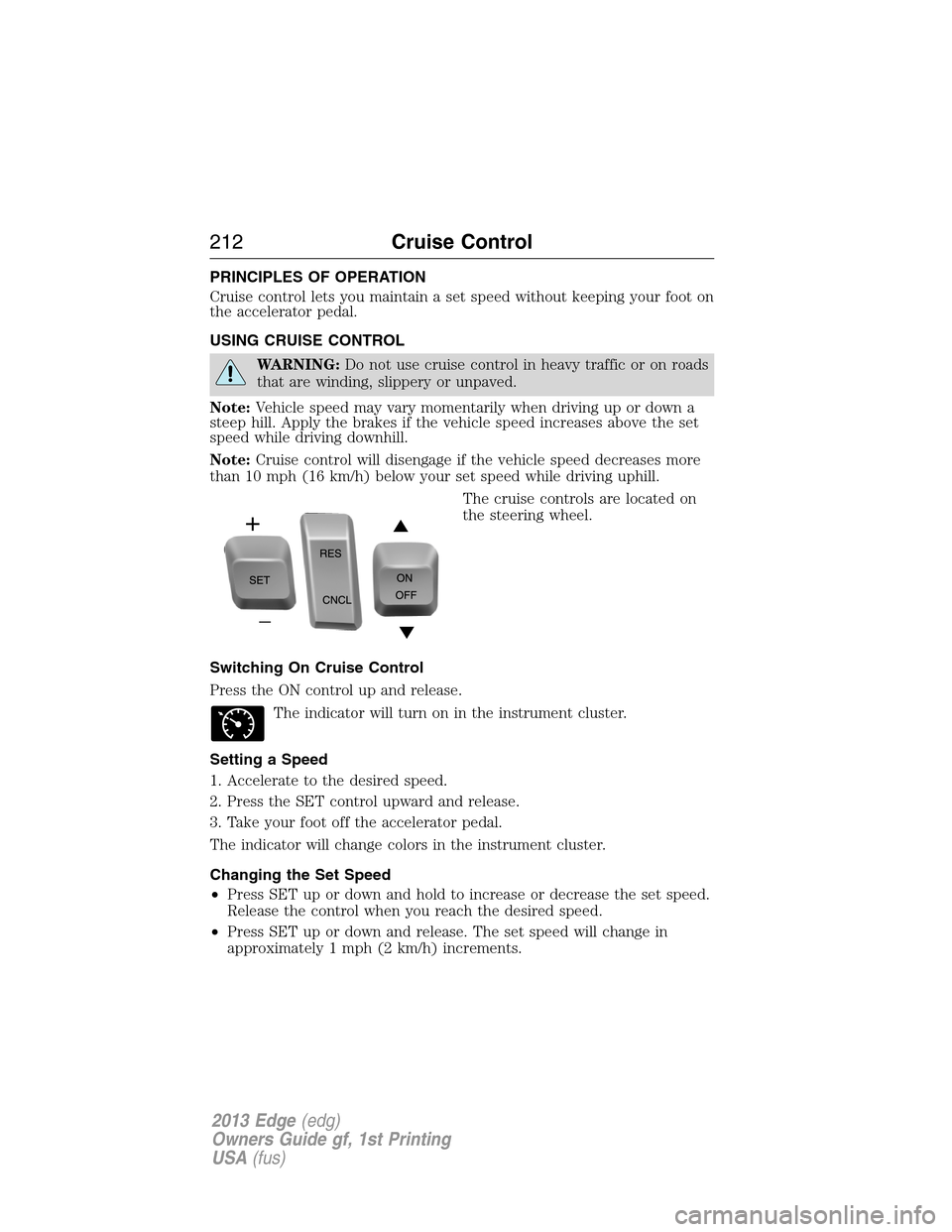
The cruise controls are located on
the steering wheel.
Switching On Cruise Control
Press the ON control up and release.
The indicator will turn on in the instrument cluster.
Setting a Speed
1. Accelerate to the desired speed.
2. Press the SET control upward and release.
3. Take your foot off the accelerator pedal.
The indicator will change colors in the instrument cluster.
Changing the Set Speed
•Press SET up or down and hold to increase or decrease the set speed.
Release the control when you reach the desired speed.
•Press SET up or down and release. The set speed will change in
approximately 1 mph (2 km/h) increments.
212Cruise Control
2013 Edge(edg)
Owners Guide gf, 1st Printing
USA(fus)
Page 215 of 526
Following a Vehicle
WARNING:When following a vehicle in front of you, the vehicle
will not decelerate automatically to a stop, nor will the vehicle
always decelerate quickly enough to avoid a collision without driver
intervention. Always apply the brakes when necessary. Failing to do so
may result in a collision, serious injury or death.
WARNING:Adaptive cruise control only warns of vehicles
detected by the radar sensor. In some cases there may be no
warning or the warning may be delayed. The driver should always apply
the brakes when necessary. Failing to do so may result in a collision,
serious injury or death.
Note:The brakes may emit a sound when they are being modulated by
the adaptive cruise control system.
When a vehicle ahead of you enters the same lane or a slower vehicle is
ahead in the same lane, the vehicle speed will adjust automatically to
maintain a preset gap distance. The distance setting is adjustable.
The lead vehicle graphic will be illuminated.
The vehicle will maintain a constant distance between the vehicle ahead
until:
•the vehicle in front of you accelerates to a speed above the set speed
•the vehicle in front of you moves out of your lane or out of view
•the vehicle speed falls below 16 mph (26 km/h)
•a new gap distance is set.
The vehicle brakes will be automatically applied to slow the vehicle to
maintain a safe distance from the vehicle in front. The maximum braking
which is applied by the system is limited and can be overridden by the
driver applying the brakes.
If the system predicts that its maximum braking level will not be
sufficient, an audible warning will sound while the system continues to
brake. This is accompanied by a heads-up display; a red warning bar
illuminating on the windshield. The driver should take immediate action.
Cruise Control215
2013 Edge(edg)
Owners Guide gf, 1st Printing
USA(fus)
Page 216 of 526
Setting the Gap Distance
Note:It is the driver’s responsibility to select a gap appropriate to the
driving conditions.
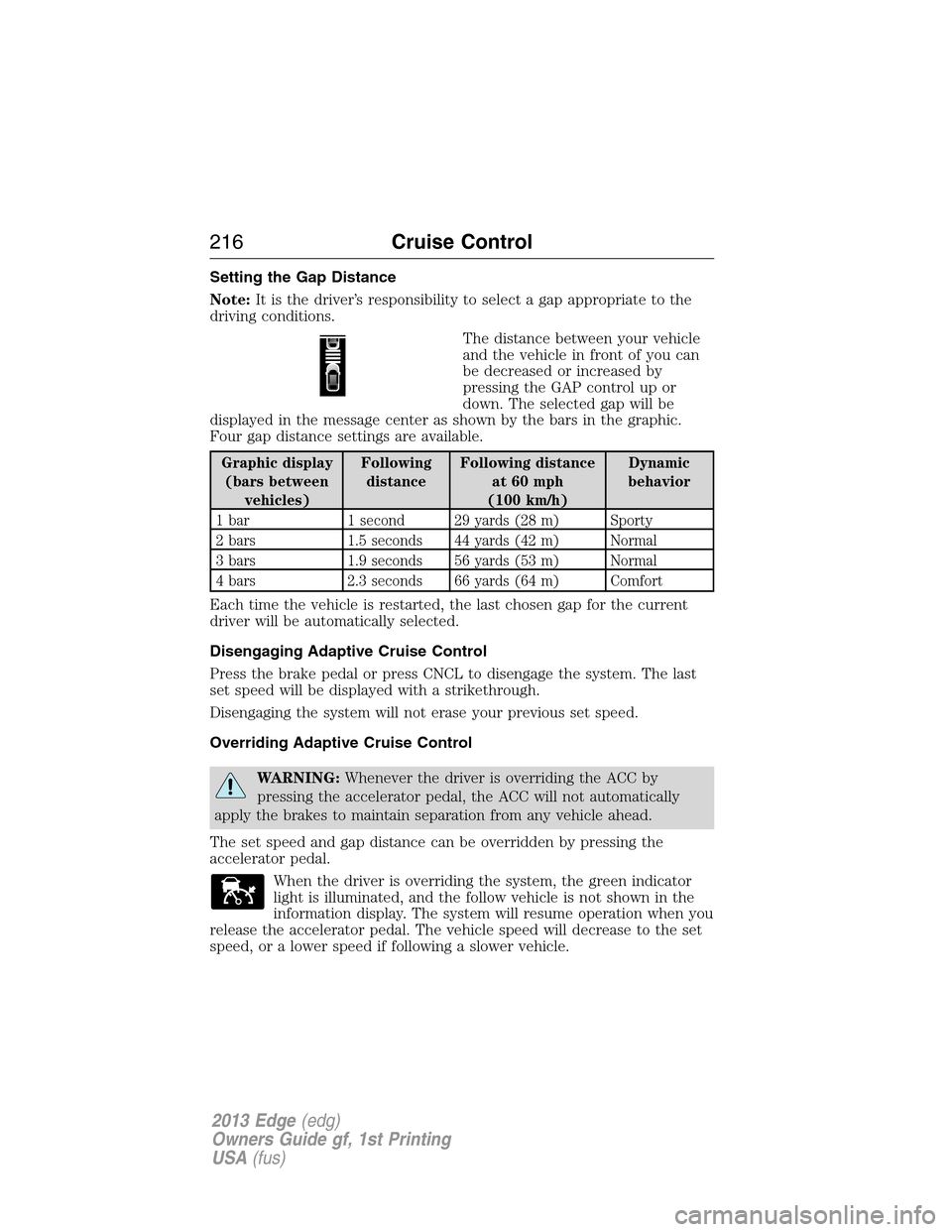
The distance between your vehicle
and the vehicle in front of you can
be decreased or increased by
pressing the GAP control up or
down. The selected gap will be
displayed in the message center as shown by the bars in the graphic.
Four gap distance settings are available.
Graphic display
(bars between
vehicles)Following
distanceFollowing distance
at 60 mph
(100 km/h)Dynamic
behavior
1 bar 1 second 29 yards (28 m) Sporty
2 bars 1.5 seconds 44 yards (42 m) Normal
3 bars 1.9 seconds 56 yards (53 m) Normal
4 bars 2.3 seconds 66 yards (64 m) Comfort
Each time the vehicle is restarted, the last chosen gap for the current
driver will be automatically selected.
Disengaging Adaptive Cruise Control
Press the brake pedal or press CNCL to disengage the system. The last
set speed will be displayed with a strikethrough.
Disengaging the system will not erase your previous set speed.
Overriding Adaptive Cruise Control
WARNING:Whenever the driver is overriding the ACC by
pressing the accelerator pedal, the ACC will not automatically
apply the brakes to maintain separation from any vehicle ahead.
The set speed and gap distance can be overridden by pressing the
accelerator pedal.
When the driver is overriding the system, the green indicator
light is illuminated, and the follow vehicle is not shown in the
information display. The system will resume operation when you
release the accelerator pedal. The vehicle speed will decrease to the set
speed, or a lower speed if following a slower vehicle.
216Cruise Control
2013 Edge(edg)
Owners Guide gf, 1st Printing
USA(fus)
Page 217 of 526
Changing the Set Speed
There are three ways to change the set speed:
•Accelerate or brake to the desired speed and press SET upward and
release.
•Increase or decrease the speed by holding SET upward or downward
until the desired set speed is shown on the information display. The
vehicle speed will gradually change to the selected speed.
•Increase or decrease the speed in increments of 1 mph (2 km/h) by
briefly pressing the SET upward or downward.
The system may apply the brakes to slow the vehicle down to the new
set speed. The set speed will display continuously in the information
display while the system is active.
Resuming the Set Speed
Note:Resume should only be used if the driver is aware of the set speed
and intends to return to it.
Press and release RES/CNCL. The vehicle will return to the previously
set speed. The set speed will display continuously in the information
display while the system is active.
Low Speed Automatic Cancellation
The system is not functional at vehicle speeds below 16 mph (26 km/h).
An audible alarm will sound and the automatic braking will be released if
the vehicle drops below this speed.
Hilly Condition Usage
Note:An audible alarm will sound and the system will shut down if it is
applying brakes for an extended period of time. This allows the brakes to
cool down. The system will function normally again when the brakes
have cooled down.
You should select a lower gear position when the system is active in
situations such as prolonged downhill driving on steep grades (i.e.,
driving in mountainous areas). Additional engine braking is needed in
these situations to reduce the load on the vehicle’s regular brake system
to prevent them from overheating.
Switching Off Adaptive Cruise Control
Note:The set speed memory is erased when you turn off the system.
Press and release OFF or turn off the ignition.
Cruise Control217
2013 Edge(edg)
Owners Guide gf, 1st Printing
USA(fus)
Page 219 of 526
Blocked Sensor
WARNING:Do not use ACC when towing a trailer with brake
controls. Aftermarket trailer brakes will not function properly
when ACC is activated because the brakes are electronically controlled.
Failing to do so may result in loss of vehicle control, which could result
in serious injury.
WARNING:Do not use tires sizes other than those
recommended because this can affect the normal operation of
ACC. Failing to do so may result in a loss of vehicle control, which
could result in serious injury.
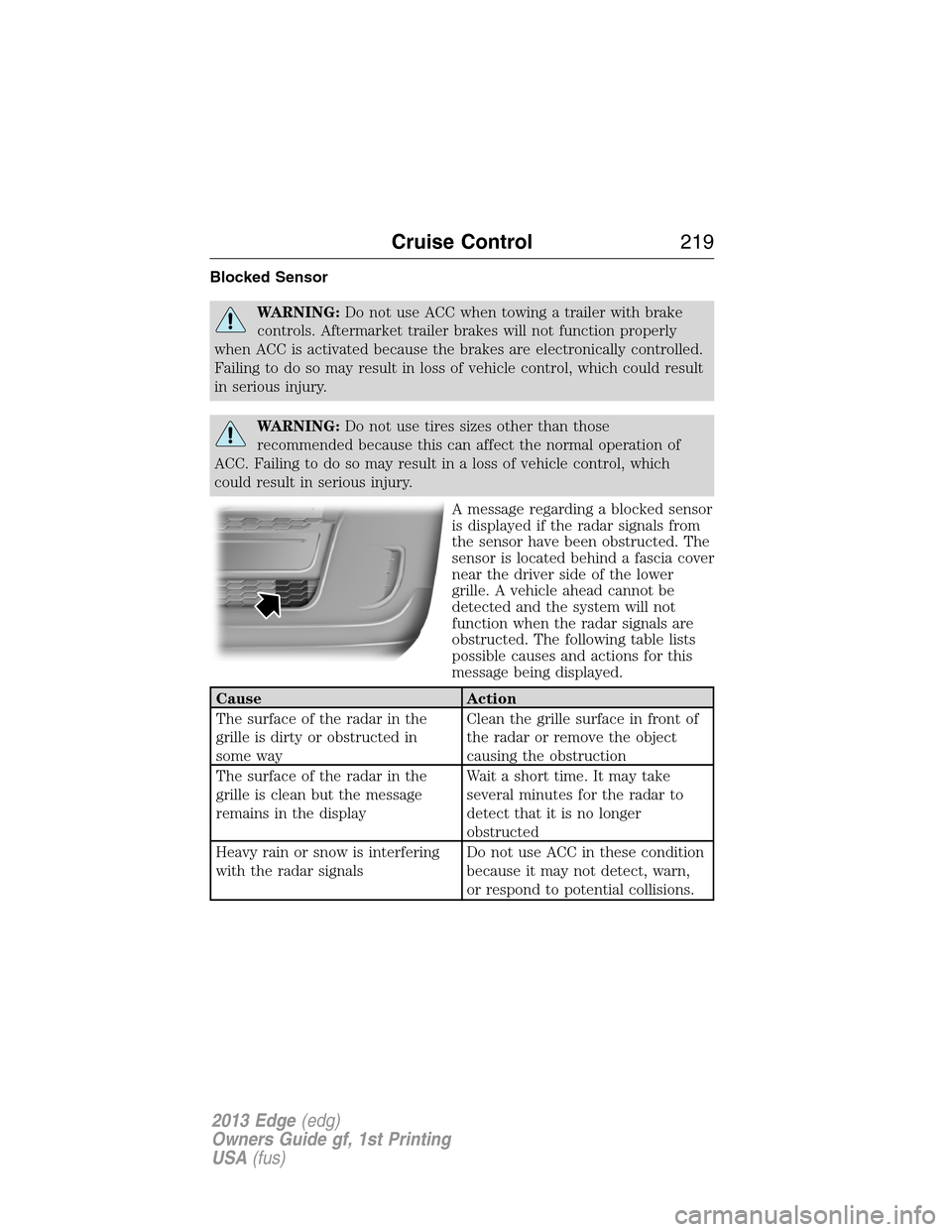
A message regarding a blocked sensor
is displayed if the radar signals from
the sensor have been obstructed. The
sensor is located behind a fascia cover
near the driver side of the lower
grille. A vehicle ahead cannot be
detected and the system will not
function when the radar signals are
obstructed. The following table lists
possible causes and actions for this
message being displayed.
Cause Action
The surface of the radar in the
grille is dirty or obstructed in
some wayClean the grille surface in front of
the radar or remove the object
causing the obstruction
The surface of the radar in the
grille is clean but the message
remains in the displayWait a short time. It may take
several minutes for the radar to
detect that it is no longer
obstructed
Heavy rain or snow is interfering
with the radar signalsDo not use ACC in these condition
because it may not detect, warn,
or respond to potential collisions.
Cruise Control219
2013 Edge(edg)
Owners Guide gf, 1st Printing
USA(fus)
Page 220 of 526
Cause Action
Swirling water, or snow or ice on
the surface of the road may
interfere with the radar signalsDo not use ACC in these condition
because it may not detect, warn,
or respond to potential collisions.
Desert / remote area with no other
vehicles and no roadside objectsWait a short time or switch to
normal cruise control.
Due to the nature of radar technology, it is possible to get a blockage
warning and not be blocked. This can happen, for example, when driving
in sparse rural or desert environments. A false blocked condition will
either self clear or clear after a key cycle.
Switching to Normal Cruise Control
WARNING:Normal cruise control will not brake due to slower
vehicles. Always be aware of which mode is selected and apply
the brakes when necessary.
You can manually change from adaptive cruise control to normal cruise
control through the information display.
The cruise control indicator light will replace the adaptive
cruise control indicator light if normal cruise control is selected.
The gap setting will not be displayed, the system will not
automatically respond to lead vehicles and automatic braking will not be
activated. The system will default to adaptive cruise control when the
engine is started.
220Cruise Control
2013 Edge(edg)
Owners Guide gf, 1st Printing
USA(fus)