instrument panel FORD EDGE 2013 1.G User Guide
[x] Cancel search | Manufacturer: FORD, Model Year: 2013, Model line: EDGE, Model: FORD EDGE 2013 1.GPages: 526, PDF Size: 5.98 MB
Page 146 of 526
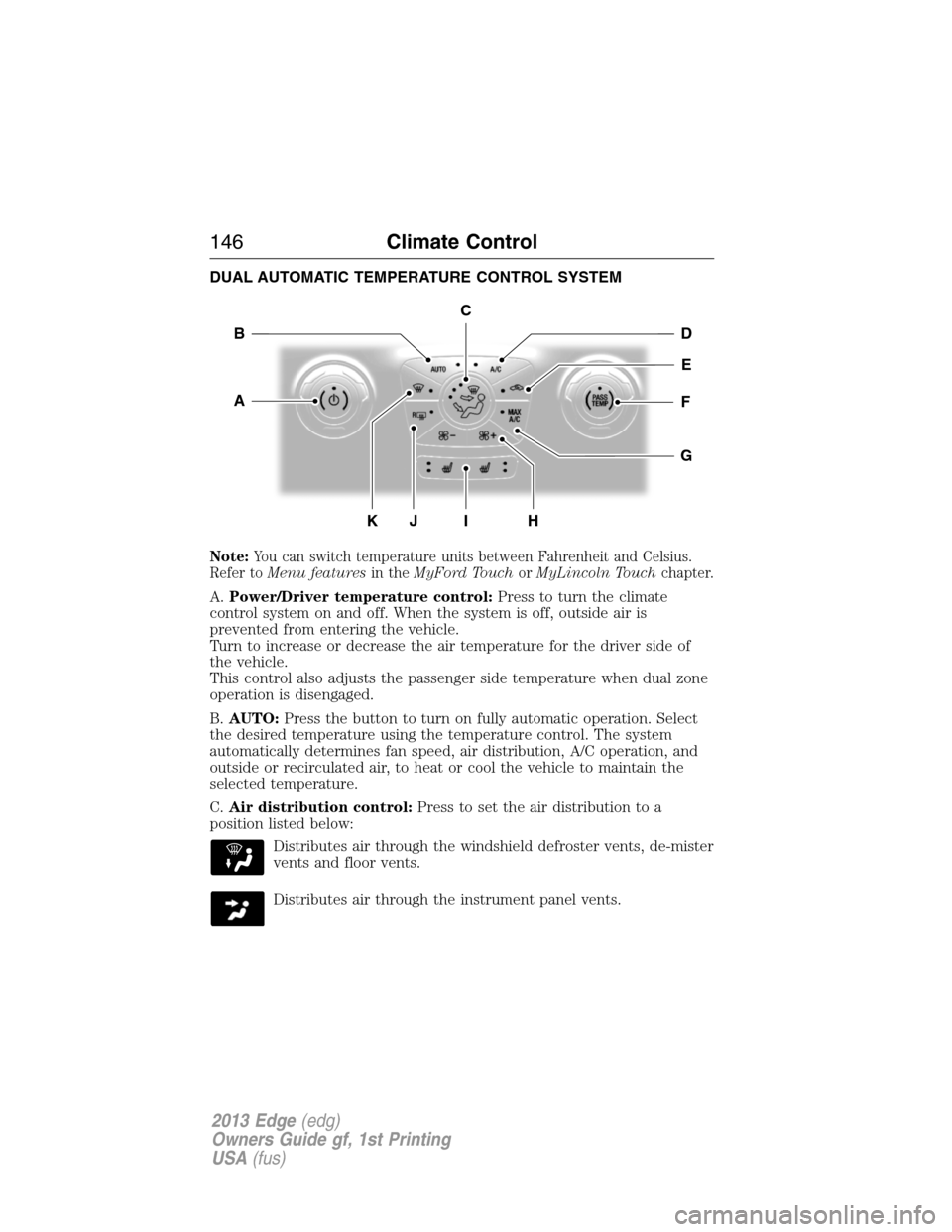
DUAL AUTOMATIC TEMPERATURE CONTROL SYSTEM
Note:You can switch temperature units between Fahrenheit and Celsius.
Refer toMenu featuresin theMyFord TouchorMyLincoln Touchchapter.
A.Power/Driver temperature control:Press to turn the climate
control system on and off. When the system is off, outside air is
prevented from entering the vehicle.
Turn to increase or decrease the air temperature for the driver side of
the vehicle.
This control also adjusts the passenger side temperature when dual zone
operation is disengaged.
B.AUTO:Press the button to turn on fully automatic operation. Select
the desired temperature using the temperature control. The system
automatically determines fan speed, air distribution, A/C operation, and
outside or recirculated air, to heat or cool the vehicle to maintain the
selected temperature.
C.Air distribution control:Press to set the air distribution to a
position listed below:
Distributes air through the windshield defroster vents, de-mister
vents and floor vents.
Distributes air through the instrument panel vents.
G
HK
E
DB
FA
I
C
J
146Climate Control
2013 Edge(edg)
Owners Guide gf, 1st Printing
USA(fus)
Page 147 of 526
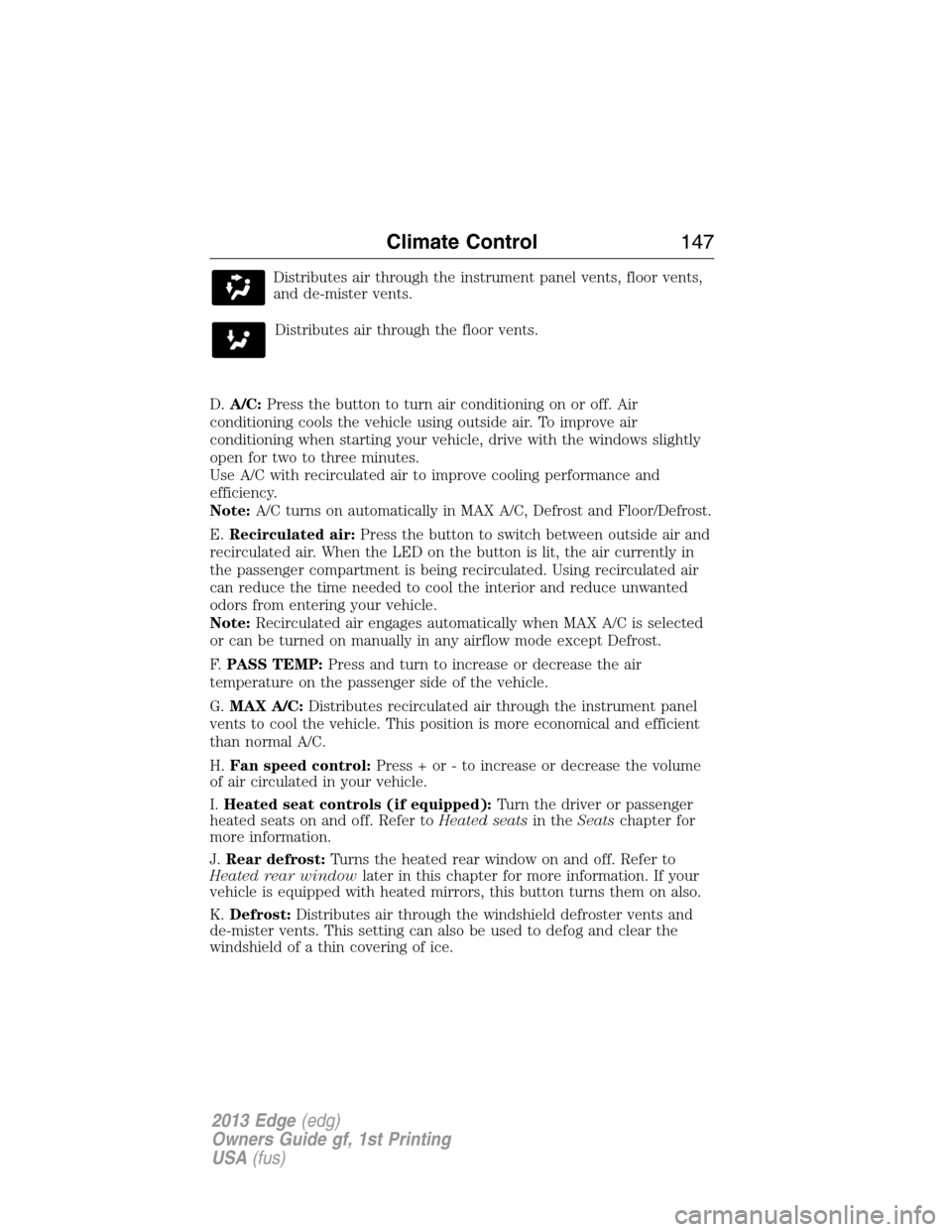
Distributes air through the instrument panel vents, floor vents,
and de-mister vents.
Distributes air through the floor vents.
D.A/C:Press the button to turn air conditioning on or off. Air
conditioning cools the vehicle using outside air. To improve air
conditioning when starting your vehicle, drive with the windows slightly
open for two to three minutes.
Use A/C with recirculated air to improve cooling performance and
efficiency.
Note:A/C turns on automatically in MAX A/C, Defrost and Floor/Defrost.
E.Recirculated air:Press the button to switch between outside air and
recirculated air. When the LED on the button is lit, the air currently in
the passenger compartment is being recirculated. Using recirculated air
can reduce the time needed to cool the interior and reduce unwanted
odors from entering your vehicle.
Note:Recirculated air engages automatically when MAX A/C is selected
or can be turned on manually in any airflow mode except Defrost.
F.PASS TEMP:Press and turn to increase or decrease the air
temperature on the passenger side of the vehicle.
G.MAX A/C:Distributes recirculated air through the instrument panel
vents to cool the vehicle. This position is more economical and efficient
than normal A/C.
H.Fan speed control:Press + or - to increase or decrease the volume
of air circulated in your vehicle.
I.Heated seat controls (if equipped):Turn the driver or passenger
heated seats on and off. Refer toHeated seatsin theSeatschapter for
more information.
J.Rear defrost:Turns the heated rear window on and off. Refer to
Heated rear windowlater in this chapter for more information. If your
vehicle is equipped with heated mirrors, this button turns them on also.
K.Defrost:Distributes air through the windshield defroster vents and
de-mister vents. This setting can also be used to defog and clear the
windshield of a thin covering of ice.
Climate Control147
2013 Edge(edg)
Owners Guide gf, 1st Printing
USA(fus)
Page 149 of 526
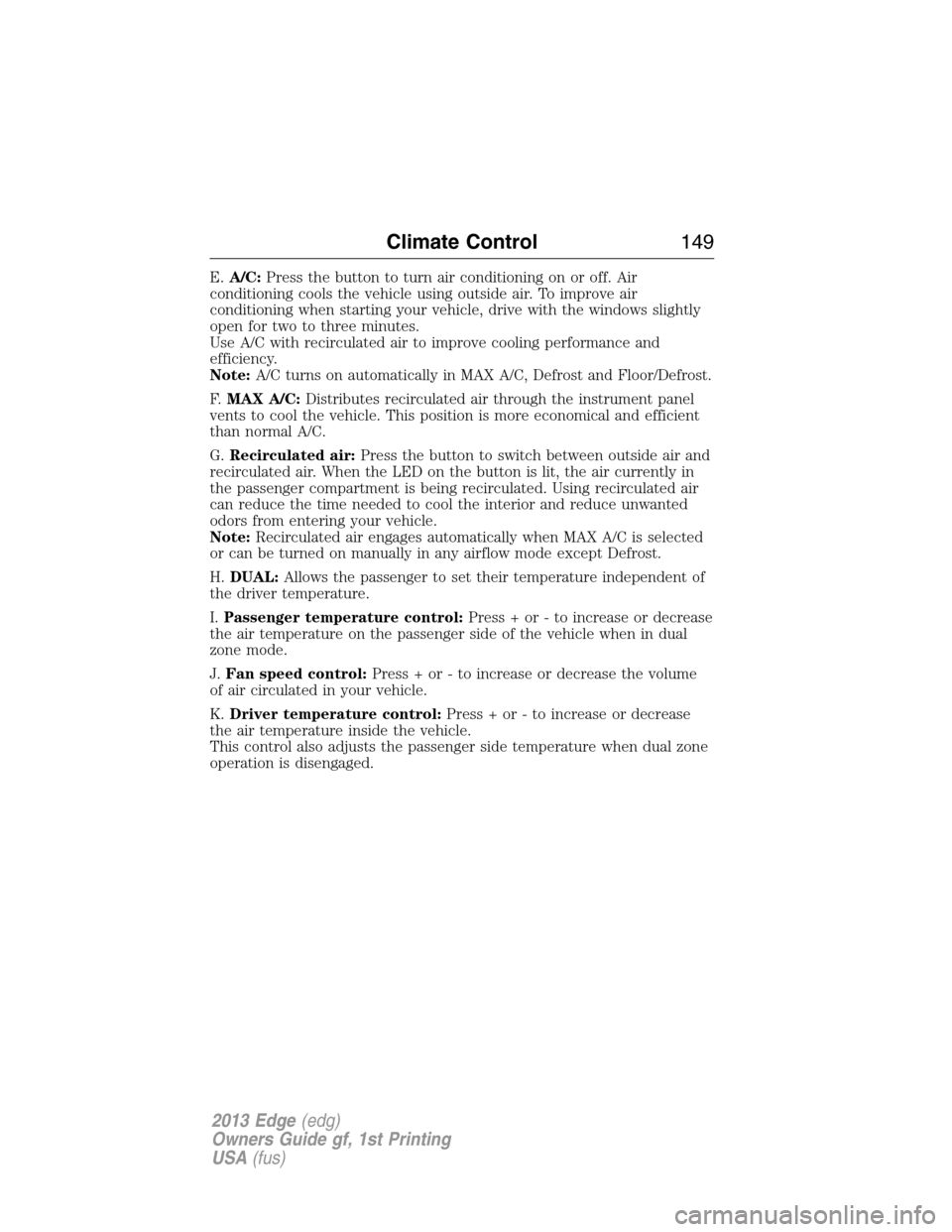
E.A/C:Press the button to turn air conditioning on or off. Air
conditioning cools the vehicle using outside air. To improve air
conditioning when starting your vehicle, drive with the windows slightly
open for two to three minutes.
Use A/C with recirculated air to improve cooling performance and
efficiency.
Note:A/C turns on automatically in MAX A/C, Defrost and Floor/Defrost.
F.MAX A/C:Distributes recirculated air through the instrument panel
vents to cool the vehicle. This position is more economical and efficient
than normal A/C.
G.Recirculated air:Press the button to switch between outside air and
recirculated air. When the LED on the button is lit, the air currently in
the passenger compartment is being recirculated. Using recirculated air
can reduce the time needed to cool the interior and reduce unwanted
odors from entering your vehicle.
Note:Recirculated air engages automatically when MAX A/C is selected
or can be turned on manually in any airflow mode except Defrost.
H.DUAL:Allows the passenger to set their temperature independent of
the driver temperature.
I.Passenger temperature control:Press + or - to increase or decrease
the air temperature on the passenger side of the vehicle when in dual
zone mode.
J.Fan speed control:Press + or - to increase or decrease the volume
of air circulated in your vehicle.
K.Driver temperature control:Press + or - to increase or decrease
the air temperature inside the vehicle.
This control also adjusts the passenger side temperature when dual zone
operation is disengaged.
Climate Control149
2013 Edge(edg)
Owners Guide gf, 1st Printing
USA(fus)
Page 151 of 526
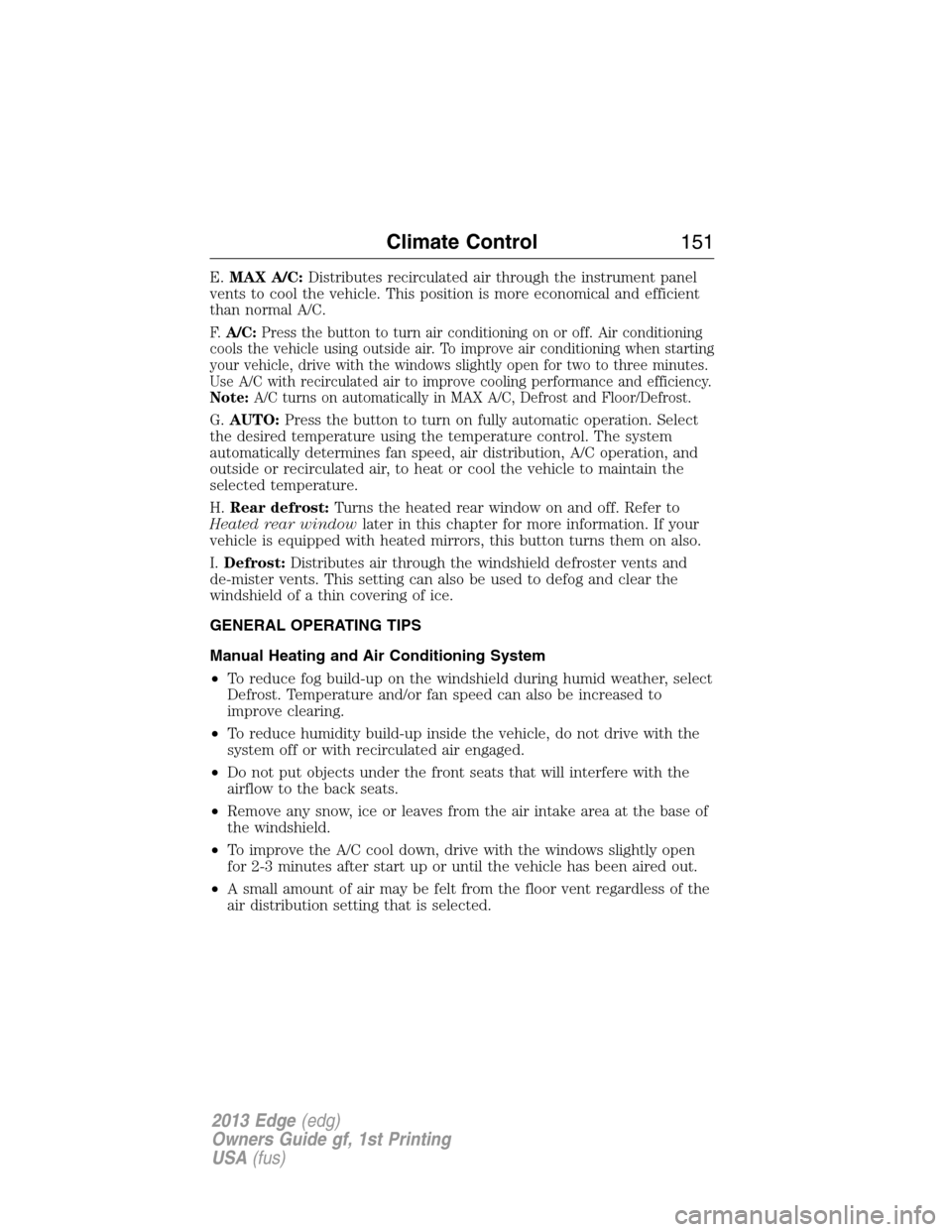
E.MAX A/C:Distributes recirculated air through the instrument panel
vents to cool the vehicle. This position is more economical and efficient
than normal A/C.
F.A/C:Press the button to turn air conditioning on or off. Air conditioning
cools the vehicle using outside air. To improve air conditioning when starting
your vehicle, drive with the windows slightly open for two to three minutes.
Use A/C with recirculated air to improve cooling performance and efficiency.
Note:A/C turns on automatically in MAX A/C, Defrost and Floor/Defrost.
G.AUTO:Press the button to turn on fully automatic operation. Select
the desired temperature using the temperature control. The system
automatically determines fan speed, air distribution, A/C operation, and
outside or recirculated air, to heat or cool the vehicle to maintain the
selected temperature.
H.Rear defrost:Turns the heated rear window on and off. Refer to
Heated rear windowlater in this chapter for more information. If your
vehicle is equipped with heated mirrors, this button turns them on also.
I.Defrost:Distributes air through the windshield defroster vents and
de-mister vents. This setting can also be used to defog and clear the
windshield of a thin covering of ice.
GENERAL OPERATING TIPS
Manual Heating and Air Conditioning System
•To reduce fog build-up on the windshield during humid weather, select
Defrost. Temperature and/or fan speed can also be increased to
improve clearing.
•To reduce humidity build-up inside the vehicle, do not drive with the
system off or with recirculated air engaged.
•Do not put objects under the front seats that will interfere with the
airflow to the back seats.
•Remove any snow, ice or leaves from the air intake area at the base of
the windshield.
•To improve the A/C cool down, drive with the windows slightly open
for 2-3 minutes after start up or until the vehicle has been aired out.
•A small amount of air may be felt from the floor vent regardless of the
air distribution setting that is selected.
Climate Control151
2013 Edge(edg)
Owners Guide gf, 1st Printing
USA(fus)
Page 152 of 526
During extreme high ambient temperatures when idling stationary for
extended periods of time in gear, it is recommended to run the A/C in
the MAX A/C mode, adjust the blower fan speed to the lowest setting
and put the vehicle’s transmission into the P (Park) position (vehicles
equipped with an automatic transmission) to continue to receive cool air
from your A/C system.
For maximum cooling performance MAX A/C in AUTO, press MAX A/C.
1. Move temperature control to the coolest setting.
2. Set the fan to the highest speed initially, then adjust to maintain
comfort.
For maximum cooling performance in panel or panel/floor modes:
1. Move temperature control to the coolest setting.
2. Select A/C and recirculated air to provide colder airflow.
3. Set the fan to the highest speed initially, then adjust to maintain
comfort.
To aid in side window defogging/demisting in cold weather:
1. Select Floor/Panel.
2. Select A/C.
3. Adjust the temperature control to maintain comfort.
4. Set the fan speed to the highest setting.
5. Direct the outer instrument panel vents towards the side windows.
6. To increase airflow to the outer instrument panel vents, close the
vents located in the middle of the instrument panel.
Dual Zone Automatic Temperature Control
•To reduce fog build-up on the windshield during humid weather, select
Defrost. Temperature and/or fan speed can also be increased to
improve clearing.
•To reduce humidity build-up inside the vehicle, do not drive with the
system off or with recirculated air engaged.
•Do not put objects under the front seats that will interfere with the
airflow to the back seats.
•Remove any snow, ice or leaves from the air intake area at the base of
the windshield.
•To improve the A/C cool down, drive with the windows slightly open
for 2-3 minutes after start up or until the vehicle has been aired out.
•A small amount of air may be felt from the floor vent regardless of the
air distribution setting that is selected.
152Climate Control
2013 Edge(edg)
Owners Guide gf, 1st Printing
USA(fus)
Page 153 of 526
During extreme high ambient temperatures when idling stationary for
extended periods of time in gear, it is recommended to run the A/C in
the MAX A/C mode, adjust the blower fan speed to the lowest setting
and put the vehicle’s transmission into the P (Park) position (vehicles
equipped with an automatic transmission) to continue to receive cool air
from your A/C system.
For maximum cooling performance MAX A/C in AUTO, press MAX A/C.
For maximum cooling performance MAX A/C in manual override control
1. Choose Panel, A/C, and recirc controls.
2. Set the temperature to LO.
3. Set the fan to the highest blower setting.
To aid in side window defogging/demisting in cold or humid weather:
1. Select Floor/Panel.
2. Select A/C.
3. Adjust the temperature control to maintain comfort.
4. Set the fan speed to the highest setting.
5. Direct the outer instrument panel vents towards the side windows.
6. To increase airflow to the outer instrument panel vents, close the
vents located in the middle of the instrument panel.
HEATED REAR WINDOW
Note:The vehicle must be running to use this feature.
Press the control to clear the rear window of thin ice and fog. Press the
control again within 15 minutes to switch it off. It turns off automatically
after 15 minutes, or when you switch the ignition off.
Do not use razor blades or other sharp objects to clean the inside
of the rear window or to remove decals from the inside of the
rear window. This may cause damage to the heated grid lines and
will not be covered by your warranty.
Climate Control153
2013 Edge(edg)
Owners Guide gf, 1st Printing
USA(fus)
Page 162 of 526
MEMORY FUNCTION (IF EQUIPPED)
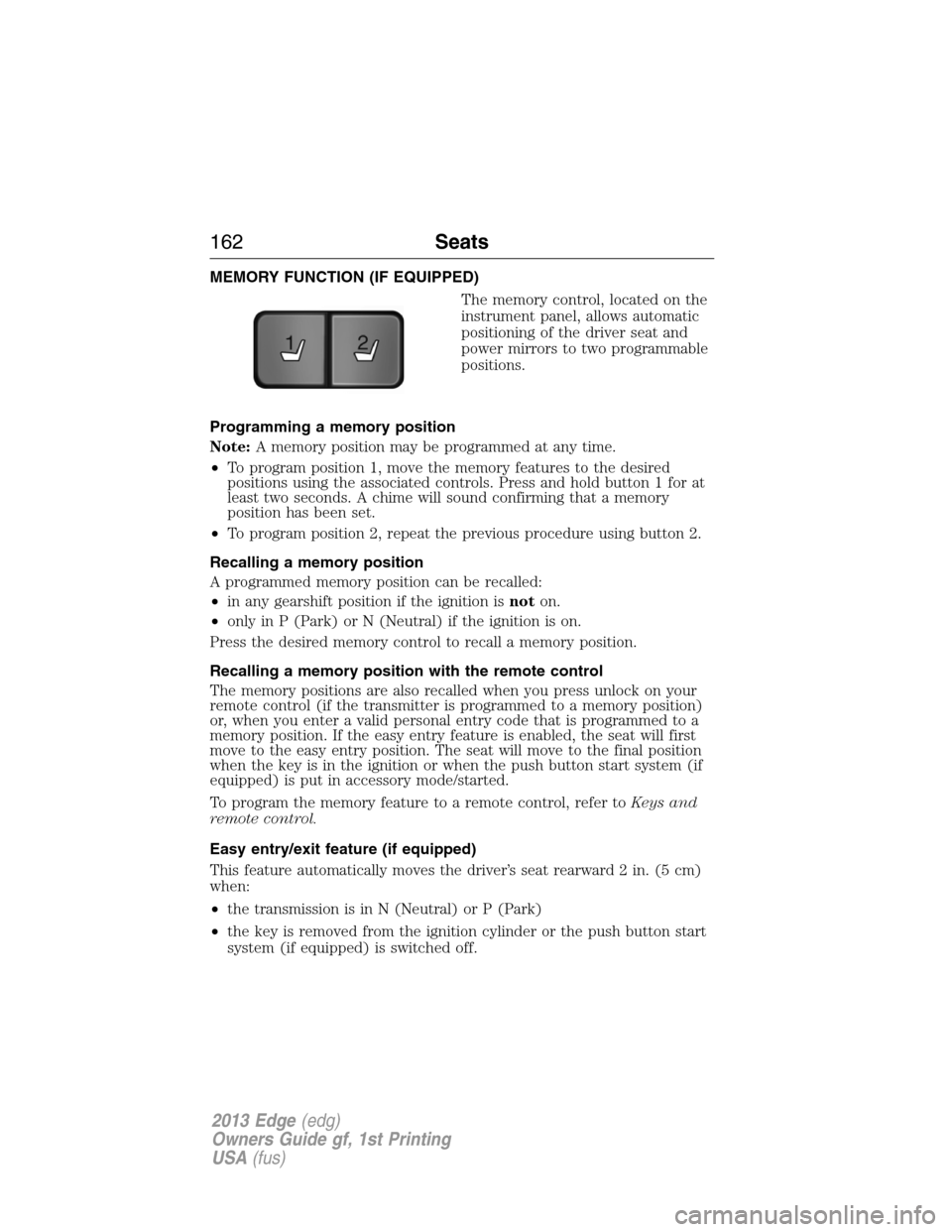
The memory control, located on the
instrument panel, allows automatic
positioning of the driver seat and
power mirrors to two programmable
positions.
Programming a memory position
Note:A memory position may be programmed at any time.
•To program position 1, move the memory features to the desired
positions using the associated controls. Press and hold button 1 for at
least two seconds. A chime will sound confirming that a memory
position has been set.
•To program position 2, repeat the previous procedure using button 2.
Recalling a memory position
A programmed memory position can be recalled:
•in any gearshift position if the ignition isnoton.
•only in P (Park) or N (Neutral) if the ignition is on.
Press the desired memory control to recall a memory position.
Recalling a memory position with the remote control
The memory positions are also recalled when you press unlock on your
remote control (if the transmitter is programmed to a memory position)
or, when you enter a valid personal entry code that is programmed to a
memory position. If the easy entry feature is enabled, the seat will first
move to the easy entry position. The seat will move to the final position
when the key is in the ignition or when the push button start system (if
equipped) is put in accessory mode/started.
To program the memory feature to a remote control, refer toKeys and
remote control.
Easy entry/exit feature (if equipped)
This feature automatically moves the driver’s seat rearward 2 in. (5 cm)
when:
•the transmission is in N (Neutral) or P (Park)
•the key is removed from the ignition cylinder or the push button start
system (if equipped) is switched off.
21
162Seats
2013 Edge(edg)
Owners Guide gf, 1st Printing
USA(fus)
Page 171 of 526
AUXILIARY POWER POINTS
Note:Do not insert objects other than an accessory plug into the power
point. This will damage the outlet and blow the fuse.
Note:Do not hang any type of accessory or accessory bracket from the
plug.
Note:Improper use of the power outlet can cause damage not covered
by your warranty.
Note:Do not plug optional electrical accessories into the cigarette
lighter socket (if equipped). Improper use of the lighter can cause
damage not covered by your warranty, and can result in fire or serious
injury.
Auxiliary power points may be found:
•on the passenger side of the center console near the instrument panel
•in the center console storage compartment
•on the rear of the center console
•on the left rear quarter panel, accessible from the liftgate or behind
the rear seat.
Do not use the power point for operating the cigarette lighter element (if
equipped).
Do not use the power point(s) over the vehicle capacity of 12 volts
DC/180 watts or a fuse may blow.
Run the engine for full capacity use of the power point and to avoid
discharge of the battery. To prevent the battery from being discharged:
•Do not use the power point longer than necessary when the engine is
not running.
•Do not leave devices plugged in overnight or when the vehicle is
parked for extended periods.
Always keep the power point caps closed when not in use.
Auxiliary Power Points171
2013 Edge(edg)
Owners Guide gf, 1st Printing
USA(fus)
Page 174 of 526
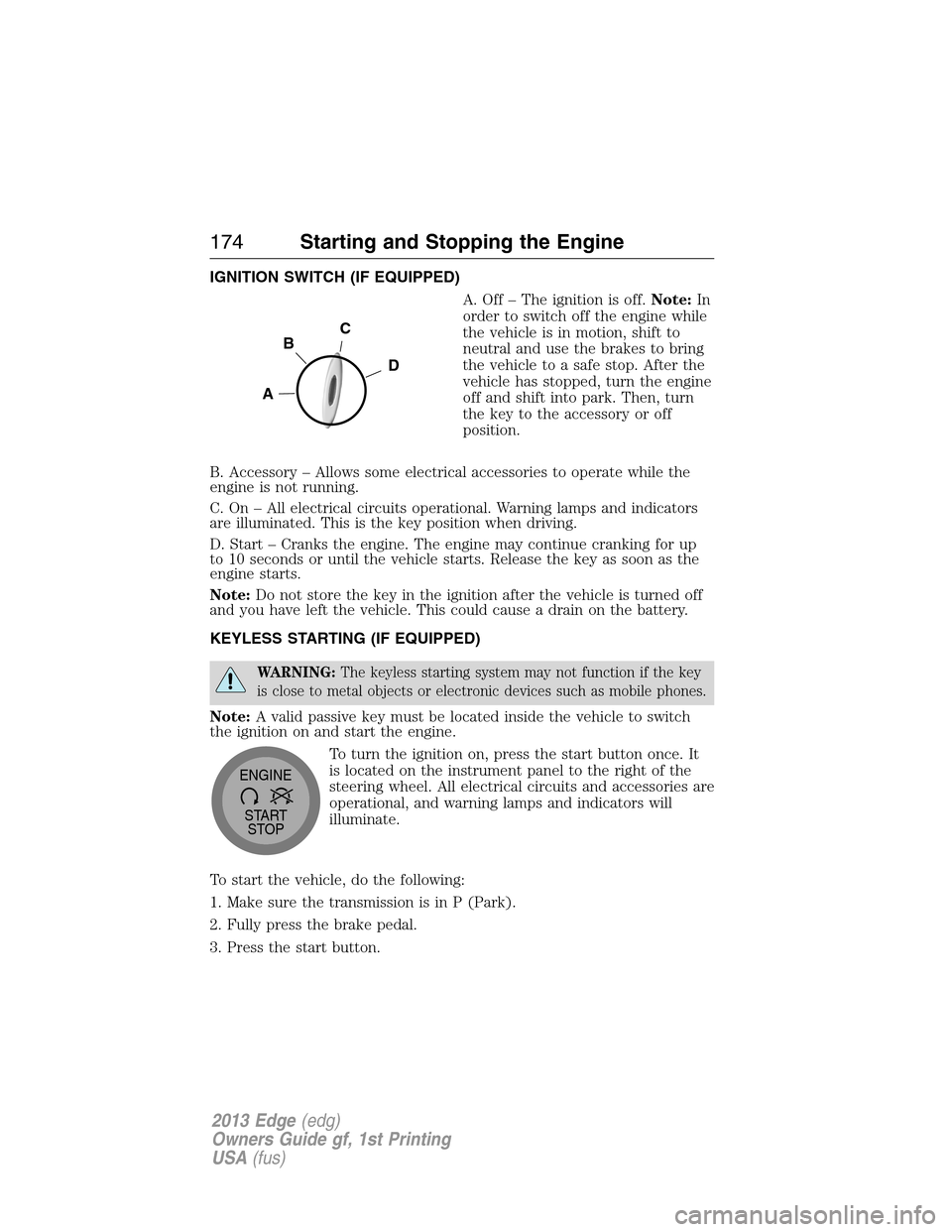
IGNITION SWITCH (IF EQUIPPED)
A. Off – The ignition is off.Note:In
order to switch off the engine while
the vehicle is in motion, shift to
neutral and use the brakes to bring
the vehicle to a safe stop. After the
vehicle has stopped, turn the engine
off and shift into park. Then, turn
the key to the accessory or off
position.
B. Accessory – Allows some electrical accessories to operate while the
engine is not running.
C. On – All electrical circuits operational. Warning lamps and indicators
are illuminated. This is the key position when driving.
D. Start – Cranks the engine. The engine may continue cranking for up
to 10 seconds or until the vehicle starts. Release the key as soon as the
engine starts.
Note:Do not store the key in the ignition after the vehicle is turned off
and you have left the vehicle. This could cause a drain on the battery.
KEYLESS STARTING (IF EQUIPPED)
WARNING:The keyless starting system may not function if the key
is close to metal objects or electronic devices such as mobile phones.
Note:A valid passive key must be located inside the vehicle to switch
the ignition on and start the engine.
To turn the ignition on, press the start button once. It
is located on the instrument panel to the right of the
steering wheel. All electrical circuits and accessories are
operational, and warning lamps and indicators will
illuminate.
To start the vehicle, do the following:
1. Make sure the transmission is in P (Park).
2. Fully press the brake pedal.
3. Press the start button.
C
D
B
A
START
STOP ENGINE
174Starting and Stopping the Engine
2013 Edge(edg)
Owners Guide gf, 1st Printing
USA(fus)
Page 254 of 526
Vehicles sold in the U.S. : Using roadside assistance
Complete the roadside assistance identification card and place it in your
wallet for quick reference. This card is found in the owner’s information
portfolio in the glove compartment.
U.S. Ford vehicle customers who require Roadside Assistance, call
1-800-241-3673.
If you need to arrange roadside assistance for yourself, Ford Motor
Company will reimburse a reasonable amount for towing to the nearest
dealership within 35 miles (56 km). To obtain reimbursement
information, U.S. Ford vehicle customers call 1-800-241-3673. Customers
will be asked to submit their original receipts.
Vehicles sold in Canada : Getting roadside assistance
Canadian customers who require roadside assistance, call
1–800–665–2006.
Vehicles sold in Canada : Using roadside assistance
Complete the roadside assistance identification card and place it in your
wallet for quick reference. In Canada, the card is found in the Warranty
Guide in the glove box.
Canadian Roadside coverage and benefits may differ from the U.S.
coverage. Please refer to your Warranty Guide or visit our website at
www.ford.ca for information on Canadian services and benefits.
Canadian customers who need to obtain roadside information, call
1-800-665-2006 or visit our website at www.ford.ca.
HAZARD WARNING FLASHERS
The hazard flasher control is located on the instrument panel
by the radio. Use it when your vehicle is disabled and is
creating a safety hazard for other motorists.
•Press the flasher control and all front and rear direction signals will
flash.
•Press the flasher control again to turn them off.
Note:With extended use, the flashers may run down your battery.
254Roadside Emergencies
2013 Edge(edg)
Owners Guide gf, 1st Printing
USA(fus)