brake light FORD EDGE 2016 2.G Owner's Guide
[x] Cancel search | Manufacturer: FORD, Model Year: 2016, Model line: EDGE, Model: FORD EDGE 2016 2.GPages: 451, PDF Size: 6.18 MB
Page 297 of 451
•
After sealant use, an authorized Ford
dealer must replace the tire pressure
monitoring system sensor and valve
stem on the wheel.
• Operating the kit could cause an
electrical disturbance in radio, CD and
DVD player operation. * When inflation only is required
for a tire or other objects, the
selector must be in the Air
position.
What to do When a Tire Is
Punctured
You can repair a tire puncture within the
tire's tread area in two stages with the kit.
• In the first stage, inflate the tire with a
sealing compound and air. After you
inflate the tire, you will need to drive
the vehicle a short distance (about 4
miles [6 kilometers]) to distribute the
sealant in the tire.
• In the second stage, check the tire
pressure and adjust, if necessary, to the
vehicle's specified tire inflation
pressure.
First Stage: Inflating the Tire with
Sealing Compound and Air WARNINGS
Do not stand directly over the kit
while inflating the tire. If you notice
any unusual bulges or deformations
in the tire's sidewall during inflation, stop
and call roadside assistance. If the tire does not inflate to the
recommended tire pressure within
15 minutes, stop and call roadside
assistance. Do not run the engine during kit
operation unless the vehicle is
outdoors or in a well-ventilated area. Preparation: Park the vehicle in a safe, level
and secure area, away from moving traffic.
Switch the hazard lights on. Apply the
parking brake and switch the engine off.
Inspect the flat tire for visible damage.
Sealant compound contains latex. Use
appropriate precautions to avoid any
allergic reactions.
Do not remove any foreign object that has
pierced the tire. If a puncture is located in
the tire sidewall, stop and call roadside
assistance.
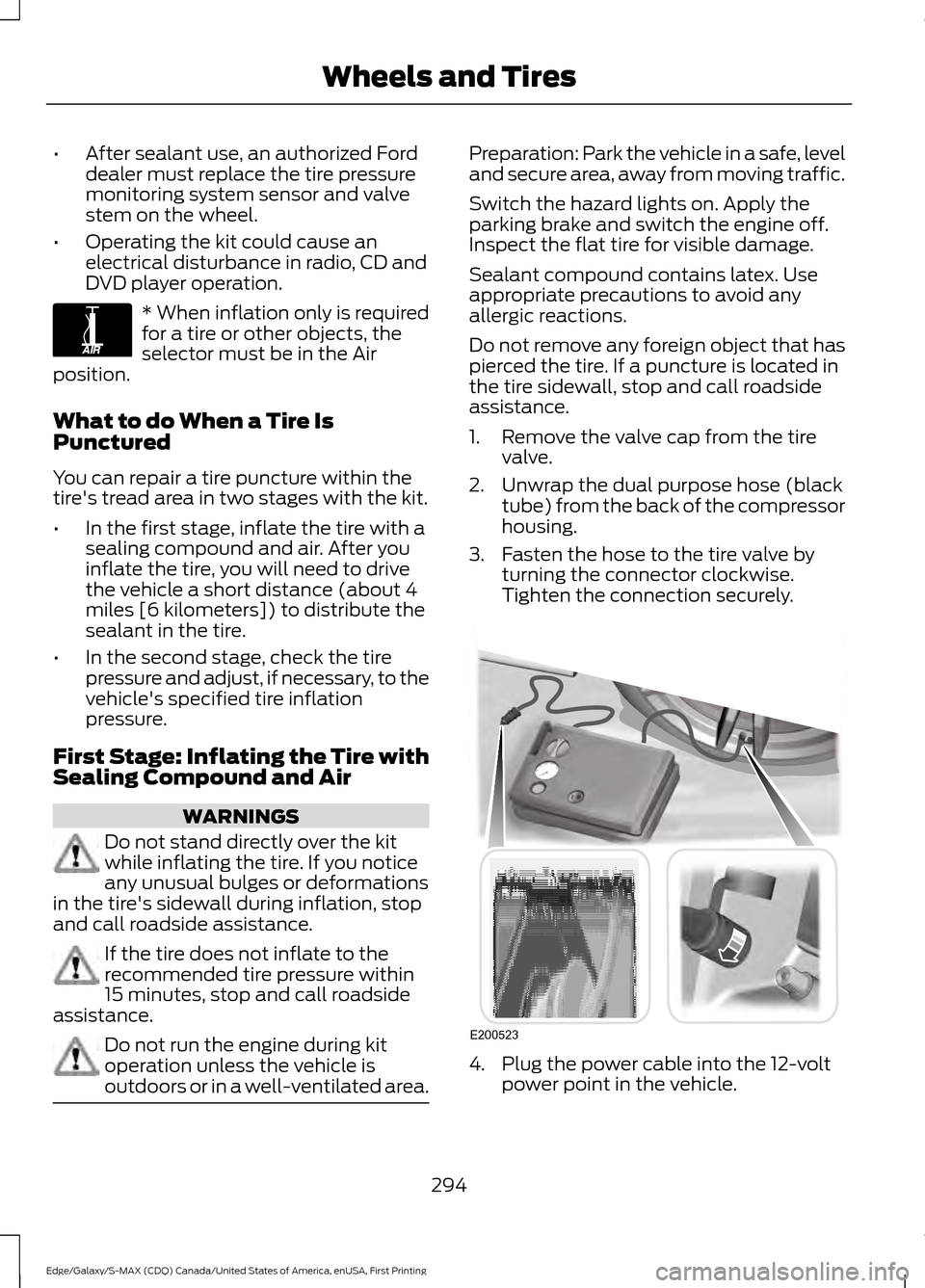
1. Remove the valve cap from the tire
valve.
2. Unwrap the dual purpose hose (black tube) from the back of the compressor
housing.
3. Fasten the hose to the tire valve by turning the connector clockwise.
Tighten the connection securely. 4. Plug the power cable into the 12-volt
power point in the vehicle.
294
Edge/Galaxy/S-MAX (CDQ) Canada/United States of America, enUSA, First Printing Wheels and TiresE175978 E200523
Page 322 of 451
How Temperature Affects Your Tire
Pressure
The tire pressure monitoring system
monitors tire pressure in each pneumatic
tire. While driving in a normal manner, a
typical passenger tire inflation pressure
may increase about 2 to 4 psi (14 to 28
kPa) from a cold start situation. If the
vehicle is stationary overnight with the
outside temperature significantly lower
than the daytime temperature, the tire
pressure may decrease about 3 psi (21
kPa) for a drop of 30°F (17°C) in ambient
temperature. This lower pressure value
may be detected by the tire pressure
monitoring system as being significantly
lower than the recommended inflation
pressure and activate the system warning
light for low tire pressure. If the low tire
pressure warning light is on, visually check
each tire to verify that no tire is flat. If one
or more tires are flat, repair as necessary.
Check the air pressure in the road tires. If
any tire is under-inflated, carefully drive
the vehicle to the nearest location where
air can be added to the tires. Inflate all the
tires to the recommended inflation
pressure.
CHANGING A ROAD WHEEL
WARNINGS
The use of tire sealant may damage
your tire pressure monitoring system
and should only be used in roadside
emergencies. If you must use a sealant, the
Ford Tire Mobility Kit sealant should be
used. The tire pressure monitoring system
sensor and valve stem on the wheel must
be replaced by an authorized dealer after
use of the sealant. If the tire pressure monitor sensor
becomes damaged, it will no longer
function. See Tire Pressure
Monitoring System (page 316). Note:
The tire pressure monitoring system
indicator light will illuminate when the spare
tire is in use. To restore the full function of
the monitoring system, all road wheels
equipped with tire pressure monitoring
sensors must be mounted on the vehicle.
If you get a flat tire while driving, do not
apply the brake heavily. Instead, gradually
decrease your speed. Hold the steering
wheel firmly and slowly move to a safe
place on the side of the road.
Have a flat serviced by an authorized
dealer in order to prevent damage to the
tire pressure monitoring system sensors.
See
Tire Pressure Monitoring System
(page 316). Replace the spare tire with a
road tire as soon as possible. During
repairing or replacing of the flat tire, have
an authorized dealer inspect the tire
pressure monitoring system sensor for
damage.
Dissimilar Spare Wheel and Tire
Assembly Information WARNING
Failure to follow these guidelines
could result in an increased risk of
loss of vehicle control, injury or death.
If you have a dissimilar spare wheel and
tire, then it is intended for temporary use
only. This means that if you need to use it,
you should replace it as soon as possible
with a road wheel and tire assembly that
is the same size and type as the road tires
and wheels that were originally provided
by Ford. If the dissimilar spare tire or wheel
is damaged, it should be replaced rather
than repaired.
A dissimilar spare wheel and tire assembly
is defined as a spare wheel and tire
assembly that is different in brand, size or
appearance from the road tires and wheels
and can be one of three types:
319
Edge/Galaxy/S-MAX (CDQ) Canada/United States of America, enUSA, First Printing Wheels and Tires
Page 404 of 451
Check every month
Engine oil level.
Function of all interior and exterior lights.
Tires (including spare) for wear and proper pressure. Windshield washer fluid level. Check every six months
Battery connections. Clean if necessary.
Body and door drain holes for obstructions. Clean if necessary. Cooling system fluid level and coolant strength.
Door weatherstrips for wear. Lubricate if necessary.
Hinges, latches and outside locks for proper operation. Lubricate if necessary. Parking brake for proper operation.
Safety belts and seat latches for wear and function.
Safety warning lamps (brake, ABS, airbag and safety belt) for operation.
Washer spray and wiper operation. Clean or replace blades as necessary.
Multi-Point Inspection
In order to keep your vehicle running right,
it is important to have the systems on your
vehicle checked regularly. This can help
identify potential issues and prevent major
problems. We recommend having the
following multi-point inspection performed
at every scheduled maintenance interval
to help make sure your vehicle keeps
running great.
401
Edge/Galaxy/S-MAX (CDQ) Canada/United States of America, enUSA, First Printing Scheduled Maintenance
Page 440 of 451
1
180 Degree Camera.....................................195
Camera Views..................................................... 196
Using the 180 degree camera system........196
A
A/C See: Climate Control.......................................... 123
About This Manual...........................................7
ABS See: Brakes............................................................ 175
ABS driving hints See: Hints on Driving With Anti-Lock
Brakes................................................................. 175
Accessories....................................................395 Exterior Style....................................................... 395
Interior Style........................................................ 395
Lifestyle................................................................. 395
Peace of Mind..................................................... 395
Accessories See: Replacement Parts
Recommendation............................................. 11
ACC See: Using Adaptive Cruise Control............198
Active Park Assist.........................................187 Deactivating the Active Park Assist
Feature ................................................................ 191
Parallel Parking, Perpendicular Parking, Park Out Assist............................................... 187
Troubleshooting the System........................... 191
Adjusting the Headlamps.........................276 Vertical Aim Adjustment................................. 276
Adjusting the Steering Wheel - Vehicles With: Manual Adjustable Steering
Column
............................................................72
Adjusting the Steering Wheel - Vehicles With: Power Adjustable Steering
Column
............................................................72
Easy Entry and Exit Feature.............................. 73
End of Travel Position......................................... 73
Memory Feature.................................................... 73
Airbag Disposal
..............................................46
Air Conditioning See: Climate Control.......................................... 123
Air Filter See: Changing the Engine Air Filter.............282 Alarm
See: Anti-Theft Alarm........................................ 70
All-Wheel Drive
.............................................170
Ambient Lighting...........................................85
Anti-Theft Alarm............................................70 Arming the Alarm................................................. 70
Disarming the Alarm........................................... 70
Appendices.....................................................418
Audible Warnings and Indicators.............97 Headlamps On Warning Chime...................... 97
Key in Ignition Warning Chime......................... 97
Keyless Warning Alert......................................... 97
Parking Brake On Warning Chime.................. 97
Audio Control - Vehicles With: Voice Control.............................................................74
Seek, Next or Previous........................................ 74
Audio Control - Vehicles Without: Voice Control
.............................................................73
MEDIA....................................................................... 73
Seek, Next or Previous........................................ 73
Audio System................................................343 General Information......................................... 343
Audio Unit - Vehicles With: AM/FM/CD/ SYNC.............................................................344
Audio Unit - Vehicles With: Premium AM/FM/CD..................................................347
Audio Unit - Vehicles With: Sony AM/ FM/CD..........................................................348
Menu Structure.................................................. 350
Autolamps.......................................................80 Windshield Wiper Activated
Headlamps........................................................80
Automatic Climate Control - Vehicles With: Dual Automatic Temperature
Control (DATC)/Premium AM/FM/
CD....................................................................125
Automatic Climate Control - Vehicles With: Dual Automatic Temperature
Control (DATC)/Sony Audio
System...........................................................126
Automatic High Beam Control..................82 Activating the System........................................ 82
Manually Overriding the System.................... 83
437
Edge/Galaxy/S-MAX (CDQ) Canada/United States of America, enUSA, First Printing Index
Page 442 of 451
Cleaning the Exterior..................................283
Exterior Chrome Parts..................................... 284
Exterior Plastic Parts........................................ 284
Stripes or Graphics........................................... 284
Underbody........................................................... 284
Cleaning the Instrument Panel and Instrument Cluster Lens........................286
Cleaning the Interior...................................286
Cleaning the Windows and Wiper Blades...........................................................285
Clearing All MyKeys.......................................54
Climate Control.............................................123
Climate Controlled Seats..........................140
Cooled Seats......................................................... 141
Cold Weather Precautions
.......................235
Collision Warning System.........................216 PRINCIPLE OF OPERATION........................... 216
Coolant Check See: Engine Coolant Check............................ 267
Crash Sensors and Airbag Indicator
........45
Creating a MyKey............................................53 Programming/Changing Configurable
Settings............................................................... 53
Cross Traffic Alert..........................................211 False Alerts............................................................ 214
Switching the System Off and On................214
System Errors....................................................... 214
System Lights, Messages and Audible Alerts................................................................... 213
System Limitations............................................ 213
Using the System................................................. 211
Cruise Control
..................................................74
Principle of Operation....................................... 197
Type 1........................................................................\
. 74
Type 2........................................................................\
75
Cruise control See: Using Cruise Control................................ 197
Customer Assistance
.................................243
D
Data Recording
..................................................9
Event Data Recording........................................... 9
Service Data Recording........................................ 9
Daytime Running Lamps..............................81 Type 1 - Conventional
(Non-Configurable)........................................ 81
Type 2 - Configurable.......................................... 81Digital Radio...................................................351
HD Radio Reception and Station
Troubleshooting............................................ 352
Direction Indicators.......................................83
Drive Control
...................................................218
Adaptive Steering............................................... 218
Driver Alert.....................................................204 PRINCIPLE OF OPERATION.......................... 204
USING DRIVER ALERT.................................... 204
Driver and Passenger Airbags...................39 Children and Airbags.......................................... 39
Proper Driver and Front Passenger Seating Adjustment........................................................ 39
Driver and Passenger Knee Airbags........43
Driving Aids....................................................204
Driving Hints
...................................................235
Driving Through Water...............................235
DRL See: Daytime Running Lamps.......................... 81
E
Economical Driving.....................................235
Electric Parking Brake
..................................176
Applying the Electric Parking brake.............176
Battery With No Charge................................... 178
Parking On a Hill (Vehicles With a Manual Transmission) ................................................. 176
Releasing the Electric Parking Brake............177
Emission Control System..........................163 On-Board Diagnostics (OBD-II)................... 164
Readiness for Inspection/Maintenance (I/M) Testing................................................... 164
End User License Agreement..................418 VEHICLE SOFTWARE END USER LICENSE
AGREEMENT (EULA) ................................. 418
Engine Block Heater....................................154 Using the Engine Block Heater...................... 154
Engine Coolant Check................................267 Adding Engine Coolant................................... 268
Checking the Engine Coolant....................... 268
Recycled Engine Coolant................................ 269
Severe Climates................................................. 269
What You Should Know About Fail-Safe Cooling............................................................. 269
Engine Immobilizer See: Passive Anti-Theft System..................... 69
439
Edge/Galaxy/S-MAX (CDQ) Canada/United States of America, enUSA, First Printing Index
Page 449 of 451
USB Port.........................................................356
Using Adaptive Cruise Control................198
Automatic Cancellation................................... 201
Blocked Sensor................................................... 202
Canceling the Set Speed............................... 200
Changing the Set Speed.................................. 201
Detection Issues................................................. 201
Following a Vehicle............................................ 199
Hilly Condition Usage........................................ 201
Overriding the System.................................... 200
Resuming the Set Speed................................. 201
Setting the Adaptive Cruise Speed.............199
Setting the Gap Distance............................... 200
Switching Adaptive Cruise Control Off....................................................................... 201
Switching Adaptive Cruise Control On........................................................................\
198
Switching to Normal Cruise Control...........203
System Not Available...................................... 202
Using All-Wheel Drive.................................170 Driving In Special Conditions With
All-Wheel Drive (AWD)............................... 170
Using Cruise Control....................................197
Switching Cruise Control Off......................... 198
Switching Cruise Control On........................... 197
Using MyKey With Remote Start Systems
..........................................................56
Using Snow Chains......................................315
Using Stability Control................................182
Using Summer Tires
....................................315
Using SYNC™ With Your Media Player.............................................................378
Accessing Your USB Song Library...............382
Bluetooth Devices and System Settings............................................................ 384
Connecting Your Digital Media Player to the USB Port........................................................... 378
Media Menu Features...................................... 382
Media Voice Commands................................. 379
USB 2..................................................................... 384
Voice Commands for Audio Sources.........385 Using SYNC™ With Your Phone.............361
Accessing Features through the Phone
Menu................................................................. 366
Accessing Your Phone Settings................... 369
Bluetooth Devices............................................. 370
Making Calls........................................................ 364
Pairing a Phone for the First Time................361
Pairing Subsequent Phones.......................... 362
Phone Options during an Active Call.........365
Phone Voice Commands................................ 363
Receiving Calls................................................... 365
System Settings.................................................. 371
Text Messaging................................................... 367
Using Traction Control...............................180 Switching the System Off............................... 180
System Indicator Lights and Messages......................................................... 180
Using a Switch.................................................... 180
Using the Information Display Controls............................................................ 180
Using Voice Recognition...........................359 Initiating a Voice Session................................ 359
System Interaction and Feedback.............360
Utilizing the Mediation/Arbitration Program (Canada Only)
........................246
V
Vehicle Care
...................................................283
General Information......................................... 283
Vehicle Certification Label........................331
Vehicle Identification Number................330
Vehicle Storage
............................................288
Battery................................................................... 289
Body....................................................................... 288
Brakes.................................................................... 289
Cooling system................................................... 289
Engine.................................................................... 288
Fuel system......................................................... 289
General.................................................................. 288
Miscellaneous..................................................... 289
Removing Vehicle From Storage.................289
Tires........................................................................\
289
Ventilation See: Climate Control.......................................... 123
VIN See: Vehicle Identification Number............330
Voice Control
....................................................74
446
Edge/Galaxy/S-MAX (CDQ) Canada/United States of America, enUSA, First Printing Index