check oil FORD EDGE 2016 2.G Owners Manual
[x] Cancel search | Manufacturer: FORD, Model Year: 2016, Model line: EDGE, Model: FORD EDGE 2016 2.GPages: 451, PDF Size: 6.18 MB
Page 7 of 451
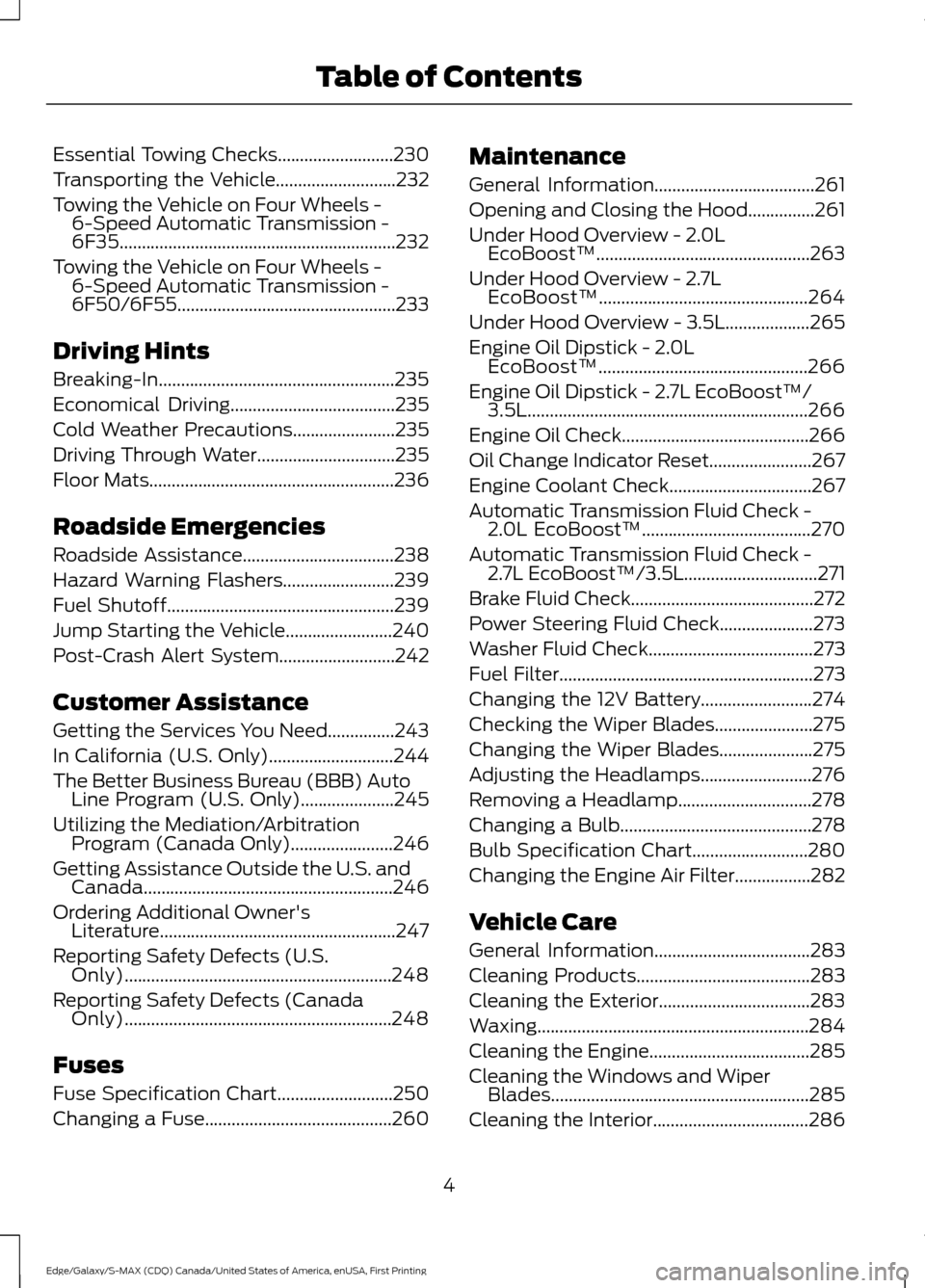
Essential Towing Checks..........................230
Transporting the Vehicle...........................232
Towing the Vehicle on Four Wheels - 6-Speed Automatic Transmission -
6F35..............................................................232
Towing the Vehicle on Four Wheels - 6-Speed Automatic Transmission -
6F50/6F55 .................................................
233
Driving Hints
Breaking-In.....................................................235
Economical Driving.....................................235
Cold Weather Precautions
.......................235
Driving Through Water...............................235
Floor Mats.......................................................236
Roadside Emergencies
Roadside Assistance
..................................238
Hazard Warning Flashers.........................239
Fuel Shutoff...................................................239
Jump Starting the Vehicle
........................240
Post-Crash Alert System..........................242
Customer Assistance
Getting the Services You Need...............243
In California (U.S. Only)............................244
The Better Business Bureau (BBB) Auto Line Program (U.S. Only).....................245
Utilizing the Mediation/Arbitration Program (Canada Only).......................246
Getting Assistance Outside the U.S. and Canada........................................................246
Ordering Additional Owner's Literature.....................................................247
Reporting Safety Defects (U.S. Only)............................................................248
Reporting Safety Defects (Canada Only)............................................................248
Fuses
Fuse Specification Chart..........................250
Changing a Fuse..........................................260 Maintenance
General Information....................................261
Opening and Closing the Hood
...............261
Under Hood Overview - 2.0L EcoBoost™................................................263
Under Hood Overview - 2.7L EcoBoost™...............................................264
Under Hood Overview - 3.5L
...................265
Engine Oil Dipstick - 2.0L EcoBoost™...............................................266
Engine Oil Dipstick - 2.7L EcoBoost™/ 3.5L...............................................................266
Engine Oil Check..........................................266
Oil Change Indicator Reset.......................267
Engine Coolant Check................................267
Automatic Transmission Fluid Check - 2.0L EcoBoost™
......................................270
Automatic Transmission Fluid Check - 2.7L EcoBoost™/3.5L
..............................271
Brake Fluid Check.........................................272
Power Steering Fluid Check.....................273
Washer Fluid Check
.....................................273
Fuel Filter
.........................................................273
Changing the 12V Battery
.........................274
Checking the Wiper Blades......................275
Changing the Wiper Blades.....................275
Adjusting the Headlamps.........................276
Removing a Headlamp..............................278
Changing a Bulb...........................................278
Bulb Specification Chart..........................280
Changing the Engine Air Filter.................282
Vehicle Care
General Information
...................................283
Cleaning Products
.......................................283
Cleaning the Exterior..................................283
Waxing.............................................................284
Cleaning the Engine....................................285
Cleaning the Windows and Wiper Blades..........................................................285
Cleaning the Interior...................................286
4
Edge/Galaxy/S-MAX (CDQ) Canada/United States of America, enUSA, First Printing Table of Contents
Page 11 of 451
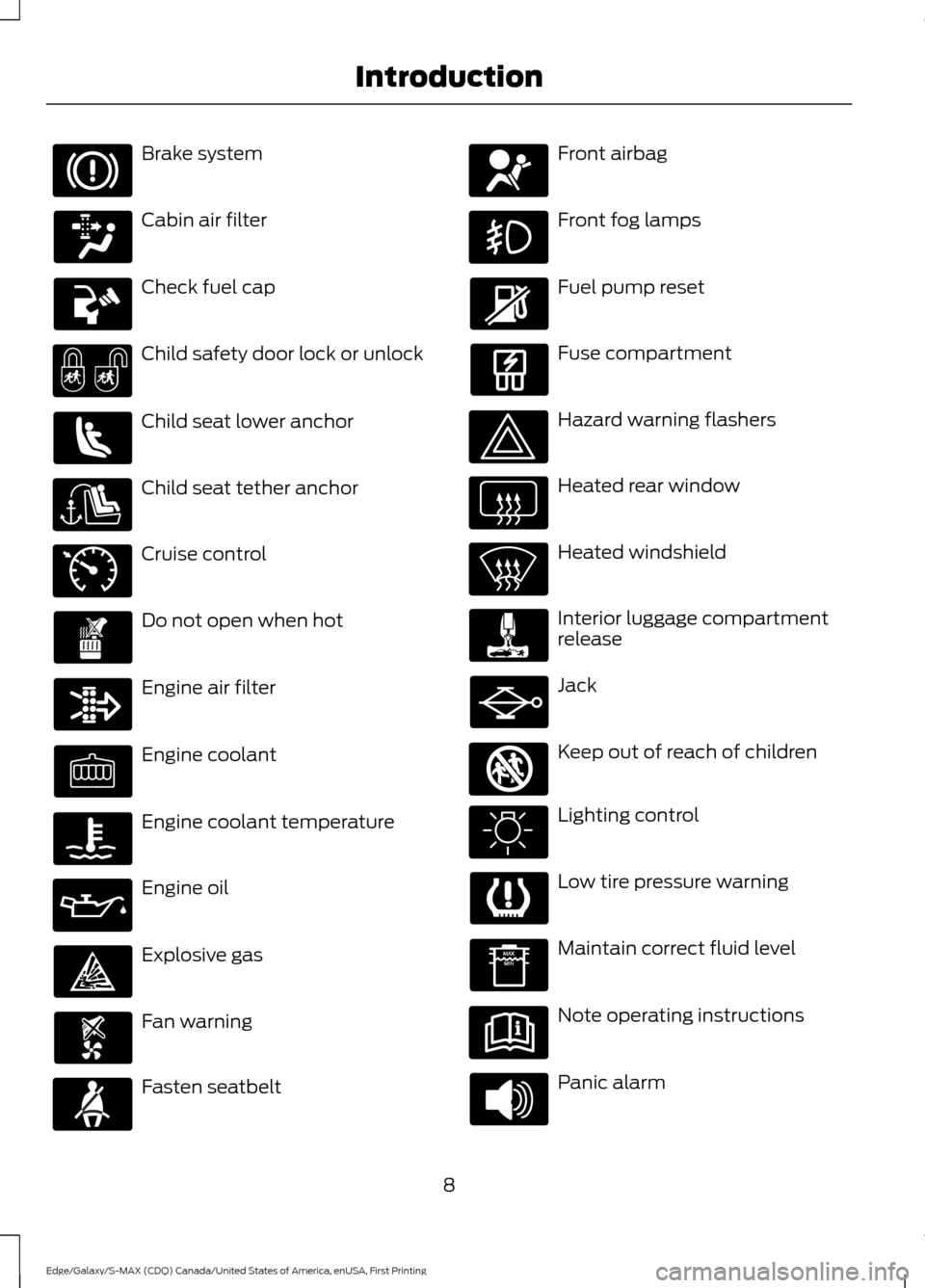
Brake system
Cabin air filter
Check fuel cap
Child safety door lock or unlock
Child seat lower anchor
Child seat tether anchor
Cruise control
Do not open when hot
Engine air filter
Engine coolant
Engine coolant temperature
Engine oil
Explosive gas
Fan warning
Fasten seatbelt Front airbag
Front fog lamps
Fuel pump reset
Fuse compartment
Hazard warning flashers
Heated rear window
Heated windshield
Interior luggage compartment
release
Jack
Keep out of reach of children
Lighting control
Low tire pressure warning
Maintain correct fluid level
Note operating instructions
Panic alarm
8
Edge/Galaxy/S-MAX (CDQ) Canada/United States of America, enUSA, First Printing Introduction E71340 E161353
Page 98 of 451
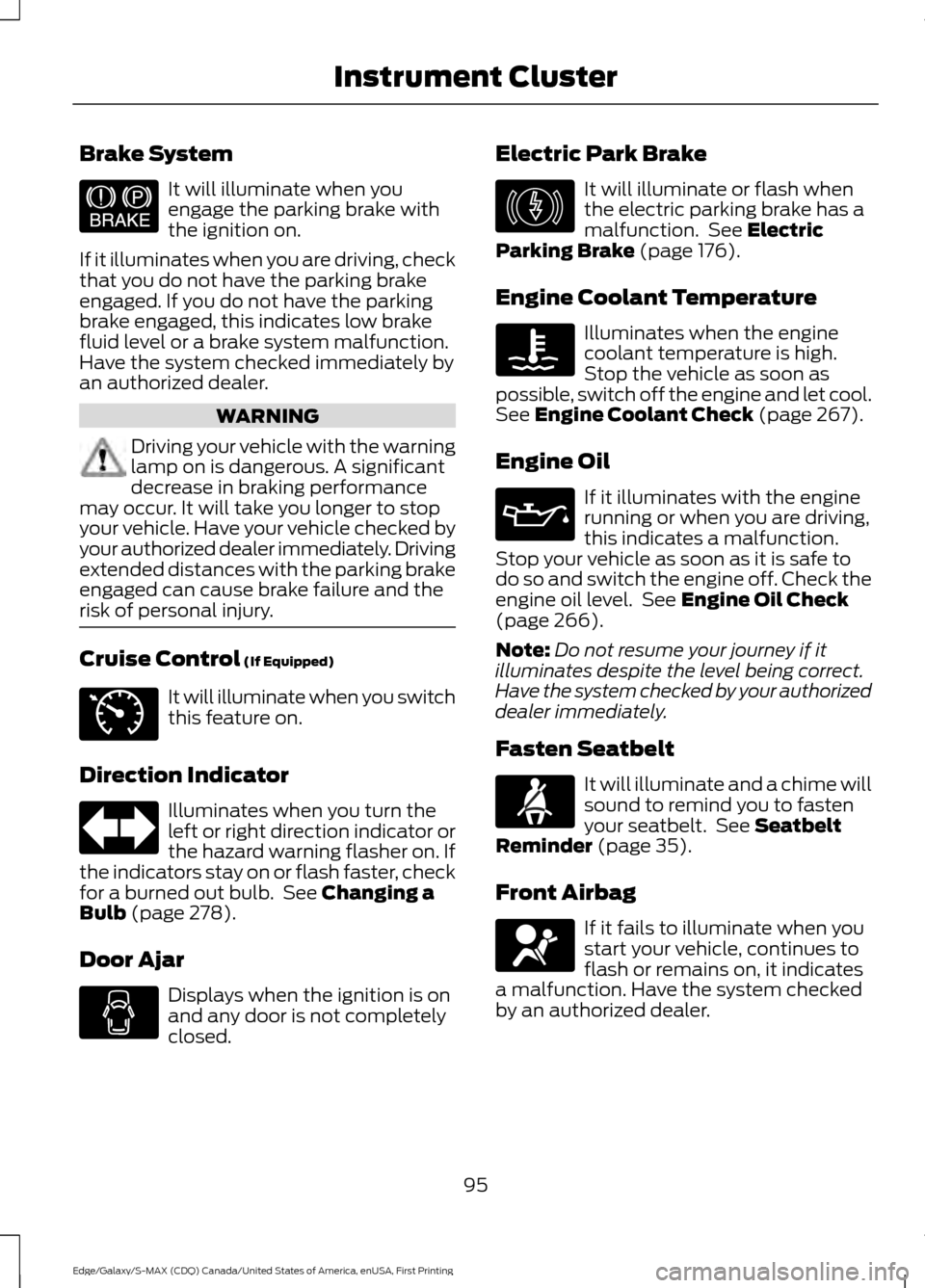
Brake System
It will illuminate when you
engage the parking brake with
the ignition on.
If it illuminates when you are driving, check
that you do not have the parking brake
engaged. If you do not have the parking
brake engaged, this indicates low brake
fluid level or a brake system malfunction.
Have the system checked immediately by
an authorized dealer. WARNING
Driving your vehicle with the warning
lamp on is dangerous. A significant
decrease in braking performance
may occur. It will take you longer to stop
your vehicle. Have your vehicle checked by
your authorized dealer immediately. Driving
extended distances with the parking brake
engaged can cause brake failure and the
risk of personal injury. Cruise Control (If Equipped)
It will illuminate when you switch
this feature on.
Direction Indicator Illuminates when you turn the
left or right direction indicator or
the hazard warning flasher on. If
the indicators stay on or flash faster, check
for a burned out bulb. See
Changing a
Bulb (page 278).
Door Ajar Displays when the ignition is on
and any door is not completely
closed. Electric Park Brake It will illuminate or flash when
the electric parking brake has a
malfunction. See
Electric
Parking Brake (page 176).
Engine Coolant Temperature Illuminates when the engine
coolant temperature is high.
Stop the vehicle as soon as
possible, switch off the engine and let cool.
See
Engine Coolant Check (page 267).
Engine Oil If it illuminates with the engine
running or when you are driving,
this indicates a malfunction.
Stop your vehicle as soon as it is safe to
do so and switch the engine off. Check the
engine oil level. See
Engine Oil Check
(page 266).
Note: Do not resume your journey if it
illuminates despite the level being correct.
Have the system checked by your authorized
dealer immediately.
Fasten Seatbelt It will illuminate and a chime will
sound to remind you to fasten
your seatbelt. See
Seatbelt
Reminder (page 35).
Front Airbag If it fails to illuminate when you
start your vehicle, continues to
flash or remains on, it indicates
a malfunction. Have the system checked
by an authorized dealer.
95
Edge/Galaxy/S-MAX (CDQ) Canada/United States of America, enUSA, First Printing Instrument ClusterE144522 E71340 E146190
Page 117 of 451
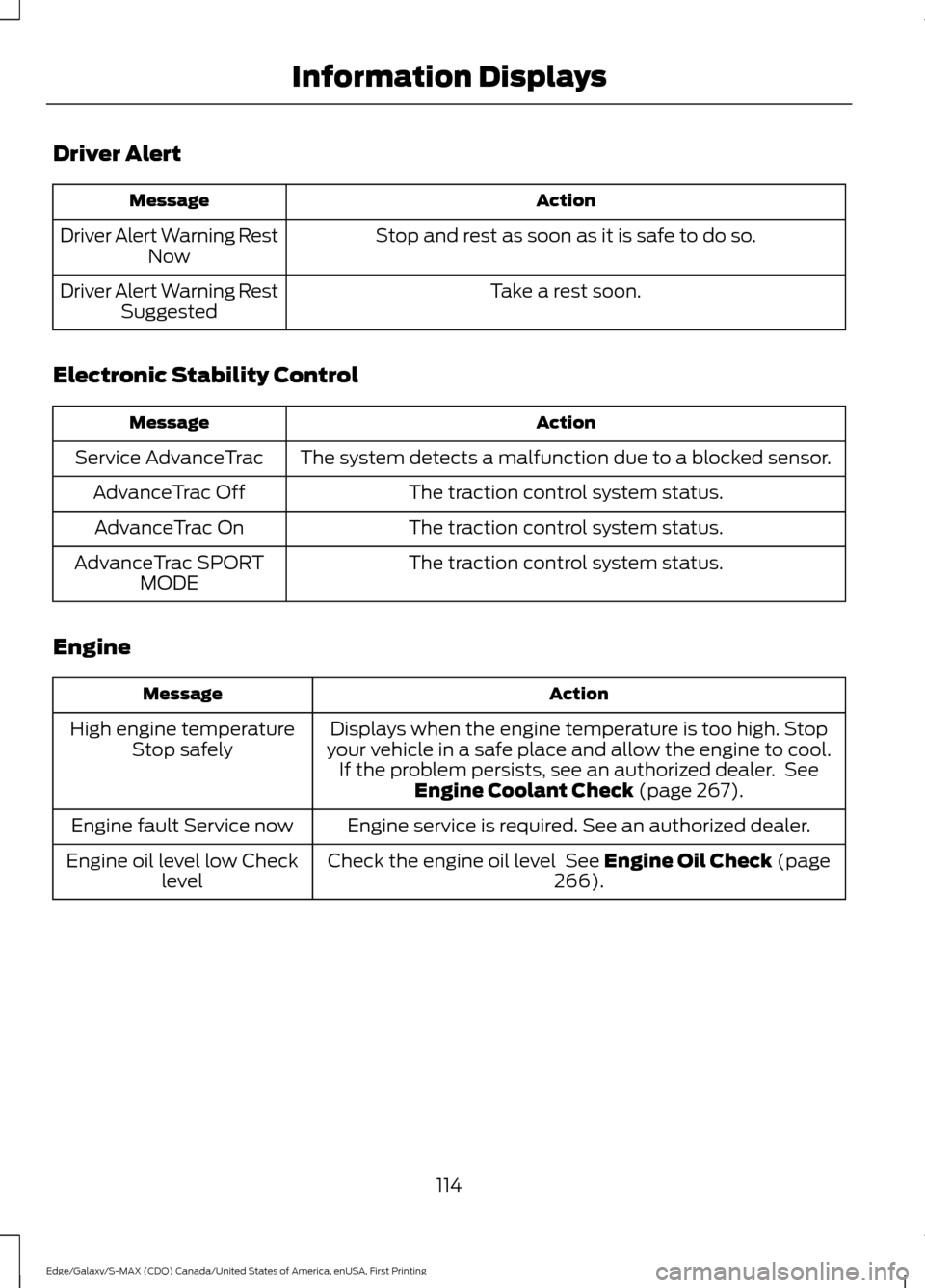
Driver Alert
Action
Message
Stop and rest as soon as it is safe to do so.
Driver Alert Warning Rest
Now
Take a rest soon.
Driver Alert Warning Rest
Suggested
Electronic Stability Control Action
Message
The system detects a malfunction due to a blocked sensor.
Service AdvanceTrac
The traction control system status.
AdvanceTrac Off
The traction control system status.
AdvanceTrac On
The traction control system status.
AdvanceTrac SPORT
MODE
Engine Action
Message
Displays when the engine temperature is too high. Stop
your vehicle in a safe place and allow the engine to cool. If the problem persists, see an authorized dealer. See Engine Coolant Check (page 267).
High engine temperature
Stop safely
Engine service is required. See an authorized dealer.
Engine fault Service now
Check the engine oil level
See Engine Oil Check (page
266).
Engine oil level low Check
level
114
Edge/Galaxy/S-MAX (CDQ) Canada/United States of America, enUSA, First Printing Information Displays
Page 119 of 451
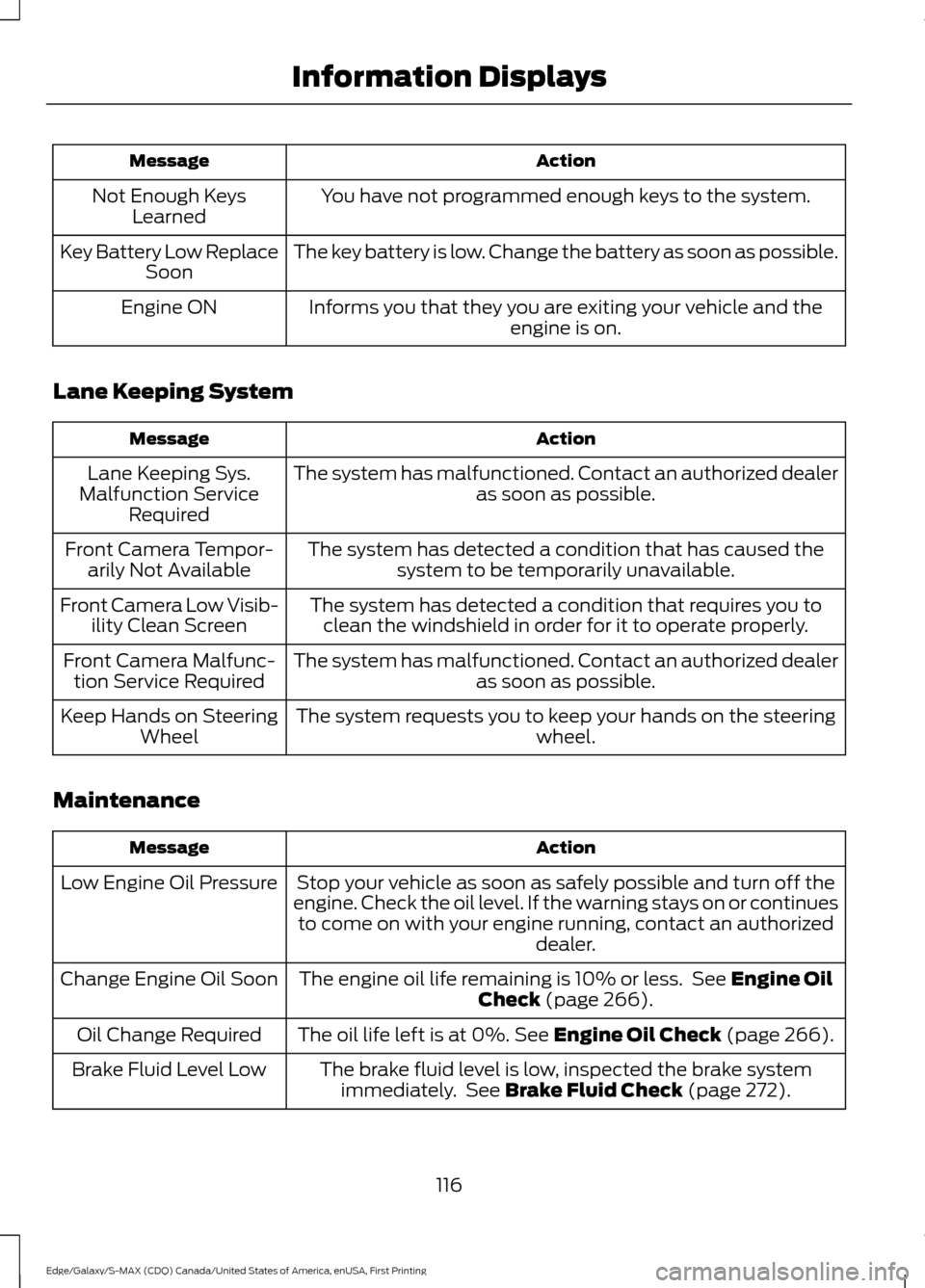
Action
Message
You have not programmed enough keys to the system.
Not Enough Keys
Learned
The key battery is low. Change the battery as soon as possible.
Key Battery Low Replace
Soon
Informs you that they you are exiting your vehicle and the engine is on.
Engine ON
Lane Keeping System Action
Message
The system has malfunctioned. Contact an authorized dealer as soon as possible.
Lane Keeping Sys.
Malfunction Service Required
The system has detected a condition that has caused thesystem to be temporarily unavailable.
Front Camera Tempor-
arily Not Available
The system has detected a condition that requires you toclean the windshield in order for it to operate properly.
Front Camera Low Visib-
ility Clean Screen
The system has malfunctioned. Contact an authorized dealeras soon as possible.
Front Camera Malfunc-
tion Service Required
The system requests you to keep your hands on the steering wheel.
Keep Hands on Steering
Wheel
Maintenance Action
Message
Stop your vehicle as soon as safely possible and turn off the
engine. Check the oil level. If the warning stays on or continues to come on with your engine running, contact an authorized dealer.
Low Engine Oil Pressure
The engine oil life remaining is 10% or less. See Engine Oil
Check (page 266).
Change Engine Oil Soon
The oil life left is at 0%.
See Engine Oil Check (page 266).
Oil Change Required
The brake fluid level is low, inspected the brake systemimmediately. See
Brake Fluid Check (page 272).
Brake Fluid Level Low
116
Edge/Galaxy/S-MAX (CDQ) Canada/United States of America, enUSA, First Printing Information Displays
Page 266 of 451
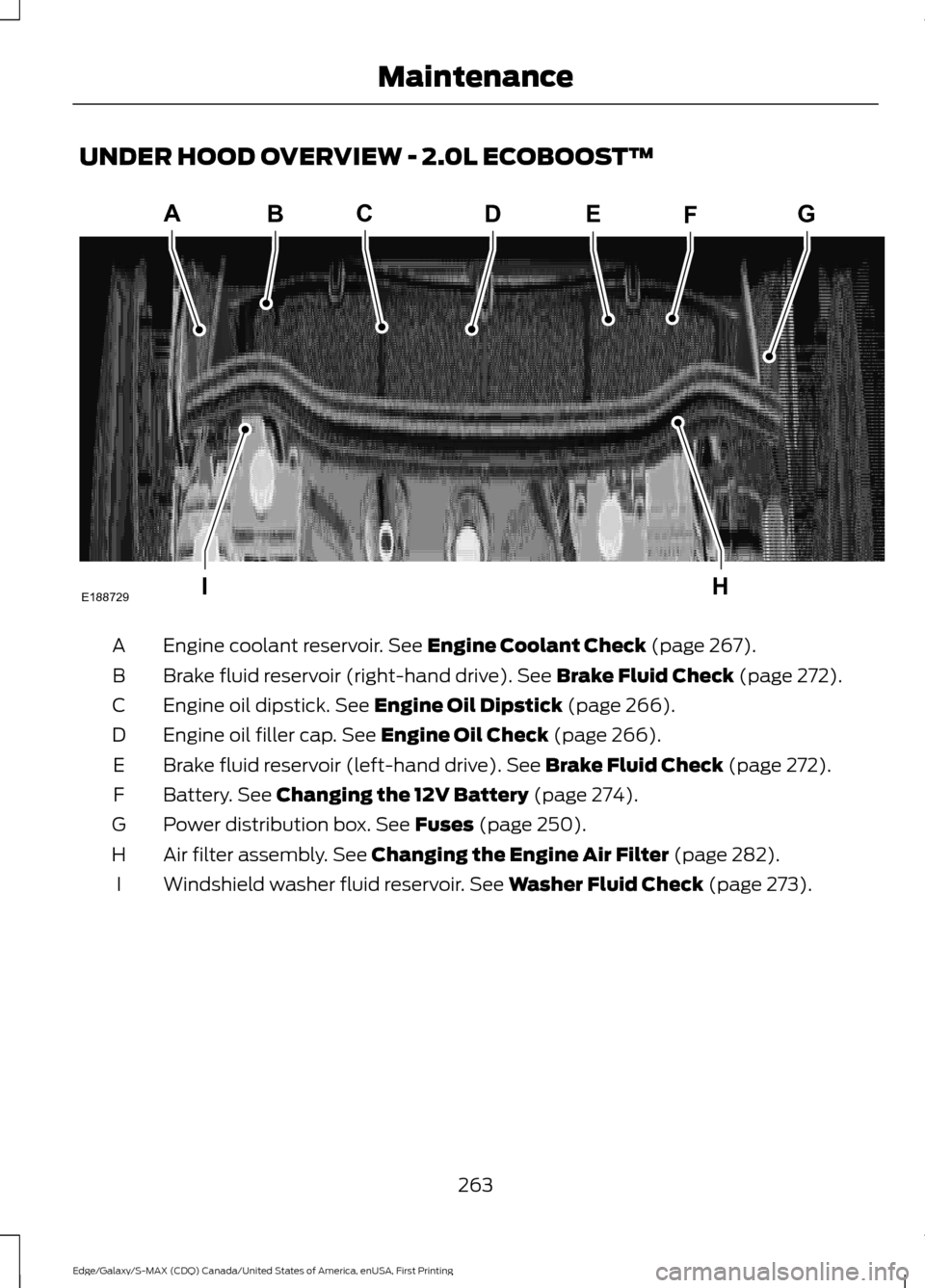
UNDER HOOD OVERVIEW - 2.0L ECOBOOST™
Engine coolant reservoir. See Engine Coolant Check (page 267).
A
Brake fluid reservoir (right-hand drive).
See Brake Fluid Check (page 272).
B
Engine oil dipstick.
See Engine Oil Dipstick (page 266).
C
Engine oil filler cap.
See Engine Oil Check (page 266).
D
Brake fluid reservoir (left-hand drive).
See Brake Fluid Check (page 272).
E
Battery.
See Changing the 12V Battery (page 274).
F
Power distribution box.
See Fuses (page 250).
G
Air filter assembly.
See Changing the Engine Air Filter (page 282).
H
Windshield washer fluid reservoir.
See Washer Fluid Check (page 273).
I
263
Edge/Galaxy/S-MAX (CDQ) Canada/United States of America, enUSA, First Printing MaintenanceA
IH
EBCDFG
E188729
Page 267 of 451
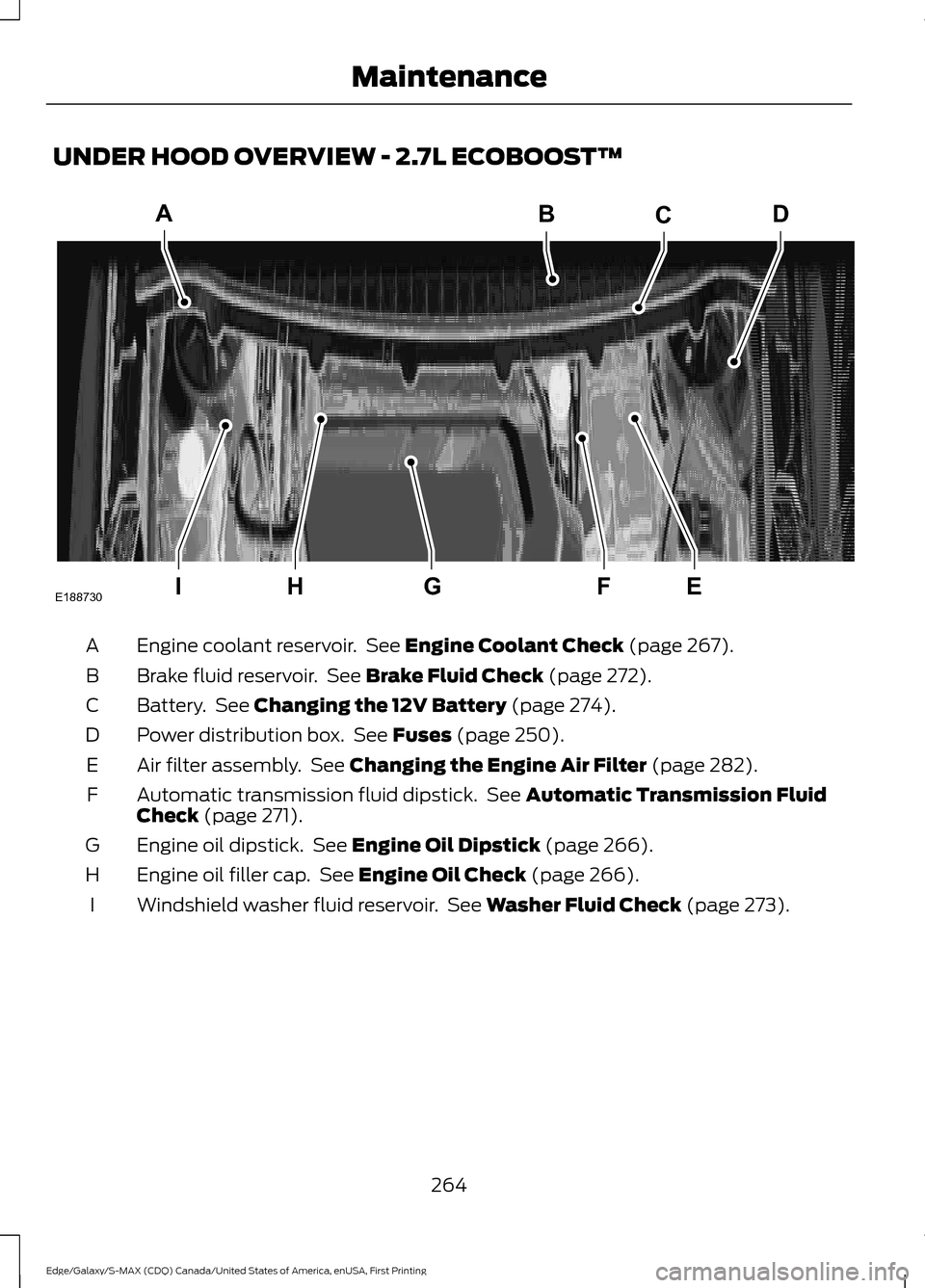
UNDER HOOD OVERVIEW - 2.7L ECOBOOST™
Engine coolant reservoir. See Engine Coolant Check (page 267).
A
Brake fluid reservoir. See
Brake Fluid Check (page 272).
B
Battery. See
Changing the 12V Battery (page 274).
C
Power distribution box. See
Fuses (page 250).
D
Air filter assembly. See
Changing the Engine Air Filter (page 282).
E
Automatic transmission fluid dipstick. See
Automatic Transmission Fluid
Check (page 271).
F
Engine oil dipstick. See
Engine Oil Dipstick (page 266).
G
Engine oil filler cap. See
Engine Oil Check (page 266).
H
Windshield washer fluid reservoir. See
Washer Fluid Check (page 273).
I
264
Edge/Galaxy/S-MAX (CDQ) Canada/United States of America, enUSA, First Printing MaintenanceA
IEFGH
BCD
E188730
Page 268 of 451
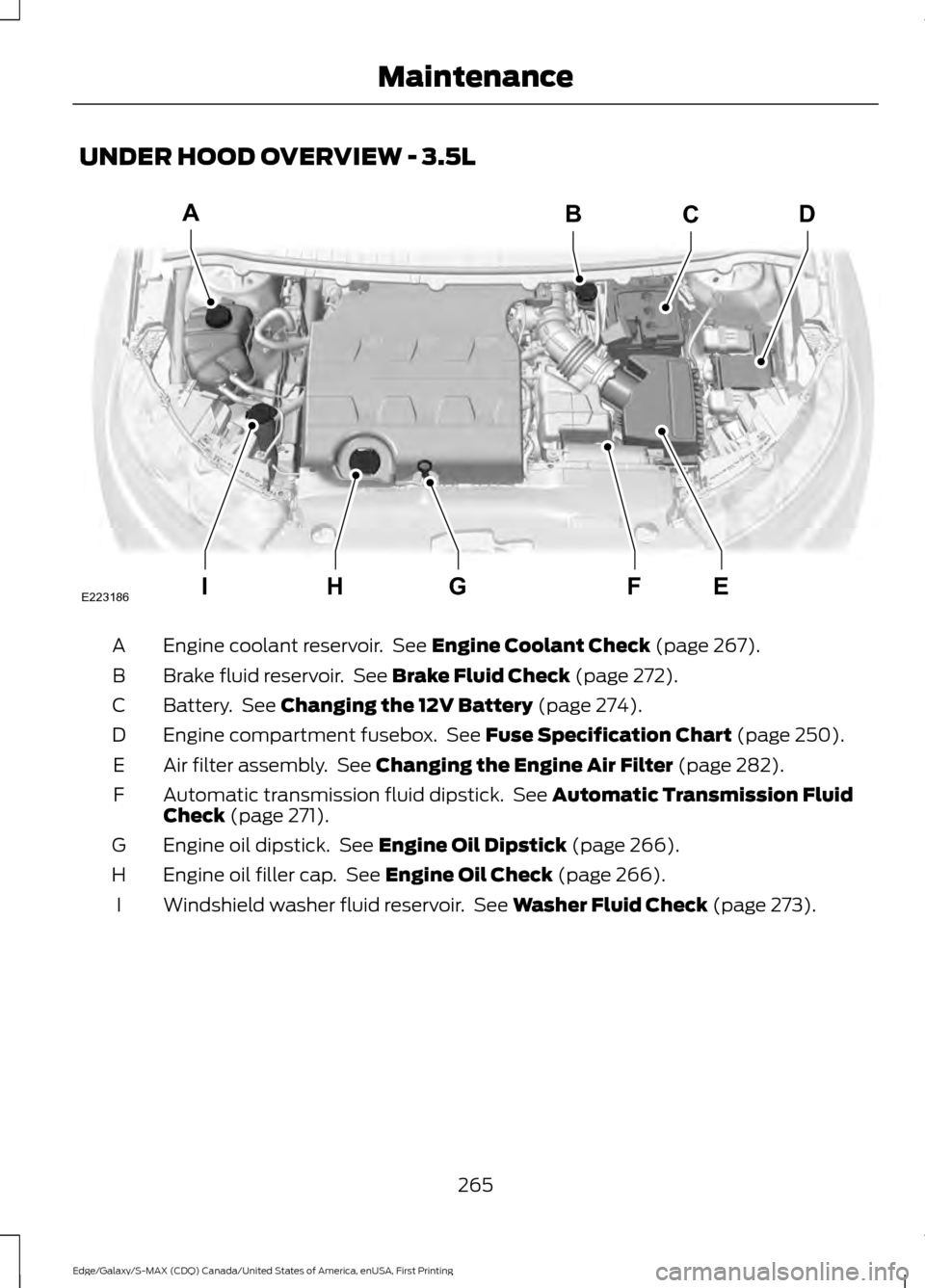
UNDER HOOD OVERVIEW - 3.5L
Engine coolant reservoir. See Engine Coolant Check (page 267).
A
Brake fluid reservoir. See
Brake Fluid Check (page 272).
B
Battery. See
Changing the 12V Battery (page 274).
C
Engine compartment fusebox. See
Fuse Specification Chart (page 250).
D
Air filter assembly. See
Changing the Engine Air Filter (page 282).
E
Automatic transmission fluid dipstick. See
Automatic Transmission Fluid
Check (page 271).
F
Engine oil dipstick. See
Engine Oil Dipstick (page 266).
G
Engine oil filler cap. See
Engine Oil Check (page 266).
H
Windshield washer fluid reservoir. See
Washer Fluid Check (page 273).
I
265
Edge/Galaxy/S-MAX (CDQ) Canada/United States of America, enUSA, First Printing MaintenanceIEFGH
ABCD
E223186
Page 269 of 451
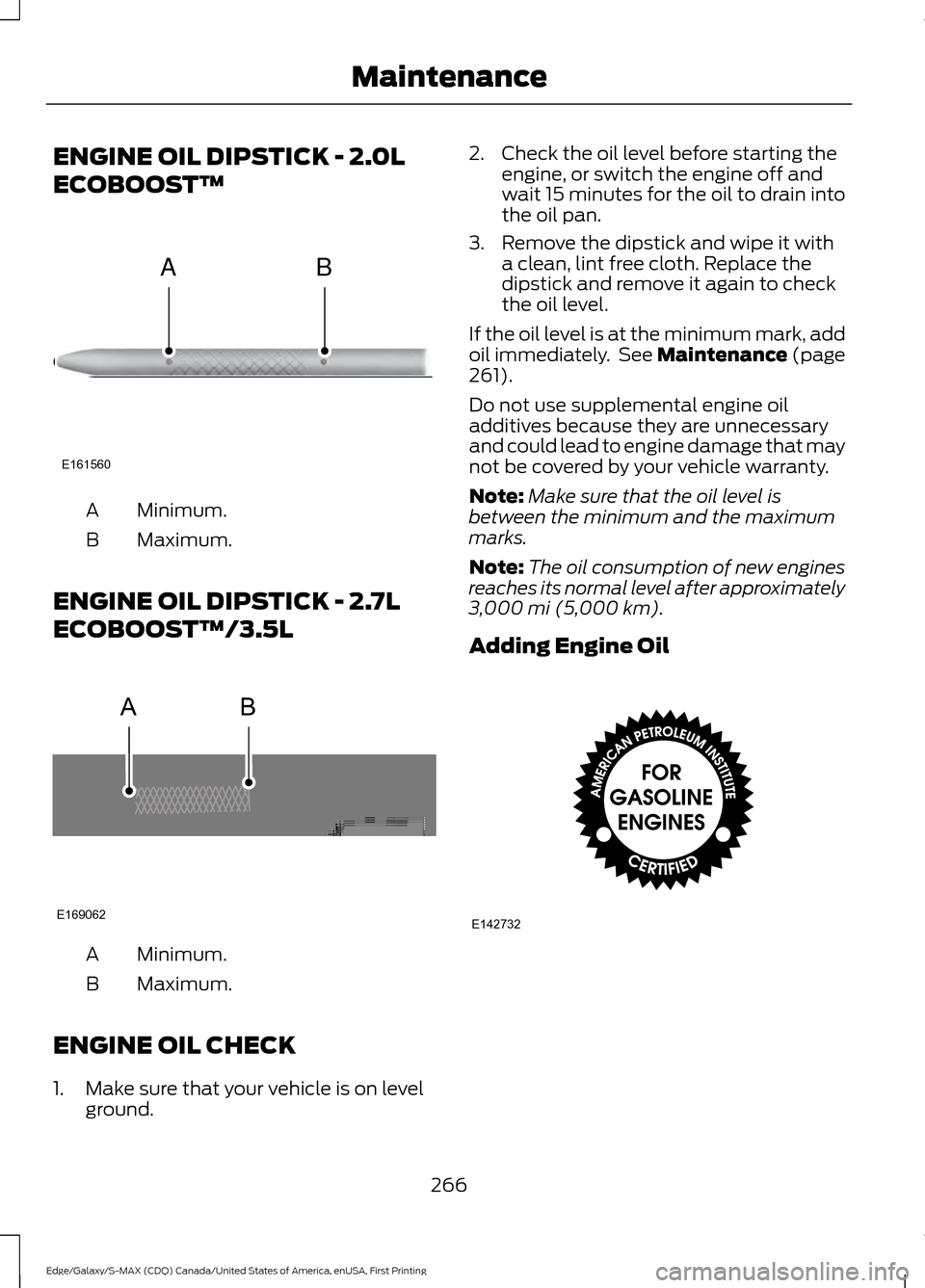
ENGINE OIL DIPSTICK - 2.0L
ECOBOOST™
Minimum.
A
Maximum.
B
ENGINE OIL DIPSTICK - 2.7L
ECOBOOST™/3.5L Minimum.
A
Maximum.
B
ENGINE OIL CHECK
1. Make sure that your vehicle is on level ground. 2. Check the oil level before starting the
engine, or switch the engine off and
wait 15 minutes for the oil to drain into
the oil pan.
3. Remove the dipstick and wipe it with a clean, lint free cloth. Replace the
dipstick and remove it again to check
the oil level.
If the oil level is at the minimum mark, add
oil immediately. See Maintenance (page
261).
Do not use supplemental engine oil
additives because they are unnecessary
and could lead to engine damage that may
not be covered by your vehicle warranty.
Note: Make sure that the oil level is
between the minimum and the maximum
marks.
Note: The oil consumption of new engines
reaches its normal level after approximately
3,000 mi (5,000 km)
.
Adding Engine Oil 266
Edge/Galaxy/S-MAX (CDQ) Canada/United States of America, enUSA, First Printing MaintenanceE161560
AB AB
E169062 E142732
Page 270 of 451
Only use oils certified for gasoline engines
by the American Petroleum Institute (API).
An oil with this trademark symbol
conforms to the current engine and
emission system protection standards and
fuel economy requirements of the
International Lubricants Specification
Advisory Council (ILSAC), comprised of
U.S. and Japanese automobile
manufacturers.
WARNINGS
Only add oil when the engine is cold.
If the engine is hot, wait 10 minutes
for the engine to cool down.
Do not remove the filler cap when
the engine is running.
1. Remove the engine oil filler cap.
2. Add engine oil that meets Ford
specifications. See Maintenance
(page 261).
3. Wipe off any spilled oil.
4. Replace the engine oil filler cap. Turn it clockwise until you feel a strong
resistance.
Note: Do not add oil further than the
maximum mark. Oil levels above the
maximum mark may cause engine damage.
Note: Soak up any spillage with an
absorbent cloth immediately.
OIL CHANGE INDICATOR
RESET
Use the information display controls on
the steering wheel to reset the oil change
indicator. From the main menu scroll to: Action and description
Message
Press the right arrow button,
then from this menu scroll
to the following message.
Settings
Press the right arrow button,
then from this menu scroll
to the following message.
Vehicle
Press the right arrow button,
then from this menu scroll
to the following message.
Oil Life
Press and hold the
OK
button until the instrument
cluster displays the
following message.
Hold OK to
Reset
Reset Successful
When the oil change indic-
ator resets the instrument
cluster displays 100%.
Remaining Life
{00}%
If the instrument cluster
displays one of the following
messages, repeat the
process.
Not Reset
Reset Cancelled
ENGINE COOLANT CHECK WARNINGS
Do not add engine coolant when the
engine is hot. Steam and scalding
liquids released from a hot cooling
system can burn you badly. Also, spilling
coolant on hot engine parts can burn you.
267
Edge/Galaxy/S-MAX (CDQ) Canada/United States of America, enUSA, First Printing Maintenance