door lock FORD EDGE 2017 2.G Owner's Guide
[x] Cancel search | Manufacturer: FORD, Model Year: 2017, Model line: EDGE, Model: FORD EDGE 2017 2.GPages: 544, PDF Size: 25.27 MB
Page 295 of 544
•
Use a quality wax that does not contain
abrasives.
• Follow the manufacturer ’s instructions
to apply and remove the wax.
• Apply a small amount of wax in a
back-and-forth motion, not in circles.
• Do not allow wax to come in contact
with any non-body (low-gloss black)
colored trim. The wax will discolor or
stain the parts over time.
•Roof racks.
• Bumpers.
• Grained door handles.
• Side moldings.
• Mirror housings.
• Windshield cowl area.
• Do not apply wax to glass areas.
• After waxing, your car's paint should
feel smooth, and be free of streaks and
smudges.
CLEANING THE ENGINE
Engines are more efficient when they are
clean because grease and dirt buildup keep
the engine warmer than normal.
When washing:
• Take care when using a power washer
to clean the engine. The high-pressure
fluid could penetrate the sealed parts
and cause damage.
• Do not spray a hot engine with cold
water to avoid cracking the engine
block or other engine components.
• Spray Motorcraft Engine Shampoo and
Degreaser on all parts that require
cleaning and pressure rinse clean. In
Canada, use Motorcraft Engine
Shampoo.
• Never wash or rinse the engine while it
is hot or running; water in the running
engine may cause internal damage. •
Never wash or rinse any ignition coil,
spark plug wire or spark plug well, or
the area in and around these locations.
• Cover the battery, power distribution
box, and air filter assembly to prevent
water damage when cleaning the
engine.
CLEANING THE WINDOWS AND
WIPER BLADES
Car wash chemicals and environmental
fallout can result in windshield and wiper
blade contamination. Dirty windshield and
wipers will result in poor windshield wiper
operation. Keep the windshield and wiper
blades clean to maintain windshield wiper
performance.
To clean the windshield and wiper blades:
• Clean the windshield with a
non-abrasive glass cleaner. When
cleaning the interior of the windshield,
avoid getting any glass cleaner on the
instrument panel or door panels. Wipe
any glass cleaner off these surfaces
immediately.
• For windshields contaminated with
tree sap, chemicals, wax or bugs, clean
the entire windshield using steel wool
(no greater than 0000 grade) in a
circular motion and rinse with water.
• Clean the wiper blades with isopropyl
rubbing alcohol or windshield washer
concentrate.
Note: Do not use razor blades or other
sharp objects to clean or remove decals
from the inside of the heated rear window.
The vehicle warranty does not cover
damage caused to the heated rear window
grid lines.
292
Edge (CDQ) Canada/United States of America, enUSA, Edition date: 201608, First Printing Vehicle Care
Page 305 of 544
•
After sealant use, an authorized Ford
dealer must replace the tire pressure
monitoring system sensor and valve
stem on the wheel.
• Operating the kit could cause an
electrical disturbance in radio, CD and
DVD player operation. * When inflation only is required
for a tire or other objects, the
selector must be in the Air
position.
What to do When a Tire Is
Punctured
You can repair a tire puncture within the
tire's tread area in two stages with the kit.
• In the first stage, inflate the tire with a
sealing compound and air. After you
inflate the tire, you will need to drive
the vehicle a short distance (about 4
miles [6 kilometers]) to distribute the
sealant in the tire.
• In the second stage, check the tire
pressure and adjust, if necessary, to the
vehicle's specified tire inflation
pressure.
First Stage: Inflating the Tire with
Sealing Compound and Air WARNINGS
Do not stand directly over the kit
while inflating the tire. If you notice
any unusual bulges or deformations
in the tire's sidewall during inflation, stop
and call roadside assistance. If the tire does not inflate to the
recommended tire pressure within
15 minutes, stop and call roadside
assistance. Do not run the engine during kit
operation unless the vehicle is
outdoors or in a well-ventilated area. Preparation: Park the vehicle in a safe, level
and secure area, away from moving traffic.
Switch the hazard lights on. Apply the
parking brake and switch the engine off.
Inspect the flat tire for visible damage.
Sealant compound contains latex. Use
appropriate precautions to avoid any
allergic reactions.
Do not remove any foreign object that has
pierced the tire. If a puncture is located in
the tire sidewall, stop and call roadside
assistance.
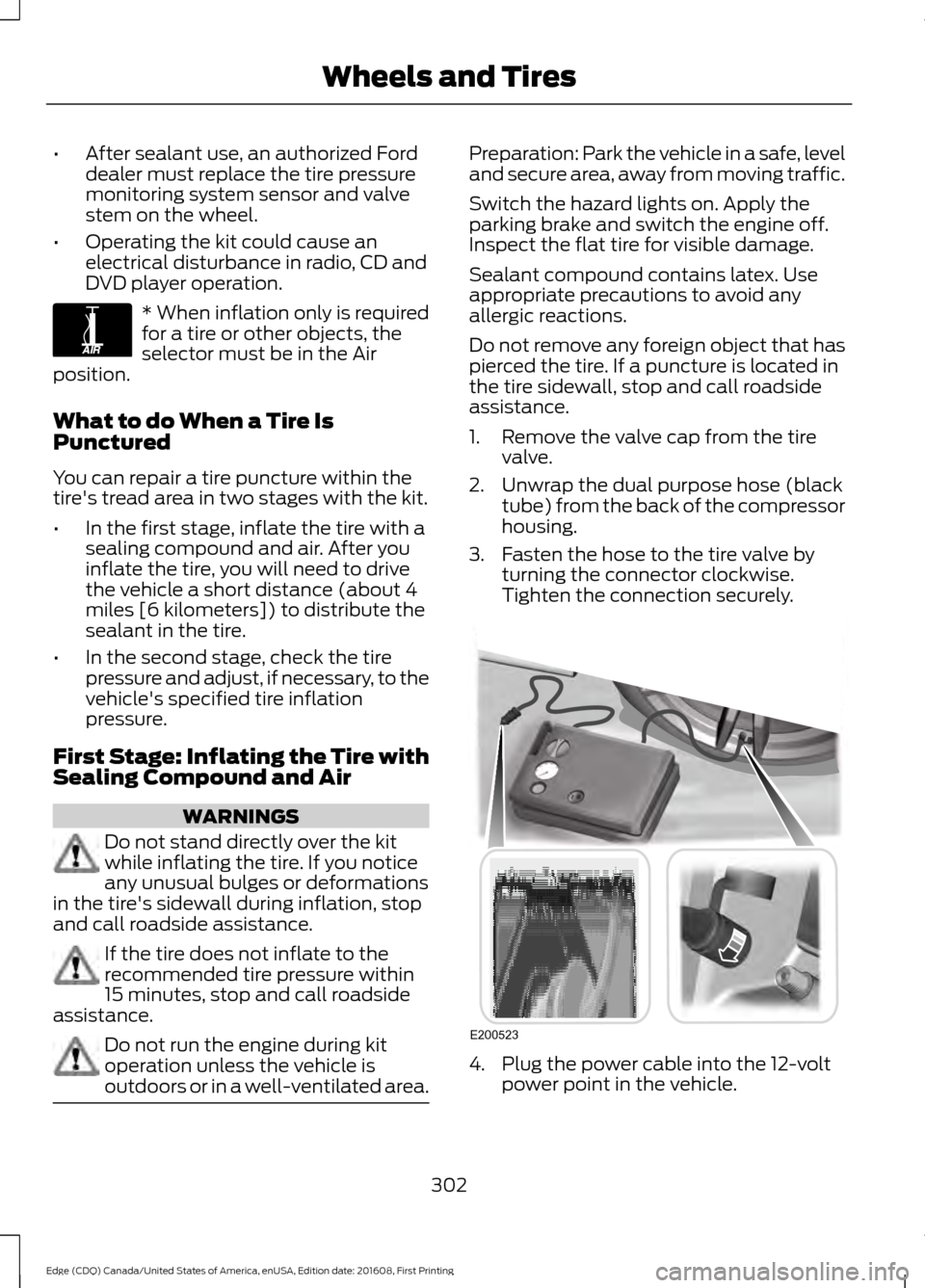
1. Remove the valve cap from the tire
valve.
2. Unwrap the dual purpose hose (black tube) from the back of the compressor
housing.
3. Fasten the hose to the tire valve by turning the connector clockwise.
Tighten the connection securely. 4. Plug the power cable into the 12-volt
power point in the vehicle.
302
Edge (CDQ) Canada/United States of America, enUSA, Edition date: 201608, First Printing Wheels and TiresE175978 E200523
Page 306 of 544
5. Remove the warning sticker found on
the casing/housing and place it on the
top of the instrument panel or the
center of the dash.
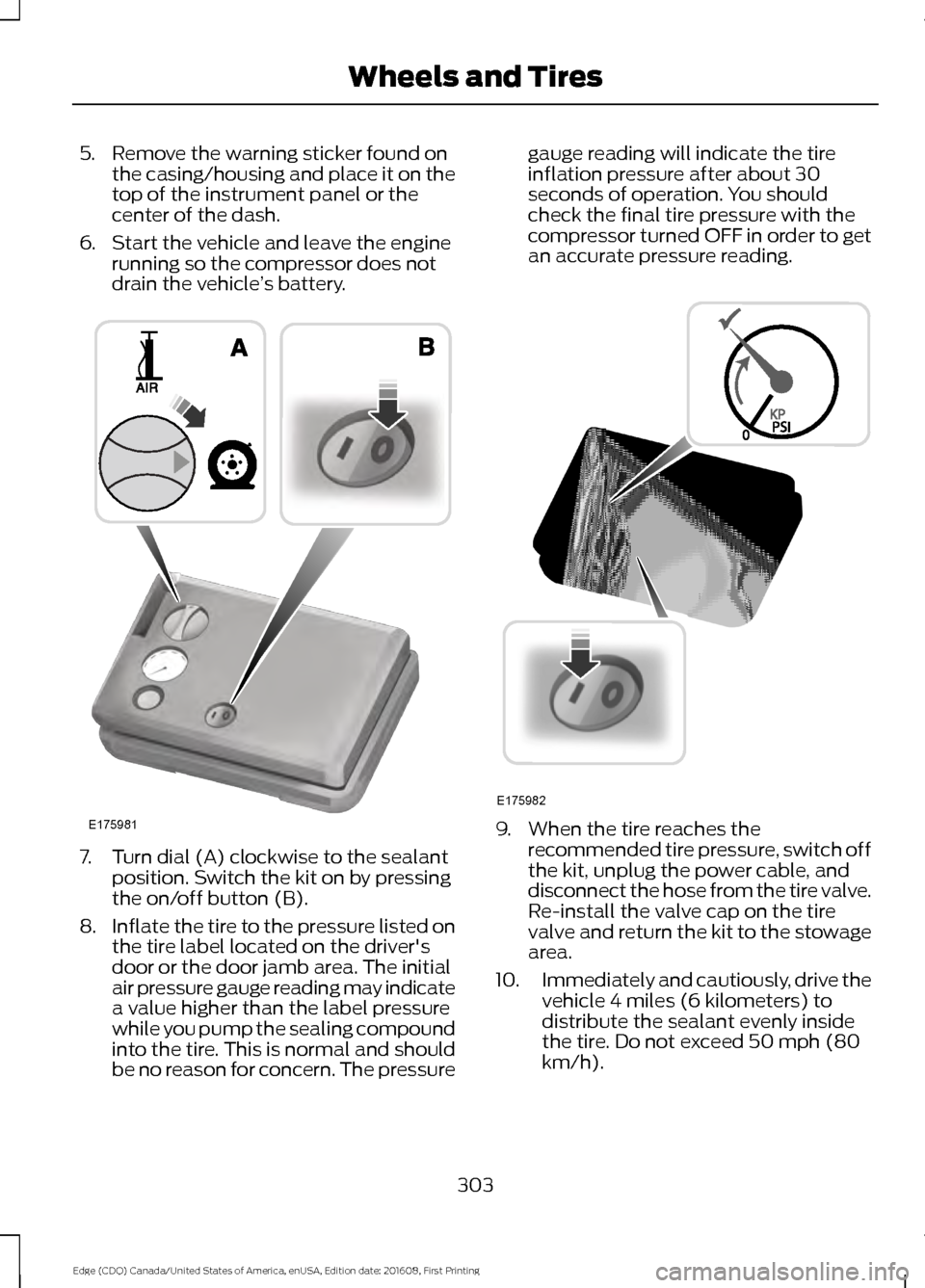
6. Start the vehicle and leave the engine running so the compressor does not
drain the vehicle ’s battery. 7. Turn dial (A) clockwise to the sealant
position. Switch the kit on by pressing
the on/off button (B).
8. Inflate the tire to the pressure listed on
the tire label located on the driver's
door or the door jamb area. The initial
air pressure gauge reading may indicate
a value higher than the label pressure
while you pump the sealing compound
into the tire. This is normal and should
be no reason for concern. The pressure gauge reading will indicate the tire
inflation pressure after about 30
seconds of operation. You should
check the final tire pressure with the
compressor turned OFF in order to get
an accurate pressure reading.
9. When the tire reaches the
recommended tire pressure, switch off
the kit, unplug the power cable, and
disconnect the hose from the tire valve.
Re-install the valve cap on the tire
valve and return the kit to the stowage
area.
10. Immediately and cautiously, drive the
vehicle 4 miles (6 kilometers) to
distribute the sealant evenly inside
the tire. Do not exceed 50 mph (80
km/h).
303
Edge (CDQ) Canada/United States of America, enUSA, Edition date: 201608, First Printing Wheels and TiresE175981 E175982
Page 307 of 544
11.
After 4 miles (6 kilometers), stop and
check the tire pressure. See Second
Stage: Checking Tire Pressure.
Note: If you experience any unusual
vibration, ride disturbance or noise while
driving, reduce your speed until you can
safely pull off to the side of the road to call
for roadside assistance. Note: Do not
proceed to the second stage of this
operation.
Second Stage: Checking Tire
Pressure WARNINGS
If you are proceeding from the First
Stage: Re-inflating the Tire with
Sealing Compound and Air section
and have injected sealant in the tire and
the pressure is below 20 psi (1.4 bar),
continue to the next step. The power plug may get hot after use
and should be handled carefully
while unplugging.
Check the air pressure of your tires as
follows:
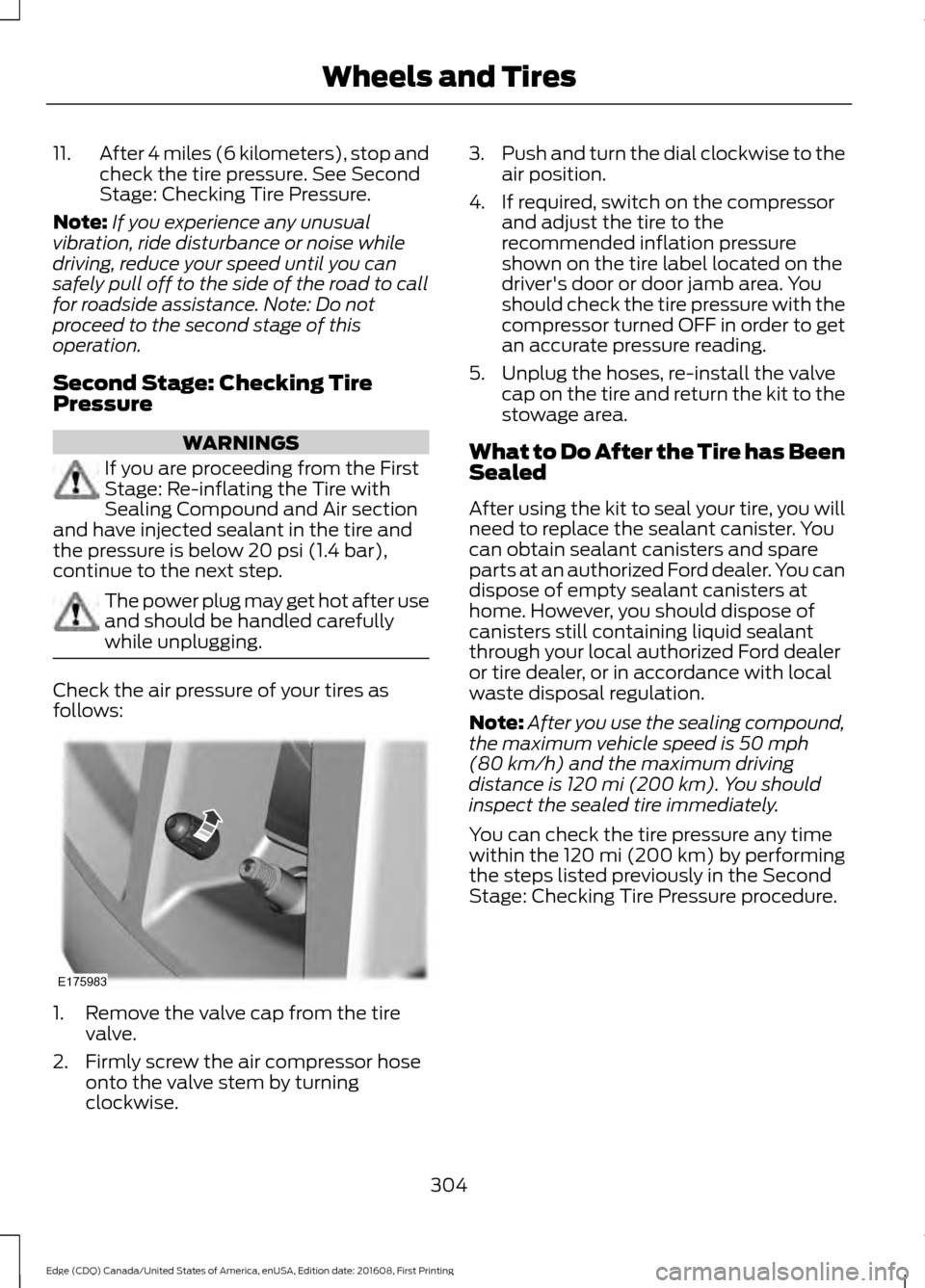
1. Remove the valve cap from the tire
valve.
2. Firmly screw the air compressor hose onto the valve stem by turning
clockwise. 3.
Push and turn the dial clockwise to the
air position.
4. If required, switch on the compressor and adjust the tire to the
recommended inflation pressure
shown on the tire label located on the
driver's door or door jamb area. You
should check the tire pressure with the
compressor turned OFF in order to get
an accurate pressure reading.
5. Unplug the hoses, re-install the valve cap on the tire and return the kit to the
stowage area.
What to Do After the Tire has Been
Sealed
After using the kit to seal your tire, you will
need to replace the sealant canister. You
can obtain sealant canisters and spare
parts at an authorized Ford dealer. You can
dispose of empty sealant canisters at
home. However, you should dispose of
canisters still containing liquid sealant
through your local authorized Ford dealer
or tire dealer, or in accordance with local
waste disposal regulation.
Note: After you use the sealing compound,
the maximum vehicle speed is
50 mph
(80 km/h) and the maximum driving
distance is 120 mi (200 km). You should
inspect the sealed tire immediately.
You can check the tire pressure any time
within the 120 mi (200 km) by performing
the steps listed previously in the Second
Stage: Checking Tire Pressure procedure.
304
Edge (CDQ) Canada/United States of America, enUSA, Edition date: 201608, First Printing Wheels and TiresE175983
Page 410 of 544
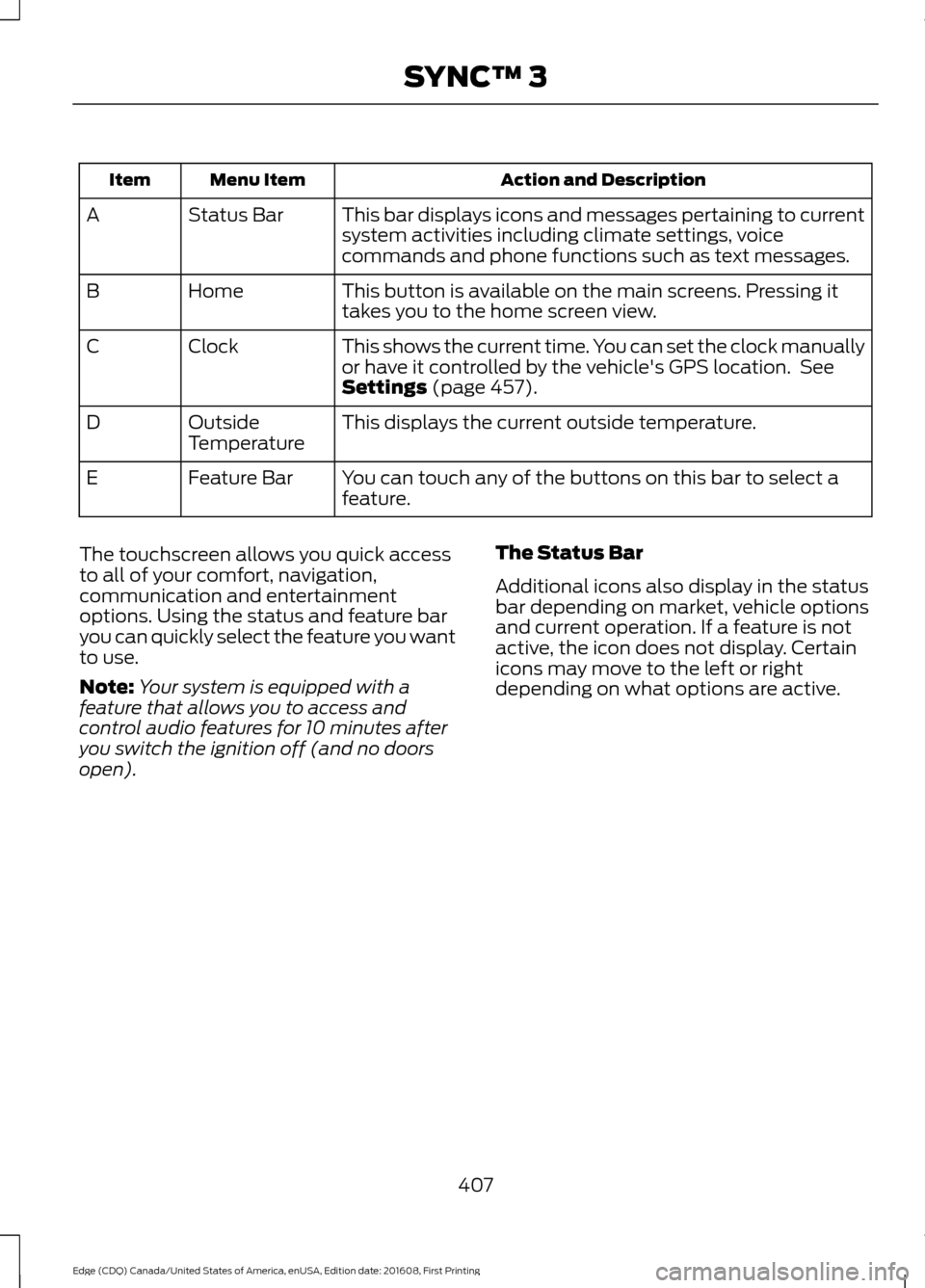
Action and Description
Menu Item
Item
This bar displays icons and messages pertaining to current
system activities including climate settings, voice
commands and phone functions such as text messages.
Status Bar
A
This button is available on the main screens. Pressing it
takes you to the home screen view.
Home
B
This shows the current time. You can set the clock manually
or have it controlled by the vehicle's GPS location. See
Settings (page 457).
Clock
C
This displays the current outside temperature.
Outside
Temperature
D
You can touch any of the buttons on this bar to select a
feature.
Feature Bar
E
The touchscreen allows you quick access
to all of your comfort, navigation,
communication and entertainment
options. Using the status and feature bar
you can quickly select the feature you want
to use.
Note: Your system is equipped with a
feature that allows you to access and
control audio features for 10 minutes after
you switch the ignition off (and no doors
open). The Status Bar
Additional icons also display in the status
bar depending on market, vehicle options
and current operation. If a feature is not
active, the icon does not display. Certain
icons may move to the left or right
depending on what options are active.
407
Edge (CDQ) Canada/United States of America, enUSA, Edition date: 201608, First Printing SYNC™ 3
Page 473 of 544
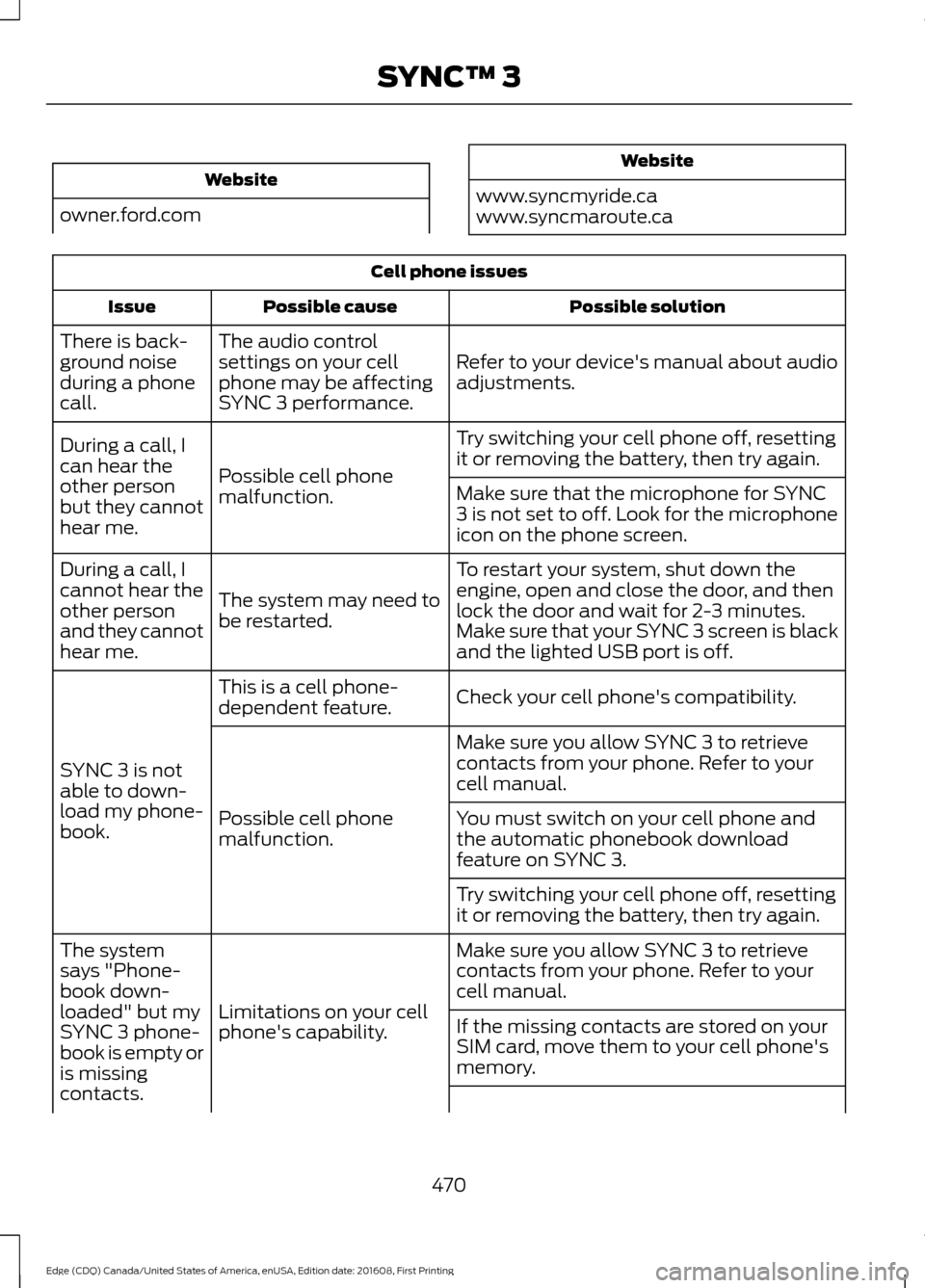
Website
owner.ford.com Website
www.syncmyride.ca
www.syncmaroute.ca Cell phone issues
Possible solution
Possible cause
Issue
Refer to your device's manual about audio
adjustments.
The audio control
settings on your cell
phone may be affecting
SYNC 3 performance.
There is back-
ground noise
during a phone
call.
Try switching your cell phone off, resetting
it or removing the battery, then try again.
Possible cell phone
malfunction.
During a call, I
can hear the
other person
but they cannot
hear me.
Make sure that the microphone for SYNC
3 is not set to off. Look for the microphone
icon on the phone screen.
To restart your system, shut down the
engine, open and close the door, and then
lock the door and wait for 2-3 minutes.
Make sure that your SYNC 3 screen is black
and the lighted USB port is off.
The system may need to
be restarted.
During a call, I
cannot hear the
other person
and they cannot
hear me.
Check your cell phone's compatibility.
This is a cell phone-
dependent feature.
SYNC 3 is not
able to down-
load my phone-
book. Make sure you allow SYNC 3 to retrieve
contacts from your phone. Refer to your
cell manual.
Possible cell phone
malfunction. You must switch on your cell phone and
the automatic phonebook download
feature on SYNC 3.
Try switching your cell phone off, resetting
it or removing the battery, then try again.
Make sure you allow SYNC 3 to retrieve
contacts from your phone. Refer to your
cell manual.
Limitations on your cell
phone's capability.
The system
says "Phone-
book down-
loaded" but my
SYNC 3 phone-
book is empty or
is missing
contacts.
If the missing contacts are stored on your
SIM card, move them to your cell phone's
memory.
470
Edge (CDQ) Canada/United States of America, enUSA, Edition date: 201608, First Printing SYNC™ 3
Page 491 of 544
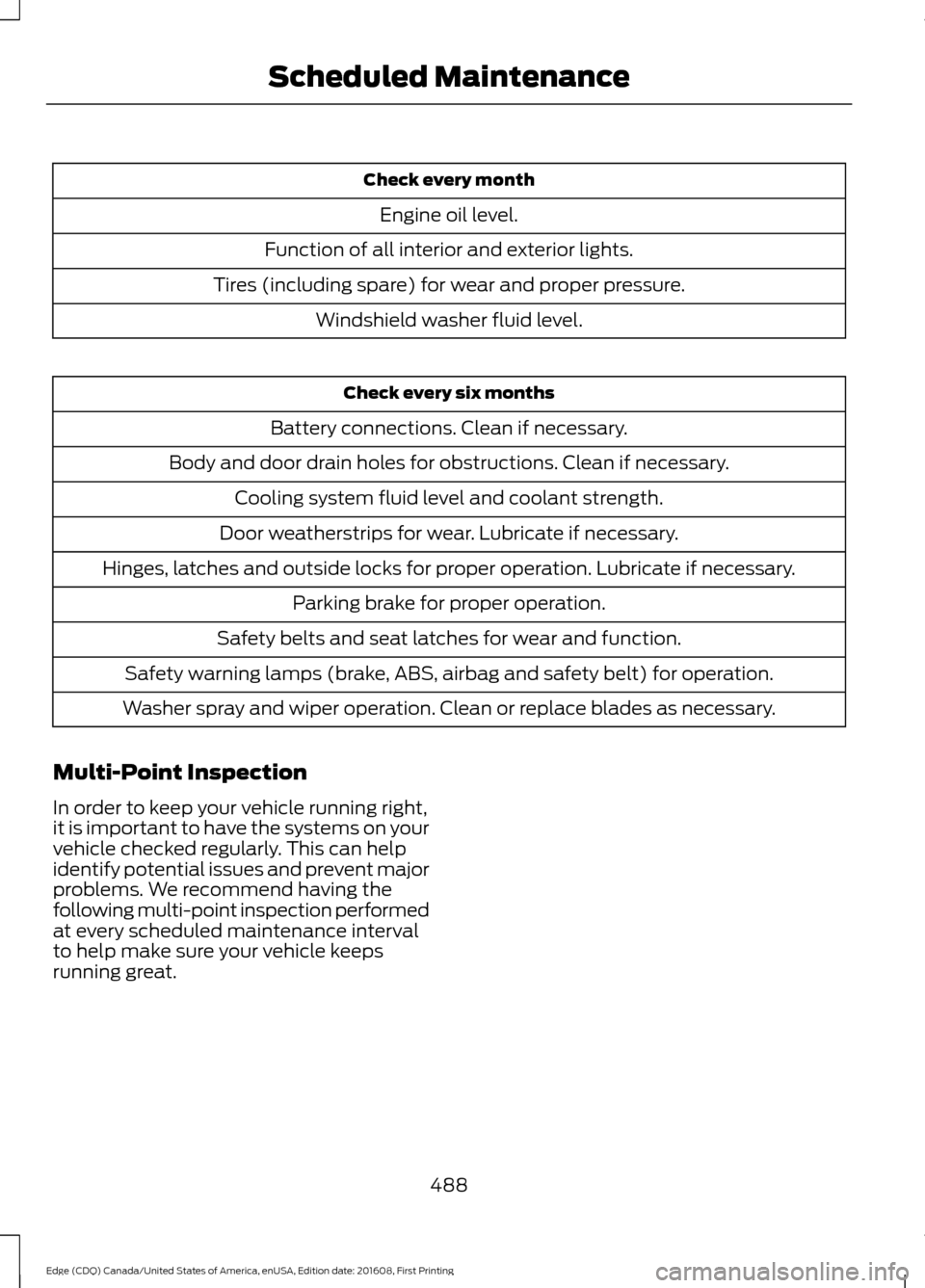
Check every month
Engine oil level.
Function of all interior and exterior lights.
Tires (including spare) for wear and proper pressure. Windshield washer fluid level. Check every six months
Battery connections. Clean if necessary.
Body and door drain holes for obstructions. Clean if necessary. Cooling system fluid level and coolant strength.
Door weatherstrips for wear. Lubricate if necessary.
Hinges, latches and outside locks for proper operation. Lubricate if necessary. Parking brake for proper operation.
Safety belts and seat latches for wear and function.
Safety warning lamps (brake, ABS, airbag and safety belt) for operation.
Washer spray and wiper operation. Clean or replace blades as necessary.
Multi-Point Inspection
In order to keep your vehicle running right,
it is important to have the systems on your
vehicle checked regularly. This can help
identify potential issues and prevent major
problems. We recommend having the
following multi-point inspection performed
at every scheduled maintenance interval
to help make sure your vehicle keeps
running great.
488
Edge (CDQ) Canada/United States of America, enUSA, Edition date: 201608, First Printing Scheduled Maintenance
Page 536 of 544
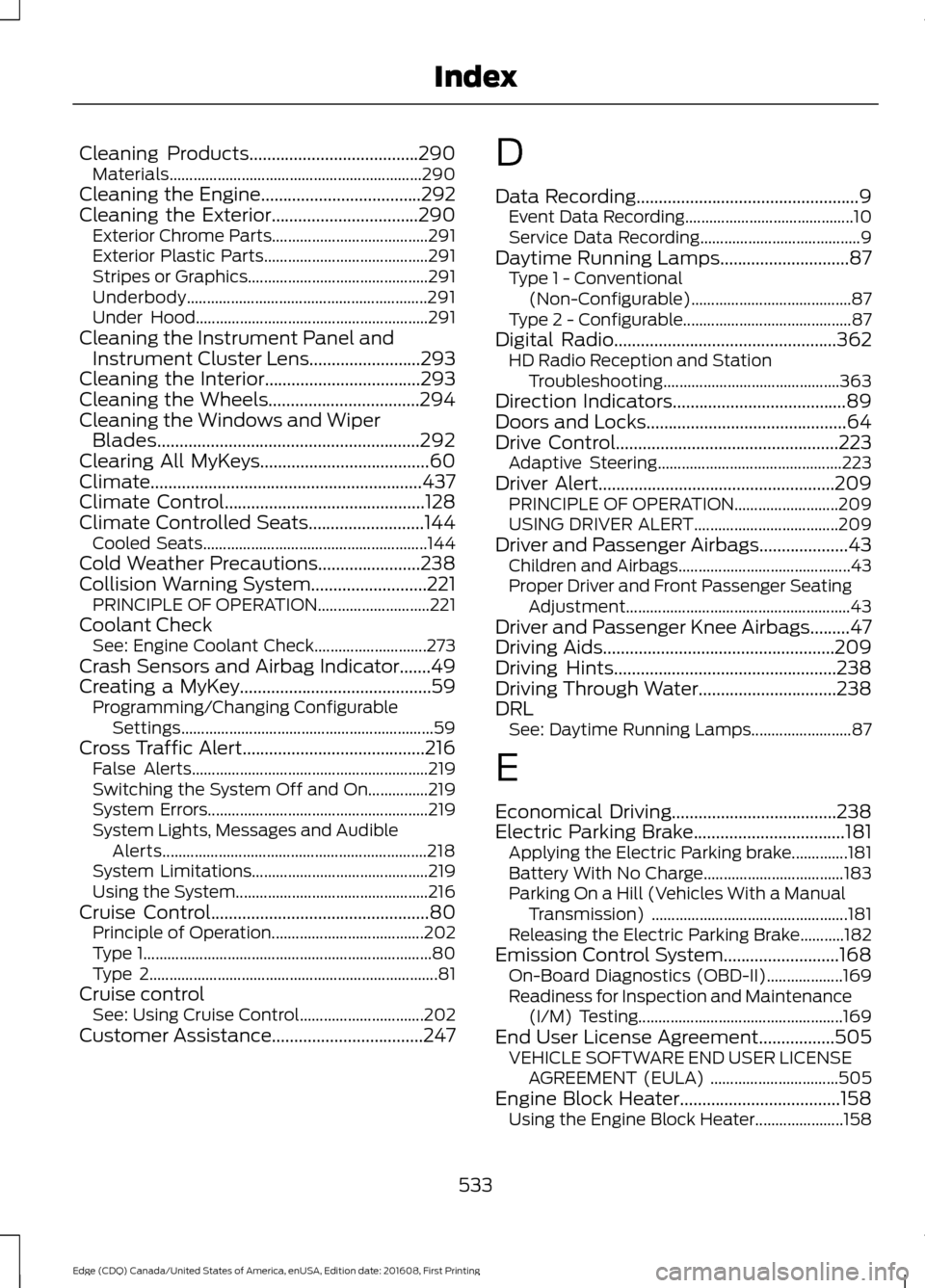
Cleaning Products......................................290
Materials............................................................... 290
Cleaning the Engine....................................292
Cleaning the Exterior.................................290 Exterior Chrome Parts....................................... 291
Exterior Plastic Parts......................................... 291
Stripes or Graphics............................................. 291
Underbody............................................................ 291
Under Hood.......................................................... 291
Cleaning the Instrument Panel and Instrument Cluster Lens.........................293
Cleaning the Interior...................................293
Cleaning the Wheels..................................294
Cleaning the Windows and Wiper Blades...........................................................292
Clearing All MyKeys......................................60
Climate.............................................................437
Climate Control.............................................128
Climate Controlled Seats..........................144
Cooled Seats........................................................ 144
Cold Weather Precautions.......................238
Collision Warning System..........................221 PRINCIPLE OF OPERATION............................ 221
Coolant Check See: Engine Coolant Check............................ 273
Crash Sensors and Airbag Indicator.......49
Creating a MyKey...........................................59 Programming/Changing Configurable
Settings............................................................... 59
Cross Traffic Alert.........................................216 False Alerts........................................................... 219
Switching the System Off and On...............219
System Errors....................................................... 219
System Lights, Messages and Audible Alerts.................................................................. 218
System Limitations............................................ 219
Using the System................................................ 216
Cruise Control
.................................................80
Principle of Operation...................................... 202
Type 1........................................................................\
80
Type 2........................................................................\
81
Cruise control See: Using Cruise Control............................... 202
Customer Assistance
..................................247 D
Data Recording
..................................................9
Event Data Recording.......................................... 10
Service Data Recording........................................ 9
Daytime Running Lamps
.............................87
Type 1 - Conventional
(Non-Configurable)........................................ 87
Type 2 - Configurable.......................................... 87
Digital Radio
..................................................362
HD Radio Reception and Station
Troubleshooting............................................ 363
Direction Indicators
.......................................89
Doors and Locks.............................................64
Drive Control
..................................................223
Adaptive Steering.............................................. 223
Driver Alert
.....................................................209
PRINCIPLE OF OPERATION.......................... 209
USING DRIVER ALERT.................................... 209
Driver and Passenger Airbags....................43 Children and Airbags........................................... 43
Proper Driver and Front Passenger Seating Adjustment........................................................ 43
Driver and Passenger Knee Airbags.........47
Driving Aids
....................................................209
Driving Hints..................................................238
Driving Through Water...............................238
DRL See: Daytime Running Lamps......................... 87
E
Economical Driving.....................................238
Electric Parking Brake
..................................181
Applying the Electric Parking brake..............181
Battery With No Charge................................... 183
Parking On a Hill (Vehicles With a Manual Transmission) ................................................. 181
Releasing the Electric Parking Brake...........182
Emission Control System..........................168 On-Board Diagnostics (OBD-II)...................169
Readiness for Inspection and Maintenance
(I/M) Testing................................................... 169
End User License Agreement
.................505
VEHICLE SOFTWARE END USER LICENSE
AGREEMENT (EULA) ................................ 505
Engine Block Heater....................................158 Using the Engine Block Heater...................... 158
533
Edge (CDQ) Canada/United States of America, enUSA, Edition date: 201608, First Printing Index
Page 538 of 544
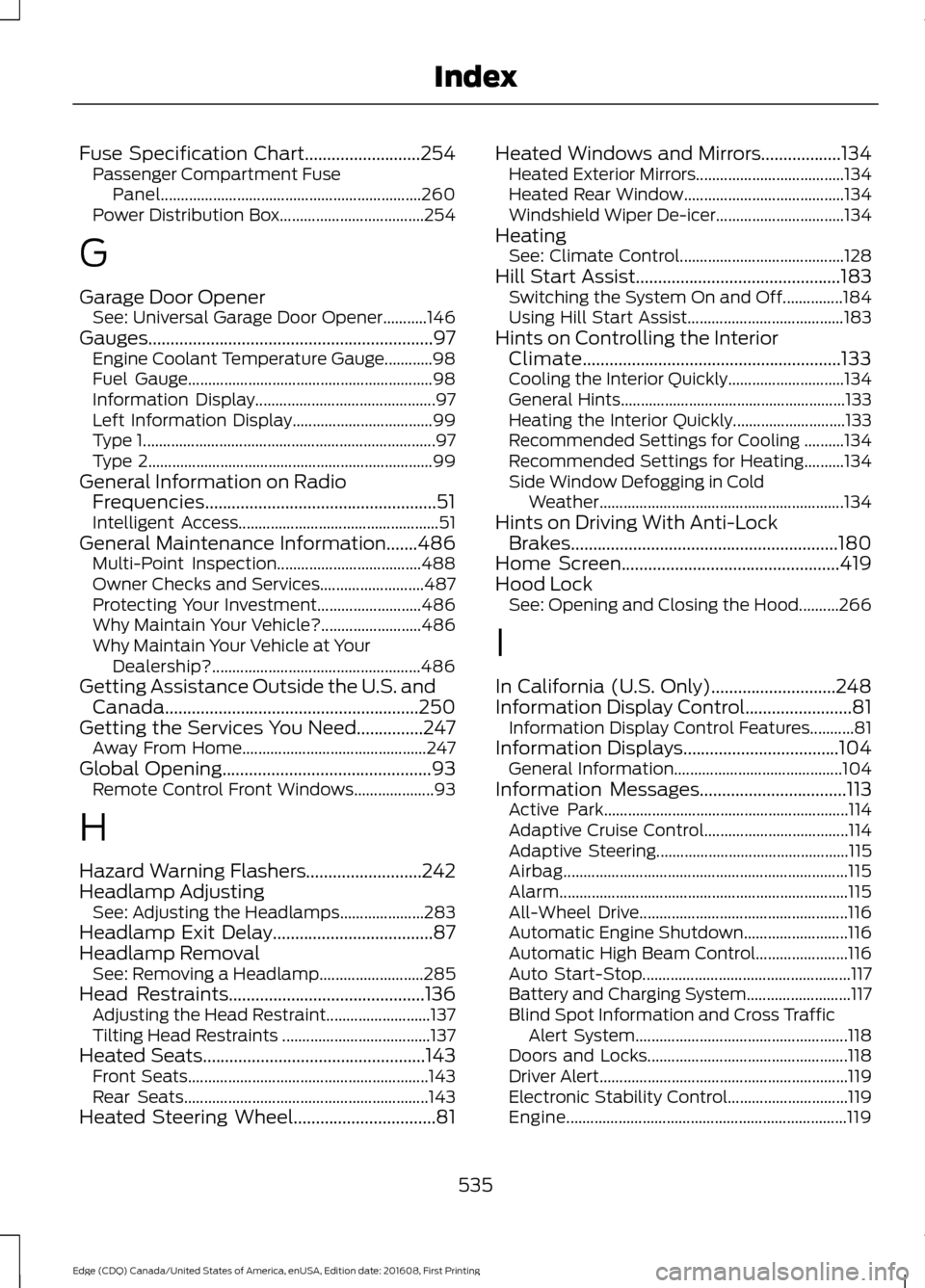
Fuse Specification Chart..........................254
Passenger Compartment Fuse
Panel................................................................. 260
Power Distribution Box.................................... 254
G
Garage Door Opener See: Universal Garage Door Opener...........146
Gauges................................................................97 Engine Coolant Temperature Gauge............98
Fuel Gauge............................................................. 98
Information Display............................................. 97
Left Information Display................................... 99
Type 1........................................................................\
. 97
Type 2....................................................................... 99
General Information on Radio Frequencies....................................................51
Intelligent Access.................................................. 51
General Maintenance Information
.......486
Multi-Point Inspection.................................... 488
Owner Checks and Services.......................... 487
Protecting Your Investment.......................... 486
Why Maintain Your Vehicle?......................... 486
Why Maintain Your Vehicle at Your Dealership?.................................................... 486
Getting Assistance Outside the U.S. and Canada.........................................................250
Getting the Services You Need...............247 Away From Home.............................................. 247
Global Opening
...............................................93
Remote Control Front Windows.................... 93
H
Hazard Warning Flashers..........................242
Headlamp Adjusting See: Adjusting the Headlamps..................... 283
Headlamp Exit Delay....................................87
Headlamp Removal See: Removing a Headlamp.......................... 285
Head Restraints
............................................136
Adjusting the Head Restraint..........................137
Tilting Head Restraints ..................................... 137
Heated Seats
..................................................143
Front Seats............................................................ 143
Rear Seats............................................................. 143
Heated Steering Wheel
................................81 Heated Windows and Mirrors..................134
Heated Exterior Mirrors..................................... 134
Heated Rear Window........................................ 134
Windshield Wiper De-icer................................ 134
Heating See: Climate Control......................................... 128
Hill Start Assist..............................................183 Switching the System On and Off...............184
Using Hill Start Assist....................................... 183
Hints on Controlling the Interior Climate..........................................................133
Cooling the Interior Quickly............................. 134
General Hints........................................................ 133
Heating the Interior Quickly............................ 133
Recommended Settings for Cooling ..........134
Recommended Settings for Heating..........134
Side Window Defogging in Cold Weather............................................................. 134
Hints on Driving With Anti-Lock Brakes............................................................180
Home Screen.................................................419
Hood Lock See: Opening and Closing the Hood..........266
I
In California (U.S. Only)............................248
Information Display Control........................81 Information Display Control Features...........81
Information Displays
...................................104
General Information.......................................... 104
Information Messages
.................................113
Active Park............................................................. 114
Adaptive Cruise Control.................................... 114
Adaptive Steering................................................ 115
Airbag....................................................................... 115
Alarm........................................................................\
115
All-Wheel Drive.................................................... 116
Automatic Engine Shutdown.......................... 116
Automatic High Beam Control....................... 116
Auto Start-Stop.................................................... 117
Battery and Charging System.......................... 117
Blind Spot Information and Cross Traffic Alert System..................................................... 118
Doors and Locks.................................................. 118
Driver Alert.............................................................. 119
Electronic Stability Control.............................. 119
Engine...................................................................... 119
535
Edge (CDQ) Canada/United States of America, enUSA, Edition date: 201608, First Printing Index
Page 539 of 544

Fuel........................................................................\
..
120
Hill Start Assist.................................................... 120
Keys and Keyless Entry..................................... 120
Lane Keeping System......................................... 121
Maintenance.......................................................... 121
MyKey...................................................................... 122
Park Aid................................................................... 123
Park Brake.............................................................. 123
Power Steering.................................................... 124
Pre-Collision Warning System....................... 124
Remote Start........................................................ 125
Seats........................................................................\
125
Starting System .................................................. 125
Tire Pressure Monitoring System.................. 125
Towing..................................................................... 126
Traction Control.................................................. 126
Transmission........................................................ 126
Installing Child Restraints............................19 Child Seats............................................................... 19
Using Lap and Shoulder Belts......................... 20
Using Lower Anchors and Tethers for Children (LATCH)............................................ 24
Using Tether Straps............................................. 26
Instrument Cluster.........................................97
Instrument Lighting Dimmer......................87
Instrument Panel Overview........................16
Interior Lamps
.................................................89
Front Interior Lamp............................................. 89
Rear Interior Lamp............................................... 90
Interior Mirror
...................................................95
Auto-Dimming Mirror......................................... 95
Introduction.........................................................7
J
Jump Starting the Vehicle........................243 Connecting the Jumper Cables.................... 243
Jump Starting...................................................... 244
Preparing Your Vehicle..................................... 243
Removing the Jumper Cables....................... 244
K
Keyless Entry
....................................................72
SECURICODE™ KEYLESS ENTRY
KEYPAD............................................................... 72
Keyless Starting
............................................154
Starting Your Vehicle......................................... 155Switching the Ignition On................................
154
Keys and Remote Controls..........................51
L
Lane Keeping System.................................210 Switching the System On and Off.................211
Lighting Control
..............................................85
Headlamp Flasher............................................... 86
High Beams............................................................ 85
Lighting..............................................................85 General Information............................................ 85
Load Carriers See: Roof Racks and Load Carriers.............224
Load Carrying
................................................224
Load Limit.......................................................225
Special Loading Instructions for Owners of
Pick-up Trucks and Utility-type
Vehicles............................................................ 229
Vehicle Loading - with and without a Trailer................................................................. 225
Locking and Unlocking
................................64
Activating Intelligent Access........................... 66
Autolock .................................................................. 67
Auto Relock............................................................ 66
Autounlock.............................................................. 67
Battery Saver.......................................................... 67
Illuminated Entry.................................................. 67
Illuminated Exit..................................................... 67
Locking and Unlocking the Doors with the Key Blade........................................................... 65
Power Door Locks................................................ 64
Remote Control.................................................... 64
Smart Unlocks for Intelligent Access Keys...................................................................... 66
Lug Nuts See: Changing a Road Wheel........................ 327
M
Maintenance.................................................266 General Information......................................... 266
Manual Climate Control - Vehicles With: Electronic Manual Temperature
Control (EMTC)
..........................................128
Manual Liftgate..............................................68
Closing the Liftgate............................................. 68
Opening the Liftgate........................................... 68
536
Edge (CDQ) Canada/United States of America, enUSA, Edition date: 201608, First Printing Index