horn FORD EDGE 2017 2.G Owners Manual
[x] Cancel search | Manufacturer: FORD, Model Year: 2017, Model line: EDGE, Model: FORD EDGE 2017 2.GPages: 544, PDF Size: 25.27 MB
Page 20 of 544
Keyless start button. See Keyless Starting (page 154).
N
Audio control. Voice control. See Audio Control (page 79). See Voice Control
(page
80).
O
Steering wheel adjustment. See
Adjusting the Steering Wheel (page 78).
P
Horn.
Q
Cruise control buttons. See
Cruise Control (page 80).
R
Hood release lever. See
Opening and Closing the Hood (page 266).
S
Lighting control. Power liftgate release button. See
Lighting Control (page
85). See Power Liftgate (page 69).
T
17
Edge (CDQ) Canada/United States of America, enUSA, Edition date: 201608, First Printing At a Glance
Page 58 of 544
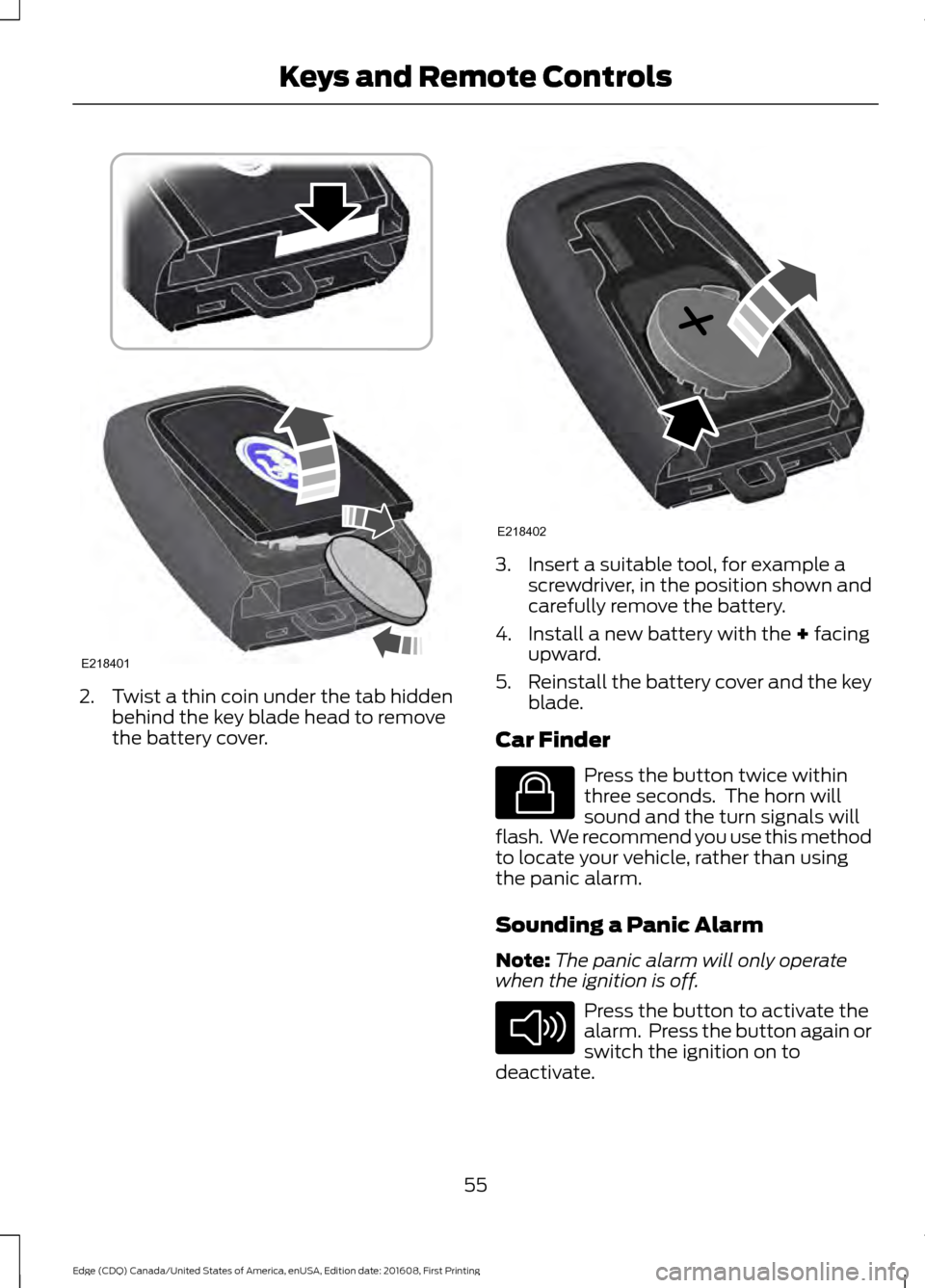
2. Twist a thin coin under the tab hidden
behind the key blade head to remove
the battery cover. 3. Insert a suitable tool, for example a
screwdriver, in the position shown and
carefully remove the battery.
4. Install a new battery with the + facing
upward.
5. Reinstall the battery cover and the key
blade.
Car Finder Press the button twice within
three seconds. The horn will
sound and the turn signals will
flash. We recommend you use this method
to locate your vehicle, rather than using
the panic alarm.
Sounding a Panic Alarm
Note: The panic alarm will only operate
when the ignition is off. Press the button to activate the
alarm. Press the button again or
switch the ignition on to
deactivate.
55
Edge (CDQ) Canada/United States of America, enUSA, Edition date: 201608, First Printing Keys and Remote ControlsE218401 E218402 E138623 E138624
Page 59 of 544
Remote Start
WARNING
To avoid exhaust fumes, do not use
remote start if your vehicle is parked
indoors or in areas that are not well
ventilated. Note:
Do not use remote start if your vehicle
is low on fuel. The remote start button is on the
transmitter.
This feature allows you to start your
vehicle from outside the vehicle. The
transmitter has an extended operating
range.
Vehicles with automatic climate control
can be configured to operate when the
vehicle is remote started. See Climate
Control (page 128). A manual climate
control system will run at the setting it was
set to when you switched the vehicle off.
Many states and provinces have
restrictions for the use of remote start.
Check your local and state or provincial
laws for specific requirements regarding
remote start systems.
The remote start system will not work if:
• the ignition is on
• the alarm system is triggered
• you disable the feature
• the hood is open
• the transmission is not in
P
• the vehicle battery voltage is too low
• the service engine soon light is on.
Remote Control Feedback
An LED on the remote control provides
status feedback of remote start or stop
commands. Status
LED
Remote start orextension
successful
Solid green
Remote stop
successful; engine off
Solid red
Remote start orstop failed
Blinking red
Waiting for statusupdate
Blinking green
Remote Starting the Vehicle
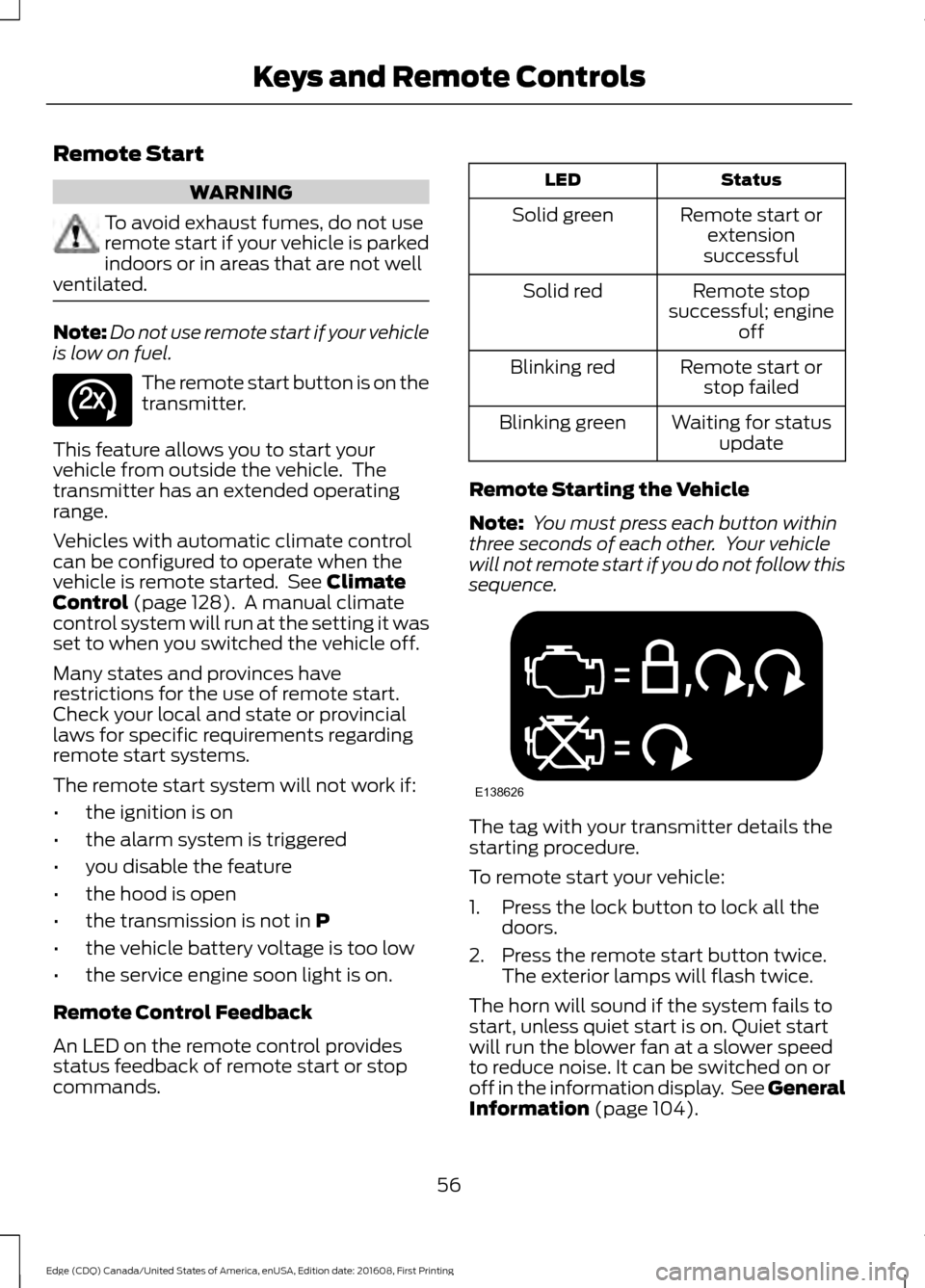
Note: You must press each button within
three seconds of each other. Your vehicle
will not remote start if you do not follow this
sequence. The tag with your transmitter details the
starting procedure.
To remote start your vehicle:
1. Press the lock button to lock all the
doors.
2. Press the remote start button twice. The exterior lamps will flash twice.
The horn will sound if the system fails to
start, unless quiet start is on. Quiet start
will run the blower fan at a slower speed
to reduce noise. It can be switched on or
off in the information display. See General
Information
(page 104).
56
Edge (CDQ) Canada/United States of America, enUSA, Edition date: 201608, First Printing Keys and Remote ControlsE138625 E138626
Page 68 of 544
Locking the Doors
Press the button to lock all
doors. The direction indicators
flash.
Press the button again within three
seconds to confirm that all the doors are
closed. The doors lock again, the horn
sounds and the direction indicators flash
if all the doors and the luggage
compartment are closed.
Note: If the system does not function, use
the key blade to lock and unlock your
vehicle.
Mislock
If any door or the luggage compartment is
open, or if the hood is open on vehicles
with an anti-theft alarm or remote start,
the horn sounds twice and the direction
indicators do not flash. You can switch this
feature on or off in the information display.
See Information Displays (page 104).
Opening the Luggage Compartment Press twice within three seconds
to open the luggage
compartment. Locking and Unlocking the Doors
with the Key Blade
Locking the Doors
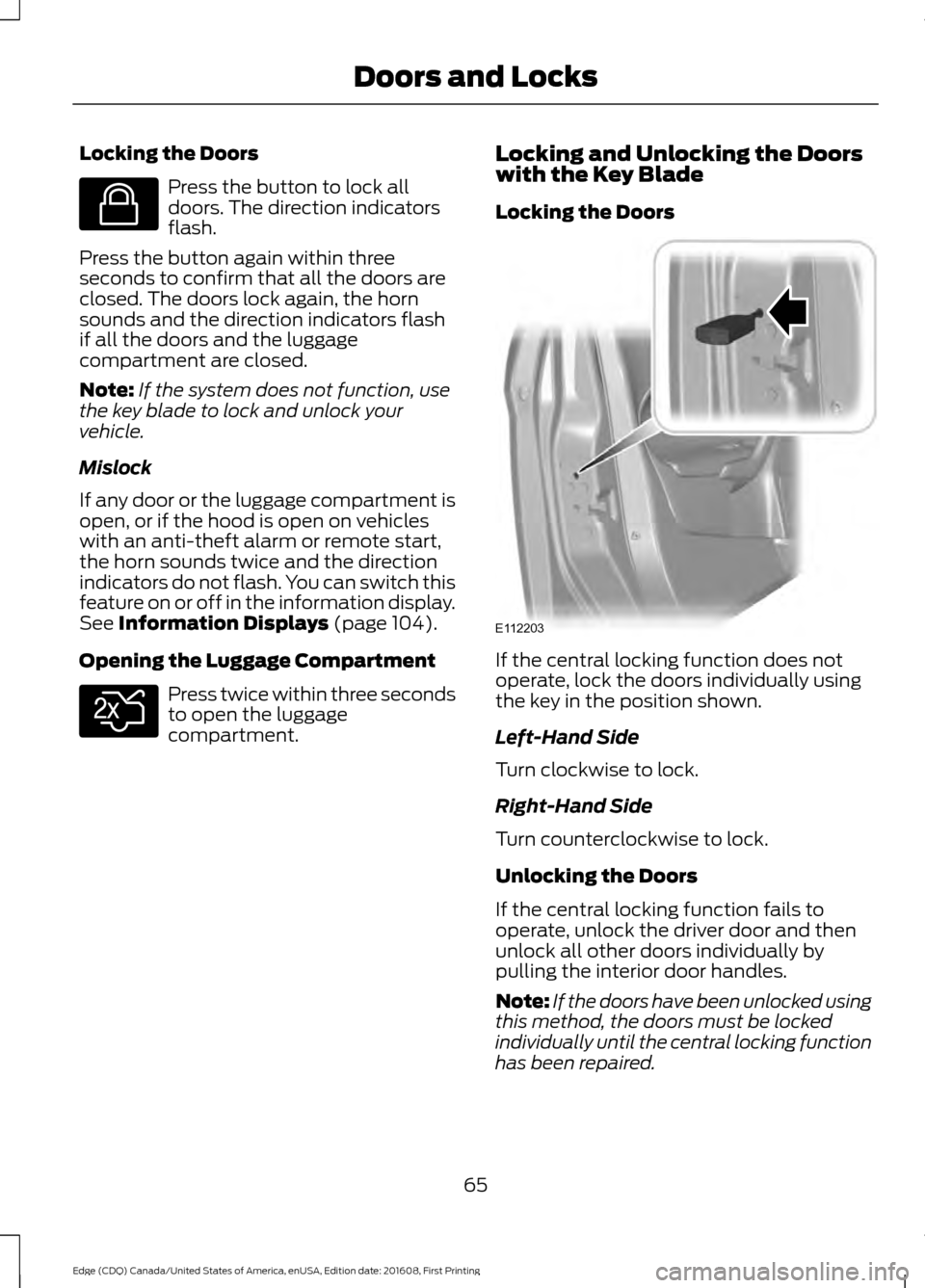
If the central locking function does not
operate, lock the doors individually using
the key in the position shown.
Left-Hand Side
Turn clockwise to lock.
Right-Hand Side
Turn counterclockwise to lock.
Unlocking the Doors
If the central locking function fails to
operate, unlock the driver door and then
unlock all other doors individually by
pulling the interior door handles.
Note:
If the doors have been unlocked using
this method, the doors must be locked
individually until the central locking function
has been repaired.
65
Edge (CDQ) Canada/United States of America, enUSA, Edition date: 201608, First Printing Doors and LocksE138623 E138630 E112203
Page 69 of 544
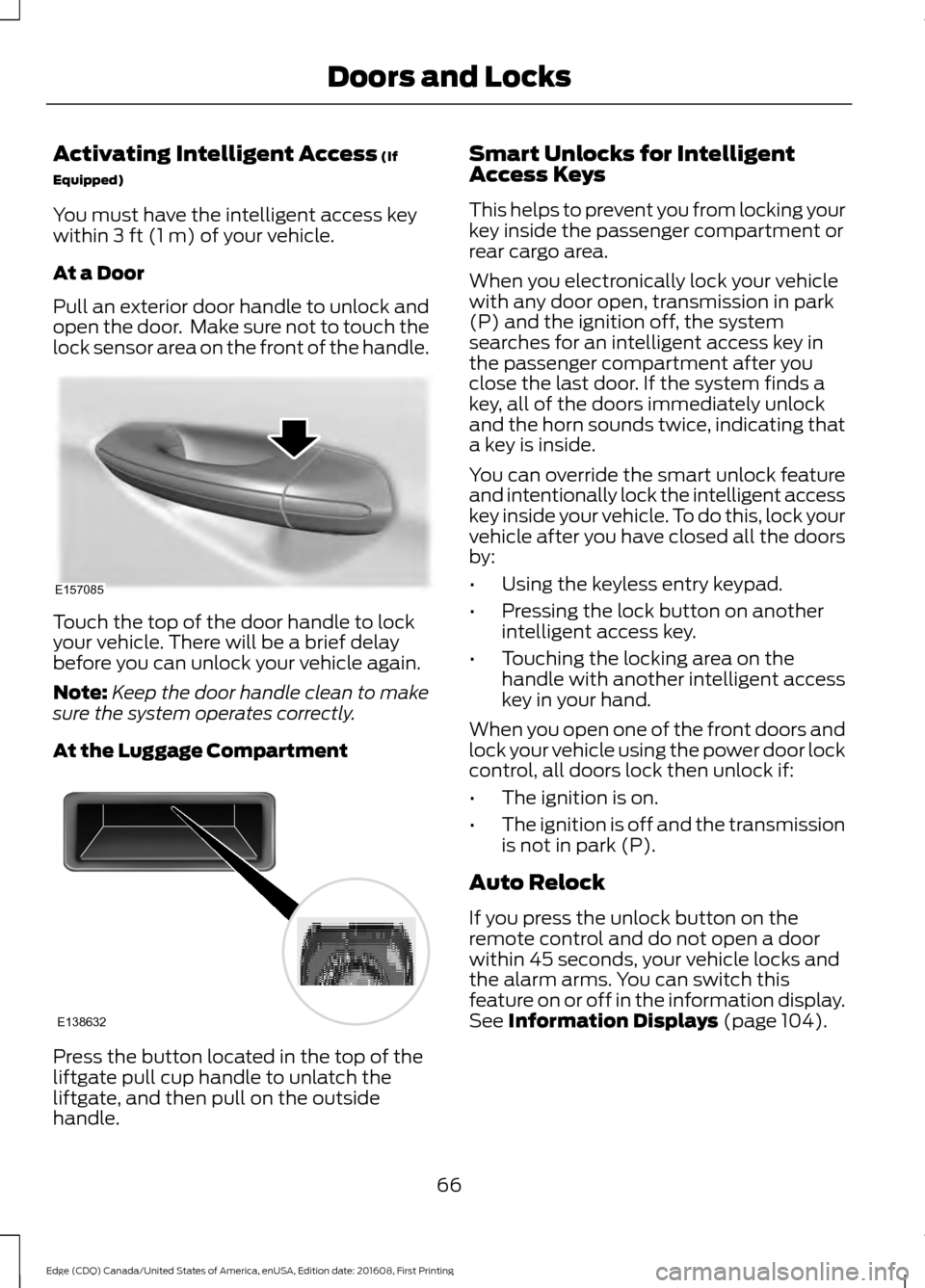
Activating Intelligent Access (If
Equipped)
You must have the intelligent access key
within
3 ft (1 m) of your vehicle.
At a Door
Pull an exterior door handle to unlock and
open the door. Make sure not to touch the
lock sensor area on the front of the handle. Touch the top of the door handle to lock
your vehicle. There will be a brief delay
before you can unlock your vehicle again.
Note:
Keep the door handle clean to make
sure the system operates correctly.
At the Luggage Compartment Press the button located in the top of the
liftgate pull cup handle to unlatch the
liftgate, and then pull on the outside
handle. Smart Unlocks for Intelligent
Access Keys
This helps to prevent you from locking your
key inside the passenger compartment or
rear cargo area.
When you electronically lock your vehicle
with any door open, transmission in park
(P) and the ignition off, the system
searches for an intelligent access key in
the passenger compartment after you
close the last door. If the system finds a
key, all of the doors immediately unlock
and the horn sounds twice, indicating that
a key is inside.
You can override the smart unlock feature
and intentionally lock the intelligent access
key inside your vehicle. To do this, lock your
vehicle after you have closed all the doors
by:
•
Using the keyless entry keypad.
• Pressing the lock button on another
intelligent access key.
• Touching the locking area on the
handle with another intelligent access
key in your hand.
When you open one of the front doors and
lock your vehicle using the power door lock
control, all doors lock then unlock if:
• The ignition is on.
• The ignition is off and the transmission
is not in park (P).
Auto Relock
If you press the unlock button on the
remote control and do not open a door
within 45 seconds, your vehicle locks and
the alarm arms. You can switch this
feature on or off in the information display.
See
Information Displays (page 104).
66
Edge (CDQ) Canada/United States of America, enUSA, Edition date: 201608, First Printing Doors and LocksE157085 E138632
Page 79 of 544
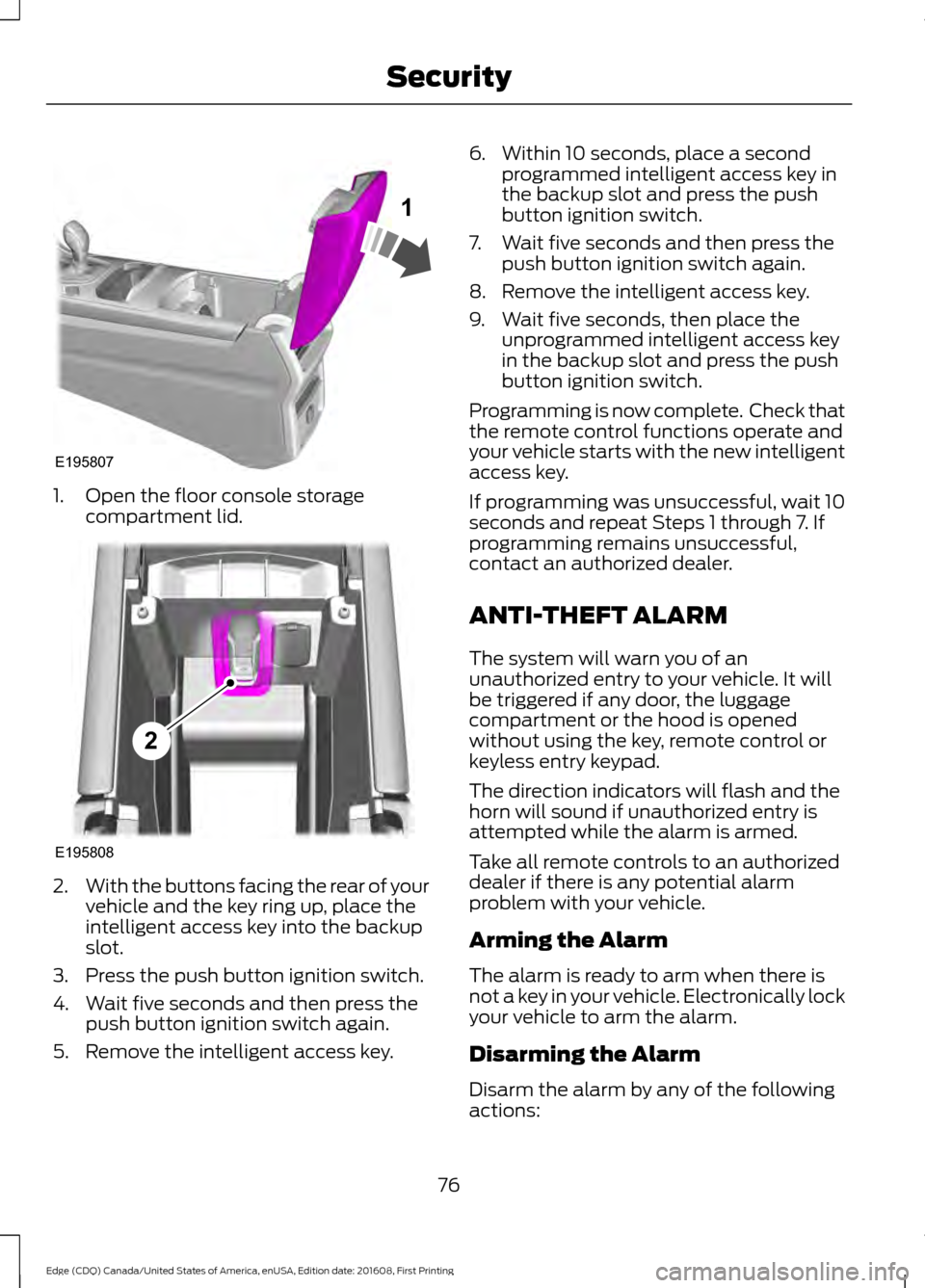
1. Open the floor console storage
compartment lid. 2.
With the buttons facing the rear of your
vehicle and the key ring up, place the
intelligent access key into the backup
slot.
3. Press the push button ignition switch.
4. Wait five seconds and then press the push button ignition switch again.
5. Remove the intelligent access key. 6. Within 10 seconds, place a second
programmed intelligent access key in
the backup slot and press the push
button ignition switch.
7. Wait five seconds and then press the push button ignition switch again.
8. Remove the intelligent access key.
9. Wait five seconds, then place the unprogrammed intelligent access key
in the backup slot and press the push
button ignition switch.
Programming is now complete. Check that
the remote control functions operate and
your vehicle starts with the new intelligent
access key.
If programming was unsuccessful, wait 10
seconds and repeat Steps 1 through 7. If
programming remains unsuccessful,
contact an authorized dealer.
ANTI-THEFT ALARM
The system will warn you of an
unauthorized entry to your vehicle. It will
be triggered if any door, the luggage
compartment or the hood is opened
without using the key, remote control or
keyless entry keypad.
The direction indicators will flash and the
horn will sound if unauthorized entry is
attempted while the alarm is armed.
Take all remote controls to an authorized
dealer if there is any potential alarm
problem with your vehicle.
Arming the Alarm
The alarm is ready to arm when there is
not a key in your vehicle. Electronically lock
your vehicle to arm the alarm.
Disarming the Alarm
Disarm the alarm by any of the following
actions:
76
Edge (CDQ) Canada/United States of America, enUSA, Edition date: 201608, First Printing SecurityE195807
1 E195808
2
Page 80 of 544
•
Unlock the doors or luggage
compartment with the remote control
or keyless entry keypad.
• Switch your vehicle on or start your
vehicle.
• Use a key in the driver door to unlock
your vehicle, then switch your vehicle
on within 12 seconds.
Note: Pressing the panic button on the
remote control will stop the horn and signal
indicators, but will not disarm the system.
77
Edge (CDQ) Canada/United States of America, enUSA, Edition date: 201608, First Printing Security
Page 106 of 544
When you first switch the ignition on,
before engine start, the service engine soon
indicator light illuminates to check the bulb
and to indicate whether your vehicle is
ready for inspection maintenance testing.
Normally, the service engine soon light will
stay on until you crank the engine, and then
turn itself off if no malfunctions are
present. However, if after 15 seconds the
service engine soon light blinks eight times,
it means that your vehicle is not ready for
inspection maintenance testing. See
Emission Control System (page 168).
Stability Control It will flash when the system is
active. If it remains illuminated
or does not illuminate when you
switch the ignition on, this indicates a
malfunction. During a malfunction, the
system will switch off. Have the system
checked by an authorized dealer
immediately. See
Using Stability
Control (page 187).
Stability Control Off It will illuminate when you switch
the system off. It will go out
when you switch the system
back on or when you switch the ignition
off. See
Using Stability Control (page
187).
AUDIBLE WARNINGS AND
INDICATORS
Key in Ignition Warning Chime
Sounds when you open the driver's door
and you have left the key in the ignition. Keyless Warning Alert
(If Equipped)
Sounds the horn twice when you exit your
vehicle with the intelligent access key, after
the last door is closed and your keyless
vehicle is in RUN, indicating your vehicle is
still on.
Headlamps On Warning Chime
Sounds when you remove the key from the
ignition and open the driver's door and you
have left the headlamps or parking lamps
on.
Parking Brake On Warning Chime
Sounds when you have left the parking
brake on and drive your vehicle. If the
warning chime remains on after you have
released the parking brake, have the
system checked by an authorized dealer
immediately.
103
Edge (CDQ) Canada/United States of America, enUSA, Edition date: 201608, First Printing Instrument ClusterE138639 E130458
Page 195 of 544
ACTIVE PARK ASSIST (If Equipped)
Parallel Parking, Perpendicular
Parking, Parallel Park Out Assist
WARNINGS
You must remain in your vehicle
when the system turns on. At all
times, you are responsible for
controlling your vehicle, supervising the
system and intervening, if required. Failure
to take care may result in the loss of
control of your vehicle, serious personal
injury or death. The sensors may not detect objects
in heavy rain or other conditions that
cause interference.
Active park assist does not apply the
brakes under any circumstances.
The system is designed to aid the
driver. It is not intended to replace
your attention and judgment. You are
still responsible to drive with due care and
attention. Note:
The Blind Spot Information System
does not detect traffic alongside or behind
your vehicle during an active park assist
maneuver.
The system detects an available parallel
or perpendicular parking space and
automatically steers your vehicle into the
space (hands-free) while you control the
accelerator, gearshift and brakes. The
system visually and audibly guides you to
park your vehicle.
If you are uncomfortable with the proximity
to any vehicle or object, you may choose
to override the system by grabbing the
steering wheel or pushing the active park
assist button. Parallel Park Out Assist automatically
steers your vehicle out of a parallel parking
space (hands-free) while you control the
accelerator, gearshift and brakes. The
system visually and audibly guides you to
enter traffic.
The system may not correctly operate in
any of the following conditions:
•
You use a spare tire or a tire
significantly worn more than the other
tires.
• One or more tires are improperly
inflated.
• You try to park on a tight curve.
• Something passes between the front
bumper and the parking space (a
pedestrian or cyclist).
• The edge of the neighboring parked
vehicle is high off the ground (for
example, a bus, tow truck or flatbed
truck).
• The weather conditions are poor
(heavy rain, snow, fog, etc).
Note: Keep the sensors, located on the
bumper or fascia, free from snow, ice and
large accumulations of dirt. Covered sensors
can affect the system's accuracy. Do not
clean the sensors with sharp objects.
Note: The sensors may not detect objects
with surfaces that absorb ultrasonic waves
or cause ultrasonic interference (motorcycle
exhaust, truck air brakes or horns).
Do not use the system if:
• You have attached a foreign object (for
example, a bike rack or trailer) close to
the sensors on the front or rear of your
vehicle.
• You have attached an overhanging
object (for example, a surfboard) to
the roof.
192
Edge (CDQ) Canada/United States of America, enUSA, Edition date: 201608, First Printing Parking Aids
Page 242 of 544
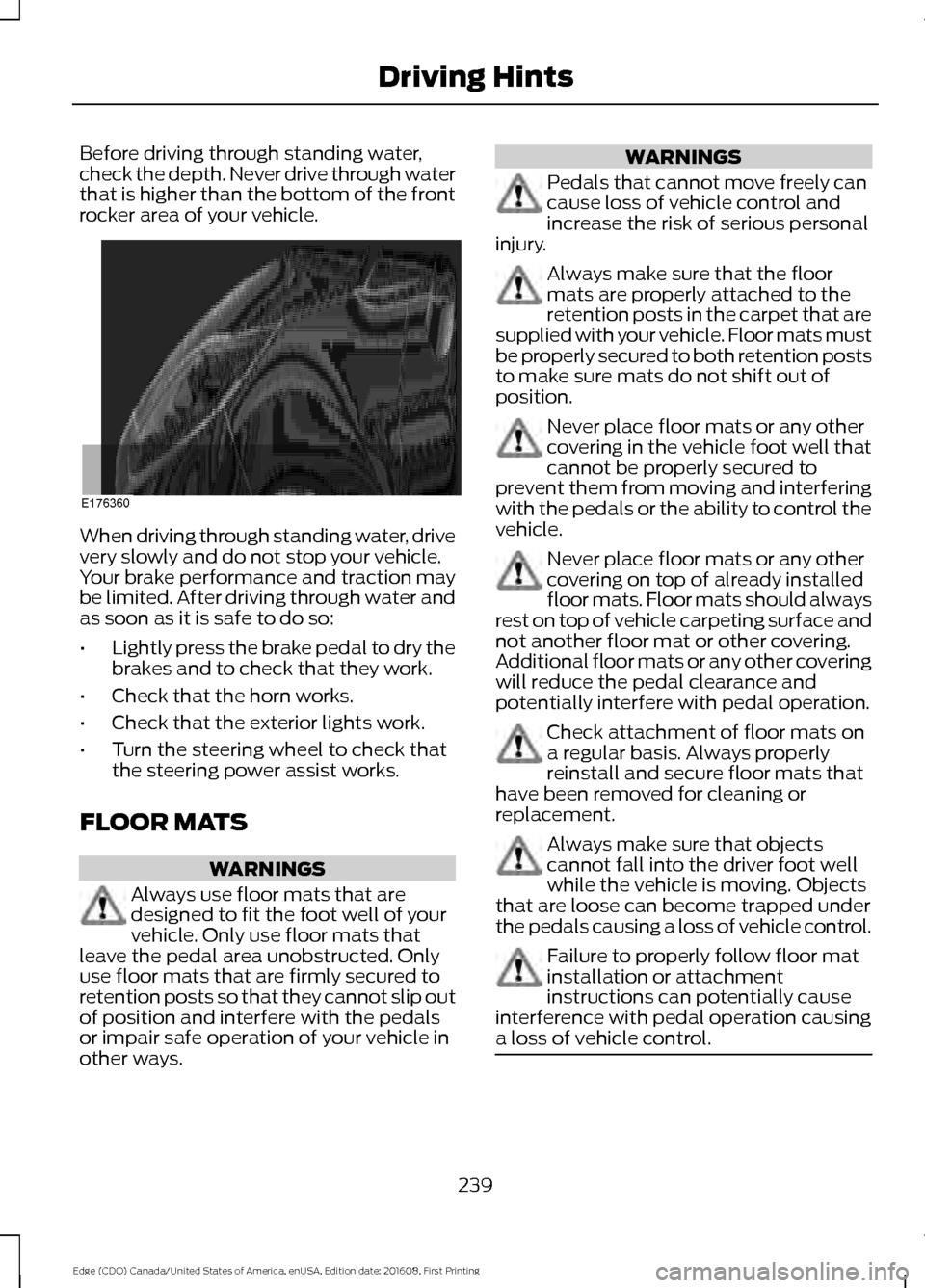
Before driving through standing water,
check the depth. Never drive through water
that is higher than the bottom of the front
rocker area of your vehicle.
When driving through standing water, drive
very slowly and do not stop your vehicle.
Your brake performance and traction may
be limited. After driving through water and
as soon as it is safe to do so:
•
Lightly press the brake pedal to dry the
brakes and to check that they work.
• Check that the horn works.
• Check that the exterior lights work.
• Turn the steering wheel to check that
the steering power assist works.
FLOOR MATS WARNINGS
Always use floor mats that are
designed to fit the foot well of your
vehicle. Only use floor mats that
leave the pedal area unobstructed. Only
use floor mats that are firmly secured to
retention posts so that they cannot slip out
of position and interfere with the pedals
or impair safe operation of your vehicle in
other ways. WARNINGS
Pedals that cannot move freely can
cause loss of vehicle control and
increase the risk of serious personal
injury. Always make sure that the floor
mats are properly attached to the
retention posts in the carpet that are
supplied with your vehicle. Floor mats must
be properly secured to both retention posts
to make sure mats do not shift out of
position. Never place floor mats or any other
covering in the vehicle foot well that
cannot be properly secured to
prevent them from moving and interfering
with the pedals or the ability to control the
vehicle. Never place floor mats or any other
covering on top of already installed
floor mats. Floor mats should always
rest on top of vehicle carpeting surface and
not another floor mat or other covering.
Additional floor mats or any other covering
will reduce the pedal clearance and
potentially interfere with pedal operation. Check attachment of floor mats on
a regular basis. Always properly
reinstall and secure floor mats that
have been removed for cleaning or
replacement. Always make sure that objects
cannot fall into the driver foot well
while the vehicle is moving. Objects
that are loose can become trapped under
the pedals causing a loss of vehicle control. Failure to properly follow floor mat
installation or attachment
instructions can potentially cause
interference with pedal operation causing
a loss of vehicle control. 239
Edge (CDQ) Canada/United States of America, enUSA, Edition date: 201608, First Printing Driving HintsE176360