traction control FORD EDGE 2017 2.G Owners Manual
[x] Cancel search | Manufacturer: FORD, Model Year: 2017, Model line: EDGE, Model: FORD EDGE 2017 2.GPages: 544, PDF Size: 25.27 MB
Page 6 of 544
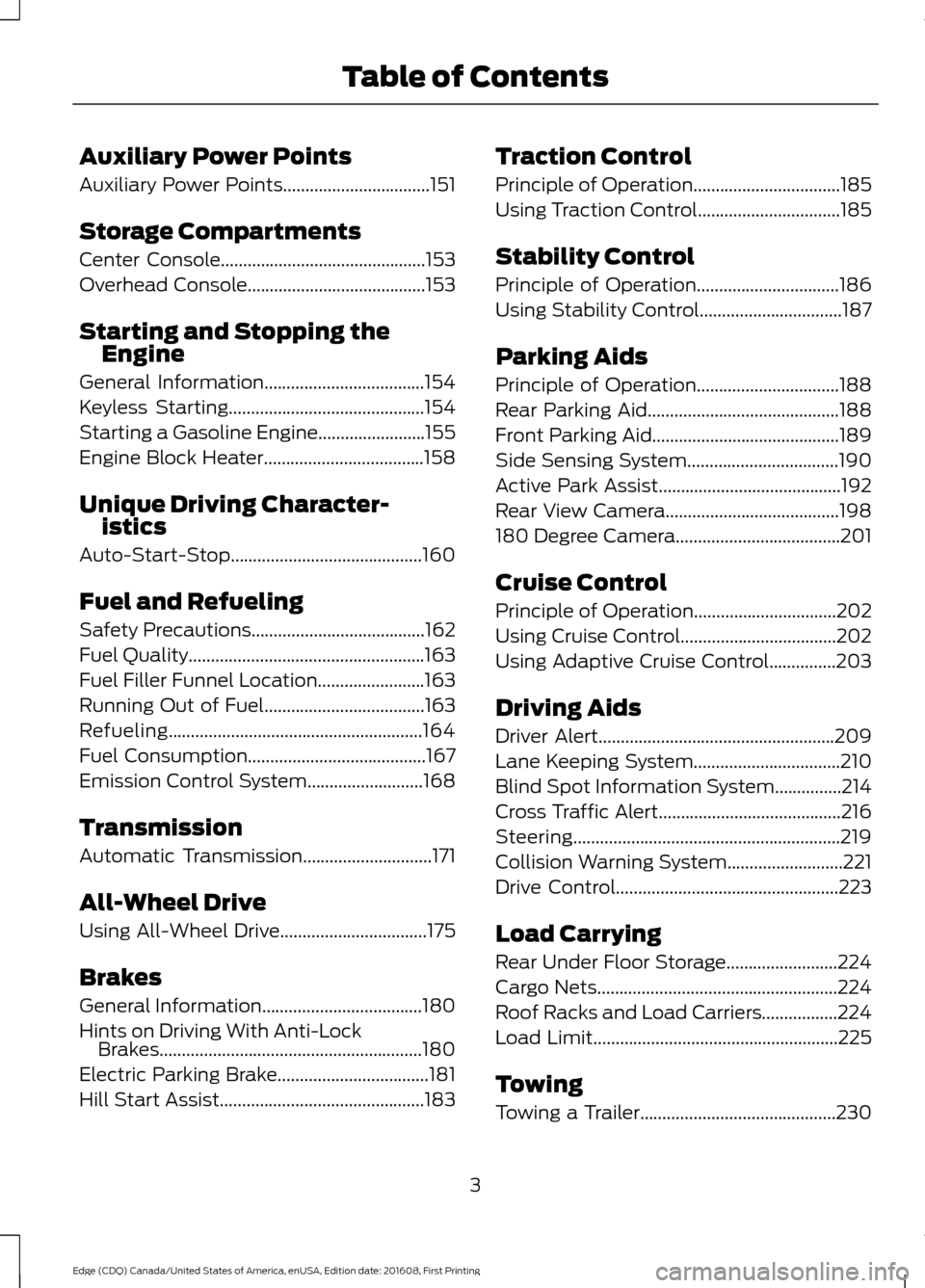
Auxiliary Power Points
Auxiliary Power Points.................................151
Storage Compartments
Center Console..............................................153
Overhead Console........................................153
Starting and Stopping the Engine
General Information....................................154
Keyless Starting
............................................154
Starting a Gasoline Engine
........................155
Engine Block Heater....................................158
Unique Driving Character- istics
Auto-Start-Stop...........................................160
Fuel and Refueling
Safety Precautions
.......................................162
Fuel Quality.....................................................163
Fuel Filler Funnel Location........................163
Running Out of Fuel
....................................163
Refueling.........................................................164
Fuel Consumption
........................................167
Emission Control System..........................168
Transmission
Automatic Transmission
.............................171
All-Wheel Drive
Using All-Wheel Drive
.................................175
Brakes
General Information....................................180
Hints on Driving With Anti-Lock Brakes
...........................................................180
Electric Parking Brake
..................................181
Hill Start Assist..............................................183 Traction Control
Principle of Operation
.................................185
Using Traction Control................................185
Stability Control
Principle of Operation................................186
Using Stability Control
................................187
Parking Aids
Principle of Operation................................188
Rear Parking Aid
...........................................188
Front Parking Aid..........................................189
Side Sensing System..................................190
Active Park Assist.........................................192
Rear View Camera.......................................198
180 Degree Camera.....................................201
Cruise Control
Principle of Operation
................................202
Using Cruise Control...................................202
Using Adaptive Cruise Control...............203
Driving Aids
Driver Alert
.....................................................209
Lane Keeping System.................................210
Blind Spot Information System
...............214
Cross Traffic Alert.........................................216
Steering............................................................219
Collision Warning System..........................221
Drive Control
..................................................223
Load Carrying
Rear Under Floor Storage.........................224
Cargo Nets......................................................224
Roof Racks and Load Carriers.................224
Load Limit
.......................................................225
Towing
Towing a Trailer
............................................230
3
Edge (CDQ) Canada/United States of America, enUSA, Edition date: 201608, First Printing Table of Contents
Page 62 of 544
•
Various vehicle speed minders can be
set. Once you select a speed, it will be
shown in the display, followed by an
audible tone when the preselected
vehicle speed is exceeded.
• Audio system maximum volume of
45%. A message will be shown in the
display when you attempt to exceed
the limited volume. Also, the
speed-sensitive or compensated
automatic volume control will be
disabled.
• Always on setting. When this is
selected, you will not be able to switch
off AdvanceTrac ™ or traction control,
911 Assist or Emergency Assistance, or
the do not disturb feature (if your
vehicle is equipped with these
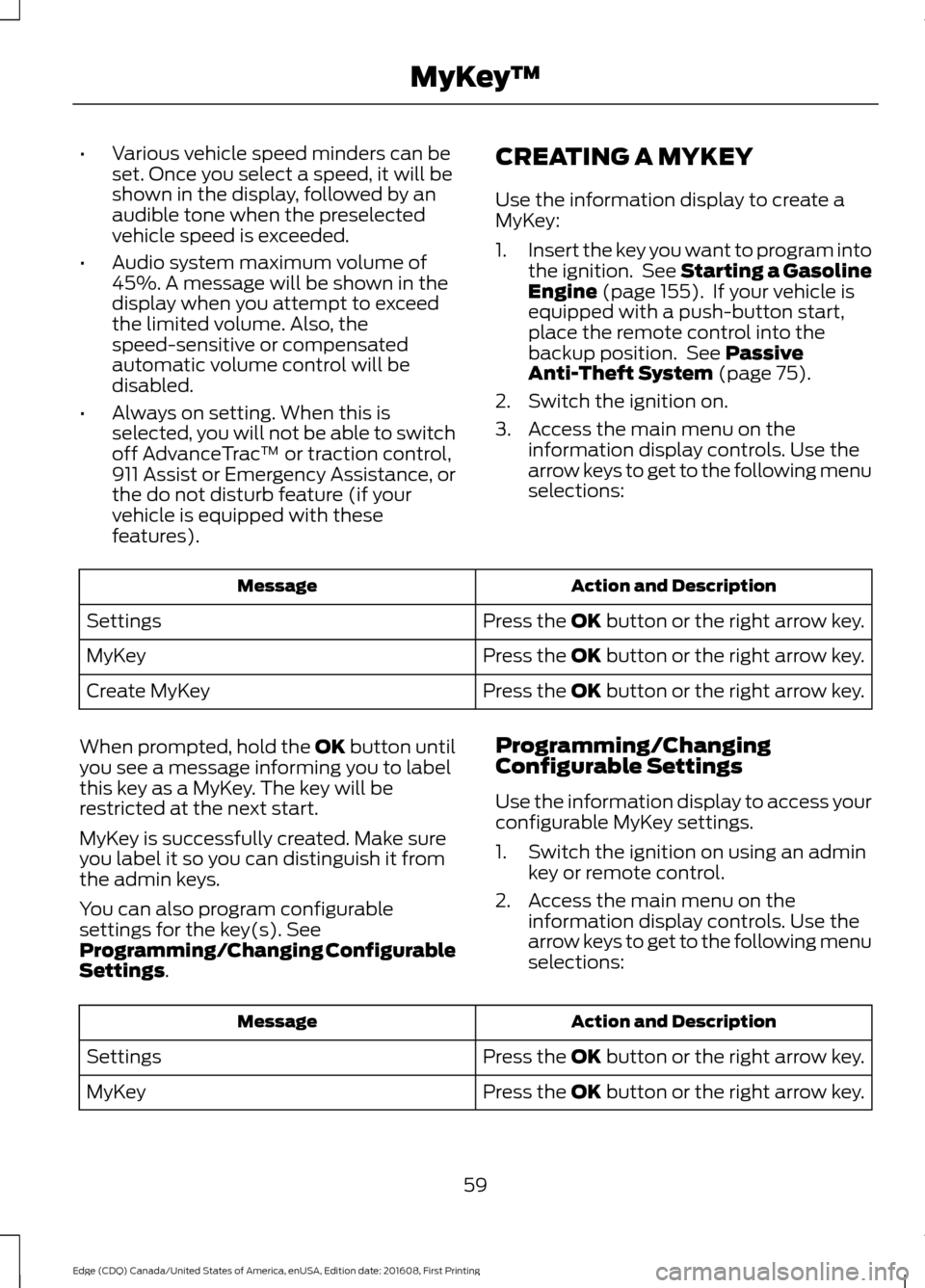
features). CREATING A MYKEY
Use the information display to create a
MyKey:
1.
Insert the key you want to program into
the ignition. See Starting a Gasoline
Engine (page 155). If your vehicle is
equipped with a push-button start,
place the remote control into the
backup position. See
Passive
Anti-Theft System (page 75).
2. Switch the ignition on.
3. Access the main menu on the information display controls. Use the
arrow keys to get to the following menu
selections: Action and Description
Message
Press the OK button or the right arrow key.
Settings
Press the OK button or the right arrow key.
MyKey
Press the OK button or the right arrow key.
Create MyKey
When prompted, hold the OK button until
you see a message informing you to label
this key as a MyKey. The key will be
restricted at the next start.
MyKey is successfully created. Make sure
you label it so you can distinguish it from
the admin keys.
You can also program configurable
settings for the key(s). See
Programming/Changing Configurable
Settings
. Programming/Changing
Configurable Settings
Use the information display to access your
configurable MyKey settings.
1. Switch the ignition on using an admin
key or remote control.
2. Access the main menu on the information display controls. Use the
arrow keys to get to the following menu
selections: Action and Description
Message
Press the OK button or the right arrow key.
Settings
Press the OK button or the right arrow key.
MyKey
59
Edge (CDQ) Canada/United States of America, enUSA, Edition date: 201608, First Printing MyKey
™
Page 109 of 544
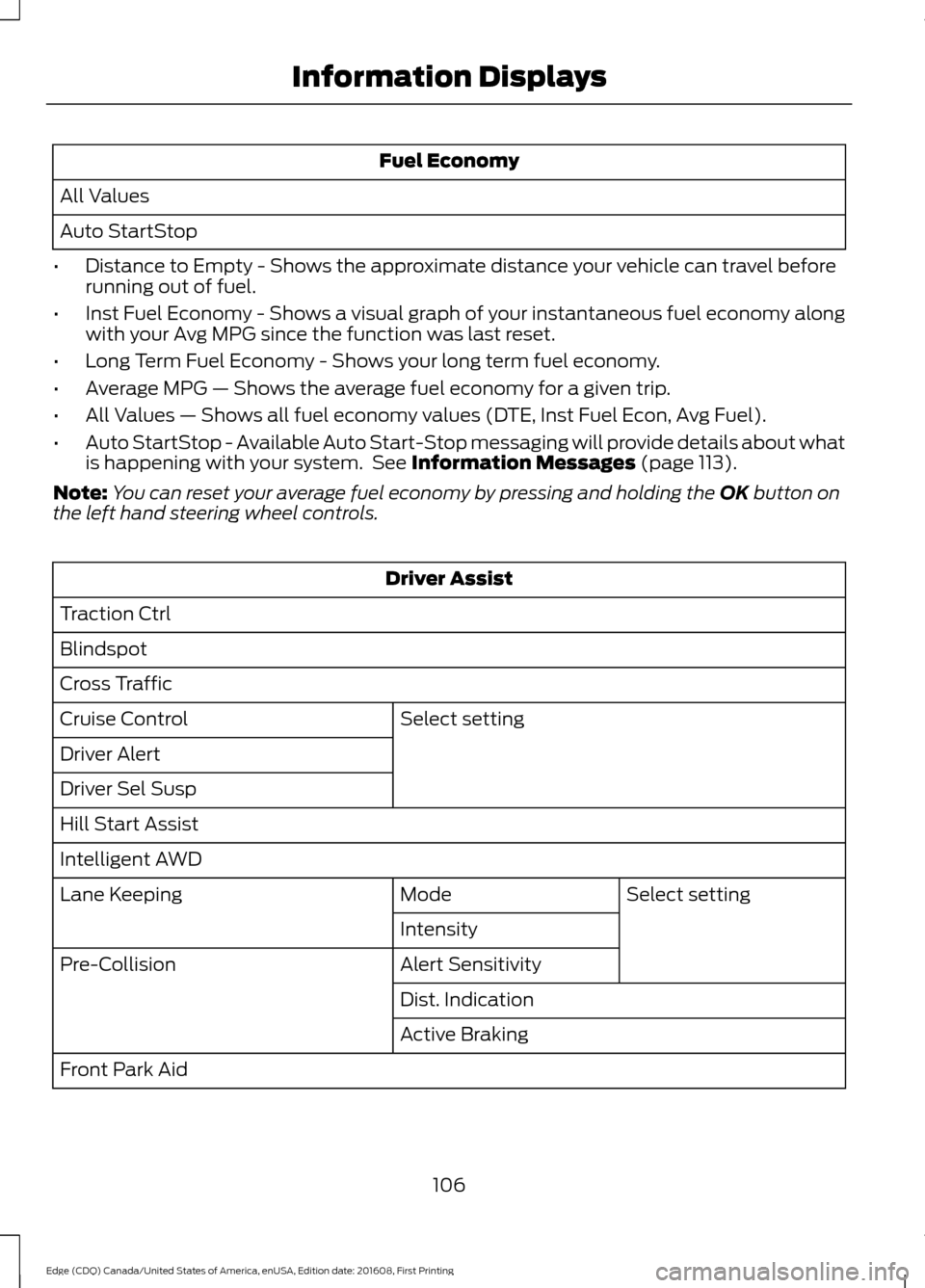
Fuel Economy
All Values
Auto StartStop
• Distance to Empty - Shows the approximate distance your vehicle can travel before
running out of fuel.
• Inst Fuel Economy - Shows a visual graph of your instantaneous fuel economy along
with your Avg MPG since the function was last reset.
• Long Term Fuel Economy - Shows your long term fuel economy.
• Average MPG — Shows the average fuel economy for a given trip.
• All Values — Shows all fuel economy values (DTE, Inst Fuel Econ, Avg Fuel).
• Auto StartStop - Available Auto Start-Stop messaging will provide details about what
is happening with your system. See Information Messages (page 113).
Note: You can reset your average fuel economy by pressing and holding the
OK button on
the left hand steering wheel controls. Driver Assist
Traction Ctrl
Blindspot
Cross Traffic Select setting
Cruise Control
Driver Alert
Driver Sel Susp
Hill Start Assist
Intelligent AWD
Select setting
Mode
Lane Keeping
Intensity
Alert Sensitivity
Pre-Collision
Dist. Indication
Active Braking
Front Park Aid
106
Edge (CDQ) Canada/United States of America, enUSA, Edition date: 201608, First Printing Information Displays
Page 114 of 544
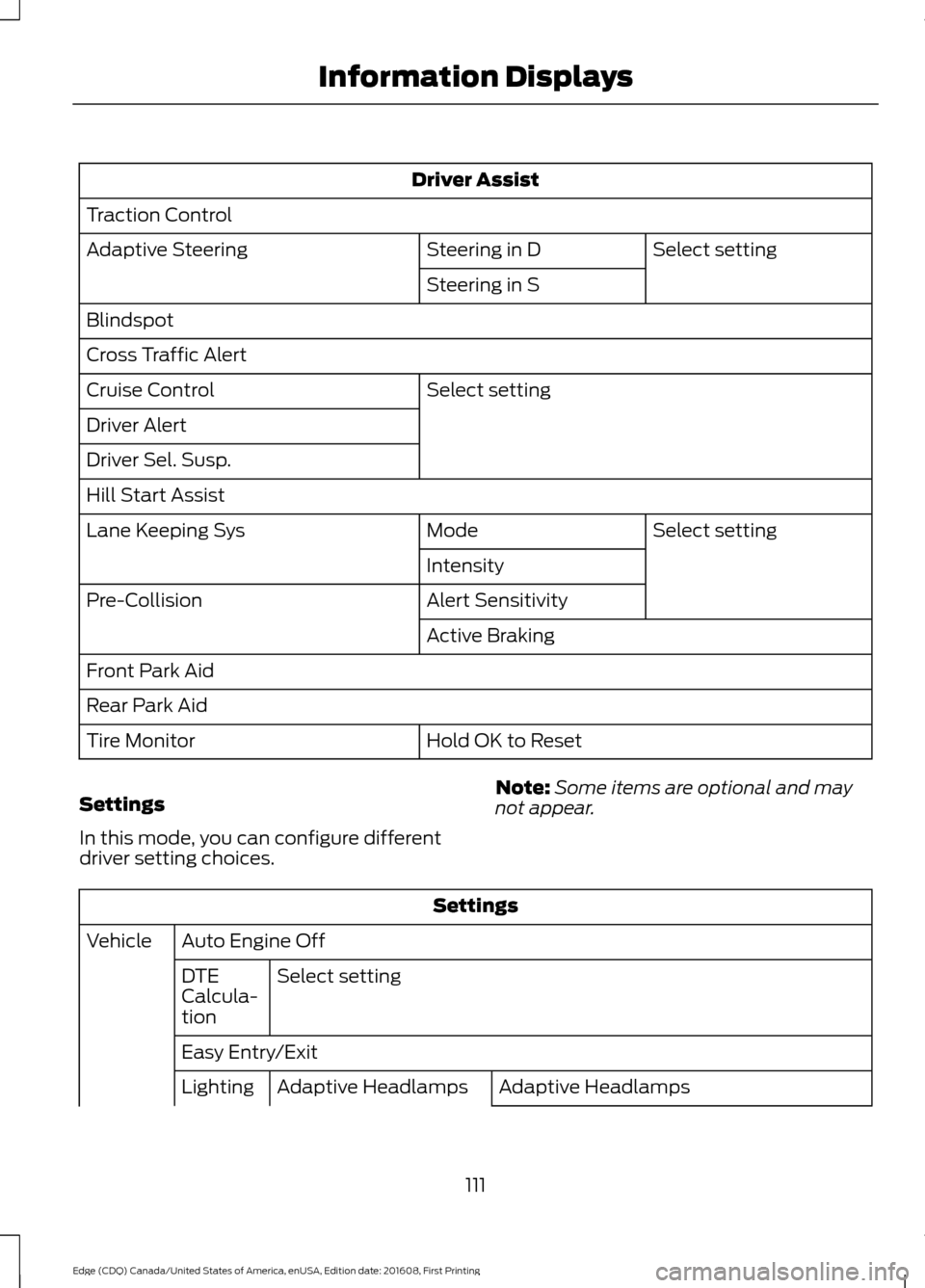
Driver Assist
Traction Control Select setting
Steering in D
Adaptive Steering
Steering in S
Blindspot
Cross Traffic Alert Select setting
Cruise Control
Driver Alert
Driver Sel. Susp.
Hill Start Assist
Select setting
Mode
Lane Keeping Sys
Intensity
Alert Sensitivity
Pre-Collision
Active Braking
Front Park Aid
Rear Park Aid Hold OK to Reset
Tire Monitor
Settings
In this mode, you can configure different
driver setting choices. Note:
Some items are optional and may
not appear. Settings
Auto Engine Off
Vehicle
Select setting
DTE
Calcula-
tion
Easy Entry/Exit
Adaptive Headlamps
Adaptive Headlamps
Lighting
111
Edge (CDQ) Canada/United States of America, enUSA, Edition date: 201608, First Printing Information Displays
Page 122 of 544
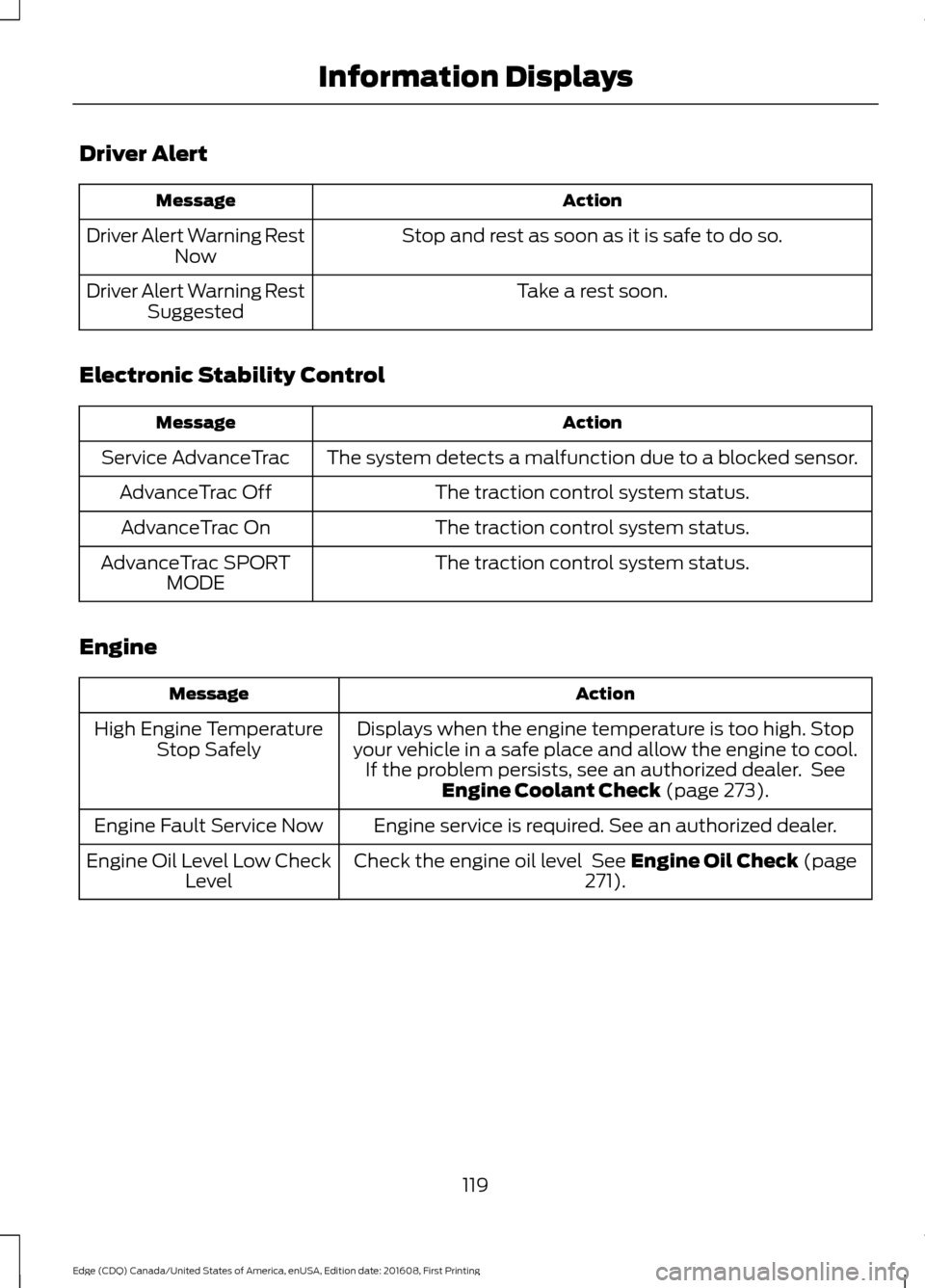
Driver Alert
Action
Message
Stop and rest as soon as it is safe to do so.
Driver Alert Warning Rest
Now
Take a rest soon.
Driver Alert Warning Rest
Suggested
Electronic Stability Control Action
Message
The system detects a malfunction due to a blocked sensor.
Service AdvanceTrac
The traction control system status.
AdvanceTrac Off
The traction control system status.
AdvanceTrac On
The traction control system status.
AdvanceTrac SPORT
MODE
Engine Action
Message
Displays when the engine temperature is too high. Stop
your vehicle in a safe place and allow the engine to cool. If the problem persists, see an authorized dealer. See Engine Coolant Check (page 273).
High Engine Temperature
Stop Safely
Engine service is required. See an authorized dealer.
Engine Fault Service Now
Check the engine oil level
See Engine Oil Check (page
271).
Engine Oil Level Low Check
Level
119
Edge (CDQ) Canada/United States of America, enUSA, Edition date: 201608, First Printing Information Displays
Page 126 of 544
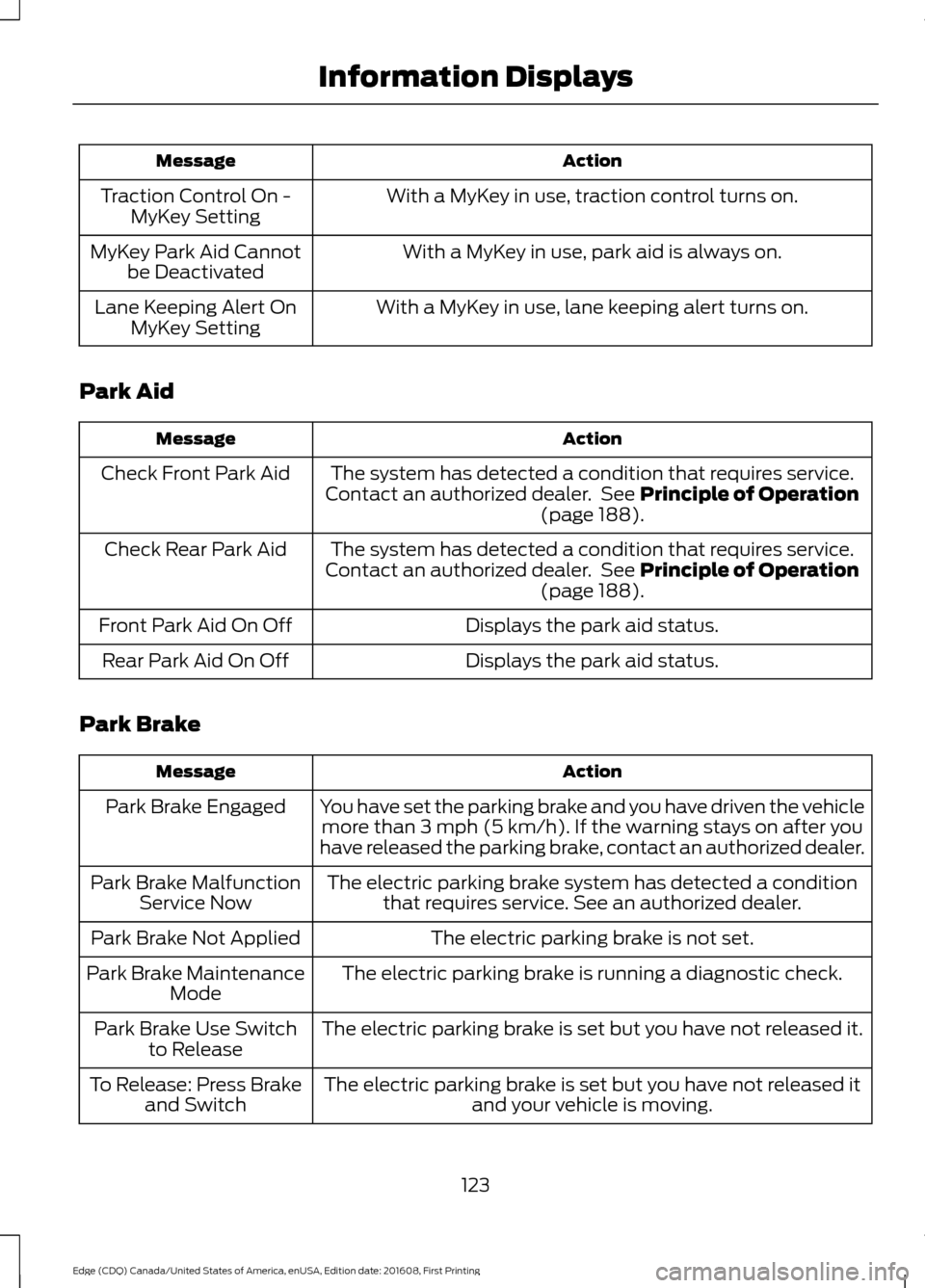
Action
Message
With a MyKey in use, traction control turns on.
Traction Control On -
MyKey Setting
With a MyKey in use, park aid is always on.
MyKey Park Aid Cannot
be Deactivated
With a MyKey in use, lane keeping alert turns on.
Lane Keeping Alert On
MyKey Setting
Park Aid Action
Message
The system has detected a condition that requires service.
Contact an authorized dealer. See Principle of Operation
(page 188).
Check Front Park Aid
The system has detected a condition that requires service.
Contact an authorized dealer. See
Principle of Operation
(page 188).
Check Rear Park Aid
Displays the park aid status.
Front Park Aid On Off
Displays the park aid status.
Rear Park Aid On Off
Park Brake Action
Message
You have set the parking brake and you have driven the vehiclemore than
3 mph (5 km/h). If the warning stays on after you
have released the parking brake, contact an authorized dealer.
Park Brake Engaged
The electric parking brake system has detected a conditionthat requires service. See an authorized dealer.
Park Brake Malfunction
Service Now
The electric parking brake is not set.
Park Brake Not Applied
The electric parking brake is running a diagnostic check.
Park Brake Maintenance
Mode
The electric parking brake is set but you have not released it.
Park Brake Use Switch
to Release
The electric parking brake is set but you have not released itand your vehicle is moving.
To Release: Press Brake
and Switch
123
Edge (CDQ) Canada/United States of America, enUSA, Edition date: 201608, First Printing Information Displays
Page 129 of 544
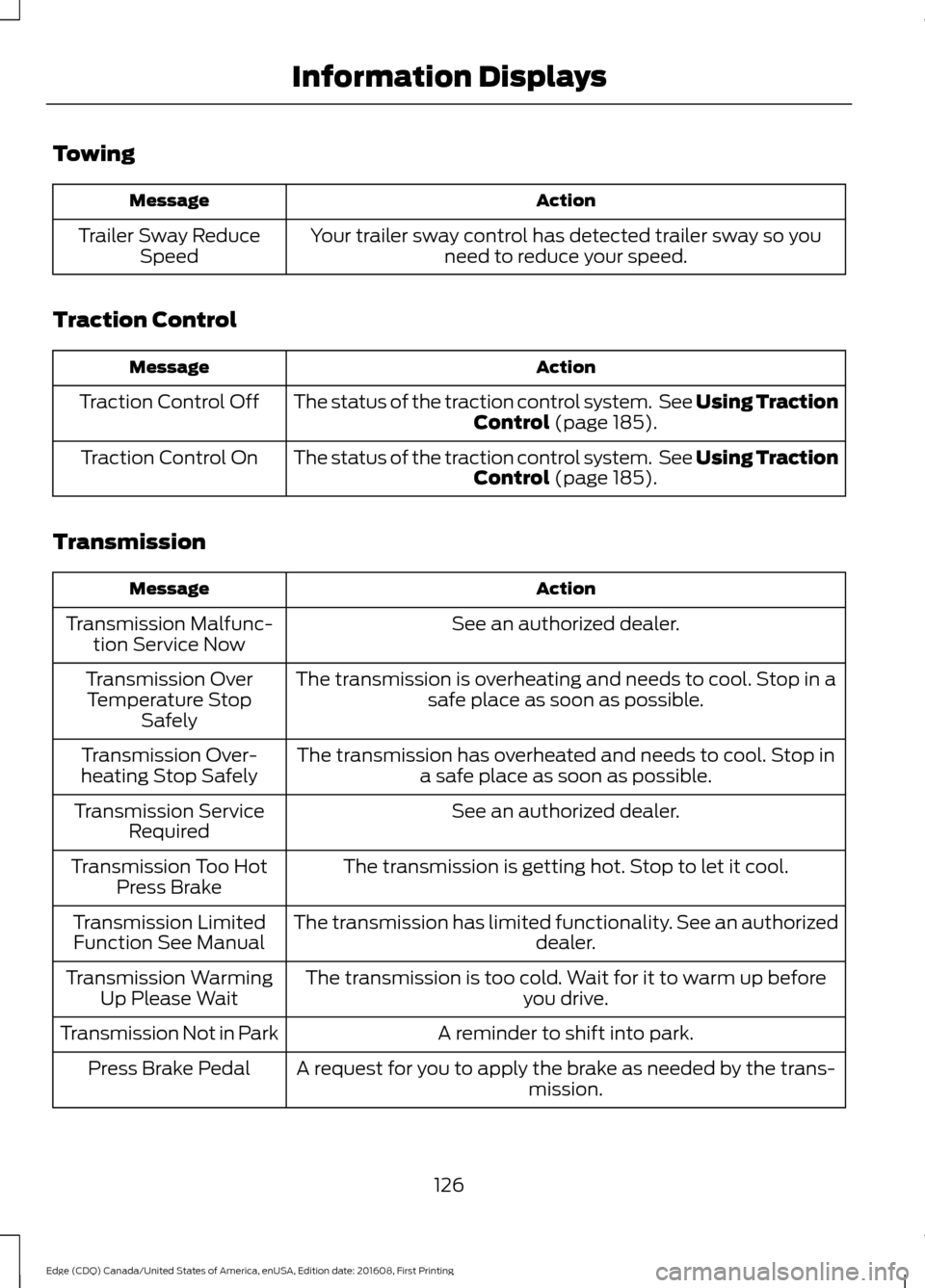
Towing
Action
Message
Your trailer sway control has detected trailer sway so youneed to reduce your speed.
Trailer Sway Reduce
Speed
Traction Control Action
Message
The status of the traction control system. See Using Traction
Control (page 185).
Traction Control Off
The status of the traction control system. See
Using Traction
Control (page 185).
Traction Control On
Transmission Action
Message
See an authorized dealer.
Transmission Malfunc-
tion Service Now
The transmission is overheating and needs to cool. Stop in asafe place as soon as possible.
Transmission Over
Temperature Stop Safely
The transmission has overheated and needs to cool. Stop ina safe place as soon as possible.
Transmission Over-
heating Stop Safely
See an authorized dealer.
Transmission Service
Required
The transmission is getting hot. Stop to let it cool.
Transmission Too Hot
Press Brake
The transmission has limited functionality. See an authorized dealer.
Transmission Limited
Function See Manual
The transmission is too cold. Wait for it to warm up beforeyou drive.
Transmission Warming
Up Please Wait
A reminder to shift into park.
Transmission Not in Park
A request for you to apply the brake as needed by the trans-mission.
Press Brake Pedal
126
Edge (CDQ) Canada/United States of America, enUSA, Edition date: 201608, First Printing Information Displays
Page 180 of 544
Sand
When driving over sand, try to keep all four
wheels on the most solid area of the trail.
Avoid reducing the tire pressures but shift
to a lower gear and drive steadily through
the terrain. Apply the accelerator slowly
and avoid spinning the wheels.
Do not drive your AWD vehicle in deep
sand. This will cause the AWD system to
overheat. After the system has cooled
down, normal AWD function will return.
Under severe operating conditions, the A/C
may cycle on and off to protect
overheating of the engine.
Avoid excessive speed because vehicle
momentum can work against you and
cause the vehicle to become stuck to the
point that assistance may be required from
another vehicle. Remember, you may be
able to back out the way you came if you
proceed with caution.
Mud and Water
If you must drive through high water, drive
slowly. Traction or brake capability may
be limited.
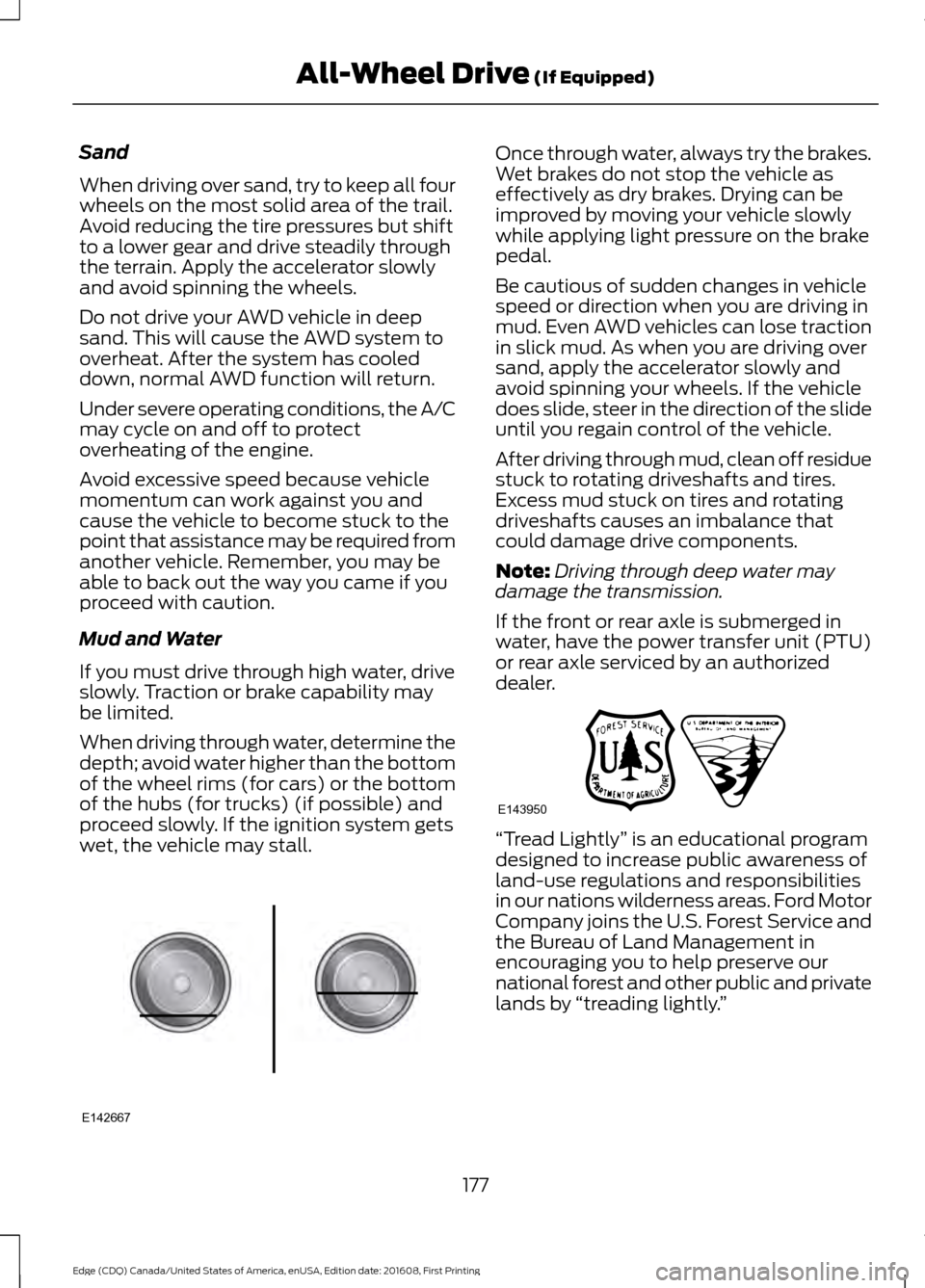
When driving through water, determine the
depth; avoid water higher than the bottom
of the wheel rims (for cars) or the bottom
of the hubs (for trucks) (if possible) and
proceed slowly. If the ignition system gets
wet, the vehicle may stall.
Once through water, always try the brakes.
Wet brakes do not stop the vehicle as
effectively as dry brakes. Drying can be
improved by moving your vehicle slowly
while applying light pressure on the brake
pedal.
Be cautious of sudden changes in vehicle
speed or direction when you are driving in
mud. Even AWD vehicles can lose traction
in slick mud. As when you are driving over
sand, apply the accelerator slowly and
avoid spinning your wheels. If the vehicle
does slide, steer in the direction of the slide
until you regain control of the vehicle.
After driving through mud, clean off residue
stuck to rotating driveshafts and tires.
Excess mud stuck on tires and rotating
driveshafts causes an imbalance that
could damage drive components.
Note:
Driving through deep water may
damage the transmission.
If the front or rear axle is submerged in
water, have the power transfer unit (PTU)
or rear axle serviced by an authorized
dealer. “Tread Lightly
” is an educational program
designed to increase public awareness of
land-use regulations and responsibilities
in our nations wilderness areas. Ford Motor
Company joins the U.S. Forest Service and
the Bureau of Land Management in
encouraging you to help preserve our
national forest and other public and private
lands by “treading lightly. ”
177
Edge (CDQ) Canada/United States of America, enUSA, Edition date: 201608, First Printing All-Wheel Drive (If Equipped)E142667 E143950
Page 181 of 544
Driving on Hilly or Sloping Terrain
Note:
Avoid driving crosswise or turning on
steep slopes or hills. A danger lies in losing
traction, slipping sideways and possibly
rolling over. Whenever driving on a hill,
determine beforehand the route you will
use. Do not drive over the crest of a hill
without seeing what conditions are on the
other side. Do not drive in reverse over a hill
without the aid of an observer.
Although natural obstacles may make it
necessary to travel diagonally up or down
a hill or steep incline, you should always
try to drive straight up or straight down.
When climbing a steep slope or hill, start
in a lower gear rather than downshifting to
a lower gear from a higher gear once the
ascent has started. This reduces strain on
the engine and the possibility of stalling.
If you do stall out, do not try to turnaround
because you might roll over. It is better to
back down to a safe location.
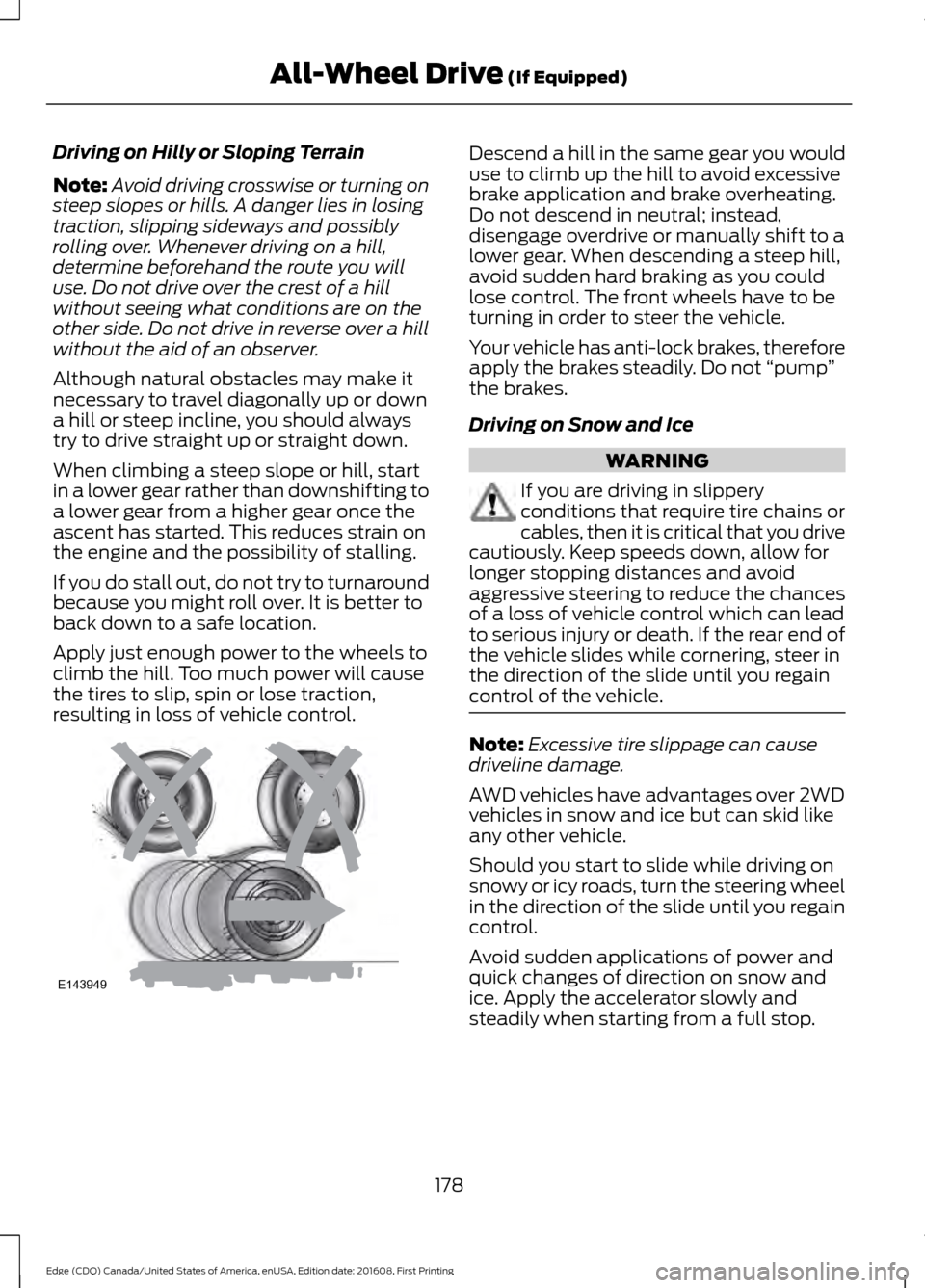
Apply just enough power to the wheels to
climb the hill. Too much power will cause
the tires to slip, spin or lose traction,
resulting in loss of vehicle control. Descend a hill in the same gear you would
use to climb up the hill to avoid excessive
brake application and brake overheating.
Do not descend in neutral; instead,
disengage overdrive or manually shift to a
lower gear. When descending a steep hill,
avoid sudden hard braking as you could
lose control. The front wheels have to be
turning in order to steer the vehicle.
Your vehicle has anti-lock brakes, therefore
apply the brakes steadily. Do not
“pump”
the brakes.
Driving on Snow and Ice WARNING
If you are driving in slippery
conditions that require tire chains or
cables, then it is critical that you drive
cautiously. Keep speeds down, allow for
longer stopping distances and avoid
aggressive steering to reduce the chances
of a loss of vehicle control which can lead
to serious injury or death. If the rear end of
the vehicle slides while cornering, steer in
the direction of the slide until you regain
control of the vehicle. Note:
Excessive tire slippage can cause
driveline damage.
AWD vehicles have advantages over 2WD
vehicles in snow and ice but can skid like
any other vehicle.
Should you start to slide while driving on
snowy or icy roads, turn the steering wheel
in the direction of the slide until you regain
control.
Avoid sudden applications of power and
quick changes of direction on snow and
ice. Apply the accelerator slowly and
steadily when starting from a full stop.
178
Edge (CDQ) Canada/United States of America, enUSA, Edition date: 201608, First Printing All-Wheel Drive (If Equipped)E143949
Page 188 of 544
PRINCIPLE OF OPERATION
The traction control system helps avoid
drive wheel spin and loss of traction.
If your vehicle begins to slide, the system
applies the brakes to individual wheels
and, when needed, reduces engine power
at the same time. If the wheels spin when
accelerating on slippery or loose surfaces,
the system reduces engine power in order
to increase traction.
USING TRACTION CONTROL
WARNING
The stability and traction control
light illuminates steadily if the
system detects a failure. Make sure
you did not manually disable the traction
control system using the information
display controls or the switch. If the
stability control and traction control light
is still illuminating steadily, have the
system serviced by an authorized dealer
immediately. Operating your vehicle with
the traction control disabled could lead to
an increased risk of loss of vehicle control,
vehicle rollover, personal injury and death. The system automatically turns on each
time you switch the ignition on.
If your vehicle is stuck in mud or snow,
switching traction control off may be
beneficial as this allows the wheels to spin.
Note:
When you switch traction control off,
stability control remains fully active.
Switching the System Off
When you switch the system off or on, a
message appears in the information
display showing system status.
You can switch the system off by either
using the information display controls or
the switch. Using the Information Display
Controls
You can switch this feature off or on in the
information display. See General
Information (page 104).
Using a Switch
(If Equipped)
Use the traction control switch on the
instrument panel to switch the system off
or on.
System Indicator Lights and
Messages The stability and traction control
light:
• Temporarily illuminates on engine
start-up.
• Flashes when a driving condition
activates either of the systems.
• Illuminates if a problem occurs in either
of the systems. The stability and traction control
off light temporarily illuminates
on engine start-up and stays on
when you switch the traction control
system off.
185
Edge (CDQ) Canada/United States of America, enUSA, Edition date: 201608, First Printing Traction ControlE138639 E130458