air conditioning FORD EDGE 2018 User Guide
[x] Cancel search | Manufacturer: FORD, Model Year: 2018, Model line: EDGE, Model: FORD EDGE 2018Pages: 557, PDF Size: 7.02 MB
Page 286 of 557
4. Check the coolant level. If the coolant
level is at or below the minimum mark,
add prediluted coolant immediately.
5. When the engine temperature cools, you can re-start the engine. Have your
vehicle checked as soon as possible to
minimize engine damage.
Note: Driving your vehicle without repair
increases the chance of engine damage.
Engine Coolant Temperature
Management (If Equipped) WARNING:
To reduce the risk of
crash and injury, be prepared that the
vehicle speed may reduce and the vehicle
may not be able to accelerate with full
power until the coolant temperature
reduces.
If you tow a trailer with your vehicle, the
engine may temporarily reach a higher
temperature during severe operating
conditions, for example ascending a long
or steep grade in high ambient
temperatures.
At this time, you may notice the coolant
temperature gauge moves toward the red
zone and a message may appear in the
information display.
You may notice a reduction in vehicle
speed caused by reduced engine power in
order to manage the engine coolant
temperature. Your vehicle may enter this
mode if certain high-temperature and
high-load conditions take place. The
amount of speed reduction depends on
vehicle loading, grade and ambient
temperature. If this occurs, there is no
need to stop your vehicle. You can
continue to drive. The air conditioning may automatically
turn on and off during severe operating
conditions to protect the engine from
overheating. When the coolant
temperature decreases to the normal
operating temperature, the air conditioning
turns on.
If the coolant temperature gauge moves
fully into the red zone, or if the coolant
temperature warning or service engine
soon messages appear in your information
display, do the following:
1. Stop your vehicle as soon as it is safe
to do so. Fully apply the parking brake,
shift into park (P) or neutral (N).
2. Leave the engine running until the coolant temperature gauge needle
returns to the normal position. If the
temperature does not drop after
several minutes, follow the remaining
steps.
3. Switch the engine off and wait for it to
cool. Check the coolant level.
4. If the coolant level is at or below the minimum mark, add prediluted coolant
immediately.
5. If the coolant level is normal, restart the engine and continue.
AUTOMATIC TRANSMISSION
FLUID CHECK - 2.0L
ECOBOOST™
Note: Transmission fluid should be checked
by an authorized dealer. If required, fluid
should be added by an authorized dealer.
283
Edge (CDQ) Canada/United States of America, enUSA, Edition date: 201706, Third-Printing- Maintenance
Page 350 of 557
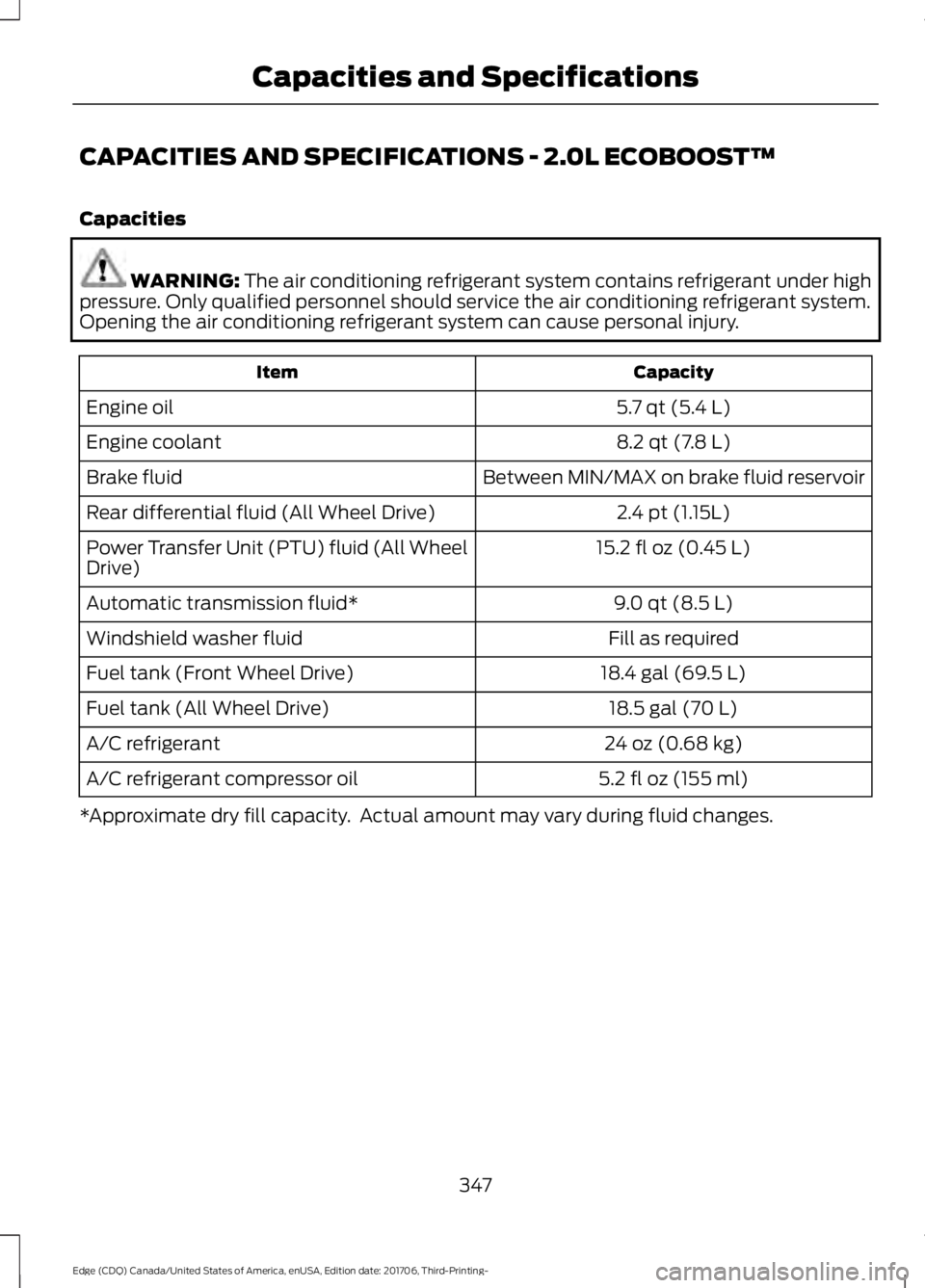
CAPACITIES AND SPECIFICATIONS - 2.0L ECOBOOST™
Capacities
WARNING: The air conditioning refrigerant system contains refrigerant under high
pressure. Only qualified personnel should service the air conditioning refrigerant system.
Opening the air conditioning refrigerant system can cause personal injury. Capacity
Item
5.7 qt (5.4 L)
Engine oil
8.2 qt (7.8 L)
Engine coolant
Between MIN/MAX on brake fluid reservoir
Brake fluid
2.4 pt (1.15L)
Rear differential fluid (All Wheel Drive)
15.2 fl oz (0.45 L)
Power Transfer Unit (PTU) fluid (All Wheel
Drive)
9.0 qt (8.5 L)
Automatic transmission fluid*
Fill as required
Windshield washer fluid
18.4 gal (69.5 L)
Fuel tank (Front Wheel Drive)
18.5 gal (70 L)
Fuel tank (All Wheel Drive)
24 oz (0.68 kg)
A/C refrigerant
5.2 fl oz (155 ml)
A/C refrigerant compressor oil
*Approximate dry fill capacity. Actual amount may vary during fluid changes.
347
Edge (CDQ) Canada/United States of America, enUSA, Edition date: 201706, Third-Printing- Capacities and Specifications
Page 354 of 557
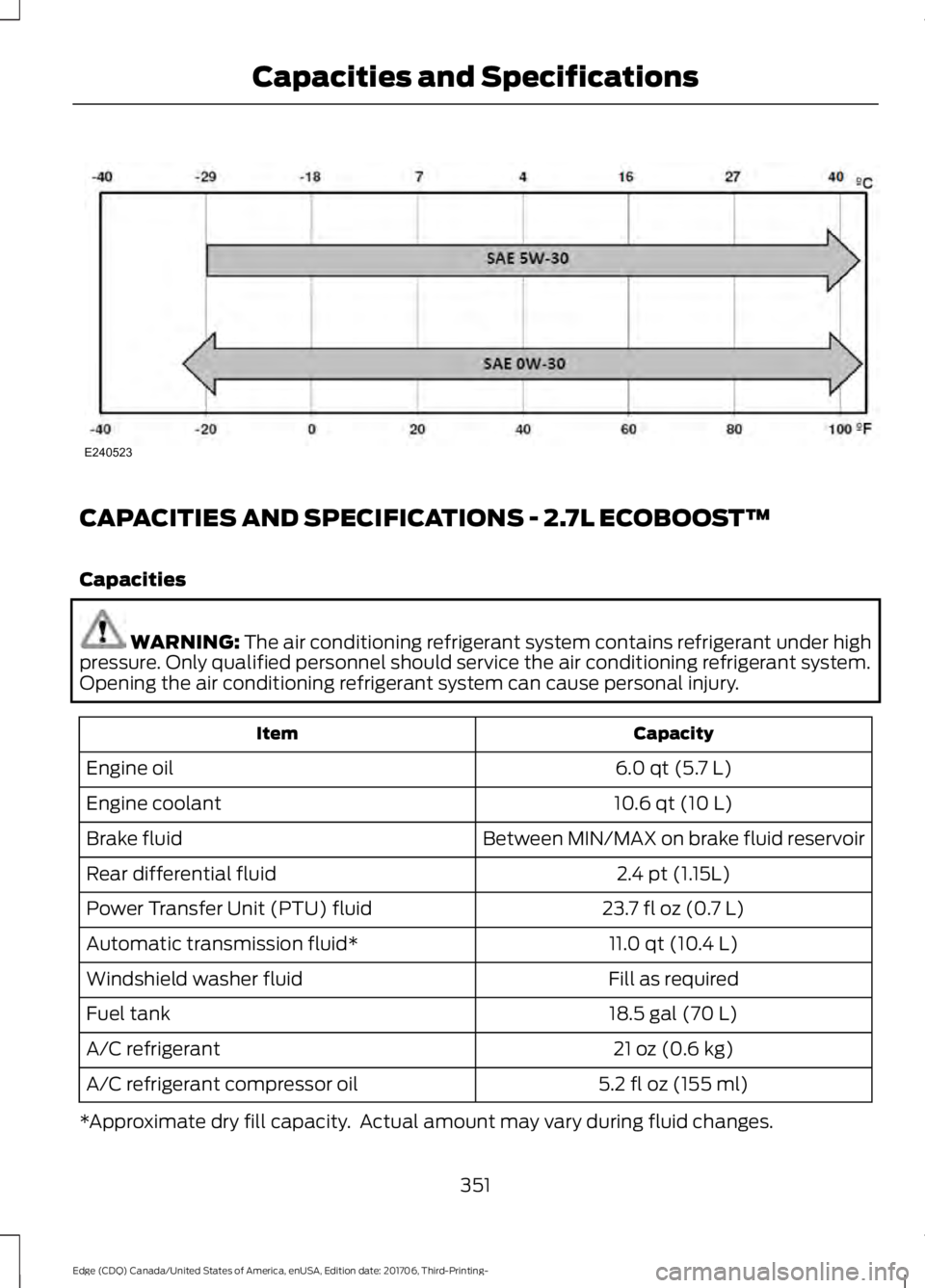
CAPACITIES AND SPECIFICATIONS - 2.7L ECOBOOST™
Capacities
WARNING: The air conditioning refrigerant system contains refrigerant under high
pressure. Only qualified personnel should service the air conditioning refrigerant system.
Opening the air conditioning refrigerant system can cause personal injury. Capacity
Item
6.0 qt (5.7 L)
Engine oil
10.6 qt (10 L)
Engine coolant
Between MIN/MAX on brake fluid reservoir
Brake fluid
2.4 pt (1.15L)
Rear differential fluid
23.7 fl oz (0.7 L)
Power Transfer Unit (PTU) fluid
11.0 qt (10.4 L)
Automatic transmission fluid*
Fill as required
Windshield washer fluid
18.5 gal (70 L)
Fuel tank
21 oz (0.6 kg)
A/C refrigerant
5.2 fl oz (155 ml)
A/C refrigerant compressor oil
*Approximate dry fill capacity. Actual amount may vary during fluid changes.
351
Edge (CDQ) Canada/United States of America, enUSA, Edition date: 201706, Third-Printing- Capacities and SpecificationsE240523
Page 358 of 557
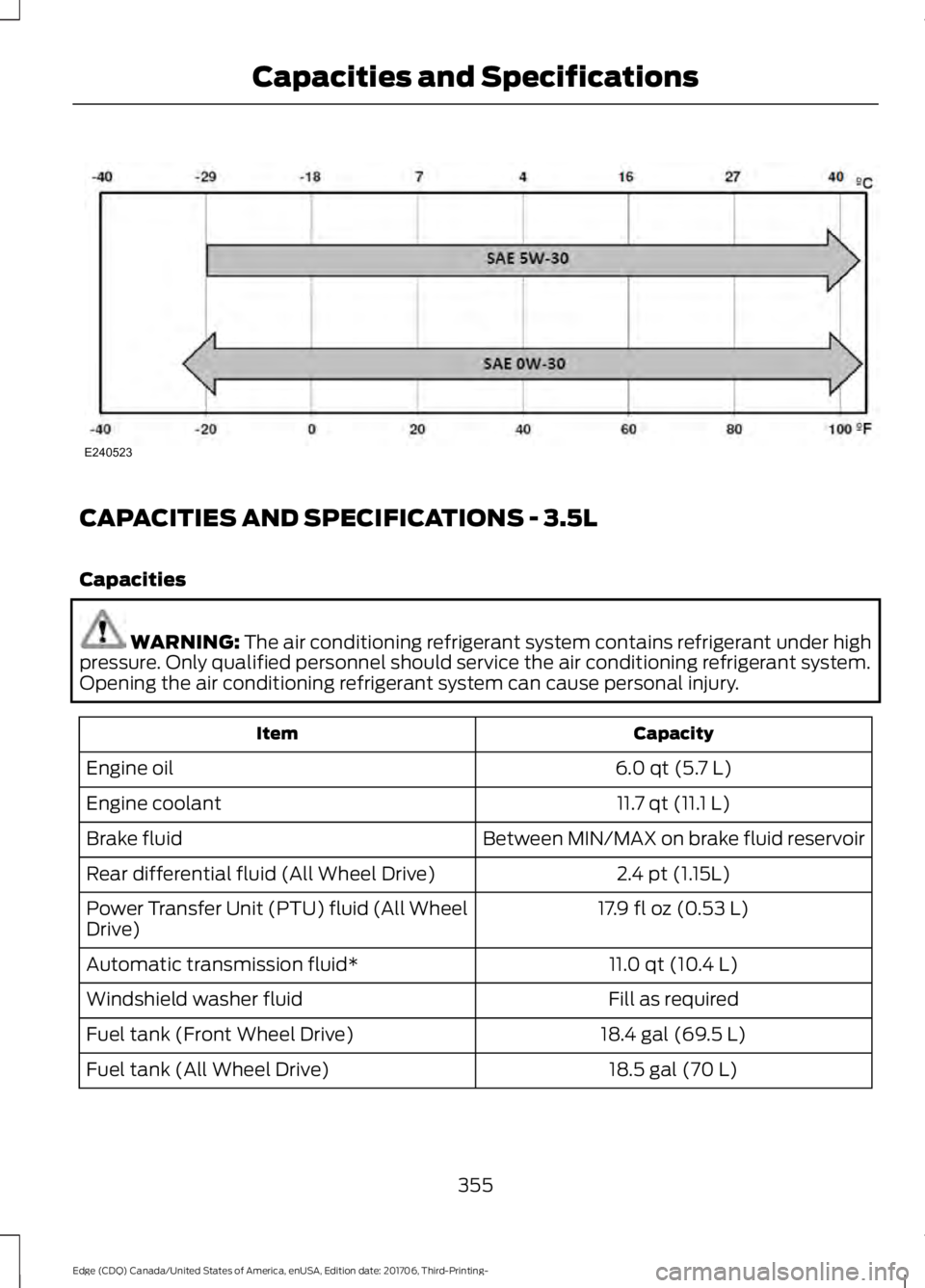
CAPACITIES AND SPECIFICATIONS - 3.5L
Capacities
WARNING: The air conditioning refrigerant system contains refrigerant under high
pressure. Only qualified personnel should service the air conditioning refrigerant system.
Opening the air conditioning refrigerant system can cause personal injury. Capacity
Item
6.0 qt (5.7 L)
Engine oil
11.7 qt (11.1 L)
Engine coolant
Between MIN/MAX on brake fluid reservoir
Brake fluid
2.4 pt (1.15L)
Rear differential fluid (All Wheel Drive)
17.9 fl oz (0.53 L)
Power Transfer Unit (PTU) fluid (All Wheel
Drive)
11.0 qt (10.4 L)
Automatic transmission fluid*
Fill as required
Windshield washer fluid
18.4 gal (69.5 L)
Fuel tank (Front Wheel Drive)
18.5 gal (70 L)
Fuel tank (All Wheel Drive)
355
Edge (CDQ) Canada/United States of America, enUSA, Edition date: 201706, Third-Printing- Capacities and SpecificationsE240523
Page 448 of 557
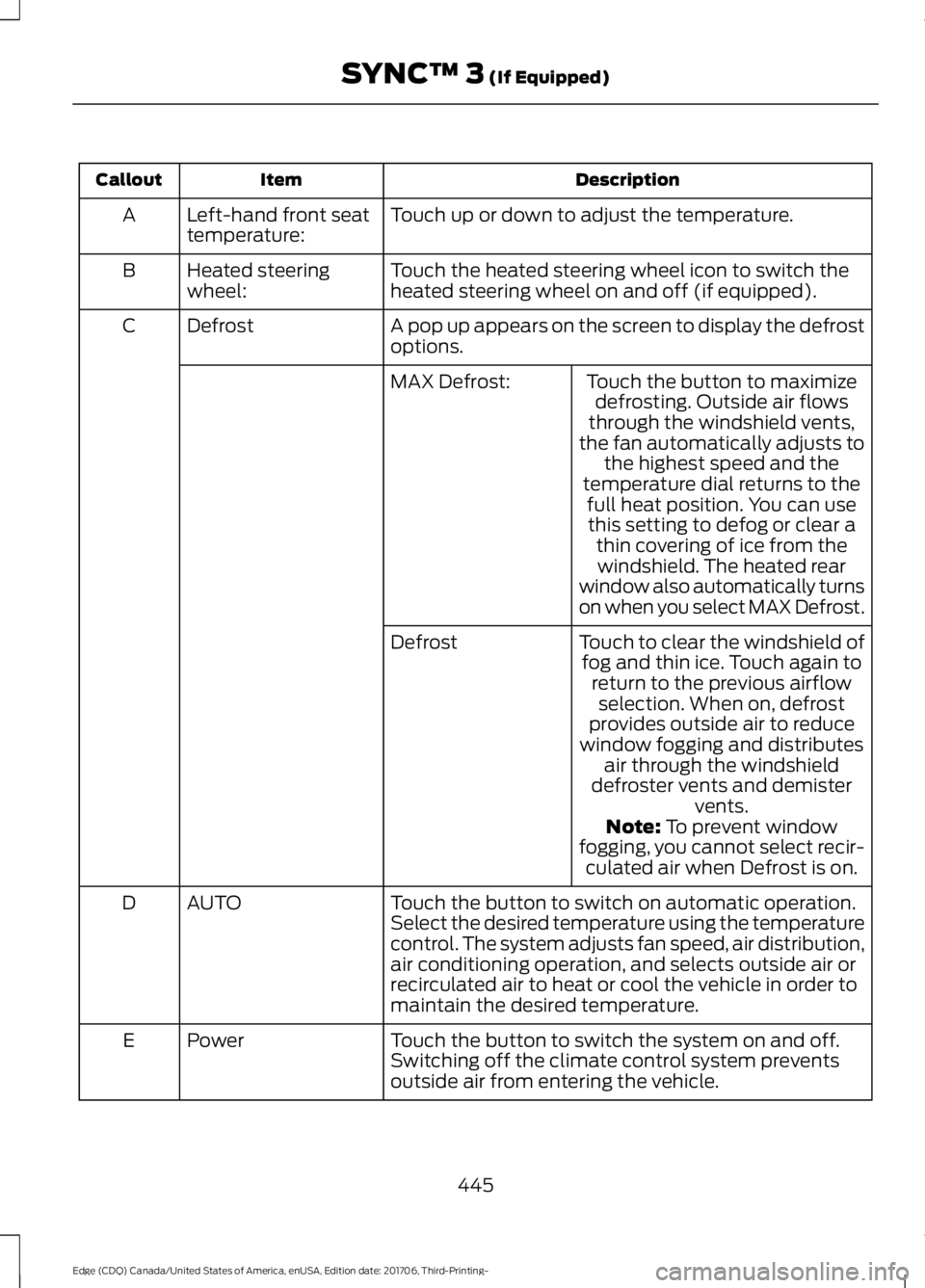
Description
Item
Callout
Touch up or down to adjust the temperature.
Left-hand front seat
temperature:
A
Touch the heated steering wheel icon to switch the
heated steering wheel on and off (if equipped).
Heated steering
wheel:
B
A pop up appears on the screen to display the defrost
options.
Defrost
C
Touch the button to maximizedefrosting. Outside air flows
through the windshield vents,
the fan automatically adjusts to the highest speed and the
temperature dial returns to the
MAX Defrost:
full heat position. You can usethis setting to defog or clear a thin covering of ice from thewindshield. The heated rear
window also automatically turns
on when you select MAX Defrost.
Touch to clear the windshield of fog and thin ice. Touch again to return to the previous airflowselection. When on, defrost
provides outside air to reduce
window fogging and distributes air through the windshield
defroster vents and demister vents.
Defrost
Note: To prevent window
fogging, you cannot select recir- culated air when Defrost is on.
Touch the button to switch on automatic operation.
Select the desired temperature using the temperature
control. The system adjusts fan speed, air distribution,
air conditioning operation, and selects outside air or
recirculated air to heat or cool the vehicle in order to
maintain the desired temperature.
AUTO
D
Touch the button to switch the system on and off.
Switching off the climate control system prevents
outside air from entering the vehicle.
Power
E
445
Edge (CDQ) Canada/United States of America, enUSA, Edition date: 201706, Third-Printing- SYNC™ 3
(If Equipped)
Page 449 of 557
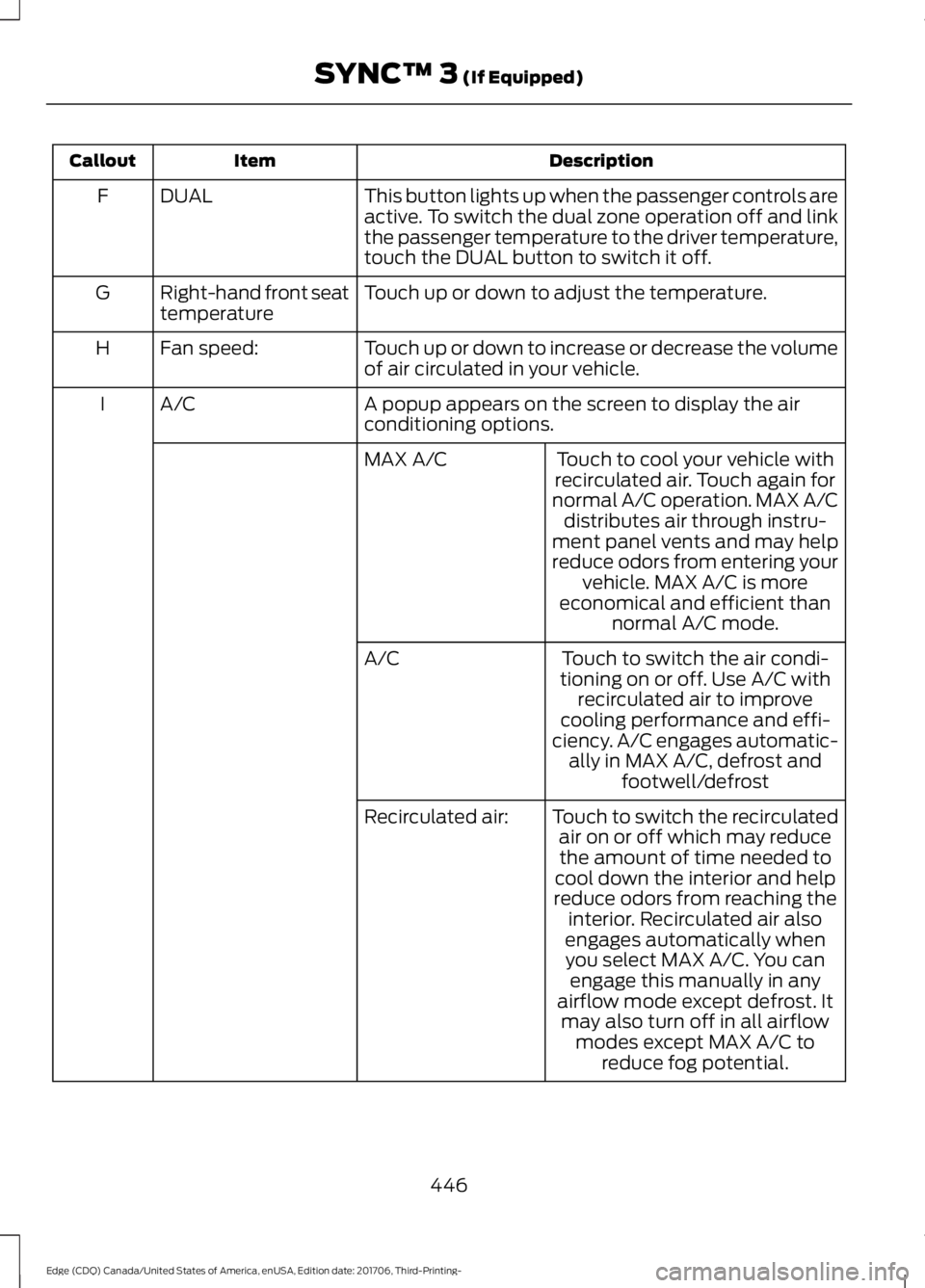
Description
Item
Callout
This button lights up when the passenger controls are
active. To switch the dual zone operation off and link
the passenger temperature to the driver temperature,
touch the DUAL button to switch it off.
DUAL
F
Touch up or down to adjust the temperature.
Right-hand front seat
temperature
G
Touch up or down to increase or decrease the volume
of air circulated in your vehicle.
Fan speed:
H
A popup appears on the screen to display the air
conditioning options.
A/C
I
Touch to cool your vehicle with
recirculated air. Touch again for
normal A/C operation. MAX A/C distributes air through instru-
ment panel vents and may help
reduce odors from entering your vehicle. MAX A/C is more
economical and efficient than normal A/C mode.
MAX A/C
Touch to switch the air condi-
tioning on or off. Use A/C with recirculated air to improve
cooling performance and effi-
ciency. A/C engages automatic- ally in MAX A/C, defrost and footwell/defrost
A/C
Touch to switch the recirculatedair on or off which may reducethe amount of time needed to
cool down the interior and help
reduce odors from reaching the interior. Recirculated air also
Recirculated air:
engages automatically whenyou select MAX A/C. You can engage this manually in any
airflow mode except defrost. It may also turn off in all airflow modes except MAX A/C to reduce fog potential.
446
Edge (CDQ) Canada/United States of America, enUSA, Edition date: 201706, Third-Printing- SYNC™ 3 (If Equipped)
Page 502 of 557
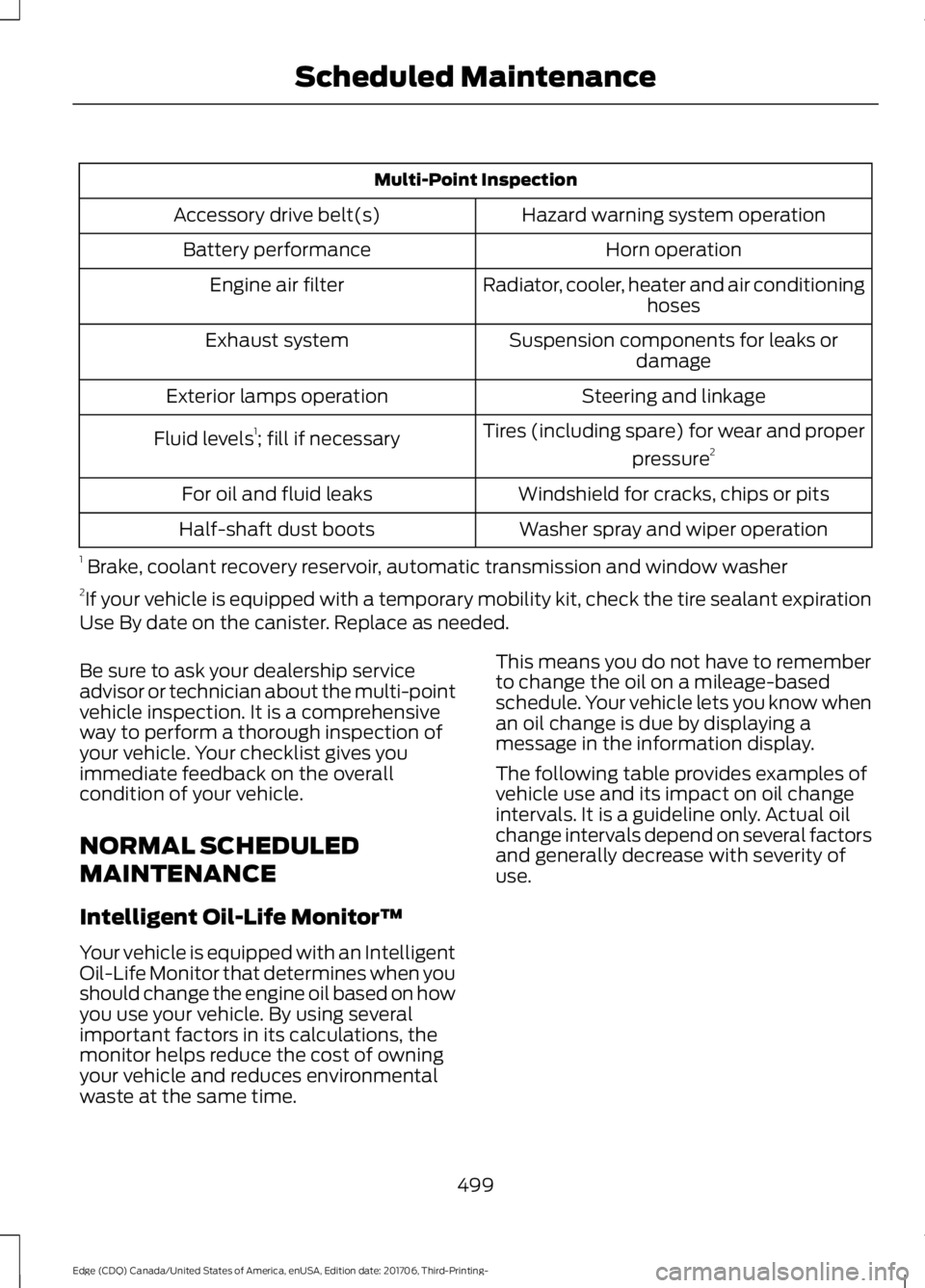
Multi-Point Inspection
Hazard warning system operation
Accessory drive belt(s)
Horn operation
Battery performance
Radiator, cooler, heater and air conditioninghoses
Engine air filter
Suspension components for leaks ordamage
Exhaust system
Steering and linkage
Exterior lamps operation
Tires (including spare) for wear and properpressure2
Fluid levels 1
; fill if necessary
Windshield for cracks, chips or pits
For oil and fluid leaks
Washer spray and wiper operation
Half-shaft dust boots
1 Brake, coolant recovery reservoir, automatic transmission and window washer
2 If your vehicle is equipped with a temporary mobility kit, check the tire sealant expiration
Use By date on the canister. Replace as needed.
Be sure to ask your dealership service
advisor or technician about the multi-point
vehicle inspection. It is a comprehensive
way to perform a thorough inspection of
your vehicle. Your checklist gives you
immediate feedback on the overall
condition of your vehicle.
NORMAL SCHEDULED
MAINTENANCE
Intelligent Oil-Life Monitor™
Your vehicle is equipped with an Intelligent
Oil-Life Monitor that determines when you
should change the engine oil based on how
you use your vehicle. By using several
important factors in its calculations, the
monitor helps reduce the cost of owning
your vehicle and reduces environmental
waste at the same time. This means you do not have to remember
to change the oil on a mileage-based
schedule. Your vehicle lets you know when
an oil change is due by displaying a
message in the information display.
The following table provides examples of
vehicle use and its impact on oil change
intervals. It is a guideline only. Actual oil
change intervals depend on several factors
and generally decrease with severity of
use.
499
Edge (CDQ) Canada/United States of America, enUSA, Edition date: 201706, Third-Printing- Scheduled Maintenance
Page 546 of 557
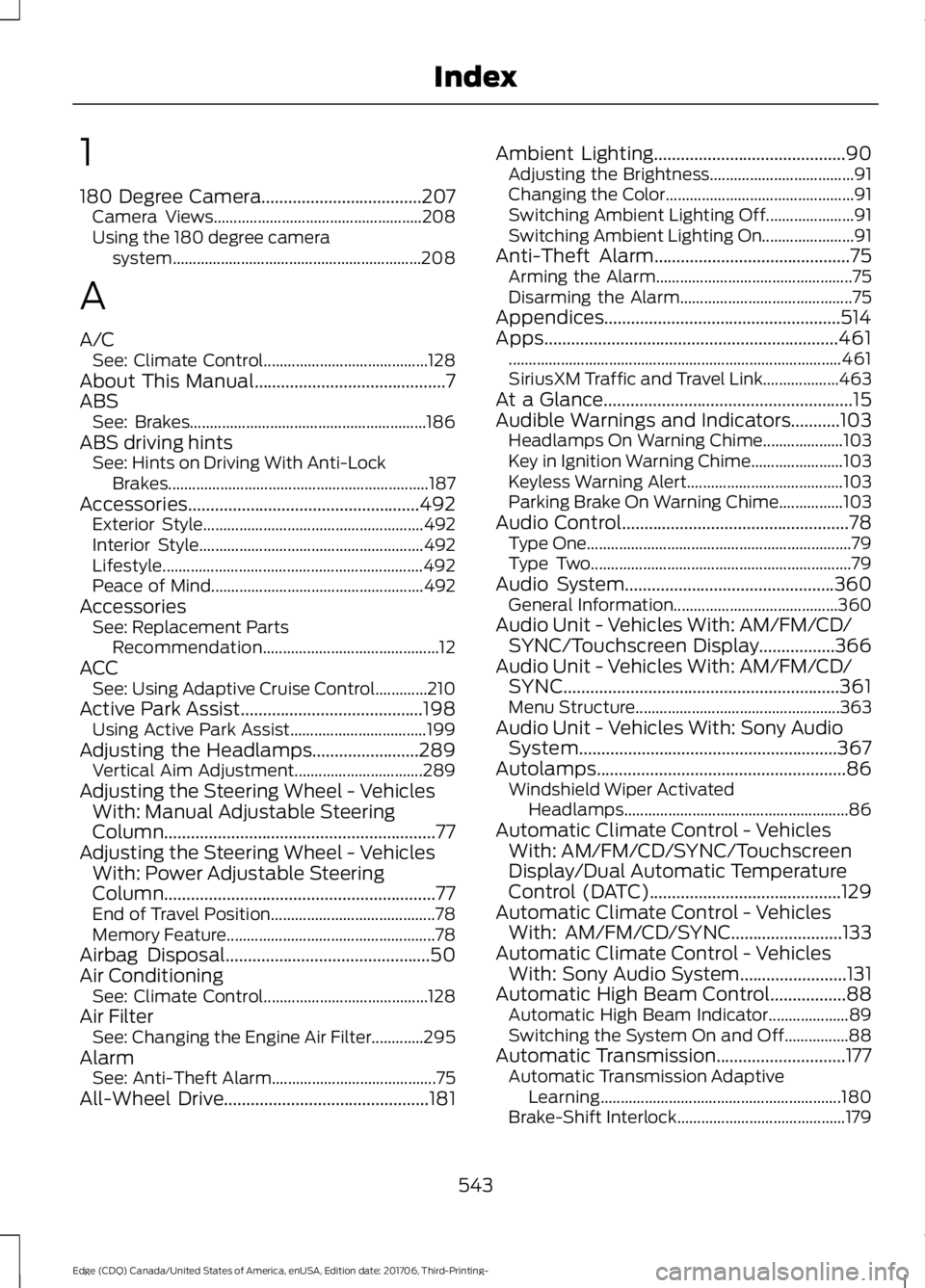
1
180 Degree Camera....................................207
Camera Views.................................................... 208
Using the 180 degree camera system.............................................................. 208
A
A/C See: Climate Control......................................... 128
About This Manual
...........................................7
ABS See: Brakes........................................................... 186
ABS driving hints See: Hints on Driving With Anti-Lock
Brakes................................................................. 187
Accessories....................................................492 Exterior Style....................................................... 492
Interior Style........................................................ 492
Lifestyle................................................................. 492
Peace of Mind..................................................... 492
Accessories See: Replacement Parts
Recommendation............................................ 12
ACC See: Using Adaptive Cruise Control.............210
Active Park Assist.........................................198 Using Active Park Assist.................................. 199
Adjusting the Headlamps........................289 Vertical Aim Adjustment................................ 289
Adjusting the Steering Wheel - Vehicles With: Manual Adjustable Steering
Column .............................................................
77
Adjusting the Steering Wheel - Vehicles With: Power Adjustable Steering
Column .............................................................
77
End of Travel Position......................................... 78
Memory Feature.................................................... 78
Airbag Disposal..............................................50
Air Conditioning See: Climate Control......................................... 128
Air Filter See: Changing the Engine Air Filter.............295
Alarm See: Anti-Theft Alarm......................................... 75
All-Wheel Drive
..............................................181 Ambient Lighting...........................................90
Adjusting the Brightness.................................... 91
Changing the Color............................................... 91
Switching Ambient Lighting Off...................... 91
Switching Ambient Lighting On....................... 91
Anti-Theft Alarm............................................75 Arming the Alarm................................................. 75
Disarming the Alarm........................................... 75
Appendices.....................................................514
Apps..................................................................461 ........................................................................\
........... 461
SiriusXM Traffic and Travel Link...................463
At a Glance........................................................15
Audible Warnings and Indicators...........103 Headlamps On Warning Chime....................103
Key in Ignition Warning Chime.......................103
Keyless Warning Alert....................................... 103
Parking Brake On Warning Chime................103
Audio Control...................................................78 Type One.................................................................. 79
Type Two................................................................. 79
Audio System
...............................................360
General Information......................................... 360
Audio Unit - Vehicles With: AM/FM/CD/ SYNC/Touchscreen Display
.................366
Audio Unit - Vehicles With: AM/FM/CD/ SYNC..............................................................361
Menu Structure................................................... 363
Audio Unit - Vehicles With: Sony Audio System
..........................................................367
Autolamps........................................................86
Windshield Wiper Activated
Headlamps........................................................ 86
Automatic Climate Control - Vehicles With: AM/FM/CD/SYNC/Touchscreen
Display/Dual Automatic Temperature
Control (DATC)...........................................129
Automatic Climate Control - Vehicles With: AM/FM/CD/SYNC.........................133
Automatic Climate Control - Vehicles With: Sony Audio System
........................131
Automatic High Beam Control.................88 Automatic High Beam Indicator....................89
Switching the System On and Off................88
Automatic Transmission
.............................177
Automatic Transmission Adaptive
Learning............................................................ 180
Brake-Shift Interlock.......................................... 179
543
Edge (CDQ) Canada/United States of America, enUSA, Edition date: 201706, Third-Printing- Index