manual transmission FORD EDGE 2018 User Guide
[x] Cancel search | Manufacturer: FORD, Model Year: 2018, Model line: EDGE, Model: FORD EDGE 2018Pages: 557, PDF Size: 7.02 MB
Page 200 of 557
Obstacle Distance Indicator (If
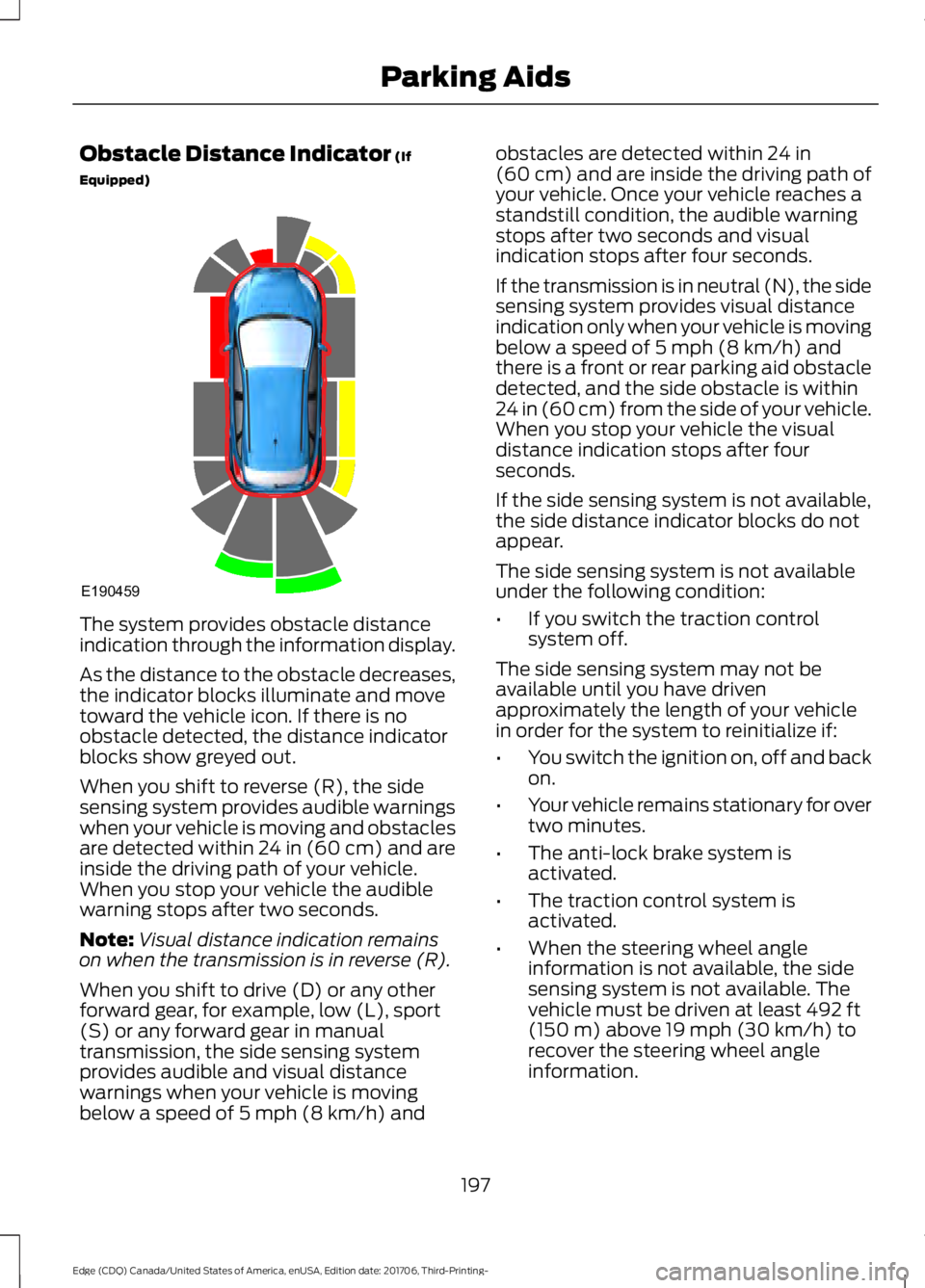
Equipped) The system provides obstacle distance
indication through the information display.
As the distance to the obstacle decreases,
the indicator blocks illuminate and move
toward the vehicle icon. If there is no
obstacle detected, the distance indicator
blocks show greyed out.
When you shift to reverse (R), the side
sensing system provides audible warnings
when your vehicle is moving and obstacles
are detected within 24 in (60 cm) and are
inside the driving path of your vehicle.
When you stop your vehicle the audible
warning stops after two seconds.
Note:
Visual distance indication remains
on when the transmission is in reverse (R).
When you shift to drive (D) or any other
forward gear, for example, low (L), sport
(S) or any forward gear in manual
transmission, the side sensing system
provides audible and visual distance
warnings when your vehicle is moving
below a speed of
5 mph (8 km/h) and obstacles are detected within
24 in
(60 cm) and are inside the driving path of
your vehicle. Once your vehicle reaches a
standstill condition, the audible warning
stops after two seconds and visual
indication stops after four seconds.
If the transmission is in neutral (N), the side
sensing system provides visual distance
indication only when your vehicle is moving
below a speed of
5 mph (8 km/h) and
there is a front or rear parking aid obstacle
detected, and the side obstacle is within
24 in (60 cm) from the side of your vehicle.
When you stop your vehicle the visual
distance indication stops after four
seconds.
If the side sensing system is not available,
the side distance indicator blocks do not
appear.
The side sensing system is not available
under the following condition:
• If you switch the traction control
system off.
The side sensing system may not be
available until you have driven
approximately the length of your vehicle
in order for the system to reinitialize if:
• You switch the ignition on, off and back
on.
• Your vehicle remains stationary for over
two minutes.
• The anti-lock brake system is
activated.
• The traction control system is
activated.
• When the steering wheel angle
information is not available, the side
sensing system is not available. The
vehicle must be driven at least
492 ft
(150 m) above 19 mph (30 km/h) to
recover the steering wheel angle
information.
197
Edge (CDQ) Canada/United States of America, enUSA, Edition date: 201706, Third-Printing- Parking AidsE190459
Page 210 of 557
Manual Zoom
WARNING: When manual zoom is
on, the full area behind your vehicle may
not show. Be aware of your surroundings
when using the manual zoom feature.
Note: Manual zoom is only available when
the transmission is in reverse (R).
Note: When you enable manual zoom, only
the centerline is shown.
Selectable settings for this feature are
Zoom in (+) and Zoom out (-). Press the
symbol in the camera screen to change the
view. The default setting is Zoom OFF.
This allows you to get a closer view of an
object behind your vehicle. The zoomed
image keeps the bumper in the image to
provide a reference. The zoom is only
active while the transmission is in reverse
(R).
Rear Camera Delay
Selectable settings for this feature are ON
and OFF. The default setting for the rear
camera delay is OFF.
When shifting the transmission out of
reverse (R) and into any gear other than
park (P), the camera image remains in the
display until:
• Your vehicle speed sufficiently
increases.
• You shift your vehicle into park (P)
(automatic transmission).
• You apply the parking brake (manual
transmission). 180 DEGREE CAMERA (If Equipped) WARNING: The camera system is a
supplement system that still requires the
driver to use it in conjunction with looking
out the windows, and checking the interior
and exterior mirrors for maximum
coverage. WARNING: You may not see objects
that are close to either corner of the
bumper or under the bumper due to the
limited coverage of the camera system. WARNING:
Use caution when
turning camera features ON or OFF while
out of park (P). Make sure your vehicle is
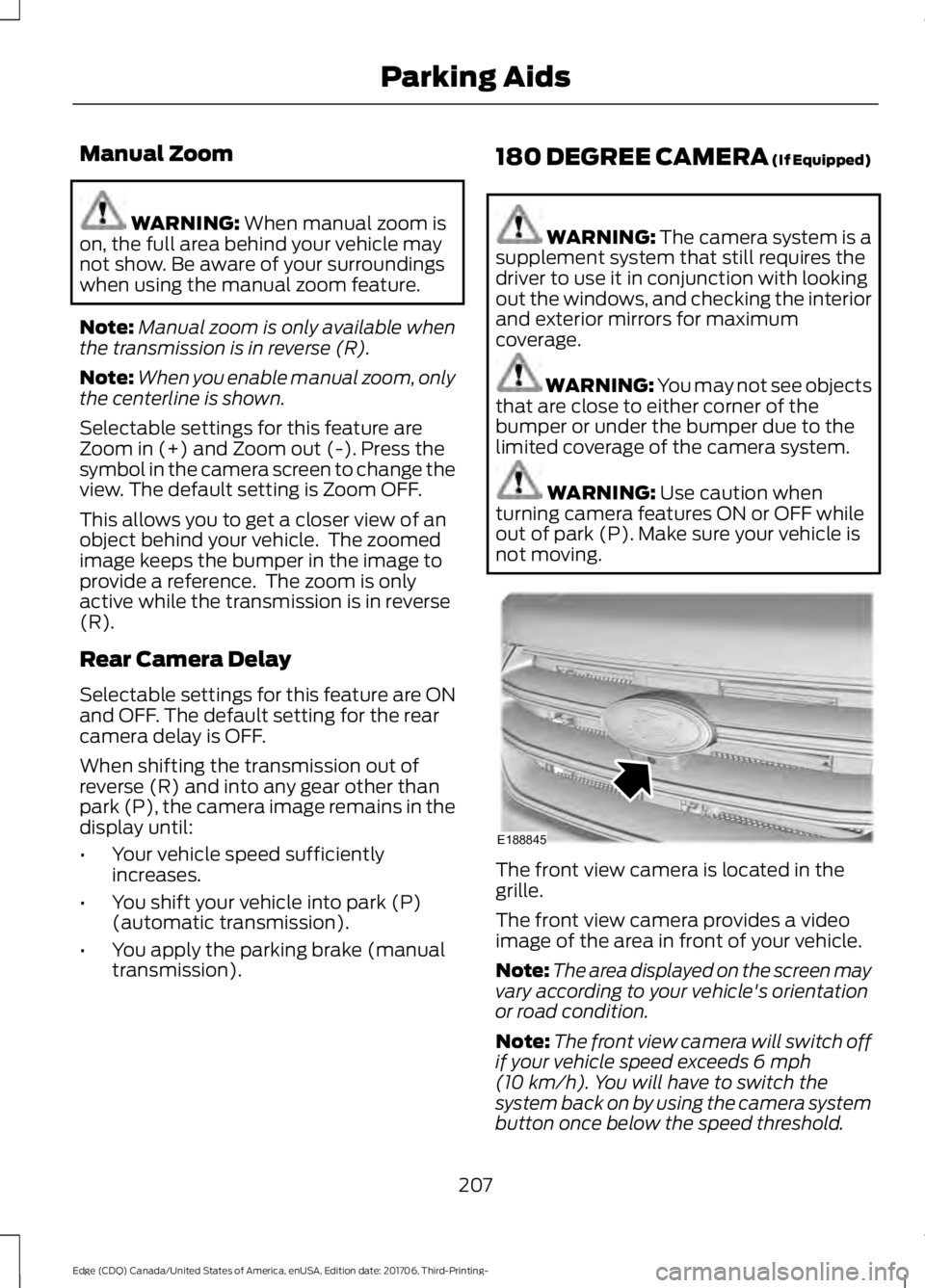
not moving. The front view camera is located in the
grille.
The front view camera provides a video
image of the area in front of your vehicle.
Note:
The area displayed on the screen may
vary according to your vehicle's orientation
or road condition.
Note: The front view camera will switch off
if your vehicle speed exceeds
6 mph
(10 km/h). You will have to switch the
system back on by using the camera system
button once below the speed threshold.
207
Edge (CDQ) Canada/United States of America, enUSA, Edition date: 201706, Third-Printing- Parking AidsE188845
Page 225 of 557
BLIND SPOT INFORMATION
SYSTEM (If Equipped)
WARNING: Do not use the blind spot
information system as a replacement for
using the interior and exterior mirrors or
looking over your shoulder before changing
lanes. The blind spot information system
is not a replacement for careful driving. WARNING:
The system may not
operate properly during severe weather
conditions, for example snow, ice, heavy
rain and spray. Always drive with due care
and attention. Failure to take care may
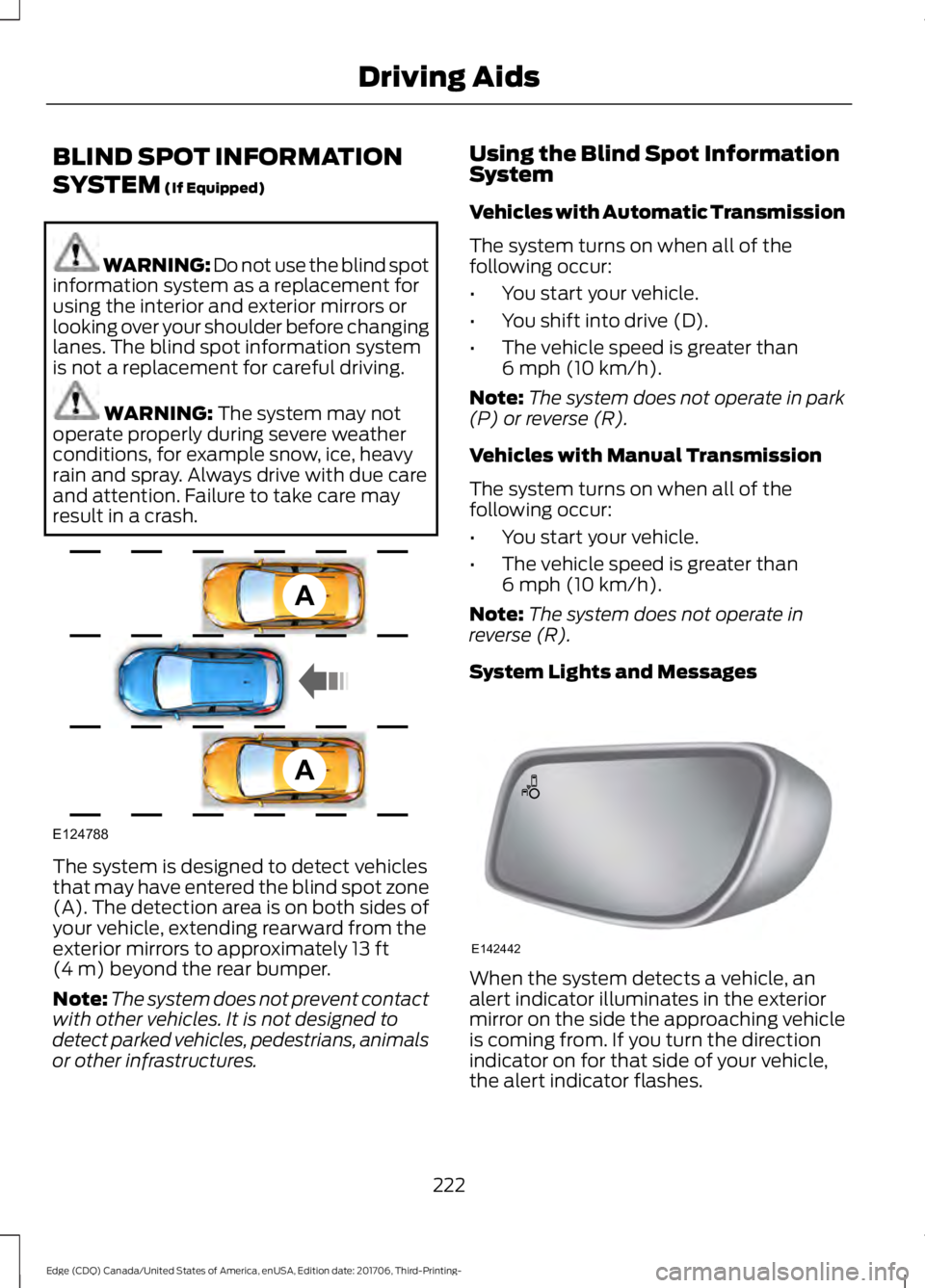
result in a crash. The system is designed to detect vehicles
that may have entered the blind spot zone
(A). The detection area is on both sides of
your vehicle, extending rearward from the
exterior mirrors to approximately
13 ft
(4 m) beyond the rear bumper.
Note: The system does not prevent contact
with other vehicles. It is not designed to
detect parked vehicles, pedestrians, animals
or other infrastructures. Using the Blind Spot Information
System
Vehicles with Automatic Transmission
The system turns on when all of the
following occur:
•
You start your vehicle.
• You shift into drive (D).
• The vehicle speed is greater than
6 mph (10 km/h)
.
Note: The system does not operate in park
(P) or reverse (R).
Vehicles with Manual Transmission
The system turns on when all of the
following occur:
• You start your vehicle.
• The vehicle speed is greater than
6 mph (10 km/h)
.
Note: The system does not operate in
reverse (R).
System Lights and Messages When the system detects a vehicle, an
alert indicator illuminates in the exterior
mirror on the side the approaching vehicle
is coming from. If you turn the direction
indicator on for that side of your vehicle,
the alert indicator flashes.
222
Edge (CDQ) Canada/United States of America, enUSA, Edition date: 201706, Third-Printing- Driving AidsA
A
E124788 E142442
Page 255 of 557
TRANSPORTING THE VEHICLE
If you need to have your vehicle towed,
contact a professional towing service or,
if you are a member of a roadside
assistance program, your roadside
assistance service provider.
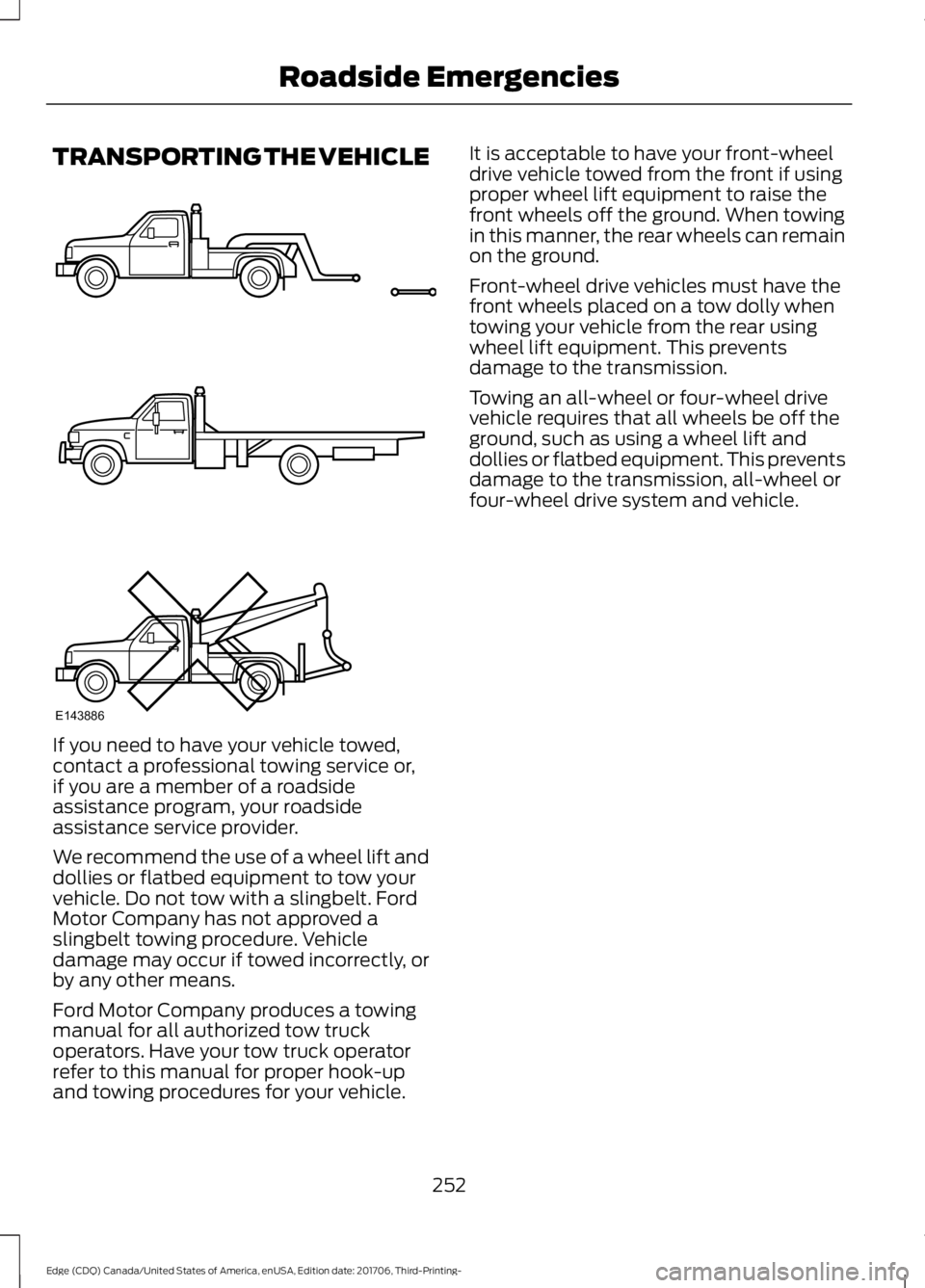
We recommend the use of a wheel lift and
dollies or flatbed equipment to tow your
vehicle. Do not tow with a slingbelt. Ford
Motor Company has not approved a
slingbelt towing procedure. Vehicle
damage may occur if towed incorrectly, or
by any other means.
Ford Motor Company produces a towing
manual for all authorized tow truck
operators. Have your tow truck operator
refer to this manual for proper hook-up
and towing procedures for your vehicle. It is acceptable to have your front-wheel
drive vehicle towed from the front if using
proper wheel lift equipment to raise the
front wheels off the ground. When towing
in this manner, the rear wheels can remain
on the ground.
Front-wheel drive vehicles must have the
front wheels placed on a tow dolly when
towing your vehicle from the rear using
wheel lift equipment. This prevents
damage to the transmission.
Towing an all-wheel or four-wheel drive
vehicle requires that all wheels be off the
ground, such as using a wheel lift and
dollies or flatbed equipment. This prevents
damage to the transmission, all-wheel or
four-wheel drive system and vehicle.
252
Edge (CDQ) Canada/United States of America, enUSA, Edition date: 201706, Third-Printing- Roadside EmergenciesE143886
Page 383 of 557
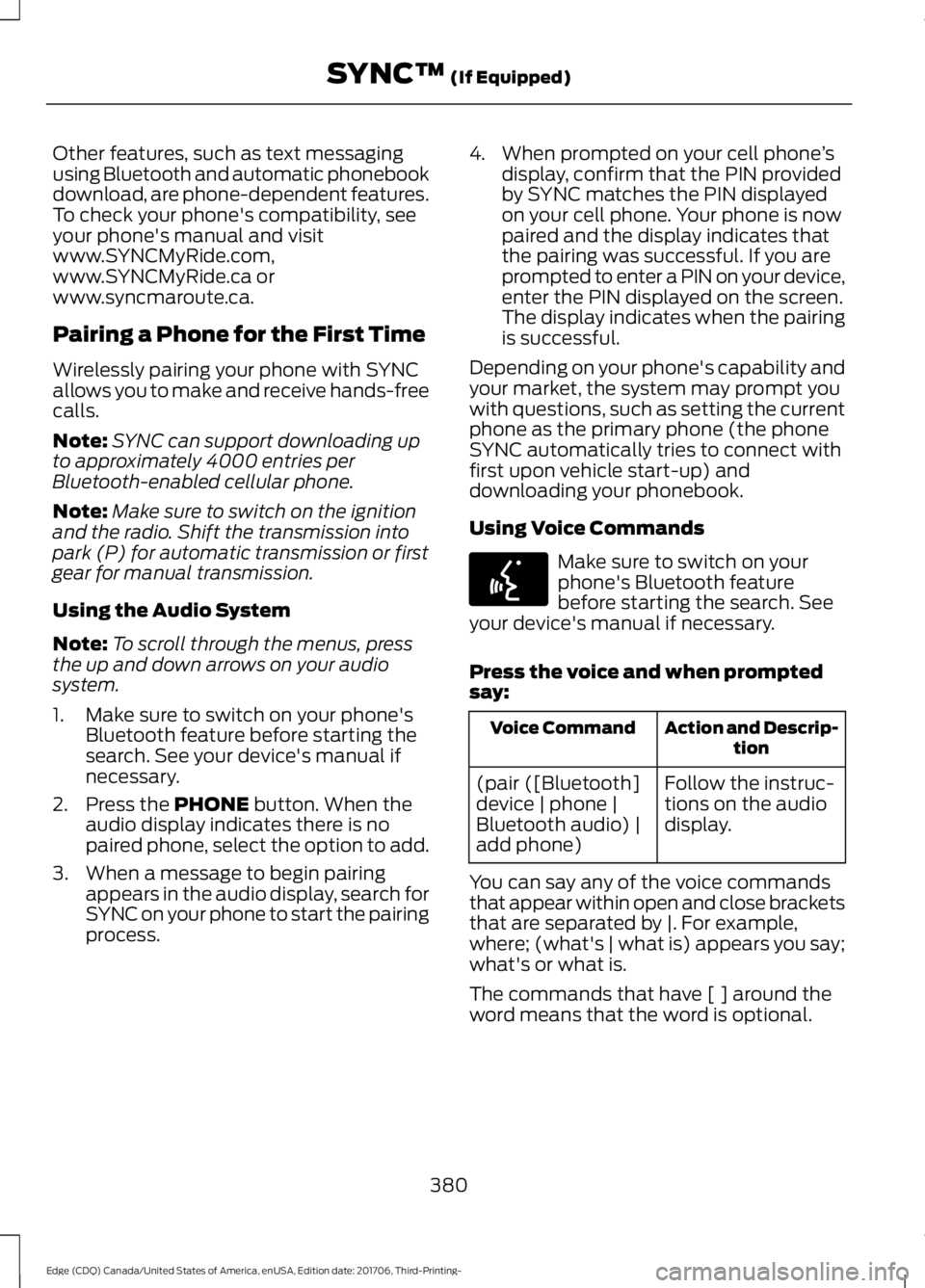
Other features, such as text messaging
using Bluetooth and automatic phonebook
download, are phone-dependent features.
To check your phone's compatibility, see
your phone's manual and visit
www.SYNCMyRide.com,
www.SYNCMyRide.ca or
www.syncmaroute.ca.
Pairing a Phone for the First Time
Wirelessly pairing your phone with SYNC
allows you to make and receive hands-free
calls.
Note:
SYNC can support downloading up
to approximately 4000 entries per
Bluetooth-enabled cellular phone.
Note: Make sure to switch on the ignition
and the radio. Shift the transmission into
park (P) for automatic transmission or first
gear for manual transmission.
Using the Audio System
Note: To scroll through the menus, press
the up and down arrows on your audio
system.
1. Make sure to switch on your phone's Bluetooth feature before starting the
search. See your device's manual if
necessary.
2. Press the PHONE button. When the
audio display indicates there is no
paired phone, select the option to add.
3. When a message to begin pairing appears in the audio display, search for
SYNC on your phone to start the pairing
process. 4. When prompted on your cell phone
’s
display, confirm that the PIN provided
by SYNC matches the PIN displayed
on your cell phone. Your phone is now
paired and the display indicates that
the pairing was successful. If you are
prompted to enter a PIN on your device,
enter the PIN displayed on the screen.
The display indicates when the pairing
is successful.
Depending on your phone's capability and
your market, the system may prompt you
with questions, such as setting the current
phone as the primary phone (the phone
SYNC automatically tries to connect with
first upon vehicle start-up) and
downloading your phonebook.
Using Voice Commands Make sure to switch on your
phone's Bluetooth feature
before starting the search. See
your device's manual if necessary.
Press the voice and when prompted
say: Action and Descrip-
tion
Voice Command
Follow the instruc-
tions on the audio
display.
(pair ([Bluetooth]
device | phone |
Bluetooth audio) |
add phone)
You can say any of the voice commands
that appear within open and close brackets
that are separated by |. For example,
where; (what's | what is) appears you say;
what's or what is.
The commands that have [ ] around the
word means that the word is optional.
380
Edge (CDQ) Canada/United States of America, enUSA, Edition date: 201706, Third-Printing- SYNC™
(If Equipped)E142599
Page 384 of 557
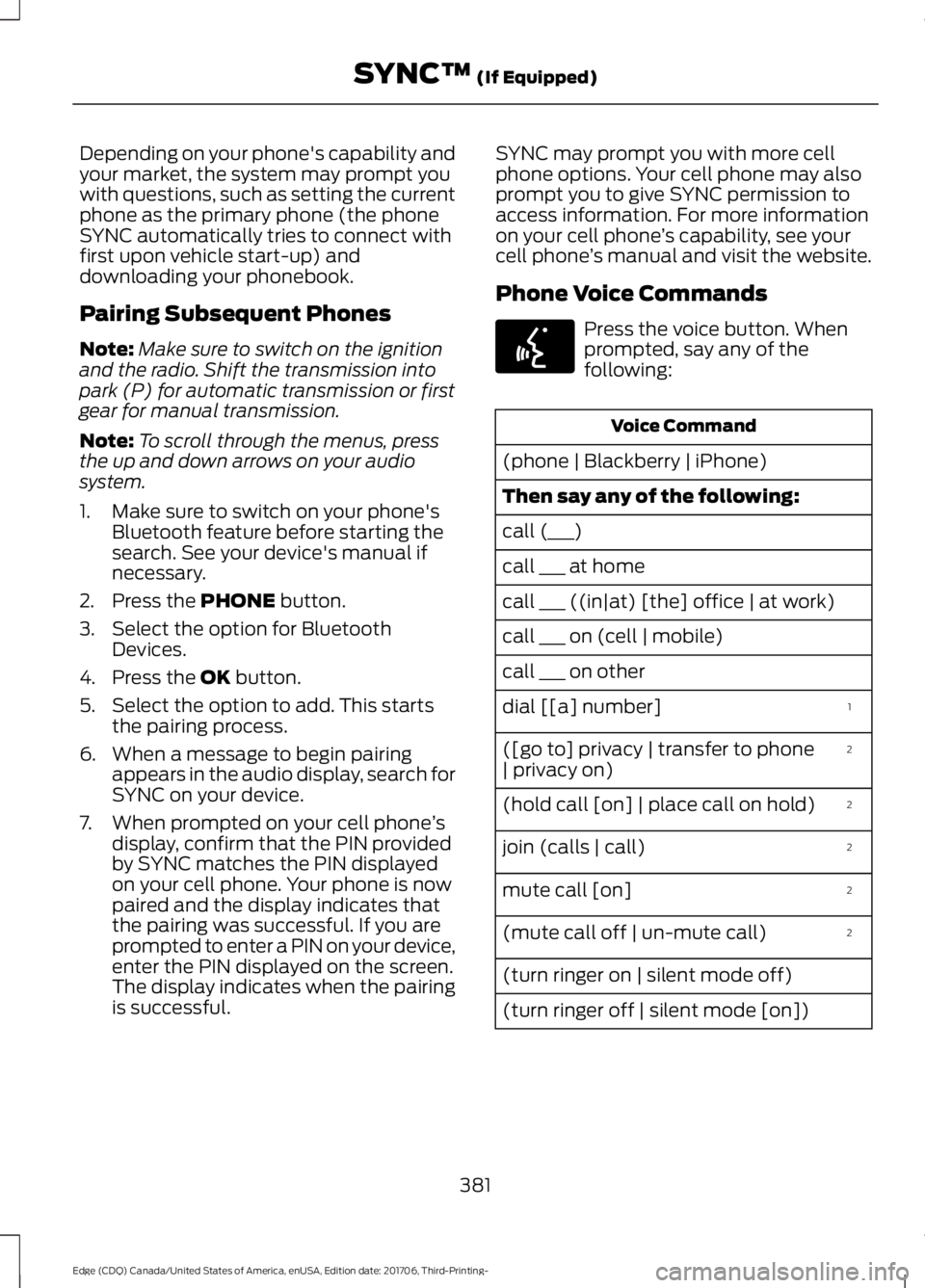
Depending on your phone's capability and
your market, the system may prompt you
with questions, such as setting the current
phone as the primary phone (the phone
SYNC automatically tries to connect with
first upon vehicle start-up) and
downloading your phonebook.
Pairing Subsequent Phones
Note:
Make sure to switch on the ignition
and the radio. Shift the transmission into
park (P) for automatic transmission or first
gear for manual transmission.
Note: To scroll through the menus, press
the up and down arrows on your audio
system.
1. Make sure to switch on your phone's Bluetooth feature before starting the
search. See your device's manual if
necessary.
2. Press the PHONE button.
3. Select the option for Bluetooth Devices.
4. Press the
OK button.
5. Select the option to add. This starts the pairing process.
6. When a message to begin pairing appears in the audio display, search for
SYNC on your device.
7. When prompted on your cell phone ’s
display, confirm that the PIN provided
by SYNC matches the PIN displayed
on your cell phone. Your phone is now
paired and the display indicates that
the pairing was successful. If you are
prompted to enter a PIN on your device,
enter the PIN displayed on the screen.
The display indicates when the pairing
is successful. SYNC may prompt you with more cell
phone options. Your cell phone may also
prompt you to give SYNC permission to
access information. For more information
on your cell phone
’s capability, see your
cell phone ’s manual and visit the website.
Phone Voice Commands Press the voice button. When
prompted, say any of the
following:
Voice Command
(phone | Blackberry | iPhone)
Then say any of the following:
call (___)
call ___ at home
call ___ ((in|at) [the] office | at work)
call ___ on (cell | mobile)
call ___ on other 1
dial [[a] number]
2
([go to] privacy | transfer to phone
| privacy on)
2
(hold call [on] | place call on hold)
2
join (calls | call)
2
mute call [on]
2
(mute call off | un-mute call)
(turn ringer on | silent mode off)
(turn ringer off | silent mode [on])
381
Edge (CDQ) Canada/United States of America, enUSA, Edition date: 201706, Third-Printing- SYNC™
(If Equipped)E142599
Page 546 of 557
1
180 Degree Camera....................................207
Camera Views.................................................... 208
Using the 180 degree camera system.............................................................. 208
A
A/C See: Climate Control......................................... 128
About This Manual
...........................................7
ABS See: Brakes........................................................... 186
ABS driving hints See: Hints on Driving With Anti-Lock
Brakes................................................................. 187
Accessories....................................................492 Exterior Style....................................................... 492
Interior Style........................................................ 492
Lifestyle................................................................. 492
Peace of Mind..................................................... 492
Accessories See: Replacement Parts
Recommendation............................................ 12
ACC See: Using Adaptive Cruise Control.............210
Active Park Assist.........................................198 Using Active Park Assist.................................. 199
Adjusting the Headlamps........................289 Vertical Aim Adjustment................................ 289
Adjusting the Steering Wheel - Vehicles With: Manual Adjustable Steering
Column .............................................................
77
Adjusting the Steering Wheel - Vehicles With: Power Adjustable Steering
Column .............................................................
77
End of Travel Position......................................... 78
Memory Feature.................................................... 78
Airbag Disposal..............................................50
Air Conditioning See: Climate Control......................................... 128
Air Filter See: Changing the Engine Air Filter.............295
Alarm See: Anti-Theft Alarm......................................... 75
All-Wheel Drive
..............................................181 Ambient Lighting...........................................90
Adjusting the Brightness.................................... 91
Changing the Color............................................... 91
Switching Ambient Lighting Off...................... 91
Switching Ambient Lighting On....................... 91
Anti-Theft Alarm............................................75 Arming the Alarm................................................. 75
Disarming the Alarm........................................... 75
Appendices.....................................................514
Apps..................................................................461 ........................................................................\
........... 461
SiriusXM Traffic and Travel Link...................463
At a Glance........................................................15
Audible Warnings and Indicators...........103 Headlamps On Warning Chime....................103
Key in Ignition Warning Chime.......................103
Keyless Warning Alert....................................... 103
Parking Brake On Warning Chime................103
Audio Control...................................................78 Type One.................................................................. 79
Type Two................................................................. 79
Audio System
...............................................360
General Information......................................... 360
Audio Unit - Vehicles With: AM/FM/CD/ SYNC/Touchscreen Display
.................366
Audio Unit - Vehicles With: AM/FM/CD/ SYNC..............................................................361
Menu Structure................................................... 363
Audio Unit - Vehicles With: Sony Audio System
..........................................................367
Autolamps........................................................86
Windshield Wiper Activated
Headlamps........................................................ 86
Automatic Climate Control - Vehicles With: AM/FM/CD/SYNC/Touchscreen
Display/Dual Automatic Temperature
Control (DATC)...........................................129
Automatic Climate Control - Vehicles With: AM/FM/CD/SYNC.........................133
Automatic Climate Control - Vehicles With: Sony Audio System
........................131
Automatic High Beam Control.................88 Automatic High Beam Indicator....................89
Switching the System On and Off................88
Automatic Transmission
.............................177
Automatic Transmission Adaptive
Learning............................................................ 180
Brake-Shift Interlock.......................................... 179
543
Edge (CDQ) Canada/United States of America, enUSA, Edition date: 201706, Third-Printing- Index
Page 551 of 557
All-Wheel Drive....................................................
116
Automatic Engine Shutdown.......................... 116
Automatic High Beam Control....................... 116
Auto Start-Stop.................................................... 117
Battery and Charging System.......................... 117
Blind Spot Information and Cross Traffic Alert System..................................................... 118
Doors and Locks.................................................. 118
Driver Alert.............................................................. 119
Electronic Stability Control.............................. 119
Engine...................................................................... 119
Fuel........................................................................\
.. 120
Hill Start Assist.................................................... 120
Keys and Keyless Entry..................................... 120
Lane Keeping System......................................... 121
Maintenance.......................................................... 121
MyKey...................................................................... 122
Park Aid................................................................... 123
Park Brake.............................................................. 123
Power Steering.................................................... 124
Pre-Collision Warning System....................... 124
Remote Start........................................................ 125
Seats........................................................................\
125
Starting System .................................................. 125
Tire Pressure Monitoring System.................. 125
Towing..................................................................... 126
Traction Control.................................................. 126
Transmission........................................................ 126
Installing Child Restraints............................18
Child Restraints...................................................... 18
Using Lap and Shoulder Belts.......................... 19
Using Lower Anchors and Tethers for CHildren (LATCH)........................................... 24
Using Tether Straps............................................. 25
Instrument Cluster
.........................................97
Instrument Lighting Dimmer.....................86
Instrument Panel Overview
.........................15
Interior Lamps.................................................89
Front Interior Lamp............................................. 89
Rear Interior Lamps............................................ 90
Interior Mirror
...................................................95
Automatic Dimming Mirror............................... 95
Manual Dimming Mirror..................................... 95
Introduction.........................................................7 J
Jump Starting the Vehicle
........................250
To Connect the Booster Cables...................250
To Start the Engine............................................. 251
K
Keyless Entry
....................................................67
SECURICODE™ KEYLESS ENTRY
KEYPAD............................................................... 67
Keyless Starting
............................................159
Ignition Modes..................................................... 159
Keys and Remote Controls..........................51
L
Lane Keeping System..................................217 Switching the System On and Off...............218
Liftgate...............................................................70
Lighting Control
..............................................85
Flashing the Headlamp High Beam..............86
Headlamp High Beam........................................ 85
Lighting..............................................................85 General Information............................................ 85
Load Carriers See: Roof Racks and Load Carriers..............231
Load Carrying.................................................231
Load Limit
.......................................................232
Special Loading Instructions for Owners of
Pick-up Trucks and Utility-type
Vehicles............................................................. 237
Vehicle Loading - with and without a Trailer................................................................. 232
Locking and Unlocking.................................63 Activating Intelligent Access............................ 65
Autolock.................................................................. 66
Auto Relock............................................................ 66
Battery Saver.......................................................... 67
Illuminated Entry.................................................. 66
Illuminated Exit..................................................... 67
Locking and Unlocking the Doors with the Key Blade........................................................... 64
Power Door Locks................................................ 63
Remote Control.................................................... 63
Smart Unlocks for Intelligent Access Keys...................................................................... 65
548
Edge (CDQ) Canada/United States of America, enUSA, Edition date: 201706, Third-Printing- Index