transmission FORD EDGE 2018 Manual PDF
[x] Cancel search | Manufacturer: FORD, Model Year: 2018, Model line: EDGE, Model: FORD EDGE 2018Pages: 557, PDF Size: 7.02 MB
Page 362 of 557
Note:
Automatic transmissions that require
MERCON® LV transmission fluid should
only use MERCON® LV transmission fluid.
The use of any other fluid may cause
transmission damage. Alternative Engine Oil for Extreme
Cold Climates
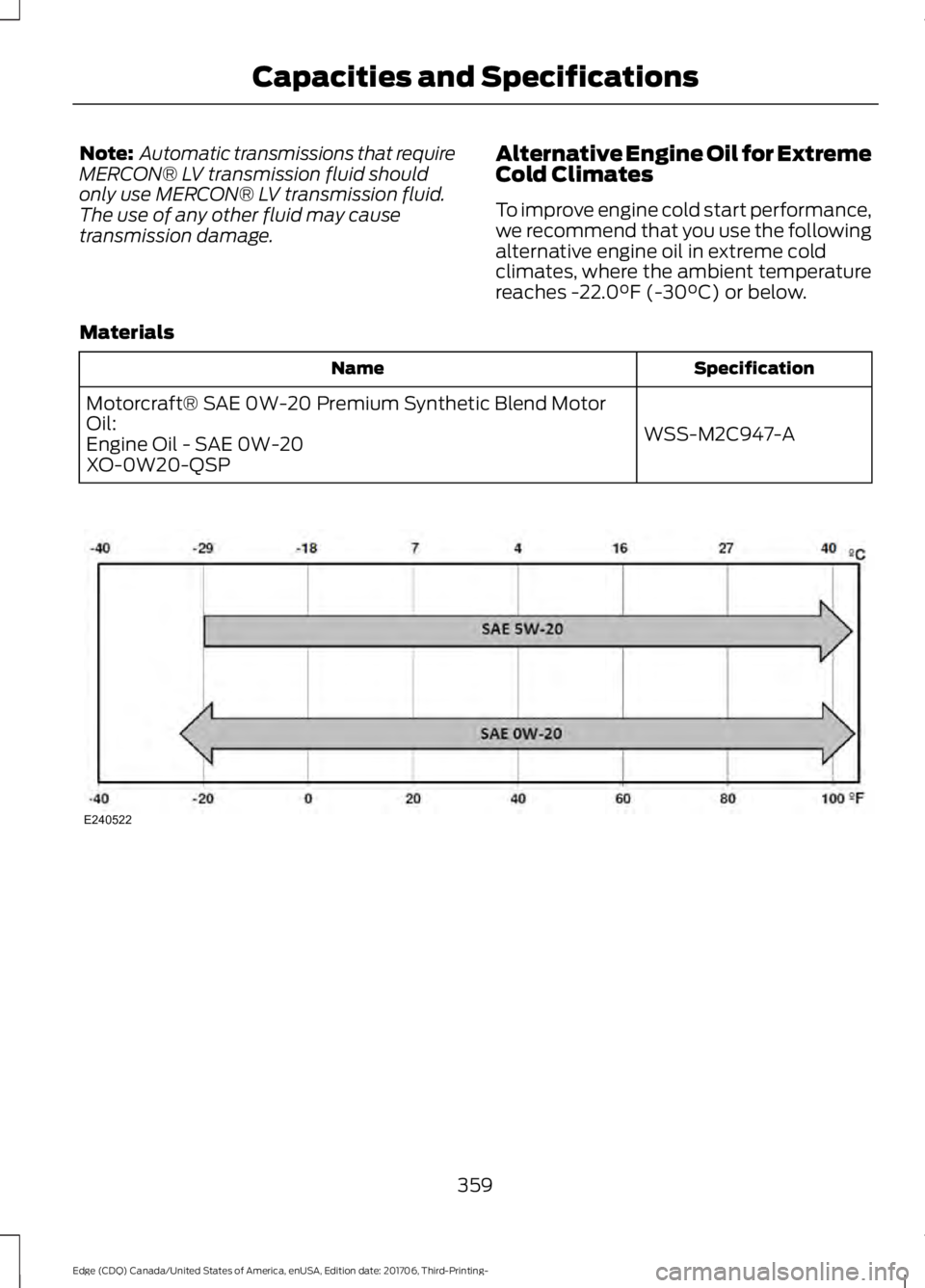
To improve engine cold start performance,
we recommend that you use the following
alternative engine oil in extreme cold
climates, where the ambient temperature
reaches -22.0°F (-30°C) or below.
Materials Specification
Name
WSS-M2C947-A
Motorcraft® SAE 0W-20 Premium Synthetic Blend Motor
Oil:
Engine Oil - SAE 0W-20
XO-0W20-QSP 359
Edge (CDQ) Canada/United States of America, enUSA, Edition date: 201706, Third-Printing- Capacities and SpecificationsE240522
Page 383 of 557
Other features, such as text messaging
using Bluetooth and automatic phonebook
download, are phone-dependent features.
To check your phone's compatibility, see
your phone's manual and visit
www.SYNCMyRide.com,
www.SYNCMyRide.ca or
www.syncmaroute.ca.
Pairing a Phone for the First Time
Wirelessly pairing your phone with SYNC
allows you to make and receive hands-free
calls.
Note:
SYNC can support downloading up
to approximately 4000 entries per
Bluetooth-enabled cellular phone.
Note: Make sure to switch on the ignition
and the radio. Shift the transmission into
park (P) for automatic transmission or first
gear for manual transmission.
Using the Audio System
Note: To scroll through the menus, press
the up and down arrows on your audio
system.
1. Make sure to switch on your phone's Bluetooth feature before starting the
search. See your device's manual if
necessary.
2. Press the PHONE button. When the
audio display indicates there is no
paired phone, select the option to add.
3. When a message to begin pairing appears in the audio display, search for
SYNC on your phone to start the pairing
process. 4. When prompted on your cell phone
’s
display, confirm that the PIN provided
by SYNC matches the PIN displayed
on your cell phone. Your phone is now
paired and the display indicates that
the pairing was successful. If you are
prompted to enter a PIN on your device,
enter the PIN displayed on the screen.
The display indicates when the pairing
is successful.
Depending on your phone's capability and
your market, the system may prompt you
with questions, such as setting the current
phone as the primary phone (the phone
SYNC automatically tries to connect with
first upon vehicle start-up) and
downloading your phonebook.
Using Voice Commands Make sure to switch on your
phone's Bluetooth feature
before starting the search. See
your device's manual if necessary.
Press the voice and when prompted
say: Action and Descrip-
tion
Voice Command
Follow the instruc-
tions on the audio
display.
(pair ([Bluetooth]
device | phone |
Bluetooth audio) |
add phone)
You can say any of the voice commands
that appear within open and close brackets
that are separated by |. For example,
where; (what's | what is) appears you say;
what's or what is.
The commands that have [ ] around the
word means that the word is optional.
380
Edge (CDQ) Canada/United States of America, enUSA, Edition date: 201706, Third-Printing- SYNC™
(If Equipped)E142599
Page 384 of 557
Depending on your phone's capability and
your market, the system may prompt you
with questions, such as setting the current
phone as the primary phone (the phone
SYNC automatically tries to connect with
first upon vehicle start-up) and
downloading your phonebook.
Pairing Subsequent Phones
Note:
Make sure to switch on the ignition
and the radio. Shift the transmission into
park (P) for automatic transmission or first
gear for manual transmission.
Note: To scroll through the menus, press
the up and down arrows on your audio
system.
1. Make sure to switch on your phone's Bluetooth feature before starting the
search. See your device's manual if
necessary.
2. Press the PHONE button.
3. Select the option for Bluetooth Devices.
4. Press the
OK button.
5. Select the option to add. This starts the pairing process.
6. When a message to begin pairing appears in the audio display, search for
SYNC on your device.
7. When prompted on your cell phone ’s
display, confirm that the PIN provided
by SYNC matches the PIN displayed
on your cell phone. Your phone is now
paired and the display indicates that
the pairing was successful. If you are
prompted to enter a PIN on your device,
enter the PIN displayed on the screen.
The display indicates when the pairing
is successful. SYNC may prompt you with more cell
phone options. Your cell phone may also
prompt you to give SYNC permission to
access information. For more information
on your cell phone
’s capability, see your
cell phone ’s manual and visit the website.
Phone Voice Commands Press the voice button. When
prompted, say any of the
following:
Voice Command
(phone | Blackberry | iPhone)
Then say any of the following:
call (___)
call ___ at home
call ___ ((in|at) [the] office | at work)
call ___ on (cell | mobile)
call ___ on other 1
dial [[a] number]
2
([go to] privacy | transfer to phone
| privacy on)
2
(hold call [on] | place call on hold)
2
join (calls | call)
2
mute call [on]
2
(mute call off | un-mute call)
(turn ringer on | silent mode off)
(turn ringer off | silent mode [on])
381
Edge (CDQ) Canada/United States of America, enUSA, Edition date: 201706, Third-Printing- SYNC™
(If Equipped)E142599
Page 502 of 557
Multi-Point Inspection
Hazard warning system operation
Accessory drive belt(s)
Horn operation
Battery performance
Radiator, cooler, heater and air conditioninghoses
Engine air filter
Suspension components for leaks ordamage
Exhaust system
Steering and linkage
Exterior lamps operation
Tires (including spare) for wear and properpressure2
Fluid levels 1
; fill if necessary
Windshield for cracks, chips or pits
For oil and fluid leaks
Washer spray and wiper operation
Half-shaft dust boots
1 Brake, coolant recovery reservoir, automatic transmission and window washer
2 If your vehicle is equipped with a temporary mobility kit, check the tire sealant expiration
Use By date on the canister. Replace as needed.
Be sure to ask your dealership service
advisor or technician about the multi-point
vehicle inspection. It is a comprehensive
way to perform a thorough inspection of
your vehicle. Your checklist gives you
immediate feedback on the overall
condition of your vehicle.
NORMAL SCHEDULED
MAINTENANCE
Intelligent Oil-Life Monitor™
Your vehicle is equipped with an Intelligent
Oil-Life Monitor that determines when you
should change the engine oil based on how
you use your vehicle. By using several
important factors in its calculations, the
monitor helps reduce the cost of owning
your vehicle and reduces environmental
waste at the same time. This means you do not have to remember
to change the oil on a mileage-based
schedule. Your vehicle lets you know when
an oil change is due by displaying a
message in the information display.
The following table provides examples of
vehicle use and its impact on oil change
intervals. It is a guideline only. Actual oil
change intervals depend on several factors
and generally decrease with severity of
use.
499
Edge (CDQ) Canada/United States of America, enUSA, Edition date: 201706, Third-Printing- Scheduled Maintenance
Page 503 of 557
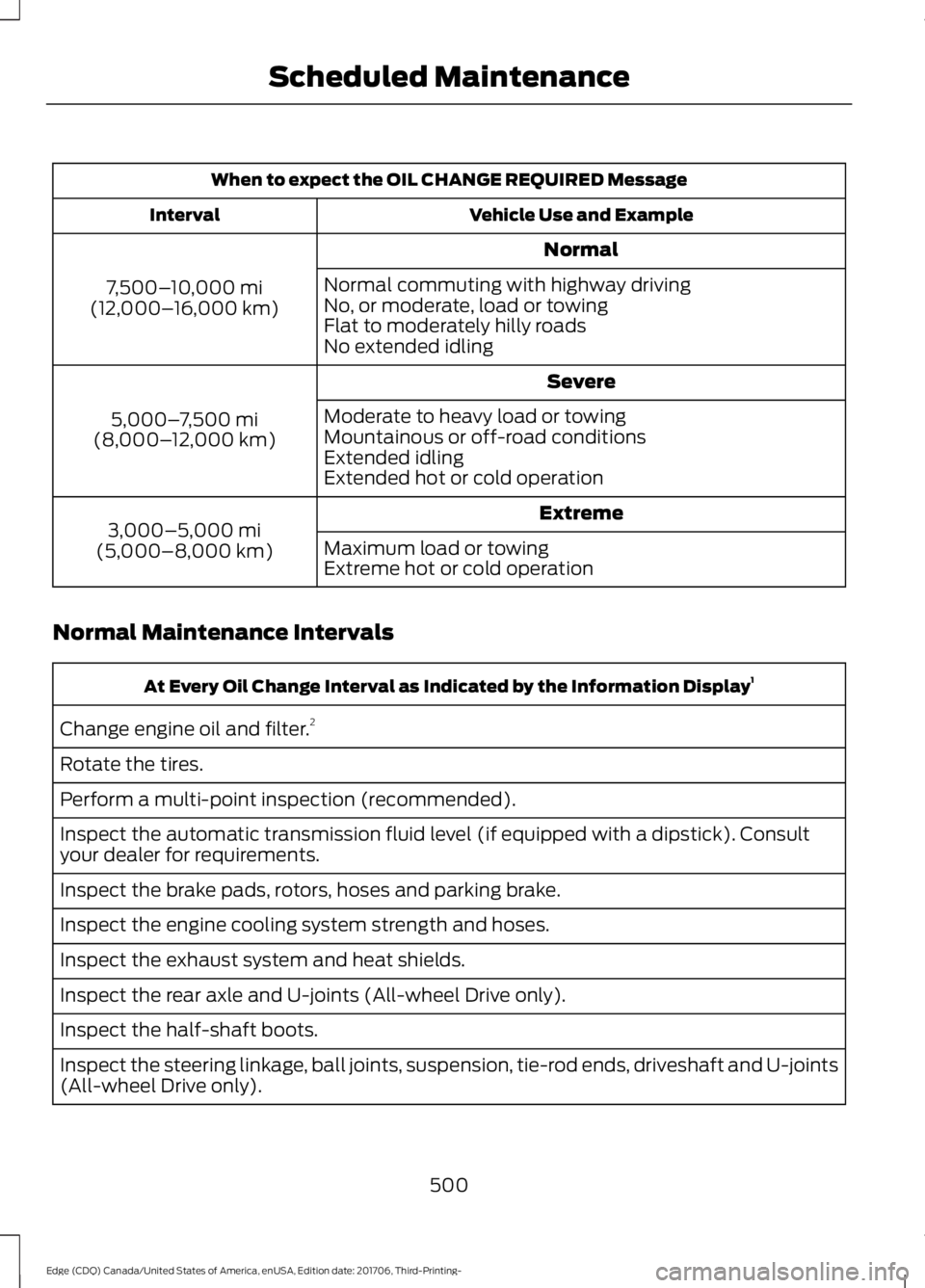
When to expect the OIL CHANGE REQUIRED Message
Vehicle Use and Example
Interval
Normal
7,500– 10,000 mi
(12,000– 16,000 km) Normal commuting with highway driving
No, or moderate, load or towing
Flat to moderately hilly roads
No extended idling
Severe
5,000– 7,500 mi
(8,000– 12,000 km) Moderate to heavy load or towing
Mountainous or off-road conditions
Extended idling
Extended hot or cold operation
Extreme
3,000–5,000 mi
(5,000–8,000 km) Maximum load or towing
Extreme hot or cold operation
Normal Maintenance Intervals At Every Oil Change Interval as Indicated by the Information Display
1
Change engine oil and filter. 2
Rotate the tires.
Perform a multi-point inspection (recommended).
Inspect the automatic transmission fluid level (if equipped with a dipstick). Consult
your dealer for requirements.
Inspect the brake pads, rotors, hoses and parking brake.
Inspect the engine cooling system strength and hoses.
Inspect the exhaust system and heat shields.
Inspect the rear axle and U-joints (All-wheel Drive only).
Inspect the half-shaft boots.
Inspect the steering linkage, ball joints, suspension, tie-rod ends, driveshaft and U-joints
(All-wheel Drive only).
500
Edge (CDQ) Canada/United States of America, enUSA, Edition date: 201706, Third-Printing- Scheduled Maintenance
Page 504 of 557
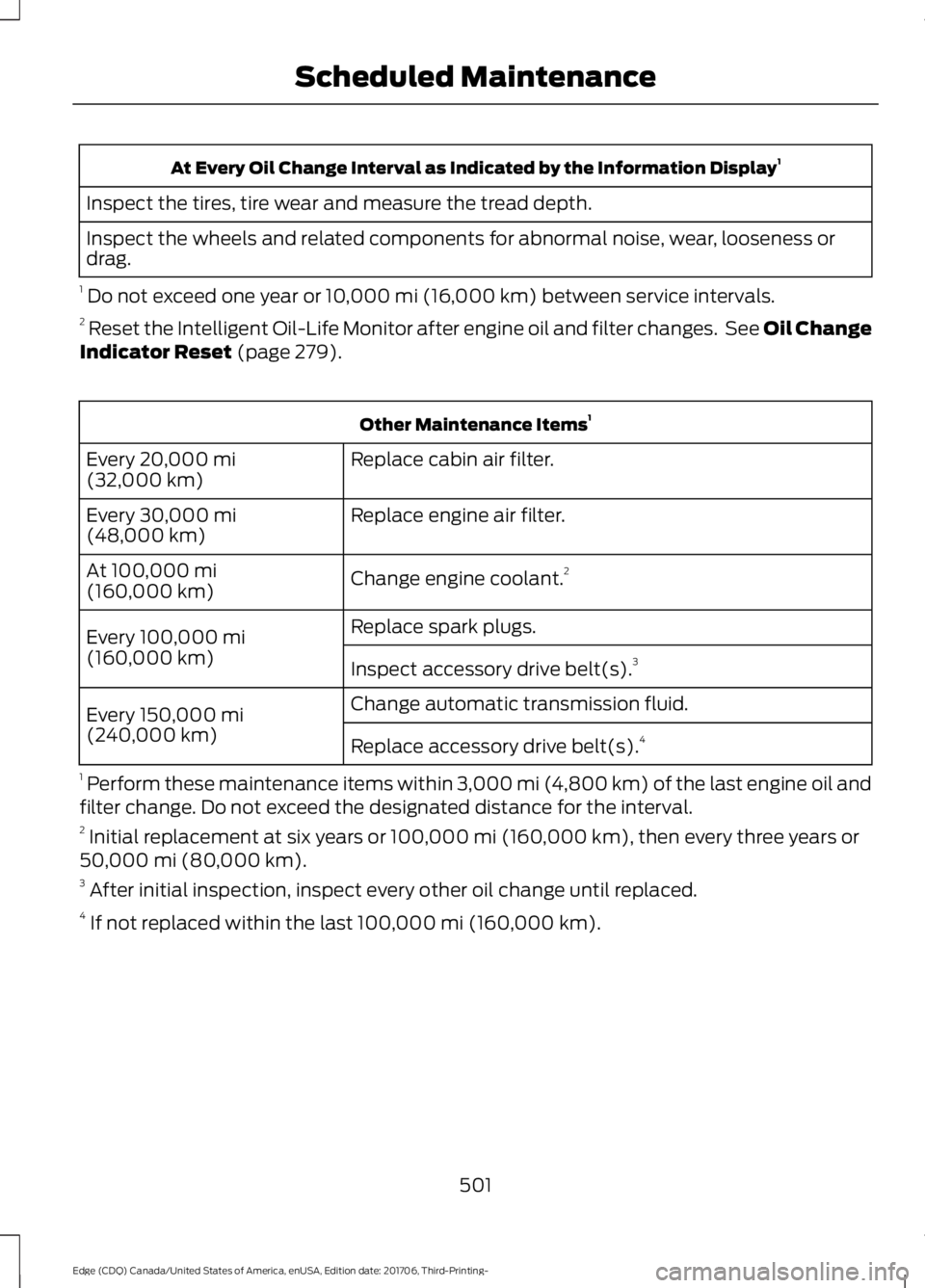
At Every Oil Change Interval as Indicated by the Information Display
1
Inspect the tires, tire wear and measure the tread depth.
Inspect the wheels and related components for abnormal noise, wear, looseness or
drag.
1 Do not exceed one year or 10,000 mi (16,000 km) between service intervals.
2 Reset the Intelligent Oil-Life Monitor after engine oil and filter changes. See Oil Change
Indicator Reset
(page 279). Other Maintenance Items
1
Replace cabin air filter.
Every
20,000 mi
(32,000 km)
Replace engine air filter.
Every
30,000 mi
(48,000 km)
Change engine coolant.2
At
100,000 mi
(160,000 km)
Replace spark plugs.
Every
100,000 mi
(160,000 km) Inspect accessory drive belt(s). 3
Change automatic transmission fluid.
Every
150,000 mi
(240,000 km) Replace accessory drive belt(s). 4
1 Perform these maintenance items within 3,000 mi (4,800 km) of the last engine oil and
filter change. Do not exceed the designated distance for the interval.
2 Initial replacement at six years or
100,000 mi (160,000 km), then every three years or
50,000 mi (80,000 km).
3 After initial inspection, inspect every other oil change until replaced.
4 If not replaced within the last
100,000 mi (160,000 km).
501
Edge (CDQ) Canada/United States of America, enUSA, Edition date: 201706, Third-Printing- Scheduled Maintenance
Page 505 of 557
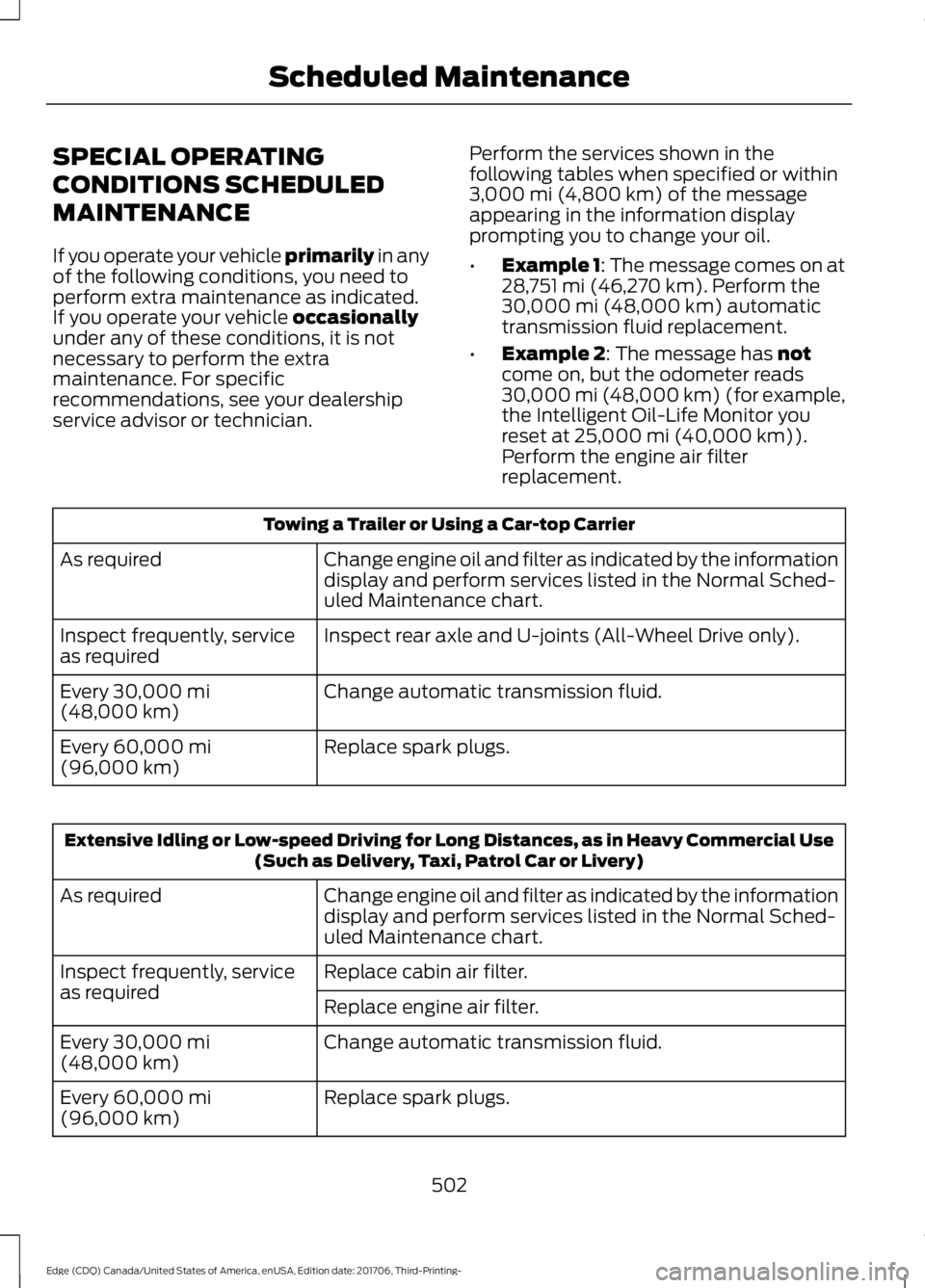
SPECIAL OPERATING
CONDITIONS SCHEDULED
MAINTENANCE
If you operate your vehicle primarily in any
of the f
ollowing conditions, you need to
perform extra maintenance as indicated.
If you operate your vehicle
occasionally
under any of these conditions, it is not
necessary to perform the extra
maintenance. For specific
recommendations, see your dealership
service advisor or technician. Perform the services shown in the
following tables when specified or within
3,000 mi (4,800 km)
of the message
appearing in the information display
prompting you to change your oil.
• Example 1: The message comes on at
28,751 mi (46,270 km)
. Perform the
30,000 mi (48,000 km) automatic
transmission fluid replacement.
• Example 2
: The message has not
come on, but the odometer reads
30,000 mi (48,000 km) (for example,
the Intelligent Oil-Life Monitor you
reset at
25,000 mi (40,000 km)).
Perform the engine air filter
replacement. Towing a Trailer or Using a Car-top Carrier
Change engine oil and filter as indicated by the information
display and perform services listed in the Normal Sched-
uled Maintenance chart.
As required
Inspect rear axle and U-joints (All-Wheel Drive only).
Inspect frequently, service
as required
Change automatic transmission fluid.
Every
30,000 mi
(48,000 km)
Replace spark plugs.
Every
60,000 mi
(96,000 km) Extensive Idling or Low-speed Driving for Long Distances, as in Heavy Commercial Use
(Such as Delivery, Taxi, Patrol Car or Livery)
Change engine oil and filter as indicated by the information
display and perform services listed in the Normal Sched-
uled Maintenance chart.
As required
Replace cabin air filter.
Inspect frequently, service
as required
Replace engine air filter.
Change automatic transmission fluid.
Every
30,000 mi
(48,000 km)
Replace spark plugs.
Every
60,000 mi
(96,000 km)
502
Edge (CDQ) Canada/United States of America, enUSA, Edition date: 201706, Third-Printing- Scheduled Maintenance
Page 506 of 557
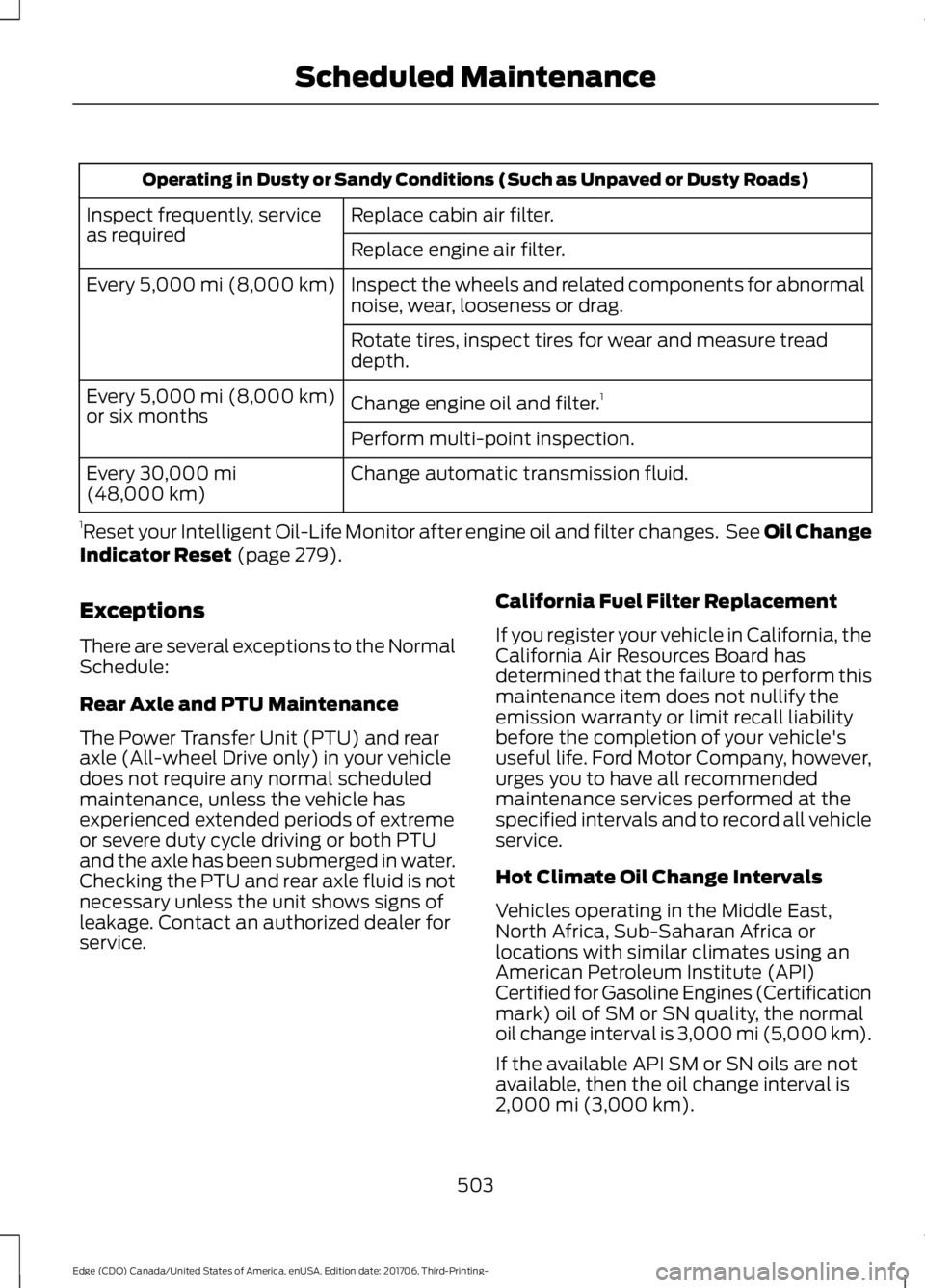
Operating in Dusty or Sandy Conditions (Such as Unpaved or Dusty Roads)
Replace cabin air filter.
Inspect frequently, service
as required
Replace engine air filter.
Inspect the wheels and related components for abnormal
noise, wear, looseness or drag.
Every 5,000 mi (8,000 km)
Rotate tires, inspect tires for wear and measure tread
depth.
Change engine oil and filter. 1
Every
5,000 mi (8,000 km)
or six months
Perform multi-point inspection.
Change automatic transmission fluid.
Every
30,000 mi
(48,000 km)
1 Reset your Intelligent Oil-Life Monitor after engine oil and filter changes. See Oil Change
Indicator Reset
(page 279).
Exceptions
There are several exceptions to the Normal
Schedule:
Rear Axle and PTU Maintenance
The Power Transfer Unit (PTU) and rear
axle (All-wheel Drive only) in your vehicle
does not require any normal scheduled
maintenance, unless the vehicle has
experienced extended periods of extreme
or severe duty cycle driving or both PTU
and the axle has been submerged in water.
Checking the PTU and rear axle fluid is not
necessary unless the unit shows signs of
leakage. Contact an authorized dealer for
service. California Fuel Filter Replacement
If you register your vehicle in California, the
California Air Resources Board has
determined that the failure to perform this
maintenance item does not nullify the
emission warranty or limit recall liability
before the completion of your vehicle's
useful life. Ford Motor Company, however,
urges you to have all recommended
maintenance services performed at the
specified intervals and to record all vehicle
service.
Hot Climate Oil Change Intervals
Vehicles operating in the Middle East,
North Africa, Sub-Saharan Africa or
locations with similar climates using an
American Petroleum Institute (API)
Certified for Gasoline Engines (Certification
mark) oil of SM or SN quality, the normal
oil change interval is 3,000 mi (5,000 km).
If the available API SM or SN oils are not
available, then the oil change interval is
2,000 mi (3,000 km)
.
503
Edge (CDQ) Canada/United States of America, enUSA, Edition date: 201706, Third-Printing- Scheduled Maintenance
Page 521 of 557
•
SOFTWARE Transfer: You may
permanently transfer your rights under
this EULA only as part of a sale or
transfer of the DEVICES, provided you
retain no copies, you transfer all of the
SOFTWARE (including all component
parts, the media and printed materials,
any upgrades, and, if applicable, the
Certificate(s) of Authenticity), and the
recipient agrees to the terms of this
EULA. If the SOFTWARE is an upgrade,
any transfer must include all prior
versions of the SOFTWARE.
• Termination: Without prejudice to any
other rights, FORD MOTOR COMPANY
may terminate this EULA if you fail to
comply with the terms and conditions
of this EULA.
• Internet-Based Services
Components:
The SOFTWARE may
contain components that enable and
facilitate the use of certain
Internet-based services. You
acknowledge and agree that FORD
MOTOR COMPANY, third party
software and service suppliers, its
affiliates and/or its designated agent
may automatically check the version
of the SOFTWARE and/or its
components that you are utilizing and
may provide upgrades or supplements
to the SOFTWARE that may be
automatically downloaded to your
DEVICES.
• Additional Software/Services: The
SOFTWARE may permit FORD MOTOR
COMPANY, third party software and
service suppliers, its affiliates and/or
its designated agent to provide or make
available to you SOFTWARE updates,
supplements, add-on components, or
Internet-based services components
of the SOFTWARE after the date you
obtain your initial copy of the
SOFTWARE ("Supplemental
Components".) SOFTWARE updates
may cause you to incur additional charges from your wireless service
provider. If FORD MOTOR COMPANY
or third party software and services
suppliers provide or make available to
you Supplemental Components and
no other EULA terms are provided
along with the Supplemental
Components, then the terms of this
EULA shall apply. FORD MOTOR
COMPANY, its affiliates and/or its
designated agent reserve the right to
discontinue without liability any
Internet-based services provided to
you or made available to you through
the use of the SOFTWARE.
• Links to Third Party Sites:
The
SOFTWARE may provide you with the
ability to link to third party sites. The
third party sites are not under the
control of FORD MOTOR COMPANY,
its affiliates and/or its designated
agent. Neither FORD MOTOR
COMPANY nor its affiliates nor its
designated agent are responsible for
(I) the contents of any third party sites,
any links contained in third party sites,
or any changes or updates to third
party sites, or (ii) webcasting or any
other form of transmission received
from any third party sites. If the
SOFTWARE provides links to third
party sites, those links are provided to
you only as a convenience, and the
inclusion of any link does not imply an
endorsement of the third party site by
FORD MOTOR COMPANY, its affiliates
and/or its designated agent.
• Obligation to Drive Responsibly:
You recognize your obligation to drive
responsibly and keep attention on the
road. You will read and abide with the
DEVICES operating instructions
particularly as they pertain to safety
and you agree to assume any risk
associated with the use of the
DEVICES.
518
Edge (CDQ) Canada/United States of America, enUSA, Edition date: 201706, Third-Printing- Appendices
Page 539 of 557
DISRUPTION OF SERVICE PROVIDED
HEREUNDER, IS LIMITED TO PAYMENT
OF DAMAGES IN AN AMOUNT NOT TO
EXCEED THE AMOUNT PAID BY END USER
FOR THE SERVICES DURING THE
TWO-MONTH PERIOD PRECEDING THE
DATE THE CLAIM AROSE.
(ii) END USER AGREES TO INDEMNIFY
AND HOLD HARMLESS THE UNDERLYING
WIRELESS SERVICE CARRIER AND ITS
OFFICERS, EMPLOYEES, AND AGENTS
AGAINST ANY AND ALL CLAIMS,
INCLUDING WITHOUT LIMITATION
CLAIMS FOR LIBEL, SLANDER, OR ANY
PROPERTY DAMAGE, PERSONAL INJURY
OR DEATH, ARISING IN ANY WAY,
DIRECTLY OR INDIRECTLY, IN
CONNECTION WITH THIS AGREEMENT
OR THE USE, FAILURE TO USE, OR
INABILITY TO USE THE DEVICE EXCEPT
WHERE THE CLAIMS RESULT FROM THE
UNDERLYING CARRIER’
S GROSS
NEGLIGENCE OR WILLFUL MISCONDUCT.
THIS INDEMNITY WILL SURVIVE THE
TERMINATION OF THE AGREEMENT.
(iii) END USER HAS NO PROPERTY RIGHT
IN ANY NUMBER ASSIGNED TO THE
DEVICE.
(iv) END USER UNDERSTANDS THAT
FORD AND THE UNDERLYING CARRIER
CANNOT GUARANTY THE SECURITY OF
WIRELESS TRANSMISSIONS, AND WILL
NOT BE LIABLE FOR ANY LACK OF
SECURITY RELATING TO THE USE OF THE
SERVICES
THE SERVICE IS FOR [END USER’ S] USE
ONLY AND END USER MAY NOT RESELL
THE SERVICE TO ANY OTHER PARTY END
USER UNDERSTANDS THAT THE
UNDERLYING CARRIER DOES NOT
GUARANTEE ANY END USER
UNINTERRUPTED SERVICE OR
COVERAGE. THE UNDERLYING CARRIER
DOES NOT WARRANT THAT END USERS
CAN OR WILL BE LOCATED USING THE
SERVICE. THE UNDERLYING CARRIER MAKES NO WARRANTY, EXPRESS OR
IMPLIED, OF MERCHANTABILITY OR
FITNESS FOR A PARTICULAR PURPOSE,
SUITABILITY, OR PERFORMANCE
REGARDING ANY SERVICES OR GOODS,
AND IN NO EVENT SHALL AT&T BE
LIABLE, WHETHER OR NOT DUE TO ITS
OWN NEGLIGENCE, FOR ANY: (A) ACT OR
OMISSION OF A THIRD PARTY; (B)
MISTAKES, OMISSIONS, INTERRUPTIONS,
ERRORS, FAILURES TO TRANSMIT,
DELAYS, OR DEFECTS IN THE SERVICE
PROVIDED BY OR THROUGH THE
UNDERLYING CARRIER; (C) DAMAGE OR
INJURY CAUSED BY SUSPENSION OR
TERMINATION BY THE UNDERLYING
CARRIER; OR (D) DAMAGE OR INJURY
CAUSED BY A FAILURE OR DELAY IN
CONNECTING A CALL TO ANY ENTITY,
INCLUDING 911 OR ANY OTHER
EMERGENCY SERVICE. TO THE FULL
EXTENT ALLOWED BY LAW, THE END
USER RELEASES, INDEMNIFIES AND
HOLDS THE UNDERLYING CARRIER
HARMLESS FROM AND AGAINST ANY
AND ALL CLAIMS OF ANY PERSON OR
ENTITY FOR DAMAGES OF ANY NATURE
ARISING IN ANY WAY FROM OR RELATING
TO, DIRECTLY OR INDIRECTLY, SERVICES
PROVIDED BY THE UNDERLYING CARRIER
OR ANY PERSON’
S USE THEREOF,
INCLUDING CLAIMS ARISING IN WHOLE
OR IN PART FROM THE ALLEGED
NEGLIGENCE OF THE UNDERLYING
CARRIER.
VII. China Territory
Personal Use Only
You agree to use this Data together with
[insert name of Client Application] for the
solely personal, non-commercial purposes
for which you were licensed, and not for
service bureau, time-sharing or other
similar purposes. Accordingly, but subject
to the restrictions set forth in the following
paragraphs, you may copy this Data only
as necessary for your personal use to (i)
536
Edge (CDQ) Canada/United States of America, enUSA, Edition date: 201706, Third-Printing- Appendices