Rear view FORD EDGE 2019 Owners Manual
[x] Cancel search | Manufacturer: FORD, Model Year: 2019, Model line: EDGE, Model: FORD EDGE 2019Pages: 547, PDF Size: 40.86 MB
Page 6 of 547
Auxiliary Power Points
Auxiliary Power Points
................................151
Wireless Accessory Charging ..................
152
Storage Compartments
Center Console .............................................
154
Overhead Console .......................................
154
Rear Seat Armrest .......................................
154
Starting and Stopping the Engine
General Information ...................................
155
Keyless Starting ...........................................
155
Starting a Gasoline Engine ......................
156
Engine Block Heater ...................................
158
Unique Driving Characteristics
Auto-Start-Stop ..........................................
160
Fuel and Refueling
Safety Precautions ......................................
162
Fuel Quality ....................................................
162
Fuel Filler Funnel Location .......................
163
Running Out of Fuel ...................................
163
Refueling .........................................................
165
Fuel Consumption .......................................
167
Engine Emission Control
Emission Law ................................................
169
Catalytic Converter .....................................
170
Transmission
Automatic Transmission ...........................
173
All-Wheel Drive
Using All-Wheel Drive ................................
179Brakes
General Information
...................................
184
Hints on Driving With Anti-Lock Brakes ........................................................................\
.
184
Electric Parking Brake ................................
185
Hill Start Assist ............................................
186
Traction Control
Principle of Operation ...............................
188
Using Traction Control ..............................
188
Stability Control
Principle of Operation ...............................
189
Using Stability Control ..............................
190
Parking Aids
Principle of Operation ................................
192
Rear Parking Aid ...........................................
192
Front Parking Aid .........................................
193
Side Sensing System .................................
194
Active Park Assist ........................................
196
Rear View Camera .....................................
202
180 Degree Camera ...................................
205
Cruise Control
Principle of Operation ...............................
207
Using Cruise Control ..................................
207
Using Adaptive Cruise Control - Vehicles With: Adaptive Cruise Control With
Stop and Go .............................................
208
Using Adaptive Cruise Control - Vehicles With: Adaptive Cruise Control With
Stop and Go/Lane Centering ..............
215
Driving Aids
Driver Alert .....................................................
225
Lane Keeping System ...............................
226
Blind Spot Information System ..............
231
Cross Traffic Alert .......................................
233
Steering ..........................................................
235
3
Edge (CDQ) Canada/United States of America, enUSA, Edition date: 201806, Third-Printing- Table of Contents
Page 7 of 547
Pre-Collision Assist
....................................236
Load Carrying
Rear Under Floor Storage .........................
241
Cargo Nets ......................................................
241
Roof Racks and Load Carriers ................
241
Load Limit ......................................................
242
Towing
Towing a Trailer ............................................
247
Trailer Sway Control ..................................
248
Recommended Towing Weights ..........
248
Essential Towing Checks .........................
250
Towing the Vehicle on Four Wheels - 2.0L ..............................................................
252
Towing the Vehicle on Four Wheels - 2.7L ........................................................................\
252
Driving Hints
Breaking-In ....................................................
254
Economical Driving ....................................
254
Cold Weather Precautions ......................
254
Driving Through Water ..............................
254
Floor Mats ......................................................
255
Roadside Emergencies
Roadside Assistance .................................
256
Hazard Flashers ...........................................
257
Fuel Shutoff ..................................................
257
Jump Starting the Vehicle .......................
258
Post-Crash Alert System .........................
260
Transporting the Vehicle .........................
260
Customer Assistance
Getting the Services You Need ...............
261
In California (U.S. Only) ............................
262
The Better Business Bureau (BBB) Auto Line Program (U.S. Only) ....................
263
Utilizing the Mediation/Arbitration Program (Canada Only) ......................
264Getting Assistance Outside the U.S. and
Canada .......................................................
264
Ordering Additional Owner's Literature ........................................................................\
266
Reporting Safety Defects (U.S. Only) ........................................................................\
266
Reporting Safety Defects (Canada Only) ........................................................................\
266
Fuses
Fuse Specification Chart .........................
268
Changing a Fuse ..........................................
278
Maintenance
General Information ..................................
280
Opening and Closing the Hood ............
280
Under Hood Overview - 2.0L EcoBoost™ ........................................................................\
282
Under Hood Overview - 2.7L EcoBoost™ ........................................................................\
283
Engine Oil Dipstick - 2.0L EcoBoost™ ........................................................................\
284
Engine Oil Dipstick - 2.7L EcoBoost™ ........................................................................\
284
Engine Oil Check .........................................
284
Oil Change Indicator Reset .....................
285
Engine Coolant Check ..............................
286
Automatic Transmission Fluid Check - 2.0L EcoBoost™/2.7L EcoBoost™
.......................................................................
290
Brake Fluid Check ......................................
290
Power Steering Fluid Check .....................
291
Washer Fluid Check ....................................
291
Fuel Filter ........................................................
291
Changing the 12V Battery ........................
292
Checking the Wiper Blades .....................
293
Changing the Wiper Blades ....................
293
Adjusting the Headlamps .......................
294
Removing a Headlamp ............................
296
Changing a Bulb .........................................
296
Changing the Engine Air Filter ...............
298
4
Edge (CDQ) Canada/United States of America, enUSA, Edition date: 201806, Third-Printing- Table of Contents
Page 28 of 547
Use of Inboard Lower Anchors from the
Outermost Seating Positions (Center
Seating Use)
WARNING: The standardized
spacing for LATCH lower anchors is 11 in
(280 mm) center to center. Do not use
LATCH lower anchors for the center
seating position unless the child restraint
manufacturer's instructions permit and
specify using anchors spaced at least as
far apart as those in this vehicle.
The lower anchors at the center of the
second row rear seat are spaced
20 in
(51 cm) apart. You cannot install a child
restraint with rigid LATCH attachments at
the center seating position. You can only
use LATCH compatible child restraints
(with attachments on belt webbing) at
this seating position provided that the child
restraint manufacturer's instructions
permit use with the anchor spacing stated.
Do not attach a child restraint to any lower
anchor if an adjacent child restraint is
attached to that anchor.
Each time you use the child restraint, check
that the seat is properly attached to the
lower anchors and tether anchor, if
applicable. Tug the child restraint from side
to side and forward and back where it is
secured to your vehicle. The seat should
move less than
1 in (2.5 cm) when you do
this for a proper installation.
If the child restraint is not anchored
properly, the risk of a child being injured in
a crash greatly increases. Combining Seatbelt and LATCH Lower
Anchors for Attaching Child Restraints
When used in combination, you may attach
either the seatbelt or the LATCH lower
anchors first, provided a proper installation
is achieved. Attach the tether strap
afterward, if included with the child
restraint.
Using Tether Straps Many forward-facing child
restraints include a tether strap
which extends from the back of
the child restraint and hooks to an
anchoring point called the top tether
anchor. Tether straps are available as an
accessory for many older child restraints.
Contact the manufacturer of your child
restraint for information about ordering a
tether strap, or to obtain a longer tether
strap if the tether strap on your child
restraint does not reach the appropriate
top tether anchor in your vehicle.
Once you install the child restraint using
either the seatbelt, the lower anchors of
the LATCH system, or both, you can attach
the top tether strap.
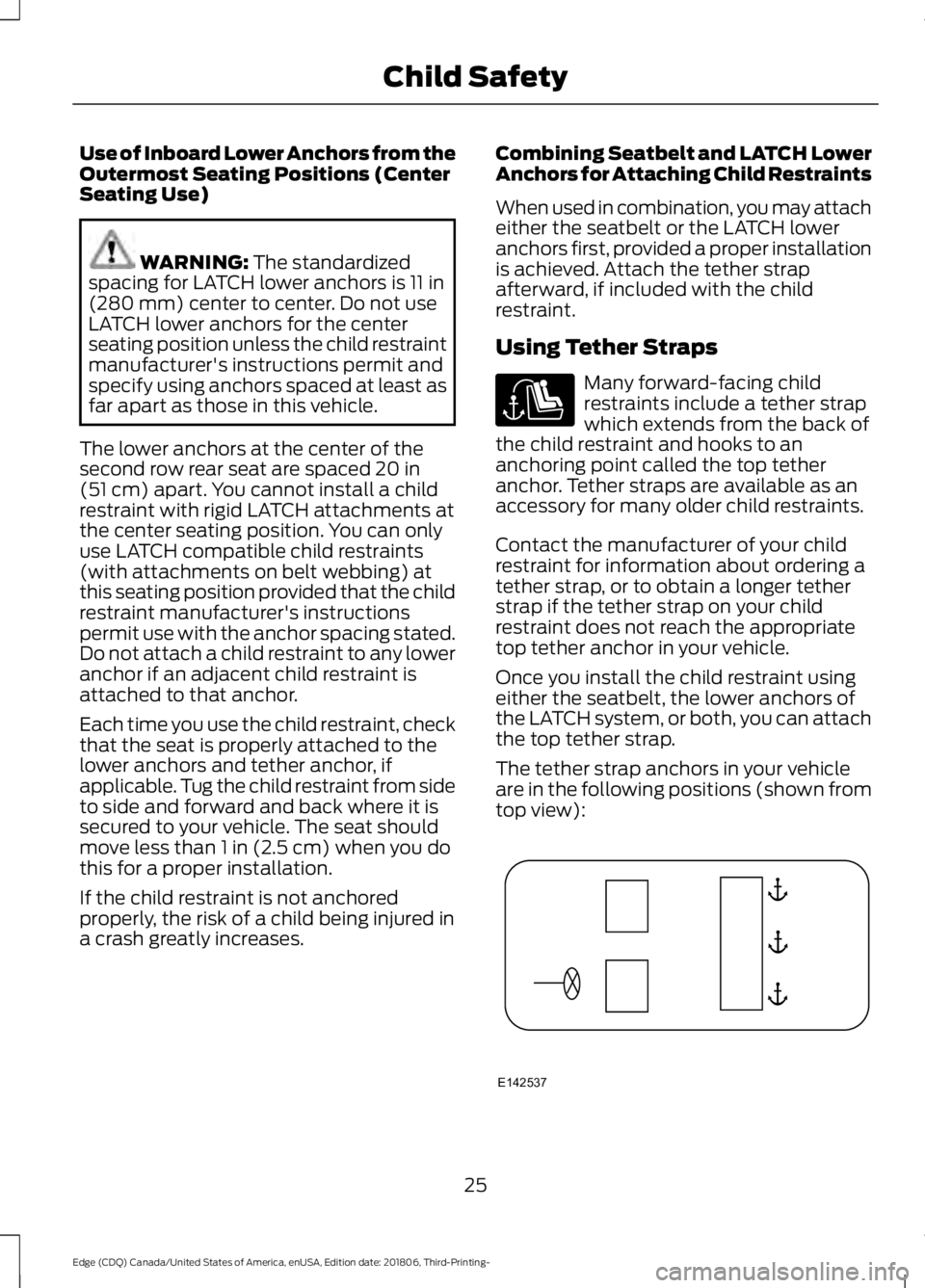
The tether strap anchors in your vehicle
are in the following positions (shown from
top view): 25
Edge (CDQ) Canada/United States of America, enUSA, Edition date: 201806, Third-Printing- Child Safety E142537
Page 168 of 547
REFUELING
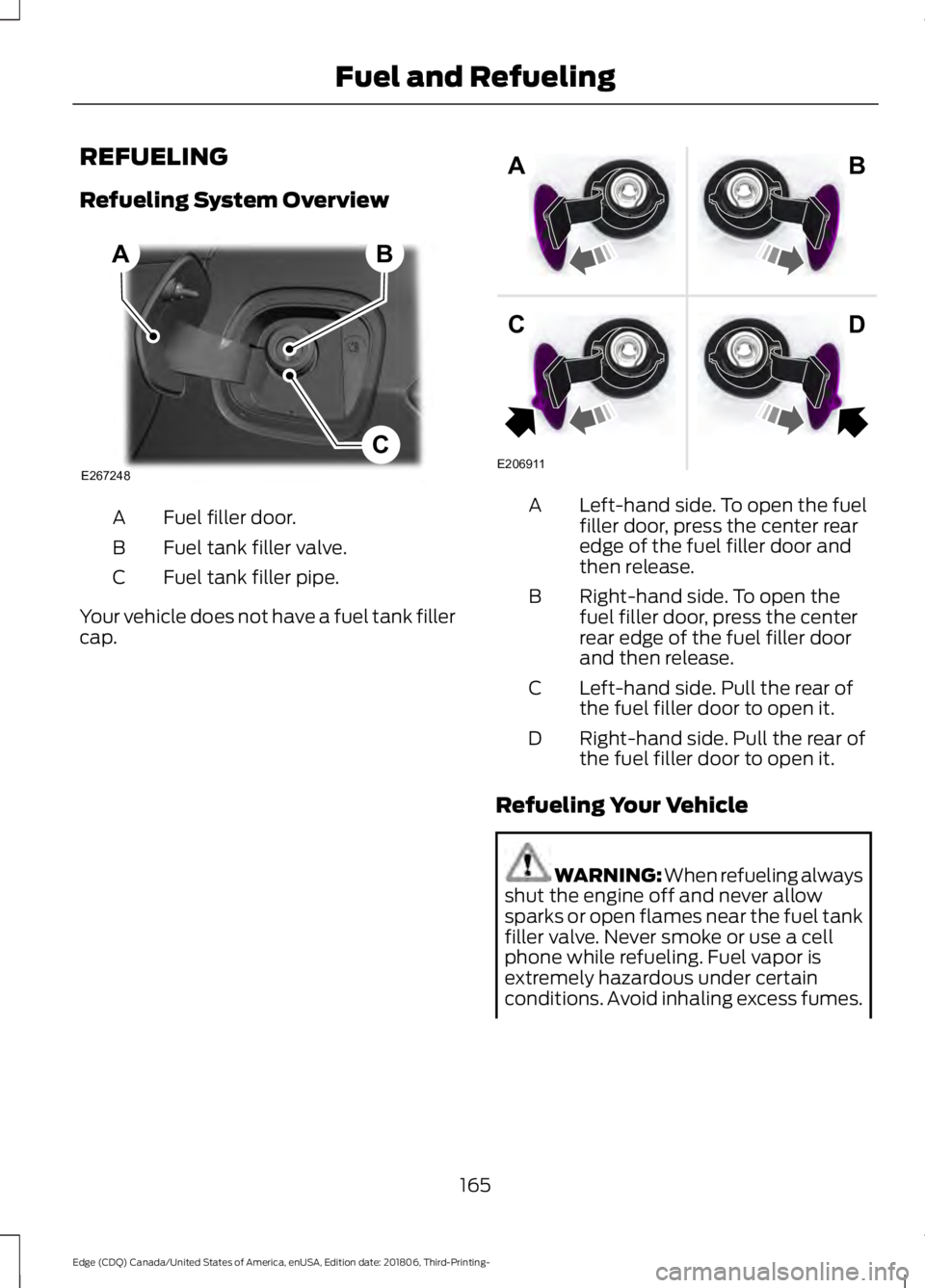
Refueling System Overview
Fuel filler door.
A
Fuel tank filler valve.
B
Fuel tank filler pipe.
C
Your vehicle does not have a fuel tank filler
cap. Left-hand side. To open the fuel
filler door, press the center rear
edge of the fuel filler door and
then release.
A
Right-hand side. To open the
fuel filler door, press the center
rear edge of the fuel filler door
and then release.
B
Left-hand side. Pull the rear of
the fuel filler door to open it.
C
Right-hand side. Pull the rear of
the fuel filler door to open it.
D
Refueling Your Vehicle WARNING: When refueling always
shut the engine off and never allow
sparks or open flames near the fuel tank
filler valve. Never smoke or use a cell
phone while refueling. Fuel vapor is
extremely hazardous under certain
conditions. Avoid inhaling excess fumes.
165
Edge (CDQ) Canada/United States of America, enUSA, Edition date: 201806, Third-Printing- Fuel and RefuelingE267248
B
C
A E206911
AB
CD
Page 205 of 547
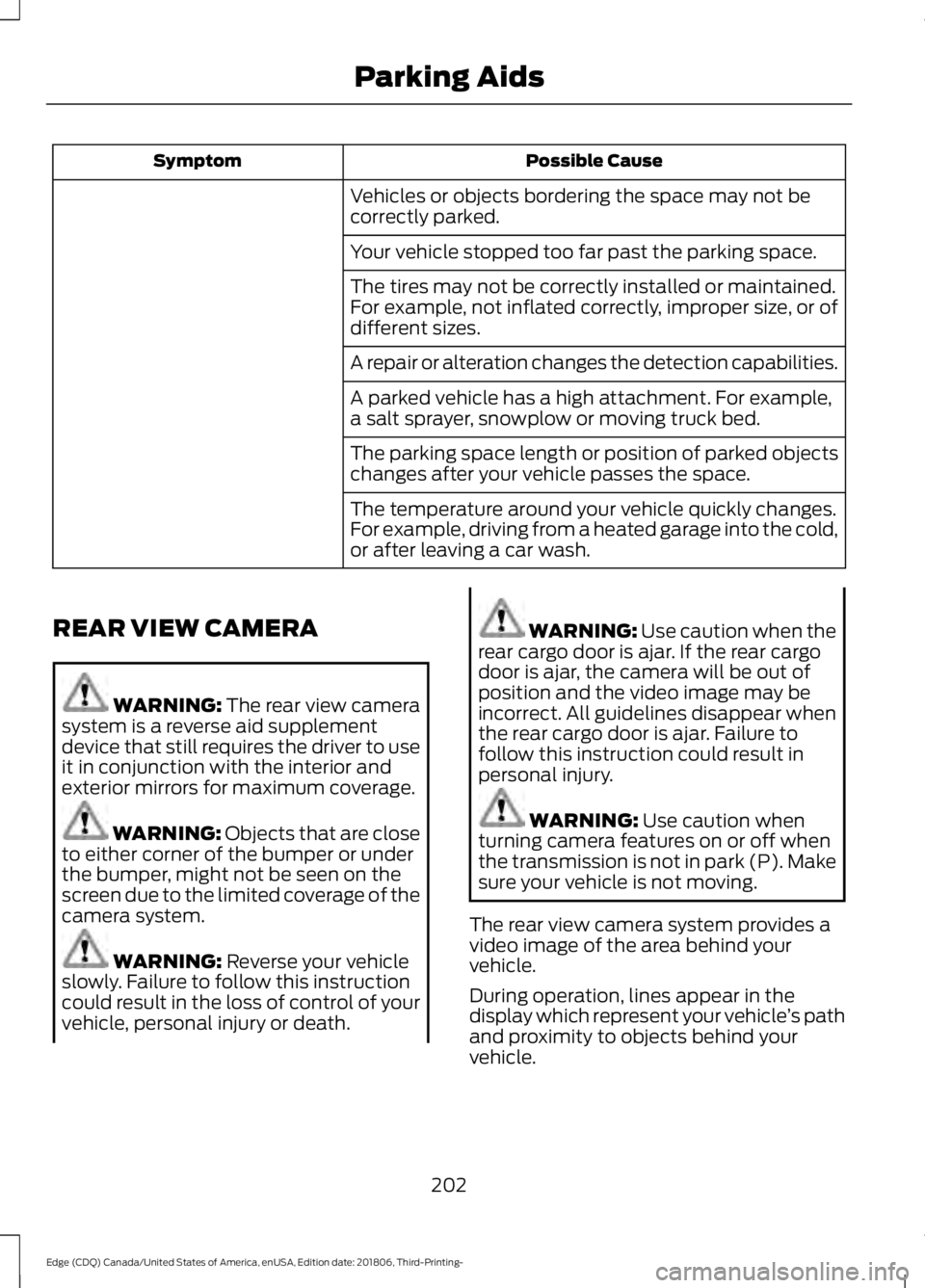
Possible Cause
Symptom
Vehicles or objects bordering the space may not be
correctly parked.
Your vehicle stopped too far past the parking space.
The tires may not be correctly installed or maintained.
For example, not inflated correctly, improper size, or of
different sizes.
A repair or alteration changes the detection capabilities.
A parked vehicle has a high attachment. For example,
a salt sprayer, snowplow or moving truck bed.
The parking space length or position of parked objects
changes after your vehicle passes the space.
The temperature around your vehicle quickly changes.
For example, driving from a heated garage into the cold,
or after leaving a car wash.
REAR VIEW CAMERA WARNING: The rear view camera
system is a reverse aid supplement
device that still requires the driver to use
it in conjunction with the interior and
exterior mirrors for maximum coverage. WARNING: Objects that are close
to either corner of the bumper or under
the bumper, might not be seen on the
screen due to the limited coverage of the
camera system. WARNING: Reverse your vehicle
slowly. Failure to follow this instruction
could result in the loss of control of your
vehicle, personal injury or death. WARNING:
Use caution when the
rear cargo door is ajar. If the rear cargo
door is ajar, the camera will be out of
position and the video image may be
incorrect. All guidelines disappear when
the rear cargo door is ajar. Failure to
follow this instruction could result in
personal injury. WARNING:
Use caution when
turning camera features on or off when
the transmission is not in park (P). Make
sure your vehicle is not moving.
The rear view camera system provides a
video image of the area behind your
vehicle.
During operation, lines appear in the
display which represent your vehicle ’s path
and proximity to objects behind your
vehicle.
202
Edge (CDQ) Canada/United States of America, enUSA, Edition date: 201806, Third-Printing- Parking Aids
Page 206 of 547
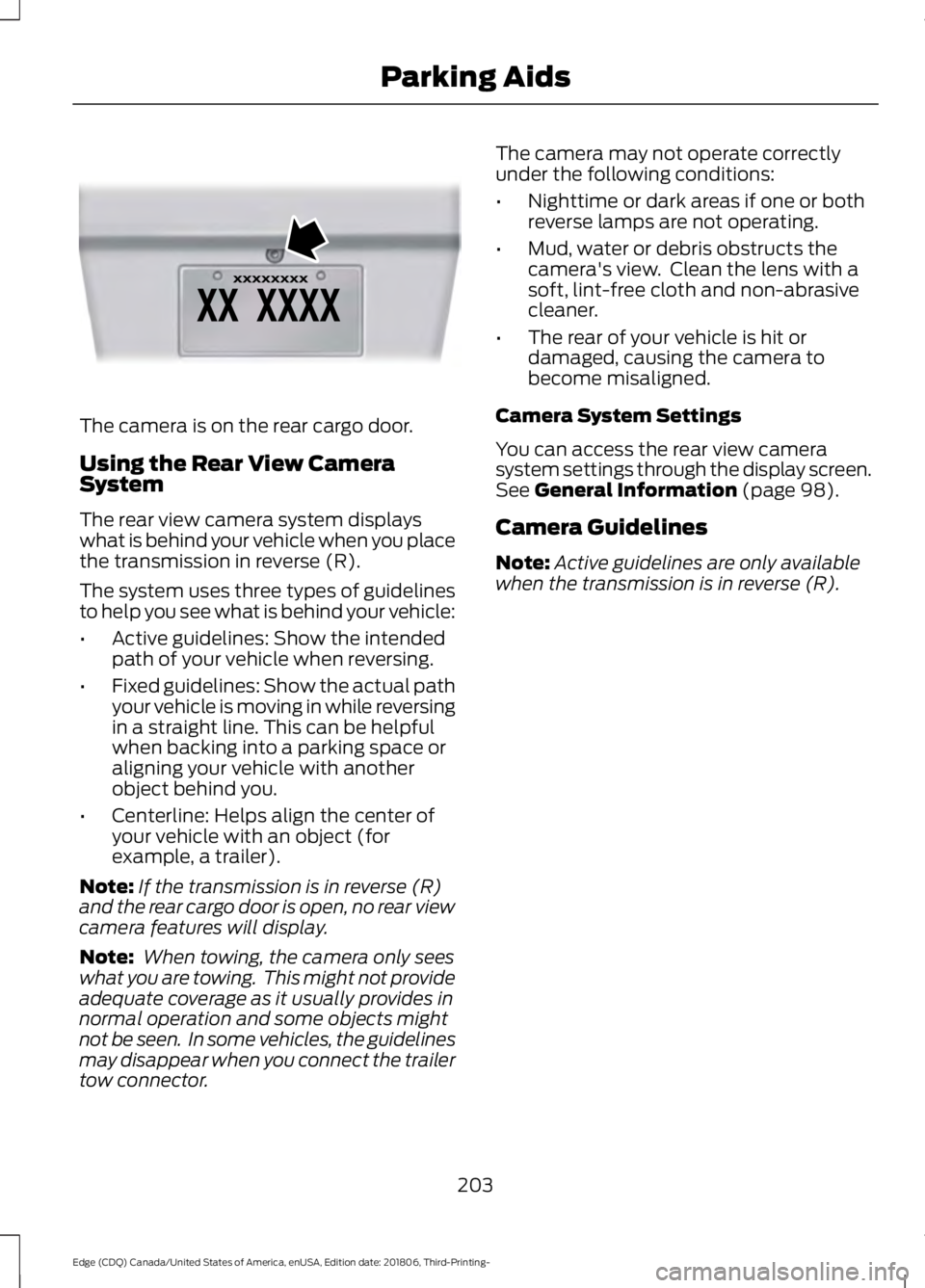
The camera is on the rear cargo door.
Using the Rear View Camera
System
The rear view camera system displays
what is behind your vehicle when you place
the transmission in reverse (R).
The system uses three types of guidelines
to help you see what is behind your vehicle:
•
Active guidelines: Show the intended
path of your vehicle when reversing.
• Fixed guidelines: Show the actual path
your vehicle is moving in while reversing
in a straight line. This can be helpful
when backing into a parking space or
aligning your vehicle with another
object behind you.
• Centerline: Helps align the center of
your vehicle with an object (for
example, a trailer).
Note: If the transmission is in reverse (R)
and the rear cargo door is open, no rear view
camera features will display.
Note: When towing, the camera only sees
what you are towing. This might not provide
adequate coverage as it usually provides in
normal operation and some objects might
not be seen. In some vehicles, the guidelines
may disappear when you connect the trailer
tow connector. The camera may not operate correctly
under the following conditions:
•
Nighttime or dark areas if one or both
reverse lamps are not operating.
• Mud, water or debris obstructs the
camera's view. Clean the lens with a
soft, lint-free cloth and non-abrasive
cleaner.
• The rear of your vehicle is hit or
damaged, causing the camera to
become misaligned.
Camera System Settings
You can access the rear view camera
system settings through the display screen.
See General Information (page 98).
Camera Guidelines
Note: Active guidelines are only available
when the transmission is in reverse (R).
203
Edge (CDQ) Canada/United States of America, enUSA, Edition date: 201806, Third-Printing- Parking AidsE142435
Page 207 of 547
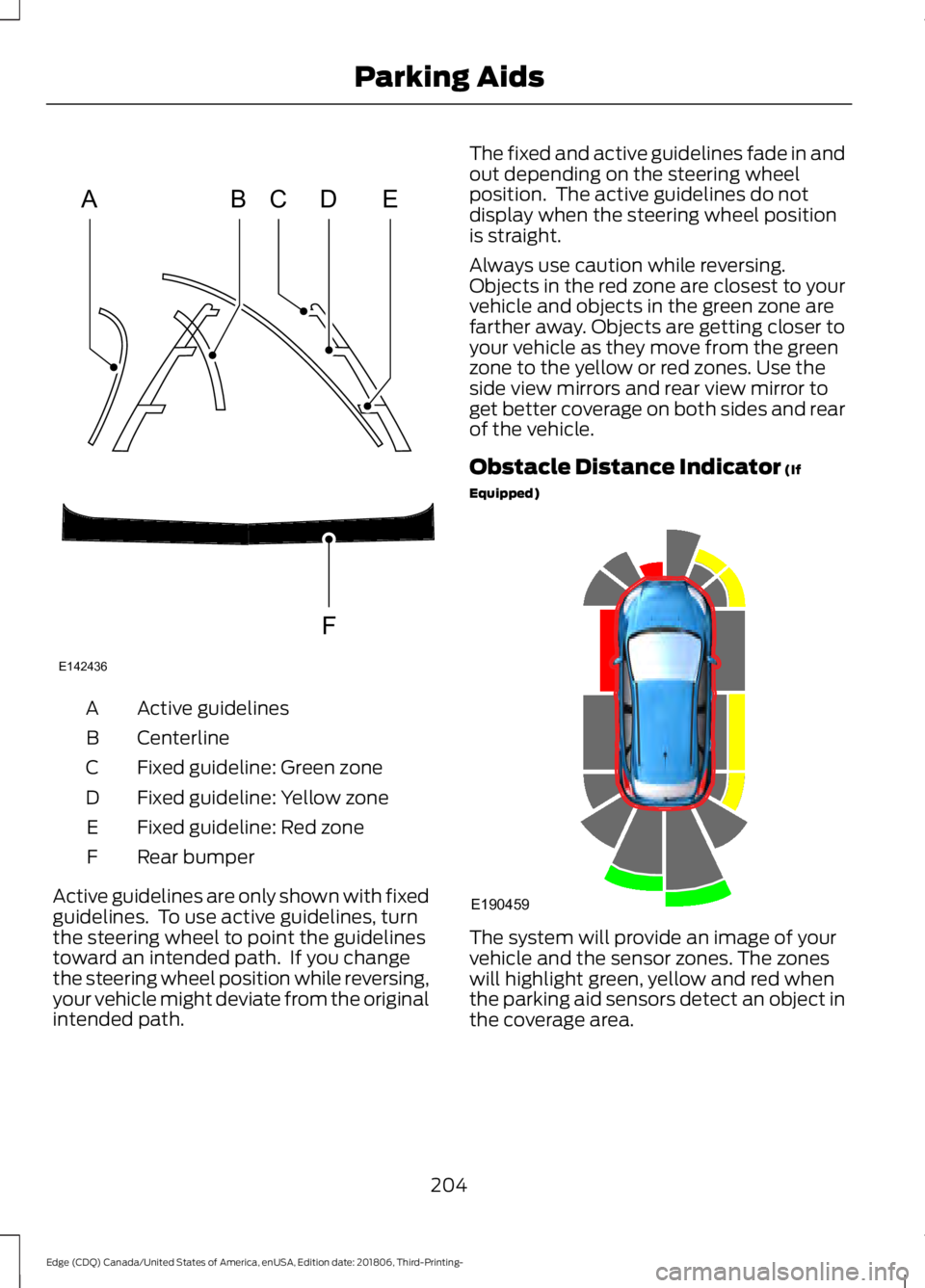
Active guidelines
A
Centerline
B
Fixed guideline: Green zone
C
Fixed guideline: Yellow zone
D
Fixed guideline: Red zone
E
Rear bumper
F
Active guidelines are only shown with fixed
guidelines. To use active guidelines, turn
the steering wheel to point the guidelines
toward an intended path. If you change
the steering wheel position while reversing,
your vehicle might deviate from the original
intended path. The fixed and active guidelines fade in and
out depending on the steering wheel
position. The active guidelines do not
display when the steering wheel position
is straight.
Always use caution while reversing.
Objects in the red zone are closest to your
vehicle and objects in the green zone are
farther away. Objects are getting closer to
your vehicle as they move from the green
zone to the yellow or red zones. Use the
side view mirrors and rear view mirror to
get better coverage on both sides and rear
of the vehicle.
Obstacle Distance Indicator (If
Equipped) The system will provide an image of your
vehicle and the sensor zones. The zones
will highlight green, yellow and red when
the parking aid sensors detect an object in
the coverage area.
204
Edge (CDQ) Canada/United States of America, enUSA, Edition date: 201806, Third-Printing- Parking AidsABCD
F
E
E142436 E190459
Page 208 of 547
Manual Zoom
WARNING: When manual zoom
is on, the full area behind your vehicle
may not show. Be aware of your
surroundings when using the manual
zoom feature.
Note: Manual zoom is only available when
the transmission is in reverse (R).
Note: When you enable manual zoom, only
the centerline is shown.
Selectable settings for this feature are
Zoom in (+) and Zoom out (-). Press the
symbol in the camera screen to change the
view. The default setting is Zoom OFF.
This allows you to get a closer view of an
object behind your vehicle. The zoomed
image keeps the bumper in the image to
provide a reference. The zoom is only
active while the transmission is in reverse
(R).
Rear Camera Delay
Selectable settings for this feature are ON
and OFF. The default setting for the rear
camera delay is OFF.
When shifting the transmission out of
reverse (R) and into any gear other than
park (P), the camera image remains in the
display until:
• Your vehicle speed sufficiently
increases.
• You shift your vehicle into park (P)
(automatic transmission).
• You apply the parking brake (manual
transmission). 180 DEGREE CAMERA (IF EQUIPPED) WARNING: Objects that are close
to either corner of the bumper or under
the bumper, might not be seen on the
screen due to the limited coverage of the
camera system. WARNING:
The front camera
system still requires the driver to use it
in conjunction with looking out of your
vehicle. WARNING:
Use caution when
turning camera features on or off when
the transmission is not in park (P). Make
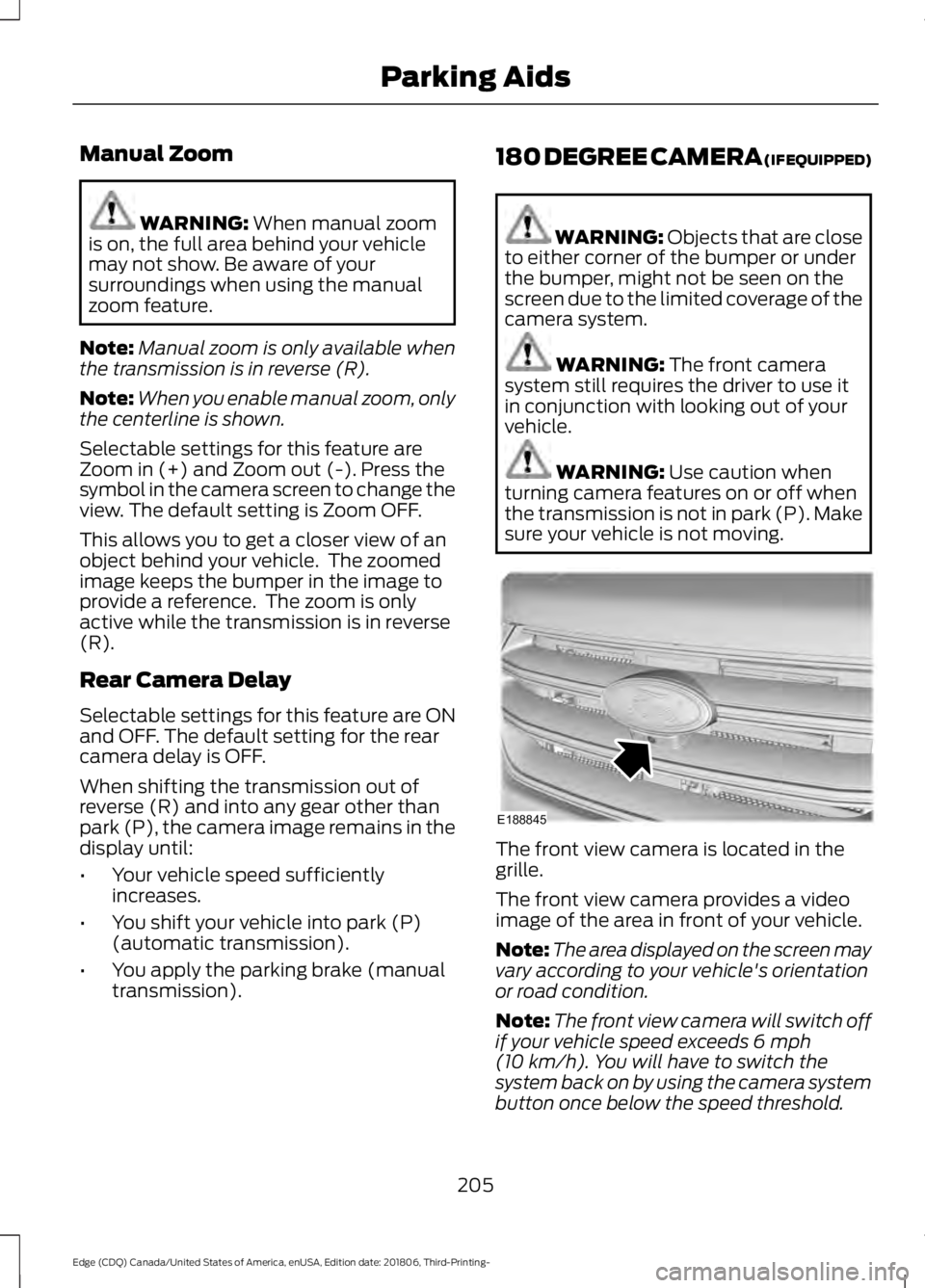
sure your vehicle is not moving. The front view camera is located in the
grille.
The front view camera provides a video
image of the area in front of your vehicle.
Note:
The area displayed on the screen may
vary according to your vehicle's orientation
or road condition.
Note: The front view camera will switch off
if your vehicle speed exceeds
6 mph
(10 km/h). You will have to switch the
system back on by using the camera system
button once below the speed threshold.
205
Edge (CDQ) Canada/United States of America, enUSA, Edition date: 201806, Third-Printing- Parking AidsE188845
Page 209 of 547
Note:
Additional camera information can
be found in the rear view camera section.
See Rear View Camera (page 202).
Using the 180 degree camera
system
The 180 degree camera system consists
of front and rear cameras. The system:
• Allows you to see what is directly in
front or behind your vehicle.
• Provides cross traffic view in front of
your vehicle.
• Provides visibility during parking
maneuvers. The camera system button is
located on the audio unit and
allows you to toggle through
different camera views.
Note: The camera system may not operate
correctly if mud, water or debris obstructs
the camera's view. You can clean the lens
with a soft, lint-free cloth and non-abrasive
cleaner or by using your front or rear washer.
See
Wipers and Washers (page 77).
Camera Views
Press the camera button to toggle
between different views.
• Normal Front View:
Provides an
image of what is directly in front your
vehicle when your vehicle is in neutral
(N) or drive (D).
• Expanded Front View:
Provides an
expanded 180 degree image of what
is directly in front your vehicle when
your vehicle is in neutral (N) or drive
(D).
206
Edge (CDQ) Canada/United States of America, enUSA, Edition date: 201806, Third-Printing- Parking AidsE188847
Page 273 of 547
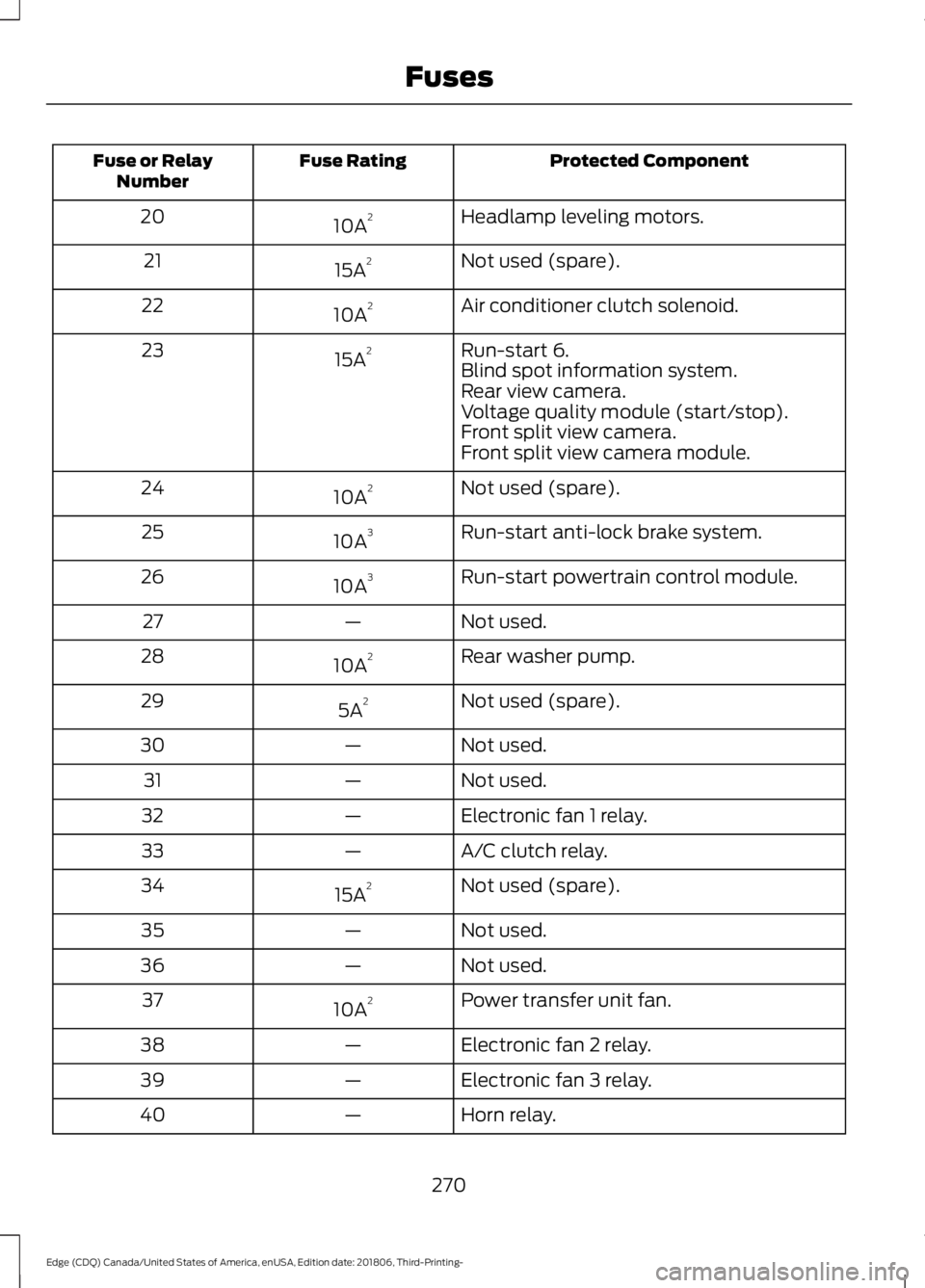
Protected Component
Fuse Rating
Fuse or Relay
Number
Headlamp leveling motors.
10A 2
20
Not used (spare).
15A 2
21
Air conditioner clutch solenoid.
10A 2
22
Run-start 6.
15A 2
23
Blind spot information system.
Rear view camera.
Voltage quality module (start/stop).
Front split view camera.
Front split view camera module.
Not used (spare).
10A 2
24
Run-start anti-lock brake system.
10A 3
25
Run-start powertrain control module.
10A 3
26
Not used.
—
27
Rear washer pump.
10A 2
28
Not used (spare).
5A 2
29
Not used.
—
30
Not used.
—
31
Electronic fan 1 relay.
—
32
A/C clutch relay.
—
33
Not used (spare).
15A 2
34
Not used.
—
35
Not used.
—
36
Power transfer unit fan.
10A 2
37
Electronic fan 2 relay.
—
38
Electronic fan 3 relay.
—
39
Horn relay.
—
40
270
Edge (CDQ) Canada/United States of America, enUSA, Edition date: 201806, Third-Printing- Fuses