ECU FORD EDGE 2019 User Guide
[x] Cancel search | Manufacturer: FORD, Model Year: 2019, Model line: EDGE, Model: FORD EDGE 2019Pages: 547, PDF Size: 40.86 MB
Page 53 of 547
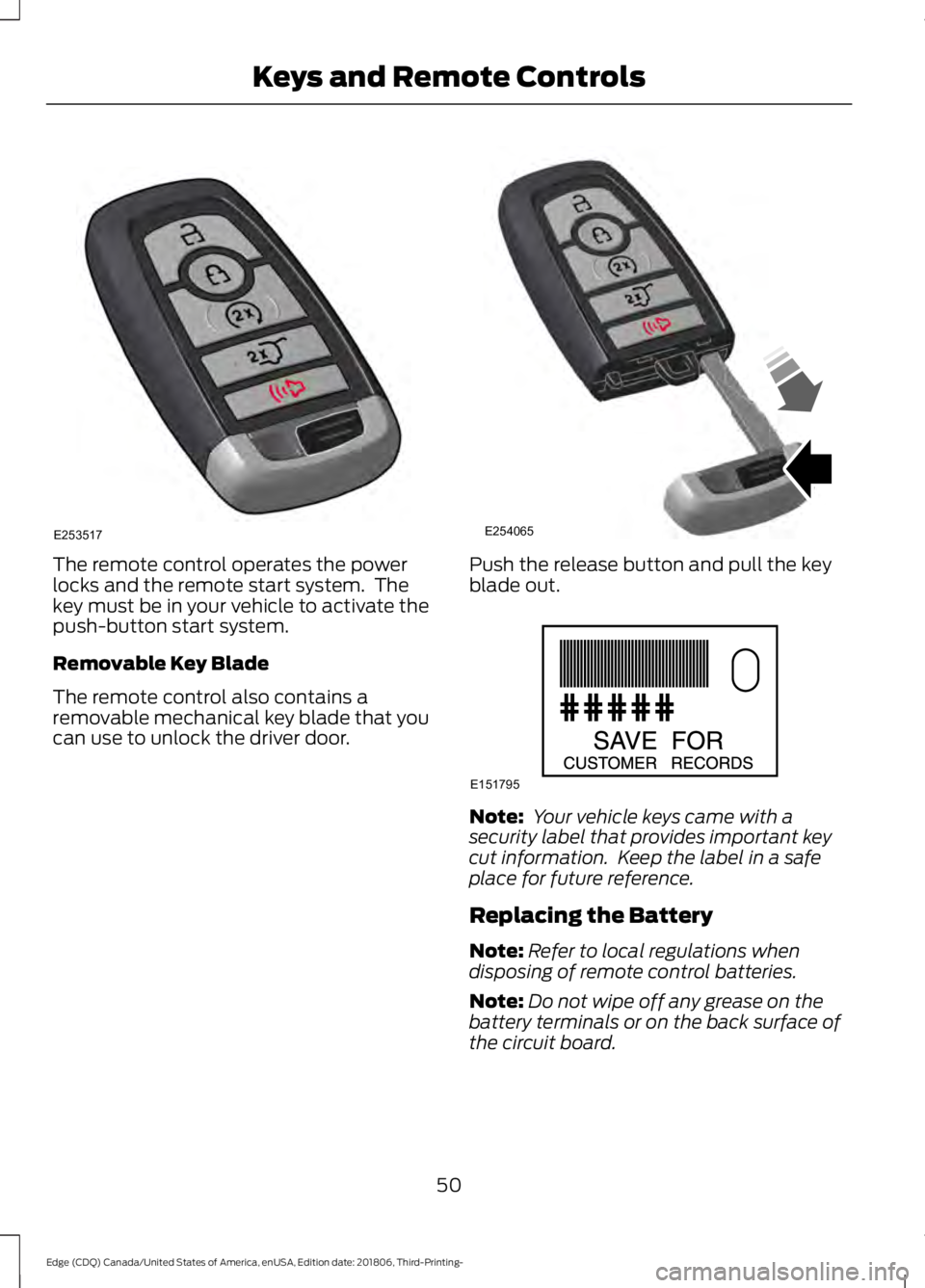
The remote control operates the power
locks and the remote start system. The
key must be in your vehicle to activate the
push-button start system.
Removable Key Blade
The remote control also contains a
removable mechanical key blade that you
can use to unlock the driver door. Push the release button and pull the key
blade out.
Note:
Your vehicle keys came with a
security label that provides important key
cut information. Keep the label in a safe
place for future reference.
Replacing the Battery
Note: Refer to local regulations when
disposing of remote control batteries.
Note: Do not wipe off any grease on the
battery terminals or on the back surface of
the circuit board.
50
Edge (CDQ) Canada/United States of America, enUSA, Edition date: 201806, Third-Printing- Keys and Remote ControlsE253517 E254065 E151795
Page 61 of 547
MYKEY – TROUBLESHOOTING
Potential causes
Condition
· The key or transmitter used to start the
vehicle does not have admin privileges.
I cannot create a MyKey.
· Vehicles with keyless start: Make sure you
place the transmitter into the backup slot.
See Passive Anti-Theft System (page
70).
· The key or transmitter used to start the
vehicle is the only admin key. There always
has to be at least one admin key.
· SecuriLock passive anti-theft system is
disabled or in unlimited mode.
· The key or transmitter used to start the
vehicle does not have admin privileges.
I cannot program the configurable settings.
· There are no MyKeys programmed to the
vehicle.
See Creating a MyKey (page 56).
· The key or transmitter used to start the
vehicle does not have admin privileges.
I cannot clear the MyKeys.
· No MyKeys are created. See
Creating a
MyKey (page 56).
· Purchase a new key or transmitter from
your authorized dealer.
I lost the only admin key.
· Program a spare key or transmitter. You
may need to see your authorized dealer.
See
Passive Anti-Theft System (page
70).
I lost a key.
· The MyKey user is not using the MyKey.
MyKey distances do not accumulate.
· An admin key holder cleared the MyKeys
and created new MyKeys.
· The key system has been reset.
58
Edge (CDQ) Canada/United States of America, enUSA, Edition date: 201806, Third-Printing- MyKey
™
Page 66 of 547
Illuminated Exit
The interior lamps and some exterior
lamps illuminate when all doors are closed,
you switch the ignition off and you remove
the key from the ignition.
The lamps turn off if all the doors remain
closed and:
•
25 seconds have elapsed.
• You press the START/STOP button.
Battery Saver
If you leave the courtesy lamps, dome
lamps or headlamps on, the battery saver
shuts them off 10 minutes after you switch
the ignition off.
Accessory Mode Battery Saver for
Intelligent Access Keys
If you leave the ignition switched on, it
shuts off once it detects a certain amount
of battery drain, or after 45 minutes.
KEYLESS ENTRY
SECURICODE™ KEYLESS ENTRY
KEYPAD
The keypad is near the driver window. It
illuminates when touched.
Note: If you enter your entry code too fast
on the keypad, the unlock function may not
work. Enter your entry code again more
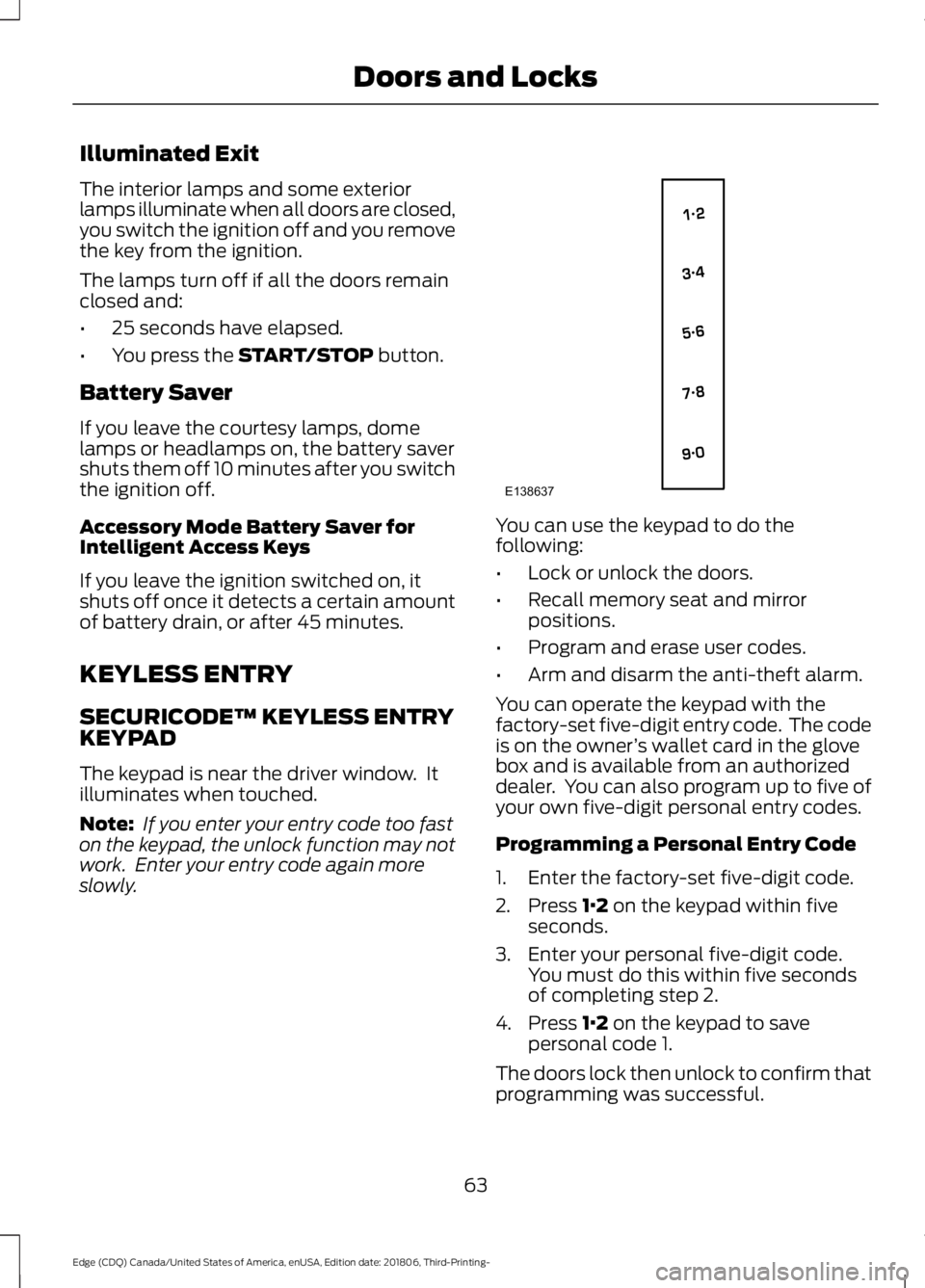
slowly. You can use the keypad to do the
following:
•
Lock or unlock the doors.
• Recall memory seat and mirror
positions.
• Program and erase user codes.
• Arm and disarm the anti-theft alarm.
You can operate the keypad with the
factory-set five-digit entry code. The code
is on the owner ’s wallet card in the glove
box and is available from an authorized
dealer. You can also program up to five of
your own five-digit personal entry codes.
Programming a Personal Entry Code
1. Enter the factory-set five-digit code.
2. Press
1·2 on the keypad within five
seconds.
3. Enter your personal five-digit code. You must do this within five seconds
of completing step 2.
4. Press
1·2 on the keypad to save
personal code 1.
The doors lock then unlock to confirm that
programming was successful.
63
Edge (CDQ) Canada/United States of America, enUSA, Edition date: 201806, Third-Printing- Doors and LocksE138637
Page 73 of 547
PASSIVE ANTI-THEFT
SYSTEM
Note:
The system is not compatible with
non-Ford aftermarket remote start systems.
Use of these systems may result in engine
starting problems and a loss of security
protection.
Note: Metallic objects, electronic devices
or a second coded key on the same key
chain may result in vehicle starting
problems, especially if they are too close to
the key when starting your vehicle. Prevent
these objects from touching the coded key
when starting your vehicle. Switch the
ignition off, move all objects on the key
chain away from the coded key and restart
your vehicle if a problem occurs.
Note: Do not leave a duplicate coded key
in your vehicle. Always take your keys and
lock all doors when leaving your vehicle.
SecuriLock®
The system helps prevent the engine from
starting unless you use a coded key
programmed to your vehicle. Using the
wrong key may prevent your vehicle from
starting. A message may appear in the
information display.
If you are unable to start your vehicle with
a coded key, it is not operating correctly.
A message may appear in the information
display.
Automatic Arming
The system arms when you switch the
ignition off.
Automatic Disarming
The system disarms when you switch the
ignition on with a coded key.
Replacement Keys
Note: Your vehicle comes with two keys. The intelligent access key functions as a
programmed key that operates the driver
door lock and turns on the intelligent
access with push button start system, as
well as a remote control.
If your programmed transmitters are lost
or stolen and you do not have an extra
coded key, you will need to have your
vehicle towed to an authorized dealer. You
need to erase the key codes from your
vehicle and program new coded keys.
Store a spare intelligent access key away
from your vehicle in a safe place. You can
purchase replacement keys or remote
controls from an authorized dealer.
Programming a Spare Intelligent
Access Key
Note:
You can program a maximum of four
keys to your vehicle.
You must have two previously
programmed intelligent access keys inside
your vehicle and the new unprogrammed
intelligent access key readily accessible.
You can purchase replacement keys or
remote controls from an authorized dealer.
Make sure that the ignition is switched off
before beginning this procedure. Make sure
that you close all the doors before
beginning and that they remain closed
throughout the procedure. Carry out all
steps within 30 seconds of starting the
sequence. Stop and wait for at least one
minute before starting again if you carry
out any steps out of sequence.
Read and understand the entire procedure
before you begin.
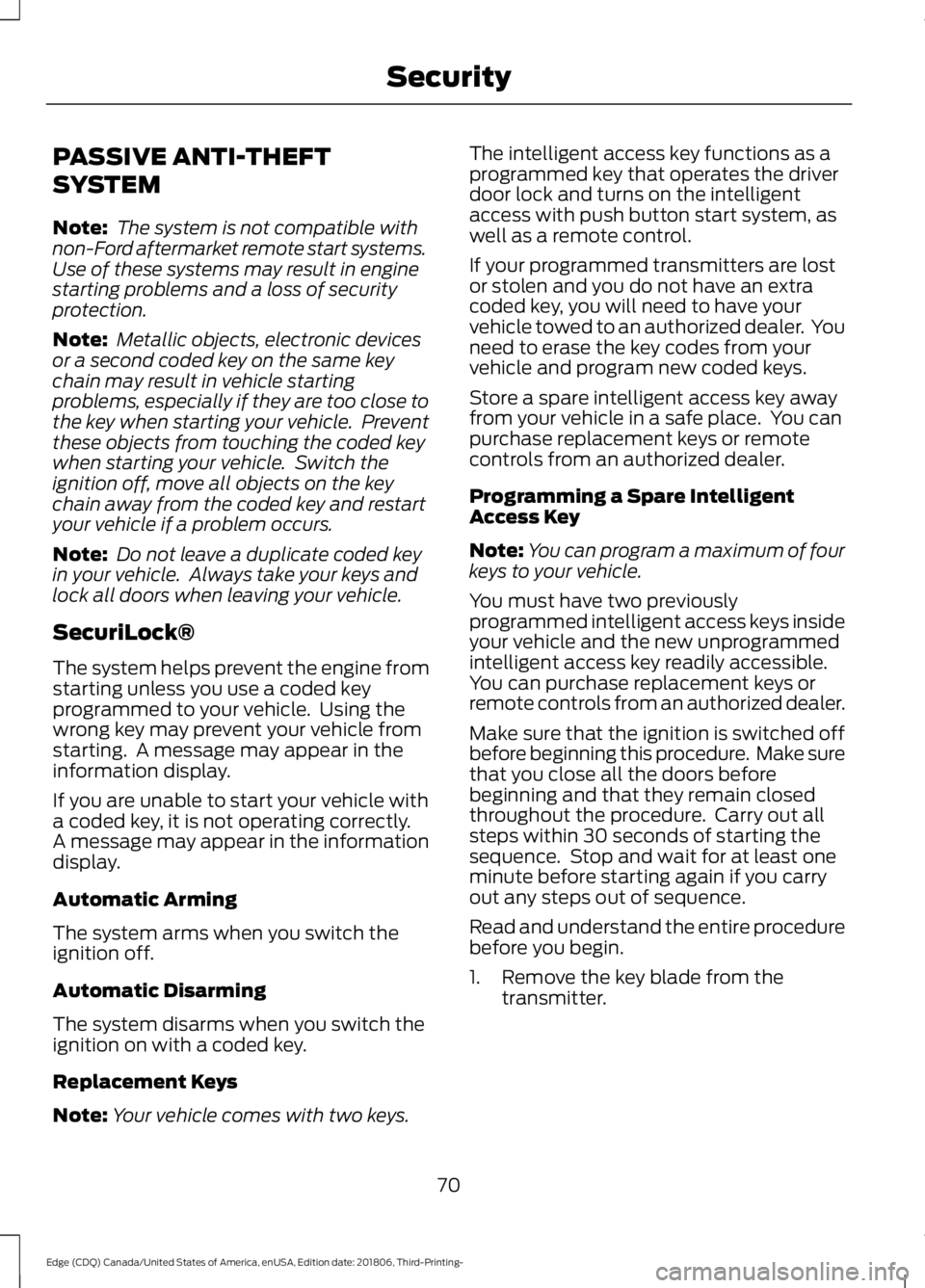
1. Remove the key blade from the transmitter.
70
Edge (CDQ) Canada/United States of America, enUSA, Edition date: 201806, Third-Printing- Security
Page 74 of 547
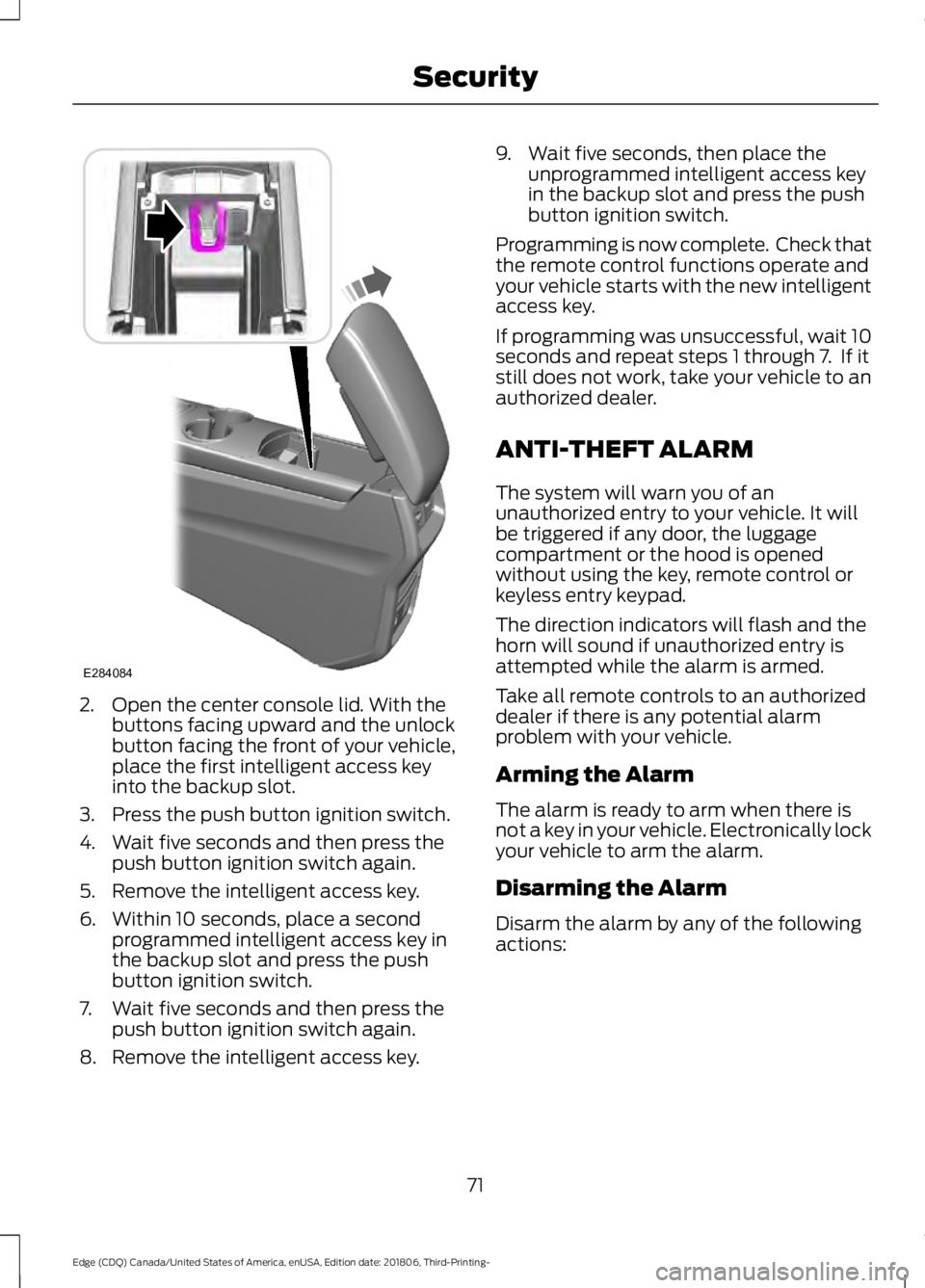
2. Open the center console lid. With the
buttons facing upward and the unlock
button facing the front of your vehicle,
place the first intelligent access key
into the backup slot.
3. Press the push button ignition switch.
4. Wait five seconds and then press the push button ignition switch again.
5. Remove the intelligent access key.
6. Within 10 seconds, place a second programmed intelligent access key in
the backup slot and press the push
button ignition switch.
7. Wait five seconds and then press the push button ignition switch again.
8. Remove the intelligent access key. 9. Wait five seconds, then place the
unprogrammed intelligent access key
in the backup slot and press the push
button ignition switch.
Programming is now complete. Check that
the remote control functions operate and
your vehicle starts with the new intelligent
access key.
If programming was unsuccessful, wait 10
seconds and repeat steps 1 through 7. If it
still does not work, take your vehicle to an
authorized dealer.
ANTI-THEFT ALARM
The system will warn you of an
unauthorized entry to your vehicle. It will
be triggered if any door, the luggage
compartment or the hood is opened
without using the key, remote control or
keyless entry keypad.
The direction indicators will flash and the
horn will sound if unauthorized entry is
attempted while the alarm is armed.
Take all remote controls to an authorized
dealer if there is any potential alarm
problem with your vehicle.
Arming the Alarm
The alarm is ready to arm when there is
not a key in your vehicle. Electronically lock
your vehicle to arm the alarm.
Disarming the Alarm
Disarm the alarm by any of the following
actions:
71
Edge (CDQ) Canada/United States of America, enUSA, Edition date: 201806, Third-Printing- SecurityE284084
Page 75 of 547
•
Unlock the doors or luggage
compartment with the remote control
or keyless entry keypad.
• Switch your vehicle on or start your
vehicle.
• Use a key in the driver door to unlock
your vehicle, then switch your vehicle
on within 12 seconds.
Note: Pressing the panic button on the
remote control will stop the horn and signal
indicators, but will not disarm the system.
72
Edge (CDQ) Canada/United States of America, enUSA, Edition date: 201806, Third-Printing- Security
Page 116 of 547
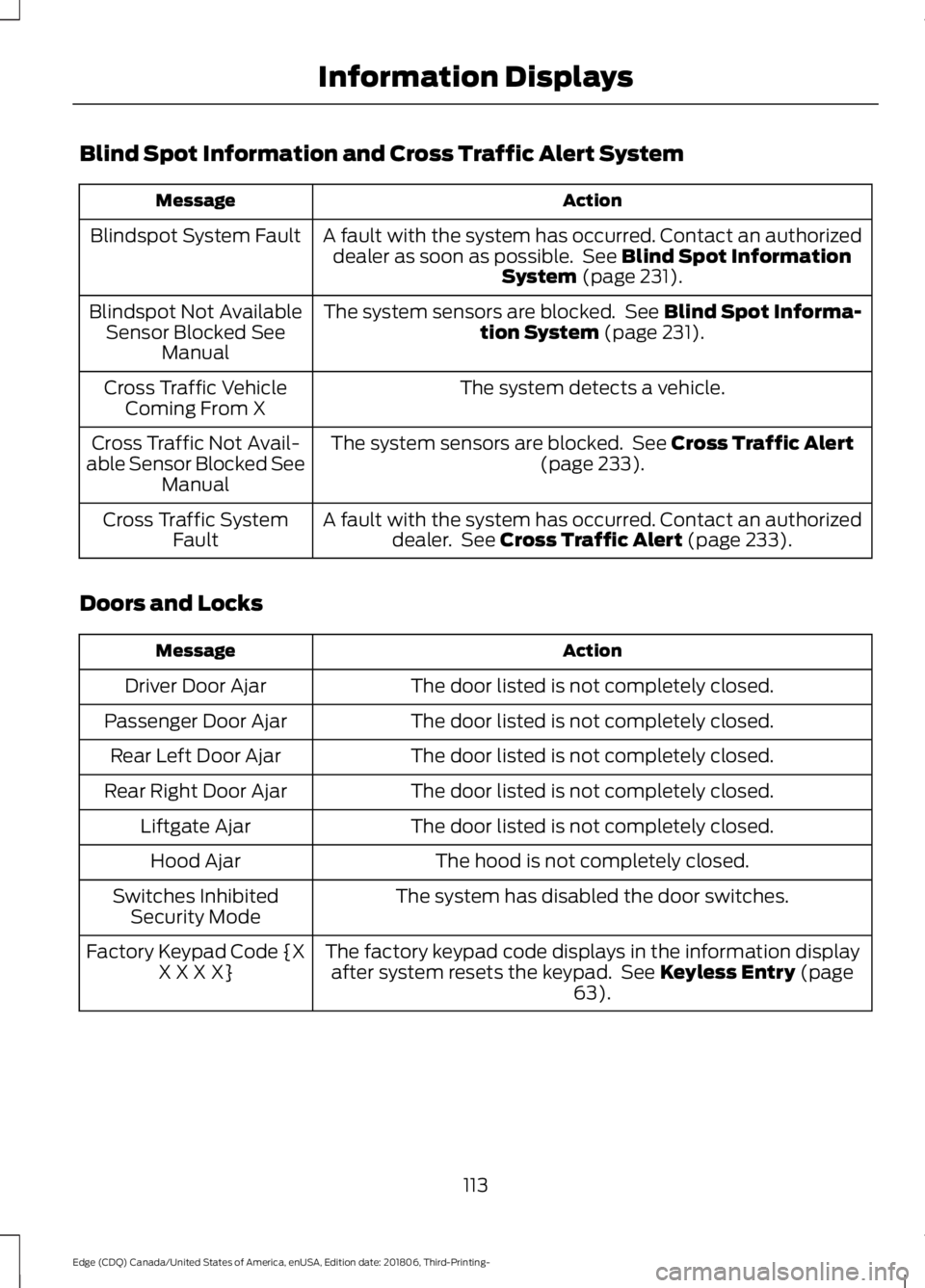
Blind Spot Information and Cross Traffic Alert System
Action
Message
A fault with the system has occurred. Contact an authorizeddealer as soon as possible. See Blind Spot Information
System (page 231).
Blindspot System Fault
The system sensors are blocked. See
Blind Spot Informa-
tion System (page 231).
Blindspot Not Available
Sensor Blocked See Manual
The system detects a vehicle.
Cross Traffic Vehicle
Coming From X
The system sensors are blocked. See
Cross Traffic Alert
(page 233).
Cross Traffic Not Avail-
able Sensor Blocked See Manual
A fault with the system has occurred. Contact an authorizeddealer. See
Cross Traffic Alert (page 233).
Cross Traffic System
Fault
Doors and Locks Action
Message
The door listed is not completely closed.
Driver Door Ajar
The door listed is not completely closed.
Passenger Door Ajar
The door listed is not completely closed.
Rear Left Door Ajar
The door listed is not completely closed.
Rear Right Door Ajar
The door listed is not completely closed.
Liftgate Ajar
The hood is not completely closed.
Hood Ajar
The system has disabled the door switches.
Switches Inhibited
Security Mode
The factory keypad code displays in the information displayafter system resets the keypad. See
Keyless Entry (page
63).
Factory Keypad Code {X
X X X X}
113
Edge (CDQ) Canada/United States of America, enUSA, Edition date: 201806, Third-Printing- Information Displays
Page 126 of 547
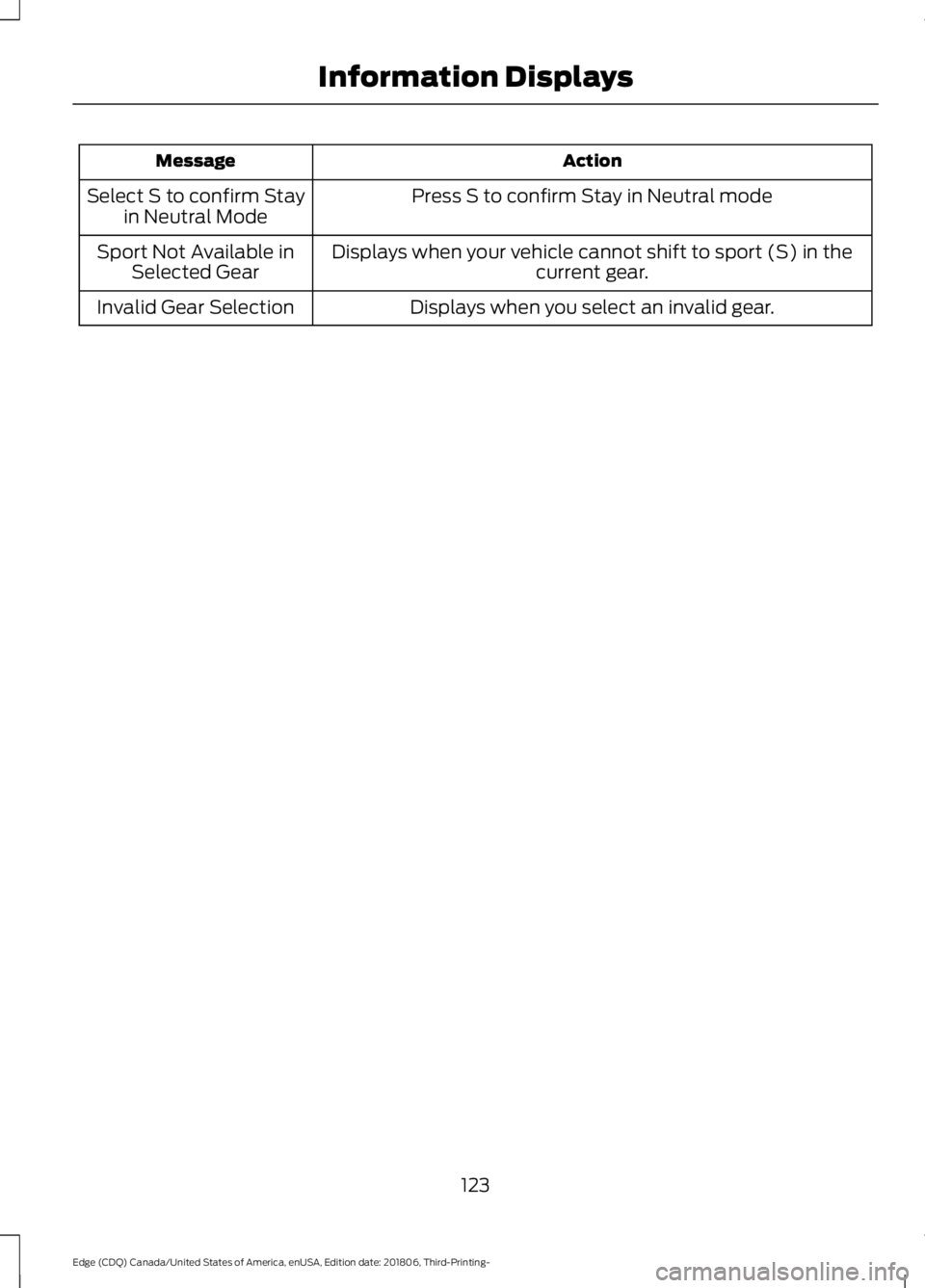
Action
Message
Press S to confirm Stay in Neutral mode
Select S to confirm Stay
in Neutral Mode
Displays when your vehicle cannot shift to sport (S) in thecurrent gear.
Sport Not Available in
Selected Gear
Displays when you select an invalid gear.
Invalid Gear Selection
123
Edge (CDQ) Canada/United States of America, enUSA, Edition date: 201806, Third-Printing- Information Displays
Page 140 of 547
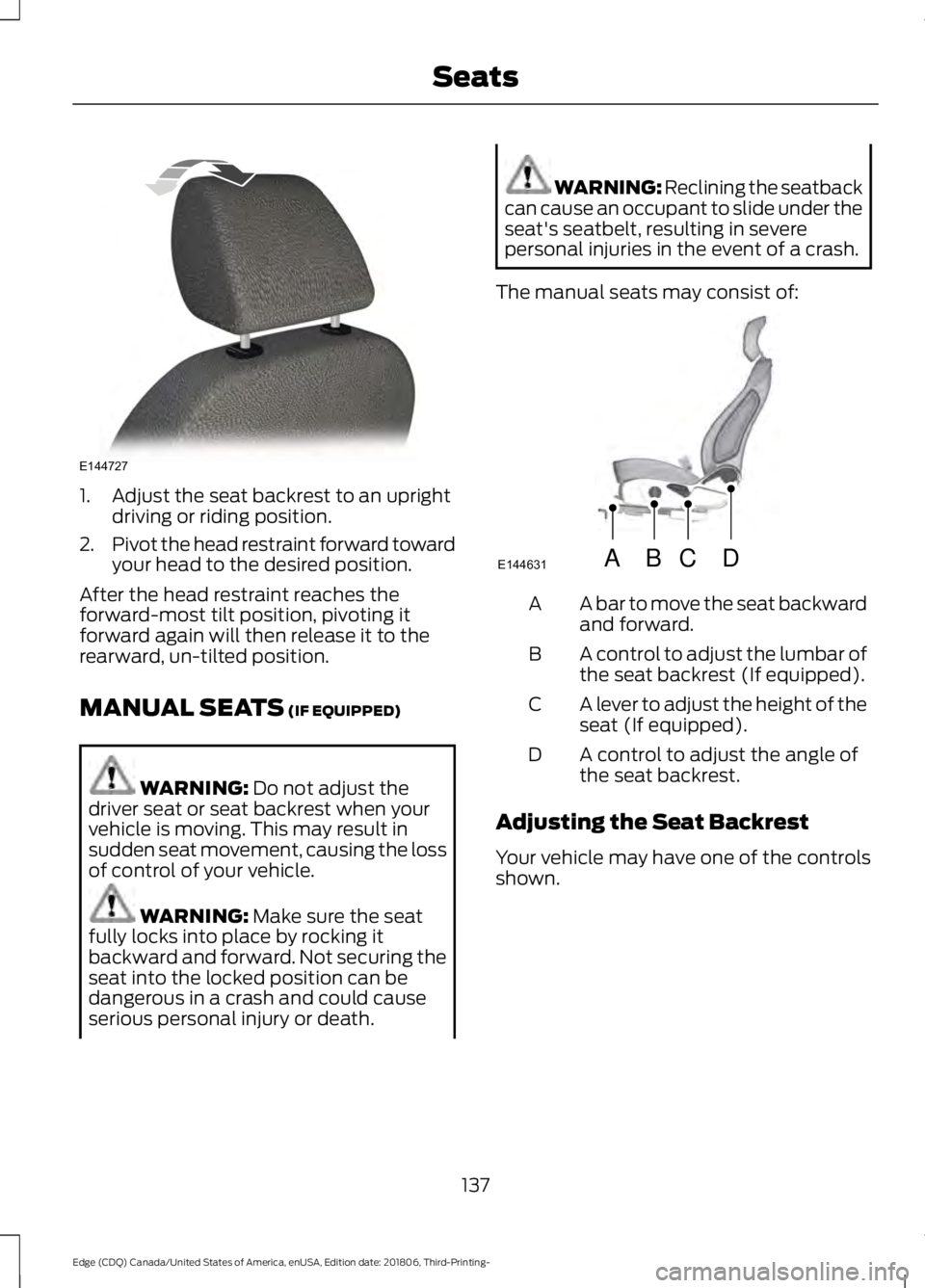
1. Adjust the seat backrest to an upright
driving or riding position.
2. Pivot the head restraint forward toward
your head to the desired position.
After the head restraint reaches the
forward-most tilt position, pivoting it
forward again will then release it to the
rearward, un-tilted position.
MANUAL SEATS (IF EQUIPPED) WARNING:
Do not adjust the
driver seat or seat backrest when your
vehicle is moving. This may result in
sudden seat movement, causing the loss
of control of your vehicle. WARNING:
Make sure the seat
fully locks into place by rocking it
backward and forward. Not securing the
seat into the locked position can be
dangerous in a crash and could cause
serious personal injury or death. WARNING: Reclining the seatback
can cause an occupant to slide under the
seat's seatbelt, resulting in severe
personal injuries in the event of a crash.
The manual seats may consist of: A bar to move the seat backward
and forward.
A
A control to adjust the lumbar of
the seat backrest (If equipped).
B
A lever to adjust the height of the
seat (If equipped).
C
A control to adjust the angle of
the seat backrest.
D
Adjusting the Seat Backrest
Your vehicle may have one of the controls
shown.
137
Edge (CDQ) Canada/United States of America, enUSA, Edition date: 201806, Third-Printing- SeatsE144727 ABCD
E144631
Page 145 of 547
Easy Entry and Exit Feature (If
Equipped)
If you enable the easy entry and exit
feature, it moves the driver seat position
rearward up to 2 in (5 cm) when you switch
the ignition off.
The driver seat returns to the previous
position when you switch the ignition on.
You can enable or disable this feature
through the information display. See
Information Displays
(page 98).
REAR SEATS
Adjusting the Rear Seats WARNING:
To prevent possible
damage to the seat or seatbelts, make
sure that the seatbelts are not fastened
before folding the seatback. WARNING:
When folding or
unfolding the seats, take care not to get
your fingers caught between the seat
backrest and seat frame. Failure to
follow this warning could result in serious
personal injury. WARNING:
When unfolding the
seat backrests, make sure that the
seatbelts are not trapped behind the
seat. WARNING:
Make sure that the
seats and the seat backrests are secure
and fully locked in their catches. Folding the Seat Backrest
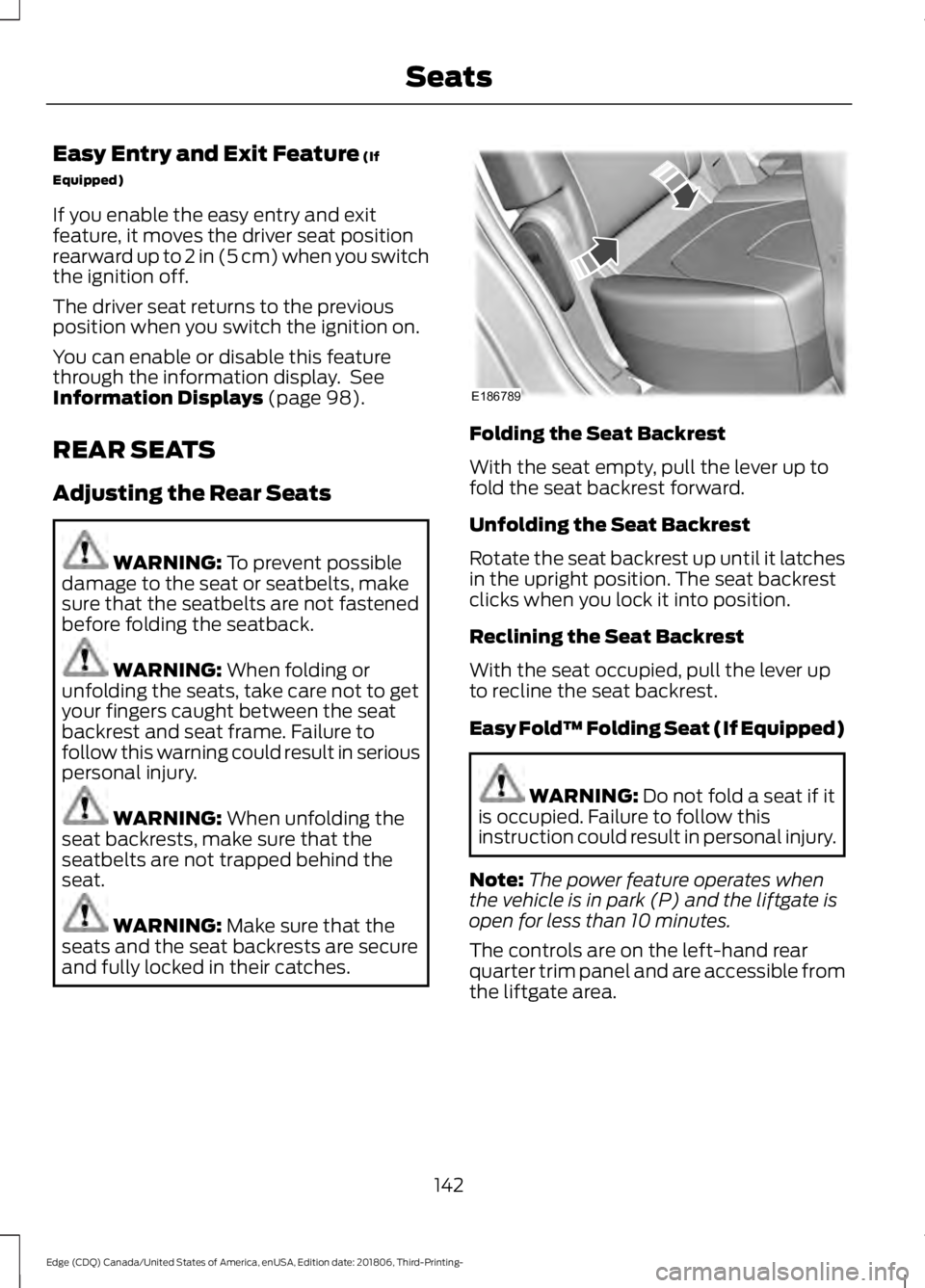
With the seat empty, pull the lever up to
fold the seat backrest forward.
Unfolding the Seat Backrest
Rotate the seat backrest up until it latches
in the upright position. The seat backrest
clicks when you lock it into position.
Reclining the Seat Backrest
With the seat occupied, pull the lever up
to recline the seat backrest.
Easy Fold™ Folding Seat (If Equipped)
WARNING:
Do not fold a seat if it
is occupied. Failure to follow this
instruction could result in personal injury.
Note: The power feature operates when
the vehicle is in park (P) and the liftgate is
open for less than 10 minutes.
The controls are on the left-hand rear
quarter trim panel and are accessible from
the liftgate area.
142
Edge (CDQ) Canada/United States of America, enUSA, Edition date: 201806, Third-Printing- SeatsE186789