ford pass FORD EDGE 2019 User Guide
[x] Cancel search | Manufacturer: FORD, Model Year: 2019, Model line: EDGE, Model: FORD EDGE 2019Pages: 547, PDF Size: 40.86 MB
Page 320 of 547
U.S. Department of
Transportation Tire quality
grades: The U.S. Department of
Transportation requires Ford
Motor Company to give you the
following information about tire
grades exactly as the government
has written it.
Treadwear
The treadwear grade is a
comparative rating based on the
wear rate of the tire when tested
under controlled conditions on a
specified government test course.
For example, a tire graded 150
would wear 1 ½ times as well on
the government course as a tire
graded 100. The relative
performance of tires depends
upon the actual conditions of their
use, however, and may depart
significantly from the norm due to
variations in driving habits, service
practices, and differences in road
characteristics and climate.
Traction AA A B C WARNING:
The traction
grade assigned to this tire is
based on straight-ahead braking
traction tests, and does not
include acceleration, cornering,
hydroplaning or peak traction
characteristics. The traction grades, from highest
to lowest are AA, A, B, and C. The
grades represent the tire
’s ability
to stop on wet pavement as
measured under controlled
conditions on specified
government test surfaces of
asphalt and concrete. A tire
marked C may have poor traction
performance.
Temperature A B C WARNING:
The
temperature grade for this tire is
established for a tire that is
properly inflated and not
overloaded. Excessive speed,
underinflation, or excessive
loading, either separately or in
combination, can cause heat
buildup and possible tire failure.
The temperature grades are A
(the highest), B and C,
representing the tire ’s resistance
to the generation of heat and its
ability to dissipate heat when
tested under controlled conditions
on a specified indoor laboratory
test wheel. Sustained high
temperature can cause the
material of the tire to degenerate
and reduce tire life, and excessive
temperature can lead to sudden
tire failure. The grade C
corresponds to a level of
performance which all passenger
car tires must meet under the
317
Edge (CDQ) Canada/United States of America, enUSA, Edition date: 201806, Third-Printing- Wheels and Tires
Page 332 of 547
The two front tires or two rear tires
should generally be replaced as a
pair.
The tire pressure sensors mounted
in the wheels (originally installed
on your vehicle) are not designed
to be used in aftermarket wheels.
The use of wheels or tires not
recommended by Ford Motor
Company may affect the
operation of your tire pressure
monitoring system.
If the tire pressure monitoring
system indicator is flashing, the
system is malfunctioning. Your
replacement tire might be
incompatible with your tire
pressure monitoring system, or
some component of the system
may be damaged.
Safety Practices
WARNING: If your vehicle
is stuck in snow, mud or sand, do
not rapidly spin the tires;
spinning the tires can tear the
tire and cause an explosion. A
tire can explode in as little as
three to five seconds. WARNING: Do not spin the
wheels at over
34 mph
(55 km/h). The tires may fail and
injure a passenger or bystander. Driving habits have a great deal
to do with your tire mileage and
safety.
*Observe posted speed limits
*Avoid fast starts, stops and turns
*Avoid potholes and objects on
the road
*Do not run over curbs or hit the
tire against a curb when parking
Highway Hazards
No matter how carefully you drive
there
’s always the possibility that
you may eventually have a flat tire
on the highway. Drive slowly to the
closest safe area out of traffic.
This may further damage the flat
tire, but your safety is more
important.
If you feel a sudden vibration or
ride disturbance while driving, or
you suspect your tire or vehicle
has been damaged, immediately
reduce your speed. Drive with
caution until you can safely pull
off the road. Stop and inspect the
tires for damage. If you cannot
detect a cause, have the vehicle
towed to the nearest repair facility
or tire dealer to have the vehicle
inspected.
329
Edge (CDQ) Canada/United States of America, enUSA, Edition date: 201806, Third-Printing- Wheels and Tires
Page 340 of 547
•
To reduce the chances of interference
from another vehicle, perform the
system reset procedure at least 3 ft
(1 m) away from another Ford Motor
Company vehicle undergoing the
system reset procedure at the same
time.
• Do not wait more than two minutes
between resetting each tire sensor or
the system can time-out and you have
to repeat the entire procedure on all
four wheels.
• A double horn sounds indicating the
need to repeat the procedure.
Performing the System Reset Procedure
Read the entire procedure before
attempting.
1. Drive the vehicle above
20 mph
(32 km/h) for at least two minutes,
then park in a safe location where you
can easily get to all four tires and have
access to an air pump.
2. Place the ignition in the off position and
keep the key in the ignition.
3. Cycle the ignition to the on position with the engine off.
4. Turn the hazard flashers on then off three times. You must accomplish this
within 10 seconds. If you successfully
enter the reset mode, the horn sounds
once, the system indicator flashes and
a message shows in the information
display. If this does not occur, please
try again starting at step 2. If after
repeated attempts to enter the reset
mode, the horn does not sound, the
system indicator does not flash and no
message shows in the information
display, seek service from your
authorized dealer. 5. Train the tire pressure monitoring
system sensors in the tires using the
following system reset sequence
starting with the left front tire in the
following clockwise order: Left front -
driver side front tire, Right front -
passenger side front tire, Right rear -
passenger side rear tire, Left rear -
driver side rear tire.
6. Remove the valve cap from the valve stem on the left front tire. Decrease the
air pressure until the horn sounds.
Note: The single horn tone confirms that
the sensor identification code has been
learned by the module for this position. If a
double horn is heard, the reset procedure
was unsuccessful, and you must repeat it.
7. Remove the valve cap from the valve stem on the right front tire. Decrease
the air pressure until the horn sounds.
8. Remove the valve cap from the valve stem on the right rear tire. Decrease the
air pressure until the horn sounds.
9. Remove the valve cap from the valve stem on the left rear tire. Decrease the
air pressure until the horn sounds.
Training is complete after the horn
sounds for the last tire trained, driver
side rear tire, the system indicator
stops flashing, and a message shows
in the information display.
10. Turn the ignition off. If two short horn
beeps are heard, the reset procedure
was unsuccessful and you must
repeat it. If after repeating the
procedure and two short beeps are
heard when the ignition is turned to
off, seek assistance from your
authorized dealer.
337
Edge (CDQ) Canada/United States of America, enUSA, Edition date: 201806, Third-Printing- Wheels and Tires
Page 349 of 547
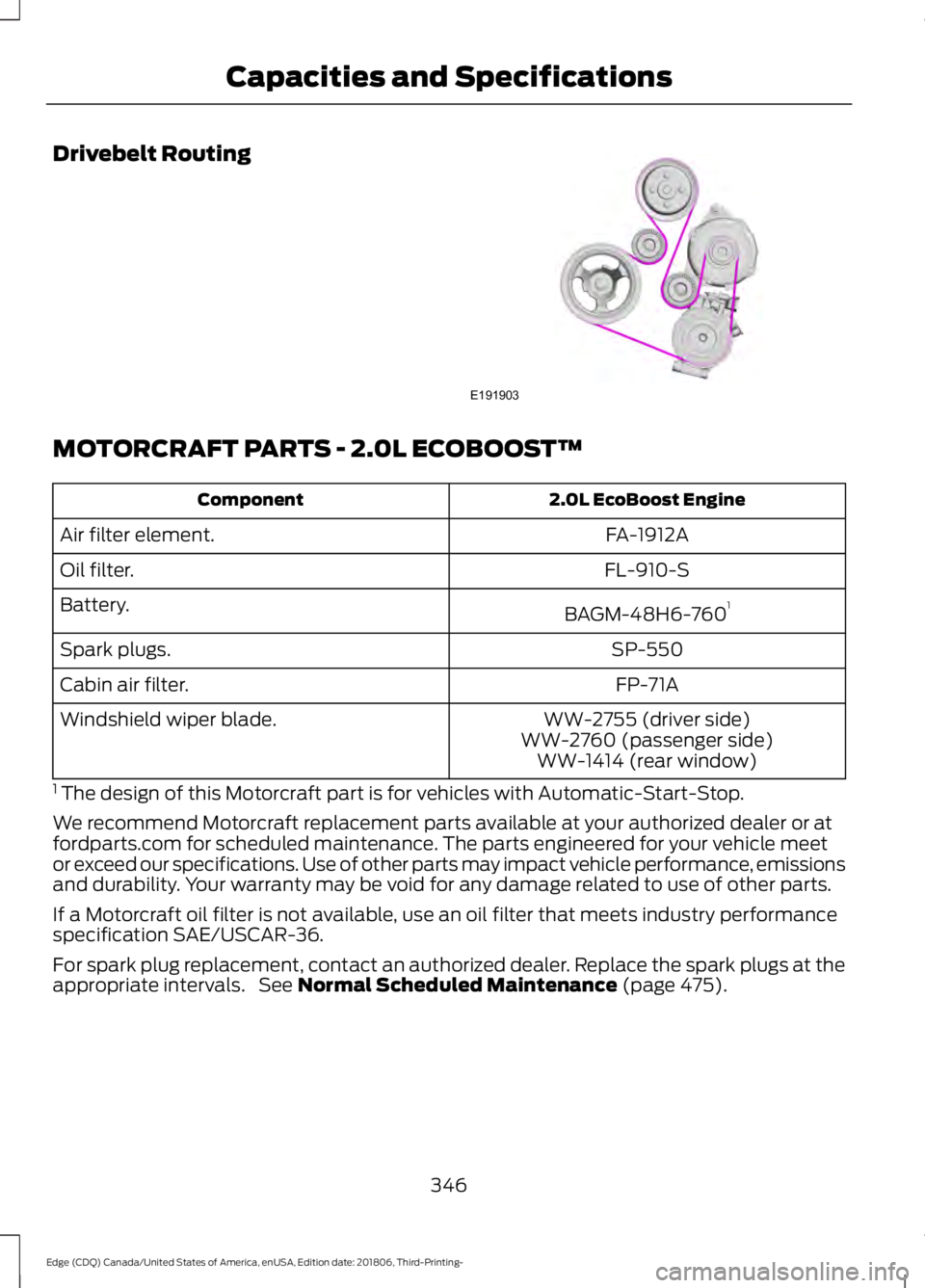
Drivebelt Routing
MOTORCRAFT PARTS - 2.0L ECOBOOST™
2.0L EcoBoost Engine
Component
FA-1912A
Air filter element.
FL-910-S
Oil filter.
BAGM-48H6-7601
Battery.
SP-550
Spark plugs.
FP-71A
Cabin air filter.
WW-2755 (driver side)
Windshield wiper blade.
WW-2760 (passenger side)WW-1414 (rear window)
1 The design of this Motorcraft part is for vehicles with Automatic-Start-Stop.
We recommend Motorcraft replacement parts available at your authorized dealer or at
fordparts.com for scheduled maintenance. The parts engineered for your vehicle meet
or exceed our specifications. Use of other parts may impact vehicle performance, emissions
and durability. Your warranty may be void for any damage related to use of other parts.
If a Motorcraft oil filter is not available, use an oil filter that meets industry performance
specification SAE/USCAR-36.
For spark plug replacement, contact an authorized dealer. Replace the spark plugs at the
appropriate intervals. See Normal Scheduled Maintenance (page 475).
346
Edge (CDQ) Canada/United States of America, enUSA, Edition date: 201806, Third-Printing- Capacities and SpecificationsE191903
Page 350 of 547
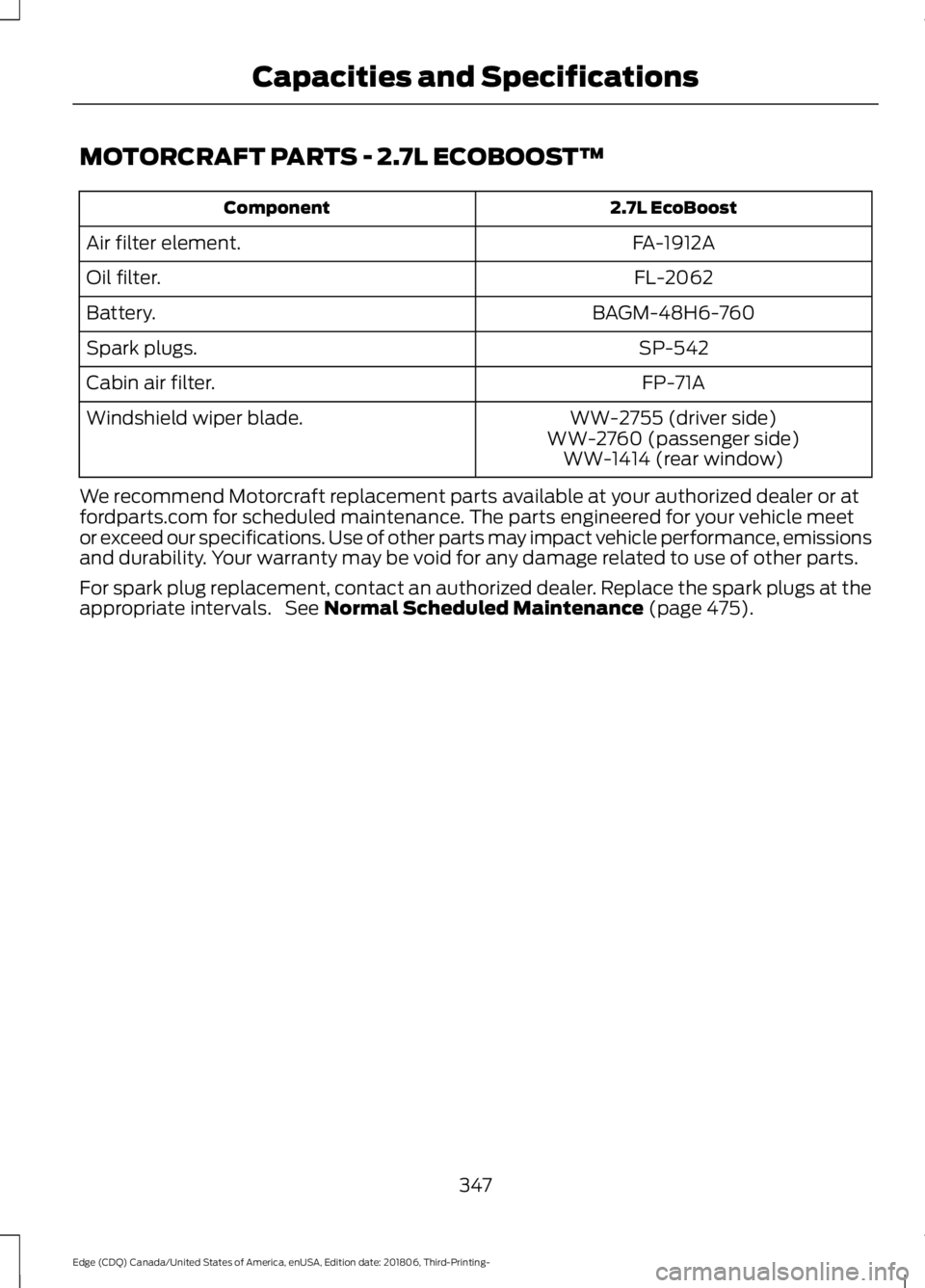
MOTORCRAFT PARTS - 2.7L ECOBOOST™
2.7L EcoBoost
Component
FA-1912A
Air filter element.
FL-2062
Oil filter.
BAGM-48H6-760
Battery.
SP-542
Spark plugs.
FP-71A
Cabin air filter.
WW-2755 (driver side)
Windshield wiper blade.
WW-2760 (passenger side)WW-1414 (rear window)
We recommend Motorcraft replacement parts available at your authorized dealer or at
fordparts.com for scheduled maintenance. The parts engineered for your vehicle meet
or exceed our specifications. Use of other parts may impact vehicle performance, emissions
and durability. Your warranty may be void for any damage related to use of other parts.
For spark plug replacement, contact an authorized dealer. Replace the spark plugs at the
appropriate intervals. See Normal Scheduled Maintenance (page 475).
347
Edge (CDQ) Canada/United States of America, enUSA, Edition date: 201806, Third-Printing- Capacities and Specifications
Page 373 of 547
Note:
This receiver includes the eCos
real-time operating system. eCos is
published under the eCos License.
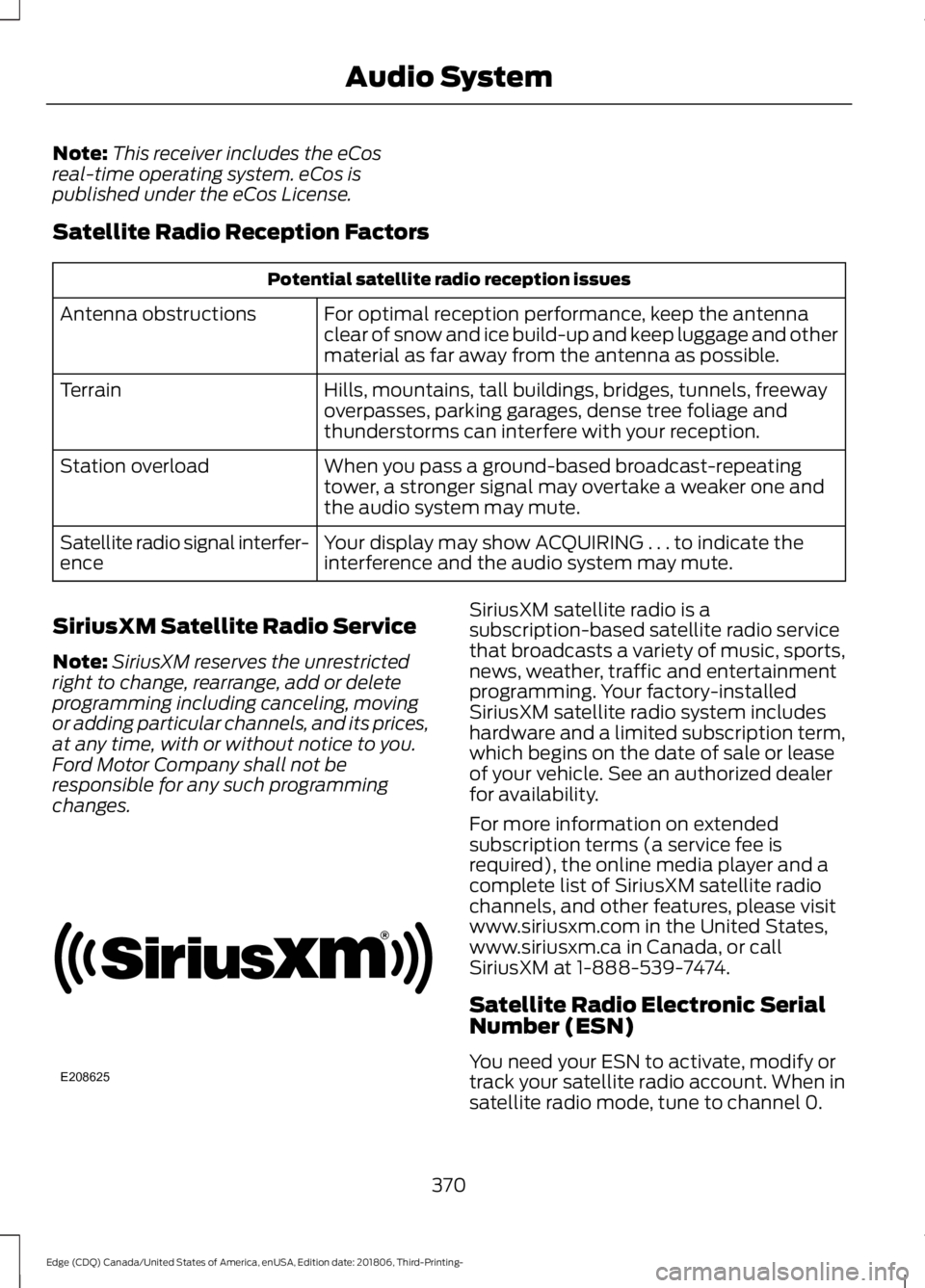
Satellite Radio Reception Factors Potential satellite radio reception issues
For optimal reception performance, keep the antenna
clear of snow and ice build-up and keep luggage and other
material as far away from the antenna as possible.
Antenna obstructions
Hills, mountains, tall buildings, bridges, tunnels, freeway
overpasses, parking garages, dense tree foliage and
thunderstorms can interfere with your reception.
Terrain
When you pass a ground-based broadcast-repeating
tower, a stronger signal may overtake a weaker one and
the audio system may mute.
Station overload
Your display may show ACQUIRING . . . to indicate the
interference and the audio system may mute.
Satellite radio signal interfer-
ence
SiriusXM Satellite Radio Service
Note: SiriusXM reserves the unrestricted
right to change, rearrange, add or delete
programming including canceling, moving
or adding particular channels, and its prices,
at any time, with or without notice to you.
Ford Motor Company shall not be
responsible for any such programming
changes. SiriusXM satellite radio is a
subscription-based satellite radio service
that broadcasts a variety of music, sports,
news, weather, traffic and entertainment
programming. Your factory-installed
SiriusXM satellite radio system includes
hardware and a limited subscription term,
which begins on the date of sale or lease
of your vehicle. See an authorized dealer
for availability.
For more information on extended
subscription terms (a service fee is
required), the online media player and a
complete list of SiriusXM satellite radio
channels, and other features, please visit
www.siriusxm.com in the United States,
www.siriusxm.ca in Canada, or call
SiriusXM at 1-888-539-7474.
Satellite Radio Electronic Serial
Number (ESN)
You need your ESN to activate, modify or
track your satellite radio account. When in
satellite radio mode, tune to channel 0.
370
Edge (CDQ) Canada/United States of America, enUSA, Edition date: 201806, Third-Printing- Audio SystemE208625
Page 393 of 547
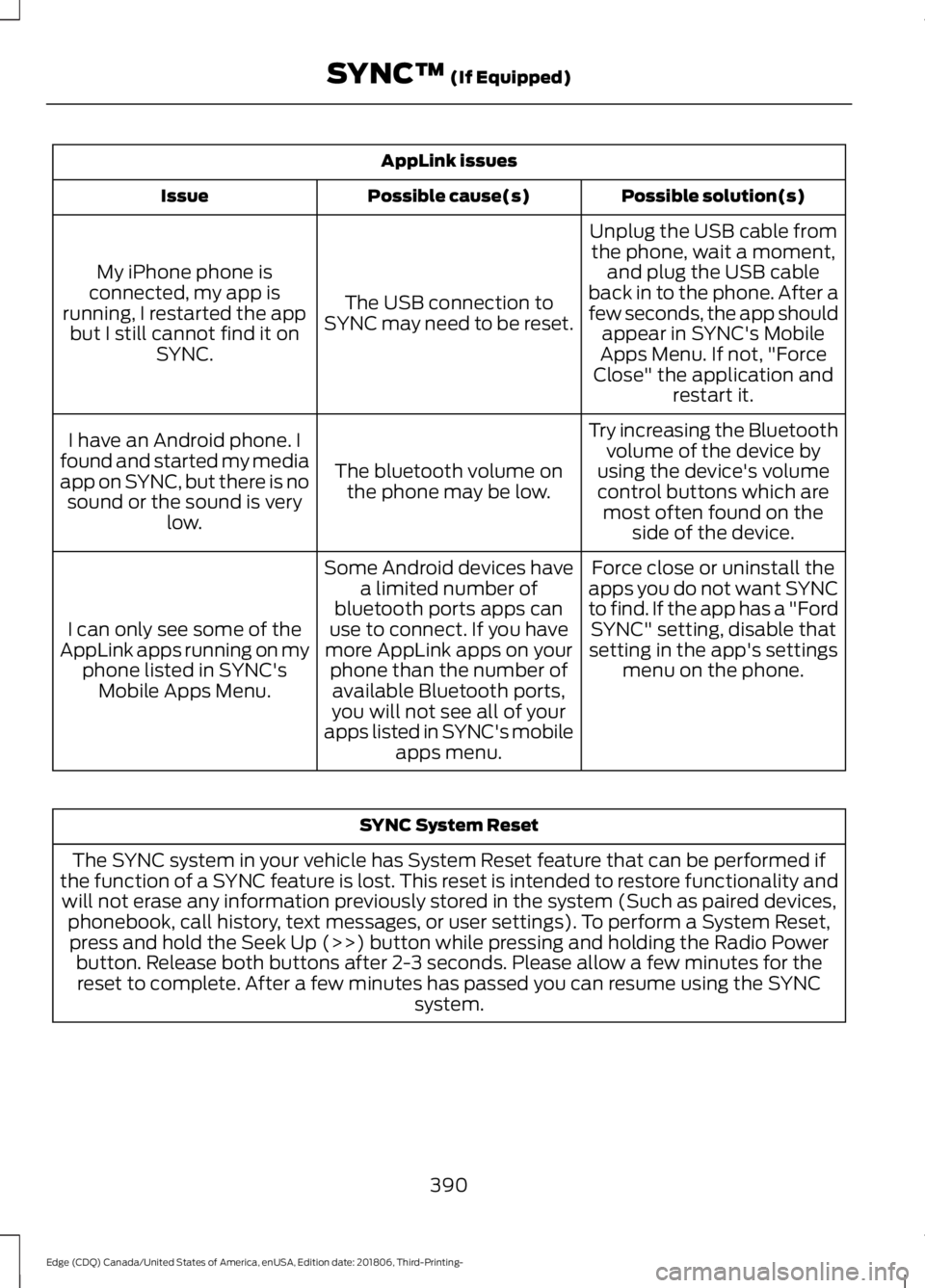
AppLink issues
Possible solution(s)
Possible cause(s)
Issue
Unplug the USB cable fromthe phone, wait a moment, and plug the USB cable
back in to the phone. After a
few seconds, the app should appear in SYNC's Mobile
Apps Menu. If not, "Force
Close" the application and restart it.
The USB connection to
SYNC may need to be reset.
My iPhone phone is
connected, my app is
running, I restarted the app but I still cannot find it on SYNC.
Try increasing the Bluetoothvolume of the device by
using the device's volume control buttons which are most often found on the side of the device.
The bluetooth volume on
the phone may be low.
I have an Android phone. I
found and started my media
app on SYNC, but there is no sound or the sound is very low.
Force close or uninstall the
apps you do not want SYNC
to find. If the app has a "Ford SYNC" setting, disable that
setting in the app's settings menu on the phone.
Some Android devices have
a limited number of
bluetooth ports apps can
use to connect. If you have
more AppLink apps on your phone than the number ofavailable Bluetooth ports,
you will not see all of your
apps listed in SYNC's mobile apps menu.
I can only see some of the
AppLink apps running on my phone listed in SYNC'sMobile Apps Menu. SYNC System Reset
The SYNC system in your vehicle has System Reset feature that can be performed if
the function of a SYNC feature is lost. This reset is intended to restore functionality and will not erase any information previously stored in the system (Such as paired devices, phonebook, call history, text messages, or user settings). To perform a System Reset,press and hold the Seek Up (>>) button while pressing and holding the Radio Power button. Release both buttons after 2-3 seconds. Please allow a few minutes for thereset to complete. After a few minutes has passed you can resume using the SYNC system.
390
Edge (CDQ) Canada/United States of America, enUSA, Edition date: 201806, Third-Printing- SYNC™ (If Equipped)
Page 403 of 547
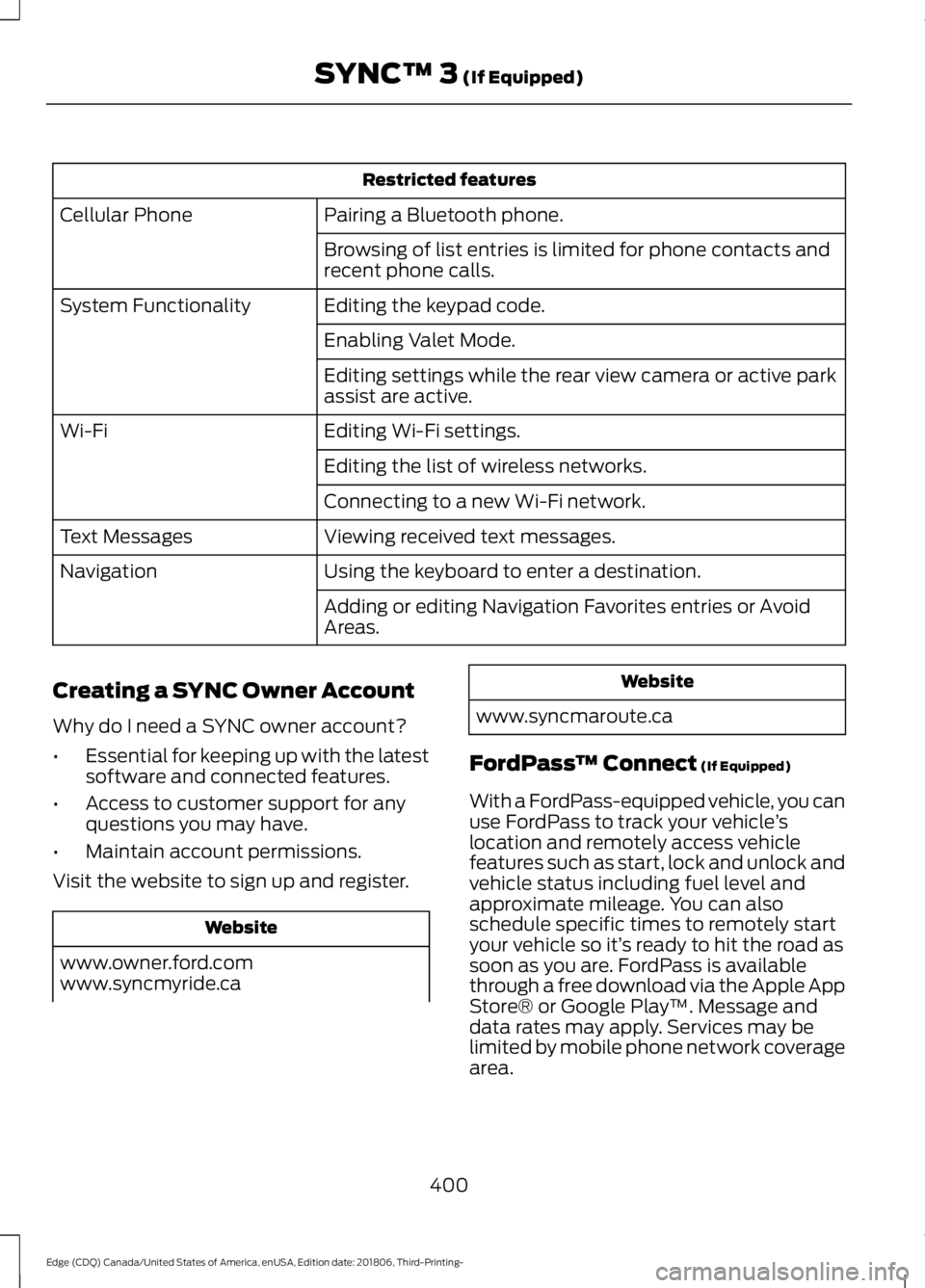
Restricted features
Pairing a Bluetooth phone.
Cellular Phone
Browsing of list entries is limited for phone contacts and
recent phone calls.
Editing the keypad code.
System Functionality
Enabling Valet Mode.
Editing settings while the rear view camera or active park
assist are active.
Editing Wi-Fi settings.
Wi-Fi
Editing the list of wireless networks.
Connecting to a new Wi-Fi network.
Viewing received text messages.
Text Messages
Using the keyboard to enter a destination.
Navigation
Adding or editing Navigation Favorites entries or Avoid
Areas.
Creating a SYNC Owner Account
Why do I need a SYNC owner account?
• Essential for keeping up with the latest
software and connected features.
• Access to customer support for any
questions you may have.
• Maintain account permissions.
Visit the website to sign up and register. Website
www.owner.ford.com
www.syncmyride.ca Website
www.syncmaroute.ca
FordPass ™ Connect (If Equipped)
With a FordPass-equipped vehicle, you can
use FordPass to track your vehicle ’s
location and remotely access vehicle
features such as start, lock and unlock and
vehicle status including fuel level and
approximate mileage. You can also
schedule specific times to remotely start
your vehicle so it’ s ready to hit the road as
soon as you are. FordPass is available
through a free download via the Apple App
Store® or Google Play ™. Message and
data rates may apply. Services may be
limited by mobile phone network coverage
area.
400
Edge (CDQ) Canada/United States of America, enUSA, Edition date: 201806, Third-Printing- SYNC™ 3
(If Equipped)
Page 472 of 547
For maximum vehicle performance, keep
the following information in mind when
adding accessories or equipment to your
vehicle:
•
When adding accessories, equipment,
passengers and luggage to your
vehicle, do not exceed the total weight
capacity of the vehicle or of the front
or rear axle (GVWR or GAWR as
indicated on the Safety Compliance
Certification label). Ask an authorized
dealer for specific weight information.
• The Federal Communications
Commission (FCC) and Canadian
Radio Telecommunications
Commission (CRTC) regulate the use
of mobile communications systems
that are equipped with radio
transmitters, for example two-way
radios, telephones and theft alarms.
Any such equipment installed in your
vehicle should comply with Federal
Communications Commission (FCC)
and Canadian Radio
Telecommunications Commission
(CRTC) regulations and should be
installed only by an authorized dealer.
• Mobile communications systems may
harm the operation of your vehicle,
particularly if their manufacturer did
not design them specifically for
automotive use.
• If you or an authorized Ford dealer add
any non-Ford electrical or electronic
accessories or components to your
vehicle, you may adversely affect
battery performance and durability. In
addition, you may also adversely affect
the performance of other electrical
systems in the vehicle.
469
Edge (CDQ) Canada/United States of America, enUSA, Edition date: 201806, Third-Printing- Accessories
Page 539 of 547
Supported Media Players, Formats and
Metadata Information................................ 420
USB Ports............................................................. 420
Environment.....................................................16
EPB See: Electric Parking Brake............................. 185
Essential Towing Checks..........................250
Before Towing a Trailer..................................... 251
Hitches.................................................................. 250
Launching or Retrieving a Boat or Personal Watercraft (PWC)......................................... 251
Safety Chains...................................................... 250
Trailer Brakes....................................................... 250
Trailer Lamps...................................................... 250
When Towing a Trailer...................................... 251
Event Data Recording See: Data Recording.............................................. 9
Export Unique Options.................................15
Exterior Mirrors
................................................87
Auto-dimming Feature...................................... 88
Blind Spot Information System...................... 88
Direction Indicator Mirrors ............................... 88
Fold-Away Exterior Mirrors............................... 87
Heated Exterior Mirrors ......................................87
Integrated Blind Spot Mirror............................ 88
Memory Mirrors ................................................... 88
Power Exterior Mirrors........................................ 87
Puddle Lamps....................................................... 88
F
Fastening the Seatbelts...............................33 Seatbelt Locking Modes.................................... 34
Using a Sliding Clip.............................................. 33
Using Seatbelts During Pregnancy................34
Flat Tire See: Changing a Road Wheel....................... 338
Flat Tire Inflation See: Tire Sealant and Inflator Kit................308
Floor Mats
.......................................................255
Fog Lamps - Front See: Front Fog Lamps........................................ 83
Ford Credit
.........................................................13
US Only..................................................................... 13
Ford Protect...................................................470 Ford Protect Extended Service Plan
(CANADA ONLY)............................................ 471Ford Protect Extended Service Plans (U.S.
Only).................................................................. 470
Front Fog Lamps............................................83
Front Parking Aid..........................................193 Obstacle Distance Indicator........................... 194
Front Passenger Sensing System............42
Fuel and Refueling
.......................................162
Fuel Consumption........................................167 Advertised Capacity........................................... 167
Filling the Fuel Tank........................................... 167
Fuel Economy...................................................... 168
Fuel Filler Funnel Location
........................163
Fuel Filter.........................................................291
Fuel Quality.....................................................162
Choosing the Right Fuel................................... 162
Fuel Shutoff
...................................................257
Fuses................................................................268
Fuse Specification Chart..........................268 Passenger Compartment Fuse Panel........274
Power Distribution Box................................... 268
G
Garage Door Opener...................................146
Garage Door Opener See: Universal Garage Door Opener...........146
Gauges................................................................91 Engine Coolant Temperature Gauge............92
Fuel Gauge.............................................................. 92
Information Display.............................................. 91
Left Information Display.................................... 93
Type 1........................................................................\
. 91
Type 2....................................................................... 93
Gearbox See: Transmission............................................... 173
General Information on Radio Frequencies...................................................49
Intelligent Access................................................. 49
General Maintenance Information........472 Multi-Point Inspection..................................... 474
Owner Checks and Services.......................... 473
Protecting Your Investment........................... 472
Why Maintain Your Vehicle?.......................... 472
Why Maintain Your Vehicle at Your Dealership?...................................................... 472
Getting Assistance Outside the U.S. and Canada.........................................................264
536
Edge (CDQ) Canada/United States of America, enUSA, Edition date: 201806, Third-Printing- Index