manual transmission FORD EDGE 2019 User Guide
[x] Cancel search | Manufacturer: FORD, Model Year: 2019, Model line: EDGE, Model: FORD EDGE 2019Pages: 547, PDF Size: 40.86 MB
Page 181 of 547
9.
Once safe to do so, and there is no risk
that your vehicle will roll, disconnect
the negative (black) battery cable from
the battery.
Returning Your Vehicle to Normal
Mode
1. Once it is safe to do so, reconnect the negative (black) battery cable to the
battery.
2. Apply the parking brake. See Electric
Parking Brake (page 185).
Note: If vehicle battery is dead, for example,
no electrical power available, an external
power may be required to apply the parking
brake.
Note: Do not pull the tether until you are in
the driver seat.
3. Once in the driver seat, fully apply the brake pedal and hold, do not release.
Pull the orange tether outward towards
the driver seat.
4. Move the tether towards the left and release to return it to the rest position.
5. Stow the manual park release cable tether, install the access cover and
replace the screw.
6. With your foot fully applied on the brake pedal, start your vehicle. Confirm
that your vehicle is in the park (P)
position and that the instrument
cluster indicates park (P).
7. If the instrument cluster is not displaying the park (P) position or there
is a message stating Park Not
Available, Transmission Not In Park or
Shift System Fault, apply the parking
brake before exiting your vehicle.
Contact an authorized dealer for
service. Automatic Transmission Adaptive
Learning
This feature may increase durability and
provide consistent shift feel over the life
of your vehicle. A new vehicle or
transmission may have firm shifts, soft
shifts or both. This operation is considered
normal and does not affect function or
durability of the transmission. Over time,
the adaptive learning process can optimize
the transmission operation.
If Your Vehicle Gets Stuck in Mud
or Snow
Note:
Do not rock your vehicle if the engine
is not at normal operating temperature or
damage to the transmission may occur.
Note: Do not rock your vehicle for more
than a minute or damage to the
transmission and tires may occur, or the
engine may overheat.
If your vehicle gets stuck in mud or snow,
it may be rocked out by shifting between
forward and reverse gears, stopping
between shifts in a steady pattern.
Press lightly on the accelerator in each
gear.
178
Edge (CDQ) Canada/United States of America, enUSA, Edition date: 201806, Third-Printing- Transmission
Page 190 of 547
developed sufficient torque to prevent your
vehicle from rolling down the slope. This
is an advantage when pulling away on a
slope, for example from a car park ramp,
traffic lights or when reversing uphill into
a parking space.
The system activates on any slope that
causes your vehicle to roll.
Note:
There is no warning light to indicate
the system is either on or off.
Using Hill Start Assist
1. Press the brake pedal to bring your vehicle to a complete standstill. Keep
the brake pedal pressed and shift into
first gear when facing uphill or reverse
(R) when facing downhill.
2. If the sensors detect that your vehicle is on a slope, the system activates
automatically.
3. When you remove your foot from the brake pedal, your vehicle remains on
the slope without rolling away for
about two to three seconds. This hold
time automatically extends if you are
in the process of driving off.
4. Drive off in the normal manner. The system releases the brakes
automatically.
Note: When you remove your foot from the
brake pedal and press the pedal again when
the system is active, you will experience
significantly reduced brake pedal travel. This
is normal.
Switching the System On and Off
Vehicles with Manual Transmission
You can switch this feature on or off in the
information display. The system
remembers the last setting when you start
your vehicle. Vehicles with Automatic Transmission
You cannot turn the system on or off.
When you switch the ignition on, the
system automatically turns on.
187
Edge (CDQ) Canada/United States of America, enUSA, Edition date: 201806, Third-Printing- Brakes
Page 197 of 547
You can switch the system off through the
information display menu or from the
pop-up message that appears once you
shift the transmission into reverse (R). See
General Information (page 98). If your
vehicle has a parking aid button, you can
switch the system off by pressing the
button.
Obstacle Distance Indicator
(If
Equipped)
The system provides obstacle distance
indication through the information display.
The indicator displays:
• As the distance to the obstacle
decreases the indicator blocks
illuminate and move towards the
vehicle icon.
• If there is no obstacle detected, the
distance indicator blocks turn grey.
If the transmission is in reverse (R), the
front sensing system provides audio
warnings when your vehicle is moving and
the detected obstacle is moving towards
your vehicle. Once the vehicle is stationary,
the audio warning stops after two seconds.
Visual indication is always present in
reverse (R).
If the transmission is in drive (D) or any
other forward gear (for example, low (L),
sport (S) or any forward gear in a manual
transmission), the front sensing system
provides audio and visual warnings when
your vehicle is moving below a speed of
5 mph (8 km/h)
and an obstacle is inside
the detection area. Once the vehicle is
stationary, the audio warning stops after
two seconds and the visual indication
stops after four seconds. If the obstacles
detected are within
12 in (30 cm), the
visual indication remains on. If the transmission is in neutral (N), the
system provides visual indication only
when your vehicle is moving at
5 mph
(8 km/h) or below and an obstacle is
inside the detection area. Once your vehicle
is stationary, the visual indication stops
after four seconds.
SIDE SENSING SYSTEM
(IF
EQUIPPED)
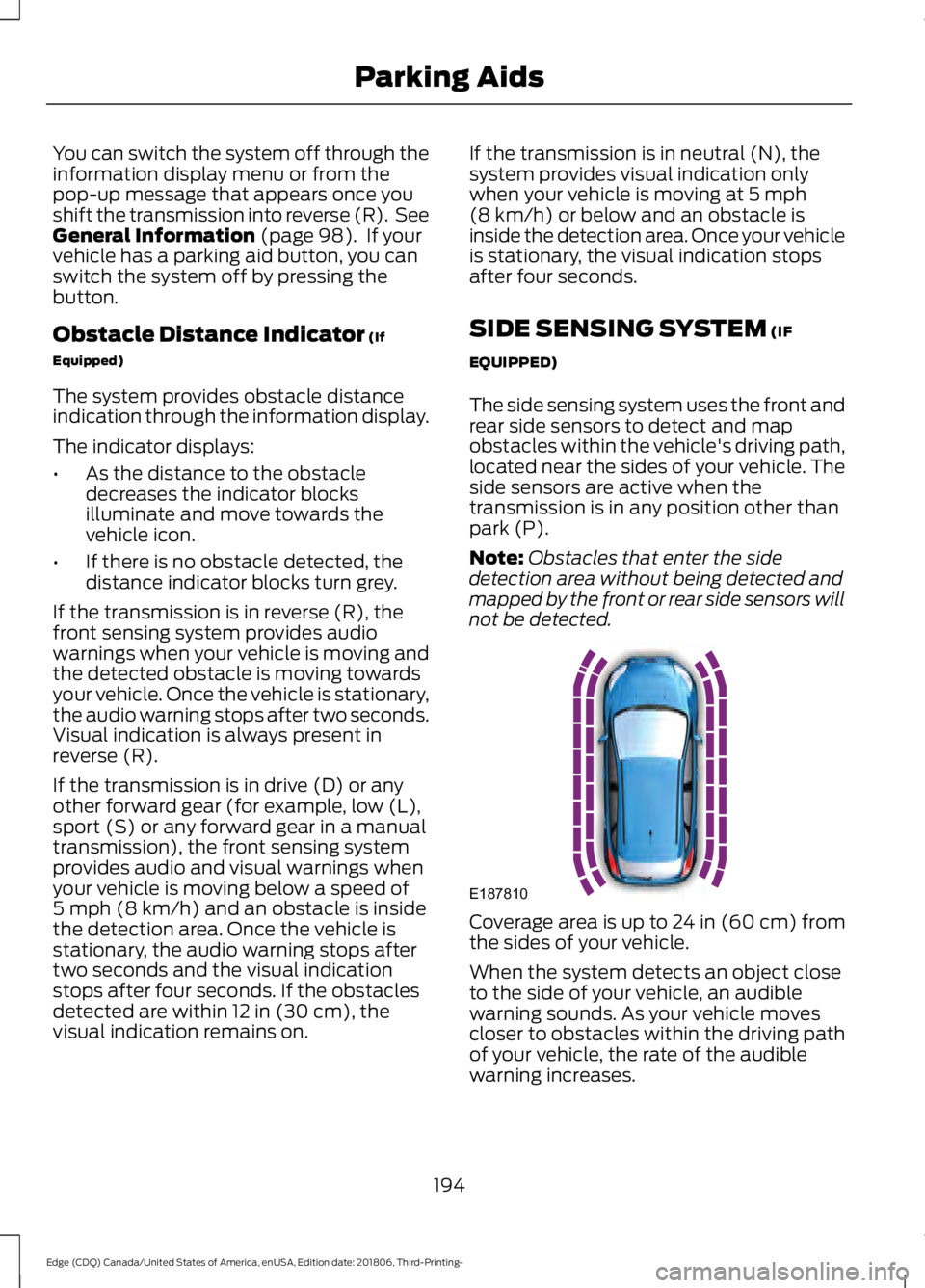
The side sensing system uses the front and
rear side sensors to detect and map
obstacles within the vehicle's driving path,
located near the sides of your vehicle. The
side sensors are active when the
transmission is in any position other than
park (P).
Note: Obstacles that enter the side
detection area without being detected and
mapped by the front or rear side sensors will
not be detected. Coverage area is up to 24 in (60 cm) from
the sides of your vehicle.
When the system detects an object close
to the side of your vehicle, an audible
warning sounds. As your vehicle moves
closer to obstacles within the driving path
of your vehicle, the rate of the audible
warning increases.
194
Edge (CDQ) Canada/United States of America, enUSA, Edition date: 201806, Third-Printing- Parking AidsE187810
Page 198 of 547
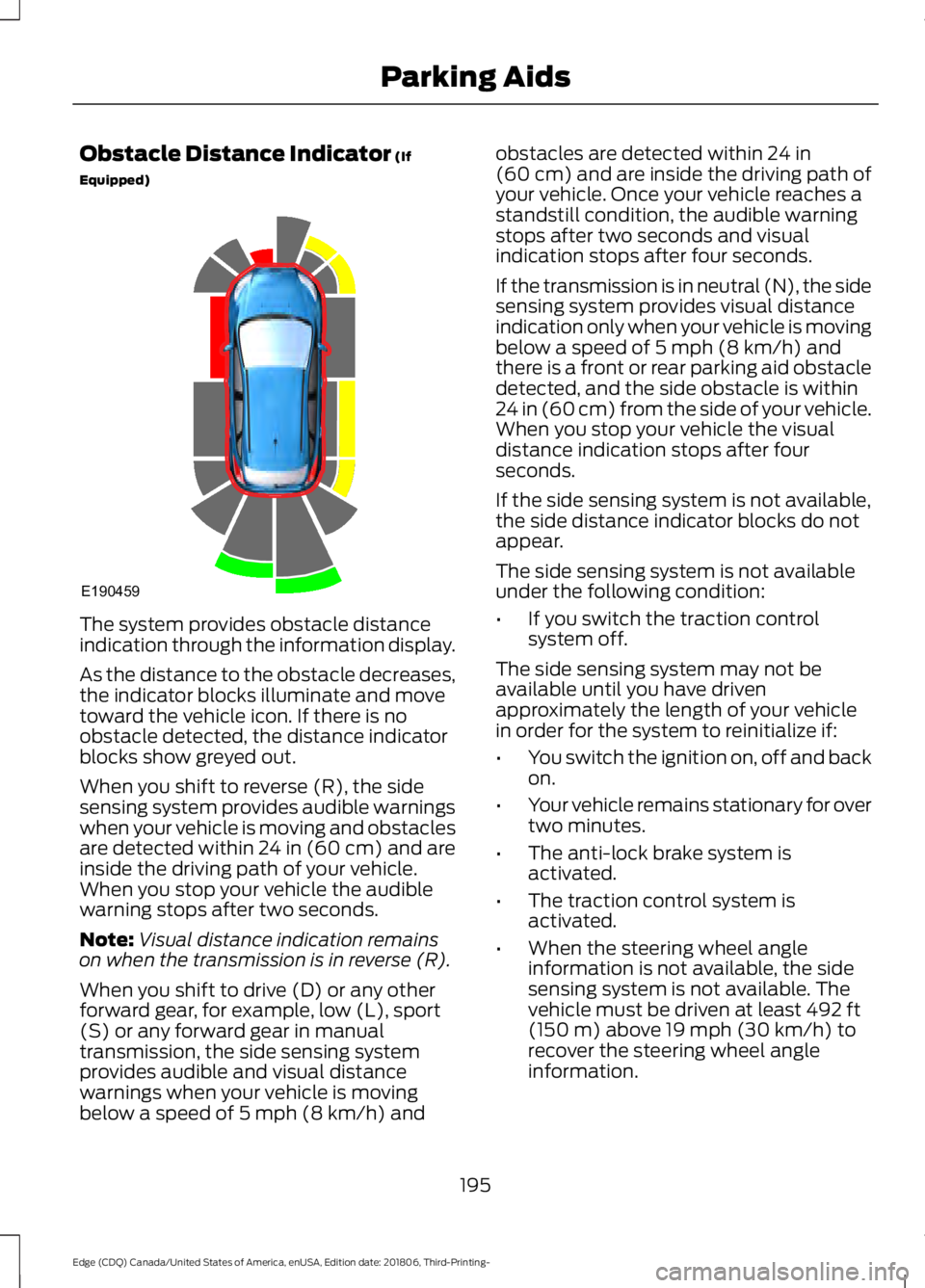
Obstacle Distance Indicator (If
Equipped) The system provides obstacle distance
indication through the information display.
As the distance to the obstacle decreases,
the indicator blocks illuminate and move
toward the vehicle icon. If there is no
obstacle detected, the distance indicator
blocks show greyed out.
When you shift to reverse (R), the side
sensing system provides audible warnings
when your vehicle is moving and obstacles
are detected within 24 in (60 cm) and are
inside the driving path of your vehicle.
When you stop your vehicle the audible
warning stops after two seconds.
Note:
Visual distance indication remains
on when the transmission is in reverse (R).
When you shift to drive (D) or any other
forward gear, for example, low (L), sport
(S) or any forward gear in manual
transmission, the side sensing system
provides audible and visual distance
warnings when your vehicle is moving
below a speed of
5 mph (8 km/h) and obstacles are detected within
24 in
(60 cm) and are inside the driving path of
your vehicle. Once your vehicle reaches a
standstill condition, the audible warning
stops after two seconds and visual
indication stops after four seconds.
If the transmission is in neutral (N), the side
sensing system provides visual distance
indication only when your vehicle is moving
below a speed of
5 mph (8 km/h) and
there is a front or rear parking aid obstacle
detected, and the side obstacle is within
24 in (60 cm) from the side of your vehicle.
When you stop your vehicle the visual
distance indication stops after four
seconds.
If the side sensing system is not available,
the side distance indicator blocks do not
appear.
The side sensing system is not available
under the following condition:
• If you switch the traction control
system off.
The side sensing system may not be
available until you have driven
approximately the length of your vehicle
in order for the system to reinitialize if:
• You switch the ignition on, off and back
on.
• Your vehicle remains stationary for over
two minutes.
• The anti-lock brake system is
activated.
• The traction control system is
activated.
• When the steering wheel angle
information is not available, the side
sensing system is not available. The
vehicle must be driven at least
492 ft
(150 m) above 19 mph (30 km/h) to
recover the steering wheel angle
information.
195
Edge (CDQ) Canada/United States of America, enUSA, Edition date: 201806, Third-Printing- Parking AidsE190459
Page 208 of 547
Manual Zoom
WARNING: When manual zoom
is on, the full area behind your vehicle
may not show. Be aware of your
surroundings when using the manual
zoom feature.
Note: Manual zoom is only available when
the transmission is in reverse (R).
Note: When you enable manual zoom, only
the centerline is shown.
Selectable settings for this feature are
Zoom in (+) and Zoom out (-). Press the
symbol in the camera screen to change the
view. The default setting is Zoom OFF.
This allows you to get a closer view of an
object behind your vehicle. The zoomed
image keeps the bumper in the image to
provide a reference. The zoom is only
active while the transmission is in reverse
(R).
Rear Camera Delay
Selectable settings for this feature are ON
and OFF. The default setting for the rear
camera delay is OFF.
When shifting the transmission out of
reverse (R) and into any gear other than
park (P), the camera image remains in the
display until:
• Your vehicle speed sufficiently
increases.
• You shift your vehicle into park (P)
(automatic transmission).
• You apply the parking brake (manual
transmission). 180 DEGREE CAMERA (IF EQUIPPED) WARNING: Objects that are close
to either corner of the bumper or under
the bumper, might not be seen on the
screen due to the limited coverage of the
camera system. WARNING:
The front camera
system still requires the driver to use it
in conjunction with looking out of your
vehicle. WARNING:
Use caution when
turning camera features on or off when
the transmission is not in park (P). Make
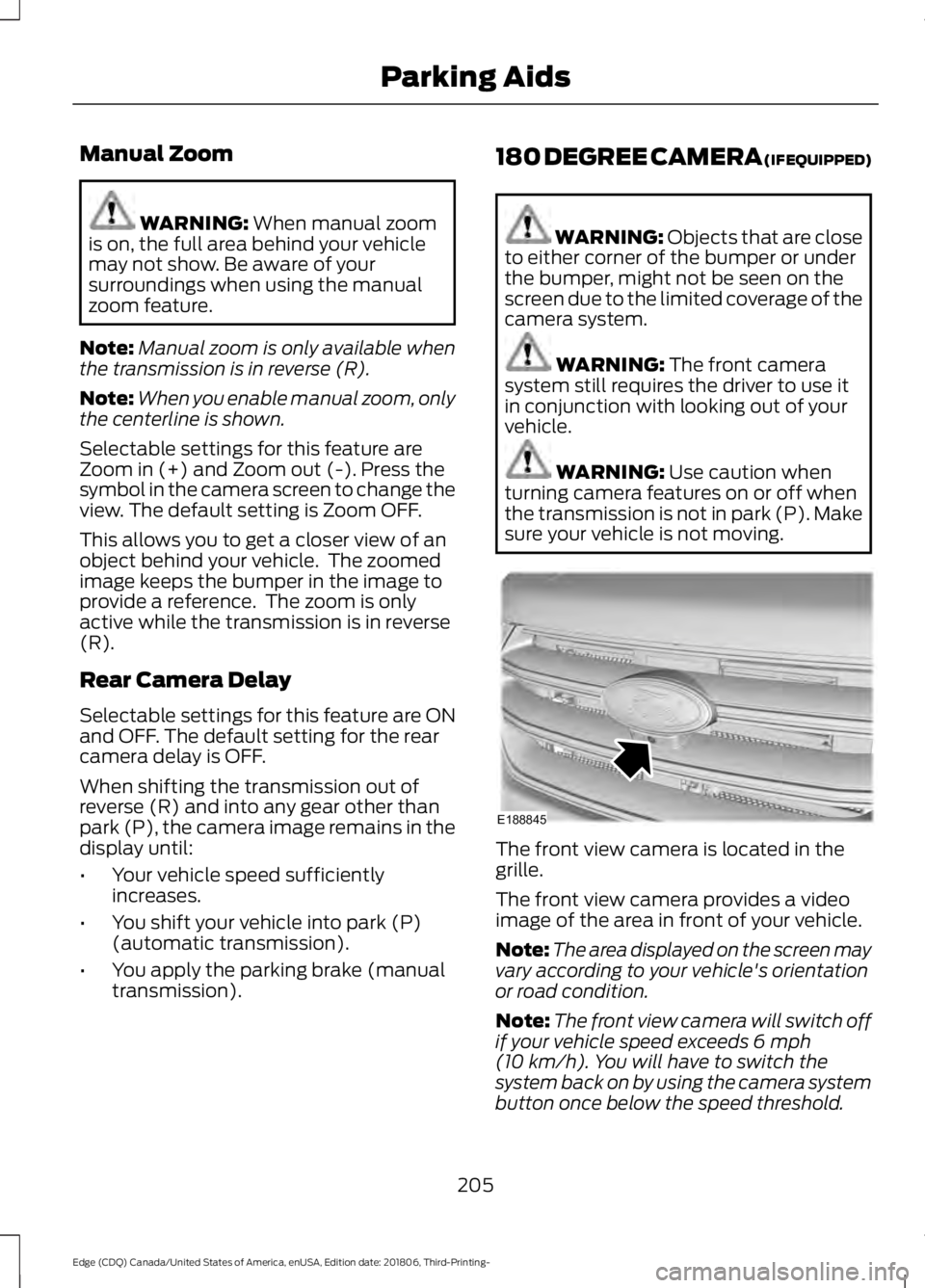
sure your vehicle is not moving. The front view camera is located in the
grille.
The front view camera provides a video
image of the area in front of your vehicle.
Note:
The area displayed on the screen may
vary according to your vehicle's orientation
or road condition.
Note: The front view camera will switch off
if your vehicle speed exceeds
6 mph
(10 km/h). You will have to switch the
system back on by using the camera system
button once below the speed threshold.
205
Edge (CDQ) Canada/United States of America, enUSA, Edition date: 201806, Third-Printing- Parking AidsE188845
Page 235 of 547
Vehicles with Manual Transmission
The system turns on when all of the
following occur:
•
You start your vehicle.
• The vehicle speed is greater than
6 mph (10 km/h).
Note: The system does not operate in
reverse (R).
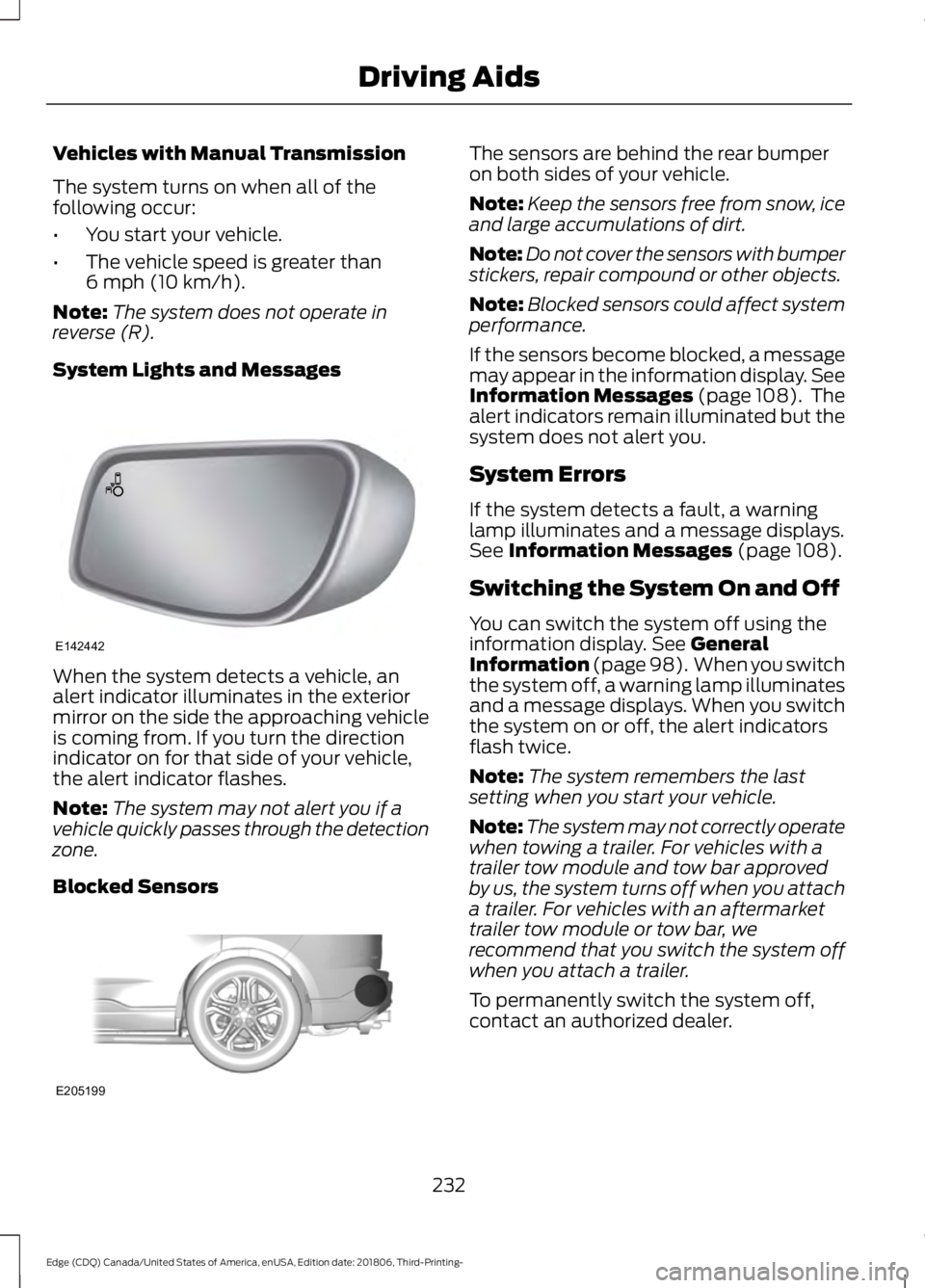
System Lights and Messages When the system detects a vehicle, an
alert indicator illuminates in the exterior
mirror on the side the approaching vehicle
is coming from. If you turn the direction
indicator on for that side of your vehicle,
the alert indicator flashes.
Note:
The system may not alert you if a
vehicle quickly passes through the detection
zone.
Blocked Sensors The sensors are behind the rear bumper
on both sides of your vehicle.
Note:
Keep the sensors free from snow, ice
and large accumulations of dirt.
Note: Do not cover the sensors with bumper
stickers, repair compound or other objects.
Note: Blocked sensors could affect system
performance.
If the sensors become blocked, a message
may appear in the information display. See
Information Messages (page 108). The
alert indicators remain illuminated but the
system does not alert you.
System Errors
If the system detects a fault, a warning
lamp illuminates and a message displays.
See
Information Messages (page 108).
Switching the System On and Off
You can switch the system off using the
information display.
See General
Information (page 98). When you switch
the system off, a warning lamp illuminates
and a message displays. When you switch
the system on or off, the alert indicators
flash twice.
Note: The system remembers the last
setting when you start your vehicle.
Note: The system may not correctly operate
when towing a trailer. For vehicles with a
trailer tow module and tow bar approved
by us, the system turns off when you attach
a trailer. For vehicles with an aftermarket
trailer tow module or tow bar, we
recommend that you switch the system off
when you attach a trailer.
To permanently switch the system off,
contact an authorized dealer.
232
Edge (CDQ) Canada/United States of America, enUSA, Edition date: 201806, Third-Printing- Driving AidsE142442 E205199
Page 255 of 547
TOWING THE VEHICLE ON
FOUR WHEELS - 2.0L
Emergency Towing
WARNING: If your vehicle has a
steering wheel lock make sure the
ignition is in the accessory or on position
when being towed.
If your vehicle becomes inoperable without
access to wheel dollies or a vehicle
transport trailer, it can be flat-towed with
all wheels on the ground, regardless of the
powertrain and transmission configuration,
under the following conditions:
• Your vehicle is facing forward for
towing in a forward direction.
• Refer to the Manual Park Release
procedure. See
Automatic
Transmission (page 173). Failing to
do so may result in damage to the
transmission.
• Maximum speed is 35 mph (56 km/h).
• Maximum distance is
50 mi (80 km).
Recreational Towing
You cannot recreational tow your vehicle
with all wheels on the ground because
vehicle or transmission damage may occur.
We recommend towing your vehicle with
all four wheels off the ground such as
when using a car-hauling trailer. Otherwise,
you cannot recreational tow your vehicle. TOWING THE VEHICLE ON
FOUR WHEELS - 2.7L
Emergency Towing WARNING:
If your vehicle has a
steering wheel lock make sure the
ignition is in the accessory or on position
when being towed.
If your vehicle becomes inoperable without
access to wheel dollies or a vehicle
transport trailer, it can be flat-towed with
all wheels on the ground, regardless of the
powertrain and transmission configuration,
under the following conditions:
• Your vehicle is facing forward for
towing in a forward direction.
• Refer to the Manual Park Release
procedure. See
Automatic
Transmission (page 173). Failing to
do so may result in damage to the
transmission.
• Maximum speed is 35 mph (56 km/h).
• Maximum distance is
50 mi (80 km).
Recreational Towing
Note: Put your climate control system in
recirculated air mode to prevent exhaust
fumes from entering the vehicle. See
Climate Control
(page 124).
Follow these guidelines if you have a need
for recreational towing. An example of
recreational towing would be towing your
vehicle behind a motorhome. We designed
these guidelines to prevent damage to your
transmission.
252
Edge (CDQ) Canada/United States of America, enUSA, Edition date: 201806, Third-Printing- Towing
Page 256 of 547
You can recreational tow your vehicle with
all four wheels on the ground using the
Manual Park Release procedure, or with
all four wheels off the ground using a
vehicle transport trailer. If you are using a
vehicle transport trailer, follow the
instructions specified by the equipment
provider.
If you recreational tow your vehicle with all
four wheels on the ground:
•
Only tow your vehicle in the forward
direction.
• Refer to the Manual Park Release
procedure. See Automatic
Transmission (page 173). Failing to
do so may result in damage to the
transmission.
• Do not exceed
65 mph (105 km/h).
253
Edge (CDQ) Canada/United States of America, enUSA, Edition date: 201806, Third-Printing- Towing
Page 263 of 547
POST-CRASH ALERT SYSTEM
The system flashes the direction indicators
and sounds the horn (intermittently) in the
event of a serious impact that deploys an
airbag (front, side, side curtain or Safety
Canopy) or the seatbelt pretensioners.
The horn and indicators turn off when:
•
You press the hazard control button.
• You press the panic button on the
remote entry transmitter (if equipped).
• Your vehicle runs out of power.
• Sounding of the horn is only enabled
in specific markets.
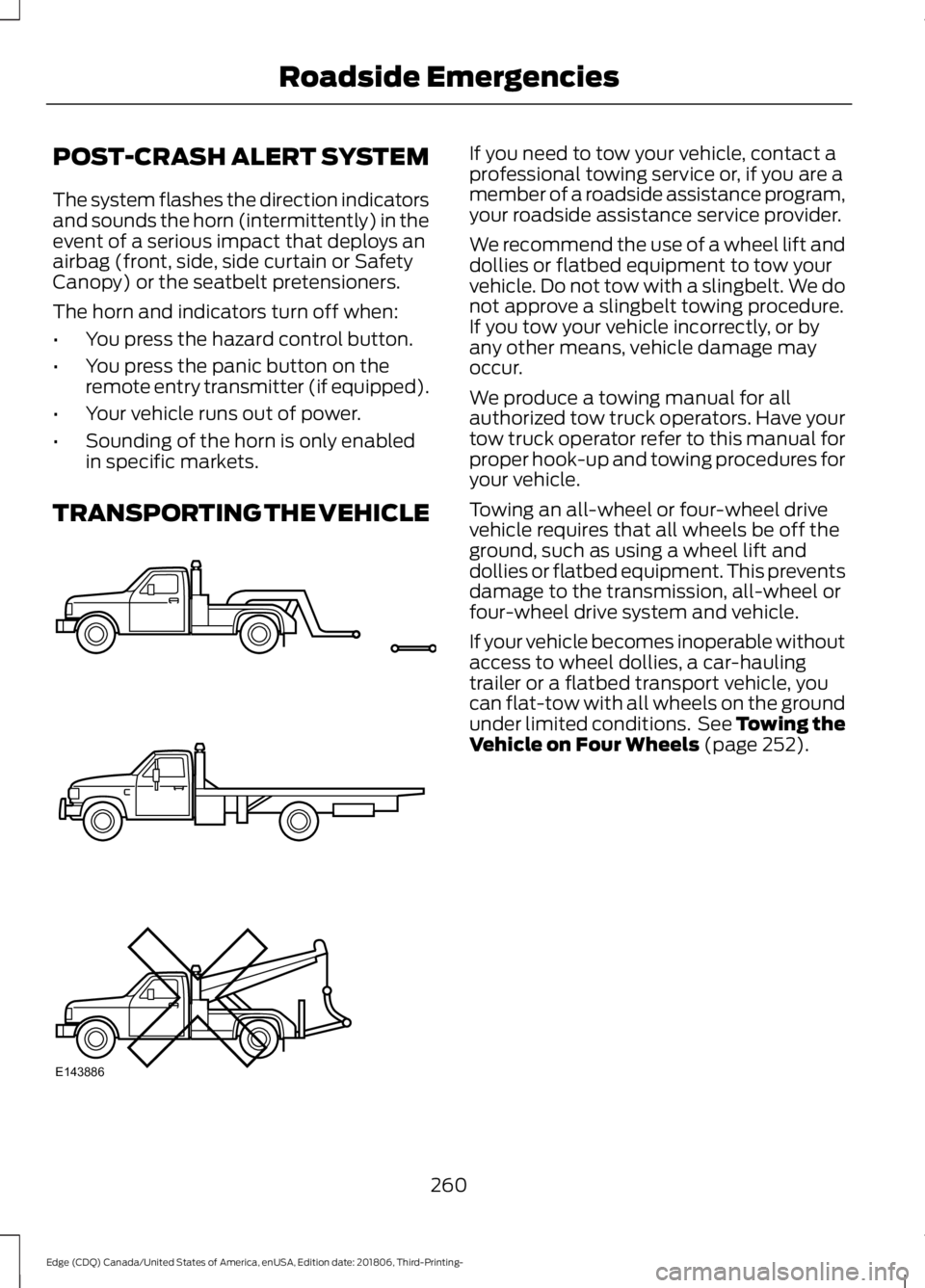
TRANSPORTING THE VEHICLE If you need to tow your vehicle, contact a
professional towing service or, if you are a
member of a roadside assistance program,
your roadside assistance service provider.
We recommend the use of a wheel lift and
dollies or flatbed equipment to tow your
vehicle. Do not tow with a slingbelt. We do
not approve a slingbelt towing procedure.
If you tow your vehicle incorrectly, or by
any other means, vehicle damage may
occur.
We produce a towing manual for all
authorized tow truck operators. Have your
tow truck operator refer to this manual for
proper hook-up and towing procedures for
your vehicle.
Towing an all-wheel or four-wheel drive
vehicle requires that all wheels be off the
ground, such as using a wheel lift and
dollies or flatbed equipment. This prevents
damage to the transmission, all-wheel or
four-wheel drive system and vehicle.
If your vehicle becomes inoperable without
access to wheel dollies, a car-hauling
trailer or a flatbed transport vehicle, you
can flat-tow with all wheels on the ground
under limited conditions. See Towing the
Vehicle on Four Wheels (page 252).
260
Edge (CDQ) Canada/United States of America, enUSA, Edition date: 201806, Third-Printing- Roadside EmergenciesE143886
Page 380 of 547
To adjust this setting press the voice button, when prompted say:
Action and Description
Voice Command
Voice Settings
Then any of the following: When enabled, this feature will prompt you
to confirm any voice initiated call command
prior to the call being placed.
Phone Confirmation Off
The system will make a best guess; you
may still occasionally be asked to confirm
settings.
Phone Confirmation On
USING SYNC™ WITH YOUR
PHONE
Hands-free calling is one of the main
features of SYNC. While the system
supports a variety of features, many are
dependent on your cellular phone's
functionality. At a minimum, most cellular
phones with Bluetooth wireless technology
support the following functions:
• Answering an incoming call.
• Ending a call.
• Dialing a number.
• Redialing.
• Call waiting notification.
• Caller ID.
Other features, such as text messaging
using Bluetooth and automatic phonebook
download, are phone-dependent features.
Pairing a Phone
Wirelessly pairing your phone with SYNC
allows you to make and receive hands-free
calls. Note:
Make sure to switch on the ignition
and the radio. Shift the transmission into
park (P) for automatic transmission or first
gear for manual transmission.
Using the Audio System
Note: To scroll through the menus, press
the up and down arrows on your audio
system.
1. Make sure to switch on your phone's Bluetooth feature before starting the
search. See your device's manual if
necessary.
2. Press the Settings button.
3. Select Bluetooth from the menu.
4. Press the
OK button.
5. Select the option to add. This starts the pairing process.
6. When a message to begin pairing appears in the audio display, search for
SYNC on your device.
Depending on your phone's capability and
your market, the system may prompt you
with questions, such as setting the current
phone as the primary phone and
downloading your phonebook.
377
Edge (CDQ) Canada/United States of America, enUSA, Edition date: 201806, Third-Printing- SYNC™
(If Equipped)