flat tires FORD EDGE 2019 Owner's Guide
[x] Cancel search | Manufacturer: FORD, Model Year: 2019, Model line: EDGE, Model: FORD EDGE 2019Pages: 547, PDF Size: 40.86 MB
Page 339 of 547
When Inflating Your Tires
WARNING: Do not use the tire
pressure displayed in the information
display as a tire pressure gauge. Failure
to follow this instruction could result in
personal injury or death.
When putting air into your tires (such as at
a gas station or in your garage), the tire
pressure monitoring system will not
respond immediately to the air added to
your tires.
It could take up to two minutes of driving
over 20 mph (32 km/h) for the light to turn
off after you have filled your tires to the
recommended inflation pressure.
How Temperature Affects Your Tire
Pressure
The tire pressure monitoring system
monitors tire pressure in each pneumatic
tire. While driving in a normal manner, a
typical passenger tire inflation pressure
could increase about
2 –4 psi (14– 28 kPa)
from a cold start situation. If the vehicle is
stationary overnight with the outside
temperature significantly lower than the
daytime temperature, the tire pressure
could decrease about
3 psi (21 kPa) for a
drop of 30°F (17°C) in ambient
temperature. This lower pressure value
could be detected by the tire pressure
monitoring system as being significantly
lower than the recommended inflation
pressure and activate the system warning
light for low tire pressure. If the low tire
pressure warning light is on, visually check
each tire to verify that no tire is flat. If one
or more tires are flat, repair as necessary.
Check the air pressure in the road tires. If
any tire is under-inflated, carefully drive
the vehicle to the nearest location where
air can be added to the tires. Inflate all the
tires to the recommended inflation
pressure. Tire Pressure Monitoring System Reset
Procedure WARNING:
To determine the
required pressure(s) for your vehicle, see
the Safety Compliance Certification
Label (on the door hinge pillar,
door-latch post or the door edge that
meets the door-latch post, next to the
driver seat) or the Tire Label on the
B-Pillar or the edge of the driver door.
Note: You need to perform the tire pressure
monitoring system reset procedure after
each tire rotation.
To provide the vehicle's load carrying
capability, some vehicles require different
recommended tire pressures in the front
tires as compared to the rear tires. The tire
pressure monitoring system equipped on
these vehicles is designed to illuminate the
low tire pressure warning light at two
different pressures; one for the front tires
and one for the rear tires.
Since tires need to be rotated to provide
consistent performance and maximum tire
life, the tire pressure monitoring system
needs to know when the tires are rotated
to determine which set of tires are on the
front and which are on the rear. With this
information, the system can detect and
properly warn of low tire pressures.
System reset tips:
336
Edge (CDQ) Canada/United States of America, enUSA, Edition date: 201806, Third-Printing- Wheels and Tires
Page 341 of 547
11.
Set all four tires to the recommended
air pressure as indicated on the
Safety Compliance Certification
Label, affixed to either the door hinge
pillar, door-latch post, or the door
edge that meets the door-latch post,
next to the driver seating position or
Tire Label located on the B-Pillar or
the edge of the driver door.
CHANGING A ROAD WHEEL (IF
EQUIPPED) WARNING:
Do not use tire
sealants as they may damage the tire
pressure monitoring system. WARNING:
If the tire pressure
monitor sensor becomes damaged it
may not function.
Note: The use of tire sealant may damage
your tire pressure monitoring system and
should only be used in roadside
emergencies. If you must use a sealant, use
the Tire Mobility Kit sealant. Replace the tire
pressure monitoring system sensor and
valve stem on the wheel by an authorized
dealer after use of the sealant.
Note: The tire pressure monitoring system
indicator light will illuminate when the spare
tire is in use. To restore the full function of
the monitoring system, all road wheels
equipped with tire pressure monitoring
sensors must be mounted on the vehicle.
If you get a flat tire while driving, do not
apply the brake heavily. Instead, gradually
decrease your speed. Hold the steering
wheel firmly and slowly move to a safe
place on the side of the road. Have a flat serviced by an authorized
dealer in order to prevent damage to the
tire pressure monitoring system sensors.
See
Tire Pressure Monitoring System
(page 332). Replace the spare tire with a
road tire as soon as possible. During
repairing or replacing of the flat tire, have
an authorized dealer inspect the tire
pressure monitoring system sensor for
damage.
Dissimilar Spare Wheel and Tire
Assembly Information WARNING:
Failure to follow these
guidelines could result in an increased
risk of loss of vehicle control, injury or
death.
If you have a dissimilar spare wheel and
tire, then it is intended for temporary use
only. This means that if you need to use it,
you should replace it as soon as possible
with a road wheel and tire assembly that
is the same size and type as the road tires
and wheels that were originally provided
by us. If the dissimilar spare tire or wheel
is damaged, replace it instead of repairing
it.
A dissimilar spare wheel and tire assembly
is defined as a spare wheel and tire
assembly that is different in brand, size or
appearance from the road tires and wheels
and can be one of three types:
1. T-type mini-spare:
This spare tire
begins with the letter T for tire size and
may have Temporary Use Only molded in
the sidewall.
2. Full-size dissimilar spare with label
on wheel:
This spare tire has a label on
the wheel that states: THIS WHEEL AND
TIRE ASSEMBLY FOR TEMPORARY USE
ONLY.
When driving with one of the dissimilar
spare tires listed above, do not:
338
Edge (CDQ) Canada/United States of America, enUSA, Edition date: 201806, Third-Printing- Wheels and Tires
Page 343 of 547
WARNING: Never place anything
between the vehicle jack and your
vehicle. WARNING:
Never place anything
between the vehicle jack and the ground. WARNING:
Park your vehicle so
that you do not obstruct the flow of
traffic or place yourself in any danger and
set up a warning triangle. WARNING:
Do not get under a
vehicle that is only supported by a
vehicle jack. WARNING:
Do not attempt to
change a tire on the side of the vehicle
close to moving traffic. Pull far enough
off the road to avoid the danger of being
hit when operating the jack or changing
the wheel. WARNING:
Use only the specified
jacking points. If you use other positions,
you may damage the body, steering,
suspension, engine, braking system or
the fuel lines. WARNING:
Always use the jack
provided as original equipment with your
vehicle. If using a jack other than the one
provided, make sure the jack capacity is
adequate for the vehicle weight,
including any vehicle cargo or
modifications. If you are unsure if the jack
capacity is adequate, contact the
authorized dealer. WARNING: The jack supplied with
this vehicle is only intended for changing
wheels. Do not use the vehicle jack other
than when you are changing a wheel in
an emergency. WARNING:
Make sure there is no
grease or oil on the threads or the
surface between the wheel lugs and
nuts. This can cause the lug nuts to
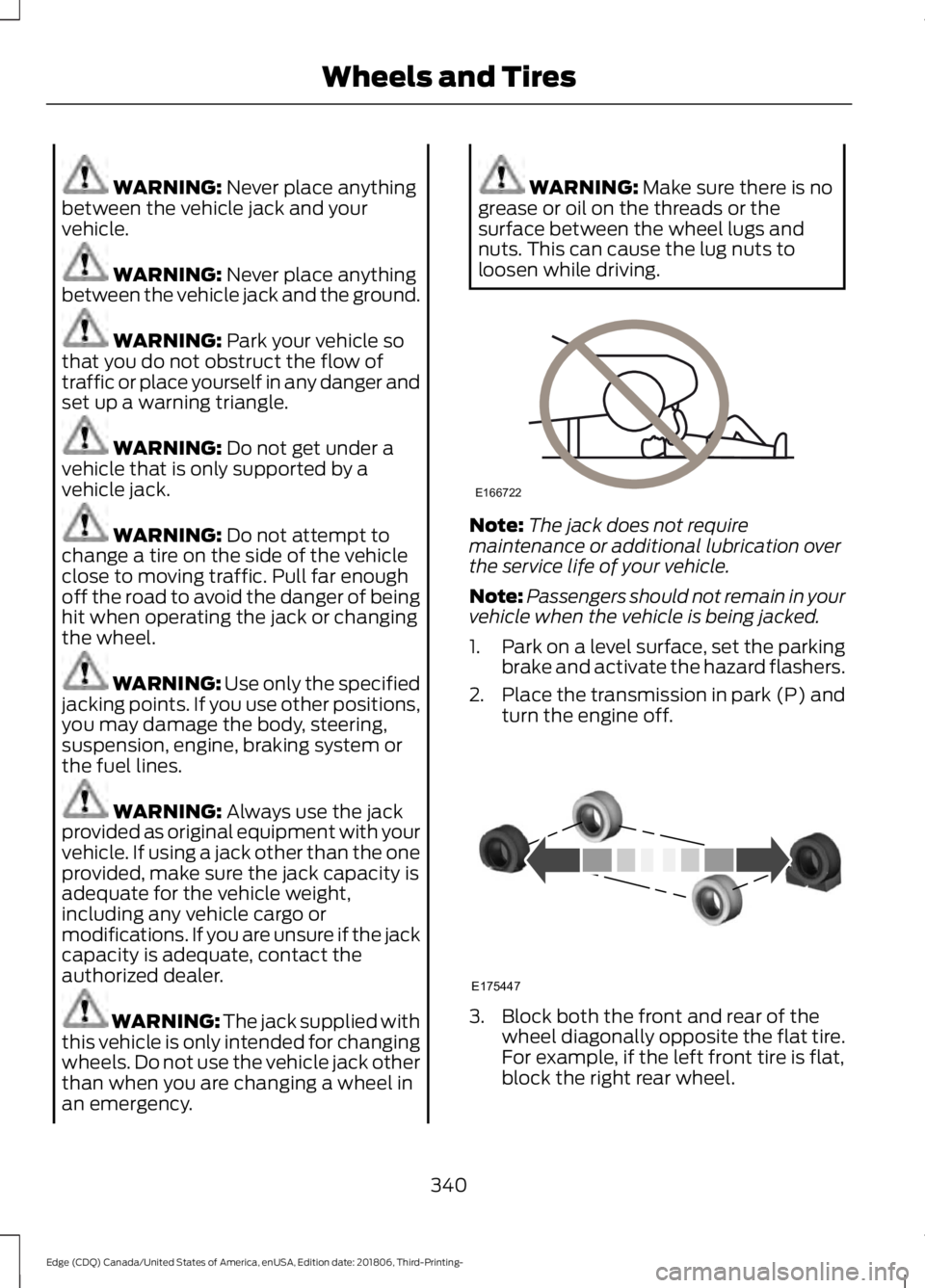
loosen while driving. Note:
The jack does not require
maintenance or additional lubrication over
the service life of your vehicle.
Note: Passengers should not remain in your
vehicle when the vehicle is being jacked.
1. Park on a level surface, set the parking
brake and activate the hazard flashers.
2. Place the transmission in park (P) and
turn the engine off. 3. Block both the front and rear of the
wheel diagonally opposite the flat tire.
For example, if the left front tire is flat,
block the right rear wheel.
340
Edge (CDQ) Canada/United States of America, enUSA, Edition date: 201806, Third-Printing- Wheels and TiresE166722 E175447
Page 345 of 547
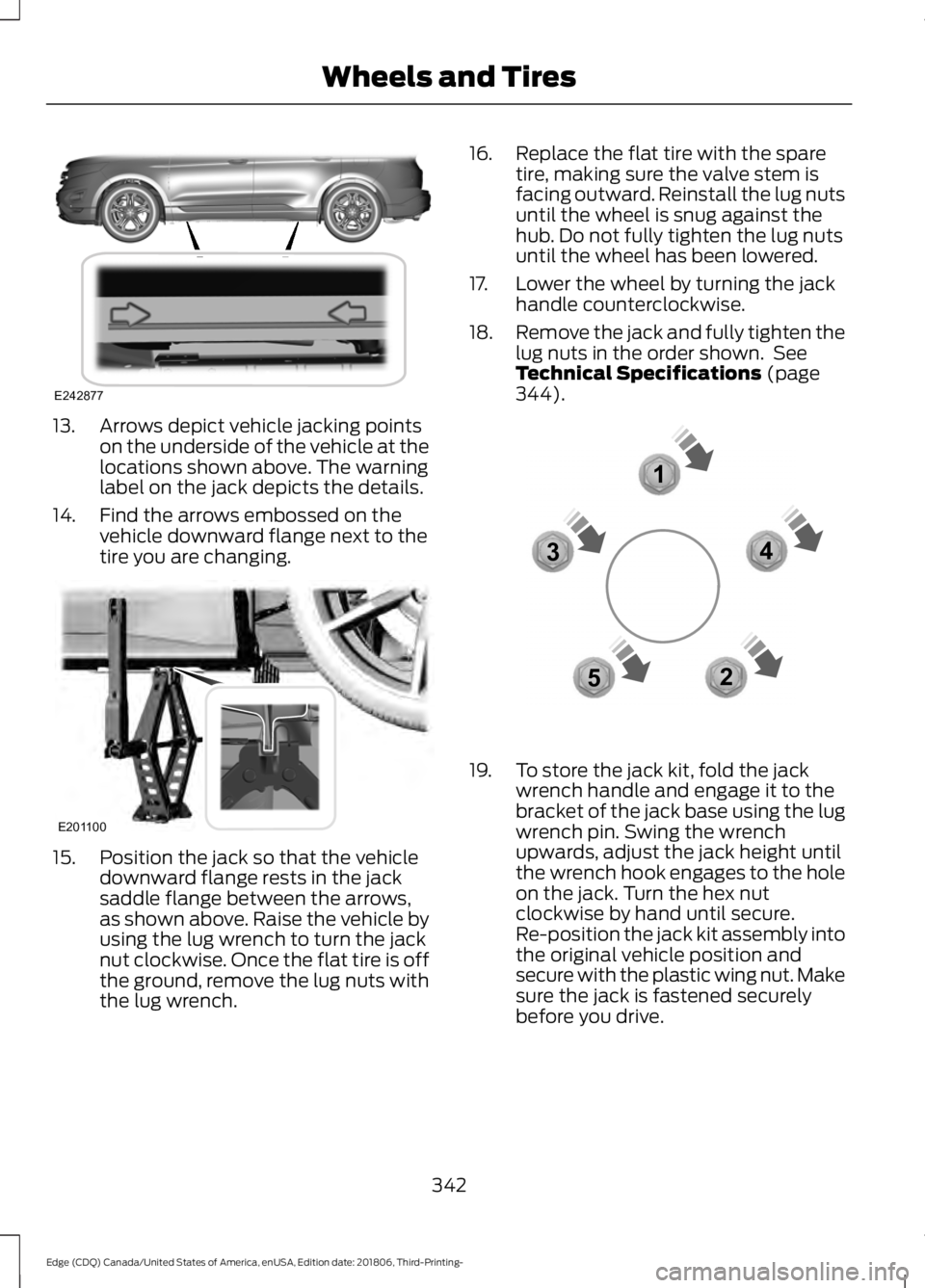
13. Arrows depict vehicle jacking points
on the underside of the vehicle at the
locations shown above. The warning
label on the jack depicts the details.
14. Find the arrows embossed on the vehicle downward flange next to the
tire you are changing.15. Position the jack so that the vehicle
downward flange rests in the jack
saddle flange between the arrows,
as shown above. Raise the vehicle by
using the lug wrench to turn the jack
nut clockwise. Once the flat tire is off
the ground, remove the lug nuts with
the lug wrench. 16. Replace the flat tire with the spare
tire, making sure the valve stem is
facing outward. Reinstall the lug nuts
until the wheel is snug against the
hub. Do not fully tighten the lug nuts
until the wheel has been lowered.
17. Lower the wheel by turning the jack handle counterclockwise.
18. Remove the jack and fully tighten the
lug nuts in the order shown. See
Technical Specifications (page
344). 19. To store the jack kit, fold the jack
wrench handle and engage it to the
bracket of the jack base using the lug
wrench pin. Swing the wrench
upwards, adjust the jack height until
the wrench hook engages to the hole
on the jack. Turn the hex nut
clockwise by hand until secure.
Re-position the jack kit assembly into
the original vehicle position and
secure with the plastic wing nut. Make
sure the jack is fastened securely
before you drive.
342
Edge (CDQ) Canada/United States of America, enUSA, Edition date: 201806, Third-Printing- Wheels and TiresE242877 E201100 12
3
4
5E306781
Page 346 of 547
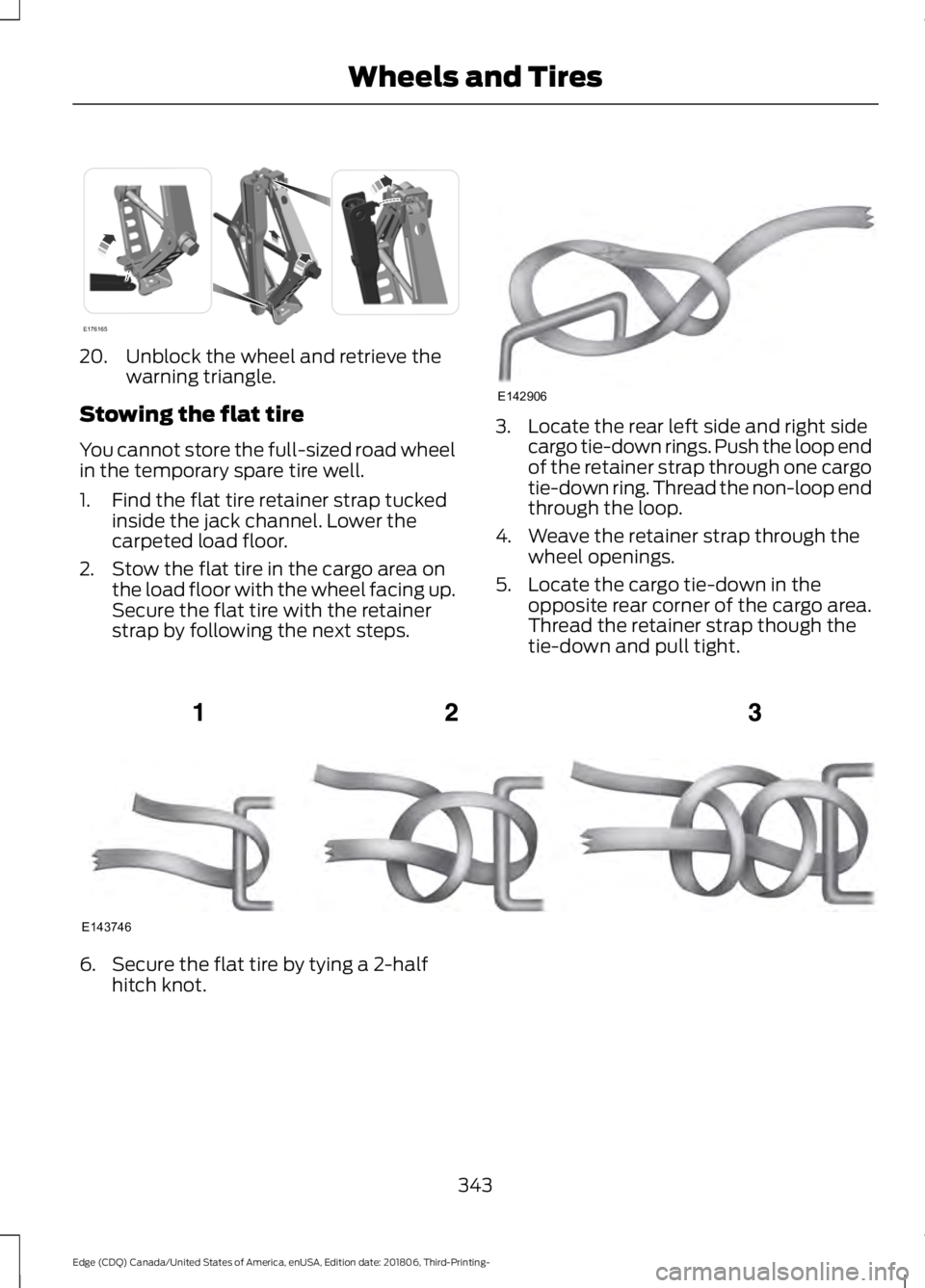
20. Unblock the wheel and retrieve the
warning triangle.
Stowing the flat tire
You cannot store the full-sized road wheel
in the temporary spare tire well.
1. Find the flat tire retainer strap tucked inside the jack channel. Lower the
carpeted load floor.
2. Stow the flat tire in the cargo area on the load floor with the wheel facing up.
Secure the flat tire with the retainer
strap by following the next steps. 3. Locate the rear left side and right side
cargo tie-down rings. Push the loop end
of the retainer strap through one cargo
tie-down ring. Thread the non-loop end
through the loop.
4. Weave the retainer strap through the wheel openings.
5. Locate the cargo tie-down in the opposite rear corner of the cargo area.
Thread the retainer strap though the
tie-down and pull tight. 6. Secure the flat tire by tying a 2-half
hitch knot.
343
Edge (CDQ) Canada/United States of America, enUSA, Edition date: 201806, Third-Printing- Wheels and TiresE176165 E142906 E143746
Page 347 of 547
TECHNICAL SPECIFICATIONS
Wheel Lug Nut Torque Specifications
WARNING: When a wheel is installed, always remove any corrosion, dirt or foreign
materials present on the mounting surfaces of the wheel or the surface of the wheel
hub, brake drum or brake disc that contacts the wheel. Make sure that any fasteners
that attach the rotor to the hub are secured so they do not interfere with the mounting
surfaces of the wheel. Installing wheels without correct metal-to-metal contact at the
wheel mounting surfaces can cause the wheel nuts to loosen and the wheel to come
off while your vehicle is in motion, resulting in loss of control. lb.ft (Nm)*
Bolt size
162 lb.ft (220 Nm)
M14 x 1.5
*Torque specifications are for nut and bolt threads free of dirt and rust. Use only Ford
recommended replacement fasteners.
Retighten the lug nuts to the specified torque within 100 miles (160 kilometers) after any
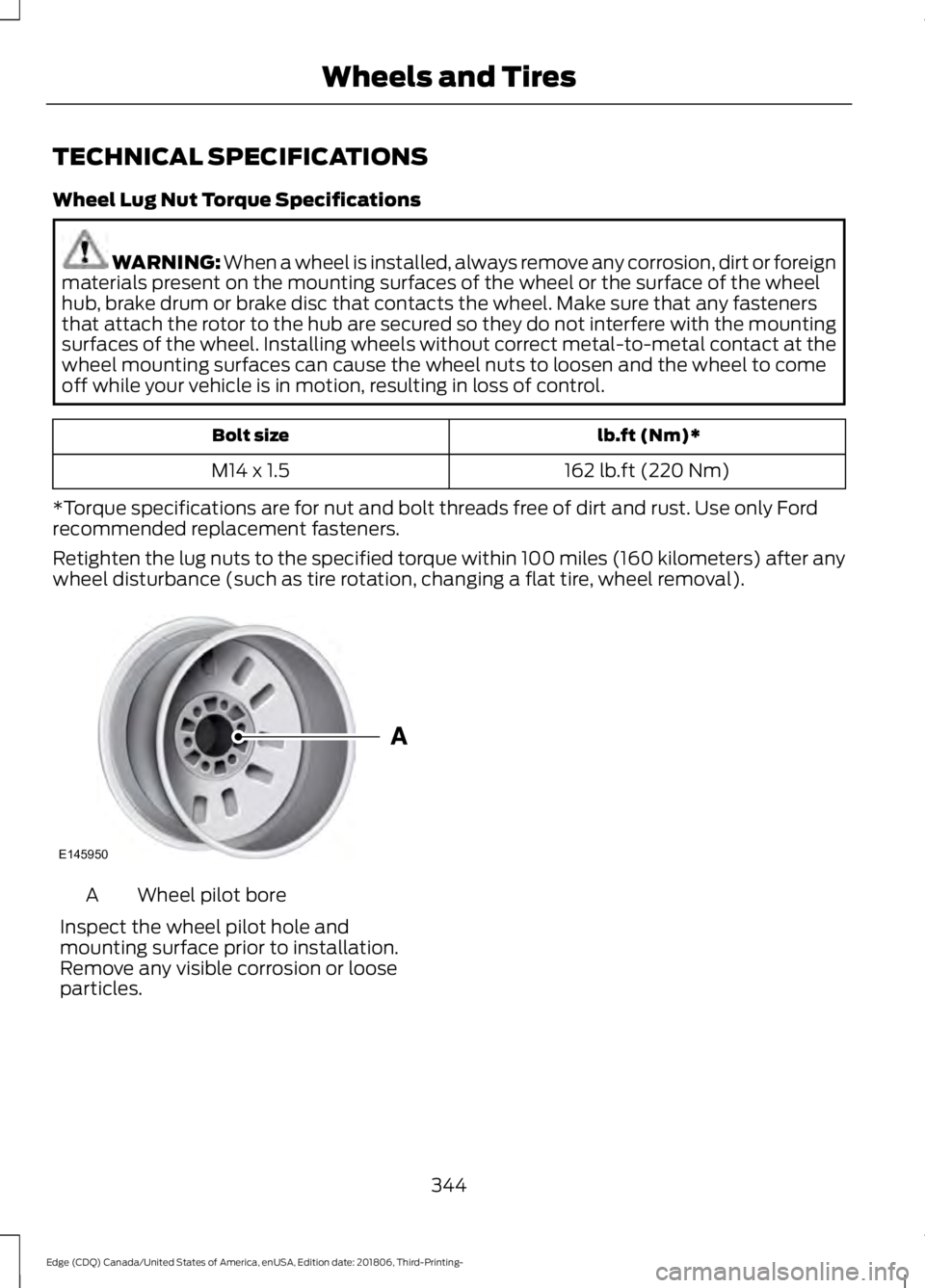
wheel disturbance (such as tire rotation, changing a flat tire, wheel removal). Wheel pilot bore
A
Inspect the wheel pilot hole and
mounting surface prior to installation.
Remove any visible corrosion or loose
particles.
344
Edge (CDQ) Canada/United States of America, enUSA, Edition date: 201806, Third-Printing- Wheels and TiresE145950
Page 479 of 547
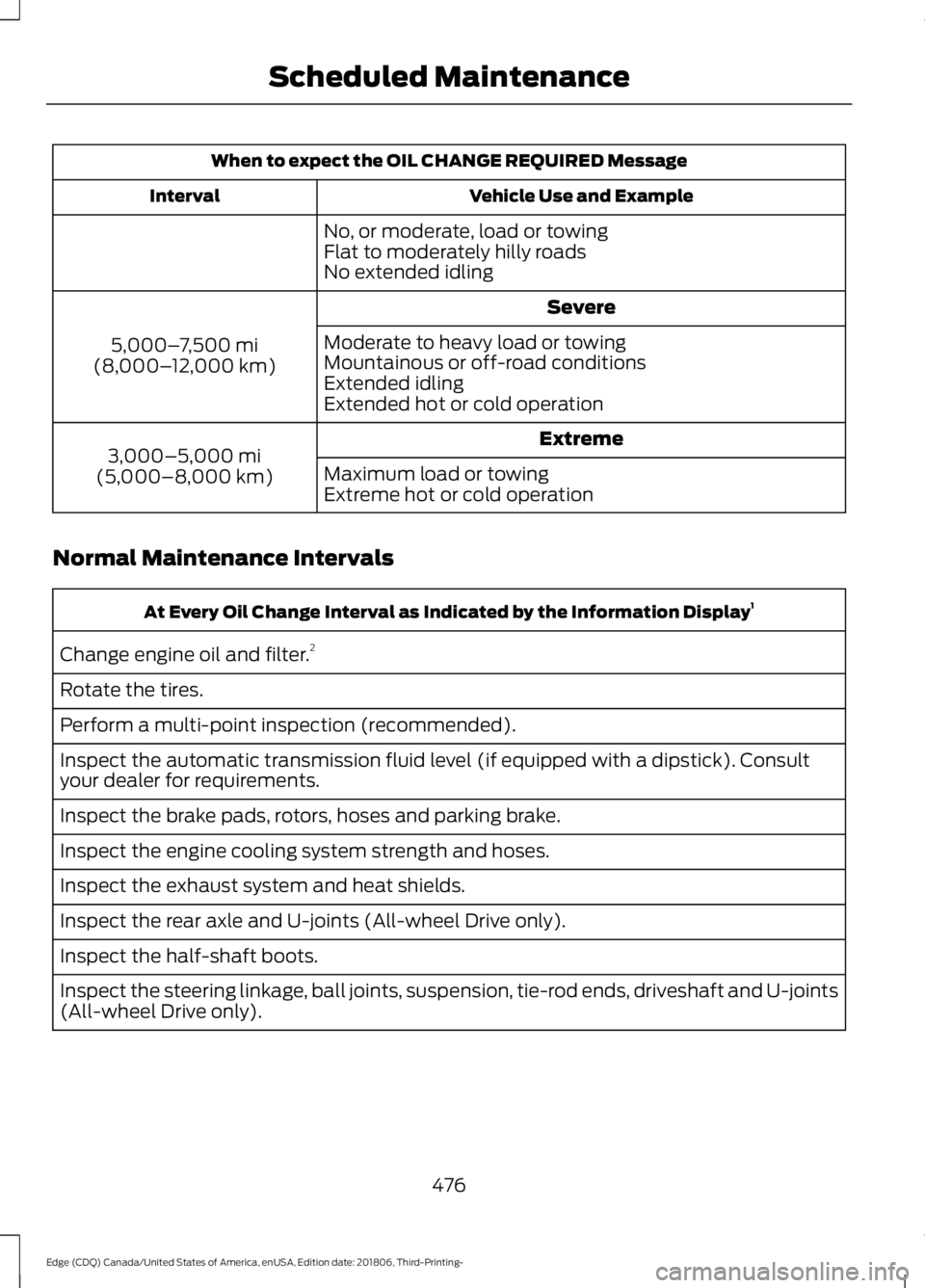
When to expect the OIL CHANGE REQUIRED Message
Vehicle Use and Example
Interval
No, or moderate, load or towing
Flat to moderately hilly roads
No extended idling Severe
5,000– 7,500 mi
(8,000– 12,000 km) Moderate to heavy load or towing
Mountainous or off-road conditions
Extended idling
Extended hot or cold operation
Extreme
3,000–5,000 mi
(5,000–8,000 km) Maximum load or towing
Extreme hot or cold operation
Normal Maintenance Intervals At Every Oil Change Interval as Indicated by the Information Display
1
Change engine oil and filter. 2
Rotate the tires.
Perform a multi-point inspection (recommended).
Inspect the automatic transmission fluid level (if equipped with a dipstick). Consult
your dealer for requirements.
Inspect the brake pads, rotors, hoses and parking brake.
Inspect the engine cooling system strength and hoses.
Inspect the exhaust system and heat shields.
Inspect the rear axle and U-joints (All-wheel Drive only).
Inspect the half-shaft boots.
Inspect the steering linkage, ball joints, suspension, tie-rod ends, driveshaft and U-joints
(All-wheel Drive only).
476
Edge (CDQ) Canada/United States of America, enUSA, Edition date: 201806, Third-Printing- Scheduled Maintenance
Page 544 of 547
Display...................................................................
453
General.................................................................. 450
Media Player......................................................... 441
Mobile Apps........................................................ 449
Navigation............................................................. 447
Phone..................................................................... 442
Radio...................................................................... 446
SiriusXM................................................................ 447
Sound.................................................................... 440
Valet Mode........................................................... 454
Vehicle................................................................... 452
Voice Control....................................................... 453
Wi-Fi & Hotspot.................................................. 451
Side Airbags
.....................................................45
Side Sensing System..................................194
Obstacle Distance Indicator........................... 195
Sitting in the Correct Position..................135
Snow Chains See: Using Snow Chains.................................. 331
Spare Wheel See: Changing a Road Wheel....................... 338
Special Notices
................................................14
New Vehicle Limited Warranty......................... 14
On Board Diagnostics Data Link Connector............................................................ 15
Special Instructions.............................................. 14
Special Operating Conditions Scheduled Maintenance...............................................478
Exceptions............................................................ 479
Speed Control See: Cruise Control............................................ 207
Stability Control
............................................189
Principle of Operation...................................... 189
Starting a Gasoline Engine
.......................156
Automatic Engine Shutdown......................... 157
Failure to Start...................................................... 157
Guarding Against Exhaust Fumes................158
Important Ventilating Information..............158
Stopping the Engine When Your Vehicle is Moving............................................................... 158
Stopping the Engine When Your Vehicle is Stationary......................................................... 158
Starting and Stopping the Engine..........155 General Information.......................................... 155
Steering...........................................................235 Adaptive Learning............................................. 236
Electric Power Steering................................... 235
Steering Wheel................................................73 Storage Compartments
.............................154
Sunroof See: Moonroof...................................................... 89
Sun Visors.........................................................89 Illuminated Vanity Mirror................................... 89
Supplementary Restraints System.........40 Principle of Operation........................................ 40
Symbols Glossary
.............................................7
SYNC™ 3.........................................................391 General Information.......................................... 391
SYNC™ 3 Troubleshooting......................454
SYNC™ Applications and Services........................................................378
911 Assist............................................................... 378
SYNC Mobile Apps........................................... 380
SYNC™............................................................374 General Information.......................................... 374
SYNC™ Troubleshooting
.........................382
T
Technical Specifications See: Capacities and Specifications............345
The Better Business Bureau (BBB) Auto Line Program (U.S. Only).......................263
Tire Care
...........................................................315
Glossary of Tire Terminology......................... 318
Important Information About Low-Profile Tires..................................................................... 315
Important Information About Sport Tires and Wheels...................................................... 315
Information About Uniform Tire Quality Grading.............................................................. 316
Information Contained on the Tire Sidewall............................................................ 319
Notice to Crossover Vehicle Owners...........316
Temperature A B C.............................................. 317
Tire Rotation........................................................ 330
Traction AA A B C................................................ 317
Treadwear.............................................................. 317
Tire Inflation When Punctured See: Tire Sealant and Inflator Kit................308
Tire Pressure Monitoring System...........332 Changing Tires With a Tire Pressure
Monitoring System....................................... 333
Understanding Your Tire Pressure Monitoring System ...................................... 333
541
Edge (CDQ) Canada/United States of America, enUSA, Edition date: 201806, Third-Printing- Index
Page 545 of 547
Tire Repair Kit
See: Tire Sealant and Inflator Kit................308
Tire Sealant and Inflator Kit....................308
First Stage: Inflating the Tire with Sealing
Compound and Air........................................ 310
General Information......................................... 309
Second Stage: Checking Tire Pressure............................................................. 312
Tips for Use of the Kit...................................... 309
What to Do After the Tire Has Been Sealed................................................................ 313
What to do When a Tire Is Punctured........310
Tires See: Wheels and Tires..................................... 307
Towing a Trailer.............................................247 Load Placement................................................. 247
Towing the Vehicle on Four Wheels - 2.0L.................................................................252
Emergency Towing............................................ 252
Recreational Towing......................................... 252
Towing the Vehicle on Four Wheels - 2.7L.................................................................252
Emergency Towing............................................ 252
Recreational Towing......................................... 252
Towing..............................................................247
Traction Control............................................188 Principle of Operation...................................... 188
Trailer Sway Control...................................248
Transmission Code Designation
............349
Transmission...................................................173
Transporting the Vehicle..........................260
Type Approvals
.............................................518
China...................................................................... 529
Radio Frequency Certification for Keys and Remote Controls........................................... 529
Radio Frequency Certifications for Blind Spot Information System........................... 527
Radio Frequency Certifications for Body Control Module.............................................. 529
Radio Frequency Certifications for Cruise Control Module.............................................. 529
Radio Frequency Certifications for Mid Range Radar.................................................... 521
Radio Frequency Certifications for Passive Anti-Theft System........................................ 522
Radio Frequency Certifications for Radio Transceiver Module...................................... 525Radio Frequency Certifications for SYNC
3........................................................................\
... 528
Radio Frequency Certifications for Tire Pressure Monitoring Sensor(s)................518
Radio Frequency Certifications for Wireless Charging........................................................... 528
Radio Frequency Statement for Audio Unit..................................................................... 529
U
Under Hood Overview - 2.0L EcoBoost™.................................................282
Under Hood Overview - 2.7L EcoBoost™.................................................283
Unique Driving Characteristics................160
Universal Garage Door Opener...............146 HomeLink Wireless Control System...........146
USB Port
..........................................................372
Using Adaptive Cruise Control - Vehicles With: Adaptive Cruise Control With
Stop and Go/Lane Centering................215
Automatic Cancellation................................... 219
Blocked Sensor................................................... 220
Canceling the Set Speed................................. 218
Changing the Set Speed.................................. 218
Detection Issues.................................................. 219
Following a Vehicle............................................. 217
Following a Vehicle to a Complete Stop..................................................................... 217
Hilly Condition Usage........................................ 219
Overriding the Set Speed................................ 218
Park Brake Application..................................... 219
Resuming the Set Speed................................. 218
Setting the Adaptive Cruise Speed..............216
Setting the Adaptive Cruise Speed When Your Vehicle is Stationary........................... 216
Setting the Gap Distance................................. 217
Switching Adaptive Cruise Control Off........................................................................\
219
Switching Adaptive Cruise Control On........................................................................\
216
Switching to Normal Cruise Control...........222
System Not Available...................................... 220
Using Lane Centering....................................... 222
542
Edge (CDQ) Canada/United States of America, enUSA, Edition date: 201806, Third-Printing- Index