cruise control FORD EDGE 2020 Owner's Manual
[x] Cancel search | Manufacturer: FORD, Model Year: 2020, Model line: EDGE, Model: FORD EDGE 2020Pages: 495, PDF Size: 6.38 MB
Page 220 of 495
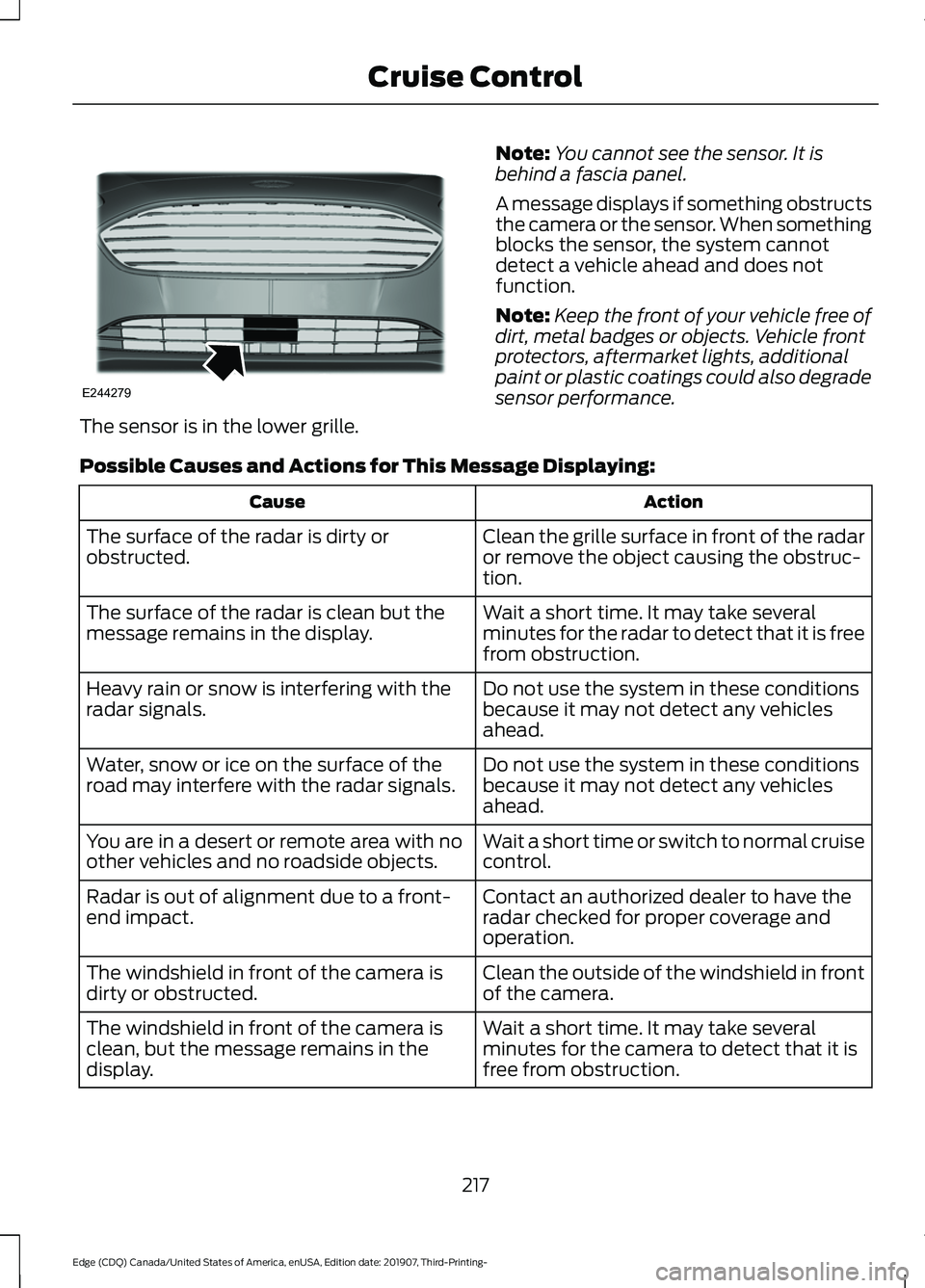
The sensor is in the lower grille.
Note:
You cannot see the sensor. It is
behind a fascia panel.
A message displays if something obstructs
the camera or the sensor. When something
blocks the sensor, the system cannot
detect a vehicle ahead and does not
function.
Note: Keep the front of your vehicle free of
dirt, metal badges or objects. Vehicle front
protectors, aftermarket lights, additional
paint or plastic coatings could also degrade
sensor performance.
Possible Causes and Actions for This Message Displaying: Action
Cause
Clean the grille surface in front of the radar
or remove the object causing the obstruc-
tion.
The surface of the radar is dirty or
obstructed.
Wait a short time. It may take several
minutes for the radar to detect that it is free
from obstruction.
The surface of the radar is clean but the
message remains in the display.
Do not use the system in these conditions
because it may not detect any vehicles
ahead.
Heavy rain or snow is interfering with the
radar signals.
Do not use the system in these conditions
because it may not detect any vehicles
ahead.
Water, snow or ice on the surface of the
road may interfere with the radar signals.
Wait a short time or switch to normal cruise
control.
You are in a desert or remote area with no
other vehicles and no roadside objects.
Contact an authorized dealer to have the
radar checked for proper coverage and
operation.
Radar is out of alignment due to a front-
end impact.
Clean the outside of the windshield in front
of the camera.
The windshield in front of the camera is
dirty or obstructed.
Wait a short time. It may take several
minutes for the camera to detect that it is
free from obstruction.
The windshield in front of the camera is
clean, but the message remains in the
display.
217
Edge (CDQ) Canada/United States of America, enUSA, Edition date: 201907, Third-Printing- Cruise ControlE244279
Page 221 of 495
Due to the nature of radar technology, it is
possible to get a blockage warning with no
actual block. This happens, for example,
when driving in sparse rural or desert
environments. A false blocked condition
either self clears, or clears after you restart
your vehicle.
Switching to Normal Cruise
Control
WARNING: Normal cruise control
will not brake when your vehicle is
approaching slower vehicles. Always be
aware of which mode you have selected
and apply the brakes when necessary.
You can change from adaptive cruise
control to normal cruise control through
the information display. The cruise control indicator light
replaces the adaptive cruise
control indicator light if you
select normal cruise control. The gap
setting does not display, and the system
does not respond to lead vehicles.
Automatic braking remains active to
maintain set speed.
Using Lane Centering WARNING: You are responsible for
controlling your vehicle at all times. The
system is designed to be an aid and does
not relieve you of your responsibility to
drive with due care and attention. Failure
to follow this instruction could result in
the loss of control of your vehicle,
personal injury or death. WARNING:
Pay close attention to
changing road conditions such as
entering or leaving a highway, on roads
with intersections or roundabouts, roads
without visible lanes of travel, roads that
are winding, slippery, unpaved, or steep
slopes. WARNING:
Do not use the system
in poor visibility, for example fog, heavy
rain, spray or snow. WARNING:
Large contrasts in
outside lighting can limit sensor
performance. WARNING:
The sensor may
incorrectly track lane markings as other
structures or objects. This can result in
a false or missed warning. WARNING:
Do not use the system
when towing a trailer. Failure to follow
this instruction could result in the loss of
control of your vehicle, personal injury or
death.
The system is designed to help keep your
vehicle in the center of the lane by applying
continuous assistance steering torque
input toward the lane center on highways.
Note: The assistance steering torque is
limited and may not be sufficient for all
driving situations.
Note: In exceptional conditions, the system
may deviate from the center line.
The system only activates when the all of
the following occur:
• You have adaptive cruise control with
stop-and-go on.
• The system detects both lane
markings.
• Your hands are on the steering wheel
at all times.
218
Edge (CDQ) Canada/United States of America, enUSA, Edition date: 201907, Third-Printing- Cruise ControlE71340
Page 222 of 495
Note:
The system may not function if the
front camera or sensor is blocked or not
available.
Switching Lane Centering On and Off Press and release the button.
The indicator appears in the information
display. When the system is on, the color
of the indicator changes to indicate the
system status.
Gray indicates the system is on but
inactive.
Green indicates the system is active and
applying assistance steering torque input
to keep your vehicle in the center of the
lane.
The system activates when it detects valid
lane markings. If it does not detect valid
lane markings, the system stays inactive
until valid markings are available.
The system may not correctly operate in
any of the following conditions:
• Your vehicle is not centered in the lane.
• The lane is too narrow or wide.
• The system does not detect at least
one lane marking or when lanes merge
or split.
• You switch the direction indicator on.
• Limited steering torque input is applied.
• Areas under construction or new
infrastructure.
• When modifications to the steering
system have been made.
• When using a spare tire. When the system is active and detects no
steering activity for a certain period of time,
the system alerts you to put your hands on
the steering wheel. If you do not react to
the warnings the system cancels and slows
your vehicle down to idle speeds while
maintaining steering control.
The system also alerts you if your vehicle
crosses lane markings without detected
steering activity.
Note:
The system may detect a light grip
or touch on the steering wheel as hands-off
driving.
You can override the system at any time
by steering your vehicle.
Automatic Cancellation
When an external condition cancels the
system, for example, no lane markings
available, a tone sounds and a message
appears in the information display. If your vehicle starts to slow
down, you must contribute to
the steering control and press
and release the button to regain full
system performance.
Automatic cancellation can also occur if:
• The lane becomes too wide or too
narrow.
• The system cannot detect valid lane
markings.
• Lane markings are crossed.
Note: The system disables until the next
key cycle if your vehicle slows down due to
driver inactivity twice within a key cycle.
Blocked Sensor WARNING: The system may not
operate properly if the sensor is blocked.
Keep the windshield free from
obstruction.
219
Edge (CDQ) Canada/United States of America, enUSA, Edition date: 201907, Third-Printing- Cruise ControlE262175 E265299
Page 223 of 495
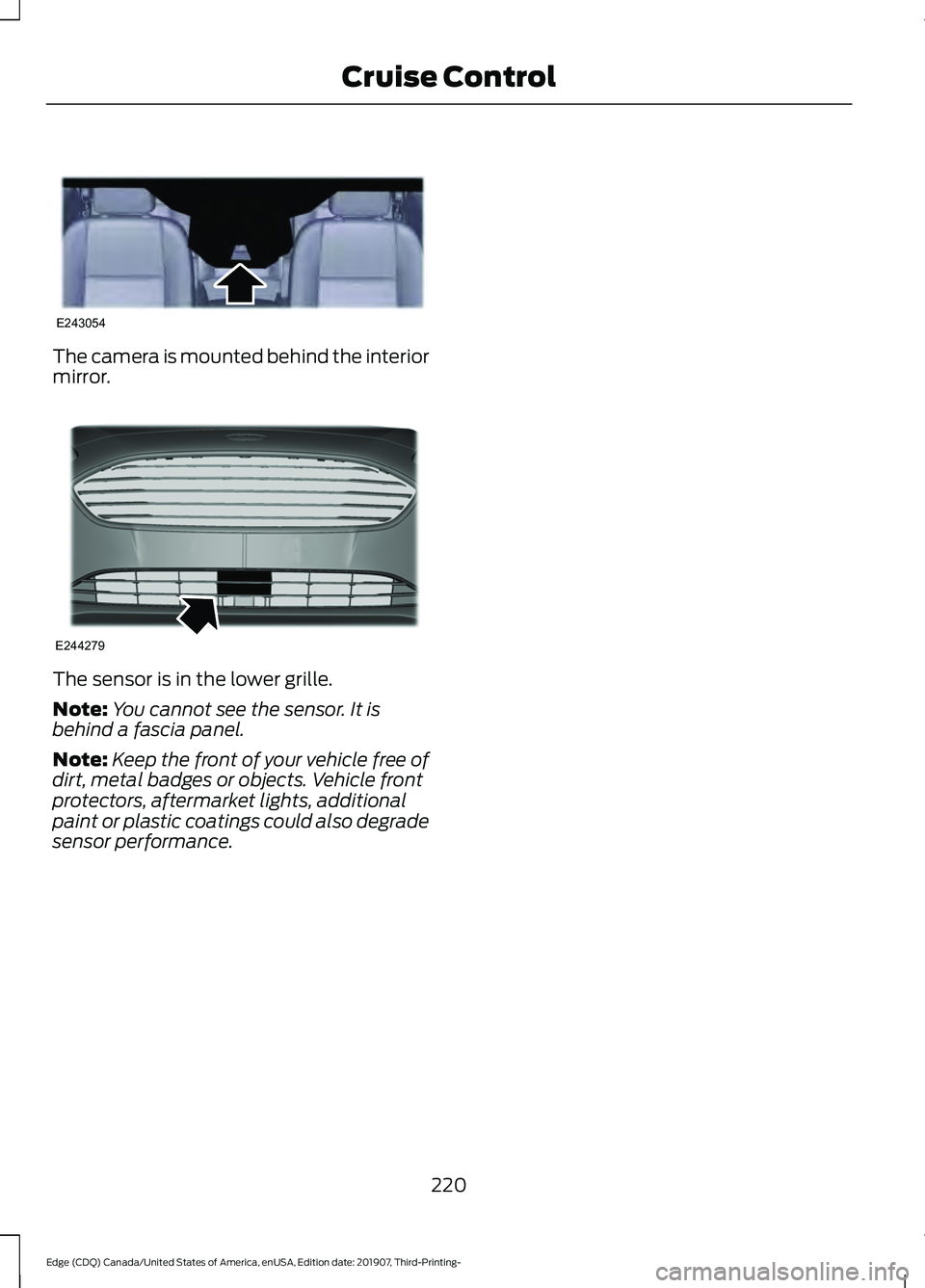
The camera is mounted behind the interior
mirror.
The sensor is in the lower grille.
Note:
You cannot see the sensor. It is
behind a fascia panel.
Note: Keep the front of your vehicle free of
dirt, metal badges or objects. Vehicle front
protectors, aftermarket lights, additional
paint or plastic coatings could also degrade
sensor performance.
220
Edge (CDQ) Canada/United States of America, enUSA, Edition date: 201907, Third-Printing- Cruise ControlE243054 E244279
Page 236 of 495
running pedestrians, partly obscured
pedestrians, or pedestrians that the
system cannot distinguish from a group.
Failure to take care may result in the loss
of control of your vehicle, serious
personal injury or death.
WARNING: The system cannot
help prevent all crashes. Do not rely on
this system to replace driver judgment
and the need to maintain a safe distance
and speed.
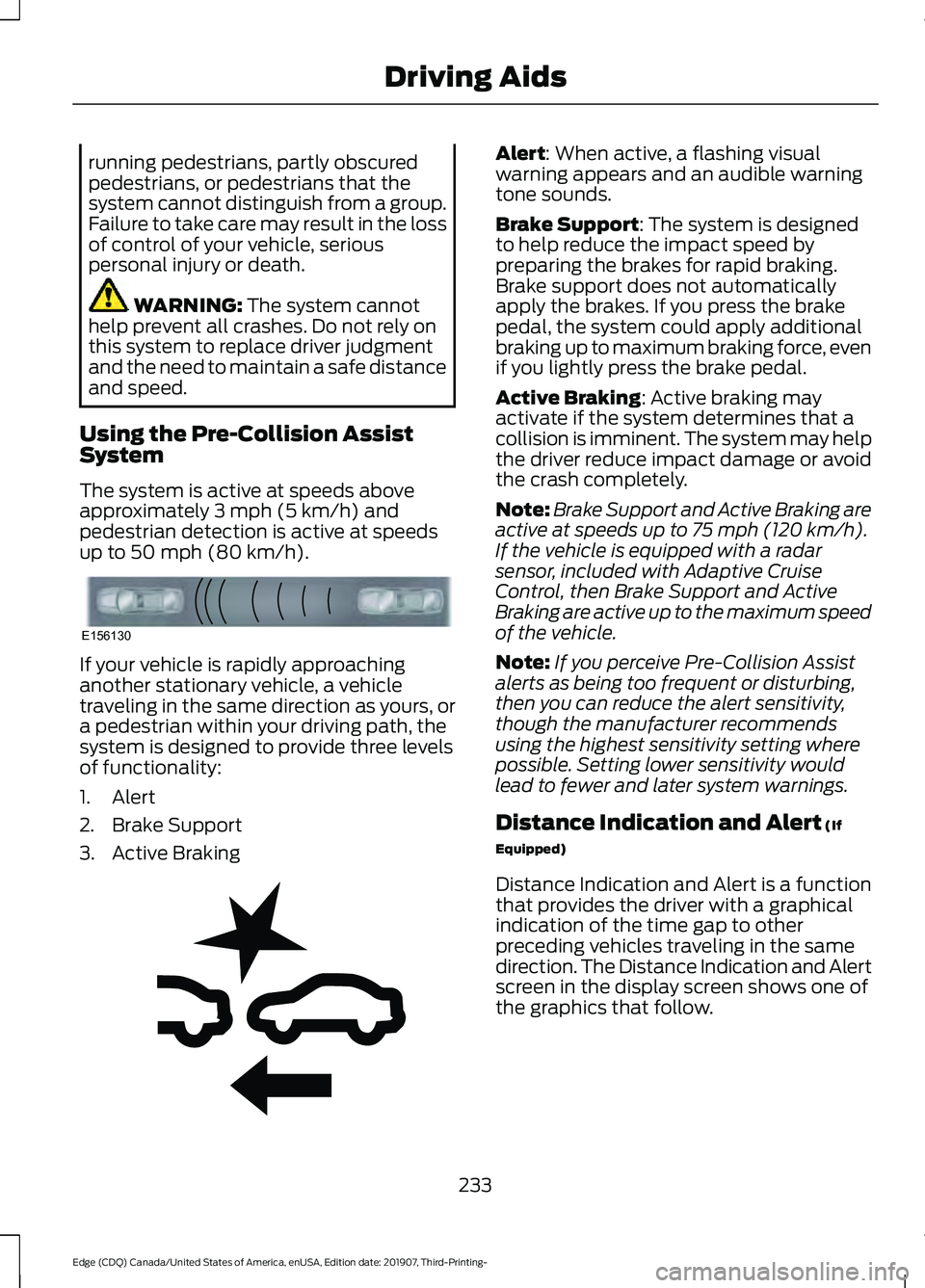
Using the Pre-Collision Assist
System
The system is active at speeds above
approximately
3 mph (5 km/h) and
pedestrian detection is active at speeds
up to
50 mph (80 km/h). If your vehicle is rapidly approaching
another stationary vehicle, a vehicle
traveling in the same direction as yours, or
a pedestrian within your driving path, the
system is designed to provide three levels
of functionality:
1. Alert
2. Brake Support
3. Active Braking Alert
: When active, a flashing visual
warning appears and an audible warning
tone sounds.
Brake Support
: The system is designed
to help reduce the impact speed by
preparing the brakes for rapid braking.
Brake support does not automatically
apply the brakes. If you press the brake
pedal, the system could apply additional
braking up to maximum braking force, even
if you lightly press the brake pedal.
Active Braking
: Active braking may
activate if the system determines that a
collision is imminent. The system may help
the driver reduce impact damage or avoid
the crash completely.
Note: Brake Support and Active Braking are
active at speeds up to
75 mph (120 km/h).
If the vehicle is equipped with a radar
sensor, included with Adaptive Cruise
Control, then Brake Support and Active
Braking are active up to the maximum speed
of the vehicle.
Note: If you perceive Pre-Collision Assist
alerts as being too frequent or disturbing,
then you can reduce the alert sensitivity,
though the manufacturer recommends
using the highest sensitivity setting where
possible. Setting lower sensitivity would
lead to fewer and later system warnings.
Distance Indication and Alert
(If
Equipped)
Distance Indication and Alert is a function
that provides the driver with a graphical
indication of the time gap to other
preceding vehicles traveling in the same
direction. The Distance Indication and Alert
screen in the display screen shows one of
the graphics that follow.
233
Edge (CDQ) Canada/United States of America, enUSA, Edition date: 201907, Third-Printing- Driving AidsE156130 E255268
Page 237 of 495
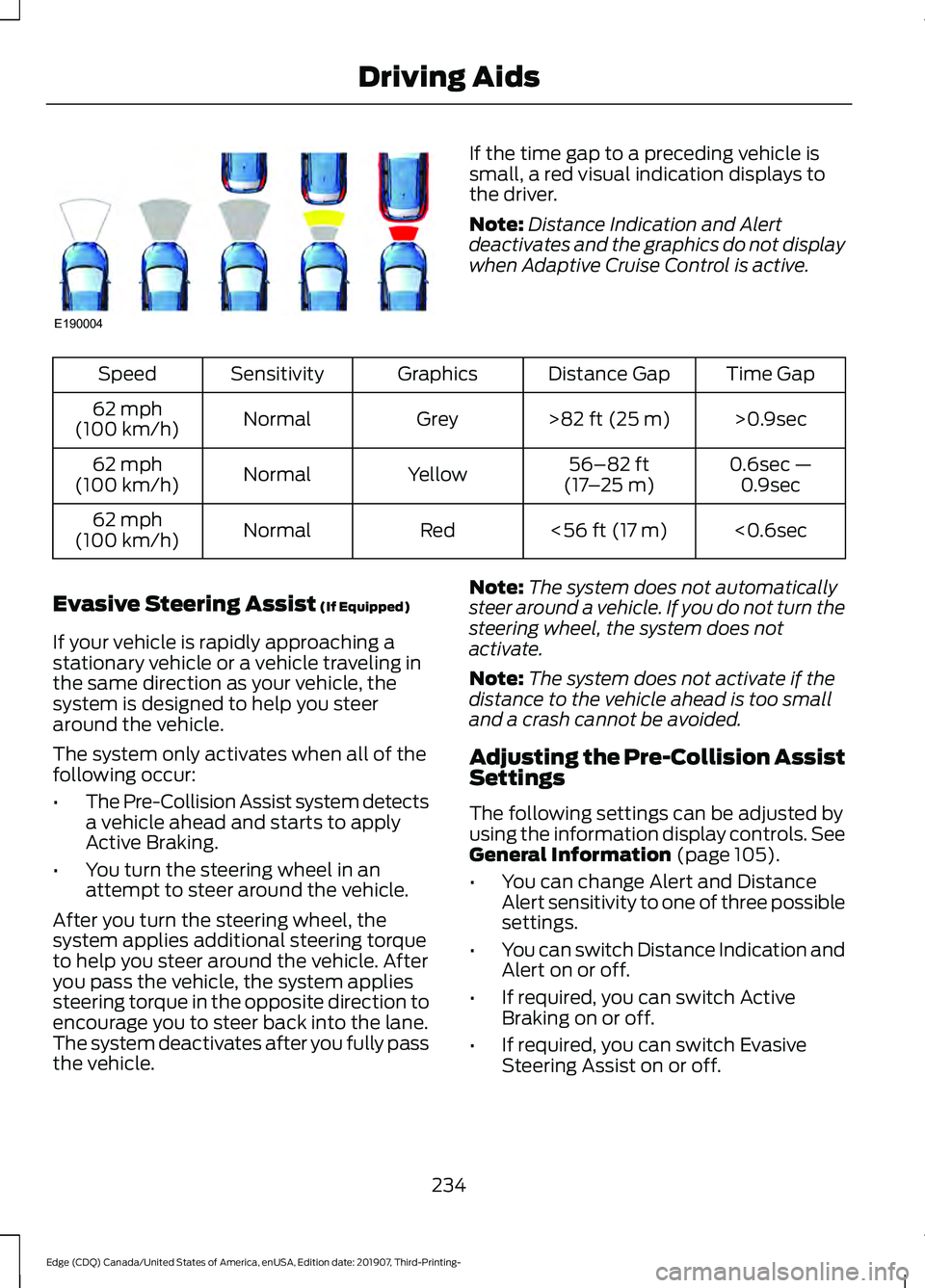
If the time gap to a preceding vehicle is
small, a red visual indication displays to
the driver.
Note:
Distance Indication and Alert
deactivates and the graphics do not display
when Adaptive Cruise Control is active. Time Gap
Distance Gap
Graphics
Sensitivity
Speed
>0.9sec
>82 ft (25 m)
Grey
Normal
62 mph
(100 km/h)
0.6sec —0.9sec
56–82 ft
(17 –25 m)
Yellow
Normal
62 mph
(100 km/h)
<0.6sec
<
56 ft (17 m)
Red
Normal
62 mph
(100 km/h)
Evasive Steering Assist
(If Equipped)
If your vehicle is rapidly approaching a
stationary vehicle or a vehicle traveling in
the same direction as your vehicle, the
system is designed to help you steer
around the vehicle.
The system only activates when all of the
following occur:
• The Pre-Collision Assist system detects
a vehicle ahead and starts to apply
Active Braking.
• You turn the steering wheel in an
attempt to steer around the vehicle.
After you turn the steering wheel, the
system applies additional steering torque
to help you steer around the vehicle. After
you pass the vehicle, the system applies
steering torque in the opposite direction to
encourage you to steer back into the lane.
The system deactivates after you fully pass
the vehicle. Note:
The system does not automatically
steer around a vehicle. If you do not turn the
steering wheel, the system does not
activate.
Note: The system does not activate if the
distance to the vehicle ahead is too small
and a crash cannot be avoided.
Adjusting the Pre-Collision Assist
Settings
The following settings can be adjusted by
using the information display controls.
See
General Information (page 105).
• You can change Alert and Distance
Alert sensitivity to one of three possible
settings.
• You can switch Distance Indication and
Alert on or off.
• If required, you can switch Active
Braking on or off.
• If required, you can switch Evasive
Steering Assist on or off.
234
Edge (CDQ) Canada/United States of America, enUSA, Edition date: 201907, Third-Printing- Driving AidsE190004
Page 482 of 495
1
180 Degree Camera...................................209
Camera Views.................................................... 209
Using the Front 180 Degree Camera System............................................................. 209
A
A/C See: Climate Control.......................................... 131
About This Manual
...........................................7
ABS See: Brakes........................................................... 186
ABS driving hints See: Hints on Driving With Anti-Lock
Brakes................................................................ 186
Accessories....................................................426
Accessories See: Replacement Parts
Recommendation............................................ 14
ACC See: Using Adaptive Cruise Control..............211
Active Park Assist.........................................199 Using Active Park Assist................................. 200
Adaptive Headlamps...................................88 System Check....................................................... 88
Adjusting the Headlamps..........................291 Vertical Aim Adjustment.................................. 291
Adjusting the Steering Wheel - Vehicles With: Manual Adjustable Steering
Column
............................................................79
Adjusting the Steering Wheel - Vehicles With: Power Adjustable Steering
Column............................................................78
End of Travel Position......................................... 78
Memory Feature.................................................... 78
AFS See: Adaptive Headlamps............................... 88
Airbag Disposal................................................51
Air Conditioning See: Climate Control.......................................... 131
Air Filter See: Changing the Engine Air Filter.............283
Alarm See: Anti-Theft Alarm........................................ 76
All-Wheel Drive
..............................................181 Ambient Lighting...........................................89
Adjusting the Brightness................................... 90
Changing the Color............................................. 90
Switching Ambient Lighting Off.................... 90
Switching Ambient Lighting On..................... 90
Anti-Theft Alarm
............................................76
Arming the Alarm................................................. 76
Disarming the Alarm........................................... 76
Appendices....................................................447
Apps.................................................................408 SiriusXM Traffic and Travel Link................... 410
Using Apps on an Android Device..............409
Using Apps on an iOS Device....................... 409
Using Mobile Navigation on an Android Device............................................................... 409
At a Glance........................................................18
At a Glance - ST...............................................18 Engine Specifications.......................................... 18
Suspension Specifications................................ 19
Audible Warnings and Indicators
...........104
Headlamps On Warning Chime.................... 104
Keyless Warning Alert....................................... 104
Parking Brake On Warning Chime................104
Audio Control
...................................................79
You can operate the following functions
with the control:............................................... 79
Audio System.................................................372 General Information.......................................... 372
Audio Unit - Vehicles With: SYNC 3/Bang and Olufsen Audio System....................374
Accessing the Sound Settings...................... 374
Adjusting the Volume....................................... 374
Changing Radio Stations................................ 374
Ejecting the CD.................................................... 374
Inserting a CD...................................................... 374
Switching the Audio Unit On and Off.........375
Using Seek, Fast Forward and Reverse.............................................................. 375
Audio Unit - Vehicles With: SYNC 3
.......................................................................372
Adjusting the Volume....................................... 373
Changing Radio Stations................................ 373
Ejecting the CD.................................................... 373
Inserting a CD...................................................... 373
Switching the Audio Unit On and Off.........373
Using Seek, Fast Forward and Reverse.............................................................. 373
479
Edge (CDQ) Canada/United States of America, enUSA, Edition date: 201907, Third-Printing- Index
Page 485 of 495
Cleaning the Interior..................................300
Mirrors................................................................... 300
Cleaning the Wheels..................................302
Cleaning the Windows and Wiper Blades..........................................................300
Clearing All MyKeys
........................................61
Climate............................................................399 Accessing Rear Climate Controls.................401
Accessing the Climate Control Menu........399
Directing the Airflow........................................ 399
Rear Climate Control Lock Indicator...........401
Setting the Blower Motor Speed.................399
Setting the Temperature................................ 399
Switching Auto Mode On and Off...............399
Switching Dual Zone Mode On and Off...................................................................... 400
Switching Maximum Air Conditioning On and Off............................................................. 400
Switching Maximum Defrost On and Off...................................................................... 400
Switching Rear Auto Mode On and Off....................................................................... 401
Switching Recirculated Air On and Off....................................................................... 401
Switching the Air Conditioning On and Off...................................................................... 399
Switching the Climate Controlled Seats On and Off............................................................. 400
Switching the Climate Control On and Off...................................................................... 400
Switching the Heated Exterior Mirrors On and Off............................................................. 400
Switching the Heated Rear Window On and Off...................................................................... 400
Switching the Heated Seats On and Off...................................................................... 400
Switching the Heated Steering Wheel On and Off............................................................. 400
Switching the Heated Windshield On and Off...................................................................... 400
Switching the Rear Climate Controlled Seats On and Off.......................................... 401
Switching the Rear Heated Seats On and Off....................................................................... 401
Switching the Rear Ventilated Seats On and Off.............................................................. 401
Switching the Ventilated Seats On and Off....................................................................... 401Climate Control..............................................131
Climate Controlled Seats..........................146
Cooled Seats......................................................... 147
Cold Weather Precautions........................251
Connected Vehicle......................................368
Connecting the Vehicle to a Mobile
Network........................................................... 368
Connected Vehicle Limitations
..............368
Connected Vehicle Requirements........368
Connected Vehicle – Troubleshooting........................................369
Connecting the Vehicle to a Mobile Network.......................................................368
Connecting FordPass to the Modem.........368
Enabling and Disabling the Modem...........368
What Is the Modem.......................................... 368
Connecting the Vehicle to a Wi-Fi Network.......................................................368
Coolant Check See: Engine Coolant Check........................... 284
Crash Sensors and Airbag Indicator
.......50
Creating a MyKey...........................................60 Programming and Changing Configurable
Settings.............................................................. 60
Creating a Vehicle Wi-Fi Hotspot............371 Connecting a Device to the Wi-Fi
Hotspot.............................................................. 371
Finding the Wi-Fi Hotspot Name and Password........................................................... 371
Cross Traffic Alert........................................228 Cross Traffic Alert Behavior When Trailer
is Attached...................................................... 230
Cross Traffic Alert Indicator........................... 230
Cross Traffic Alert Information Messages.......................................................... 231
Cross Traffic Alert System Limitations...................................................... 230
Cross Traffic Alert System Sensors............230
Switching the System On and Off..............230
Using Cross Traffic Alert.................................. 228
Cruise Control
................................................210
Cruise Control Indicators.............................211
Cruise Control - Vehicles With: Adaptive Cruise Control
..............................................80
Cruise Control - Vehicles With: Cruise Control............................................................80
Customer Assistance
.................................258
482
Edge (CDQ) Canada/United States of America, enUSA, Edition date: 201907, Third-Printing- Index
Page 488 of 495
General Information on Radio
Frequencies...................................................52
Intelligent Access................................................. 52
General Maintenance Information.......429 Multi-Point Inspection...................................... 431
Owner Checks and Services......................... 430
Protecting Your Investment........................... 429
Why Maintain Your Vehicle?......................... 429
Why Maintain Your Vehicle at Your Dealership?..................................................... 429
Getting Assistance Outside the U.S. and Canada..........................................................261
Getting the Services You Need...............258
Away From Home.............................................. 258
Global Opening
...............................................94
Remote Control Front Windows.................... 94
H
Hazard Flashers
...........................................254
Headlamp Adjusting See: Adjusting the Headlamps...................... 291
Headlamp Exit Delay....................................86
Headlamp Removal See: Removing a Headlamp.......................... 294
Headrest See: Head Restraints......................................... 137
Head Restraints
.............................................137
Adjusting the Head Restraint......................... 138
Tilting Head Restraints .................................... 138
Heated Exterior Mirrors...............................135
Heated Rear Window..................................135
Heated Seats..................................................145 Front Seats............................................................ 145
Rear Seats............................................................. 145
Heated Steering Wheel...............................80
Heated Windshield.......................................135 Windshield Wiper De-Icer................................ 135
Heating See: Climate Control.......................................... 131
Hill Start Assist.............................................188 Switching the System On and Off...............189
Using Hill Start Assist....................................... 189
Hints on Controlling the Interior Climate..........................................................134
Defogging the Side Windows in Cold Weather............................................................. 134
General Hints....................................................... 134Quickly Cooling the Interior.............................
134
Quickly Heating the Interior............................ 134
Recommended Settings for Cooling...........134
Recommended Settings for Heating..........134
Hints on Driving With Anti-Lock Brakes............................................................186
Hood Lock See: Opening and Closing the Hood...........277
Horn
......................................................................81
I
In California (U.S. Only)............................259
Information Display Control......................80
Information Displays
...................................105
General Information.......................................... 105
Information Messages
.................................115
Active Park.............................................................. 115
Adaptive Cruise Control.................................... 116
Airbag....................................................................... 116
Alarm........................................................................\
117
All-Wheel Drive..................................................... 117
Automatic Engine Shutdown.......................... 117
Automatic High Beam Control....................... 118
Auto Start-Stop................................................... 118
Battery and Charging System......................... 119
Blind Spot Information and Cross Traffic Alert System.................................................... 120
Doors and Locks................................................. 120
Driver Alert.............................................................. 121
Electronic Stability Control.............................. 121
Engine....................................................................... 121
Fuel........................................................................\
... 122
Hill Start Assist.................................................... 122
Keys and Keyless Entry..................................... 122
Lane Centering Assist........................................ 123
Lane Keeping System........................................ 123
Maintenance......................................................... 124
MyKey...................................................................... 124
Park Aid................................................................... 125
Park Brake.............................................................. 125
Power Steering.................................................... 126
Pre-Collision Warning System....................... 127
Remote Start........................................................ 127
Seats........................................................................\
127
Starting System .................................................. 127
Tire Pressure Monitoring System.................. 128
Towing....................................................................\
.128
485
Edge (CDQ) Canada/United States of America, enUSA, Edition date: 201907, Third-Printing- Index
Page 492 of 495

Ambient Lighting................................................
412
Audio........................................................................\
411
Automatic Updates............................................ 411
Bluetooth................................................................ 411
Charge Settings................................................... 412
Clock........................................................................\
. 411
Display.................................................................... 412
Driver Assist........................................................... 411
FordPass................................................................. 411
General.................................................................... 411
Message Center................................................... 412
Mobile Apps........................................................... 411
Multi Contour Seats........................................... 412
Navigation............................................................. 412
Personal Profiles................................................. 412
Phone....................................................................... 411
Seats........................................................................\
412
Sound....................................................................... 411
Valet Mode............................................................ 412
Vehicle..................................................................... 411
Voice Control........................................................ 412
Setting the Cruise Control Speed..........210 Changing the Set Speed.................................. 210
Side Airbags......................................................47
Side Sensing System..................................198
Object Distance Indicator............................... 199
Sitting in the Correct Position..................137
Snow Chains See: Using Snow Chains................................. 329
Spare Wheel See: Changing a Road Wheel........................ 333
Special Notices
................................................14
New Vehicle Limited Warranty......................... 14
Notice to Owners of Pickup Trucks and Utility Type Vehicles........................................ 15
On Board Diagnostics Data Link Connector............................................................ 15
Special Instructions.............................................. 14
Using Your Vehicle as an Ambulance............15
Using Your Vehicle With a Snowplow...........15
Special Operating Conditions Scheduled Maintenance..............................................435
Exceptions............................................................ 436
Speed Control See: Cruise Control............................................ 210
Stability Control.............................................191 Principle of Operation........................................ 191Starting a Gasoline Engine.......................158
Automatic Engine Shutdown......................... 159
Failure to Start..................................................... 159
Guarding Against Exhaust Fumes...............160
Important Ventilating Information..............160
Stopping the Engine When Your Vehicle is Moving............................................................... 160
Stopping the Engine When Your Vehicle is Stationary......................................................... 159
Starting and Stopping the Engine..........157 General Information........................................... 157
Steering............................................................231 Adaptive Learning.............................................. 232
Electric Power Steering..................................... 231
Steering Wheel................................................78
Storage Compartments
.............................156
Sunroof See: Moonroof...................................................... 96
Sun Visors
.........................................................96
Illuminated Vanity Mirror................................... 96
Supplementary Restraints System.........43 Principle of Operation........................................ 43
Switching Automatic High Beam Control On and Off......................................................91
Activating the Automatic High Beam Control.................................................................. 91
Switching Cruise Control On and Off...................................................................210
Switching Cruise Control Off......................... 210
Switching Cruise Control On.......................... 210
Switching Off the Engine..........................160 Vehicles With a Turbocharger....................... 160
Symbols Glossary
.............................................7
SYNC™ 3.........................................................381
General Information.......................................... 381
SYNC™ 3 Troubleshooting.......................413 Additional Information and
Assistance....................................................... 425
Apps....................................................................... 420
Navigation............................................................. 419
Personal Profiles................................................ 423
Phone...................................................................... 417
Resetting the System....................................... 425
USB and Bluetooth Audio............................... 414
Voice Recognition............................................... 413
Wi-Fi Connectivity............................................. 422
489
Edge (CDQ) Canada/United States of America, enUSA, Edition date: 201907, Third-Printing- Index