power steering FORD EDGE 2020 Owner's Manual
[x] Cancel search | Manufacturer: FORD, Model Year: 2020, Model line: EDGE, Model: FORD EDGE 2020Pages: 495, PDF Size: 6.38 MB
Page 271 of 495
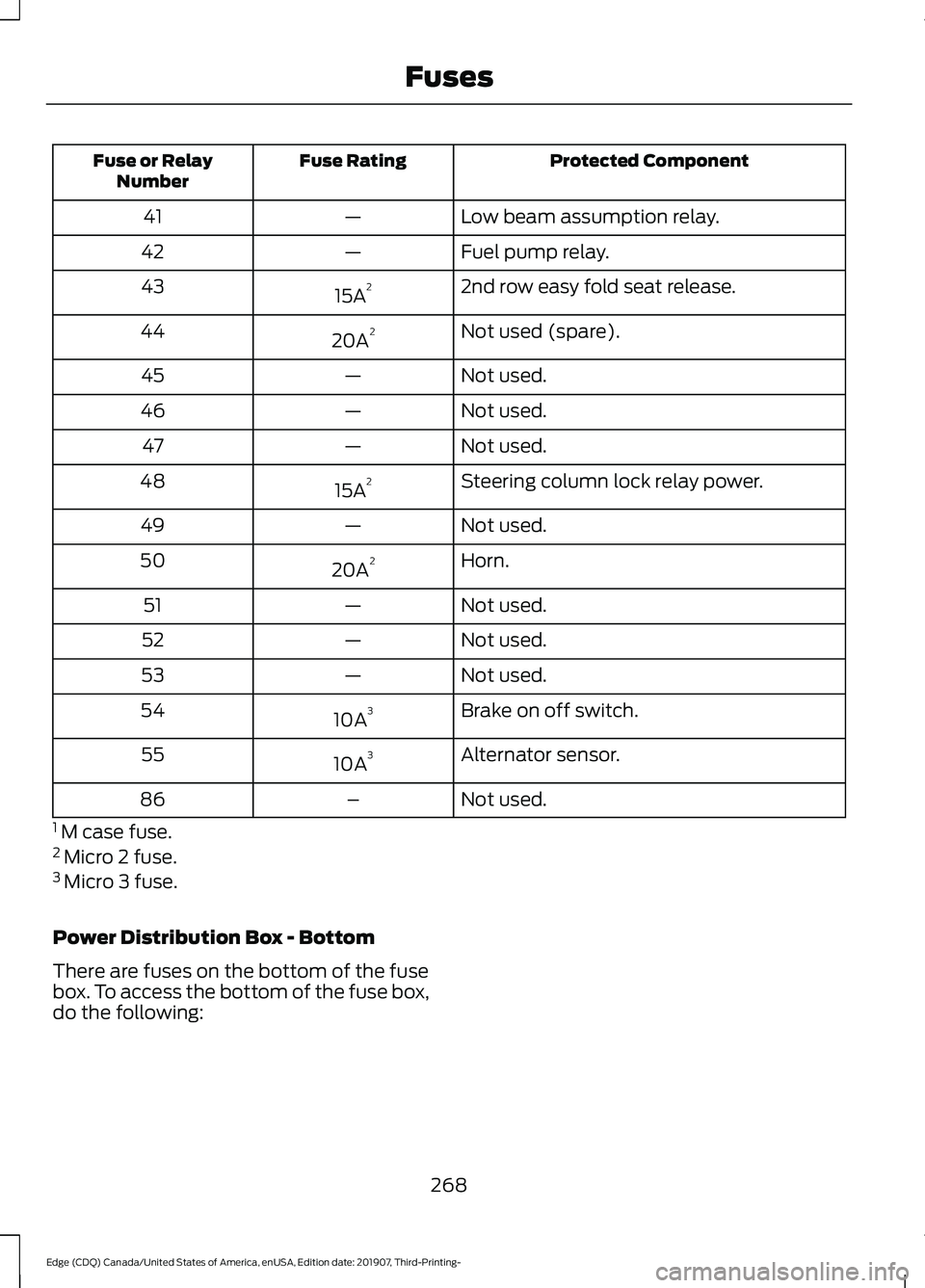
Protected Component
Fuse Rating
Fuse or Relay
Number
Low beam assumption relay.
—
41
Fuel pump relay.
—
42
2nd row easy fold seat release.
15A 2
43
Not used (spare).
20A 2
44
Not used.
—
45
Not used.
—
46
Not used.
—
47
Steering column lock relay power.
15A 2
48
Not used.
—
49
Horn.
20A 2
50
Not used.
—
51
Not used.
—
52
Not used.
—
53
Brake on off switch.
10A 3
54
Alternator sensor.
10A 3
55
Not used.
–
86
1 M case fuse.
2 Micro 2 fuse.
3 Micro 3 fuse.
Power Distribution Box - Bottom
There are fuses on the bottom of the fuse
box. To access the bottom of the fuse box,
do the following:
268
Edge (CDQ) Canada/United States of America, enUSA, Edition date: 201907, Third-Printing- Fuses
Page 276 of 495
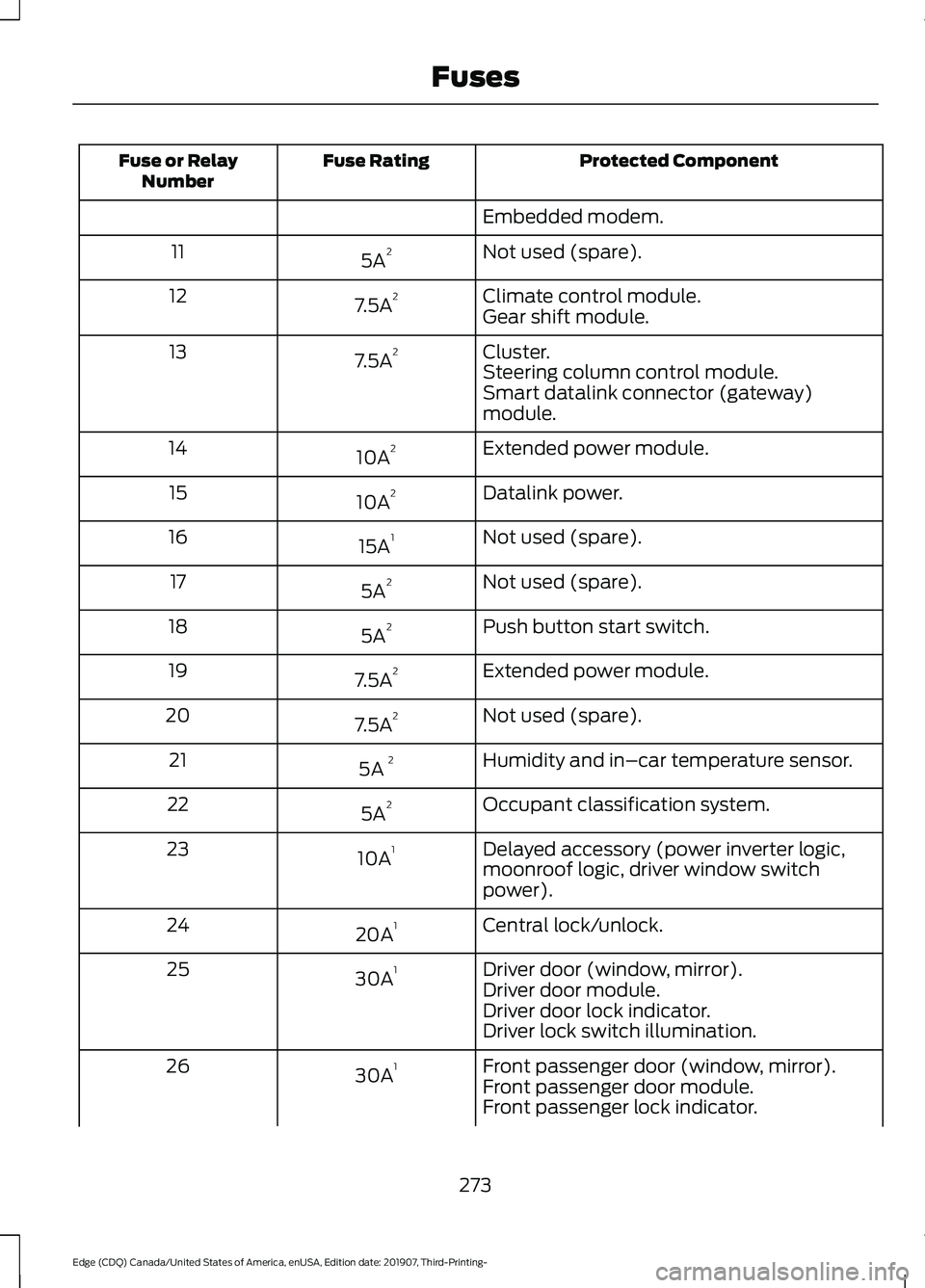
Protected Component
Fuse Rating
Fuse or Relay
Number
Embedded modem.
Not used (spare).
5A 2
11
Climate control module.
7.5A 2
12
Gear shift module.
Cluster.
7.5A 2
13
Steering column control module.
Smart datalink connector (gateway)
module.
Extended power module.
10A 2
14
Datalink power.
10A 2
15
Not used (spare).
15A 1
16
Not used (spare).
5A 2
17
Push button start switch.
5A 2
18
Extended power module.
7.5A 2
19
Not used (spare).
7.5A 2
20
Humidity and in–car temperature sensor.
5A 2
21
Occupant classification system.
5A 2
22
Delayed accessory (power inverter logic,
moonroof logic, driver window switch
power).
10A
1
23
Central lock/unlock.
20A 1
24
Driver door (window, mirror).
30A 1
25
Driver door module.
Driver door lock indicator.
Driver lock switch illumination.
Front passenger door (window, mirror).
30A 1
26
Front passenger door module.
Front passenger lock indicator.
273
Edge (CDQ) Canada/United States of America, enUSA, Edition date: 201907, Third-Printing- Fuses
Page 277 of 495
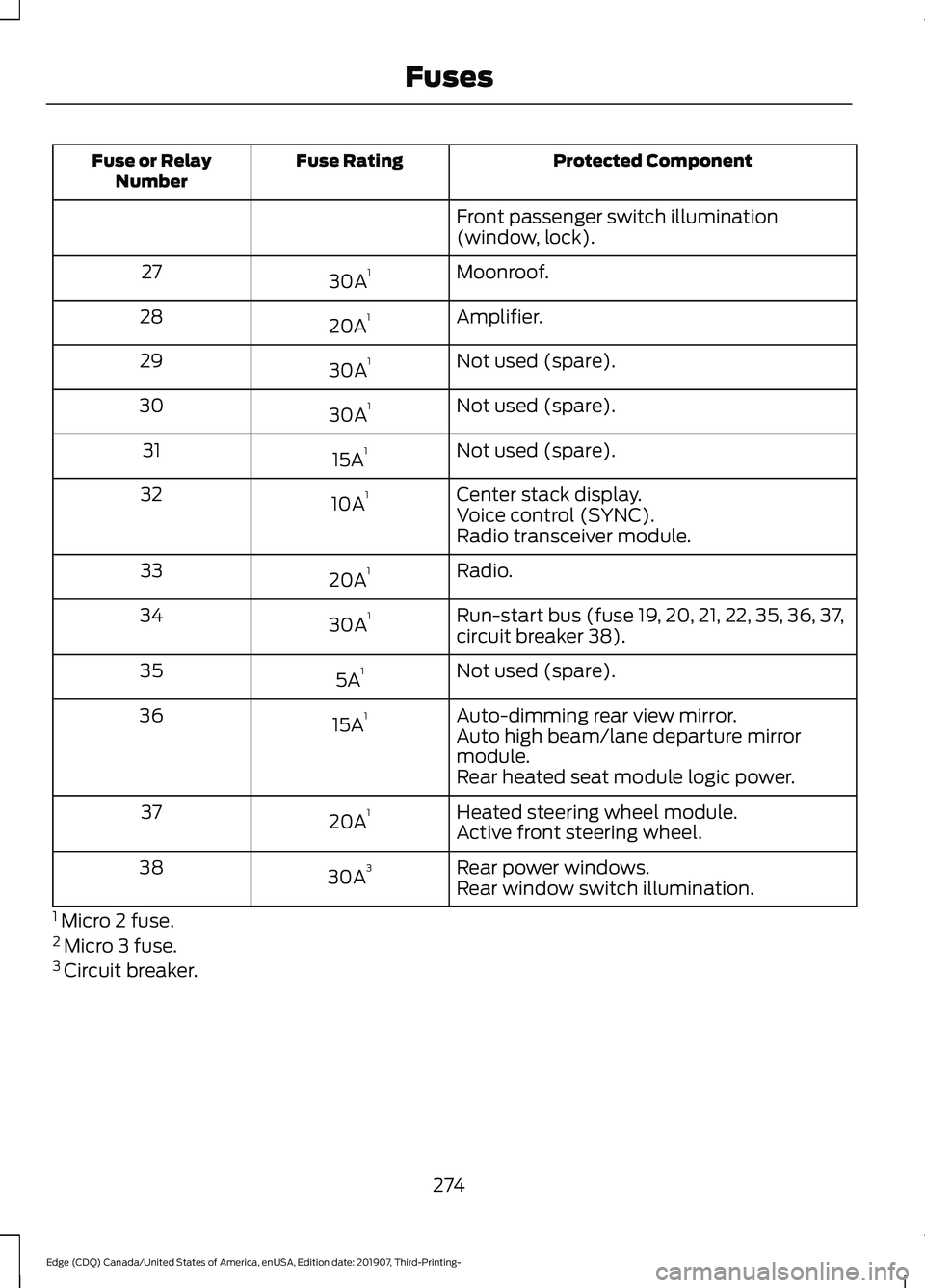
Protected Component
Fuse Rating
Fuse or Relay
Number
Front passenger switch illumination
(window, lock).
Moonroof.
30A 1
27
Amplifier.
20A 1
28
Not used (spare).
30A 1
29
Not used (spare).
30A 1
30
Not used (spare).
15A 1
31
Center stack display.
10A 1
32
Voice control (SYNC).
Radio transceiver module.
Radio.
20A 1
33
Run-start bus (fuse 19, 20, 21, 22, 35, 36, 37,
circuit breaker 38).
30A 1
34
Not used (spare).
5A 1
35
Auto-dimming rear view mirror.
15A 1
36
Auto high beam/lane departure mirror
module.
Rear heated seat module logic power.
Heated steering wheel module.
20A 1
37
Active front steering wheel.
Rear power windows.
30A 3
38
Rear window switch illumination.
1 Micro 2 fuse.
2 Micro 3 fuse.
3 Circuit breaker.
274
Edge (CDQ) Canada/United States of America, enUSA, Edition date: 201907, Third-Printing- Fuses
Page 289 of 495
Dispose of used engine coolant in an
appropriate manner. Follow your
community's regulations and standards
for recycling and disposing of automotive
fluids.
Severe Climates
If you drive in extremely cold climates:
•
It may be necessary to increase the
coolant concentration above 50%.
• A coolant concentration of 60%
provides improved freeze point
protection. Coolant concentrations
above 60% decrease the overheat
protection characteristics of the
coolant and may cause engine
damage.
If you drive in extremely hot climates:
• You can decrease the coolant
concentration to 40%.
• Coolant concentrations below 40%
decrease the freeze and corrosion
protection characteristics of the
coolant and may cause engine
damage.
Vehicles driven year-round in non-extreme
climates should use prediluted coolant for
optimum cooling system and engine
protection.
Coolant Change
At specific mileage intervals, as listed in
the scheduled maintenance information,
the coolant should be changed. Add
prediluted coolant approved to the correct
specification. See Capacities and
Specifications (page 341).
Fail-Safe Cooling
Fail-safe cooling allows you to temporarily
drive your vehicle before any incremental
component damage occurs. The fail-safe
distance depends on ambient
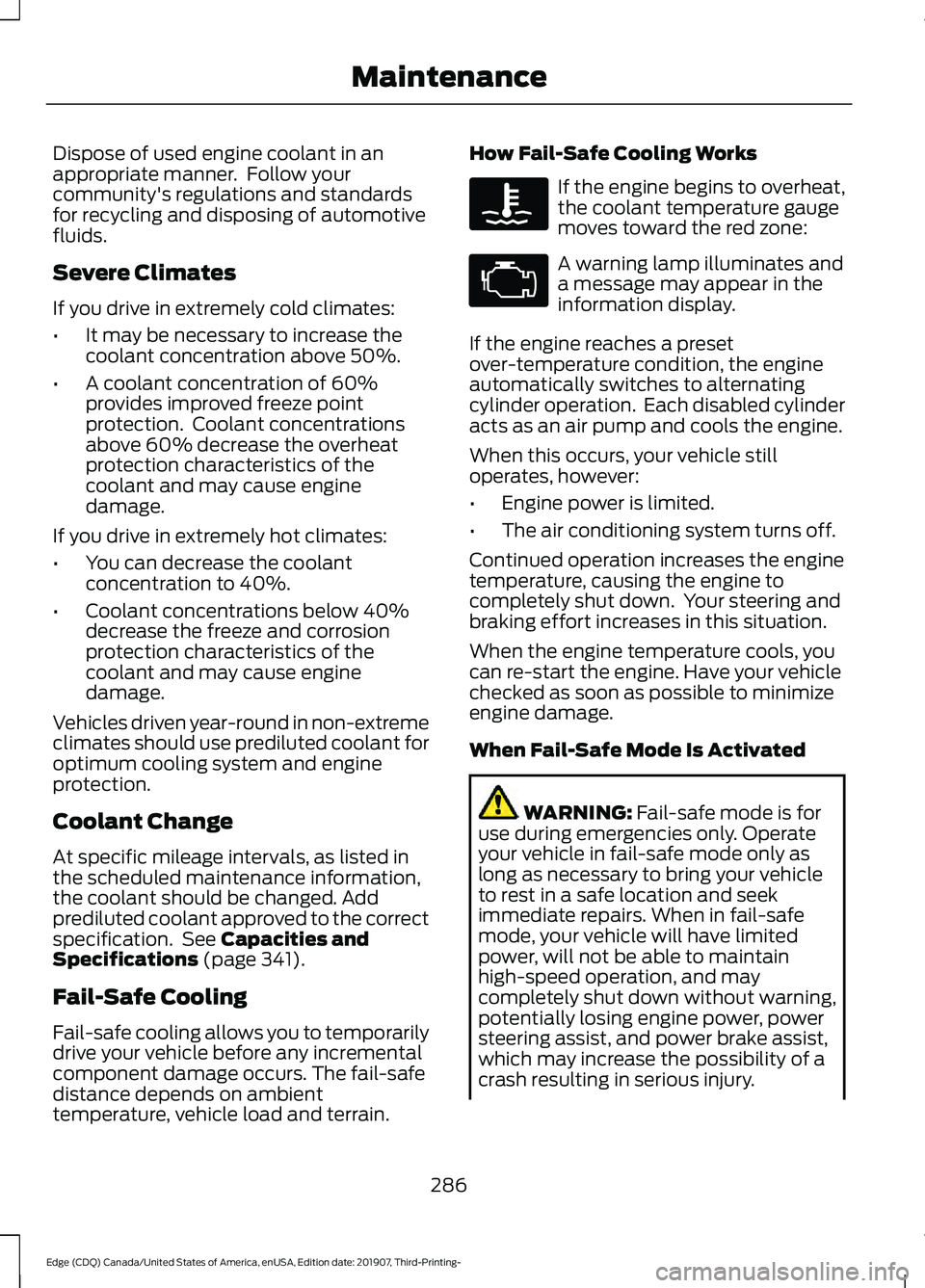
temperature, vehicle load and terrain. How Fail-Safe Cooling Works If the engine begins to overheat,
the coolant temperature gauge
moves toward the red zone:
A warning lamp illuminates and
a message may appear in the
information display.
If the engine reaches a preset
over-temperature condition, the engine
automatically switches to alternating
cylinder operation. Each disabled cylinder
acts as an air pump and cools the engine.
When this occurs, your vehicle still
operates, however:
• Engine power is limited.
• The air conditioning system turns off.
Continued operation increases the engine
temperature, causing the engine to
completely shut down. Your steering and
braking effort increases in this situation.
When the engine temperature cools, you
can re-start the engine. Have your vehicle
checked as soon as possible to minimize
engine damage.
When Fail-Safe Mode Is Activated WARNING:
Fail-safe mode is for
use during emergencies only. Operate
your vehicle in fail-safe mode only as
long as necessary to bring your vehicle
to rest in a safe location and seek
immediate repairs. When in fail-safe
mode, your vehicle will have limited
power, will not be able to maintain
high-speed operation, and may
completely shut down without warning,
potentially losing engine power, power
steering assist, and power brake assist,
which may increase the possibility of a
crash resulting in serious injury.
286
Edge (CDQ) Canada/United States of America, enUSA, Edition date: 201907, Third-Printing- Maintenance
Page 292 of 495
1. Park your vehicle on a level surface.
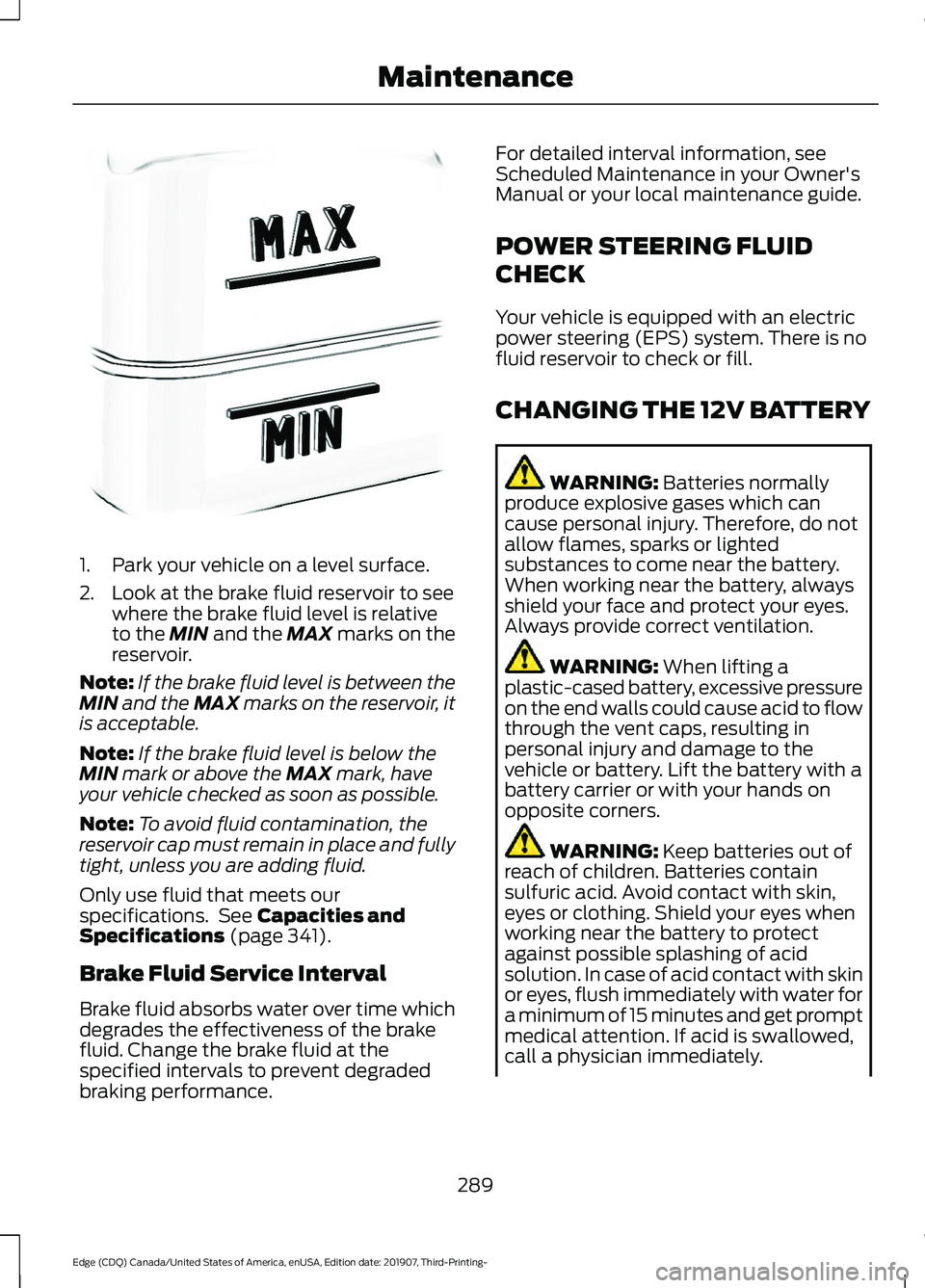
2. Look at the brake fluid reservoir to see
where the brake fluid level is relative
to the MIN and the MAX marks on the
reservoir.
Note: If the brake fluid level is between the
MIN
and the MAX marks on the reservoir, it
is acceptable.
Note: If the brake fluid level is below the
MIN
mark or above the MAX mark, have
your vehicle checked as soon as possible.
Note: To avoid fluid contamination, the
reservoir cap must remain in place and fully
tight, unless you are adding fluid.
Only use fluid that meets our
specifications. See
Capacities and
Specifications (page 341).
Brake Fluid Service Interval
Brake fluid absorbs water over time which
degrades the effectiveness of the brake
fluid. Change the brake fluid at the
specified intervals to prevent degraded
braking performance. For detailed interval information, see
Scheduled Maintenance in your Owner's
Manual or your local maintenance guide.
POWER STEERING FLUID
CHECK
Your vehicle is equipped with an electric
power steering (EPS) system. There is no
fluid reservoir to check or fill.
CHANGING THE 12V BATTERY
WARNING:
Batteries normally
produce explosive gases which can
cause personal injury. Therefore, do not
allow flames, sparks or lighted
substances to come near the battery.
When working near the battery, always
shield your face and protect your eyes.
Always provide correct ventilation. WARNING:
When lifting a
plastic-cased battery, excessive pressure
on the end walls could cause acid to flow
through the vent caps, resulting in
personal injury and damage to the
vehicle or battery. Lift the battery with a
battery carrier or with your hands on
opposite corners. WARNING:
Keep batteries out of
reach of children. Batteries contain
sulfuric acid. Avoid contact with skin,
eyes or clothing. Shield your eyes when
working near the battery to protect
against possible splashing of acid
solution. In case of acid contact with skin
or eyes, flush immediately with water for
a minimum of 15 minutes and get prompt
medical attention. If acid is swallowed,
call a physician immediately.
289
Edge (CDQ) Canada/United States of America, enUSA, Edition date: 201907, Third-Printing- MaintenanceE170684
Page 310 of 495
Tire valve connector.
G
Accessory power plug.
H
Casing/housing.
I
Bike/raft/sports ball adapters.
J
General Information WARNING: Failure to follow these
guidelines could result in an increased
risk of loss of vehicle control, injury or
death.
Note: Do not use the kit if you have severely
damaged a tire. Only seal punctures within
the tire tread with the kit.
Do not attempt to repair punctures larger
than ¼ inch (6 millimeters) or damage to
the tire's sidewall. The tire may not
completely seal.
Loss of air pressure may adversely affect
tire performance. For this reason:
Note: Do not drive the vehicle above
50 mph (80 km/h)
.
Note: Do not drive further than
120 mi
(200 km). Drive only to the closest
authorized dealer or tire repair shop to have
your tire inspected.
• Drive carefully and avoid abrupt
steering maneuvers.
• Periodically monitor tire inflation
pressure in the affected tire; if the tire
is losing pressure, have the vehicle
towed.
• Read the information in the Tips for
Use of the Kit section to make sure safe
operation of the kit and your vehicle.
Tips for Use of the Kit
To ensure safe operation of the kit: •
Read all instructions and cautions fully.
• Before operating the kit, make sure
your vehicle is safely off the road and
away from moving traffic. Switch on
the hazard lights.
• Always set the parking brake to ensure
the vehicle does not move
unexpectedly.
• Do not remove any foreign objects,
such as nails or screws, from the tire.
• When using the kit, leave the engine
running (only if the vehicle is outdoors
or in a well-ventilated area) so the
compressor does not drain the
vehicle's battery.
• Do not allow the compressor to
operate continuously for more than 15
minutes. This will help prevent the
compressor from overheating.
• Never leave the kit unattended during
operation.
• Sealant compound contains latex.
Those with latex sensitivities should
use appropriate precautions to avoid
an allergic reaction.
• Keep the kit away from children.
• Only use the kit when the ambient
temperature is between -22°F (-30°C)
and 158°F (70°C).
• Only use the sealing compound before
the use-by date. The use-by date is on
a label on the sealant canister, which
you can see through the rectangular
viewing window on the bottom of the
compressor. Check the use-by date
regularly and replace the canister when
the sealant expires.
• Do not store the kit unsecured inside
the passenger compartment of the
vehicle as it may cause injury during a
sudden stop or crash. Always store the
kit in its original location.
307
Edge (CDQ) Canada/United States of America, enUSA, Edition date: 201907, Third-Printing- Wheels and Tires
Page 332 of 495
USING SUMMER TIRES
Summer tires provide superior
performance on wet and dry roads.
Summer tires do not have the Mud and
Snow (M+S or M/S) tire traction rating on
the tire side wall. Since summer tires do
not have the same traction performance
as All-season or Snow tires, we do not
recommend using summer tires when
temperatures drop to about 45°F (7°C) or
below (depending on tire wear and
environmental conditions) or in snow and
ice conditions. Like any tire, summer tire
performance is affected by tire wear and
environmental conditions. If you must drive
in those conditions, we recommend using
Mud and Snow (M+S, M/S), All-season or
Snow tires.
Always store your summer tires indoors at
temperatures above 19°F (-7°C). The
rubber compounds used in these tires lose
flexibility and may develop surface cracks
in the tread area at temperatures below
19°F (-7°C)
. If the tires have been
subjected to 19°F (-7°C) or less, warm
them in a heated space to at least 41°F
(5°C) for at least 24 hours before installing
them on a vehicle, or moving the vehicle
with the tires installed, or checking tire
inflation. Do not place tires near heaters
or heating devices used to warm the room
where the tires are stored. Do not apply
heat or blow heated air directly on the tires.
Always inspect the tires after storage
periods and before use.
USING SNOW CHAINS WARNING:
Snow tires must be the
same size, load index, speed rating as
those originally provided by Ford. Use of
any tire or wheel not recommended by
Ford can affect the safety and
performance of your vehicle, which could result in an increased risk of loss of
vehicle control, vehicle rollover, personal
injury and death. Additionally, the use of
non-recommended tires and wheels
could cause steering, suspension, axle,
transfer case or power transfer unit
failure.
The tires on your vehicle may have
all-weather treads to provide traction in
rain and snow. However, in some climates,
you may need to use snow tires and cables.
Your vehicle may not be compatible with
snow chain or cable usage with the
factory-fitted wheels and tires.
Follow these guidelines when using snow
tires and traction device:
• If possible, avoid fully loading your
vehicle.
• Purchase chains or cables from a
manufacturer that clearly labels body
to tire dimension restrictions.
• Use no larger than 10 mm cables or
chains ONLY on the front axle with
235/60R18 tires. Do not use chains or
cables on any other size tires.
• The snow chains or cables must be
mounted in pairs on the front axle.
• When driving with tire cables, do not
exceed
30 mph (48 km/h) or the
maximum speed recommended by the
chain manufacturer, whichever is less.
• Drive cautiously. If you hear the cables
rub or bang against the vehicle, stop
and re-tighten them. If this does not
work, remove the cables to prevent
vehicle damage.
• Remove the cables when you no longer
need them. Do not use cables on dry
roads.
• If a temporary spare tire is mounted on
your vehicle, do not use snow chains
on the axle with the temporary spare
tire.
329
Edge (CDQ) Canada/United States of America, enUSA, Edition date: 201907, Third-Printing- Wheels and Tires
Page 482 of 495
1
180 Degree Camera...................................209
Camera Views.................................................... 209
Using the Front 180 Degree Camera System............................................................. 209
A
A/C See: Climate Control.......................................... 131
About This Manual
...........................................7
ABS See: Brakes........................................................... 186
ABS driving hints See: Hints on Driving With Anti-Lock
Brakes................................................................ 186
Accessories....................................................426
Accessories See: Replacement Parts
Recommendation............................................ 14
ACC See: Using Adaptive Cruise Control..............211
Active Park Assist.........................................199 Using Active Park Assist................................. 200
Adaptive Headlamps...................................88 System Check....................................................... 88
Adjusting the Headlamps..........................291 Vertical Aim Adjustment.................................. 291
Adjusting the Steering Wheel - Vehicles With: Manual Adjustable Steering
Column
............................................................79
Adjusting the Steering Wheel - Vehicles With: Power Adjustable Steering
Column............................................................78
End of Travel Position......................................... 78
Memory Feature.................................................... 78
AFS See: Adaptive Headlamps............................... 88
Airbag Disposal................................................51
Air Conditioning See: Climate Control.......................................... 131
Air Filter See: Changing the Engine Air Filter.............283
Alarm See: Anti-Theft Alarm........................................ 76
All-Wheel Drive
..............................................181 Ambient Lighting...........................................89
Adjusting the Brightness................................... 90
Changing the Color............................................. 90
Switching Ambient Lighting Off.................... 90
Switching Ambient Lighting On..................... 90
Anti-Theft Alarm
............................................76
Arming the Alarm................................................. 76
Disarming the Alarm........................................... 76
Appendices....................................................447
Apps.................................................................408 SiriusXM Traffic and Travel Link................... 410
Using Apps on an Android Device..............409
Using Apps on an iOS Device....................... 409
Using Mobile Navigation on an Android Device............................................................... 409
At a Glance........................................................18
At a Glance - ST...............................................18 Engine Specifications.......................................... 18
Suspension Specifications................................ 19
Audible Warnings and Indicators
...........104
Headlamps On Warning Chime.................... 104
Keyless Warning Alert....................................... 104
Parking Brake On Warning Chime................104
Audio Control
...................................................79
You can operate the following functions
with the control:............................................... 79
Audio System.................................................372 General Information.......................................... 372
Audio Unit - Vehicles With: SYNC 3/Bang and Olufsen Audio System....................374
Accessing the Sound Settings...................... 374
Adjusting the Volume....................................... 374
Changing Radio Stations................................ 374
Ejecting the CD.................................................... 374
Inserting a CD...................................................... 374
Switching the Audio Unit On and Off.........375
Using Seek, Fast Forward and Reverse.............................................................. 375
Audio Unit - Vehicles With: SYNC 3
.......................................................................372
Adjusting the Volume....................................... 373
Changing Radio Stations................................ 373
Ejecting the CD.................................................... 373
Inserting a CD...................................................... 373
Switching the Audio Unit On and Off.........373
Using Seek, Fast Forward and Reverse.............................................................. 373
479
Edge (CDQ) Canada/United States of America, enUSA, Edition date: 201907, Third-Printing- Index
Page 488 of 495
General Information on Radio
Frequencies...................................................52
Intelligent Access................................................. 52
General Maintenance Information.......429 Multi-Point Inspection...................................... 431
Owner Checks and Services......................... 430
Protecting Your Investment........................... 429
Why Maintain Your Vehicle?......................... 429
Why Maintain Your Vehicle at Your Dealership?..................................................... 429
Getting Assistance Outside the U.S. and Canada..........................................................261
Getting the Services You Need...............258
Away From Home.............................................. 258
Global Opening
...............................................94
Remote Control Front Windows.................... 94
H
Hazard Flashers
...........................................254
Headlamp Adjusting See: Adjusting the Headlamps...................... 291
Headlamp Exit Delay....................................86
Headlamp Removal See: Removing a Headlamp.......................... 294
Headrest See: Head Restraints......................................... 137
Head Restraints
.............................................137
Adjusting the Head Restraint......................... 138
Tilting Head Restraints .................................... 138
Heated Exterior Mirrors...............................135
Heated Rear Window..................................135
Heated Seats..................................................145 Front Seats............................................................ 145
Rear Seats............................................................. 145
Heated Steering Wheel...............................80
Heated Windshield.......................................135 Windshield Wiper De-Icer................................ 135
Heating See: Climate Control.......................................... 131
Hill Start Assist.............................................188 Switching the System On and Off...............189
Using Hill Start Assist....................................... 189
Hints on Controlling the Interior Climate..........................................................134
Defogging the Side Windows in Cold Weather............................................................. 134
General Hints....................................................... 134Quickly Cooling the Interior.............................
134
Quickly Heating the Interior............................ 134
Recommended Settings for Cooling...........134
Recommended Settings for Heating..........134
Hints on Driving With Anti-Lock Brakes............................................................186
Hood Lock See: Opening and Closing the Hood...........277
Horn
......................................................................81
I
In California (U.S. Only)............................259
Information Display Control......................80
Information Displays
...................................105
General Information.......................................... 105
Information Messages
.................................115
Active Park.............................................................. 115
Adaptive Cruise Control.................................... 116
Airbag....................................................................... 116
Alarm........................................................................\
117
All-Wheel Drive..................................................... 117
Automatic Engine Shutdown.......................... 117
Automatic High Beam Control....................... 118
Auto Start-Stop................................................... 118
Battery and Charging System......................... 119
Blind Spot Information and Cross Traffic Alert System.................................................... 120
Doors and Locks................................................. 120
Driver Alert.............................................................. 121
Electronic Stability Control.............................. 121
Engine....................................................................... 121
Fuel........................................................................\
... 122
Hill Start Assist.................................................... 122
Keys and Keyless Entry..................................... 122
Lane Centering Assist........................................ 123
Lane Keeping System........................................ 123
Maintenance......................................................... 124
MyKey...................................................................... 124
Park Aid................................................................... 125
Park Brake.............................................................. 125
Power Steering.................................................... 126
Pre-Collision Warning System....................... 127
Remote Start........................................................ 127
Seats........................................................................\
127
Starting System .................................................. 127
Tire Pressure Monitoring System.................. 128
Towing....................................................................\
.128
485
Edge (CDQ) Canada/United States of America, enUSA, Edition date: 201907, Third-Printing- Index
Page 490 of 495
Motorcraft Parts - 2.7L
EcoBoost™.................................................343
MyKey – Troubleshooting............................61
MyKey ™.............................................................59
Principle of Operation........................................ 59
N
Navigation......................................................403 Changing the Format of the Map...............405
cityseeker.............................................................. 407
Michelin Travel Guide...................................... 408
Navigation Map Accuracy and Updates........................................................... 408
Route Guidance................................................. 405
Setting a Destination....................................... 404
SiriusXM Traffic and Travel Link.................. 408
Zoom.....................................................................\
.405
Normal Scheduled Maintenance..........432 Intelligent Oil-Life Monitor™......................... 432
Normal Maintenance Intervals..................... 433
O
Oil Change Indicator Reset......................282
Oil Check See: Engine Oil Check....................................... 281
Opening and Closing the Hood
...............277
Closing the Hood................................................ 278
Opening the Hood.............................................. 277
Ordering Additional Owner's Literature......................................................263
Obtaining a French Owner ’s Manual.........263
Overhead Console
.......................................156
Overriding Automatic High Beam Control.............................................................91
P
Parking Aids
....................................................194
Principle of Operation....................................... 194
Passive Anti-Theft System.........................75 SecuriLock®........................................................... 75
PATS See: Passive Anti-Theft System..................... 75
Perchlorate........................................................13 Personal Safety System
™
..........................42
How Does the Personal Safety System
Work?.................................................................. 42
Phone...............................................................401 Android Auto....................................................... 403
Apple CarPlay..................................................... 403
Pairing Your Cell Phone for the First Time.................................................................. 402
Text Messaging.................................................. 402
Using Your Cell Phone..................................... 402
Post-Crash Alert System
...........................257
Power Door Locks See: Locking and Unlocking............................. 63
Power Liftgate...................................................71 Hands-Free Feature............................................. 73
Obstacle Detection.............................................. 73
Opening and Closing the Liftgate.................... 71
Setting the Liftgate Open Height................... 72
Stopping the Liftgate Movement................... 72
Switching the Power Liftgate On or Off........................................................................\
.. 73
Power Seats
...................................................140
Adjusting the 10-Way Seat.............................. 142
Adjusting the 8-Way Seat................................ 141
Adjusting the Lumbar Support...................... 142
Power Steering Fluid Check....................289
Power Windows..............................................93 Accessory Delay................................................... 94
Bounce-Back......................................................... 93
One-Touch Down................................................. 93
One-Touch Up....................................................... 93
Window Lock......................................................... 94
Pre-Collision Assist
.....................................232
Adjusting the Pre-Collision Assist
Settings............................................................ 234
Blocked Sensors................................................. 235
Distance Indication and Alert........................ 233
Evasive Steering Assist.................................... 234
Using the Pre-Collision Assist System.............................................................. 233
Protecting the Environment........................17
Puncture See: Changing a Road Wheel........................ 333
R
Rear Parking Aid............................................195 Object Distance Indicator............................... 196
487
Edge (CDQ) Canada/United States of America, enUSA, Edition date: 201907, Third-Printing- Index