belt FORD EDGE 2020 Owner's Guide
[x] Cancel search | Manufacturer: FORD, Model Year: 2020, Model line: EDGE, Model: FORD EDGE 2020Pages: 495, PDF Size: 6.38 MB
Page 62 of 495
PRINCIPLE OF OPERATION
MyKey allows you to program keys with
restricted driving modes to promote good
driving habits. All but one of the keys can
be activated with these restricted modes.
Any keys that remain unprogrammed are
referred to as administrator keys or admin
keys. They can be used to:
•
Create a MyKey.
• Program configurable MyKey settings.
• Clear all MyKey features.
When you have created a MyKey, you can
access the following information by using
the information display to determine:
• How many admin keys and MyKeys are
programmed to your vehicle.
• The total distance your vehicle traveled
with a MyKey.
Note: Switch the vehicle on to use the
system.
Note: All MyKeys are programmed to the
same settings. You cannot program them
individually.
Note: For vehicles with push-button start,
when both a MyKey and an admin key are
present, the vehicle will recognize the admin
key when you switch the vehicle on.
Non-Configurable Settings
The following settings cannot be changed
by an admin key user:
• Seatbelt reminder. You cannot disable
this feature. The audio system will
mute when the driver and front-seat
passenger seatbelts are not fastened.
• Early low fuel or charge. The low-fuel
or low charge warning activates earlier,
giving the MyKey user more time to
refuel or recharge. •
Restricted touchscreen operation in
some markets. For example, MyKey
may prevent manual navigation
destination input when the vehicle is in
any gear other than park (P), or when
the vehicle reaches a certain rate of
speed.
• Satellite radio adult content
restrictions, if available on your vehicle.
Note: If a phone is connected using Apple
CarPlay or Android Auto when driving with
a MyKey, the driver can receive phone calls
and text messages even if the do not disturb
restriction is on. If the vehicle comes with
satellite radio, the adult content is not
restricted.
Note: The audio system may not mute with
a basic AM/FM radio.
Note: You may be able to turn the lane
departure warning feature off, but the
feature will automatically re-activate with
every new key cycle.
Configurable Settings
With an admin key, you can configure
certain MyKey settings when you first
create a MyKey and before you restart the
vehicle. You can also change the settings
afterward with an admin key.
Note: Available vehicle features will appear
in your information display, providing you
with choices to switch them on or off, or to
select a more specific setting. WARNING: Do not set MyKey
maximum speed limit to a limit that will
prevent the driver from maintaining a
safe speed considering posted speed
limits and prevailing road conditions. The
driver is always responsible to drive in
accordance with local laws and
prevailing conditions. Failure to do so
could result in accident or injury.
59
Edge (CDQ) Canada/United States of America, enUSA, Edition date: 201907, Third-Printing- MyKey
™
Page 73 of 495
MANUAL LIFTGATE (IF EQUIPPED)
WARNING:
It is extremely
dangerous to ride in a cargo area, inside
or outside of a vehicle. In a crash, people
riding in these areas are more likely to be
seriously injured or killed. Do not allow
people to ride in any area of your vehicle
that is not equipped with seats and
seatbelts. Make sure everyone in your
vehicle is in a seat and properly using a
seatbelt. Failure to follow this warning
could result in serious personal injury or
death. WARNING:
Make sure that you fully
close the liftgate to prevent exhaust
fumes from entering your vehicle. If you
are unable to fully close the liftgate,
open the air vents or the windows to
allow fresh air to enter your vehicle.
Failure to follow this instruction could
result in personal injury or death.
Note: Be careful when opening or closing
the liftgate in a garage or other enclosed
area to avoid damaging the liftgate.
Note: Do not hang anything, for example
a bike rack, from the glass or liftgate. This
could damage the liftgate and its
components.
Note: Do not leave the liftgate open while
driving. This could damage the liftgate and
its components. Opening the Liftgate
Manually
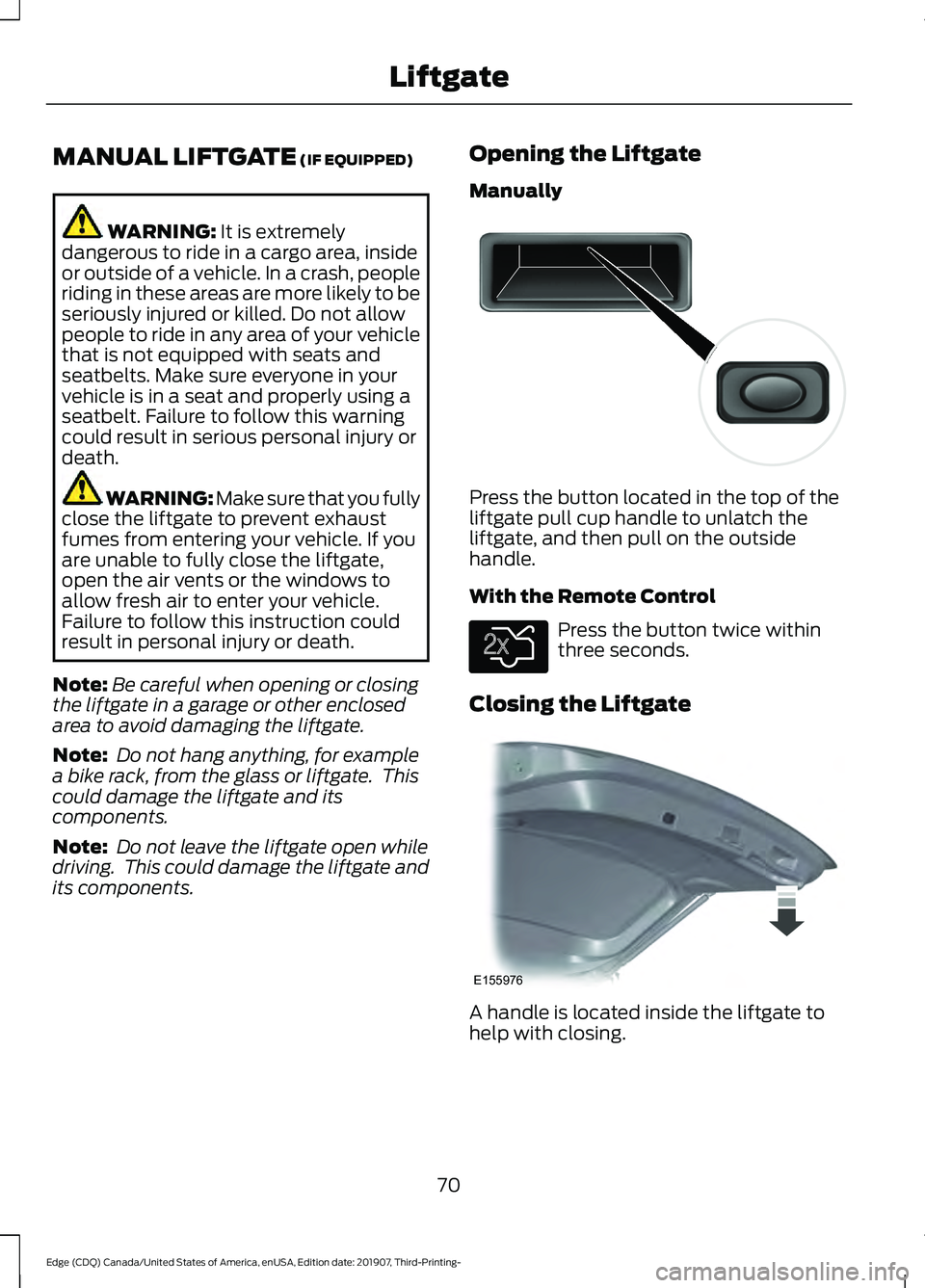
Press the button located in the top of the
liftgate pull cup handle to unlatch the
liftgate, and then pull on the outside
handle.
With the Remote Control
Press the button twice within
three seconds.
Closing the Liftgate A handle is located inside the liftgate to
help with closing.
70
Edge (CDQ) Canada/United States of America, enUSA, Edition date: 201907, Third-Printing- LiftgateE138632 E138630 E155976
Page 74 of 495
POWER LIFTGATE (IF EQUIPPED)
WARNING:
It is extremely
dangerous to ride in a cargo area, inside
or outside of a vehicle. In a crash, people
riding in these areas are more likely to be
seriously injured or killed. Do not allow
people to ride in any area of your vehicle
that is not equipped with seats and
seatbelts. Make sure everyone in your
vehicle is in a seat and properly using a
seatbelt. Failure to follow this warning
could result in serious personal injury or
death. WARNING:
Make sure that you fully
close the liftgate to prevent exhaust
fumes from entering your vehicle. If you
are unable to fully close the liftgate,
open the air vents or the windows to
allow fresh air to enter your vehicle.
Failure to follow this instruction could
result in personal injury or death. WARNING:
Make sure that you fully
close the liftgate to prevent passengers
and cargo from falling out. Failure to
follow this instruction could result in
personal injury or death. WARNING: Keep keys out of reach
of children. Do not allow children to
operate or play near an open or moving
power liftgate. You should supervise the
operation of the power liftgate at all
times.
Note: Make sure that you close the liftgate
before operating or moving your vehicle,
especially in an enclosure, like a garage or
a parking structure. This could damage the
liftgate and its components.
Note: Do not hang anything, for example
a bike rack, from the glass or liftgate. This
could damage the liftgate and its
components. The liftgate only operates with the
transmission in park (P).
If there is a problem with the open or close
request, a tone sounds for one of the
following reasons:
•
The ignition is on and the transmission
is not in park (P).
• The battery voltage is below the
minimum operating voltage.
• The liftgate is not fully closed and your
vehicle speed is at or above
3 mph
(5 km/h).
If the liftgate starts to close after it has
fully opened, this indicates there may be
excessive weight on the liftgate or a
possible strut failure. A repetitive tone
sounds and the liftgate closes under
control. Remove any excessive weight
from the liftgate. If the liftgate continues
to close after opening, have the system
checked by an authorized dealer.
Opening and Closing the Liftgate WARNING:
Make sure all persons
are clear of the power liftgate area
before using the power liftgate control.
Note: Make sure the area behind your
vehicle is free from obstruction and that
there is enough room for you to operate the
liftgate. Objects too close to your vehicle,
for example a wall, garage door or another
vehicle may come into contact with the
moving liftgate. This could damage the
liftgate and its components.
Note: Be careful when opening or closing
the liftgate in a garage or other enclosed
area to avoid damaging the liftgate.
Note: Do not leave the liftgate open when
you are driving. This could damage the
liftgate and its components.
71
Edge (CDQ) Canada/United States of America, enUSA, Edition date: 201907, Third-Printing- Liftgate
Page 105 of 495
•
You apply the parking brake with the
ignition on.
• Your vehicle has a brake fault or low
brake fluid level, regardless of parking
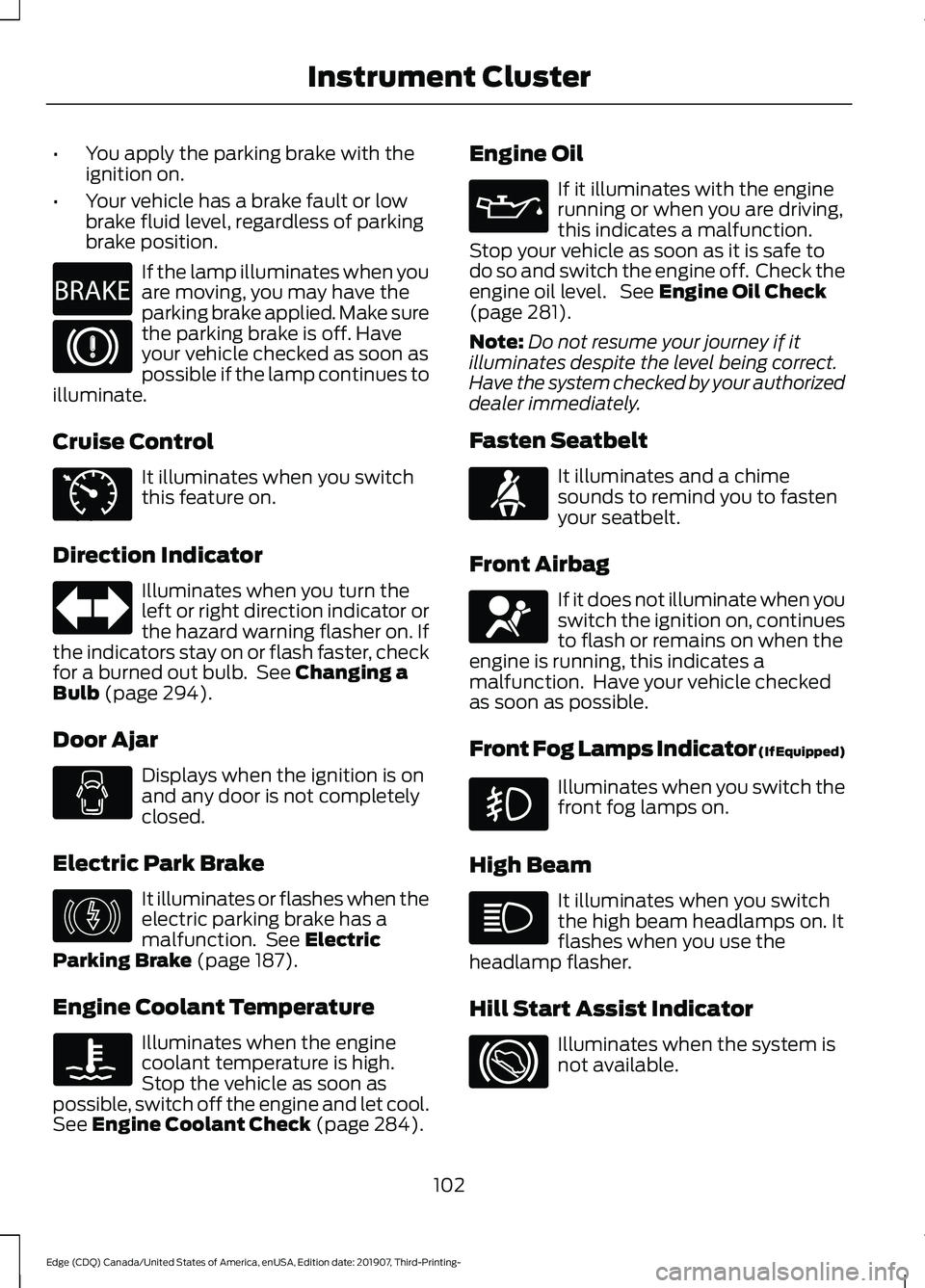
brake position. If the lamp illuminates when you
are moving, you may have the
parking brake applied. Make sure
the parking brake is off. Have
your vehicle checked as soon as
possible if the lamp continues to
illuminate.
Cruise Control It illuminates when you switch
this feature on.
Direction Indicator Illuminates when you turn the
left or right direction indicator or
the hazard warning flasher on. If
the indicators stay on or flash faster, check
for a burned out bulb. See Changing a
Bulb (page 294).
Door Ajar Displays when the ignition is on
and any door is not completely
closed.
Electric Park Brake It illuminates or flashes when the
electric parking brake has a
malfunction. See
Electric
Parking Brake (page 187).
Engine Coolant Temperature Illuminates when the engine
coolant temperature is high.
Stop the vehicle as soon as
possible, switch off the engine and let cool.
See
Engine Coolant Check (page 284). Engine Oil If it illuminates with the engine
running or when you are driving,
this indicates a malfunction.
Stop your vehicle as soon as it is safe to
do so and switch the engine off. Check the
engine oil level. See
Engine Oil Check
(page 281).
Note: Do not resume your journey if it
illuminates despite the level being correct.
Have the system checked by your authorized
dealer immediately.
Fasten Seatbelt It illuminates and a chime
sounds to remind you to fasten
your seatbelt.
Front Airbag If it does not illuminate when you
switch the ignition on, continues
to flash or remains on when the
engine is running, this indicates a
malfunction. Have your vehicle checked
as soon as possible.
Front Fog Lamps Indicator (If Equipped) Illuminates when you switch the
front fog lamps on.
High Beam It illuminates when you switch
the high beam headlamps on. It
flashes when you use the
headlamp flasher.
Hill Start Assist Indicator Illuminates when the system is
not available.
102
Edge (CDQ) Canada/United States of America, enUSA, Edition date: 201907, Third-Printing- Instrument ClusterE270480 E71340 E146190 E71880 E67017
Page 112 of 495
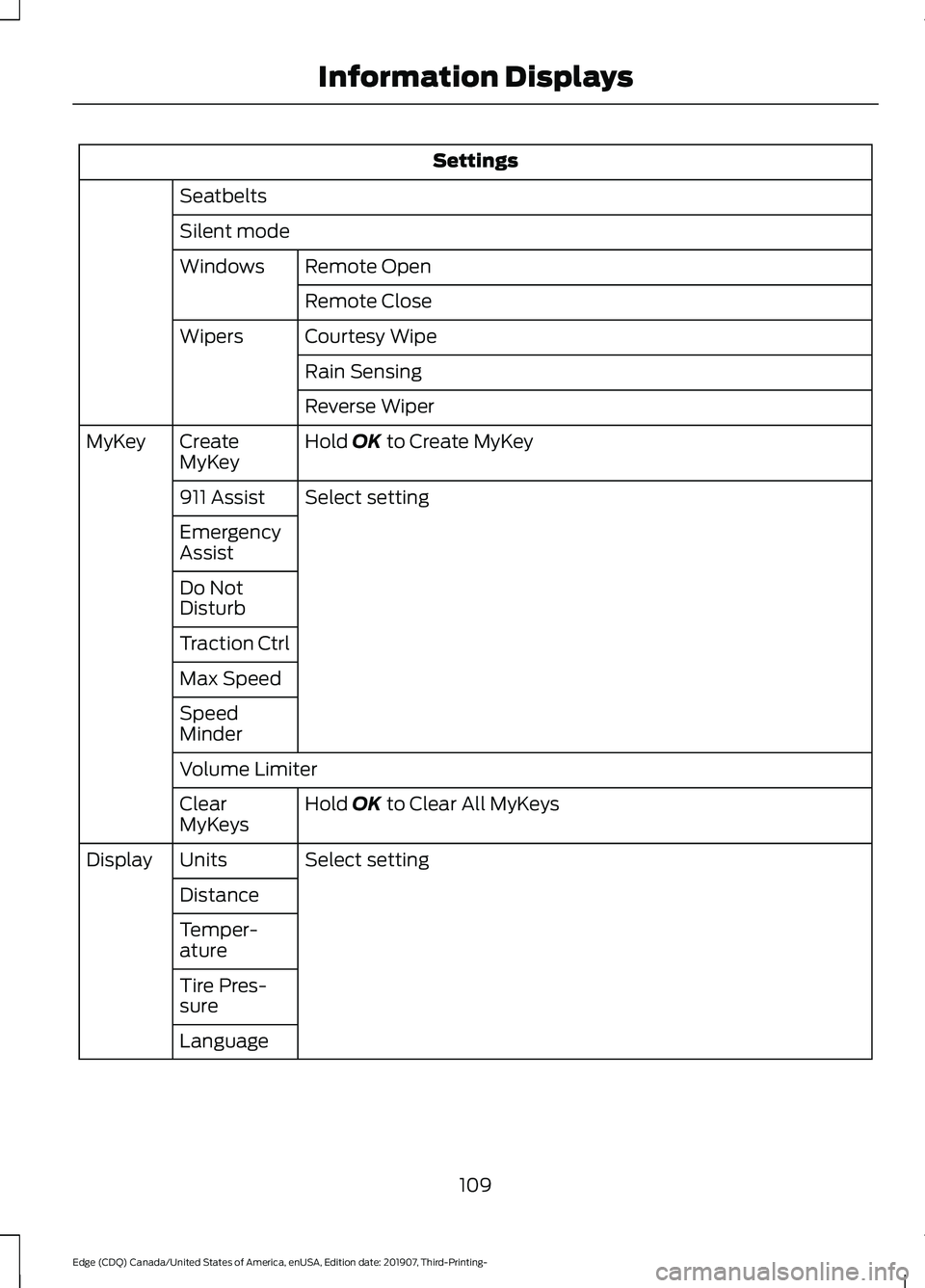
Settings
Seatbelts
Silent mode Remote Open
Windows
Remote Close
Courtesy Wipe
Wipers
Rain Sensing
Reverse Wiper
Hold OK to Create MyKey
Create
MyKey
MyKey
Select setting
911 Assist
Emergency
Assist
Do Not
Disturb
Traction Ctrl
Max Speed
Speed
Minder
Volume Limiter
Hold
OK to Clear All MyKeys
Clear
MyKeys
Select setting
Units
Display
Distance
Temper-
ature
Tire Pres-
sure
Language
109
Edge (CDQ) Canada/United States of America, enUSA, Edition date: 201907, Third-Printing- Information Displays
Page 117 of 495
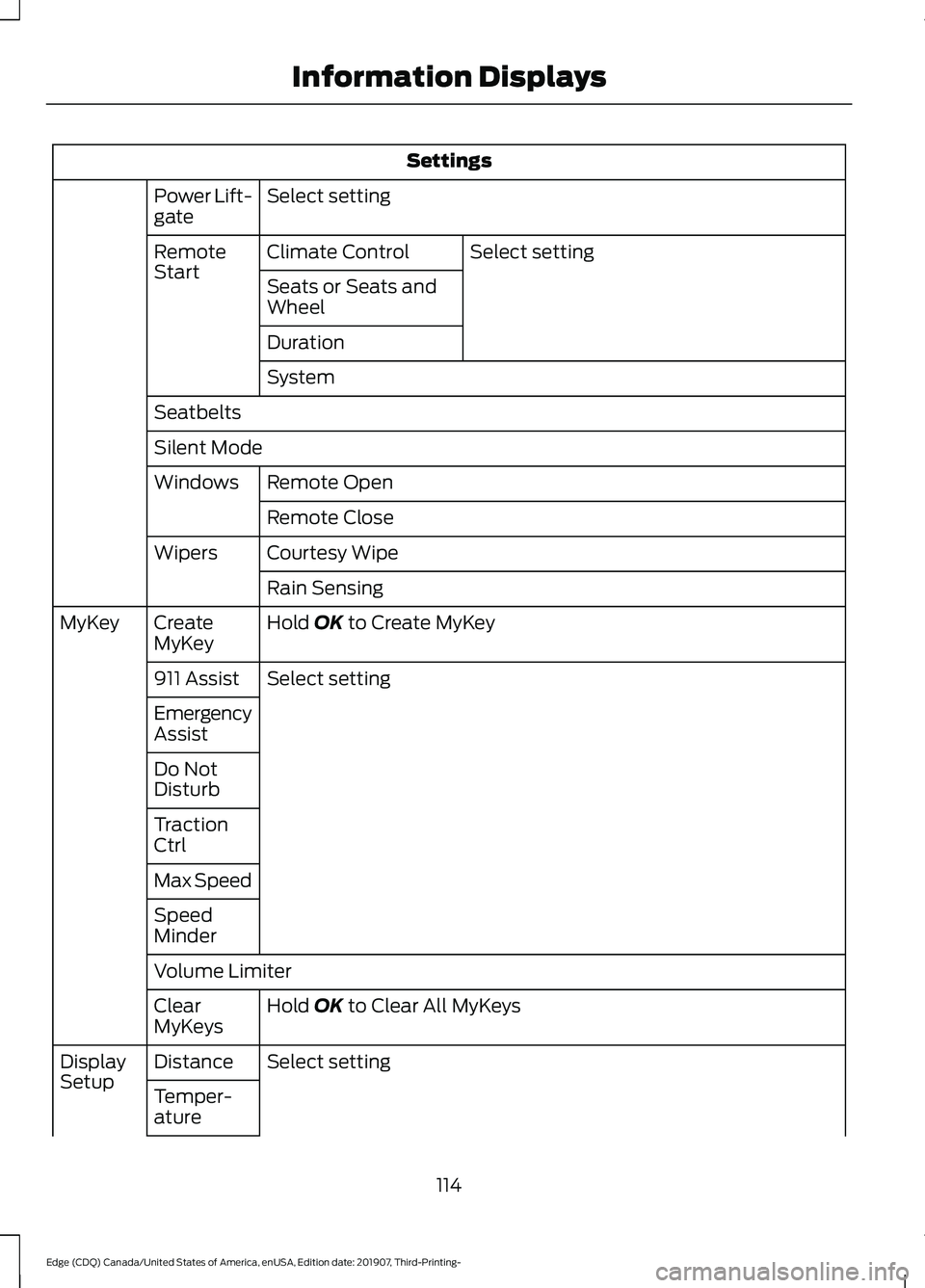
Settings
Select setting
Power Lift-
gate
Select setting
Climate Control
Remote
Start
Seats or Seats and
Wheel
Duration
System
Seatbelts
Silent Mode Remote Open
Windows
Remote Close
Courtesy Wipe
Wipers
Rain Sensing
Hold OK to Create MyKey
Create
MyKey
MyKey
Select setting
911 Assist
Emergency
Assist
Do Not
Disturb
Traction
Ctrl
Max Speed
Speed
Minder
Volume Limiter
Hold
OK to Clear All MyKeys
Clear
MyKeys
Select setting
Distance
Display
Setup
Temper-
ature
114
Edge (CDQ) Canada/United States of America, enUSA, Edition date: 201907, Third-Printing- Information Displays
Page 128 of 495
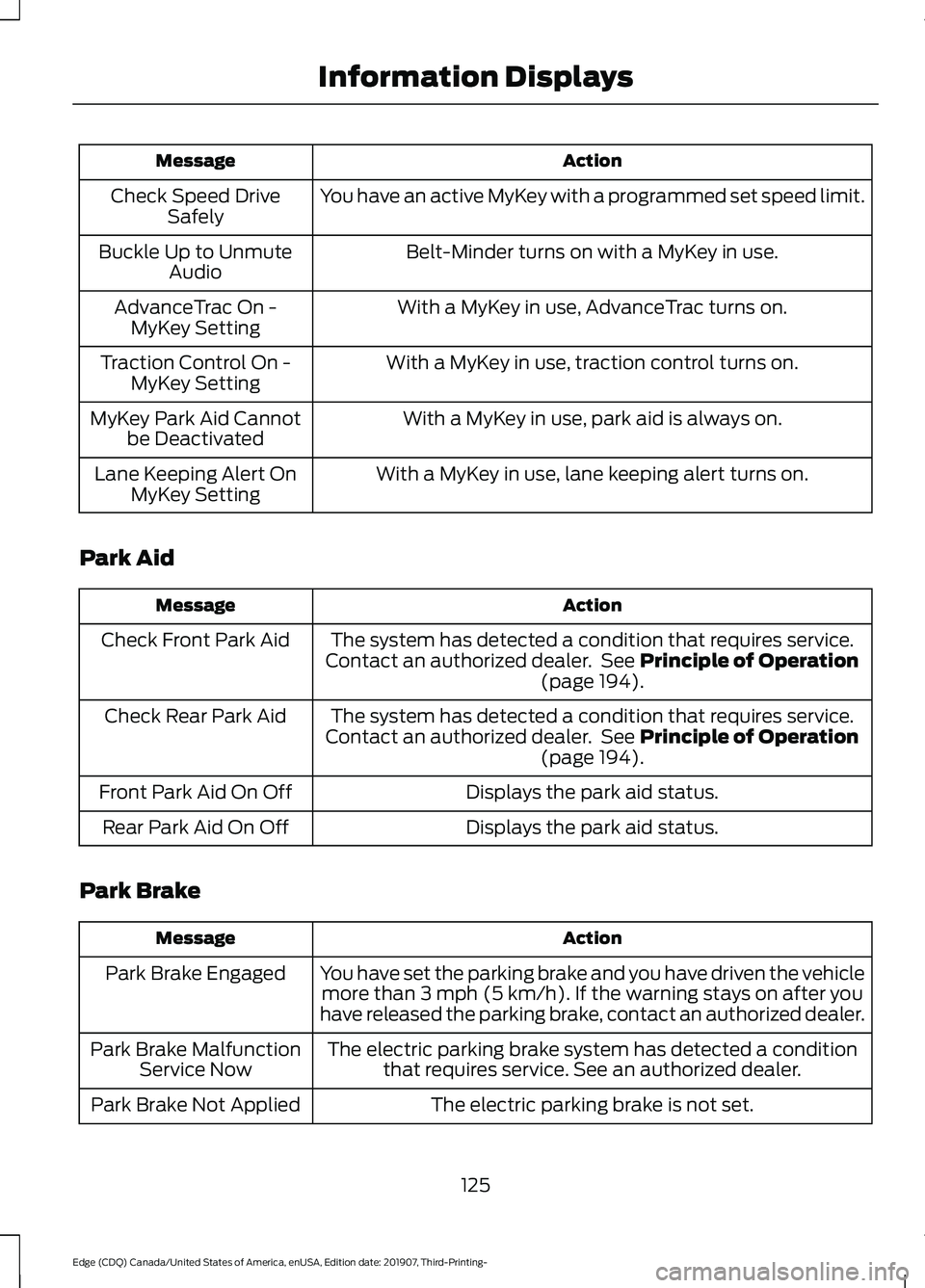
Action
Message
You have an active MyKey with a programmed set speed limit.
Check Speed Drive
Safely
Belt-Minder turns on with a MyKey in use.
Buckle Up to Unmute
Audio
With a MyKey in use, AdvanceTrac turns on.
AdvanceTrac On -
MyKey Setting
With a MyKey in use, traction control turns on.
Traction Control On -
MyKey Setting
With a MyKey in use, park aid is always on.
MyKey Park Aid Cannot
be Deactivated
With a MyKey in use, lane keeping alert turns on.
Lane Keeping Alert On
MyKey Setting
Park Aid Action
Message
The system has detected a condition that requires service.
Contact an authorized dealer. See Principle of Operation
(page 194).
Check Front Park Aid
The system has detected a condition that requires service.
Contact an authorized dealer. See
Principle of Operation
(page 194).
Check Rear Park Aid
Displays the park aid status.
Front Park Aid On Off
Displays the park aid status.
Rear Park Aid On Off
Park Brake Action
Message
You have set the parking brake and you have driven the vehiclemore than
3 mph (5 km/h). If the warning stays on after you
have released the parking brake, contact an authorized dealer.
Park Brake Engaged
The electric parking brake system has detected a conditionthat requires service. See an authorized dealer.
Park Brake Malfunction
Service Now
The electric parking brake is not set.
Park Brake Not Applied
125
Edge (CDQ) Canada/United States of America, enUSA, Edition date: 201907, Third-Printing- Information Displays
Page 140 of 495
SITTING IN THE CORRECT
POSITION
WARNING: Sitting improperly, out
of position or with the seatback reclined
too far can take weight off the seat
cushion and affect the decision of the
passenger sensing system, resulting in
serious injury or death in the event of a
crash. Always sit upright against your
seat back, with your feet on the floor. WARNING: Do not recline the seat
backrest too far as this can cause the
occupant to slide under the seatbelt,
resulting in personal injury in the event
of a crash. WARNING:
Do not place objects
higher than the top of the seat backrest.
Failure to follow this instruction could
result in personal injury or death in the
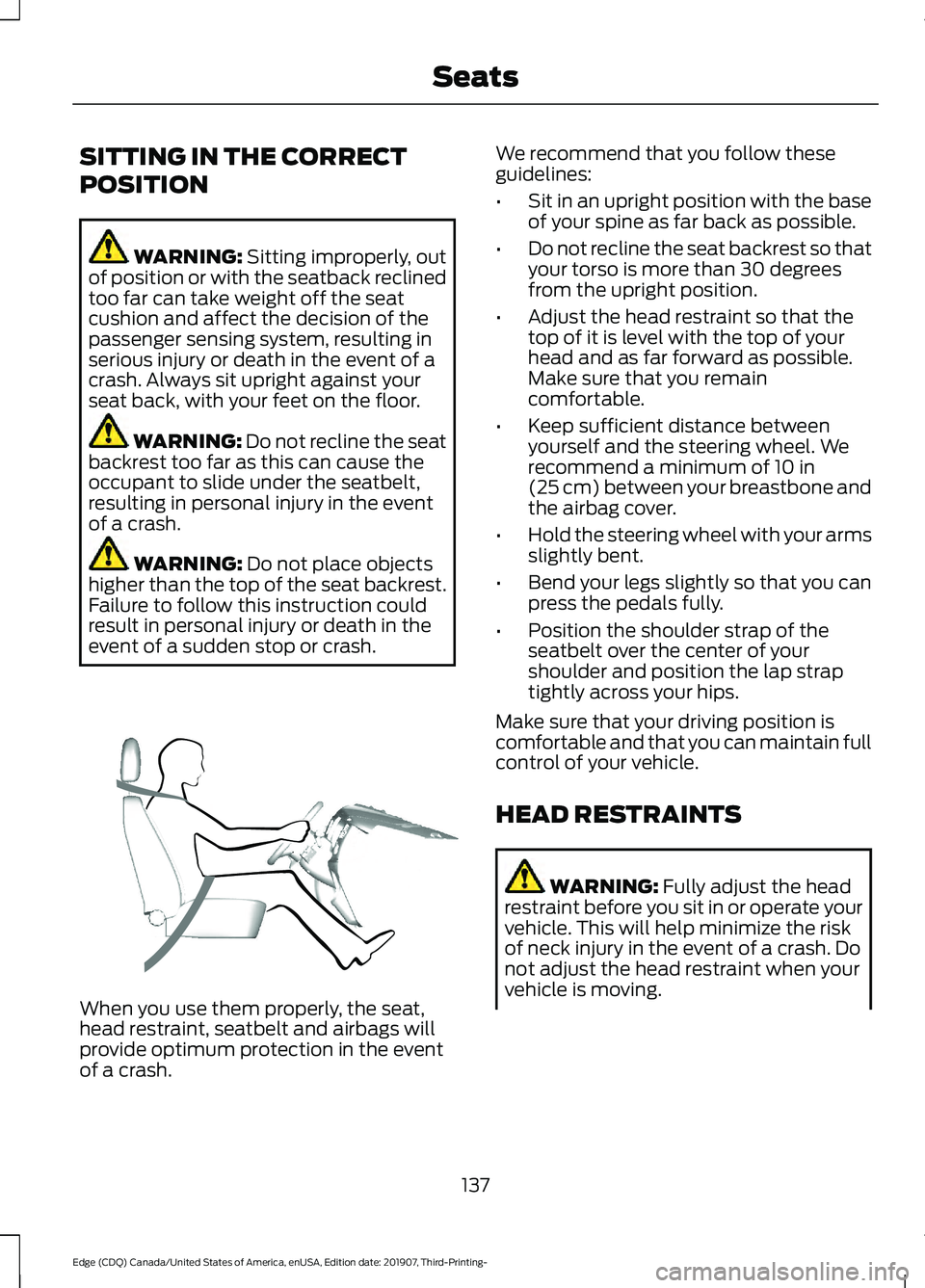
event of a sudden stop or crash. When you use them properly, the seat,
head restraint, seatbelt and airbags will
provide optimum protection in the event
of a crash. We recommend that you follow these
guidelines:
•
Sit in an upright position with the base
of your spine as far back as possible.
• Do not recline the seat backrest so that
your torso is more than 30 degrees
from the upright position.
• Adjust the head restraint so that the
top of it is level with the top of your
head and as far forward as possible.
Make sure that you remain
comfortable.
• Keep sufficient distance between
yourself and the steering wheel. We
recommend a minimum of
10 in
(25 cm) between your breastbone and
the airbag cover.
• Hold the steering wheel with your arms
slightly bent.
• Bend your legs slightly so that you can
press the pedals fully.
• Position the shoulder strap of the
seatbelt over the center of your
shoulder and position the lap strap
tightly across your hips.
Make sure that your driving position is
comfortable and that you can maintain full
control of your vehicle.
HEAD RESTRAINTS WARNING:
Fully adjust the head
restraint before you sit in or operate your
vehicle. This will help minimize the risk
of neck injury in the event of a crash. Do
not adjust the head restraint when your
vehicle is moving.
137
Edge (CDQ) Canada/United States of America, enUSA, Edition date: 201907, Third-Printing- SeatsE68595
Page 142 of 495
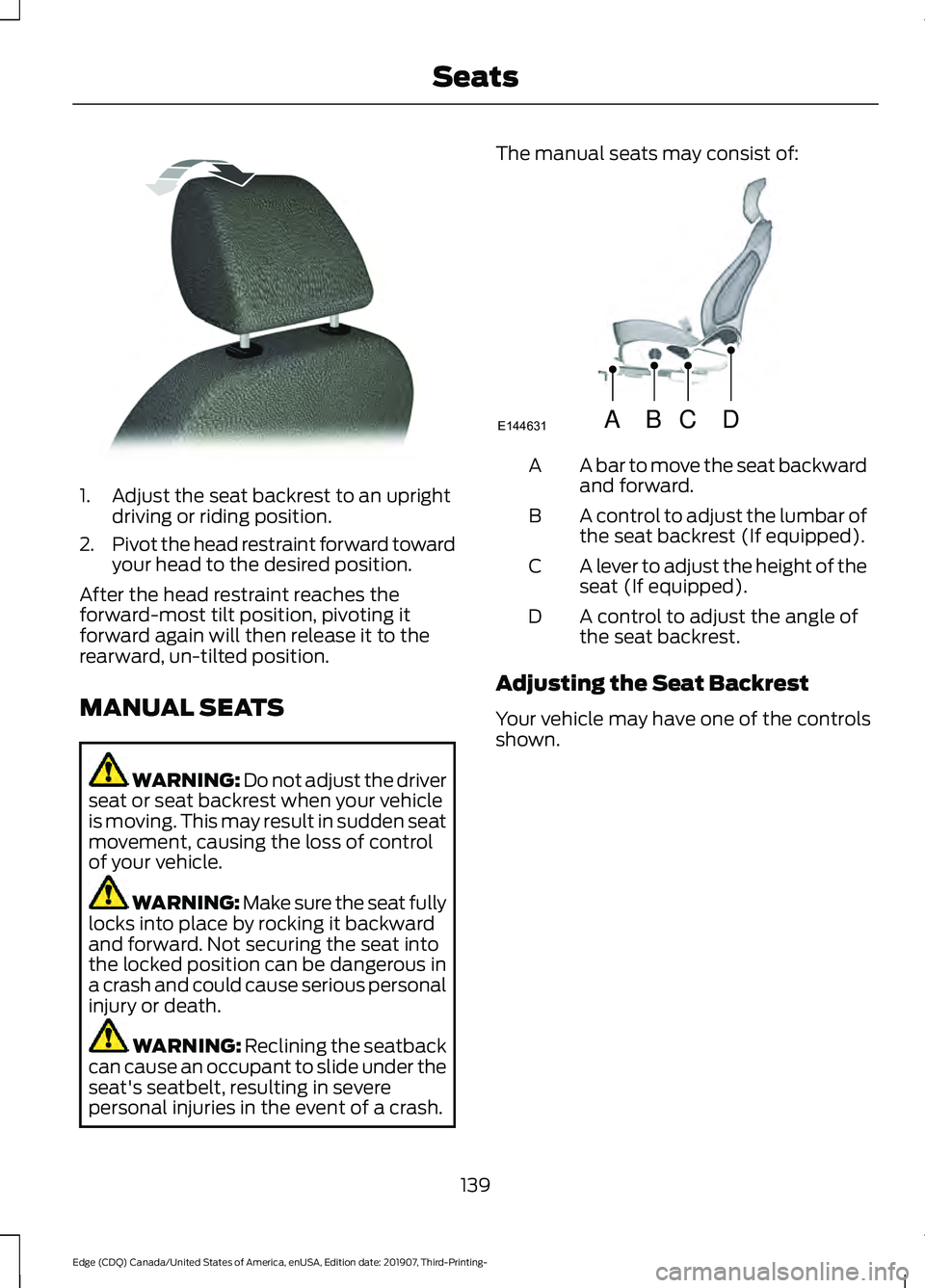
1. Adjust the seat backrest to an upright
driving or riding position.
2. Pivot the head restraint forward toward
your head to the desired position.
After the head restraint reaches the
forward-most tilt position, pivoting it
forward again will then release it to the
rearward, un-tilted position.
MANUAL SEATS WARNING: Do not adjust the driver
seat or seat backrest when your vehicle
is moving. This may result in sudden seat
movement, causing the loss of control
of your vehicle. WARNING: Make sure the seat fully
locks into place by rocking it backward
and forward. Not securing the seat into
the locked position can be dangerous in
a crash and could cause serious personal
injury or death. WARNING: Reclining the seatback
can cause an occupant to slide under the
seat's seatbelt, resulting in severe
personal injuries in the event of a crash. The manual seats may consist of:
A bar to move the seat backward
and forward.
A
A control to adjust the lumbar of
the seat backrest (If equipped).
B
A lever to adjust the height of the
seat (If equipped).
C
A control to adjust the angle of
the seat backrest.
D
Adjusting the Seat Backrest
Your vehicle may have one of the controls
shown.
139
Edge (CDQ) Canada/United States of America, enUSA, Edition date: 201907, Third-Printing- SeatsE144727 ABCD
E144631
Page 147 of 495
Easy Entry and Exit Feature (If
Equipped)
If you enable the easy entry and exit
feature, it moves the driver seat position
rearward up to 2 in (5 cm) when you switch
the ignition off.
The driver seat returns to the previous
position when you switch the ignition on.
You can enable or disable this feature
through the information display. See
Information Displays
(page 105).
REAR SEATS
Adjusting the Rear Seats WARNING:
To prevent possible
damage to the seat or seatbelts, make
sure that the seatbelts are not fastened
before folding the seatback. WARNING:
When folding or
unfolding the seats, take care not to get
your fingers caught between the seat
backrest and seat frame. Failure to
follow this warning could result in serious
personal injury. WARNING:
When unfolding the
seat backrests, make sure that the
seatbelts are not trapped behind the
seat. WARNING:
Make sure that the
seats and the seat backrests are secure
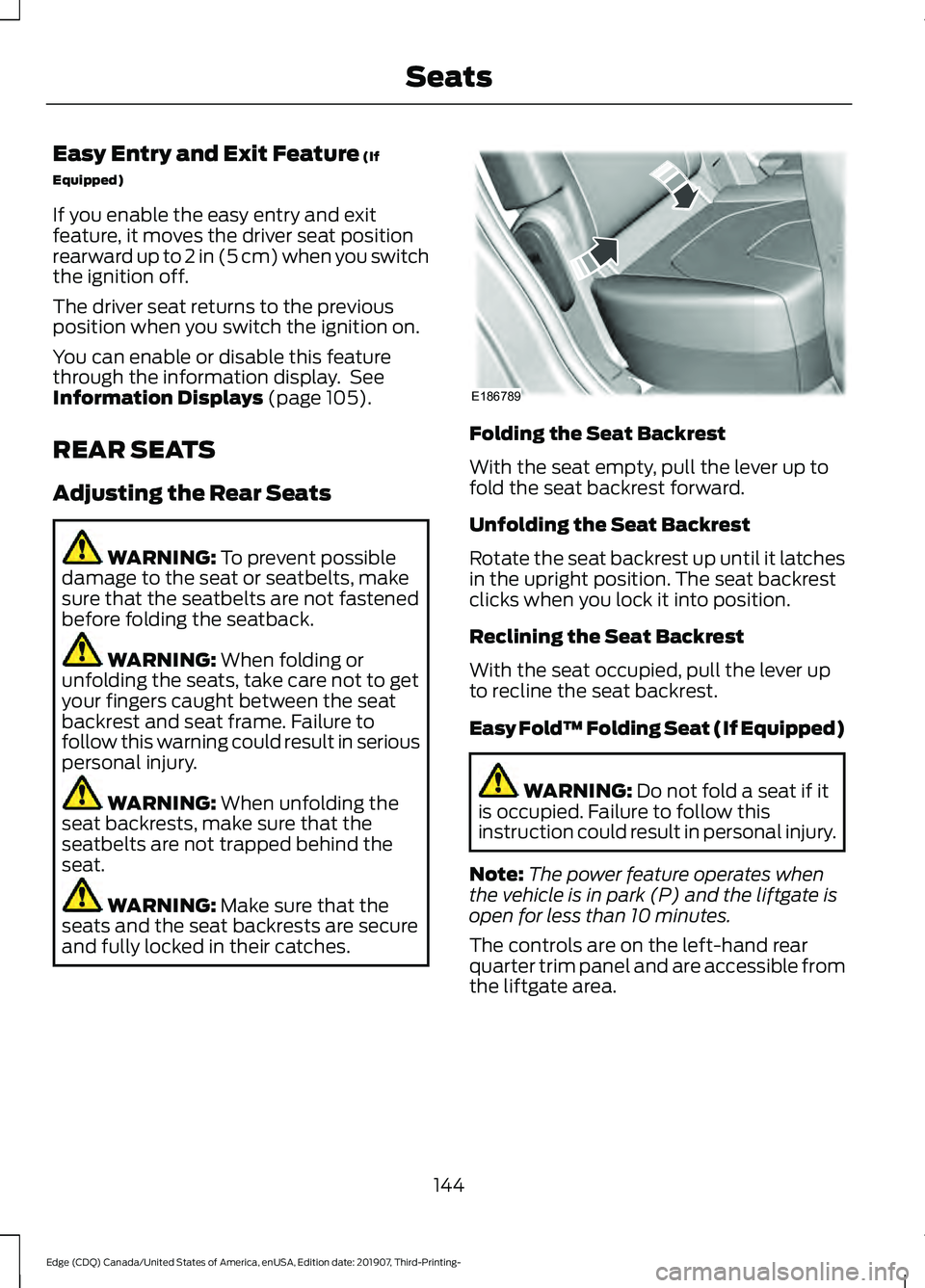
and fully locked in their catches. Folding the Seat Backrest
With the seat empty, pull the lever up to
fold the seat backrest forward.
Unfolding the Seat Backrest
Rotate the seat backrest up until it latches
in the upright position. The seat backrest
clicks when you lock it into position.
Reclining the Seat Backrest
With the seat occupied, pull the lever up
to recline the seat backrest.
Easy Fold™ Folding Seat (If Equipped)
WARNING:
Do not fold a seat if it
is occupied. Failure to follow this
instruction could result in personal injury.
Note: The power feature operates when
the vehicle is in park (P) and the liftgate is
open for less than 10 minutes.
The controls are on the left-hand rear
quarter trim panel and are accessible from
the liftgate area.
144
Edge (CDQ) Canada/United States of America, enUSA, Edition date: 201907, Third-Printing- SeatsE186789