steering wheel FORD EDGE 2020 Repair Manual
[x] Cancel search | Manufacturer: FORD, Model Year: 2020, Model line: EDGE, Model: FORD EDGE 2020Pages: 495, PDF Size: 6.38 MB
Page 386 of 495
Switching Automatic System Updates
On
Select the settings option on the
feature bar.
1. Select Automatic Updates.
2. Switch
Automatic System Updates
on.
The system is now set to check for and
receive system updates when it is
connected to a Wi-Fi network.
Note: You can use the system when a
download is in progress.
Note: If the system is disconnected from
the Wi-Fi network when a download is in
progress, the download continues the next
time the system is connected to a Wi-Fi
network.
Additional Information and
Assistance
For additional information and assistance,
we recommend that you contact an
authorized dealer or refer to the local Ford
website. USING VOICE RECOGNITION
The system allows you to interact with the
entertainment, information and
communication systems on your vehicle
using voice commands. This allows you
to keep your hands on the steering wheel
and focus on what is in front of you. Press the voice control button
on the steering wheel and wait
for the voice prompt.
Note: Press the voice control button again
to interrupt a voice prompt and begin
speaking.
Note: Turn the volume control when a voice
prompt plays to adjust the volume.
Note: Press and hold the voice control
button on the steering wheel to use Siri on
your iOS device.
The following voice commands are
designed to help you from any screen:
• List of Commands
• Help
The following tables list some of the more
frequently used voice commands. For a
complete list of voice commands, refer to
our website.
General Description
Voice Command
Get a list of voice commands for a specific feature. 1
___ List of Commands
Cancel an active voice session.
Cancel
Get a list of voice commands for a specific feature. 1
___ Help
Return to the previous screen.
Go back
Go to the main menu.
Main Menu
383
Edge (CDQ) Canada/United States of America, enUSA, Edition date: 201907, Third-Printing- SYNC™ 3E280315 E142599
Page 403 of 495

A/C: Touch to switch the air conditioning
on or off. Use A/C with recirculated air to
improve cooling performance and
efficiency.
Note: In certain conditions, such as
maximum defrost, the air conditioning
compressor may continue to operate even
though you switch off the air conditioning.
Switching the Climate Control On
and Off Touch the button.
Switching the Climate Controlled
Seats On and Off Touch the button to cycle
through the various climate
controlled seat settings.
Switching Dual Zone Mode On and
Off Touch the button to switch on
temperature control for the
right-hand side of the vehicle.
Switching the Heated Exterior
Mirrors On and Off Touch the button.
Switching the Heated Windshield
On and Off Touch the button to clear the
windshield of thin ice and fog.
The heated windshield turns off
after a short period of time. Switching the Heated Rear
Window On and Off Touch the button to clear the
rear window of thin ice and fog.
Switching the Heated Seats On
and Off Touch the button to cycle
through the various heat
settings.
Switching the Heated Steering
Wheel On and Off Touch the button.
Switching Maximum Air
Conditioning On and Off Touch the button for maximum
cooling.
Recirculated air flows through the
instrument panel air vents, air conditioning
turns on and the blower motor adjusts to
the highest speed.
Switching Maximum Defrost On
and Off Touch the button for maximum
defrosting.
Air flows through the windshield air vents,
and the blower motor adjusts to the
highest speed.
You can also use this setting to defog and
clear the windshield of a thin covering of
ice.
Note: To prevent window fogging, you
cannot select recirculated air when
maximum defrost is on.
400
Edge (CDQ) Canada/United States of America, enUSA, Edition date: 201907, Third-Printing- SYNC™ 3 E265282 E265280 E266189 E184884
Page 411 of 495
SiriusXM Traffic and Travel Link (If
Equipped)
SiriusXM Traffic and Travel Link is available
on vehicles equipped with navigation and
only in select markets. You must activate
and subscribe to receive SiriusXM Traffic
and Travel Link information. It helps you
locate the best gas prices, find movie
listings, get current traffic alerts, view the
weather map, get accurate ski conditions
and see current sports scores.
The system calculates a reasonable
efficient route based on available speed
limits, traffic, and road conditions. You may
know a local short cut that is more efficient
at a given time than the route provided by
SYNC 3, but you should expect a slight
difference in minutes or miles with the
SYNC 3 route.
Michelin Travel Guide (If Equipped)
The Michelin travel guide is a service which
provides additional information about
certain places of interest, for example
restaurants, hotels and tourist sites. Points
of interest that have Michelin travel guide
information display a button to show you
more information. Push the button to see
the additional information. If you have
paired your phone with the system, you
can press the phone button to directly
establish a call with the selected point of
interest.
Navigation Map Accuracy and
Updates
HERE is the digital map provider for the
navigation application. If you find map data
errors, you may report them directly to
HERE by going to www.here.com. HERE
evaluates all reported map errors and
responds with the result of their
investigation by e-mail. The navigation system map data may
contain inaccurate or incomplete
information due to the passage of time,
changing circumstances, sources used and
the nature of collecting comprehensive
geographic data, any of which may lead to
incorrect results. Inaccurate speed limit
information, turn restrictions and other
road attributes may affect the determined
route and associated guidance
Annual navigation map updates are
available for purchase through your
dealership. Depending on your purchase
agreement, you might be eligible for free
Map update. You can choose to download
the Map data update onto a USB, order a
USB, or use Wi-Fi to deliver automatic
updates. To update your Map data over
Wi-Fi, your vehicle must be connected to
a Wi-Fi access point. Map Data files are
large, so it is highly recommended to
perform the update when free Wi-Fi is
available otherwise high data rates may
apply. For USB updates, free map update
eligibility, and other details, contact
dealers at 1-866-462-8837 in the United
States and Canada or 01-800-557-5539
in Mexico or visit our local website for more
information.
APPS
The system allows you interact with select
mobile apps while keeping your eyes on
the road. Voice commands, your steering
wheel buttons, or a quick tap on your
touchscreen give you advanced control of
compatible mobile apps. You can also
stream your favorite music or podcasts,
share your time of arrival with friends, and
keep connected safely.
408
Edge (CDQ) Canada/United States of America, enUSA, Edition date: 201907, Third-Printing- SYNC™ 3
Page 416 of 495
SYNC™ 3 TROUBLESHOOTING
Voice Recognition
Possible Cause and Resolution
Symptom
The system does not under-
stand what I am saying. –
You are using the wrong voice commands.
•See Using Voice Recognition (page 383).
• For a complete list of voice commands, refer to our
website.
– You are speaking too soon.
•Wait for the voice prompt before you speak.
The system does not under-
stand the name of a track or
artist. –
Device limitation. Bluetooth does not support voice
commands.
•Connect your device to a USB port.
• If you have an iOS device, press and hold the voice
control button on the steering wheel to use Siri to
play specific tracks.
– You are using the wrong voice commands.
•See
Using Voice Recognition (page 383).
• For a complete list of voice commands, refer to our
website.
– You are not saying the name exactly as it appears on
your device.
•Say the name of the track or artist exactly as it
appears on your device. Spell out any abbreviations
in the name.
The song or artist name may have some special char-
acters that are not being recognized by the system.
– The name contains special characters, for example *,
- or +.
•Rename the files on your device or use the touch-
screen to select and play the track.
413
Edge (CDQ) Canada/United States of America, enUSA, Edition date: 201907, Third-Printing- SYNC™ 3
Page 418 of 495
Possible Cause and Resolution
Symptom
–Incorrect device settings.
•Make sure that your device does not have an auto-
install program or active security settings.
• Check that your device is not set only to charge.
– Device lock screen enabled.
•Unlock your device before connecting it.
The system does not recog-
nize my device. –
Device limitation.
•Do not leave your device in your vehicle during very
hot or very cold weather conditions.
– Cable connection issue.
•Correctly connect the cable to your device and the
vehicle USB port.
– Incompatible cable.
•Use the cable recommended by the manufacturer
of your device.
The system does not under-
stand the name of a track or
artist. –
Device limitation. Bluetooth does not support voice
commands.
•Connect your device to a USB port.
• If you have an iOS device, press and hold the voice
control button on the steering wheel to use Siri to
play specific tracks.
I cannot stream audio from
my Bluetooth device. –
Incompatible device.
•Check the compatibility of your device on our
website.
– Device not connected.
•Pair your device. See Phone (page 401).
– Media player not running.
•Start the media player on your device.
The system does not recog-
nize the music on my device. –
Missing or incorrect audio file metadata, for example
artist, song title, album or genre.
•Repair the files on your device.
– Corrupt files.
•Repair the files on your device.
415
Edge (CDQ) Canada/United States of America, enUSA, Edition date: 201907, Third-Printing- SYNC™ 3
Page 436 of 495
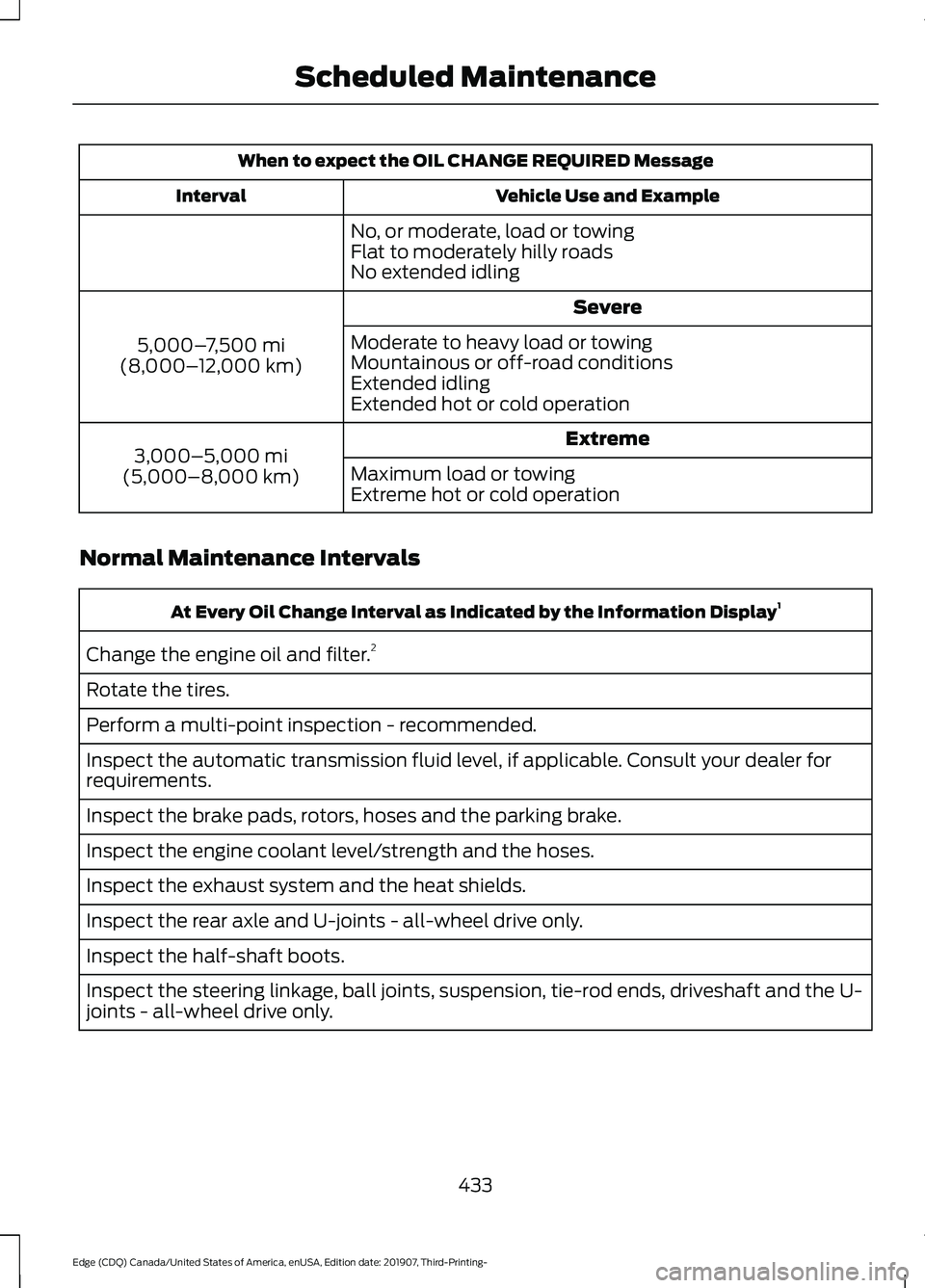
When to expect the OIL CHANGE REQUIRED Message
Vehicle Use and Example
Interval
No, or moderate, load or towing
Flat to moderately hilly roads
No extended idling Severe
5,000– 7,500 mi
(8,000– 12,000 km) Moderate to heavy load or towing
Mountainous or off-road conditions
Extended idling
Extended hot or cold operation
Extreme
3,000–5,000 mi
(5,000–8,000 km) Maximum load or towing
Extreme hot or cold operation
Normal Maintenance Intervals At Every Oil Change Interval as Indicated by the Information Display
1
Change the engine oil and filter. 2
Rotate the tires.
Perform a multi-point inspection - recommended.
Inspect the automatic transmission fluid level, if applicable. Consult your dealer for
requirements.
Inspect the brake pads, rotors, hoses and the parking brake.
Inspect the engine coolant level/strength and the hoses.
Inspect the exhaust system and the heat shields.
Inspect the rear axle and U-joints - all-wheel drive only.
Inspect the half-shaft boots.
Inspect the steering linkage, ball joints, suspension, tie-rod ends, driveshaft and the U-
joints - all-wheel drive only.
433
Edge (CDQ) Canada/United States of America, enUSA, Edition date: 201907, Third-Printing- Scheduled Maintenance
Page 482 of 495
1
180 Degree Camera...................................209
Camera Views.................................................... 209
Using the Front 180 Degree Camera System............................................................. 209
A
A/C See: Climate Control.......................................... 131
About This Manual
...........................................7
ABS See: Brakes........................................................... 186
ABS driving hints See: Hints on Driving With Anti-Lock
Brakes................................................................ 186
Accessories....................................................426
Accessories See: Replacement Parts
Recommendation............................................ 14
ACC See: Using Adaptive Cruise Control..............211
Active Park Assist.........................................199 Using Active Park Assist................................. 200
Adaptive Headlamps...................................88 System Check....................................................... 88
Adjusting the Headlamps..........................291 Vertical Aim Adjustment.................................. 291
Adjusting the Steering Wheel - Vehicles With: Manual Adjustable Steering
Column
............................................................79
Adjusting the Steering Wheel - Vehicles With: Power Adjustable Steering
Column............................................................78
End of Travel Position......................................... 78
Memory Feature.................................................... 78
AFS See: Adaptive Headlamps............................... 88
Airbag Disposal................................................51
Air Conditioning See: Climate Control.......................................... 131
Air Filter See: Changing the Engine Air Filter.............283
Alarm See: Anti-Theft Alarm........................................ 76
All-Wheel Drive
..............................................181 Ambient Lighting...........................................89
Adjusting the Brightness................................... 90
Changing the Color............................................. 90
Switching Ambient Lighting Off.................... 90
Switching Ambient Lighting On..................... 90
Anti-Theft Alarm
............................................76
Arming the Alarm................................................. 76
Disarming the Alarm........................................... 76
Appendices....................................................447
Apps.................................................................408 SiriusXM Traffic and Travel Link................... 410
Using Apps on an Android Device..............409
Using Apps on an iOS Device....................... 409
Using Mobile Navigation on an Android Device............................................................... 409
At a Glance........................................................18
At a Glance - ST...............................................18 Engine Specifications.......................................... 18
Suspension Specifications................................ 19
Audible Warnings and Indicators
...........104
Headlamps On Warning Chime.................... 104
Keyless Warning Alert....................................... 104
Parking Brake On Warning Chime................104
Audio Control
...................................................79
You can operate the following functions
with the control:............................................... 79
Audio System.................................................372 General Information.......................................... 372
Audio Unit - Vehicles With: SYNC 3/Bang and Olufsen Audio System....................374
Accessing the Sound Settings...................... 374
Adjusting the Volume....................................... 374
Changing Radio Stations................................ 374
Ejecting the CD.................................................... 374
Inserting a CD...................................................... 374
Switching the Audio Unit On and Off.........375
Using Seek, Fast Forward and Reverse.............................................................. 375
Audio Unit - Vehicles With: SYNC 3
.......................................................................372
Adjusting the Volume....................................... 373
Changing Radio Stations................................ 373
Ejecting the CD.................................................... 373
Inserting a CD...................................................... 373
Switching the Audio Unit On and Off.........373
Using Seek, Fast Forward and Reverse.............................................................. 373
479
Edge (CDQ) Canada/United States of America, enUSA, Edition date: 201907, Third-Printing- Index
Page 485 of 495
Cleaning the Interior..................................300
Mirrors................................................................... 300
Cleaning the Wheels..................................302
Cleaning the Windows and Wiper Blades..........................................................300
Clearing All MyKeys
........................................61
Climate............................................................399 Accessing Rear Climate Controls.................401
Accessing the Climate Control Menu........399
Directing the Airflow........................................ 399
Rear Climate Control Lock Indicator...........401
Setting the Blower Motor Speed.................399
Setting the Temperature................................ 399
Switching Auto Mode On and Off...............399
Switching Dual Zone Mode On and Off...................................................................... 400
Switching Maximum Air Conditioning On and Off............................................................. 400
Switching Maximum Defrost On and Off...................................................................... 400
Switching Rear Auto Mode On and Off....................................................................... 401
Switching Recirculated Air On and Off....................................................................... 401
Switching the Air Conditioning On and Off...................................................................... 399
Switching the Climate Controlled Seats On and Off............................................................. 400
Switching the Climate Control On and Off...................................................................... 400
Switching the Heated Exterior Mirrors On and Off............................................................. 400
Switching the Heated Rear Window On and Off...................................................................... 400
Switching the Heated Seats On and Off...................................................................... 400
Switching the Heated Steering Wheel On and Off............................................................. 400
Switching the Heated Windshield On and Off...................................................................... 400
Switching the Rear Climate Controlled Seats On and Off.......................................... 401
Switching the Rear Heated Seats On and Off....................................................................... 401
Switching the Rear Ventilated Seats On and Off.............................................................. 401
Switching the Ventilated Seats On and Off....................................................................... 401Climate Control..............................................131
Climate Controlled Seats..........................146
Cooled Seats......................................................... 147
Cold Weather Precautions........................251
Connected Vehicle......................................368
Connecting the Vehicle to a Mobile
Network........................................................... 368
Connected Vehicle Limitations
..............368
Connected Vehicle Requirements........368
Connected Vehicle – Troubleshooting........................................369
Connecting the Vehicle to a Mobile Network.......................................................368
Connecting FordPass to the Modem.........368
Enabling and Disabling the Modem...........368
What Is the Modem.......................................... 368
Connecting the Vehicle to a Wi-Fi Network.......................................................368
Coolant Check See: Engine Coolant Check........................... 284
Crash Sensors and Airbag Indicator
.......50
Creating a MyKey...........................................60 Programming and Changing Configurable
Settings.............................................................. 60
Creating a Vehicle Wi-Fi Hotspot............371 Connecting a Device to the Wi-Fi
Hotspot.............................................................. 371
Finding the Wi-Fi Hotspot Name and Password........................................................... 371
Cross Traffic Alert........................................228 Cross Traffic Alert Behavior When Trailer
is Attached...................................................... 230
Cross Traffic Alert Indicator........................... 230
Cross Traffic Alert Information Messages.......................................................... 231
Cross Traffic Alert System Limitations...................................................... 230
Cross Traffic Alert System Sensors............230
Switching the System On and Off..............230
Using Cross Traffic Alert.................................. 228
Cruise Control
................................................210
Cruise Control Indicators.............................211
Cruise Control - Vehicles With: Adaptive Cruise Control
..............................................80
Cruise Control - Vehicles With: Cruise Control............................................................80
Customer Assistance
.................................258
482
Edge (CDQ) Canada/United States of America, enUSA, Edition date: 201907, Third-Printing- Index
Page 488 of 495
General Information on Radio
Frequencies...................................................52
Intelligent Access................................................. 52
General Maintenance Information.......429 Multi-Point Inspection...................................... 431
Owner Checks and Services......................... 430
Protecting Your Investment........................... 429
Why Maintain Your Vehicle?......................... 429
Why Maintain Your Vehicle at Your Dealership?..................................................... 429
Getting Assistance Outside the U.S. and Canada..........................................................261
Getting the Services You Need...............258
Away From Home.............................................. 258
Global Opening
...............................................94
Remote Control Front Windows.................... 94
H
Hazard Flashers
...........................................254
Headlamp Adjusting See: Adjusting the Headlamps...................... 291
Headlamp Exit Delay....................................86
Headlamp Removal See: Removing a Headlamp.......................... 294
Headrest See: Head Restraints......................................... 137
Head Restraints
.............................................137
Adjusting the Head Restraint......................... 138
Tilting Head Restraints .................................... 138
Heated Exterior Mirrors...............................135
Heated Rear Window..................................135
Heated Seats..................................................145 Front Seats............................................................ 145
Rear Seats............................................................. 145
Heated Steering Wheel...............................80
Heated Windshield.......................................135 Windshield Wiper De-Icer................................ 135
Heating See: Climate Control.......................................... 131
Hill Start Assist.............................................188 Switching the System On and Off...............189
Using Hill Start Assist....................................... 189
Hints on Controlling the Interior Climate..........................................................134
Defogging the Side Windows in Cold Weather............................................................. 134
General Hints....................................................... 134Quickly Cooling the Interior.............................
134
Quickly Heating the Interior............................ 134
Recommended Settings for Cooling...........134
Recommended Settings for Heating..........134
Hints on Driving With Anti-Lock Brakes............................................................186
Hood Lock See: Opening and Closing the Hood...........277
Horn
......................................................................81
I
In California (U.S. Only)............................259
Information Display Control......................80
Information Displays
...................................105
General Information.......................................... 105
Information Messages
.................................115
Active Park.............................................................. 115
Adaptive Cruise Control.................................... 116
Airbag....................................................................... 116
Alarm........................................................................\
117
All-Wheel Drive..................................................... 117
Automatic Engine Shutdown.......................... 117
Automatic High Beam Control....................... 118
Auto Start-Stop................................................... 118
Battery and Charging System......................... 119
Blind Spot Information and Cross Traffic Alert System.................................................... 120
Doors and Locks................................................. 120
Driver Alert.............................................................. 121
Electronic Stability Control.............................. 121
Engine....................................................................... 121
Fuel........................................................................\
... 122
Hill Start Assist.................................................... 122
Keys and Keyless Entry..................................... 122
Lane Centering Assist........................................ 123
Lane Keeping System........................................ 123
Maintenance......................................................... 124
MyKey...................................................................... 124
Park Aid................................................................... 125
Park Brake.............................................................. 125
Power Steering.................................................... 126
Pre-Collision Warning System....................... 127
Remote Start........................................................ 127
Seats........................................................................\
127
Starting System .................................................. 127
Tire Pressure Monitoring System.................. 128
Towing....................................................................\
.128
485
Edge (CDQ) Canada/United States of America, enUSA, Edition date: 201907, Third-Printing- Index
Page 490 of 495
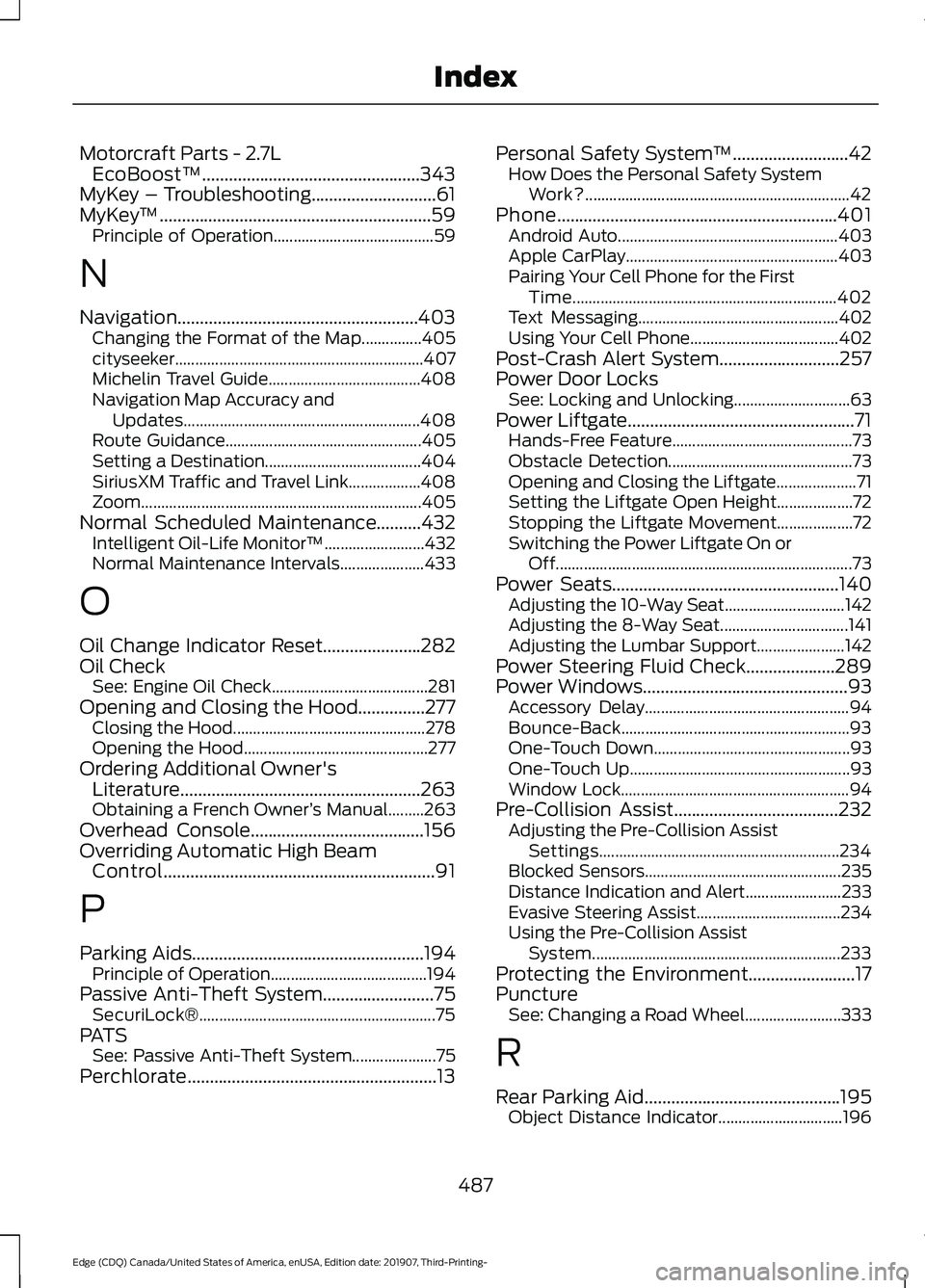
Motorcraft Parts - 2.7L
EcoBoost™.................................................343
MyKey – Troubleshooting............................61
MyKey ™.............................................................59
Principle of Operation........................................ 59
N
Navigation......................................................403 Changing the Format of the Map...............405
cityseeker.............................................................. 407
Michelin Travel Guide...................................... 408
Navigation Map Accuracy and Updates........................................................... 408
Route Guidance................................................. 405
Setting a Destination....................................... 404
SiriusXM Traffic and Travel Link.................. 408
Zoom.....................................................................\
.405
Normal Scheduled Maintenance..........432 Intelligent Oil-Life Monitor™......................... 432
Normal Maintenance Intervals..................... 433
O
Oil Change Indicator Reset......................282
Oil Check See: Engine Oil Check....................................... 281
Opening and Closing the Hood
...............277
Closing the Hood................................................ 278
Opening the Hood.............................................. 277
Ordering Additional Owner's Literature......................................................263
Obtaining a French Owner ’s Manual.........263
Overhead Console
.......................................156
Overriding Automatic High Beam Control.............................................................91
P
Parking Aids
....................................................194
Principle of Operation....................................... 194
Passive Anti-Theft System.........................75 SecuriLock®........................................................... 75
PATS See: Passive Anti-Theft System..................... 75
Perchlorate........................................................13 Personal Safety System
™
..........................42
How Does the Personal Safety System
Work?.................................................................. 42
Phone...............................................................401 Android Auto....................................................... 403
Apple CarPlay..................................................... 403
Pairing Your Cell Phone for the First Time.................................................................. 402
Text Messaging.................................................. 402
Using Your Cell Phone..................................... 402
Post-Crash Alert System
...........................257
Power Door Locks See: Locking and Unlocking............................. 63
Power Liftgate...................................................71 Hands-Free Feature............................................. 73
Obstacle Detection.............................................. 73
Opening and Closing the Liftgate.................... 71
Setting the Liftgate Open Height................... 72
Stopping the Liftgate Movement................... 72
Switching the Power Liftgate On or Off........................................................................\
.. 73
Power Seats
...................................................140
Adjusting the 10-Way Seat.............................. 142
Adjusting the 8-Way Seat................................ 141
Adjusting the Lumbar Support...................... 142
Power Steering Fluid Check....................289
Power Windows..............................................93 Accessory Delay................................................... 94
Bounce-Back......................................................... 93
One-Touch Down................................................. 93
One-Touch Up....................................................... 93
Window Lock......................................................... 94
Pre-Collision Assist
.....................................232
Adjusting the Pre-Collision Assist
Settings............................................................ 234
Blocked Sensors................................................. 235
Distance Indication and Alert........................ 233
Evasive Steering Assist.................................... 234
Using the Pre-Collision Assist System.............................................................. 233
Protecting the Environment........................17
Puncture See: Changing a Road Wheel........................ 333
R
Rear Parking Aid............................................195 Object Distance Indicator............................... 196
487
Edge (CDQ) Canada/United States of America, enUSA, Edition date: 201907, Third-Printing- Index