child lock FORD EDGE 2021 User Guide
[x] Cancel search | Manufacturer: FORD, Model Year: 2021, Model line: EDGE, Model: FORD EDGE 2021Pages: 500, PDF Size: 8.52 MB
Page 48 of 500
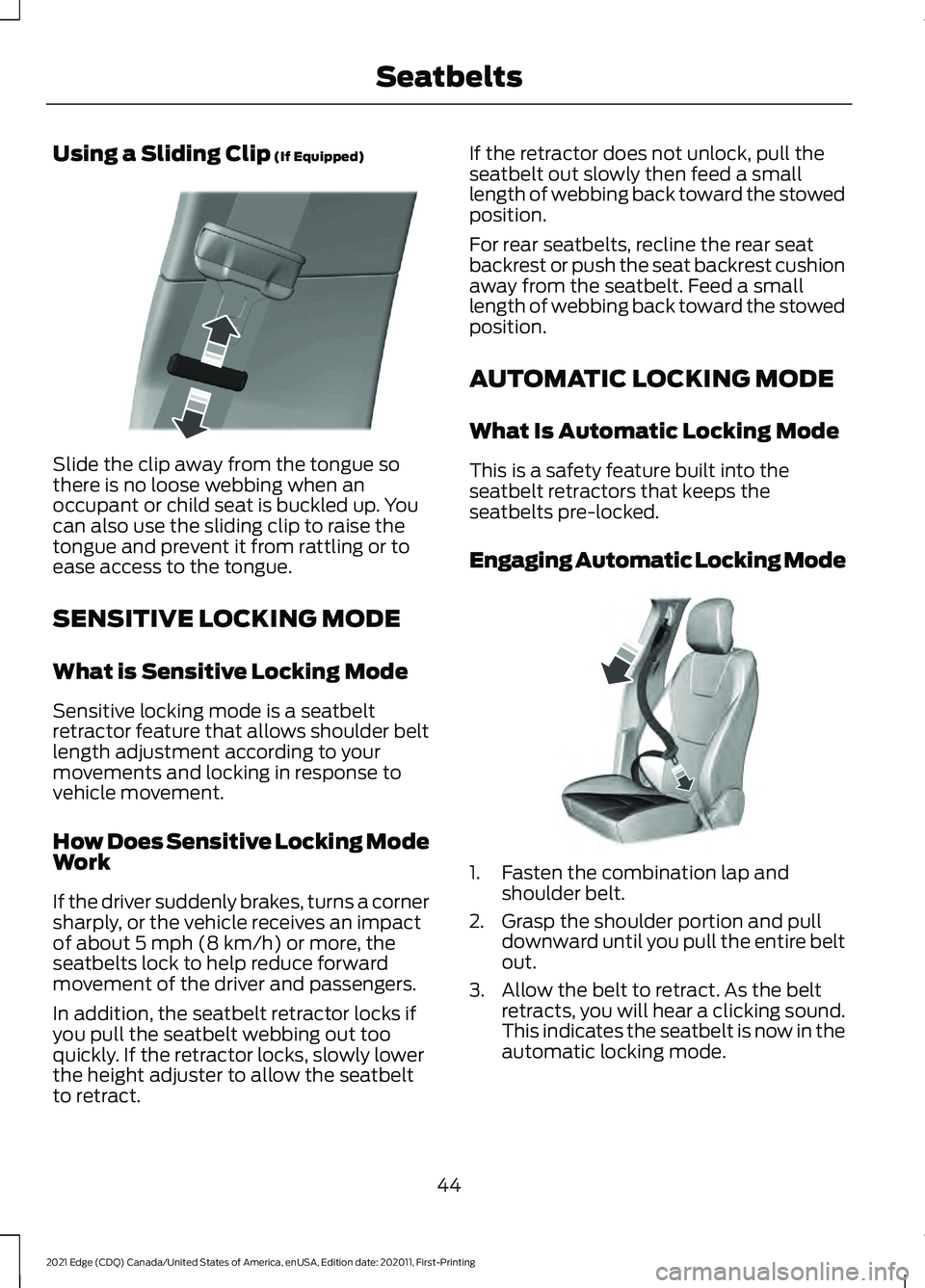
Using a Sliding Clip (If Equipped)
Slide the clip away from the tongue so
there is no loose webbing when an
occupant or child seat is buckled up. You
can also use the sliding clip to raise the
tongue and prevent it from rattling or to
ease access to the tongue.
SENSITIVE LOCKING MODE
What is Sensitive Locking Mode
Sensitive locking mode is a seatbelt
retractor feature that allows shoulder belt
length adjustment according to your
movements and locking in response to
vehicle movement.
How Does Sensitive Locking Mode
Work
If the driver suddenly brakes, turns a corner
sharply, or the vehicle receives an impact
of about
5 mph (8 km/h) or more, the
seatbelts lock to help reduce forward
movement of the driver and passengers.
In addition, the seatbelt retractor locks if
you pull the seatbelt webbing out too
quickly. If the retractor locks, slowly lower
the height adjuster to allow the seatbelt
to retract. If the retractor does not unlock, pull the
seatbelt out slowly then feed a small
length of webbing back toward the stowed
position.
For rear seatbelts, recline the rear seat
backrest or push the seat backrest cushion
away from the seatbelt. Feed a small
length of webbing back toward the stowed
position.
AUTOMATIC LOCKING MODE
What Is Automatic Locking Mode
This is a safety feature built into the
seatbelt retractors that keeps the
seatbelts pre-locked.
Engaging Automatic Locking Mode
1. Fasten the combination lap and
shoulder belt.
2. Grasp the shoulder portion and pull downward until you pull the entire belt
out.
3. Allow the belt to retract. As the belt retracts, you will hear a clicking sound.
This indicates the seatbelt is now in the
automatic locking mode.
44
2021 Edge (CDQ) Canada/United States of America, enUSA, Edition date: 202011, First-Printing SeatbeltsE200788 E142591
Page 66 of 500
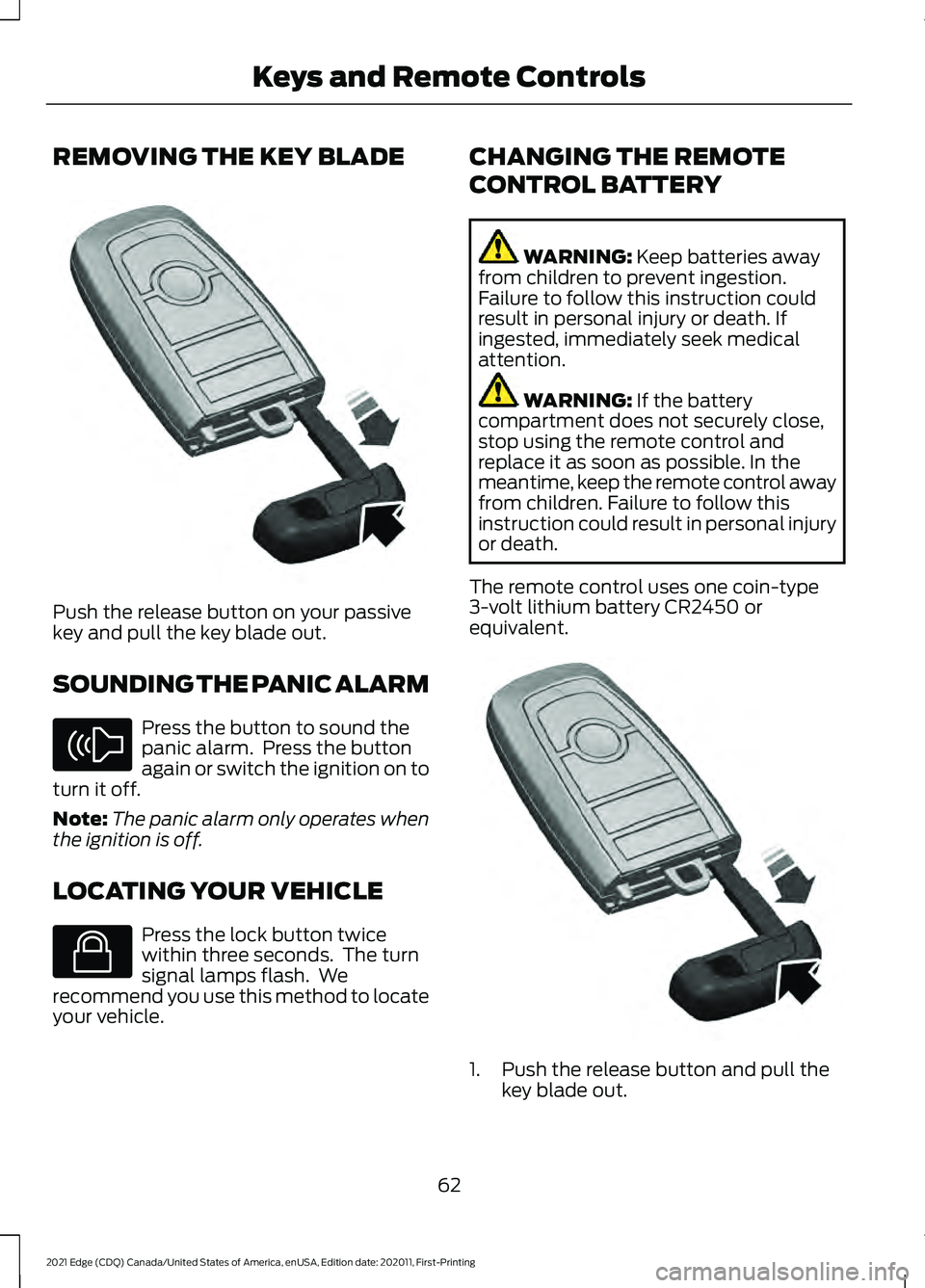
REMOVING THE KEY BLADE
Push the release button on your passive
key and pull the key blade out.
SOUNDING THE PANIC ALARM
Press the button to sound the
panic alarm. Press the button
again or switch the ignition on to
turn it off.
Note: The panic alarm only operates when
the ignition is off.
LOCATING YOUR VEHICLE Press the lock button twice
within three seconds. The turn
signal lamps flash. We
recommend you use this method to locate
your vehicle. CHANGING THE REMOTE
CONTROL BATTERY WARNING: Keep batteries away
from children to prevent ingestion.
Failure to follow this instruction could
result in personal injury or death. If
ingested, immediately seek medical
attention. WARNING:
If the battery
compartment does not securely close,
stop using the remote control and
replace it as soon as possible. In the
meantime, keep the remote control away
from children. Failure to follow this
instruction could result in personal injury
or death.
The remote control uses one coin-type
3-volt lithium battery CR2450 or
equivalent. 1. Push the release button and pull the
key blade out.
62
2021 Edge (CDQ) Canada/United States of America, enUSA, Edition date: 202011, First-Printing Keys and Remote ControlsE322866 E138624 E138623 E322866
Page 86 of 500
LIFTGATE PRECAUTIONS
WARNING: It is extremely
dangerous to ride in a cargo area, inside
or outside of a vehicle. In a crash, people
riding in these areas are more likely to be
seriously injured or killed. Do not allow
people to ride in any area of your vehicle
that is not equipped with seats and
seatbelts. Make sure everyone in your
vehicle is in a seat and properly using a
seatbelt. Failure to follow this warning
could result in serious personal injury or
death. WARNING:
Make sure that you fully
close the liftgate to prevent exhaust
fumes from entering your vehicle. If you
are unable to fully close the liftgate,
open the air vents or the windows to
allow fresh air to enter your vehicle.
Failure to follow this instruction could
result in personal injury or death. WARNING: Keep keys out of reach
of children. Do not allow children to
operate or play near an open or moving
power liftgate. You should supervise the
operation of the power liftgate at all
times.
OPENING THE LIFTGATE
Opening the Liftgate From Inside
Your Vehicle
P o w er Lift g a t e R el e a s e
P o w er Lift g a t e Ob s t a cl e D e t e c tion
With the transmission in park
(P), press the button on the
instrument panel. Note:
Be careful when opening or closing
the liftgate in a garage or other enclosed
area to avoid damaging the liftgate.
Note: Do not hang anything, for example
a bike rack, from the glass or liftgate. This
could damage the liftgate and its
components.
Note: Do not leave the liftgate open while
driving. This could damage the liftgate and
its components.
Opening the Liftgate From Outside
Your Vehicle
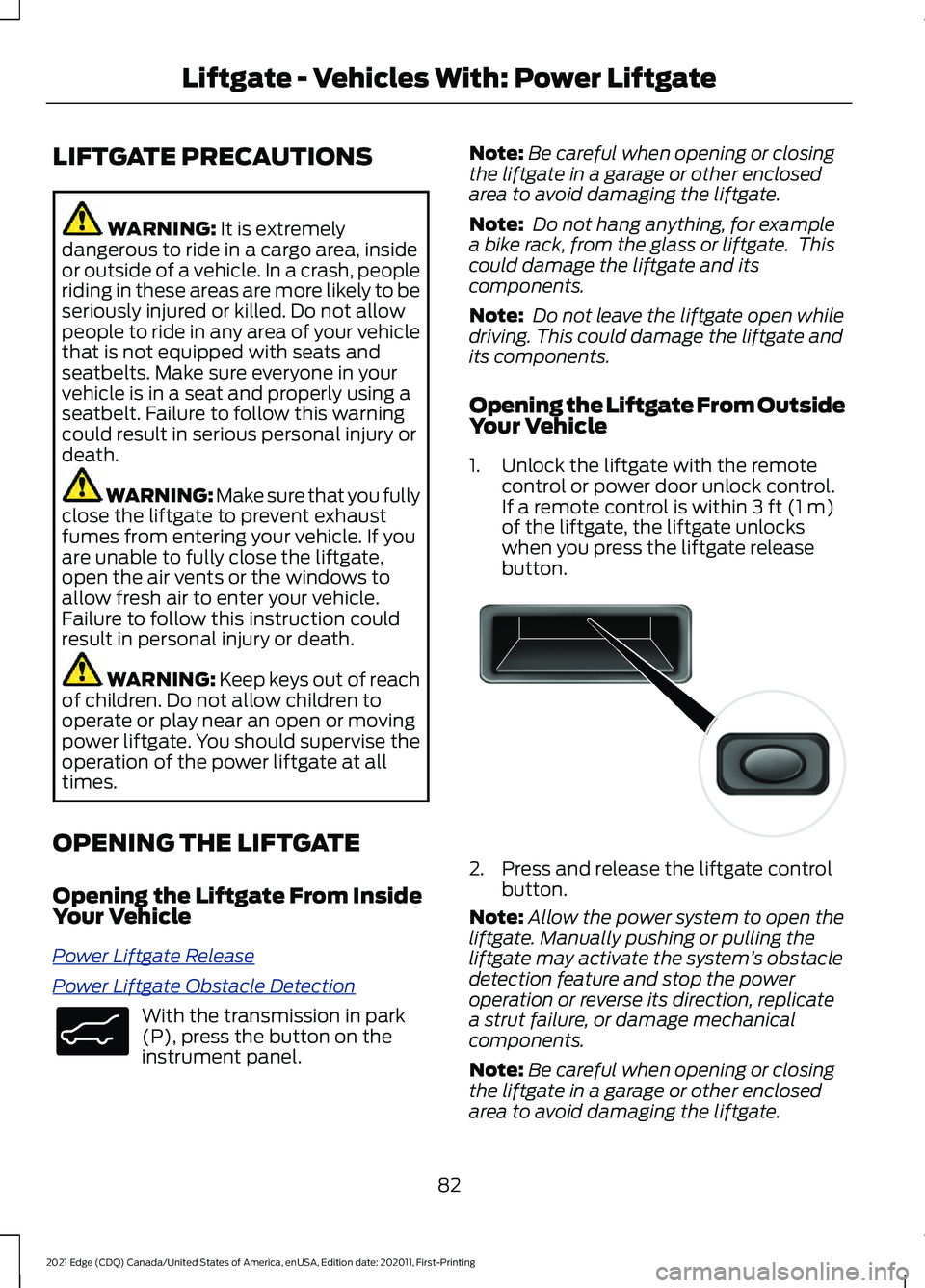
1. Unlock the liftgate with the remote control or power door unlock control.
If a remote control is within 3 ft (1 m)
of the liftgate, the liftgate unlocks
when you press the liftgate release
button. 2. Press and release the liftgate control
button.
Note: Allow the power system to open the
liftgate. Manually pushing or pulling the
liftgate may activate the system ’s obstacle
detection feature and stop the power
operation or reverse its direction, replicate
a strut failure, or damage mechanical
components.
Note: Be careful when opening or closing
the liftgate in a garage or other enclosed
area to avoid damaging the liftgate.
82
2021 Edge (CDQ) Canada/United States of America, enUSA, Edition date: 202011, First-Printing Liftgate - Vehicles With: Power LiftgateE138633 E138632
Page 111 of 500
OPENING AND CLOSING THE
WINDOWS
WARNING: Do not leave children
unattended in your vehicle and do not
let them play with the power windows.
Failure to follow this instruction could
result in personal injury. WARNING:
When closing the
power windows, verify they are free of
obstruction and make sure that children
and pets are not in the proximity of the
window openings. Press the window control switch
to open the window. Lift the
window control switch to close
the window.
Note: The power windows operate with the
ignition on, and for several minutes after you
switch the ignition off or until you open a
front door.
To reduce wind noise or pulsing noise when
one window is open, slightly open the
opposite window.
One-Touch Open
(If Equipped)
Fully press the window control switch and
release it. Press again or lift it to stop the
window.
One-Touch Close
(If Equipped)
Fully lift the window control switch and
release it. Press again or lift it to stop the
window.
Resetting One-Touch Close
Carry out all steps within 30 seconds of
starting the sequence.
1. Close the window. 2. Press and hold the window control
switch until the window is fully open.
Keep the window control switch
pressed for a few seconds.
3. Lift and hold the window control switch
until the window is fully closed. Keep
the window control switch held for a
few seconds.
4. Press and hold the window control switch until the window is fully open.
Keep the window control switch
pressed for a few seconds.
5. Lift and hold the window control switch
until the window is fully closed. Keep
the window control switch held for a
few seconds.
Note: Repeat the procedure if the window
does not close when you use one-touch.
Accessory Delay
The window switches remain operational
for several minutes when you switch the
ignition off or until you open either front
door.
GLOBAL OPENING
What Is Global Opening
You can use the remote control to open
the windows with the ignition off.
Using Global Opening
Gl ob al Open W indo w s
1.
Press and release the unlock button on
the remote control.
2. Press and hold the unlock button on the remote control.
3. Release the button when the windows
start to open.
Press the lock or the unlock button on the
remote control to stop global opening.
107
2021 Edge (CDQ) Canada/United States of America, enUSA, Edition date: 202011, First-Printing Windows
Page 390 of 500
UPDATING THE VEHICLE
SYSTEMS WIRELESSLY
Over the air system updates
allow you to update your vehicle
system software wirelessly. To
make sure you receive all updates, set a
recurring schedule and connect to Wi-Fi.
Updates may take longer if not connected
to Wi-Fi, or may not download at all. See
Connected Vehicle (page 360).
Note: Additional over the air update icons
may appear in the status bar. See
Status
Bar (page 373).
Over the Air System Update
Requirements
Before updating, reference this list to make
sure your vehicle is ready be updated. If
these requirements are not met during a
scheduled update, the update will be
canceled and you can reschedule.
• Your vehicle is not running.
• Your vehicle is stopped.
• Your vehicle is parked.
• The hazard indicators are switched off.
• The alarm is not sounding.
• The doors are closed.
• The parking lights are switched off.
• You are not pressing the brake pedal.
• An emergency call is not in progress.
• Your vehicle is not in limp mode.
Scheduling an Over the Air System
Update
Make sure Vehicle Connectivity and
Automatic Updates are switched on.
Using the Settings Menu
1. Open the application drawer.
2. Press the
System Updates button. 3. Press
Schedule Update.
4. Use the controls to set the time and day of the update.
5. Save the schedule.
Note: You can set the updates to occur
every seven days.
Using the Status Bar Icon When an update is available, tap
the notification icon and follow
the prompts on the screen.
Applying an Over the Air System
Update
You can schedule a convenient time for
the update to complete. During scheduled
updates you may not be able to use your
vehicle.
Note: Updates may take up to 30 minutes
to complete.
You can see the progress of the update on
the touchscreen. An update cannot be
canceled once it has been started.
During an update you will not be able to
drive your vehicle, start the vehicle, use
remote controls to lock and unlock the
vehicle. The alarm, central locks, and door
tones are disabled. The electronic door
lock will not function during an update. You
can open the doors using the mechanical
latch if child locks are not on. Pull the
handle until it stops to use the mechanical
latch.
Note: Double locking is switched off and
central locking is switched on during and
after an update.
Note: If your vehicle is plugged in, charging
will stop during an update and resume when
the update is complete.
386
2021 Edge (CDQ) Canada/United States of America, enUSA, Edition date: 202011, First-Printing Vehicle System UpdatesE327789 E327785
Page 480 of 500
Blind Spot Information System
Precautions..................................................231
Blind Spot Information System Requirements.............................................232
Blind Spot Information System – Troubleshooting........................................233
Blind Spot Information System – Information Messages................................ 233
Bluetooth®.....................................................381
Body Control Module Fuse Box.............286 Accessing the Body Control Module Fuse
Box..................................................................... 286
Identifying the Fuses in the Body Control Module Fuse Box........................................... 287
Locating the Body Control Module Fuse Box..................................................................... 286
Body Styling Kit Precautions....................312
Body Styling Kits...........................................312
Bonnet Lock See: Opening and Closing the Hood..........290
Booster Seats
..................................................39
Types of Booster Seats...................................... 39
Brake Fluid Specification
..........................188
Brake Over Accelerator...............................187
Brake Precautions........................................187
Brakes................................................................187 Anti-Lock Braking System............................... 187
Brakes – Troubleshooting............................... 188
Brakes – Troubleshooting.........................188 Brakes – Frequently Asked
Questions......................................................... 189
Brakes – Information Messages................... 189
Brakes – Warning Lamps................................ 188
Breaking-In.....................................................263 Brakes and Clutch............................................. 263
Tires........................................................................\
263
C
Calculating Payload
....................................249
Calculating the Load Limit.......................249
Helpful examples for calculating the
available amount of cargo and luggage
load capacity.................................................. 250
California Proposition 65 - United States of America
..................................................440
Canceling the Set Speed...........................213
Capacities and Specifications................347 Catalytic Converter.......................................176
Catalytic Converter –
Troubleshooting............................................. 176
Catalytic Converter Precautions
.............176
Catalytic Converter – Troubleshooting.........................................176
Catalytic Converter – Warning Lamps................................................................. 176
Changing a Flat Tire.....................................341 ........................................................................\
.......... 346
Dissimilar Spare Wheel and Tire Assembly Information...................................................... 341
Stowing the flat tire ......................................... 345
Tire Change Procedure.................................... 342
Changing a Road Wheel
............................341
Changing the 12V Battery.........................299 Remove and Reinstall the Battery.............300
Changing the Engine Air Filter................298
Changing the Fuel Filter............................298
Changing the Remote Control Battery.............................................................62
Changing the Vehicle Wi-Fi Hotspot Name or Password..................................364
Changing the Wi-Fi Hotspot Frequency........................................................ 365
Charging a Device
.........................................154
Charging a Wireless Device.......................157
Checking MyKey System Status
..............68
Checking the Brake Fluid...........................187
Checking the Coolant................................294 Adding Coolant.................................................. 295
Coolant Change................................................. 296
Engine Coolant Temperature Management.................................................. 297
Fail-Safe Cooling............................................... 296
Severe Climates................................................. 296
Checking the Seatbelts................................47
Checking the Tire Pressures....................326
Checking the Wiper Blades........................95
Children and Airbags....................................54
Child Restraint Anchor Points....................32 Locating the Child Restraint Lower Anchor
Points................................................................... 32
Locating the Child Restraint Top Tether Anchor Points................................................... 33
What Are the Child Restraint Anchor Points................................................................... 32
476
2021 Edge (CDQ) Canada/United States of America, enUSA, Edition date: 202011, First-Printing Index
Page 481 of 500
Child Restraints...............................................33
Child Restraint Position Information.............33
Child Restraints Recommendation...............34
Child Safety
.......................................................31
Child Restraint Anchor Points.......................... 32
Child Restraints..................................................... 33
Installing Child Restraints................................. 34
Child Safety Locks..........................................41 Left-Hand Side....................................................... 41
Right-Hand Side.................................................... 41
Child Safety Precautions
..............................31
Cleaning Products.......................................307 Materials............................................................... 307
Cleaning the Exterior..................................307 Cleaning Camera Lenses and
Sensors............................................................ 309
Cleaning Chrome, Aluminium or Stainless Steel.................................................................. 308
Cleaning Headlamps and Rear Lamps............................................................... 307
Cleaning Stripes or Graphics........................ 309
Cleaning the Engine Compartment...........308
Cleaning the Exterior Precautions...............307
Cleaning the Underbody................................ 309
Cleaning Wheels............................................... 308
Cleaning Windows and Wiper Blades............................................................... 308
Cleaning the Interior...................................309 Cleaning Carpets and Floor Mats.................310
Cleaning Displays and Screens..................... 310
Cleaning Fabric Seats and Headliners........................................................ 310
Cleaning Leather and Vinyl ............................ 310
Cleaning Moonroof Tracks............................... 311
Cleaning Plastic................................................. 309
Cleaning Seatbelts.............................................. 311
Cleaning Storage Compartments.................311
Cleaning the Instrument Panel.................... 309
Clearing All MyKeys.......................................67
Clearing the Garage Door Opener...........151
Climate Control
.............................................128
Auto Mode............................................................ 130
Climate Control – Troubleshooting..............131
Climate Control – Troubleshooting
........131
Climate Control – Frequently Asked
Questions........................................................... 131
Closing the Liftgate.......................................80 Closing the Hands-Free Liftgate.................... 85Closing the Liftgate From Inside Your
Vehicle................................................................. 84
Closing the Liftgate From Outside Your Vehicle................................................................ 80
Closing the Liftgate Using the Remote Control................................................................ 85
Cold Weather Precautions.......................263
Connected Vehicle
.....................................360
Connected Vehicle –
Troubleshooting............................................. 361
Connecting the Vehicle to a Mobile Network........................................................... 360
Connected Vehicle Data
..............................24
Connected Vehicle Limitations..............360
Connected Vehicle Requirements........360
Connected Vehicle – Troubleshooting.........................................361
Connected Vehicle – Frequently Asked Questions......................................................... 361
Connecting a Bluetooth® Device...........381
Connecting a Trailer....................................254 Safety Chains...................................................... 255
Trailer Lamps....................................................... 254
Trailer Towing Connector................................ 254
Connecting a Trailer Precautions..........254
Connecting the Vehicle to a Mobile Network.......................................................360
Connecting FordPass to the Modem.........360
Enabling and Disabling the Modem..........360
What Is the Modem.......................................... 360
Connecting the Vehicle to a Wi-Fi Network.......................................................360
Connecting Your Phone
.............................377
Contacting Us...................................................15
Argentina.................................................................. 15
Asia Pacific.............................................................. 15
Australia.................................................................... 15
Brazil........................................................................\
... 15
Canada...................................................................... 15
Caribbean, Central America and Israel.........15
Europe....................................................................... 15
Ford Credit - US Only........................................... 16
Middle East.............................................................. 16
New Zealand........................................................... 15
North Africa ............................................................ 15
Puerto Rico.............................................................. 16
South Korea............................................................ 16
Sub-Saharan Africa ............................................. 15
477
2021 Edge (CDQ) Canada/United States of America, enUSA, Edition date: 202011, First-Printing Index
Page 486 of 500
Information on the Tire Sidewall............316
Information on P Type Tires............................ 317
Inspecting the Tire for Damage..............327 Safety Practices.................................................. 327
Inspecting the Tire for Wear.....................327
Inspecting the Wheel Valve Stems............................................................328
Installing and Removing the Luggage Compartment Cargo Net.......................252
Installing and Removing the Luggage Compartment Cover................................252
Installing the Luggage Cover......................... 252
Removing the Luggage Cover....................... 253
Installing Child Restraints...........................34 Combining the Seatbelt and Lower Anchors
for Attaching Child Restraints.................... 38
Installing a Child Restraint in a Center Seat....................................................................... 37
Using Lower Anchors and Tethers for Children............................................................... 36
Using Seatbelts..................................................... 34
Using Tether Straps............................................. 38
Instrument Cluster Display.........................117 Personalized Settings....................................... 120
Trip Computer....................................................... 118
Instrument Cluster Display Main Menu................................................................117
Instrument Cluster Indicators...................116
Adaptive Cruise Control.................................... 116
Automatic Headlamp High Beam.................116
Auto-Start-Stop.................................................. 116
Blind Spot Monitor.............................................. 116
Cruise Control....................................................... 116
Front Airbag........................................................... 116
Front Fog Lamps.................................................. 116
High Beam.............................................................. 116
Hill Start Assist..................................................... 116
Lane Keeping Aid................................................. 116
Side Marker Lamps............................................. 116
Stability and Traction Control........................ 116
Turn Signal Lamps.............................................. 116
Instrument Cluster........................................113 Fuel Gauge............................................................. 113
Instrument Cluster Overview
....................113
Instrument Cluster Warning Lamps.......114 Anti-Lock Brake System.................................... 114
Battery..................................................................... 114
Brake System........................................................ 115Door Ajar.................................................................
115
Electric Park Brake.............................................. 115
Engine Coolant Temperature.......................... 115
Fasten Seatbelt.................................................... 115
Hood Ajar................................................................ 115
Liftgate Ajar............................................................ 115
Low Fuel Level...................................................... 115
Low Tire Pressure Warning.............................. 115
Low Washer Fluid Level..................................... 115
Malfunction Indicator Lamp............................ 115
Oil Pressure............................................................ 115
Powertrain Fault................................................... 115
Instrument Panel............................................27
Interior Air Quality.........................................132
Interior Bulbs................................................306 Interior Bulb Specification Chart.................306
Interior Lamp Function...............................105 Switching the Interior Lamp Function On
and Off.............................................................. 105
What Is the Interior Lamp Function............105
Interior Lighting
.............................................105
Ambient Lighting................................................ 106
Interior Lamp Function..................................... 105
Interior Lighting – Troubleshooting.............106
Interior Lighting – Troubleshooting........................................106
Interior Lighting – Frequently Asked Questions......................................................... 106
Interior Mirror.................................................109 Auto-Dimming Interior Mirror........................ 109
Interior Mirror Precautions........................109
Introduction.......................................................17
J
Jump Starting the Vehicle........................266 Jump Starting Precautions............................ 266
Jump Starting the Vehicle............................... 267
Preparing the Vehicle....................................... 267
K
Keyless Entry
....................................................74
Keyless Entry – Troubleshooting.................... 75
Keyless Entry Keypad....................................76 Keyless Entry Keypad –
Troubleshooting............................................... 78
Keyless Entry Keypad Limitations............76
482
2021 Edge (CDQ) Canada/United States of America, enUSA, Edition date: 202011, First-Printing Index