steering FORD EDGE 2021 User Guide
[x] Cancel search | Manufacturer: FORD, Model Year: 2021, Model line: EDGE, Model: FORD EDGE 2021Pages: 500, PDF Size: 8.52 MB
Page 63 of 500
HOW DOES 911 ASSIST WORK
If a crash deploys an airbag, excluding knee
airbags and rear inflatable seatbelts, or
activates the fuel pump shut-off, your
vehicle may be able to contact emergency
services by dialing 911 through a paired and
connected Bluetooth-enabled phone.
Not all crashes will deploy an airbag or
activate the fuel pump shut-off. If a
connected cell phone sustains damage or
loses its connection to SYNC during a
crash, SYNC will search for and try to
connect to a previously paired cell phone.
SYNC will then attempt to call the
emergency services.
Before making the call:
•
SYNC provides about 10 seconds to
cancel the call. If you fail to cancel the
call, SYNC attempts to dial 911.
• SYNC says the following, or a similar
message: "SYNC will attempt to call
911, to cancel the call, press Cancel on
your screen or press and hold the
phone button on your steering wheel."
If you do not cancel the call and SYNC
makes a successful call a pre-recorded
message plays for the 911 operator. The
occupants in your vehicle are able to talk
with the operator. Be prepared to provide
your name, phone number and location
immediately because not all 911 systems
are capable of receiving this information
electronically.
During an emergency call the system
transmits vehicle data to the emergency
service. EMERGENCY CALL
REQUIREMENTS WARNING: Do not wait for 911
Assist to make an emergency call if you
can do it yourself. Dial emergency
services immediately to avoid delayed
response time which could increase the
risk of serious injury or death after a
crash. If you do not hear 911 Assist within
five seconds of the crash, the system or
phone may be damaged or
non-functional. WARNING:
Always place your
phone in a secure location in your vehicle
so it does not become a projectile or get
damaged in a crash. Failure to do so may
cause serious injury to someone or
damage the phone which could prevent
911 Assist from working properly. WARNING:
Unless the 911 Assist
setting is set on before a crash, the
system will not dial for help which could
delay response time, potentially
increasing the risk of serious injury or
death after a crash.
• SYNC must be powered and working
properly at the time of the incident and
throughout feature activation and use.
• The 911 Assist feature must be set on
before the incident.
• You must pair and connect a Bluetooth
enabled and compatible cell phone to
SYNC.
• A connected Bluetooth enabled phone
must have the ability to make and
maintain an outgoing call at the time
of the incident.
59
2021 Edge (CDQ) Canada/United States of America, enUSA, Edition date: 202011, First-Printing 911 Assist
Page 71 of 500
Emergency Assistance
If you set emergency assistance to always
on, you cannot switch it off with a MyKey.
Do Not Disturb
If you set do not disturb to always on, you
cannot switch it off with a MyKey.
Note:
If a phone is connected using Apple
CarPlay or Android Auto while driving with
a MyKey, the driver can receive phone calls
and text messages even if the do not disturb
restriction is on, and if the vehicle is
equipped with satellite radio, the adult
content is not restricted.
Traction Control
If you set traction control to always on, you
cannot switch it off with a MyKey.
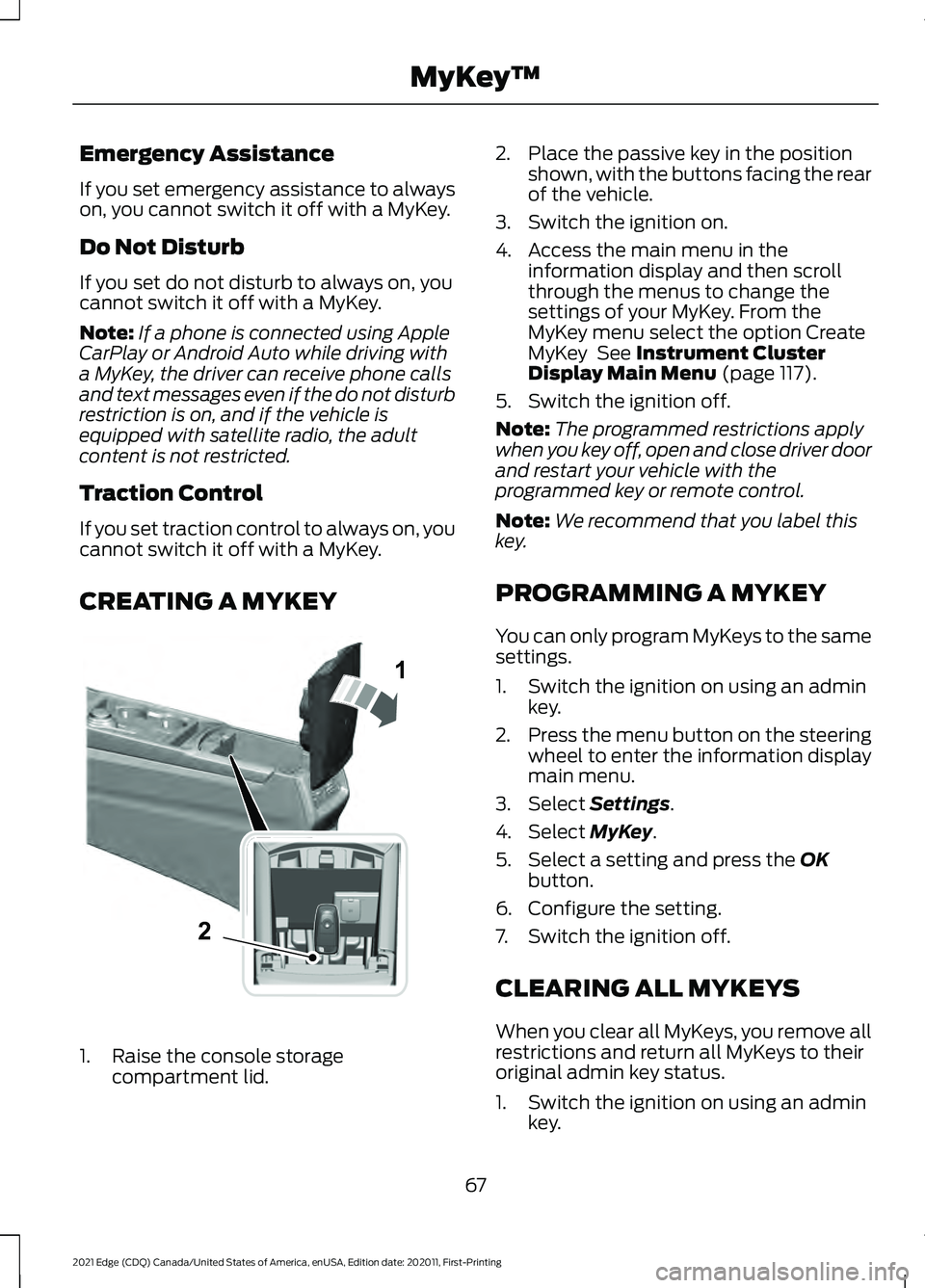
CREATING A MYKEY 1. Raise the console storage
compartment lid. 2. Place the passive key in the position
shown, with the buttons facing the rear
of the vehicle.
3. Switch the ignition on.
4. Access the main menu in the information display and then scroll
through the menus to change the
settings of your MyKey. From the
MyKey menu select the option Create
MyKey See Instrument Cluster
Display Main Menu (page 117).
5. Switch the ignition off.
Note: The programmed restrictions apply
when you key off, open and close driver door
and restart your vehicle with the
programmed key or remote control.
Note: We recommend that you label this
key.
PROGRAMMING A MYKEY
You can only program MyKeys to the same
settings.
1. Switch the ignition on using an admin key.
2. Press the menu button on the steering
wheel to enter the information display
main menu.
3. Select
Settings.
4. Select
MyKey.
5. Select a setting and press the
OK
button.
6. Configure the setting.
7. Switch the ignition off.
CLEARING ALL MYKEYS
When you clear all MyKeys, you remove all
restrictions and return all MyKeys to their
original admin key status.
1. Switch the ignition on using an admin key.
67
2021 Edge (CDQ) Canada/United States of America, enUSA, Edition date: 202011, First-Printing MyKey
™1
2E331284
Page 72 of 500
2.
Press the menu button on the steering
wheel to enter the information display
main menu.
3. Select Settings.
4. Select
MyKey.
5. Select
Clear MyKeys.
6. Press and hold the
OK button until a
confirmation message appears in the
information display.
CHECKING MYKEY SYSTEM
STATUS
You can find information about the
distance traveled using a MyKey and also
the number of admin keys and MyKeys
created for your vehicle. 1. Switch the ignition on.
2.
Press the menu button on the steering
wheel to enter the information display
main menu.
3. Select
Settings.
4. Select
MyKey.
5. Select
MyKey Info.
USING MYKEY WITH REMOTE
START SYSTEMS
MyKey is not compatible with unapproved,
aftermarket remote start systems. If you
choose to install a remote start system,
see an authorized dealer for an approved
remote start system.
MYKEY – TROUBLESHOOTING
MyKey – Information Messages Description
Message
Displays when trying to create a MyKey and the admin key is
not placed in the backup position. See
Creating a MyKey
(page 67).
Place Key in Backup
Location
Displays when trying to create a MyKey with a key already
designated as a MyKey.
Key is Already a MyKey
Displays to confirm that the key is restricted after you switch
the ignition off.
This Key restricted at
Next Key Cycle. Label
Key as MyKey
68
2021 Edge (CDQ) Canada/United States of America, enUSA, Edition date: 202011, First-Printing MyKey
™
Page 75 of 500
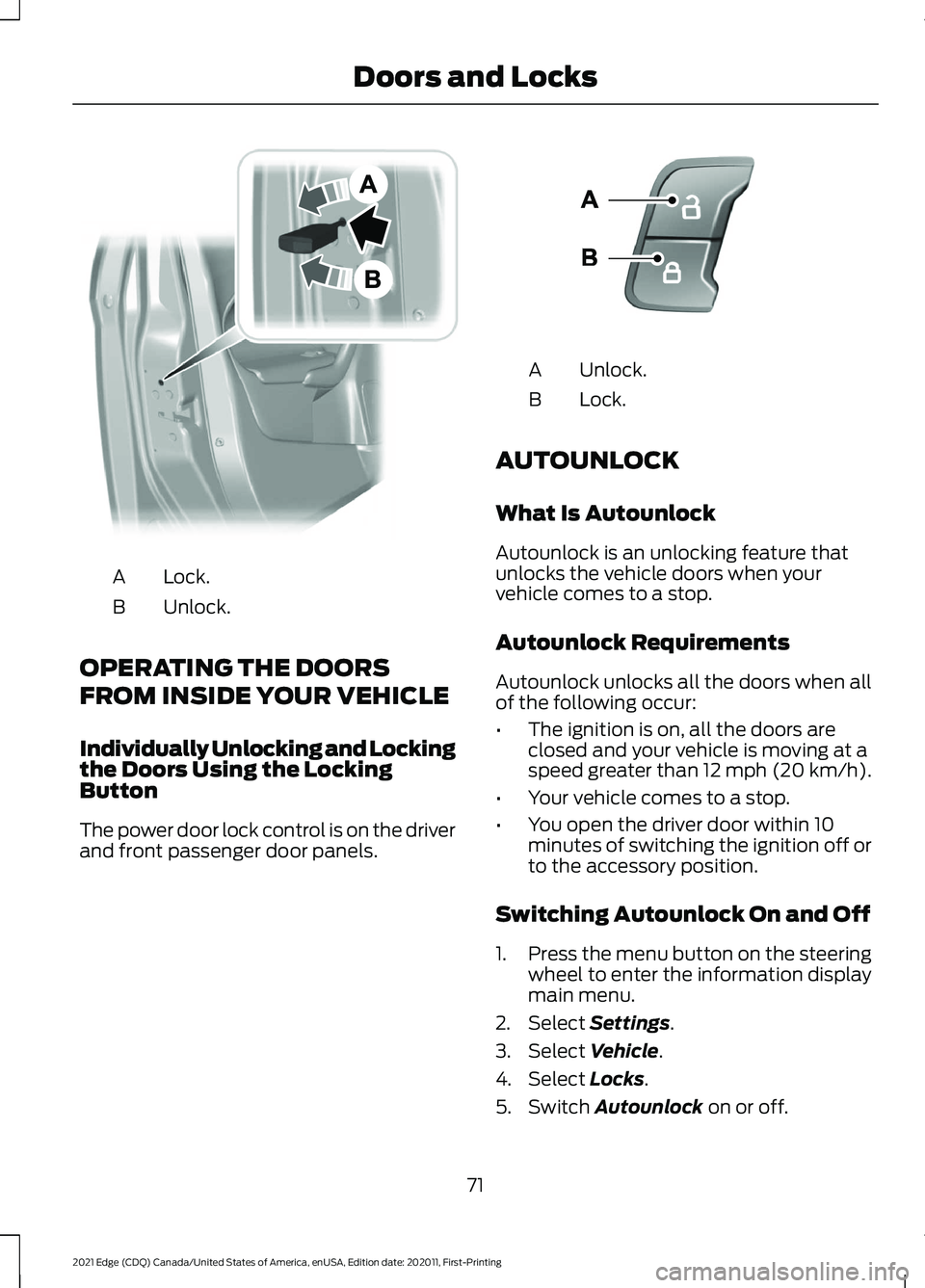
Lock.
A
Unlock.
B
OPERATING THE DOORS
FROM INSIDE YOUR VEHICLE
Individually Unlocking and Locking
the Doors Using the Locking
Button
The power door lock control is on the driver
and front passenger door panels. Unlock.
A
Lock.
B
AUTOUNLOCK
What Is Autounlock
Autounlock is an unlocking feature that
unlocks the vehicle doors when your
vehicle comes to a stop.
Autounlock Requirements
Autounlock unlocks all the doors when all
of the following occur:
• The ignition is on, all the doors are
closed and your vehicle is moving at a
speed greater than 12 mph (20 km/h).
• Your vehicle comes to a stop.
• You open the driver door within 10
minutes of switching the ignition off or
to the accessory position.
Switching Autounlock On and Off
1. Press the menu button on the steering
wheel to enter the information display
main menu.
2. Select Settings.
3. Select
Vehicle.
4. Select
Locks.
5. Switch
Autounlock on or off.
71
2021 Edge (CDQ) Canada/United States of America, enUSA, Edition date: 202011, First-Printing Doors and LocksE112203 E138628
Page 76 of 500
AUTOLOCK
What Is Autolock
Autolock is a locking feature that locks
your vehicle doors when you start driving.
Autolock Requirements
Autolock locks all the doors when all of the
following occur:
•
All doors are closed.
• The ignition is on.
• Your vehicle reaches a speed greater
than 12 mph (20 km/h).
MISLOCK
What Is Mislock
Mislock is a locking feature that warns you
if your vehicle has not locked.
Mislock Limitations
When you press the lock button once, the
direction indicators do not flash if:
• Any door or the liftgate is open.
• The hood is open. If you switch mislock off, the horn does not
sound if you press the lock button on the
remote control when a door is open.
Switching Mislock On and Off
1.
Press the menu button on the steering
wheel to enter the information display
main menu.
2. Select
Settings.
3. Select
Vehicle.
4. Select
Locks.
5. Switch
Mislock Chirp on or off.
DOORS AND LOCKS AUDIBLE
WARNINGS
Door Ajar Audible Warning
Sounds when a door is not fully closed and
your vehicle is moving.
DOORS AND LOCKS –
TROUBLESHOOTING
Doors and Locks – Warning Lamps
Door Ajar Warning Lamp It illuminates when you switch
the ignition on and remains on if
any door or the hood is open.
Doors and Locks – Information Messages Action
Message
Displays if a door is open. Fully close the door.
Driver Door Ajar
Passenger Door Ajar
Rear Left Door Ajar
Rear Right Door Ajar
72
2021 Edge (CDQ) Canada/United States of America, enUSA, Edition date: 202011, First-Printing Doors and LocksE249859
Page 83 of 500
HOW DOES EASY ENTRY AND
EXIT WORK
Easy entry and exit moves the driver seat
rearward up to 2 in (5 cm) and the steering
column up when you switch the ignition
off. The driver seat and steering column
return to their previous positions when you
switch the ignition on.
Note:
Depending on your vehicle, the
column may move up and in.
SWITCHING EASY ENTRY AND
EXIT ON AND OFF
If you enable the easy entry and exit
feature, it moves the driver seat position
rearward up to 2 in (5 cm) when you switch
the ignition off.
The driver seat returns to the previous
position when you switch the ignition on.
You can enable or disable this feature
through the information display. See
Instrument Cluster Display (page 117).
79
2021 Edge (CDQ) Canada/United States of America, enUSA, Edition date: 202011, First-Printing Easy Entry and Exit
Page 96 of 500
ADJUSTING THE STEERING
WHEEL - VEHICLES WITH:
MANUAL ADJUSTABLE
STEERING COLUMN
WARNING: Do not adjust the
steering wheel when your vehicle is
moving.
Note: Make sure that you are sitting in the
correct position. See Sitting in the Correct
Position
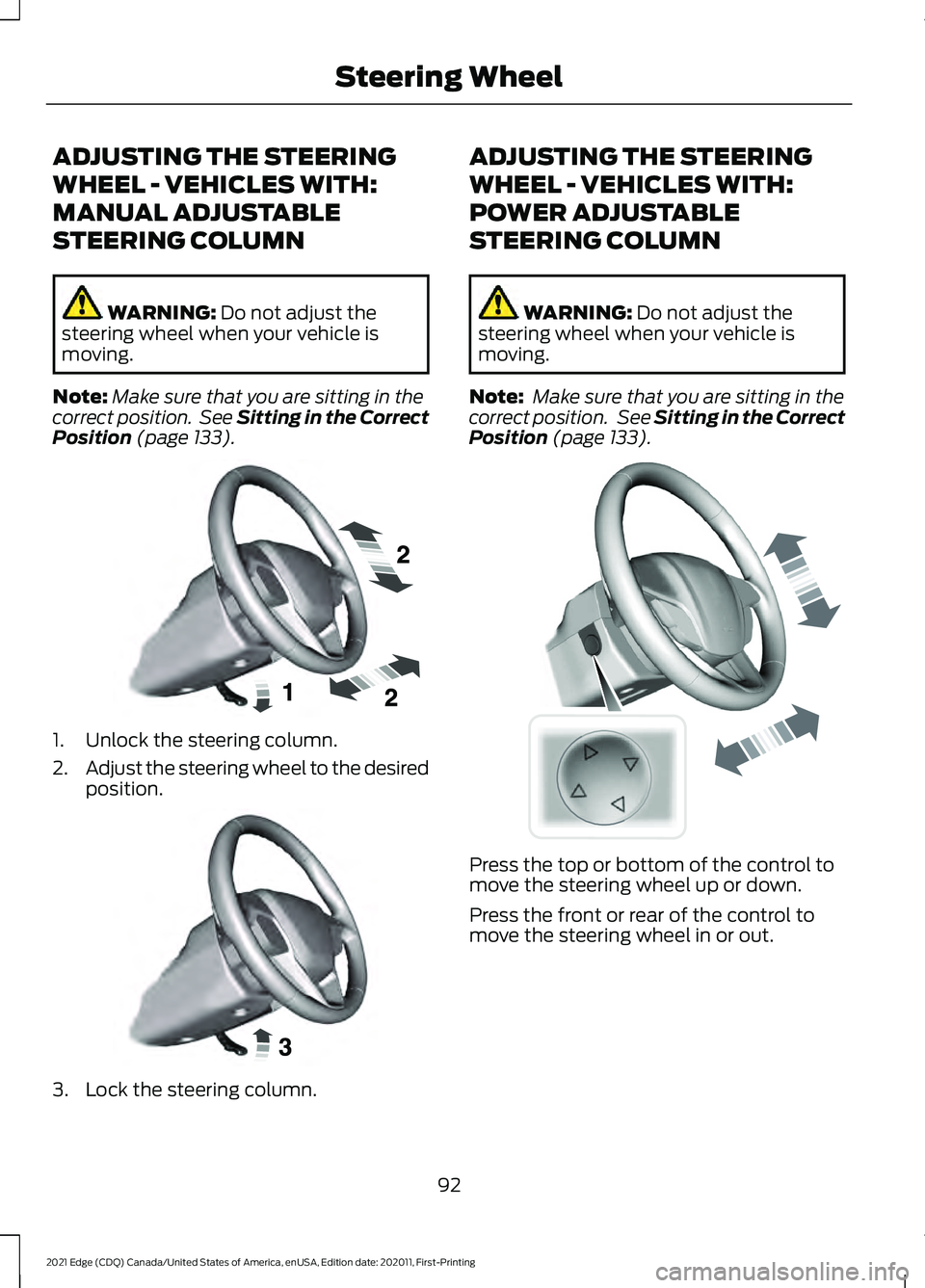
(page 133). 1. Unlock the steering column.
2.
Adjust the steering wheel to the desired
position. 3. Lock the steering column. ADJUSTING THE STEERING
WHEEL - VEHICLES WITH:
POWER ADJUSTABLE
STEERING COLUMN
WARNING:
Do not adjust the
steering wheel when your vehicle is
moving.
Note: Make sure that you are sitting in the
correct position. See
Sitting in the Correct
Position (page 133). Press the top or bottom of the control to
move the steering wheel up or down.
Press the front or rear of the control to
move the steering wheel in or out.
92
2021 Edge (CDQ) Canada/United States of America, enUSA, Edition date: 202011, First-Printing Steering WheelE191039 E191047 E261582
Page 97 of 500
RESETTING THE STOPPING
POSITION - VEHICLES WITH:
POWER ADJUSTABLE
STEERING COLUMN
Note:
The steering wheel stops when it
detects an obstruction. This sets a new
stopping position.
To reset the steering column to its normal
stopping position:
1. Confirm there is nothing obstructing the motion of the steering column.
2. Press and hold the steering column control until the steering column stops
moving.
3. Press the steering column control again.
Note: The steering column may start to
move again.
4. When the steering column stops, continue holding the control for a few
seconds.
5. Repeat for each direction, as necessary.
HORN Press on the center of the
steering wheel near the horn icon
to activate the horn.
SWITCHING THE HEATED
STEERING WHEEL ON AND OFF
(IF EQUIPPED) To switch the heated steering
wheel on or off, press the button
on the touchscreen near the
climate controls.
Note: A sensor regulates the temperature
of the steering wheel.
93
2021 Edge (CDQ) Canada/United States of America, enUSA, Edition date: 202011, First-Printing Steering WheelE270945
Page 98 of 500
WIPERS
Wiper Precautions
Do not operate the wipers on a dry
windshield. This could scratch the glass or
damage the wiper blades. Use the
windshield washers before wiping a dry
windshield.
Fully defrost the windshield before you
switch the windshield wipers on.
Switch the windshield wipers off before
entering a car wash.
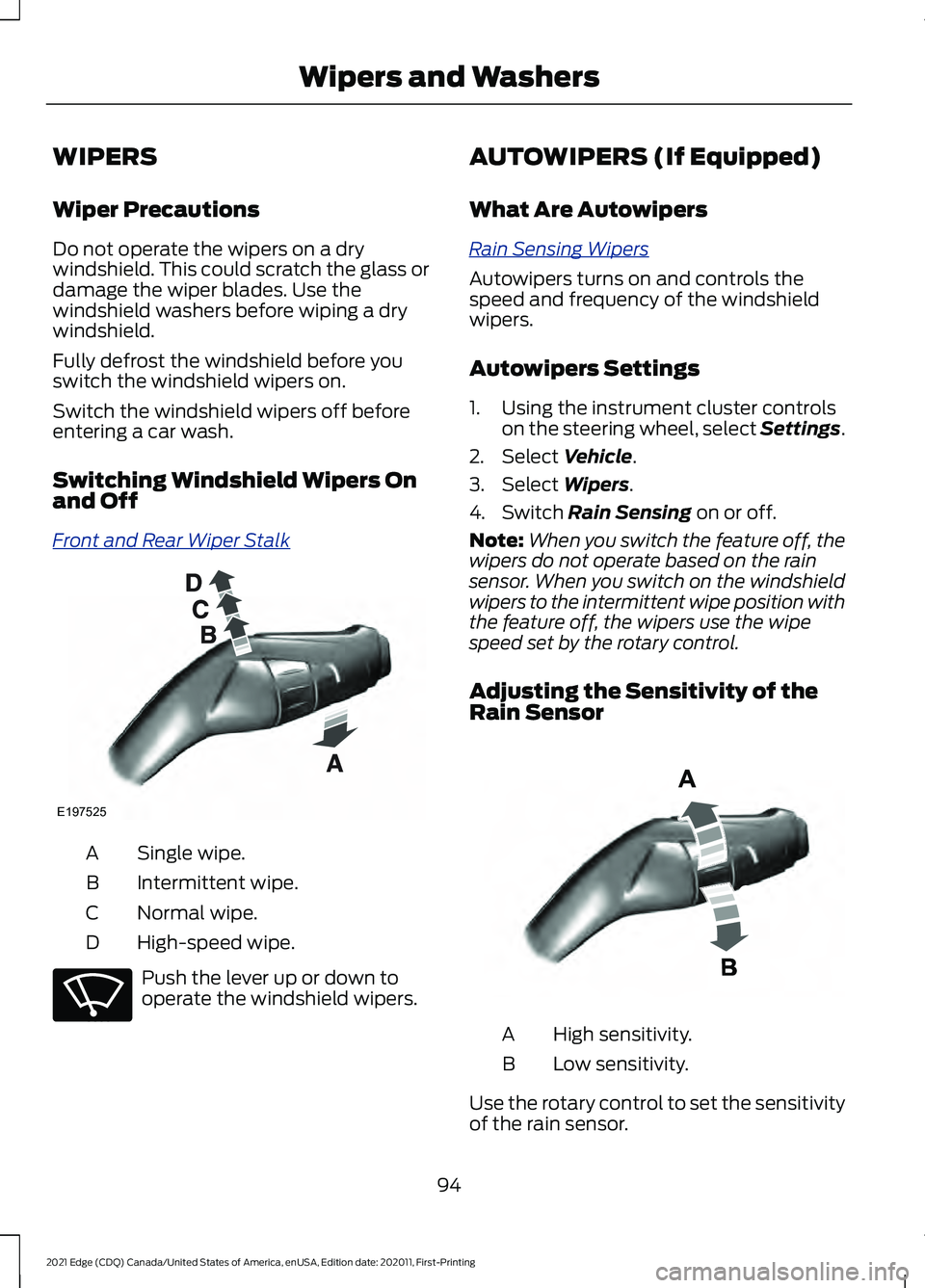
Switching Windshield Wipers On
and Off
Fr
ont and R e ar W iper S t alk
Single wipe.
A
Intermittent wipe.
B
Normal wipe.
C
High-speed wipe.
D Push the lever up or down to
operate the windshield wipers. AUTOWIPERS (If Equipped)
What Are Autowipers
R ain S ensing W iper s
Autowipers turns on and controls the
speed and frequency of the windshield
wipers.
Autowipers Settings
1. Using the instrument cluster controls
on the steering wheel, select Settings.
2. Select Vehicle.
3. Select
Wipers.
4. Switch
Rain Sensing on or off.
Note: When you switch the feature off, the
wipers do not operate based on the rain
sensor. When you switch on the windshield
wipers to the intermittent wipe position with
the feature off, the wipers use the wipe
speed set by the rotary control.
Adjusting the Sensitivity of the
Rain Sensor High sensitivity.
A
Low sensitivity.
B
Use the rotary control to set the sensitivity
of the rain sensor.
94
2021 Edge (CDQ) Canada/United States of America, enUSA, Edition date: 202011, First-Printing Wipers and WashersE197525 E270969 E331276
Page 99 of 500
When you select high sensitivity, the wipers
operate when the sensor detects a small
amount of water on the windshield.
When you select low sensitivity, the wipers
operate when the sensor detects a large
amount of water on the windshield.
SWITCHING THE REAR
WINDOW WIPER ON AND OFF
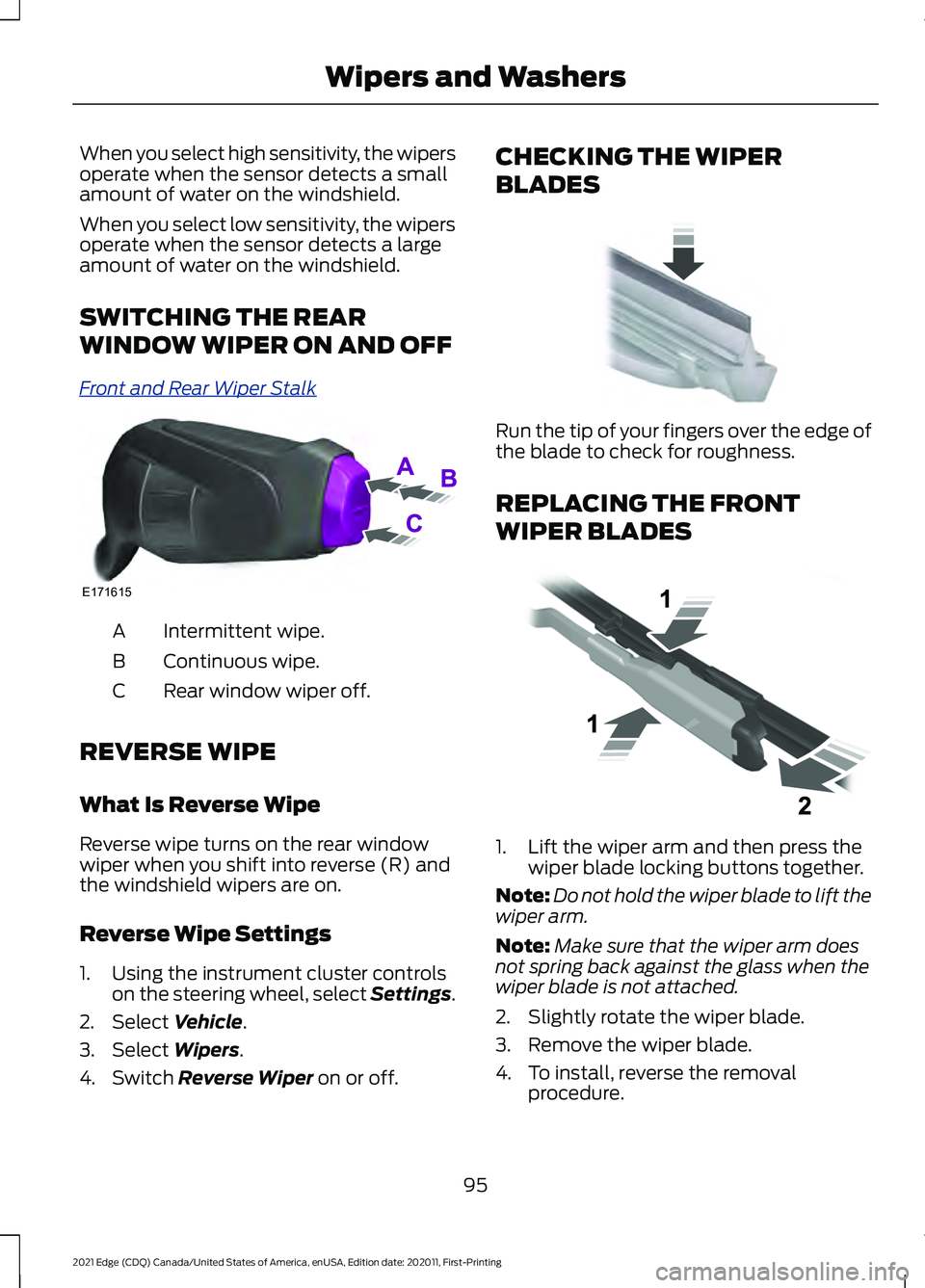
Fr
ont and R e ar W iper S t alk
Intermittent wipe.
A
Continuous wipe.
B
Rear window wiper off.
C
REVERSE WIPE
What Is Reverse Wipe
Reverse wipe turns on the rear window
wiper when you shift into reverse (R) and
the windshield wipers are on.
Reverse Wipe Settings
1. Using the instrument cluster controls on the steering wheel, select Settings.
2. Select Vehicle.
3. Select
Wipers.
4. Switch
Reverse Wiper on or off. CHECKING THE WIPER
BLADES
Run the tip of your fingers over the edge of
the blade to check for roughness.
REPLACING THE FRONT
WIPER BLADES
1. Lift the wiper arm and then press the
wiper blade locking buttons together.
Note: Do not hold the wiper blade to lift the
wiper arm.
Note: Make sure that the wiper arm does
not spring back against the glass when the
wiper blade is not attached.
2. Slightly rotate the wiper blade.
3. Remove the wiper blade.
4. To install, reverse the removal procedure.
95
2021 Edge (CDQ) Canada/United States of America, enUSA, Edition date: 202011, First-Printing Wipers and WashersE171615 E142463 E129990