steering wheel FORD EDGE 2021 Owner's Manual
[x] Cancel search | Manufacturer: FORD, Model Year: 2021, Model line: EDGE, Model: FORD EDGE 2021Pages: 500, PDF Size: 8.52 MB
Page 108 of 500
Switching Adaptive Front Lighting
On and Off
1. Using the instrument cluster controls
on the steering wheel, select Settings.
2. Select Vehicle.
3. Select
Lighting.
4. Switch Adaptive Headlamps on or off.
Set the lighting control to the autolamps
position to use the adaptive front lighting.
104
2021 Edge (CDQ) Canada/United States of America, enUSA, Edition date: 202011, First-Printing Exterior Lighting
Page 112 of 500
Note:
You can use global opening for a
short period of time when you unlock your
vehicle using the remote control.
Switching Global Opening On and
Off
1. Using the information display controls on the steering wheel, select Settings.
2. Select Vehicle.
3. Select
Windows.
4. Switch
Remote Open on or off.
WINDOW BOUNCE-BACK
What Is Window Bounce-Back
The window stops and reverses if it detects
an obstruction when closing.
Overriding Window Bounce-Back WARNING:
If you override
bounce-back, the window does not
reverse if it detects an obstacle. Take
care when closing the windows to avoid
personal injury or damage to your
vehicle.
1. Close the window until it reaches the point of resistance and let it reverse.
2. Lift and hold the window control switch
within two seconds to override
bounce-back and close the window.
Bounce-back is now disabled and you
can close the window manually.
Note: The window goes past the point of
resistance and you can fully close it.
Note: If the window does not close, have
your vehicle checked as soon as possible. LOCKING THE REAR WINDOW
CONTROLS Press the window control switch
to lock or unlock the rear window
controls. It illuminates when you
lock the rear window controls.
108
2021 Edge (CDQ) Canada/United States of America, enUSA, Edition date: 202011, First-Printing Windows
Page 121 of 500
USING THE INSTRUMENT
CLUSTER DISPLAY CONTROLS
WARNING: Driving while distracted
can result in loss of vehicle control, crash
and injury. We strongly recommend that
you use extreme caution when using any
device that may take your focus off the
road. Your primary responsibility is the
safe operation of your vehicle. We
recommend against the use of any
hand-held device while driving and
encourage the use of voice-operated
systems when possible. Make sure you
are aware of all applicable local laws
that may affect the use of electronic
devices while driving.
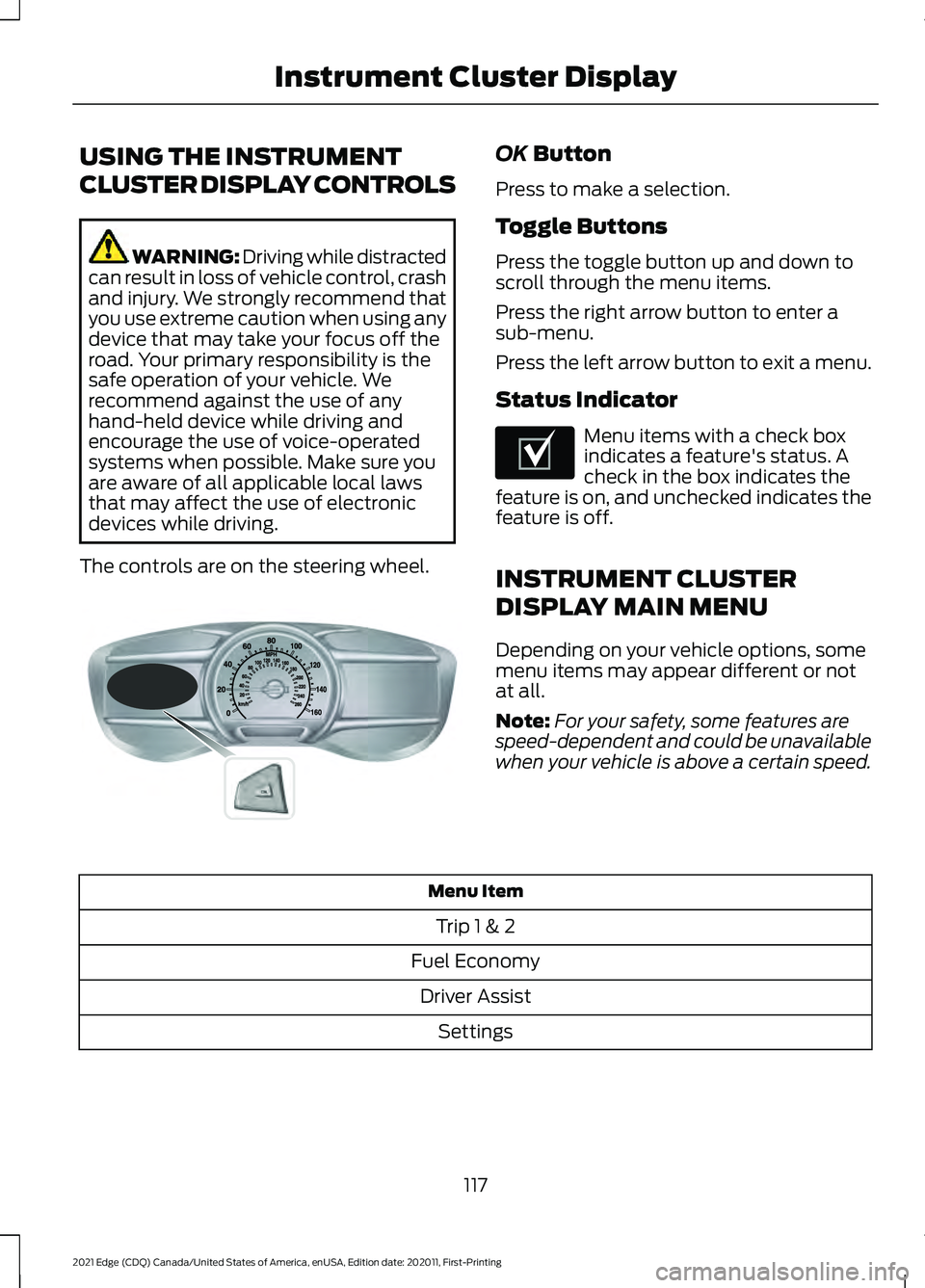
The controls are on the steering wheel. OK Button
Press to make a selection.
Toggle Buttons
Press the toggle button up and down to
scroll through the menu items.
Press the right arrow button to enter a
sub-menu.
Press the left arrow button to exit a menu.
Status Indicator Menu items with a check box
indicates a feature's status. A
check in the box indicates the
feature is on, and unchecked indicates the
feature is off.
INSTRUMENT CLUSTER
DISPLAY MAIN MENU
Depending on your vehicle options, some
menu items may appear different or not
at all.
Note: For your safety, some features are
speed-dependent and could be unavailable
when your vehicle is above a certain speed. Menu Item
Trip 1 & 2
Fuel Economy Driver Assist Settings
117
2021 Edge (CDQ) Canada/United States of America, enUSA, Edition date: 202011, First-Printing Instrument Cluster DisplayE144638 E204495
Page 122 of 500
TRIP COMPUTER
Accessing the Trip Computer
You can access the trip computer using
the steering wheel controls to navigate the
instrument cluster display. Action
Menu Item
Press the OK button.
Trip 1 & 2
118
2021 Edge (CDQ) Canada/United States of America, enUSA, Edition date: 202011, First-Printing Instrument Cluster Display
Page 123 of 500
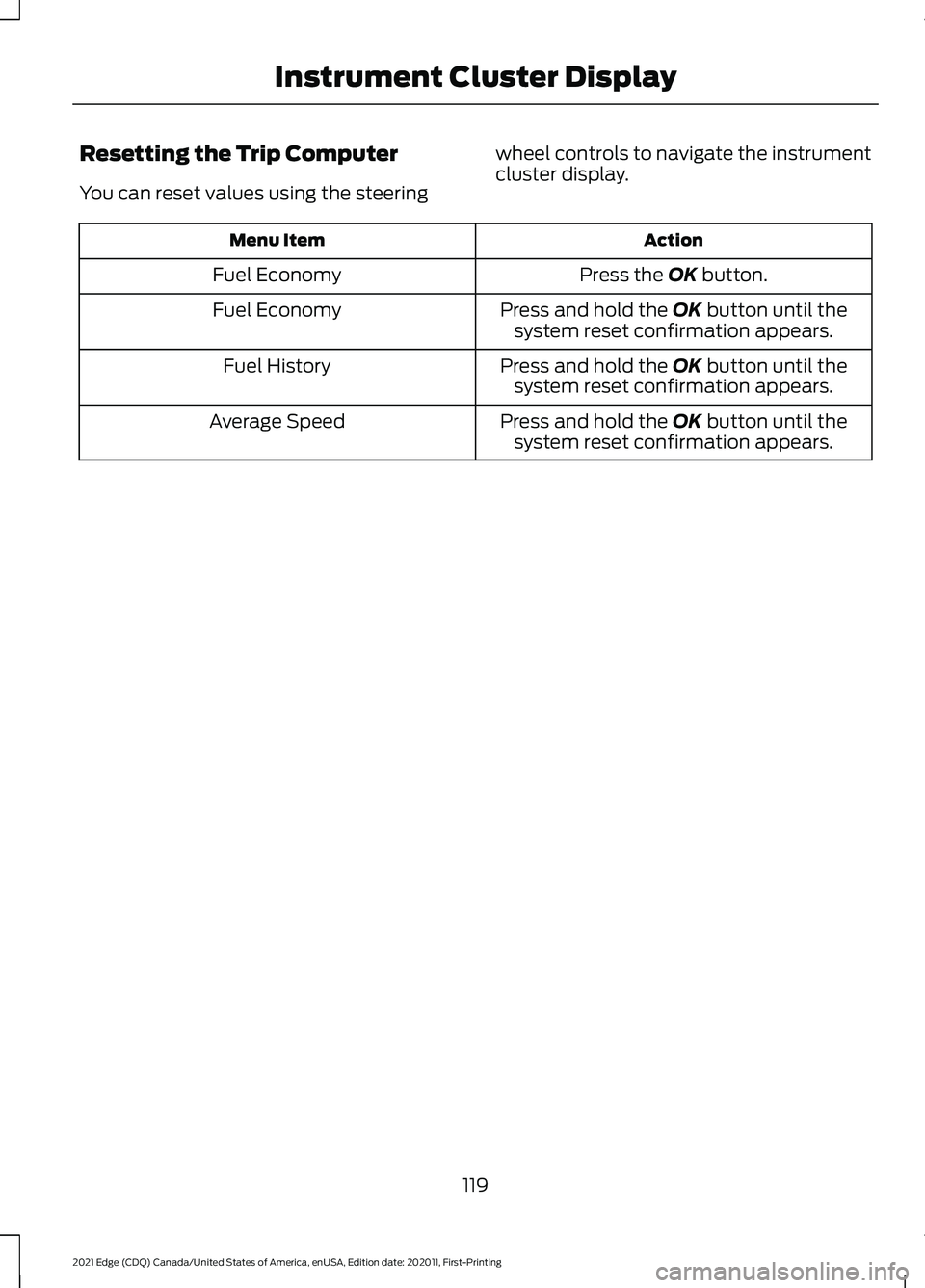
Resetting the Trip Computer
You can reset values using the steering
wheel controls to navigate the instrument
cluster display. Action
Menu Item
Press the OK button.
Fuel Economy
Press and hold the
OK button until the
system reset confirmation appears.
Fuel Economy
Press and hold the
OK button until the
system reset confirmation appears.
Fuel History
Press and hold the
OK button until the
system reset confirmation appears.
Average Speed
119
2021 Edge (CDQ) Canada/United States of America, enUSA, Edition date: 202011, First-Printing Instrument Cluster Display
Page 124 of 500
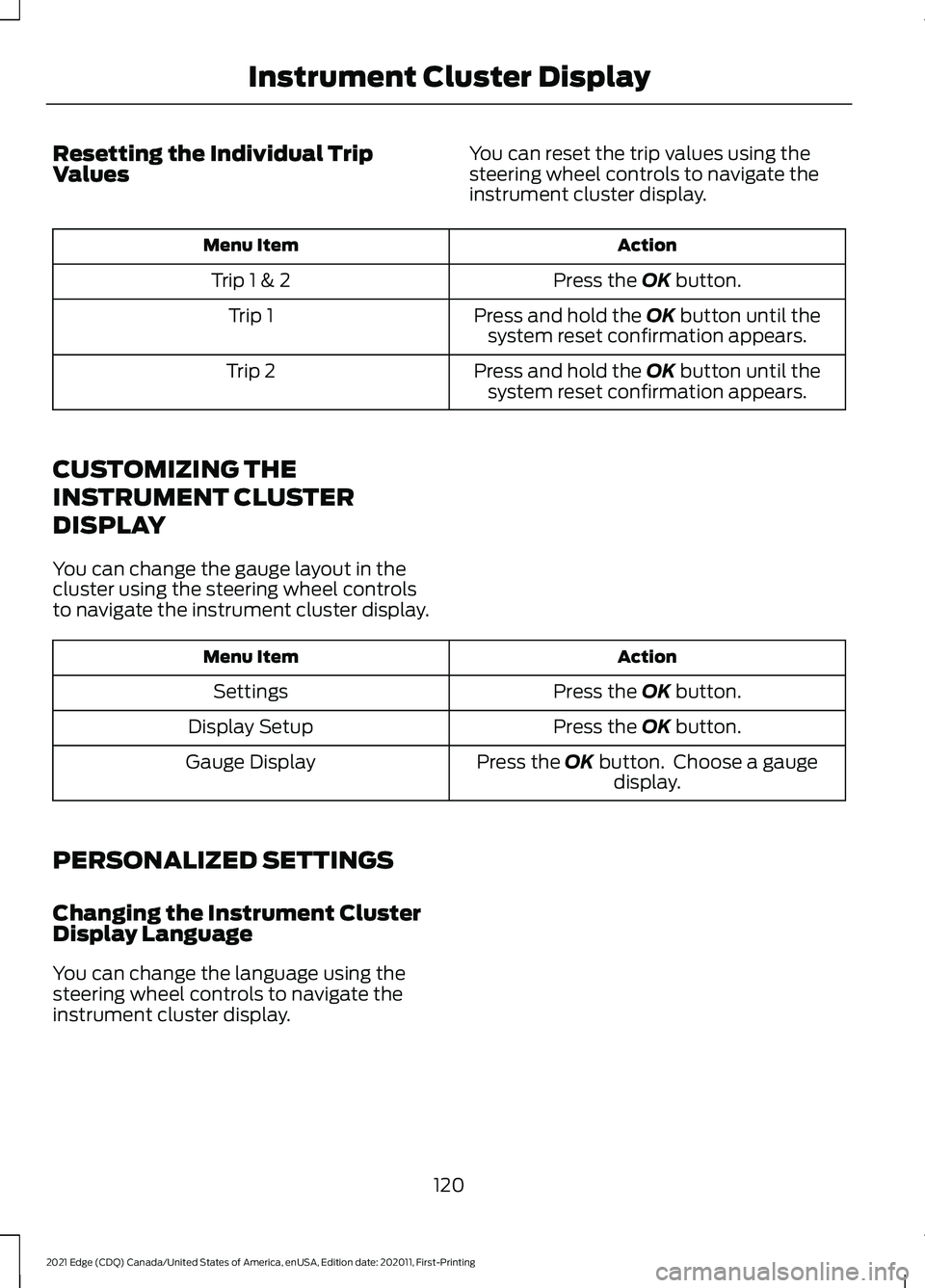
Resetting the Individual Trip
Values
You can reset the trip values using the
steering wheel controls to navigate the
instrument cluster display. Action
Menu Item
Press the OK button.
Trip 1 & 2
Press and hold the
OK button until the
system reset confirmation appears.
Trip 1
Press and hold the
OK button until the
system reset confirmation appears.
Trip 2
CUSTOMIZING THE
INSTRUMENT CLUSTER
DISPLAY
You can change the gauge layout in the
cluster using the steering wheel controls
to navigate the instrument cluster display. Action
Menu Item
Press the
OK button.
Settings
Press the
OK button.
Display Setup
Press the
OK button. Choose a gaugedisplay.
Gauge Display
PERSONALIZED SETTINGS
Changing the Instrument Cluster
Display Language
You can change the language using the
steering wheel controls to navigate the
instrument cluster display.
120
2021 Edge (CDQ) Canada/United States of America, enUSA, Edition date: 202011, First-Printing Instrument Cluster Display
Page 125 of 500
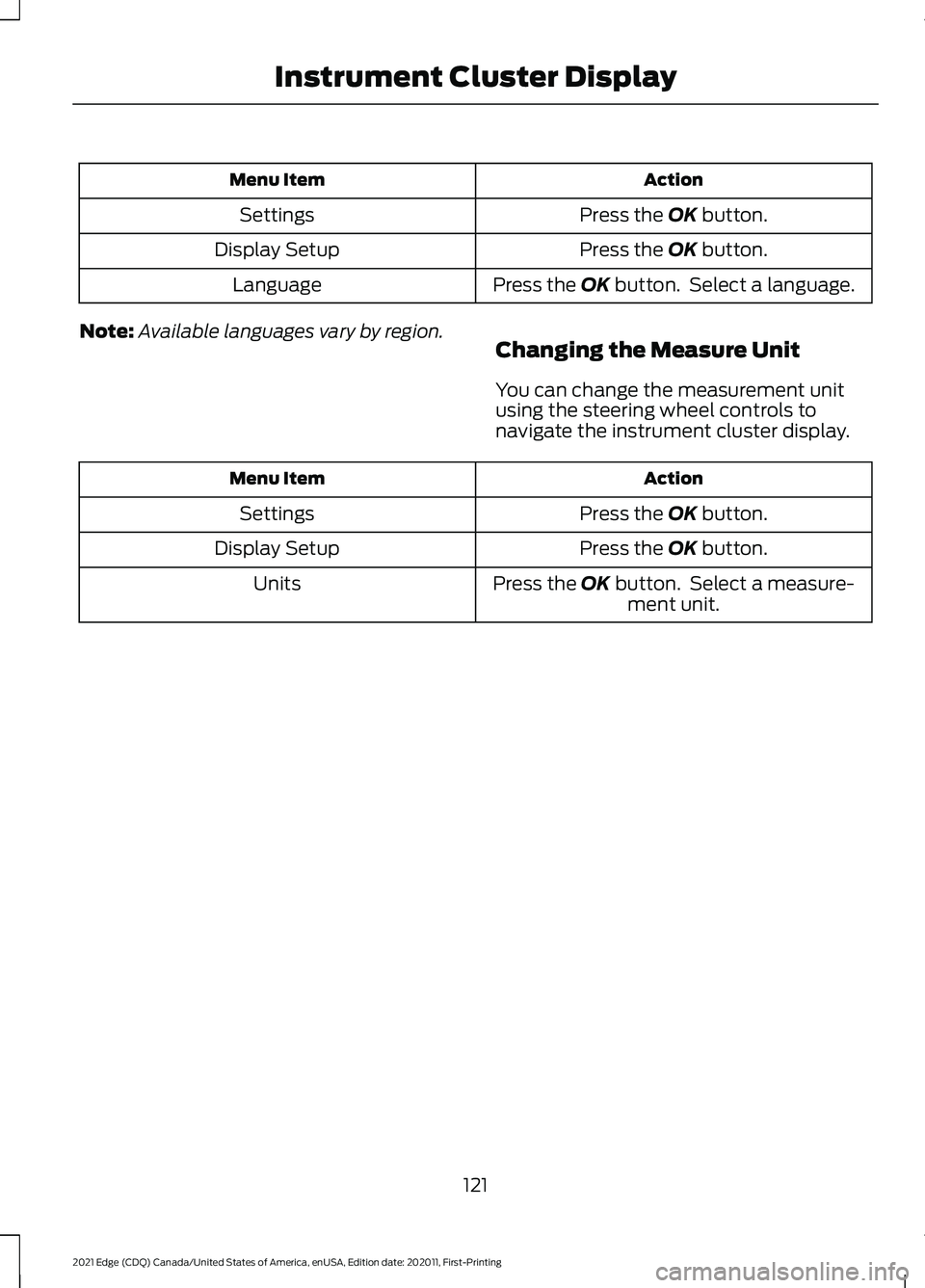
Action
Menu Item
Press the OK button.
Settings
Press the
OK button.
Display Setup
Press the
OK button. Select a language.
Language
Note: Available languages vary by region.
Changing the Measure Unit
You can change the measurement unit
using the steering wheel controls to
navigate the instrument cluster display. Action
Menu Item
Press the
OK button.
Settings
Press the
OK button.
Display Setup
Press the
OK button. Select a measure-ment unit.
Units
121
2021 Edge (CDQ) Canada/United States of America, enUSA, Edition date: 202011, First-Printing Instrument Cluster Display
Page 126 of 500
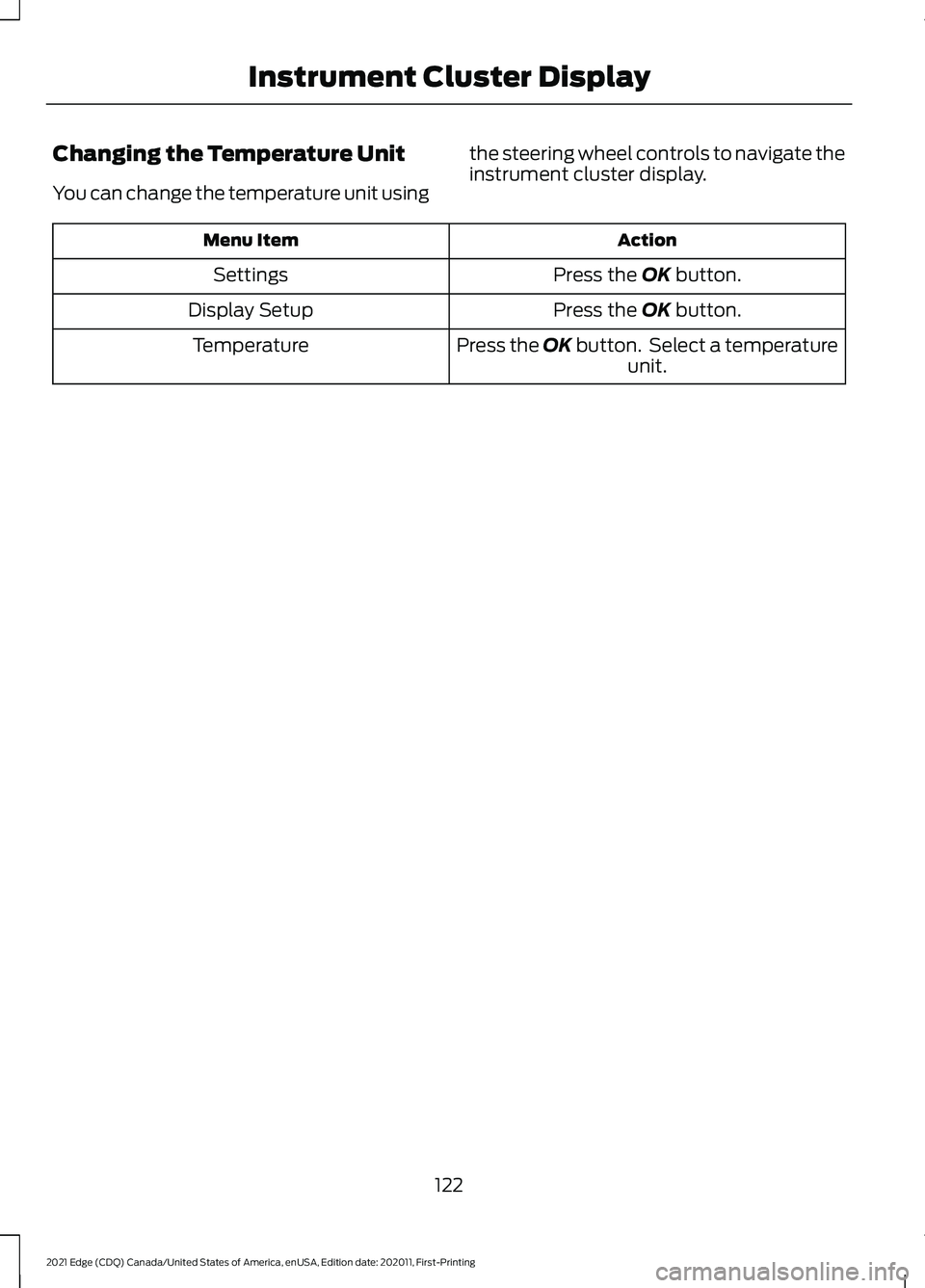
Changing the Temperature Unit
You can change the temperature unit using
the steering wheel controls to navigate the
instrument cluster display. Action
Menu Item
Press the OK button.
Settings
Press the
OK button.
Display Setup
Press the OK button. Select a temperatureunit.
Temperature
122
2021 Edge (CDQ) Canada/United States of America, enUSA, Edition date: 202011, First-Printing Instrument Cluster Display
Page 127 of 500
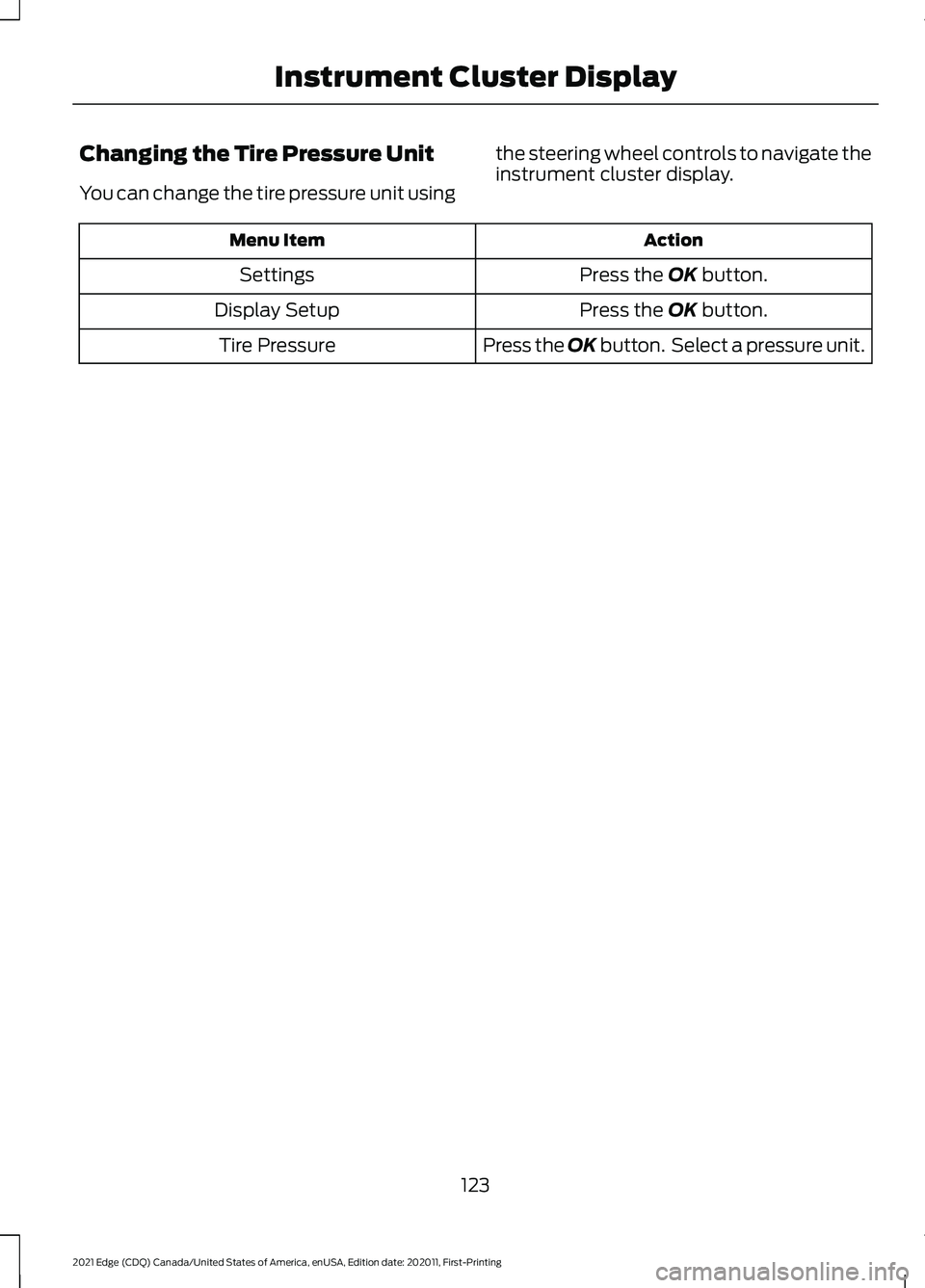
Changing the Tire Pressure Unit
You can change the tire pressure unit using
the steering wheel controls to navigate the
instrument cluster display. Action
Menu Item
Press the OK button.
Settings
Press the
OK button.
Display Setup
Press the OK button. Select a pressure unit.
Tire Pressure
123
2021 Edge (CDQ) Canada/United States of America, enUSA, Edition date: 202011, First-Printing Instrument Cluster Display
Page 129 of 500
WHAT IS REMOTE START
R
emo t e S t art S y s t em
The system allows you to remotely start
your vehicle and to adjust the interior
temperature according to the settings that
you chose.
REMOTE START
PRECAUTIONS
WARNING: Do not start the engine
in a closed garage or in other enclosed
areas. Exhaust fumes are toxic. Always
open the garage door before you start
the engine. Failure to follow this
instruction could result in personal injury
or death.
REMOTE START LIMITATIONS
Remote start does not work under the
following conditions:
• The alarm horn is sounding.
• The hood is open.
• The transmission is not in park (P).
• The ignition is on.
• The battery voltage is below the
minimum operating voltage.
Note: Do not use remote start if your fuel
level is low.
Note: You can use remote start with
FordPass. See Connecting the Vehicle to
a Wi-Fi Network (page 360).
ENABLING REMOTE START
1. Using the information display controls on the steering wheel, select Settings.
2. Select
Settings. 3. Select
Vehicle.
4. Select
Remote Start.
5. Switch
System on.
Note: To use remote start, make sure that
the modem is enabled. See
Enabling and
Disabling the Modem (page 360).
REMOTELY STARTING AND
STOPPING THE VEHICLE
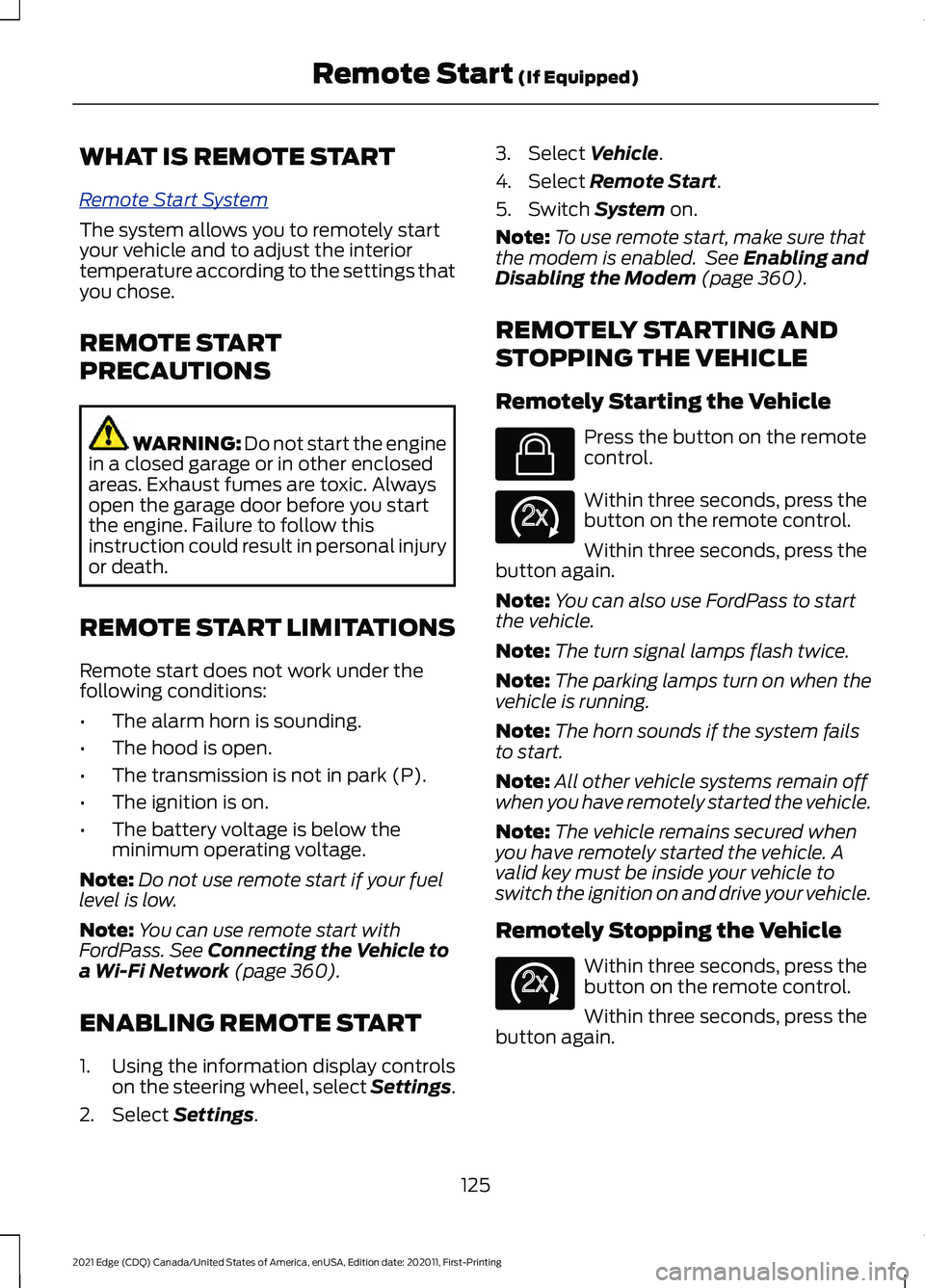
Remotely Starting the Vehicle Press the button on the remote
control.
Within three seconds, press the
button on the remote control.
Within three seconds, press the
button again.
Note: You can also use FordPass to start
the vehicle.
Note: The turn signal lamps flash twice.
Note: The parking lamps turn on when the
vehicle is running.
Note: The horn sounds if the system fails
to start.
Note: All other vehicle systems remain off
when you have remotely started the vehicle.
Note: The vehicle remains secured when
you have remotely started the vehicle. A
valid key must be inside your vehicle to
switch the ignition on and drive your vehicle.
Remotely Stopping the Vehicle Within three seconds, press the
button on the remote control.
Within three seconds, press the
button again.
125
2021 Edge (CDQ) Canada/United States of America, enUSA, Edition date: 202011, First-Printing Remote Start
(If Equipped)E138623 E138625 E138625