lock FORD ESCAPE 2003 1.G User Guide
[x] Cancel search | Manufacturer: FORD, Model Year: 2003, Model line: ESCAPE, Model: FORD ESCAPE 2003 1.GPages: 240, PDF Size: 2.6 MB
Page 41 of 240
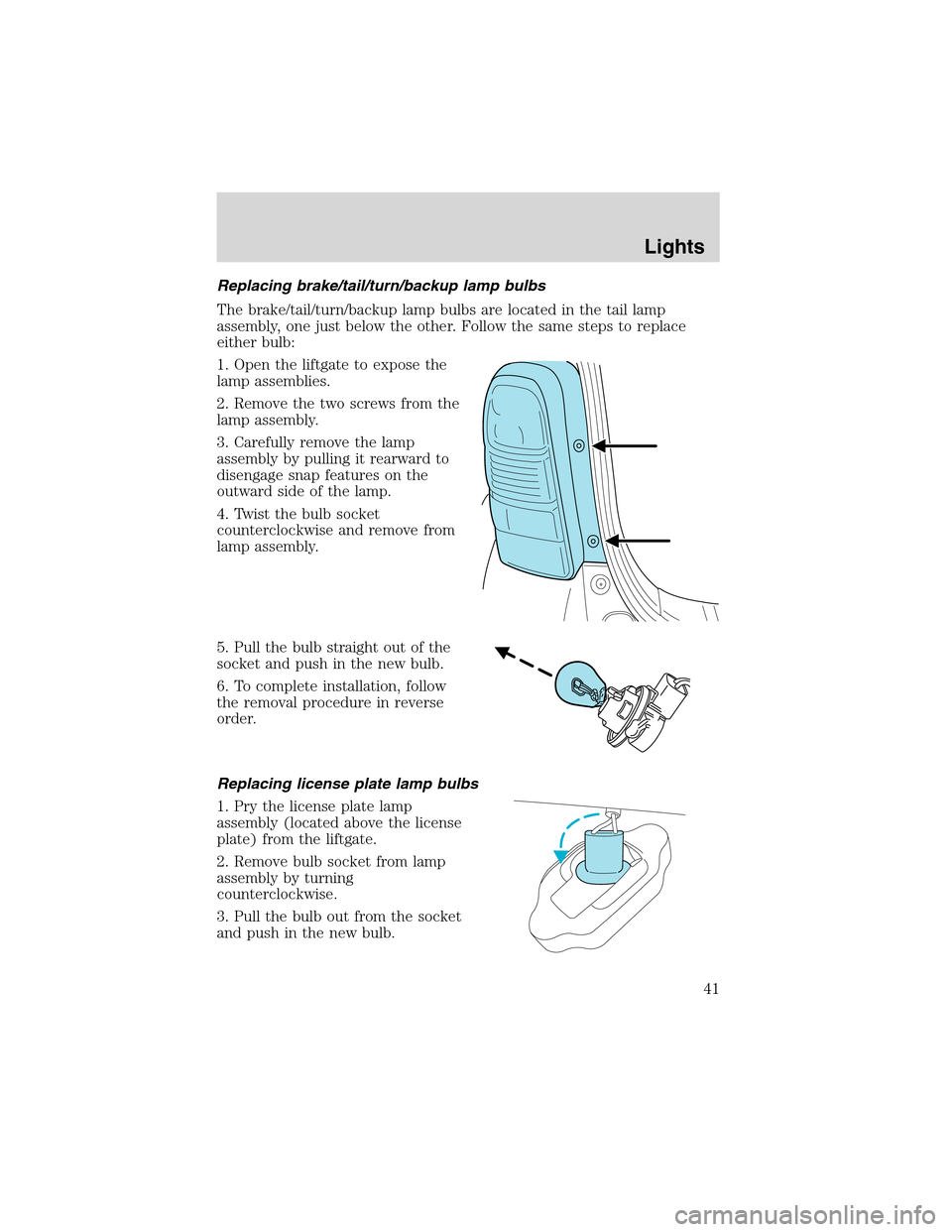
Replacing brake/tail/turn/backup lamp bulbs
The brake/tail/turn/backup lamp bulbs are located in the tail lamp
assembly, one just below the other. Follow the same steps to replace
either bulb:
1. Open the liftgate to expose the
lamp assemblies.
2. Remove the two screws from the
lamp assembly.
3. Carefully remove the lamp
assembly by pulling it rearward to
disengage snap features on the
outward side of the lamp.
4. Twist the bulb socket
counterclockwise and remove from
lamp assembly.
5. Pull the bulb straight out of the
socket and push in the new bulb.
6. To complete installation, follow
the removal procedure in reverse
order.
Replacing license plate lamp bulbs
1. Pry the license plate lamp
assembly (located above the license
plate) from the liftgate.
2. Remove bulb socket from lamp
assembly by turning
counterclockwise.
3. Pull the bulb out from the socket
and push in the new bulb.
Lights
41
Page 42 of 240
4. Install the bulb socket in lamp assembly turning it clockwise,
5. To install, press the lamp assembly in to liftgate.
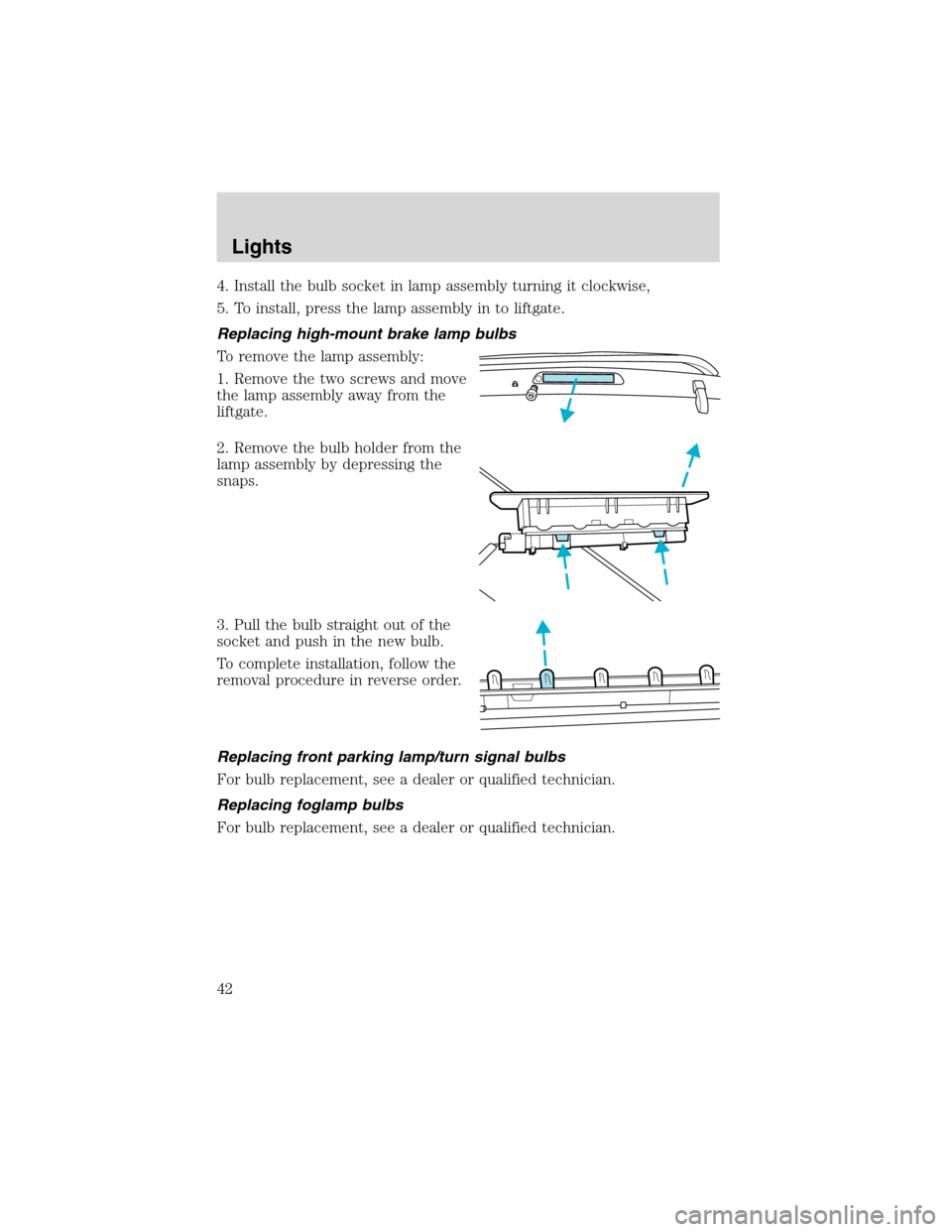
Replacing high-mount brake lamp bulbs
To remove the lamp assembly:
1. Remove the two screws and move
the lamp assembly away from the
liftgate.
2. Remove the bulb holder from the
lamp assembly by depressing the
snaps.
3. Pull the bulb straight out of the
socket and push in the new bulb.
To complete installation, follow the
removal procedure in reverse order.
Replacing front parking lamp/turn signal bulbs
For bulb replacement, see a dealer or qualified technician.
Replacing foglamp bulbs
For bulb replacement, see a dealer or qualified technician.
Lights
42
Page 44 of 240
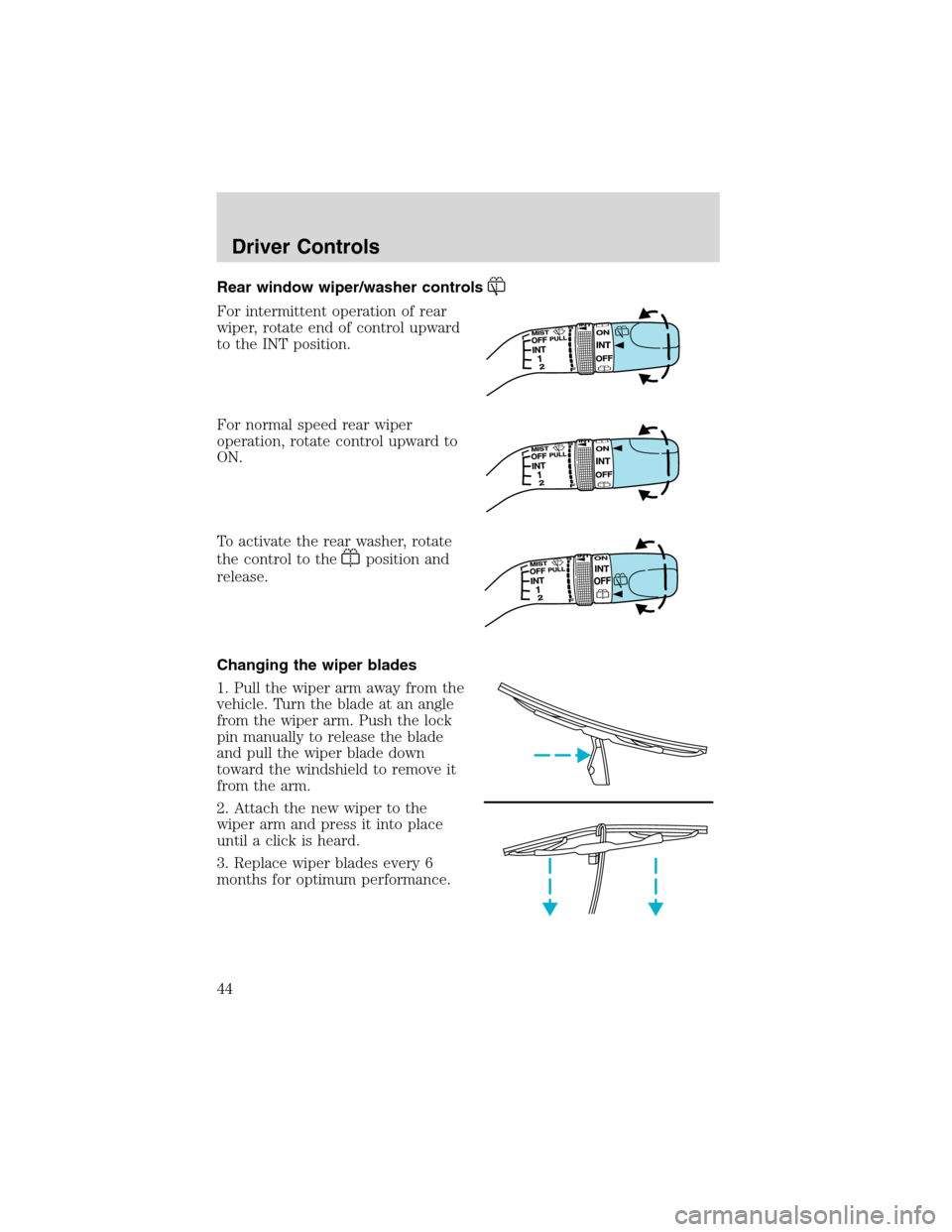
Rear window wiper/washer controls
For intermittent operation of rear
wiper, rotate end of control upward
to the INT position.
For normal speed rear wiper
operation, rotate control upward to
ON.
To activate the rear washer, rotate
the control to the
position and
release.
Changing the wiper blades
1. Pull the wiper arm away from the
vehicle. Turn the blade at an angle
from the wiper arm. Push the lock
pin manually to release the blade
and pull the wiper blade down
toward the windshield to remove it
from the arm.
2. Attach the new wiper to the
wiper arm and press it into place
until a click is heard.
3. Replace wiper blades every 6
months for optimum performance.
Driver Controls
44
Page 45 of 240
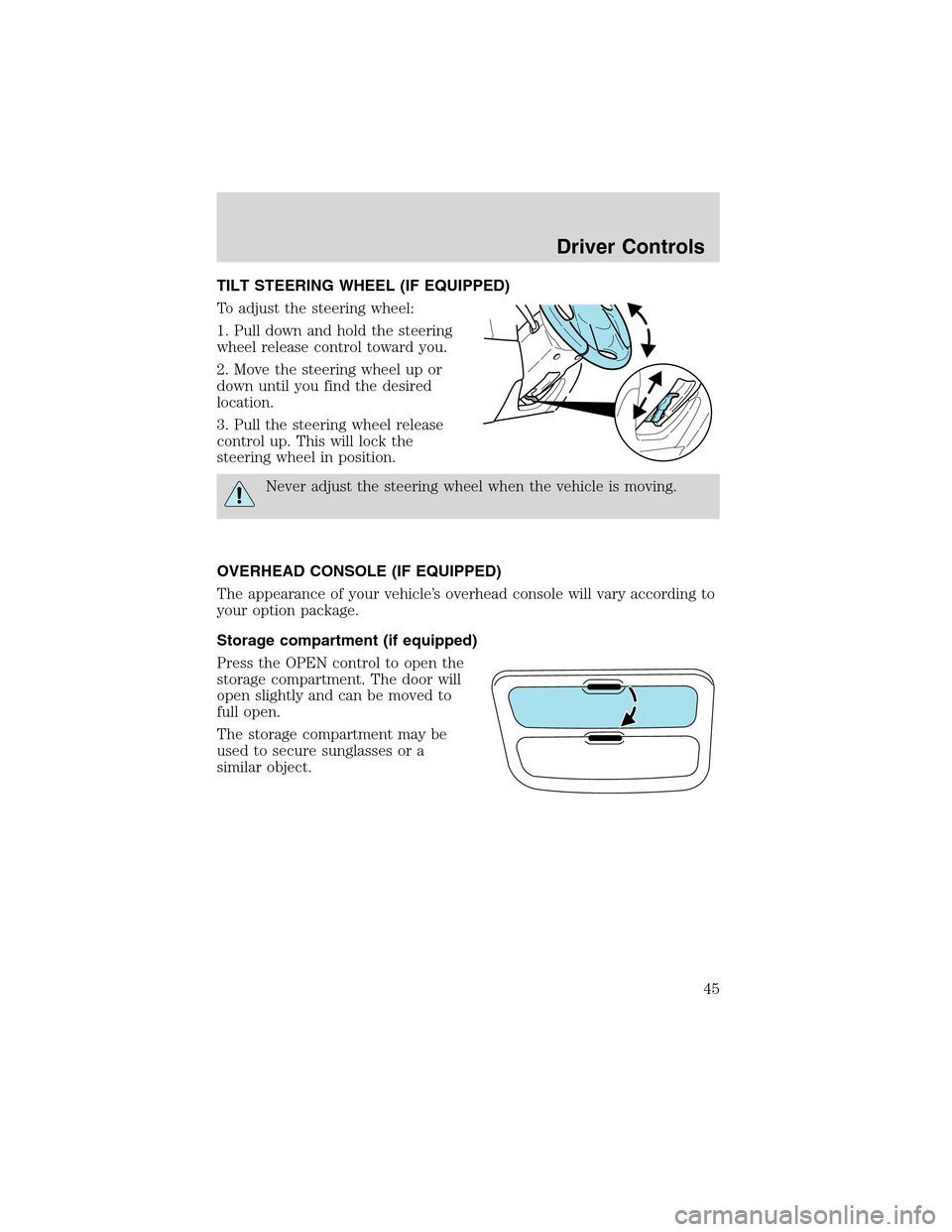
TILT STEERING WHEEL (IF EQUIPPED)
To adjust the steering wheel:
1. Pull down and hold the steering
wheel release control toward you.
2. Move the steering wheel up or
down until you find the desired
location.
3. Pull the steering wheel release
control up. This will lock the
steering wheel in position.
Never adjust the steering wheel when the vehicle is moving.
OVERHEAD CONSOLE (IF EQUIPPED)
The appearance of your vehicle’s overhead console will vary according to
your option package.
Storage compartment (if equipped)
Press the OPEN control to open the
storage compartment. The door will
open slightly and can be moved to
full open.
The storage compartment may be
used to secure sunglasses or a
similar object.
Driver Controls
45
Page 48 of 240
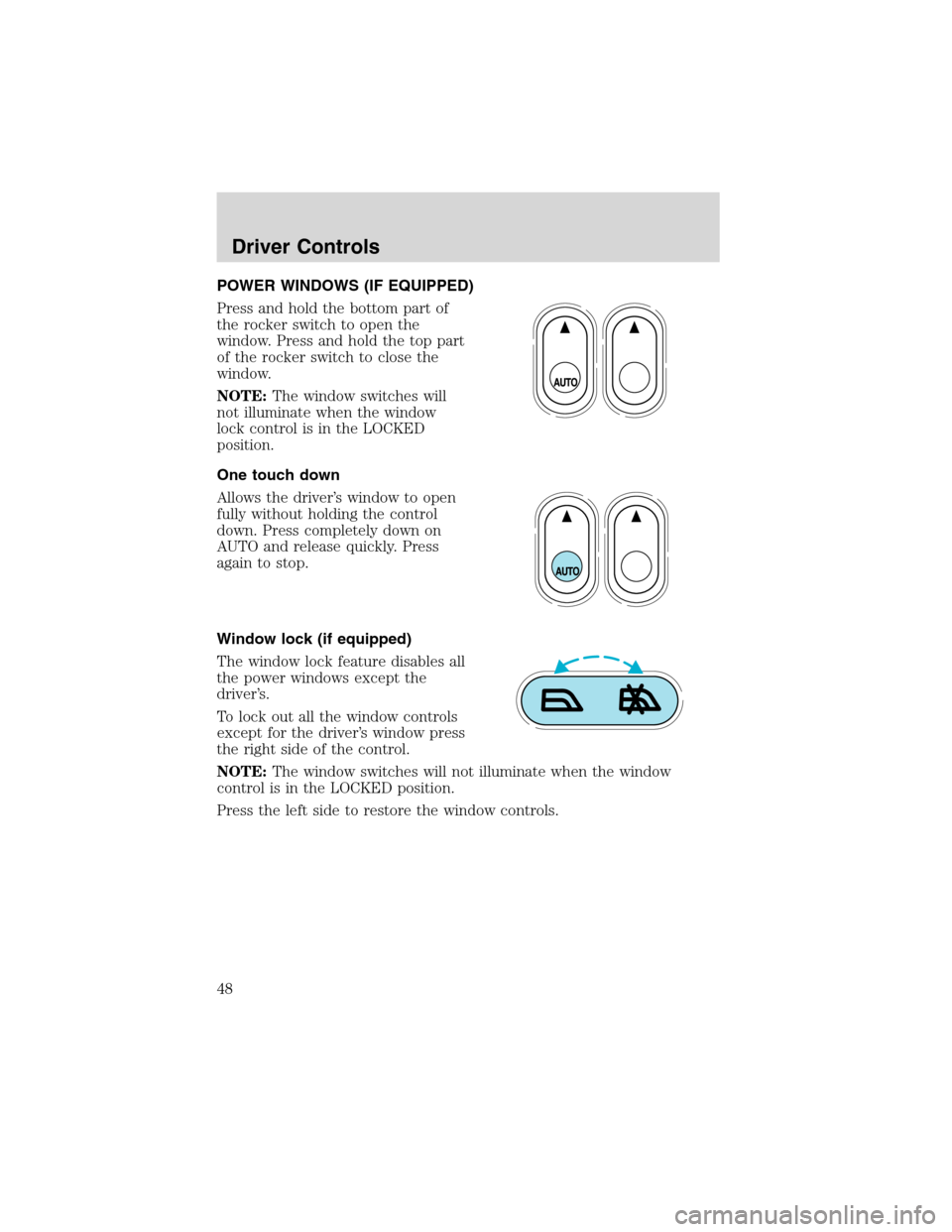
POWER WINDOWS (IF EQUIPPED)
Press and hold the bottom part of
the rocker switch to open the
window. Press and hold the top part
of the rocker switch to close the
window.
NOTE:The window switches will
not illuminate when the window
lock control is in the LOCKED
position.
One touch down
Allows the driver’s window to open
fully without holding the control
down. Press completely down on
AUTO and release quickly. Press
again to stop.
Window lock (if equipped)
The window lock feature disables all
the power windows except the
driver’s.
To lock out all the window controls
except for the driver’s window press
the right side of the control.
NOTE:The window switches will not illuminate when the window
control is in the LOCKED position.
Press the left side to restore the window controls.
Driver Controls
48
Page 49 of 240
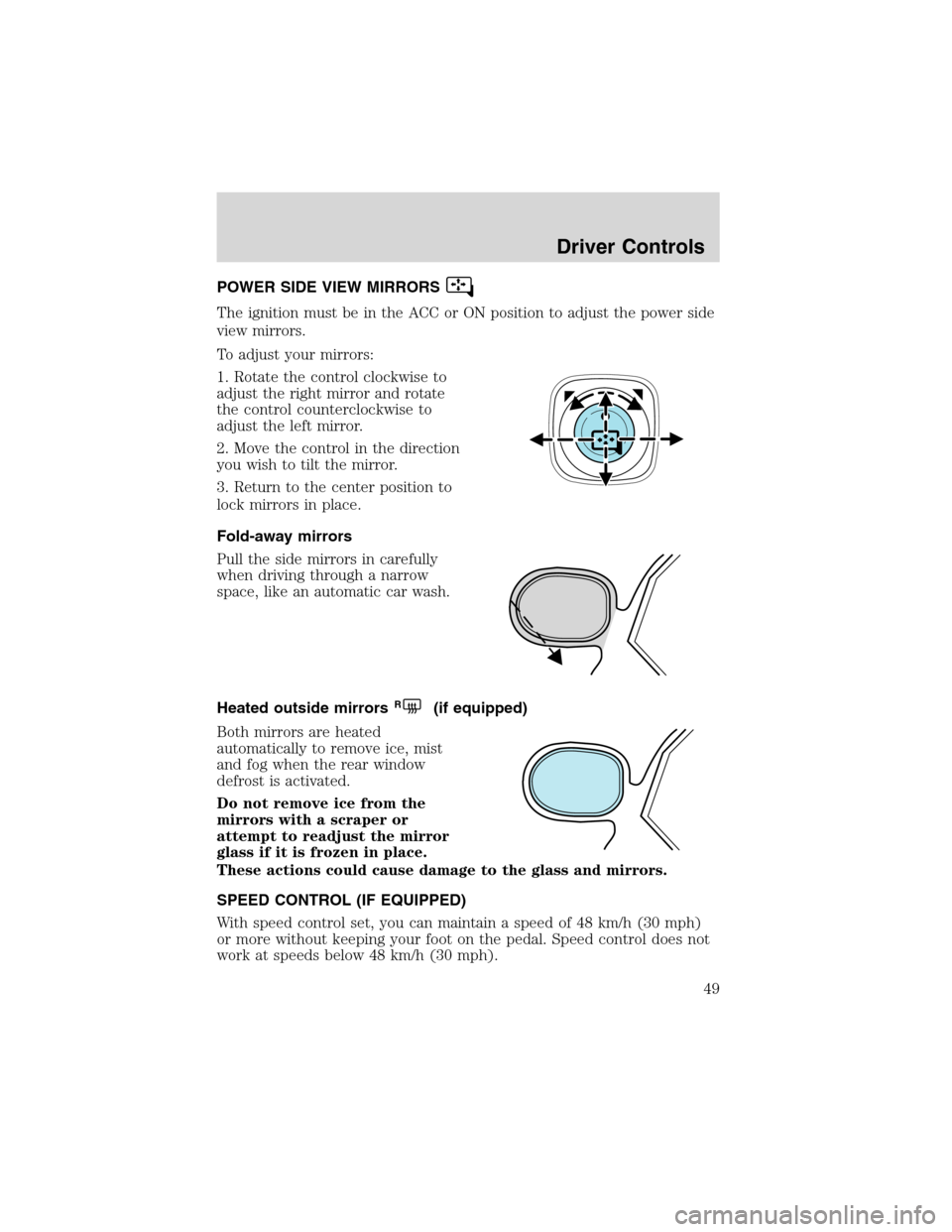
POWER SIDE VIEW MIRRORS
The ignition must be in the ACC or ON position to adjust the power side
view mirrors.
To adjust your mirrors:
1. Rotate the control clockwise to
adjust the right mirror and rotate
the control counterclockwise to
adjust the left mirror.
2. Move the control in the direction
you wish to tilt the mirror.
3. Return to the center position to
lock mirrors in place.
Fold-away mirrors
Pull the side mirrors in carefully
when driving through a narrow
space, like an automatic car wash.
Heated outside mirrors
R(if equipped)
Both mirrors are heated
automatically to remove ice, mist
and fog when the rear window
defrost is activated.
Do not remove ice from the
mirrors with a scraper or
attempt to readjust the mirror
glass if it is frozen in place.
These actions could cause damage to the glass and mirrors.
SPEED CONTROL (IF EQUIPPED)
With speed control set, you can maintain a speed of 48 km/h (30 mph)
or more without keeping your foot on the pedal. Speed control does not
work at speeds below 48 km/h (30 mph).
Driver Controls
49
Page 57 of 240
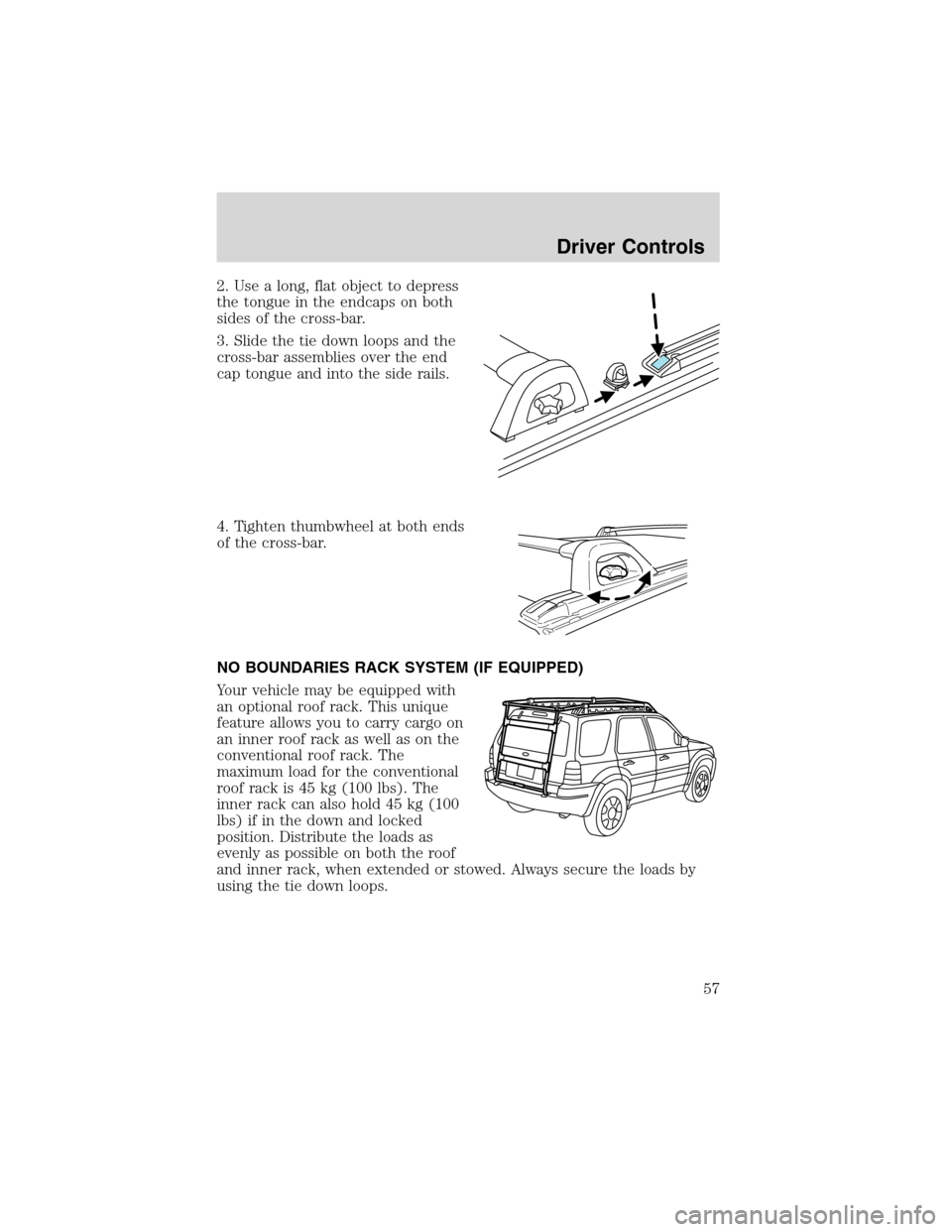
2. Use a long, flat object to depress
the tongue in the endcaps on both
sides of the cross-bar.
3. Slide the tie down loops and the
cross-bar assemblies over the end
cap tongue and into the side rails.
4. Tighten thumbwheel at both ends
of the cross-bar.
NO BOUNDARIES RACK SYSTEM (IF EQUIPPED)
Your vehicle may be equipped with
an optional roof rack. This unique
feature allows you to carry cargo on
an inner roof rack as well as on the
conventional roof rack. The
maximum load for the conventional
roof rack is 45 kg (100 lbs). The
inner rack can also hold 45 kg (100
lbs) if in the down and locked
position. Distribute the loads as
evenly as possible on both the roof
and inner rack, when extended or stowed. Always secure the loads by
using the tie down loops.
Driver Controls
57
Page 59 of 240
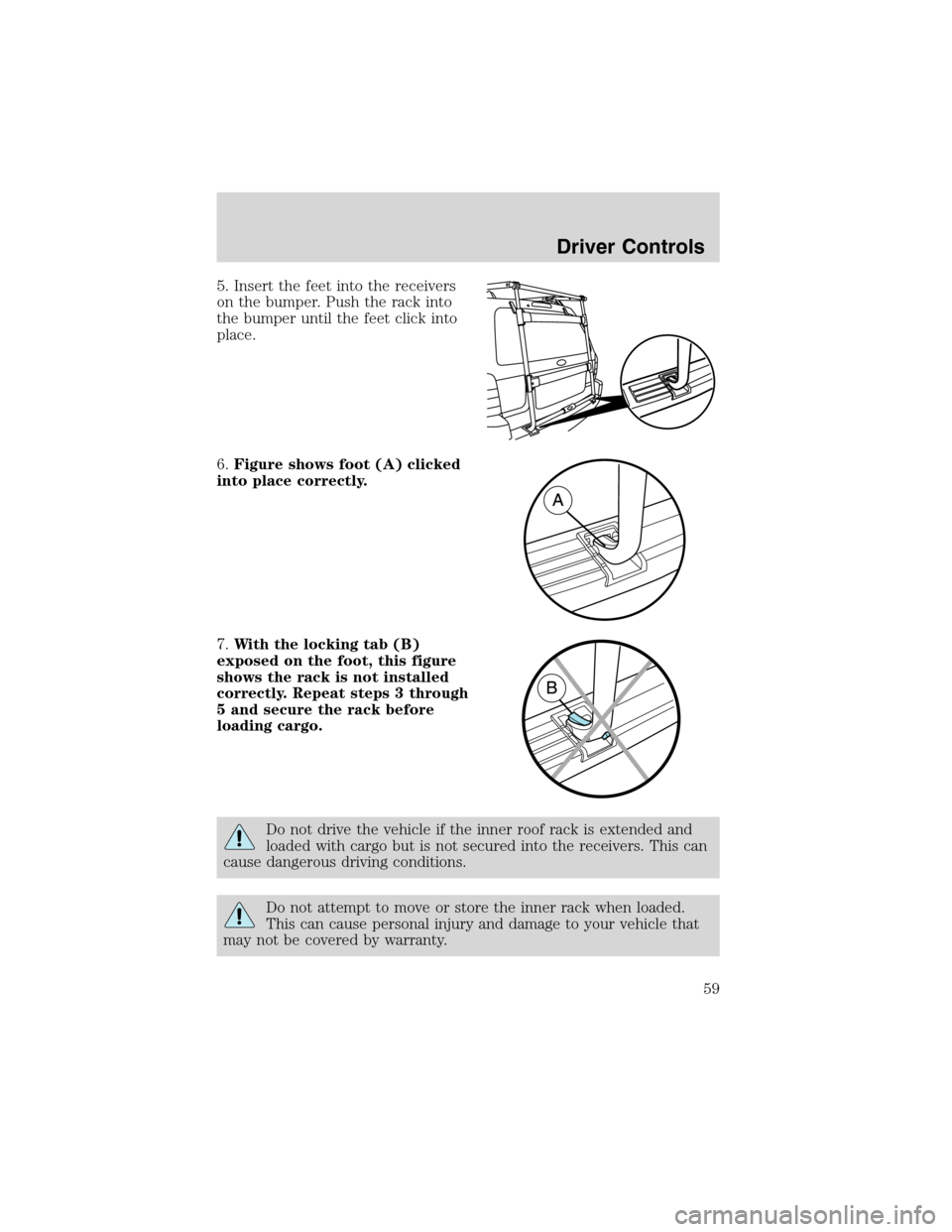
5. Insert the feet into the receivers
on the bumper. Push the rack into
the bumper until the feet click into
place.
6.Figure shows foot (A) clicked
into place correctly.
7.With the locking tab (B)
exposed on the foot, this figure
shows the rack is not installed
correctly. Repeat steps 3 through
5 and secure the rack before
loading cargo.
Do not drive the vehicle if the inner roof rack is extended and
loaded with cargo but is not secured into the receivers. This can
cause dangerous driving conditions.
Do not attempt to move or store the inner rack when loaded.
This can cause personal injury and damage to your vehicle that
may not be covered by warranty.
Driver Controls
59
Page 61 of 240
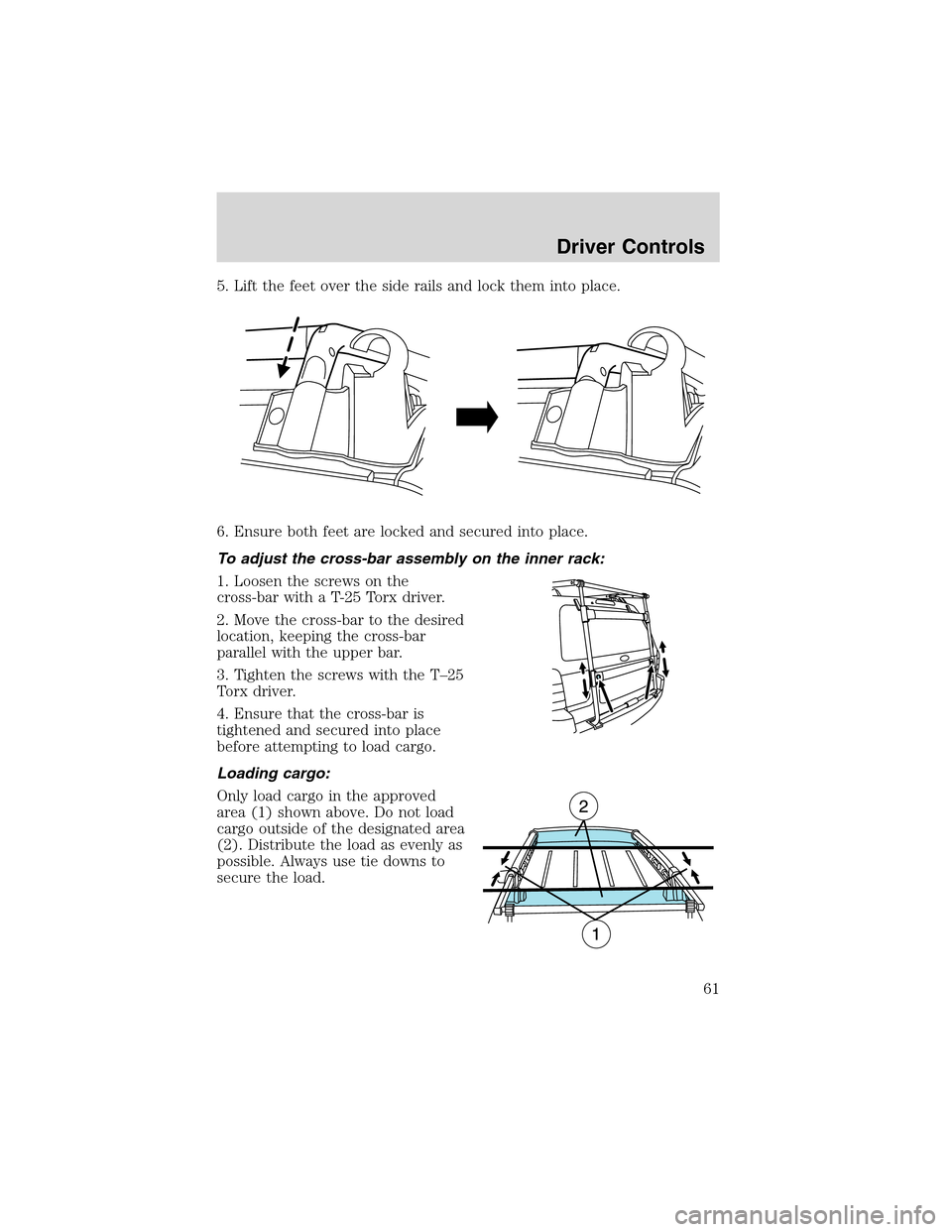
5. Lift the feet over the side rails and lock them into place.
6. Ensure both feet are locked and secured into place.
To adjust the cross-bar assembly on the inner rack:
1. Loosen the screws on the
cross-bar with a T-25 Torx driver.
2. Move the cross-bar to the desired
location, keeping the cross-bar
parallel with the upper bar.
3. Tighten the screws with the T–25
Torx driver.
4. Ensure that the cross-bar is
tightened and secured into place
before attempting to load cargo.
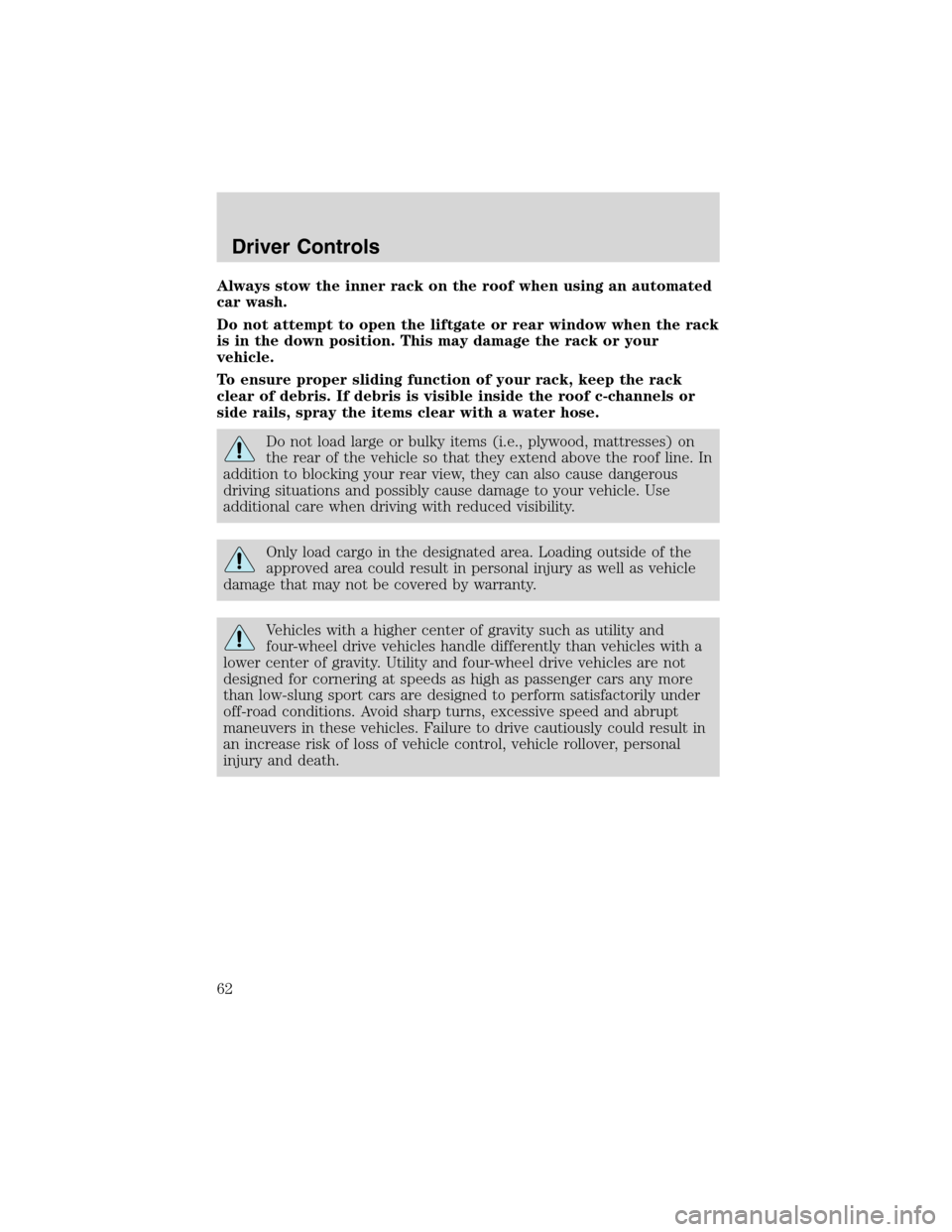
Loading cargo:
Only load cargo in the approved
area (1) shown above. Do not load
cargo outside of the designated area
(2). Distribute the load as evenly as
possible. Always use tie downs to
secure the load.
Driver Controls
61
Page 62 of 240
Always stow the inner rack on the roof when using an automated
car wash.
Do not attempt to open the liftgate or rear window when the rack
is in the down position. This may damage the rack or your
vehicle.
To ensure proper sliding function of your rack, keep the rack
clear of debris. If debris is visible inside the roof c-channels or
side rails, spray the items clear with a water hose.
Do not load large or bulky items (i.e., plywood, mattresses) on
the rear of the vehicle so that they extend above the roof line. In
addition to blocking your rear view, they can also cause dangerous
driving situations and possibly cause damage to your vehicle. Use
additional care when driving with reduced visibility.
Only load cargo in the designated area. Loading outside of the
approved area could result in personal injury as well as vehicle
damage that may not be covered by warranty.
Vehicles with a higher center of gravity such as utility and
four-wheel drive vehicles handle differently than vehicles with a
lower center of gravity. Utility and four-wheel drive vehicles are not
designed for cornering at speeds as high as passenger cars any more
than low-slung sport cars are designed to perform satisfactorily under
off-road conditions. Avoid sharp turns, excessive speed and abrupt
maneuvers in these vehicles. Failure to drive cautiously could result in
an increase risk of loss of vehicle control, vehicle rollover, personal
injury and death.
Driver Controls
62