wheel FORD ESCAPE 2014 3.G Owners Manual
[x] Cancel search | Manufacturer: FORD, Model Year: 2014, Model line: ESCAPE, Model: FORD ESCAPE 2014 3.GPages: 428, PDF Size: 16.6 MB
Page 372 of 428
Recirculated air: Touch to turn the recirculated air on or off which may reduce
the amount of time needed to cool down the interior and help reduce odors
from reaching the interior. Recirculated air also engages automatically when
MAX A/C or MAX defrost is selected and may be engaged manually in any
airflow mode except defrost. It may also turn off in all airflow modes except
MAX A/C and MAX defrost to reduce fog potential. E
MAX A/C: Touch to cool your vehicle with recirculated air. Touch again for
normal A/C operation. MAX A/C distributes air through instrument panel vents
and may help reduce odors from entering your vehicle. MAX A/C is more
economical and efficient than normal A/C mode. F
A/C: Touch to turn the air conditioning on or off. Use A/C with recirculated air
to improve cooling performance and efficiency. A/C engages automatically in
MAX A/C, defrost and footwell/defrost. G
AUTO: Touch to engage automatic operation, then set the temperature using
the temperature control. The system automatically controls fan speed, airflow
distribution, A/C on or off and the use of fresh or recirculated air. H
Manual airflow distribution controls:Footwell and Defrost: Distributes
air through the windshield defroster vents, demister vents, floor vents and rear
seat floor vents, and provides outside air to reduce window fogging.Panel:
Distributes air through the instrument panel vents.Panel and Floor: Distributes
air through the instrument panel vents, demister vents, floor vents and rear seat
floor vents.Floor: Distributes air through the demister vents, floor vents and I
rear seat floor vents.Defrost: Touch to clear the windshield of fog and thin ice.
Touch again to return to the previous airflow selection. When on, defrost provides
outside air to reduce window fogging and distributes air through the windshield
defroster vents and demister vents.MAX Defrost: Distributes outside air
through the windshield air vents and automatically switches the air conditioning
on. The fan is set to the highest speed and the temperature to HI. When the air
distribution is set in this position, you are unable to select recirculated air or
manually adjust the fan speed and temperature control.
Driver settings: Touch + or – adjust the temperature. J
Climate Control Voice Commands
E142599
Press the voice button on the
steering wheel controls. When
prompted, say any of the
following commands:
369
MyFord Touch™ (If Equipped)
Page 380 of 428
E142655
No GPS symbol indicates that
insufficient GPS satellite signals
are available for accurate map
positioning. This icon may display
under normal operation in an area with
poor GPS access.
Quick-touch Buttons
When in map mode, touch anywhere on
the map display to access the following
options:
Set as Dest
Touch this button to select a scrolled
location on the map as your destination.
You may scroll the map by pressing your
index finger on the map display. When you
reach the desired location, simply let go
and then touch Set as Dest.
Set as Waypoint
Touch this button to set the current
location as a waypoint.
Save to Favorites
Touch this button to save the current
location to your favorites.
POI Icons
Touch this button to select icons to display
on the map. You can select up to three
icons to display on the map at the same
time. Turn these ON or OFF.
Cancel Route
Touch this button to cancel the active
route.
View/Edit Route
Access these features when a route is
active:
• View Route
• Edit Destination/Waypoints• Edit Turn List
• Detour
• Edit Route Preferences
• Edit Traffic Preferences
• Cancel Route.
Nokia is the digital map provider for the
navigation application. If you find map data
errors, you may report them directly to
Nokia by going to
http://mapreporter.navteq.com. Nokia
evaluates all reported map errors and
responds with the result of their
investigation by e-mail.
Navigation Map Updates
Annual navigation map updates are
available for purchase through your
dealership, by calling 1-800-NAVMAPS (in
Mexico, call 01-800-557-5539) or going
to www.navigation.com/ford. You need to
specify the make and model of your vehicle
to determine if there is an update available.
Navigation Voice Commands
E142599
When in navigation mode, press
the voice button on the steering
wheel controls. After the tone,
say any of the following commands:
Navigation system voice commands
"Cancel next waypoint" 1
"Cancel route"1
"Destination"2
"Destination
"Destination
"Destination favorites"
"Destination home"
377
MyFord Touch™ (If Equipped)
Page 383 of 428
For a complete listing of the accessories
that are available for your vehicle, please
contact your authorized dealer or visit our
online store at: Accessories.Ford.com (U.S.
only).
Ford Custom Accessories are available for
your vehicle through your local Ford or Ford
of Canada authorized dealer. Ford Motor
Company will repair or replace any properly
authorized dealer-installed Ford Custom
Accessories found to be defective in
factory-supplied materials or workmanship
during the warranty period, as well as any
component damaged by the defective
accessories. The accessories will be
warranted for whichever provides you the
greatest benefit:
• 12 months or 12000 miles (20000 km)
(whichever occurs first), or
• the remainder of your new vehicle
limited warranty.
Contact your authorized dealer for details
and a copy of the warranty.
Exterior style
• Hood deflector*
• Side window deflectors
• Splash guards
• Custom graphics*
Interior style
• Floor mats
• Interior light kit
Lifestyle
• Ash cup / smoker's packages
• Cargo area protector
• Cargo net*
• Cargo shade
• Soft cargo organizers
• Roof racks and carriers*• Recovery hook (towing eye)
• Trailer towing accessories
Peace of mind
• Keyless entry keypad
• Remote start
• Vehicle security systems
• Wheel locks
• Bumper mounted parking assist
system*
*Ford Licensed Accessories (FLA) are
warranted by the accessory
manufacturer's warranty. Ford Licensed
Accessories are fully designed and
developed by the accessory manufacturer
and have not been designed or tested to
Ford Motor Company engineering
requirements. Contact your Ford
authorized dealer for details regarding the
manufacturer's limited warranty and a
copy of the FLA product limited warranty
offered by the accessory manufacturer.
For maximum vehicle performance, keep
the following information in mind when
adding accessories or equipment to your
vehicle:
380
Accessories
Page 390 of 428
WARNING
Operating certain parts of this
system while driving can distract
your attention away from the road,
and possibly cause an accident or other
serious consequences. Do not change
system settings or enter data non-verbally
(using your hands) while driving. Stop the
vehicle in a safe and legal manner before
attempting these operations. This is
important since while setting up or
changing some functions you might be
required to distract your attention away
from the road and remove your hands from
the wheel.
General Operation
Voice Command Control: Functions
within the Windows Automotive-based
system may be accomplished using only
voice commands. Using voice commands
while driving allows you to operate the
system without removing your hands from
the wheel.
Prolonged Views of Screen: Do not
access any function requiring a prolonged
view of the screen while you are driving.
Pull over in a safe and legal manner before
attempting to access a function of the
system requiring prolonged attention. Even
occasional short scans to the screen may
be hazardous if your attention has been
diverted away from your driving task at a
critical time.
Volume Setting: Do not raise the volume
excessively. Keep the volume at a level
where you can still hear outside traffic and
emergency signals while driving. Driving
while unable to hear these sounds could
cause an accident.Use of Speech Recognition Functions:
Speech recognition software is inherently
a statistical process which is subject to
errors. It is your responsibility to monitor
any speech recognition functions included
in the system and address any errors.
Navigation Features: Any navigation
features included in the system are
intended to provide turn by turn
instructions to get you to a desired
destination. Please make certain all
persons using this system carefully read
and follow instructions and safety
information fully.
Distraction Hazard: Any navigation
features may require manual (non-verbal)
setup. Attempting to perform such set-up
or insert data while driving can seriously
distract your attention and could cause an
accident or other serious consequences.
Stop the vehicle in a safe and legal manner
before attempting these operations.
Let Your Judgment Prevail: Any
navigation features are provided only as
an aid. Make your driving decisions based
on your observations of local conditions
and existing traffic regulations. Any such
feature is not a substitute for your personal
judgment. Any route suggestions made by
this system should never replace any local
traffic regulations or your personal
judgment or knowledge of safe driving
practices.
Route Safety: Do not follow the route
suggestions if doing so would result in an
unsafe or illegal maneuver, if you would be
placed in an unsafe situation, or if you
would be directed into an area that you
consider unsafe. The driver is ultimately
responsible for the safe operation of the
vehicle and therefore, must evaluate
whether it is safe to follow the suggested
directions.
387
Appendices
Page 407 of 428
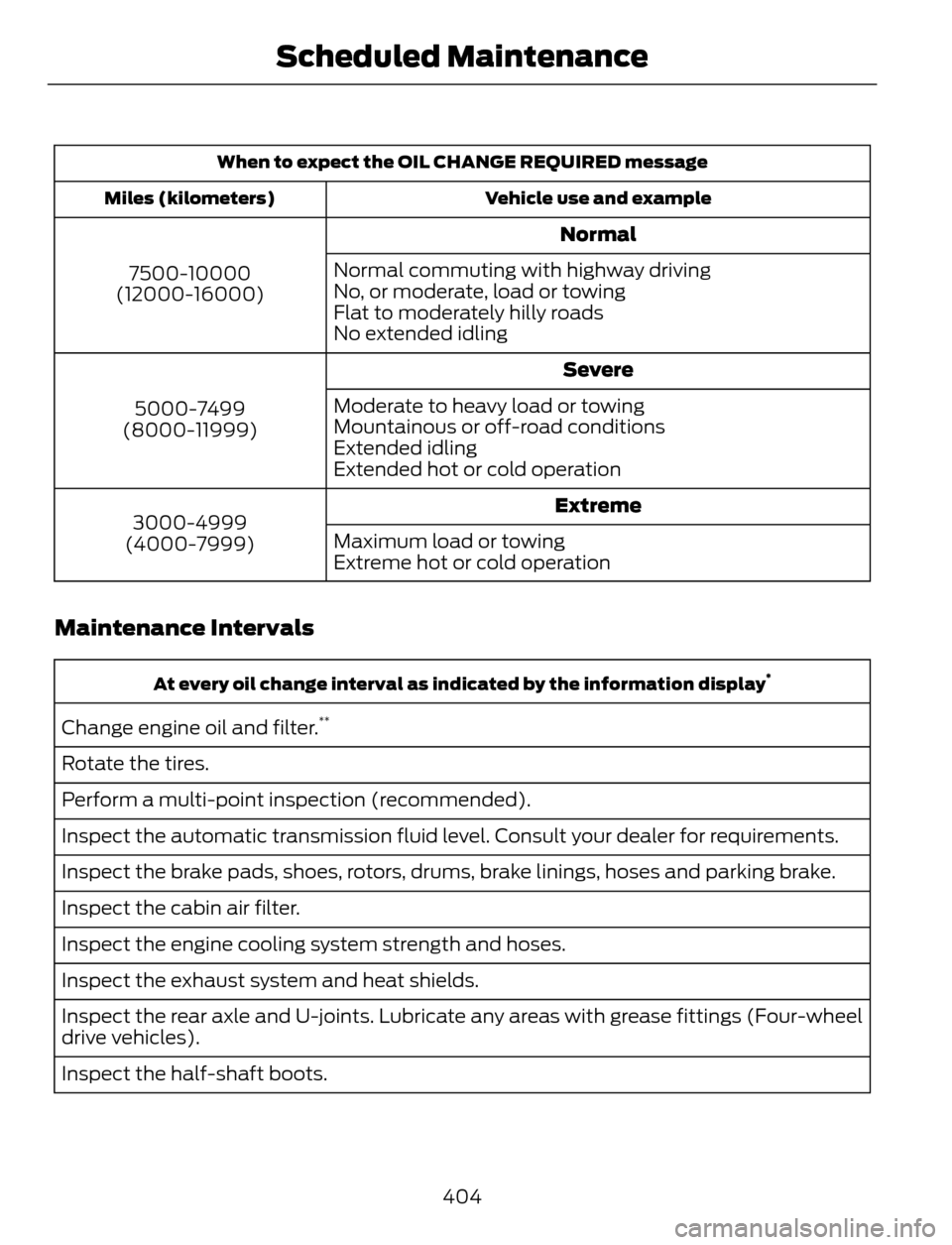
When to expect the OIL CHANGE REQUIRED message
Vehicle use and example Miles (kilometers)
Normal
7500-10000
(12000-16000)Normal commuting with highway driving
No, or moderate, load or towing
Flat to moderately hilly roads
No extended idling
Severe
5000-7499
(8000-11999)Moderate to heavy load or towing
Mountainous or off-road conditions
Extended idling
Extended hot or cold operation
Extreme
3000-4999
(4000-7999)Maximum load or towing
Extreme hot or cold operation
Maintenance Intervals
At every oil change interval as indicated by the information display*
Change engine oil and filter.**
Rotate the tires.
Perform a multi-point inspection (recommended).
Inspect the automatic transmission fluid level. Consult your dealer for requirements.
Inspect the brake pads, shoes, rotors, drums, brake linings, hoses and parking brake.
Inspect the cabin air filter.
Inspect the engine cooling system strength and hoses.
Inspect the exhaust system and heat shields.
Inspect the rear axle and U-joints. Lubricate any areas with grease fittings (Four-wheel
drive vehicles).
Inspect the half-shaft boots.
404
Scheduled Maintenance
Page 408 of 428
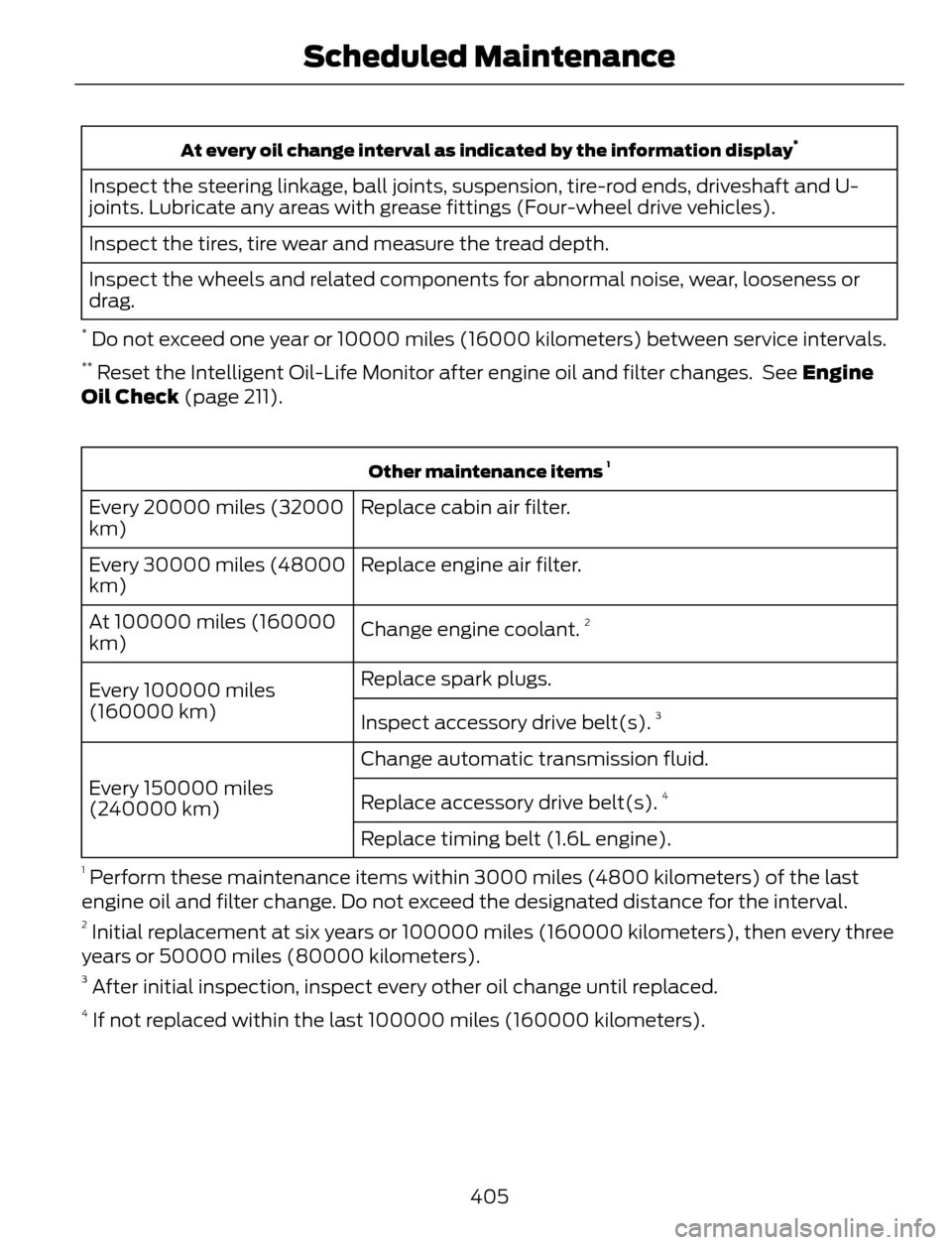
At every oil change interval as indicated by the information display*
Inspect the steering linkage, ball joints, suspension, tire-rod ends, driveshaft and U-
joints. Lubricate any areas with grease fittings (Four-wheel drive vehicles).
Inspect the tires, tire wear and measure the tread depth.
Inspect the wheels and related components for abnormal noise, wear, looseness or
drag.
* Do not exceed one year or 10000 miles (16000 kilometers) between service intervals.** Reset the Intelligent Oil-Life Monitor after engine oil and filter changes. See Engine
Oil Check (page 211).
Other maintenance items 1
Replace cabin air filter. Every 20000 miles (32000
km)
Replace engine air filter. Every 30000 miles (48000
km)
Change engine coolant.
2At 100000 miles (160000
km)
Replace spark plugs.
Every 100000 miles
(160000 km)
Inspect accessory drive belt(s).
3
Change automatic transmission fluid.
Every 150000 miles
(240000 km)Replace accessory drive belt(s).
4
Replace timing belt (1.6L engine).
1 Perform these maintenance items within 3000 miles (4800 kilometers) of the last
engine oil and filter change. Do not exceed the designated distance for the interval.
2 Initial replacement at six years or 100000 miles (160000 kilometers), then every three
years or 50000 miles (80000 kilometers).
3 After initial inspection, inspect every other oil change until replaced.4 If not replaced within the last 100000 miles (160000 kilometers).
405
Scheduled Maintenance
Page 410 of 428
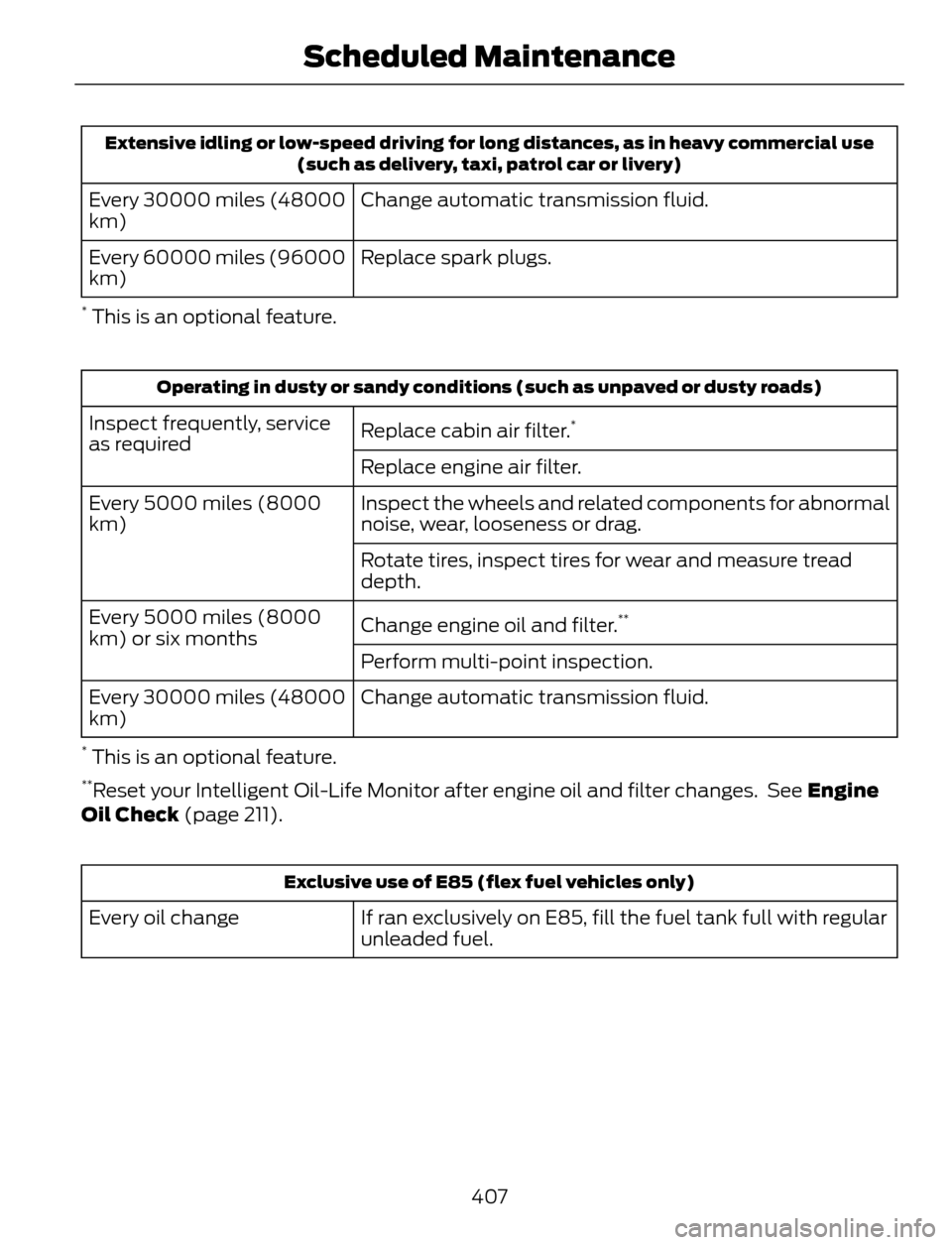
Extensive idling or low-speed driving for long distances, as in heavy commercial use
(such as delivery, taxi, patrol car or livery)
Change automatic transmission fluid. Every 30000 miles (48000
km)
Replace spark plugs. Every 60000 miles (96000
km)
* This is an optional feature.
Operating in dusty or sandy conditions (such as unpaved or dusty roads)
Replace cabin air filter.*Inspect frequently, service
as required
Replace engine air filter.
Inspect the wheels and related components for abnormal
noise, wear, looseness or drag. Every 5000 miles (8000
km)
Rotate tires, inspect tires for wear and measure tread
depth.
Change engine oil and filter.
**Every 5000 miles (8000
km) or six months
Perform multi-point inspection.
Change automatic transmission fluid. Every 30000 miles (48000
km)
* This is an optional feature.**Reset your Intelligent Oil-Life Monitor after engine oil and filter changes. See Engine
Oil Check (page 211).
Exclusive use of E85 (flex fuel vehicles only)
If ran exclusively on E85, fill the fuel tank full with regular
unleaded fuel. Every oil change
407
Scheduled Maintenance
Page 418 of 428
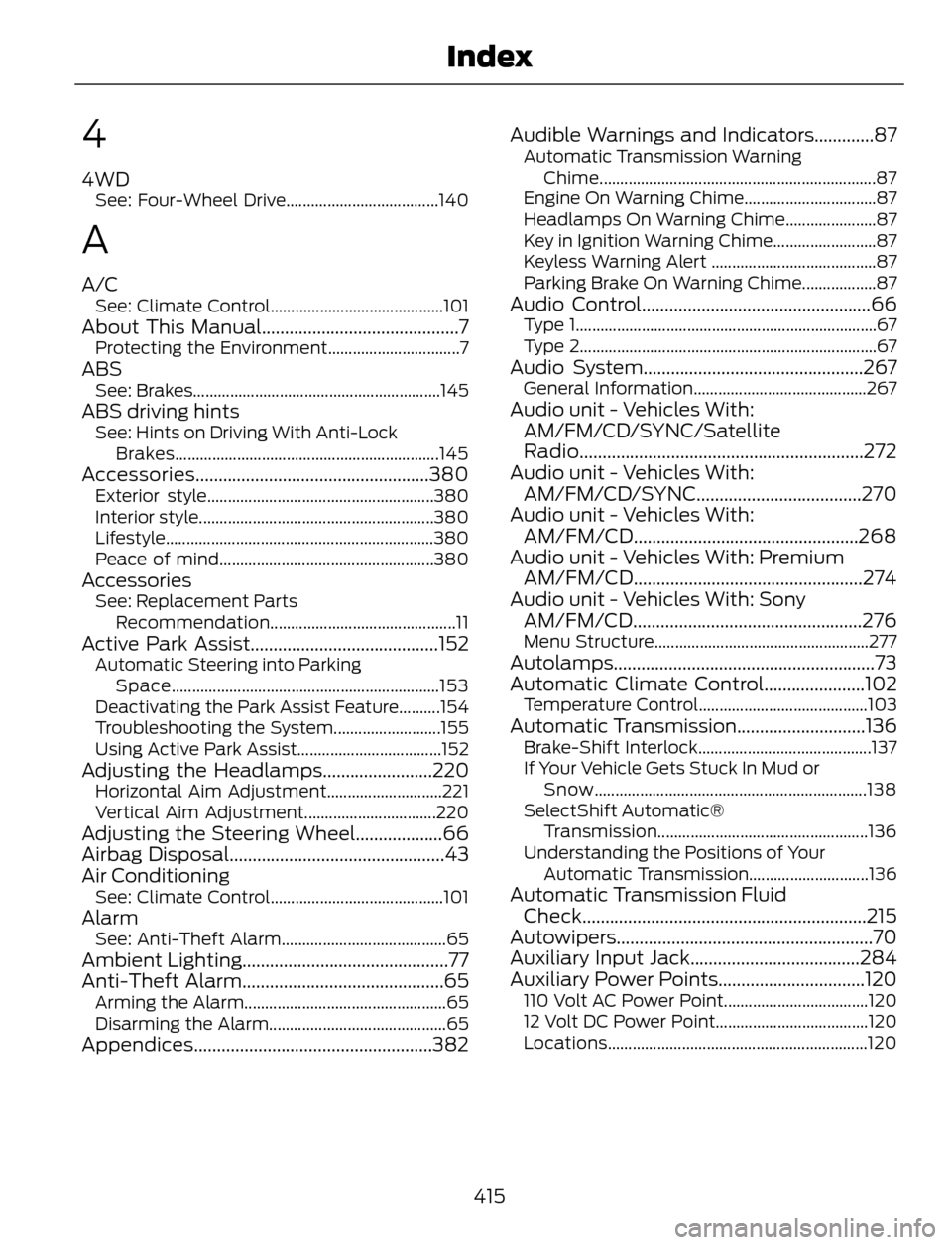
4
4WDSee: Four-Wheel Drive.....................................140
A
A/CSee: Climate Control..........................................101About This Manual...........................................7Protecting the Environment................................7ABSSee: Brakes............................................................145ABS driving hintsSee: Hints on Driving With Anti-Lock
Brakes................................................................145
Accessories...................................................380Exterior style.......................................................380
Interior style.........................................................380
Lifestyle.................................................................380
Peace of mind....................................................380
AccessoriesSee: Replacement Parts
Recommendation.............................................11
Active Park Assist.........................................152Automatic Steering into Parking
Space.................................................................153
Deactivating the Park Assist Feature..........154
Troubleshooting the System..........................155
Using Active Park Assist...................................152
Adjusting the Headlamps........................220Horizontal Aim Adjustment............................221
Vertical Aim Adjustment................................220
Adjusting the Steering Wheel...................66
Airbag Disposal...............................................43
Air Conditioning
See: Climate Control..........................................101AlarmSee: Anti-Theft Alarm........................................65Ambient Lighting.............................................77
Anti-Theft Alarm............................................65
Arming the Alarm.................................................65
Disarming the Alarm...........................................65
Appendices....................................................382Audible Warnings and Indicators.............87
Automatic Transmission Warning
Chime...................................................................87
Engine On Warning Chime................................87
Headlamps On Warning Chime......................87
Key in Ignition Warning Chime.........................87
Keyless Warning Alert ........................................87
Parking Brake On Warning Chime..................87
Audio Control..................................................66Type 1.........................................................................67
Type 2........................................................................67
Audio System................................................267General Information..........................................267Audio unit - Vehicles With:
AM/FM/CD/SYNC/Satellite
Radio..............................................................272
Audio unit - Vehicles With:
AM/FM/CD/SYNC....................................270
Audio unit - Vehicles With:
AM/FM/CD.................................................268
Audio unit - Vehicles With: Premium
AM/FM/CD..................................................274
Audio unit - Vehicles With: Sony
AM/FM/CD..................................................276
Menu Structure....................................................277Autolamps.........................................................73
Automatic Climate Control......................102
Temperature Control.........................................103Automatic Transmission............................136Brake-Shift Interlock..........................................137
If Your Vehicle Gets Stuck In Mud or
Snow..................................................................138
SelectShift Automatic®
Transmission...................................................136
Understanding the Positions of Your
Automatic Transmission.............................136
Automatic Transmission Fluid
Check..............................................................215
Autowipers........................................................70
Auxiliary Input Jack.....................................284
Auxiliary Power Points................................120
110 Volt AC Power Point...................................120
12 Volt DC Power Point.....................................120
Locations...............................................................120
415
Index
Page 419 of 428
B
Blind Spot Monitor......................................160Blind Spot Information System (BLIS®)
with Cross Traffic Alert................................160
Bonnet LockSee: Opening and Closing the Hood..........206Booster Seats....................................................17Types of Booster Seats.......................................17Brake Fluid Check.........................................215
Brakes...............................................................145
General Information..........................................145Breaking-In......................................................183
Bulb Specification Chart...........................226
C
Cabin Air Filter................................................107
California Proposition 65..............................11
Capacities and Specifications.................261
Technical Specifications.................................265Car WashSee: Cleaning the Exterior...............................227Center Console..............................................122
Changing a Bulb...........................................222
Lamp Assembly Condensation....................222
Replacing Fog, Park and Turn Signal
Bulbs..................................................................224
Replacing Headlamp Bulbs...........................222
Replacing HID Headlamp Bulbs...................223
Replacing High-Mount Brake Lamp
Bulb....................................................................225
Replacing License Plate Lamp Bulb...........225
Replacing Reverse Lamp Assembly...........225
Replacing Side Marker Bulbs.........................224
Replacing Tail, Brake and Turn Signal
Bulbs..................................................................225
Changing a Fuse...........................................196Fuses.......................................................................196Changing a Road Wheel...........................255Dissimilar Spare Wheel and Tire Assembly
Information.....................................................255
Tire Change Procedure....................................256
Changing the 12V Battery..........................216
Changing the Engine Air Filter.................219
...................................................................................2 1 9
1.6L and 2.0L EcoBoost Engines...................219
2.5L Engine............................................................219
Changing the Wiper Blades......................218
Checking MyKey System Status..............50
Checking the Wiper Blades......................218
Child Restraint and Safety Belt
Maintenance.................................................32
Child Safety.......................................................14
General Information.............................................14Child Safety Locks..........................................24Left-Hand Side......................................................25
Right-Hand Side...................................................25
Child Seat Positioning...................................15
Cleaning Leather Seats..............................231
Cleaning Products........................................227
Cleaning the Alloy Wheels........................231
Cleaning the Engine....................................229
Cleaning the Exterior...................................227
Cleaning Plastic Exterior Parts.....................228
Exterior Chrome..................................................227
Stripes or Graphics (if equipped).................227
Underbody...........................................................228
Cleaning the Instrument Panel and
Instrument Cluster Lens........................230
Cleaning the Interior...................................229
Cleaning the Windows and Wiper
Blades...........................................................229
Clearing All MyKeys.......................................50
Climate............................................................368
Climate Control Voice Commands.............369Climate Control..............................................101
Coolant Check
See: Engine Coolant Check.............................212Crash Sensors and Airbag Indicator........42
Creating a MyKey...........................................50
Programming/Changing Configurable
Settings...............................................................50
Cruise Control.................................................68Principle of Operation.......................................159Cruise controlSee: Using Cruise Control................................159Customer Assistance.................................190
D
Data Recording..................................................9Event Data Recording...........................................9
Service Data Recording........................................9
416
Index
Page 421 of 428
Ford Credit..........................................................11(U.S. Only).................................................................11Ford Extended Service Plan (ESP).......397SERVICE PLANS (CANADA ONLY)............399
SERVICE PLANS (U.S. Only).........................397
Four-Wheel Drive.........................................140Principle of Operation......................................140Front Fog Lamps.............................................75
Front Passenger Sensing System.............37
Fuel and Refueling.......................................128
Fuel Consumption........................................134
Calculating Fuel Economy..............................134
Filling the Tank.....................................................134
Fuel Filter.........................................................216
Fuel Quality.....................................................129
Choosing the Right Fuel...................................129
Octane Recommendations............................129
Fuel Shutoff....................................................187
Fuses.................................................................196
Fuse Specification Chart............................197
Luggage Compartment Fuse Panel...........203
Passenger Compartment Fuse
Panel.................................................................200
Power Distribution Box.....................................197
Pre-Fuse Box........................................................197
G
Garage Door OpenerSee: Universal Garage Door Opener............116Gauges...............................................................83Engine Coolant Temperature Gauge............84
Fuel Gauge.............................................................84
Information Display.............................................83
General Information on Radio
Frequencies...................................................44
Intelligent Access.................................................44General Maintenance Information.......400Multi-Point Inspection.....................................402
Owner Checks and Services..........................401
Protecting Your Investment..........................400
Why Maintain Your Vehicle?........................400
Why Maintain Your Vehicle at Your
Dealership?....................................................400
Getting Assistance Outside the U.S. and
Canada..........................................................193
Getting the Services You Need...............190
Away From Home..............................................190
H
HandbrakeSee: Parking Brake.............................................146Hazard Warning Flashers...........................187
Headlamp Exit Delay.....................................74
Head Restraints............................................109
Adjusting the Head Restraint..........................110Heated Seats...................................................115
Heated Windows and Mirrors..................107
Heated Exterior Mirror.......................................107
Heated Rear Window........................................107
HeatingSee: Climate Control..........................................101Hill Start Assist..............................................138Using Hill Start Assist.......................................138Hints on Controlling the Interior
Climate..........................................................104
Cooling the Interior Quickly............................105
General Hints.......................................................104
Heating the Interior Quickly............................104
Maximum Cooling Performance in
Instrument Panel or Instrument Panel
and Footwell Positions................................107
Recommended Settings for Cooling .........105
Recommended Settings for Heating..........105
Side Window Defogging in Cold
Weather............................................................106
Vehicle Stationary for Extended Periods
during Extreme High Ambient
Temperatures.................................................106
Hints on Driving With Anti-Lock
Brakes............................................................145
Hood Lock
See: Opening and Closing the Hood..........206
I
Ignition Switch...............................................123
In California (U.S. Only)..............................191
Information Display Control......................68
Multimedia Controls...........................................69Information Displays....................................88General Information...........................................88
418
Index