light FORD ESCAPE 2014 3.G User Guide
[x] Cancel search | Manufacturer: FORD, Model Year: 2014, Model line: ESCAPE, Model: FORD ESCAPE 2014 3.GPages: 428, PDF Size: 16.6 MB
Page 41 of 428
This system works with sensors that are
part of the front passenger’s seat and
safety belt to detect the presence of a
properly–seated occupant and determine
if the front passenger’s frontal airbag
should be enabled (may inflate) or not.
E145987
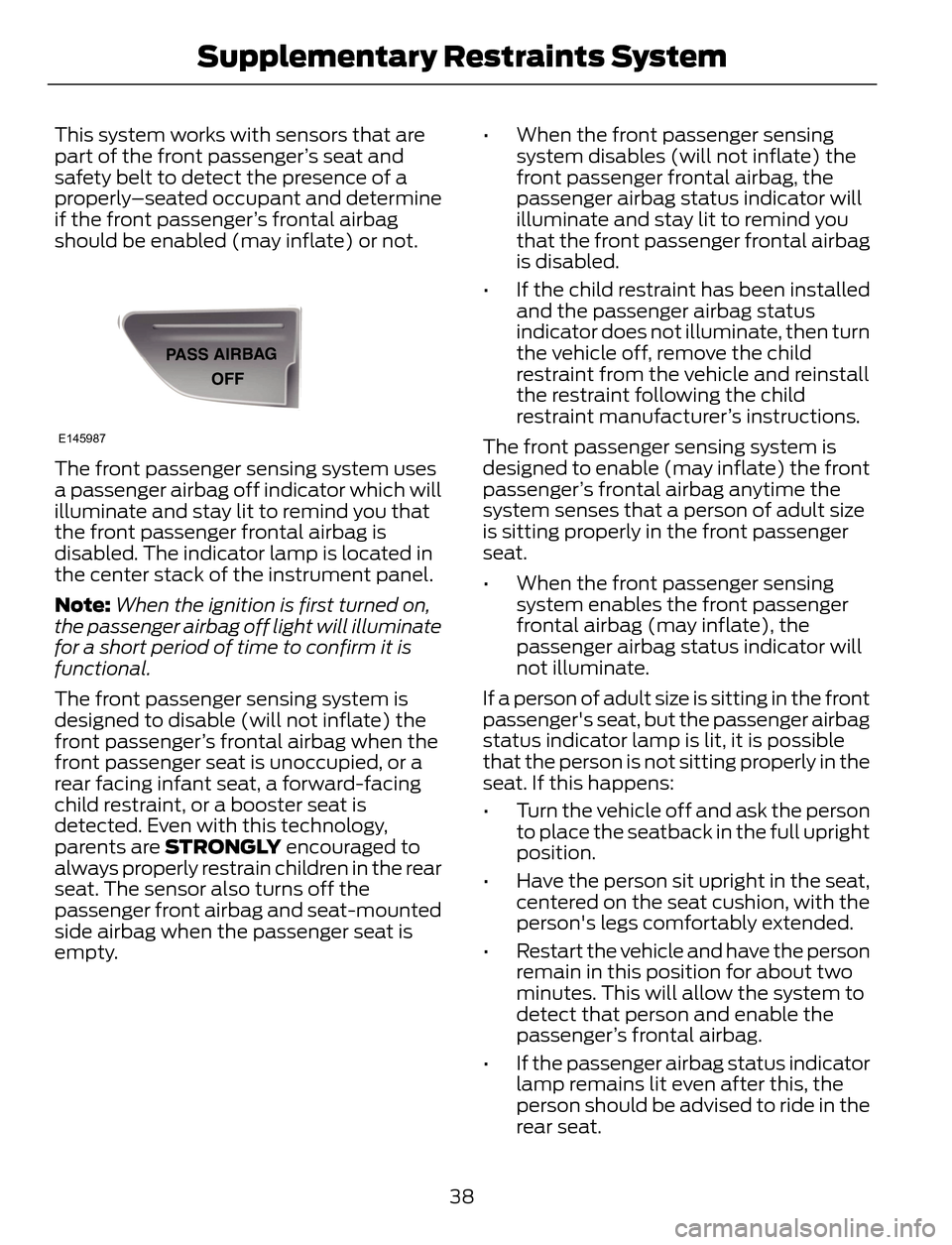
The front passenger sensing system uses
a passenger airbag off indicator which will
illuminate and stay lit to remind you that
the front passenger frontal airbag is
disabled. The indicator lamp is located in
the center stack of the instrument panel.
Note:When the ignition is first turned on,
the passenger airbag off light will illuminate
for a short period of time to confirm it is
functional.
The front passenger sensing system is
designed to disable (will not inflate) the
front passenger’s frontal airbag when the
front passenger seat is unoccupied, or a
rear facing infant seat, a forward-facing
child restraint, or a booster seat is
detected. Even with this technology,
parents are STRONGLY encouraged to
always properly restrain children in the rear
seat. The sensor also turns off the
passenger front airbag and seat-mounted
side airbag when the passenger seat is
empty.• When the front passenger sensing
system disables (will not inflate) the
front passenger frontal airbag, the
passenger airbag status indicator will
illuminate and stay lit to remind you
that the front passenger frontal airbag
is disabled.
• If the child restraint has been installed
and the passenger airbag status
indicator does not illuminate, then turn
the vehicle off, remove the child
restraint from the vehicle and reinstall
the restraint following the child
restraint manufacturer’s instructions.
The front passenger sensing system is
designed to enable (may inflate) the front
passenger’s frontal airbag anytime the
system senses that a person of adult size
is sitting properly in the front passenger
seat.
• When the front passenger sensing
system enables the front passenger
frontal airbag (may inflate), the
passenger airbag status indicator will
not illuminate.
If a person of adult size is sitting in the front
passenger's seat, but the passenger airbag
status indicator lamp is lit, it is possible
that the person is not sitting properly in the
seat. If this happens:
• Turn the vehicle off and ask the person
to place the seatback in the full upright
position.
• Have the person sit upright in the seat,
centered on the seat cushion, with the
person's legs comfortably extended.
• Restart the vehicle and have the person
remain in this position for about two
minutes. This will allow the system to
detect that person and enable the
passenger’s frontal airbag.
• If the passenger airbag status indicator
lamp remains lit even after this, the
person should be advised to ride in the
rear seat.
38
Supplementary Restraints System
Page 42 of 428
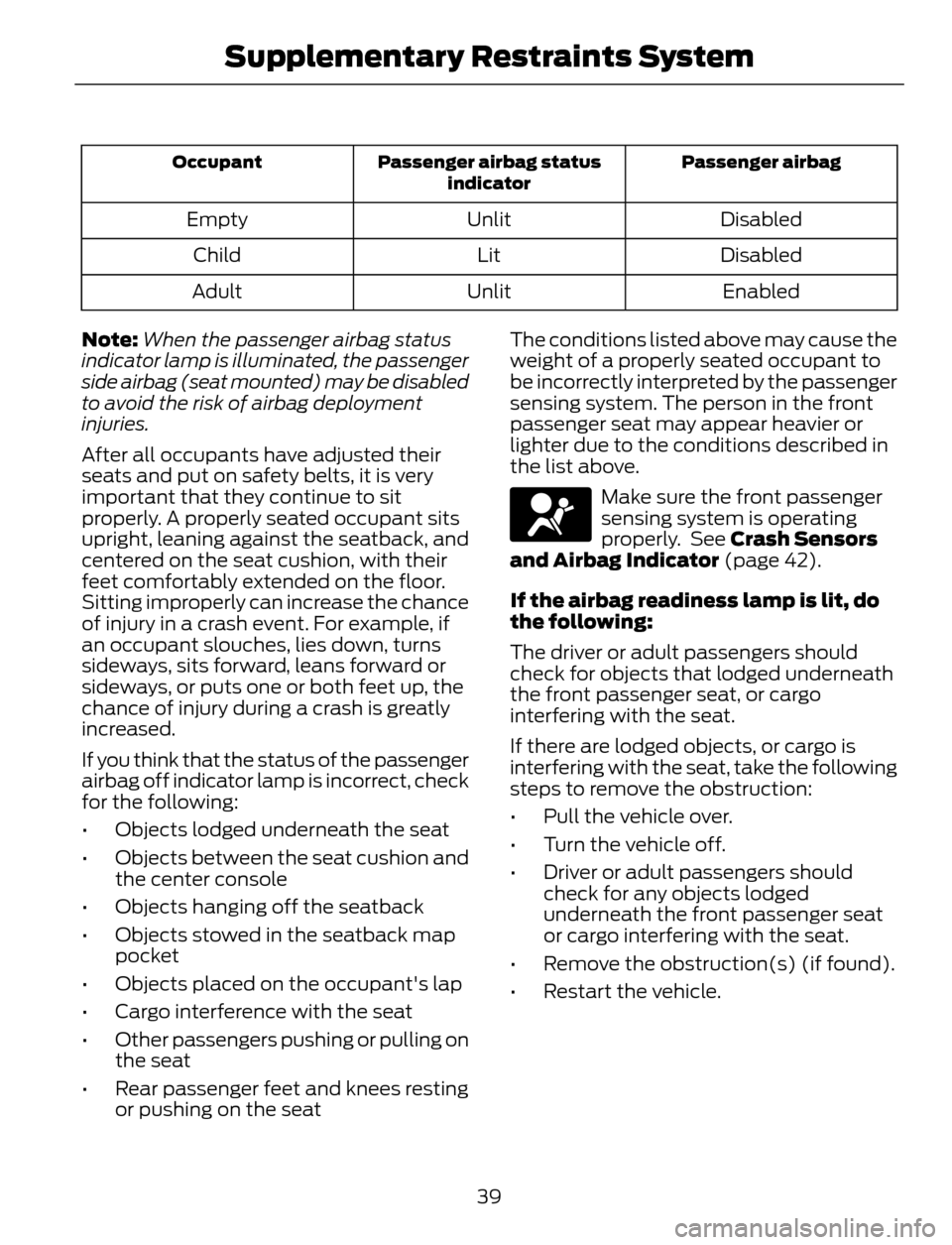
Passenger airbag Passenger airbag status
indicator Occupant
Disabled Unlit Empty
Disabled Lit Child
Enabled Unlit Adult
Note:When the passenger airbag status
indicator lamp is illuminated, the passenger
side airbag (seat mounted) may be disabled
to avoid the risk of airbag deployment
injuries.
After all occupants have adjusted their
seats and put on safety belts, it is very
important that they continue to sit
properly. A properly seated occupant sits
upright, leaning against the seatback, and
centered on the seat cushion, with their
feet comfortably extended on the floor.
Sitting improperly can increase the chance
of injury in a crash event. For example, if
an occupant slouches, lies down, turns
sideways, sits forward, leans forward or
sideways, or puts one or both feet up, the
chance of injury during a crash is greatly
increased.
If you think that the status of the passenger
airbag off indicator lamp is incorrect, check
for the following:
• Objects lodged underneath the seat
• Objects between the seat cushion and
the center console
• Objects hanging off the seatback
• Objects stowed in the seatback map
pocket
• Objects placed on the occupant's lap
• Cargo interference with the seat
• Other passengers pushing or pulling on
the seat
• Rear passenger feet and knees resting
or pushing on the seatThe conditions listed above may cause the
weight of a properly seated occupant to
be incorrectly interpreted by the passenger
sensing system. The person in the front
passenger seat may appear heavier or
lighter due to the conditions described in
the list above.
Make sure the front passenger
sensing system is operating
properly. See Crash Sensors
and Airbag Indicator (page 42).
If the airbag readiness lamp is lit, do
the following:
The driver or adult passengers should
check for objects that lodged underneath
the front passenger seat, or cargo
interfering with the seat.
If there are lodged objects, or cargo is
interfering with the seat, take the following
steps to remove the obstruction:
• Pull the vehicle over.
• Turn the vehicle off.
• Driver or adult passengers should
check for any objects lodged
underneath the front passenger seat
or cargo interfering with the seat.
• Remove the obstruction(s) (if found).
• Restart the vehicle.
39
Supplementary Restraints System
Page 45 of 428
• The crash sensors and monitoring
system have a readiness indicator. See
Crash Sensors and Airbag Indicator
(page 42).
Children 12 years old and under should
always be properly restrained in the rear
seats. The Safety Canopy will not interfere
with children restrained using a properly
installed child or booster seat because it
is designed to inflate downward from the
headliner above the doors along the side
window opening.
The design and development of the Safety
Canopy included recommended testing
procedures that were developed by a
group of automotive safety experts known
as the Side Airbag Technical Working
Group. These recommended testing
procedures help reduce the risk of injuries
related to the deployment of side airbags
(including the Safety Canopy).
CRASH SENSORS AND
AIRBAG INDICATOR
WARNING
Modifying or adding equipment to
the front end of your vehicle
(including frame, bumper, front end
body structure and tow hooks) may affect
the performance of the airbag system,
increasing the risk of injury. Do not modify
the front end of your vehicle.
Your vehicle has a collection of crash and
occupant sensors which provide
information to the restraints control
module which deploys (activates) the
front safety belt pretensioners, driver
airbag, passenger airbag, seat mounted
side airbags, and the Safety Canopy. Based
on the type of accident (frontal impact,
side impact or rollover) the restraints
control module will deploy the appropriate
safety devices.
The restraints control module also
monitors the readiness of the above safety
devices plus the crash and occupant
sensors. The readiness of the safety
system is indicated by a warning indicator
light in the instrument cluster or by a
backup tone if the warning light is not
working. Routine maintenance of the
airbag is not required.
A difficulty with the system is indicated by
one or more of the following:
• The readiness light will not illuminate
immediately after the ignition is turned
on.
• The readiness light will either flash or
stay lit.
• A series of five beeps will be heard. The
tone pattern will repeat periodically
until the problem, the light or both are
repaired.
If any of these things happen, even
intermittently, have the supplemental
restraint system serviced at an authorized
dealer immediately. Unless serviced, the
system may not function properly in the
event of a crash.
42
Supplementary Restraints System
Page 58 of 428
LOCKING AND UNLOCKING
You can use the power door lock control
or the remote control to lock and unlock
your vehicle.
Power Door Locks
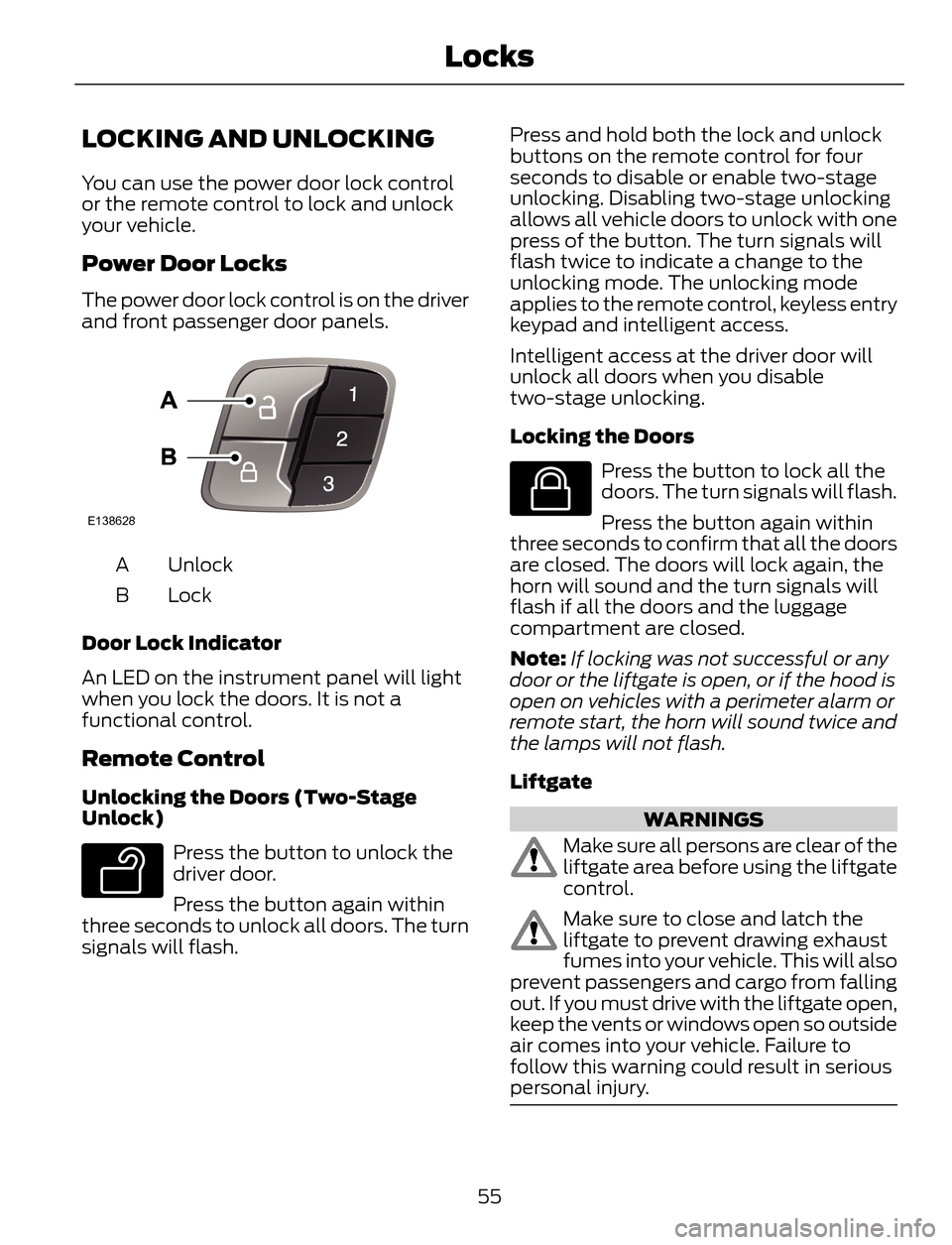
The power door lock control is on the driver
and front passenger door panels.
E138628
Unlock A
Lock B
Door Lock Indicator
An LED on the instrument panel will light
when you lock the doors. It is not a
functional control.
Remote Control
Unlocking the Doors (Two-Stage
Unlock)
E138629
Press the button to unlock the
driver door.
Press the button again within
three seconds to unlock all doors. The turn
signals will flash.Press and hold both the lock and unlock
buttons on the remote control for four
seconds to disable or enable two-stage
unlocking. Disabling two-stage unlocking
allows all vehicle doors to unlock with one
press of the button. The turn signals will
flash twice to indicate a change to the
unlocking mode. The unlocking mode
applies to the remote control, keyless entry
keypad and intelligent access.
Intelligent access at the driver door will
unlock all doors when you disable
two-stage unlocking.
Locking the Doors
E138623
Press the button to lock all the
doors. The turn signals will flash.
Press the button again within
three seconds to confirm that all the doors
are closed. The doors will lock again, the
horn will sound and the turn signals will
flash if all the doors and the luggage
compartment are closed.
Note:If locking was not successful or any
door or the liftgate is open, or if the hood is
open on vehicles with a perimeter alarm or
remote start, the horn will sound twice and
the lamps will not flash.
Liftgate
WARNINGS
Make sure all persons are clear of the
liftgate area before using the liftgate
control.
Make sure to close and latch the
liftgate to prevent drawing exhaust
fumes into your vehicle. This will also
prevent passengers and cargo from falling
out. If you must drive with the liftgate open,
keep the vents or windows open so outside
air comes into your vehicle. Failure to
follow this warning could result in serious
personal injury.
55
Locks
Page 61 of 428
1. Switch the ignition on.
2. Press the power door unlock button
three times.
3. Switch the ignition off.
4. Press the power door unlock button
three times.
5. Switch the ignition on. The horn will
sound indicating your vehicle is in
programming mode.
Autolock: Press the power door unlock
button then the lock button. The horn will
sound once if disabled or twice (one short
and one long) if enabled.
Autounlock: Press the power door lock
button then the unlock button. The horn
will sound once if disabled or twice (one
short and one long) if enabled.
After programming the feature, switch the
ignition off. The horn will sound once
indicating programming is complete.
Note:You can enable or disable the
autounlock feature independently of the
autolock feature.
Illuminated Entry
The interior lamps and select exterior
lamps will illuminate when you unlock the
doors with the remote entry system.
The illuminated entry system will turn off
the lights if:
• you start your vehicle,
• you press the remote control lock
button, or
• after 25 seconds of illumination.
The lights will not turn off if:
• you turn them on with the lamp control,
or
• any door is open.
Illuminated Exit
The interior lamps and select exterior
lamps will illuminate when all doors are
closed and you switch the ignition off.
The lamps will turn off if all the doors
remain closed and:
• 25 seconds elapse, or
• you lock your vehicle from the outside.
Battery Saver
If you leave the courtesy lamps or dome
lamps on and switch the ignition off, the
battery saver shuts them off after some
time.
Accessory Mode Battery Saver for
Intelligent Access Keys (If Equipped)
If you leave the ignition on after leaving
your vehicle, it will shut off 15 minutes after
you close all of the doors.
MANUAL LIFTGATE
WARNINGS
It is extremely dangerous to ride in a
cargo area, inside or outside of a
vehicle. In a crash, people riding in
these areas are more likely to be seriously
injured or killed. Do not allow people to ride
in any area of your vehicle that is not
equipped with seats and safety belts. Be
sure everyone in your vehicle is in a seat
and using a safety belt properly. Failure to
follow this warning could result in serious
personal injury or death.
Make sure to close and latch the
liftgate to prevent drawing exhaust
fumes into your vehicle. This will also
prevent passengers and cargo from falling
out. If you must drive with the liftgate open,
keep the vents or windows open so outside
air comes into your vehicle. Failure to
follow this warning could result in serious
personal injury.
58
Locks
Page 65 of 428
Obstacle Detection
When Closing
The system stops when it detects an
obstacle and two short tones sound. Once
you remove the obstacle, you can power
close the liftgate.
Note:Entering your vehicle while the
liftgate is closing can cause your vehicle to
bounce and activate obstacle detection. To
prevent this, let the power liftgate close
completely before you enter your vehicle.
Before driving off, check the instrument
cluster for a liftgate or door ajar message or
warning indicator. Failure to do this could
result in unintentionally leaving the liftgate
open while driving.
When Opening
The system stops when it detects an
obstacle and two short tones sound.
Remove the obstacle to operate the
liftgate.
KEYLESS ENTRY (IF EQUIPPED)
SECURICODE™ KEYLESS ENTRY
KEYPAD
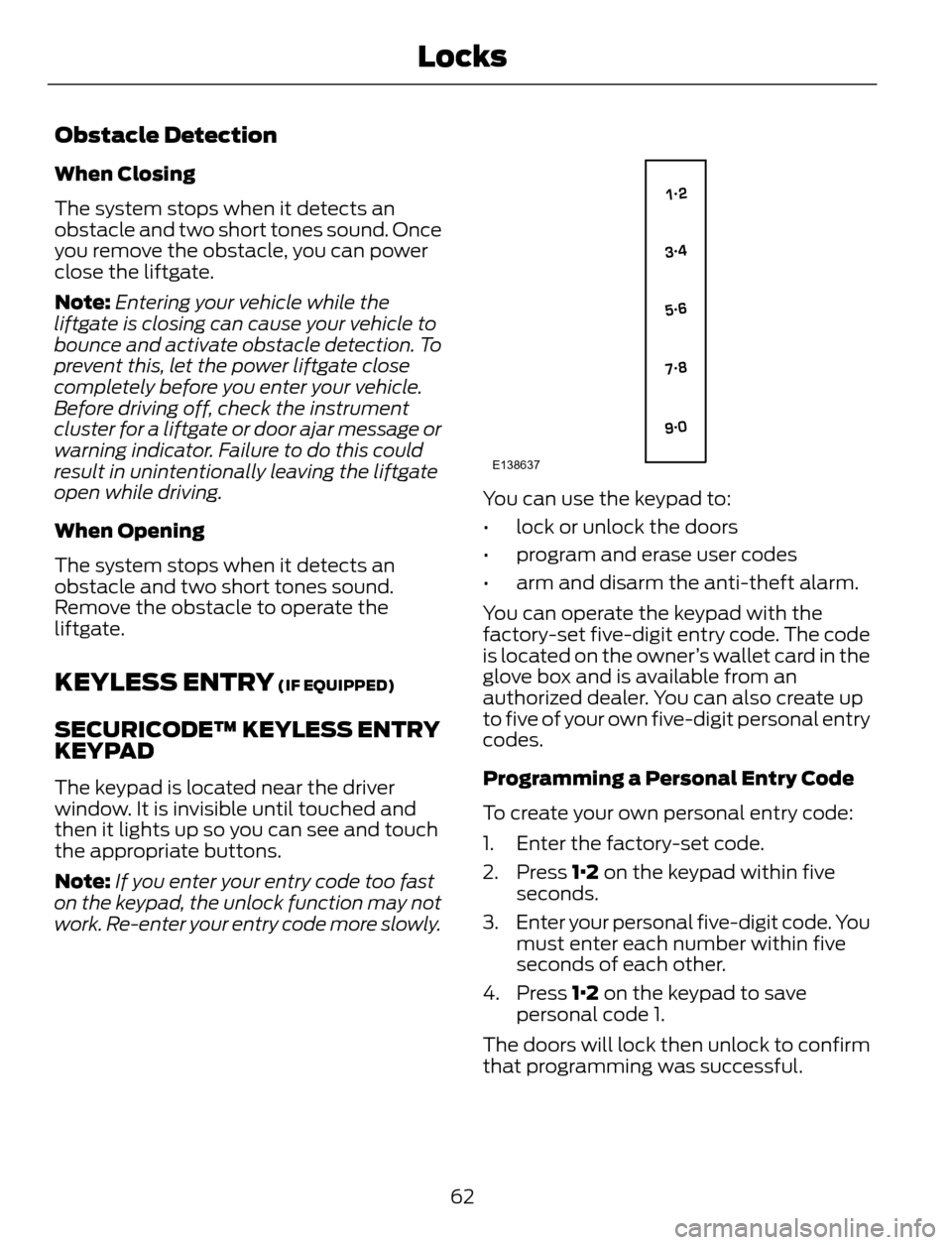
The keypad is located near the driver
window. It is invisible until touched and
then it lights up so you can see and touch
the appropriate buttons.
Note:If you enter your entry code too fast
on the keypad, the unlock function may not
work. Re-enter your entry code more slowly.
E138637
You can use the keypad to:
• lock or unlock the doors
• program and erase user codes
• arm and disarm the anti-theft alarm.
You can operate the keypad with the
factory-set five-digit entry code. The code
is located on the owner’s wallet card in the
glove box and is available from an
authorized dealer. You can also create up
to five of your own five-digit personal entry
codes.
Programming a Personal Entry Code
To create your own personal entry code:
1. Enter the factory-set code.
2. Press 1·2 on the keypad within five
seconds.
3. Enter your personal five-digit code. You
must enter each number within five
seconds of each other.
4. Press 1·2 on the keypad to save
personal code 1.
The doors will lock then unlock to confirm
that programming was successful.
62
Locks
Page 76 of 428
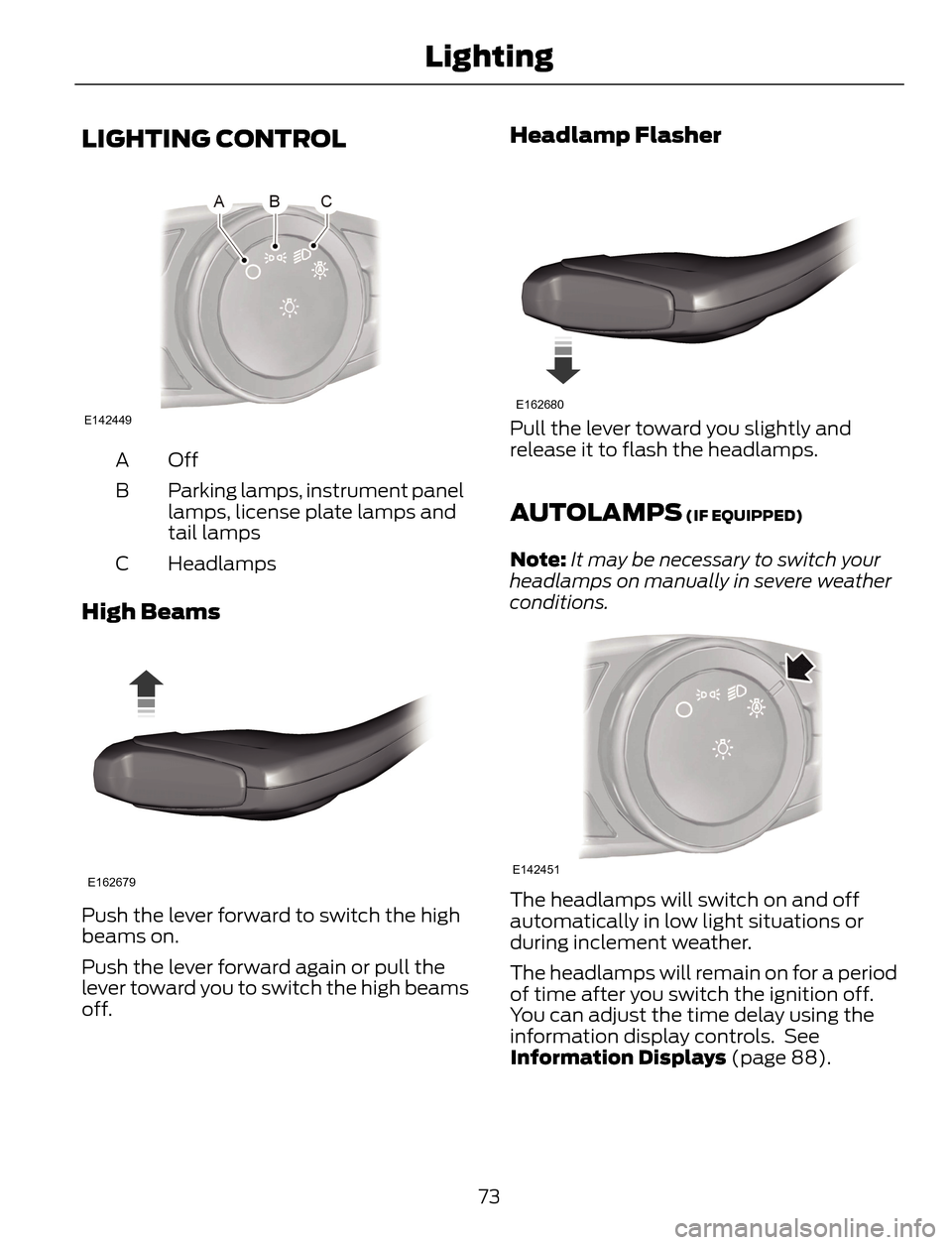
LIGHTING CONTROL
E142449
Off A
Parking lamps, instrument panel
lamps, license plate lamps and
tail lamps B
Headlamps C
High Beams
E162679
Push the lever forward to switch the high
beams on.
Push the lever forward again or pull the
lever toward you to switch the high beams
off.
Headlamp Flasher
E162680
Pull the lever toward you slightly and
release it to flash the headlamps.
AUTOLAMPS (IF EQUIPPED)
Note:It may be necessary to switch your
headlamps on manually in severe weather
conditions.
E142451
The headlamps will switch on and off
automatically in low light situations or
during inclement weather.
The headlamps will remain on for a period
of time after you switch the ignition off.
You can adjust the time delay using the
information display controls. See
Information Displays (page 88).
73
Lighting
Page 77 of 428
Note:If you switch autolamps on in
conjunction with autowipers, low beam
headlamps will illuminate automatically
when the rain sensor activates the
windshield wipers continuously.
INSTRUMENT LIGHTING
DIMMER
Note:If you disconnect the battery or it
becomes discharged, the illuminated
components will switch to the maximum
setting.
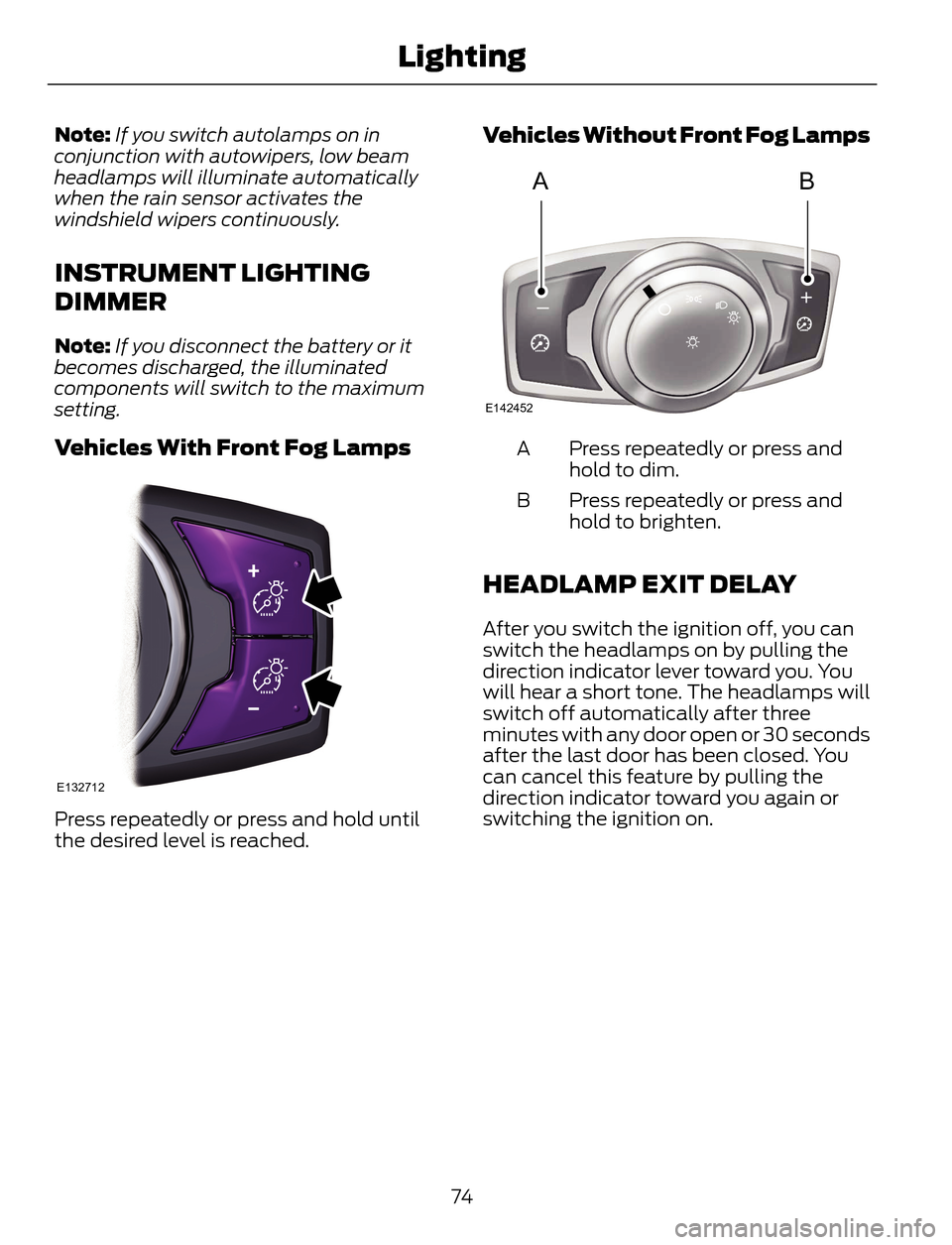
Vehicles With Front Fog Lamps
E132712
Press repeatedly or press and hold until
the desired level is reached.
Vehicles Without Front Fog Lamps
AB
A
E142452
Press repeatedly or press and
hold to dim. A
Press repeatedly or press and
hold to brighten. B
HEADLAMP EXIT DELAY
After you switch the ignition off, you can
switch the headlamps on by pulling the
direction indicator lever toward you. You
will hear a short tone. The headlamps will
switch off automatically after three
minutes with any door open or 30 seconds
after the last door has been closed. You
can cancel this feature by pulling the
direction indicator toward you again or
switching the ignition on.
74
Lighting
Page 78 of 428
DAYTIME RUNNING LAMPS (IF
EQUIPPED)
WARNING
Always remember to switch your
headlamps on in low light situations
or during inclement weather. The
Daytime Running Lamp system does not
activate the tail lamps and may not
provide adequate lighting during these
conditions. Failure to activate your
headlamps under these conditions may
result in a collision.
To switch the Daytime Running Lamp
system on:
1. Turn the ignition to the on position.
2. Switch the lighting control to the off,
autolamp or parking lamp position.
Vehicles With Halogen Headlamps
The Daytime Running Lamp system
switches the low beam headlamps on at
a reduced intensity in day light conditions.
Vehicle With High Intensity
Discharge Headlamps
The Daytime Running Lamp system
switches the fog lamps on in day light
conditions (Not available in all markets).
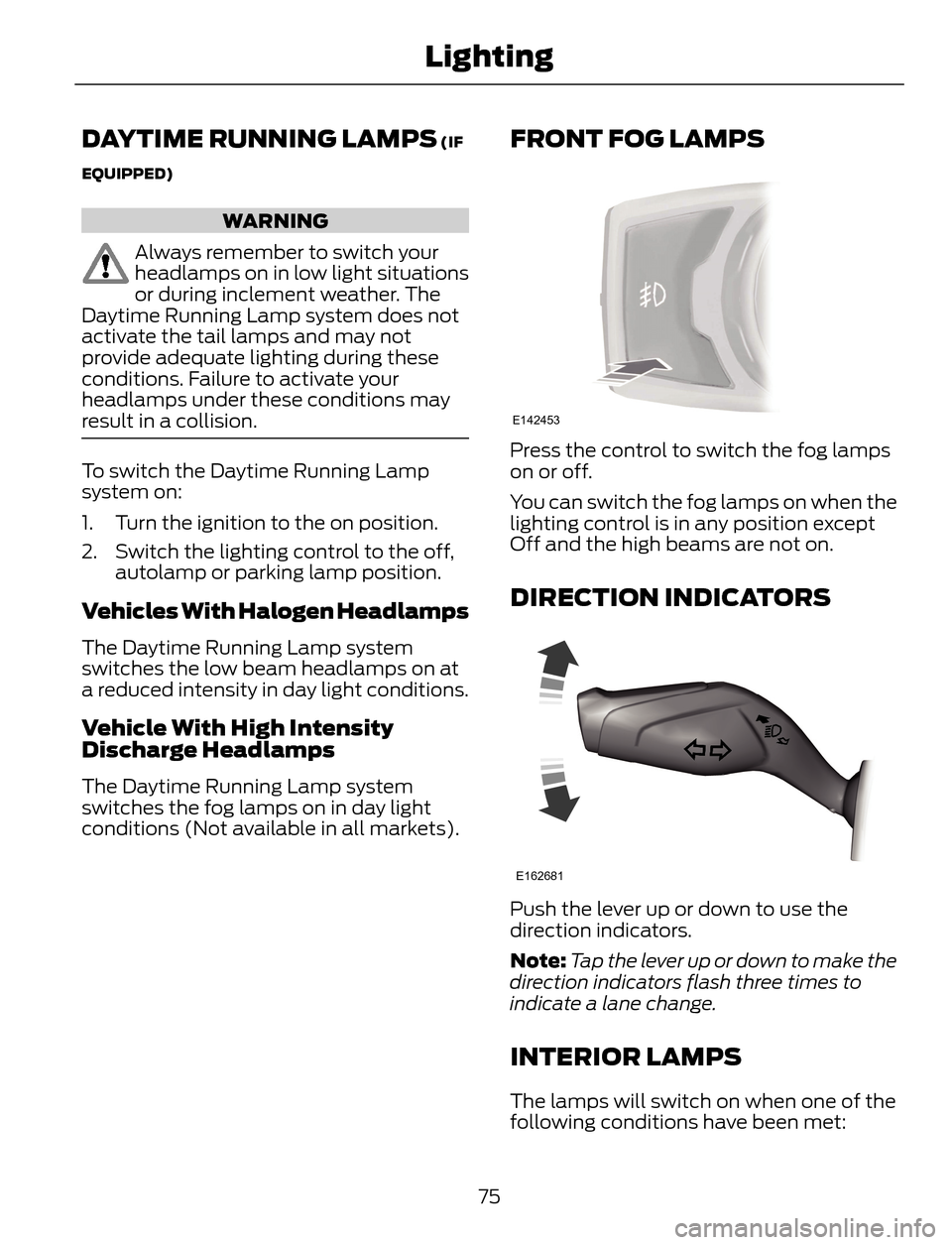
FRONT FOG LAMPS
E142453
Press the control to switch the fog lamps
on or off.
You can switch the fog lamps on when the
lighting control is in any position except
Off and the high beams are not on.
DIRECTION INDICATORS
E162681
Push the lever up or down to use the
direction indicators.
Note:Tap the lever up or down to make the
direction indicators flash three times to
indicate a lane change.
INTERIOR LAMPS
The lamps will switch on when one of the
following conditions have been met:
75
Lighting
Page 79 of 428
• You open any door.
• You press a remote control button.
• You press switch B on the front interior
lamp.
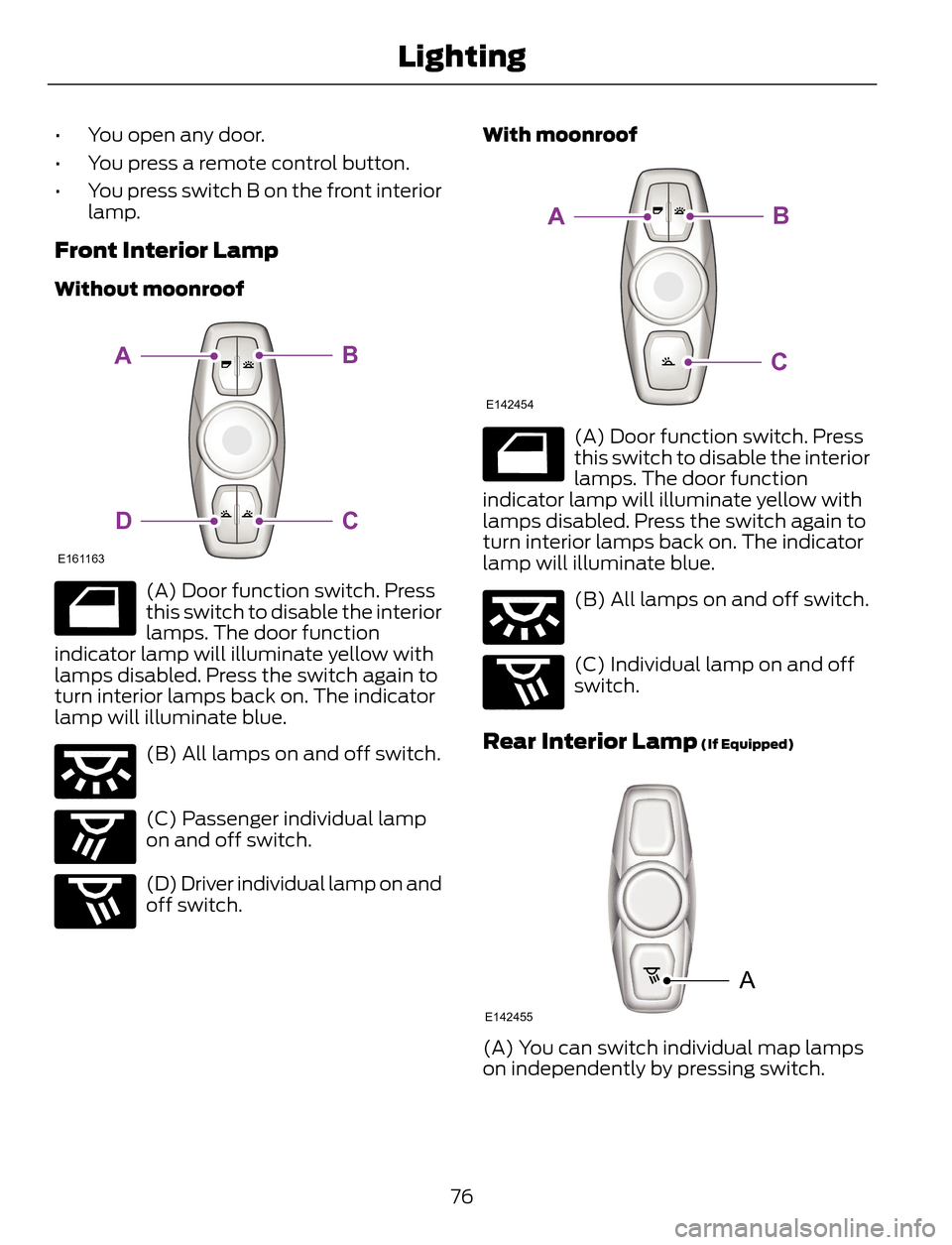
Front Interior Lamp
Without moonroof
E161163
BA
CD
E160819
(A) Door function switch. Press
this switch to disable the interior
lamps. The door function
indicator lamp will illuminate yellow with
lamps disabled. Press the switch again to
turn interior lamps back on. The indicator
lamp will illuminate blue.
E160816
(B) All lamps on and off switch.
E160817
(C) Passenger individual lamp
on and off switch.
E160818
(D) Driver individual lamp on and
off switch.With moonroof
E142454
BA
C
E160819
(A) Door function switch. Press
this switch to disable the interior
lamps. The door function
indicator lamp will illuminate yellow with
lamps disabled. Press the switch again to
turn interior lamps back on. The indicator
lamp will illuminate blue.
E160816
(B) All lamps on and off switch.
E160818
(C) Individual lamp on and off
switch.
Rear Interior Lamp (If Equipped)
A
E142455
(A) You can switch individual map lamps
on independently by pressing switch.
76
Lighting