service FORD ESCAPE 2014 3.G User Guide
[x] Cancel search | Manufacturer: FORD, Model Year: 2014, Model line: ESCAPE, Model: FORD ESCAPE 2014 3.GPages: 428, PDF Size: 16.6 MB
Page 89 of 428
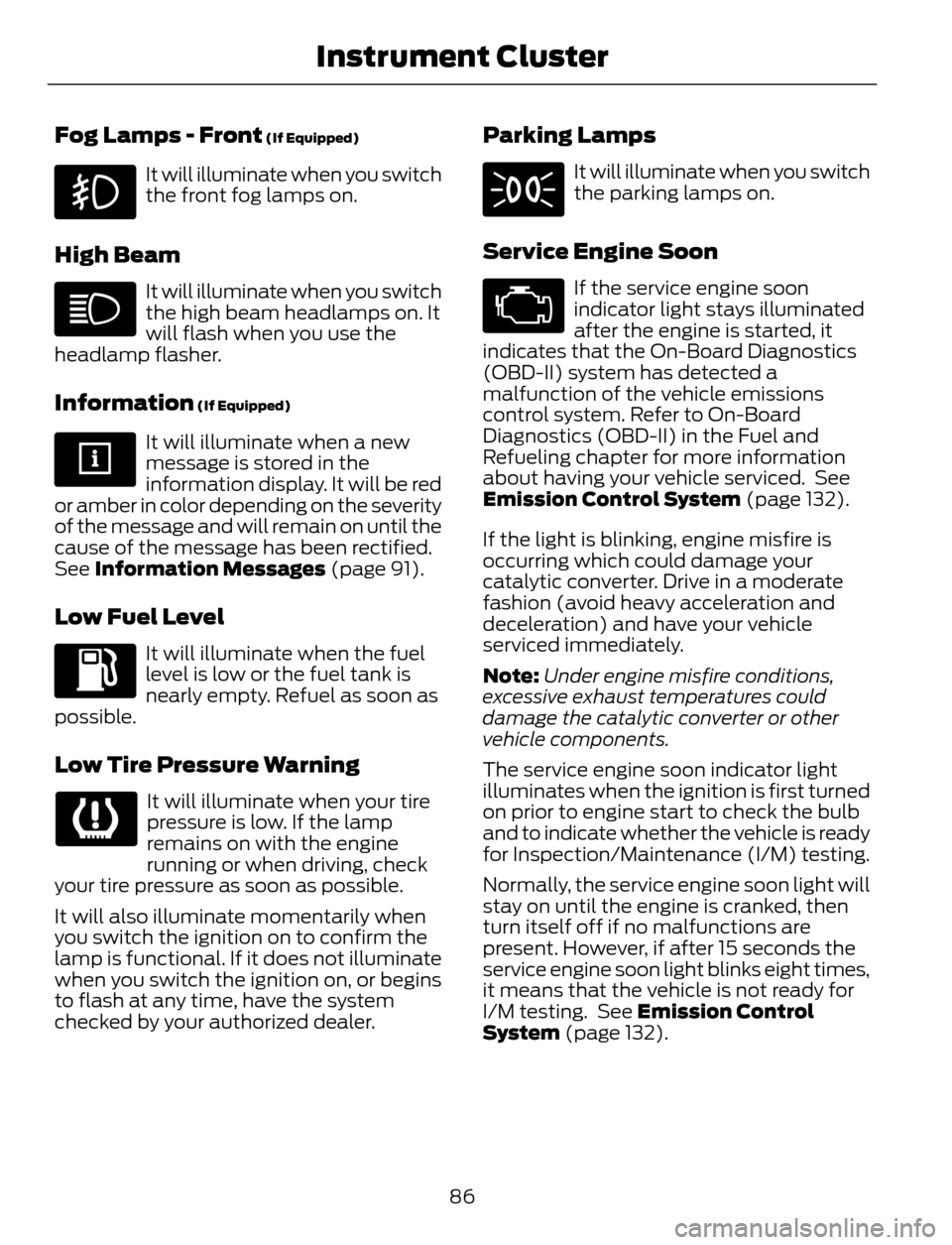
Fog Lamps - Front (If Equipped)
It will illuminate when you switch
the front fog lamps on.
High Beam
It will illuminate when you switch
the high beam headlamps on. It
will flash when you use the
headlamp flasher.
Information (If Equipped)
It will illuminate when a new
message is stored in the
information display. It will be red
or amber in color depending on the severity
of the message and will remain on until the
cause of the message has been rectified.
See Information Messages (page 91).
Low Fuel Level
It will illuminate when the fuel
level is low or the fuel tank is
nearly empty. Refuel as soon as
possible.
Low Tire Pressure Warning
It will illuminate when your tire
pressure is low. If the lamp
remains on with the engine
running or when driving, check
your tire pressure as soon as possible.
It will also illuminate momentarily when
you switch the ignition on to confirm the
lamp is functional. If it does not illuminate
when you switch the ignition on, or begins
to flash at any time, have the system
checked by your authorized dealer.
Parking Lamps
It will illuminate when you switch
the parking lamps on.
Service Engine Soon
If the service engine soon
indicator light stays illuminated
after the engine is started, it
indicates that the On-Board Diagnostics
(OBD-II) system has detected a
malfunction of the vehicle emissions
control system. Refer to On-Board
Diagnostics (OBD-II) in the Fuel and
Refueling chapter for more information
about having your vehicle serviced. See
Emission Control System (page 132).
If the light is blinking, engine misfire is
occurring which could damage your
catalytic converter. Drive in a moderate
fashion (avoid heavy acceleration and
deceleration) and have your vehicle
serviced immediately.
Note:Under engine misfire conditions,
excessive exhaust temperatures could
damage the catalytic converter or other
vehicle components.
The service engine soon indicator light
illuminates when the ignition is first turned
on prior to engine start to check the bulb
and to indicate whether the vehicle is ready
for Inspection/Maintenance (I/M) testing.
Normally, the service engine soon light will
stay on until the engine is cranked, then
turn itself off if no malfunctions are
present. However, if after 15 seconds the
service engine soon light blinks eight times,
it means that the vehicle is not ready for
I/M testing. See Emission Control
System (page 132).
86
Instrument Cluster
Page 94 of 428
Distance to E
Indicates the approximate distance the
vehicle will travel on the fuel remaining in
the tank. Changes in driving pattern may
cause the value to vary.
Trip Odometer
Registers the distance traveled of
individual journeys.
Trip Timer
Registers the time of individual journeys.
Average Fuel
Indicates the average fuel consumption
since the function was last reset.
All Value
Indicates all the respective remaining fuel,
distance, time and average fuel
information.
INFORMATION MESSAGES
Note:Depending on the vehicle options
equipped with your vehicle, not all of the
messages will display or be available.
Certain messages may be abbreviated or
shortened depending upon which cluster
type you have.
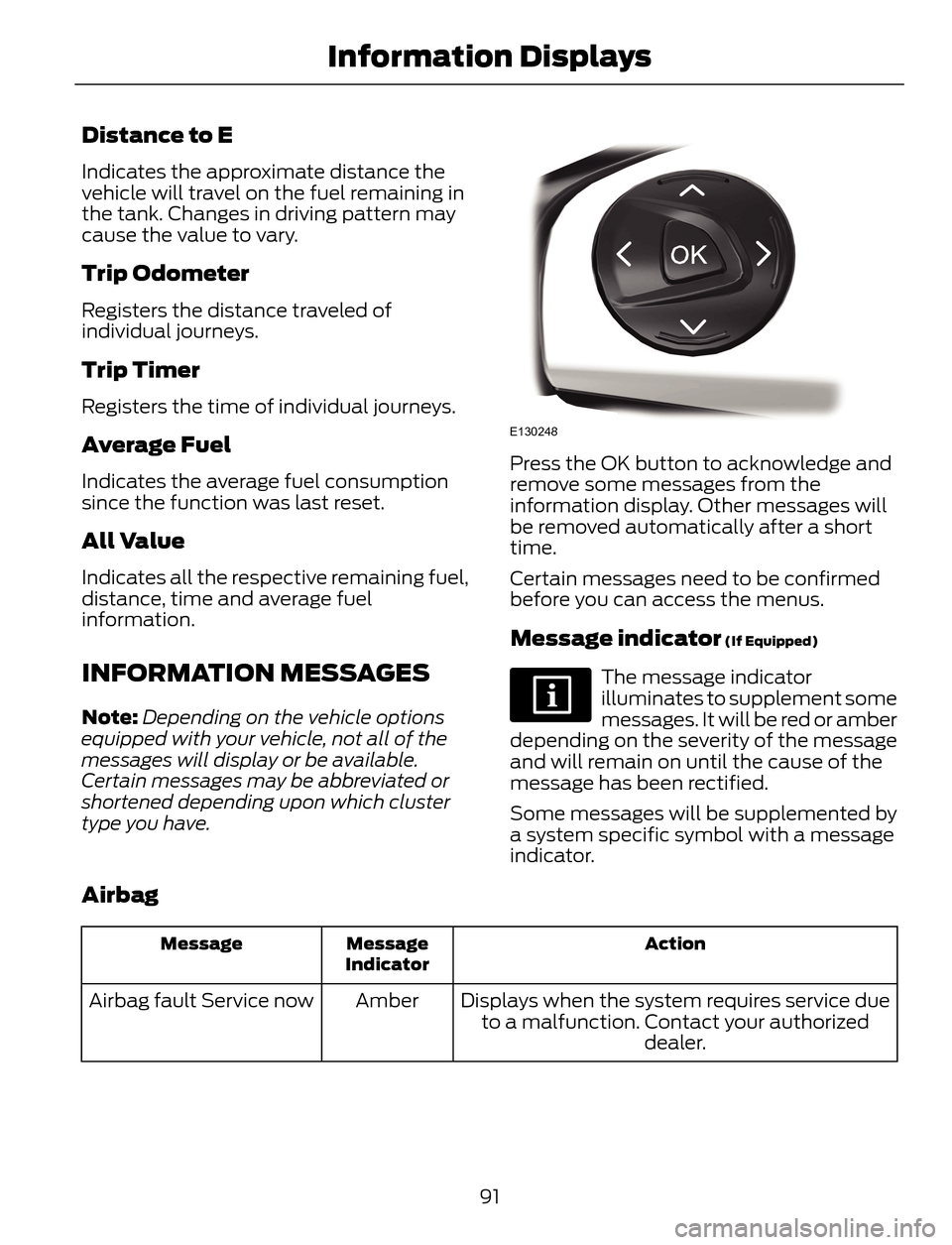
E130248
Press the OK button to acknowledge and
remove some messages from the
information display. Other messages will
be removed automatically after a short
time.
Certain messages need to be confirmed
before you can access the menus.
Message indicator (If Equipped)
The message indicator
illuminates to supplement some
messages. It will be red or amber
depending on the severity of the message
and will remain on until the cause of the
message has been rectified.
Some messages will be supplemented by
a system specific symbol with a message
indicator.
Airbag
Action Message
Indicator Message
Displays when the system requires service due
to a malfunction. Contact your authorized
dealer. Amber Airbag fault Service now
91
Information Displays
Page 95 of 428
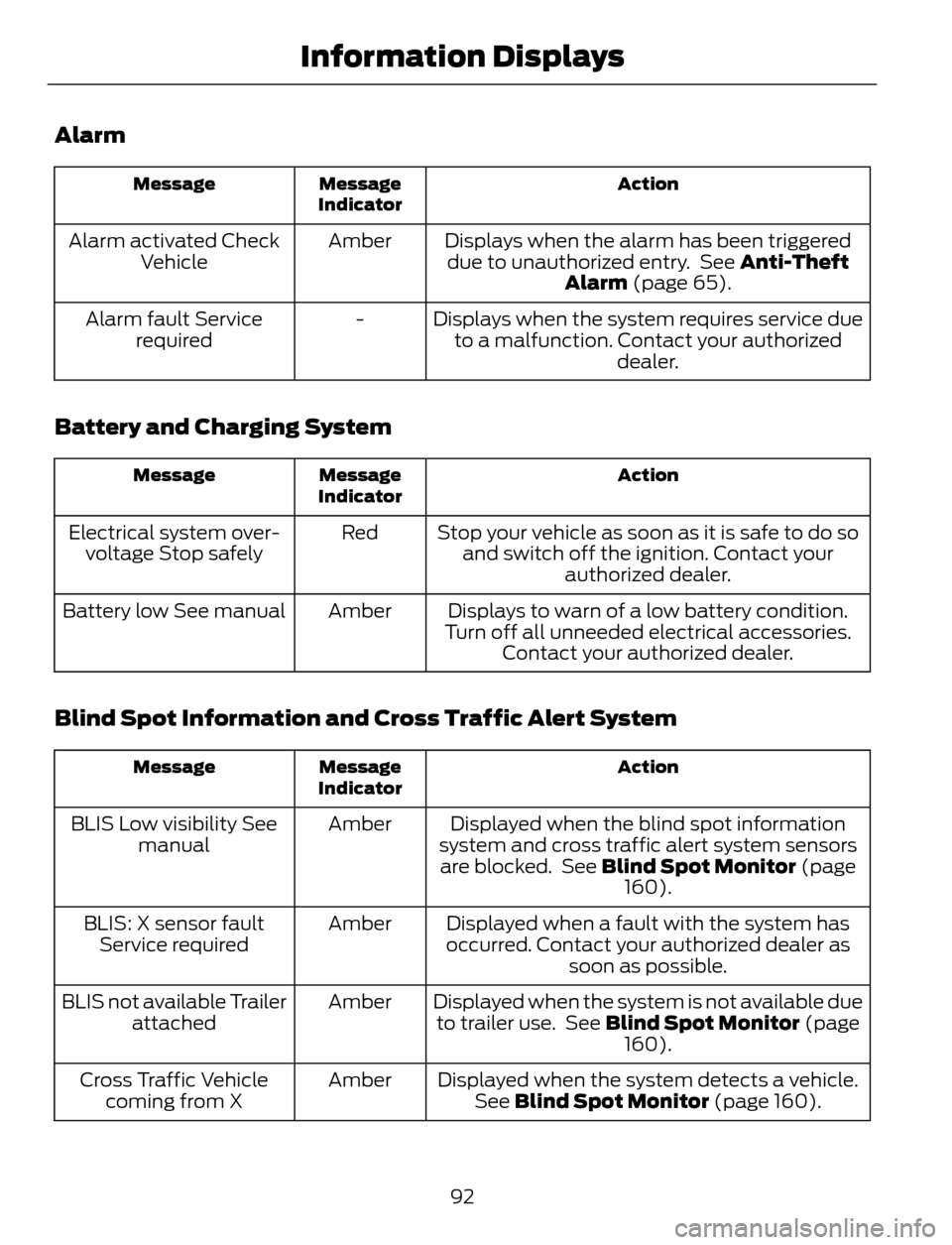
Alarm
Action Message
Indicator Message
Displays when the alarm has been triggered
due to unauthorized entry. See Anti-Theft
Alarm (page 65). Amber Alarm activated Check
Vehicle
Displays when the system requires service due
to a malfunction. Contact your authorized
dealer. - Alarm fault Service
required
Battery and Charging System
Action Message
Indicator Message
Stop your vehicle as soon as it is safe to do so
and switch off the ignition. Contact your
authorized dealer. Red Electrical system over-
voltage Stop safely
Displays to warn of a low battery condition.
Turn off all unneeded electrical accessories.
Contact your authorized dealer. Amber Battery low See manual
Blind Spot Information and Cross Traffic Alert System
Action Message
Indicator Message
Displayed when the blind spot information
system and cross traffic alert system sensors
are blocked. See Blind Spot Monitor (page
160). Amber BLIS Low visibility See
manual
Displayed when a fault with the system has
occurred. Contact your authorized dealer as
soon as possible. Amber BLIS: X sensor fault
Service required
Displayed when the system is not available due
to trailer use. See Blind Spot Monitor (page
160). Amber BLIS not available Trailer
attached
Displayed when the system detects a vehicle.
See Blind Spot Monitor (page 160). Amber Cross Traffic Vehicle
coming from X
92
Information Displays
Page 96 of 428
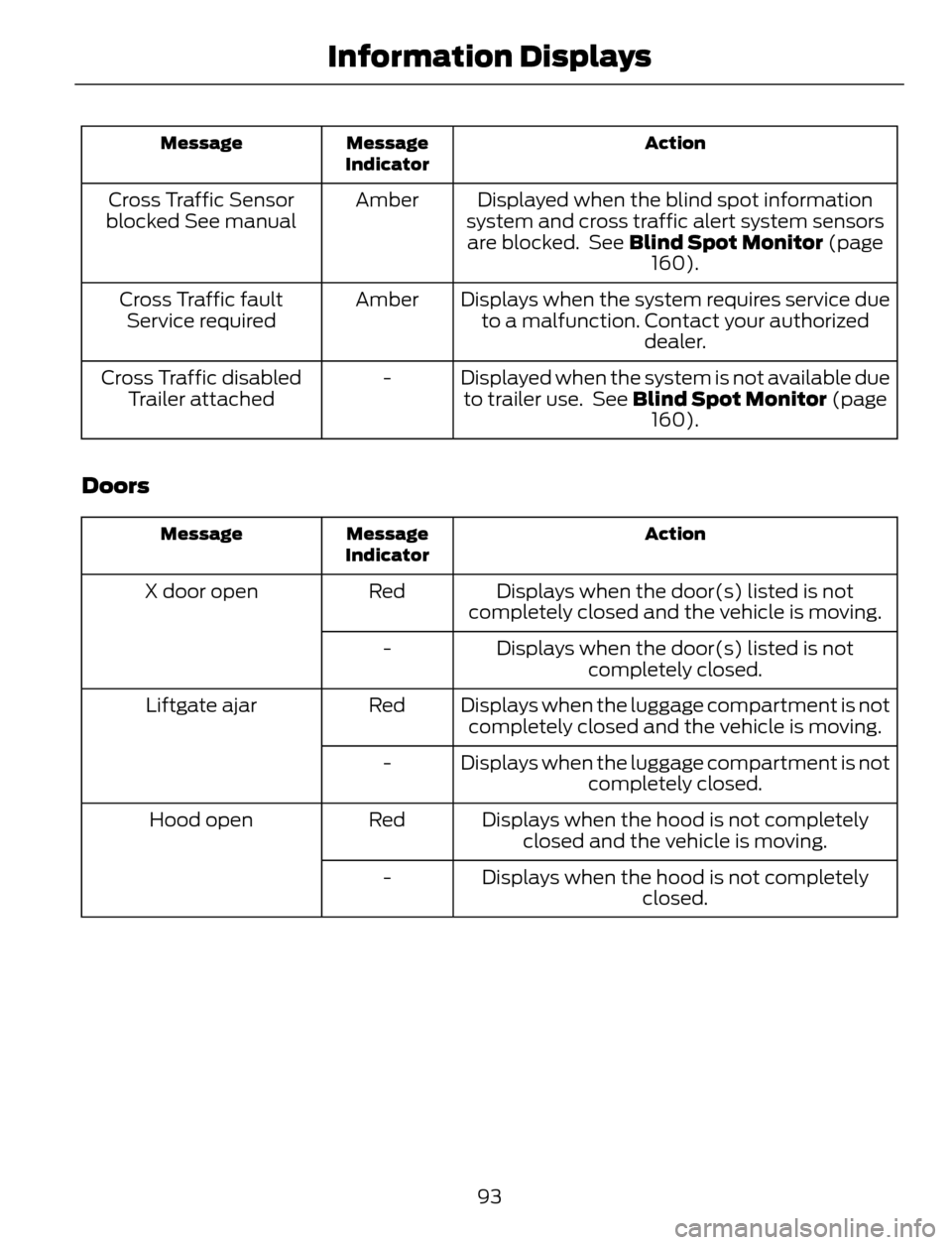
Action Message
Indicator Message
Displayed when the blind spot information
system and cross traffic alert system sensors
are blocked. See Blind Spot Monitor (page
160). Amber Cross Traffic Sensor
blocked See manual
Displays when the system requires service due
to a malfunction. Contact your authorized
dealer. Amber Cross Traffic fault
Service required
Displayed when the system is not available due
to trailer use. See Blind Spot Monitor (page
160). - Cross Traffic disabled
Trailer attached
Doors
Action Message
Indicator Message
Displays when the door(s) listed is not
completely closed and the vehicle is moving. Red X door open
Displays when the door(s) listed is not
completely closed. -
Displays when the luggage compartment is not
completely closed and the vehicle is moving. Red Liftgate ajar
Displays when the luggage compartment is not
completely closed. -
Displays when the hood is not completely
closed and the vehicle is moving. Red Hood open
Displays when the hood is not completely
closed. -
93
Information Displays
Page 97 of 428
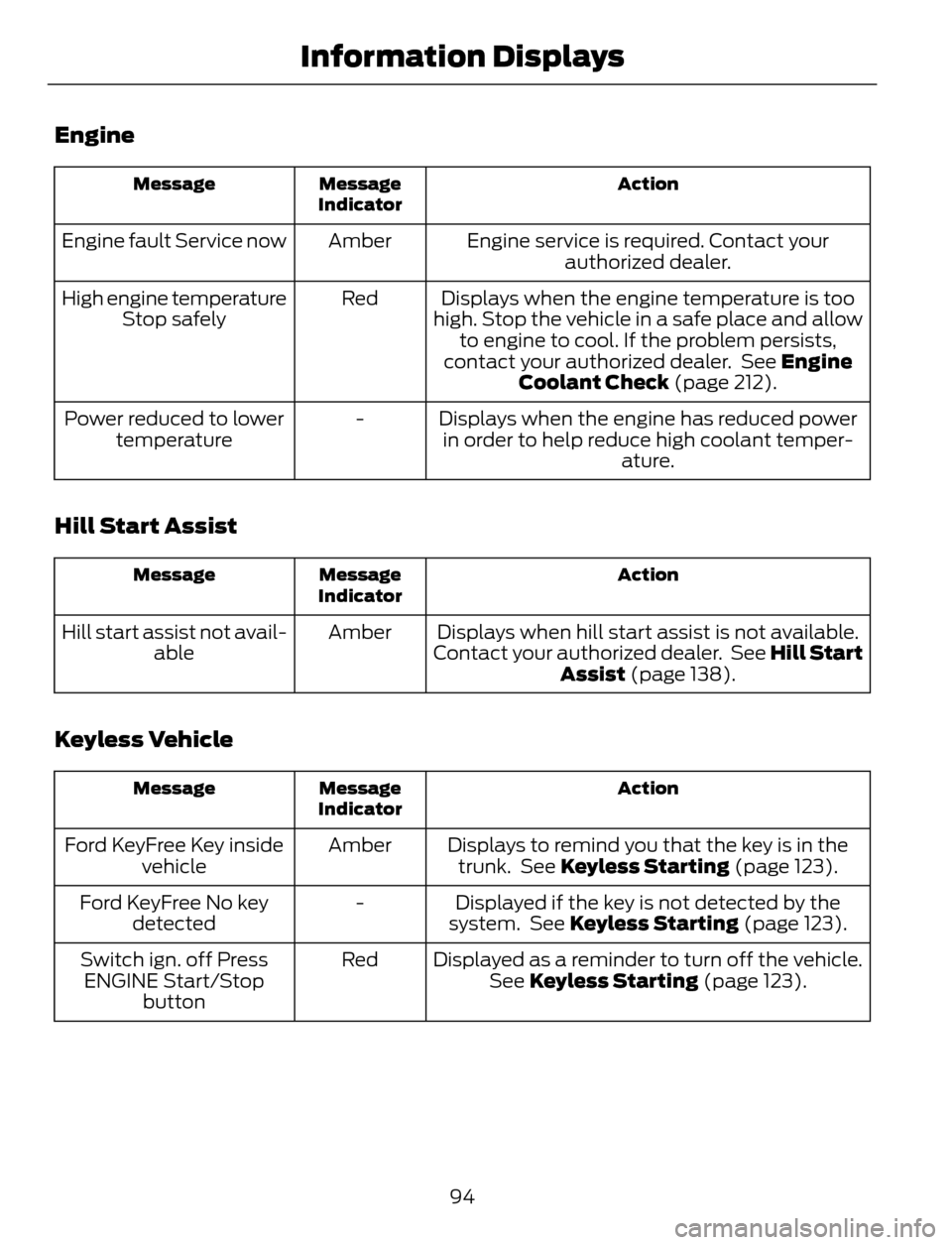
Engine
Action Message
Indicator Message
Engine service is required. Contact your
authorized dealer. Amber Engine fault Service now
Displays when the engine temperature is too
high. Stop the vehicle in a safe place and allow
to engine to cool. If the problem persists,
contact your authorized dealer. See Engine
Coolant Check (page 212). Red High engine temperature
Stop safely
Displays when the engine has reduced power
in order to help reduce high coolant temper-
ature. - Power reduced to lower
temperature
Hill Start Assist
Action Message
Indicator Message
Displays when hill start assist is not available.
Contact your authorized dealer. See Hill Start
Assist (page 138). Amber Hill start assist not avail-
able
Keyless Vehicle
Action Message
Indicator Message
Displays to remind you that the key is in the
trunk. See Keyless Starting (page 123). Amber Ford KeyFree Key inside
vehicle
Displayed if the key is not detected by the
system. See Keyless Starting (page 123). - Ford KeyFree No key
detected
Displayed as a reminder to turn off the vehicle.
See Keyless Starting (page 123). Red Switch ign. off Press
ENGINE Start/Stop
button
94
Information Displays
Page 98 of 428
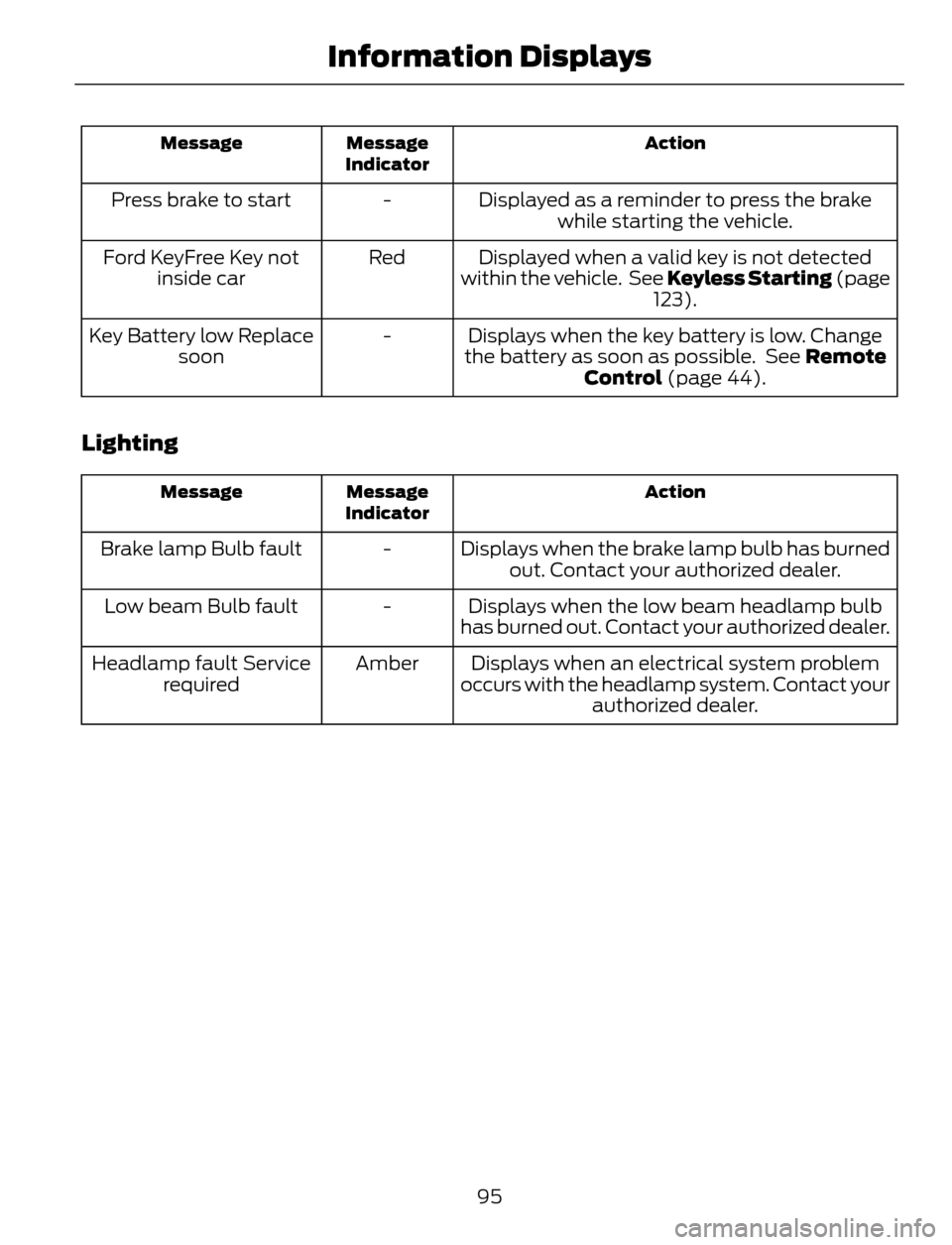
Action Message
Indicator Message
Displayed as a reminder to press the brake
while starting the vehicle. - Press brake to start
Displayed when a valid key is not detected
within the vehicle. See Keyless Starting (page
123). Red Ford KeyFree Key not
inside car
Displays when the key battery is low. Change
the battery as soon as possible. See Remote
Control (page 44). - Key Battery low Replace
soon
Lighting
Action Message
Indicator Message
Displays when the brake lamp bulb has burned
out. Contact your authorized dealer. - Brake lamp Bulb fault
Displays when the low beam headlamp bulb
has burned out. Contact your authorized dealer. - Low beam Bulb fault
Displays when an electrical system problem
occurs with the headlamp system. Contact your
authorized dealer. Amber Headlamp fault Service
required
95
Information Displays
Page 99 of 428
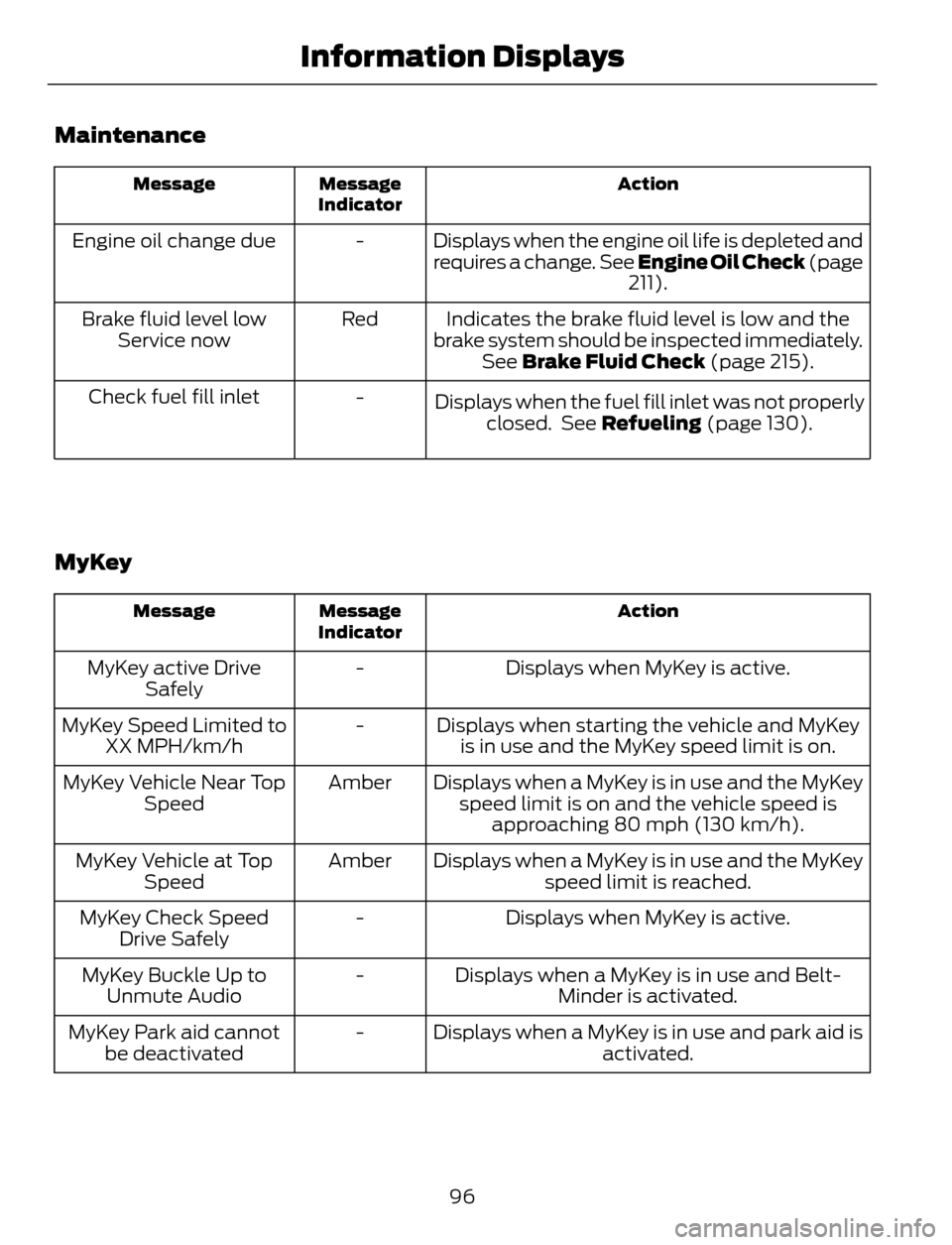
Maintenance
Action Message
Indicator Message
Displays when the engine oil life is depleted and
requires a change. See Engine Oil Check (page
211). - Engine oil change due
Indicates the brake fluid level is low and the
brake system should be inspected immediately.
See Brake Fluid Check (page 215). Red Brake fluid level low
Service now
-
Displays when the fuel fill inlet was not properly
closed. See Refueling (page 130). Check fuel fill inlet
MyKey
Action Message
Indicator Message
Displays when MyKey is active. - MyKey active Drive
Safely
Displays when starting the vehicle and MyKey
is in use and the MyKey speed limit is on. - MyKey Speed Limited to
XX MPH/km/h
Displays when a MyKey is in use and the MyKey
speed limit is on and the vehicle speed is
approaching 80 mph (130 km/h). Amber MyKey Vehicle Near Top
Speed
Displays when a MyKey is in use and the MyKey
speed limit is reached. Amber MyKey Vehicle at Top
Speed
Displays when MyKey is active. - MyKey Check Speed
Drive Safely
Displays when a MyKey is in use and Belt-
Minder is activated. - MyKey Buckle Up to
Unmute Audio
Displays when a MyKey is in use and park aid is
activated. - MyKey Park aid cannot
be deactivated
96
Information Displays
Page 100 of 428
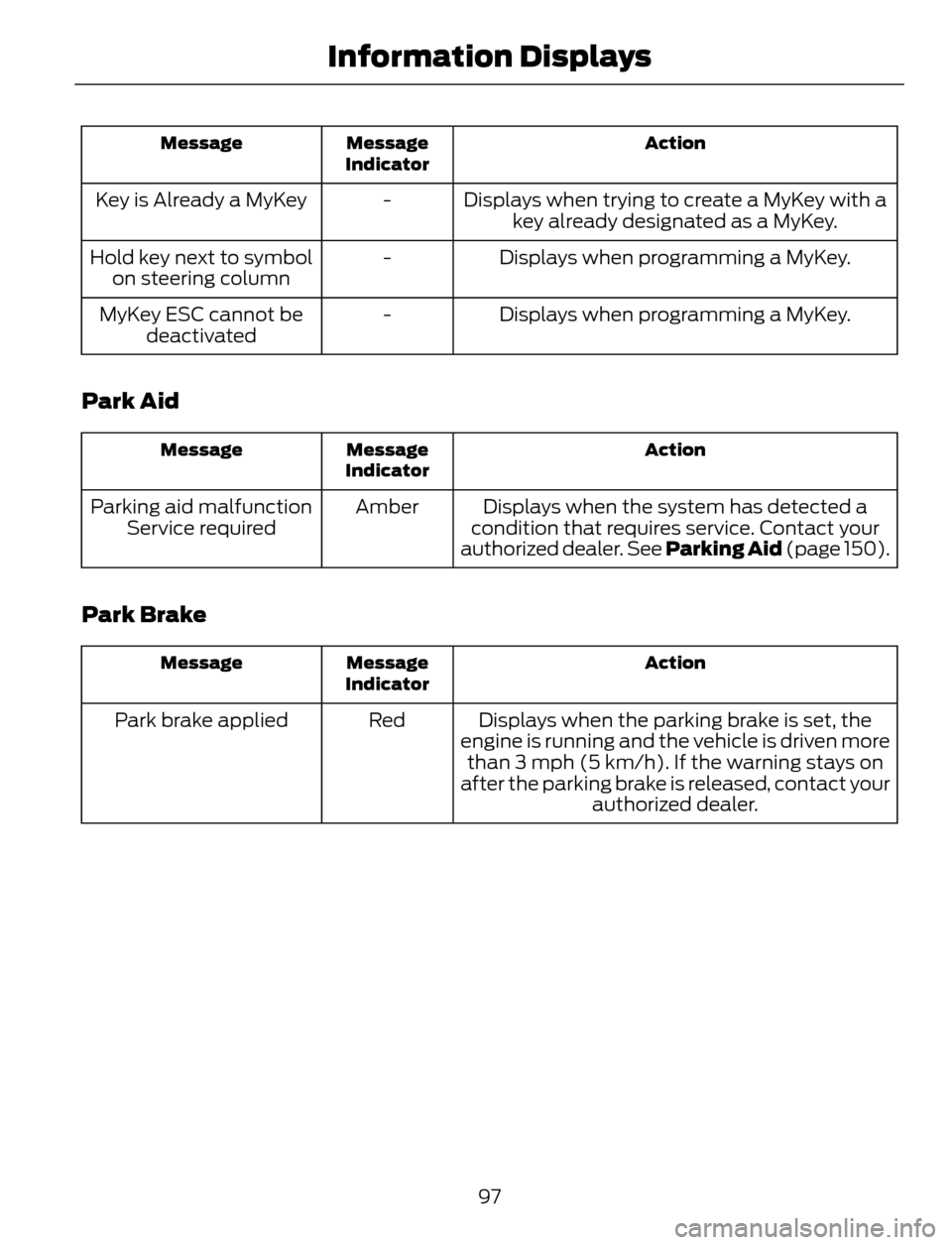
Action Message
Indicator Message
Displays when trying to create a MyKey with a
key already designated as a MyKey. - Key is Already a MyKey
Displays when programming a MyKey. - Hold key next to symbol
on steering column
Displays when programming a MyKey. - MyKey ESC cannot be
deactivated
Park Aid
Action Message
Indicator Message
Displays when the system has detected a
condition that requires service. Contact your
authorized dealer. See Parking Aid (page 150). Amber Parking aid malfunction
Service required
Park Brake
Action Message
Indicator Message
Displays when the parking brake is set, the
engine is running and the vehicle is driven more
than 3 mph (5 km/h). If the warning stays on
after the parking brake is released, contact your
authorized dealer. Red Park brake applied
97
Information Displays
Page 101 of 428
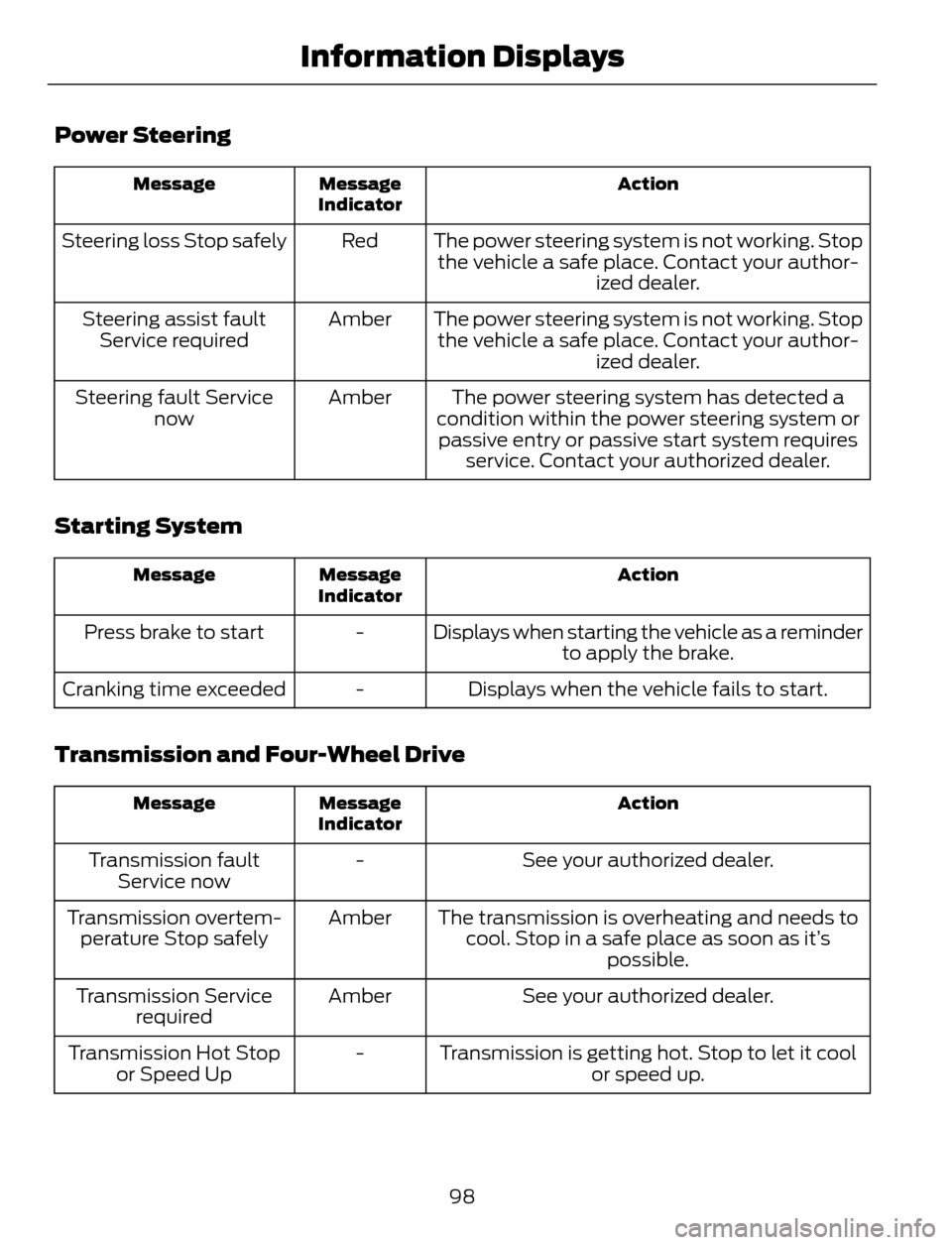
Power Steering
Action Message
Indicator Message
The power steering system is not working. Stop
the vehicle a safe place. Contact your author-
ized dealer. Red Steering loss Stop safely
The power steering system is not working. Stop
the vehicle a safe place. Contact your author-
ized dealer. Amber Steering assist fault
Service required
The power steering system has detected a
condition within the power steering system or
passive entry or passive start system requires
service. Contact your authorized dealer. Amber Steering fault Service
now
Starting System
Action Message
Indicator Message
Displays when starting the vehicle as a reminder
to apply the brake. - Press brake to start
Displays when the vehicle fails to start. - Cranking time exceeded
Transmission and Four-Wheel Drive
Action Message
Indicator Message
See your authorized dealer. - Transmission fault
Service now
The transmission is overheating and needs to
cool. Stop in a safe place as soon as it’s
possible. Amber Transmission overtem-
perature Stop safely
See your authorized dealer. Amber Transmission Service
required
Transmission is getting hot. Stop to let it cool
or speed up. - Transmission Hot Stop
or Speed Up
98
Information Displays
Page 102 of 428
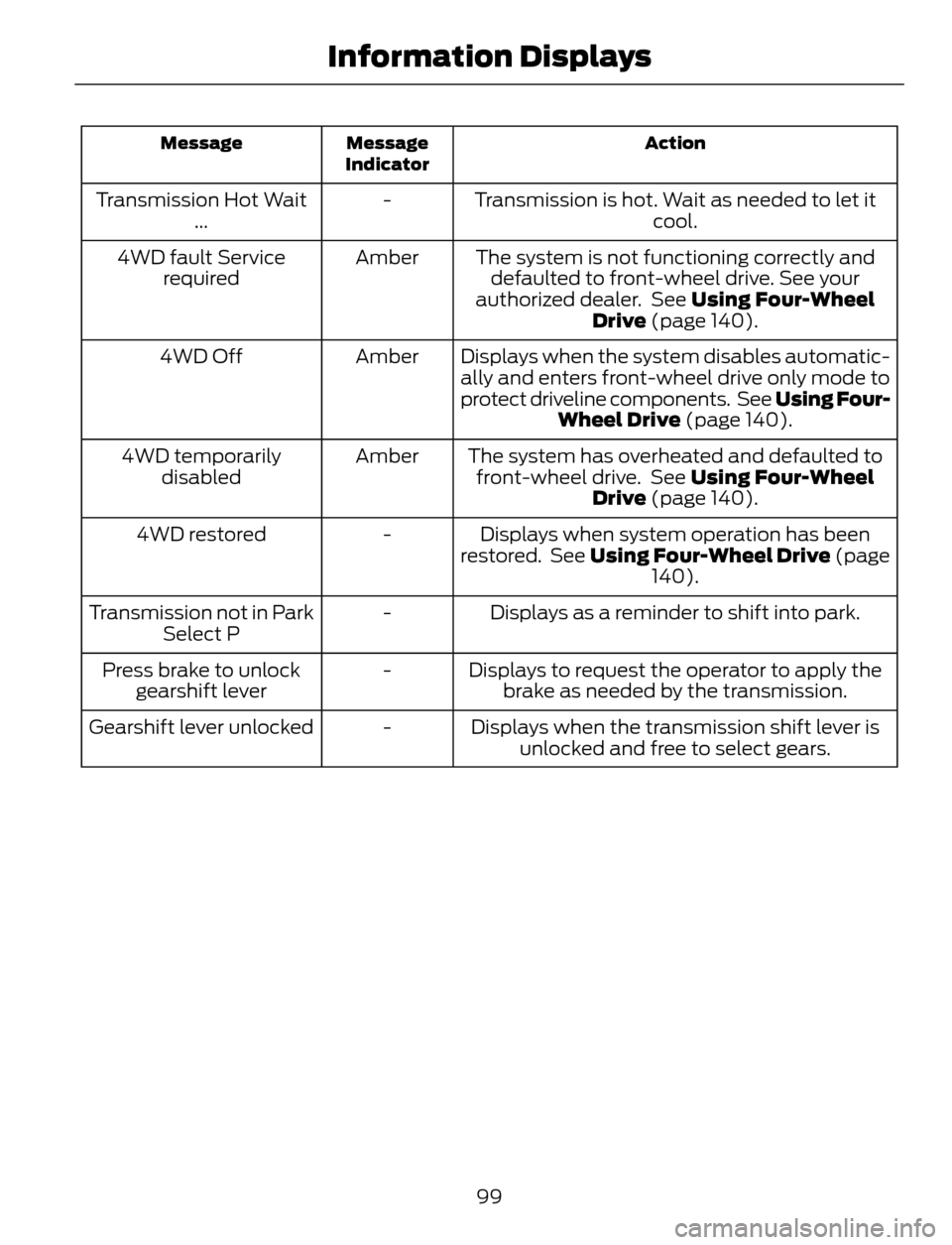
Action Message
Indicator Message
Transmission is hot. Wait as needed to let it
cool. - Transmission Hot Wait
...
The system is not functioning correctly and
defaulted to front-wheel drive. See your
authorized dealer. See Using Four-Wheel
Drive (page 140). Amber 4WD fault Service
required
Displays when the system disables automatic-
ally and enters front-wheel drive only mode to
protect driveline components. See Using Four-
Wheel Drive (page 140). Amber 4WD Off
The system has overheated and defaulted to
front-wheel drive. See Using Four-Wheel
Drive (page 140). Amber 4WD temporarily
disabled
Displays when system operation has been
restored. See Using Four-Wheel Drive (page
140). - 4WD restored
Displays as a reminder to shift into park. - Transmission not in Park
Select P
Displays to request the operator to apply the
brake as needed by the transmission. - Press brake to unlock
gearshift lever
Displays when the transmission shift lever is
unlocked and free to select gears. - Gearshift lever unlocked
99
Information Displays