automatic transmission FORD ESCAPE 2014 3.G Owner's Manual
[x] Cancel search | Manufacturer: FORD, Model Year: 2014, Model line: ESCAPE, Model: FORD ESCAPE 2014 3.GPages: 428, PDF Size: 16.6 MB
Page 267 of 428
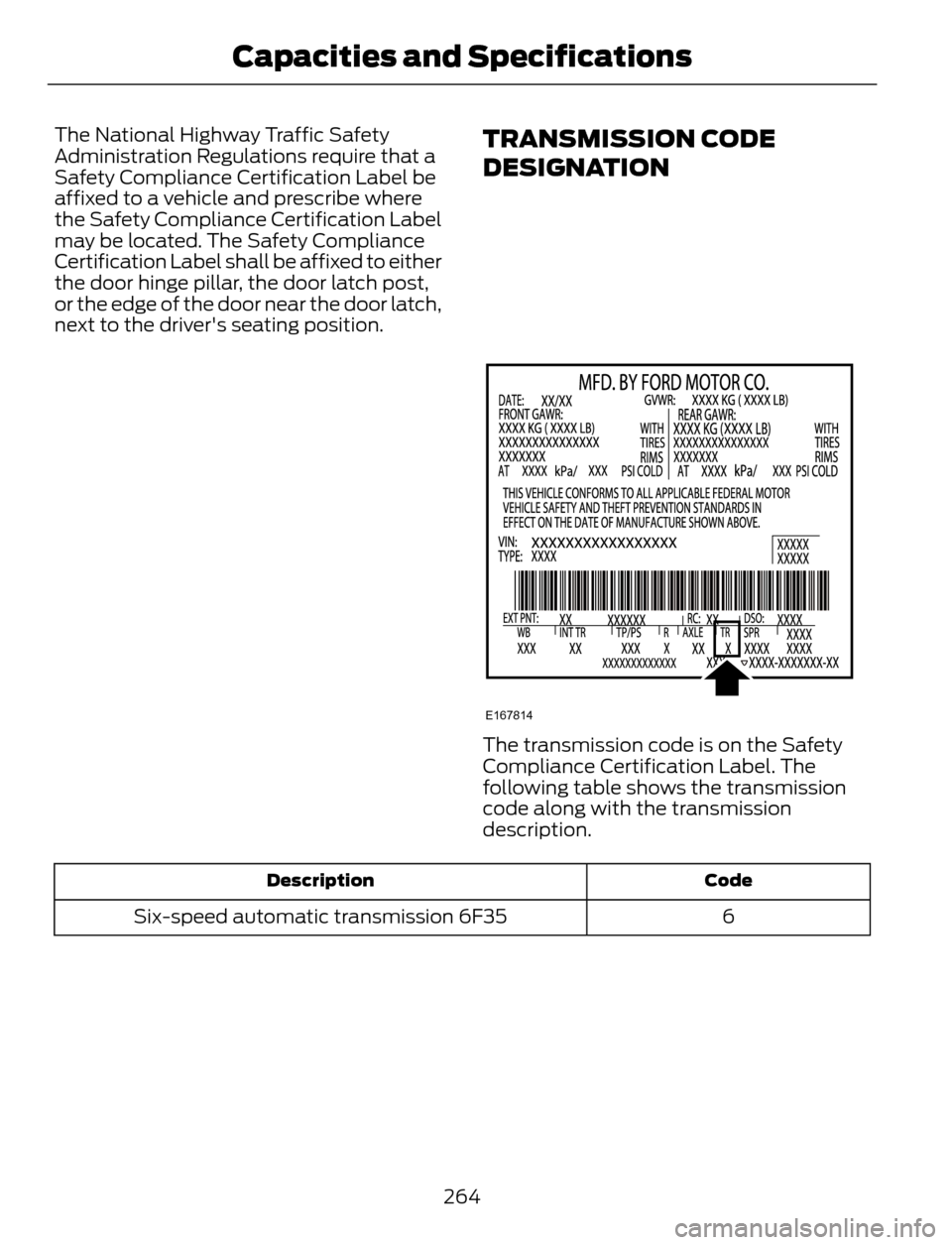
The National Highway Traffic Safety
Administration Regulations require that a
Safety Compliance Certification Label be
affixed to a vehicle and prescribe where
the Safety Compliance Certification Label
may be located. The Safety Compliance
Certification Label shall be affixed to either
the door hinge pillar, the door latch post,
or the edge of the door near the door latch,
next to the driver's seating position.TRANSMISSION CODE
DESIGNATION
E167814
The transmission code is on the Safety
Compliance Certification Label. The
following table shows the transmission
code along with the transmission
description.
Code Description
6 Six-speed automatic transmission 6F35
264
Capacities and Specifications
Page 269 of 428
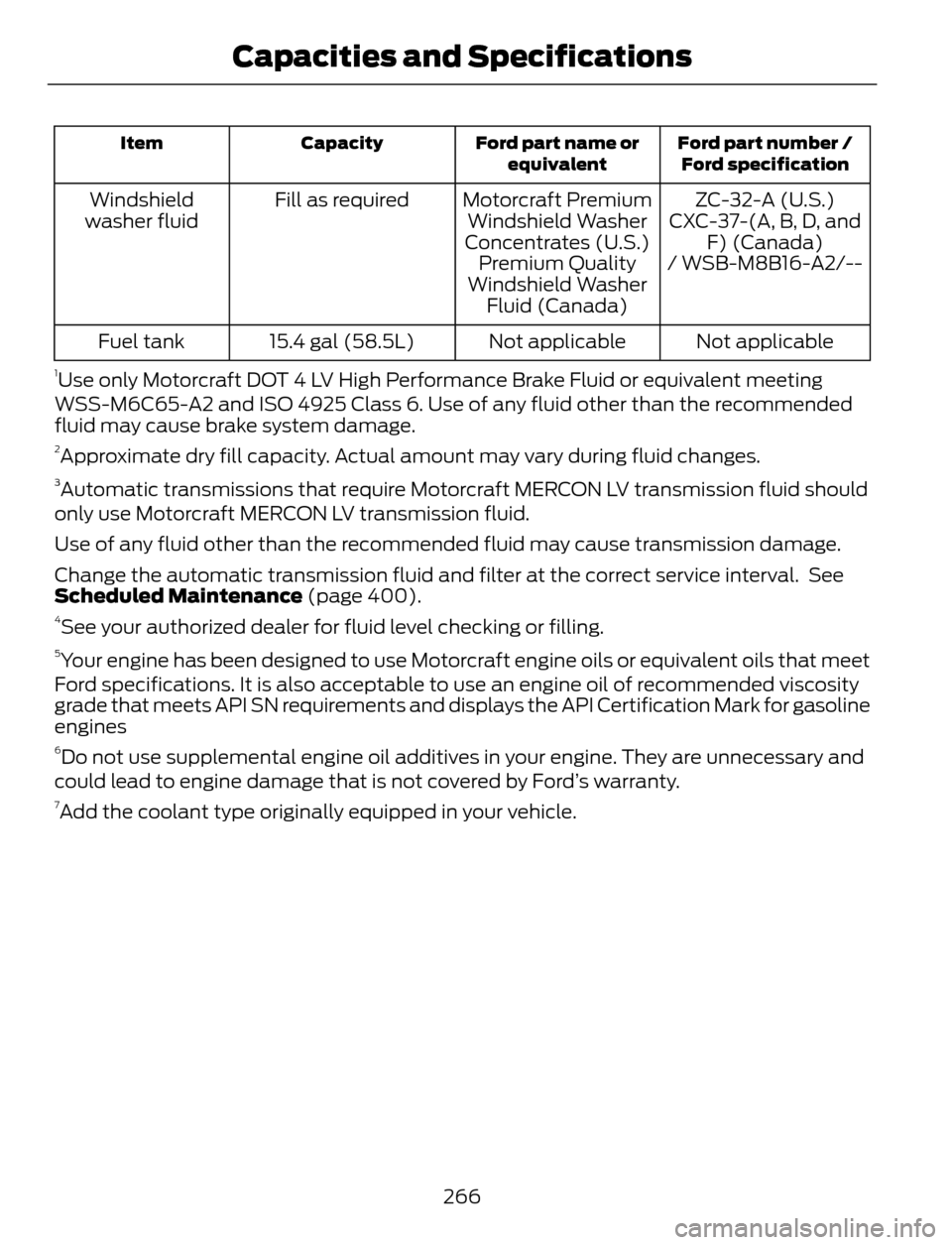
Ford part number /
Ford specification Ford part name or
equivalent Capacity Item
ZC-32-A (U.S.) Motorcraft Premium
Windshield Washer
Concentrates (U.S.) Fill as required Windshield
washer fluid CXC-37-(A, B, D, and
F) (Canada)
Premium Quality
Windshield Washer
Fluid (Canada)/ WSB-M8B16-A2/--
Not applicable Not applicable 15.4 gal (58.5L) Fuel tank
1Use only Motorcraft DOT 4 LV High Performance Brake Fluid or equivalent meeting
WSS-M6C65-A2 and ISO 4925 Class 6. Use of any fluid other than the recommended
fluid may cause brake system damage.
2Approximate dry fill capacity. Actual amount may vary during fluid changes.3Automatic transmissions that require Motorcraft MERCON LV transmission fluid should
only use Motorcraft MERCON LV transmission fluid.
Use of any fluid other than the recommended fluid may cause transmission damage.
Change the automatic transmission fluid and filter at the correct service interval. See
Scheduled Maintenance (page 400).
4See your authorized dealer for fluid level checking or filling.5Your engine has been designed to use Motorcraft engine oils or equivalent oils that meet
Ford specifications. It is also acceptable to use an engine oil of recommended viscosity
grade that meets API SN requirements and displays the API Certification Mark for gasoline
engines
6Do not use supplemental engine oil additives in your engine. They are unnecessary and
could lead to engine damage that is not covered by Ford’s warranty.
7Add the coolant type originally equipped in your vehicle.
266
Capacities and Specifications
Page 294 of 428
Pairing a Phone for the First Time
Note:SYNC can support downloading up
to approximately 1000 entries per
Bluetooth-enabled cellular phone.
Note:Make sure to switch on the ignition
and the radio. Put the transmission in
position P.
Note:To scroll through the menus, press
the up and down arrows on your audio
system.
Wirelessly pairing your phone with SYNC
allows you to make and receive hands-free
calls.
1. Press the phone button. When the
display indicates there is no phone
paired, press OK.
2. When Find SYNC appears in the
display, press OK.
3. Put your phone into Bluetooth
discovery mode. See your device's
manual if necessary.
4. When prompted on your phone's
display, enter the six-digit PIN provided
by SYNC in the radio display. The
display indicates when the pairing is
successful.
Depending on your phone's capability and
your market, the system may prompt you
with questions, such as setting the current
phone as the primary phone (the phone
SYNC automatically tries to connect with
first upon vehicle start-up) and
downloading your phonebook.
Pairing Subsequent Phones
Note:Make sure to switch on the ignition
and the radio. Put the transmission in
position P.
Note:To scroll through the menus, press
the up and down arrows on your audio
system.1. Press the phone button, and then scroll
to System Settings. Press OK.
2. Scroll to Bluetooth Devices. Press OK.
3. Scroll to Add Bluetooth Device. Press
OK.
4. When Find SYNC appears in the
display, press OK.
5. Put your phone into Bluetooth
discovery mode. See your phone's
manual if necessary.
6. When prompted on your phone's
display, enter the six-digit PIN provided
by SYNC in the radio display. The
display indicates when the pairing is
successful.
The system then prompts with questions,
such as if you would like to set the current
phone as the primary phone (the phone
SYNC automatically tries to connect with
first upon vehicle start-up) and download
your phone book.
Phone Voice Commands
Press the voice icon and say "Phone". Say
any of the following:
"PHONE"
"Call
"Call
"Call
"Call
"Call
"Call
"Call history incoming"2
"Call history missed"2
291
SYNC™
Page 357 of 428
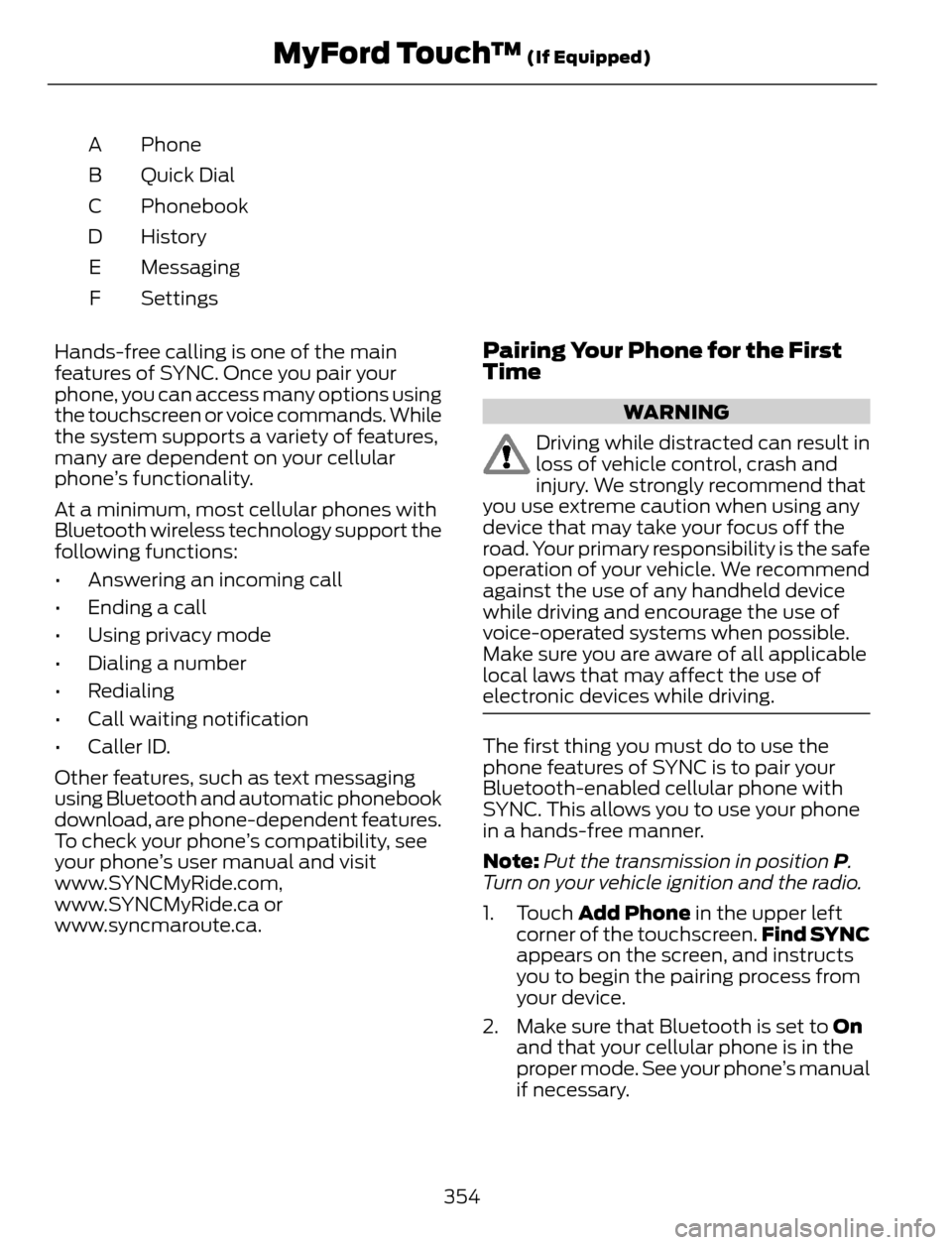
Phone A
Quick Dial B
Phonebook C
History D
Messaging E
Settings F
Hands-free calling is one of the main
features of SYNC. Once you pair your
phone, you can access many options using
the touchscreen or voice commands. While
the system supports a variety of features,
many are dependent on your cellular
phone’s functionality.
At a minimum, most cellular phones with
Bluetooth wireless technology support the
following functions:
• Answering an incoming call
• Ending a call
• Using privacy mode
• Dialing a number
• Redialing
• Call waiting notification
• Caller ID.
Other features, such as text messaging
using Bluetooth and automatic phonebook
download, are phone-dependent features.
To check your phone’s compatibility, see
your phone’s user manual and visit
www.SYNCMyRide.com,
www.SYNCMyRide.ca or
www.syncmaroute.ca.
Pairing Your Phone for the First
Time
WARNING
Driving while distracted can result in
loss of vehicle control, crash and
injury. We strongly recommend that
you use extreme caution when using any
device that may take your focus off the
road. Your primary responsibility is the safe
operation of your vehicle. We recommend
against the use of any handheld device
while driving and encourage the use of
voice-operated systems when possible.
Make sure you are aware of all applicable
local laws that may affect the use of
electronic devices while driving.
The first thing you must do to use the
phone features of SYNC is to pair your
Bluetooth-enabled cellular phone with
SYNC. This allows you to use your phone
in a hands-free manner.
Note:Put the transmission in position P.
Turn on your vehicle ignition and the radio.
1. Touch Add Phone in the upper left
corner of the touchscreen.Find SYNC
appears on the screen, and instructs
you to begin the pairing process from
your device.
2. Make sure that Bluetooth is set to On
and that your cellular phone is in the
proper mode. See your phone’s manual
if necessary.
354
MyFord Touch™ (If Equipped)
Page 406 of 428
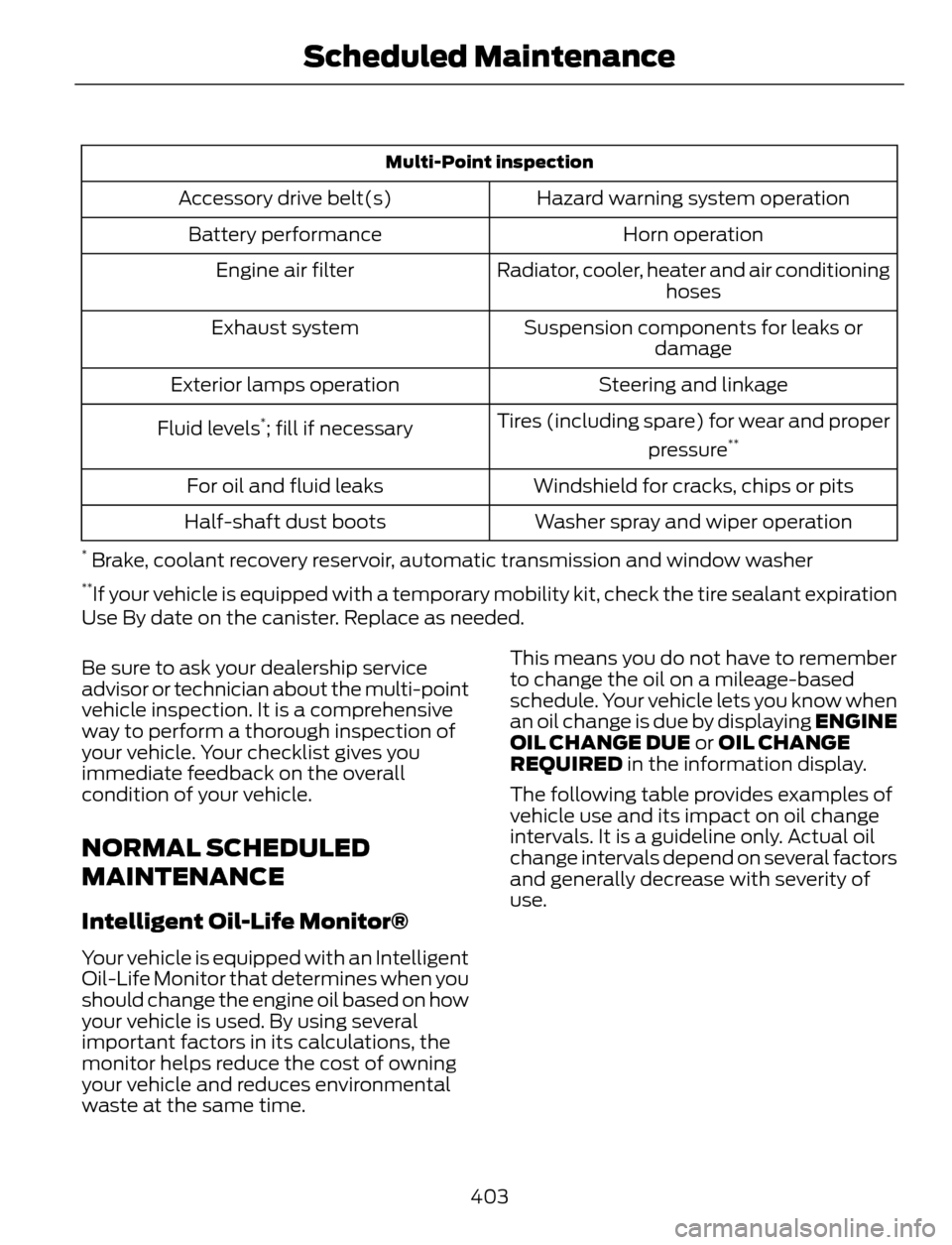
Multi-Point inspection
Hazard warning system operation Accessory drive belt(s)
Horn operation Battery performance
Radiator, cooler, heater and air conditioning
hoses Engine air filter
Suspension components for leaks or
damage Exhaust system
Steering and linkage Exterior lamps operation
Tires (including spare) for wear and proper
pressure
**Fluid levels*; fill if necessary
Windshield for cracks, chips or pits For oil and fluid leaks
Washer spray and wiper operation Half-shaft dust boots
* Brake, coolant recovery reservoir, automatic transmission and window washer**If your vehicle is equipped with a temporary mobility kit, check the tire sealant expiration
Use By date on the canister. Replace as needed.
Be sure to ask your dealership service
advisor or technician about the multi-point
vehicle inspection. It is a comprehensive
way to perform a thorough inspection of
your vehicle. Your checklist gives you
immediate feedback on the overall
condition of your vehicle.
NORMAL SCHEDULED
MAINTENANCE
Intelligent Oil-Life Monitor®
Your vehicle is equipped with an Intelligent
Oil-Life Monitor that determines when you
should change the engine oil based on how
your vehicle is used. By using several
important factors in its calculations, the
monitor helps reduce the cost of owning
your vehicle and reduces environmental
waste at the same time.This means you do not have to remember
to change the oil on a mileage-based
schedule. Your vehicle lets you know when
an oil change is due by displaying ENGINE
OIL CHANGE DUE or OIL CHANGE
REQUIRED in the information display.
The following table provides examples of
vehicle use and its impact on oil change
intervals. It is a guideline only. Actual oil
change intervals depend on several factors
and generally decrease with severity of
use.
403
Scheduled Maintenance
Page 407 of 428
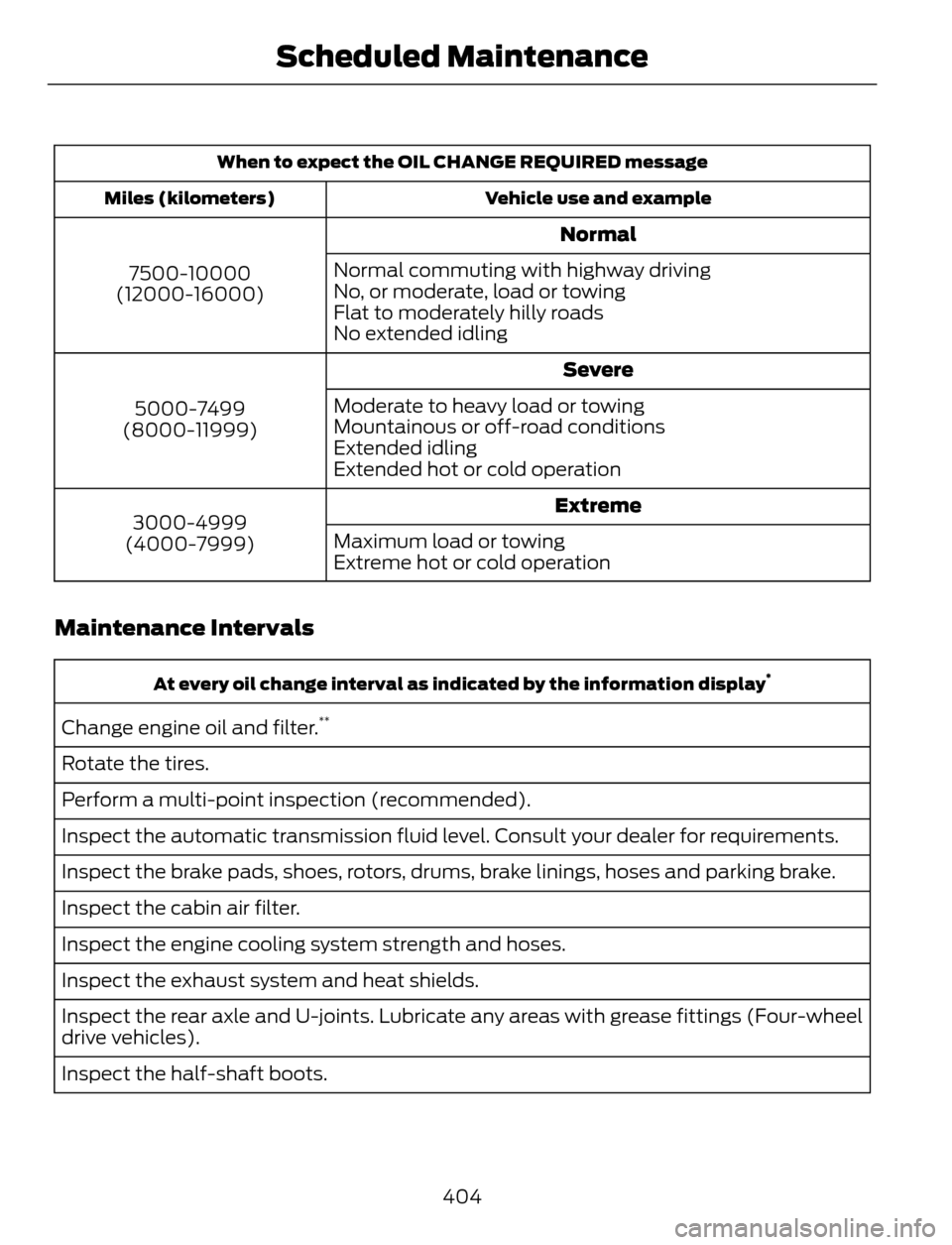
When to expect the OIL CHANGE REQUIRED message
Vehicle use and example Miles (kilometers)
Normal
7500-10000
(12000-16000)Normal commuting with highway driving
No, or moderate, load or towing
Flat to moderately hilly roads
No extended idling
Severe
5000-7499
(8000-11999)Moderate to heavy load or towing
Mountainous or off-road conditions
Extended idling
Extended hot or cold operation
Extreme
3000-4999
(4000-7999)Maximum load or towing
Extreme hot or cold operation
Maintenance Intervals
At every oil change interval as indicated by the information display*
Change engine oil and filter.**
Rotate the tires.
Perform a multi-point inspection (recommended).
Inspect the automatic transmission fluid level. Consult your dealer for requirements.
Inspect the brake pads, shoes, rotors, drums, brake linings, hoses and parking brake.
Inspect the cabin air filter.
Inspect the engine cooling system strength and hoses.
Inspect the exhaust system and heat shields.
Inspect the rear axle and U-joints. Lubricate any areas with grease fittings (Four-wheel
drive vehicles).
Inspect the half-shaft boots.
404
Scheduled Maintenance
Page 408 of 428
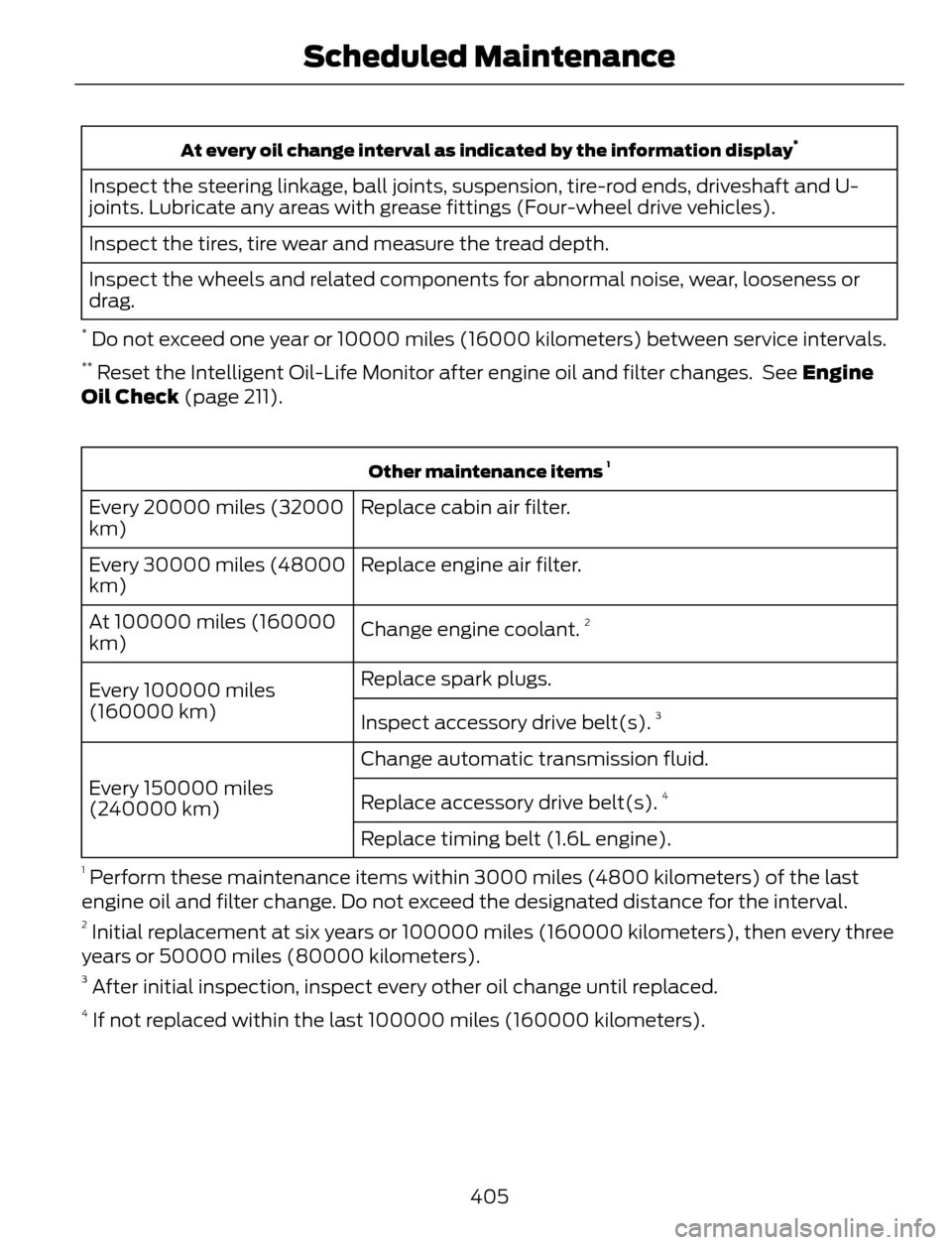
At every oil change interval as indicated by the information display*
Inspect the steering linkage, ball joints, suspension, tire-rod ends, driveshaft and U-
joints. Lubricate any areas with grease fittings (Four-wheel drive vehicles).
Inspect the tires, tire wear and measure the tread depth.
Inspect the wheels and related components for abnormal noise, wear, looseness or
drag.
* Do not exceed one year or 10000 miles (16000 kilometers) between service intervals.** Reset the Intelligent Oil-Life Monitor after engine oil and filter changes. See Engine
Oil Check (page 211).
Other maintenance items 1
Replace cabin air filter. Every 20000 miles (32000
km)
Replace engine air filter. Every 30000 miles (48000
km)
Change engine coolant.
2At 100000 miles (160000
km)
Replace spark plugs.
Every 100000 miles
(160000 km)
Inspect accessory drive belt(s).
3
Change automatic transmission fluid.
Every 150000 miles
(240000 km)Replace accessory drive belt(s).
4
Replace timing belt (1.6L engine).
1 Perform these maintenance items within 3000 miles (4800 kilometers) of the last
engine oil and filter change. Do not exceed the designated distance for the interval.
2 Initial replacement at six years or 100000 miles (160000 kilometers), then every three
years or 50000 miles (80000 kilometers).
3 After initial inspection, inspect every other oil change until replaced.4 If not replaced within the last 100000 miles (160000 kilometers).
405
Scheduled Maintenance
Page 409 of 428
SPECIAL OPERATING
CONDITIONS SCHEDULED
MAINTENANCE
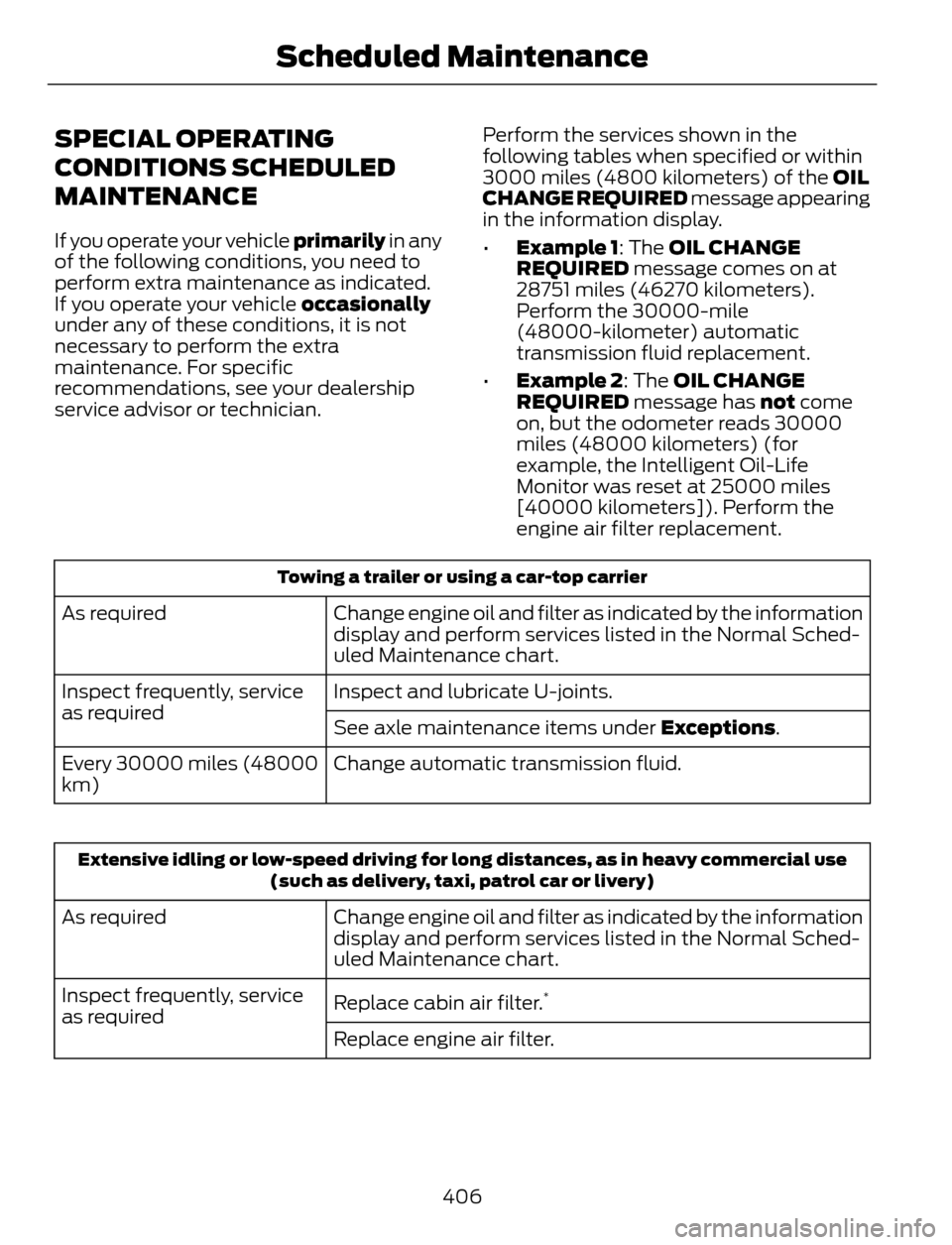
If you operate your vehicle primarily in any
of the following conditions, you need to
perform extra maintenance as indicated.
If you operate your vehicle occasionally
under any of these conditions, it is not
necessary to perform the extra
maintenance. For specific
recommendations, see your dealership
service advisor or technician.Perform the services shown in the
following tables when specified or within
3000 miles (4800 kilometers) of the OIL
CHANGE REQUIRED message appearing
in the information display.
•Example 1: The OIL CHANGE
REQUIRED message comes on at
28751 miles (46270 kilometers).
Perform the 30000-mile
(48000-kilometer) automatic
transmission fluid replacement.
•Example 2: The OIL CHANGE
REQUIRED message has not come
on, but the odometer reads 30000
miles (48000 kilometers) (for
example, the Intelligent Oil-Life
Monitor was reset at 25000 miles
[40000 kilometers]). Perform the
engine air filter replacement.
Towing a trailer or using a car-top carrier
Change engine oil and filter as indicated by the information
display and perform services listed in the Normal Sched-
uled Maintenance chart. As required
Inspect and lubricate U-joints. Inspect frequently, service
as required
See axle maintenance items under Exceptions.
Change automatic transmission fluid. Every 30000 miles (48000
km)
Extensive idling or low-speed driving for long distances, as in heavy commercial use
(such as delivery, taxi, patrol car or livery)
Change engine oil and filter as indicated by the information
display and perform services listed in the Normal Sched-
uled Maintenance chart. As required
Replace cabin air filter.
*Inspect frequently, service
as required
Replace engine air filter.
406
Scheduled Maintenance
Page 410 of 428
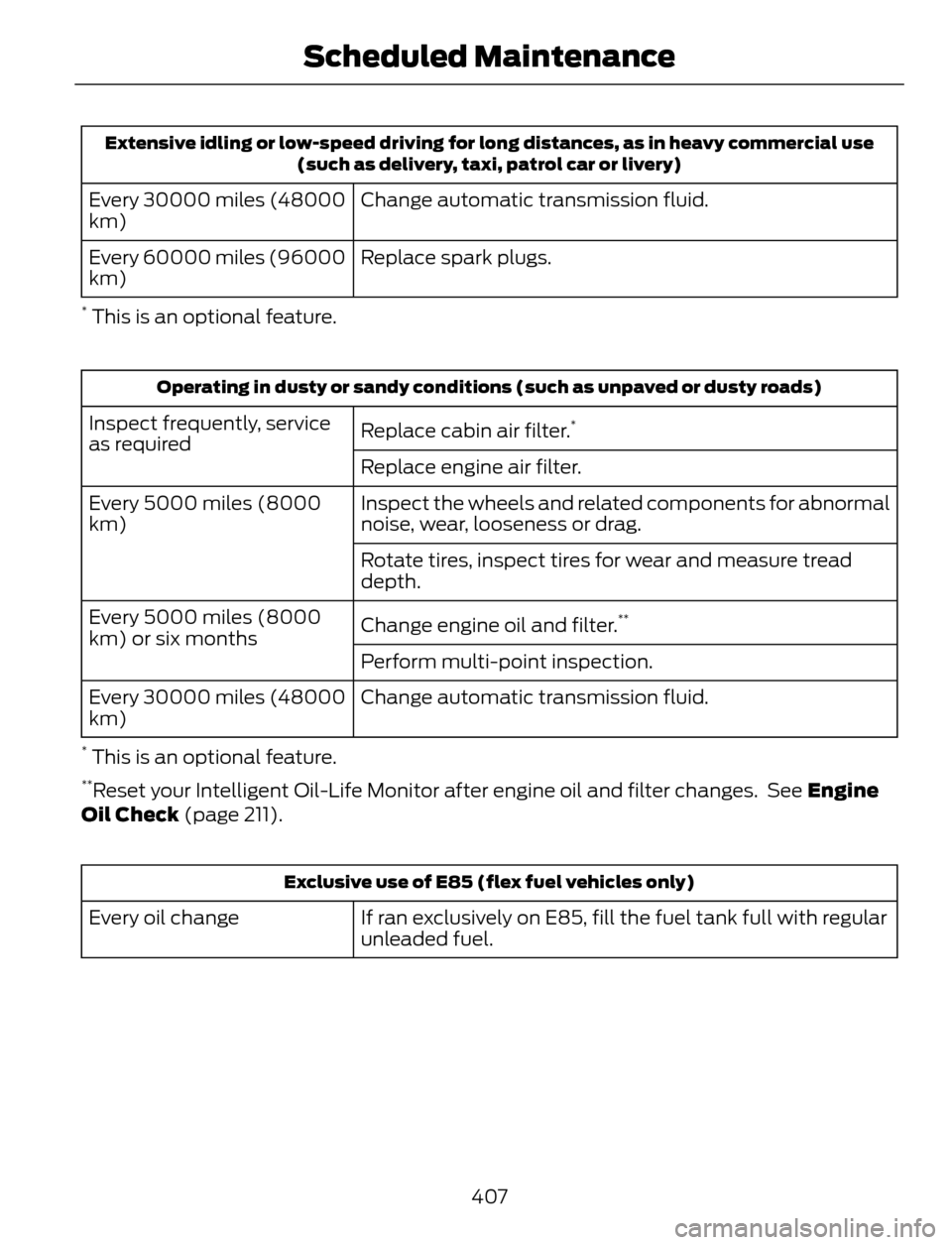
Extensive idling or low-speed driving for long distances, as in heavy commercial use
(such as delivery, taxi, patrol car or livery)
Change automatic transmission fluid. Every 30000 miles (48000
km)
Replace spark plugs. Every 60000 miles (96000
km)
* This is an optional feature.
Operating in dusty or sandy conditions (such as unpaved or dusty roads)
Replace cabin air filter.*Inspect frequently, service
as required
Replace engine air filter.
Inspect the wheels and related components for abnormal
noise, wear, looseness or drag. Every 5000 miles (8000
km)
Rotate tires, inspect tires for wear and measure tread
depth.
Change engine oil and filter.
**Every 5000 miles (8000
km) or six months
Perform multi-point inspection.
Change automatic transmission fluid. Every 30000 miles (48000
km)
* This is an optional feature.**Reset your Intelligent Oil-Life Monitor after engine oil and filter changes. See Engine
Oil Check (page 211).
Exclusive use of E85 (flex fuel vehicles only)
If ran exclusively on E85, fill the fuel tank full with regular
unleaded fuel. Every oil change
407
Scheduled Maintenance
Page 418 of 428
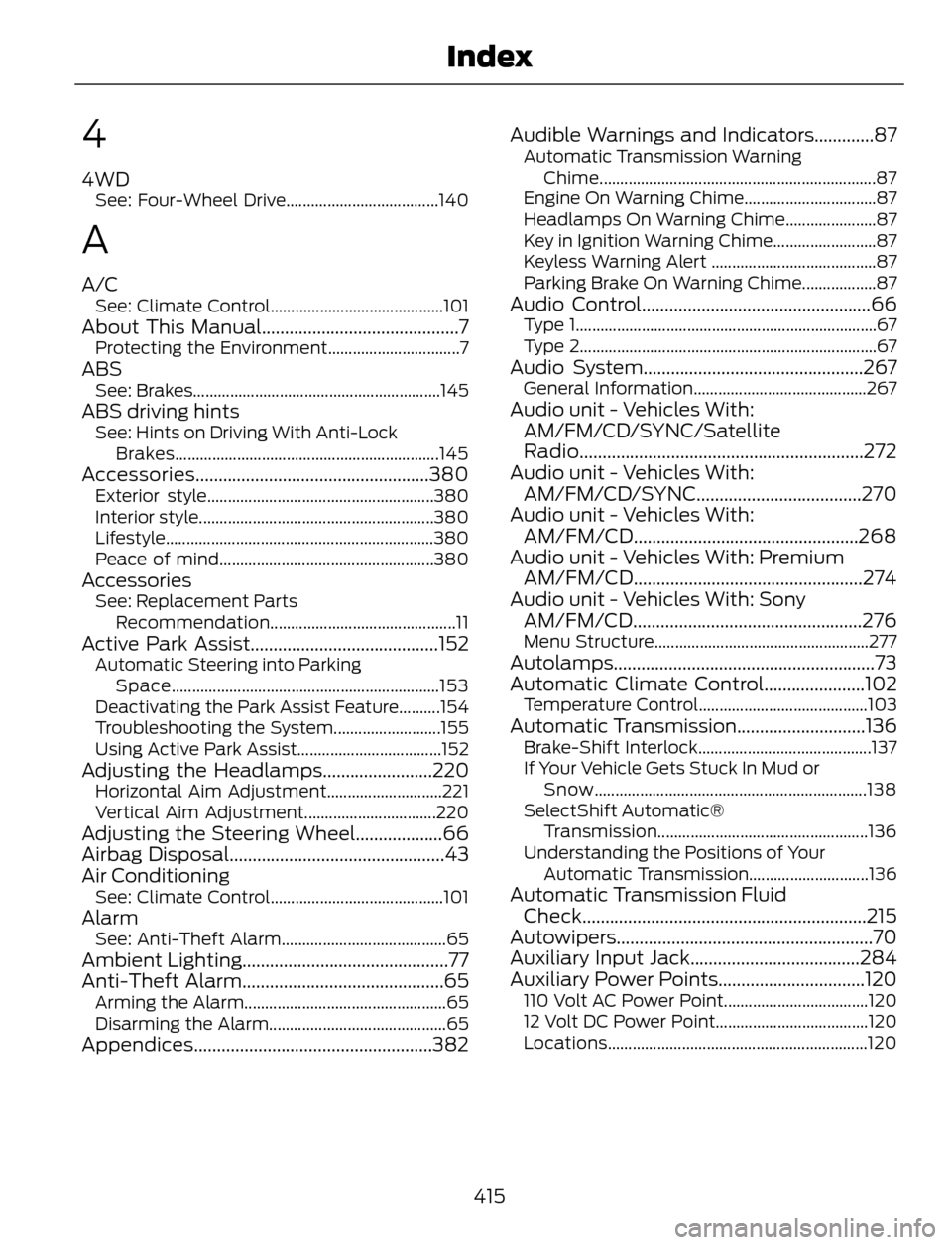
4
4WDSee: Four-Wheel Drive.....................................140
A
A/CSee: Climate Control..........................................101About This Manual...........................................7Protecting the Environment................................7ABSSee: Brakes............................................................145ABS driving hintsSee: Hints on Driving With Anti-Lock
Brakes................................................................145
Accessories...................................................380Exterior style.......................................................380
Interior style.........................................................380
Lifestyle.................................................................380
Peace of mind....................................................380
AccessoriesSee: Replacement Parts
Recommendation.............................................11
Active Park Assist.........................................152Automatic Steering into Parking
Space.................................................................153
Deactivating the Park Assist Feature..........154
Troubleshooting the System..........................155
Using Active Park Assist...................................152
Adjusting the Headlamps........................220Horizontal Aim Adjustment............................221
Vertical Aim Adjustment................................220
Adjusting the Steering Wheel...................66
Airbag Disposal...............................................43
Air Conditioning
See: Climate Control..........................................101AlarmSee: Anti-Theft Alarm........................................65Ambient Lighting.............................................77
Anti-Theft Alarm............................................65
Arming the Alarm.................................................65
Disarming the Alarm...........................................65
Appendices....................................................382Audible Warnings and Indicators.............87
Automatic Transmission Warning
Chime...................................................................87
Engine On Warning Chime................................87
Headlamps On Warning Chime......................87
Key in Ignition Warning Chime.........................87
Keyless Warning Alert ........................................87
Parking Brake On Warning Chime..................87
Audio Control..................................................66Type 1.........................................................................67
Type 2........................................................................67
Audio System................................................267General Information..........................................267Audio unit - Vehicles With:
AM/FM/CD/SYNC/Satellite
Radio..............................................................272
Audio unit - Vehicles With:
AM/FM/CD/SYNC....................................270
Audio unit - Vehicles With:
AM/FM/CD.................................................268
Audio unit - Vehicles With: Premium
AM/FM/CD..................................................274
Audio unit - Vehicles With: Sony
AM/FM/CD..................................................276
Menu Structure....................................................277Autolamps.........................................................73
Automatic Climate Control......................102
Temperature Control.........................................103Automatic Transmission............................136Brake-Shift Interlock..........................................137
If Your Vehicle Gets Stuck In Mud or
Snow..................................................................138
SelectShift Automatic®
Transmission...................................................136
Understanding the Positions of Your
Automatic Transmission.............................136
Automatic Transmission Fluid
Check..............................................................215
Autowipers........................................................70
Auxiliary Input Jack.....................................284
Auxiliary Power Points................................120
110 Volt AC Power Point...................................120
12 Volt DC Power Point.....................................120
Locations...............................................................120
415
Index