key FORD ESCAPE 2014 3.G Service Manual
[x] Cancel search | Manufacturer: FORD, Model Year: 2014, Model line: ESCAPE, Model: FORD ESCAPE 2014 3.GPages: 428, PDF Size: 16.6 MB
Page 206 of 428
Protected components Fuse amp rating Fuse or relay number
Air bag module, Occupant classification
system, Passenger air bag deactivation
indicator 10A F86
Not used (spare) 7.5A F87
Supply for F67, F69, F71 and F79 25A F88
Not used — F89
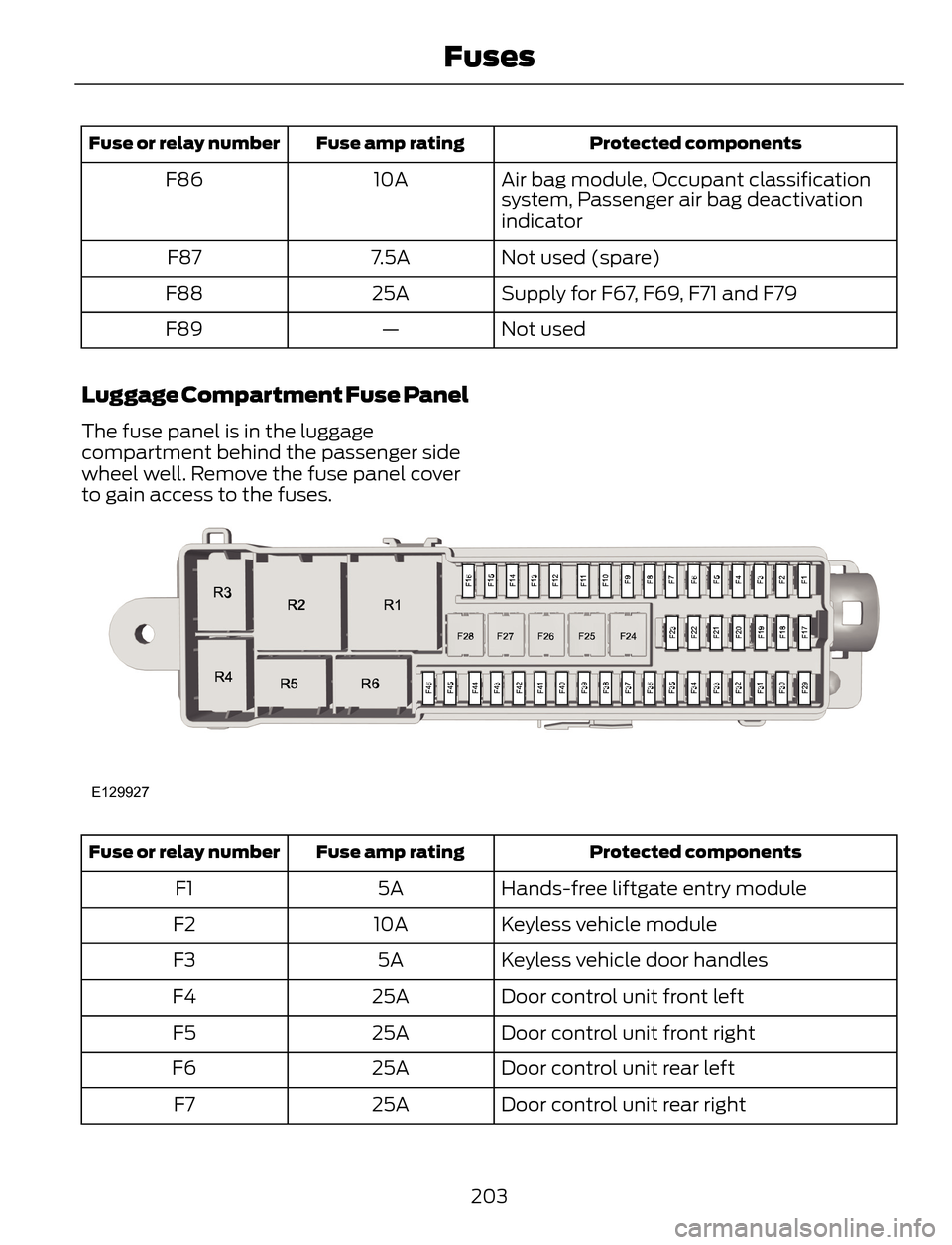
Luggage Compartment Fuse Panel
The fuse panel is in the luggage
compartment behind the passenger side
wheel well. Remove the fuse panel cover
to gain access to the fuses.
E129927
Protected components Fuse amp rating Fuse or relay number
Hands-free liftgate entry module 5A F1
Keyless vehicle module 10A F2
Keyless vehicle door handles 5A F3
Door control unit front left 25A F4
Door control unit front right 25A F5
Door control unit rear left 25A F6
Door control unit rear right 25A F7
203
Fuses
Page 209 of 428
GENERAL INFORMATION
Have your vehicle serviced regularly to help
maintain its roadworthiness and resale
value. There is a large network of Ford
authorized dealers that are there to help
you with their professional servicing
expertise. We believe that their specially
trained technicians are best qualified to
service your vehicle properly and expertly.
They are supported by a wide range of
highly specialized tools developed
specifically for servicing your vehicle.
To help you service your vehicle, we
provide scheduled maintenance
information which makes tracking routine
service easy. See Scheduled
Maintenance (page 400).
If your vehicle requires professional service,
your authorized dealer can provide the
necessary parts and service. Check your
warranty information to find out which
parts and services are covered.
Use only recommended fuels, lubricants,
fluids and service parts conforming to
specifications. Motorcraft® parts are
designed and built to provide the best
performance in your vehicle.
Precautions
• Do not work on a hot engine.
• Make sure that nothing gets caught in
moving parts.
• Do not work on a vehicle with the
engine running in an enclosed space,
unless you are sure you have enough
ventilation.
• Keep all open flames and other burning
material (such as cigarettes) away
from the battery and all fuel related
parts.
Working with the Engine Off
1. Set the parking brake and shift to P
(Park).
2. Turn off the engine and remove the key
(if equipped).
3. Block the wheels.
Working with the Engine On
WARNING
To reduce the risk of vehicle damage
and/or personal burn injuries, do not
start your engine with the air cleaner
removed and do not remove it while the
engine is running.
1. Set the parking brake and shift to P
(Park).
2. Block the wheels
OPENING AND CLOSING THE
HOOD
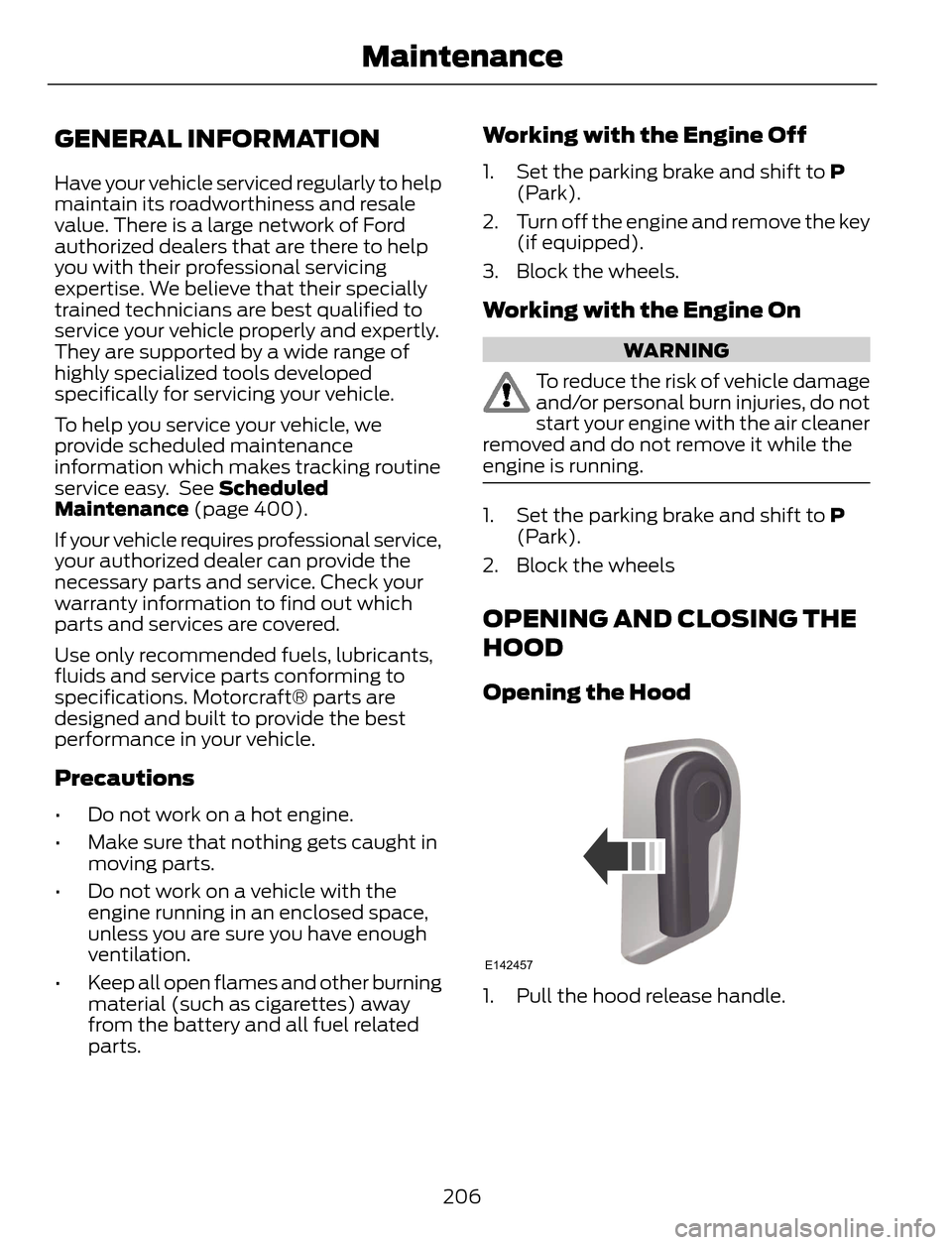
Opening the Hood
E142457
1. Pull the hood release handle.
206
Maintenance
Page 215 of 428
1. Remove the filler cap.
2. Add engine oil that meets the Ford
specifications. See Capacities and
Specifications (page 261).
3. Replace the filler cap. Turn it until you
feel a strong resistance.
Resetting the Oil Life Monitoring
System
Note:Reset the oil life monitoring only after
an oil change.
1. Turn the ignition key to the on position.
Do not start the engine. For vehicles
with push-button start, press and hold
the start button for two seconds
without pressing the brake pedal. Do
not attempt to start the engine.
2. Press both the accelerator and brake
pedals at the same time.
3. Keep both pedals fully pressed.
4. After three seconds, the Service: Oil
reset in prog. message will be
displayed.
5. After 25 seconds, the Service: Oil reset
complete message will be displayed.
6. Release both the accelerator and brake
pedals.
7. The Service: Oil reset complete
message will no longer be displayed.
8. Rotate the key to the off position. For
vehicles with push-button start, press
the start button to turn the vehicle off
completely.
ENGINE COOLANT CHECK
Checking the Engine Coolant
When the engine is cold, check the
concentration and level of the engine
coolant at the intervals listed in the
scheduled maintenance information. See
Scheduled Maintenance (page 400).Note:Make sure that the level is between
the MIN and MAX marks on the coolant
reservoir.
Note:Coolant expands when it is hot. The
level may extend beyond the MAX mark
Note:If the level is at the MIN mark, below
the MIN mark, or empty, add coolant
immediately. See Adding Engine Coolant
in this chapter.
The coolant concentration should be
maintained within 48% to 50%, which
equates to a freeze point between -30°F
(-34ºC) and -34ºF (-37ºC).
Note:For best results, coolant
concentration should be tested with a
refractometer such as Rotunda tool
300-ROB75240 available from your
authorized dealer. Ford does not
recommend the use of hydrometers or
coolant test strips for measuring coolant
concentrations.
Note:Automotive fluids are not
interchangeable. Do not use engine coolant
or antifreeze or windshield washer fluid
outside of its specified function and vehicle
location.
Adding Engine Coolant
WARNINGS
Do not add engine coolant when the
engine is hot. Steam and scalding
liquids released from a hot cooling
system can burn you badly. Also, you can
be burned if you spill coolant on hot engine
parts.
Do not put engine coolant in the
windshield washer fluid container. If
sprayed on the windshield, engine
coolant could make it difficult to see
through the windshield.
212
Maintenance
Page 286 of 428
Troubleshooting
Possible action Condition Radio display
No action required. This
message should disappear
shortly. Radio requires more than
two seconds to produce
audio for the selected
channel. Acquiring
If this message does not
clear shortly, or with an igni-
tion key cycle, your receiver
may have a fault. See an
authorized dealer for service. There is an internal module
or system failure present. Sat Fault/SIRIUS system
failure
Tune to another channel or
choose another preset. The channel is no longer
available. Invalid Channel
Contact SIRIUS at 1-888-
539-7474 to subscribe to
the channel, or tune to
another channel. Your subscription does not
include this channel. Unsubscribed Channel
The signal is blocked. When
you move into an open area,
the signal should return. The signal is lost from the
SIRIUS satellite or SIRIUS
tower to your vehicle
antenna. No Signal
No action required. The
process may take up to
three minutes. Update of channel
programming in progress. Updating
Contact SIRIUS at 1-888-
539-7474 to resolve
subscription issues. Your satellite service is no
longer available. Call SIRIUS 1-888-539-7474
Use the channel guide to
turn off the Lock or Skip
function on that station. All the channels in the
selected category are either
skipped or locked. None found. Check Channel
Guide.
No action required. SIRIUS has updated the
channels available for your
vehicle. Subscription Updated
283
Audio System
Page 326 of 428
Safety Information
WARNING
Driving while distracted can result in
loss of vehicle control, crash and
injury. We strongly recommend that
you use extreme caution when using any
device that may take your focus off the
road. Your primary responsibility is the safe
operation of your vehicle. We recommend
against the use of any hand-held device
while driving and encourage the use of
voice-operated systems when possible.
Make sure you are aware of all applicable
local laws that may affect the use of
electronic devices while driving.
• Do not attempt to service or repair the
system. See an authorized dealer.
• Do not operate playing devices if the
power cords or cables are broken, split
or damaged. Place cords and cables
out of the way, so they do not interfere
with the operation of pedals, seats,
compartments or safe driving abilities.• Do not leave playing devices in your
vehicle during extreme conditions as it
could cause them damage. See your
device's user guide for further
information.
• For your safety, some SYNC functions
are speed-dependent. Their use is
limited to when your vehicle is traveling
at speeds under 3 mph (5 km/h).
Make sure that you review your device's
manual before using it with SYNC.
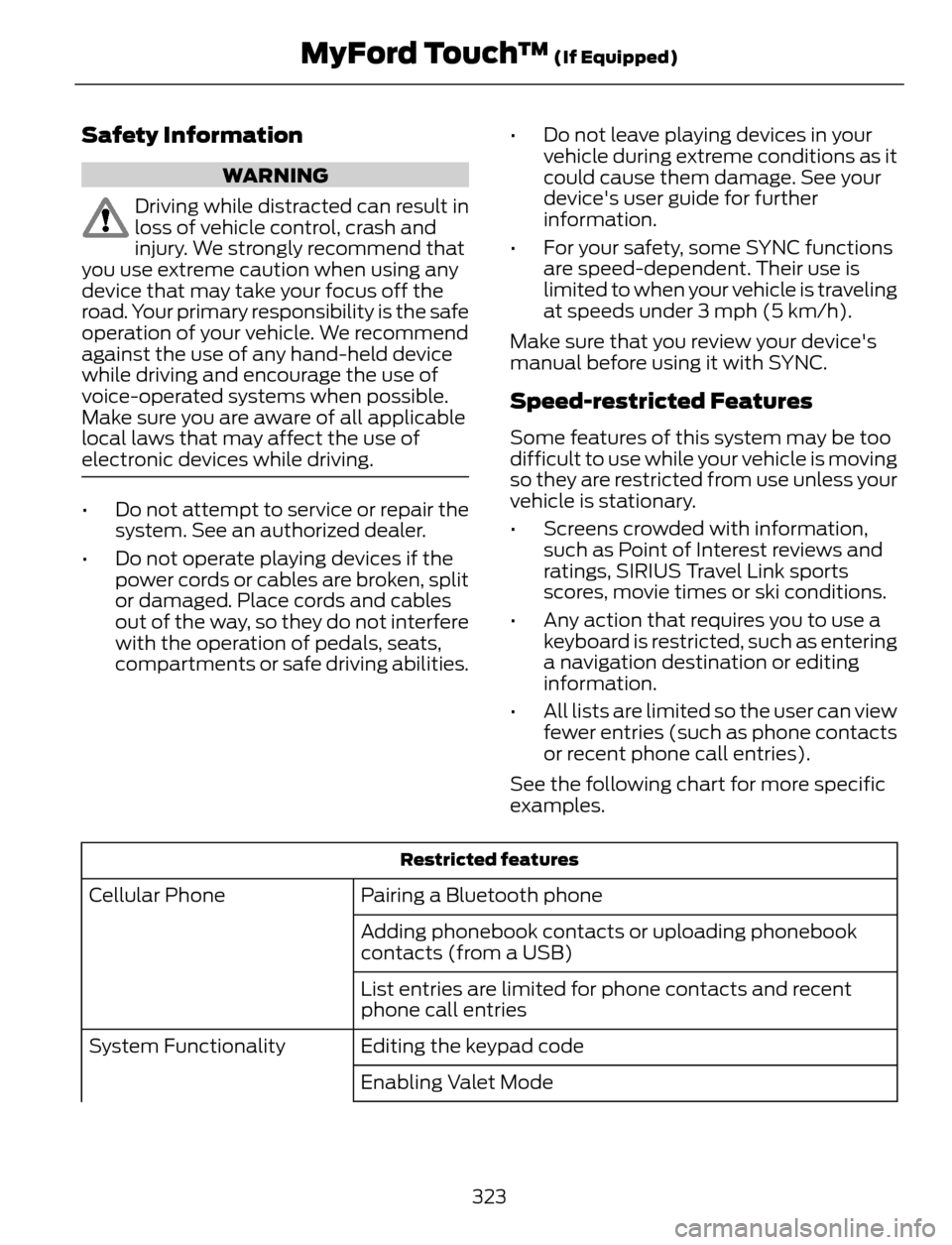
Speed-restricted Features
Some features of this system may be too
difficult to use while your vehicle is moving
so they are restricted from use unless your
vehicle is stationary.
• Screens crowded with information,
such as Point of Interest reviews and
ratings, SIRIUS Travel Link sports
scores, movie times or ski conditions.
• Any action that requires you to use a
keyboard is restricted, such as entering
a navigation destination or editing
information.
• All lists are limited so the user can view
fewer entries (such as phone contacts
or recent phone call entries).
See the following chart for more specific
examples.
Restricted features
Pairing a Bluetooth phone Cellular Phone
Adding phonebook contacts or uploading phonebook
contacts (from a USB)
List entries are limited for phone contacts and recent
phone call entries
Editing the keypad code System Functionality
Enabling Valet Mode
323
MyFord Touch™ (If Equipped)
Page 327 of 428
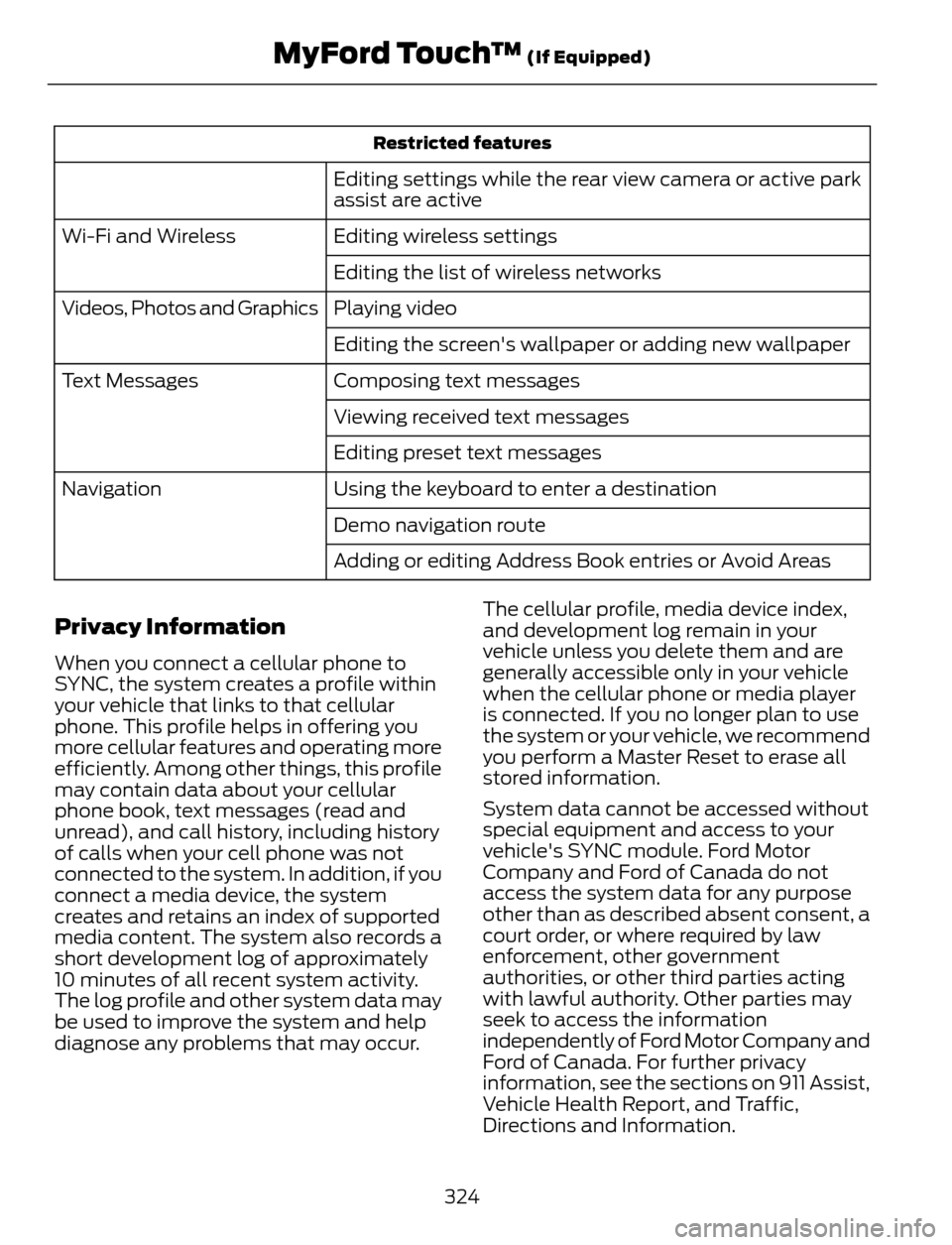
Restricted features
Editing settings while the rear view camera or active park
assist are active
Editing wireless settings Wi-Fi and Wireless
Editing the list of wireless networks
Playing video Videos, Photos and Graphics
Editing the screen's wallpaper or adding new wallpaper
Composing text messages Text Messages
Viewing received text messages
Editing preset text messages
Using the keyboard to enter a destination Navigation
Demo navigation route
Adding or editing Address Book entries or Avoid Areas
Privacy Information
When you connect a cellular phone to
SYNC, the system creates a profile within
your vehicle that links to that cellular
phone. This profile helps in offering you
more cellular features and operating more
efficiently. Among other things, this profile
may contain data about your cellular
phone book, text messages (read and
unread), and call history, including history
of calls when your cell phone was not
connected to the system. In addition, if you
connect a media device, the system
creates and retains an index of supported
media content. The system also records a
short development log of approximately
10 minutes of all recent system activity.
The log profile and other system data may
be used to improve the system and help
diagnose any problems that may occur.The cellular profile, media device index,
and development log remain in your
vehicle unless you delete them and are
generally accessible only in your vehicle
when the cellular phone or media player
is connected. If you no longer plan to use
the system or your vehicle, we recommend
you perform a Master Reset to erase all
stored information.
System data cannot be accessed without
special equipment and access to your
vehicle's SYNC module. Ford Motor
Company and Ford of Canada do not
access the system data for any purpose
other than as described absent consent, a
court order, or where required by law
enforcement, other government
authorities, or other third parties acting
with lawful authority. Other parties may
seek to access the information
independently of Ford Motor Company and
Ford of Canada. For further privacy
information, see the sections on 911 Assist,
Vehicle Health Report, and Traffic,
Directions and Information.
324
MyFord Touch™ (If Equipped)
Page 333 of 428
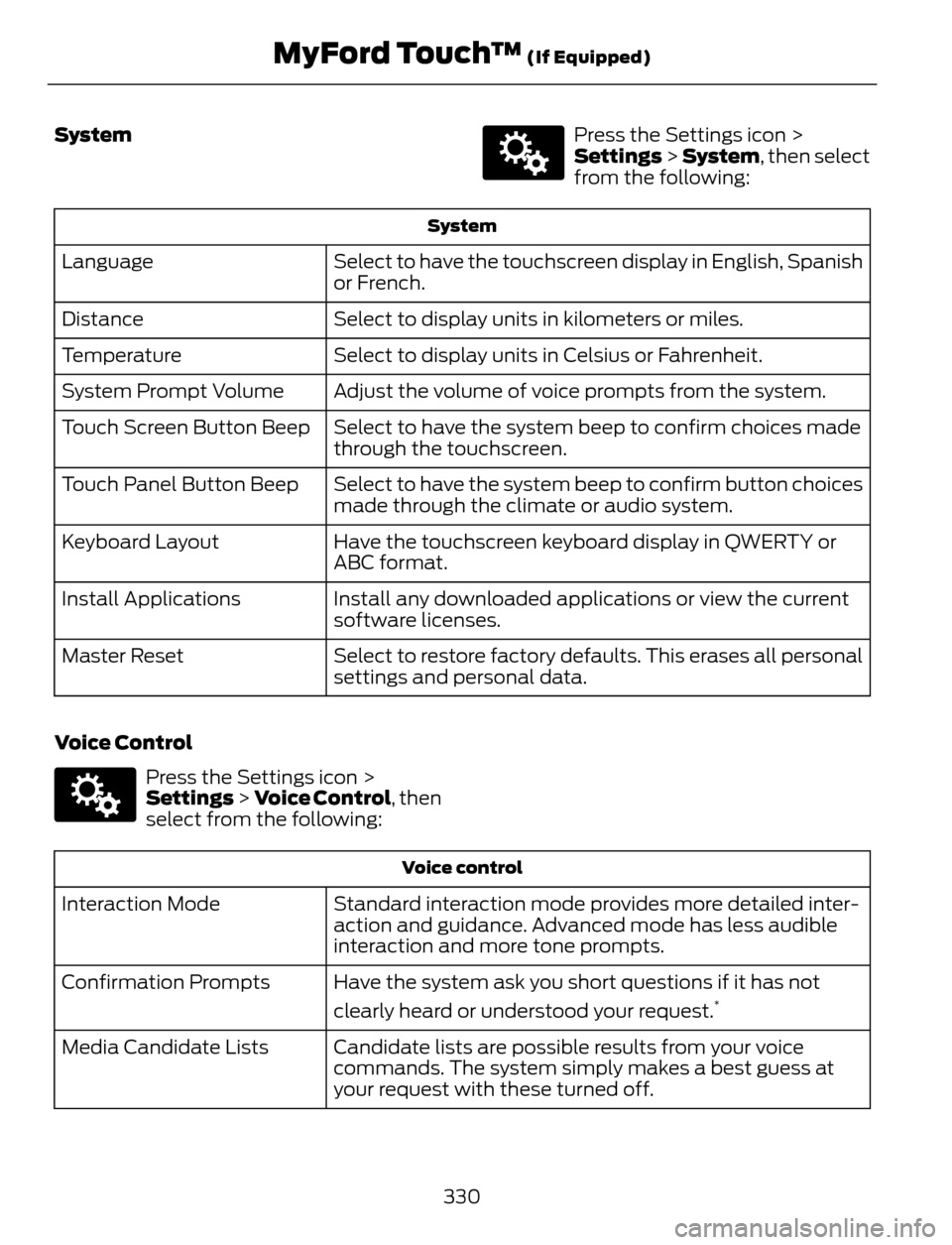
System
E142607
Press the Settings icon >
Settings > System, then select
from the following:
System
Select to have the touchscreen display in English, Spanish
or French. Language
Select to display units in kilometers or miles. Distance
Select to display units in Celsius or Fahrenheit. Temperature
Adjust the volume of voice prompts from the system. System Prompt Volume
Select to have the system beep to confirm choices made
through the touchscreen. Touch Screen Button Beep
Select to have the system beep to confirm button choices
made through the climate or audio system. Touch Panel Button Beep
Have the touchscreen keyboard display in QWERTY or
ABC format. Keyboard Layout
Install any downloaded applications or view the current
software licenses. Install Applications
Select to restore factory defaults. This erases all personal
settings and personal data. Master Reset
Voice Control
E142607
Press the Settings icon >
Settings > Voice Control, then
select from the following:
Voice control
Standard interaction mode provides more detailed inter-
action and guidance. Advanced mode has less audible
interaction and more tone prompts. Interaction Mode
Have the system ask you short questions if it has not
clearly heard or understood your request.
*Confirmation Prompts
Candidate lists are possible results from your voice
commands. The system simply makes a best guess at
your request with these turned off. Media Candidate Lists
330
MyFord Touch™ (If Equipped)
Page 348 of 428
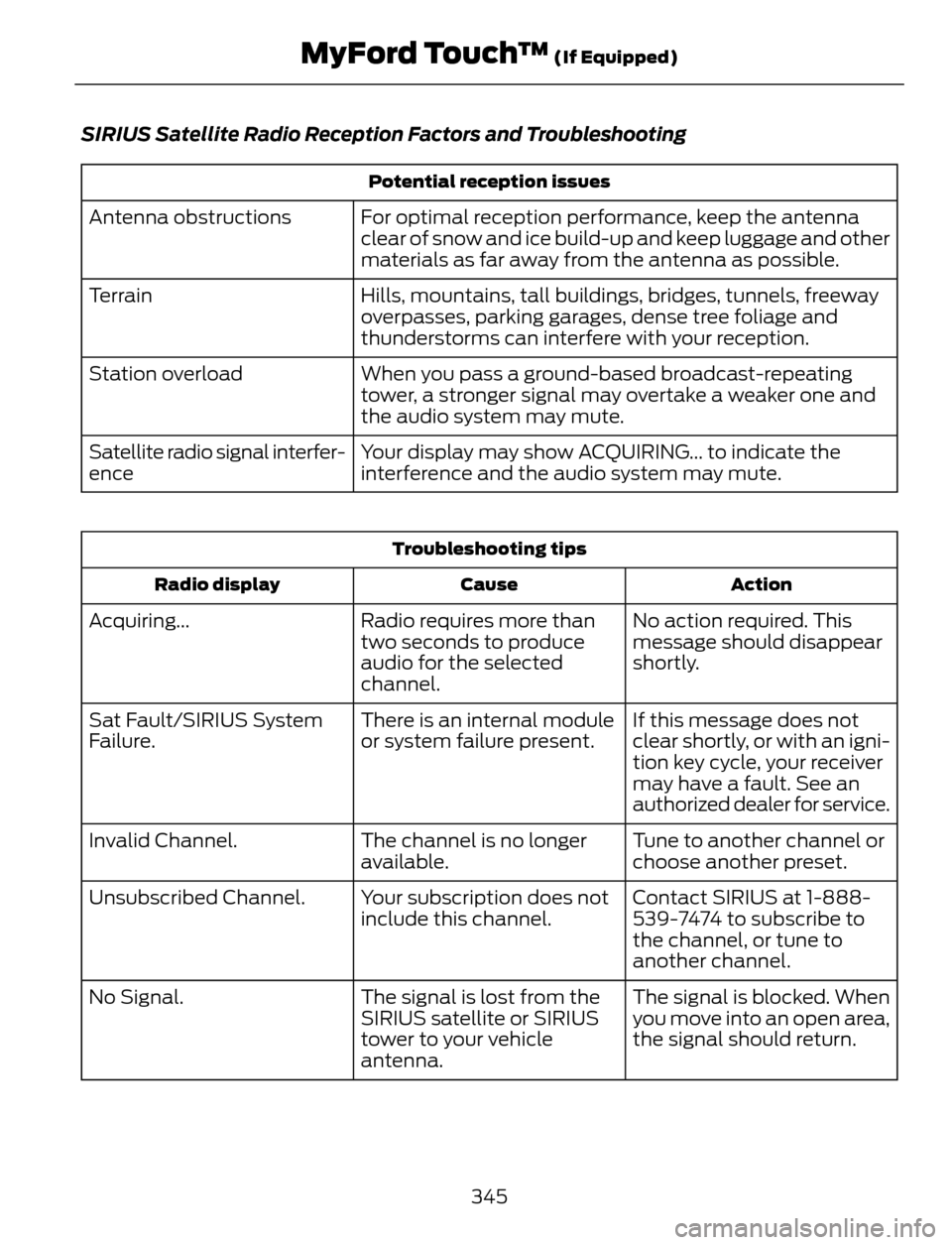
SIRIUS Satellite Radio Reception Factors and Troubleshooting
Potential reception issues
For optimal reception performance, keep the antenna
clear of snow and ice build-up and keep luggage and other
materials as far away from the antenna as possible. Antenna obstructions
Hills, mountains, tall buildings, bridges, tunnels, freeway
overpasses, parking garages, dense tree foliage and
thunderstorms can interfere with your reception. Terrain
When you pass a ground-based broadcast-repeating
tower, a stronger signal may overtake a weaker one and
the audio system may mute. Station overload
Your display may show ACQUIRING... to indicate the
interference and the audio system may mute. Satellite radio signal interfer-
ence
Troubleshooting tips
Action Cause Radio display
No action required. This
message should disappear
shortly. Radio requires more than
two seconds to produce
audio for the selected
channel. Acquiring...
If this message does not
clear shortly, or with an igni-
tion key cycle, your receiver
may have a fault. See an
authorized dealer for service. There is an internal module
or system failure present. Sat Fault/SIRIUS System
Failure.
Tune to another channel or
choose another preset. The channel is no longer
available. Invalid Channel.
Contact SIRIUS at 1-888-
539-7474 to subscribe to
the channel, or tune to
another channel. Your subscription does not
include this channel. Unsubscribed Channel.
The signal is blocked. When
you move into an open area,
the signal should return. The signal is lost from the
SIRIUS satellite or SIRIUS
tower to your vehicle
antenna. No Signal.
345
MyFord Touch™ (If Equipped)
Page 383 of 428
For a complete listing of the accessories
that are available for your vehicle, please
contact your authorized dealer or visit our
online store at: Accessories.Ford.com (U.S.
only).
Ford Custom Accessories are available for
your vehicle through your local Ford or Ford
of Canada authorized dealer. Ford Motor
Company will repair or replace any properly
authorized dealer-installed Ford Custom
Accessories found to be defective in
factory-supplied materials or workmanship
during the warranty period, as well as any
component damaged by the defective
accessories. The accessories will be
warranted for whichever provides you the
greatest benefit:
• 12 months or 12000 miles (20000 km)
(whichever occurs first), or
• the remainder of your new vehicle
limited warranty.
Contact your authorized dealer for details
and a copy of the warranty.
Exterior style
• Hood deflector*
• Side window deflectors
• Splash guards
• Custom graphics*
Interior style
• Floor mats
• Interior light kit
Lifestyle
• Ash cup / smoker's packages
• Cargo area protector
• Cargo net*
• Cargo shade
• Soft cargo organizers
• Roof racks and carriers*• Recovery hook (towing eye)
• Trailer towing accessories
Peace of mind
• Keyless entry keypad
• Remote start
• Vehicle security systems
• Wheel locks
• Bumper mounted parking assist
system*
*Ford Licensed Accessories (FLA) are
warranted by the accessory
manufacturer's warranty. Ford Licensed
Accessories are fully designed and
developed by the accessory manufacturer
and have not been designed or tested to
Ford Motor Company engineering
requirements. Contact your Ford
authorized dealer for details regarding the
manufacturer's limited warranty and a
copy of the FLA product limited warranty
offered by the accessory manufacturer.
For maximum vehicle performance, keep
the following information in mind when
adding accessories or equipment to your
vehicle:
380
Accessories
Page 418 of 428
4
4WDSee: Four-Wheel Drive.....................................140
A
A/CSee: Climate Control..........................................101About This Manual...........................................7Protecting the Environment................................7ABSSee: Brakes............................................................145ABS driving hintsSee: Hints on Driving With Anti-Lock
Brakes................................................................145
Accessories...................................................380Exterior style.......................................................380
Interior style.........................................................380
Lifestyle.................................................................380
Peace of mind....................................................380
AccessoriesSee: Replacement Parts
Recommendation.............................................11
Active Park Assist.........................................152Automatic Steering into Parking
Space.................................................................153
Deactivating the Park Assist Feature..........154
Troubleshooting the System..........................155
Using Active Park Assist...................................152
Adjusting the Headlamps........................220Horizontal Aim Adjustment............................221
Vertical Aim Adjustment................................220
Adjusting the Steering Wheel...................66
Airbag Disposal...............................................43
Air Conditioning
See: Climate Control..........................................101AlarmSee: Anti-Theft Alarm........................................65Ambient Lighting.............................................77
Anti-Theft Alarm............................................65
Arming the Alarm.................................................65
Disarming the Alarm...........................................65
Appendices....................................................382Audible Warnings and Indicators.............87
Automatic Transmission Warning
Chime...................................................................87
Engine On Warning Chime................................87
Headlamps On Warning Chime......................87
Key in Ignition Warning Chime.........................87
Keyless Warning Alert ........................................87
Parking Brake On Warning Chime..................87
Audio Control..................................................66Type 1.........................................................................67
Type 2........................................................................67
Audio System................................................267General Information..........................................267Audio unit - Vehicles With:
AM/FM/CD/SYNC/Satellite
Radio..............................................................272
Audio unit - Vehicles With:
AM/FM/CD/SYNC....................................270
Audio unit - Vehicles With:
AM/FM/CD.................................................268
Audio unit - Vehicles With: Premium
AM/FM/CD..................................................274
Audio unit - Vehicles With: Sony
AM/FM/CD..................................................276
Menu Structure....................................................277Autolamps.........................................................73
Automatic Climate Control......................102
Temperature Control.........................................103Automatic Transmission............................136Brake-Shift Interlock..........................................137
If Your Vehicle Gets Stuck In Mud or
Snow..................................................................138
SelectShift Automatic®
Transmission...................................................136
Understanding the Positions of Your
Automatic Transmission.............................136
Automatic Transmission Fluid
Check..............................................................215
Autowipers........................................................70
Auxiliary Input Jack.....................................284
Auxiliary Power Points................................120
110 Volt AC Power Point...................................120
12 Volt DC Power Point.....................................120
Locations...............................................................120
415
Index