clock reset FORD ESCAPE 2014 3.G Owners Manual
[x] Cancel search | Manufacturer: FORD, Model Year: 2014, Model line: ESCAPE, Model: FORD ESCAPE 2014 3.GPages: 428, PDF Size: 16.6 MB
Page 220 of 428
When a low voltage battery replacement
is necessary, see an authorized dealer to
replace the low voltage battery with a Ford
recommended replacement low voltage
battery that matches the electrical
requirements of the vehicle
To ensure proper operation of the battery
management system (BMS), do not allow
a technician to connect any electrical
device ground connection directly to the
low voltage battery negative post. A
connection at the low voltage battery
negative post can cause inaccurate
measurements of the battery condition
and potential incorrect system operation.
Note:If a person adds electrical or
electronic accessories or components to the
vehicle, the accessories or components may
adversely affect the low voltage battery
performance and durability and may also
affect the performance of other electrical
systems in the vehicle.
For longer, trouble-free operation, keep the
top of the battery clean and dry. Also,
make certain the battery cables are always
tightly fastened to the battery terminals.
If you see any corrosion on the battery or
terminals, remove the cables from the
terminals and clean with a wire brush. You
can neutralize the acid with a solution of
baking soda and water.
When a battery replacement is required,
the battery should only be replaced with
a Ford recommended replacement battery
that matches the electrical requirements
of the vehicle.
Because your vehicle’s engine is
electronically-controlled by a computer,
some engine control settings are
maintained by power from the low voltage
battery. Some engine computer settings,
like the idle trim and fuel trim strategy,
optimize the driveability and performance
of the engine. Some other computer
settings, like the clock and radio stationpresets, are also maintained in memory by
power from the low voltage battery. When
a technician disconnects and connects the
low voltage battery, these settings are
erased. Complete the following procedure
in order to restore the settings:
1. With the vehicle at a complete stop,
set the parking brake.
2. Shift the transmission into P.
3. Turn off all accessories.
4. Step on the brake pedal and start the
vehicle.
5. Run the engine until it reaches normal
operating temperature. While the
engine is warming up, complete the
following: Reset the clock. See Audio
System (page 267). Reset the power
windows bounce-back feature. See
Windows and Mirrors (page 78).
Reset the radio station presets. See
Audio System (page 267).
6. Allow the engine to idle for at least one
minute. If the engine turns off, step on
the accelerator to start the engine.
7. While the engine is running, step on the
brake pedal and shift the transmission
to N.
8. Allow the engine to run for at least one
minute by pressing on the accelerator
pedal.
9. Drive the vehicle at least 10 miles (16
kilometers) to completely relearn the
idle and fuel trim strategy.
Note:If you do not allow the engine to
relearn the idle and fuel trim strategy, the
idle quality of your vehicle may be adversely
affected until the engine computer
eventually relearns the idle trim and fuel
trim strategy.
217
Maintenance
Page 272 of 428
E142600
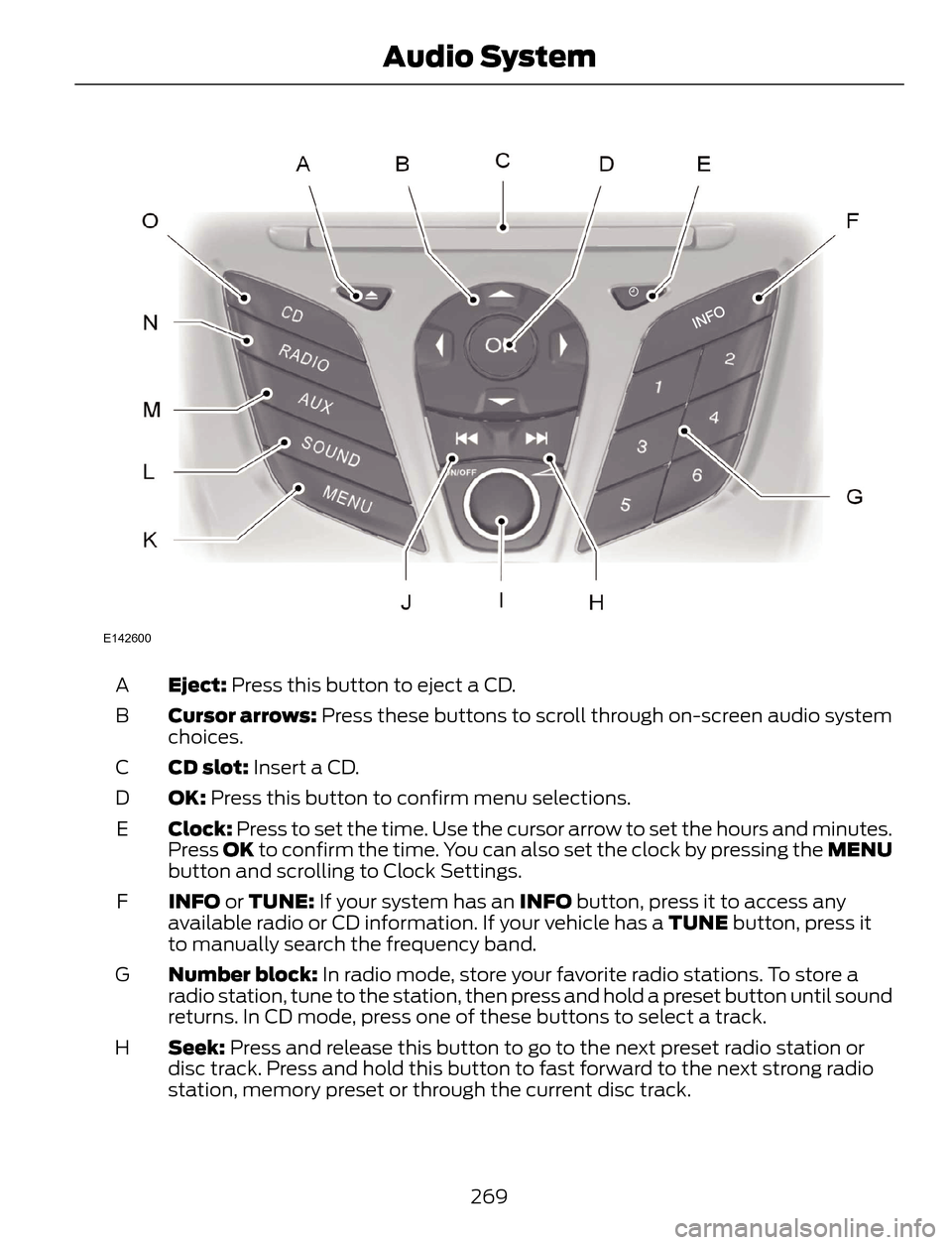
Eject: Press this button to eject a CD. A
Cursor arrows: Press these buttons to scroll through on-screen audio system
choices. B
CD slot: Insert a CD. C
OK: Press this button to confirm menu selections. D
Clock: Press to set the time. Use the cursor arrow to set the hours and minutes.
Press OK to confirm the time. You can also set the clock by pressing the MENU
button and scrolling to Clock Settings. E
INFO or TUNE: If your system has an INFO button, press it to access any
available radio or CD information. If your vehicle has a TUNE button, press it
to manually search the frequency band. F
Number block: In radio mode, store your favorite radio stations. To store a
radio station, tune to the station, then press and hold a preset button until sound
returns. In CD mode, press one of these buttons to select a track. G
Seek: Press and release this button to go to the next preset radio station or
disc track. Press and hold this button to fast forward to the next strong radio
station, memory preset or through the current disc track. H
269
Audio System
Page 274 of 428
ABDC
E
F
G
H
IJ
H
K
L
M
N
O
E162867
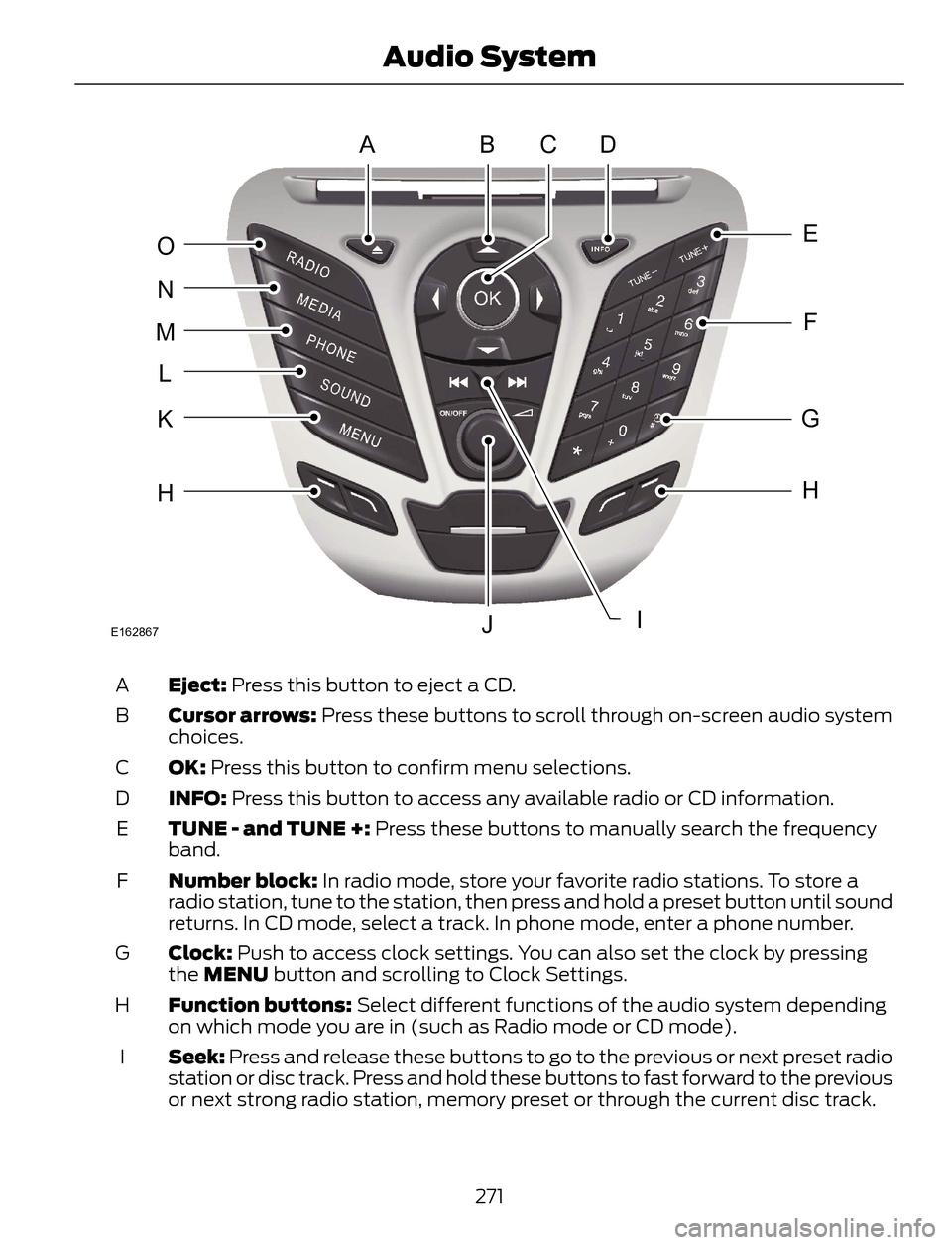
Eject: Press this button to eject a CD. A
Cursor arrows: Press these buttons to scroll through on-screen audio system
choices. B
OK: Press this button to confirm menu selections. C
INFO: Press this button to access any available radio or CD information. D
TUNE - and TUNE +: Press these buttons to manually search the frequency
band. E
Number block: In radio mode, store your favorite radio stations. To store a
radio station, tune to the station, then press and hold a preset button until sound
returns. In CD mode, select a track. In phone mode, enter a phone number. F
Clock: Push to access clock settings. You can also set the clock by pressing
the MENU button and scrolling to Clock Settings. G
Function buttons: Select different functions of the audio system depending
on which mode you are in (such as Radio mode or CD mode). H
Seek: Press and release these buttons to go to the previous or next preset radio
station or disc track. Press and hold these buttons to fast forward to the previous
or next strong radio station, memory preset or through the current disc track. I
271
Audio System
Page 276 of 428
ABDC
E
F
G
H
JK
H
L
M
N
O
P
IE162869
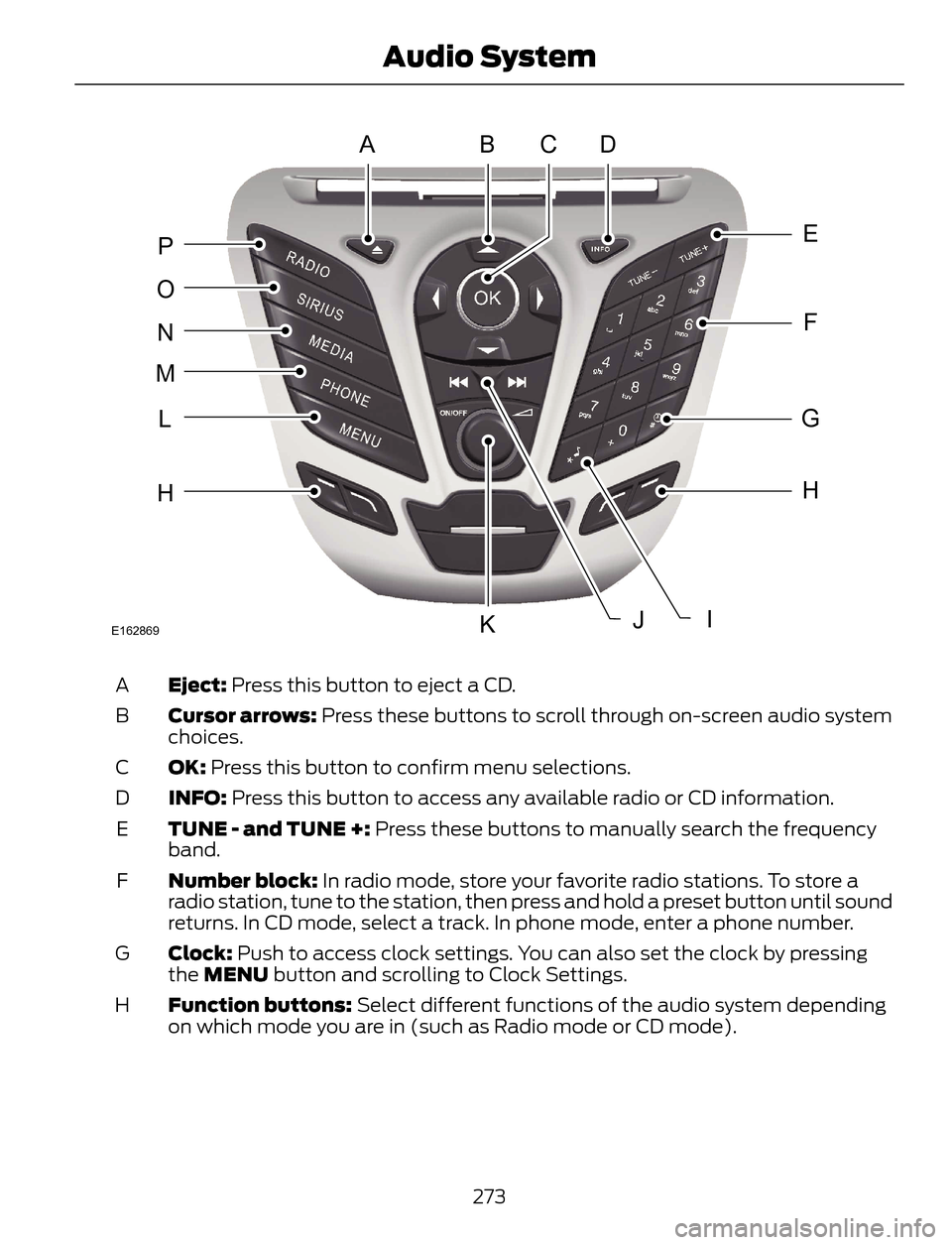
Eject: Press this button to eject a CD. A
Cursor arrows: Press these buttons to scroll through on-screen audio system
choices. B
OK: Press this button to confirm menu selections. C
INFO: Press this button to access any available radio or CD information. D
TUNE - and TUNE +: Press these buttons to manually search the frequency
band. E
Number block: In radio mode, store your favorite radio stations. To store a
radio station, tune to the station, then press and hold a preset button until sound
returns. In CD mode, select a track. In phone mode, enter a phone number. F
Clock: Push to access clock settings. You can also set the clock by pressing
the MENU button and scrolling to Clock Settings. G
Function buttons: Select different functions of the audio system depending
on which mode you are in (such as Radio mode or CD mode). H
273
Audio System