horn FORD ESCAPE 2014 3.G Owners Manual
[x] Cancel search | Manufacturer: FORD, Model Year: 2014, Model line: ESCAPE, Model: FORD ESCAPE 2014 3.GPages: 428, PDF Size: 16.6 MB
Page 39 of 428
SOS POST-CRASH ALERT
SYSTEM
The system flashes the turn signal lamps
and sounds the horn (intermittently) in the
event of a serious impact that deploys an
airbag (front, side, side curtain or Safety
Canopy) or the safety belt pretensioners.
The horn and lamps will turn off when:
• the hazard control button is pressed
• the panic button (if equipped) is
pressed on the remote entry
transmitter, or
• your vehicle runs out of power.
DRIVER AND PASSENGER
AIRBAGS
WARNINGS
Never place your arm or any objects
over an airbag module. Placing your
arm over a deploying airbag can
result in serious arm fractures or other
injuries. Objects placed on or over the
airbag inflation area may cause those
objects to be propelled by the airbag into
your face and torso causing serious injury.
Airbags can kill or injure a child in a
child seat. Never place a rear-facing
child seat in front of an active airbag.
If you must use a forward-facing child seat
in the front seat, move the seat upon which
the child seat is installed all the way back.
E151127
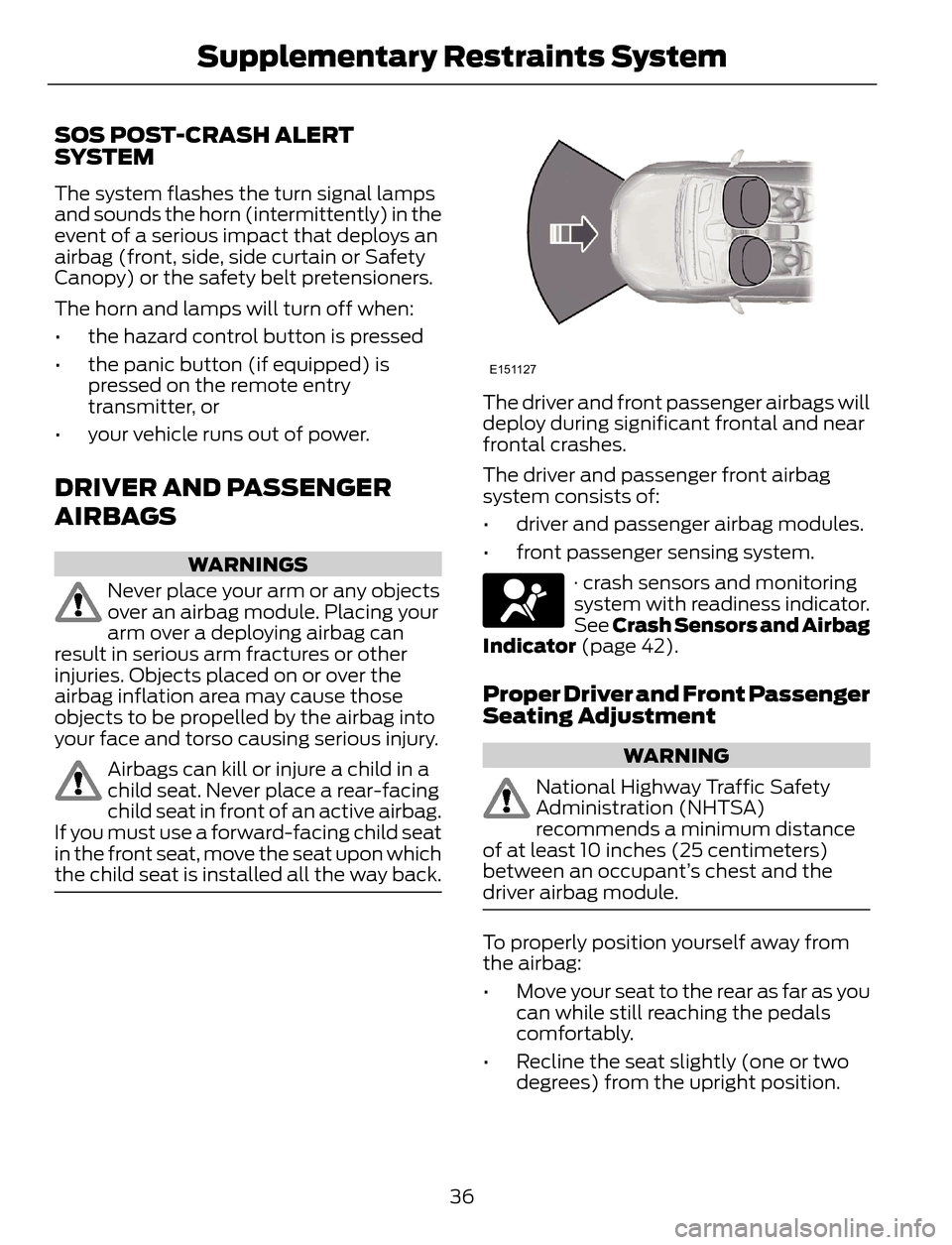
The driver and front passenger airbags will
deploy during significant frontal and near
frontal crashes.
The driver and passenger front airbag
system consists of:
• driver and passenger airbag modules.
• front passenger sensing system.
· crash sensors and monitoring
system with readiness indicator.
See Crash Sensors and Airbag
Indicator (page 42).
Proper Driver and Front Passenger
Seating Adjustment
WARNING
National Highway Traffic Safety
Administration (NHTSA)
recommends a minimum distance
of at least 10 inches (25 centimeters)
between an occupant’s chest and the
driver airbag module.
To properly position yourself away from
the airbag:
• Move your seat to the rear as far as you
can while still reaching the pedals
comfortably.
• Recline the seat slightly (one or two
degrees) from the upright position.
36
Supplementary Restraints System
Page 49 of 428
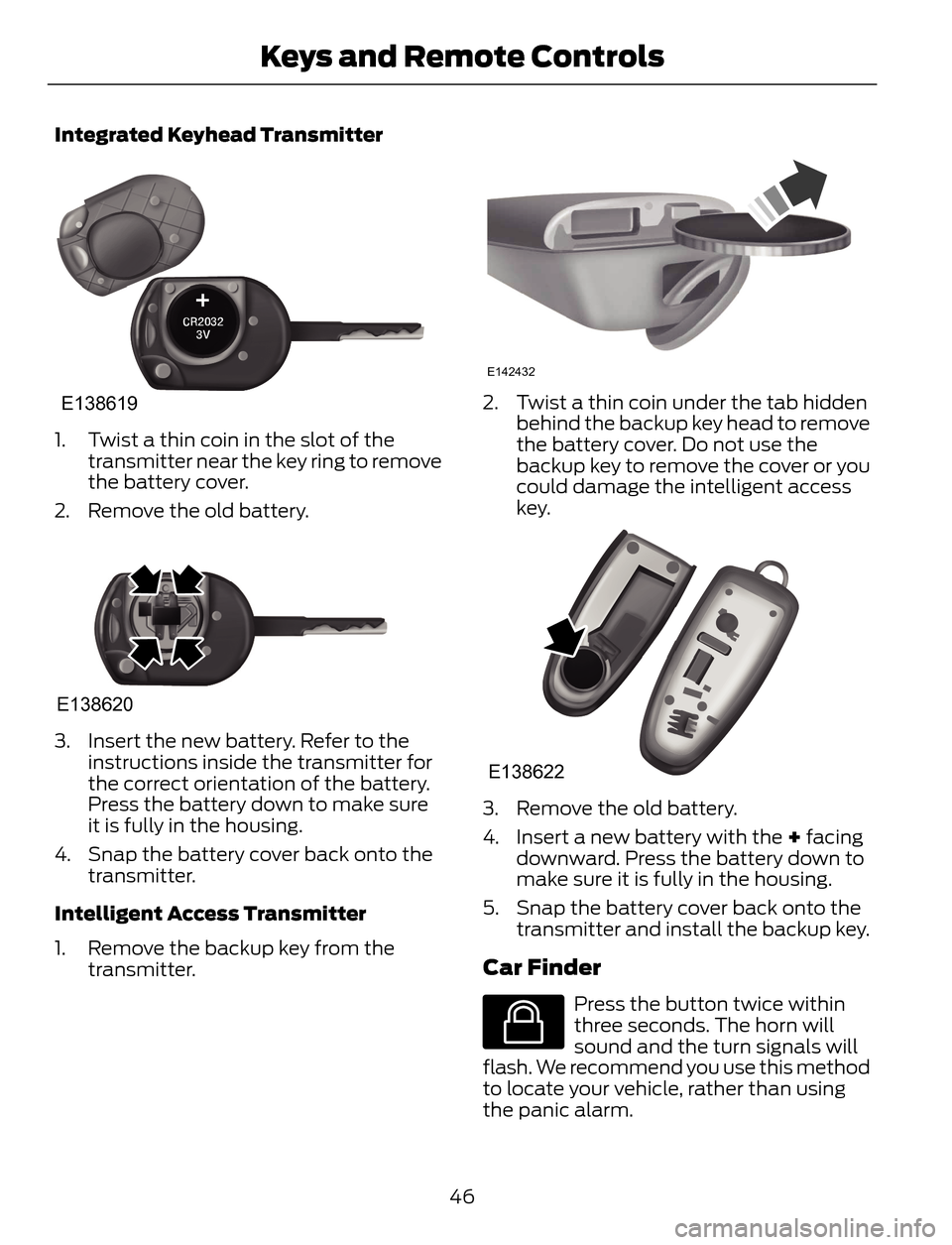
Integrated Keyhead Transmitter
E138619
1. Twist a thin coin in the slot of the
transmitter near the key ring to remove
the battery cover.
2. Remove the old battery.
E138620
3. Insert the new battery. Refer to the
instructions inside the transmitter for
the correct orientation of the battery.
Press the battery down to make sure
it is fully in the housing.
4. Snap the battery cover back onto the
transmitter.
Intelligent Access Transmitter
1. Remove the backup key from the
transmitter.
E142432
2. Twist a thin coin under the tab hidden
behind the backup key head to remove
the battery cover. Do not use the
backup key to remove the cover or you
could damage the intelligent access
key.
E138622
3. Remove the old battery.
4. Insert a new battery with the + facing
downward. Press the battery down to
make sure it is fully in the housing.
5. Snap the battery cover back onto the
transmitter and install the backup key.
Car Finder
E138623
Press the button twice within
three seconds. The horn will
sound and the turn signals will
flash. We recommend you use this method
to locate your vehicle, rather than using
the panic alarm.
46
Keys and Remote Controls
Page 50 of 428
Note:If locking was not successful or if any
door or the liftgate is open, or if the hood is
open on vehicles with a perimeter alarm or
remote start, the horn will sound twice and
the lamps will not flash.
Sounding a Panic Alarm
Note:The panic alarm will only operate
when the ignition is off.
E138624
Press the button to activate the
alarm. Press the button again or
turn the ignition on to deactivate.
Remote Start (If Equipped)
WARNING
To avoid exhaust fumes, do not use
remote start if your vehicle is parked
indoors or areas that are not well
ventilated.
Note:Do not use remote start if your vehicle
is low on fuel.
E138625
The remote start button is on the
transmitter.
This feature allows you to start your
vehicle from outside the vehicle. The
transmitter has an extended operating
range.
Vehicles with automatic climate control
can be configured to operate when the
vehicle is remote started. See Automatic
Climate Control (page 102).
Many states and provinces have
restrictions for the use of remote start.
Check your local and state or provincial
laws for specific requirements regarding
remote start systems.
The remote start system will not work if:
• the ignition is on
• the alarm system is triggered
• you disable the feature• the hood is open
• the transmission is not in P
• the vehicle battery voltage is too low
• the service engine soon indicator was
on the last time your vehicle was
driven.
Remote Starting the Vehicle
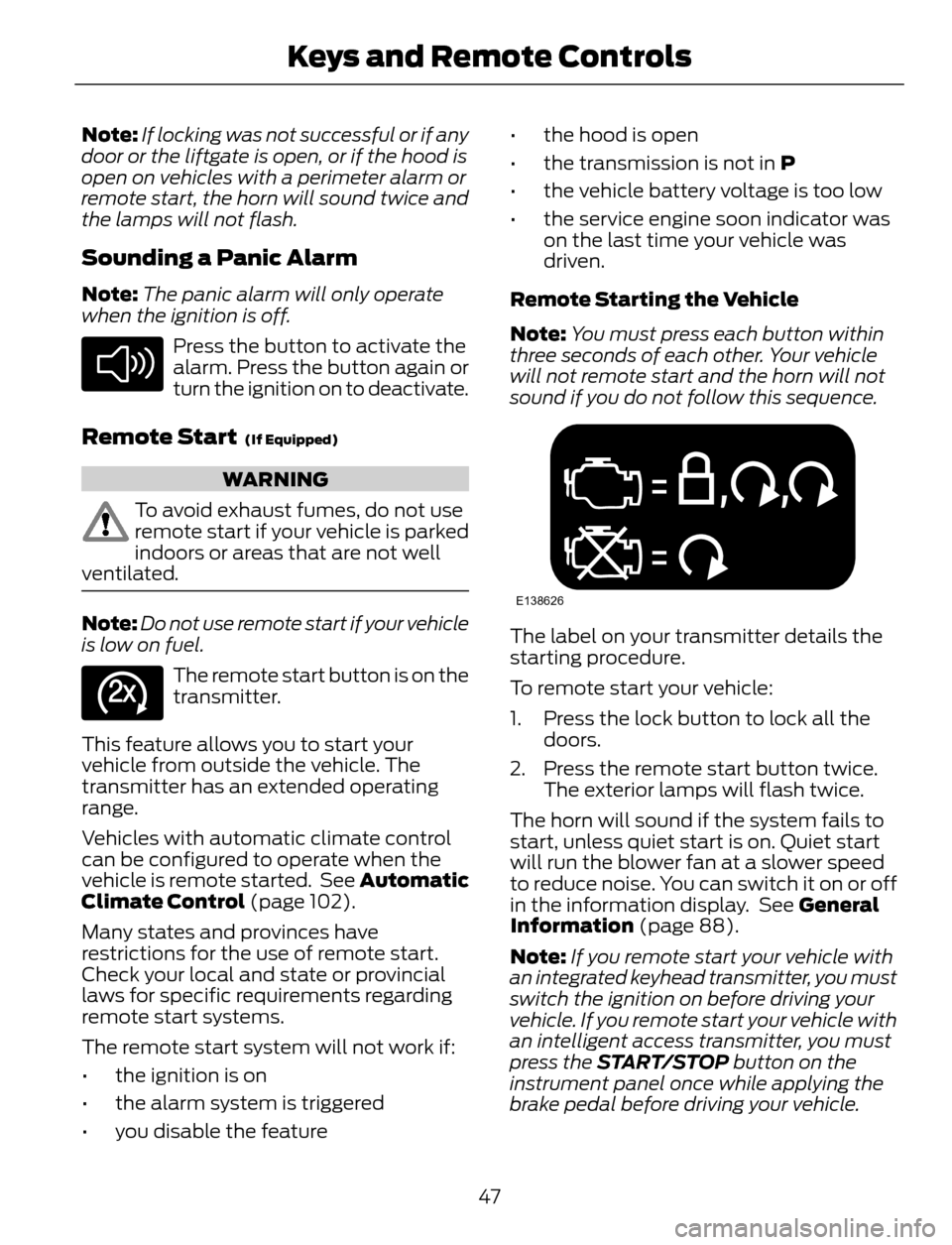
Note:You must press each button within
three seconds of each other. Your vehicle
will not remote start and the horn will not
sound if you do not follow this sequence.
E138626
The label on your transmitter details the
starting procedure.
To remote start your vehicle:
1. Press the lock button to lock all the
doors.
2. Press the remote start button twice.
The exterior lamps will flash twice.
The horn will sound if the system fails to
start, unless quiet start is on. Quiet start
will run the blower fan at a slower speed
to reduce noise. You can switch it on or off
in the information display. See General
Information (page 88).
Note:If you remote start your vehicle with
an integrated keyhead transmitter, you must
switch the ignition on before driving your
vehicle. If you remote start your vehicle with
an intelligent access transmitter, you must
press the START/STOP button on the
instrument panel once while applying the
brake pedal before driving your vehicle.
47
Keys and Remote Controls
Page 58 of 428
LOCKING AND UNLOCKING
You can use the power door lock control
or the remote control to lock and unlock
your vehicle.
Power Door Locks
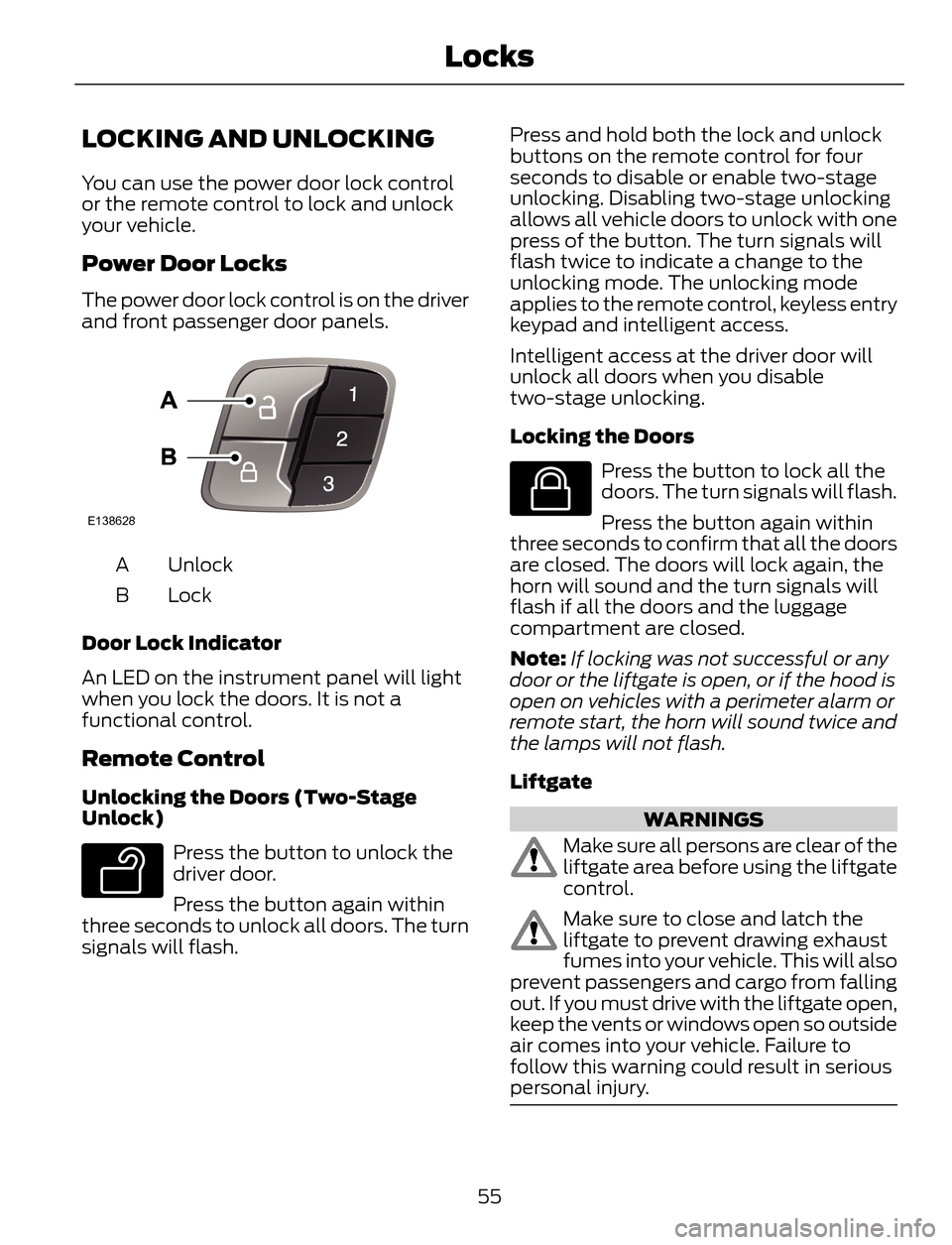
The power door lock control is on the driver
and front passenger door panels.
E138628
Unlock A
Lock B
Door Lock Indicator
An LED on the instrument panel will light
when you lock the doors. It is not a
functional control.
Remote Control
Unlocking the Doors (Two-Stage
Unlock)
E138629
Press the button to unlock the
driver door.
Press the button again within
three seconds to unlock all doors. The turn
signals will flash.Press and hold both the lock and unlock
buttons on the remote control for four
seconds to disable or enable two-stage
unlocking. Disabling two-stage unlocking
allows all vehicle doors to unlock with one
press of the button. The turn signals will
flash twice to indicate a change to the
unlocking mode. The unlocking mode
applies to the remote control, keyless entry
keypad and intelligent access.
Intelligent access at the driver door will
unlock all doors when you disable
two-stage unlocking.
Locking the Doors
E138623
Press the button to lock all the
doors. The turn signals will flash.
Press the button again within
three seconds to confirm that all the doors
are closed. The doors will lock again, the
horn will sound and the turn signals will
flash if all the doors and the luggage
compartment are closed.
Note:If locking was not successful or any
door or the liftgate is open, or if the hood is
open on vehicles with a perimeter alarm or
remote start, the horn will sound twice and
the lamps will not flash.
Liftgate
WARNINGS
Make sure all persons are clear of the
liftgate area before using the liftgate
control.
Make sure to close and latch the
liftgate to prevent drawing exhaust
fumes into your vehicle. This will also
prevent passengers and cargo from falling
out. If you must drive with the liftgate open,
keep the vents or windows open so outside
air comes into your vehicle. Failure to
follow this warning could result in serious
personal injury.
55
Locks
Page 61 of 428
1. Switch the ignition on.
2. Press the power door unlock button
three times.
3. Switch the ignition off.
4. Press the power door unlock button
three times.
5. Switch the ignition on. The horn will
sound indicating your vehicle is in
programming mode.
Autolock: Press the power door unlock
button then the lock button. The horn will
sound once if disabled or twice (one short
and one long) if enabled.
Autounlock: Press the power door lock
button then the unlock button. The horn
will sound once if disabled or twice (one
short and one long) if enabled.
After programming the feature, switch the
ignition off. The horn will sound once
indicating programming is complete.
Note:You can enable or disable the
autounlock feature independently of the
autolock feature.
Illuminated Entry
The interior lamps and select exterior
lamps will illuminate when you unlock the
doors with the remote entry system.
The illuminated entry system will turn off
the lights if:
• you start your vehicle,
• you press the remote control lock
button, or
• after 25 seconds of illumination.
The lights will not turn off if:
• you turn them on with the lamp control,
or
• any door is open.
Illuminated Exit
The interior lamps and select exterior
lamps will illuminate when all doors are
closed and you switch the ignition off.
The lamps will turn off if all the doors
remain closed and:
• 25 seconds elapse, or
• you lock your vehicle from the outside.
Battery Saver
If you leave the courtesy lamps or dome
lamps on and switch the ignition off, the
battery saver shuts them off after some
time.
Accessory Mode Battery Saver for
Intelligent Access Keys (If Equipped)
If you leave the ignition on after leaving
your vehicle, it will shut off 15 minutes after
you close all of the doors.
MANUAL LIFTGATE
WARNINGS
It is extremely dangerous to ride in a
cargo area, inside or outside of a
vehicle. In a crash, people riding in
these areas are more likely to be seriously
injured or killed. Do not allow people to ride
in any area of your vehicle that is not
equipped with seats and safety belts. Be
sure everyone in your vehicle is in a seat
and using a safety belt properly. Failure to
follow this warning could result in serious
personal injury or death.
Make sure to close and latch the
liftgate to prevent drawing exhaust
fumes into your vehicle. This will also
prevent passengers and cargo from falling
out. If you must drive with the liftgate open,
keep the vents or windows open so outside
air comes into your vehicle. Failure to
follow this warning could result in serious
personal injury.
58
Locks
Page 68 of 428
You must have two previously
programmed coded keys and the new
unprogrammed key readily accessible. See
your authorized dealer to have the spare
key programmed if two previously
programmed coded keys are not available.
Read and understand the entire procedure
before you begin.
1. Insert the first previously programmed
coded key into the ignition.
2. Switch the ignition from off to on. Keep
the ignition on for at least three
seconds, but no more than 10 seconds.
3. Switch the ignition off and remove the
first coded key from the ignition.
4. After three seconds but within 10
seconds of switching the ignition off,
insert the second previously coded key
into the ignition.
5. Switch the ignition from off to on. Keep
the ignition on for at least three
seconds, but no more than 10 seconds.
6. Switch the ignition off and remove the
second previously programmed coded
key from the ignition.
7. After three seconds but within 10
seconds of switching the ignition off
and removing the previously
programmed coded key, insert the new
unprogrammed key into the ignition.
8. Switch the ignition from off to on. Keep
the ignition on for at least six seconds.
9. Remove the newly programmed coded
key from the ignition.
If the key has been successfully
programmed it will start the engine and
operate the remote entry system (if the
new key is an integrated keyhead
transmitter).
If programming was not successful, wait
10 seconds and repeat Steps 1 through 8.
If you are still unsuccessful, take your
vehicle to your authorized dealer.Programming a Spare Intelligent
Access Key
See your authorized dealer to have
additional keys programmed to your
vehicle.
ANTI-THEFT ALARM (IF EQUIPPED)
The system will warn you of an
unauthorized entry to your vehicle. It will
be triggered if any door, the luggage
compartment or the hood is opened
without using the key, remote control or
keyless entry keypad.
The direction indicators will flash and the
horn will sound if unauthorized entry is
attempted while the alarm is armed.
Take all remote controls to an authorized
dealer if there is any potential alarm
problem with your vehicle.
Arming the Alarm
The alarm is ready to arm when there is
not a key in the ignition. Electronically lock
the vehicle to arm the alarm.
The message indicator flashes
when theft protection is active.
Disarming the Alarm
Disarm the alarm by any of the following
actions:
• Unlock the doors or luggage
compartment with the remote control
or keyless entry keypad.
• Switch the ignition on or start the
vehicle.
• Use a key in the driver’s door to unlock
the vehicle, then switch the ignition on
within 12 seconds.
Note:Pressing the panic button on the
remote control will stop the horn and signal
indicators, but will not disarm the system.
65
Security
Page 90 of 428
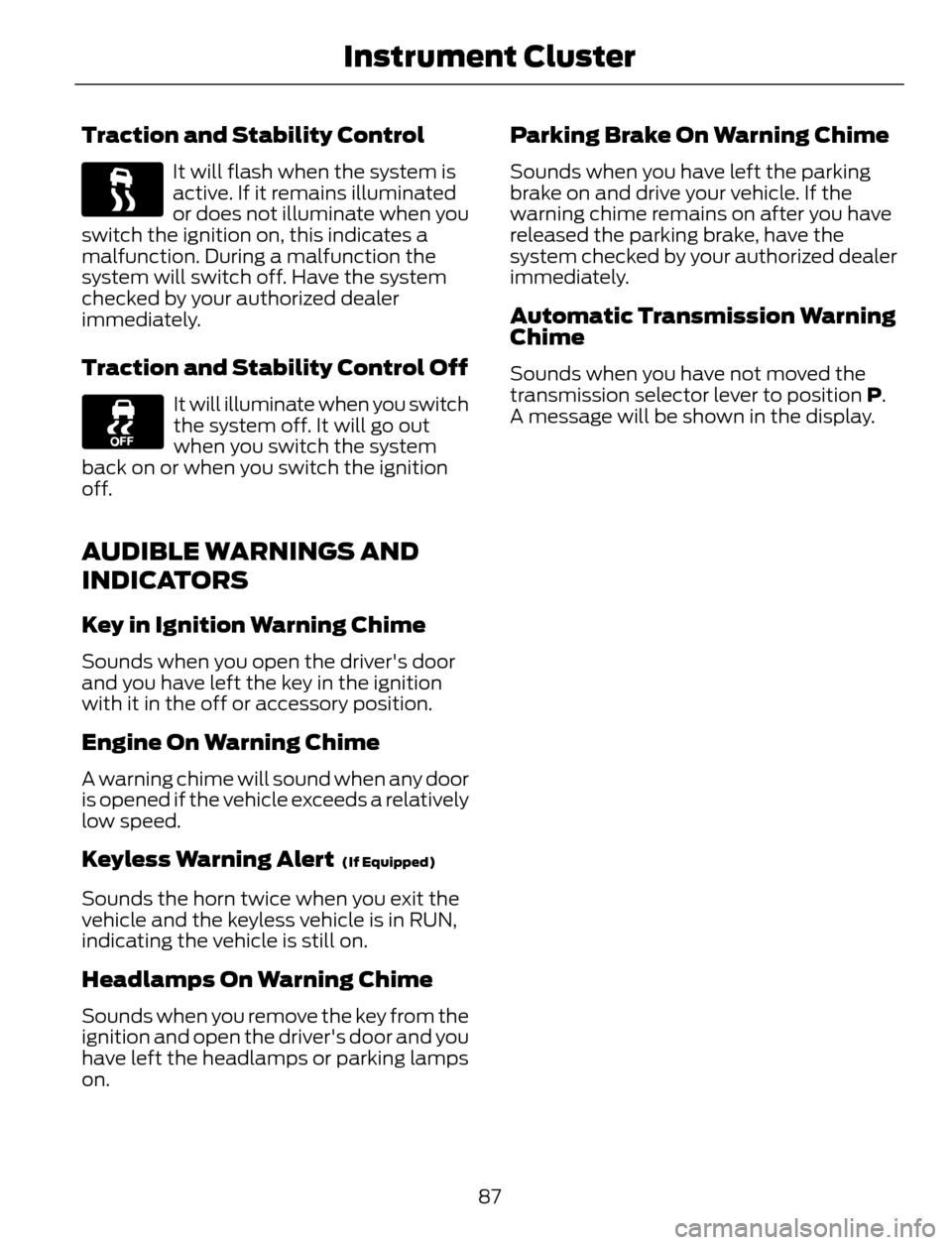
Traction and Stability Control
It will flash when the system is
active. If it remains illuminated
or does not illuminate when you
switch the ignition on, this indicates a
malfunction. During a malfunction the
system will switch off. Have the system
checked by your authorized dealer
immediately.
Traction and Stability Control Off
It will illuminate when you switch
the system off. It will go out
when you switch the system
back on or when you switch the ignition
off.
AUDIBLE WARNINGS AND
INDICATORS
Key in Ignition Warning Chime
Sounds when you open the driver's door
and you have left the key in the ignition
with it in the off or accessory position.
Engine On Warning Chime
A warning chime will sound when any door
is opened if the vehicle exceeds a relatively
low speed.
Keyless Warning Alert (If Equipped)
Sounds the horn twice when you exit the
vehicle and the keyless vehicle is in RUN,
indicating the vehicle is still on.
Headlamps On Warning Chime
Sounds when you remove the key from the
ignition and open the driver's door and you
have left the headlamps or parking lamps
on.
Parking Brake On Warning Chime
Sounds when you have left the parking
brake on and drive your vehicle. If the
warning chime remains on after you have
released the parking brake, have the
system checked by your authorized dealer
immediately.
Automatic Transmission Warning
Chime
Sounds when you have not moved the
transmission selector lever to position P.
A message will be shown in the display.
87
Instrument Cluster
Page 201 of 428
Protected components Fuse amp rating Fuse or relay number
Anti-lock brake system and electronic
stability program pump 40A** F7
Electronic stability program valve 30A** F8
Not used — F9
Heater blower motor 40A** F10
Body control module feed 30A** F11
Powertrain control module relay fuse 30A** F12
Starter relay 30A** F13
Rear power window (without door control
unit) 25A** F14
Front cigar lighter or power outlet 20A** F15
Front power window (without door control
unit) 25A** F16
Rear power outlet 20A** F17
Center power outlet 20A** F18
Anti-lock brake system and electronic
stability program 15 feed 5A* F19
Horn 15A* F20
Stop light switch 5A* F21
Battery monitor system 15A* F22
Relay coils 5A* F23
Light switch module 5A* F24
Power exterior mirror (without door control
unit) 10A* F25
Keep-alive power 5A* F26
Air conditioner clutch 15A* F27
Vehicle power - fuel injector (2.5L engine) 10A* F28
Rear window defroster 25A* F29
198
Fuses
Page 202 of 428
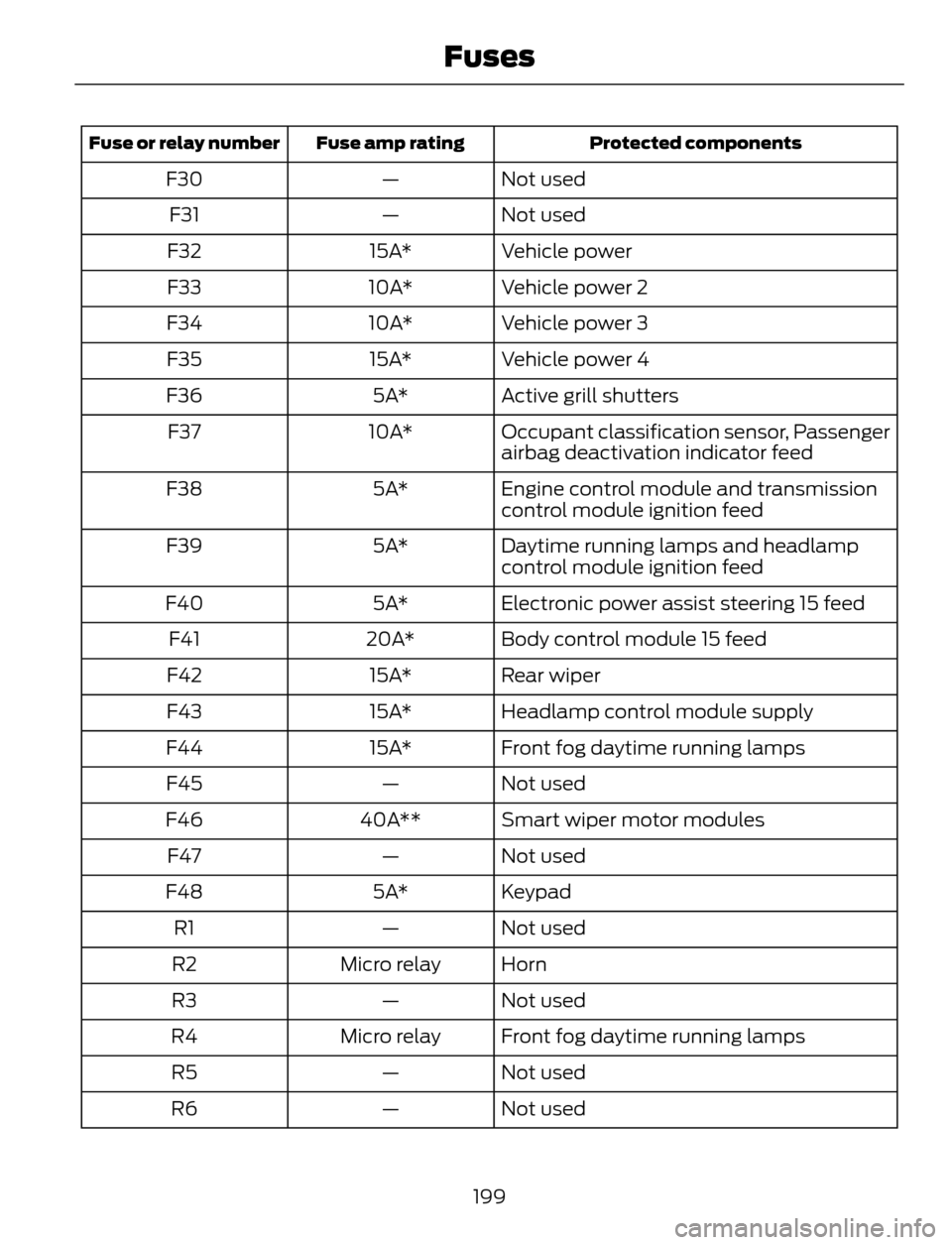
Protected components Fuse amp rating Fuse or relay number
Not used — F30
Not used — F31
Vehicle power 15A* F32
Vehicle power 2 10A* F33
Vehicle power 3 10A* F34
Vehicle power 4 15A* F35
Active grill shutters 5A* F36
Occupant classification sensor, Passenger
airbag deactivation indicator feed 10A* F37
Engine control module and transmission
control module ignition feed 5A* F38
Daytime running lamps and headlamp
control module ignition feed 5A* F39
Electronic power assist steering 15 feed 5A* F40
Body control module 15 feed 20A* F41
Rear wiper 15A* F42
Headlamp control module supply 15A* F43
Front fog daytime running lamps 15A* F44
Not used — F45
Smart wiper motor modules 40A** F46
Not used — F47
Keypad 5A* F48
Not used — R1
Horn Micro relay R2
Not used — R3
Front fog daytime running lamps Micro relay R4
Not used — R5
Not used — R6
199
Fuses
Page 406 of 428
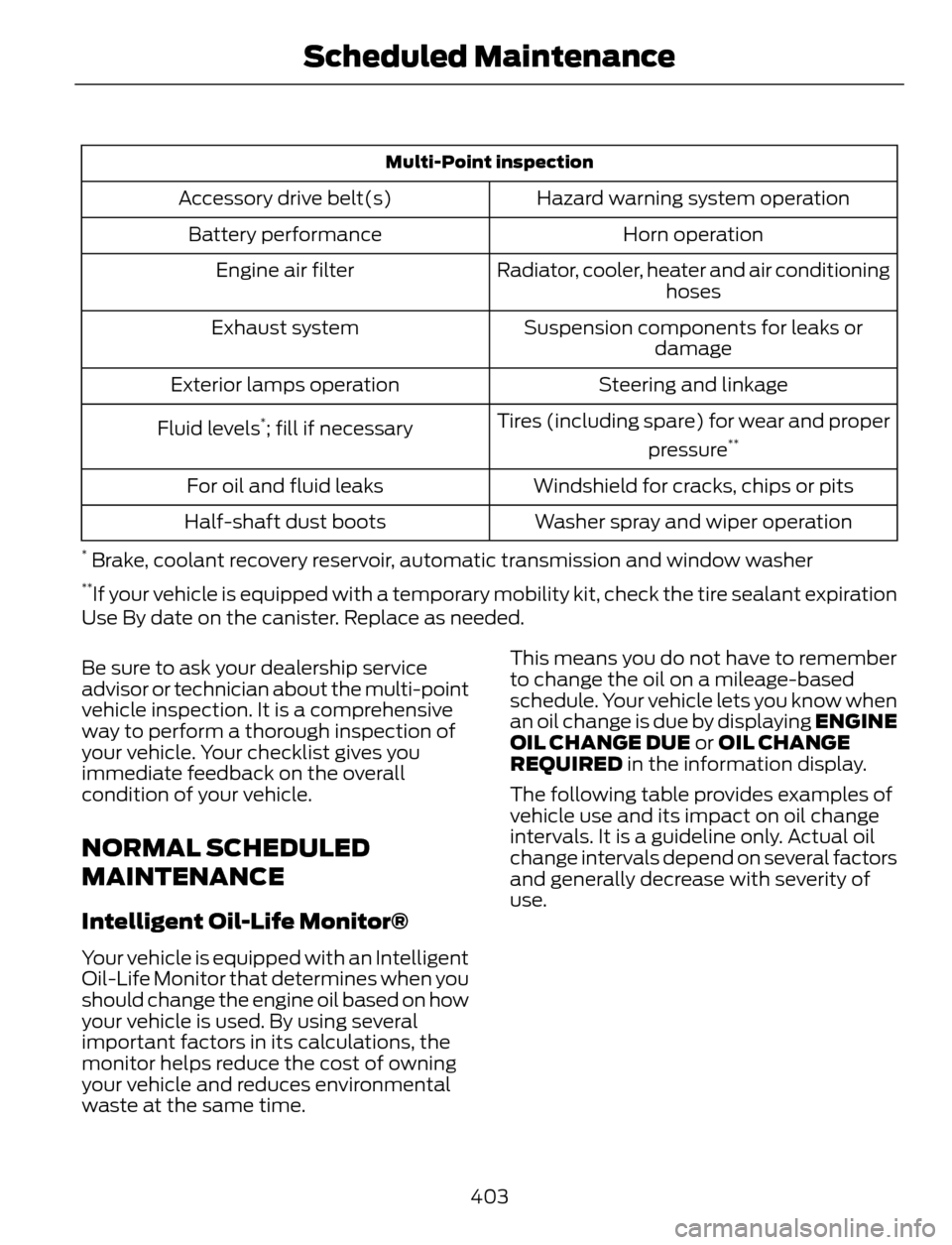
Multi-Point inspection
Hazard warning system operation Accessory drive belt(s)
Horn operation Battery performance
Radiator, cooler, heater and air conditioning
hoses Engine air filter
Suspension components for leaks or
damage Exhaust system
Steering and linkage Exterior lamps operation
Tires (including spare) for wear and proper
pressure
**Fluid levels*; fill if necessary
Windshield for cracks, chips or pits For oil and fluid leaks
Washer spray and wiper operation Half-shaft dust boots
* Brake, coolant recovery reservoir, automatic transmission and window washer**If your vehicle is equipped with a temporary mobility kit, check the tire sealant expiration
Use By date on the canister. Replace as needed.
Be sure to ask your dealership service
advisor or technician about the multi-point
vehicle inspection. It is a comprehensive
way to perform a thorough inspection of
your vehicle. Your checklist gives you
immediate feedback on the overall
condition of your vehicle.
NORMAL SCHEDULED
MAINTENANCE
Intelligent Oil-Life Monitor®
Your vehicle is equipped with an Intelligent
Oil-Life Monitor that determines when you
should change the engine oil based on how
your vehicle is used. By using several
important factors in its calculations, the
monitor helps reduce the cost of owning
your vehicle and reduces environmental
waste at the same time.This means you do not have to remember
to change the oil on a mileage-based
schedule. Your vehicle lets you know when
an oil change is due by displaying ENGINE
OIL CHANGE DUE or OIL CHANGE
REQUIRED in the information display.
The following table provides examples of
vehicle use and its impact on oil change
intervals. It is a guideline only. Actual oil
change intervals depend on several factors
and generally decrease with severity of
use.
403
Scheduled Maintenance