ignition FORD ESCAPE 2014 3.G Owners Manual
[x] Cancel search | Manufacturer: FORD, Model Year: 2014, Model line: ESCAPE, Model: FORD ESCAPE 2014 3.GPages: 428, PDF Size: 16.6 MB
Page 5 of 428
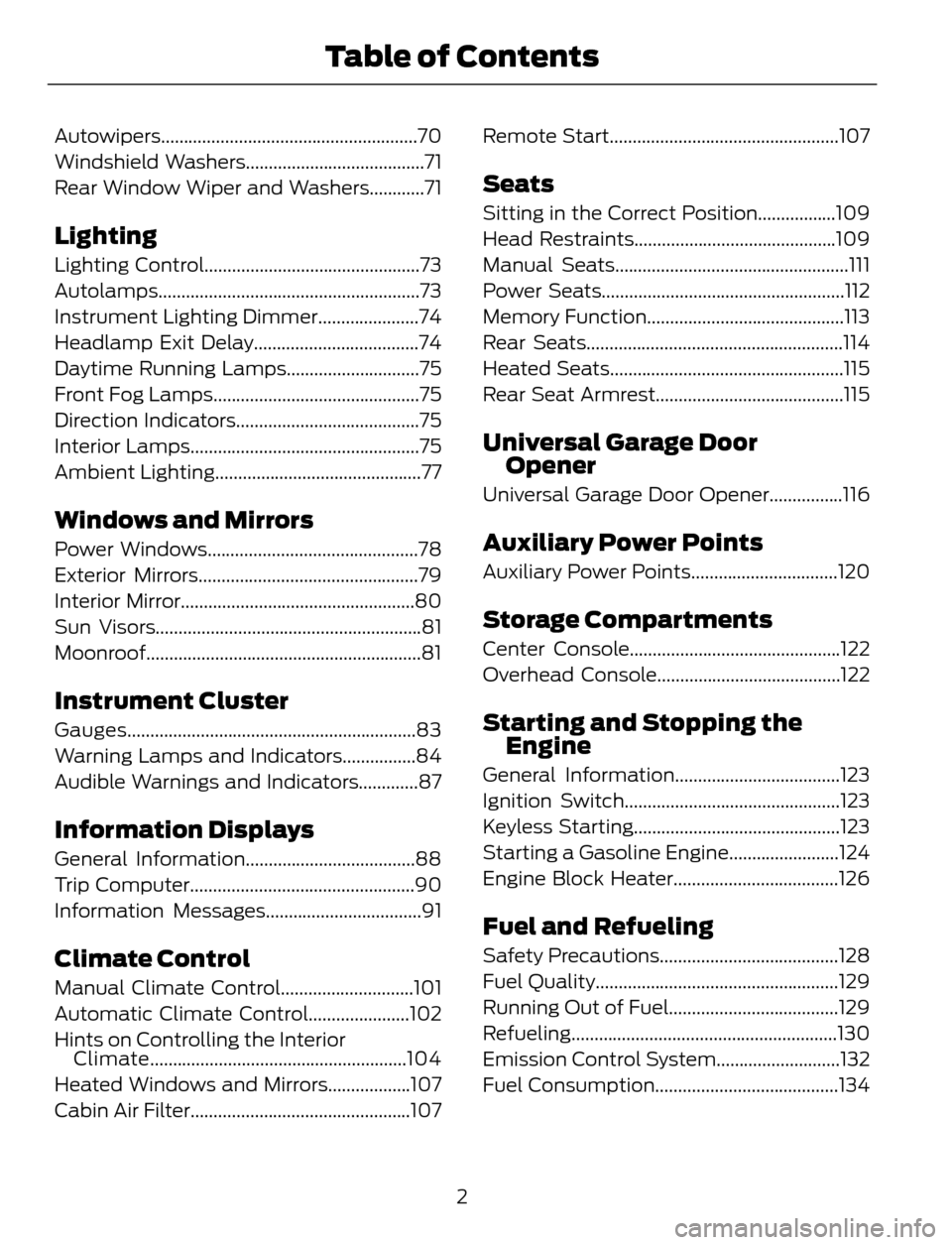
Autowipers........................................................70
Windshield Washers.......................................71
Rear Window Wiper and Washers............71
Lighting
Lighting Control...............................................73
Autolamps.........................................................73
Instrument Lighting Dimmer......................74
Headlamp Exit Delay....................................74
Daytime Running Lamps.............................75
Front Fog Lamps.............................................75
Direction Indicators........................................75
Interior Lamps..................................................75
Ambient Lighting.............................................77
Windows and Mirrors
Power Windows..............................................78
Exterior Mirrors................................................79
Interior Mirror...................................................80
Sun Visors..........................................................81
Moonroof............................................................81
Instrument Cluster
Gauges...............................................................83
Warning Lamps and Indicators................84
Audible Warnings and Indicators.............87
Information Displays
General Information.....................................88
Trip Computer.................................................90
Information Messages..................................91
Climate Control
Manual Climate Control.............................101
Automatic Climate Control......................102
Hints on Controlling the Interior
Climate........................................................104
Heated Windows and Mirrors..................107
Cabin Air Filter................................................107Remote Start..................................................107
Seats
Sitting in the Correct Position.................109
Head Restraints............................................109
Manual Seats...................................................111
Power Seats.....................................................112
Memory Function...........................................113
Rear Seats........................................................114
Heated Seats...................................................115
Rear Seat Armrest.........................................115
Universal Garage Door
Opener
Universal Garage Door Opener................116
Auxiliary Power Points
Auxiliary Power Points................................120
Storage Compartments
Center Console..............................................122
Overhead Console........................................122
Starting and Stopping the
Engine
General Information....................................123
Ignition Switch...............................................123
Keyless Starting.............................................123
Starting a Gasoline Engine........................124
Engine Block Heater....................................126
Fuel and Refueling
Safety Precautions.......................................128
Fuel Quality.....................................................129
Running Out of Fuel.....................................129
Refueling..........................................................130
Emission Control System...........................132
Fuel Consumption........................................134
2
Table of Contents
Page 33 of 428
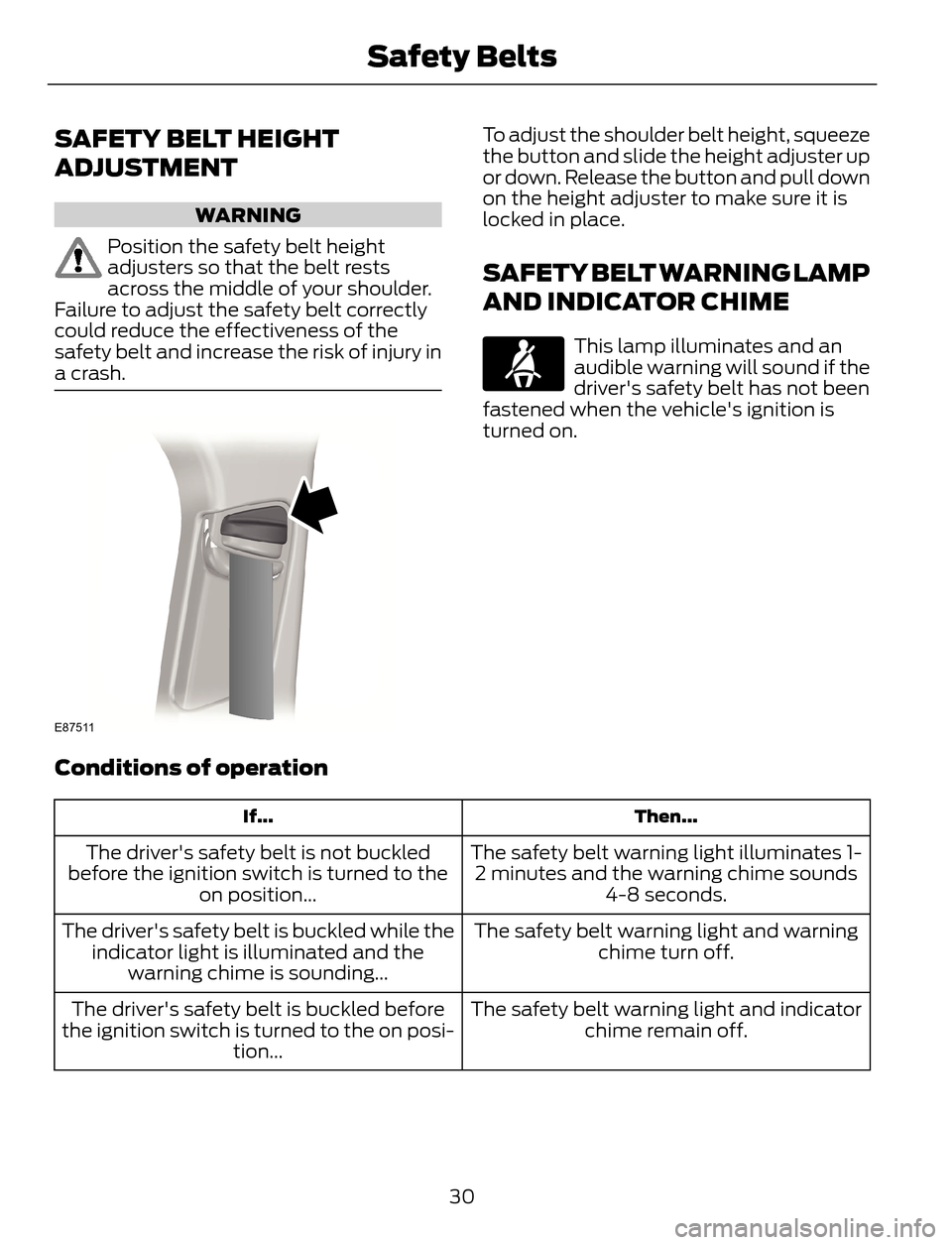
SAFETY BELT HEIGHT
ADJUSTMENT
WARNING
Position the safety belt height
adjusters so that the belt rests
across the middle of your shoulder.
Failure to adjust the safety belt correctly
could reduce the effectiveness of the
safety belt and increase the risk of injury in
a crash.
E87511
To adjust the shoulder belt height, squeeze
the button and slide the height adjuster up
or down. Release the button and pull down
on the height adjuster to make sure it is
locked in place.
SAFETY BELT WARNING LAMP
AND INDICATOR CHIME
This lamp illuminates and an
audible warning will sound if the
driver's safety belt has not been
fastened when the vehicle's ignition is
turned on.
Conditions of operation
Then... If...
The safety belt warning light illuminates 1-
2 minutes and the warning chime sounds
4-8 seconds. The driver's safety belt is not buckled
before the ignition switch is turned to the
on position...
The safety belt warning light and warning
chime turn off. The driver's safety belt is buckled while the
indicator light is illuminated and the
warning chime is sounding...
The safety belt warning light and indicator
chime remain off. The driver's safety belt is buckled before
the ignition switch is turned to the on posi-
tion...
30
Safety Belts
Page 34 of 428
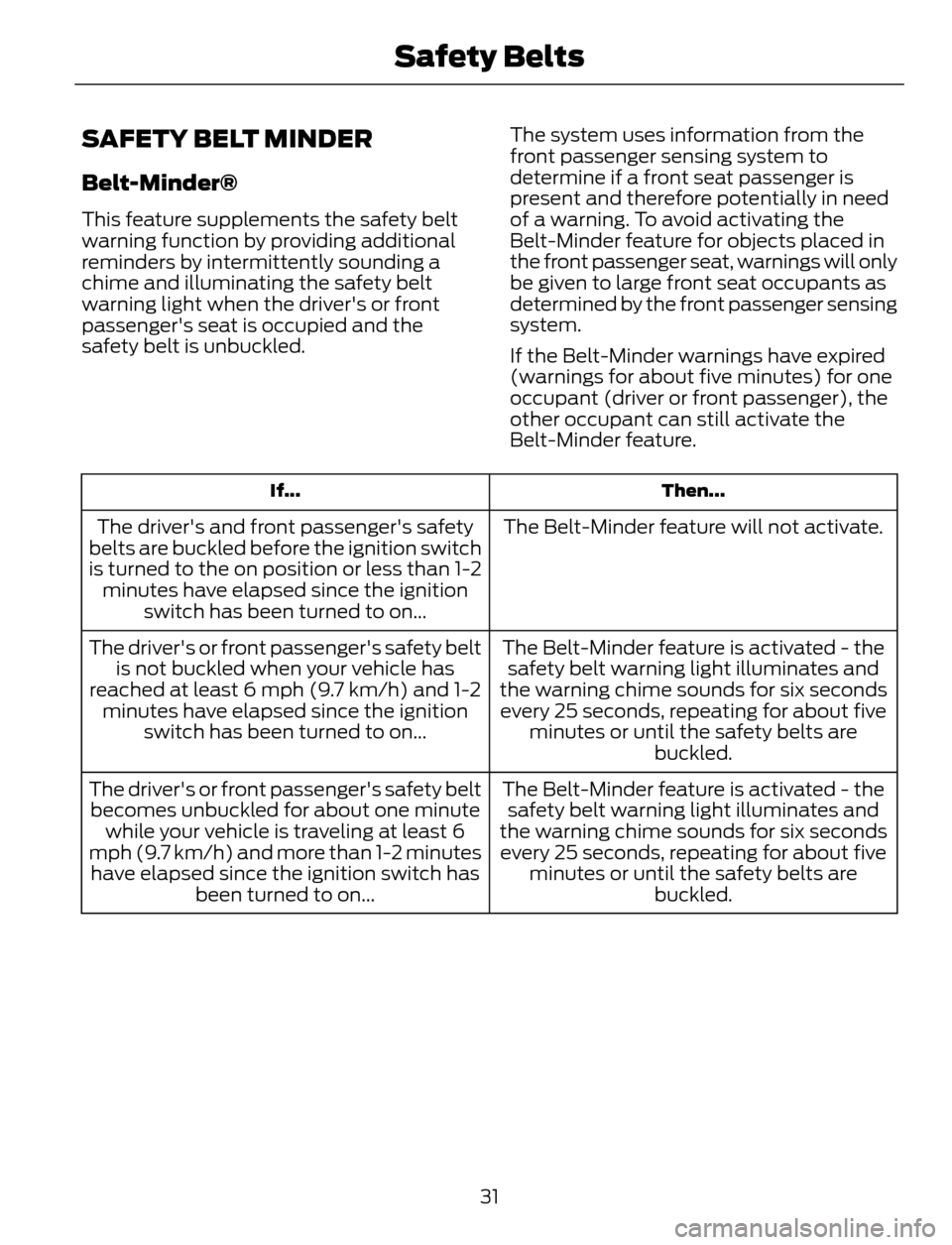
SAFETY BELT MINDER
Belt-Minder®
This feature supplements the safety belt
warning function by providing additional
reminders by intermittently sounding a
chime and illuminating the safety belt
warning light when the driver's or front
passenger's seat is occupied and the
safety belt is unbuckled.The system uses information from the
front passenger sensing system to
determine if a front seat passenger is
present and therefore potentially in need
of a warning. To avoid activating the
Belt-Minder feature for objects placed in
the front passenger seat, warnings will only
be given to large front seat occupants as
determined by the front passenger sensing
system.
If the Belt-Minder warnings have expired
(warnings for about five minutes) for one
occupant (driver or front passenger), the
other occupant can still activate the
Belt-Minder feature.
Then... If...
The Belt-Minder feature will not activate. The driver's and front passenger's safety
belts are buckled before the ignition switch
is turned to the on position or less than 1-2
minutes have elapsed since the ignition
switch has been turned to on...
The Belt-Minder feature is activated - the
safety belt warning light illuminates and
the warning chime sounds for six seconds
every 25 seconds, repeating for about five
minutes or until the safety belts are
buckled. The driver's or front passenger's safety belt
is not buckled when your vehicle has
reached at least 6 mph (9.7 km/h) and 1-2
minutes have elapsed since the ignition
switch has been turned to on...
The Belt-Minder feature is activated - the
safety belt warning light illuminates and
the warning chime sounds for six seconds
every 25 seconds, repeating for about five
minutes or until the safety belts are
buckled. The driver's or front passenger's safety belt
becomes unbuckled for about one minute
while your vehicle is traveling at least 6
mph (9.7 km/h) and more than 1-2 minutes
have elapsed since the ignition switch has
been turned to on...
31
Safety Belts
Page 35 of 428
Deactivating and Activating the
Belt-Minder Feature
WARNING
While the system allows you to
deactivate it, this system is designed
to improve your chances of being
safely belted and surviving an accident.
We recommend you leave the system
activated for yourself and others who may
use your vehicle. To reduce the risk of
injury, do not deactivate or activate the
system while driving your vehicle.
Note:The driver and front passenger
warning are deactivated and activated
independently. When deactivating or
activating one seating position, do not
buckle the other position as this will
terminate the process.
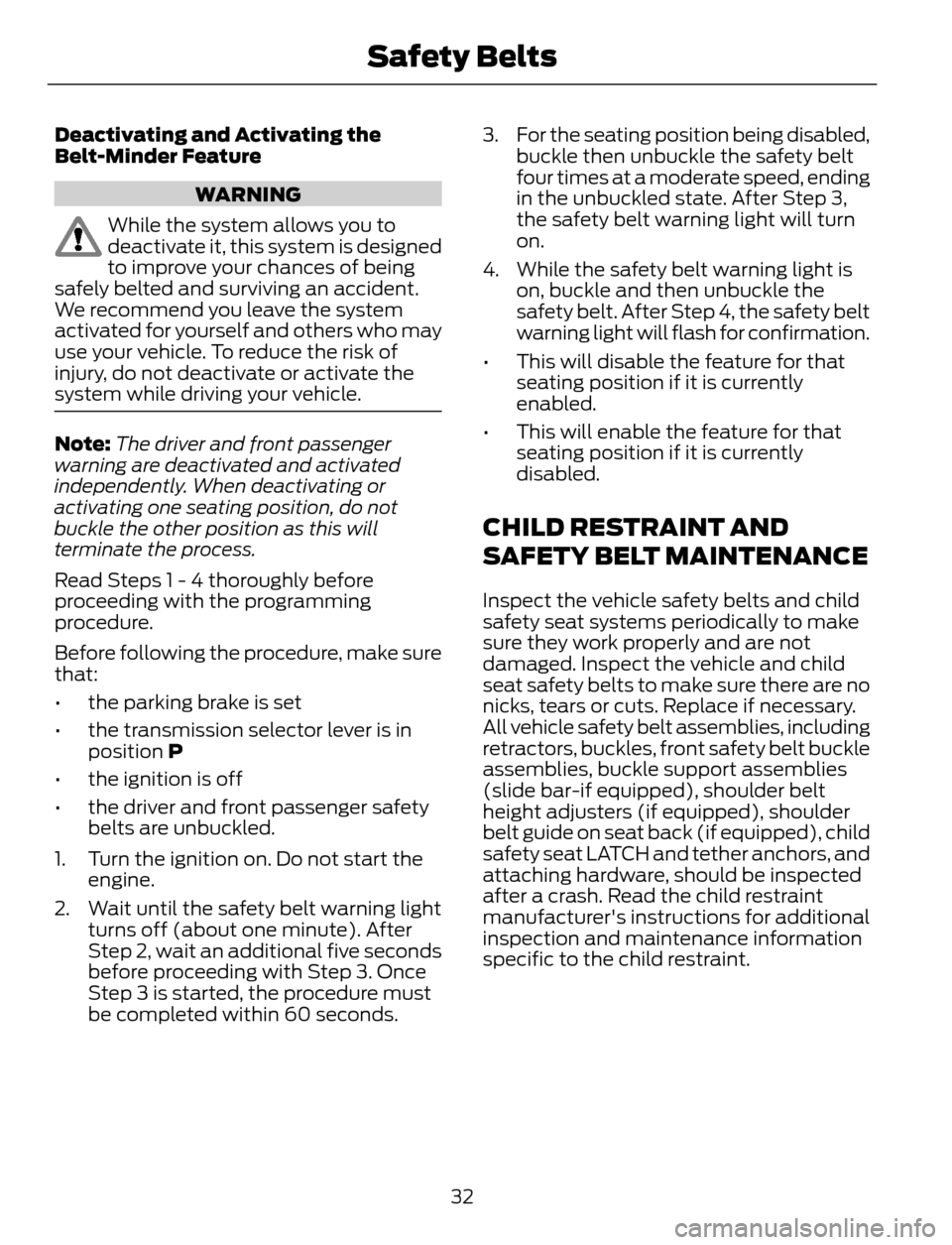
Read Steps 1 - 4 thoroughly before
proceeding with the programming
procedure.
Before following the procedure, make sure
that:
• the parking brake is set
• the transmission selector lever is in
position P
• the ignition is off
• the driver and front passenger safety
belts are unbuckled.
1. Turn the ignition on. Do not start the
engine.
2. Wait until the safety belt warning light
turns off (about one minute). After
Step 2, wait an additional five seconds
before proceeding with Step 3. Once
Step 3 is started, the procedure must
be completed within 60 seconds.3. For the seating position being disabled,
buckle then unbuckle the safety belt
four times at a moderate speed, ending
in the unbuckled state. After Step 3,
the safety belt warning light will turn
on.
4. While the safety belt warning light is
on, buckle and then unbuckle the
safety belt. After Step 4, the safety belt
warning light will flash for confirmation.
• This will disable the feature for that
seating position if it is currently
enabled.
• This will enable the feature for that
seating position if it is currently
disabled.
CHILD RESTRAINT AND
SAFETY BELT MAINTENANCE
Inspect the vehicle safety belts and child
safety seat systems periodically to make
sure they work properly and are not
damaged. Inspect the vehicle and child
seat safety belts to make sure there are no
nicks, tears or cuts. Replace if necessary.
All vehicle safety belt assemblies, including
retractors, buckles, front safety belt buckle
assemblies, buckle support assemblies
(slide bar-if equipped), shoulder belt
height adjusters (if equipped), shoulder
belt guide on seat back (if equipped), child
safety seat LATCH and tether anchors, and
attaching hardware, should be inspected
after a crash. Read the child restraint
manufacturer's instructions for additional
inspection and maintenance information
specific to the child restraint.
32
Safety Belts
Page 41 of 428
This system works with sensors that are
part of the front passenger’s seat and
safety belt to detect the presence of a
properly–seated occupant and determine
if the front passenger’s frontal airbag
should be enabled (may inflate) or not.
E145987
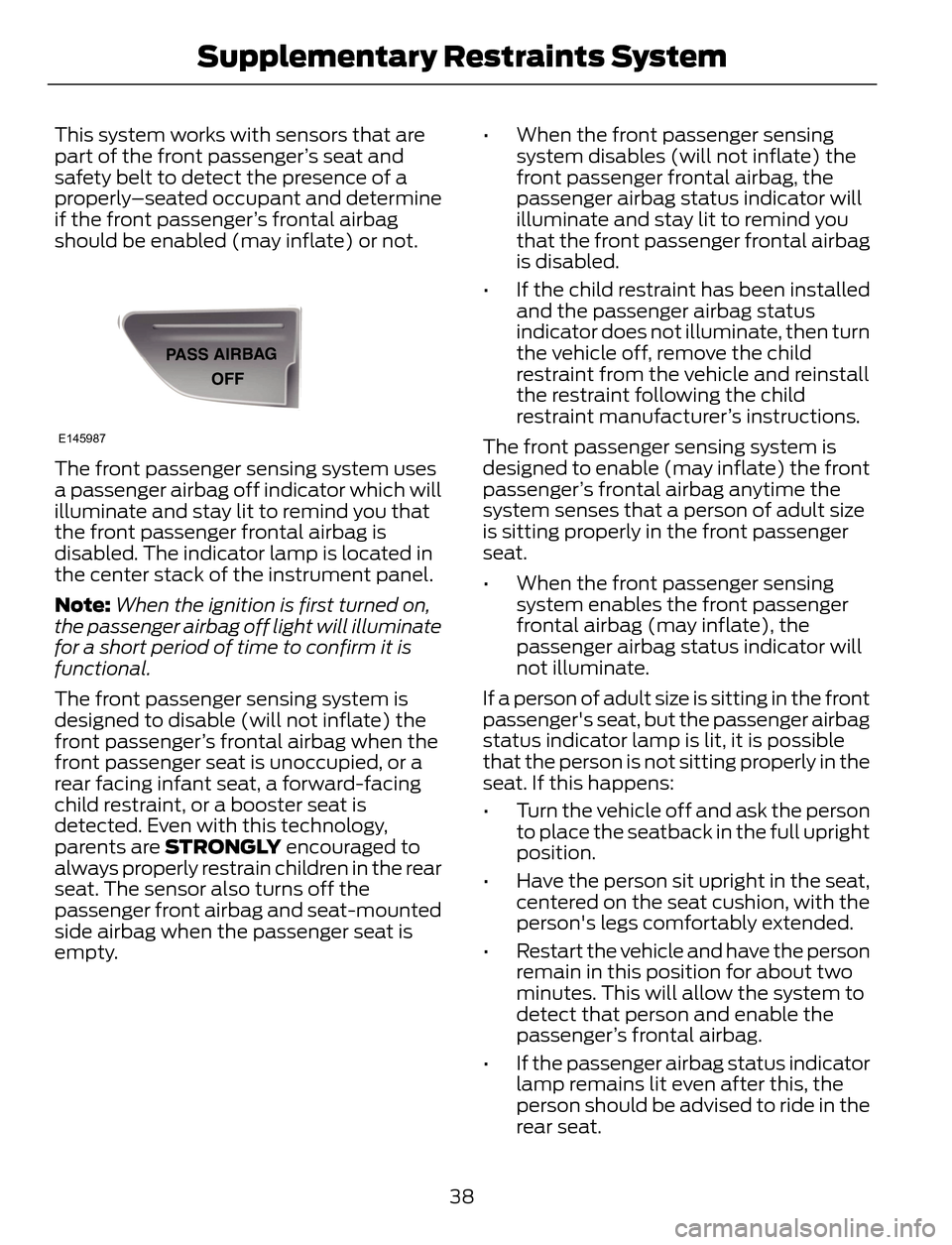
The front passenger sensing system uses
a passenger airbag off indicator which will
illuminate and stay lit to remind you that
the front passenger frontal airbag is
disabled. The indicator lamp is located in
the center stack of the instrument panel.
Note:When the ignition is first turned on,
the passenger airbag off light will illuminate
for a short period of time to confirm it is
functional.
The front passenger sensing system is
designed to disable (will not inflate) the
front passenger’s frontal airbag when the
front passenger seat is unoccupied, or a
rear facing infant seat, a forward-facing
child restraint, or a booster seat is
detected. Even with this technology,
parents are STRONGLY encouraged to
always properly restrain children in the rear
seat. The sensor also turns off the
passenger front airbag and seat-mounted
side airbag when the passenger seat is
empty.• When the front passenger sensing
system disables (will not inflate) the
front passenger frontal airbag, the
passenger airbag status indicator will
illuminate and stay lit to remind you
that the front passenger frontal airbag
is disabled.
• If the child restraint has been installed
and the passenger airbag status
indicator does not illuminate, then turn
the vehicle off, remove the child
restraint from the vehicle and reinstall
the restraint following the child
restraint manufacturer’s instructions.
The front passenger sensing system is
designed to enable (may inflate) the front
passenger’s frontal airbag anytime the
system senses that a person of adult size
is sitting properly in the front passenger
seat.
• When the front passenger sensing
system enables the front passenger
frontal airbag (may inflate), the
passenger airbag status indicator will
not illuminate.
If a person of adult size is sitting in the front
passenger's seat, but the passenger airbag
status indicator lamp is lit, it is possible
that the person is not sitting properly in the
seat. If this happens:
• Turn the vehicle off and ask the person
to place the seatback in the full upright
position.
• Have the person sit upright in the seat,
centered on the seat cushion, with the
person's legs comfortably extended.
• Restart the vehicle and have the person
remain in this position for about two
minutes. This will allow the system to
detect that person and enable the
passenger’s frontal airbag.
• If the passenger airbag status indicator
lamp remains lit even after this, the
person should be advised to ride in the
rear seat.
38
Supplementary Restraints System
Page 45 of 428
• The crash sensors and monitoring
system have a readiness indicator. See
Crash Sensors and Airbag Indicator
(page 42).
Children 12 years old and under should
always be properly restrained in the rear
seats. The Safety Canopy will not interfere
with children restrained using a properly
installed child or booster seat because it
is designed to inflate downward from the
headliner above the doors along the side
window opening.
The design and development of the Safety
Canopy included recommended testing
procedures that were developed by a
group of automotive safety experts known
as the Side Airbag Technical Working
Group. These recommended testing
procedures help reduce the risk of injuries
related to the deployment of side airbags
(including the Safety Canopy).
CRASH SENSORS AND
AIRBAG INDICATOR
WARNING
Modifying or adding equipment to
the front end of your vehicle
(including frame, bumper, front end
body structure and tow hooks) may affect
the performance of the airbag system,
increasing the risk of injury. Do not modify
the front end of your vehicle.
Your vehicle has a collection of crash and
occupant sensors which provide
information to the restraints control
module which deploys (activates) the
front safety belt pretensioners, driver
airbag, passenger airbag, seat mounted
side airbags, and the Safety Canopy. Based
on the type of accident (frontal impact,
side impact or rollover) the restraints
control module will deploy the appropriate
safety devices.
The restraints control module also
monitors the readiness of the above safety
devices plus the crash and occupant
sensors. The readiness of the safety
system is indicated by a warning indicator
light in the instrument cluster or by a
backup tone if the warning light is not
working. Routine maintenance of the
airbag is not required.
A difficulty with the system is indicated by
one or more of the following:
• The readiness light will not illuminate
immediately after the ignition is turned
on.
• The readiness light will either flash or
stay lit.
• A series of five beeps will be heard. The
tone pattern will repeat periodically
until the problem, the light or both are
repaired.
If any of these things happen, even
intermittently, have the supplemental
restraint system serviced at an authorized
dealer immediately. Unless serviced, the
system may not function properly in the
event of a crash.
42
Supplementary Restraints System
Page 50 of 428
Note:If locking was not successful or if any
door or the liftgate is open, or if the hood is
open on vehicles with a perimeter alarm or
remote start, the horn will sound twice and
the lamps will not flash.
Sounding a Panic Alarm
Note:The panic alarm will only operate
when the ignition is off.
E138624
Press the button to activate the
alarm. Press the button again or
turn the ignition on to deactivate.
Remote Start (If Equipped)
WARNING
To avoid exhaust fumes, do not use
remote start if your vehicle is parked
indoors or areas that are not well
ventilated.
Note:Do not use remote start if your vehicle
is low on fuel.
E138625
The remote start button is on the
transmitter.
This feature allows you to start your
vehicle from outside the vehicle. The
transmitter has an extended operating
range.
Vehicles with automatic climate control
can be configured to operate when the
vehicle is remote started. See Automatic
Climate Control (page 102).
Many states and provinces have
restrictions for the use of remote start.
Check your local and state or provincial
laws for specific requirements regarding
remote start systems.
The remote start system will not work if:
• the ignition is on
• the alarm system is triggered
• you disable the feature• the hood is open
• the transmission is not in P
• the vehicle battery voltage is too low
• the service engine soon indicator was
on the last time your vehicle was
driven.
Remote Starting the Vehicle
Note:You must press each button within
three seconds of each other. Your vehicle
will not remote start and the horn will not
sound if you do not follow this sequence.
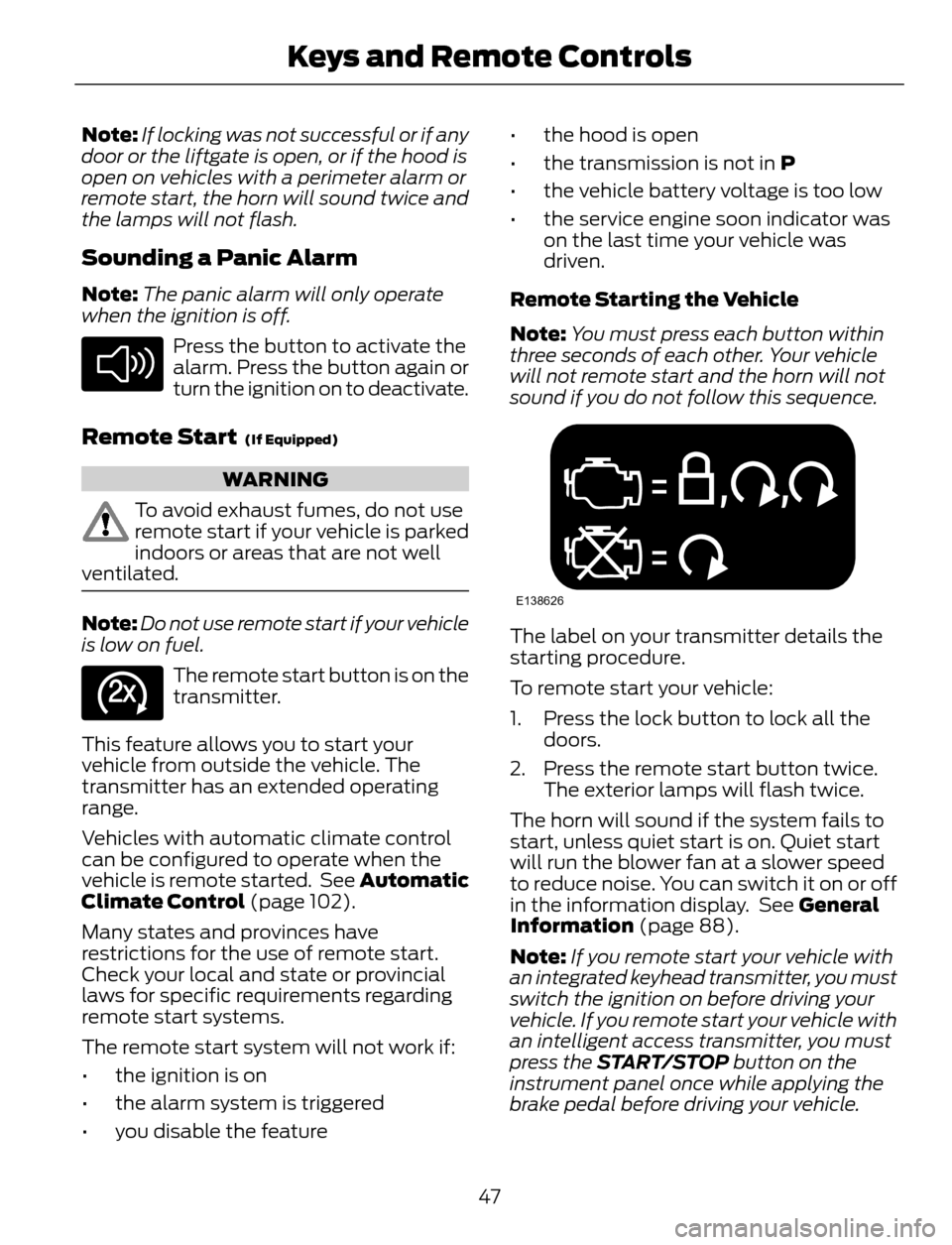
E138626
The label on your transmitter details the
starting procedure.
To remote start your vehicle:
1. Press the lock button to lock all the
doors.
2. Press the remote start button twice.
The exterior lamps will flash twice.
The horn will sound if the system fails to
start, unless quiet start is on. Quiet start
will run the blower fan at a slower speed
to reduce noise. You can switch it on or off
in the information display. See General
Information (page 88).
Note:If you remote start your vehicle with
an integrated keyhead transmitter, you must
switch the ignition on before driving your
vehicle. If you remote start your vehicle with
an intelligent access transmitter, you must
press the START/STOP button on the
instrument panel once while applying the
brake pedal before driving your vehicle.
47
Keys and Remote Controls
Page 52 of 428
PRINCIPLE OF OPERATION
MyKey allows you to program keys with
restricted driving modes to promote good
driving habits. All but one of the keys
programmed to the vehicle can be
activated with these restricted modes.
Any keys that have not been programmed
are referred to as administrator keys or
admin keys. These can be used to:
• create a MyKey
• program configurable MyKey settings
• clear all MyKey features.
When you have programmed a MyKey, you
can access the following information using
the information display:
• How many admin keys and MyKeys are
programmed to your vehicle.
• The total distance your vehicle has
traveled using a MyKey.
Note:All MyKeys are programmed to the
same settings. You cannot program them
individually.
Note:For vehicles with intelligent access
with push-button start, when both a MyKey
and an admin intelligent access key fob are
present, the admin fob will be recognized
by the vehicle while switching the ignition
on to start the vehicle.
Non-configurable Settings
The following settings cannot be changed
by an admin key user:• Belt-Minder. You cannot disable this
feature. The audio system will mute
when the front seat occupants’ safety
belts are not fastened.
• Early low fuel. The low-fuel warning
activates earlier, giving the MyKey user
more time to refuel.
• Driver assist features, if equipped on
your vehicle, are forced on: parking aid,
blind spot information system (BLIS)
with cross traffic alert, lane departure
warning and forward collision warning
system.
Configurable Settings
With an admin key, you can configure
certain MyKey settings when you first
create a MyKey and before you recycle the
key or restart the vehicle. You can also
change the settings afterward with an
admin key.
• A vehicle speed limit can be set.
Warnings will be shown in the display
followed by an audible tone when your
vehicle reaches the set speed. You
cannot override the set speed by fully
depressing the accelerator pedal or by
setting cruise control.
• Vehicle speed minders of 45, 55 or 65
mph (75, 90 or 105 km/h). Once you
select a speed, it will be shown in the
display, followed by an audible tone
when the preselected vehicle speed is
exceeded.
• Audio system maximum volume of
45%. A message will be shown in the
display when you attempt to exceed
the limited volume. Also, the
speed-sensitive or compensated
automatic volume control will be
disabled.
• Always on setting. When this is
selected, you will not be able to turn
off Advance Trac (if your vehicle is
equipped with this feature).
49
MyKey™
Page 53 of 428
CREATING A MYKEY
Use the information display to create a
MyKey:
1. Insert the key you want to program into
the ignition. If your vehicle is equipped with
a push-button start, hold the intelligent
access key next to the steering column.
Details on the correct fob placement and
position is in another chapter. See
Starting and Stopping the Engine (page
123).
2. Switch the ignition on.
3. Access the main menu on the
information display controls, and select
Settings and then MyKey by pressing OK
or the > button.
4. Press OK or the > button to select
Create MyKey.
5. When prompted, hold the OK button
until you see a message informing you to
label this key as a MyKey. The key will be
restricted at your vehicle's next start.
MyKey is successfully created. Make sure
you label it so you can distinguish it from
the admin keys.
You can also program configurable
settings for the key(s). Refer to
Programming/Changing Configurable
Settings.
Programming/Changing
Configurable Settings
Use the information display to access your
configurable MyKey settings:
1. Switch the ignition on using an admin
key or fob.
2. Access the main menu on the
information display controls, and select
Settings, then MyKey by pressing OK
or the > button.
3. Use the arrow buttons to get to a
configurable feature.4. Press OK or > to make a selection.
Note:You can clear or change your MyKey
settings at any time during the same key
cycle as you created the MyKey. Once you
have switched the engine off, however, you
will need an admin key to change or clear
your MyKey settings.
CLEARING ALL MYKEYS
You can clear all MyKeys within the same
key cycle as you created the MyKey. If you
switch your ignition off, however, you will
need to use an admin key to clear your
MyKeys.
Note:When you clear your MyKeys, you
remove all restrictions and return all MyKeys
to their original admin key status at once.
To clear all MyKeys of all MyKey settings,
use the information display to do the
following:
1. Access the main menu and select
Settings, then MyKey.
2. Scroll to Clear MyKey and press the
OK button.
3. Hold the OK button until ALL
MYKEYS CLEARED displays.
CHECKING MYKEY SYSTEM
STATUS
You can find information about your
programmed MyKeys by using the
information display.
MYKEY DISTANCE
Tracks the distance when drivers use a
MyKey. The only way to delete the
accumulated distance is by using an admin
key to clear your MyKey. If the distance
does not accumulate as expected, then
the intended user is not using the MyKey,
or an admin key user recently cleared and
then recreated a MyKey.
50
MyKey™
Page 55 of 428
MyKey is not compatible with
non-Ford-approved aftermarket remote
start systems. If you choose to install a
remote start system, please see a Ford
authorized dealer for a Ford-approved
system.
The following information may help
customers who choose to install a
non-Ford-approved remote start system.
The actions provided below do not make
MyKey compatible with
non-Ford-approved remote start systems,
but may help you retain some MyKey
functions.
When using a non-Ford-approved remote
start system, the vehicle may recognize
the remote start system as an additional
admin key with its associated privileges. If
you restart the engine by inserting a key
into the ignition cylinder and recycling the
ignition completely, then you may retain
some MyKey functions. This action forces
your vehicle to read the traditional key
instead of the remote start fob and then
uses the key's associated privileges.
Note:The MyKey system status menu
display may include the remote start system
as an additional key in the total count of
MYKEY(S) PROGRAMMED or ADMIN KEYS
PROGRAMMED. See Checking MyKey
System Status (page 50).As an added precaution, owners of vehicles
equipped with traditional keys may want
to program the remote start system as a
MyKey, if the MyKey driver uses the remote
start fob. That way, when the MyKey driver
starts the vehicle with the remote start
system, the MyKey restrictions will be
remain active.
With a non-Ford-approved aftermarket
remote start system, it is possible to
program all real keys as MyKeys
unintentionally. If this happens, then the
remote start fob is the admin key. If you
want to have only one real key as a MyKey,
or do not want to have any MyKeys, then
you need to use your remote start to clear
all MyKeys. In that case, follow these steps:
• Enter the vehicle and close all doors.
• Remote start the vehicle using your
non-Ford-approved remote start fob.
•See Clearing All MyKeys (page 50).
Follow Steps 1-3.
After clearing your MyKeys, you can create
a new MyKey. See Creating a MyKey
(page 50).
Note:For vehicles with Intelligent Access
Keys (Push-button Start), you cannot
program the remote start system as a
MyKey. Always treat the remote start fob
as you would any other admin key.
MYKEY TROUBLESHOOTING
Potential Causes Condition
· The key or fob used to start the vehicle does
not have admin privileges. I cannot create a MyKey.
· The key or fob used to start the vehicle is the
only admin key (there always has to be at least
one admin key).
· Vehicles with push-button start: The intelli-
gent access key fob is not positioned correctly
next to the steering column. See Keyless
Starting (page 123).
52
MyKey™