Eco FORD ESCAPE 2016 3.G Service Manual
[x] Cancel search | Manufacturer: FORD, Model Year: 2016, Model line: ESCAPE, Model: FORD ESCAPE 2016 3.GPages: 393, PDF Size: 5.85 MB
Page 84 of 393
INTERIOR MIRROR
WARNING
Do not adjust the mirror when your
vehicle is moving.
Note:
Do not clean the housing or glass of
any mirror with harsh abrasives, fuel or other
petroleum or ammonia-based cleaning
products.
You can adjust the interior mirror to your
preference. Some mirrors also have a
second pivot point. This lets you move the
mirror head up or down and from side to
side.
Pull the tab below the mirror toward you
to reduce glare at night.
Auto-Dimming Mirror (If Equipped)
Note: Do not block the sensors on the front
and back of the mirror. Mirror performance
may be affected. A rear center passenger or
raised rear center head restraint may also
block light from reaching the sensor.
The mirror will dim automatically to reduce
glare when bright lights are detected from
behind your vehicle. It will automatically
return to normal reflection when you select
reverse gear to make sure you have a clear
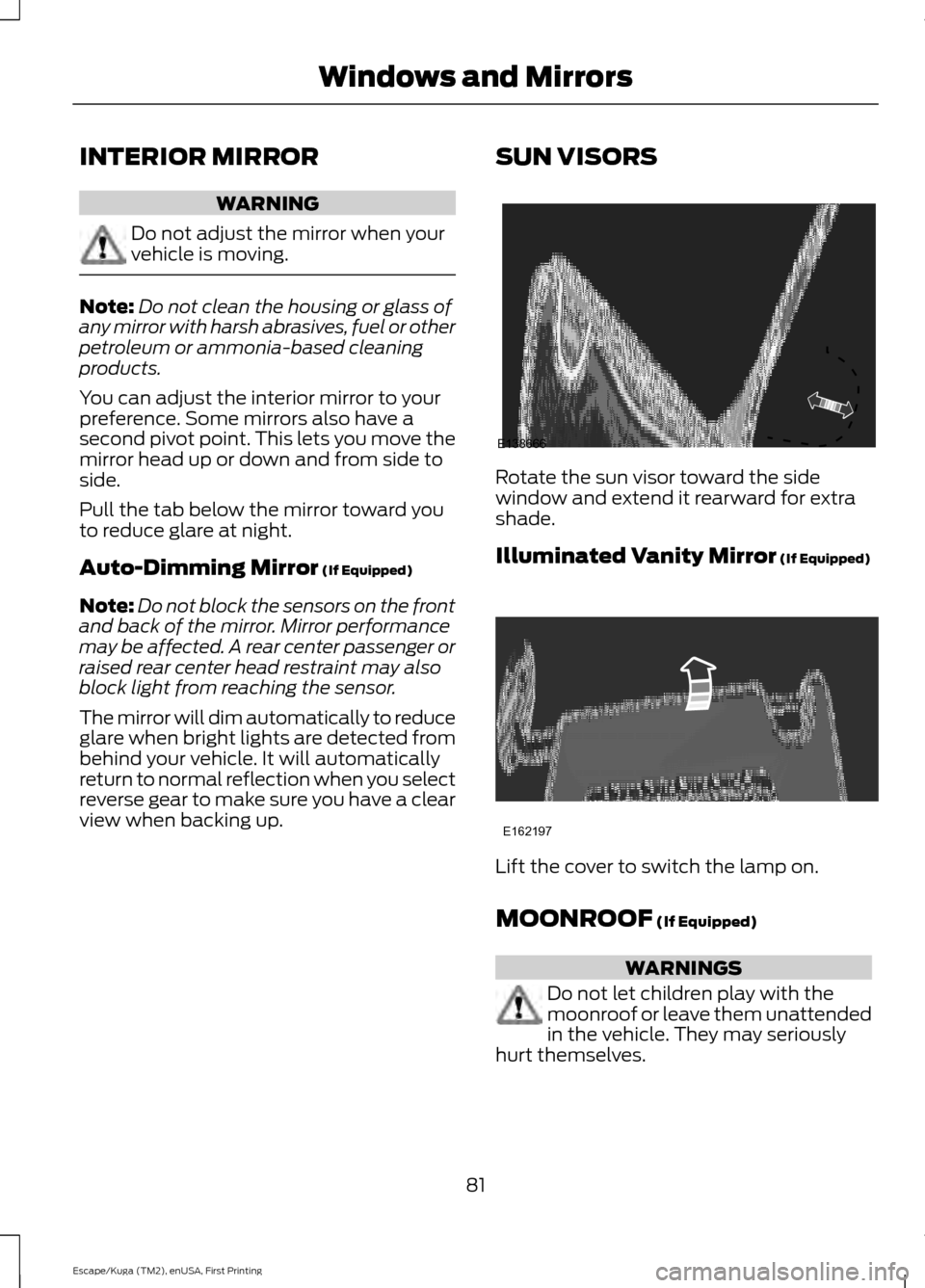
view when backing up. SUN VISORS Rotate the sun visor toward the side
window and extend it rearward for extra
shade.
Illuminated Vanity Mirror (If Equipped)
Lift the cover to switch the lamp on.
MOONROOF
(If Equipped)
WARNINGS
Do not let children play with the
moonroof or leave them unattended
in the vehicle. They may seriously
hurt themselves.
81
Escape/Kuga (TM2), enUSA, First Printing Windows and MirrorsE138666 E162197
Page 85 of 393
WARNINGS
When closing the moonroof, you
should verify that it is free of
obstructions and make sure that
children and pets are not in the proximity
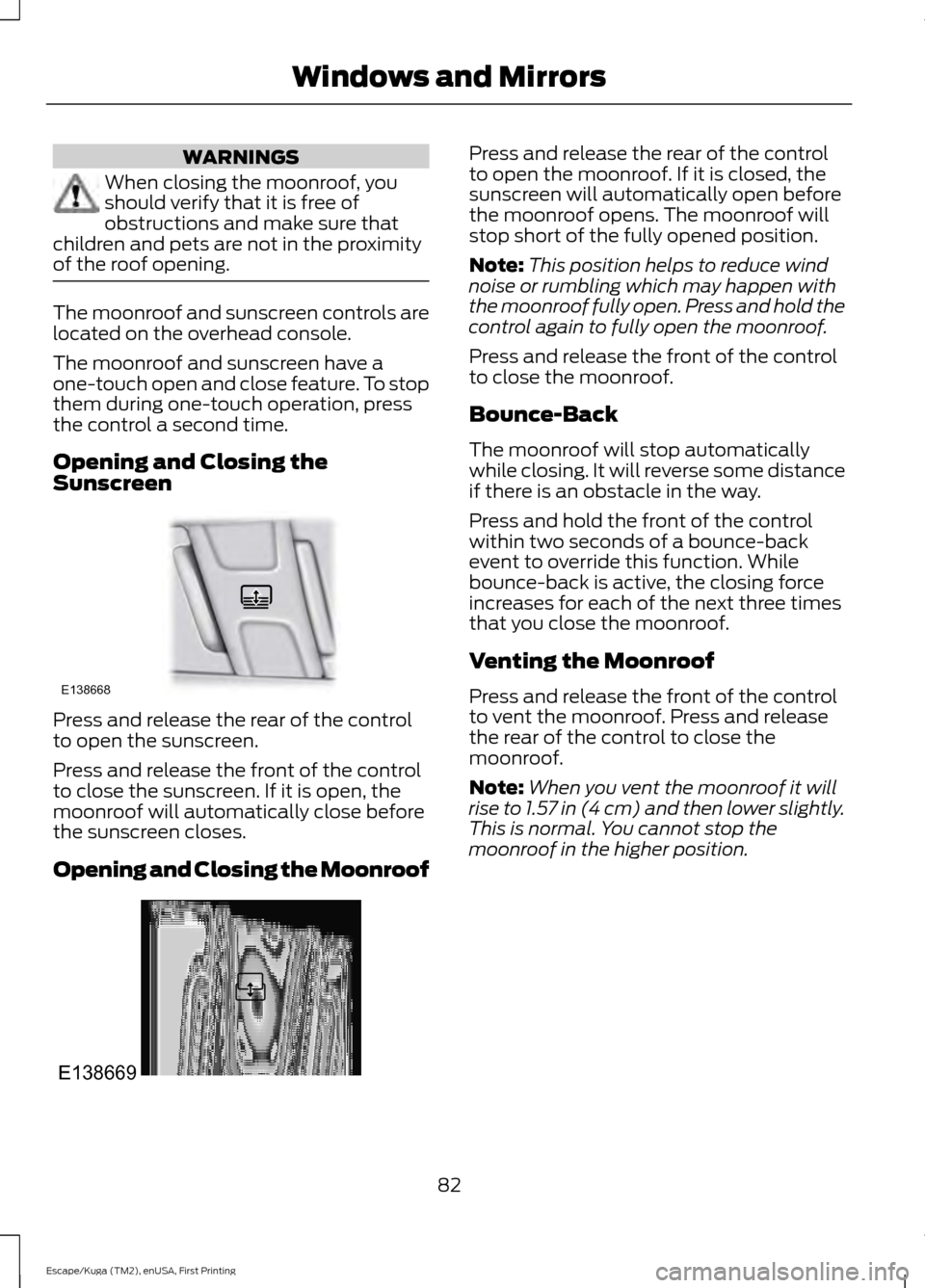
of the roof opening. The moonroof and sunscreen controls are
located on the overhead console.
The moonroof and sunscreen have a
one-touch open and close feature. To stop
them during one-touch operation, press
the control a second time.
Opening and Closing the
Sunscreen
Press and release the rear of the control
to open the sunscreen.
Press and release the front of the control
to close the sunscreen. If it is open, the
moonroof will automatically close before
the sunscreen closes.
Opening and Closing the Moonroof Press and release the rear of the control
to open the moonroof. If it is closed, the
sunscreen will automatically open before
the moonroof opens. The moonroof will
stop short of the fully opened position.
Note:
This position helps to reduce wind
noise or rumbling which may happen with
the moonroof fully open. Press and hold the
control again to fully open the moonroof.
Press and release the front of the control
to close the moonroof.
Bounce-Back
The moonroof will stop automatically
while closing. It will reverse some distance
if there is an obstacle in the way.
Press and hold the front of the control
within two seconds of a bounce-back
event to override this function. While
bounce-back is active, the closing force
increases for each of the next three times
that you close the moonroof.
Venting the Moonroof
Press and release the front of the control
to vent the moonroof. Press and release
the rear of the control to close the
moonroof.
Note: When you vent the moonroof it will
rise to 1.57 in (4 cm) and then lower slightly.
This is normal. You cannot stop the
moonroof in the higher position.
82
Escape/Kuga (TM2), enUSA, First Printing Windows and MirrorsE138668 E138669
Page 88 of 393
Note:
The low fuel warning and
distance-to-empty warning can appear at
different fuel gauge positions depending on
fuel economy conditions. This variation is
normal.
WARNING LAMPS AND
INDICATORS
The following warning lamps and
indicators will alert you to a vehicle
condition that may become serious. Some
lamps will illuminate when you start your
vehicle to make sure they work. If any
lamps remain on after starting your vehicle,
refer to the respective system warning
lamp for further information.
Note: Some warning indicators appear in
the information display and function the
same as a warning lamp but do not display
when you start your vehicle.
Airbag - Front If it fails to illuminate when you
start your vehicle, continues to
flash or remains on, it indicates
a malfunction. Have the system checked
by your authorized dealer.
Anti-Lock Braking System If it illuminates when you are
driving, this indicates a
malfunction. You will continue
to have the normal braking system
(without ABS) unless the brake system
warning lamp is also illuminated. Have the
system checked by your authorized dealer.
Battery If it illuminates while driving, it
indicates a malfunction. Switch
off all unnecessary electrical
equipment and have the system checked
by your authorized dealer immediately. Blind Spot Monitor (If Equipped) It will illuminate when you switch
this feature off or in conjunction
with a message. See Blind Spot
Information System
(page 162). See
Information Messages (page 91).
Brake System It will illuminate when you
engage the parking brake with
the ignition on.
If it illuminates when you are driving, check
that the parking brake is not engaged. If
the parking brake is not engaged, this
indicates low brake fluid level or a brake
system malfunction. Have the system
checked immediately by your authorized
dealer. WARNING
Driving your vehicle with the warning
lamp on is dangerous. A significant
decrease in braking performance
may occur. It will take you longer to stop
your vehicle. Have your vehicle checked by
your authorized dealer immediately. Driving
extended distances with the parking brake
engaged can cause brake failure and the
risk of personal injury. Cruise Control
(If Equipped)
It will illuminate when you switch
this feature on. See
Using
Cruise Control (page 161).
Direction Indicator Illuminates when the left or right
turn signal or the hazard warning
flasher is turned on. If the
indicators stay on or flash faster, check for
a burned out bulb. See
Changing a Bulb
(page 226).
85
Escape/Kuga (TM2), enUSA, First Printing Instrument Cluster E124823 E138644 E71340
Page 90 of 393
WARNING
Under engine misfire conditions,
excessive exhaust temperatures
could damage the catalytic
converter, the fuel system, interior floor
coverings or other vehicle components,
possibly causing a fire. Have an authorized
dealer service your vehicle immediately. The service engine soon indicator light
illuminates when the ignition is first turned
on prior to engine start to check the bulb
and to indicate whether the vehicle is ready
for Inspection/Maintenance (I/M) testing.
Normally, the service engine soon light will
stay on until the engine is cranked, then
turn itself off if no malfunctions are
present. However, if after 15 seconds the
service engine soon light blinks eight times,
it means that the vehicle is not ready for
I/M testing. See Emission Control
System (page 135).
Traction and Stability Control It will flash when the system is
active. If it remains illuminated
or does not illuminate when you
switch the ignition on, this indicates a
malfunction. During a malfunction the
system will switch off. Have the system
checked by your authorized dealer
immediately.
Traction and Stability Control Off It will illuminate when you switch
the system off. It will go out
when you switch the system
back on or when you switch the ignition
off. AUDIBLE WARNINGS AND
INDICATORS
Key in Ignition Warning Chime
Sounds when you open the driver's door
and you have left the key in the ignition.
Engine On Warning Chime
A warning chime will sound when any door
is opened if the vehicle exceeds a relatively
low speed.
Keyless Warning Alert
(If Equipped)
Sounds the horn twice when you exit the
vehicle and the keyless vehicle is in RUN,
indicating the vehicle is still on.
Headlamps On Warning Chime
Sounds when you remove the key from the
ignition and open the driver's door and you
have left the headlamps or parking lamps
on.
Parking Brake On Warning Chime
Sounds when you have left the parking
brake on and drive your vehicle. If the
warning chime remains on after you have
released the parking brake, have the
system checked by your authorized dealer
immediately.
Automatic Transmission Warning
Chime
Sounds when you have not moved the
transmission selector lever to position
P.
A message will be shown in the display.
87
Escape/Kuga (TM2), enUSA, First Printing Instrument ClusterE138639
Page 91 of 393
GENERAL INFORMATION
WARNING
Driving while distracted can result in
loss of vehicle control, crash and
injury. We strongly recommend that
you use extreme caution when using any
device that may take your focus off the
road. Your primary responsibility is the safe
operation of your vehicle. We recommend
against the use of any handheld device
while driving and encourage the use of
voice-operated systems when possible.
Make sure you are aware of all applicable
local laws that may affect the use of
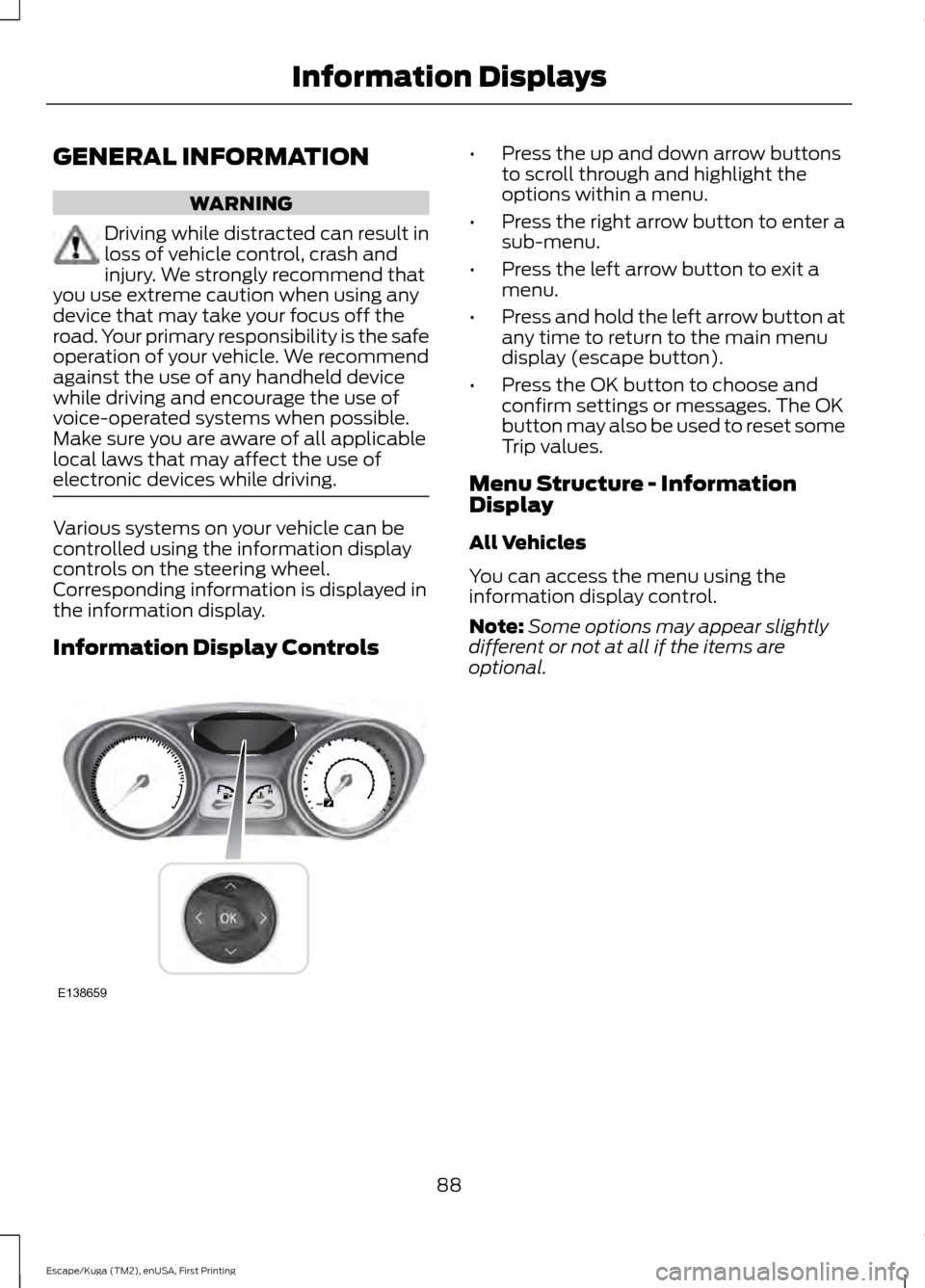
electronic devices while driving. Various systems on your vehicle can be
controlled using the information display
controls on the steering wheel.
Corresponding information is displayed in
the information display.
Information Display Controls •
Press the up and down arrow buttons
to scroll through and highlight the
options within a menu.
• Press the right arrow button to enter a
sub-menu.
• Press the left arrow button to exit a
menu.
• Press and hold the left arrow button at
any time to return to the main menu
display (escape button).
• Press the OK button to choose and
confirm settings or messages. The OK
button may also be used to reset some
Trip values.
Menu Structure - Information
Display
All Vehicles
You can access the menu using the
information display control.
Note: Some options may appear slightly
different or not at all if the items are
optional.
88
Escape/Kuga (TM2), enUSA, First Printing Information DisplaysE138659
Page 92 of 393
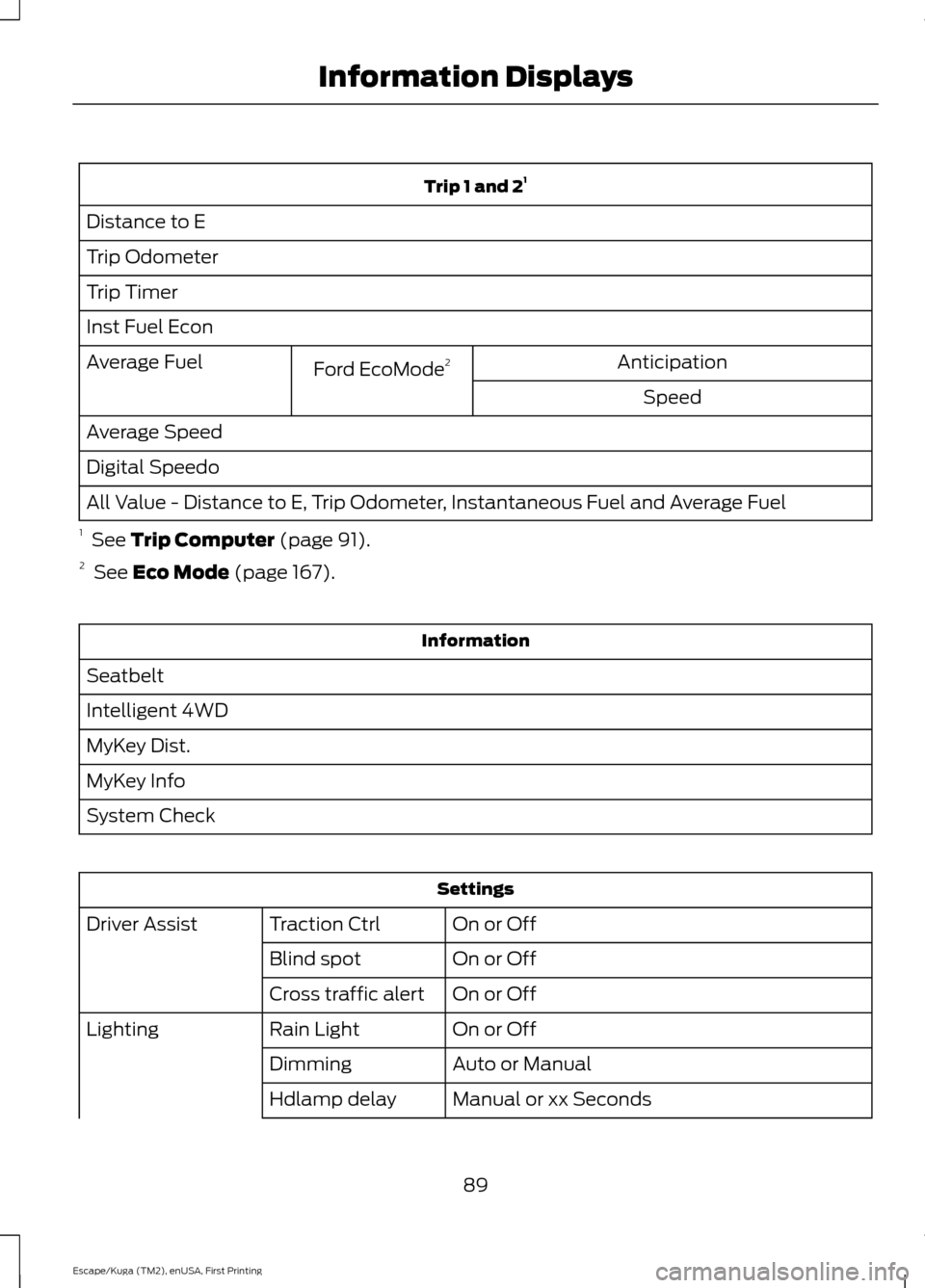
Trip 1 and 2
1
Distance to E
Trip Odometer
Trip Timer
Inst Fuel Econ Anticipation
Ford EcoMode 2
Average Fuel
Speed
Average Speed
Digital Speedo
All Value - Distance to E, Trip Odometer, Instantaneous Fuel and Average Fuel
1 See Trip Computer (page 91).
2 See
Eco Mode (page 167). Information
Seatbelt
Intelligent 4WD
MyKey Dist.
MyKey Info
System Check Settings
On or Off
Traction Ctrl
Driver Assist
On or Off
Blind spot
On or Off
Cross traffic alert
On or Off
Rain Light
Lighting
Auto or Manual
Dimming
Manual or xx Seconds
Hdlamp delay
89
Escape/Kuga (TM2), enUSA, First Printing Information Displays
Page 95 of 393
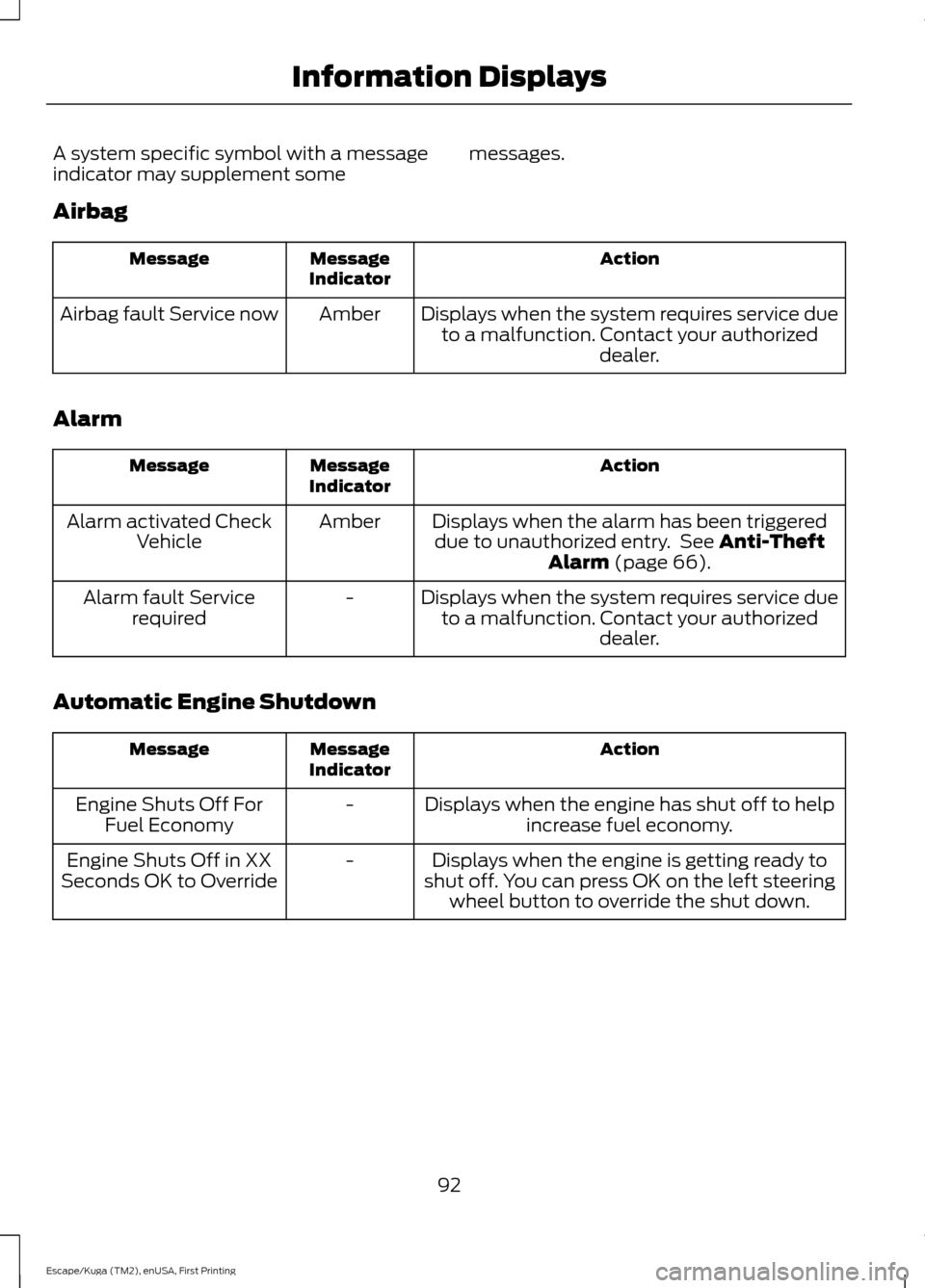
A system specific symbol with a message
indicator may supplement some
messages.
Airbag Action
Message
Indicator
Message
Displays when the system requires service dueto a malfunction. Contact your authorized dealer.
Amber
Airbag fault Service now
Alarm Action
Message
Indicator
Message
Displays when the alarm has been triggereddue to unauthorized entry. See Anti-Theft
Alarm (page 66).
Amber
Alarm activated Check
Vehicle
Displays when the system requires service dueto a malfunction. Contact your authorized dealer.
-
Alarm fault Service
required
Automatic Engine Shutdown Action
Message
Indicator
Message
Displays when the engine has shut off to helpincrease fuel economy.
-
Engine Shuts Off For
Fuel Economy
Displays when the engine is getting ready to
shut off. You can press OK on the left steering wheel button to override the shut down.
-
Engine Shuts Off in XX
Seconds OK to Override
92
Escape/Kuga (TM2), enUSA, First Printing Information Displays
Page 107 of 393
Note:
To reduce humidity build-up inside
your vehicle, do not drive with the system
switched off or with recirculated air always
switched on.
Note: Do not place objects under the front
seats as this may interfere with the airflow
to the rear seats.
Note: Remove any snow, ice or leaves from
the air intake area at the base of the
windshield.
Manual Climate Control
Note: To reduce fogging of the windshield
during humid weather, adjust the air
distribution control to the windshield air
vents position. Increase the temperature
and fan speed to improve clearing, if
required. Automatic Climate Control
Note:
Adjusting the settings when your
vehicle interior is extremely hot or cold is
not necessary. The system automatically
adjusts to heat or cool the cabin to your
selected temperature as quickly as possible.
For the system to function efficiently, the
instrument panel and side air vents should
be fully open.
Note: At low ambient temperatures with
AUTO selected, the system directs airflow
to the windshield and side window vents
and fan may run at a slow speed until the
engine warms up.
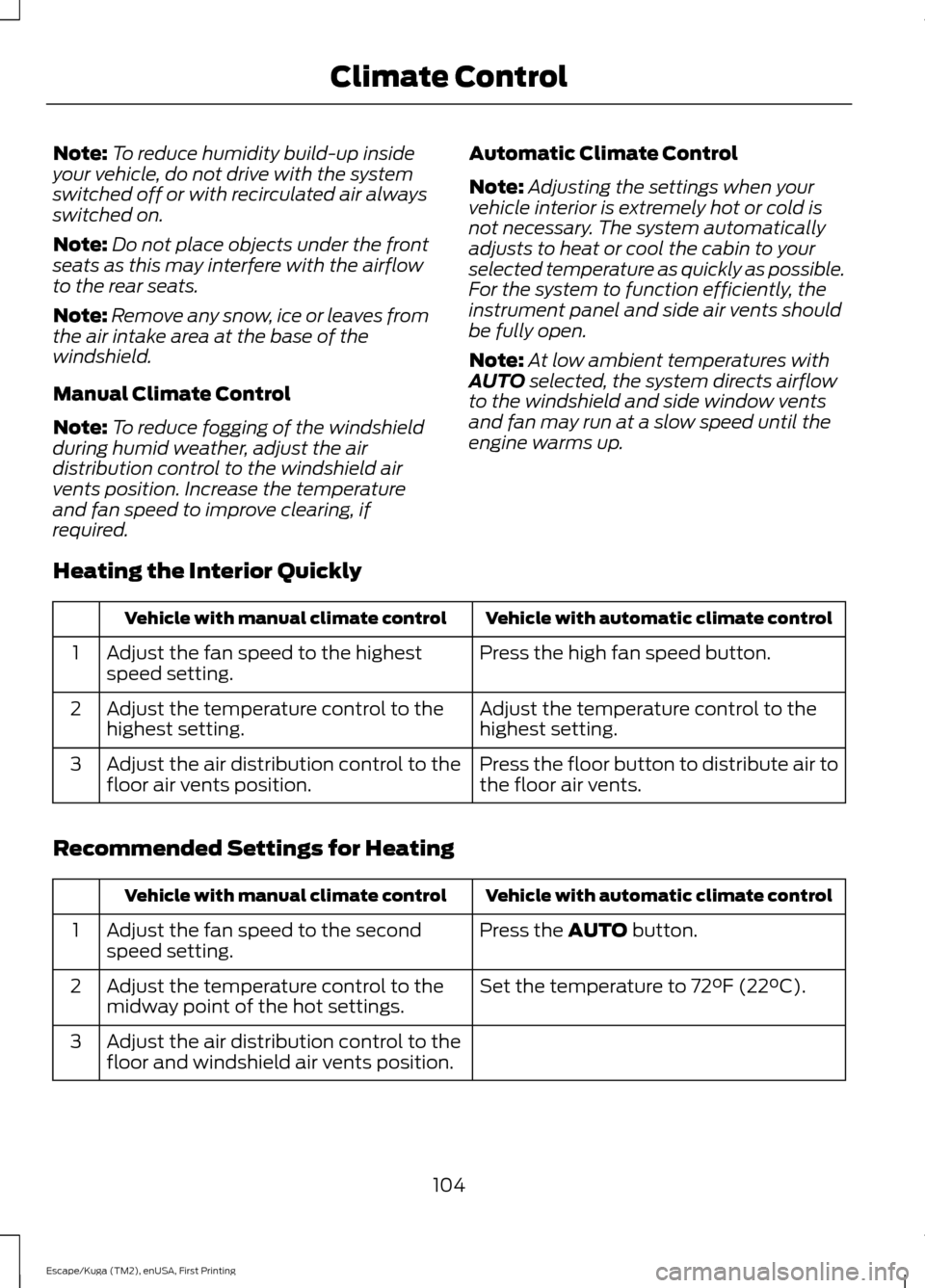
Heating the Interior Quickly Vehicle with automatic climate control
Vehicle with manual climate control
Press the high fan speed button.
Adjust the fan speed to the highest
speed setting.
1
Adjust the temperature control to the
highest setting.
Adjust the temperature control to the
highest setting.
2
Press the floor button to distribute air to
the floor air vents.
Adjust the air distribution control to the
floor air vents position.
3
Recommended Settings for Heating Vehicle with automatic climate control
Vehicle with manual climate control
Press the
AUTO button.
Adjust the fan speed to the second
speed setting.
1
Set the temperature to 72°F (22°C).
Adjust the temperature control to the
midway point of the hot settings.
2
Adjust the air distribution control to the
floor and windshield air vents position.
3
104
Escape/Kuga (TM2), enUSA, First Printing Climate Control
Page 108 of 393
Cooling the Interior Quickly
Vehicle with automatic climate control
Vehicle with manual climate control
Press the MAX A/C button.
Adjust the fan speed to the highest
speed setting.
1
Adjust the temperature control to the
MAX A/C position.
2
Adjust the air distribution control to the
instrument panel air vents position.
3
Recommended Settings for Cooling Vehicle with automatic climate control
Vehicle with manual climate control
Press the
AUTO button.
Adjust the fan speed to the second
speed setting.
1
Set the temperature to 72°F (22°C).
Adjust the temperature control to the
midway point of the cold settings.
2
Adjust the air distribution control to the
instrument panel air vents position.
3
Vehicle Stationary for Extended Periods during Extreme High Ambient
Temperatures Vehicle with automatic climate control
Vehicle with manual climate control
Apply the parking brake.
Apply the parking brake.
1
Move the transmission selector lever to
position
P.
Move the transmission selector lever to
position P.
2
Press the
MAX A/C button.
Adjust the temperature control to the
MAX A/C position.
3
Adjust the fan speed to the lowest speed
setting.
4
105
Escape/Kuga (TM2), enUSA, First Printing Climate Control
Page 111 of 393
SITTING IN THE CORRECT
POSITION
WARNINGS
Sitting improperly, out of position or
with the seatback reclined too far
can take weight off the seat cushion
and affect the decision of the passenger
sensing system, resulting in serious injury
or death in the event of a crash. Always sit
upright against your seat back, with your
feet on the floor. Do not recline the seatback as this
can cause the occupant to slide
under the safety belt, resulting in
serious injury in the event of a crash. Do not place objects higher than the
seatback to reduce the risk of serious
injury in the event of a crash or during
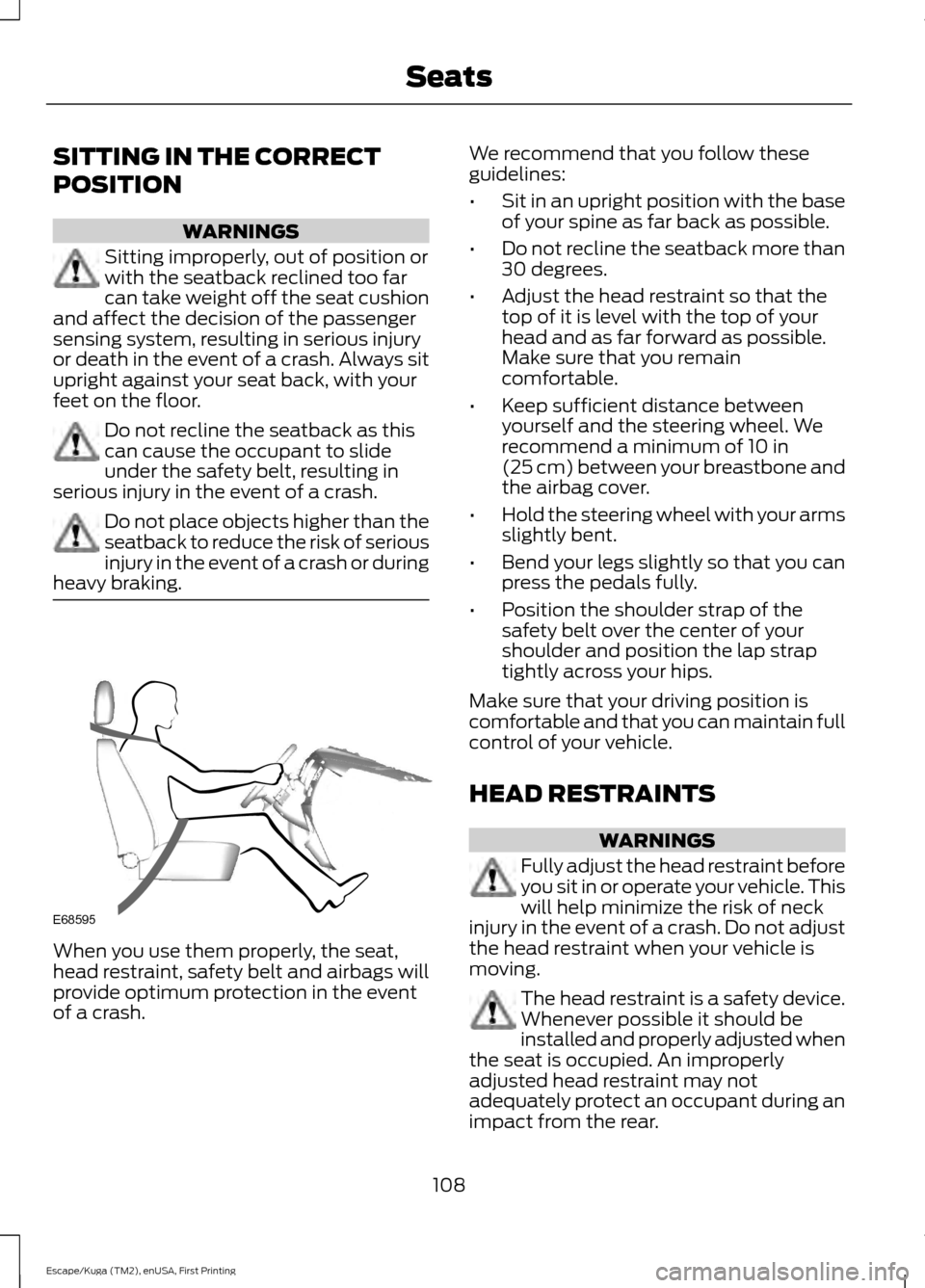
heavy braking. When you use them properly, the seat,
head restraint, safety belt and airbags will
provide optimum protection in the event
of a crash. We recommend that you follow these
guidelines:
•
Sit in an upright position with the base
of your spine as far back as possible.
• Do not recline the seatback more than
30 degrees.
• Adjust the head restraint so that the
top of it is level with the top of your
head and as far forward as possible.
Make sure that you remain
comfortable.
• Keep sufficient distance between
yourself and the steering wheel. We
recommend a minimum of 10 in
(25 cm) between your breastbone and
the airbag cover.
• Hold the steering wheel with your arms
slightly bent.
• Bend your legs slightly so that you can
press the pedals fully.
• Position the shoulder strap of the
safety belt over the center of your
shoulder and position the lap strap
tightly across your hips.
Make sure that your driving position is
comfortable and that you can maintain full
control of your vehicle.
HEAD RESTRAINTS WARNINGS
Fully adjust the head restraint before
you sit in or operate your vehicle. This
will help minimize the risk of neck
injury in the event of a crash. Do not adjust
the head restraint when your vehicle is
moving. The head restraint is a safety device.
Whenever possible it should be
installed and properly adjusted when
the seat is occupied. An improperly
adjusted head restraint may not
adequately protect an occupant during an
impact from the rear.
108
Escape/Kuga (TM2), enUSA, First Printing SeatsE68595