key FORD ESCAPE 2016 3.G Service Manual
[x] Cancel search | Manufacturer: FORD, Model Year: 2016, Model line: ESCAPE, Model: FORD ESCAPE 2016 3.GPages: 393, PDF Size: 5.85 MB
Page 195 of 393
Canadian roadside coverage and benefits
may differ from the U.S. coverage. If you
require more information, please refer to
the coverage section of your warranty
guide, call us in Canada at
1-800-665-2006, or visit our website at
www.ford.ca.
Sykes Assistance Services Corporation
administers the Roadside Assistance
program. You must receive covered
services in Canada or the continental
United States. Coverage extends to
vehicles that use public, non-seasonal,
annually traveled roadways. Roadside
Assistance coverage does not extend to
vehicles involved in cross-country driving,
logging, autocross and any other form of
off-road use. Well maintained roads and
surfaces help ensure safe travel for the
supplier, and allow their representatives
to perform service as per the standard
operating procedures.
In Remote Locations
If our supplier cannot take your vehicle by
road to the nearest authorized dealership,
transportation by rail or water may be
necessary. The program covers a tow to
the dock or rail terminal and also to the
dealership at the end of the trip.
For rail or water transportation, however,
contact your authorized dealer to confirm
if you are eligible for additional coverage
before you authorize or pay for the service.
Call Ford Roadside Assistance at
1-800-665-2006 for additional
information.
HAZARD WARNING FLASHERS
Note:
If used when the vehicle is not
running, the battery will lose charge. There
may be insufficient power to restart your
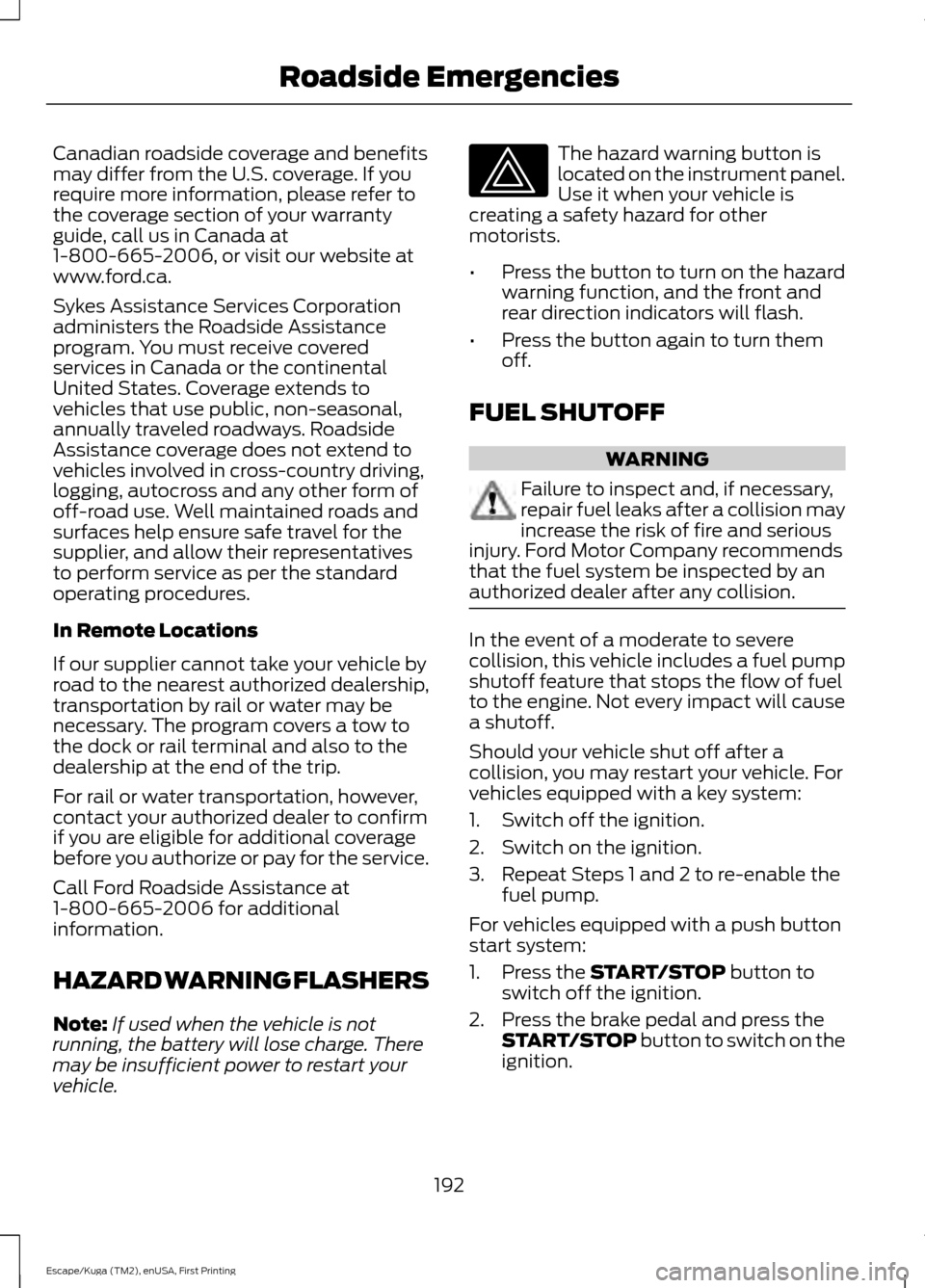
vehicle. The hazard warning button is
located on the instrument panel.
Use it when your vehicle is
creating a safety hazard for other
motorists.
• Press the button to turn on the hazard
warning function, and the front and
rear direction indicators will flash.
• Press the button again to turn them
off.
FUEL SHUTOFF WARNING
Failure to inspect and, if necessary,
repair fuel leaks after a collision may
increase the risk of fire and serious
injury. Ford Motor Company recommends
that the fuel system be inspected by an
authorized dealer after any collision. In the event of a moderate to severe
collision, this vehicle includes a fuel pump
shutoff feature that stops the flow of fuel
to the engine. Not every impact will cause
a shutoff.
Should your vehicle shut off after a
collision, you may restart your vehicle. For
vehicles equipped with a key system:
1. Switch off the ignition.
2. Switch on the ignition.
3. Repeat Steps 1 and 2 to re-enable the
fuel pump.
For vehicles equipped with a push button
start system:
1. Press the START/STOP button to
switch off the ignition.
2. Press the brake pedal and press the START/STOP
button to switch on the
ignition.
192
Escape/Kuga (TM2), enUSA, First Printing Roadside Emergencies
Page 207 of 393
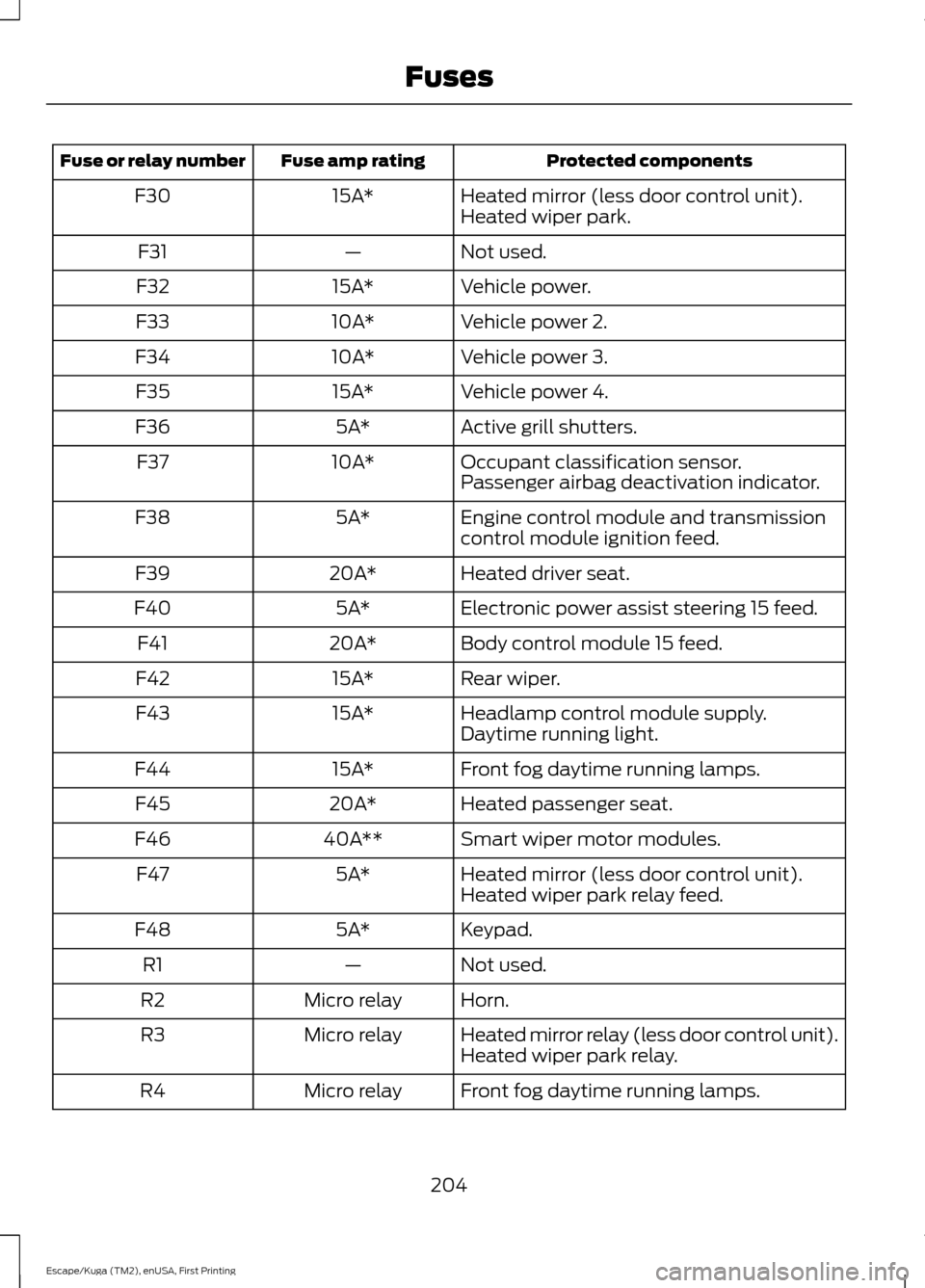
Protected components
Fuse amp rating
Fuse or relay number
Heated mirror (less door control unit).
15A*
F30
Heated wiper park.
Not used.
—
F31
Vehicle power.
15A*
F32
Vehicle power 2.
10A*
F33
Vehicle power 3.
10A*
F34
Vehicle power 4.
15A*
F35
Active grill shutters.
5A*
F36
Occupant classification sensor.
10A*
F37
Passenger airbag deactivation indicator.
Engine control module and transmission
control module ignition feed.
5A*
F38
Heated driver seat.
20A*
F39
Electronic power assist steering 15 feed.
5A*
F40
Body control module 15 feed.
20A*
F41
Rear wiper.
15A*
F42
Headlamp control module supply.
15A*
F43
Daytime running light.
Front fog daytime running lamps.
15A*
F44
Heated passenger seat.
20A*
F45
Smart wiper motor modules.
40A**
F46
Heated mirror (less door control unit).
5A*
F47
Heated wiper park relay feed.
Keypad.
5A*
F48
Not used.
—
R1
Horn.
Micro relay
R2
Heated mirror relay (less door control unit).
Micro relay
R3
Heated wiper park relay.
Front fog daytime running lamps.
Micro relay
R4
204
Escape/Kuga (TM2), enUSA, First Printing Fuses
Page 212 of 393
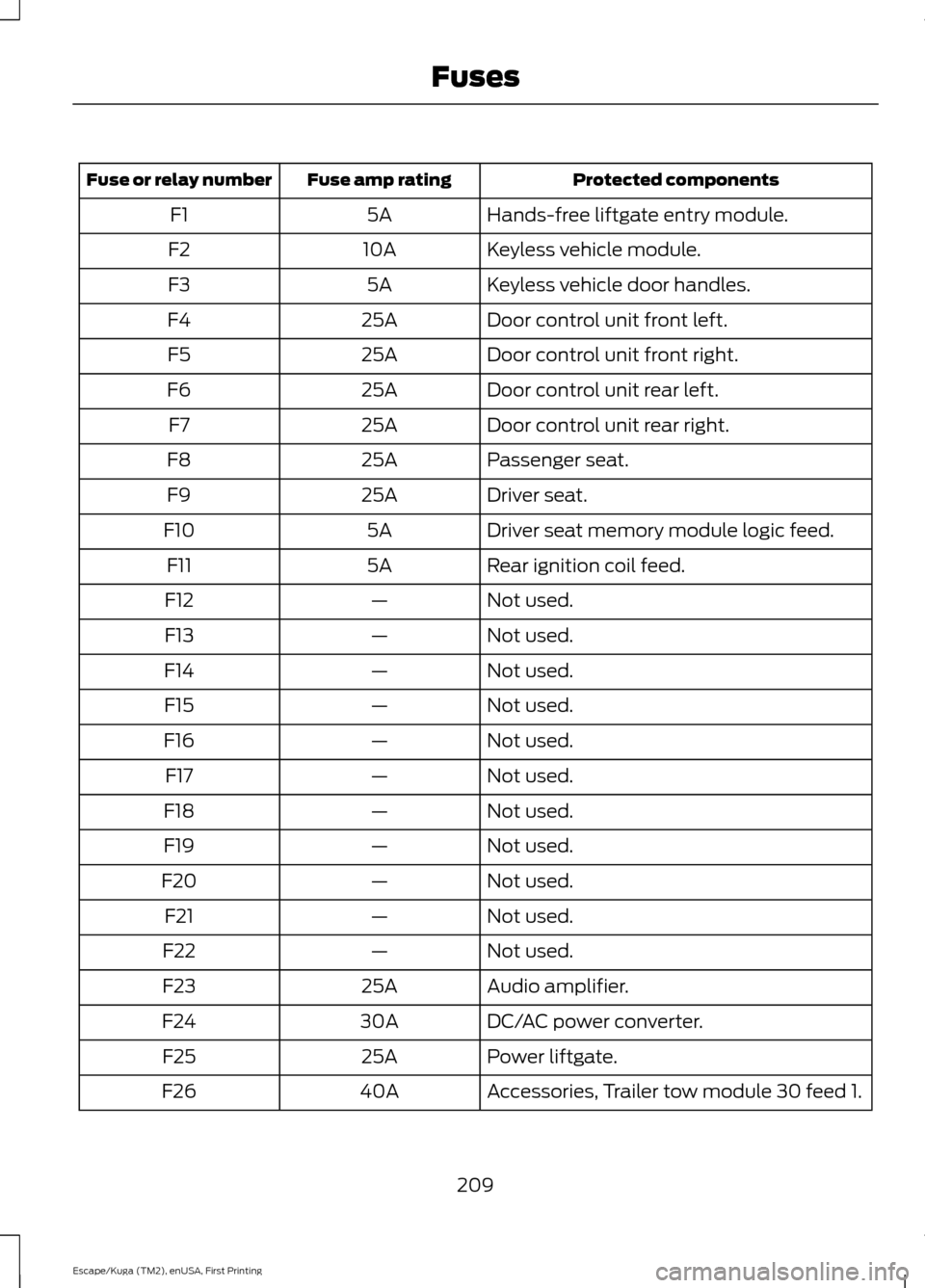
Protected components
Fuse amp rating
Fuse or relay number
Hands-free liftgate entry module.
5A
F1
Keyless vehicle module.
10A
F2
Keyless vehicle door handles.
5A
F3
Door control unit front left.
25A
F4
Door control unit front right.
25A
F5
Door control unit rear left.
25A
F6
Door control unit rear right.
25A
F7
Passenger seat.
25A
F8
Driver seat.
25A
F9
Driver seat memory module logic feed.
5A
F10
Rear ignition coil feed.
5A
F11
Not used.
—
F12
Not used.
—
F13
Not used.
—
F14
Not used.
—
F15
Not used.
—
F16
Not used.
—
F17
Not used.
—
F18
Not used.
—
F19
Not used.
—
F20
Not used.
—
F21
Not used.
—
F22
Audio amplifier.
25A
F23
DC/AC power converter.
30A
F24
Power liftgate.
25A
F25
Accessories, Trailer tow module 30 feed 1.
40A
F26
209
Escape/Kuga (TM2), enUSA, First Printing Fuses
Page 305 of 393
SIRIUS satellite radio is a
subscription-based satellite radio service
that broadcasts a variety of music, sports,
news, weather, traffic and entertainment
programming. Your factory-installed
SIRIUS satellite radio system includes
hardware and a limited subscription term,
which begins on the date of sale or lease
of your vehicle. See an authorized dealer
for availability.
For more information on extended
subscription terms (a service fee is
required), the online media player and a
complete list of SIRIUS satellite radio
channels, and other features, please visit
www.siriusxm.com in the United States,
www.siriusxm.ca in Canada, or call SIRIUS
at 1-888-539-7474.
Satellite Radio Electronic Serial
Number (ESN)
You need your ESN to activate, modify or
track your satellite radio account. When in
satellite radio mode, tune to channel 0.
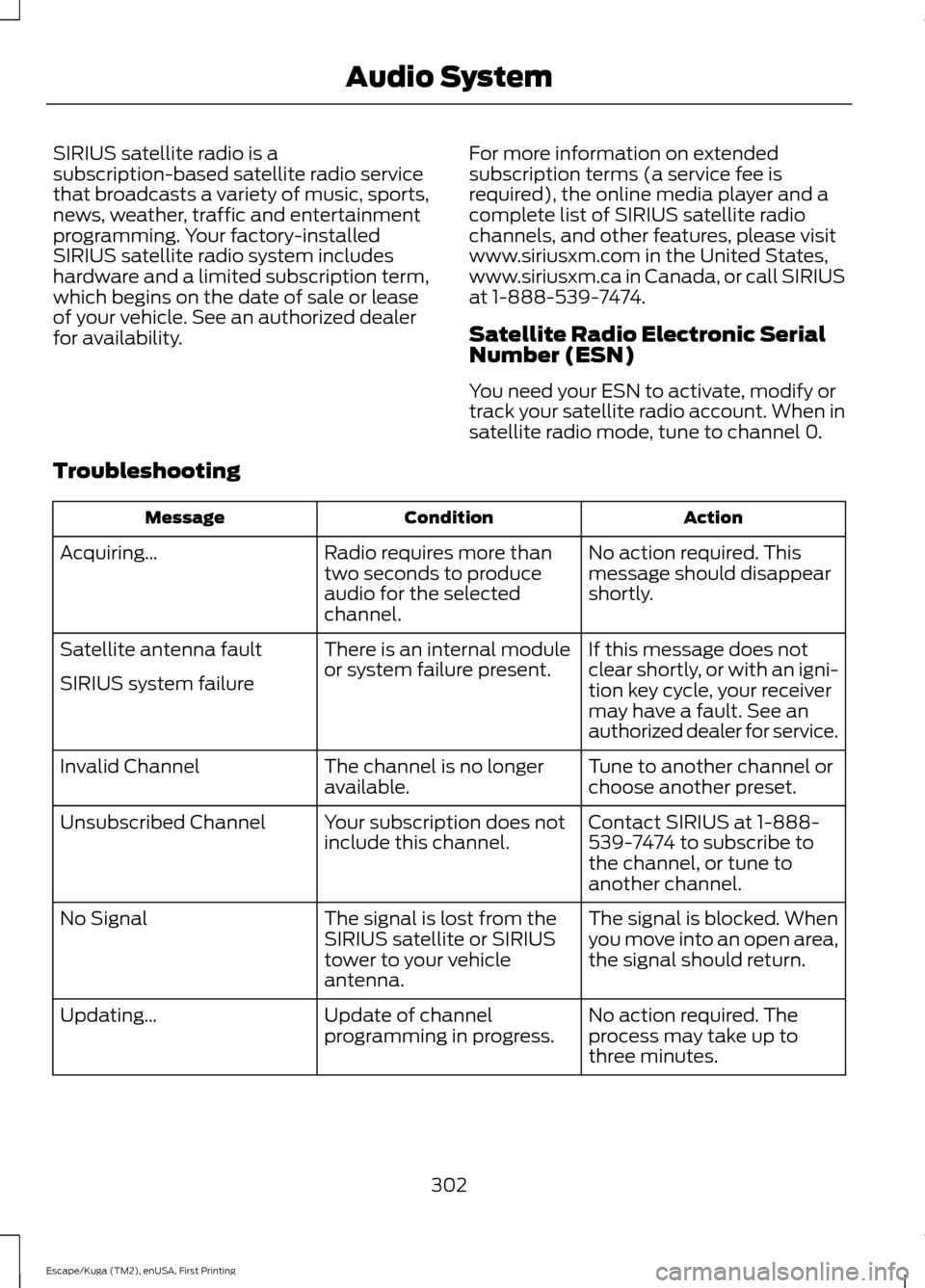
Troubleshooting Action
Condition
Message
No action required. This
message should disappear
shortly.
Radio requires more than
two seconds to produce
audio for the selected
channel.
Acquiring\b
If this message does not
clear shortly, or with an igni-
tion key cycle, your receiver
may have a fault. See an
authorized dealer for service.
There is an internal module
or system failure present.
Satellite antenna fault
SIRIUS system failure
Tune to another channel or
choose another preset.
The channel is no longer
available.
Invalid Channel
Contact SIRIUS at 1-888-
539-7474 to subscribe to
the channel, or tune to
another channel.
Your subscription does not
include this channel.
Unsubscribed Channel
The signal is blocked. When
you move into an open area,
the signal should return.
The signal is lost from the
SIRIUS satellite or SIRIUS
tower to your vehicle
antenna.
No Signal
No action required. The
process may take up to
three minutes.
Update of channel
programming in progress.
Updating\b
302
Escape/Kuga (TM2), enUSA, First Printing Audio System
Page 315 of 393
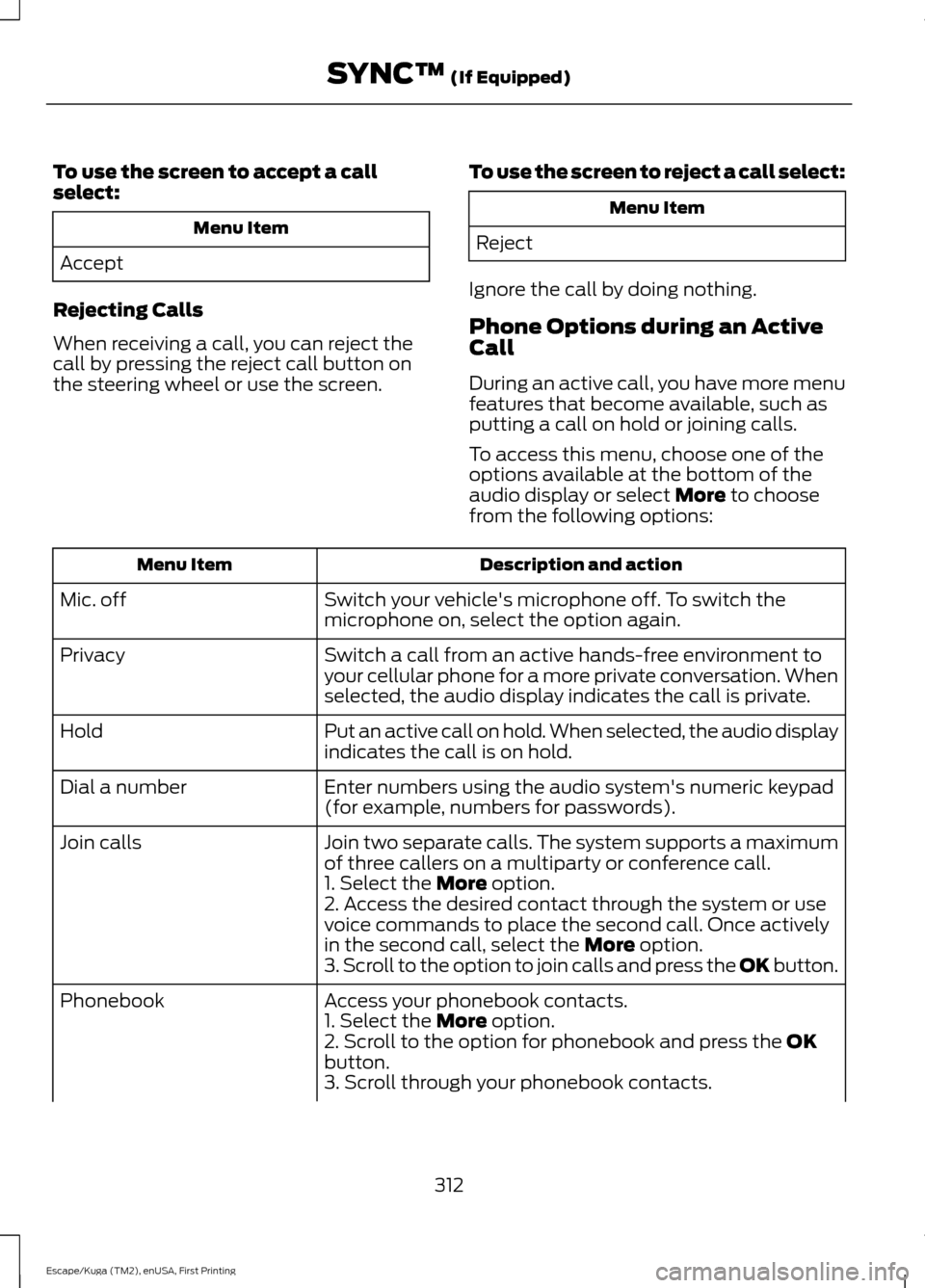
To use the screen to accept a call
select:
Menu Item
Accept
Rejecting Calls
When receiving a call, you can reject the
call by pressing the reject call button on
the steering wheel or use the screen. To use the screen to reject a call select: Menu Item
Reject
Ignore the call by doing nothing.
Phone Options during an Active
Call
During an active call, you have more menu
features that become available, such as
putting a call on hold or joining calls.
To access this menu, choose one of the
options available at the bottom of the
audio display or select More to choose
from the following options: Description and action
Menu Item
Switch your vehicle's microphone off. To switch the
microphone on, select the option again.
Mic. off
Switch a call from an active hands-free environment to
your cellular phone for a more private conversation. When
selected, the audio display indicates the call is private.
Privacy
Put an active call on hold. When selected, the audio display
indicates the call is on hold.
Hold
Enter numbers using the audio system's numeric keypad
(for example, numbers for passwords).
Dial a number
Join two separate calls. The system supports a maximum
of three callers on a multiparty or conference call.
Join calls
1. Select the
More option.
2. Access the desired contact through the system or use
voice commands to place the second call. Once actively
in the second call, select the
More option.
3. Scroll to the option to join calls and press the OK button.
Access your phonebook contacts.
Phonebook
1. Select the
More option.
2. Scroll to the option for phonebook and press the OK
button.
3. Scroll through your phonebook contacts.
312
Escape/Kuga (TM2), enUSA, First Printing SYNC™
(If Equipped)
Page 316 of 393
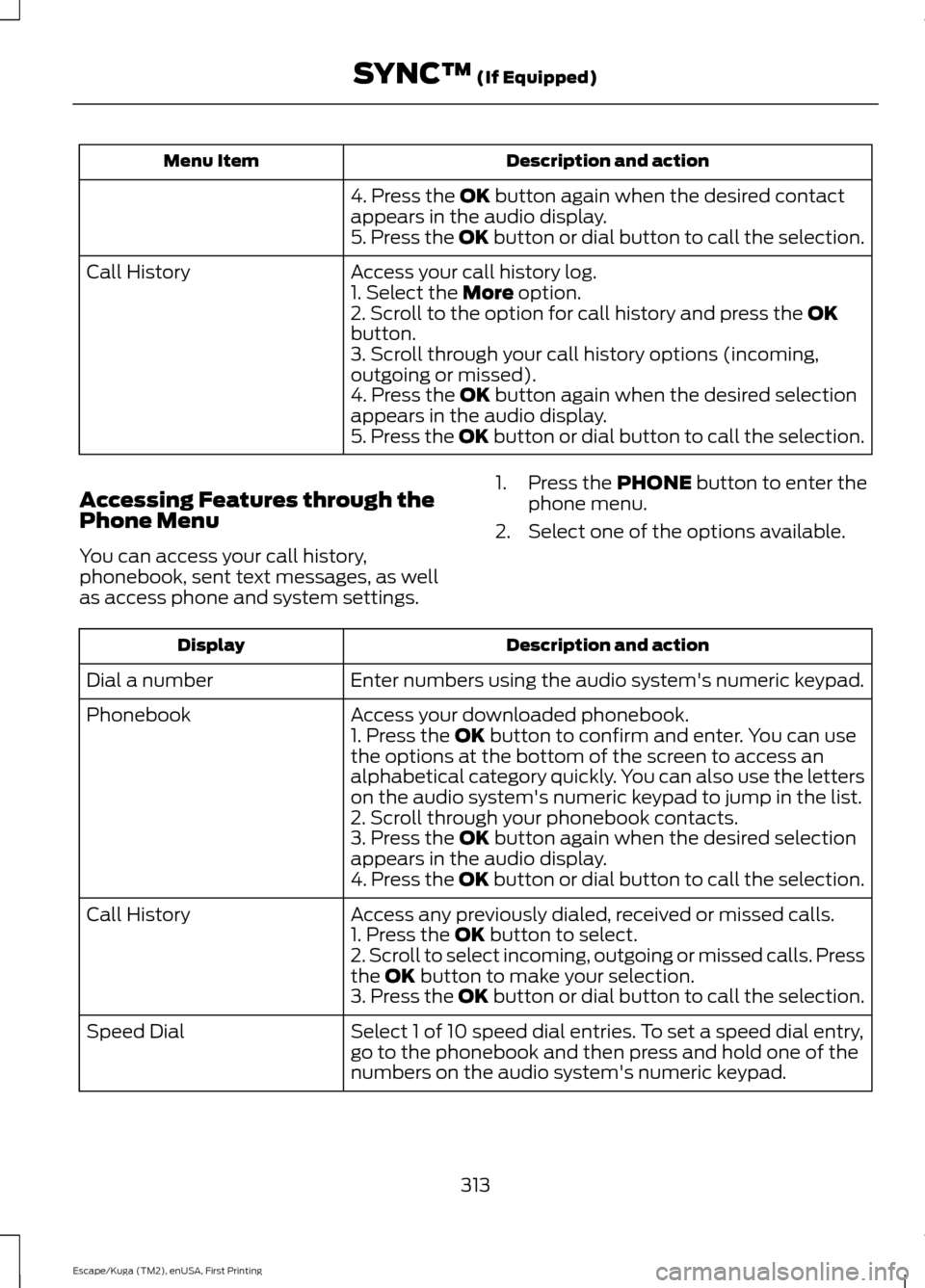
Description and action
Menu Item
4. Press the OK button again when the desired contact
appears in the audio display.
5. Press the OK button or dial button to call the selection.
Access your call history log.
Call History
1. Select the
More option.
2. Scroll to the option for call history and press the OK
button.
3. Scroll through your call history options (incoming,
outgoing or missed).
4. Press the
OK button again when the desired selection
appears in the audio display.
5. Press the OK button or dial button to call the selection.
Accessing Features through the
Phone Menu
You can access your call history,
phonebook, sent text messages, as well
as access phone and system settings. 1. Press the
PHONE button to enter the
phone menu.
2. Select one of the options available. Description and action
Display
Enter numbers using the audio system's numeric keypad.
Dial a number
Access your downloaded phonebook.
Phonebook
1. Press the
OK button to confirm and enter. You can use
the options at the bottom of the screen to access an
alphabetical category quickly. You can also use the letters
on the audio system's numeric keypad to jump in the list.
2. Scroll through your phonebook contacts.
3. Press the
OK button again when the desired selection
appears in the audio display.
4. Press the OK button or dial button to call the selection.
Access any previously dialed, received or missed calls.
Call History
1. Press the
OK button to select.
2. Scroll to select incoming, outgoing or missed calls. Press
the
OK button to make your selection.
3. Press the OK button or dial button to call the selection.
Select 1 of 10 speed dial entries. To set a speed dial entry,
go to the phonebook and then press and hold one of the
numbers on the audio system's numeric keypad.
Speed Dial
313
Escape/Kuga (TM2), enUSA, First Printing SYNC™
(If Equipped)
Page 326 of 393
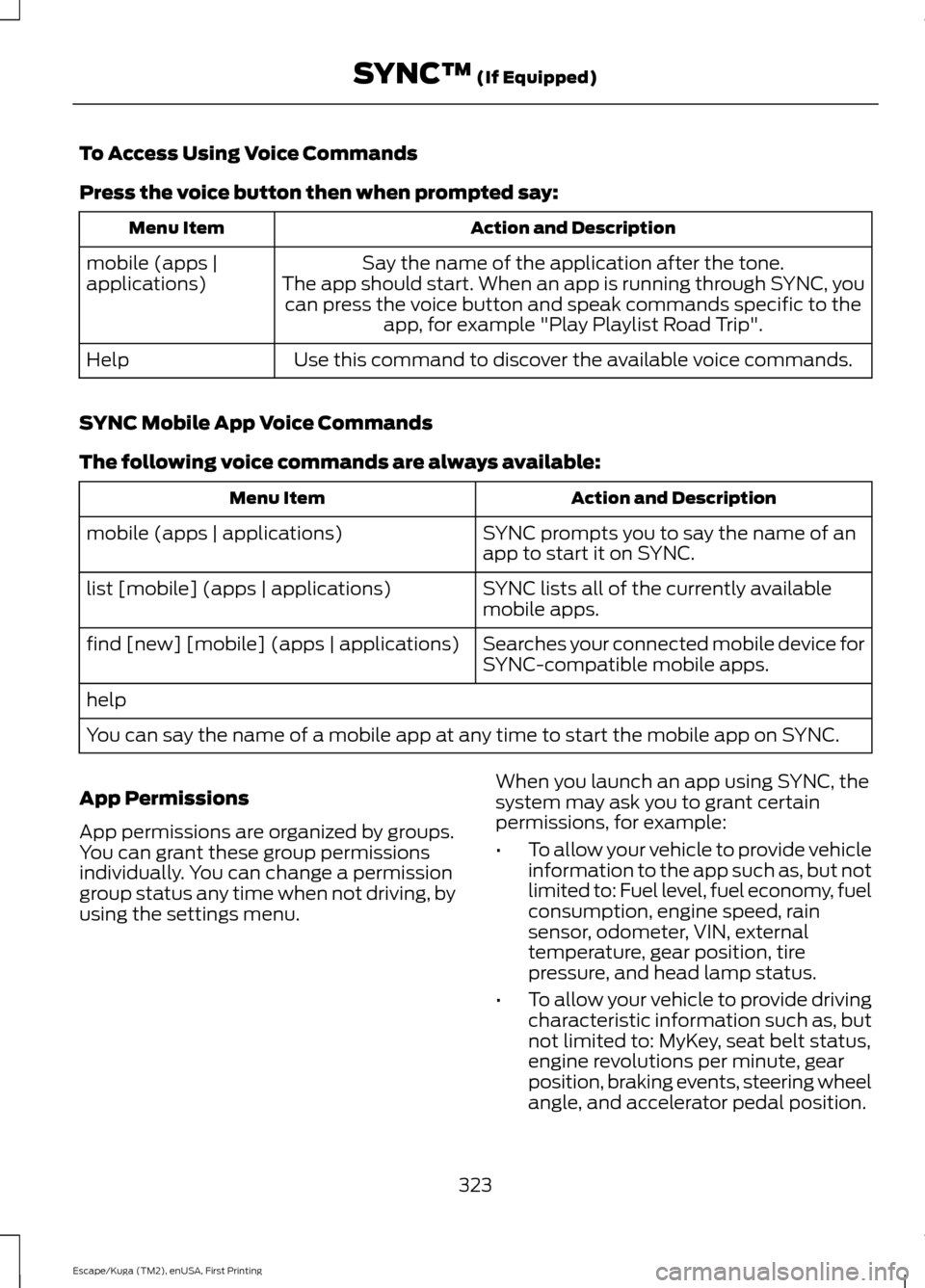
To Access Using Voice Commands
Press the voice button then when prompted say:
Action and Description
Menu Item
Say the name of the application after the tone.
The app should start. When an app is running through SYNC, you can press the voice button and speak commands specific to the app, for example "Play Playlist Road Trip".
mobile (apps |
applications)
Use this command to discover the available voice commands.
Help
SYNC Mobile App Voice Commands
The following voice commands are always available: Action and Description
Menu Item
SYNC prompts you to say the name of an
app to start it on SYNC.
mobile (apps | applications)
SYNC lists all of the currently available
mobile apps.
list [mobile] (apps | applications)
Searches your connected mobile device for
SYNC-compatible mobile apps.
find [new] [mobile] (apps | applications)
help
You can say the name of a mobile app at any time to start the mobile app on SYNC.
App Permissions
App permissions are organized by groups.
You can grant these group permissions
individually. You can change a permission
group status any time when not driving, by
using the settings menu. When you launch an app using SYNC, the
system may ask you to grant certain
permissions, for example:
•
To allow your vehicle to provide vehicle
information to the app such as, but not
limited to: Fuel level, fuel economy, fuel
consumption, engine speed, rain
sensor, odometer, VIN, external
temperature, gear position, tire
pressure, and head lamp status.
• To allow your vehicle to provide driving
characteristic information such as, but
not limited to: MyKey, seat belt status,
engine revolutions per minute, gear
position, braking events, steering wheel
angle, and accelerator pedal position.
323
Escape/Kuga (TM2), enUSA, First Printing SYNC™ (If Equipped)
Page 334 of 393
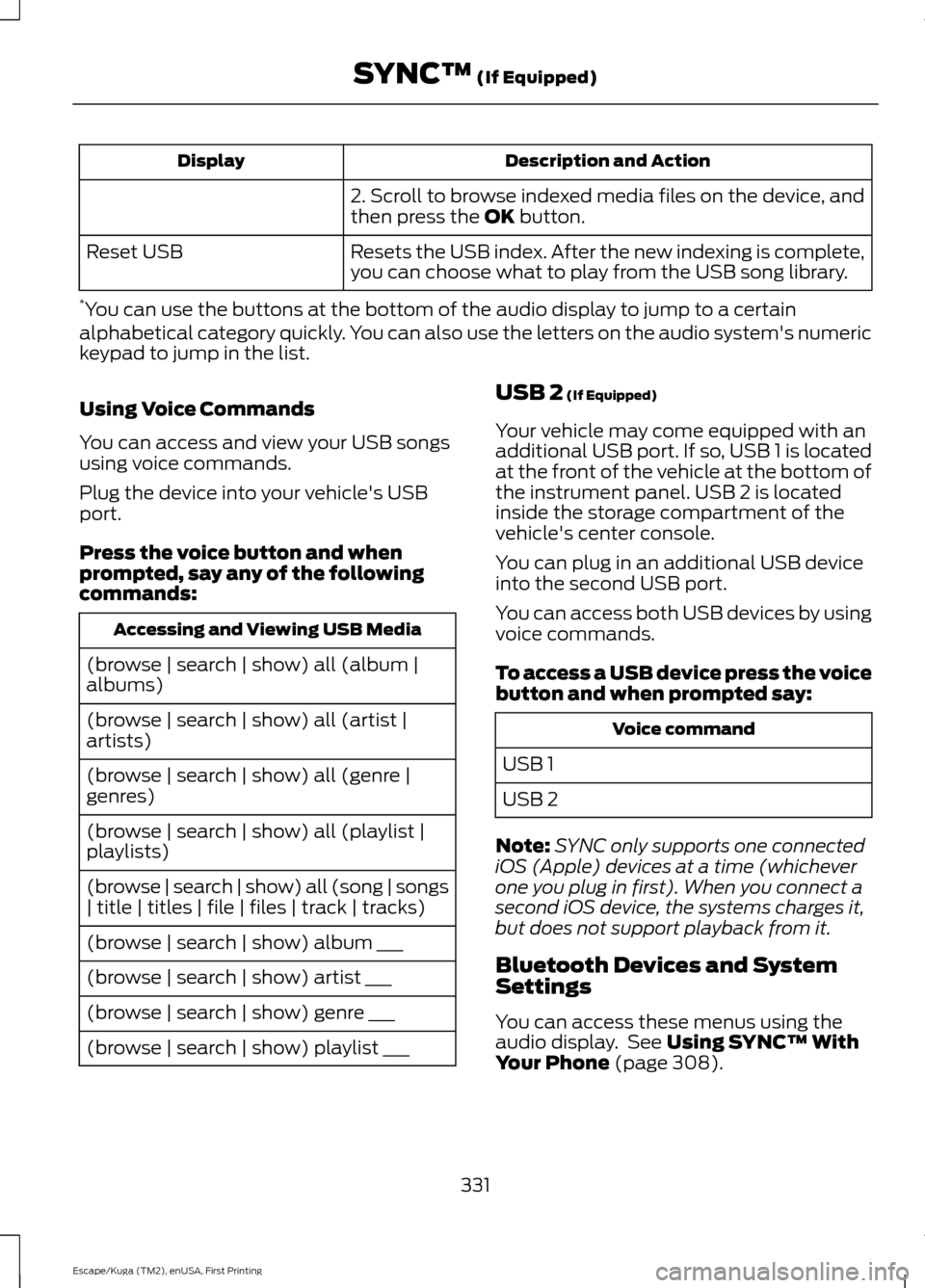
Description and Action
Display
2. Scroll to browse indexed media files on the device, and
then press the OK button.
Resets the USB index. After the new indexing is complete,
you can choose what to play from the USB song library.
Reset USB
* You can use the buttons at the bottom of the audio display to jump to a certain
alphabetical category quickly. You can also use the letters on the audio system's numeric
keypad to jump in the list.
Using Voice Commands
You can access and view your USB songs
using voice commands.
Plug the device into your vehicle's USB
port.
Press the voice button and when
prompted, say any of the following
commands: Accessing and Viewing USB Media
(browse | search | show) all (album |
albums)
(browse | search | show) all (artist |
artists)
(browse | search | show) all (genre |
genres)
(browse | search | show) all (playlist |
playlists)
(browse | search | show) all (song | songs
| title | titles | file | files | track | tracks)
(browse | search | show) album ___
(browse | search | show) artist ___
(browse | search | show) genre ___
(browse | search | show) playlist ___ USB 2
(If Equipped)
Your vehicle may come equipped with an
additional USB port. If so, USB 1 is located
at the front of the vehicle at the bottom of
the instrument panel. USB 2 is located
inside the storage compartment of the
vehicle's center console.
You can plug in an additional USB device
into the second USB port.
You can access both USB devices by using
voice commands.
To access a USB device press the voice
button and when prompted say: Voice command
USB 1
USB 2
Note: SYNC only supports one connected
iOS (Apple) devices at a time (whichever
one you plug in first). When you connect a
second iOS device, the systems charges it,
but does not support playback from it.
Bluetooth Devices and System
Settings
You can access these menus using the
audio display. See
Using SYNC™ With
Your Phone (page 308).
331
Escape/Kuga (TM2), enUSA, First Printing SYNC™
(If Equipped)
Page 345 of 393
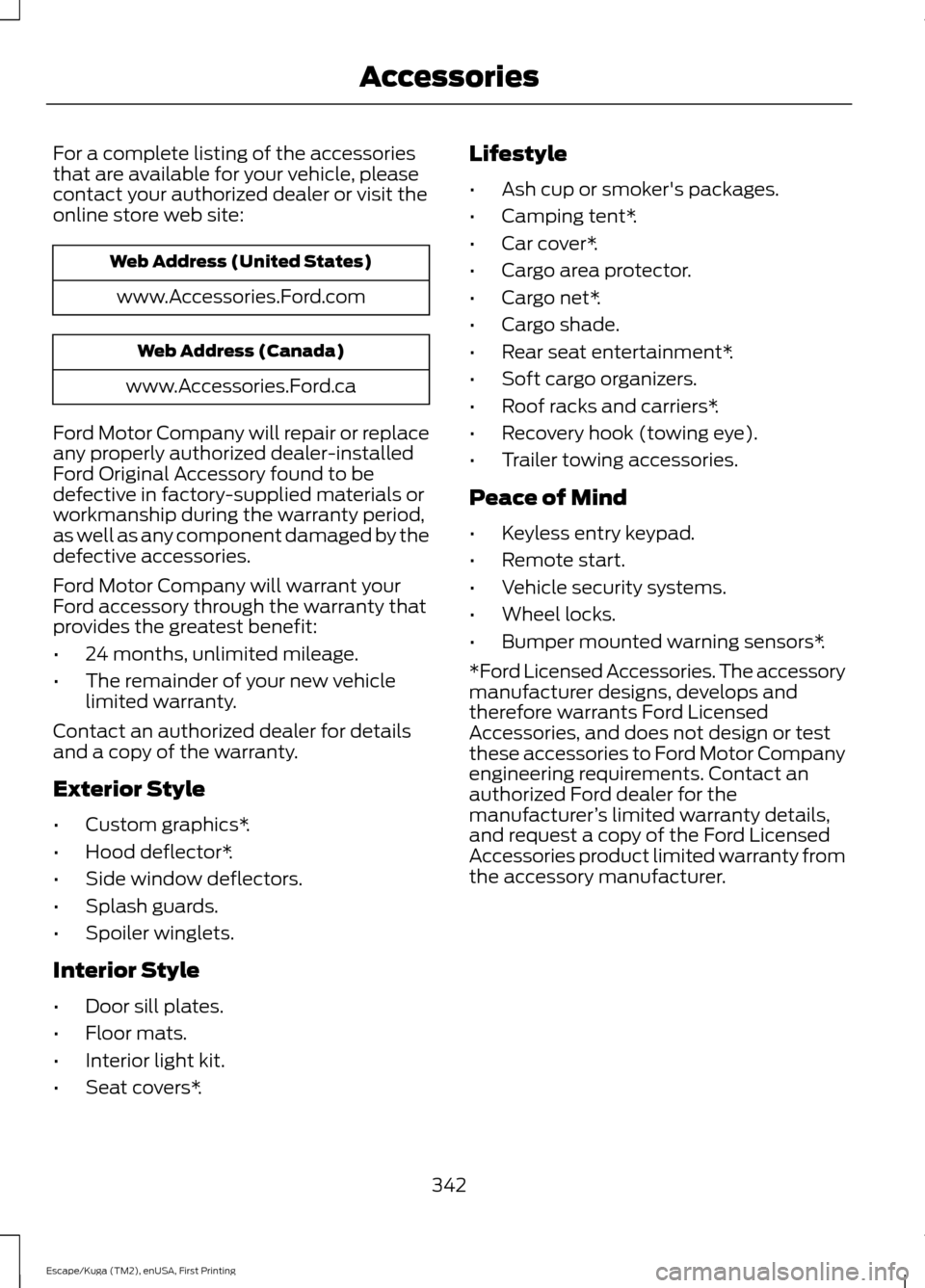
For a complete listing of the accessories
that are available for your vehicle, please
contact your authorized dealer or visit the
online store web site:
Web Address (United States)
www.Accessories.Ford.com Web Address (Canada)
www.Accessories.Ford.ca
Ford Motor Company will repair or replace
any properly authorized dealer-installed
Ford Original Accessory found to be
defective in factory-supplied materials or
workmanship during the warranty period,
as well as any component damaged by the
defective accessories.
Ford Motor Company will warrant your
Ford accessory through the warranty that
provides the greatest benefit:
• 24 months, unlimited mileage.
• The remainder of your new vehicle
limited warranty.
Contact an authorized dealer for details
and a copy of the warranty.
Exterior Style
• Custom graphics*.
• Hood deflector*.
• Side window deflectors.
• Splash guards.
• Spoiler winglets.
Interior Style
• Door sill plates.
• Floor mats.
• Interior light kit.
• Seat covers*. Lifestyle
•
Ash cup or smoker's packages.
• Camping tent*.
• Car cover*.
• Cargo area protector.
• Cargo net*.
• Cargo shade.
• Rear seat entertainment*.
• Soft cargo organizers.
• Roof racks and carriers*.
• Recovery hook (towing eye).
• Trailer towing accessories.
Peace of Mind
• Keyless entry keypad.
• Remote start.
• Vehicle security systems.
• Wheel locks.
• Bumper mounted warning sensors*.
*Ford Licensed Accessories. The accessory
manufacturer designs, develops and
therefore warrants Ford Licensed
Accessories, and does not design or test
these accessories to Ford Motor Company
engineering requirements. Contact an
authorized Ford dealer for the
manufacturer ’s limited warranty details,
and request a copy of the Ford Licensed
Accessories product limited warranty from
the accessory manufacturer.
342
Escape/Kuga (TM2), enUSA, First Printing Accessories
Page 384 of 393
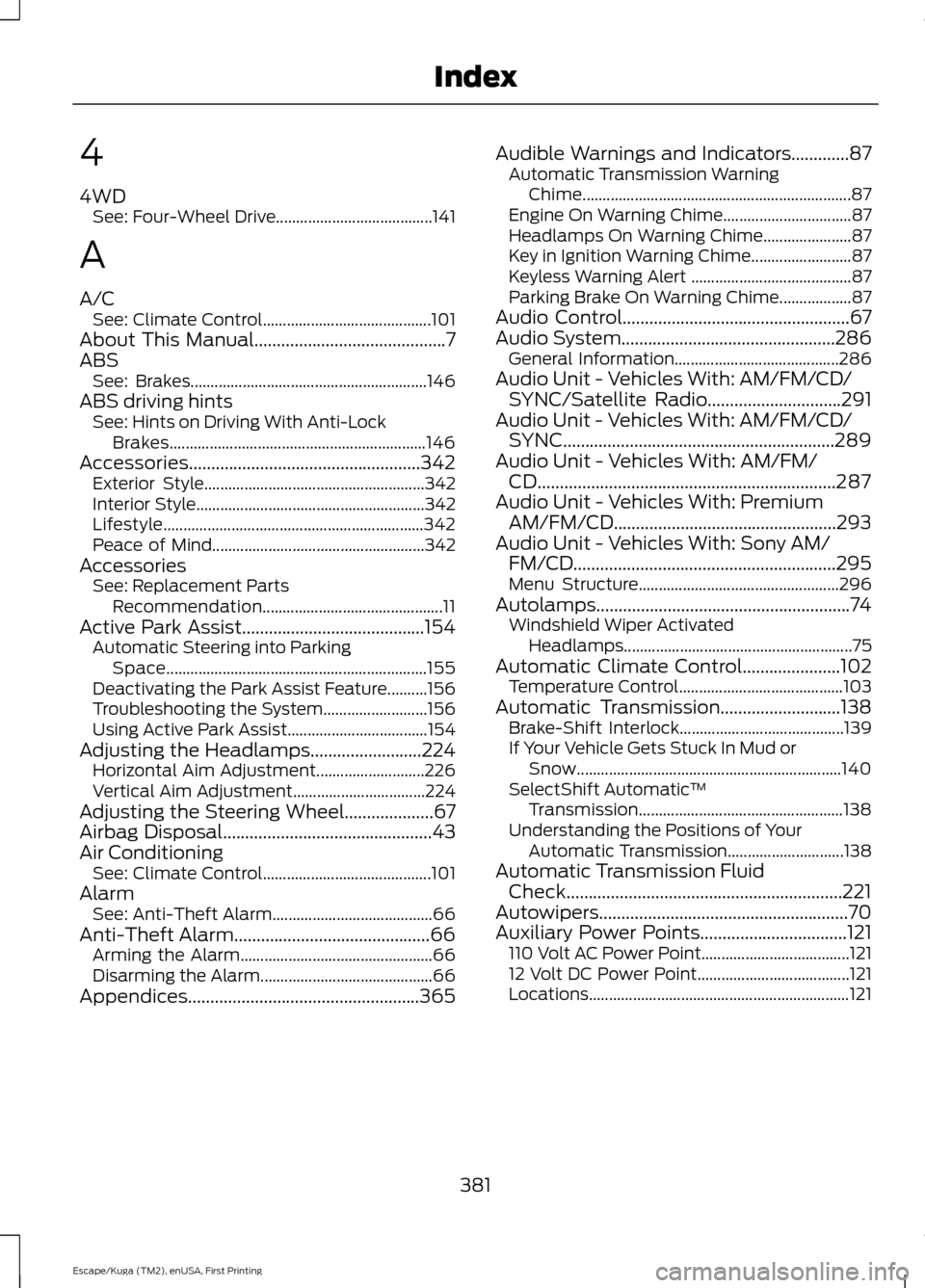
4
4WD
See: Four-Wheel Drive....................................... 141
A
A/C See: Climate Control.......................................... 101
About This Manual...........................................7
ABS See: Brakes........................................................... 146
ABS driving hints See: Hints on Driving With Anti-Lock
Brakes................................................................ 146
Accessories....................................................342 Exterior Style....................................................... 342
Interior Style......................................................... 342
Lifestyle................................................................. 342
Peace of Mind..................................................... 342
Accessories See: Replacement Parts
Recommendation............................................. 11
Active Park Assist
.........................................154
Automatic Steering into Parking
Space................................................................. 155
Deactivating the Park Assist Feature..........156
Troubleshooting the System.......................... 156
Using Active Park Assist................................... 154
Adjusting the Headlamps.........................224 Horizontal Aim Adjustment........................... 226
Vertical Aim Adjustment................................. 224
Adjusting the Steering Wheel
....................67
Airbag Disposal...............................................43
Air Conditioning See: Climate Control.......................................... 101
Alarm See: Anti-Theft Alarm........................................ 66
Anti-Theft Alarm............................................66 Arming the Alarm................................................ 66
Disarming the Alarm........................................... 66
Appendices....................................................365 Audible Warnings and Indicators.............87
Automatic Transmission Warning
Chime................................................................... 87
Engine On Warning Chime................................ 87
Headlamps On Warning Chime...................... 87
Key in Ignition Warning Chime......................... 87
Keyless Warning Alert ........................................ 87
Parking Brake On Warning Chime.................. 87
Audio Control...................................................67
Audio System................................................286 General Information......................................... 286
Audio Unit - Vehicles With: AM/FM/CD/ SYNC/Satellite Radio
..............................291
Audio Unit - Vehicles With: AM/FM/CD/ SYNC.............................................................289
Audio Unit - Vehicles With: AM/FM/ CD...................................................................287
Audio Unit - Vehicles With: Premium AM/FM/CD..................................................293
Audio Unit - Vehicles With: Sony AM/ FM/CD...........................................................295
Menu Structure.................................................. 296
Autolamps.........................................................74 Windshield Wiper Activated
Headlamps......................................................... 75
Automatic Climate Control......................102 Temperature Control......................................... 103
Automatic Transmission...........................138 Brake-Shift Interlock......................................... 139
If Your Vehicle Gets Stuck In Mud or Snow.................................................................. 140
SelectShift Automatic ™
Transmission................................................... 138
Understanding the Positions of Your Automatic Transmission............................. 138
Automatic Transmission Fluid Check..............................................................221
Autowipers........................................................70
Auxiliary Power Points.................................121 110 Volt AC Power Point..................................... 121
12 Volt DC Power Point...................................... 121
Locations................................................................. 121
381
Escape/Kuga (TM2), enUSA, First Printing Index