audio FORD ESCAPE 2016 3.G Owners Manual
[x] Cancel search | Manufacturer: FORD, Model Year: 2016, Model line: ESCAPE, Model: FORD ESCAPE 2016 3.GPages: 393, PDF Size: 5.85 MB
Page 4 of 393
Introduction
About This Manual...........................................7
Symbols Glossary
.............................................7
Data Recording
..................................................9
California Proposition 65..............................11
Perchlorate.........................................................11
Ford Credit
..........................................................11
Replacement Parts Recommendation
........................................11
Special Notices................................................12
Mobile Communications Equipment.....................................................13
Export Unique Options..................................13
Environment
Protecting the Environment........................14
Child Safety
General Information
.......................................15
Installing Child Seats.....................................16
Booster Seats
..................................................22
Child Seat Positioning
..................................24
Child Safety Locks
..........................................25
Safety Belts
Principle of Operation...................................27
Fastening the Safety Belts
.........................28
Safety Belt Height Adjustment..................31
Safety Belt Warning Lamp and Indicator Chime..............................................................31
Safety Belt Minder.........................................32
Child Restraint and Safety Belt Maintenance
................................................33
Personal Safety System ™
Personal Safety System ™
..........................34
Supplementary Restraints System
Principle of Operation..................................35 Driver and Passenger Airbags...................36
Front Passenger Sensing System.............37
Side Airbags
.....................................................39
Driver Knee Airbag.........................................40
Safety Canopy ™
............................................40
Crash Sensors and Airbag Indicator........42
Airbag Disposal
...............................................43
Keys and Remote Controls
Principle of Operation..................................44
General Information on Radio Frequencies..................................................44
Remote Control..............................................45
Replacing a Lost Key or Remote Control...........................................................48
MyKey ™
Principle of Operation..................................49
Creating a MyKey
...........................................50
Clearing All MyKeys.......................................50
Checking MyKey System Status...............52
Using MyKey With Remote Start Systems.........................................................53
MyKey Troubleshooting
...............................53
Locks
Locking and Unlocking.................................55
Manual Liftgate
..............................................59
Power Liftgate
................................................60
Keyless Entry
....................................................63
Security
Passive Anti-Theft System
........................65
Anti-Theft Alarm............................................66
Steering Wheel
Adjusting the Steering Wheel....................67
Audio Control
...................................................67
Voice Control
...................................................68
Cruise Control.................................................68
1
Escape/Kuga (TM2), enUSA, First Printing Table of Contents
Page 8 of 393
Capacities and Specifications - 2.5L....282
Audio System
General Information...................................286
Audio Unit - Vehicles With: AM/FM/
CD..................................................................287
Audio Unit - Vehicles With: AM/FM/CD/ SYNC............................................................289
Audio Unit - Vehicles With: AM/FM/CD/ SYNC/
Satellite Radio.............................291
Audio Unit - Vehicles With: Premium AM/ FM/CD.........................................................293
Audio Unit - Vehicles With: Sony AM/FM/ CD..................................................................295
Digital Radio
..................................................298
Satellite Radio
...............................................301
USB Port
.........................................................303
Media Hub
......................................................303
SYNC™
General Information
...................................304
Using Voice Recognition...........................306
Using SYNC™ With Your Phone...........308
SYNC™ Applications and Services......320
Using SYNC™ With Your Media Player...........................................................325
SYNC™ Troubleshooting
.........................334
Accessories
Accessories....................................................342
Extended Service Plan (ESP)
Extended Service Plan (ESP).................344
Scheduled Maintenance
General Maintenance Information
.......346
Normal Scheduled Maintenance..........349
Special Operating Conditions Scheduled Maintenance..............................................352
Scheduled Maintenance Record
...........355 Appendices
End User License Agreement.................365
5
Escape/Kuga (TM2), enUSA, First Printing Table of Contents
Page 52 of 393
PRINCIPLE OF OPERATION
MyKey allows you to program keys with
restricted driving modes to promote good
driving habits. All but one of the keys
programmed to the vehicle can be
activated with these restricted modes.
Any keys that have not been programmed
are referred to as administrator keys or
admin keys. These can be used to:
•
Create a MyKey.
• Program configurable MyKey settings.
• Clear all MyKey features.
When you have created a MyKey, you can
access the following information using the
information display:
• How many admin keys and MyKeys are
programmed to your vehicle.
• The total distance your vehicle has
traveled using any MyKey.
Note: All MyKeys are programmed to the
same settings. You cannot program them
individually.
Note: For vehicles with keyless start, when
both a MyKey transmitter and an admin
transmitter are present, the admin
transmitter will be recognized by the vehicle
to start the engine. Non-configurable Settings
The following settings cannot be changed
by an admin key user:
•
Belt-minder. You cannot disable this
feature. The audio system will mute
when the safety belts are not fastened.
• Early low fuel warning. The low-fuel
warning activates earlier, giving the
MyKey user more time to refuel.
• Driver assist features, if equipped on
your vehicle, are forced on: parking aid,
blind spot information system (BLIS)
with cross traffic alert, lane departure
warning and forward collision warning
system.
Configurable Settings
With an admin key, you can configure
certain MyKey settings when you first
create a MyKey and before you recycle the
key or restart the vehicle.
You can also change the settings
afterward with an admin key:
• A vehicle speed limit can be set.
Warnings will be shown in the display
followed by an audible tone when your
vehicle reaches the set speed. You
cannot override the set speed by fully
depressing the accelerator pedal or by
setting the cruise control. WARNING
Do not set MyKey maximum speed
limit to a limit that will prevent the
driver from maintaining a safe speed
considering posted speed limits and
prevailing road conditions. The driver is
always responsible to drive in accordance
with local laws and prevailing conditions.
Failure to do so could result in accident or
injury. 49
Escape/Kuga (TM2), enUSA, First Printing MyKey
™
Page 53 of 393
•
Vehicle speed minders. Once you select
a speed, it will be shown in the display
followed by an audible tone when the
set vehicle speed is exceeded.
• Audio system maximum volume of
45%. A message will be shown in the
display when you attempt to exceed
the limited volume. Also, the speed
sensitive compensated volume
(automatic volume control) feature
will be disabled.
• Always on setting. When this is
selected you will not be able to disable
the traction control system (if your
vehicle is equipped with this feature).
CREATING A MYKEY
Use the information display to create a
MyKey:
1. Insert the key you want to program into
the ignition. If your vehicle is equipped with
a push-button start, hold the intelligent
access key next to the steering column.
Details on the correct fob placement and
position is in another chapter. See
Starting and Stopping the Engine (page
124).
2. Switch the ignition on.
3. Access the main menu on the
information display controls, and select
Settings
and then MyKey by pressing OK
or the > button.
4. Press
OK or the > button to select
Create MyKey.
5. When prompted, hold the
OK button
until you see a message informing you to
label this key as a MyKey. The key will be
restricted at your vehicle's next start. MyKey is successfully created. Make sure
you label it so you can distinguish it from
the admin keys.
You can also program configurable
settings for the key(s). Refer to
Programming/Changing Configurable
Settings
.
Programming/Changing
Configurable Settings
Use the information display to access your
configurable MyKey settings:
1. Switch the ignition on using an admin key or fob.
2. Access the main menu on the information display controls, and select
Settings
, then MyKey by pressing OK
or the > button.
3. Use the arrow buttons to get to a configurable feature.
4. Press
OK or > to make a selection.
Note: You can clear or change your MyKey
settings at any time during the same key
cycle as you created the MyKey. Once you
have switched the engine off, however, you
will need an admin key to change or clear
your MyKey settings.
CLEARING ALL MYKEYS
You can clear or change your MyKey
settings using the information display
control on the steering wheel. See
Information Displays
(page 88).
Switch the ignition on using an admin key
or remote control.
50
Escape/Kuga (TM2), enUSA, First Printing MyKey
™
Page 70 of 393
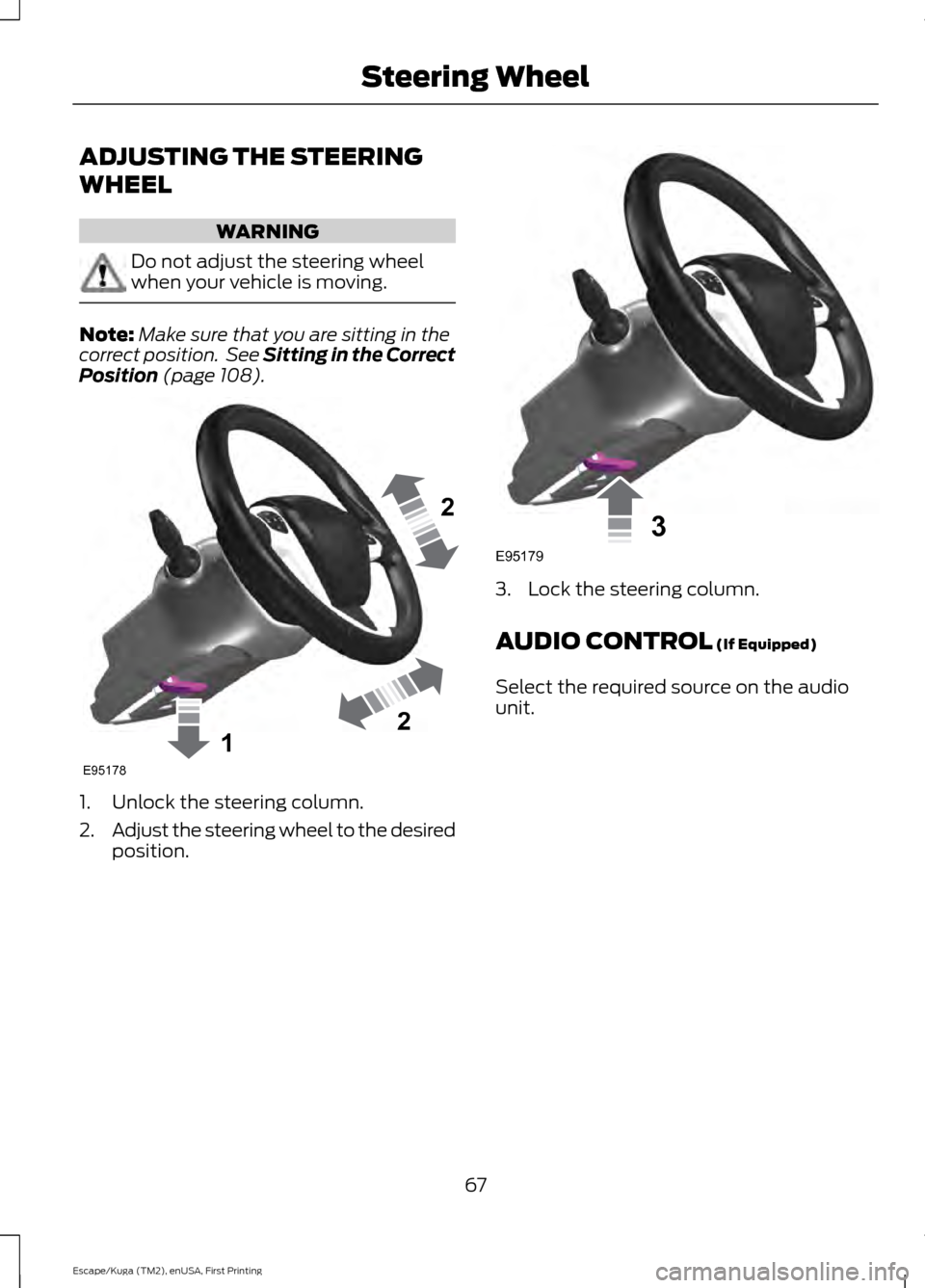
ADJUSTING THE STEERING
WHEEL
WARNING
Do not adjust the steering wheel
when your vehicle is moving.
Note:
Make sure that you are sitting in the
correct position. See Sitting in the Correct
Position (page 108). 1. Unlock the steering column.
2.
Adjust the steering wheel to the desired
position. 3. Lock the steering column.
AUDIO CONTROL
(If Equipped)
Select the required source on the audio
unit.
67
Escape/Kuga (TM2), enUSA, First Printing Steering Wheel122E95178 3E95179
Page 100 of 393
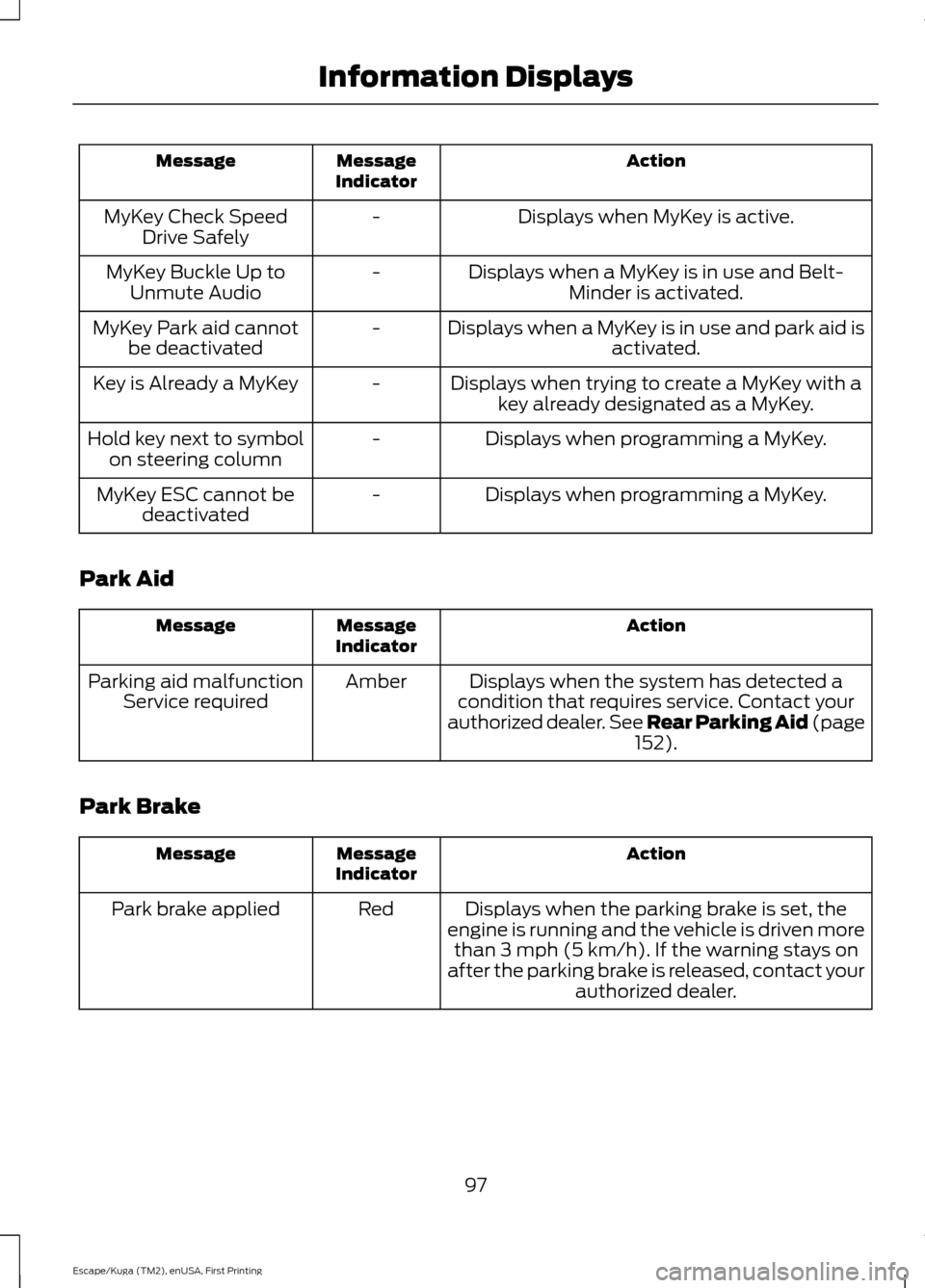
Action
Message
Indicator
Message
Displays when MyKey is active.
-
MyKey Check Speed
Drive Safely
Displays when a MyKey is in use and Belt-Minder is activated.
-
MyKey Buckle Up to
Unmute Audio
Displays when a MyKey is in use and park aid isactivated.
-
MyKey Park aid cannot
be deactivated
Displays when trying to create a MyKey with akey already designated as a MyKey.
-
Key is Already a MyKey
Displays when programming a MyKey.
-
Hold key next to symbol
on steering column
Displays when programming a MyKey.
-
MyKey ESC cannot be
deactivated
Park Aid Action
Message
Indicator
Message
Displays when the system has detected a
condition that requires service. Contact your
authorized dealer. See Rear Parking Aid (page 152).
Amber
Parking aid malfunction
Service required
Park Brake Action
Message
Indicator
Message
Displays when the parking brake is set, the
engine is running and the vehicle is driven more than 3 mph (5 km/h). If the warning stays on
after the parking brake is released, contact your authorized dealer.
Red
Park brake applied
97
Escape/Kuga (TM2), enUSA, First Printing Information Displays
Page 156 of 393
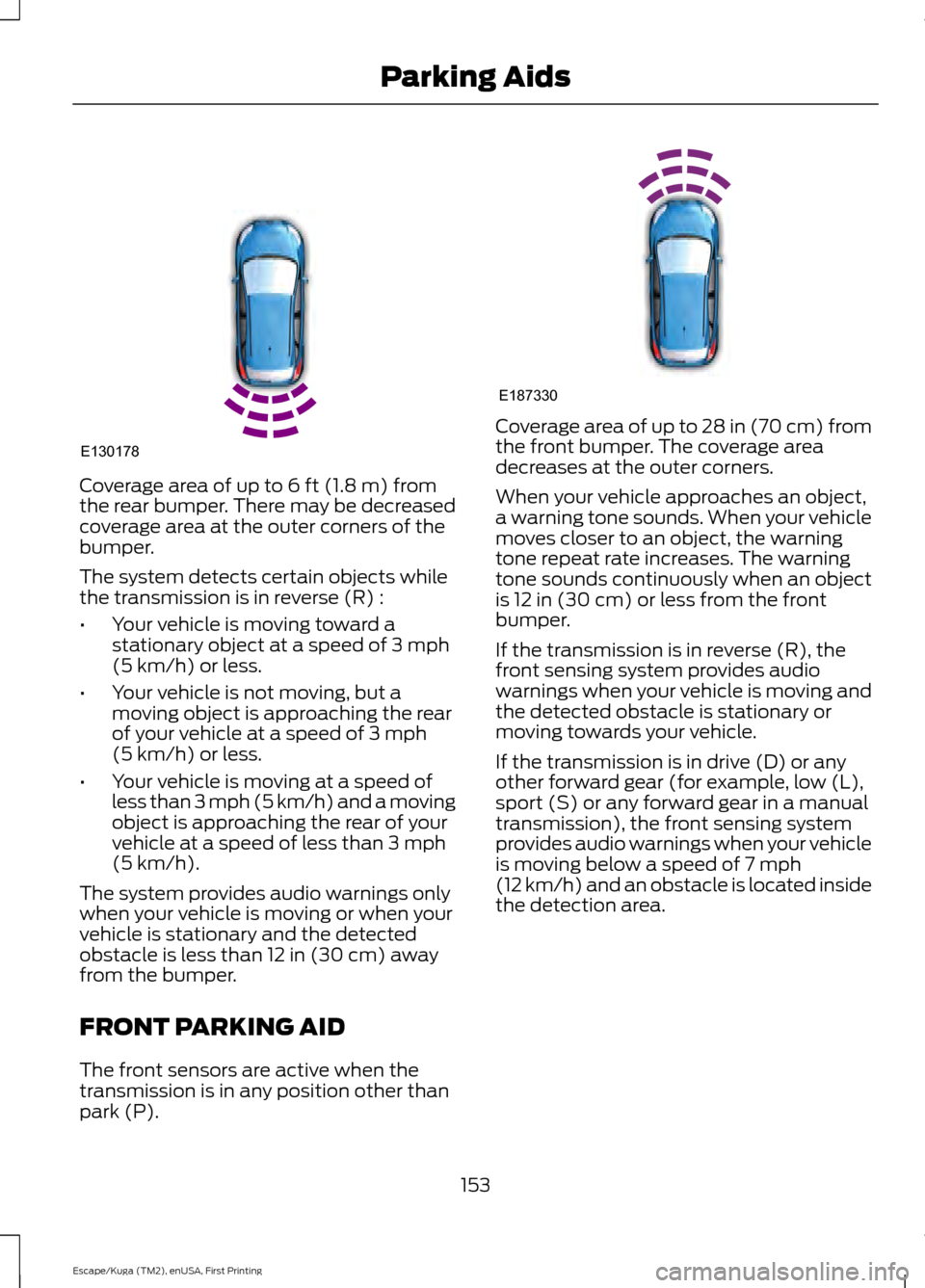
Coverage area of up to 6 ft (1.8 m) from
the rear bumper. There may be decreased
coverage area at the outer corners of the
bumper.
The system detects certain objects while
the transmission is in reverse (R) :
• Your vehicle is moving toward a
stationary object at a speed of
3 mph
(5 km/h) or less.
• Your vehicle is not moving, but a
moving object is approaching the rear
of your vehicle at a speed of
3 mph
(5 km/h) or less.
• Your vehicle is moving at a speed of
less than 3 mph (5 km/h) and a moving
object is approaching the rear of your
vehicle at a speed of less than
3 mph
(5 km/h).
The system provides audio warnings only
when your vehicle is moving or when your
vehicle is stationary and the detected
obstacle is less than
12 in (30 cm) away
from the bumper.
FRONT PARKING AID
The front sensors are active when the
transmission is in any position other than
park (P). Coverage area of up to
28 in (70 cm) from
the front bumper. The coverage area
decreases at the outer corners.
When your vehicle approaches an object,
a warning tone sounds. When your vehicle
moves closer to an object, the warning
tone repeat rate increases. The warning
tone sounds continuously when an object
is
12 in (30 cm) or less from the front
bumper.
If the transmission is in reverse (R), the
front sensing system provides audio
warnings when your vehicle is moving and
the detected obstacle is stationary or
moving towards your vehicle.
If the transmission is in drive (D) or any
other forward gear (for example, low (L),
sport (S) or any forward gear in a manual
transmission), the front sensing system
provides audio warnings when your vehicle
is moving below a speed of
7 mph
(12 km/h) and an obstacle is located inside
the detection area.
153
Escape/Kuga (TM2), enUSA, First Printing Parking AidsE130178 E187330
Page 212 of 393
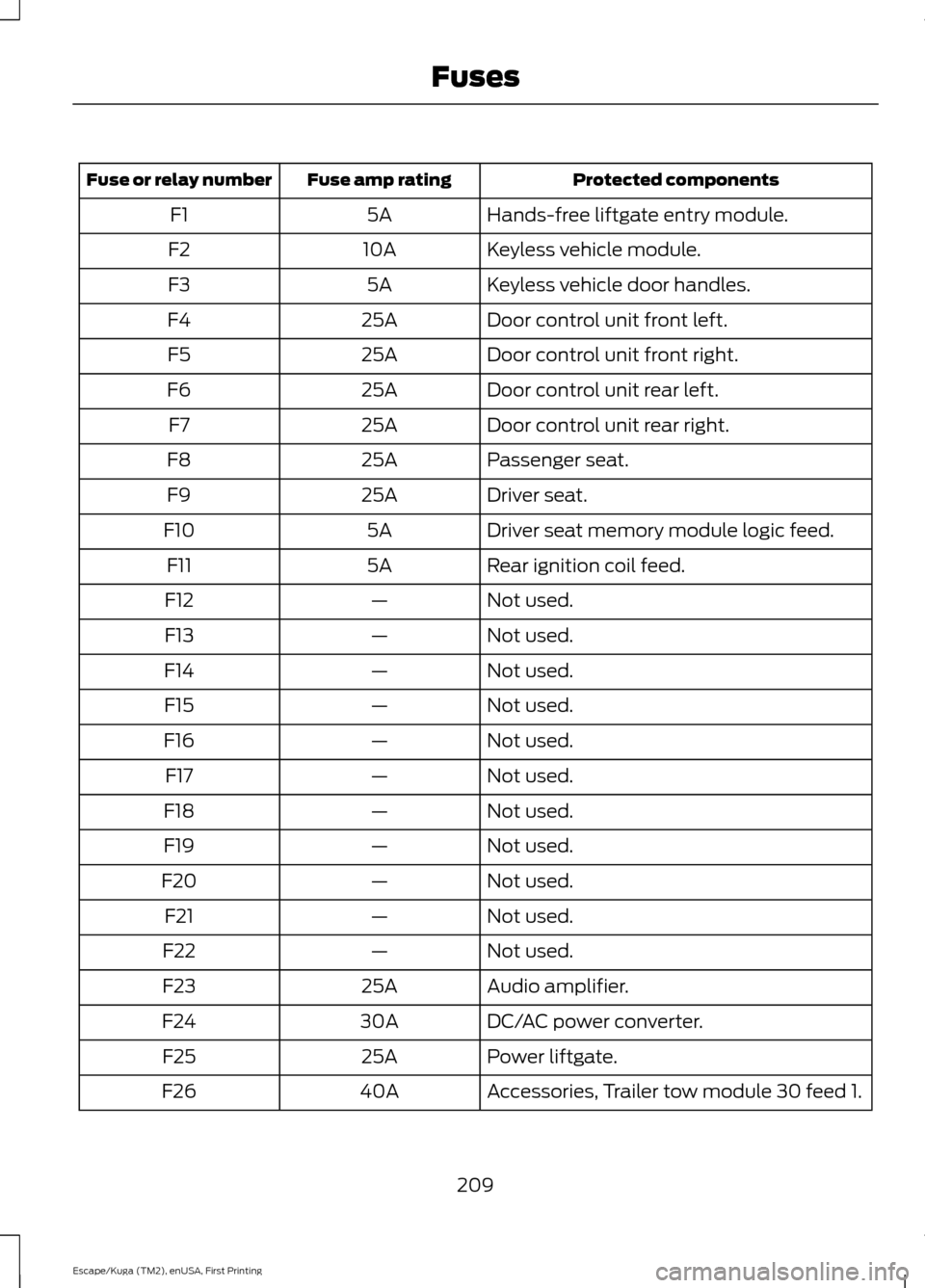
Protected components
Fuse amp rating
Fuse or relay number
Hands-free liftgate entry module.
5A
F1
Keyless vehicle module.
10A
F2
Keyless vehicle door handles.
5A
F3
Door control unit front left.
25A
F4
Door control unit front right.
25A
F5
Door control unit rear left.
25A
F6
Door control unit rear right.
25A
F7
Passenger seat.
25A
F8
Driver seat.
25A
F9
Driver seat memory module logic feed.
5A
F10
Rear ignition coil feed.
5A
F11
Not used.
—
F12
Not used.
—
F13
Not used.
—
F14
Not used.
—
F15
Not used.
—
F16
Not used.
—
F17
Not used.
—
F18
Not used.
—
F19
Not used.
—
F20
Not used.
—
F21
Not used.
—
F22
Audio amplifier.
25A
F23
DC/AC power converter.
30A
F24
Power liftgate.
25A
F25
Accessories, Trailer tow module 30 feed 1.
40A
F26
209
Escape/Kuga (TM2), enUSA, First Printing Fuses
Page 226 of 393
Because your vehicle
’s engine is
electronically-controlled by a computer,
some engine control settings are
maintained by power from the low voltage
battery. Some engine computer settings,
like the idle trim and fuel trim strategy,
optimize the driveability and performance
of the engine. Some other computer
settings, like the clock and radio station
presets, are also maintained in memory by
power from the low voltage battery. When
a technician disconnects and connects the
low voltage battery, these settings are
erased. Complete the following procedure
in order to restore the settings:
1. With the vehicle at a complete stop, set the parking brake.
2. Shift into park (P).
3. Switch off all accessories.
4. Fully press the brake pedal and start the vehicle.
5. Run the engine until it reaches normal operating temperature. While the
engine is warming up, complete the
following: Reset the clock. See Audio
System (page 286). Reset the power
windows bounce-back feature. See
Windows and Mirrors
(page 78).
Reset the radio station presets. See
Audio System
(page 286).
6. Allow the engine to idle for at least one
minute. If the engine turns off, press
the accelerator pedal to start the
engine.
7. While the engine is running, press the brake pedal and shift into neutral (N).
8. Allow the engine to run for at least one
minute by pressing on the accelerator
pedal.
9. Drive the vehicle at least 12 mi (20 km)
to completely relearn the idle and fuel
trim strategy. Note:
If you do not allow the engine to
relearn the idle and fuel trim strategy, the
idle quality of your vehicle may be adversely
affected until the engine computer
eventually relearns the idle trim and fuel
trim strategy.
Make sure that you dispose of old batteries
in an environmentally friendly way. Seek
advice from your local authority about
recycling old batteries.
CHECKING THE WIPER
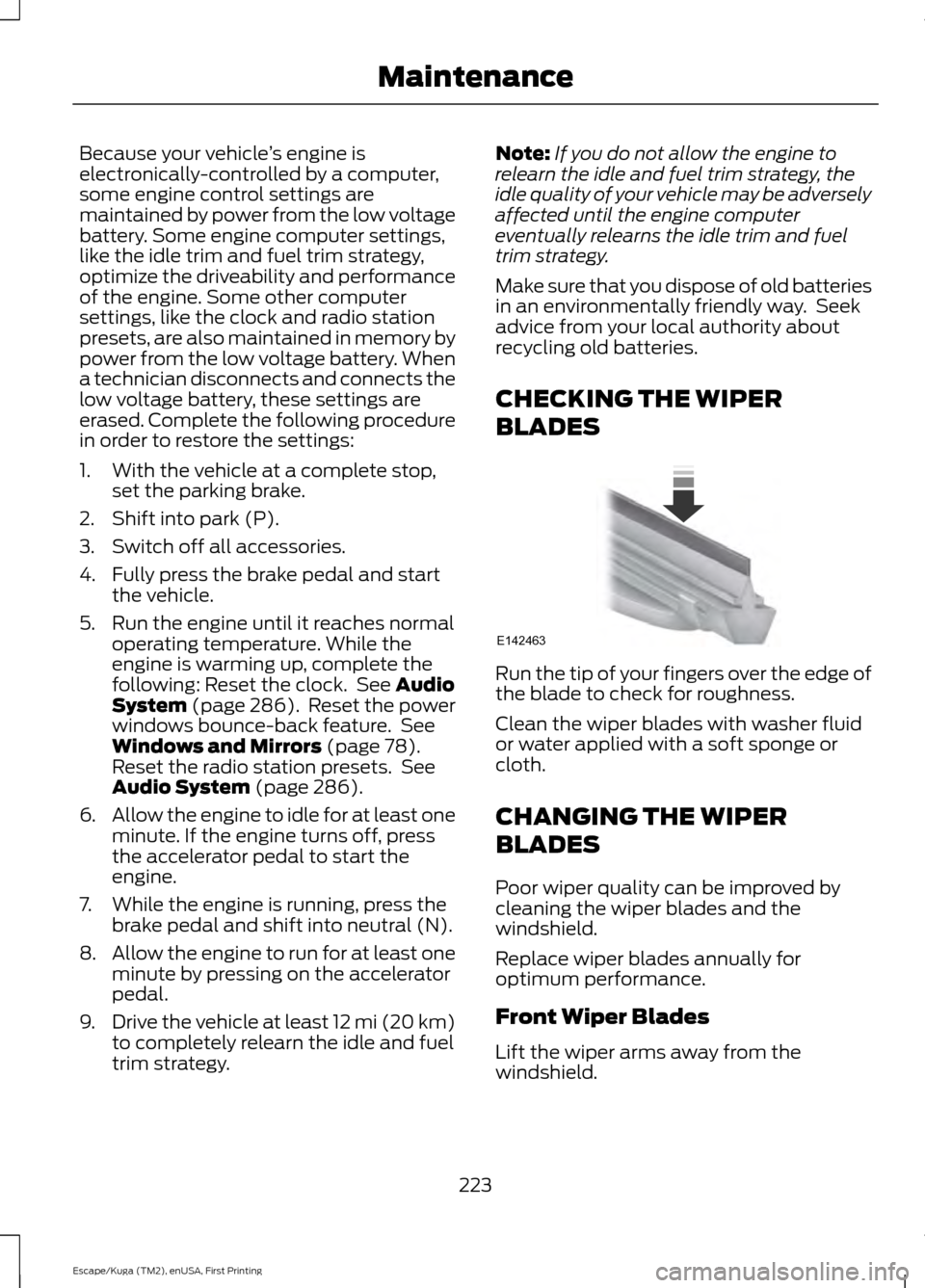
BLADES Run the tip of your fingers over the edge of
the blade to check for roughness.
Clean the wiper blades with washer fluid
or water applied with a soft sponge or
cloth.
CHANGING THE WIPER
BLADES
Poor wiper quality can be improved by
cleaning the wiper blades and the
windshield.
Replace wiper blades annually for
optimum performance.
Front Wiper Blades
Lift the wiper arms away from the
windshield.
223
Escape/Kuga (TM2), enUSA, First Printing MaintenanceE142463
Page 289 of 393
GENERAL INFORMATION
Radio Frequencies and Reception
Factors
AM and FM frequencies are established by
the Federal Communications Commission
(FCC) and the Canadian Radio and
Telecommunications Commission (CRTC).
Those frequencies are:
•
AM: 530, 540-1700, 1710 kHz
• FM: 87.9-107.7, 107.9 MHz Radio Reception Factors
The further you travel from an AM or FM station, the
weaker the signal and the weaker the reception.
Distance and strength
Hills, mountains, tall buildings, bridges, tunnels, freeway
overpasses, parking garages, dense tree foliage and
thunderstorms can interfere with the reception.
Terrain
When you pass a ground-based broadcast repeating
tower, a stronger signal may overtake a weaker one and
result in the audio system muting.
Station overload
CD and CD Player Information
Note: CD units play commercially pressed
4.75-inch (12 centimeter) audio compact
discs only. Due to technical incompatibility,
certain recordable and re-recordable
compact discs may not function correctly
when used in Ford CD players.
Note: Do not insert CDs with homemade
paper (adhesive) labels into the CD player
as the label may peel and cause the CD to
become jammed. You should use a
permanent felt tip marker rather than
adhesive labels on your homemade CDs.
Ballpoint pens may damage CDs. Please
contact an authorized dealer for further
information.
Note: Do not use any irregularly shaped
discs or discs with a scratch protection film
attached.
Always handle discs by their edges only.
Clean the disc with an approved CD
cleaner only. Wipe it from the center of the
disc toward the edge. Do not clean in a
circular motion. Do not expose discs to direct sunlight or
heat sources for extended periods.
MP3 Track and Folder Structure
Audio systems capable of recognizing and
playing MP3 individual tracks and folder
structures work as follows:
•
There are two different modes for MP3
disc playback: MP3 track mode
(system default) and MP3 folder
mode.
• MP3 track mode ignores any folder
structure on the MP3 disc. The player
numbers each MP3 track on the disc
(noted by the .mp3 file extension) from
T001 to a maximum of T255. The
maximum number of playable MP3
files may be less depending on the
structure of the CD and exact model
of radio present.
286
Escape/Kuga (TM2), enUSA, First Printing Audio System