warning FORD ESCAPE 2017 3.G Owners Manual
[x] Cancel search | Manufacturer: FORD, Model Year: 2017, Model line: ESCAPE, Model: FORD ESCAPE 2017 3.GPages: 486, PDF Size: 6.34 MB
Page 293 of 486
WARNINGS
Never get underneath a vehicle that
is supported only by a jack. If the
vehicle slips off the jack, you or
someone else could be seriously injured. Do not attempt to change a tire on
the side of the vehicle close to
moving traffic. Pull far enough off the
road to avoid the danger of being hit when
operating the jack or changing the wheel. Always use the jack provided as
original equipment with your vehicle.
If using a jack other than the one
provided as original equipment with your
vehicle, make sure the jack capacity is
adequate for the vehicle weight, including
any vehicle cargo or modifications. Note:
Passengers should not remain in your
vehicle when the vehicle is being jacked.
1. Park on a level surface, set the parking
brake and activate the hazard flashers.
2. Place the transmission in park (P) and
turn the engine off.
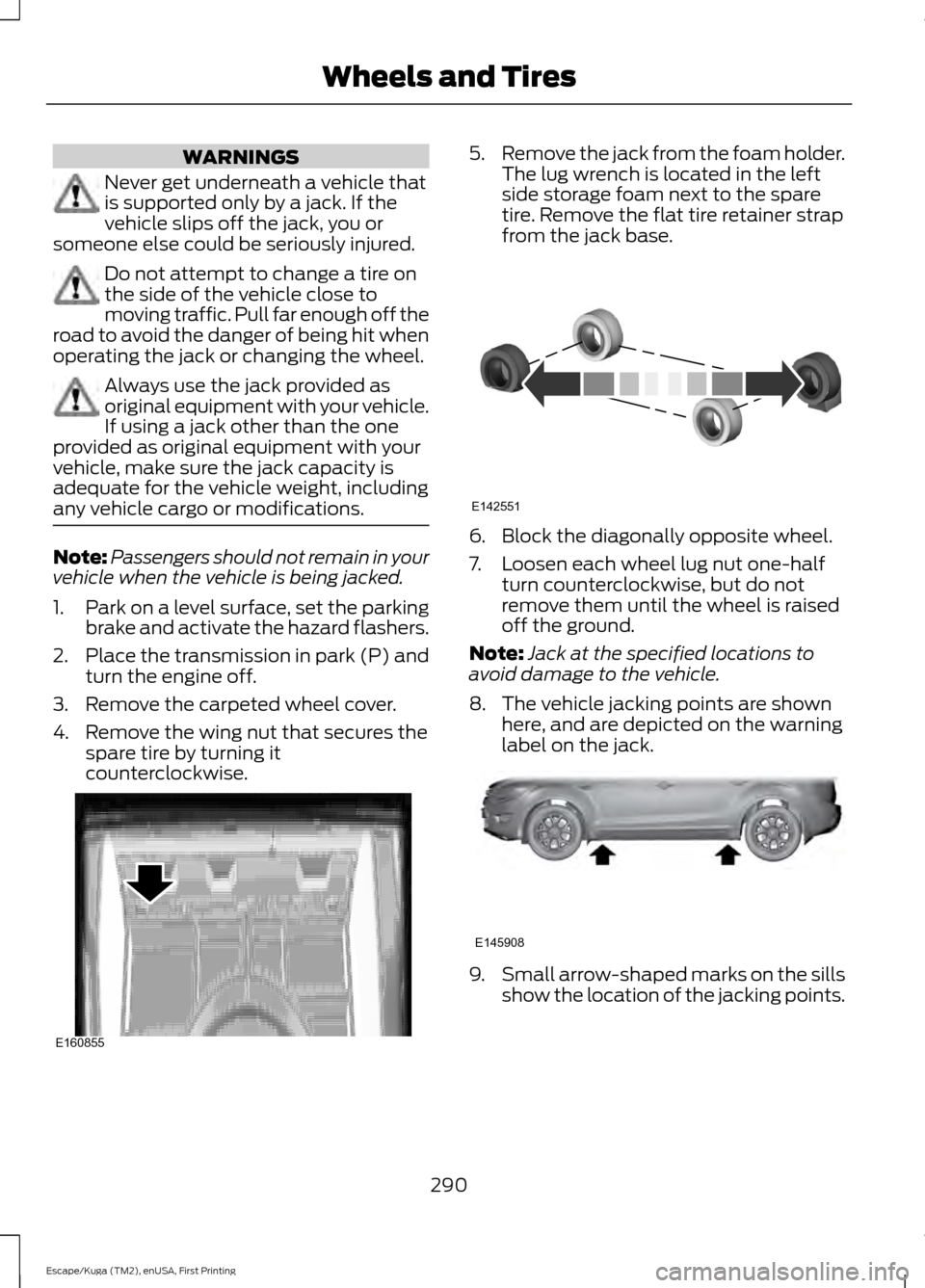
3. Remove the carpeted wheel cover.
4. Remove the wing nut that secures the spare tire by turning it
counterclockwise. 5.
Remove the jack from the foam holder.
The lug wrench is located in the left
side storage foam next to the spare
tire. Remove the flat tire retainer strap
from the jack base. 6. Block the diagonally opposite wheel.
7. Loosen each wheel lug nut one-half
turn counterclockwise, but do not
remove them until the wheel is raised
off the ground.
Note: Jack at the specified locations to
avoid damage to the vehicle.
8. The vehicle jacking points are shown here, and are depicted on the warning
label on the jack. 9.
Small arrow-shaped marks on the sills
show the location of the jacking points.
290
Escape/Kuga (TM2), enUSA, First Printing Wheels and TiresE160855 E142551 E145908
Page 295 of 486
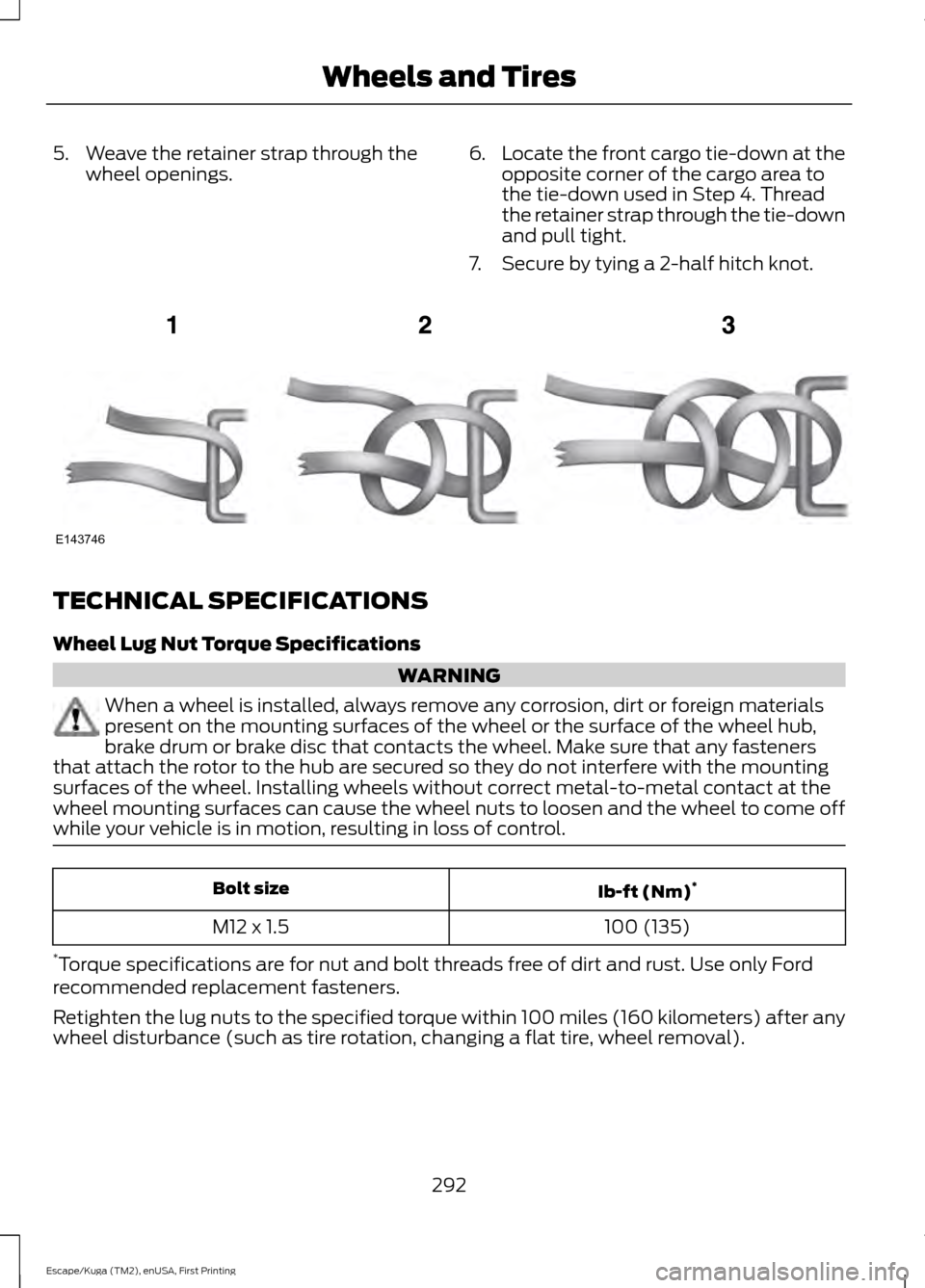
5. Weave the retainer strap through the
wheel openings. 6.
Locate the front cargo tie-down at the
opposite corner of the cargo area to
the tie-down used in Step 4. Thread
the retainer strap through the tie-down
and pull tight.
7. Secure by tying a 2-half hitch knot. TECHNICAL SPECIFICATIONS
Wheel Lug Nut Torque Specifications
WARNING
When a wheel is installed, always remove any corrosion, dirt or foreign materials
present on the mounting surfaces of the wheel or the surface of the wheel hub,
brake drum or brake disc that contacts the wheel. Make sure that any fasteners
that attach the rotor to the hub are secured so they do not interfere with the mounting
surfaces of the wheel. Installing wheels without correct metal-to-metal contact at the
wheel mounting surfaces can cause the wheel nuts to loosen and the wheel to come off
while your vehicle is in motion, resulting in loss of control. Ib-ft (Nm)
*
Bolt size
100 (135)
M12 x 1.5
* Torque specifications are for nut and bolt threads free of dirt and rust. Use only Ford
recommended replacement fasteners.
Retighten the lug nuts to the specified torque within 100 miles (160 kilometers) after any
wheel disturbance (such as tire rotation, changing a flat tire, wheel removal).
292
Escape/Kuga (TM2), enUSA, First Printing Wheels and TiresE143746
Page 304 of 486
CAPACITIES AND SPECIFICATIONS - 1.5L ECOBOOST™
Capacities
WARNING
The air conditioning refrigerant system contains refrigerant under high pressure.
Only qualified personnel should service the air conditioning refrigerant system.
Opening the air conditioning refrigerant system can cause personal injury.
Capacity
Item
4.3 qt (4.1 L)
Engine oil (with oil filter)
12.5 qt (11.8 L)
Engine coolant
Between MIN/MAX on brake fluid reservoir
Brake fluid
2.4 pt (1.15 L)
Rear differential fluid (All Wheel Drive)
17.9 fl oz (0.53 L)
Power Transfer Unit (PTU) fluid
9.0 qt (8.5 L)*
Automatic transmission fluid
Fill as required
Windshield washer fluid
16.2 gal (61.3 L)
Fuel tank
24 oz (0.68 kg)
A/C refrigerant
4.5 fl oz (133 ml)
A/C refrigerant compressor oil
* Approximate dry fill capacity. Actual amount may vary during fluid changes.
Specifications
Materials Specification
Name
WSS-M2C945-A
Recommended motor oil (U.S.):
Motorcraft® SAE 5W-20 Premium Synthetic Blend Motor
Oil
XO-5W20-QSP
WSS-M2C945-A
Recommended motor oil (Canada):
Motorcraft® SAE 5W-20 Super Premium Blend Motor
Oil
CXO-5W20-LSP12
WSS-M2C945-A
Recommended motor oil (Mexico):
301
Escape/Kuga (TM2), enUSA, First Printing Capacities and Specifications
Page 307 of 486
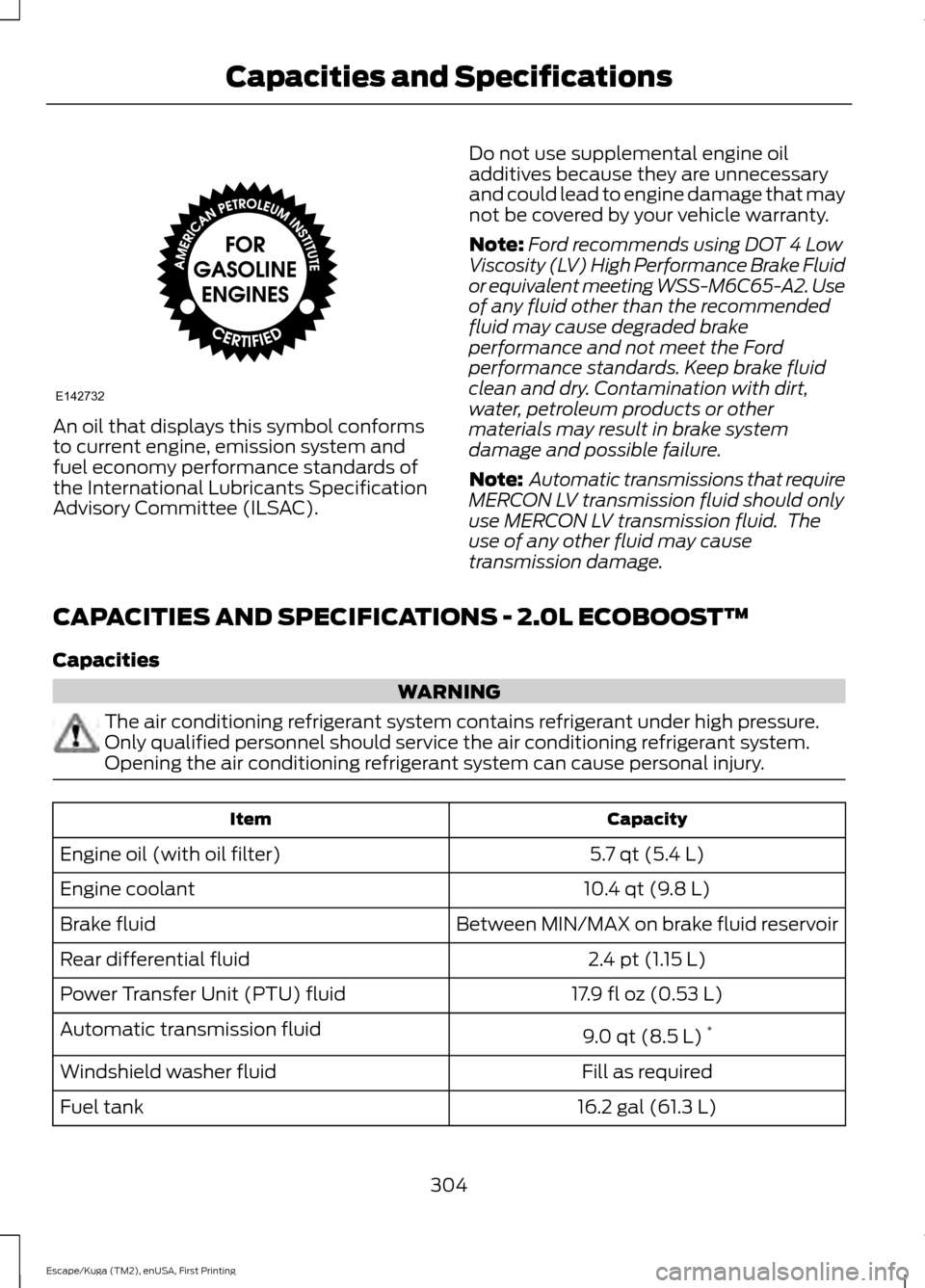
An oil that displays this symbol conforms
to current engine, emission system and
fuel economy performance standards of
the International Lubricants Specification
Advisory Committee (ILSAC).
Do not use supplemental engine oil
additives because they are unnecessary
and could lead to engine damage that may
not be covered by your vehicle warranty.
Note:
Ford recommends using DOT 4 Low
Viscosity (LV) High Performance Brake Fluid
or equivalent meeting WSS-M6C65-A2. Use
of any fluid other than the recommended
fluid may cause degraded brake
performance and not meet the Ford
performance standards. Keep brake fluid
clean and dry. Contamination with dirt,
water, petroleum products or other
materials may result in brake system
damage and possible failure.
Note: Automatic transmissions that require
MERCON LV transmission fluid should only
use MERCON LV transmission fluid. The
use of any other fluid may cause
transmission damage.
CAPACITIES AND SPECIFICATIONS - 2.0L ECOBOOST™
Capacities WARNING
The air conditioning refrigerant system contains refrigerant under high pressure.
Only qualified personnel should service the air conditioning refrigerant system.
Opening the air conditioning refrigerant system can cause personal injury.
Capacity
Item
5.7 qt (5.4 L)
Engine oil (with oil filter)
10.4 qt (9.8 L)
Engine coolant
Between MIN/MAX on brake fluid reservoir
Brake fluid
2.4 pt (1.15 L)
Rear differential fluid
17.9 fl oz (0.53 L)
Power Transfer Unit (PTU) fluid
9.0 qt (8.5 L)*
Automatic transmission fluid
Fill as required
Windshield washer fluid
16.2 gal (61.3 L)
Fuel tank
304
Escape/Kuga (TM2), enUSA, First Printing Capacities and SpecificationsE142732
Page 311 of 486
Note:
Ford recommends using DOT 4 Low
Viscosity (LV) High Performance Brake Fluid
or equivalent meeting WSS-M6C65-A2. Use
of any fluid other than the recommended
fluid may cause degraded brake
performance and not meet the Ford
performance standards. Keep brake fluid
clean and dry. Contamination with dirt,
water, petroleum products or other
materials may result in brake system
damage and possible failure. Note:
Automatic transmissions that require
MERCON LV transmission fluid should only
use MERCON LV transmission fluid. The
use of any other fluid may cause
transmission damage.
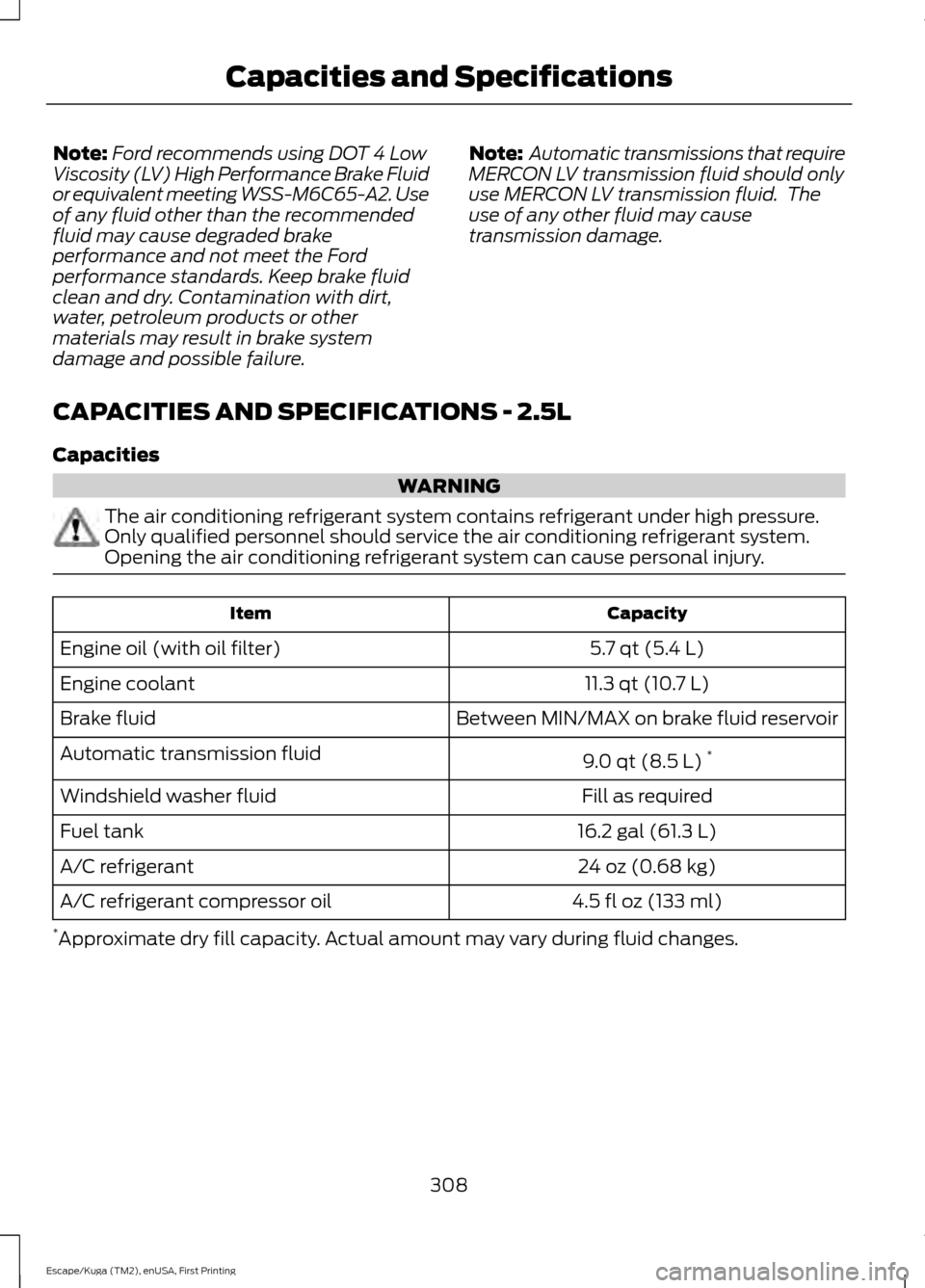
CAPACITIES AND SPECIFICATIONS - 2.5L
Capacities WARNING
The air conditioning refrigerant system contains refrigerant under high pressure.
Only qualified personnel should service the air conditioning refrigerant system.
Opening the air conditioning refrigerant system can cause personal injury.
Capacity
Item
5.7 qt (5.4 L)
Engine oil (with oil filter)
11.3 qt (10.7 L)
Engine coolant
Between MIN/MAX on brake fluid reservoir
Brake fluid
9.0 qt (8.5 L)*
Automatic transmission fluid
Fill as required
Windshield washer fluid
16.2 gal (61.3 L)
Fuel tank
24 oz (0.68 kg)
A/C refrigerant
4.5 fl oz (133 ml)
A/C refrigerant compressor oil
* Approximate dry fill capacity. Actual amount may vary during fluid changes.
308
Escape/Kuga (TM2), enUSA, First Printing Capacities and Specifications
Page 316 of 486
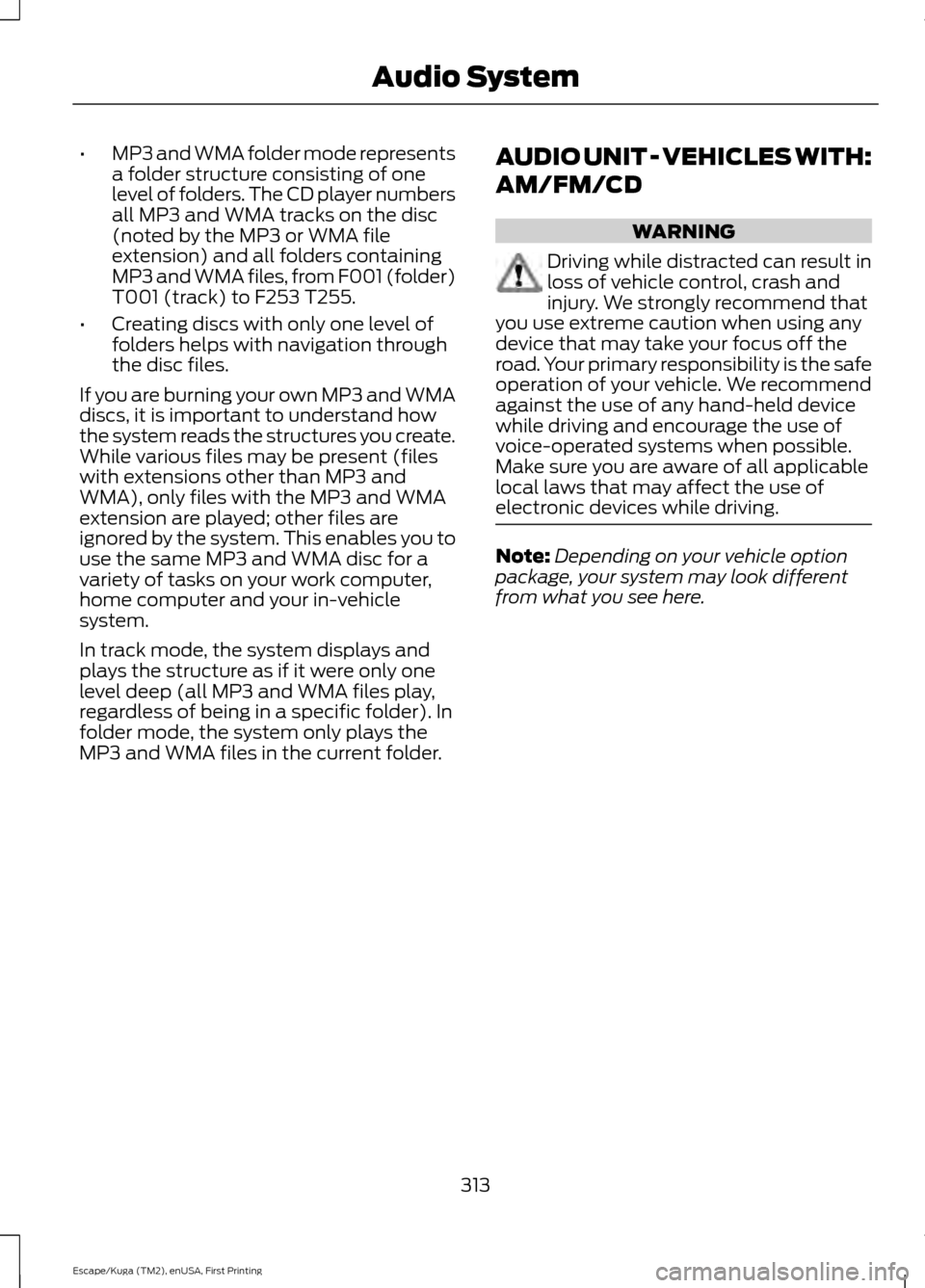
•
MP3 and WMA folder mode represents
a folder structure consisting of one
level of folders. The CD player numbers
all MP3 and WMA tracks on the disc
(noted by the MP3 or WMA file
extension) and all folders containing
MP3 and WMA files, from F001 (folder)
T001 (track) to F253 T255.
• Creating discs with only one level of
folders helps with navigation through
the disc files.
If you are burning your own MP3 and WMA
discs, it is important to understand how
the system reads the structures you create.
While various files may be present (files
with extensions other than MP3 and
WMA), only files with the MP3 and WMA
extension are played; other files are
ignored by the system. This enables you to
use the same MP3 and WMA disc for a
variety of tasks on your work computer,
home computer and your in-vehicle
system.
In track mode, the system displays and
plays the structure as if it were only one
level deep (all MP3 and WMA files play,
regardless of being in a specific folder). In
folder mode, the system only plays the
MP3 and WMA files in the current folder. AUDIO UNIT - VEHICLES WITH:
AM/FM/CD WARNING
Driving while distracted can result in
loss of vehicle control, crash and
injury. We strongly recommend that
you use extreme caution when using any
device that may take your focus off the
road. Your primary responsibility is the safe
operation of your vehicle. We recommend
against the use of any hand-held device
while driving and encourage the use of
voice-operated systems when possible.
Make sure you are aware of all applicable
local laws that may affect the use of
electronic devices while driving. Note:
Depending on your vehicle option
package, your system may look different
from what you see here.
313
Escape/Kuga (TM2), enUSA, First Printing Audio System
Page 318 of 486
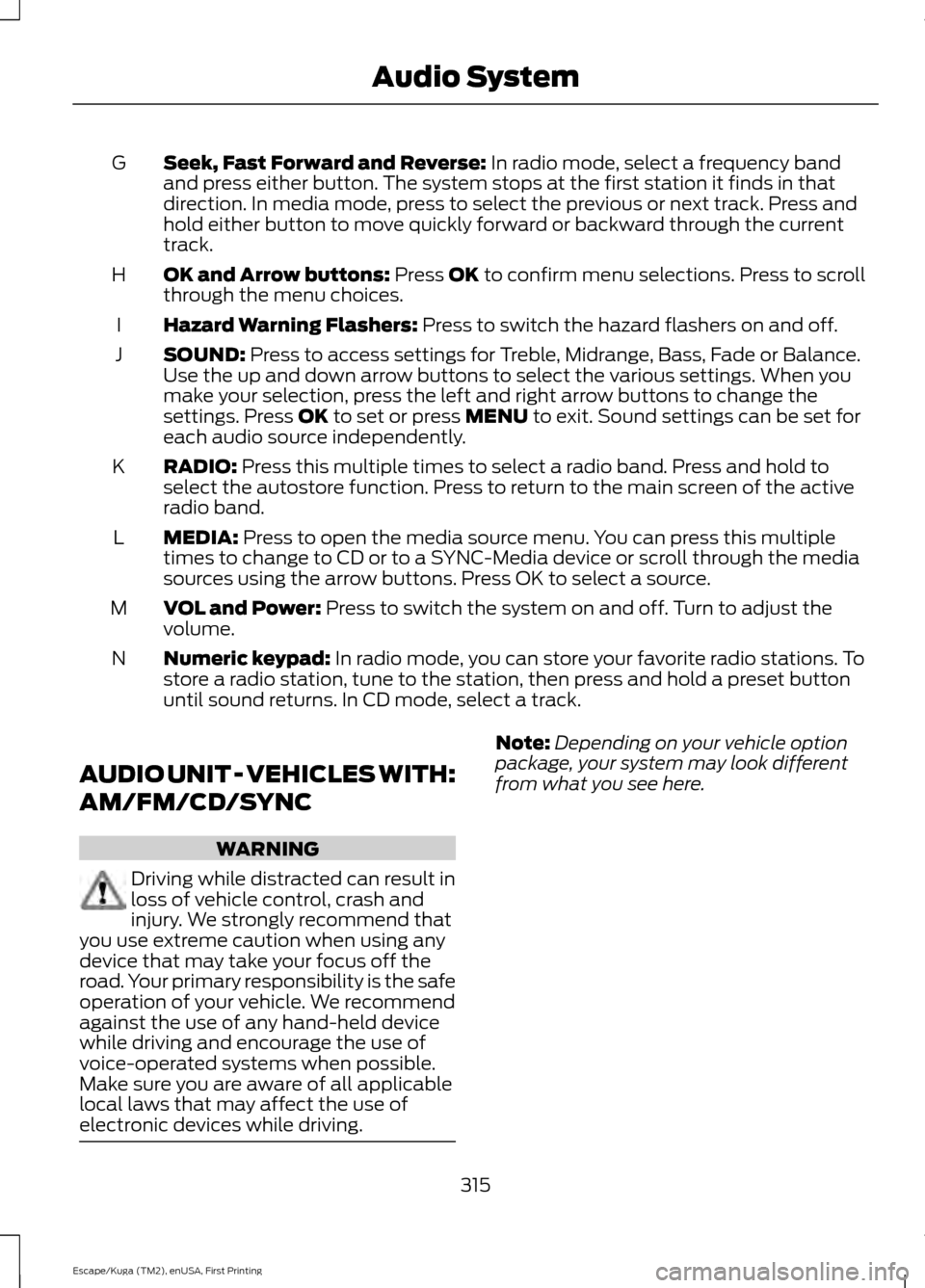
Seek, Fast Forward and Reverse: In radio mode, select a frequency band
and press either button. The system stops at the first station it finds in that
direction. In media mode, press to select the previous or next track. Press and
hold either button to move quickly forward or backward through the current
track.
G
OK and Arrow buttons:
Press OK to confirm menu selections. Press to scroll
through the menu choices.
H
Hazard Warning Flashers:
Press to switch the hazard flashers on and off.
I
SOUND:
Press to access settings for Treble, Midrange, Bass, Fade or Balance.
Use the up and down arrow buttons to select the various settings. When you
make your selection, press the left and right arrow buttons to change the
settings. Press
OK to set or press MENU to exit. Sound settings can be set for
each audio source independently.
J
RADIO:
Press this multiple times to select a radio band. Press and hold to
select the autostore function. Press to return to the main screen of the active
radio band.
K
MEDIA:
Press to open the media source menu. You can press this multiple
times to change to CD or to a SYNC-Media device or scroll through the media
sources using the arrow buttons. Press OK to select a source.
L
VOL and Power:
Press to switch the system on and off. Turn to adjust the
volume.
M
Numeric keypad:
In radio mode, you can store your favorite radio stations. To
store a radio station, tune to the station, then press and hold a preset button
until sound returns. In CD mode, select a track.
N
AUDIO UNIT - VEHICLES WITH:
AM/FM/CD/SYNC WARNING
Driving while distracted can result in
loss of vehicle control, crash and
injury. We strongly recommend that
you use extreme caution when using any
device that may take your focus off the
road. Your primary responsibility is the safe
operation of your vehicle. We recommend
against the use of any hand-held device
while driving and encourage the use of
voice-operated systems when possible.
Make sure you are aware of all applicable
local laws that may affect the use of
electronic devices while driving. Note:
Depending on your vehicle option
package, your system may look different
from what you see here.
315
Escape/Kuga (TM2), enUSA, First Printing Audio System
Page 321 of 486
AUDIO UNIT - VEHICLES WITH:
AM/FM/CD/SYNC/SATELLITE
RADIO WARNING
Driving while distracted can result in
loss of vehicle control, crash and
injury. We strongly recommend that
you use extreme caution when using any
device that may take your focus off the
road. Your primary responsibility is the safe
operation of your vehicle. We recommend
against the use of any hand-held device
while driving and encourage the use of
voice-operated systems when possible.
Make sure you are aware of all applicable
local laws that may affect the use of
electronic devices while driving. Note:
The system controls most of the
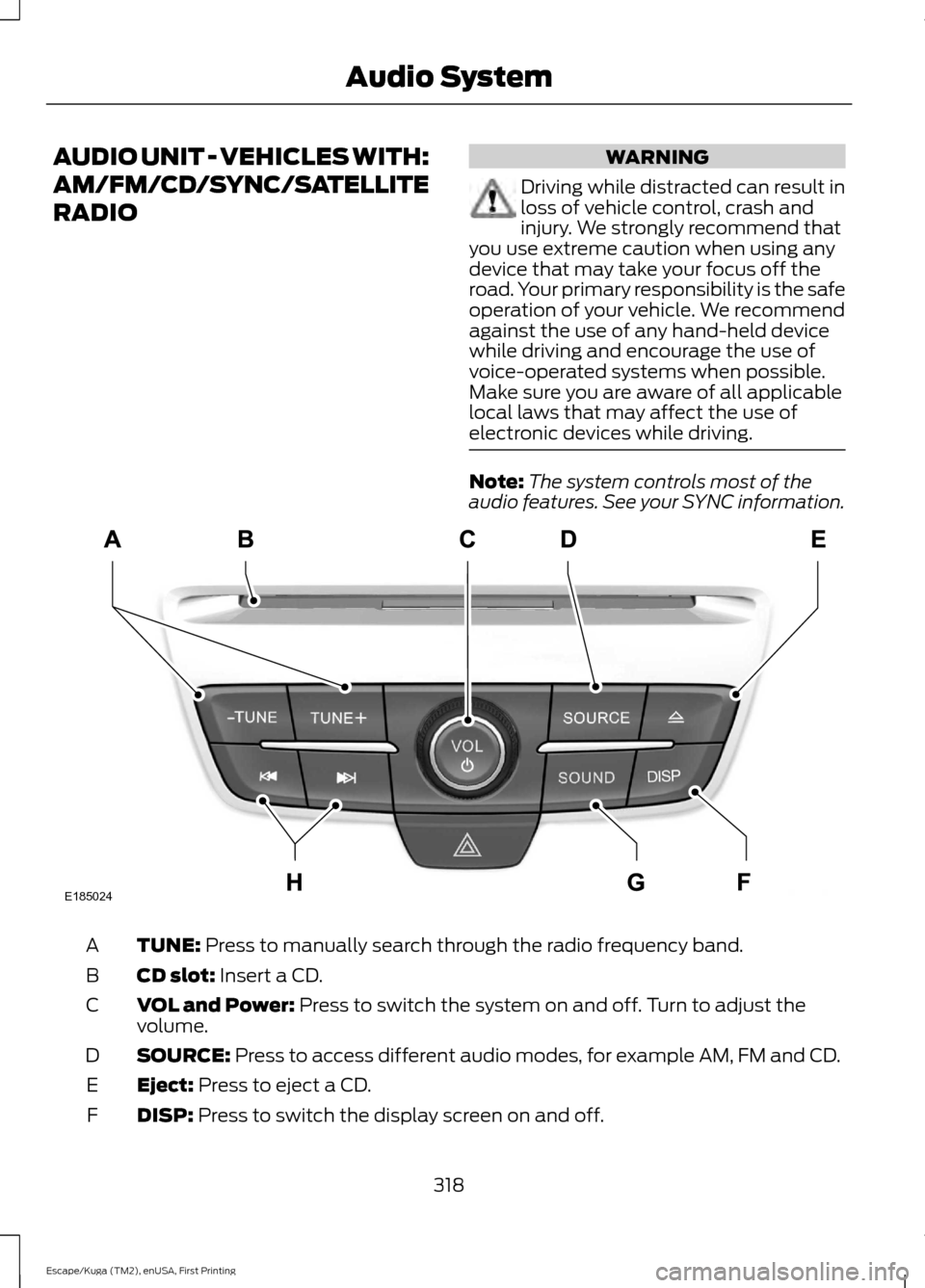
audio features. See your SYNC information. TUNE: Press to manually search through the radio frequency band.
A
CD slot:
Insert a CD.
B
VOL and Power:
Press to switch the system on and off. Turn to adjust the
volume.
C
SOURCE:
Press to access different audio modes, for example AM, FM and CD.
D
Eject:
Press to eject a CD.
E
DISP:
Press to switch the display screen on and off.
F
318
Escape/Kuga (TM2), enUSA, First Printing Audio SystemE185024
Page 322 of 486
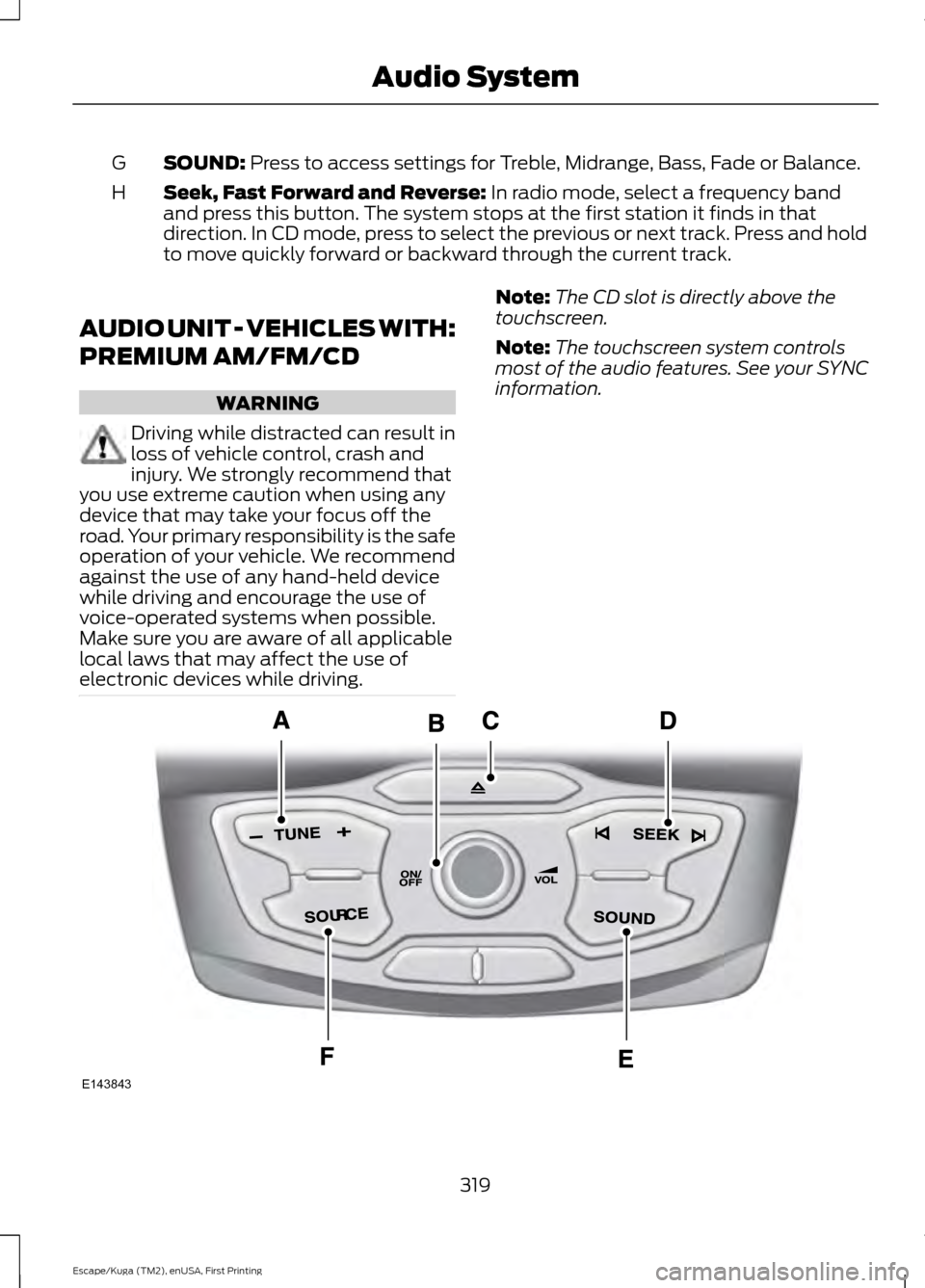
SOUND: Press to access settings for Treble, Midrange, Bass, Fade or Balance.
G
Seek, Fast Forward and Reverse:
In radio mode, select a frequency band
and press this button. The system stops at the first station it finds in that
direction. In CD mode, press to select the previous or next track. Press and hold
to move quickly forward or backward through the current track.
H
AUDIO UNIT - VEHICLES WITH:
PREMIUM AM/FM/CD WARNING
Driving while distracted can result in
loss of vehicle control, crash and
injury. We strongly recommend that
you use extreme caution when using any
device that may take your focus off the
road. Your primary responsibility is the safe
operation of your vehicle. We recommend
against the use of any hand-held device
while driving and encourage the use of
voice-operated systems when possible.
Make sure you are aware of all applicable
local laws that may affect the use of
electronic devices while driving. Note:
The CD slot is directly above the
touchscreen.
Note: The touchscreen system controls
most of the audio features. See your SYNC
information. 319
Escape/Kuga (TM2), enUSA, First Printing Audio SystemE143843
Page 323 of 486
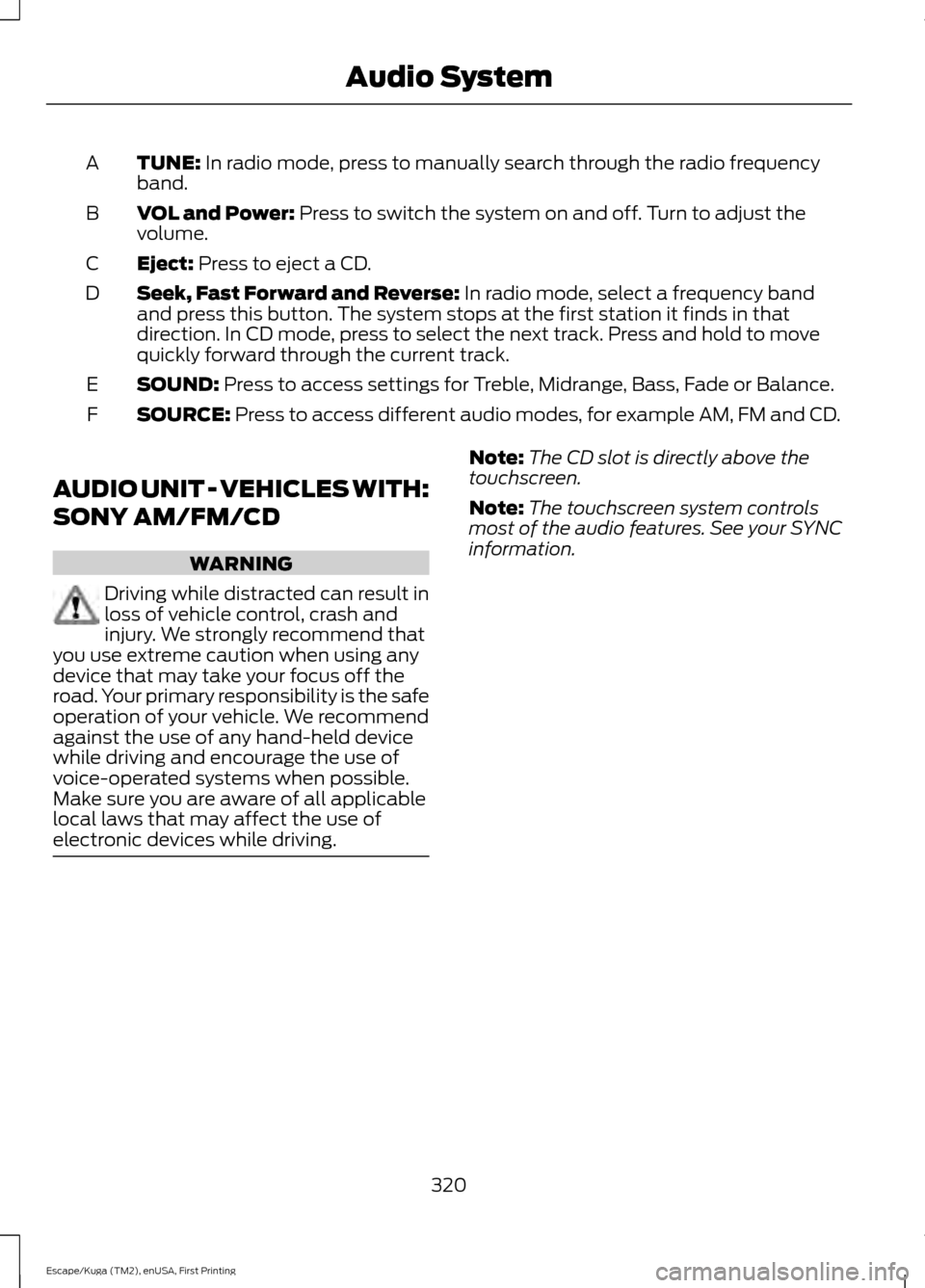
TUNE: In radio mode, press to manually search through the radio frequency
band.
A
VOL and Power:
Press to switch the system on and off. Turn to adjust the
volume.
B
Eject:
Press to eject a CD.
C
Seek, Fast Forward and Reverse:
In radio mode, select a frequency band
and press this button. The system stops at the first station it finds in that
direction. In CD mode, press to select the next track. Press and hold to move
quickly forward through the current track.
D
SOUND:
Press to access settings for Treble, Midrange, Bass, Fade or Balance.
E
SOURCE:
Press to access different audio modes, for example AM, FM and CD.
F
AUDIO UNIT - VEHICLES WITH:
SONY AM/FM/CD WARNING
Driving while distracted can result in
loss of vehicle control, crash and
injury. We strongly recommend that
you use extreme caution when using any
device that may take your focus off the
road. Your primary responsibility is the safe
operation of your vehicle. We recommend
against the use of any hand-held device
while driving and encourage the use of
voice-operated systems when possible.
Make sure you are aware of all applicable
local laws that may affect the use of
electronic devices while driving. Note:
The CD slot is directly above the
touchscreen.
Note: The touchscreen system controls
most of the audio features. See your SYNC
information.
320
Escape/Kuga (TM2), enUSA, First Printing Audio System