clock FORD ESCAPE 2017 3.G User Guide
[x] Cancel search | Manufacturer: FORD, Model Year: 2017, Model line: ESCAPE, Model: FORD ESCAPE 2017 3.GPages: 486, PDF Size: 6.34 MB
Page 258 of 486
Install the new bulbs in reverse order from
the steps above. Be sure that the spring
clip is not damaged or detached from the
headlamp assembly during the
replacement procedure.
Replacing HID Headlamp Bulbs (If
Equipped)
The low beam headlamps on your vehicle
use a high intensity discharge source.
These lamps operate at a high voltage.
When the bulb is burned out, the bulb and
starter capsule assembly must be replaced
by your authorized dealer.
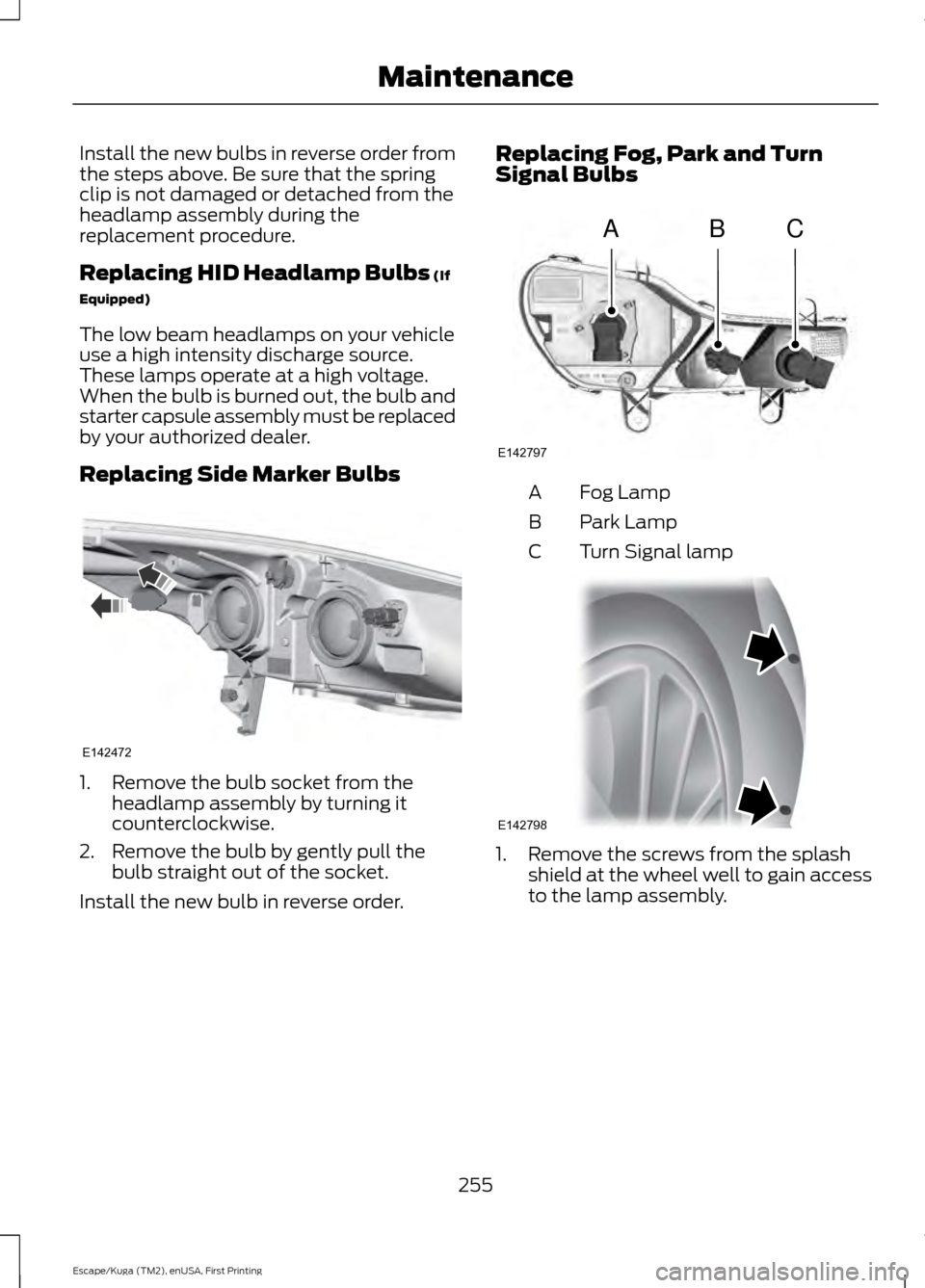
Replacing Side Marker Bulbs 1. Remove the bulb socket from the
headlamp assembly by turning it
counterclockwise.
2. Remove the bulb by gently pull the bulb straight out of the socket.
Install the new bulb in reverse order. Replacing Fog, Park and Turn
Signal Bulbs
Fog Lamp
A
Park Lamp
B
Turn Signal lamp
C 1. Remove the screws from the splash
shield at the wheel well to gain access
to the lamp assembly.
255
Escape/Kuga (TM2), enUSA, First Printing MaintenanceE142472 ABC
E142797 E142798
Page 259 of 486
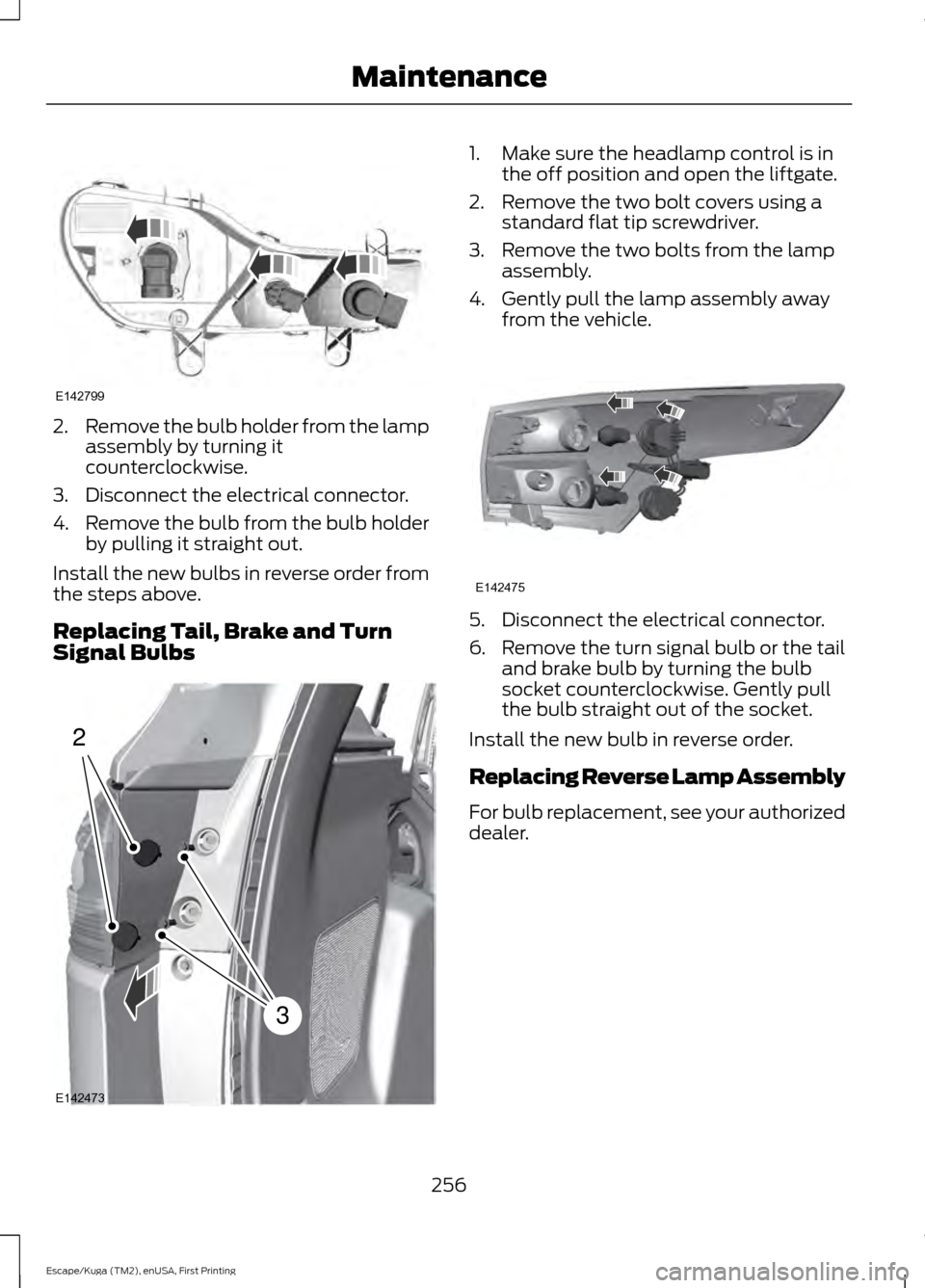
2.
Remove the bulb holder from the lamp
assembly by turning it
counterclockwise.
3. Disconnect the electrical connector.
4. Remove the bulb from the bulb holder
by pulling it straight out.
Install the new bulbs in reverse order from
the steps above.
Replacing Tail, Brake and Turn
Signal Bulbs 1. Make sure the headlamp control is in
the off position and open the liftgate.
2. Remove the two bolt covers using a standard flat tip screwdriver.
3. Remove the two bolts from the lamp assembly.
4. Gently pull the lamp assembly away from the vehicle. 5. Disconnect the electrical connector.
6.
Remove the turn signal bulb or the tail
and brake bulb by turning the bulb
socket counterclockwise. Gently pull
the bulb straight out of the socket.
Install the new bulb in reverse order.
Replacing Reverse Lamp Assembly
For bulb replacement, see your authorized
dealer.
256
Escape/Kuga (TM2), enUSA, First Printing MaintenanceE142799 2
3
E142473 E142475
Page 293 of 486
WARNINGS
Never get underneath a vehicle that
is supported only by a jack. If the
vehicle slips off the jack, you or
someone else could be seriously injured. Do not attempt to change a tire on
the side of the vehicle close to
moving traffic. Pull far enough off the
road to avoid the danger of being hit when
operating the jack or changing the wheel. Always use the jack provided as
original equipment with your vehicle.
If using a jack other than the one
provided as original equipment with your
vehicle, make sure the jack capacity is
adequate for the vehicle weight, including
any vehicle cargo or modifications. Note:
Passengers should not remain in your
vehicle when the vehicle is being jacked.
1. Park on a level surface, set the parking
brake and activate the hazard flashers.
2. Place the transmission in park (P) and
turn the engine off.
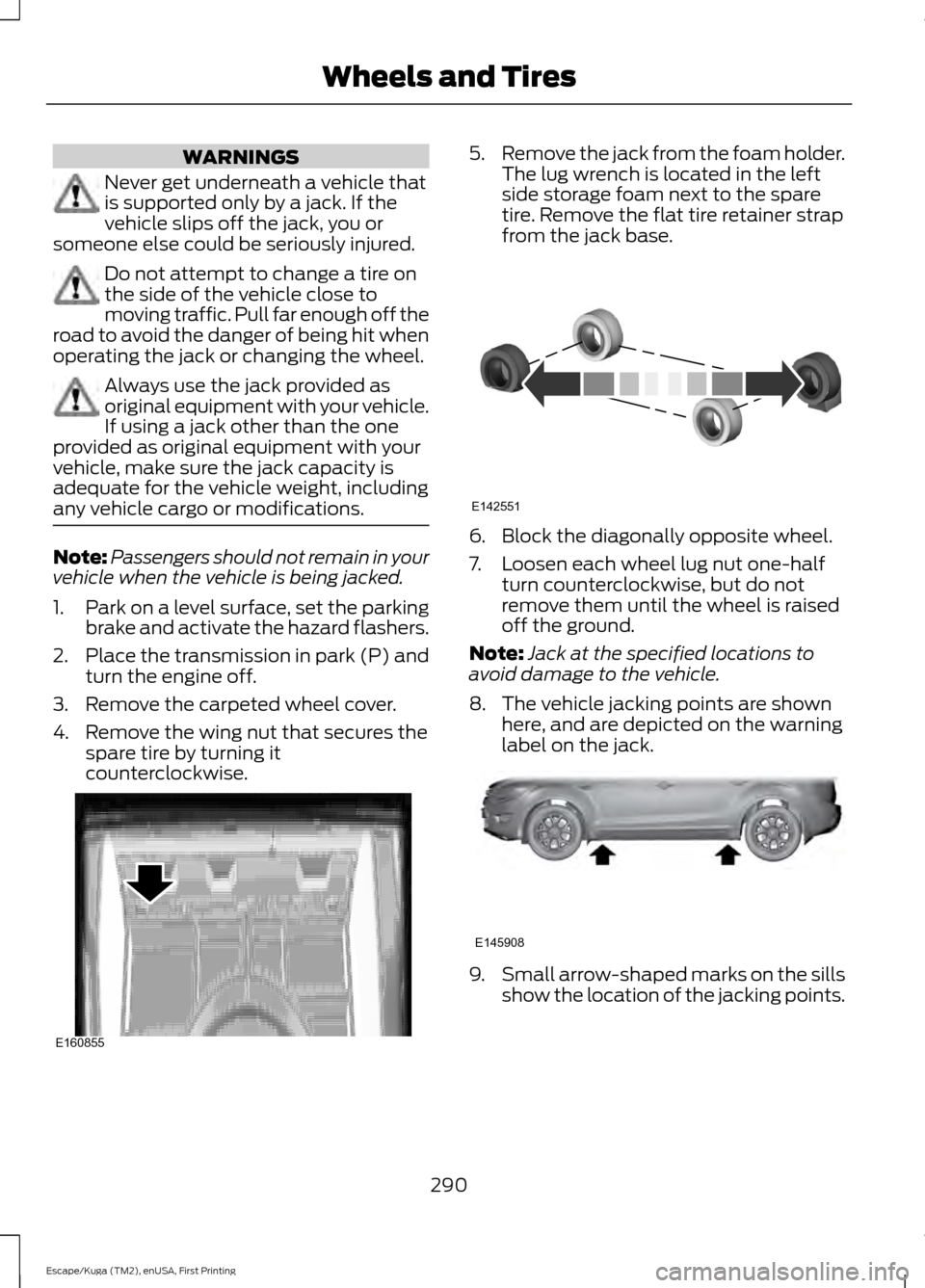
3. Remove the carpeted wheel cover.
4. Remove the wing nut that secures the spare tire by turning it
counterclockwise. 5.
Remove the jack from the foam holder.
The lug wrench is located in the left
side storage foam next to the spare
tire. Remove the flat tire retainer strap
from the jack base. 6. Block the diagonally opposite wheel.
7. Loosen each wheel lug nut one-half
turn counterclockwise, but do not
remove them until the wheel is raised
off the ground.
Note: Jack at the specified locations to
avoid damage to the vehicle.
8. The vehicle jacking points are shown here, and are depicted on the warning
label on the jack. 9.
Small arrow-shaped marks on the sills
show the location of the jacking points.
290
Escape/Kuga (TM2), enUSA, First Printing Wheels and TiresE160855 E142551 E145908
Page 294 of 486
10. Remove the lug nuts with the lug
wrench.
Note: If equipped with full wheel covers
with exposed wheel nuts, remove the wheel
nuts prior to removing the wheel cover or
damage to the wheel cover may occur.
11. Replace the flat tire with the spare tire, making sure the valve stem is
facing outward. Reinstall the lug nuts
until the wheel is snug against the
hub. Do not fully tighten the lug nuts
until the wheel has been lowered.
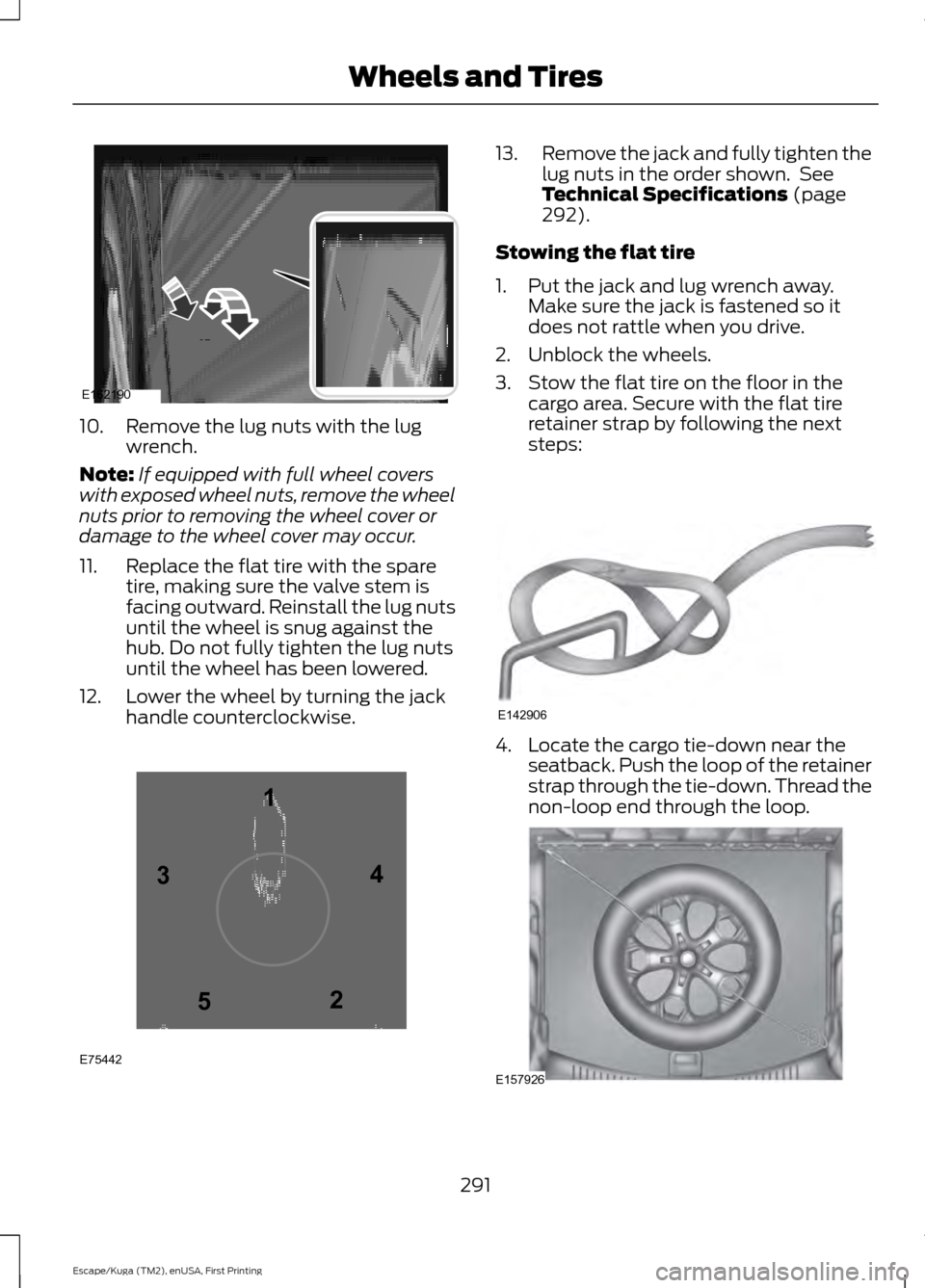
12. Lower the wheel by turning the jack handle counterclockwise. 13.
Remove the jack and fully tighten the
lug nuts in the order shown. See
Technical Specifications (page
292).
Stowing the flat tire
1. Put the jack and lug wrench away. Make sure the jack is fastened so it
does not rattle when you drive.
2. Unblock the wheels.
3. Stow the flat tire on the floor in the cargo area. Secure with the flat tire
retainer strap by following the next
steps: 4. Locate the cargo tie-down near the
seatback. Push the loop of the retainer
strap through the tie-down. Thread the
non-loop end through the loop. 291
Escape/Kuga (TM2), enUSA, First Printing Wheels and TiresE162190 12
3
4
5
E75442 E142906 E157926
Page 317 of 486
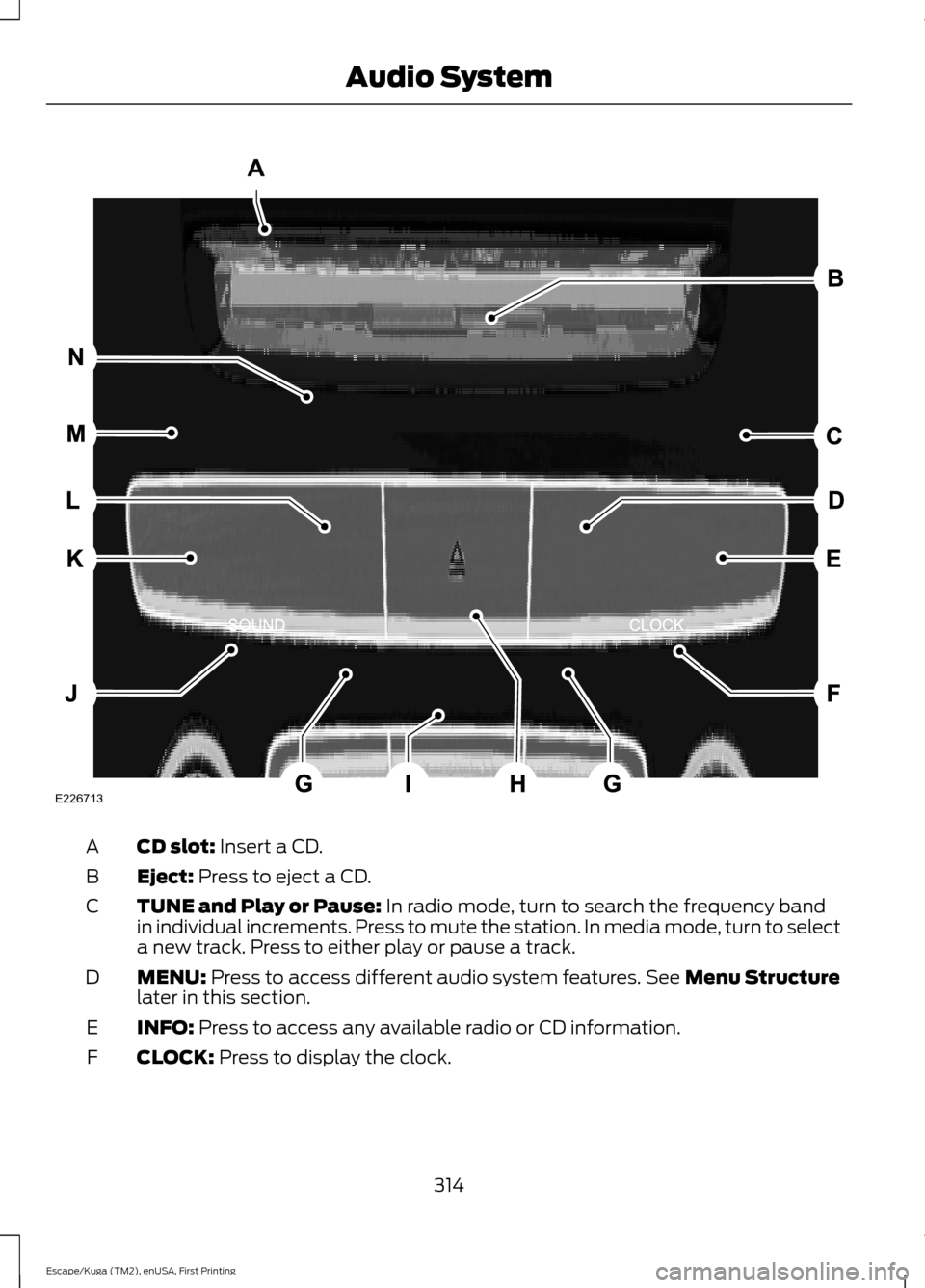
CD slot: Insert a CD.
A
Eject:
Press to eject a CD.
B
TUNE and Play or Pause:
In radio mode, turn to search the frequency band
in individual increments. Press to mute the station. In media mode, turn to select
a new track. Press to either play or pause a track.
C
MENU:
Press to access different audio system features. See Menu Structure
later in this section.
D
INFO:
Press to access any available radio or CD information.
E
CLOCK:
Press to display the clock.
F
314
Escape/Kuga (TM2), enUSA, First Printing Audio SystemE226713
Page 320 of 486
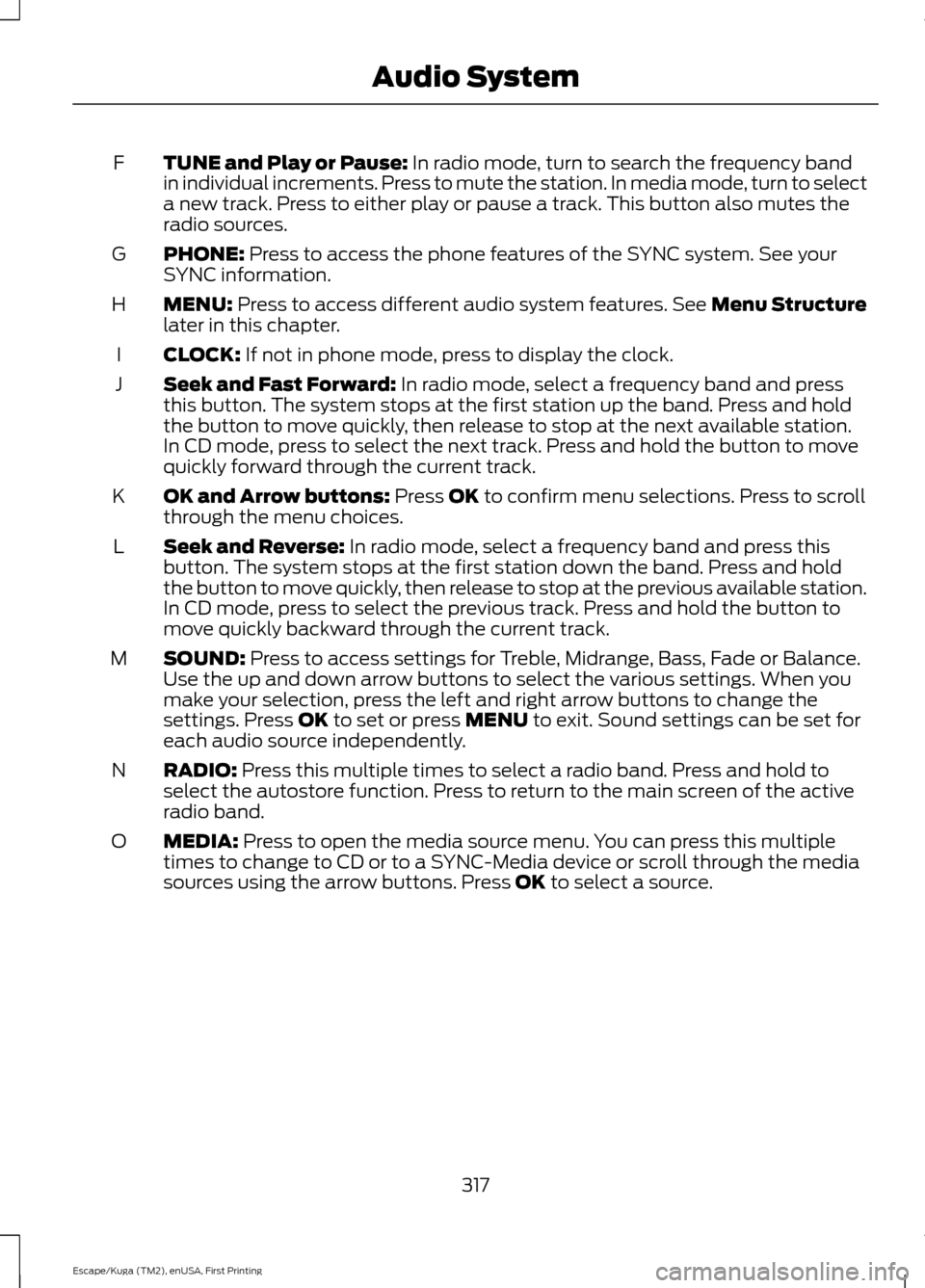
TUNE and Play or Pause: In radio mode, turn to search the frequency band
in individual increments. Press to mute the station. In media mode, turn to select
a new track. Press to either play or pause a track. This button also mutes the
radio sources.
F
PHONE:
Press to access the phone features of the SYNC system. See your
SYNC information.
G
MENU:
Press to access different audio system features. See Menu Structure
later in this chapter.
H
CLOCK:
If not in phone mode, press to display the clock.
I
Seek and Fast Forward:
In radio mode, select a frequency band and press
this button. The system stops at the first station up the band. Press and hold
the button to move quickly, then release to stop at the next available station.
In CD mode, press to select the next track. Press and hold the button to move
quickly forward through the current track.
J
OK and Arrow buttons:
Press OK to confirm menu selections. Press to scroll
through the menu choices.
K
Seek and Reverse:
In radio mode, select a frequency band and press this
button. The system stops at the first station down the band. Press and hold
the button to move quickly, then release to stop at the previous available station.
In CD mode, press to select the previous track. Press and hold the button to
move quickly backward through the current track.
L
SOUND:
Press to access settings for Treble, Midrange, Bass, Fade or Balance.
Use the up and down arrow buttons to select the various settings. When you
make your selection, press the left and right arrow buttons to change the
settings. Press
OK to set or press MENU to exit. Sound settings can be set for
each audio source independently.
M
RADIO:
Press this multiple times to select a radio band. Press and hold to
select the autostore function. Press to return to the main screen of the active
radio band.
N
MEDIA:
Press to open the media source menu. You can press this multiple
times to change to CD or to a SYNC-Media device or scroll through the media
sources using the arrow buttons. Press
OK to select a source.
O
317
Escape/Kuga (TM2), enUSA, First Printing Audio System
Page 369 of 486
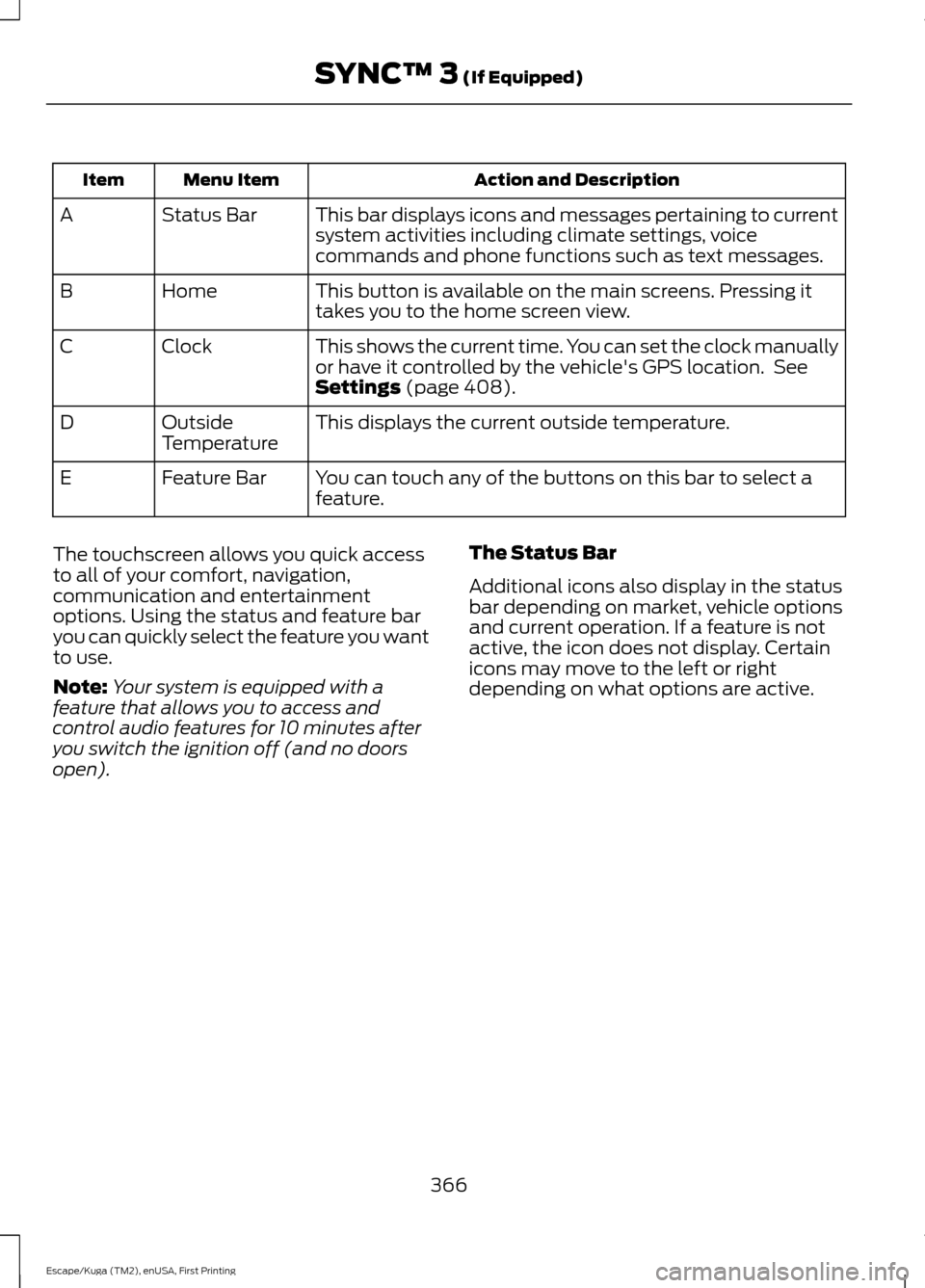
Action and Description
Menu Item
Item
This bar displays icons and messages pertaining to current
system activities including climate settings, voice
commands and phone functions such as text messages.
Status Bar
A
This button is available on the main screens. Pressing it
takes you to the home screen view.
Home
B
This shows the current time. You can set the clock manually
or have it controlled by the vehicle's GPS location. See
Settings (page 408).
Clock
C
This displays the current outside temperature.
Outside
Temperature
D
You can touch any of the buttons on this bar to select a
feature.
Feature Bar
E
The touchscreen allows you quick access
to all of your comfort, navigation,
communication and entertainment
options. Using the status and feature bar
you can quickly select the feature you want
to use.
Note: Your system is equipped with a
feature that allows you to access and
control audio features for 10 minutes after
you switch the ignition off (and no doors
open). The Status Bar
Additional icons also display in the status
bar depending on market, vehicle options
and current operation. If a feature is not
active, the icon does not display. Certain
icons may move to the left or right
depending on what options are active.
366
Escape/Kuga (TM2), enUSA, First Printing SYNC™ 3
(If Equipped)
Page 413 of 486
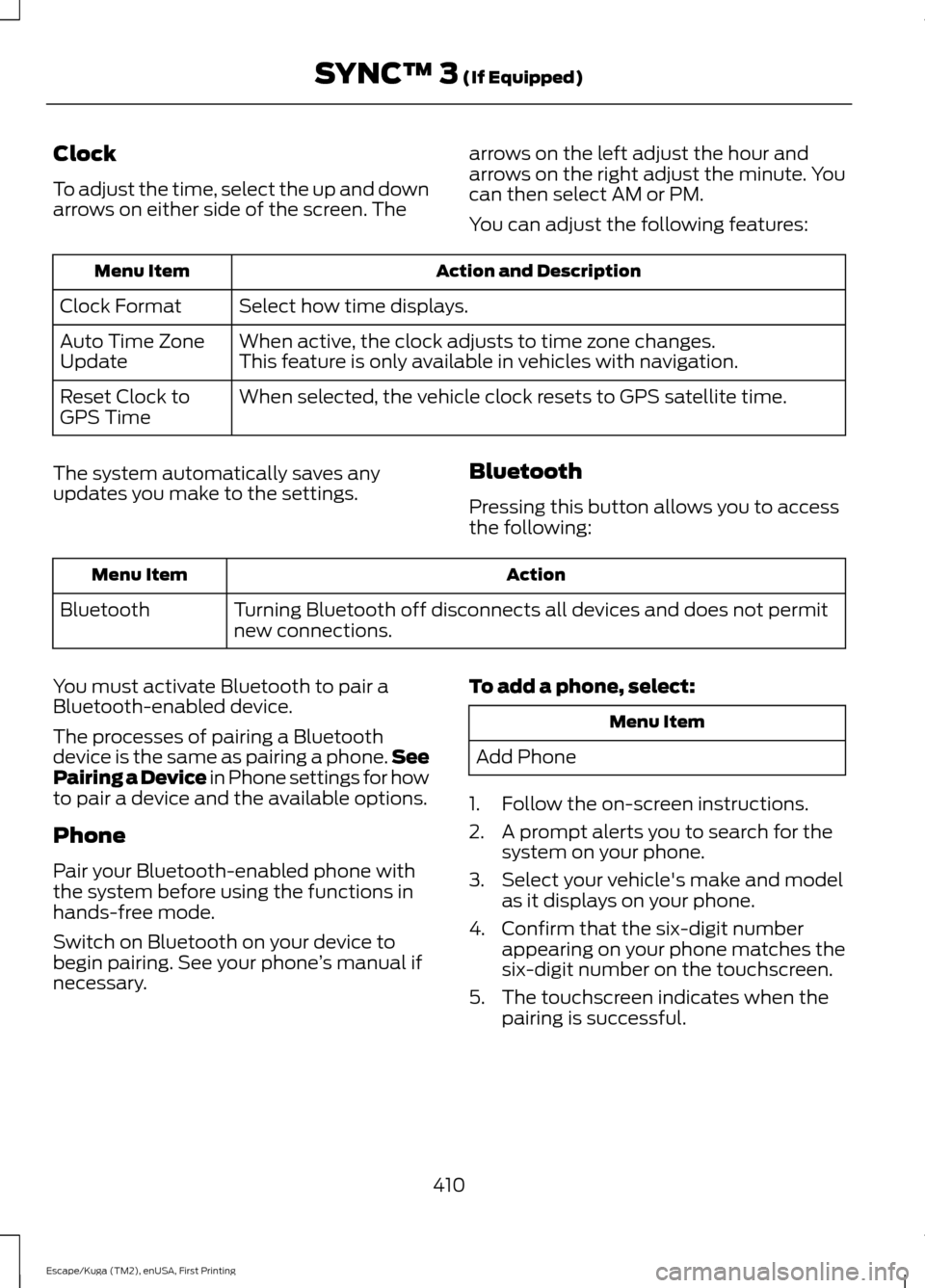
Clock
To adjust the time, select the up and down
arrows on either side of the screen. The
arrows on the left adjust the hour and
arrows on the right adjust the minute. You
can then select AM or PM.
You can adjust the following features:Action and Description
Menu Item
Select how time displays.
Clock Format
When active, the clock adjusts to time zone changes.
Auto Time Zone
Update This feature is only available in vehicles with navigation.
When selected, the vehicle clock resets to GPS satellite time.
Reset Clock to
GPS Time
The system automatically saves any
updates you make to the settings. Bluetooth
Pressing this button allows you to access
the following: Action
Menu Item
Turning Bluetooth off disconnects all devices and does not permit
new connections.
Bluetooth
You must activate Bluetooth to pair a
Bluetooth-enabled device.
The processes of pairing a Bluetooth
device is the same as pairing a phone. See
Pairing a Device in Phone settings for how
to pair a device and the available options.
Phone
Pair your Bluetooth-enabled phone with
the system before using the functions in
hands-free mode.
Switch on Bluetooth on your device to
begin pairing. See your phone ’s manual if
necessary. To add a phone, select: Menu Item
Add Phone
1. Follow the on-screen instructions.
2. A prompt alerts you to search for the system on your phone.
3. Select your vehicle's make and model as it displays on your phone.
4. Confirm that the six-digit number appearing on your phone matches the
six-digit number on the touchscreen.
5. The touchscreen indicates when the pairing is successful.
410
Escape/Kuga (TM2), enUSA, First Printing SYNC™ 3 (If Equipped)
Page 483 of 486
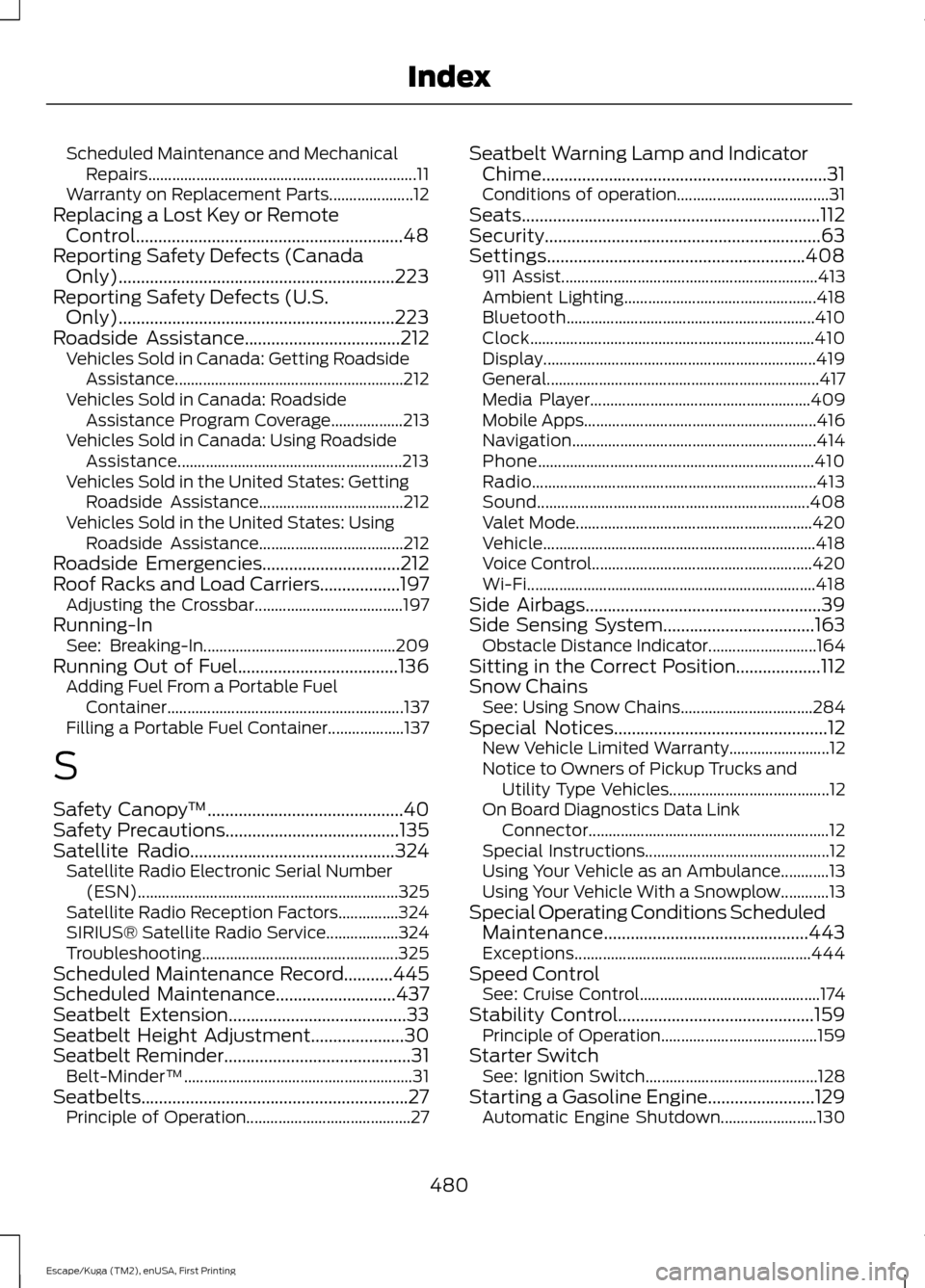
Scheduled Maintenance and Mechanical
Repairs................................................................... 11
Warranty on Replacement Parts..................... 12
Replacing a Lost Key or Remote Control............................................................48
Reporting Safety Defects (Canada Only)..............................................................223
Reporting Safety Defects (U.S. Only)
..............................................................223
Roadside Assistance...................................212
Vehicles Sold in Canada: Getting Roadside
Assistance......................................................... 212
Vehicles Sold in Canada: Roadside Assistance Program Coverage.................. 213
Vehicles Sold in Canada: Using Roadside Assistance........................................................ 213
Vehicles Sold in the United States: Getting Roadside Assistance.................................... 212
Vehicles Sold in the United States: Using Roadside Assistance.................................... 212
Roadside Emergencies...............................212
Roof Racks and Load Carriers..................197 Adjusting the Crossbar..................................... 197
Running-In See: Breaking-In................................................ 209
Running Out of Fuel
....................................136
Adding Fuel From a Portable Fuel
Container........................................................... 137
Filling a Portable Fuel Container................... 137
S
Safety Canopy ™
............................................40
Safety Precautions.......................................135
Satellite Radio..............................................324
Satellite Radio Electronic Serial Number
(ESN)................................................................. 325
Satellite Radio Reception Factors...............324
SIRIUS® Satellite Radio Service.................. 324
Troubleshooting................................................. 325
Scheduled Maintenance Record
...........445
Scheduled Maintenance...........................437
Seatbelt Extension........................................33
Seatbelt Height Adjustment.....................30
Seatbelt Reminder
..........................................31
Belt-Minder™......................................................... 31
Seatbelts............................................................27 Principle of Operation......................................... 27Seatbelt Warning Lamp and Indicator
Chime................................................................31
Conditions of operation...................................... 31
Seats...................................................................112
Security..............................................................63
Settings..........................................................408 911 Assist................................................................ 413
Ambient Lighting................................................ 418
Bluetooth.............................................................. 410
Clock....................................................................... 410
Display.................................................................... 419
General.................................................................... 417
Media Player....................................................... 409
Mobile Apps.......................................................... 416
Navigation............................................................. 414
Phone..................................................................... 410
Radio....................................................................... 413
Sound.................................................................... 408
Valet Mode........................................................... 420
Vehicle.................................................................... 418
Voice Control....................................................... 420
Wi-Fi........................................................................\
418
Side Airbags.....................................................39
Side Sensing System..................................163 Obstacle Distance Indicator........................... 164
Sitting in the Correct Position...................112
Snow Chains See: Using Snow Chains................................. 284
Special Notices................................................12 New Vehicle Limited Warranty......................... 12
Notice to Owners of Pickup Trucks and Utility Type Vehicles........................................ 12
On Board Diagnostics Data Link Connector............................................................ 12
Special Instructions.............................................. 12
Using Your Vehicle as an Ambulance............13
Using Your Vehicle With a Snowplow............13
Special Operating Conditions Scheduled Maintenance..............................................443
Exceptions........................................................... 444
Speed Control See: Cruise Control............................................. 174
Stability Control............................................159 Principle of Operation....................................... 159
Starter Switch See: Ignition Switch........................................... 128
Starting a Gasoline Engine........................129 Automatic Engine Shutdown........................ 130
480
Escape/Kuga (TM2), enUSA, First Printing Index