cruise control FORD ESCAPE 2017 3.G User Guide
[x] Cancel search | Manufacturer: FORD, Model Year: 2017, Model line: ESCAPE, Model: FORD ESCAPE 2017 3.GPages: 486, PDF Size: 6.34 MB
Page 180 of 486
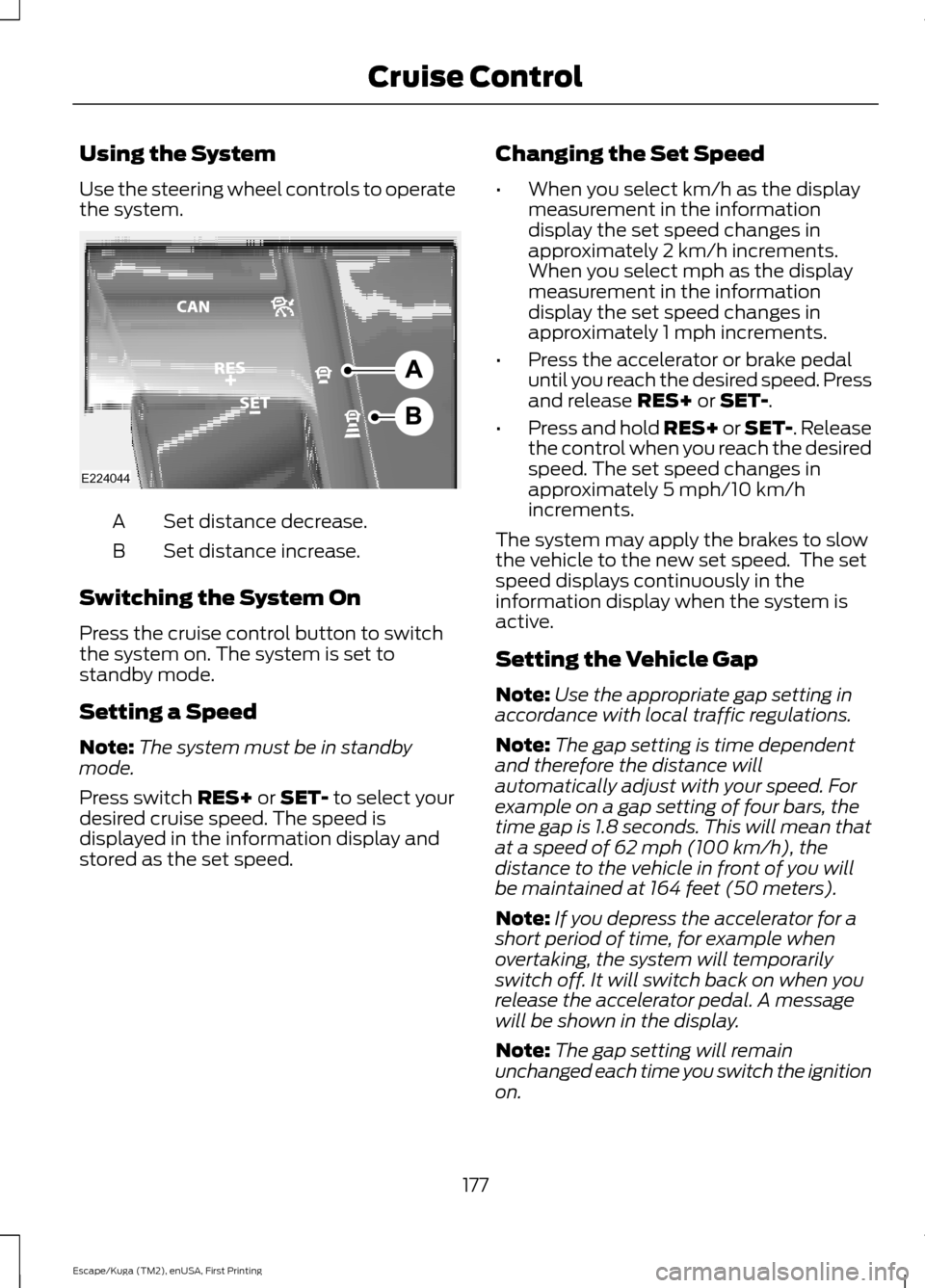
Using the System
Use the steering wheel controls to operate
the system.
Set distance decrease.
A
Set distance increase.
B
Switching the System On
Press the cruise control button to switch
the system on. The system is set to
standby mode.
Setting a Speed
Note: The system must be in standby
mode.
Press switch RES+ or SET- to select your
desired cruise speed. The speed is
displayed in the information display and
stored as the set speed. Changing the Set Speed
•
When you select km/h as the display
measurement in the information
display the set speed changes in
approximately 2 km/h increments.
When you select mph as the display
measurement in the information
display the set speed changes in
approximately 1 mph increments.
• Press the accelerator or brake pedal
until you reach the desired speed. Press
and release
RES+ or SET-.
• Press and hold RES+ or SET-. Release
the control when you reach the desired
speed. The set speed changes in
approximately 5 mph/10 km/h
increments.
The system may apply the brakes to slow
the vehicle to the new set speed. The set
speed displays continuously in the
information display when the system is
active.
Setting the Vehicle Gap
Note: Use the appropriate gap setting in
accordance with local traffic regulations.
Note: The gap setting is time dependent
and therefore the distance will
automatically adjust with your speed. For
example on a gap setting of four bars, the
time gap is 1.8 seconds. This will mean that
at a speed of 62 mph (100 km/h), the
distance to the vehicle in front of you will
be maintained at 164 feet (50 meters).
Note: If you depress the accelerator for a
short period of time, for example when
overtaking, the system will temporarily
switch off. It will switch back on when you
release the accelerator pedal. A message
will be shown in the display.
Note: The gap setting will remain
unchanged each time you switch the ignition
on.
177
Escape/Kuga (TM2), enUSA, First Printing Cruise ControlE224044
Page 181 of 486
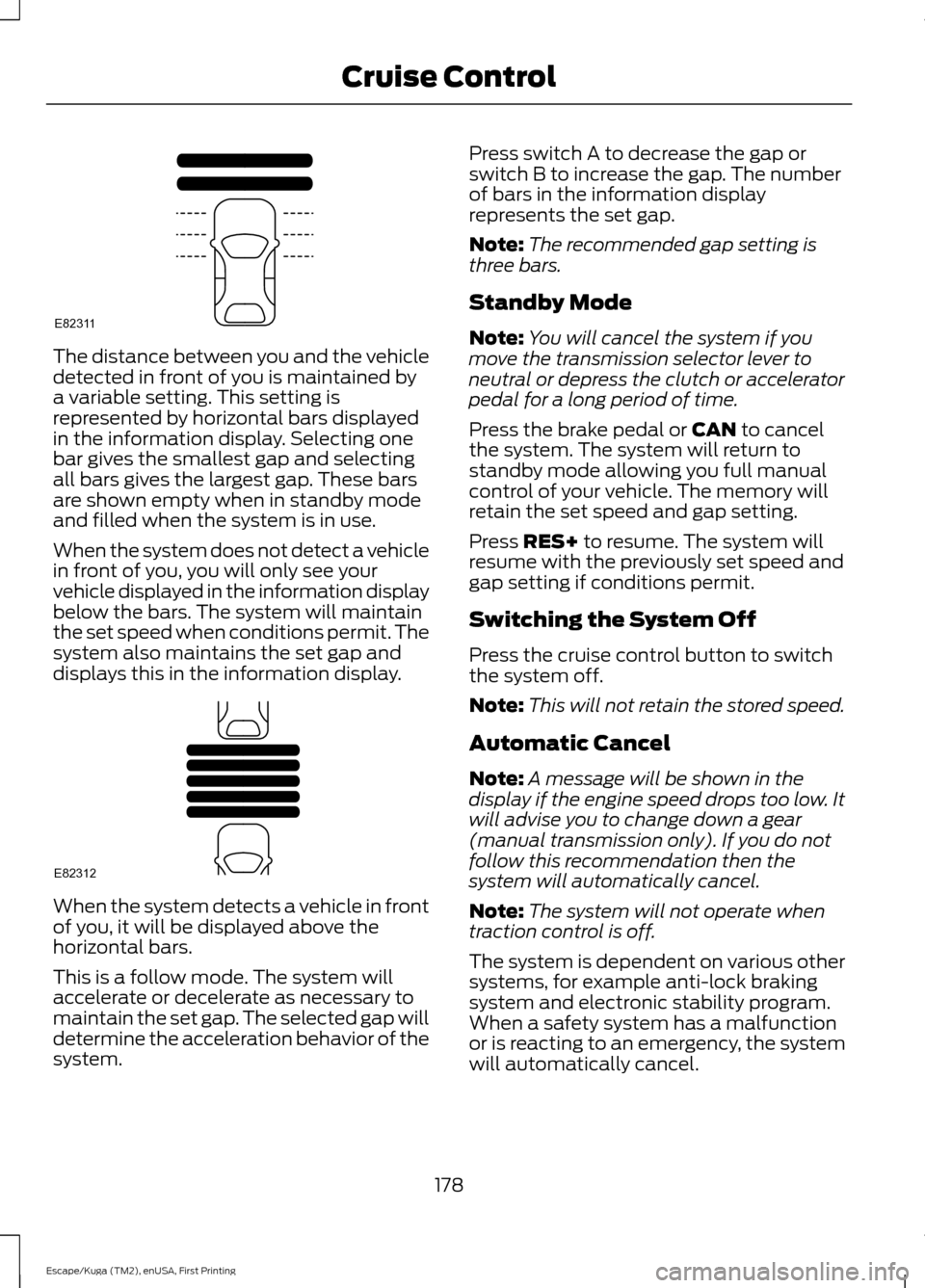
The distance between you and the vehicle
detected in front of you is maintained by
a variable setting. This setting is
represented by horizontal bars displayed
in the information display. Selecting one
bar gives the smallest gap and selecting
all bars gives the largest gap. These bars
are shown empty when in standby mode
and filled when the system is in use.
When the system does not detect a vehicle
in front of you, you will only see your
vehicle displayed in the information display
below the bars. The system will maintain
the set speed when conditions permit. The
system also maintains the set gap and
displays this in the information display.
When the system detects a vehicle in front
of you, it will be displayed above the
horizontal bars.
This is a follow mode. The system will
accelerate or decelerate as necessary to
maintain the set gap. The selected gap will
determine the acceleration behavior of the
system. Press switch A to decrease the gap or
switch B to increase the gap. The number
of bars in the information display
represents the set gap.
Note:
The recommended gap setting is
three bars.
Standby Mode
Note: You will cancel the system if you
move the transmission selector lever to
neutral or depress the clutch or accelerator
pedal for a long period of time.
Press the brake pedal or CAN to cancel
the system. The system will return to
standby mode allowing you full manual
control of your vehicle. The memory will
retain the set speed and gap setting.
Press
RES+ to resume. The system will
resume with the previously set speed and
gap setting if conditions permit.
Switching the System Off
Press the cruise control button to switch
the system off.
Note: This will not retain the stored speed.
Automatic Cancel
Note: A message will be shown in the
display if the engine speed drops too low. It
will advise you to change down a gear
(manual transmission only). If you do not
follow this recommendation then the
system will automatically cancel.
Note: The system will not operate when
traction control is off.
The system is dependent on various other
systems, for example anti-lock braking
system and electronic stability program.
When a safety system has a malfunction
or is reacting to an emergency, the system
will automatically cancel.
178
Escape/Kuga (TM2), enUSA, First Printing Cruise ControlE82311 E82312
Page 182 of 486
You will hear an audible tone and a
message will be shown in the display. You
must then intervene and adapt your driving
and speed to vehicles in front of you.
An automatic cancel can occur if:
•
Your vehicle speed falls below
approximately 17 mph (25 km/h).
• The tires lose traction.
• The brake temperature is too high, for
example when driving on mountainous
or hilly roads.
• The engine speed is too low.
• The radar sensor is covered.
• You apply the parking brake.
Forward Alert Function WARNINGS
Never wait for a crash warning. When
driving you are responsible for
maintaining the correct distance and
speed, even when the system is used. The system will only react to vehicles
in front of you traveling in the same
direction and will not react to slow
or stationary vehicles. Never drive in a manner to provoke
the system. The system is designed
to assist in emergencies only.
Warnings may be absent, triggered
late or triggered unnecessarily due
to detection beam issues. See Using
Adaptive Cruise Control (page 175). Note:
The brake support system only
reduces the crash speed if you brake
immediately once alerted.
Note: If you depress the brake pedal quick
enough, you will maintain full braking. This
is regardless of how much force you apply
to the pedal. Note:
Brake support prepares the braking
system for rapid braking by gently applying
the brake. You may notice a slight jerk.
Note: Crash alerts will only occur when you
switch the system on. Brake support is
always on and you can not turn it off.
Note: You can use the system with or
without switching the adaptive cruise
control system on.
Note: The system uses the same radar
sensors as adaptive cruise control and
therefore has the same limitations. See
Using Adaptive Cruise Control (page 175).
The system is designed to assist you by
warning you of the risk of a crash with the
vehicle in front of you.
The system is designed to alert you by
warning chimes and a visual warning in the
information display.
Brake support is turned on to enable full
braking effectiveness and reduce the
severity of a crash with the vehicle in front
of you.
Adjusting the Warning Sensitivity
This will determine how early the system
alerts you. You can adjust the sensitivity
using the steering wheel controls.
179
Escape/Kuga (TM2), enUSA, First Printing Cruise Control
Page 186 of 486
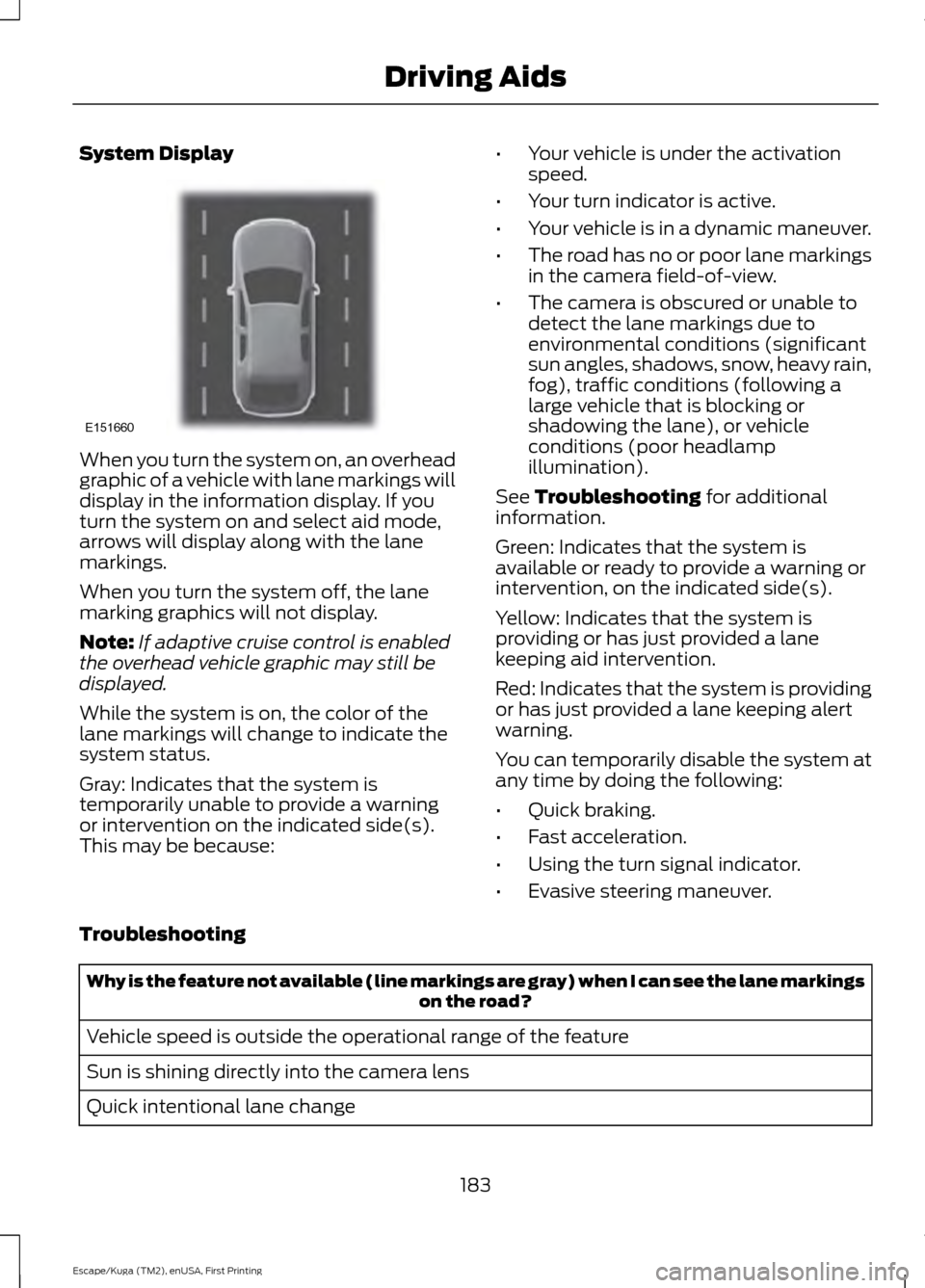
System Display
When you turn the system on, an overhead
graphic of a vehicle with lane markings will
display in the information display. If you
turn the system on and select aid mode,
arrows will display along with the lane
markings.
When you turn the system off, the lane
marking graphics will not display.
Note:
If adaptive cruise control is enabled
the overhead vehicle graphic may still be
displayed.
While the system is on, the color of the
lane markings will change to indicate the
system status.
Gray: Indicates that the system is
temporarily unable to provide a warning
or intervention on the indicated side(s).
This may be because: •
Your vehicle is under the activation
speed.
• Your turn indicator is active.
• Your vehicle is in a dynamic maneuver.
• The road has no or poor lane markings
in the camera field-of-view.
• The camera is obscured or unable to
detect the lane markings due to
environmental conditions (significant
sun angles, shadows, snow, heavy rain,
fog), traffic conditions (following a
large vehicle that is blocking or
shadowing the lane), or vehicle
conditions (poor headlamp
illumination).
See Troubleshooting for additional
information.
Green: Indicates that the system is
available or ready to provide a warning or
intervention, on the indicated side(s).
Yellow: Indicates that the system is
providing or has just provided a lane
keeping aid intervention.
Red: Indicates that the system is providing
or has just provided a lane keeping alert
warning.
You can temporarily disable the system at
any time by doing the following:
• Quick braking.
• Fast acceleration.
• Using the turn signal indicator.
• Evasive steering maneuver.
Troubleshooting Why is the feature not available (line markings are gray) when I can see the lane markings
on the road?
Vehicle speed is outside the operational range of the feature
Sun is shining directly into the camera lens
Quick intentional lane change
183
Escape/Kuga (TM2), enUSA, First Printing Driving AidsE151660
Page 196 of 486
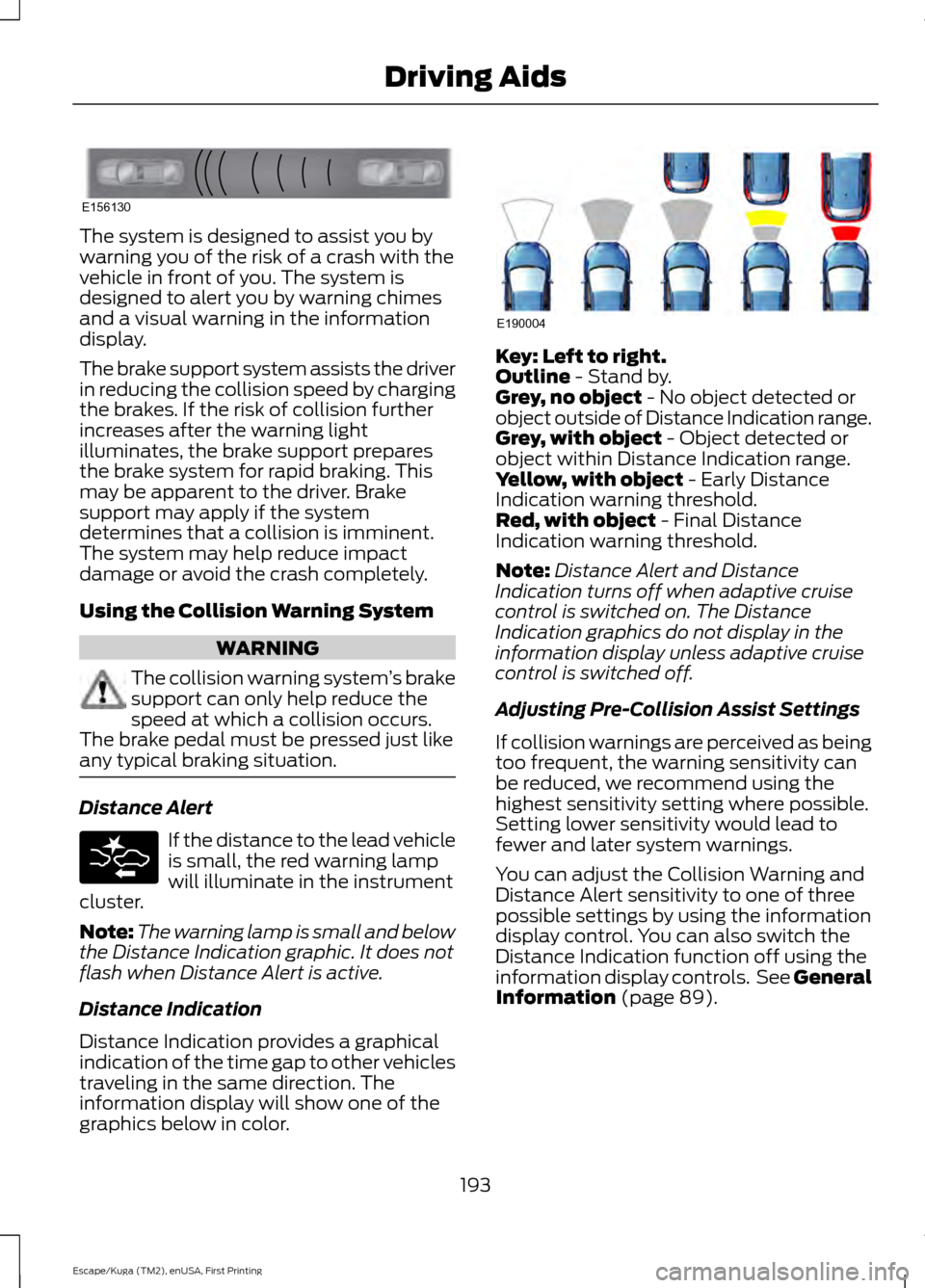
The system is designed to assist you by
warning you of the risk of a crash with the
vehicle in front of you. The system is
designed to alert you by warning chimes
and a visual warning in the information
display.
The brake support system assists the driver
in reducing the collision speed by charging
the brakes. If the risk of collision further
increases after the warning light
illuminates, the brake support prepares
the brake system for rapid braking. This
may be apparent to the driver. Brake
support may apply if the system
determines that a collision is imminent.
The system may help reduce impact
damage or avoid the crash completely.
Using the Collision Warning System
WARNING
The collision warning system
’s brake
support can only help reduce the
speed at which a collision occurs.
The brake pedal must be pressed just like
any typical braking situation. Distance Alert
If the distance to the lead vehicle
is small, the red warning lamp
will illuminate in the instrument
cluster.
Note: The warning lamp is small and below
the Distance Indication graphic. It does not
flash when Distance Alert is active.
Distance Indication
Distance Indication provides a graphical
indication of the time gap to other vehicles
traveling in the same direction. The
information display will show one of the
graphics below in color. Key: Left to right.
Outline - Stand by.
Grey, no object - No object detected or
object outside of Distance Indication range.
Grey, with object
- Object detected or
object within Distance Indication range.
Yellow, with object
- Early Distance
Indication warning threshold.
Red, with object
- Final Distance
Indication warning threshold.
Note: Distance Alert and Distance
Indication turns off when adaptive cruise
control is switched on. The Distance
Indication graphics do not display in the
information display unless adaptive cruise
control is switched off.
Adjusting Pre-Collision Assist Settings
If collision warnings are perceived as being
too frequent, the warning sensitivity can
be reduced, we recommend using the
highest sensitivity setting where possible.
Setting lower sensitivity would lead to
fewer and later system warnings.
You can adjust the Collision Warning and
Distance Alert sensitivity to one of three
possible settings by using the information
display control. You can also switch the
Distance Indication function off using the
information display controls. See General
Information
(page 89).
193
Escape/Kuga (TM2), enUSA, First Printing Driving AidsE156130 E190004
Page 213 of 486
•
Transmissions give their best fuel
economy when operated in the top
cruise gear and with steady pressure
on the gas pedal.
• Four-wheel-drive operation (if
equipped) is less fuel efficient than
two-wheel-drive operation.
• Close the windows for high-speed
driving.
DRIVING THROUGH WATER WARNING
Do not drive through flowing or deep
water as you may lose control of your
vehicle.
Note:
Driving through standing water can
cause vehicle damage.
Note: Engine damage can occur if water
enters the air filter.
Before driving through standing water,
check the depth. Never drive through water
that is higher than the bottom of the front
rocker area of your vehicle. When driving through standing water, drive
very slowly and do not stop your vehicle.
Your brake performance and traction may
be limited. After driving through water and
as soon as it is safe to do so: •
Lightly press the brake pedal to dry the
brakes and to check that they work.
• Check that the horn works.
• Check that the exterior lights work.
• Turn the steering wheel to check that
the steering power assist works.
FLOOR MATS WARNINGS
Always use floor mats that are
designed to fit the foot well of your
vehicle. Only use floor mats that
leave the pedal area unobstructed. Only
use floor mats that are firmly secured to
retention posts so that they cannot slip out
of position and interfere with the pedals
or impair safe operation of your vehicle in
other ways. Pedals that cannot move freely can
cause loss of vehicle control and
increase the risk of serious personal
injury. Always make sure that the floor
mats are properly attached to the
retention posts in the carpet that are
supplied with your vehicle. Floor mats must
be properly secured to both retention posts
to make sure mats do not shift out of
position. Never place floor mats or any other
covering in the vehicle foot well that
cannot be properly secured to
prevent them from moving and interfering
with the pedals or the ability to control the
vehicle. Never place floor mats or any other
covering on top of already installed
floor mats. Floor mats should always
rest on top of vehicle carpeting surface and
not another floor mat or other covering.
Additional floor mats or any other covering
will reduce the pedal clearance and
potentially interfere with pedal operation.
210
Escape/Kuga (TM2), enUSA, First Printing Driving HintsE176360
Page 476 of 486
4
4WD
See: Four-Wheel Drive..................................... 148
A
A/C See: Climate Control......................................... 104
About This Manual...........................................7
ABS See: Brakes............................................................ 153
ABS driving hints See: Hints on Driving With Anti-Lock
Brakes................................................................. 153
Accessories....................................................433 Exterior Style....................................................... 433
Interior Style........................................................ 433
Lifestyle................................................................. 433
Peace of Mind..................................................... 433
Accessories See: Replacement Parts
Recommendation............................................. 11
ACC See: Using Adaptive Cruise Control.............175
Active Park Assist.........................................165 Deactivating the Active Park Assist
Feature.............................................................. 169
Parallel Parking, Perpendicular Parking, Parallel Park Out Assist............................... 165
Troubleshooting the System.......................... 169
Adjusting the Headlamps
..........................251
Horizontal Aim Adjustment........................... 253
Vertical Aim Adjustment.................................. 251
Adjusting the Steering Wheel...................66
Airbag Disposal
...............................................43
Air Conditioning See: Climate Control......................................... 104
Air Filter See: Changing the Engine Air Filter.............259
Alarm See: Anti-Theft Alarm........................................ 65
Ambient Lighting.............................................77
Anti-Theft Alarm
............................................65
Arming the Alarm................................................. 65
Disarming the Alarm........................................... 65
Appendices....................................................456 Apps.................................................................406
........................................................................\
......... 406
SiriusXM Traffic and Travel Link................... 407
Audible Warnings and Indicators.............87 Automatic Transmission Warning
Chime.................................................................. 88
Engine On Warning Chime................................ 87
Headlamps On Warning Chime..................... 88
Key in Ignition Warning Chime......................... 87
Keyless Warning Alert ........................................ 87
Parking Brake On Warning Chime.................88
Audio Control
..................................................66
Type One.................................................................. 67
Type Two................................................................. 67
Audio System
.................................................312
General Information........................................... 312
Audio Unit - Vehicles With: AM/FM/CD/ SYNC/Satellite Radio
..............................318
Audio Unit - Vehicles With: AM/FM/CD/ SYNC..............................................................315
Audio Unit - Vehicles With: AM/FM/ CD....................................................................313
Audio Unit - Vehicles With: Premium AM/FM/CD...................................................319
Audio Unit - Vehicles With: Sony AM/ FM/CD...........................................................320
Autolamps.........................................................73 Windshield Wiper Activated
Headlamps......................................................... 73
Automatic Climate Control......................105 Temperature Control......................................... 107
Automatic High Beam Control
..................75
Activating the System......................................... 75
Manually Overriding the System.................... 76
Automatic Transmission
...........................144
Brake-Shift Interlock Override....................... 146
If Your Vehicle Gets Stuck In Mud or Snow................................................................... 147
SelectShift Automatic ™
Transmission................................................... 145
Transmission Selector Positions.................. 144
Automatic Transmission Fluid Check.............................................................247
Auto-Start-Stop............................................133 Disabling Auto StartStop................................ 134
Enabling Auto StartStop.................................. 133
Autowipers.......................................................69
473
Escape/Kuga (TM2), enUSA, First Printing Index
Page 478 of 486
Climate Control............................................104
Collision Warning System.........................192
PRINCIPLE OF OPERATION........................... 192
Coolant Check See: Engine Coolant Check............................ 243
Crash Sensors and Airbag Indicator........42
Creating a MyKey
...........................................50
Programming or Changing Configurable
Settings................................................................ 51
Cross Traffic Alert.........................................187 False Alerts........................................................... 190
Switching the System Off and On...............190
System Errors...................................................... 190
System Lights, Messages and Audible Alerts.................................................................. 189
System Limitations........................................... 190
Using the System................................................ 187
Cruise Control.................................................68 Principle of Operation....................................... 174
Type One................................................................. 68
Type Two................................................................. 68
Cruise control See: Using Cruise Control................................. 174
Customer Assistance
..................................218
D
Data Recording
..................................................9
Event Data Recording........................................... 9
Service Data Recording........................................ 9
Daytime Running Lamps.............................74 Type 1 - Conventional
(Non-Configurable)........................................ 74
Type 2 - Configurable.......................................... 74
Digital Radio
...................................................321
HD Radio Reception and Station
Troubleshooting............................................ 322
Direction Indicators
........................................76
Driver Alert......................................................180
Using Driver Alert............................................... 180
Driver and Passenger Airbags...................36 Children and Airbags.......................................... 36
Proper Driver and Front Passenger Seating Adjustment........................................................ 36
Driver Knee Airbag.........................................40
Driving Aids
.....................................................180
Driving Hints..................................................209
Driving Through Water................................210 DRL
See: Daytime Running Lamps......................... 74
E
Eco Mode
..........................................................191
Resetting Eco Mode............................................ 191
Type 1........................................................................\
191
Type 2 and 3.......................................................... 191
Economical Driving
.....................................209
Electric Parking Brake.................................154 Applying the Electric Parking brake.............154
Battery With No Charge................................... 156
Parking On a Hill (Vehicles With a Manual Transmission) ................................................ 154
Releasing the Electric Parking Brake...........155
Emission Control System...........................141 On-Board Diagnostics (OBD-II).................... 142
Readiness for Inspection and Maintenance (I/M) Testing.................................................... 142
End User License Agreement.................456 VEHICLE SOFTWARE END USER LICENSE
AGREEMENT (EULA) ................................ 456
Engine Block Heater.....................................131 Using the Engine Block Heater...................... 132
Engine Coolant Check................................243 Adding Coolant................................................... 243
Coolant Change................................................. 245
Engine Coolant Temperature Management.................................................. 246
Fail-Safe Cooling............................................... 245
Recycled Coolant............................................... 244
Severe Climates................................................. 245
Engine Immobilizer See: Passive Anti-Theft System..................... 63
Engine Oil Check
...........................................241
Adding Engine Oil............................................... 241
Engine Oil Dipstick - 1.5L EcoBoost™..................................................241
Engine Oil Dipstick - 2.0L EcoBoost™/ 2.5L..................................................................241
Engine Specifications - 1.5L EcoBoost™.................................................294
Drivebelt Routing............................................... 294
Engine Specifications - 2.0L EcoBoost™.................................................294
Drivebelt Routing............................................... 295
475
Escape/Kuga (TM2), enUSA, First Printing Index
Page 480 of 486
Getting the Services You Need................218
Away From Home............................................... 218
H
Hazard Warning Flashers...........................213
Headlamp Adjusting See: Adjusting the Headlamps...................... 251
Headlamp Exit Delay.....................................74
Headlamp Removal See: Removing a Headlamp.......................... 253
Head Restraints
..............................................112
Adjusting the Head Restraint.......................... 113
Heated Seats
..................................................119
Heated Steering Wheel...............................68
Heated Windows and Mirrors...................110 Heated Exterior Mirror........................................ 110
Heated Rear Window......................................... 110
Heating See: Climate Control......................................... 104
Hill Start Assist..............................................156 Switching the System On and Off................157
Using Hill Start Assist....................................... 156
Hints on Controlling the Interior Climate..........................................................107
Cooling the Interior Quickly............................ 109
General Hints........................................................ 107
Heating the Interior Quickly........................... 108
Recommended Settings for Cooling..........109
Recommended Settings for Heating..........108
Side Window Defogging in Cold Weather............................................................ 109
Hints on Driving With Anti-Lock Brakes.............................................................153
Home Screen
.................................................376
Hood Lock See: Opening and Closing the Hood..........236
I
Ignition Switch
...............................................128
In California (U.S. Only).............................219
Information Display Control......................68
Information Displays....................................89
General Information........................................... 89
Information Messages
.................................93
Airbag....................................................................... 93
Alarm........................................................................\
94Automatic Engine Shutdown..........................
94
Auto Start-Stop.................................................... 95
Battery and Charging System......................... 95
Blind Spot Information and Cross Traffic Alert System..................................................... 96
Cruise Control and Adaptive Cruise Control (ACC)................................................................... 97
Doors........................................................................\
. 97
Engine...................................................................... 98
Hill Start Assist..................................................... 98
Keyless Vehicle..................................................... 98
Lighting.................................................................... 99
Maintenance.......................................................... 99
Message Indicator................................................ 93
MyKey..................................................................... 100
Park Aid.................................................................. 100
Park Brake.............................................................. 101
Power Steering..................................................... 101
Starting System .................................................. 101
Tire Pressure Monitoring System.................103
Traction Control.................................................. 103
Trailer...................................................................... 103
Transmission and Four-Wheel Drive...........102
Installing Child Restraints
............................16
Child Seats............................................................... 16
Using Lap and Shoulder Belts.......................... 17
Using Lower Anchors and Tethers for CHildren (LATCH)............................................ 19
Using Tether Straps.............................................. 21
Instrument Cluster
........................................83
Instrument Lighting Dimmer......................74
Interior Lamps..................................................77
Front Interior Lamp ............................................. 77
Rear Interior Lamp................................................ 77
Interior Mirror....................................................81 Auto-Dimming Mirror........................................... 81
Introduction.........................................................7
J
Jump Starting the Vehicle.........................214 Connecting the Jumper Cables..................... 214
Jump Starting....................................................... 215
Preparing Your Vehicle...................................... 214
Removing the Jumper Cables........................ 215
477
Escape/Kuga (TM2), enUSA, First Printing Index
Page 483 of 486
Scheduled Maintenance and Mechanical
Repairs................................................................... 11
Warranty on Replacement Parts..................... 12
Replacing a Lost Key or Remote Control............................................................48
Reporting Safety Defects (Canada Only)..............................................................223
Reporting Safety Defects (U.S. Only)
..............................................................223
Roadside Assistance...................................212
Vehicles Sold in Canada: Getting Roadside
Assistance......................................................... 212
Vehicles Sold in Canada: Roadside Assistance Program Coverage.................. 213
Vehicles Sold in Canada: Using Roadside Assistance........................................................ 213
Vehicles Sold in the United States: Getting Roadside Assistance.................................... 212
Vehicles Sold in the United States: Using Roadside Assistance.................................... 212
Roadside Emergencies...............................212
Roof Racks and Load Carriers..................197 Adjusting the Crossbar..................................... 197
Running-In See: Breaking-In................................................ 209
Running Out of Fuel
....................................136
Adding Fuel From a Portable Fuel
Container........................................................... 137
Filling a Portable Fuel Container................... 137
S
Safety Canopy ™
............................................40
Safety Precautions.......................................135
Satellite Radio..............................................324
Satellite Radio Electronic Serial Number
(ESN)................................................................. 325
Satellite Radio Reception Factors...............324
SIRIUS® Satellite Radio Service.................. 324
Troubleshooting................................................. 325
Scheduled Maintenance Record
...........445
Scheduled Maintenance...........................437
Seatbelt Extension........................................33
Seatbelt Height Adjustment.....................30
Seatbelt Reminder
..........................................31
Belt-Minder™......................................................... 31
Seatbelts............................................................27 Principle of Operation......................................... 27Seatbelt Warning Lamp and Indicator
Chime................................................................31
Conditions of operation...................................... 31
Seats...................................................................112
Security..............................................................63
Settings..........................................................408 911 Assist................................................................ 413
Ambient Lighting................................................ 418
Bluetooth.............................................................. 410
Clock....................................................................... 410
Display.................................................................... 419
General.................................................................... 417
Media Player....................................................... 409
Mobile Apps.......................................................... 416
Navigation............................................................. 414
Phone..................................................................... 410
Radio....................................................................... 413
Sound.................................................................... 408
Valet Mode........................................................... 420
Vehicle.................................................................... 418
Voice Control....................................................... 420
Wi-Fi........................................................................\
418
Side Airbags.....................................................39
Side Sensing System..................................163 Obstacle Distance Indicator........................... 164
Sitting in the Correct Position...................112
Snow Chains See: Using Snow Chains................................. 284
Special Notices................................................12 New Vehicle Limited Warranty......................... 12
Notice to Owners of Pickup Trucks and Utility Type Vehicles........................................ 12
On Board Diagnostics Data Link Connector............................................................ 12
Special Instructions.............................................. 12
Using Your Vehicle as an Ambulance............13
Using Your Vehicle With a Snowplow............13
Special Operating Conditions Scheduled Maintenance..............................................443
Exceptions........................................................... 444
Speed Control See: Cruise Control............................................. 174
Stability Control............................................159 Principle of Operation....................................... 159
Starter Switch See: Ignition Switch........................................... 128
Starting a Gasoline Engine........................129 Automatic Engine Shutdown........................ 130
480
Escape/Kuga (TM2), enUSA, First Printing Index