lights FORD ESCAPE 2017 3.G User Guide
[x] Cancel search | Manufacturer: FORD, Model Year: 2017, Model line: ESCAPE, Model: FORD ESCAPE 2017 3.GPages: 486, PDF Size: 6.34 MB
Page 176 of 486
The fixed and active guidelines fade in and
out depending on the steering wheel
position. The active guidelines do not
display when the steering wheel position
is straight.
Always use caution while reversing.
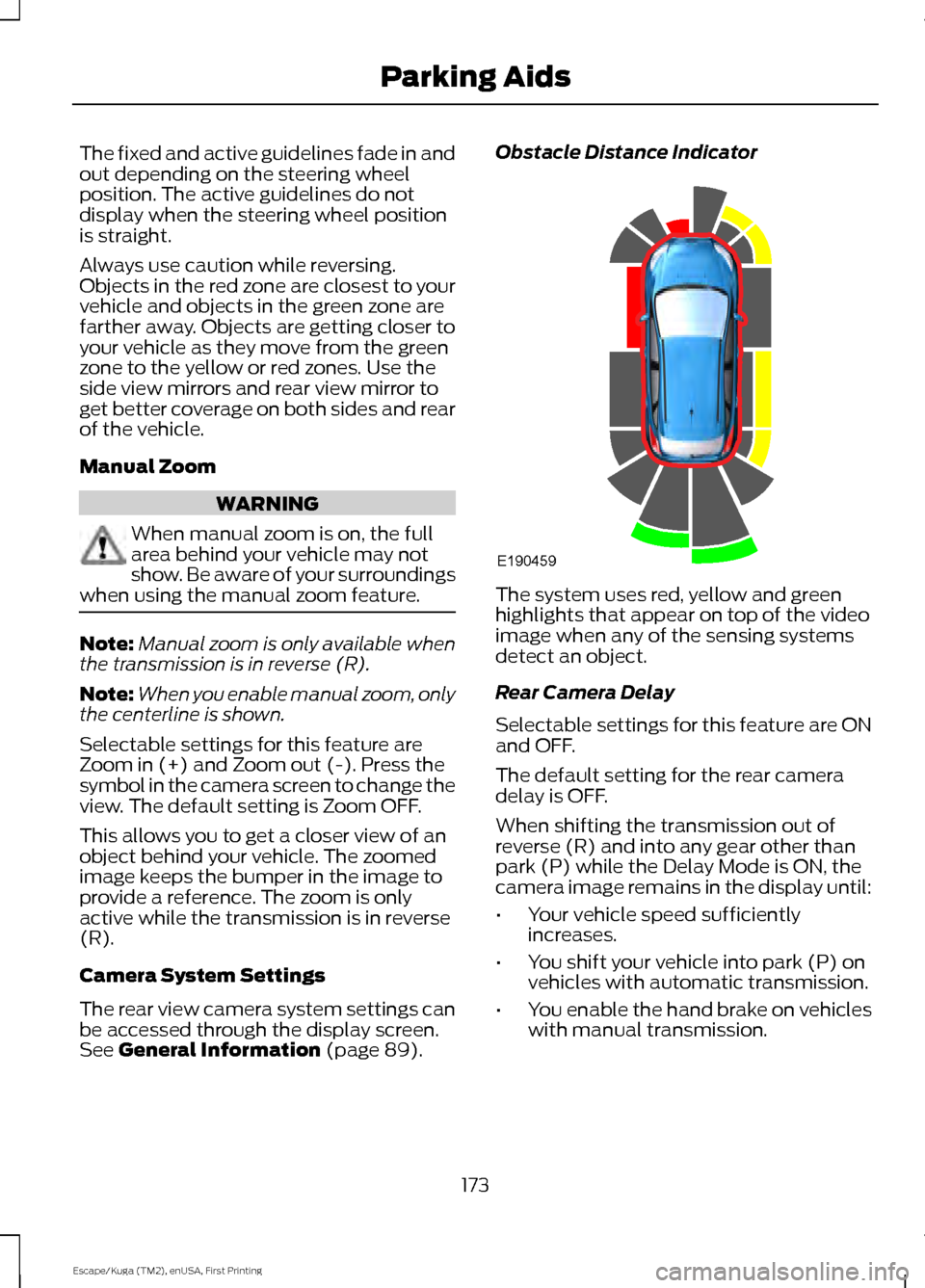
Objects in the red zone are closest to your
vehicle and objects in the green zone are
farther away. Objects are getting closer to
your vehicle as they move from the green
zone to the yellow or red zones. Use the
side view mirrors and rear view mirror to
get better coverage on both sides and rear
of the vehicle.
Manual Zoom
WARNING
When manual zoom is on, the full
area behind your vehicle may not
show. Be aware of your surroundings
when using the manual zoom feature. Note:
Manual zoom is only available when
the transmission is in reverse (R).
Note: When you enable manual zoom, only
the centerline is shown.
Selectable settings for this feature are
Zoom in (+) and Zoom out (-). Press the
symbol in the camera screen to change the
view. The default setting is Zoom OFF.
This allows you to get a closer view of an
object behind your vehicle. The zoomed
image keeps the bumper in the image to
provide a reference. The zoom is only
active while the transmission is in reverse
(R).
Camera System Settings
The rear view camera system settings can
be accessed through the display screen.
See General Information (page 89). Obstacle Distance Indicator
The system uses red, yellow and green
highlights that appear on top of the video
image when any of the sensing systems
detect an object.
Rear Camera Delay
Selectable settings for this feature are ON
and OFF.
The default setting for the rear camera
delay is OFF.
When shifting the transmission out of
reverse (R) and into any gear other than
park (P) while the Delay Mode is ON, the
camera image remains in the display until:
•
Your vehicle speed sufficiently
increases.
• You shift your vehicle into park (P) on
vehicles with automatic transmission.
• You enable the hand brake on vehicles
with manual transmission.
173
Escape/Kuga (TM2), enUSA, First Printing Parking AidsE190459
Page 178 of 486
Note:
You erase the set speed when you
switch the system off.
USING ADAPTIVE CRUISE
CONTROL (If Equipped) WARNINGS
The system is not a crash warning or
avoidance system. You must
intervene if the system does not
detect a vehicle in front of you. When you use the system you are
responsible for maintaining the
correct distance and speed. Always
pay attention to the traffic conditions and
intervene when the system is not
maintaining a suitable speed or distance. The system does not relieve you of
your responsibility to drive with due
care and attention.
The system does not brake for slow
or stationary vehicles, pedestrians,
objects in the road, oncoming and
crossing vehicles. Do not use the system in poor
visibility, specifically fog, heavy rain,
spray or snow.
Do not use the system on icy or
slippery roads.
Do not use the system when entering
or leaving a freeway.
Note:
Only use the system when conditions
are favorable, for example on freeways and
main roads with steady free flowing traffic.
Note: The radar sensor has a limited field
of vision. In some situations it may detect a
vehicle other than the one expected or not
detect any vehicle at all. Note:
When you switch the system on, it is
possible that you will hear some unusual
sounds during automatic braking. This is
normal and caused by the automatic
braking system.
Note: Keep the front of your vehicle free
from dirt, metal badges or objects. This
includes vehicle front protectors and
additional lights which may prevent the
sensor from operating.
The system is designed to help you
maintain a gap from the vehicle in front of
you. If there is no vehicle in front of you the
system will maintain a set speed. The
system is intended to provide enhanced
operation of your vehicle when following
other vehicles which are in the same lane
and traveling in the same direction.
The system is based on the use of a radar
sensor which projects a beam directly
forward of your vehicle. This beam will
detect any vehicle ahead within the
system's range.
The radar sensor is located behind the
front grille.
175
Escape/Kuga (TM2), enUSA, First Printing Cruise Control
Page 188 of 486
BLIND SPOT INFORMATION
SYSTEM (If Equipped)
WARNING
To help avoid injuries, NEVER use the
Blind Spot Information System as a
replacement for using the interior
and exterior mirrors or looking over your
shoulder before changing lanes. The Blind
Spot Information System is not a
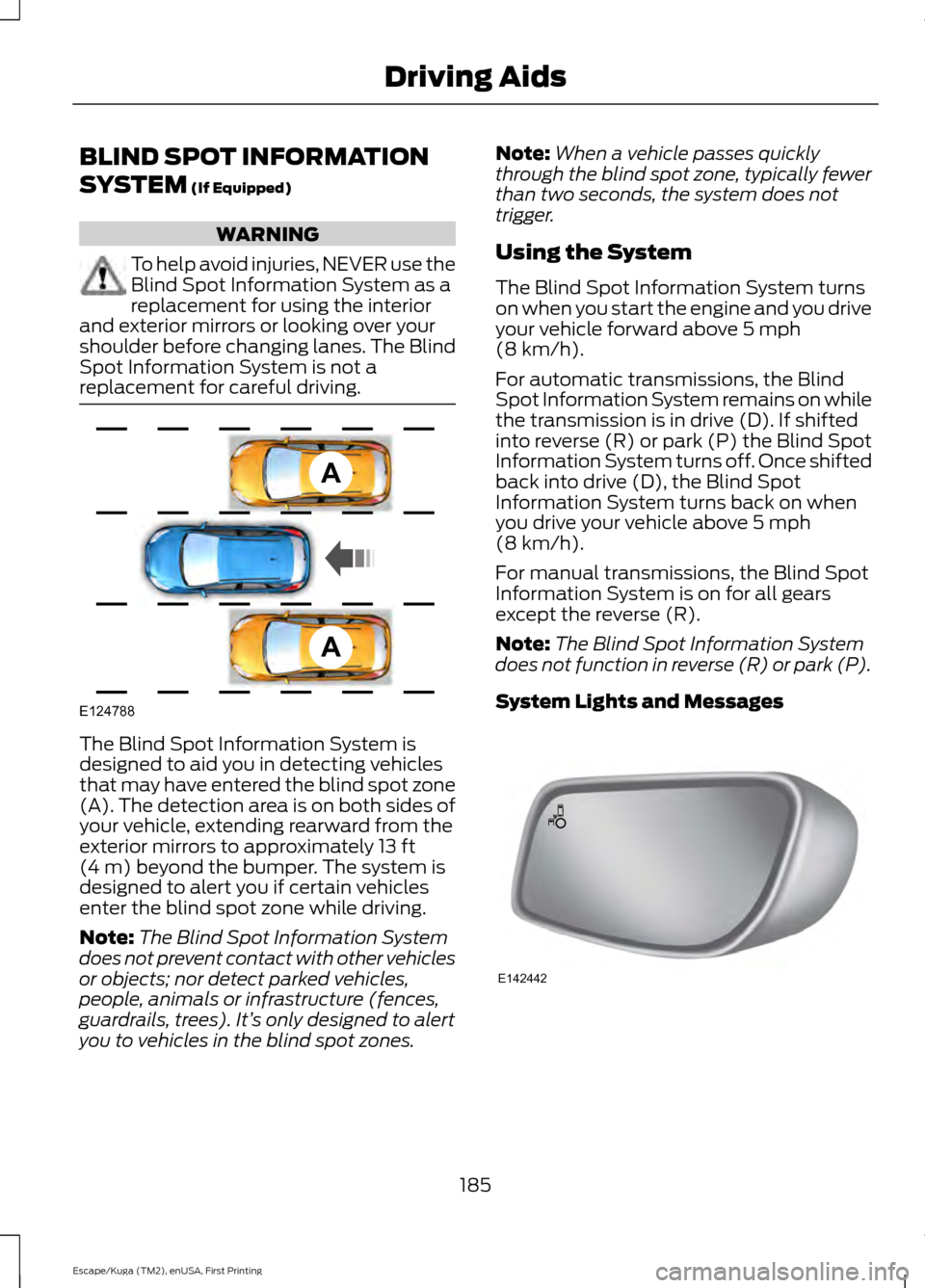
replacement for careful driving. The Blind Spot Information System is
designed to aid you in detecting vehicles
that may have entered the blind spot zone
(A). The detection area is on both sides of
your vehicle, extending rearward from the
exterior mirrors to approximately
13 ft
(4 m) beyond the bumper. The system is
designed to alert you if certain vehicles
enter the blind spot zone while driving.
Note: The Blind Spot Information System
does not prevent contact with other vehicles
or objects; nor detect parked vehicles,
people, animals or infrastructure (fences,
guardrails, trees). It’ s only designed to alert
you to vehicles in the blind spot zones. Note:
When a vehicle passes quickly
through the blind spot zone, typically fewer
than two seconds, the system does not
trigger.
Using the System
The Blind Spot Information System turns
on when you start the engine and you drive
your vehicle forward above
5 mph
(8 km/h).
For automatic transmissions, the Blind
Spot Information System remains on while
the transmission is in drive (D). If shifted
into reverse (R) or park (P) the Blind Spot
Information System turns off. Once shifted
back into drive (D), the Blind Spot
Information System turns back on when
you drive your vehicle above
5 mph
(8 km/h).
For manual transmissions, the Blind Spot
Information System is on for all gears
except the reverse (R).
Note: The Blind Spot Information System
does not function in reverse (R) or park (P).
System Lights and Messages 185
Escape/Kuga (TM2), enUSA, First Printing Driving AidsA
A
E124788 E142442
Page 192 of 486
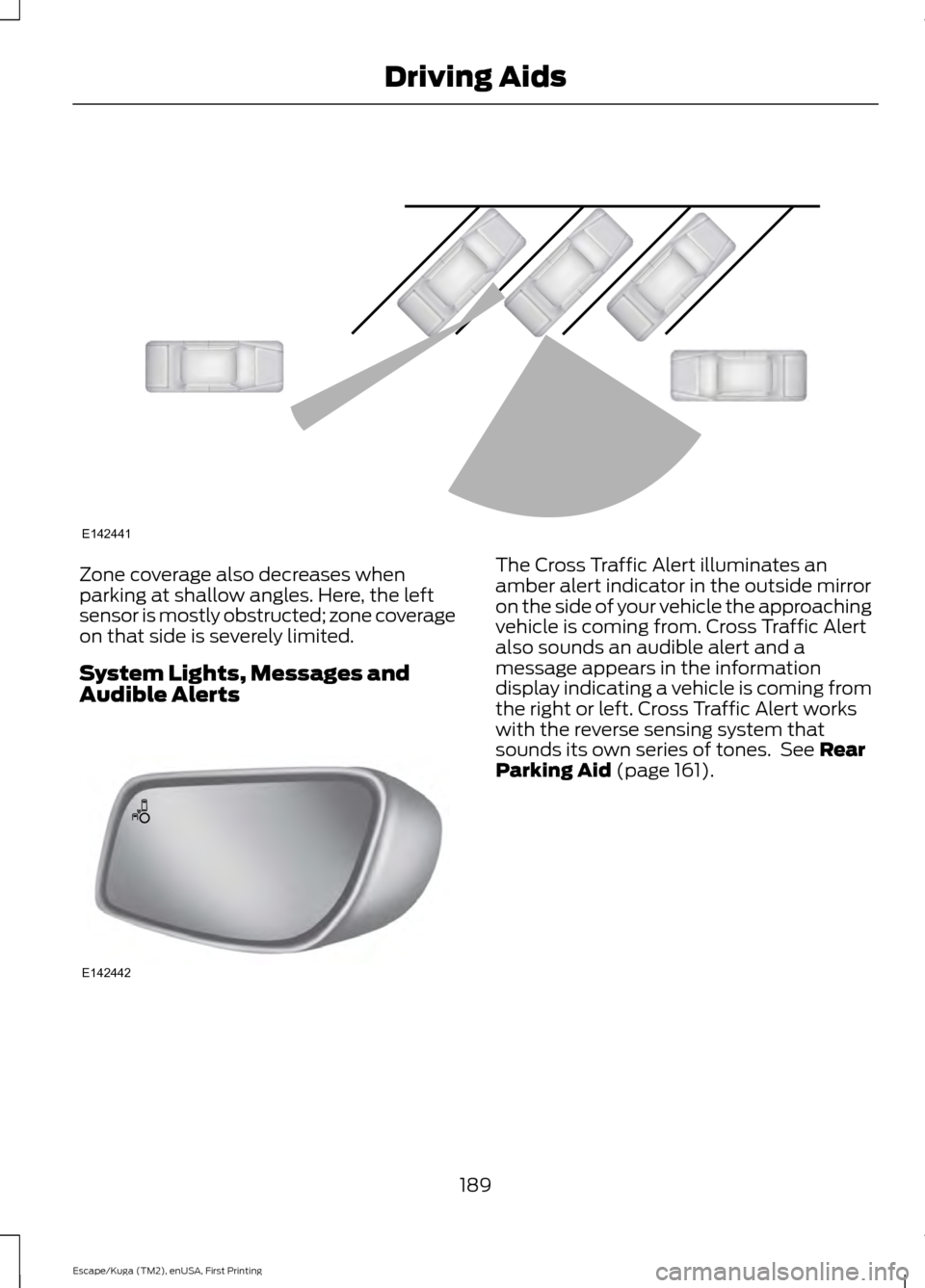
Zone coverage also decreases when
parking at shallow angles. Here, the left
sensor is mostly obstructed; zone coverage
on that side is severely limited.
System Lights, Messages and
Audible Alerts The Cross Traffic Alert illuminates an
amber alert indicator in the outside mirror
on the side of your vehicle the approaching
vehicle is coming from. Cross Traffic Alert
also sounds an audible alert and a
message appears in the information
display indicating a vehicle is coming from
the right or left. Cross Traffic Alert works
with the reverse sensing system that
sounds its own series of tones. See Rear
Parking Aid (page 161).
189
Escape/Kuga (TM2), enUSA, First Printing Driving AidsE142441 E142442
Page 209 of 486
ESSENTIAL TOWING CHECKS
Follow these guidelines for safe towing:
•
Do not tow a trailer until you drive your
vehicle at least 1000 miles (1600
kilometers).
• Consult your local motor vehicle laws
for towing a trailer.
• See the instructions included with
towing accessories for the proper
installation and adjustment
specifications.
• Service your vehicle more frequently if
you tow a trailer. See your scheduled
maintenance information.
• If you use a rental trailer, follow the
instructions the rental agency gives
you.
You can find information on load
specification terms found on the tire label
and Safety Compliance label as well as
instructions on calculating your vehicle's
load in the Load Carrying chapter. See
Load Limit (page 198).
Remember to account for the trailer
tongue weight as part of your vehicle load
when calculating the total vehicle weight.
Hitches
Do not use a hitch that either clamps onto
the bumper or attaches to the axle.
Distribute the trailer load so 10-15% of the
total trailer weight is on the tongue.
Safety Chains
Note: Never attach safety chains to the
bumper.
Always connect the safety chains to the
hook retainers of your vehicle hitch.
To connect the safety chains, cross them
under the trailer tongue and allow enough
slack for turning tight corners. Do not allow
the chains to drag on the ground. Trailer Brakes WARNING
Do not connect a trailer's hydraulic
brake system directly to your
vehicle's brake system. Your vehicle
may not have enough braking power and
your chances of having a collision greatly
increase. Electric brakes and manual, automatic or
surge-type trailer brakes are safe if you
install them properly and adjust them to
the manufacturer's specifications. The
trailer brakes must meet local and federal
regulations.
The rating for the tow vehicle's braking
system operation is at the gross vehicle
weight rating, not the gross combined
weight rating.
Separate functioning brake systems
are required for safe control of towed
vehicles and trailers weighing more
than 1500 pounds (680 kilograms)
when load.
Trailer Lamps
WARNING
Never connect any trailer lamp wiring
to the vehicle's tail lamp wiring; this
may damage the electrical system
resulting in fire. Contact your authorized
dealer as soon as possible for assistance
in proper trailer tow wiring installation.
Additional electrical equipment may be
required. Trailer lamps are required on most towed
vehicles. Make sure all running lights, brake
lights, turn signals and hazard lights are
working.
206
Escape/Kuga (TM2), enUSA, First Printing Towing
Page 213 of 486
•
Transmissions give their best fuel
economy when operated in the top
cruise gear and with steady pressure
on the gas pedal.
• Four-wheel-drive operation (if
equipped) is less fuel efficient than
two-wheel-drive operation.
• Close the windows for high-speed
driving.
DRIVING THROUGH WATER WARNING
Do not drive through flowing or deep
water as you may lose control of your
vehicle.
Note:
Driving through standing water can
cause vehicle damage.
Note: Engine damage can occur if water
enters the air filter.
Before driving through standing water,
check the depth. Never drive through water
that is higher than the bottom of the front
rocker area of your vehicle. When driving through standing water, drive
very slowly and do not stop your vehicle.
Your brake performance and traction may
be limited. After driving through water and
as soon as it is safe to do so: •
Lightly press the brake pedal to dry the
brakes and to check that they work.
• Check that the horn works.
• Check that the exterior lights work.
• Turn the steering wheel to check that
the steering power assist works.
FLOOR MATS WARNINGS
Always use floor mats that are
designed to fit the foot well of your
vehicle. Only use floor mats that
leave the pedal area unobstructed. Only
use floor mats that are firmly secured to
retention posts so that they cannot slip out
of position and interfere with the pedals
or impair safe operation of your vehicle in
other ways. Pedals that cannot move freely can
cause loss of vehicle control and
increase the risk of serious personal
injury. Always make sure that the floor
mats are properly attached to the
retention posts in the carpet that are
supplied with your vehicle. Floor mats must
be properly secured to both retention posts
to make sure mats do not shift out of
position. Never place floor mats or any other
covering in the vehicle foot well that
cannot be properly secured to
prevent them from moving and interfering
with the pedals or the ability to control the
vehicle. Never place floor mats or any other
covering on top of already installed
floor mats. Floor mats should always
rest on top of vehicle carpeting surface and
not another floor mat or other covering.
Additional floor mats or any other covering
will reduce the pedal clearance and
potentially interfere with pedal operation.
210
Escape/Kuga (TM2), enUSA, First Printing Driving HintsE176360
Page 232 of 486
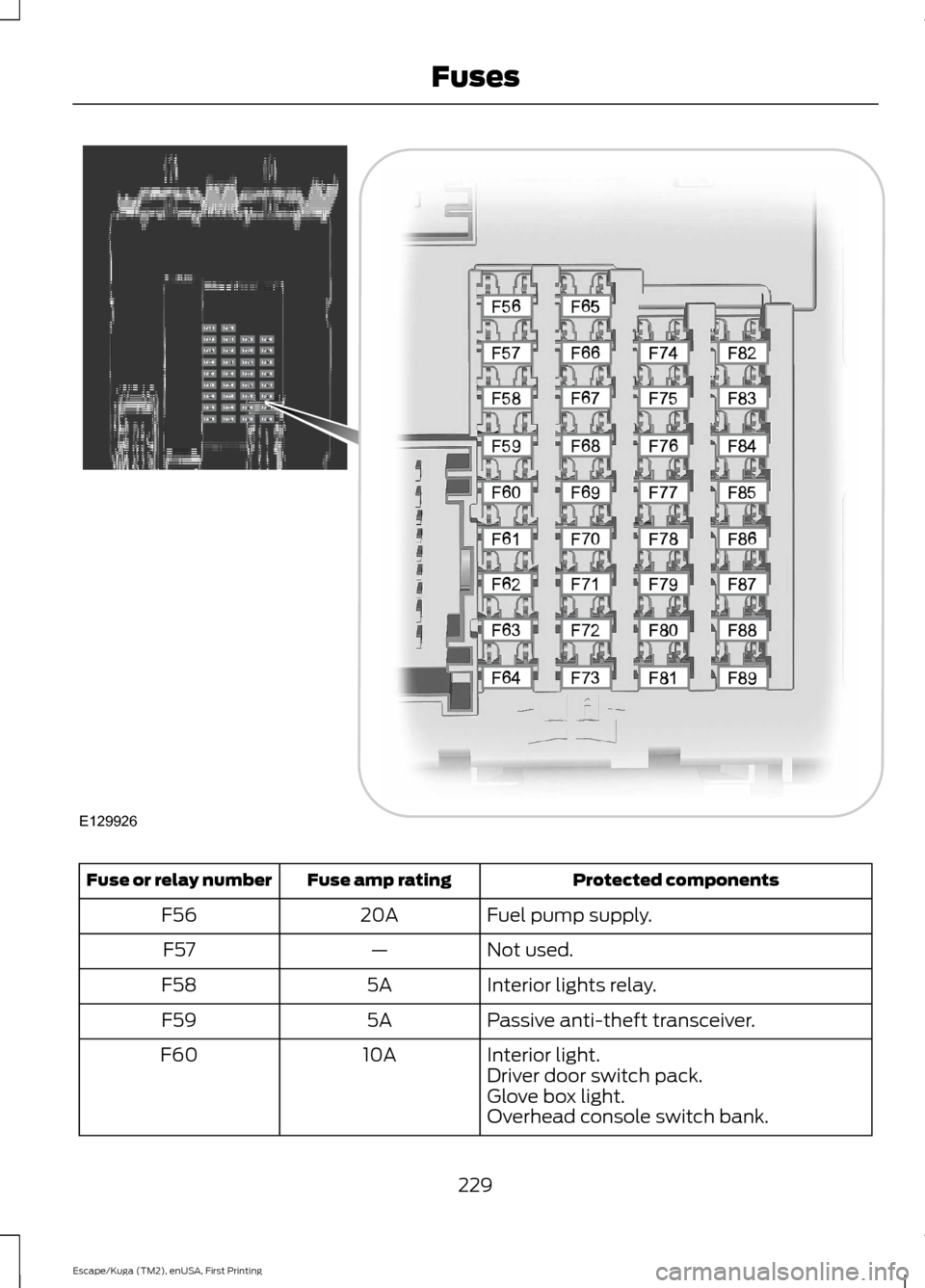
Protected components
Fuse amp rating
Fuse or relay number
Fuel pump supply.
20A
F56
Not used.
—
F57
Interior lights relay.
5A
F58
Passive anti-theft transceiver.
5A
F59
Interior light.
10A
F60
Driver door switch pack.
Glove box light.
Overhead console switch bank.
229
Escape/Kuga (TM2), enUSA, First Printing FusesE129926
Page 261 of 486
Trade number
Function
LED
* High-mount brake lamp
LED
* Interior lamps
* To replace these lamps - see your authorized dealer.
To replace all instrument panel lights - see your authorized dealer
258
Escape/Kuga (TM2), enUSA, First Printing Maintenance
Page 341 of 486
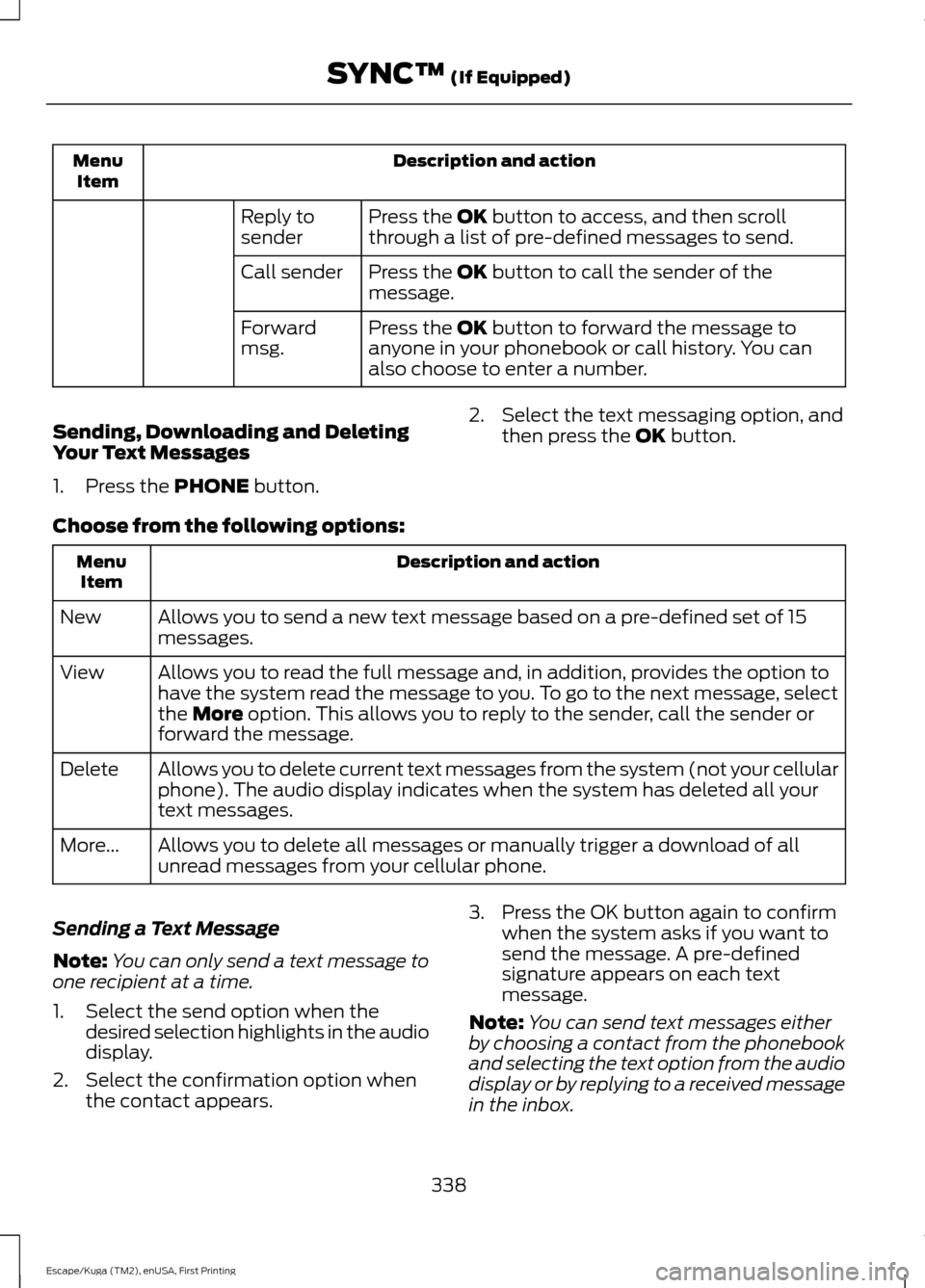
Description and action
Menu
Item
Press the OK button to access, and then scroll
through a list of pre-defined messages to send.
Reply to
sender
Press the
OK button to call the sender of the
message.
Call sender
Press the
OK button to forward the message to
anyone in your phonebook or call history. You can
also choose to enter a number.
Forward
msg.
Sending, Downloading and Deleting
Your Text Messages
1. Press the
PHONE button. 2. Select the text messaging option, and
then press the
OK button.
Choose from the following options: Description and action
Menu
Item
Allows you to send a new text message based on a pre-defined set of 15
messages.
New
Allows you to read the full message and, in addition, provides the option to
have the system read the message to you. To go to the next message, select
the
More option. This allows you to reply to the sender, call the sender or
forward the message.
View
Allows you to delete current text messages from the system (not your cellular
phone). The audio display indicates when the system has deleted all your
text messages.
Delete
Allows you to delete all messages or manually trigger a download of all
unread messages from your cellular phone.
More...
Sending a Text Message
Note: You can only send a text message to
one recipient at a time.
1. Select the send option when the desired selection highlights in the audio
display.
2. Select the confirmation option when the contact appears. 3. Press the OK button again to confirm
when the system asks if you want to
send the message. A pre-defined
signature appears on each text
message.
Note: You can send text messages either
by choosing a contact from the phonebook
and selecting the text option from the audio
display or by replying to a received message
in the inbox.
338
Escape/Kuga (TM2), enUSA, First Printing SYNC™
(If Equipped)
Page 402 of 486
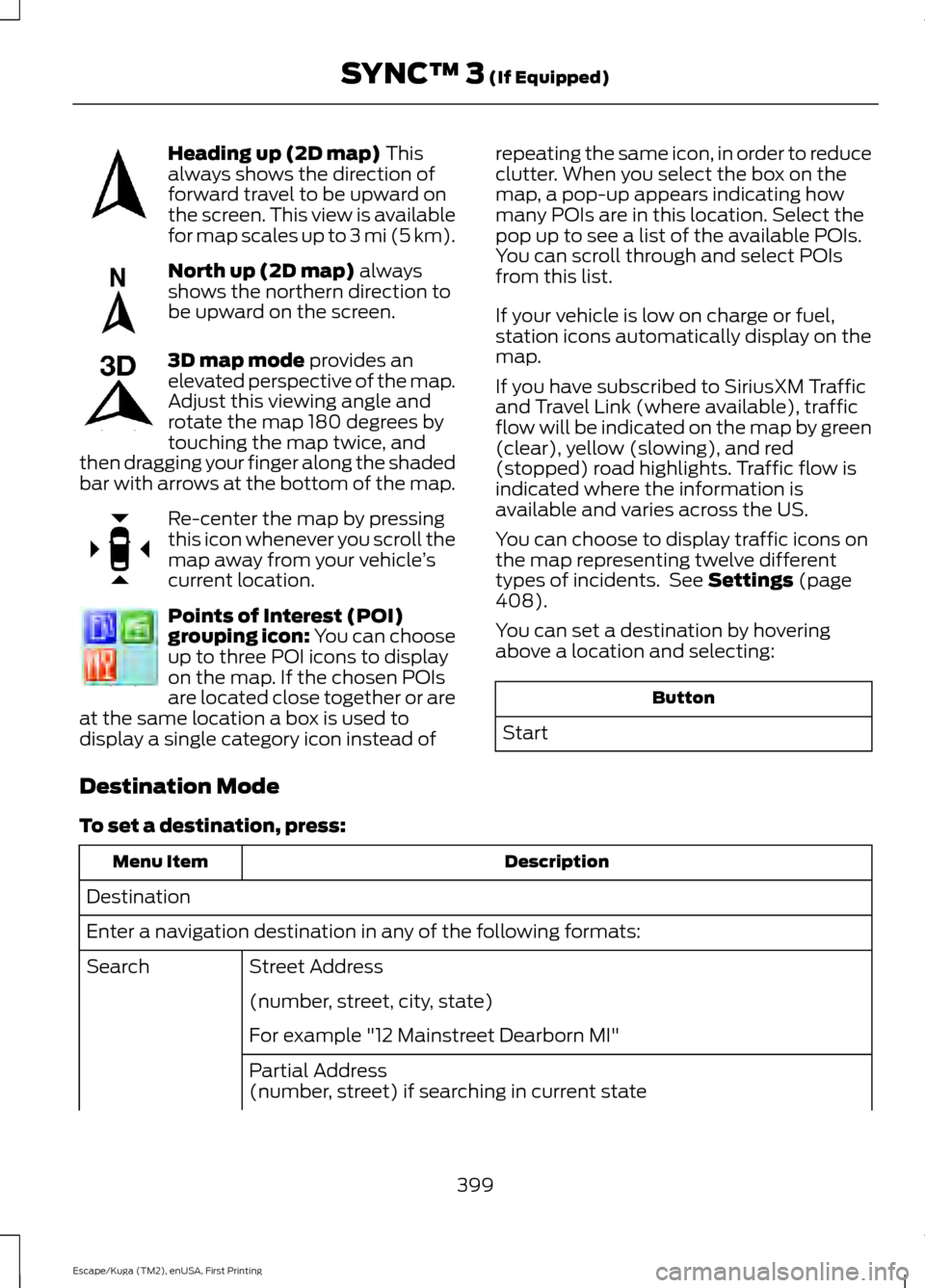
Heading up (2D map) This
always shows the direction of
forward travel to be upward on
the screen. This view is available
for map scales up to
3 mi (5 km). North up (2D map)
always
shows the northern direction to
be upward on the screen. 3D map mode
provides an
elevated perspective of the map.
Adjust this viewing angle and
rotate the map 180 degrees by
touching the map twice, and
then dragging your finger along the shaded
bar with arrows at the bottom of the map. Re-center the map by pressing
this icon whenever you scroll the
map away from your vehicle
’s
current location. Points of Interest (POI)
grouping icon: You can choose
up to three POI icons to display
on the map. If the chosen POIs
are located close together or are
at the same location a box is used to
display a single category icon instead of repeating the same icon, in order to reduce
clutter. When you select the box on the
map, a pop-up appears indicating how
many POIs are in this location. Select the
pop up to see a list of the available POIs.
You can scroll through and select POIs
from this list.
If your vehicle is low on charge or fuel,
station icons automatically display on the
map.
If you have subscribed to SiriusXM Traffic
and Travel Link (where available), traffic
flow will be indicated on the map by green
(clear), yellow (slowing), and red
(stopped) road highlights. Traffic flow is
indicated where the information is
available and varies across the US.
You can choose to display traffic icons on
the map representing twelve different
types of incidents. See
Settings (page
408).
You can set a destination by hovering
above a location and selecting: Button
Start
Destination Mode
To set a destination, press: Description
Menu Item
Destination
Enter a navigation destination in any of the following formats: Street Address
Search
(number, street, city, state)
For example "12 Mainstreet Dearborn MI"
Partial Address
(number, street) if searching in current state
399
Escape/Kuga (TM2), enUSA, First Printing SYNC™ 3
(If Equipped)E207750 E207749 E207748 E207751 E207754